side-pane
Pins the options and open questions Claude asks you to choose from in a side pane, so you never scroll back to find "option 2"
paneguardcommandtoastprompttool

Pins the options and open questions Claude asks you to choose from in a side pane, so you never scroll back to find "option 2"
A Claude Code plugin that keeps the options and open questions Claude asks you about in a pane beside the conversation. In a long chat you no longer scroll back to remember what "option 2" was.
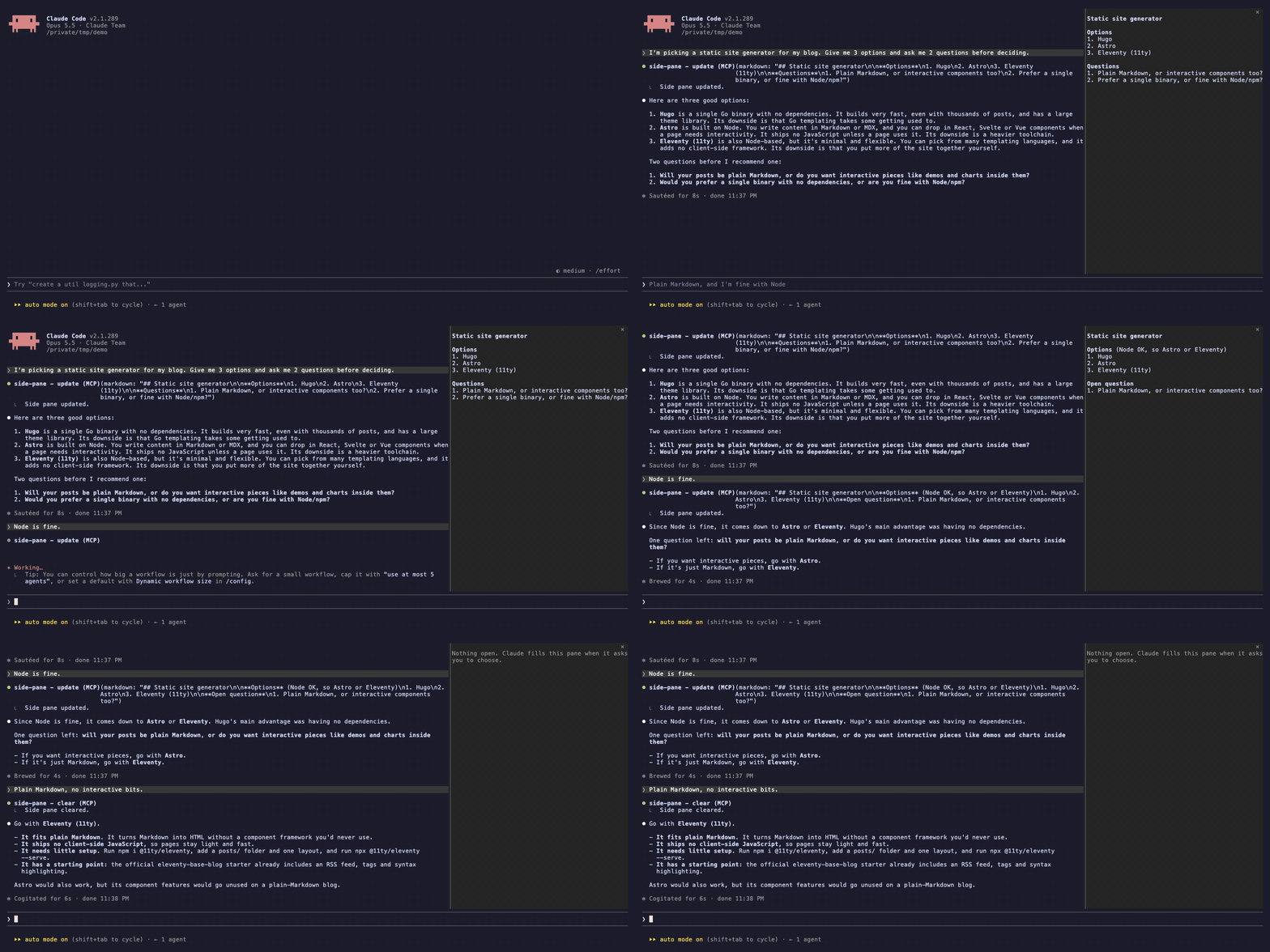
Claude fills the pane itself: the plugin gives it a tool and a short instruction to call it whenever it lists options or asks you something. The topic you are on stays at the top; unanswered items of an earlier topic move under "On hold". Each session has its own pane, and the last pane of a directory comes back when you start a new session there.
Claude Code 2.1.289 or newer. The pane is built on Claude Code mods (plugins of function hooks), which are in early access.
/side-pane shows or hides it; /side-pane clear empties it. Once you hide the pane, Claude keeps it current but no longer reopens it in that session./side-pane and it opens at any width. Desktop places the pane itself.Change them in /config:
| Setting | Default | What it does |
|---|---|---|
autoOpen | true | Open the pane when Claude first fills it |
maxChars | 3000 | Longest pane content in characters; more is cut |
The plugin runs no commands, opens no network connections and reads no files. It keeps the pane's text in the session's plugin state, and the last pane of each working directory in Claude Code's local plugin store, keyed by that directory's path, so a new session there can show it again. /side-pane clear deletes that saved copy.
MIT. Source and issues: https://github.com/xixiaofinland/side-pane
hooks/register.tsx 233 lines1import { atom, read, update } from 'claude-code'
2import type { EngineInterface, Register } from 'claude-code'
3
4const PLUGIN = 'side-pane'
5const PANE = 'side-pane'
6const TITLE = 'Side pane'
7const UPDATE_TOOL = 'mcp__side-pane__update'
8const CLEAR_TOOL = 'mcp__side-pane__clear'
9
10const markdown = atom({ plugin: 'side-pane', key: 'markdown' } as const, '')
11const isRestored = atom({ plugin: 'side-pane', key: 'isRestored' } as const, false)
12const hasWarned = atom({ plugin: 'side-pane', key: 'hasWarned' } as const, false)
13const isDismissed = atom({ plugin: 'side-pane', key: 'isDismissed' } as const, false)
14
15// $.store is shared by every session, so the last content is kept per working
16// directory and parallel sessions never overwrite each other's live pane.
17type Saved = { markdown: string; savedAt: string }
18const storeKey = (cwd: string) => `last:${cwd}`
19
20const instructions = (maxChars: number) =>
21 [
22 'Fill the side pane the user sees next to the conversation, so they need not scroll back to recall what "option 2" was.',
23 '',
24 '- Whenever your reply lists options for the user to pick from, or asks them questions they still have to answer, call this tool first with those items, then write the reply.',
25 '- Pass the whole pane each time: it replaces what was there. When the user settles some items, keep the ones still open and add any new question you ask.',
26 '- Group by context: a heading per project or topic, then its items, numbered the way you number them in the reply. The topic you are on now goes first.',
27 '- When the user moves on from a topic and leaves its items unanswered, move them under a last `## On hold` heading, a few words each. Drop an on-hold item when the user says so, or once a few turns pass without anyone coming back to it.',
28 `- Keep it short: a few words per item, no explanations, under ${maxChars} characters. Write in the language you are replying in.`,
29 `- Call \`${CLEAR_TOOL}\` only when nothing is left open.`,
30 '- Do not mention the pane or the tool calls in your reply.',
31 ].join('\n')
32
33// The pane splits into list items, each drawn with its own buttons, and the
34// runs of other lines (headings, prose) between them.
35type Block = { kind: 'text' | 'item'; text: string }
36const ITEM = /^\s*(?:[-*+]|\d+[.)])\s+\S/
37
38function blocks(body: string): Block[] {
39 const out: Block[] = []
40 for (const line of body.split('\n')) {
41 if (ITEM.test(line)) {
42 out.push({ kind: 'item', text: line.trim() })
43 continue
44 }
45 const last = out[out.length - 1]
46 if (last?.kind === 'text') last.text += `\n${line}`
47 else if (line.trim() !== '') out.push({ kind: 'text', text: line })
48 }
49 return out.filter(block => block.text.trim() !== '')
50}
51
52const NUDGE = `Whenever your reply lists options for the user or asks them questions, call \`${UPDATE_TOOL}\` first, as its description says.`
53
54async function open($: EngineInterface) {
55 if (await read($, isDismissed)) return
56 if ((await $.ui.panes()).some(pane => pane.id === PANE)) return
57 const opened = await $.ui.open({ id: PANE, title: TITLE })
58 if (opened.isPlaced || (await read($, hasWarned))) return
59 await update($, hasWarned, () => true)
60 $.ui.toast('side-pane: no room to open the pane unasked; run /side-pane to show it', {
61 timeoutMs: 8000,
62 })
63}
64
65async function show($: EngineInterface, text: string) {
66 await update($, markdown, () => text)
67 await update($, isRestored, () => false)
68 const cwd = await $.session.cwd()
69 if (text === '') await $.store.delete(storeKey(cwd))
70 else await $.store.set(storeKey(cwd), { markdown: text, savedAt: new Date().toISOString() })
71}
72
73export const register: Register = (on, options) => {
74 const autoOpen = options.autoOpen !== false
75 const maxChars = Math.max(200, Number(options.maxChars) || 3000)
76
77 on('session.start', async ($, e, next) => {
78 await $.tool.register({
79 name: 'update',
80 description: instructions(maxChars),
81 inputSchema: {
82 type: 'object',
83 properties: {
84 markdown: {
85 type: 'string',
86 description: 'The whole pane as Markdown: headings per context, numbered items.',
87 },
88 },
89 required: ['markdown'],
90 },
91 })
92 await $.tool.register({
93 name: 'clear',
94 description: 'Empty the side pane once nothing in it is open any more.',
95 })
96 await $.command.register({
97 name: 'side-pane',
98 description: 'Show or hide the side pane (`clear` empties it)',
99 argumentHint: '[clear]',
100 immediate: true,
101 })
102
103 // A fresh session starts empty; show the last pane of this directory so a
104 // resumed conversation has it back. A hot reload keeps its own state.
105 if ((await read($, markdown)) === '') {
106 const saved = (await $.store.get(storeKey(e.cwd))) as Saved | undefined
107 if (saved?.markdown) {
108 await update($, markdown, () => saved.markdown)
109 await update($, isRestored, () => true)
110 }
111 }
112
113 return next(e)
114 })
115
116 // The rules ride in the tool's own description, kept out of ToolSearch: a
117 // managed plugin may bypass a user plugin's prompt.context and
118 // prompt.compose hooks, and a deferred tool shows the model only its name.
119 on('tool.describe', { tool: UPDATE_TOOL }, async ($, e, next) => {
120 const described = await next(e)
121
122 return { ...described, isDeferred: false }
123 })
124
125 // A one-line nudge where the session lets user plugins add context.
126 on('prompt.context', async ($, e, next) => {
127 const context = await next(e)
128
129 return { ...context, blocks: [...context.blocks, { name: PLUGIN, text: NUDGE }] }
130 })
131
132 on('tool.call', { tool: UPDATE_TOOL }, async ($, e) => {
133 if (typeof e.markdown !== 'string') return { deny: 'markdown must be a string.' }
134 const text = e.markdown.trim()
135 const isCut = text.length > maxChars
136 await show($, isCut ? text.slice(0, maxChars) : text)
137 if (autoOpen && text !== '') await open($)
138
139 return {
140 result: isCut
141 ? `Side pane updated, cut to ${maxChars} characters. Shorten it next time.`
142 : 'Side pane updated.',
143 }
144 })
145
146 on('tool.call', { tool: CLEAR_TOOL }, async $ => {
147 await show($, '')
148
149 return { result: 'Side pane cleared.' }
150 })
151
152 // /side-pane toggles: closing it also stops updates reopening it this session.
153 // A pane still waiting for room, or behind another tab, counts as hidden.
154 on('command.run', { command: 'side-pane' }, async ($, e) => {
155 const arg = e.args.trim()
156 if (arg === 'clear') {
157 await show($, '')
158 return { text: 'Side pane cleared.' }
159 }
160 if (arg !== '')
161 return { text: 'Usage: /side-pane toggles the pane; /side-pane clear empties it.' }
162 const panes = await $.ui.panes()
163 if (panes.some(pane => pane.id === PANE && pane.isPlaced && pane.isShown)) {
164 await update($, isDismissed, () => true)
165 await $.ui.close({ id: PANE })
166 return { text: 'Side pane closed; /side-pane shows it again.' }
167 }
168 await update($, isDismissed, () => false)
169 await $.ui.open({ id: PANE, title: TITLE })
170
171 return { text: 'Side pane opened.' }
172 })
173
174 // Once the person closes the pane (its close mark, ctrl+x x), updates stop
175 // reopening it for this session; /side-pane brings it back.
176 on('ui.close', async ($, e, next) => {
177 if (e.id === PANE && e.origin.kind === 'person') await update($, isDismissed, () => true)
178
179 return next(e)
180 })
181
182 on('ui.render', { component: 'Pane', requestId: PANE }, async ($, e) => {
183 const { Box, Text, Markdown, Button } = $.ui.resolve(e)
184 const body = await read($, markdown)
185 const restored = await read($, isRestored)
186
187 // Desktop draws the pane with no text selection, so each item carries its
188 // own copy and quote buttons; the person can still select in a terminal.
189 const copy = async (text: string) => {
190 const copied = await $.ui.copy({ text, surface: e.surface })
191 if (!copied.isCopied) $.ui.toast(`side-pane: could not copy (${copied.reason})`)
192 }
193 const quote = async (text: string) => {
194 const filled = await $.prompt.fill({ text: `> ${text}\n`, mode: 'insert' })
195 if (!filled.isFilled) $.ui.toast('side-pane: the prompt box is not taking text right now')
196 }
197
198 return (
199 <Box flexDirection="column">
200 {body.trim() === '' ? (
201 <Text dimColor>Nothing open. Claude fills this pane when it asks you to choose.</Text>
202 ) : (
203 <Box flexDirection="column">
204 {restored && <Text dimColor>From an earlier session here</Text>}
205 {blocks(body).map((block, i) =>
206 block.kind === 'text' ? (
207 <Markdown key={`text:${i}`} text={block.text} />
208 ) : (
209 <Box key={`item:${i}`} flexDirection="row" columnGap={1}>
210 <Box flexGrow={1}>
211 <Markdown text={block.text} />
212 </Box>
213 <Button key={`copy:${i}`} plain dimColor onPress={() => copy(block.text)}>
214 copy
215 </Button>
216 <Button key={`quote:${i}`} plain dimColor onPress={() => quote(block.text)}>
217 quote
218 </Button>
219 </Box>
220 ),
221 )}
222 <Box flexDirection="row">
223 <Button key="copy-all" plain dimColor onPress={() => copy(body)}>
224 copy all
225 </Button>
226 </Box>
227 </Box>
228 )}
229 </Box>
230 )
231 })
232}
233types/index.d.ts 15 lines1declare module 'claude-code' {
2 interface PluginState {
3 'side-pane': {
4 // What the model last put in the pane.
5 markdown: string
6 // True when markdown came from an earlier session in this directory.
7 isRestored: boolean
8 // True once this session told the person the pane could not be placed.
9 hasWarned: boolean
10 // True once the person closed the pane, so updates stop reopening it.
11 isDismissed: boolean
12 }
13 }
14}
15