RemCTL
Apple Reminders in Claude Code: RemCTL's tools, plus today's tasks above the prompt in your lists' colors.
newpanebandguardcommandtoast

Apple Reminders in Claude Code: RemCTL's tools, plus today's tasks above the prompt in your lists' colors.
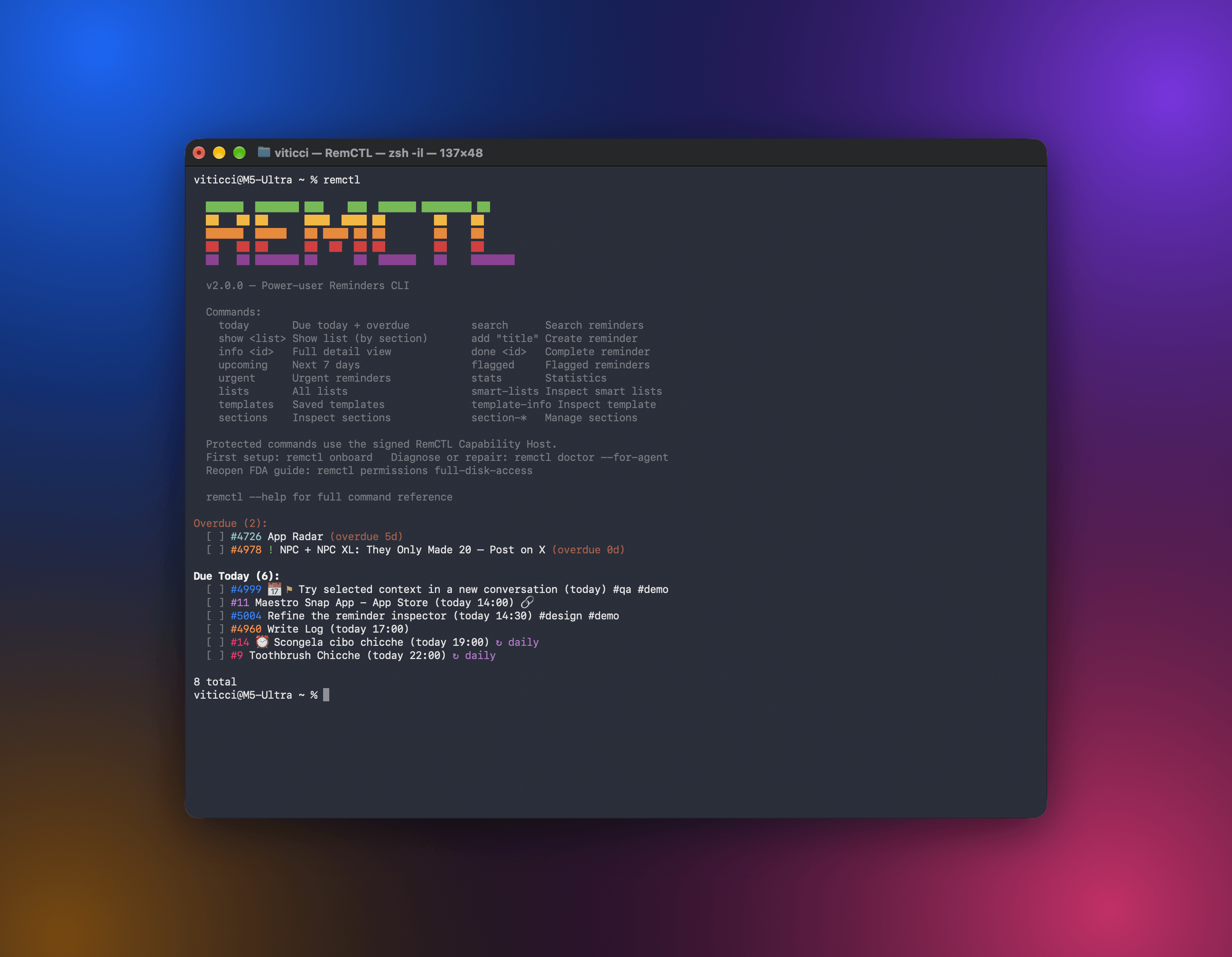
RemCTL gives you full control of Apple Reminders from the terminal, from AI apps, from a Reminders workspace inside Codex, and from a Today band in Claude Code. It covers the basics (reminders, lists, due dates, flags, and search) as well as features Apple doesn't expose to other apps, such as sections, tags, subtasks, smart lists, and templates.
Everything goes through RemCTL Capability Host, a small signed app that holds the macOS permissions. You grant access to that one app, and the terminal, scripts, and AI apps use it. None of them need their own permissions.
You need macOS 14 or later with iCloud Reminders turned on. You don't need an Apple developer account, Xcode, or your own copy of Python.
Download (recommended). On a Mac with Apple silicon, download RemCTL-arm64.dmg from Releases, open it, and double-click 'Install RemCTL'. macOS asks whether to open an app downloaded from the internet; click Open. Terminal then checks that RemCTL is signed by MacStories and notarized by Apple, installs it, and walks you through permissions. The installer puts RemCTL Capability Host in ~/Applications and keeps it running in the background, so you never open it yourself.
Build it yourself (free). This is also the route for Intel Macs. Install Apple's Command Line Tools once, then build from this repo:
xcode-select --install
git clone https://github.com/viticci/remctl.git
cd remctl
./install.sh --from-source --bootstrap
This builds everything on your Mac and signs it with a certificate RemCTL creates for you. It never signs in to Apple. The certificate lives in ~/Library/Application Support/RemCTL Signing: keep it, because future updates need the same certificate to keep your permissions.
Both routes ask for your Mac password once. RemCTL installs its own Python under /Library/RemCTL, owned by root, so other apps can't tamper with it.
Setup asks for three permissions, all for 'RemCTL Capability Host': Reminders, Automation for the Reminders app, and Full Disk Access. The first two are standard macOS prompts. Full Disk Access has no prompt, so RemCTL opens a helper that shows you exactly which app to add. When it's done, check everything with:
remctl doctorIf you quit setup early, pick it up again with remctl onboard. If remctl isn't found, the installer tells you which folder to add to your PATH (usually ~/bin). Installation covers custom paths, permissions by hand, and troubleshooting.
Find your current setup below. remctl --version tells you which version you have.
| You have | Do this |
|---|---|
| RemCTL 2.0 from the download | Download the new release and open 'Install RemCTL' again. |
| RemCTL 2.0 you built yourself | git pull, then ./install.sh --from-source. |
A 2.0 prerelease installed from main with your own Apple Development certificate | git pull, then ./install.sh --from-source. It reuses your certificate, so permissions carry over. |
| RemCTL 1.7.1 | Download the release and open 'Install RemCTL', or git pull and run ./install.sh --from-source --bootstrap. The installer recognizes 1.7.1 and asks before replacing it. |
| RemCTL 1.7.0 or older | From your old checkout, run ./uninstall.sh --keep-config. Then install as new. |
Updates that keep the same signature keep your permissions. RemCTL 1.x had no Capability Host, so coming from 1.x means granting permissions once to the new app. (You can remove the old grants for Terminal afterwards; RemCTL doesn't need them anymore.)
Switching between the download and your own build changes the app's signature. The installer refuses unless you add --migrate-signing, and you'll need to grant Full Disk Access again. Switching signatures explains how.
remctl today                      # due today and overdue
remctl upcoming 7                 # the next week
remctl show Work --format table   # one list, in Reminders' order
remctl search "invoice" --json    # titles, notes, and saved links
remctl add "Review PR" -l Work -d "tomorrow 10:00" -p high
remctl add "Pay rent" -d 2026-06-01 --recurrence monthly
remctl done 23880 23881           # one id or a batch of up to 50
remctl info 23880 --json          # everything RemCTL knows about one reminder
Every reminder has a stable numeric id, and every read command has --json. rctl and reminders work as aliases. The command guide covers due dates, recurrence, output formats, inline images, and every command.
RemCTL includes an MCP server (MCP, or Model Context Protocol, is the standard AI apps use to call tools). Setup offers to connect the AI apps it finds on your Mac. You can also do it yourself:
remctl mcp install                          # every supported app on this Mac
remctl mcp install --client claude-desktop  # Claude Desktop and Cowork; restart Claude afterwards
remctl mcp bundle --open                    # or install it as a one-click Claude Desktop extension
remctl mcp status
AI apps can read, create, edit, complete, and delete reminders and lists, search with paging, and restore reminders from Recently Deleted. Apps that support MCP Apps also get an interactive reminders widget. To use RemCTL from Claude Code, Codex, or Claude Desktop on another computer, remctl mcp install --client tailscale serves the same tools over your private Tailscale network.
The MCP guide has the full tool list and troubleshooting. There's also a guide for Hermes Agent.
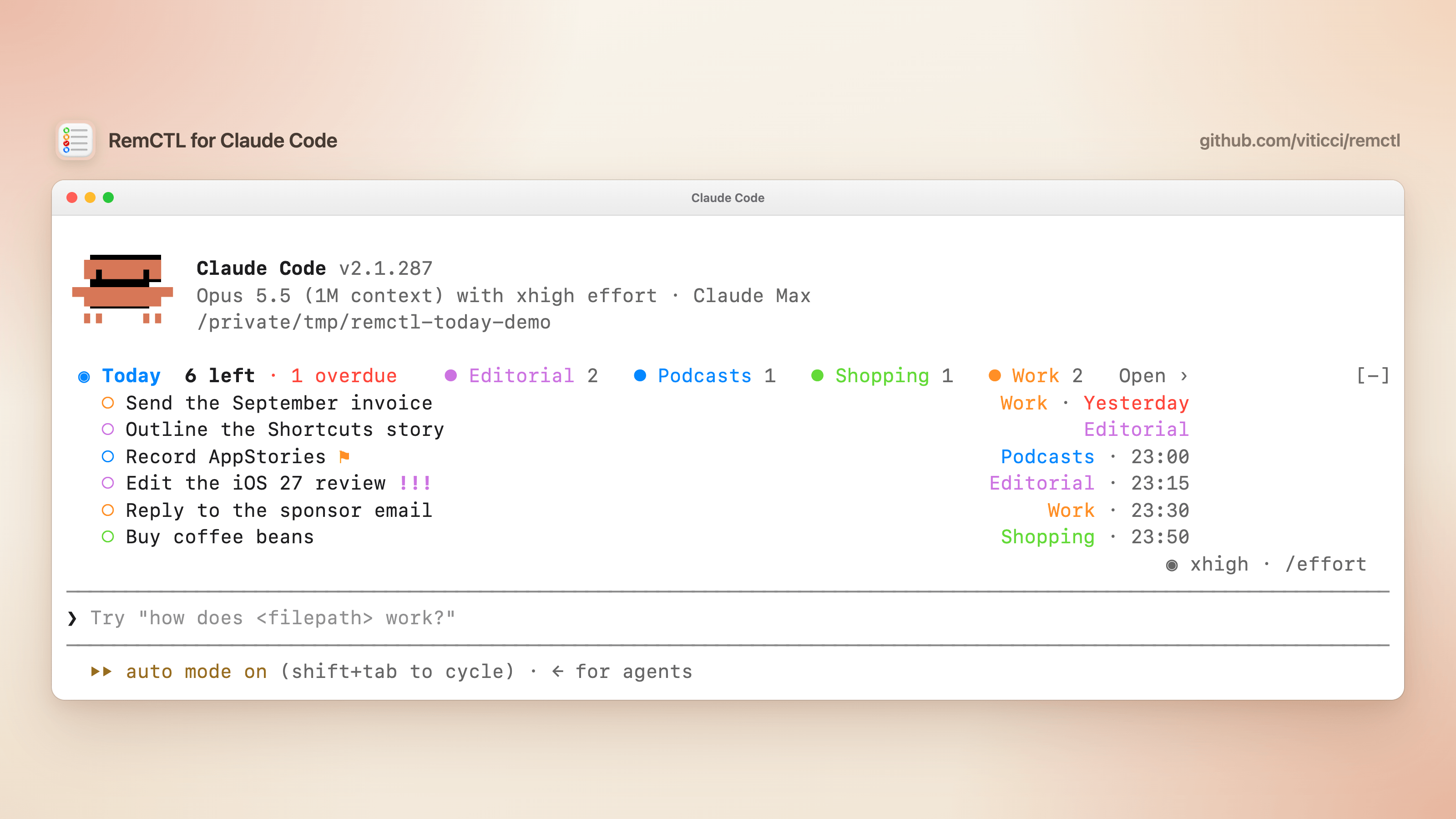
The RemCTL plugin for Claude Code gives Claude RemCTL's tools and adds Today, a mod that keeps today's reminders above the prompt. A mod is the part of a plugin that draws in Claude Code's own interface. Today shows how many tasks are left, which ones are overdue, and every list in its Reminders color.
Install RemCTL first, then add the plugin from this repository's marketplace. In Claude Code:
/plugin marketplace add viticci/remctl
/plugin install remctl@remctl
/reload-plugins
Or from your shell, before you start Claude Code:
claude plugin marketplace add viticci/remctl
claude plugin install remctl@remctl
What you get:
~/bin/remctl mcp, the same server remctl mcp install connects, so Claude can read, create, edit, and complete your reminders.!, !!, or !!! shows its priority. When the chips don't fit beside the summary, they get a row of their own. Open › opens /reminders. When nothing is left, the band says so; when RemCTL can't read Reminders, it shows the error instead. The band hides while the /reminders pane is open, and Claude Code's [-] button collapses it./reminders. A pane with today's date and counts, and today's tasks grouped by list, in your sidebar's order. It docks beside the conversation in a window at least 110 columns wide, and opens above the prompt in a narrower one. Press ✓ to complete a task in Reminders: the row fills in, then leaves the list. Undo brings back the last task you completed, and only that one. Repeating tasks have no Undo because completing them advances the series. Refresh reads Reminders again, and "Updated" shows when it last did. The command also adds one line to the conversation, such as "Today: 6 left, 1 overdue.", which Claude can read.status, the summary moves under the prompt, with your next task: "Today: 6 left · 1 overdue · next: Record AppStories 23:00"./clear, and every five minutes otherwise.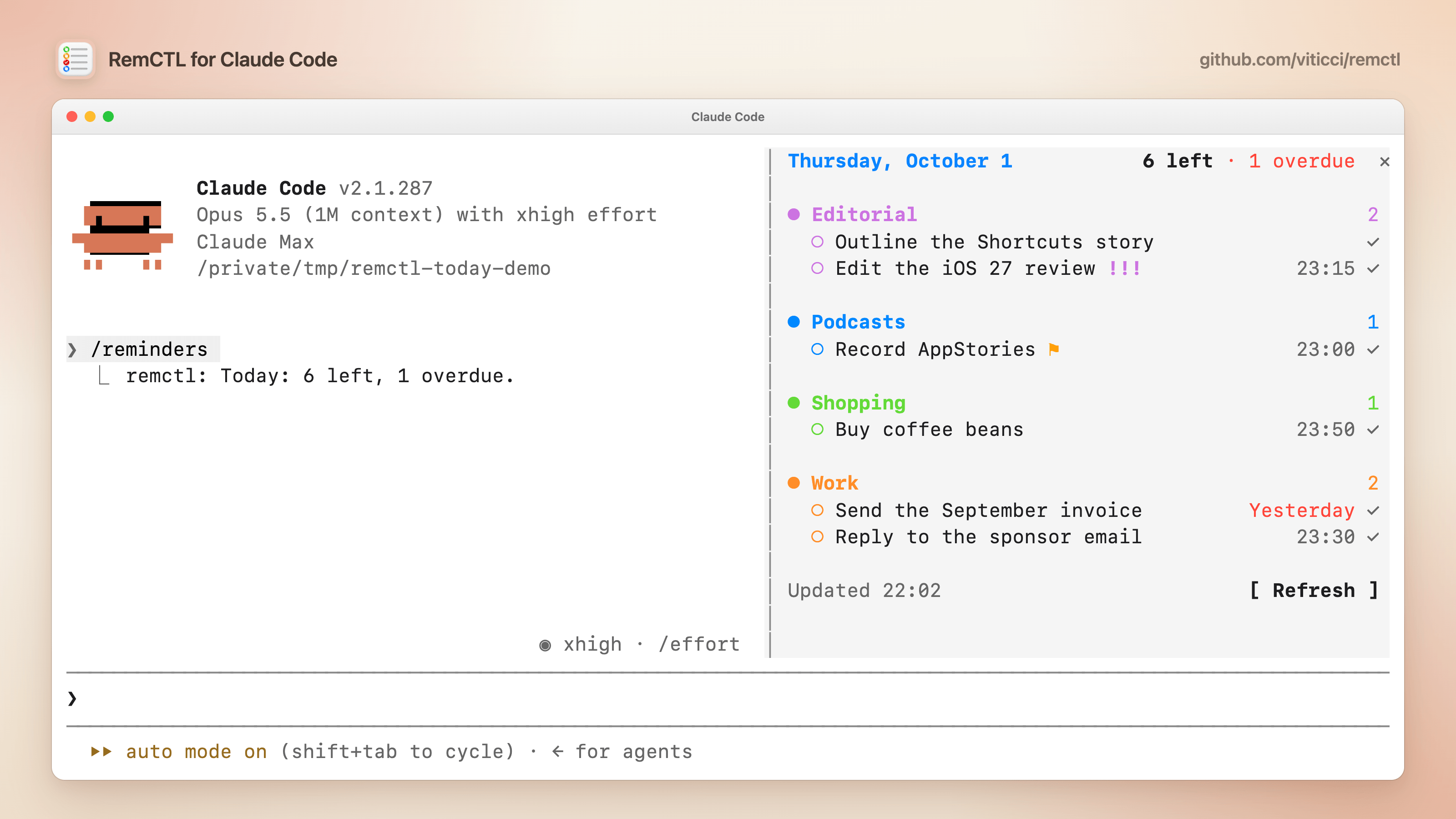
To use the pane from the keyboard, press ctrl+x, then Tab, to move from the prompt to the pane. Tab and Shift-Tab move between its buttons (each task's ✓, Undo, Refresh, and the ✕ that closes the pane), Enter presses the one that's selected, and Esc returns to the prompt. You can also click them. After you complete a task, the selection moves to the next task's ✓, so pressing Enter again completes that one too.
To change how Today looks, open /config, where each setting's title starts with "Today:", or run /plugin configure remctl@remctl. From your shell, pass the settings you want to change as JSON, by key and with every value in quotes, then start a new session:
echo '{"display": "status", "refreshMinutes": "2"}' | claude plugin configure remctl@remctl --values-stdin| Setting | Key | Default | What it does |
|---|---|---|---|
| Show tasks as | display | band | band lists your next tasks under the summary, compact shows the summary line only, status moves it to the status line, and pane only shows nothing until you run /reminders. |
| Tasks in the band | rows | 3 | How many tasks the band lists, from 0 to 8. |
| Include overdue tasks | includeOverdue | on | Counts and lists reminders that were due before today. |
| Only these lists | lists | empty | Comma-separated list names, such as Work, Editorial. Empty means every list. |
| Complete from the pane | checkboxes | on | Shows the ✓ buttons in /reminders. |
| Refresh every (minutes) | refreshMinutes | 5 | How often Today reads Reminders again, from 1 to 60. |
| Open the pane at start | openOnStart | off | Docks /reminders beside the conversation when a session starts in a wide window. |
A few things to know:
claude --version to check. Older versions still get RemCTL's tools, without the band or /reminders./reminders once the app bundles Claude Code 2.1.287 or later. Until then, it has RemCTL's tools only.remctl mcp install and onboarding don't add another connection to Claude Code. If you connected Claude Code before with remctl mcp install --client claude-code, remove that connection so Claude doesn't see every RemCTL tool twice: remctl mcp remove --client claude-code, or run remctl mcp install again. remctl doctor points it out. Skills or prompts that name a tool such as mcp__remctl__today should then use mcp__plugin_remctl_remctl__today./plugin → Marketplaces. To update by hand, run claude plugin marketplace update remctl, then claude plugin update remctl@remctl.The RemCTL plugin for Codex on the Mac adds a full Reminders workspace, with a sidebar that works like the Reminders app: list, column, and calendar layouts, an inspector for every reminder field, drag and drop, a command palette, quick add, and your real list icons and colors. It follows your Mac's light and dark appearance, remembers the layout you pick for each list, and keeps your reminders in Apple Reminders. You can attach specific reminders to a conversation.
Install RemCTL first, then add the plugin from the installed app:
codex plugin marketplace add "$HOME/Applications/RemCTL Capability Host.app/Contents/Resources"
codex plugin add remctl@remctl-local
Open 'Reminders' in the Codex sidebar, or ask Codex to open your Reminders workspace. The Codex plugin guide covers updates, settings, keyboard shortcuts, and removal.
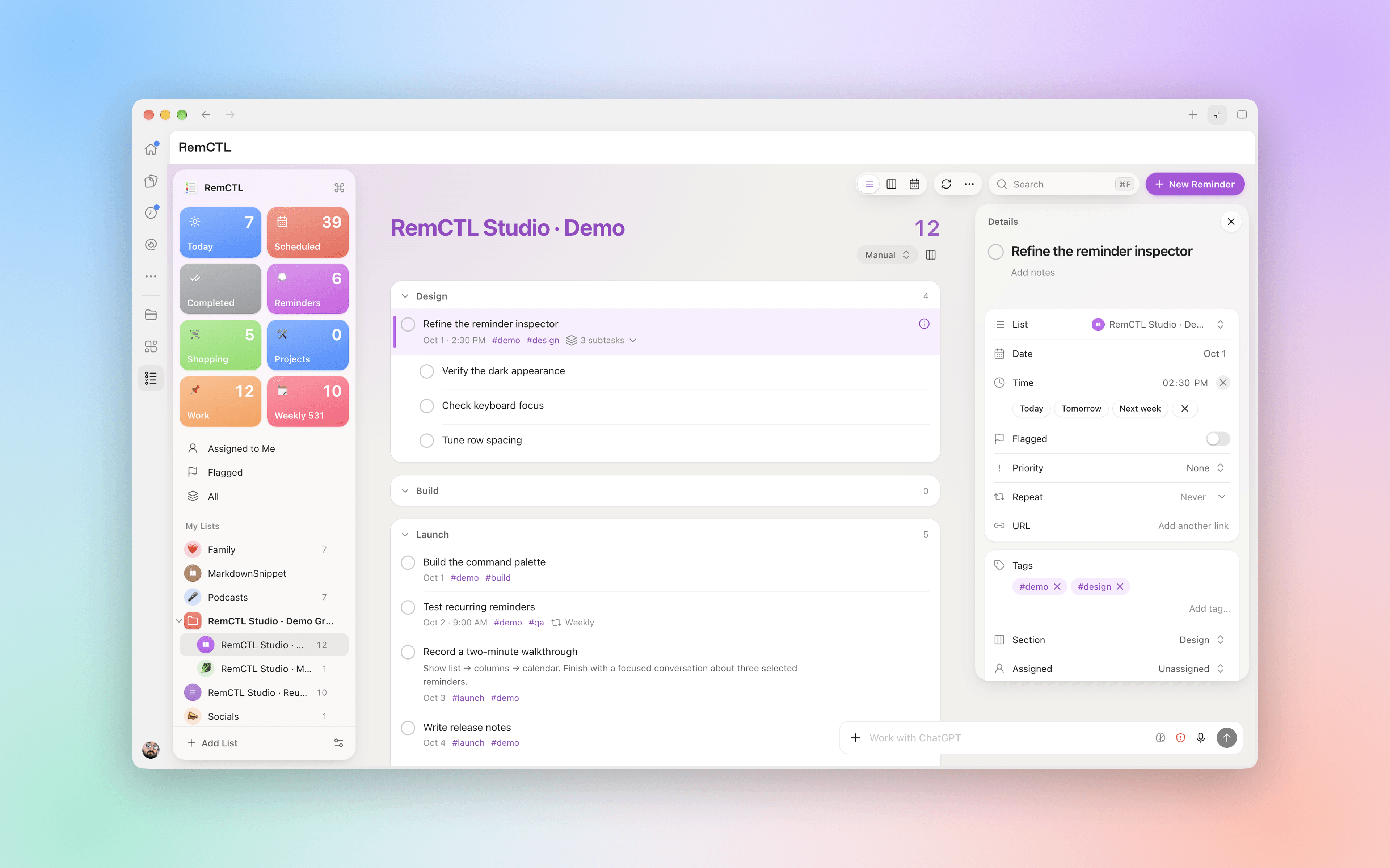
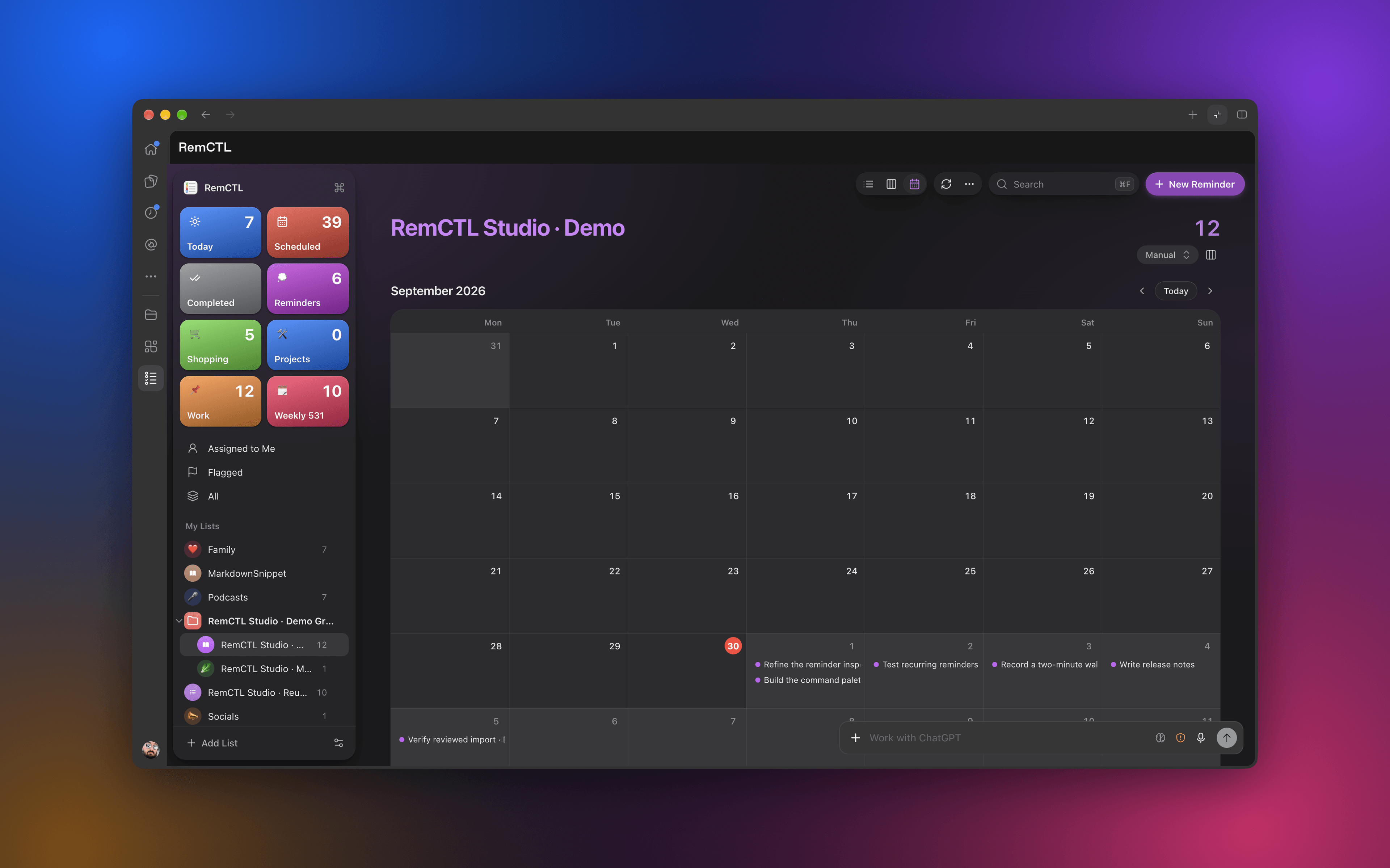
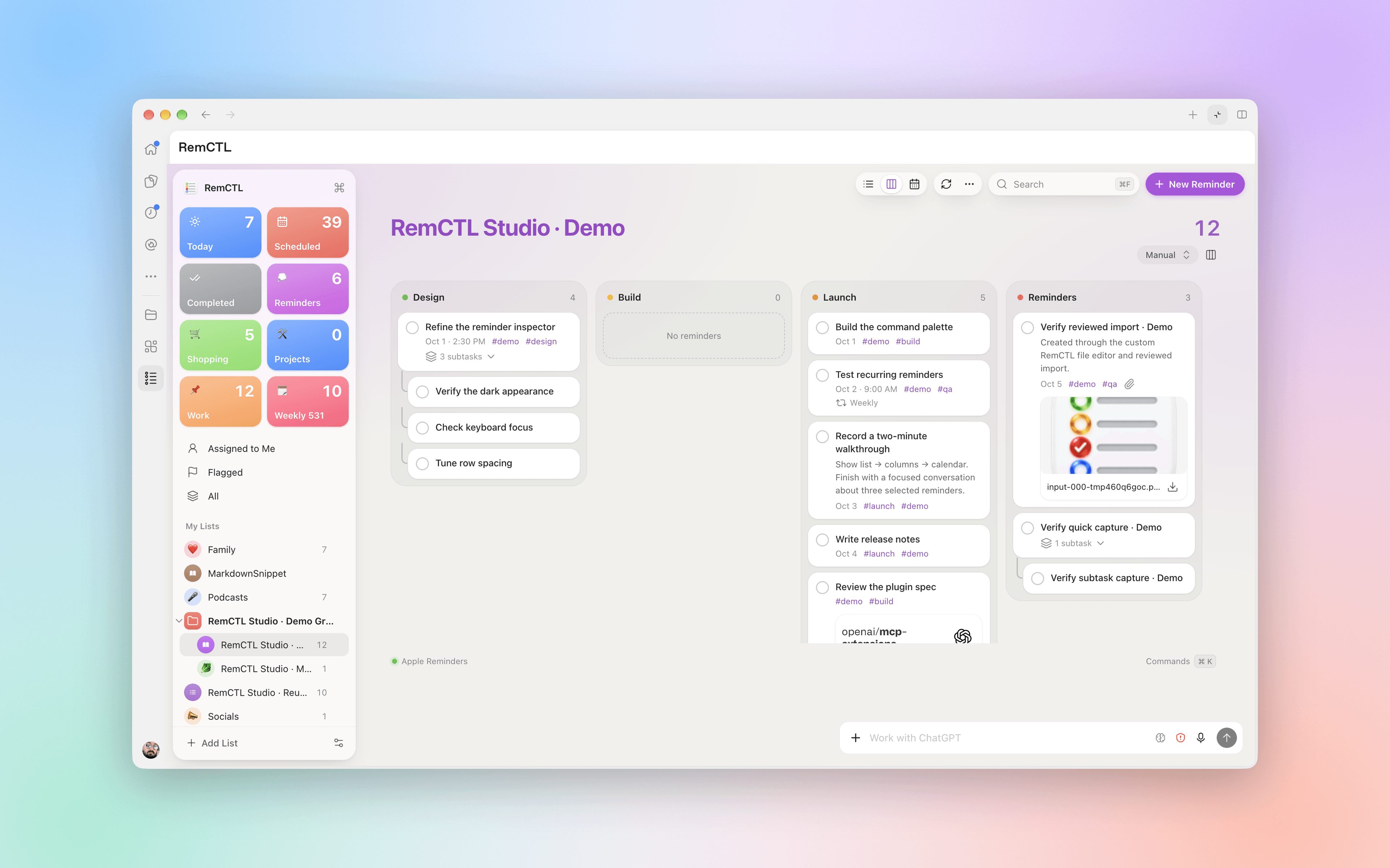
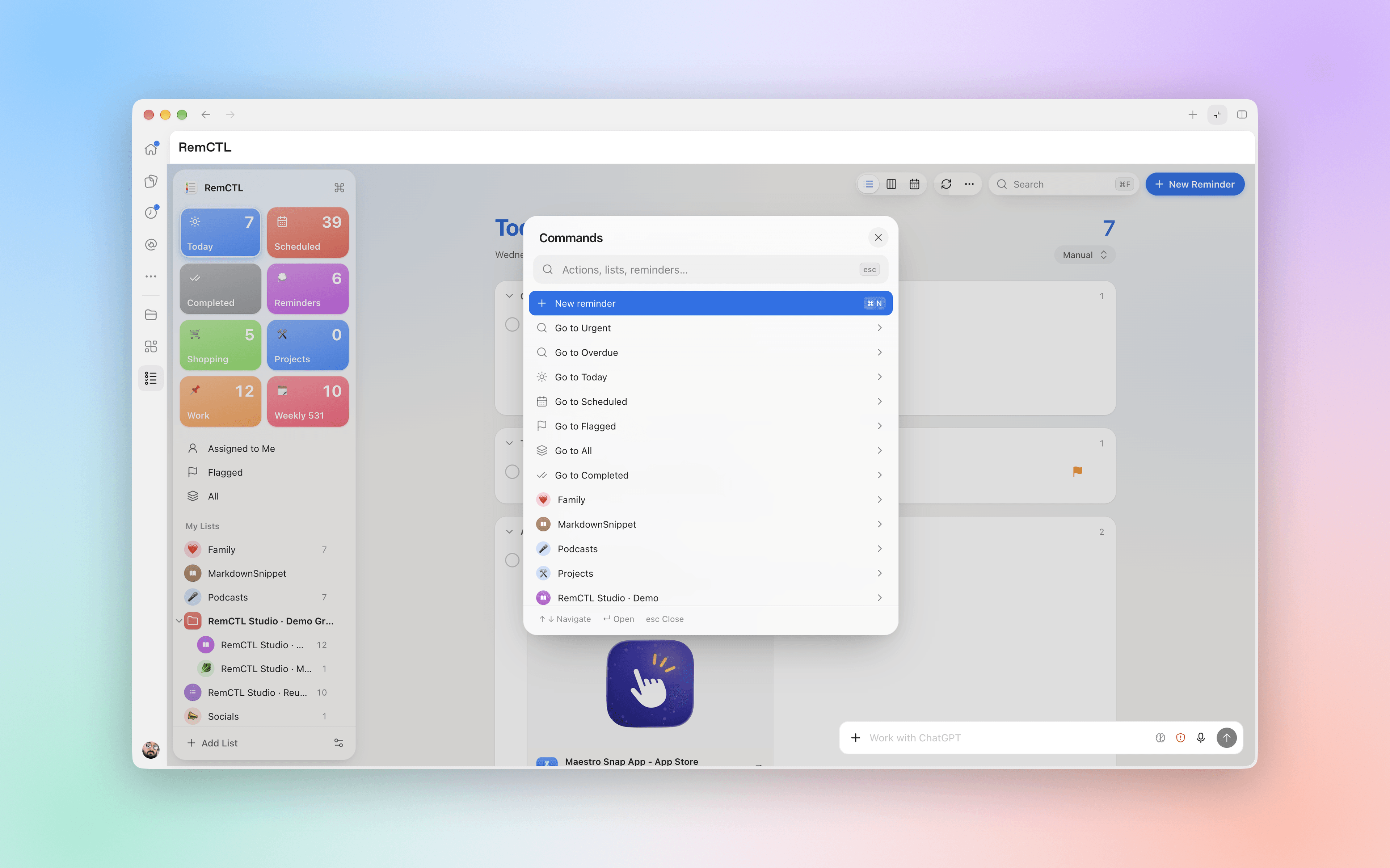
Some Reminders features have no public API: sections, synced tags, rich links, image attachments, subtasks, shared-list assignment, urgent reminders, Early Reminders, manual ordering, list icons, Groceries lists, list groups, custom smart lists, and templates. RemCTL writes them only when you pass --private:
remctl add "Research" -l Projects --private --url https://example.com -t remctl --section Research
remctl smart-list-create "Priority or Today" --private --match any --priority high,medium --date today
These writes use Apple's private ReminderKit framework, never the database directly. Apple can change these APIs in any macOS release. Private metadata lists what works and how to verify it.
Read SKILL.md. In short: use the RemCTL MCP tools when they're connected, use deterministic dates (YYYY-MM-DD or YYYY-MM-DD HH:MM), and verify writes with info <id> --json. remctl doctor --for-agent --json reports readiness; access.effective is the field that matters.
Disconnect AI apps and remove the Claude Code and Codex plugins first, then run the uninstaller that came with the app (or ./uninstall.sh from a checkout):
remctl mcp remove
claude plugin uninstall remctl@remctl && claude plugin marketplace remove remctl
codex plugin remove remctl@remctl-local && codex plugin marketplace remove remctl-local
~/Applications/"RemCTL Capability Host.app"/Contents/Resources/Distribution/uninstall.sh
It stops the Capability Host and removes the app, the CLI, its background service, and your RemCTL settings (add --keep-config to keep them). It leaves the shared Python under /Library/RemCTL and your signing certificate in place, and it doesn't revoke macOS permissions. --dry-run shows what it would remove.
| Path | Purpose |
|---|---|
remctl | The CLI |
remctl_mcp.py, remctl_mcp_widget.html | MCP server and its reminders widget |
remctl_plugin.py, remctl_workspace.py, remctl_workspace.html | Codex plugin tools and the built workspace |
remctl_events.py | MCP Events (not enabled in the plugin yet) |
remctl_broker.py, remctl_capability_policy.py, remctl_capabilities.py | Socket protocol and host command policy |
remctl_runtime.py, remctl_serialization.py, remctl_images.py, remctl_smart_lists.py | Shared helpers, JSON, images, and smart-list filters |
remctl-capability-host.swift | The signed host app |
remctl-bridge.swift, remctl-private.m, remctl-permissions.swift | EventKit, private ReminderKit, and Full Disk Access helpers |
plugins/claude-code/, .claude-plugin/ | Claude Code plugin (MCP server and the Today mod) and its marketplace |
plugins/remctl/, .agents/plugins/ | Codex plugin manifest, skills, and marketplace |
ui/ | Workspace source (only needed to change the interface) |
scripts/ | Release builds, notarization, signing, and live test matrices |
install.sh, uninstall.sh | Installer and uninstaller |
MIT. See LICENSE.
hooks/register.tsx 594 lines1/**
2 * Today: the RemCTL plugin's mod for Claude Code.
3 *
4 * Reads today's Apple Reminders through RemCTL's MCP server and draws them
5 * above the prompt, in the status line, or in a /reminders pane, each in its
6 * Reminders list's color. Until the server answers it draws nothing.
7 */
8import { atom, read, update } from 'claude-code'
9import type { Elements, EngineInterface, PluginOptions, Register } from 'claude-code'
10
11import type { TodayDone, TodayList, TodaySnapshot, TodayTask } from '../types'
12
13type Kit = Pick<Elements['terminal'], 'Box' | 'Text' | 'Button'>
14
15type Settings = {
16 display: (typeof DISPLAYS)[number]
17 rows: number
18 includeOverdue: boolean
19 lists: string[]
20 checkboxes: boolean
21 refreshMinutes: number
22 openOnStart: boolean
23}
24
25// A task as drawn: its list's color, whether it is past due, its due label.
26type Row = TodayTask & { color: string; isLate: boolean; label: string }
27
28type Group = { name: string; color: string; order: number; rows: Row[] }
29
30const PANE = 'remctl-today'
31const DISPLAYS = ['band', 'compact', 'status', 'pane only'] as const
32// This plugin's server, as .mcp.json names it; also the name
33// `remctl mcp install --client claude-code` gives a server it adds by hand.
34const SERVER = 'remctl'
35// RemCTL tools that change reminders: when Claude calls one, re-read.
36const WRITES =
37 /^mcp__(plugin_remctl_)?remctl__(create_reminder|update_reminder|set_completion|set_flagged|delete_reminder|restore_reminder|run)$/
38// The band's widest, in columns.
39const BAND_COLUMNS = 96
40// The docked pane's width, in columns.
41const PANE_COLUMNS = 52
42// Waits between looks for the server while MCP servers connect at startup.
43const RETRIES = [2_000, 5_000, 15_000, 30_000]
44
45// Apple's dark-mode system colors, as Reminders draws them.
46const RED = '#FF453A'
47const ORANGE = '#FF9F0A'
48const GREEN = '#30D158'
49const BLUE = '#0A84FF'
50const GRAY = '#8E8E93'
51
52const MONTHS = ['Jan', 'Feb', 'Mar', 'Apr', 'May', 'Jun', 'Jul', 'Aug', 'Sep', 'Oct', 'Nov', 'Dec']
53const LONG_MONTHS = ['January', 'February', 'March', 'April', 'May', 'June', 'July', 'August', 'September', 'October', 'November', 'December']
54const WEEKDAYS = ['Sunday', 'Monday', 'Tuesday', 'Wednesday', 'Thursday', 'Friday', 'Saturday']
55const PRIORITY_MARKS: Record<string, string> = { high: '!!!', medium: '!!', low: '!' }
56
57const snapshot = atom({ plugin: 'remctl', key: 'snapshot' } as const, null)
58const failure = atom({ plugin: 'remctl', key: 'failure' } as const, null)
59const checked = atom({ plugin: 'remctl', key: 'checked' } as const, [])
60const lastDone = atom({ plugin: 'remctl', key: 'lastDone' } as const, null)
61const isPaneOpen = atom({ plugin: 'remctl', key: 'isPaneOpen' } as const, false)
62
63// RemCTL answered, but with an error (a missing permission, a stopped host).
64class RemctlError extends Error {}
65
66// The server name RemCTL answered under; a reload finds it again.
67let server: string | null = null
68
69export const register: Register = (on, options) => {
70 const settings = settingsFrom(options)
71
72 on('session.start', async ($, e, next) => {
73 const result = await next(e)
74 await registerCommand($)
75 $.clock.after(0, () => void discover($, settings, 0))
76 $.clock.every(settings.refreshMinutes * 60_000, () => void refresh($, settings))
77 return result
78 })
79
80 // A /clear starts a new session with empty state and no session.start.
81 on('session.end', async ($, e, next) => {
82 const result = await next(e)
83 if (e.reason === 'clear') {
84 $.clock.after(0, () => void registerCommand($))
85 $.clock.after(0, () => void discover($, settings, 0))
86 }
87 return result
88 })
89
90 on('tool.call', async ($, e, next) => {
91 const result = await next(e)
92 if (WRITES.test(e.tool)) $.clock.after(0, () => void refresh($, settings))
93 return result
94 })
95
96 on('command.run', { command: 'reminders' }, async $ => {
97 if (!(await refresh($, settings))) {
98 return {
99 text: "RemCTL didn't answer. Install RemCTL (https://github.com/viticci/remctl), check it with `remctl doctor`, then run /reminders again.",
100 }
101 }
102 await openPane($)
103 const snap = await read($, snapshot)
104 return { text: snap ? `Today: ${countsLine(rowsOf(snap))}.` : 'Today' }
105 })
106
107 on('ui.close', async ($, e, next) => {
108 const result = await next(e)
109 if (e.id === PANE) await update($, isPaneOpen, () => false)
110 return result
111 })
112
113 on('ui.render', { component: 'AbovePrompt' }, async ($, e, next) => {
114 if (e.props.hasSurvey || (settings.display !== 'band' && settings.display !== 'compact')) {
115 return next(e)
116 }
117 const [snap, error, isPaneUp] = await Promise.all([read($, snapshot), read($, failure), read($, isPaneOpen)])
118 if (isPaneUp || (snap === null && error === null)) return next(e)
119
120 const kit = $.ui.resolve(e)
121 const { Box, Text, Button } = kit
122
123 if (error !== null) {
124 return (
125 <Box paddingX={1}>
126 <Text wrap="truncate-end">
127 <Text color={BLUE} bold>◉ Today</Text>
128 <Text color={RED}>{` RemCTL couldn't read Reminders: ${error}`}</Text>
129 </Text>
130 </Box>
131 )
132 }
133 if (snap === null) return next(e)
134
135 const rows = rowsOf(snap)
136 if (rows.length === 0) {
137 return (
138 <Box paddingX={1}>
139 <Text>
140 <Text color={GREEN} bold>✓ Today</Text>
141 <Text dimColor> All done. Nothing left in Reminders.</Text>
142 </Text>
143 </Box>
144 )
145 }
146
147 // Capped so a task's due label stays near its title on a wide terminal,
148 // and clear of the engine's collapse mark at the band's right edge.
149 const width = Math.min(e.props.bodyColumns - 4, BAND_COLUMNS)
150 const groups = groupsOf(rows, snap.lists)
151 // The list chips sit beside the summary when they all fit there, and get
152 // a row of their own otherwise, as on an 80-column terminal.
153 const beside = fitChips(groups, width - headText(rows).length - 8)
154 const isOwnRow = beside.hidden > 0
155 const chips = isOwnRow ? fitChips(groups, width - 4) : beside
156 const shown = settings.display === 'band' ? rows.slice(0, settings.rows) : []
157 const more = rows.length - shown.length
158
159 return (
160 <Box flexDirection="column" paddingX={1} width={width}>
161 <Box justifyContent="space-between">
162 <Text wrap="truncate-end">
163 <Text color={BLUE} bold>◉ Today</Text>
164 <Text bold>{` ${rows.length} left`}</Text>
165 {lateCount(rows) > 0 ? <Text color={RED}>{` · ${lateCount(rows)} overdue`}</Text> : null}
166 {isOwnRow ? null : <Text>{' '}</Text>}
167 {isOwnRow ? null : chipTexts(kit, chips)}
168 </Text>
169 <Button key="open" plain dimColor label="Open ›" onPress={() => void openPane($)} />
170 </Box>
171 {isOwnRow ? (
172 <Box paddingLeft={2}>
173 <Text wrap="truncate-end">{chipTexts(kit, chips)}</Text>
174 </Box>
175 ) : null}
176 {shown.map(row => taskLine(kit, row, { showList: true }))}
177 {shown.length > 0 && more > 0 ? <Text dimColor>{` +${more} more · /reminders`}</Text> : null}
178 </Box>
179 )
180 })
181
182 on('ui.render', { component: 'Pane', requestId: PANE }, async ($, e) => {
183 const [snap, error, ticked, done] = await Promise.all([
184 read($, snapshot),
185 read($, failure),
186 read($, checked),
187 read($, lastDone),
188 ])
189 const kit = $.ui.resolve(e)
190 const { Box, Text, Button } = kit
191
192 if (snap === null) {
193 return (
194 <Box paddingX={1}>
195 <Text dimColor>{error ?? "RemCTL didn't answer. Check it with `remctl doctor`."}</Text>
196 </Box>
197 )
198 }
199
200 const rows = rowsOf(snap)
201 const late = lateCount(rows)
202
203 return (
204 <Box flexDirection="column" paddingX={1}>
205 <Box justifyContent="space-between" paddingRight={2} gap={2}>
206 <Text color={BLUE} bold wrap="truncate-end">{dayTitle(snap.now, countsWidth(rows), e.props.bodyColumns)}</Text>
207 <Text>
208 <Text bold>{`${rows.length} left`}</Text>
209 {late > 0 ? <Text color={RED}>{` · ${late} overdue`}</Text> : null}
210 </Text>
211 </Box>
212 {error !== null ? <Text color={RED}>{`RemCTL: ${error}`}</Text> : null}
213 {rows.length === 0 ? (
214 <Box marginTop={1}>
215 <Text>
216 <Text color={GREEN} bold>✓ </Text>
217 <Text>All done for today.</Text>
218 </Text>
219 </Box>
220 ) : null}
221 {groupsOf(rows, snap.lists).map(group => (
222 <Box flexDirection="column" marginTop={1}>
223 <Box justifyContent="space-between">
224 <Text color={group.color} bold wrap="truncate-end">{`● ${group.name}`}</Text>
225 <Text color={group.color}>{String(group.rows.length)}</Text>
226 </Box>
227 {group.rows.map(row =>
228 taskLine(kit, row, {
229 isChecked: ticked.includes(row.id),
230 onCheck: settings.checkboxes ? () => void complete($, settings, snap.server, row) : undefined,
231 }),
232 )}
233 </Box>
234 ))}
235 <Box marginTop={1} justifyContent="space-between">
236 <Text dimColor>{`Updated ${snap.now.slice(11, 16)}`}</Text>
237 <Box gap={1}>
238 {done !== null ? <Button key="undo" label="Undo" onPress={() => void undo($, settings, snap.server, done)} /> : null}
239 <Button key="refresh" label="Refresh" onPress={() => void refresh($, settings)} />
240 </Box>
241 </Box>
242 </Box>
243 )
244 })
245}
246
247// Opens /reminders: docked, wide enough for a task and its due time; above
248// the prompt, tall enough for every row rather than the default third.
249async function openPane($: EngineInterface) {
250 const snap = await read($, snapshot)
251 const size = snap ? { rows: paneRows(snap) } : {}
252 const opened = await $.ui.open({ id: PANE, title: 'Today', columns: PANE_COLUMNS, ...size })
253 await update($, isPaneOpen, () => opened.isPlaced)
254}
255
256// The pane's height: the date row, a gap and a heading per list, its tasks,
257// then a gap and the footer.
258function paneRows(snap: TodaySnapshot): number {
259 const rows = rowsOf(snap)
260 const lists = new Set(rows.map(row => row.list)).size
261 return 1 + (rows.length === 0 ? 2 : lists * 2 + rows.length) + 2
262}
263
264// Looks for RemCTL until it answers or the retries run out.
265async function discover($: EngineInterface, settings: Settings, attempt: number) {
266 if (attempt === 0) {
267 const panes = await $.ui.panes()
268 await update($, isPaneOpen, () => panes.some(pane => pane.id === PANE && pane.isPlaced))
269 }
270 if (await refresh($, settings)) {
271 if (settings.openOnStart) await openPane($)
272 return
273 }
274 const wait = RETRIES[attempt]
275 if (wait !== undefined) $.clock.after(wait, () => void discover($, settings, attempt + 1))
276}
277
278// Ticks a task off in Reminders from the pane's check button.
279async function complete($: EngineInterface, settings: Settings, name: string, row: Row) {
280 await update($, checked, ids => [...ids, row.id])
281 try {
282 await callTool($, name, 'set_completion', { reminder_id: row.id, completed: true })
283 } catch (cause) {
284 await update($, checked, ids => ids.filter(id => id !== row.id))
285 $.ui.toast(`Couldn't complete “${row.title}”: ${messageOf(cause)}`)
286 return
287 }
288 // Uncompleting a repeating reminder does not rewind its advanced due date.
289 await update($, lastDone, () => row.recurring ? null : ({ id: row.id, title: row.title }))
290 // Leave the ticked row up for a moment, as Reminders does.
291 $.clock.after(1_500, () => void refresh($, settings))
292}
293
294// Puts back the task the pane last ticked off.
295async function undo($: EngineInterface, settings: Settings, name: string, done: TodayDone) {
296 try {
297 await callTool($, name, 'set_completion', { reminder_id: done.id, completed: false })
298 } catch (cause) {
299 $.ui.toast(`Couldn't undo “${done.title}”: ${messageOf(cause)}`)
300 return
301 }
302 await update($, lastDone, () => null)
303 await refresh($, settings)
304}
305
306// Each list as a chip in its color with its count, then how many did not fit.
307function chipTexts(kit: Kit, chips: { shown: Group[]; hidden: number }) {
308 const { Text } = kit
309 return [
310 ...chips.shown.map(group => (
311 <Text>
312 <Text color={group.color}>{`● ${group.name} `}</Text>
313 <Text dimColor>{`${group.rows.length} `}</Text>
314 </Text>
315 )),
316 chips.hidden > 0 ? <Text dimColor>{`+${chips.hidden} ${chips.hidden === 1 ? 'list' : 'lists'}`}</Text> : null,
317 ]
318}
319
320// One task's line: a circle in its list's color, the title with its flag and
321// priority marks, then the list (in the band) and the due label on the right.
322function taskLine(
323 kit: Kit,
324 row: Row,
325 options: { showList?: boolean; isChecked?: boolean; onCheck?: (() => void) | undefined },
326) {
327 const { Box, Text, Button } = kit
328 const mark = PRIORITY_MARKS[row.priority]
329 const due = row.isLate ? { color: RED } : { dimColor: true }
330
331 return (
332 <Box justifyContent="space-between" paddingLeft={2}>
333 <Box flexShrink={1}>
334 <Text wrap="truncate-end">
335 <Text color={row.color}>{options.isChecked ? '●' : '○'}</Text>
336 <Text dimColor={options.isChecked === true} strikethrough={options.isChecked === true}>{` ${row.title}`}</Text>
337 {mark !== undefined ? <Text color={row.color} bold>{` ${mark}`}</Text> : null}
338 {row.flagged ? <Text color={ORANGE}>{' ⚑'}</Text> : null}
339 </Text>
340 </Box>
341 <Box flexShrink={0} gap={1} paddingLeft={2}>
342 <Text>
343 {options.showList ? <Text color={row.color}>{row.list}</Text> : null}
344 {options.showList && row.label !== '' ? <Text dimColor>{' · '}</Text> : null}
345 {row.label !== '' ? <Text {...due}>{row.label}</Text> : null}
346 </Text>
347 {options.onCheck !== undefined && !options.isChecked ? (
348 <Button key={`done-${row.id}`} plain dimColor label="✓" onPress={options.onCheck} />
349 ) : null}
350 </Box>
351 </Box>
352 )
353}
354
355// Re-reads today's tasks and the lists' colors; says whether RemCTL answered.
356// With no RemCTL server in the session it clears everything, so nothing draws.
357async function refresh($: EngineInterface, settings: Settings): Promise<boolean> {
358 for (const name of await serverNames($)) {
359 try {
360 const [today, lists] = await Promise.all([
361 callTool($, name, 'today', { include_overdue: settings.includeOverdue }),
362 callTool($, name, 'lists'),
363 ])
364 server = name
365 const fresh = snapshotFrom(name, itemsOf(today), itemsOf(lists), settings, await $.clock.now())
366 await update($, snapshot, () => fresh)
367 await update($, failure, () => null)
368 await update($, checked, () => [])
369 $.ui.status(settings.display === 'status' ? statusText(rowsOf(fresh)) : undefined)
370 return true
371 } catch (cause) {
372 if (!(cause instanceof RemctlError)) continue
373 server = name
374 await update($, failure, () => cause.message)
375 $.ui.status(settings.display === 'status' ? `RemCTL: ${cause.message}` : undefined)
376 return true
377 }
378 }
379 server = null
380 await update($, snapshot, () => null)
381 await update($, failure, () => null)
382 $.ui.status(undefined)
383 return false
384}
385
386// Where RemCTL may answer, most likely first: the server that answered last,
387// this plugin's own (under whatever name the session runs it), and one added
388// by hand with `remctl mcp install`, for a session where the plugin's is off.
389async function serverNames($: EngineInterface): Promise<string[]> {
390 const own = await $.mcp.connect(SERVER)
391 const names = [server, own.isConnected ? own.server : null, SERVER]
392 return [...new Set(names.filter((name): name is string => name !== null))]
393}
394
395// Adds /reminders to this session.
396async function registerCommand($: EngineInterface) {
397 await $.command.register({ name: 'reminders', description: "Open today's Reminders in a pane, in your lists' colors" })
398}
399
400// Calls one RemCTL tool and answers its structured result. Rejects with a
401// RemctlError when RemCTL reports a failure, and with the engine's own error
402// when no server by that name is connected.
403async function callTool($: EngineInterface, name: string, tool: string, args: Record<string, unknown> = {}) {
404 const result = await $.mcp.call(name, tool, args)
405 const text = result.content.find(block => block.type === 'text')?.text ?? ''
406 const data = (result.structuredContent ?? parseJson(text)) as Record<string, unknown> | null
407 const error = data?.error as { message?: string; code?: string } | string | undefined
408 if (result.isError || (error !== undefined && error !== null)) {
409 const message = typeof error === 'string' ? error : (error?.message ?? error?.code)
410 throw new RemctlError(message ?? (text || `${tool} failed`))
411 }
412 return data ?? {}
413}
414
415function itemsOf(data: Record<string, unknown>): Record<string, unknown>[] {
416 return Array.isArray(data.items) ? (data.items as Record<string, unknown>[]) : []
417}
418
419function parseJson(text: string): unknown {
420 try {
421 return JSON.parse(text)
422 } catch {
423 return null
424 }
425}
426
427function messageOf(cause: unknown): string {
428 return cause instanceof Error ? cause.message : String(cause)
429}
430
431function snapshotFrom(
432 name: string,
433 taskItems: Record<string, unknown>[],
434 listItems: Record<string, unknown>[],
435 settings: Settings,
436 at: number,
437): TodaySnapshot {
438 const lists: Record<string, TodayList> = {}
439 listItems.forEach((item, order) => {
440 const hex = (item.color as { hex?: unknown } | undefined)?.hex
441 if (typeof item.title === 'string' && item.isGroup !== true) {
442 lists[item.title] = { color: typeof hex === 'string' ? hex : GRAY, order }
443 }
444 })
445 const tasks = taskItems
446 .map(toTask)
447 .filter(task => settings.lists.length === 0 || settings.lists.includes(task.list.toLowerCase()))
448 return { server: name, tasks, lists, now: localStamp(new Date(at)) }
449}
450
451function toTask(item: Record<string, unknown>): TodayTask {
452 return {
453 id: Number(item.id),
454 title: typeof item.title === 'string' && item.title !== '' ? item.title : 'Untitled',
455 list: typeof item.list === 'string' ? item.list : '',
456 due: typeof item.displayDate === 'string' ? item.displayDate : typeof item.dueDate === 'string' ? item.dueDate : null,
457 allDay: item.allDay === true,
458 flagged: item.flagged === true,
459 priority: typeof item.priority === 'string' ? item.priority : 'none',
460 recurring: !!item.recurrence,
461 }
462}
463
464// Today's tasks in Reminders' order: overdue first, then all-day, then by time.
465function rowsOf(snap: TodaySnapshot): Row[] {
466 const today = snap.now.slice(0, 10)
467 return snap.tasks
468 .map(task => {
469 const due = task.due ?? today
470 const isLate = task.allDay ? due.slice(0, 10) < today : due.slice(0, 16) < snap.now
471 const color = snap.lists[task.list]?.color ?? GRAY
472 return { ...task, color, isLate, label: dueLabel(due, task.allDay, today) }
473 })
474 .sort((a, b) => compare(sortKey(a), sortKey(b)))
475}
476
477function sortKey(task: TodayTask): string {
478 const due = task.due ?? ''
479 return due.slice(0, 10) + (task.allDay ? '' : due.slice(11, 16))
480}
481
482function compare(a: string, b: string): number {
483 return a < b ? -1 : a > b ? 1 : 0
484}
485
486// The rows by list, in the order Reminders' sidebar shows the lists.
487function groupsOf(rows: Row[], lists: Record<string, TodayList>): Group[] {
488 const groups = new Map<string, Group>()
489 for (const row of rows) {
490 const group = groups.get(row.list) ?? {
491 name: row.list || 'Reminders',
492 color: row.color,
493 order: lists[row.list]?.order ?? Number.MAX_SAFE_INTEGER,
494 rows: [],
495 }
496 group.rows.push(row)
497 groups.set(row.list, group)
498 }
499 return [...groups.values()].sort((a, b) => a.order - b.order)
500}
501
502// As many list chips as fit in `room` columns, and how many did not.
503function fitChips(groups: Group[], room: number): { shown: Group[]; hidden: number } {
504 const shown: Group[] = []
505 let used = 0
506 for (const group of groups) {
507 const width = group.name.length + String(group.rows.length).length + 6
508 if (used + width > room) break
509 shown.push(group)
510 used += width
511 }
512 return { shown, hidden: groups.length - shown.length }
513}
514
515function lateCount(rows: Row[]): number {
516 return rows.filter(row => row.isLate).length
517}
518
519function countsLine(rows: Row[]): string {
520 if (rows.length === 0) return 'all done'
521 const late = lateCount(rows)
522 return `${rows.length} left${late > 0 ? `, ${late} overdue` : ''}`
523}
524
525// The band's summary as plain text, to measure what room the chips have.
526function headText(rows: Row[]): string {
527 const late = lateCount(rows)
528 return `◉ Today ${rows.length} left${late > 0 ? ` · ${late} overdue` : ''} `
529}
530
531function statusText(rows: Row[]): string {
532 if (rows.length === 0) return '✓ Today: all done'
533 const next = rows.find(row => !row.isLate) ?? rows[0]
534 const when = next !== undefined && next.label !== '' ? ` ${next.label}` : ''
535 return `Today: ${countsLine(rows).replace(',', ' ·')}${next ? ` · next: ${next.title}${when}` : ''}`
536}
537
538// Today: the time, or nothing for an all-day task. Earlier: Yesterday, Sep 25.
539function dueLabel(due: string, allDay: boolean, today: string): string {
540 const day = due.slice(0, 10)
541 if (day === today) return allDay ? '' : due.slice(11, 16)
542 if (day === shiftDay(today, -1)) return 'Yesterday'
543 const [, month = 1, date = 1] = day.split('-').map(Number)
544 return `${MONTHS[month - 1]} ${date}`
545}
546
547function shiftDay(day: string, by: number): string {
548 const [year = 1970, month = 1, date = 1] = day.split('-').map(Number)
549 return localStamp(new Date(year, month - 1, date + by)).slice(0, 10)
550}
551
552// `Thursday, October 1` for a local stamp.
553// The pane's date: `Thursday, October 1`, or `Thu, Oct 1` when the long form
554// would crowd the counts beside it.
555function dayTitle(stamp: string, counts: number, columns: number): string {
556 const [year = 1970, month = 1, date = 1] = stamp.slice(0, 10).split('-').map(Number)
557 const weekday = WEEKDAYS[new Date(year, month - 1, date).getDay()] ?? ''
558 const long = `${weekday}, ${LONG_MONTHS[month - 1]} ${date}`
559 // The pane's padding, the gap, and room for the close mark.
560 return long.length + counts + 7 <= columns ? long : `${weekday.slice(0, 3)}, ${MONTHS[month - 1]} ${date}`
561}
562
563// The width of the pane's `6 left · 1 overdue`.
564function countsWidth(rows: Row[]): number {
565 const late = lateCount(rows)
566 return `${rows.length} left`.length + (late > 0 ? ` · ${late} overdue`.length : 0)
567}
568
569// Local `YYYY-MM-DDTHH:MM`: how RemCTL's zone-less due dates begin.
570function localStamp(date: Date): string {
571 const pad = (n: number) => String(n).padStart(2, '0')
572 return `${date.getFullYear()}-${pad(date.getMonth() + 1)}-${pad(date.getDate())}T${pad(date.getHours())}:${pad(date.getMinutes())}`
573}
574
575function settingsFrom(options: PluginOptions): Settings {
576 return {
577 display: DISPLAYS.find(one => one === options.display) ?? 'band',
578 rows: clamp(options.rows, 3, 0, 8),
579 includeOverdue: options.includeOverdue !== false,
580 lists: String(options.lists ?? '')
581 .split(',')
582 .map(name => name.trim().toLowerCase())
583 .filter(Boolean),
584 checkboxes: options.checkboxes !== false,
585 refreshMinutes: clamp(options.refreshMinutes, 5, 1, 60),
586 openOnStart: options.openOnStart === true,
587 }
588}
589
590function clamp(value: unknown, fallback: number, low: number, high: number): number {
591 const n = Number(value)
592 return Number.isFinite(n) ? Math.min(high, Math.max(low, Math.round(n))) : fallback
593}
594types/index.d.ts 39 lines1// One reminder due today (or overdue), as RemCTL's `today` tool returns it.
2export type TodayTask = {
3 id: number
4 title: string
5 list: string
6 // Reminders' display date, falling back to the due date, in local time.
7 due: string | null
8 allDay: boolean
9 flagged: boolean
10 priority: string
11 recurring: boolean
12}
13
14// A Reminders list's look, from RemCTL's `lists` tool.
15export type TodayList = { color: string; order: number }
16
17// One read of Reminders: the tasks, their lists' colors, and when it was taken.
18export type TodaySnapshot = {
19 server: string
20 tasks: TodayTask[]
21 lists: Record<string, TodayList>
22 // Local `YYYY-MM-DDTHH:MM` at the read: what "today" and "late" mean.
23 now: string
24}
25
26export type TodayDone = { id: number; title: string }
27
28declare module 'claude-code' {
29 interface PluginState {
30 remctl: {
31 snapshot: TodaySnapshot | null
32 failure: string | null
33 checked: number[]
34 lastDone: TodayDone | null
35 isPaneOpen: boolean
36 }
37 }
38}
39