overalls
Status band above the prompt: context weather, usage limits, and the Ponytail and Caveman levels
panebandguardcommandtoastprompt

Status band above the prompt: context weather, usage limits, and the Ponytail and Caveman levels
A Claude Code mod that draws a status band above the prompt: a live "weather forecast" of the context window, how much of your usage limits is spent, and the level Ponytail and Caveman are running at.

Once the context passes 75% (and Claude isn't mid-turn), a Compact button appears in the band.
Where the widgets don't fit on one row, they wrap whole onto a second, while Compact and ⚙ stay at the right of the first.
Prefer it out of the way? View in the ⚙ Config box (or /overalls view …) puts Overalls in a Pane instead: the same widgets, wrapping to its width, with the MCP errors, tool denials and running agents listed in full, and the Config box inside it. both shows the band and the Pane.
In the Claude Code terminal:
/plugin marketplace add Troepster/overalls
/plugin install overalls@overalls
/reload-plugins
Or from any shell, which also covers the desktop app (new sessions pick it up):
claude plugin marketplace add Troepster/overalls
claude plugin install overalls@overalls
If the band doesn't appear, start a new session or restart Claude Code.
To update: /plugin marketplace update overalls in Claude Code, or from a shell:
claude plugin marketplace update overalls
claude plugin update overalls@overalls
Ponytail and Caveman are optional. Without Caveman its widget doesn't show; without Ponytail its widget reads not installed until you set it to off. Either way, the ⚙ Config box offers to install them.
A mod runs inside Claude Code with the same access Claude Code has, so read hooks/register.tsx before installing.
Each appears as a row in the Claude Code config menu under overalls; changing one reloads the mod. The /overalls command sets them from the prompt, which also works in the desktop app, where /config isn't available:
/overalls weather minimal
/overalls ponytail off
/overalls            (shows the current values)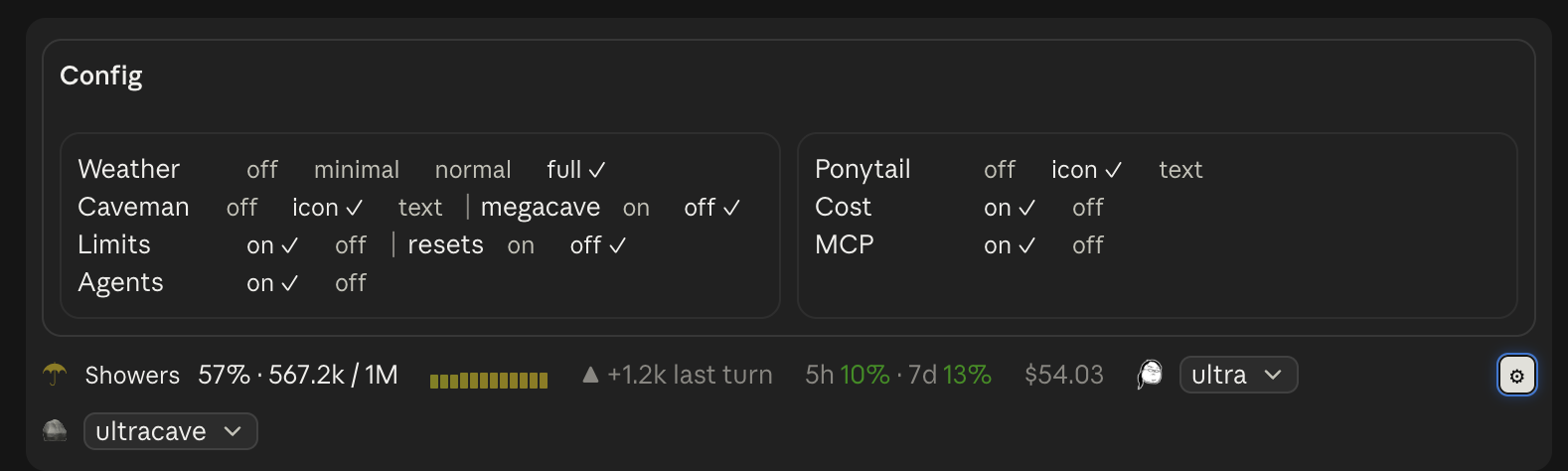
The ⚙ at the right of the band opens a Config box above it with every choice for every setting, the current one ticked; pressing one sets it, so you see the change in the band as you make it. Press ⚙ again to close it. Hover over a setting's name in the Config box for a line on what it is and the /overalls command that sets it.
Pressing the forecast itself (Showers, or 67% at minimal) steps the weather detail through minimal → normal → full and round again; off is set in the Config box.
Where the mod has a /config row (the terminal), /overalls sets that row. Where it has none (the desktop app), it keeps the choice in the mod's own store instead, and that choice wins over the /config value in every session until you set the same setting with /overalls in a session that has the row.
| Setting | Values | Default | What it does |
|---|---|---|---|
| Sessions | on · off | on | Share this session's status with the Sessions Pane, which lists every open session running Overalls; Open in the Config box (or /overalls sessions) shows it |
| Unread | on · off | on | An orange dot before ⚙ while a desktop session waits unread (with how many, when more than one); press it to go to the one that has waited longest |
| Last task | on · off | on | Show your last prompt's first line on this session's card in the Sessions Pane |
| Recap | on · off | on | A Recap button that has Claude sum up where the session is, for coming back to it |
| Auto-recap | on · off | off | Write a recap without asking, after a turn that ran 10 minutes or more, or the first turn after a 30-minute break |
| View | bar · pane · both | bar | Where Overalls shows: the band above the prompt, a Pane with everything at full size (it opens by itself only in a wide enough window), or both |
| Weather detail | off · minimal · normal · full (typed; anything else counts as full) | full | How much of the forecast to show |
| Ponytail level | off · icon · text (typed; anything else counts as icon, and an old on/off value as icon/off) | icon | Show whether Ponytail is installed and its level, after its logo or the word ponytail: |
| Caveman mode | off · icon · text (typed; anything else counts as icon) | icon | Show Caveman's mode where it's installed, after 🪨 or the word caveman: |
| Offer megacave | on · off | off | List Caveman's Classical Chinese mode (megacave) in its dropdown; in the Config box it sits on Caveman's row |
| Usage limits | on · off | on | Show how much of your 5-hour and weekly limits is spent (subscriptions only) |
| Limit resets | on · off | on | Show how long until each limit resets (5h 42% ↻1h20m); in the Config box it sits on the Limits row |
| Limit run-out | off · warn · always (typed; anything else counts as warn) | warn | Warn when a limit will run out before it resets, at your pace over the last hour: ⚠1h40m in amber, red under 30 minutes. always also shows ✓ lasts for a limit that won't. Needs 10 minutes of samples and 2 points of movement first. Follows each limit, or stands alone (5h ⚠1h40m) with the limits off |
| Session cost | on · off | off | Show what this session has cost so far |
| MCP warnings | on · off | on | Warn when an MCP server or connector fails or needs signing in again |
| Running agents | on · off | on | Show ⧗ 2 agents while subagents run; pressing it lists them (type and task) |
| Turns left | on · off | on | Show ⌛ ~6 turns: about how many more turns fit, at the average growth of the last five that grew (red from 3) |
| Tool denials | on · off | on | Show ⛔ 2 denied for tool calls refused by you, a hook, a permission rule or the auto-mode classifier; pressing it lists them, with Dismiss |
What each weather level shows:
| Level | Band |
|---|---|
minimal | ☂ 67% |
normal | ☂ Showers 67% · 134.4k / 200k |
full | normal plus the last 12 turns as a sparkline and the change since last turn |
off | nothing (the Ponytail segment still shows if enabled) |
<img src="assets/ponytail-logo.png" width="110" alt="Ponytail, the lazy senior dev">
ponytail@… entry in enabledPlugins. Otherwise the band shows not installed beside the logo.$PONYTAIL_DEFAULT_MODE, else defaultMode in its config.json ($XDG_CONFIG_HOME/ponytail/, or ~/.config/ponytail/), else full/ponytail <level> (or /ponytail:ponytail <level>), /ponytail-review, stop ponytail and normal mode change it as they go in. Another session's switch doesn't change this band./ponytail <level> command.Where either isn't installed, its row in the ⚙ Config box has an Install button. A mod can't install plugins, so it types a request into the prompt box, for example:
Install the caveman Claude Code plugin: run `claude plugin marketplace add JuliusBrussee/caveman` then `claude plugin install caveman@caveman`.Send it and Claude runs the two commands, each behind the usual permission prompt. A plugin's hooks start with the next session.
caveman@… entry in enabledPlugins; otherwise nothing shows..caveman-sessions/<session id>.mode in your Claude config directory, so the band reads that. A session with no file of its own (one started before Caveman was installed) shows off; the shared .caveman-active, which holds the last mode set in any window, is read only when there's no session id./megacave, /ultracave, /caveman and /caveman off commands.Claude Code gives a mod no list of MCP servers or their state, so the band learns of trouble from Claude's own tool calls:
mcp__<server>__… call that fails to sign in or connect (a bad-arguments error doesn't count), andThe band then shows ⚠ 2 MCP errors. Pressing it opens an MCP errors box above the band (like the Config box; one is open at a time) with a row per server: its name, sign in or failed, the error as Claude saw it, and:
claude://claude.ai/customize/connectors), and at https://claude.ai/customize/connectors from the CLI or the web. For any other server, /mcp in the terminal; the desktop app's /mcp only lists servers, so there it says to sign in from a terminal session.A server leaves the list on its next successful call, or when dismissed. It's caught on its first failure, not before.
Claude Code gives a mod no list of other sessions, so each session running Overalls writes its status to a small file of its own, overalls/sessions/<session id>.json in your Claude config directory, every 30 seconds and after each turn. The Sessions Pane (Open on the Sessions row of the Config box, or /overalls sessions) reads them all and shows one card per live session: its title, project and folder, model, context and turns left, cost, running agents, MCP errors, tool denials, and the Ponytail and Caveman levels, yours marked ▶. The usage limits are your account's, so they sit on one line above the cards, each from the session that heard it most recently. In the desktop app, Open ↗ on another session's card switches to it.
With Last task on, a card also shows the first line of the last prompt you gave that session (slash commands aside).
A session that ends marks its file ended; one that stops writing (closed without ending, crashed) drops off after two minutes. Only sessions running Overalls show up. Turn Sessions off to stop writing the file.
In the desktop app, an orange dot 🟠 before ⚙, like the sidebar's, shows while a session waits unread, with how many when there's more than one. Pressing it switches to the one that has waited longest. You stopped looking at a session when you switched to the next one (the app records each switch), and it's unread once its last turn ended after that: not while it's still working, and not for a turn that ended while you watched. Each session running Overalls notes when its turns start and end in its status file; for any other session the app's own record of its last turn stands in. That record is undocumented: if the app changes it, the dot stops showing rather than showing something wrong. The macOS app only for now.
Recap in the band asks Claude to sum up the session in three short lines: what it's working on, what was done last, and what's waiting on you. It opens in a box above the band (always shown in the Pane), with Refresh for a new one; pressed again, the button closes it. It's one question over the session's own conversation, so it costs about as much as a short reply while the API still has the conversation cached, and the whole context afresh after a long break.
Auto-recap writes one without asking, when a turn that ran 10 minutes or more ends (one you may have walked away from), or the first turn after a 30-minute break. Both happen just after a turn, while the conversation is cached. It's off by default as it spends tokens unasked.
Overalls makes no network requests of its own and sends nothing anywhere, with one exception: a Recap asks Claude through this session's own connection, as a turn does, sending the session's conversation with the request to sum it up ($.model.fork); only when you press Recap or turn Auto-recap on. Everything else stays inside your Claude Code session:
$.session.usage()) after each turn$.session.usage()) when those widgets are on, and the clock to count down to each reset$.agent.list(): type, task, status) when the agents widget is on.caveman-sessions/<session id>.mode (or .caveman-active when there's no session id)config.json, for its default level, and the PONYTAIL_DEFAULT_MODE, XDG_CONFIG_HOME, CLAUDE_CONFIG_DIR and HOME environment variablesclaude-code-sessions under ~/Library/Application Support/Claude) every 30 seconds while Unread is on, using only each session's id, title, archived flag and the times of its last turn and when you last switched to it, to find unread sessions; it never writes there/ponytail …, stop ponytail, normal mode), and keeps its first line (up to 100 characters, slash commands aside) and when the last turn ended, in session state, for Last task and Auto-recap/ponytail <level>, or Caveman's command for the mode, as if you had typed it (which Claude reads, as it would your typing), or types it into the prompt box if it can't run it/mcp only when you press Reconnect in the terminalCLAUDE_CODE_ENTRYPOINT while the MCP errors box is open, to tell the desktop app from the CLI and the web; in the desktop app, pressing Reconnect on a connector hands claude://claude.ai/customize/connectors to the system's opener (open on macOS, xdg-open on Linux, cmd /c start on Windows), which opens that page in the app/compact for you, or types it into the prompt box if it can't run it/overalls weather … or /overalls ponytail … (and the rest), pick one in the ⚙ Config box, or press the forecast to step the weather detail: through the /config row where there is one (saved in your Claude Code settings, as /config saves them), otherwise in the mod's own store, a small JSON file Claude Code keeps for the plugin in your Claude config directory.Apart from that store, the only files it writes are its session status files (overalls/sessions/<session id>.json in your Claude config directory: the session's title, project folder, model, context, limits, cost, counts of agents, MCP errors and denials, the Ponytail and Caveman levels, the desktop app's id for the session from CLAUDE_CODE_HOST_SESSION_ID, whether a turn is running and when the last ended, with Last task on your last prompt's first line, and when; never replies), which it also reads to draw the Sessions Pane. For the title it runs grep on this session's own transcript (projects/<project>/<session id>.jsonl in your Claude config directory) at the start and after each turn, matching only the rows that hold the title the desktop app or /rename gave it; nothing else of the transcript is read. The only other program it starts is the system opener, in the desktop app: for Customize › Connectors when you press Reconnect, and for another session when you press Open ↗ on its card.
It hooks seven events only to observe them, never changing what they carry: session.end (mark this session's status file ended), turn.start (note in the status file that a turn is running), session.measure (note the usage-limit percentages a response reported), tool.call (note an MCP server failing or answering again, and a refused call), turn.complete (take a reading, and with Auto-recap on start a recap), session.compact (record the drop after a compaction, and reset the Ponytail level to its default) and prompt.submit (note a Ponytail switch once your prompt has gone in, so /ponytail lite shows straight away, and the prompt's first line for Last task). It also draws the band above the prompt.
Load your clone directly instead of the installed copy, so saves hot-reload:
claude --plugin-dir ~/Projects/overallsor for every session (including the desktop app), in ~/.claude/settings.json:
{ "env": { "CLAUDE_CODE_PLUGIN_DIRS": "~/Projects/overalls" } }Don't also have the marketplace copy installed, or you'll get two bands.
claude plugin validate .
claude plugin test .
hooks/register.tsx is the module; types/index.d.ts declares the state it keeps. To add a setting, declare a field under userConfig in .claude-plugin/plugin.json and read it from options in register.
Ponytail and its logo are by Dietrich Gebert, used under the MIT licence (assets/PONYTAIL-LICENSE). Overalls only reads the level Ponytail writes; it isn't affiliated with or endorsed by the Ponytail project.
Caveman is by Julius Brussee; "Caveman" is his trademark. Overalls only reads the mode Caveman writes and runs its commands, uses none of its logos (🪨 is a stock emoji), and isn't affiliated with or endorsed by the Caveman project.
hooks/register.tsx 1309 lines1import { atom, read, update } from 'claude-code'
2import type { EngineInterface, Register } from 'claude-code'
3
4import type { Activity, Beat, Denial, McpTrouble, Reading, Recap, Sample, Unread } from '../types'
5import { PONYTAIL_PNG } from './ponytail-icon'
6
7const history = atom({ plugin: 'overalls', key: 'history' } as const, [] as Reading[])
8const ponytail = atom({ plugin: 'overalls', key: 'ponytail' } as const, '')
9const level = atom({ plugin: 'overalls', key: 'level' } as const, '')
10const caveman = atom({ plugin: 'overalls', key: 'caveman' } as const, '')
11const mcpDown = atom({ plugin: 'overalls', key: 'mcpDown' } as const, {} as Record<string, McpTrouble>)
12// Which box is open above the band, if any: ⚙'s Config box or the MCP errors box. One at a time.
13const panel = atom({ plugin: 'overalls', key: 'panel' } as const, '' as '' | 'config' | 'mcp' | 'agents' | 'denials' | 'recap')
14const denials = atom({ plugin: 'overalls', key: 'denials' } as const, [] as Denial[])
15// Each usage limit's percent over the last hour, by kind, for when it runs out.
16// Was limitSamples, polled every 30 s; renamed so a running session drops those stale figures.
17const limitSamples = atom({ plugin: 'overalls', key: 'limitMeasures' } as const, {} as Record<string, Sample[]>)
18// The session's title, for the Sessions Pane; read after each turn, not on every heartbeat.
19const title = atom({ plugin: 'overalls', key: 'title' } as const, '')
20// The last recap of the session, and whether one is being written.
21const recap = atom({ plugin: 'overalls', key: 'recap' } as const, { text: '', at: 0, busy: false } as Recap)
22// The last prompt's first line, when the last turn ended and how long the gap before this one was.
23const activity = atom({ plugin: 'overalls', key: 'activity' } as const, { ask: '', endedAt: 0, awayMs: 0, busy: false } as Activity)
24// The desktop app's unread sessions, oldest first; read on the 30 s tick, not while drawing.
25const unread = atom({ plugin: 'overalls', key: 'unread' } as const, [] as Unread[])
26
27const BARS = '▁▂▃▄▅▆▇█'
28const DETAILS = ['off', 'minimal', 'normal', 'full'] as const
29const PONY = ['off', 'icon', 'text'] as const
30const ONOFF = ['on', 'off'] as const
31const RUNOUT = ['off', 'warn', 'always'] as const
32// Every setting and what it takes, in /overalls, the Config box and userConfig alike.
33const VIEWS = ['bar', 'pane', 'both'] as const
34const FIELDS = { weather: DETAILS, ponytail: PONY, caveman: PONY, megacave: ONOFF, limits: ONOFF, resets: ONOFF, cost: ONOFF, mcp: ONOFF, agents: ONOFF, turns: ONOFF, denials: ONOFF, runout: RUNOUT, view: VIEWS, sessions: ONOFF, lasttask: ONOFF, recap: ONOFF, autorecap: ONOFF, unread: ONOFF } as const
35type Field = keyof typeof FIELDS
36const COMPACT_AT = 75
37// The desktop sidebar's unread dot. An emoji, as a Button draws its label in its own colour on
38// the desktop (a coloured Text inside it came out black).
39const UNREAD_DOT = '🟠'
40// The Config box's hover cards, keyed by the hover scope that reveals them. The band has none:
41// a card can't leave the band, so there it covers the forecast it would explain.
42const TIPS = {
43 'cfg-weather': 'Weather: a forecast of how full the context window is',
44 'cfg-ponytail': 'Ponytail: the level the Ponytail plugin is running at',
45 'cfg-caveman': 'Caveman: the mode the Caveman plugin is running in',
46 'cfg-megacave': 'Megacave: offer Caveman\'s Classical Chinese mode in its dropdown',
47 'cfg-limits': 'Limits: how much of your 5-hour and weekly usage is spent, and when each resets',
48 'cfg-resets': 'Resets: how long until each limit resets',
49 'cfg-runout': 'Run-out: when a limit runs out before it resets, at your pace over the last hour; always also marks one that lasts',
50 'cfg-agents': 'Agents: how many subagents are running; press it to see them',
51 'cfg-view': 'View: the band above the prompt, a Pane with everything at full size, or both',
52 'cfg-sessions': 'Sessions: every open session running Overalls, in a Pane; each writes its status to a small file',
53 'cfg-unread': 'Unread: an orange dot before ⚙ while a desktop session waits unread; press it to go to the one that has waited longest',
54 'cfg-lasttask': "Last task: your last prompt's first line on this session's card in the Sessions Pane",
55 'cfg-recap': 'Recap: a button that has Claude sum up where this session is, for coming back to it',
56 'cfg-autorecap': 'Auto: a recap without asking, after a turn that ran 10 minutes or followed a 30-minute break',
57 'cfg-turns': 'Turns: about how many more turns fit, at the pace of the last few',
58 'cfg-denials': 'Denials: tool calls that were refused (by you, a hook or a permission rule); press it to see them',
59 'cfg-cost': 'Cost: what this session has cost so far',
60 'cfg-mcp': 'MCP: a warning when an MCP server or connector fails or needs signing in again',
61} as const
62// Where Overalls shows: the band above the prompt, a Pane with everything at full size, or both.
63async function applyView($: EngineInterface, view: string) {
64 if (view === 'bar') await $.ui.close({ id: 'overalls' }).catch(() => {})
65 else await $.ui.open({ id: 'overalls', title: 'Overalls' }).catch(() => {})
66}
67const USAGE = Object.entries(FIELDS).map(([f, vs]) => `${f} ${vs.join('|')}`).join(' · ')
68
69export const ponytailLabel = (installed: boolean, level: string | undefined) =>
70 !installed ? 'not installed' : level?.trim() || 'off'
71
72// Ponytail keeps one level file for every session (<claude dir>/.ponytail-active), so it can't say
73// what this session runs at. The level is tracked here per session instead, by Ponytail's own
74// rules (hooks/ponytail-activate.js, ponytail-mode-tracker.js, ponytail-config.js in 4.9.0): a
75// session, and a compaction, start at its default; a submitted command changes it.
76const MODES = ['off', 'lite', 'full', 'ultra']
77
78// What a submitted prompt does to the session's level: a level, 'default', or undefined (none).
79export const levelAfter = (text: string) => {
80 const t = text.trim().toLowerCase()
81 const [first = '', arg = ''] = t.split(/\s+/)
82 const cmd = first.replace(/^[@$]/, '/')
83 if (cmd === '/ponytail-review' || cmd === '/ponytail:ponytail-review') return 'review'
84 if (cmd === '/ponytail' || cmd === '/ponytail:ponytail') {
85 // A bare /ponytail only reports; `/ponytail default x` sets new sessions', not this one's.
86 if (arg === '' || arg === 'default') return undefined
87 return MODES.includes(arg) ? arg : 'default'
88 }
89 const bare = t.replace(/[.!?\s]+$/, '')
90 return bare === 'stop ponytail' || bare === 'normal mode' ? 'off' : undefined
91}
92
93// PONYTAIL_DEFAULT_MODE, else defaultMode in its config.json, else full.
94async function ponytailDefault($: EngineInterface) {
95 const env = String((await $.env.get('PONYTAIL_DEFAULT_MODE')) ?? '').toLowerCase()
96 if (MODES.includes(env)) return env
97 const xdg = await $.env.get('XDG_CONFIG_HOME')
98 const dir = xdg ? `${xdg}/ponytail` : `${await $.env.get('HOME')}/.config/ponytail`
99 const raw = await $.fs.read(`${dir}/config.json`).catch(() => undefined)
100 try {
101 const mode = String(JSON.parse(String(raw)).defaultMode).toLowerCase()
102 if (MODES.includes(mode)) return mode
103 } catch {}
104 return 'full'
105}
106
107async function isInstalled($: EngineInterface, plugin: string) {
108 const plugins = ((await $.settings.read()).enabledPlugins ?? {}) as Record<string, unknown>
109 return Object.entries(plugins).some(([k, v]) => k.startsWith(`${plugin}@`) && v === true)
110}
111
112const claudeDir = async ($: EngineInterface) =>
113 (await $.env.get('CLAUDE_CONFIG_DIR')) ?? `${await $.env.get('HOME')}/.claude`
114
115// Never throws: a failed check leaves the last label rather than breaking the hook it rides on.
116const readPonytail = ($: EngineInterface) => checkPonytail($).catch(() => {})
117
118async function checkPonytail($: EngineInterface) {
119 const installed = await isInstalled($, 'ponytail')
120 let now = await read($, level)
121 if (installed && !now) {
122 now = await ponytailDefault($)
123 await update($, level, () => now)
124 }
125 await update($, ponytail, () => ponytailLabel(installed, now))
126}
127
128// Ponytail and Caveman switch only on a submitted command: their prompt hooks tell Claude. So a
129// pick runs it as if typed (a turn, as typing it is), under the plugin's name if the bare one is
130// refused, else leaves it in the box to send. True when it ran.
131async function runAsTyped($: EngineInterface, plugin: string, command: string, args = '') {
132 for (const name of [command, `${plugin}:${command}`]) {
133 if (await $.command.run({ command: name, args }).then(() => true, () => false)) return true
134 }
135 const text = `/${command}${args && ` ${args}`}`
136 const r = await $.prompt.fill({ text })
137 if (!r.isFilled) $.ui.toast(`Couldn't run it here: run ${text}`)
138 return false
139}
140
141// Where each plugin installs from. A mod can't install one, so Install leaves a request in the
142// prompt box for Claude to run (behind the usual permission prompts) once it's sent.
143const SOURCES = { ponytail: 'DietrichGebert/ponytail', caveman: 'JuliusBrussee/caveman' } as const
144async function askToInstall($: EngineInterface, plugin: keyof typeof SOURCES) {
145 const text = `Install the ${plugin} Claude Code plugin: run \`claude plugin marketplace add ${SOURCES[plugin]}\` then \`claude plugin install ${plugin}@${plugin}\`.`
146 const r = await $.prompt.fill({ text })
147 if (!r.isFilled) $.ui.toast(`Couldn't fill the prompt: install ${plugin} from ${SOURCES[plugin]}`)
148}
149
150const LEVELS = ['ultra', 'full', 'lite', 'off'] // strongest first, as the dropdown lists them
151async function switchPonytail($: EngineInterface, args: string) {
152 if (!(await runAsTyped($, 'ponytail', 'ponytail', args))) return
153 await update($, level, () => args)
154 await readPonytail($)
155}
156
157// Caveman keeps each session's mode in <claude dir>/.caveman-sessions/<session id>.mode, so this
158// session's is read straight from there. (It no longer reports a savings figure: 3.1.0 empties
159// .caveman-statusline-suffix as "not measurements".)
160// No file means Caveman isn't running here (a session started before it was installed): off. Its
161// own statusline falls back to the last-write-wins .caveman-active, which shows another window's
162// mode, so that is read only when there is no usable session id.
163// Older level names read as Caveman reads them (src/hooks/caveman-statusline.sh, 3.1.0).
164const CAVE_MODES = ['megacave', 'ultracave', 'caveman', 'off'] // strongest first
165export const caveMode = (raw: unknown) => {
166 const m = String(raw ?? '').trim().toLowerCase().replace(/[^a-z0-9-]/g, '')
167 return ['caveman', 'lite', 'full'].includes(m) ? 'caveman'
168 : ['ultracave', 'ultra'].includes(m) ? 'ultracave'
169 : m === 'megacave' || m.startsWith('wenyan') ? 'megacave'
170 : ['commit', 'review', 'compress'].includes(m) ? m
171 : 'off'
172}
173
174const readCaveman = ($: EngineInterface) => checkCaveman($).catch(() => {})
175
176async function checkCaveman($: EngineInterface) {
177 if (!(await isInstalled($, 'caveman'))) return update($, caveman, () => '')
178 const dir = await claudeDir($)
179 const id = await $.session.id()
180 const own = /^[A-Za-z0-9_-]{1,128}$/.test(id) ? `${dir}/.caveman-sessions/${id}.mode` : `${dir}/.caveman-active`
181 const raw = await $.fs.read(own).catch(() => undefined)
182 await update($, caveman, () => caveMode(raw))
183}
184
185// Caveman's modes are commands of their own; off is `/caveman off`.
186async function switchCaveman($: EngineInterface, mode: string) {
187 if (await (mode === 'off' ? runAsTyped($, 'caveman', 'caveman', 'off') : runAsTyped($, 'caveman', mode))) {
188 await readCaveman($)
189 }
190}
191
192// No API lists MCP servers or their state, so the band learns of trouble from Claude's own tool
193// calls: an `mcp__<server>__*` call that fails to sign in or connect, or the servers a ToolSearch
194// reports as failed. A server's next successful call clears it.
195export const mcpServer = (tool: string) => (tool.startsWith('mcp__') ? tool.split('__')[1] ?? '' : '')
196export const mcpTrouble = (text: string) =>
197 /unauthori[sz]ed|\b40[13]\b|auth(entication|orization)? (required|failed|expired)|sign(ed)? ?in|log(ged)? ?in|re-?auth|oauth|token (has )?(expired|invalid|revoked)|invalid[_ ]token/i.test(text) ? 'sign in'
198 : /not connected|disconnected|failed to connect|connection (closed|refused|reset|lost)|econn|etimedout|timed out|server (is )?unavailable|no such server|not found: server/i.test(text) ? 'failed'
199 : ''
200// A claude.ai connector is named claude_ai_<Name>, or by its id; it's signed in from claude.ai.
201export const isConnector = (server: string) => /^claude_ai_/.test(server) || /^[0-9a-f]{8}-/.test(server)
202// Customize › Connectors, as Claude's support article links it (support.claude.com/en/articles/11176164);
203// the old /settings/connectors only says they moved.
204export const CONNECTORS_URL = 'https://claude.ai/customize/connectors'
205// The desktop app (CLAUDE_CODE_ENTRYPOINT=claude-desktop) opens the same page in itself from its
206// claude:// scheme (claude://claude.ai/<path>), which a Link can't carry (https only), so there it
207// goes to the system's opener; the CLI and the web get the https link, the web's own site.
208const CONNECTORS_APP_URL = 'claude://claude.ai/customize/connectors'
209const OPENERS = [['open'], ['xdg-open'], ['cmd', '/c', 'start', '']] // macOS, Linux, Windows
210async function openApp($: EngineInterface, url: string) {
211 for (const opener of OPENERS) {
212 const r = await $.process.run([...opener, url]).catch(() => undefined)
213 if (r?.exitCode === 0) return true
214 }
215 return false
216}
217async function openConnectors($: EngineInterface) {
218 if (!(await openApp($, CONNECTORS_APP_URL))) $.ui.toast(`Sign the connector back in at ${CONNECTORS_URL}`)
219}
220
221// claude_ai_Gmail → Gmail, plugin_productivity_atlassian → atlassian; a connector id is cut short.
222export const mcpLabel = (server: string) => {
223 const name = server.replace(/^claude_ai_/, '').replace(/^plugin_[^_]+_/, '').replace(/_/g, ' ')
224 return /^[0-9a-f]{8}-/.test(name) ? `connector ${name.slice(0, 8)}` : name
225}
226
227// Any other server signs in through /mcp's menu, which the terminal has; the desktop app's /mcp
228// only prints a count. The entry stays until the server answers or is dismissed.
229async function reconnectMcp($: EngineInterface, surface: string, server: string) {
230 if (surface !== 'terminal') {
231 $.ui.toast(`Sign ${mcpLabel(server)} in with /mcp in a terminal session (claude): the desktop app's /mcp only lists servers`)
232 return
233 }
234 const ran = await $.command.run({ command: 'mcp' }).then(() => true, () => false)
235 if (!ran) $.ui.toast(`Reconnect ${mcpLabel(server)} with /mcp`)
236}
237
238const dismissMcp = ($: EngineInterface, server?: string) =>
239 update($, mcpDown, prev => {
240 if (server === undefined) return {}
241 const { [server]: _, ...rest } = prev
242 return rest
243 })
244
245// The error as Claude saw it, on one line and cut short.
246const detailOf = (text: string) => text.replace(/\s+/g, ' ').trim().slice(0, 100)
247
248// How long until a limit resets, at the two largest units: 1h20m, 3d4h, 12m; now or past, 0m.
249export const untilReset = (resetsAt: string, now: number) => {
250 const m = Math.max(0, Math.round((Date.parse(resetsAt) - now) / 60000))
251 const [d, h, min] = [Math.floor(m / 1440), Math.floor((m % 1440) / 60), m % 60]
252 return d ? `${d}d${h ? `${h}h` : ''}` : h ? `${h}h${min ? `${min}m` : ''}` : `${min}m`
253}
254
255// A limit's samples with this one added: the last hour, at most one per 25 s (the band redraws every
256// 30 s, and on more than the clock). A fall in percent is a reset, which starts them over.
257export const sampled = (prev: Sample[], at: number, pct: number) => {
258 const last = prev.at(-1)
259 if (last && pct < last.pct) return [{ at, pct }]
260 if (last && at - last.at < 25_000) return prev
261 return [...prev.filter(s => at - s.at <= 3_600_000), { at, pct }]
262}
263
264// When a limit runs out at its pace over the samples: a time, or Infinity when it lasts until it
265// resets (or hasn't moved). Undefined under 10 minutes, or 1 point of movement: whole-percent steps
266// are noise until then.
267export const runsOutAt = (samples: Sample[], resetsAt?: string) => {
268 const [first, last] = [samples[0], samples.at(-1)]
269 if (!first || !last || last.at - first.at < 600_000) return undefined
270 const moved = last.pct - first.pct
271 if (moved <= 0) return Infinity
272 if (moved < 2) return undefined
273 const at = last.at + ((100 - last.pct) * (last.at - first.at)) / moved
274 return resetsAt && at >= Date.parse(resetsAt) ? Infinity : at
275}
276
277// About how many more turns fit: the space left over the average growth of the last 5 turns that
278// grew (a compaction's drop isn't a turn's growth). Undefined until 3 readings, or with no growth.
279export const turnsLeft = (readings: Reading[]) => {
280 const growth = readings.slice(1).map((r, i) => r.tokens - readings[i]!.tokens).filter(d => d > 0).slice(-5)
281 const now = readings.at(-1)
282 if (readings.length < 3 || !growth.length || !now) return undefined
283 return Math.max(0, Math.floor((now.window - now.tokens) / (growth.reduce((a, b) => a + b, 0) / growth.length)))
284}
285
286// A tool call refused rather than failed: denied by a hook (`deny`), declined by the person, or
287// refused by a permission rule or the auto-mode classifier. Its own error (a command that failed)
288// is not a denial.
289export const deniedBy = (text: string) =>
290 /permission for this action was denied|doesn't want to proceed|user (has )?(rejected|denied|declined)|was (denied|blocked) by|blocked by (a |the )?hook|not allowed by (your )?(permission|settings)|permission (rule|settings) (deny|denied)/i.test(text)
291
292export const weather = (percent: number) =>
293 percent < 25 ? { icon: '☀', word: 'Clear' }
294 : percent < 50 ? { icon: '☁', word: 'Cloudy' }
295 : percent < 75 ? { icon: '☂', word: 'Showers' }
296 : percent < 90 ? { icon: '☇', word: 'Storm' }
297 : { icon: '↯', word: 'Compact soon' }
298
299const hsl = (hue: number, l: number) => {
300 const f = (n: number) => {
301 const k = (n + hue / 30) % 12
302 return l - l * Math.max(-1, Math.min(k - 3, 9 - k, 1))
303 }
304 return [f(0), f(8), f(4)]
305}
306
307// WCAG relative luminance of an sRGB triple in 0..1.
308export const luminance = (rgb: number[]) => {
309 const [r = 0, g = 0, b = 0] = rgb.map(c => (c <= 0.04045 ? c / 12.92 : ((c + 0.055) / 1.055) ** 2.4))
310 return 0.2126 * r + 0.7152 * g + 0.0722 * b
311}
312
313export const contrast = (a: number[], b: number[]) => {
314 const [hi = 0, lo = 0] = [luminance(a), luminance(b)].sort((x, y) => y - x)
315 return (hi + 0.05) / (lo + 0.05)
316}
317
318export const hexToRgb = (hex: string) => [1, 3, 5].map(i => parseInt(hex.slice(i, i + 2), 16) / 255)
319
320// Green at empty to red at full, every step held at one luminance (0.2) so it keeps
321// 3:1 against white, black and the usual dark greys alike: no theme detection needed.
322const TARGET = 0.2
323export const heat = (percent: number) => {
324 const hue = 120 * (1 - Math.min(100, Math.max(0, percent)) / 100)
325 let lo = 0
326 let hi = 0.5
327 for (let i = 0; i < 24; i++) {
328 const mid = (lo + hi) / 2
329 if (luminance(hsl(hue, mid)) < TARGET) lo = mid
330 else hi = mid
331 }
332 return '#' + hsl(hue, lo).map(c => Math.round(c * 255).toString(16).padStart(2, '0')).join('')
333}
334
335export const fmt = (n: number) =>
336 n >= 1e6 ? `${+(n / 1e6).toFixed(1)}M` : n >= 1e3 ? `${+(n / 1e3).toFixed(1)}k` : `${n}`
337
338const pct = (r: Reading) => (r.tokens / r.window) * 100
339
340// Bars scale to the window, so a full bar means a full context, not the busiest turn.
341export const bar = (r: Reading) => BARS[Math.min(7, Math.floor(pct(r) / 12.5))]
342
343// The same bars as an Svg: 4 px wide, 1 px apart, rising from the bottom of a 14 px line, at least
344// 1 px tall so an empty turn still shows.
345export const sparkSvg = (readings: Reading[]) =>
346 `<svg xmlns="http://www.w3.org/2000/svg" viewBox="0 0 ${readings.length * 5} 14">` +
347 readings
348 .map((r, i) => {
349 const h = Math.max(1, Math.round((Math.min(100, pct(r)) / 100) * 14))
350 return `<rect x="${i * 5}" y="${14 - h}" width="4" height="${h}" rx="0.5" fill="${heat(pct(r))}"/>`
351 })
352 .join('') +
353 '</svg>'
354
355// The engine skips a plugin's own session.compact hook for a compaction that plugin
356// started, so the button calls this too.
357async function recordDrop($: EngineInterface, tokensAfter?: number) {
358 await update($, history, prev => {
359 const last = prev[prev.length - 1]
360 return last && tokensAfter !== undefined
361 ? [...prev, { tokens: tokensAfter, window: last.window }].slice(-12)
362 : []
363 })
364}
365
366// No API lists other sessions, so each session running Overalls writes its status to a file of
367// its own, <claude dir>/overalls/sessions/<session id>.json (one file each, so two sessions never
368// overwrite each other), and the Sessions Pane reads them all. Every 30 s and every turn; a
369// session that stops writing drops off after LIVE_MS, and one that ends says so.
370const LIVE_MS = 120_000
371const beatsDir = async ($: EngineInterface) => `${await claudeDir($)}/overalls/sessions`
372
373// The title the desktop app or /rename gives a session: the last custom-title row of its transcript,
374// projects/<project root, non-alphanumerics as ->/<session id>.jsonl, found with grep as a
375// transcript outgrows fs.read's 4 MiB. ponytail: Claude Code cuts and hashes a project path over
376// 200 characters, and Windows has no grep; no title there.
377async function refreshTitle($: EngineInterface, options: Options) {
378 if (!(await prefs($, options)).sessions) return
379 const [dir, id, root] = await Promise.all([claudeDir($), $.session.id(), $.session.root()])
380 if (!/^[A-Za-z0-9_-]{1,128}$/.test(id)) return
381 const path = `${dir}/projects/${root.replace(/[^A-Za-z0-9]/g, '-')}/${id}.jsonl`
382 const found = await $.process.run(['grep', '-a', '-F', '"type":"custom-title"', path]).catch(() => undefined)
383 const last = found?.stdout.trim().split('\n').at(-1)
384 if (!last) return
385 try {
386 const named = JSON.parse(last).customTitle
387 if (typeof named === 'string') await update($, title, () => named.slice(0, 120))
388 } catch {}
389}
390
391async function heartbeat($: EngineInterface, options: Options, ended = false) {
392 if (!(await prefs($, options)).sessions) return
393 const id = await $.session.id()
394 if (!/^[A-Za-z0-9_-]{1,128}$/.test(id)) return
395 const [cwd, model, readings, usage, agents, down, refused, pony, cave, at, host, measured, named, done] = await Promise.all([
396 $.session.cwd(),
397 $.session.model().catch(() => ''),
398 read($, history),
399 $.session.usage().catch(() => undefined),
400 $.agent.list().catch(() => []),
401 read($, mcpDown),
402 read($, denials),
403 read($, ponytail),
404 read($, caveman),
405 $.clock.now().catch(() => Date.now()),
406 // The desktop app's own id for the session (local_…), which its links open; the CLI has none.
407 $.env.get('CLAUDE_CODE_HOST_SESSION_ID').catch(() => undefined),
408 read($, limitSamples),
409 read($, title),
410 read($, activity),
411 ])
412 const { lasttask } = await prefs($, options)
413 const now = readings.at(-1)
414 const beat: Beat = {
415 id,
416 title: named,
417 ask: lasttask && done.ask ? done.ask : undefined,
418 busy: done.busy,
419 endedAt: done.endedAt || undefined,
420 project: cwd.split('/').filter(Boolean).at(-1) ?? cwd,
421 cwd,
422 model,
423 percent: now ? Math.round(pct(now)) : undefined,
424 turnsLeft: turnsLeft(readings),
425 // With when a response last reported each, so the Pane can take the freshest across sessions.
426 limits: (usage?.rateLimits ?? []).map(r => ({ kind: r.kind, percent: Math.round(r.percentUsed), at: measured[r.kind]?.at(-1)?.at ?? 0 })),
427 cost: usage?.cost?.usd,
428 agents: agents.filter(a => a.status === 'running').length,
429 mcp: Object.keys(down).map(mcpLabel),
430 denials: refused.length,
431 ponytail: pony,
432 caveman: cave,
433 at,
434 ended,
435 host: host && /^[A-Za-z0-9_-]{1,128}$/.test(host) ? host : undefined,
436 }
437 await $.fs.write(`${await beatsDir($)}/${id}.json`, JSON.stringify(beat))
438}
439
440// The desktop app keeps a record of each session (on macOS, under Application Support), but its
441// lastFocusedAt is when you switched to a session, and its lastTurnEdgeAt moves when a turn starts
442// as well as ends. So: you stopped looking at a session when you focused the next one (the last
443// focused is still in front of you), and it's unread when its last turn ended after that, from its
444// own turn.complete where it runs Overalls (its status file), else the app's edge, and not while a
445// turn runs. Undocumented, so read only, and nothing shows if its shape changes. ponytail: every
446// record is read each tick (~150 KB each); skip unchanged files by mtime if that ever shows.
447type AppRecord = { sessionId: string; title?: unknown; isArchived?: unknown; lastTurnEdgeAt?: unknown; lastFocusedAt?: unknown }
448export const unreadOf = (records: unknown[], beats: Beat[], self?: string): Unread[] => {
449 const all = records.filter(
450 (r): r is AppRecord =>
451 !!r && typeof r === 'object' && typeof (r as AppRecord).sessionId === 'string' && /^local_[A-Za-z0-9-]{1,100}$/.test((r as AppRecord).sessionId),
452 )
453 const focus = all.map(r => Number(r.lastFocusedAt) || 0).sort((a, b) => a - b)
454 const live = new Map(beats.flatMap(b => (b.host ? [[b.host, b] as const] : [])))
455 return all
456 .flatMap(r => {
457 const focused = Number(r.lastFocusedAt) || 0
458 const seenUntil = focused ? focus.find(f => f > focused) : 0
459 if (seenUntil === undefined || r.isArchived || r.sessionId === self) return []
460 const beat = live.get(r.sessionId)
461 if (beat?.busy) return []
462 const ended = beat?.endedAt || Number(r.lastTurnEdgeAt) || 0
463 return ended > seenUntil ? [{ host: r.sessionId, title: String(r.title ?? '').slice(0, 80) || 'Untitled', at: ended }] : []
464 })
465 .sort((a, b) => a.at - b.at)
466}
467async function readUnread($: EngineInterface, options: Options) {
468 if (!(await prefs($, options)).unread) return
469 const root = `${await $.env.get('HOME')}/Library/Application Support/Claude/claude-code-sessions`
470 const dirs = async (path: string) =>
471 (await $.fs.list(path).catch(() => [])).filter(f => f.kind === 'dir').map(f => `${path}/${f.name}`)
472 const files = (
473 await Promise.all(
474 (await Promise.all((await dirs(root)).map(dirs))).flat().map(async dir =>
475 (await $.fs.list(dir).catch(() => []))
476 .filter(f => f.kind === 'file' && /^local_[A-Za-z0-9-]+\.json$/.test(f.name))
477 .map(f => `${dir}/${f.name}`),
478 ),
479 )
480 ).flat()
481 const records = await Promise.all(files.map(f => $.fs.read(f).then(t => JSON.parse(String(t)) as unknown, () => undefined)))
482 const [self, now, beats] = await Promise.all([
483 $.env.get('CLAUDE_CODE_HOST_SESSION_ID').catch(() => undefined),
484 $.clock.now().catch(() => Date.now()),
485 readBeats($),
486 ])
487 const found = unreadOf(records, liveBeats(beats, now, ''), self)
488 await update($, unread, prev => (JSON.stringify(prev) === JSON.stringify(found) ? prev : found))
489}
490
491// A recap is one question over the session's own transcript ($.model.fork), so its prefix comes
492// from the API's cache while that holds; a press after a long break pays for the context afresh.
493const RECAP_PROMPT =
494 'Recap this session for someone coming back to it: in at most three short lines, what it is working on, ' +
495 'what was done last, and what is waiting on them. Plain text, no preamble, no headings.'
496async function writeRecap($: EngineInterface) {
497 if ((await read($, recap)).busy) return
498 await update($, recap, r => ({ ...r, busy: true }))
499 const r = await $.model.fork({ prompt: RECAP_PROMPT }).catch(() => undefined)
500 const at = await $.clock.now().catch(() => Date.now())
501 await update($, recap, prev => (r?.isAnswered ? { text: r.text.trim(), at, busy: false } : { ...prev, busy: false }))
502 if (r?.isAnswered) await update($, panel, () => 'recap')
503 else $.ui.toast(`No recap: ${r?.reason ?? 'the request failed'}`)
504}
505// Auto-recap: after a turn long enough to have walked away from, or the first after a break.
506export const AWAY_MS = 30 * 60_000
507export const LONG_TURN_MS = 10 * 60_000
508export const wantsRecap = (durationMs: number, awayMs: number) => durationMs >= LONG_TURN_MS || awayMs >= AWAY_MS
509// A prompt's first line, for the Sessions card; slash commands aren't tasks.
510export const askLine = (text: string) => {
511 const line = text.trim().split('\n')[0]?.trim() ?? ''
512 return line.startsWith('/') ? '' : line.slice(0, 100)
513}
514
515// The sessions written to in the last LIVE_MS that haven't ended, this one first.
516export const liveBeats = (beats: Beat[], now: number, self: string) =>
517 beats
518 .filter(b => !b.ended && now - b.at < LIVE_MS)
519 .sort((a, b) => Number(b.id === self) - Number(a.id === self) || a.project.localeCompare(b.project))
520
521async function readBeats($: EngineInterface) {
522 const dir = await beatsDir($)
523 const files = (await $.fs.list(dir).catch(() => [])).filter(f => f.kind === 'file' && f.name.endsWith('.json'))
524 const beats = await Promise.all(
525 files.map(f => $.fs.read(`${dir}/${f.name}`).then(t => JSON.parse(String(t)) as Beat, () => undefined)),
526 )
527 return beats.filter((b): b is Beat => !!b && typeof b.at === 'number')
528}
529
530// The limits are the account's, each session's only as fresh as its last response: per limit, the
531// most recently measured figure.
532export const accountLimits = (beats: Beat[]) => {
533 const best = new Map<string, Beat['limits'][number]>()
534 for (const l of beats.flatMap(b => b.limits)) {
535 const had = best.get(l.kind)
536 if (!had || (l.at ?? 0) > (had.at ?? 0) || (l.at === had.at && l.percent > had.percent)) best.set(l.kind, l)
537 }
538 return [...best.values()]
539}
540
541export const ago = (ms: number) => (ms < 60_000 ? `${Math.max(0, Math.round(ms / 1000))}s` : `${Math.round(ms / 60_000)}m`)
542
543// Only from a measurement: a session's limits are its last response's, so polling an idle one
544// stamps an old figure with a new time, and the first reply after a break reads as a burst.
545async function sampleLimits($: EngineInterface, limits: { kind: string; percentUsed: number }[]) {
546 if (!limits.length) return
547 const now = await $.clock.now().catch(() => Date.now())
548 await update($, limitSamples, prev => Object.fromEntries(limits.map(r => [r.kind, sampled(prev[r.kind] ?? [], now, r.percentUsed)])))
549}
550
551type Prefs = Partial<Record<Field, string | boolean>>
552type Options = Parameters<Register>[1]
553
554// Ponytail was an on/off switch before it had a choice of icon or text: on (true) is the icon.
555export const ponyMode = (v: unknown) =>
556 v === true ? 'icon' : v === false ? 'off' : PONY.find(m => m === String(v).trim().toLowerCase()) ?? 'icon'
557
558// /overalls choices made where the mod has no /config row (the desktop app) live in its
559// store and win over userConfig. A typed field, not a picker: the directory doesn't accept
560// userConfig `options` yet.
561async function prefs($: EngineInterface, options: Options) {
562 const saved = ((await $.store.get('prefs')) ?? {}) as Prefs
563 const pick = (f: Field) => String(saved[f] ?? options[f]).trim().toLowerCase()
564 return {
565 view: VIEWS.find(v => v === pick('view')) ?? 'bar',
566 sessions: pick('sessions') !== 'off',
567 lasttask: pick('lasttask') !== 'off',
568 unread: pick('unread') !== 'off',
569 recap: pick('recap') !== 'off',
570 autorecap: pick('autorecap') === 'on',
571 detail: DETAILS.find(d => d === pick('weather')) ?? 'full',
572 pony: ponyMode(saved.ponytail ?? options.ponytail),
573 cave: ponyMode(saved.caveman ?? options.caveman),
574 megacave: pick('megacave') === 'on',
575 limits: pick('limits') !== 'off',
576 resets: pick('resets') !== 'off',
577 agents: pick('agents') !== 'off',
578 turns: pick('turns') !== 'off',
579 denials: pick('denials') !== 'off',
580 cost: pick('cost') === 'on',
581 mcp: pick('mcp') !== 'off',
582 runout: RUNOUT.find(m => m === pick('runout')) ?? 'warn',
583 }
584}
585
586async function refreshPonytail($: EngineInterface, options: Options) {
587 const p = await prefs($, options)
588 if (p.pony !== 'off') await readPonytail($)
589 if (p.cave !== 'off') await readCaveman($)
590}
591
592// Where the mod has a /config row (the terminal), set that and drop any stored choice;
593// the engine saves the row and reloads this module with it. Returns why it was refused, if it was.
594async function setPref($: EngineInterface, options: Options, field: string, value: string) {
595 const row = (await $.config.list()).find(
596 r => r.provider.plugin.split('@')[0] === 'overalls' && (r.key === field || r.key.endsWith(`.${field}`)),
597 )
598 const saved = ((await $.store.get('prefs')) ?? {}) as Record<string, unknown>
599 await $.store.set('prefs', row ? { ...saved, [field]: undefined } : { ...saved, [field]: value })
600 if (row) {
601 const r = await $.config.set({ key: row.key, value }).catch((err: unknown) => ({ deny: String(err) }))
602 return r.deny
603 }
604 await refreshPonytail($, options)
605 $.ui.invalidate('ui.render')
606}
607
608// Don't name a local `h`: JSX compiles to the global h().
609// One drawing for both places: the band above the prompt, and the Pane, where widgets flow the
610// same way under the ⚙ row and the MCP errors, denials and agents boxes are always open.
611// eslint-disable-next-line @typescript-eslint/no-explicit-any
612async function draw($: EngineInterface, e: any, next: (e: any) => Promise<any>, inPane: boolean, options: Options) {
613 const { view, sessions, lasttask, unread: unreadOn, recap: recapOn, autorecap, detail, pony: ponyAs, cave: caveAs, megacave, limits, resets, cost, mcp, agents, turns, denials: showDenials, runout } = await prefs($, options)
614 const refused = showDenials ? await read($, denials) : []
615 const down = mcp ? Object.entries(await read($, mcpDown)) : []
616 const readings = detail === 'off' ? [] : await read($, history)
617 const pony = ponyAs !== 'off' ? await read($, ponytail) : ''
618 const cave = caveAs !== 'off' ? await read($, caveman) : ''
619 const usage = limits || cost || runout !== 'off' ? await $.session.usage().catch(() => undefined) : undefined
620 const summary = recapOn ? await read($, recap) : { text: '', at: 0, busy: false }
621 const waiting = unreadOn ? await read($, unread) : []
622 // With nothing else to show, ⚙ still draws alone, so both turned off can be turned on again.
623 if (!inPane && e.props.hasSurvey) return next(e)
624 const els = $.ui.resolve(e)
625 const { Box, Button, Link, Text } = els
626 // Widgets never shrink (the desktop app would wrap the text inside one); they wrap whole onto
627 // further rows of their own box, which takes the free width, so Compact and ⚙ hold the right
628 // end of the first row.
629 type El = ReturnType<typeof Box>
630 // In the Pane a widget sizes to its content, sharing rows with the others; if the Pane is
631 // narrower than one widget, its pieces keep their size and wrap between each other, so a
632 // button's label never breaks in two. (Full width put each widget on a row of its own.)
633 const widget = (...children: El[]) =>
634 inPane ? (
635 <Box flexDirection="row" flexWrap="wrap" flexShrink={1}>
636 {...children.map(c => <Box flexDirection="row" flexShrink={0}>{c}</Box>)}
637 </Box>
638 ) : (
639 <Box flexDirection="row" flexShrink={0}>{...children}</Box>
640 )
641 const band = (widgets: El[], ...end: El[]) =>
642 inPane ? (
643 <Box flexDirection="column" width="100%" gap={1}>
644 <Box flexDirection="row" gap={2}>
645 <Box flexDirection="row" flexGrow={1} />
646 {...end}
647 {...unreadButton}
648 {settings}
649 </Box>
650 {...(open ? [configBox] : [])}
651 <Box flexDirection="row" flexWrap="wrap" width="100%" columnGap={2} rowGap={1}>
652 {...widgets}
653 </Box>
654 {...(down.length ? [mcpBox] : [])}
655 {...(refused.length ? [denialsBox] : [])}
656 {...(running.length ? [agentsBox] : [])}
657 {...(summary.text ? [recapBox] : [])}
658 </Box>
659 ) : withPanel(
660 <Box flexDirection="row" width="100%" alignItems="flex-start" gap={2}>
661 <Box flexDirection="row" flexWrap="wrap" flexGrow={1} flexShrink={1} columnGap={2} rowGap={1}>
662 {...widgets}
663 </Box>
664 {...end}
665 {...unreadButton}
666 {settings}
667 </Box>,
668 )
669 // The Ponytail logo stands for the word: an Svg on the remote surfaces, an Image on the
670 // terminal, which draws the word dim in its place where it can't show pictures.
671 // A cell between a plugin's icon (or word) and its level.
672 const iconGap = <Box flexDirection="row" width={1} flexShrink={0} />
673 const ponyIcon =
674 ponyAs === 'text' ? (
675 <Text dimColor>ponytail:</Text>
676 ) : e.surface === 'terminal' && 'Image' in els ? (
677 <els.Image source={{ png: PONYTAIL_PNG }} columns={2} rows={1} alt="ponytail:" />
678 ) : e.surface !== 'terminal' && 'Svg' in els ? (
679 <els.Svg
680 alt="Ponytail"
681 width={14}
682 height={16}
683 source={`<svg xmlns="http://www.w3.org/2000/svg" viewBox="0 0 42 48"><image width="42" height="48" href="data:image/png;base64,${PONYTAIL_PNG}"/></svg>`}
684 />
685 ) : (
686 <Text dimColor>ponytail:</Text>
687 )
688 // A plugin's level picks its own: a dropdown showing the current one where the surface draws
689 // one; on mobile, which has none, a press steps to the next, strongest first and round.
690 const Select = 'Select' in els && e.surface !== 'mobile' ? els.Select : undefined
691 const picker = (key: string, current: string, levels: string[], pick: (v: string) => Promise<unknown>) =>
692 Select ? (
693 <Select
694 key={key}
695 value={current}
696 options={(levels.includes(current) ? levels : [...levels, current]).map(value => ({ value }))}
697 onSelect={(v: string) => void (v !== current && pick(v))}
698 />
699 ) : (
700 <Button
701 key={key}
702 label={` ${current}`}
703 plain
704 dimColor
705 hover={{ scope: key, underline: true }}
706 onPress={() => void pick(levels[(levels.indexOf(current) + 1) % levels.length] ?? current)}
707 />
708 )
709 const level =
710 pony === 'not installed' ? (
711 <Text dimColor> {pony}</Text>
712 ) : (
713 picker('ponytail-level', pony, LEVELS, v => switchPonytail($, v))
714 )
715 // Caveman's logo is its trademark, so a generic rock stands for it; nothing shows where it
716 // isn't installed.
717 const caveSegment = cave
718 ? [
719 widget(
720 caveAs === 'text' ? <Text dimColor>caveman:</Text> : <Text>🪨</Text>,
721 iconGap,
722 // Megacave answers in Classical Chinese, so it's offered only when asked for.
723 picker('caveman-mode', cave, megacave ? CAVE_MODES : CAVE_MODES.filter(m => m !== 'megacave'), v => switchCaveman($, v)),
724 ),
725 ]
726 : []
727 const LIMIT = { five_hour: '5h', seven_day: '7d', spend_limit: 'spend' } as Record<string, string>
728 const nowMs = await $.clock.now().catch(() => Date.now())
729 const samples = runout !== 'off' ? await read($, limitSamples) : {}
730 // Run-out at its pace: amber before the reset, red under 30 minutes; always also marks a limit
731 // that lasts. Nothing until there's a pace.
732 const runOut = (r: { kind: string; resetsAt?: string }) => {
733 const out = runout !== 'off' ? runsOutAt(samples[r.kind] ?? [], r.resetsAt) : undefined
734 return out === undefined ? []
735 : out === Infinity ? (runout === 'always' ? [<Text dimColor> ✓ lasts</Text>] : [])
736 : [<Text color={heat(out - nowMs < 30 * 60_000 ? 100 : 70)}> ⚠{untilReset(new Date(out).toISOString(), nowMs)}</Text>]
737 }
738 // Subagents still running, the model's and plugins' alike; pressing the count lists them.
739 const running = agents ? (await $.agent.list().catch(() => [])).filter(a => a.status === 'running') : []
740 const agentSegment = running.length
741 ? [
742 widget(
743 <Text dimColor>⧗ </Text>,
744 <Button
745 key="agents"
746 label={`${running.length} agent${running.length === 1 ? '' : 's'}`}
747 plain
748 hover={{ scope: 'agents', underline: true }}
749 onPress={() => void update($, panel, p => (p === 'agents' ? '' : 'agents'))}
750 />,
751 ),
752 ]
753 : []
754 const usageSegments = [
755 ...(limits && usage?.rateLimits.length
756 ? [
757 widget(
758 ...usage.rateLimits.flatMap((r, i) => [
759 ...(i ? [<Text dimColor> · </Text>] : []),
760 <Text dimColor>{LIMIT[r.kind] ?? r.kind} </Text>,
761 <Text color={heat(r.percentUsed)}>{Math.round(r.percentUsed)}%</Text>,
762 ...(resets && r.resetsAt ? [<Text dimColor> ↻{untilReset(r.resetsAt, nowMs)}</Text>] : []),
763 ...runOut(r),
764 ]),
765 ),
766 ]
767 : []),
768 // With the limits off, each run-out stands alone under its limit's name.
769 ...(!limits && usage
770 ? usage.rateLimits.flatMap(r => {
771 const f = runOut(r)
772 return f.length ? [widget(<Text dimColor>{LIMIT[r.kind] ?? r.kind}</Text>, ...f)] : []
773 })
774 : []),
775 ...(cost && usage?.cost ? [widget(<Text dimColor>${usage.cost.usd.toFixed(2)}</Text>)] : []),
776 ]
777 // Only while something is down: a count that opens the MCP errors box.
778 const mcpSegment = down.length
779 ? [
780 widget(
781 <Text color={heat(100)}>⚠ </Text>,
782 <Button
783 key="mcp"
784 label={`${down.length} MCP error${down.length === 1 ? '' : 's'}`}
785 plain
786 hover={{ scope: 'mcp', underline: true }}
787 onPress={() => void update($, panel, p => (p === 'mcp' ? '' : 'mcp'))}
788 />,
789 ),
790 ]
791 : []
792 // Refused tool calls, until dismissed: a count that opens the Tool denials box.
793 const denialSegment = refused.length
794 ? [
795 widget(
796 <Text color={heat(100)}>⛔ </Text>,
797 <Button
798 key="denials"
799 label={`${refused.length} denied`}
800 plain
801 hover={{ scope: 'denials', underline: true }}
802 onPress={() => void update($, panel, p => (p === 'denials' ? '' : 'denials'))}
803 />,
804 ),
805 ]
806 : []
807 // Recap: writes one, or with one written opens it (the Pane always shows it).
808 const recapSegment = recapOn
809 ? [
810 widget(
811 <Button
812 key="recap"
813 label={summary.busy ? 'Recapping…' : 'Recap'}
814 plain
815 hover={{ scope: 'recap', underline: true }}
816 onPress={() =>
817 void (summary.text && !inPane ? update($, panel, p => (p === 'recap' ? '' : 'recap')) : writeRecap($))
818 }
819 />,
820 ),
821 ]
822 : []
823 const ponySegment = [...mcpSegment, ...denialSegment, ...agentSegment, ...usageSegments, ...(pony ? [widget(ponyIcon, iconGap, level)] : []), ...caveSegment, ...recapSegment]
824 // No tooltip prop: each card is drawn hidden over the Config box's blank row, revealed by its
825 // hover scope.
826 // Each card ends with the setting's command, so the prompt can set it too.
827 const tip = (scope: keyof typeof TIPS) => {
828 const field = scope.slice('cfg-'.length) as Field
829 return (
830 <Box position="absolute" top={0} left={0} display="none" hover={{ scope, display: 'flex' }} flexDirection="row">
831 <Text inverse> {TIPS[scope]} · /overalls {field} {FIELDS[field].join('|')} </Text>
832 </Box>
833 )
834 }
835 const set = async (field: string, value: string) => {
836 const deny = await setPref($, options, field, value)
837 if (deny) $.ui.toast(`Couldn't set ${field}: ${deny}`)
838 }
839 // ⚙ opens a Config box above the band with every choice, the current one ticked, so each
840 // change shows in the band as it's made.
841 const choice = (field: string, value: string, current: boolean) => (
842 <Button key={`${field}-${value}`} label={`${value}${current ? ' ✓' : ''}`} plain dimColor={!current} onPress={() => void set(field, value)} />
843 )
844 // Settings sit in two bordered columns (the band's slot is capped at half the window's height).
845 const setting = (field: Field, name: string, choices: (ReturnType<typeof Button> | ReturnType<typeof Text>)[]) => (
846 <Box flexDirection="row">
847 <Box flexDirection="row" width={10}>
848 <Text hover={{ scope: `cfg-${field}`, underline: true }}>{name}</Text>
849 </Box>
850 {...choices.flatMap(c => [c, <Text> </Text>])}
851 </Box>
852 )
853 const shown = await read($, panel)
854 const open = shown === 'config'
855 // The Config box offers Install on a plugin's row where it isn't installed.
856 const missing = async (plugin: keyof typeof SOURCES) => open && !(await isInstalled($, plugin).catch(() => true))
857 const install = async (plugin: keyof typeof SOURCES) =>
858 (await missing(plugin))
859 ? [<Text dimColor>│</Text>, <Button key={`install-${plugin}`} label="Install" plain onPress={() => void askToInstall($, plugin)} />]
860 : []
861 const [installPonytail, installCaveman] = await Promise.all([install('ponytail'), install('caveman')])
862 const settings = (
863 // A Button takes no bold: while the row is open ⚙ is drawn as the primary button instead.
864 open ? (
865 <Button key="settings" label="⚙" variant="primary" onPress={() => void update($, panel, p => (p === 'config' ? '' : 'config'))} />
866 ) : (
867 <Button key="settings" label="⚙" plain dimColor onPress={() => void update($, panel, p => (p === 'config' ? '' : 'config'))} />
868 )
869 )
870 // The unread session that has waited longest, as the sidebar's orange dot (with how many, when
871 // more than one), held at the right before ⚙; pressing it goes there.
872 const oldest = waiting[0]
873 const unreadButton = oldest
874 ? [
875 <Button
876 key="unread"
877 label={`${UNREAD_DOT}${waiting.length > 1 ? ` ${waiting.length}` : ''}`}
878 plain
879 onPress={() => void openSession($, oldest.host)}
880 />,
881 ]
882 : []
883 const inApp = shown === 'mcp' && (await $.env.get('CLAUDE_CODE_ENTRYPOINT').catch(() => undefined)) === 'claude-desktop'
884 // One row per failing server: its name, why, the error as Claude saw it, and what to do.
885 const mcpBox = (
886 <Box flexDirection="column" borderStyle="round" borderColor={heat(100)} paddingX={1} marginBottom={1}>
887 <Box flexDirection="row">
888 <Text bold>MCP errors</Text>
889 <Box flexDirection="row" flexGrow={1} />
890 <Button key="mcp-dismiss-all" label="Dismiss all" plain dimColor onPress={() => void dismissMcp($)} />
891 </Box>
892 <Text> </Text>
893 {...down.map(([server, t]) => (
894 <Box flexDirection="row" gap={2}>
895 <Box flexDirection="row" width={14}>
896 <Text>{mcpLabel(server)}</Text>
897 </Box>
898 <Text color={heat(100)}>{t.why}</Text>
899 <Box flexDirection="row" flexGrow={1} flexShrink={1}>
900 <Text dimColor>{t.detail}</Text>
901 </Box>
902 {isConnector(server) && inApp ? (
903 <Button key={`mcp-reconnect-${server}`} label="Reconnect" plain onPress={() => void openConnectors($)} />
904 ) : isConnector(server) ? (
905 <Link href={CONNECTORS_URL} label="Reconnect" />
906 ) : (
907 <Button key={`mcp-reconnect-${server}`} label="Reconnect" plain onPress={() => void reconnectMcp($, e.surface ?? '', server)} />
908 )}
909 <Button key={`mcp-dismiss-${server}`} label="Dismiss" plain dimColor onPress={() => void dismissMcp($, server)} />
910 </Box>
911 ))}
912 </Box>
913 )
914 const agentsBox = (
915 <Box flexDirection="column" borderStyle="round" paddingX={1} marginBottom={1}>
916 <Text bold>Agents running</Text>
917 <Text> </Text>
918 {...running.map(a => (
919 <Box flexDirection="row" gap={2}>
920 <Box flexDirection="row" width={18}>
921 <Text dimColor>{a.type}</Text>
922 </Box>
923 <Text>{a.description.replace(/\s+/g, ' ').slice(0, 80)}</Text>
924 </Box>
925 ))}
926 </Box>
927 )
928 // One row per refused call, newest last: the tool and why, with Dismiss.
929 const denialsBox = (
930 <Box flexDirection="column" borderStyle="round" borderColor={heat(100)} paddingX={1} marginBottom={1}>
931 <Box flexDirection="row">
932 <Text bold>Tool denials</Text>
933 <Box flexDirection="row" flexGrow={1} />
934 <Button key="denials-dismiss-all" label="Dismiss all" plain dimColor onPress={() => void update($, denials, () => [])} />
935 </Box>
936 <Text> </Text>
937 {...refused.map((d, i) => (
938 <Box flexDirection="row" gap={2}>
939 <Box flexDirection="row" width={18}>
940 <Text>{d.tool.startsWith('mcp__') ? `${mcpLabel(mcpServer(d.tool))} ${d.tool.split('__')[2] ?? ''}` : d.tool}</Text>
941 </Box>
942 <Box flexDirection="row" flexGrow={1} flexShrink={1}>
943 <Text dimColor>{d.reason}</Text>
944 </Box>
945 <Button key={`denials-dismiss-${i}`} label="Dismiss" plain dimColor onPress={() => void update($, denials, prev => prev.filter((_, j) => j !== i))} />
946 </Box>
947 ))}
948 </Box>
949 )
950 const recapBox = (
951 <Box flexDirection="column" borderStyle="round" paddingX={1} marginBottom={1}>
952 <Box flexDirection="row" gap={2}>
953 <Text bold>Recap</Text>
954 <Text dimColor>{ago(nowMs - summary.at)} ago</Text>
955 <Box flexDirection="row" flexGrow={1} />
956 <Button key="recap-refresh" label={summary.busy ? 'Recapping…' : 'Refresh'} plain dimColor onPress={() => void writeRecap($)} />
957 {...(inPane ? [] : [<Button key="recap-close" label="Close" plain dimColor onPress={() => void update($, panel, () => '')} />])}
958 </Box>
959 <Text> </Text>
960 {...summary.text.split('\n').filter(l => l.trim()).map(l => <Text>{l}</Text>)}
961 </Box>
962 )
963 // Settings sit in two columns in the band, whose height is capped, and in one in the Pane.
964 const configBox = (
965 <Box flexDirection="column" borderStyle="round" paddingX={1} marginBottom={1}>
966 <Text bold>Config</Text>
967 <Box flexDirection="row">
968 <Text> </Text>
969 {...(Object.keys(TIPS) as (keyof typeof TIPS)[]).map(tip)}
970 </Box>
971 <Box flexDirection={inPane ? 'column' : 'row'} gap={1}>
972 <Box flexDirection="column" width={inPane ? '100%' : '50%'} borderStyle="round" borderDimColor paddingX={1}>
973 {setting('weather', 'Weather', DETAILS.map(d => choice('weather', d, d === detail)))}
974 {setting('turns', 'Turns', ONOFF.map(m => choice('turns', m, (m === 'on') === turns)))}
975 {setting('caveman', 'Caveman', [
976 ...PONY.map(m => choice('caveman', m, m === caveAs)),
977 // Megacave belongs to Caveman, so its switch shares the row, past a divider.
978 <Text dimColor>│</Text>,
979 <Text hover={{ scope: 'cfg-megacave', underline: true }}>megacave</Text>,
980 ...ONOFF.map(m => choice('megacave', m, (m === 'on') === megacave)),
981 ...installCaveman,
982 ])}
983 {setting('limits', 'Limits', [
984 ...ONOFF.map(m => choice('limits', m, (m === 'on') === limits)),
985 // Resets belong to the limits, so their switch shares the row, past a divider.
986 <Text dimColor>│</Text>,
987 <Text hover={{ scope: 'cfg-resets', underline: true }}>resets</Text>,
988 ...ONOFF.map(m => choice('resets', m, (m === 'on') === resets)),
989 ])}
990 {setting('agents', 'Agents', ONOFF.map(m => choice('agents', m, (m === 'on') === agents)))}
991 {setting('recap', 'Recap', [
992 ...ONOFF.map(m => choice('recap', m, (m === 'on') === recapOn)),
993 // Auto-recap belongs to Recap, so its switch shares the row, past a divider.
994 <Text dimColor>│</Text>,
995 <Text hover={{ scope: 'cfg-autorecap', underline: true }}>auto</Text>,
996 ...ONOFF.map(m => choice('autorecap', m, (m === 'on') === autorecap)),
997 ])}
998 </Box>
999 <Box flexDirection="column" width={inPane ? '100%' : '50%'} borderStyle="round" borderDimColor paddingX={1}>
1000 {setting('view', 'View', VIEWS.map(v => choice('view', v, v === view)))}
1001 {setting('sessions', 'Sessions', [
1002 ...ONOFF.map(m => choice('sessions', m, (m === 'on') === sessions)),
1003 <Text dimColor>│</Text>,
1004 <Button key="sessions-open" label="Open" plain onPress={() => void $.ui.open({ id: 'overalls-sessions', title: 'Sessions' })} />,
1005 ])}
1006 {setting('lasttask', 'Last task', ONOFF.map(m => choice('lasttask', m, (m === 'on') === lasttask)))}
1007 {setting('unread', 'Unread', ONOFF.map(m => choice('unread', m, (m === 'on') === unreadOn)))}
1008 {setting('ponytail', 'Ponytail', [...PONY.map(m => choice('ponytail', m, m === ponyAs)), ...installPonytail])}
1009 {setting('cost', 'Cost', ONOFF.map(m => choice('cost', m, (m === 'on') === cost)))}
1010 {setting('mcp', 'MCP', ONOFF.map(m => choice('mcp', m, (m === 'on') === mcp)))}
1011 {setting('denials', 'Denials', ONOFF.map(m => choice('denials', m, (m === 'on') === showDenials)))}
1012 {setting('runout', 'Run-out', RUNOUT.map(m => choice('runout', m, m === runout)))}
1013 </Box>
1014 </Box>
1015 </Box>
1016 )
1017 const withPanel = (band: ReturnType<typeof Box>) =>
1018 shown === 'denials' && refused.length ? (
1019 <Box flexDirection="column" width="100%">
1020 {denialsBox}
1021 {band}
1022 </Box>
1023 ) : shown === 'agents' && running.length ? (
1024 <Box flexDirection="column" width="100%">
1025 {agentsBox}
1026 {band}
1027 </Box>
1028 ) : shown === 'recap' && summary.text ? (
1029 <Box flexDirection="column" width="100%">
1030 {recapBox}
1031 {band}
1032 </Box>
1033 ) : shown === 'mcp' && down.length ? (
1034 <Box flexDirection="column" width="100%">
1035 {mcpBox}
1036 {band}
1037 </Box>
1038 ) : !open ? band : (
1039 <Box flexDirection="column" width="100%">
1040 {configBox}
1041 {band}
1042 </Box>
1043 )
1044 const now = readings.at(-1)
1045 if (!now) return band(ponySegment)
1046
1047 const percent = Math.round(pct(now))
1048 const w = weather(percent)
1049 const delta = now.tokens - (readings.at(-2)?.tokens ?? 0)
1050 const left = turnsLeft(readings)
1051
1052 // Pressing the forecast steps minimal → normal → full → minimal; off is the Config box's.
1053 const cycle = () => set('weather', DETAILS[(DETAILS.indexOf(detail) % 3) + 1] ?? 'full')
1054
1055 const compact = async () => {
1056 try {
1057 const r = await $.session.compact()
1058 if (r.skip !== undefined) $.ui.toast(`Compact skipped: ${r.skip}`)
1059 else await recordDrop($, r.tokensAfter)
1060 } catch {
1061 // Headless sessions (the desktop app) can't compact from a plugin yet: run /compact as if
1062 // typed, else leave it in the box to send. session.compact above records the drop.
1063 await $.command.run({ command: 'compact' }).catch(async () => {
1064 const r = await $.prompt.fill({ text: '/compact' })
1065 if (!r.isFilled) $.ui.toast("Couldn't compact here: run /compact")
1066 })
1067 }
1068 }
1069
1070 // Block characters sit on the font's baseline and widen in the desktop app's font, so the remote
1071 // surfaces get the bars as an Svg the height of a line; the terminal keeps the characters.
1072 const sparkline =
1073 e.surface !== 'terminal' && 'Svg' in els ? (
1074 <els.Svg alt={`Context over the last ${readings.length} turns`} width={readings.length * 5} height={14} source={sparkSvg(readings)} />
1075 ) : (
1076 <Text>{...readings.map(r => <Text color={heat(pct(r))}>{bar(r)}</Text>)}</Text>
1077 )
1078 const forecast = (
1079 <Button key="detail" label={detail === 'minimal' ? `${percent}%` : w.word} plain hover={{ scope: 'forecast', underline: true }} onPress={cycle} />
1080 )
1081 return band(
1082 [
1083 widget(
1084 <Text color={heat(percent)}>{w.icon} </Text>,
1085 forecast,
1086 ...(detail === 'minimal' ? [] : [<Text> {percent}% · {fmt(now.tokens)} / {fmt(now.window)}</Text>]),
1087 ),
1088 ...(detail === 'full'
1089 ? [
1090 widget(sparkline),
1091 widget(<Text dimColor>{delta >= 0 ? '▲ +' : '▼ -'}{fmt(Math.abs(delta))} last turn</Text>),
1092 ]
1093 : []),
1094 ...(turns && left !== undefined
1095 ? [widget(<Text color={left <= 3 ? heat(100) : undefined} dimColor={left > 3}>⌛ ~{left} turn{left === 1 ? '' : 's'}</Text>)]
1096 : []),
1097 ...ponySegment,
1098 ],
1099 ...(percent >= COMPACT_AT && !(!inPane && e.props.isWorking)
1100 ? // Started, not awaited: compacting a large context outlasts a press's 10 s budget, and the
1101 // session.compact hook records the drop whenever it finishes.
1102 [<Button key="compact" label="Compact" variant="primary" onPress={() => void compact()} />]
1103 : []),
1104 )
1105}
1106
1107// A desktop session opens in the app from its claude:// link, as the app's own session links do.
1108export const sessionLink = (host: string) => `claude://claude.ai/epitaxy/${host}`
1109async function openSession($: EngineInterface, host: string) {
1110 if (!(await openApp($, sessionLink(host)))) $.ui.toast(`Open it from the sidebar: ${sessionLink(host)}`)
1111}
1112
1113// Every live session running Overalls: one bordered card each, this one marked, warnings in red.
1114// eslint-disable-next-line @typescript-eslint/no-explicit-any
1115async function drawSessions($: EngineInterface, e: any) {
1116 const { Box, Text, Button } = $.ui.resolve(e)
1117 const [now, self] = await Promise.all([$.clock.now().catch(() => Date.now()), $.session.id()])
1118 const beats = liveBeats(await readBeats($), now, self)
1119 const account = accountLimits(beats)
1120 const LIMIT = { five_hour: '5h', seven_day: '7d', spend_limit: 'spend' } as Record<string, string>
1121 return (
1122 <Box flexDirection="column" gap={1} width="100%">
1123 <Text dimColor>
1124 {beats.length} live session{beats.length === 1 ? '' : 's'} running Overalls · updated every 30 s
1125 </Text>
1126 {...(account.length
1127 ? [
1128 <Box flexDirection="row" columnGap={2} flexWrap="wrap">
1129 <Text bold>Limits</Text>
1130 {...account.map(l => <Text color={heat(l.percent)}>{LIMIT[l.kind] ?? l.kind} {l.percent}%</Text>)}
1131 </Box>,
1132 ]
1133 : [])}
1134 {...beats.map(b => (
1135 <Box flexDirection="column" borderStyle="round" borderDimColor={b.id !== self} paddingX={1}>
1136 <Box flexDirection="row" gap={2} flexWrap="wrap">
1137 <Text bold>{b.id === self ? '▶ ' : ''}{b.title || b.project}</Text>
1138 {...(b.host && b.id !== self
1139 ? [<Button key={`session-open-${b.id}`} label="Open ↗" onPress={() => void openSession($, b.host!)} />]
1140 : [])}
1141 {...(b.title ? [<Text dimColor>{b.project}</Text>] : [])}
1142 <Text dimColor>{b.model}</Text>
1143 <Box flexDirection="row" flexGrow={1} />
1144 <Text dimColor>{ago(now - b.at)} ago</Text>
1145 </Box>
1146 <Box flexDirection="row" columnGap={2} flexWrap="wrap">
1147 {...(b.percent !== undefined ? [<Text color={heat(b.percent)}>☂ {b.percent}%</Text>] : [])}
1148 {...(b.turnsLeft !== undefined ? [<Text dimColor>⌛ ~{b.turnsLeft}</Text>] : [])}
1149 {...(b.cost !== undefined ? [<Text dimColor>${b.cost.toFixed(2)}</Text>] : [])}
1150 {...(b.agents ? [<Text dimColor>⧗ {b.agents}</Text>] : [])}
1151 {...(b.mcp.length ? [<Text color={heat(100)}>⚠ {b.mcp.join(', ')}</Text>] : [])}
1152 {...(b.denials ? [<Text color={heat(100)}>⛔ {b.denials}</Text>] : [])}
1153 {...(b.ponytail && b.ponytail !== 'not installed' ? [<Text dimColor>ponytail {b.ponytail}</Text>] : [])}
1154 {...(b.caveman ? [<Text dimColor>caveman {b.caveman}</Text>] : [])}
1155 </Box>
1156 {...(b.ask ? [<Text>› {b.ask}</Text>] : [])}
1157 <Text dimColor>{b.cwd}</Text>
1158 </Box>
1159 ))}
1160 </Box>
1161 )
1162}
1163
1164export const register: Register = (on, options) => {
1165 on('session.start', async ($, e, next) => {
1166 await $.command.register({ name: 'overalls', description: 'Set the Overalls band', argumentHint: USAGE })
1167 await refreshPonytail($, options)
1168 // A reload mid-recap drops the request; don't leave the button waiting on it.
1169 await update($, recap, r => (r.busy ? { ...r, busy: false } : r))
1170 // Opened unasked, a Pane seats only where the window is wide enough (144 columns).
1171 if ((await prefs($, options)).view !== 'bar') await applyView($, 'pane')
1172 await refreshTitle($, options).catch(() => {})
1173 await heartbeat($, options).catch(() => {})
1174 await readUnread($, options).catch(() => {})
1175 // Redraw every 30 s, so reset countdowns and the agent count move while nothing else happens.
1176 // A reload drops this environment's timers, so there is only ever the one.
1177 try {
1178 $.clock.every(30_000, () =>
1179 void Promise.all([heartbeat($, options).catch(() => {}), readUnread($, options).catch(() => {})]).finally(() =>
1180 $.ui.invalidate('ui.render'),
1181 ),
1182 )
1183 } catch {}
1184 return next(e)
1185 })
1186
1187 // After each turn, and when a limit moves a point: fresh limits to sample for when they run out
1188 // (a render can't write).
1189 on('session.measure', async ($, e, next) => {
1190 await sampleLimits($, e.rateLimits).catch(() => {})
1191 return next(e)
1192 })
1193
1194 on('command.run', { command: 'overalls' }, async ($, e) => {
1195 const [field = '', arg = ''] = e.args.trim().toLowerCase().split(/\s+/)
1196 if (field === 'sessions' && !arg) {
1197 await $.ui.open({ id: 'overalls-sessions', title: 'Sessions' })
1198 return { text: 'Opened the Sessions Pane' }
1199 }
1200 const value = field in FIELDS && (FIELDS[field as Field] as readonly string[]).includes(arg) ? arg : undefinedhooks/ponytail-icon.ts 4 lines1// assets/ponytail-logo-dark.png (Ponytail, MIT: assets/PONYTAIL-LICENSE) scaled to 42×48, base64.
2// The dark variant's face is filled white, so it reads on light and dark backgrounds alike.
3export const PONYTAIL_PNG = 'iVBORw0KGgoAAAANSUhEUgAAACkAAAAwCAYAAACMuVOlAAAABGdBTUEAALGPC/xhBQAAACBjSFJNAAB6JgAAgIQAAPoAAACA6AAAdTAAAOpgAAA6mAAAF3CculE8AAAAmGVYSWZNTQAqAAAACAAFARoABQAAAAEAAABKARsABQAAAAEAAABSASgAAwAAAAEAAgAAATIAAgAAABQAAABah2kABAAAAAEAAABuAAAAAAAAAEgAAAABAAAASAAAAAEyMDI2OjA2OjE0IDE3OjQxOjAyAAADoAEAAwAAAAEAAQAAoAIABAAAAAEAAAApoAMABAAAAAEAAAAwAAAAACLxhbMAAAAJcEhZcwAACxMAAAsTAQCanBgAAAPeaVRYdFhNTDpjb20uYWRvYmUueG1wAAAAAAA8eDp4bXBtZXRhIHhtbG5zOng9ImFkb2JlOm5zOm1ldGEvIiB4OnhtcHRrPSJYTVAgQ29yZSA2LjAuMCI+CiAgIDxyZGY6UkRGIHhtbG5zOnJkZj0iaHR0cDovL3d3dy53My5vcmcvMTk5OS8wMi8yMi1yZGYtc3ludGF4LW5zIyI+CiAgICAgIDxyZGY6RGVzY3JpcHRpb24gcmRmOmFib3V0PSIiCiAgICAgICAgICAgIHhtbG5zOnRpZmY9Imh0dHA6Ly9ucy5hZG9iZS5jb20vdGlmZi8xLjAvIgogICAgICAgICAgICB4bWxuczpleGlmPSJodHRwOi8vbnMuYWRvYmUuY29tL2V4aWYvMS4wLyIKICAgICAgICAgICAgeG1sbnM6ZGM9Imh0dHA6Ly9wdXJsLm9yZy9kYy9lbGVtZW50cy8xLjEvIgogICAgICAgICAgICB4bWxuczp4bXA9Imh0dHA6Ly9ucy5hZG9iZS5jb20veGFwLzEuMC8iPgogICAgICAgICA8dGlmZjpZUmVzb2x1dGlvbj43MjwvdGlmZjpZUmVzb2x1dGlvbj4KICAgICAgICAgPHRpZmY6UmVzb2x1dGlvblVuaXQ+MjwvdGlmZjpSZXNvbHV0aW9uVW5pdD4KICAgICAgICAgPHRpZmY6WFJlc29sdXRpb24+NzI8L3RpZmY6WFJlc29sdXRpb24+CiAgICAgICAgIDxleGlmOlBpeGVsWERpbWVuc2lvbj40Mzc8L2V4aWY6UGl4ZWxYRGltZW5zaW9uPgogICAgICAgICA8ZXhpZjpDb2xvclNwYWNlPjE8L2V4aWY6Q29sb3JTcGFjZT4KICAgICAgICAgPGV4aWY6UGl4ZWxZRGltZW5zaW9uPjUwMDwvZXhpZjpQaXhlbFlEaW1lbnNpb24+CiAgICAgICAgIDxkYzp0aXRsZT4KICAgICAgICAgICAgPHJkZjpBbHQ+CiAgICAgICAgICAgICAgIDxyZGY6bGkgeG1sOmxhbmc9IngtZGVmYXVsdCI+bG9nb19wb255dGFpbDwvcmRmOmxpPgogICAgICAgICAgICA8L3JkZjpBbHQ+CiAgICAgICAgIDwvZGM6dGl0bGU+CiAgICAgICAgIDx4bXA6TW9kaWZ5RGF0ZT4yMDI2LTA2LTE0VDE3OjQxOjAyPC94bXA6TW9kaWZ5RGF0ZT4KICAgICAgPC9yZGY6RGVzY3JpcHRpb24+CiAgIDwvcmRmOlJERj4KPC94OnhtcG1ldGE+CpCyhLIAAAo2SURBVFgJ3Vh5bE9tFj66WWtfSlH7rmpfQzAjEgzhD6SIEEQYlDESEYRBLWNJLN8wiRBqlxFq376OrdaxL7Vv/WorUxRtnXmeM+7tr9XWr+gfMyc59773vu973nPPfq7I/wDk+xEeVbUQ9g8C1gO+BcYC9wEbAgcDg4GpwHhgHPAM8GK+fPne4+41+Hm9MuuFfRMTE1dER0cLGJY6depI8+bNrz979ix4zZo1Re/fvy9gSIKDg6VGjRpSt27dtNq1a8dhbQzIrcLc2azJ/qS3OKgMcEtCQoJOmzZNu3btqsWLF9cePXpo9erVFcd8hfnz59cWLVroggUL9MGDB8nY/3dg/p/EUjoZEPUHjklNTb29fv16hWQyMOPr66uDBg3S5cuX67Bhw7RatWoaGhqqlSpVyrAuKChId+/eDVJ6FFgr/YQfHIFYKeCu48ePa+fOnTMcCtLat29fjYujNtMhPj5eX7x4oa9evdKtW7cqTMLdFxAQoDNnztTPnz8/wo5OP8geOFD1AR5Yt26dFihQwD2IzBFhd/rw4cN07jxGKSkp7tPz5891ypQpWqtWLZdG//799d8ALAr/bkaxOR/wLydOnFAfHx+XOJmjKps1a6YbNmxwGfEcwCz006dPnq9sTHPw8/NzabVr105fv379BpM1votRbJx//fp1hYe6RMlg27ZtddWqVTp58uSvmPDmBSUaGBjo0qSWALNzzSQ2hSCkJGU2/LFjx2pycrIx+fjxY1daHz9+pI15wyM9XGfPnq3169c3Rhs2bKhv3rxJxOY6uWIUGyKpSkrOwSFDhrhMvH371h1zQPXmBrZs2aLjx483O2eIoiMBooE+XjGKhRXhla88PZIqp7cSKMm0tDSNjY3VcePG6YgRI3TMmDG6efNmPXr0qLvOFmdzef/+vVLNDFtkkiHtxo0bXN3NWyYH7tmzx5UgJbly5Ur3OGQUY4Rh58CBA3rnzh09e/asLl261MJRq1at9Pbt2xoTE/NNE6CZUN3ISrp48WKesdVhMtu0iEUUdzhTngP4UunYsaPzKCEhITYuVaqUpT1nomnTpjJq1Ci5ePGiQP2SlJRk6dGZ5x2SlkOHDtlcmTJlBEFfEJZk27ZtcvDgQRk5cmQd8OCP1JniuS/DGAvaQ+ypxYoVUyy0cBEWFvZNm6NEvIHz58/r6dOn9erVq8rIQWnv3bvXzhk4cKCCzlUySaaylSTmQqBGX3ibScHf31+6d+8uGzdulPLly0vjxo0FcU4QNwXBXXCYHD58WJAWhXsoHdiXIP7ZugwSwAP3ewKLE8RzKVKkiPTq1UuQjWIcKebEZCA3FS5c2Gi1adNGEGqkUKFC8vLlS8HXC4K0IZxH7t69KwsXLpSiRYsKnEHgXHLmzBkZOnSozJgxQ8qWLSsFCxY0Wgja8uHDB6ucSpQoYR/JCZ7VqVMnQXJ4jcd5thiXnJhsC5UYAVQuMnr0aLOjSZMmmfQcArzT7ubPny8IBMYkP6Ry5cqGlMzw4cPtcKjPJA0pSenSpYUf9+jRI6EAaOvUQpMmTQRhjWTTeCFkySSIsRgO5WISHDx4sBGbN8/9ONvsXKj2fv36yYoVK6RPnz52EN9RYpQwcrPRGDBggNWWc+fOdbYK8rqgdBNEAaEwKFl8bCAWlAM+5MIsmcT7ojDcIvwyxEI7rFGjRlyfLVStWlUmTpwomzZtMq91VEs1d+nSxUygffv2No+wZjZZsmRJeffunWmGqr5y5YrZNWzeFwex2mclL1m2D5BkL8TAbRMmTPChXVaoUEGWLVtmRs1NmQHVuamZH0Wg+pEaTQt8pv2iIBbEUEFBIufOnRPQN3XT8WCD0qFDBy6Vffv2mS0jry+G40TYy8wXMNgIKviN5ROkoDBkRdyy7IK5LAGOpJ7lmOeinNJkVjkesVVhXiSxKzNv9owJX2AscyleKIvSli1bckOugcxBwqwTLQ6SAGvJ7GpO5wCmXNYG2P+rw6Rrk9OnT2eG+fOxY8daLFmyxOYZYqjq7wFUThZfT548KZcuXTK7Q+9jXo6+SMqVo198DTQZxmHc3zizLpNopqrCSaahdDJ7chagF3GGXt/JBEMMnQ4ZS5BBLJTRMRim2DlCcl+lSh7AiMA9gN94IbhMYlwNYSCAeZYEHOCzA9kRduadO2MjQxADO4OzA95ohYkChTC3sFc38GTy94hpbBOcObsz6TsAb3OGOd6dLJXjomwmKckv+585S2iHBvDOMOZcT8lxggGdyNzM0JLXwCzEjMWjnbOMSUjPH/k2iI6CFtTmGL8IUVFR8uTJExvzIzJL2iZ+4oX1AZzqM0jeccg6kvSBDfmzKKBNUK1OxuAmVM7m5ax2GKR/NlB6BBYdqLykZs2aj/F42V7i4jD5CXbwhHmakiIyXRHIGEuwy5cv23uqnFmIlY43kJXkaXeeQKFcu3bN0imdDpI8jnduCDIm8YLesos/lhg66JkO8OtY67GO5FfymcAPImRnp3zPNHjv3j25deuWqwGO165daynRCOBCmtTckSNHpGfPnqzEf3HmeE/nRuQ5F/IrM6uURGbNmiWRkZFWxYSHh1t4oQ2zeuFHEFCUuGbCoMyAvXr1amHbwdxN6dPmWZo5eZ60qZmdO3cKC44GDRpEQ2gxRjDzBWppePPmzWSo3VIi5q1t4C+V3r17sytMAF6BI9mPqAsXLmCLssy3nhsRQOFg1oyxiySAKWsJ9u/fr8g8itoxQ46HtK2rZP/Nvh5FMrcNyMyb+4xJP0jwAjs8MugwCelqt27d2BXyT1QQ8G9InYoiVdFsKRo1hQqVPwiQChW2jCVqzJBxBzjHbpKMOz+xmNfZZfJHF//Q4YNfYn1bl6kvA1fdEDG7+lMoWsNOnTpl03i21MYQhB6H9vsa60bg/d0dO3b8EQcEs7Pbvn27ZQmqq2LFitb1sYOk+llP0pbx8baGjsh0yU6Szsi8PnXq1NR69epFgf500L/3hTf3liGF4PAWsLFfUcIX8AzqtCFI7zQItAZaDMJaJvU/ADsAS0OC5ZCxaqNWLPD06VOza9os6ZAR1pGMGMzdtEMKgLaNiv4mYnIE6O5xucppgI2+IHwJnZyrcqxXEMOU7vzGXj+sCQOOBy4DRgGjYUL/BHMJcMg42GQ8Mtd7SDYJz/cx/1dg1uWQx2GuuvkOX5MGoslOIP/yznoWjG/zOTvAXubMf33BDMvASFm8eIfqhvmuJJBrE7HnFe7fhAxMglgxpL4gFKfuxtatWzulvfUb7kQuBmDGKRaYIdKJ54KGuxRM/g4/n2hzpm569qJFi/g7Lt4btbiE8moAJgKA/0DbqlWqVDEm+QcXnsjftMPy6txc0QUjNSGxFORQxe8UYxLtKV5rZK4I5eViMEPv3AHPs/+E/NcID+TP9vJ5eW6uaIOZksAbEREROmfOHAz1DnBIrojk9WIw9CemLORvMngY+H1tYl4yCqZCgWuBo4D//RWRlwf+v9H+D4Ti414Y4cMgAAAAAElFTkSuQmCC'
4types/index.d.ts 36 lines1export type Reading = { tokens: number; window: number }
2export type McpTrouble = { why: string; detail: string }
3export type Denial = { tool: string; reason: string }
4export type Sample = { at: number; pct: number }
5export type Recap = { text: string; at: number; busy: boolean }
6export type Unread = { host: string; title: string; at: number }
7export type Activity = { ask: string; endedAt: number; awayMs: number; busy: boolean }
8export type Beat = {
9 id: string
10 title?: string
11 ask?: string
12 busy?: boolean
13 endedAt?: number
14 project: string
15 cwd: string
16 model: string
17 percent?: number
18 turnsLeft?: number
19 limits: { kind: string; percent: number; at?: number }[]
20 cost?: number
21 agents: number
22 mcp: string[]
23 denials: number
24 ponytail: string
25 caveman: string
26 at: number
27 ended: boolean
28 host?: string
29}
30
31declare module 'claude-code' {
32 interface PluginState {
33 overalls: { history: Reading[]; ponytail: string; level: string; caveman: string; mcpDown: Record<string, McpTrouble>; panel: '' | 'config' | 'mcp' | 'agents' | 'denials' | 'recap'; denials: Denial[]; limitMeasures: Record<string, Sample[]>; title: string; recap: Recap; activity: Activity; unread: Unread[] }
34 }
35}
36