toyon-tally
Counts tool calls and adds a /tally command: the smallest mod, for the Claude integration test
newguardcommand

Counts tool calls and adds a /tally command: the smallest mod, for the Claude integration test
Toyon is where you ask for changes to your web app and try them as they happen. Every chat gets its own running copy with a live preview.
Each copy runs on your own machine, and the next one is pre-warmed. Works with Claude Code, Codex and OpenCode over the Agent Client Protocol (ACP).
How it works · Install · Under the hood · Trust · Uninstall
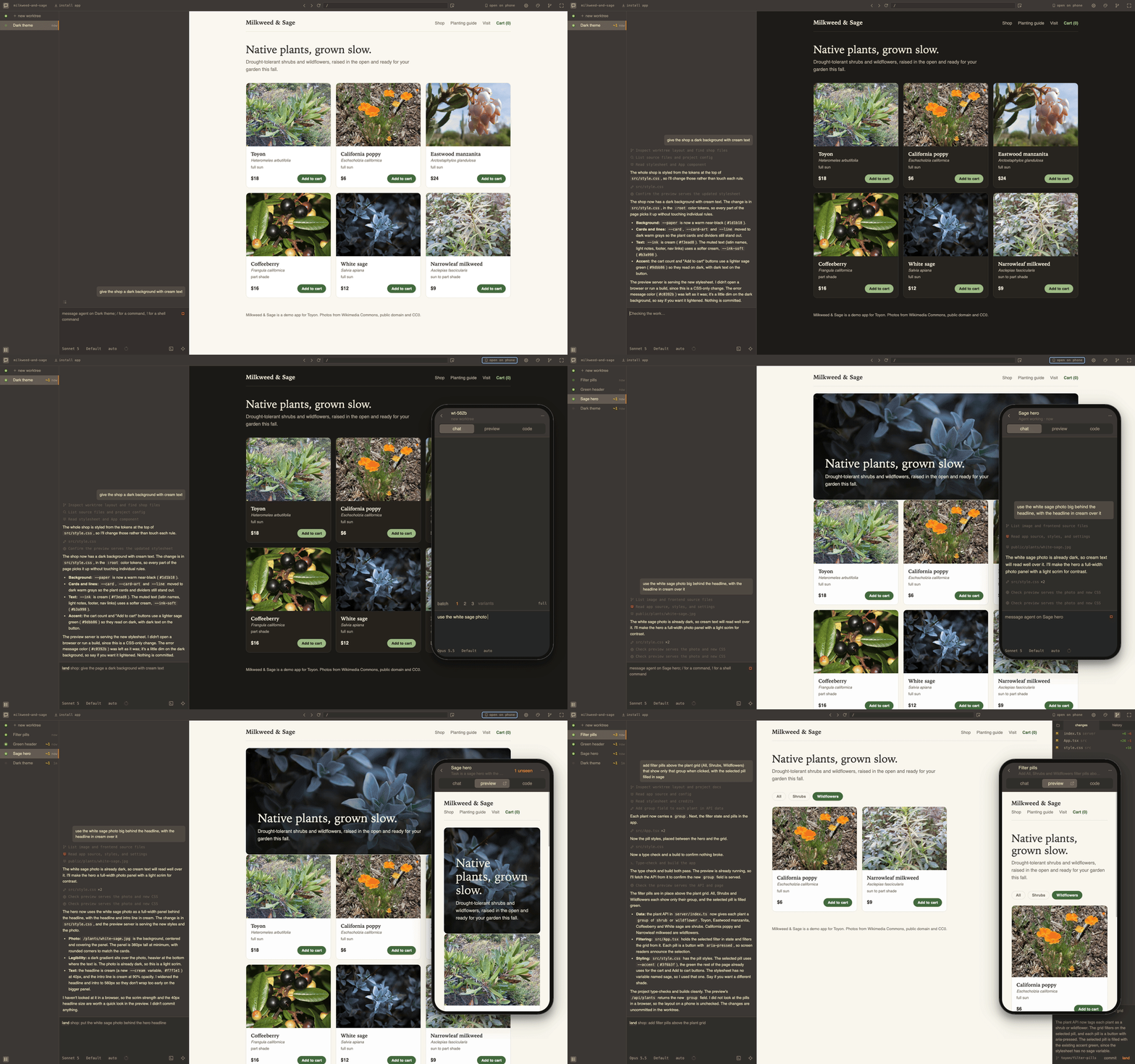
A diff says what changed, not whether the page still looks right. A preview link at the end of a run shows you the result after the agent has stopped, too late to steer it. And with more than one agent going it gets worse: terminal splits, copies of the repo made by hand, dev servers fighting over a port.
In Toyon you point at a button in the page and ask for it to be bigger, watch it change while the agent works, and keep the change when it looks right.
Each copy is a branch and a git worktree with your dependencies and .env files; one spare per project is kept warm.
Point at anything on the page to talk about it or open the line that draws it, and the design pane maps it to your tokens and components. What the agent is told about the page, and the keys, are in docs/preview.md.
One Toyon holds every project you open, and the list of chats shows which one needs you.
When your check passes, land merges into main on your machine by default, or pushes, or opens a pull request.
Built for web apps. A project without a page still works; the chat takes the middle instead of the preview.
Try it in a project:
cd your-project
npx toyon
Or install it globally:
npm i -g toyon
toyon ~/projects/app
toyon . opens the folder you are in and toyon --help lists the rest. A global install keeps itself updated; TOYON_UPDATES=off stops it. Run outside a project, Toyon opens with none: describe a new one in a sentence, or give the project picker a git URL to clone.
You need:
sudo apt install bubblewrap socat). toyon doctor checks both and prints the AppArmor profile Ubuntu 24.04 and later ask for.Each agent signs in from the chat. Claude Code and Codex install on first start; OpenCode is a larger download with no subagents, effort levels or steering mid-turn. What each one reads and can do is in docs/agents.md.
| Coming from | What stays | What changes |
|---|---|---|
| Claude Code or Codex in a terminal | The same agent under your login, with your permission rules, hooks, slash commands and MCP servers | Each chat gets its own copy of the project with the app running, and nothing lands until you press |
| Cursor, Zed or VS Code | Your editor and your checkout; any file opens back in your editor | The running app is the centre of every chat, wired to its source |
| Lovable, v0 or Bolt | The loop: a chat and the page it changes, and pointing at an element to talk about it | Your own project on your machine, with your database, Docker and private packages; each chat is a branch in your repository |
| Conductor or Superset | Many agents at once, each on its own copy | Built around the app instead of the agents; MIT, no account, no telemetry, lands on your machine without GitHub |
The contract for anything Toyon runs: stay in the foreground, listen on $PORT, reload yourself however you like. A .toyon/settings.json in the project names the setup commands, the commands to run, an optional check and how work lands. The first open guesses one from package.json, asks you to confirm it, and writes it into the project; other stacks start from an empty guess the agent can fill in. If a server comes up on some other port anyway, the preview follows it there and says which flag to add.
A project with a page and an API behind it:
{
  "setup": ["npm install"],
  "run": {
    "web": "vite --port $PORT --strictPort",
    "api": { "cmd": "node --watch server.js", "from": "trunk" }
  },
  "check": "npm test",
  "land": { "route": "pr" }
}
Each command gets its own $PORT, and the addresses of the others as <NAME>_URL (API_URL here), so the page can proxy to its API. The preview shows web. A command marked from: "trunk" runs once, in the main checkout, and every copy's page reaches that one until the copy's own changes touch it; then the copy starts its own. A copy that only changes the page costs one Vite.
Copies start when you open them, and stop their servers when nobody has looked at them for a while; the chat and the agent keep going. Close the window and the daemon stops itself once nothing has needed it for half an hour; toyon stop stops it now, and everything it runs. toyon doctor says what is running and why a page cannot connect. Every setting, the port rules and the sleep delay are in docs/settings.md.
TOYON_WORKTREE in every command's environment lets a project give each copy its own (app_$TOYON_WORKTREE as the database name); docs/settings.md has the recipes.Toyon can also run on a box you open from your phone, or on your own Fly account with the laptop closed. This moves Toyon and its copies off your laptop; it does not publish your app. None of it passes through a Toyon server; there is none. toyon remote puts a box on your own domain behind Caddy or on your Tailscale tailnet, toyon deploy fly up builds a machine on your Fly account and prints the link, and the Dockerfile in the package runs on any host with a disk and a port range. A Fly machine measured about $4-6 a month in ordinary use, plus whatever your agents spend, and its first chat can sign in with your Claude plan. toyon.cloud keeps a list of your machines in your browser, and nothing else.
These routes are new. How to set each one up, and what it has been checked with, is in docs/remote.md.
Each copy is a real git worktree under ~/.toyon/worktrees.noindex with its own node_modules, cloned from the main checkout with copy-on-write where the filesystem has it: cp -c on APFS, --reflink=auto on btrfs and XFS. A new copy then costs seconds and almost no space until files diverge. On ext4 and other filesystems without reflinks it is a plain copy, and each one costs a full node_modules. The setup log says which path ran. Nothing is deleted without you.
The daemon listens on loopback only and every request carries a per-machine token. Nothing is exposed to your network, and turning on remote access admits one name over https and nothing else.
Agents run confined. Everything a shell command spawns runs inside an OS sandbox (Seatbelt on macOS, bubblewrap on Linux) that can write to the worktree, the temp directories and package-manager caches, and nothing else, and the file tools are held to the same boundary. An agent cannot widen its own sandbox or another's. MCP servers run as each agent runs them, outside Toyon's sandbox. Opening a repository runs its setup, its dev server and whatever it configures for the agents, so open the ones you trust.
Each chat has a permission mode, shown next to the prompt. auto, the default, lets edits and sandboxed commands run and asks only when the agent proposes a plan. ask turns every edit and every command into a card in the chat before it runs. plan puts the agent in its read-only mode, and approving its plan chooses whether the work runs in auto or ask.
One limit worth knowing: the sandbox cannot tell a commit from a push. git push, branch deletion and gh pr are refused by rules in the configuration Toyon gives Claude Code and OpenCode, and every agent is told not to push. Codex has no equivalent list, and its shell commands can read Toyon's token. That is a command filter, not a wall: if your credentials are on the machine, a determined agent could still find a spelling that pushes. The whole boundary, per agent, is in docs/trust.md.
On a company machine, IT can turn updates, deploying, remote access, particular agents and the personal Claude sign-in off for everyone with one root-owned file, pushed the way Chrome's policies are; toyon doctor shows what is in effect. The file and its keys are in docs/policy.md.
toyon uninstall
npm uninstall -g toyon
The first command lists what it will remove from ~/.toyon and asks before doing it. It keeps your projects, every branch Toyon made under toyon/, and Toyon's settings in each project. It does not delete a machine you deployed to Fly; run toyon deploy fly destroy <name> first.
None: nothing about you or your work is sent anywhere. Toyon's one call of its own is an update check every six hours against the registry npm is set up for, and TOYON_UPDATES=off stops it. The rest of the traffic is to the agents you sign into, to npm on first start to fetch the Claude Code and Codex adapters and again when you first pick OpenCode, to Fly when you deploy there, and to whatever your own dev servers, git fetch and git push talk to.
Toyon is early, and there is more worth doing than there are hands. The most useful thing right now is an issue: what you ran, what broke, and what your project is built with, especially anything that is not a Node app. Pull requests are welcome too; CONTRIBUTING.md has the setup, and bun run check is the bar.
MIT
hooks/register.js 18 lines1// The smallest mod: a plugin whose hooks are functions Claude Code calls in its own process. The
2// integration test loads it from this folder through agents.json and runs /tally.
3let calls = 0;
4
5export function register(on) {
6 on("session.start", async ($, e, next) => {
7 await $.command.register({ name: "tally", description: "Show how many tool calls Claude has made" });
8 return next(e);
9 });
10 on("tool.call", async (_$, e, next) => {
11 calls += 1;
12 return next(e);
13 });
14 on("command.run", { command: "tally" }, async () => {
15 return { text: `Claude has made ${calls} tool calls since this mod loaded` };
16 });
17}
18