diagrams
Pins the diagrams Claude draws to a chip above the prompt: expand it in place, open it full screen or in the browser, and see it as a rendered picture
newpanebandguardcommandtoast

Pins the diagrams Claude draws to a chip above the prompt: expand it in place, open it full screen or in the browser, and see it as a rendered picture
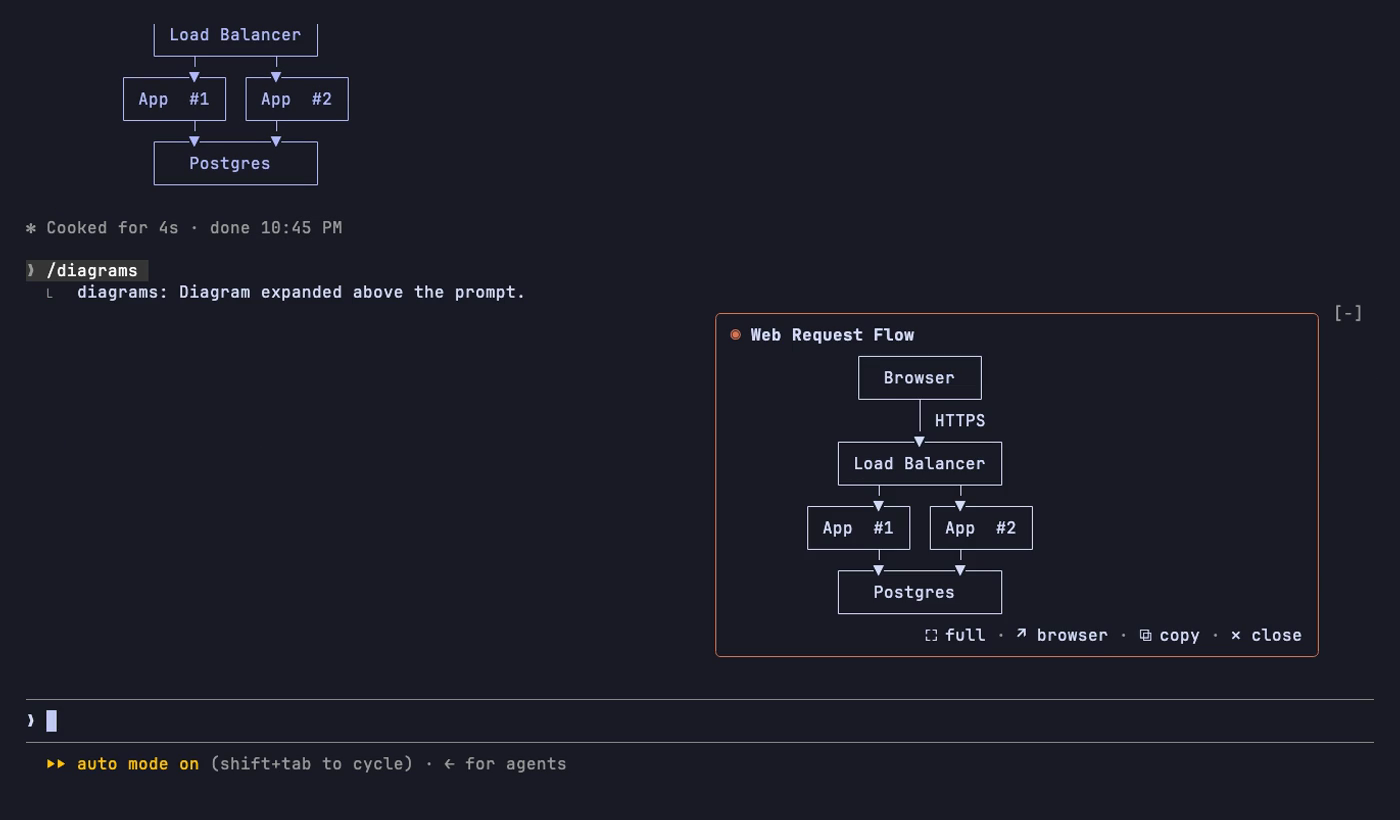
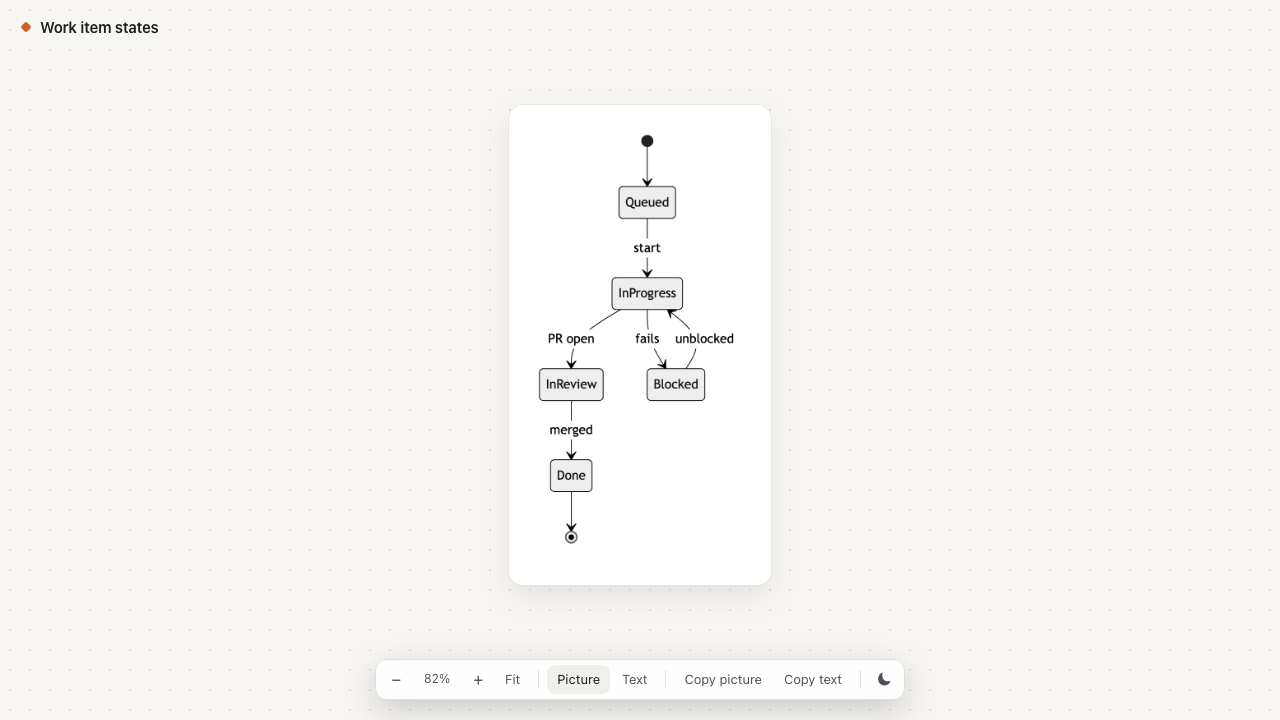
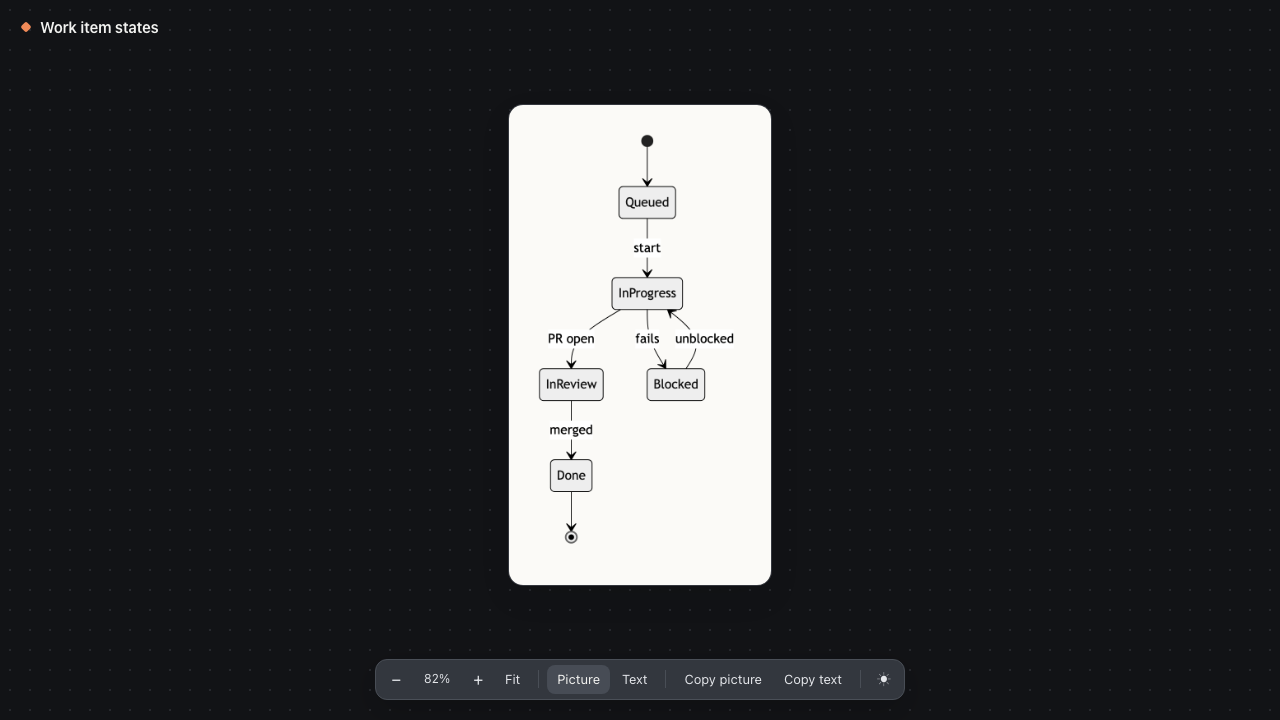
A Claude Code mod for the diagrams Claude draws. Every box-and-arrow diagram in a reply gets pinned to a small chip above the prompt. Expand it in place, open it full screen, see it as a rendered Mermaid picture, or open it in the browser to zoom, copy and share.
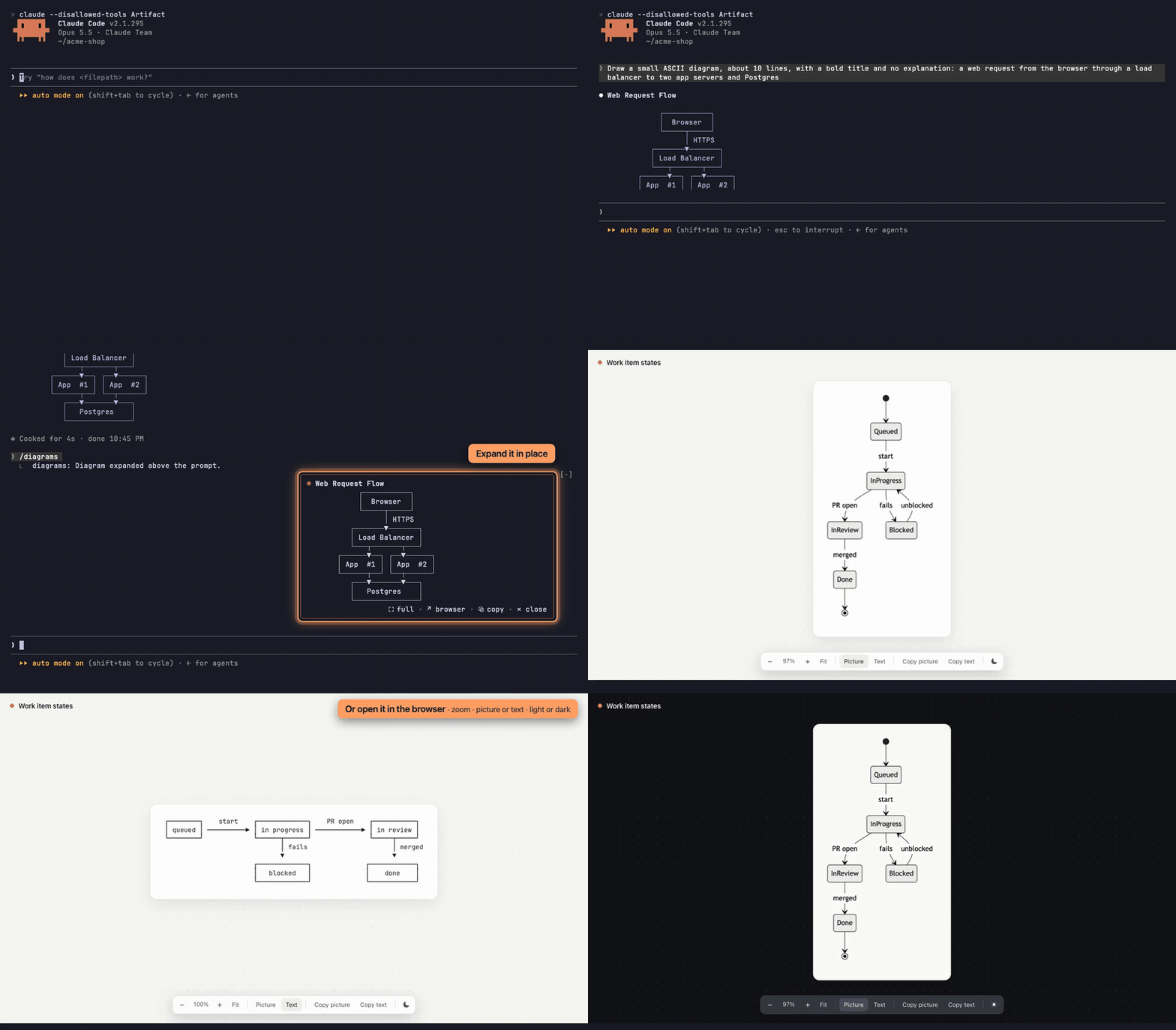
<sub>Watch the MP4</sub>
If you ask Claude for diagrams often (architecture, request flows, state machines), they scroll away with the chat and are hard to share. This mod keeps them at hand:
| Card above the prompt | Browser, light | Browser, dark |
|---|---|---|
 |  |  |
In a Claude Code terminal session:
/plugin install diagrams --marketplace tomasvarga/claude-code-diagramsAnswer y to add the marketplace, pick a scope (user is the default), and set the options on the screen that follows. The mod starts working right away, with no restart.
/diagrams, to open the card. /diagrams again closes it.+ and −, pinch or ctrl+scroll to zoom, 0 or Fit to fit, and drag to pan.Change them with /config → diagrams.
| Setting | Values | What it does |
|---|---|---|
| Palette | terminal (default), solarized-light, solarized-dark | terminal uses your terminal's own colors. A preset paints the card in fixed colors, whatever Claude Code's theme is. |
| Full screen palette | same (default), solarized-light, solarized-dark | Gives only the full-screen pane its own palette. |
| Pictures | on (default), off | Claude adds a Mermaid version of each diagram, and the mod renders it as a picture. off keeps replies shorter and skips the renderer. |
The mod renders Mermaid using mmdc if it's installed. Otherwise it uses the pinned @mermaid-js/mermaid-cli through npx. The first render downloads the renderer and a headless Chrome, which takes about a minute. After that, a render takes about a second.
The picture shows in terminals that speak the kitty graphics protocol: kitty, Ghostty and WezTerm. Elsewhere the card shows the text.
/config → renderer → fullscreen, or "tui": "fullscreen" in settings. In the default mode, use /diagrams to open and close the card. export CLAUDE_CODE_FORCE_TERMINAL_IMAGES=1herdr also needs kitty_graphics = true in its config.
The mod runs inside Claude Code's mod sandbox and reaches the outside only through these calls:
claude-diagram-*.mmd, .png and .html files to your temp folder ($TMPDIR).mmdc, or npx @mermaid-js/mermaid-cli, to render pictures; open or xdg-open for the browser view; osascript or xclip to copy a picture; and herdr or tmux to zoom the pane.npx download of the Mermaid renderer.git clone https://github.com/tomasvarga/claude-code-diagrams
claude --plugin-dir ./claude-code-diagrams # run Claude Code with it
claude plugin validate ./claude-code-diagrams # check what the engine would accept
claude plugin test ./claude-code-diagrams # run the testsThe mod is one module, hooks/register.tsx. Its state contract is in types/index.d.ts, and the tests are in tests/.
hooks/register.tsx 951 lines1import { atom, read, update } from 'claude-code'
2import type { EngineInterface, Register, Timer } from 'claude-code'
3
4import type { Diagram, Picture } from '../types'
5
6const MAX_DIAGRAMS = 50
7const PANE = 'diagram'
8
9// How the mod colors itself, picked in /config (`palette`). `terminal` paints no
10// colors of its own: text, borders and backgrounds follow each person's terminal,
11// whatever its theme. The presets paint a full palette whatever Claude Code's theme is.
12type Ink = { color?: string; dimColor?: boolean }
13type Palette = {
14 text: Ink
15 muted: Ink
16 accent: Ink
17 rule: { borderColor?: string; borderDimColor?: boolean }
18 highlight: { borderColor?: string; borderDimColor?: boolean }
19 background?: string
20 surface?: string
21}
22
23const PALETTES: Record<string, Palette> = {
24 terminal: {
25 text: {},
26 muted: { dimColor: true },
27 accent: { color: 'claude' },
28 rule: { borderDimColor: true },
29 highlight: { borderColor: 'claude' },
30 },
31 // Braver's Solarized Light: base2 for the card, a step darker than the base3 cream of the chat.
32 'solarized-light': {
33 text: { color: '#073642' },
34 muted: { color: '#586e75' },
35 accent: { color: '#cb4b16' },
36 rule: { borderColor: '#93a1a1' },
37 highlight: { borderColor: '#cb4b16' },
38 background: '#eee8d5',
39 surface: '#e3dbc6',
40 },
41 'solarized-dark': {
42 text: { color: '#93a1a1' },
43 muted: { color: '#839496' },
44 accent: { color: '#cb4b16' },
45 rule: { borderColor: '#586e75' },
46 highlight: { borderColor: '#cb4b16' },
47 background: '#073642',
48 surface: '#0d3f4c',
49 },
50}
51
52// The title types itself back in this many characters per frame once a turn ends.
53const REVEAL_STEP = 3
54const REVEAL_FRAME_MS = 25
55
56const list = atom({ plugin: 'diagrams', key: 'list' } as const, [])
57const index = atom({ plugin: 'diagrams', key: 'index' } as const, 0)
58const isOpen = atom({ plugin: 'diagrams', key: 'isOpen' } as const, false)
59// How much of the chip's title shows; -1 is all of it.
60const reveal = atom({ plugin: 'diagrams', key: 'reveal' } as const, -1)
61// How many columns the full-screen view is panned right, for a diagram wider than the pane.
62const pan = atom({ plugin: 'diagrams', key: 'pan' } as const, 0)
63// Which multiplexer full screen zoomed ('herdr', 'tmux' or ''), so close undoes only its own zoom.
64const zoomedBy = atom({ plugin: 'diagrams', key: 'zoomedBy' } as const, '')
65const isFull = atom({ plugin: 'diagrams', key: 'isFull' } as const, false)
66// Show the text version even where a picture is rendered.
67const isText = atom({ plugin: 'diagrams', key: 'isText' } as const, false)
68// The frame of the working chip's pulse.
69const pulse = atom({ plugin: 'diagrams', key: 'pulse' } as const, 0)
70const PULSE = ['◇', '◈', '◆', '◈']
71const PULSE_FRAME_MS = 300
72
73// The Mermaid renderer when `mmdc` isn't installed: pinned, fetched once into npx's cache.
74const MERMAID_CLI = '@mermaid-js/mermaid-cli@11.17.0'
75// The first render downloads the renderer and a headless Chrome.
76const RENDER_TIMEOUT_MS = 300_000
77// A terminal cell's width over its height (16x30 px in kitty, 8x17 in most), for
78// sizing a picture in cells with its shape kept.
79const CELL_ASPECT = 0.53
80// Pictures render at 2x, so on a Retina screen with 16 px cells this many image
81// pixels make one column at actual size; a picture is never stretched past it.
82const PIXELS_PER_COLUMN = 16
83// What full screen asks the dock for: more than any terminal has, so it gets the most it can.
84const FULL_COLUMNS = 1000
85
86const STYLE = `The user's diagrams mod pins every diagram you write to a small chip on the right above the prompt, which they expand to see it large, with a history.
87- Put each diagram in its own fenced code block (\`\`\`text), drawn with Unicode box-drawing characters (┌ ─ ┐ │ └ ┘ ├ ┤ ┬ ┴ ┼) and arrows (──▶ ◀── ▲ ▼).
88- Write a short title naming what it shows, in bold on its own line just before the block, e.g. "**Slack request flow**". The chip shows it.
89- Keep each diagram at most 100 columns wide and about 25 lines tall; split a big picture into several blocks, each with its own title.`
90
91const MERMAID_STYLE = `- Right after each diagram's block, write the same diagram as a \`\`\`mermaid block (flowchart, sequenceDiagram, stateDiagram-v2 or erDiagram, whichever fits); the mod renders it as a picture. Quote flowchart node labels (A["..."]) and edge labels (-->|"..."|); in sequence, state and ER diagrams write labels bare, since quotes there show literally. Keep it as simple as the text version.`
92
93// Box-drawing and arrow characters; a fenced block with enough of them is a diagram.
94const DRAWING = /[┌┐└┘├┤┬┴┼─│═║╔╗╚╝╭╮╯╰▶◀▲▼►◄→←↑↓]/g
95const MIN_DRAWING_CHARS = 12
96const FENCE = /(^|\n)```([^\n]*)\n([\s\S]*?)\n```/g
97
98type Part = { kind: 'text'; text: string } | { kind: 'diagram'; diagram: Diagram }
99
100export const register: Register = (on, options) => {
101 const S = PALETTES[String(options.palette)] ?? PALETTES.terminal!
102 // Full screen can wear its own palette, the card keeping the terminal's colors.
103 const fullS = PALETTES[String(options.fullScreenPalette)] ?? S
104 const isPictures = options.pictures !== 'off'
105 const theme = String(options.palette).endsWith('dark') ? 'dark' : 'neutral'
106 let revealing: Timer | undefined
107 let pulsing: Timer | undefined
108
109 on('session.start', async ($, e, next) => {
110 // A reload drops the timers, so a title stuck half typed shows whole.
111 await update($, reveal, () => -1)
112 await $.command.register({
113 name: 'diagrams',
114 description: 'Expand or collapse the diagram card above the prompt',
115 })
116
117 return next(e)
118 })
119
120 on('prompt.compose', async ($, e, next) => {
121 const composed = await next(e)
122
123 return {
124 sections: [...composed.sections, { id: 'diagrams:style', text: isPictures ? `${STYLE}\n${MERMAID_STYLE}` : STYLE, scope: 'session' }],
125 }
126 })
127
128 // While a turn runs the chip's symbol pulses, so it reads as working.
129 on('turn.start', async ($, e, next) => {
130 pulsing?.cancel()
131 pulsing = $.clock.every(PULSE_FRAME_MS, () => void update($, pulse, n => (n + 1) % PULSE.length))
132
133 return next(e)
134 })
135
136 on('turn.complete', async ($, e, next) => {
137 const done = await next(e)
138
139 if (e.agentId) {
140 return done
141 }
142
143 pulsing?.cancel()
144
145 if (!e.isAborted) {
146 for (const diagram of diagramsIn(e.answer)) {
147 await pin($, diagram)
148 }
149
150 // Rendering takes seconds (minutes the first time): outside this dispatch.
151 if (isPictures) {
152 $.clock.after(0, () => void renderPictures($, S.background ?? 'transparent', theme))
153 }
154 }
155
156 // The chip sat as a bare symbol while the turn ran; type its title back in.
157 revealing?.cancel()
158 await update($, reveal, () => 0)
159 revealing = $.clock.every(REVEAL_FRAME_MS, async () => {
160 const title = (await current($))?.title ?? ''
161 const shown = await update($, reveal, n => (n < 0 || n + REVEAL_STEP >= title.length ? -1 : n + REVEAL_STEP))
162
163 if (shown < 0) {
164 revealing?.cancel()
165 }
166 })
167
168 return done
169 })
170
171 // An earlier version registered this tool, and a registration outlives the code
172 // that made it (there is no unregister), so calls to it still arrive: pin the diagram.
173 on('tool.call', { tool: 'mcp__diagrams__show_diagram' }, async ($, e) => {
174 const args = e as unknown as { title?: unknown; diagram?: unknown }
175 const source = typeof args.diagram === 'string' ? args.diagram.replace(/\s+$/, '') : ''
176
177 if (!isDiagram(source)) {
178 return { deny: 'That is not a diagram. Write diagrams in a fenced ```text block in your reply instead.' }
179 }
180
181 const title = typeof args.title === 'string' && args.title.trim() ? args.title.trim() : 'Diagram'
182 await pin($, { title, source })
183
184 return { result: `Diagram "${title}" is pinned to the chip above the prompt. Next time, write diagrams in a fenced \`\`\`text block in your reply; the mod pins those too.` }
185 })
186
187 // Esc and the corner mark close full screen without our own close call.
188 on('ui.close', { id: PANE }, async ($, e, next) => {
189 const closed = await next(e)
190 await update($, isFull, () => false)
191 await unzoom($)
192
193 return closed
194 })
195
196 on('command.run', { command: 'diagrams' }, async $ => {
197 if ((await read($, list)).length === 0) {
198 return { text: 'No diagrams yet in this session.' }
199 }
200
201 const expanded = await update($, isOpen, open => !open)
202
203 return { text: expanded ? 'Diagram expanded above the prompt.' : 'Diagram collapsed.' }
204 })
205
206 on('ui.render', { component: 'AbovePrompt' }, async ($, e, next) => {
207 const all = await read($, list)
208 const at = clamp(await read($, index), all.length)
209 const diagram = all[at]
210
211 if (!diagram || e.props.hasSurvey) {
212 return next(e)
213 }
214
215 const elements = $.ui.resolve(e)
216 const { Box, Button, Text } = elements
217 // Pictures draw only where the surface has Image (the terminal); elsewhere the text.
218 const Image = 'Image' in elements ? elements.Image : undefined
219 const step = (by: number) => () => update($, index, i => clamp(i + by, all.length))
220 const showsPicture = isPictures && !!Image && !!diagram.picture && !(await read($, isText))
221 const toggle: Action[] = isPictures && diagram.picture
222 ? [{ key: 'view', label: showsPicture ? '⌗ text' : '▦ picture', onPress: () => update($, isText, text => !text) }]
223 : []
224 const expand = () => update($, isOpen, () => true)
225 const collapse = () => update($, isOpen, () => false)
226 const fullScreen = async () => {
227 await collapse()
228 await openPane($)
229 }
230 const navigation = all.length > 1 && (
231 <Box gap={1} flexShrink={0}>
232 {/* Words beside the arrows: a one-cell arrow is too small to hit. */}
233 <Button key="prev" label="‹ prev" plain onPress={step(-1)} />
234 <Text {...S.muted}>
235 {at + 1}/{all.length}
236 </Text>
237 <Button key="next" label="next ›" plain onPress={step(1)} />
238 </Box>
239 )
240
241 // While Claude works the chip is a bare symbol, out of the way, that still expands.
242 if (e.props.isWorking && !(await read($, isOpen))) {
243 return (
244 <Box justifyContent="flex-end">
245 <Box borderStyle="round" {...S.rule} paddingX={1} gap={1}>
246 <Button key="open-symbol" label={PULSE[(await read($, pulse)) % PULSE.length]!} plain onPress={expand} />
247 {all.length > 1 && <Text {...S.muted}>{all.length}</Text>}
248 <Button key="open" label="⤢" plain onPress={expand} />
249 </Box>
250 </Box>
251 )
252 }
253
254 if (await read($, isOpen)) {
255 return <Box justifyContent="flex-end">{expandedCard()}</Box>
256 }
257
258 // Full screen is open: the chip says so and closes it.
259 if (await read($, isFull)) {
260 return (
261 <Box justifyContent="flex-end">
262 <Box borderStyle="round" {...S.highlight} paddingX={1} gap={1}>
263 <Text {...S.accent}>⛶</Text>
264 <Text bold {...S.text} wrap="truncate-end">
265 {diagram.title}
266 </Text>
267 <Text {...S.muted}>in full screen</Text>
268 <Button key="close-full" label="close" onPress={() => closePane($)} />
269 </Box>
270 </Box>
271 )
272 }
273
274 const shown = await read($, reveal)
275 const title = shown < 0 ? diagram.title : diagram.title.slice(0, shown)
276
277 return (
278 <Box justifyContent="flex-end">
279 <Box borderStyle="round" {...S.rule} paddingX={1} gap={1}>
280 <Text {...S.accent}>◆</Text>
281 {/* The whole title expands too, not only the small button at the end. */}
282 <Button key="open-title" label={title || ' '} plain onPress={expand} />
283 {shown < 0 && navigation}
284 <Button key="open" label="expand" variant="primary" onPress={expand} />
285 </Box>
286 </Box>
287 )
288
289 // The chip grown into a card in place. Painting it over the chat (an absolute
290 // Box above the band) left the chat garbled in a fullscreen terminal, so it takes
291 // its rows; a diagram taller than the band's room is cut, with full screen offered.
292 function expandedCard() {
293 const lines = diagram!.source.split('\n')
294 // One width for every diagram in the history, so switching doesn't move the controls.
295 const widest = Math.max(...all.flatMap(one => one.source.split('\n').map(line => [...line].length)), 56)
296 // Wide enough for every diagram's text and, with pictures on, its picture at actual size.
297 const pictured = isPictures ? Math.max(0, ...all.map(one => (one.picture ? Math.ceil(one.picture.width / PIXELS_PER_COLUMN) : 0))) : 0
298 const width = Math.min(e.props.bodyColumns, Math.max(widest, pictured) + 4)
299 // The band's rows less the card's own: two border rows, the title bar, the footer
300 // and the "more lines" note; more than that and the band scrolls, cutting off the top.
301 const room = Math.max(4, e.props.maxRows - 5)
302 const hidden = Math.max(0, lines.length - room)
303
304 return (
305 <Box flexDirection="column" width={width} borderStyle="round" {...S.highlight} backgroundColor={S.background}>
306 <Box gap={1} paddingX={1} backgroundColor={S.surface}>
307 <Text {...S.accent} backgroundColor={S.surface}>
308 ◉
309 </Text>
310 <Text bold {...S.text} backgroundColor={S.surface} wrap="truncate-end">
311 {diagram!.title}
312 </Text>
313 </Box>
314 {showsPicture ? (
315 pictureBox(S, Box, Image!, diagram!, width - 4, room)
316 ) : (
317 diagramLines(S, Box, Text, hidden > 0 ? lines.slice(0, room) : lines, 0)
318 )}
319 {!showsPicture && hidden > 0 && (
320 <Text {...S.muted} backgroundColor={S.background}>
321 {` … ${hidden} more lines in full screen`}
322 </Text>
323 )}
324 {/* Every control on the bottom row, which sits on the prompt and so stays put. */}
325 <Box justifyContent="space-between" paddingX={1} backgroundColor={S.background}>
326 <Box flexShrink={0}>{navigation || <Text backgroundColor={S.background}> </Text>}</Box>
327 {actions(S, Box, Button, Text, [
328 ...toggle,
329 { key: 'full', label: '⛶ full', onPress: fullScreen },
330 { key: 'browser', label: '↗ browser', onPress: () => openInBrowser($, diagram!) },
331 { key: 'copy', label: '⧉ copy', onPress: press => copy($, diagram!, press.surface, showsPicture) },
332 { key: 'close', label: '✕ close', onPress: collapse },
333 ])}
334 </Box>
335 </Box>
336 )
337 }
338
339 })
340
341 // Full screen: Claude Code's pane, which the person scrolls with the arrows.
342 on('ui.render', { component: 'Pane', requestId: PANE }, async ($, e) => {
343 const S = fullS
344 const diagram = await current($)
345 const elements = $.ui.resolve(e)
346 const { Box, Button, Text } = elements
347 const Image = 'Image' in elements ? elements.Image : undefined
348
349 if (!diagram) {
350 return <Text {...S.muted}>No diagrams yet.</Text>
351 }
352
353 const lines = diagram.source.split('\n')
354 // The pane's width less its padding; a wider diagram pans sideways instead of being cut.
355 const visible = Math.max(10, e.props.bodyColumns - 2)
356 const widest = Math.max(...lines.map(line => [...line].length))
357 const maxPan = Math.max(0, widest - visible)
358 const left = Math.min(await read($, pan), maxPan)
359 const panBy = (by: number) => () => update($, pan, at => Math.max(0, Math.min(at + by, maxPan)))
360 const step = Math.max(10, Math.floor(visible / 2))
361 const showsPicture = isPictures && !!Image && !!diagram.picture && !(await read($, isText))
362
363 // At least the pane's height, so the palette fills it and the footer sits at its
364 // bottom; a taller diagram makes it longer and the person scrolls with the arrows.
365 return (
366 <Box flexDirection="column" width={e.props.bodyColumns} minHeight={e.props.scroll.bodyRows} backgroundColor={S.background}>
367 <Box gap={1} paddingX={1} backgroundColor={S.surface}>
368 <Text {...S.accent} backgroundColor={S.surface}>
369 ◉
370 </Text>
371 <Text bold {...S.text} backgroundColor={S.surface} wrap="truncate-end">
372 {diagram.title}
373 </Text>
374 </Box>
375 <Box flexDirection="column" flexGrow={1} backgroundColor={S.background}>
376 {showsPicture
377 ? pictureBox(S, Box, Image!, diagram, visible, Math.max(4, e.props.scroll.bodyRows - 4), true)
378 : diagramLines(S, Box, Text, lines.map(line => [...line].slice(left, left + visible).join('')), 1)}
379 </Box>
380 <Box justifyContent="space-between" paddingX={1} backgroundColor={S.background}>
381 {!showsPicture && maxPan > 0 ? (
382 <Box gap={1} flexShrink={0}>
383 <Button key="left" label="◀" plain onPress={panBy(-step)} />
384 <Text {...S.muted} backgroundColor={S.background}>
385 columns {left + 1}–{Math.min(left + visible, widest)} of {widest}
386 </Text>
387 <Button key="right" label="▶" plain onPress={panBy(step)} />
388 </Box>
389 ) : (
390 <Text backgroundColor={S.background}> </Text>
391 )}
392 {actions(S, Box, Button, Text, [
393 ...(isPictures && diagram.picture
394 ? [{ key: 'view', label: showsPicture ? '⌗ text' : '▦ picture', onPress: () => update($, isText, text => !text) }]
395 : []),
396 { key: 'browser', label: '↗ browser', onPress: () => openInBrowser($, diagram) },
397 { key: 'copy', label: '⧉ copy', onPress: press => copy($, diagram, press.surface, showsPicture) },
398 { key: 'close', label: '✕ close', onPress: () => closePane($) },
399 ])}
400 </Box>
401 </Box>
402 )
403 })
404}
405
406type Elements = ReturnType<EngineInterface['ui']['resolve']>
407type TerminalImage = Extract<Elements, { Image: unknown }>['Image']
408
409// The diagram as plain Text rows, not Code: Code paints its own background over the palette.
410function diagramLines(S: Palette, Box: Elements['Box'], Text: Elements['Text'], lines: readonly string[], paddingY: number) {
411 return (
412 <Box flexDirection="column" paddingX={1} paddingY={paddingY} backgroundColor={S.background}>
413 {lines.map((line, row) => (
414 <Text key={`line-${row}`} {...S.text} backgroundColor={S.background} wrap="truncate-end">
415 {line || ' '}
416 </Text>
417 ))}
418 </Box>
419 )
420}
421
422// Diagrams whose render failed this load, so a broken one isn't retried after every turn.
423const failed = new Set<string>()
424let isRendering = false
425
426// Renders the pinned diagrams that have Mermaid and no picture yet, one at a time.
427async function renderPictures($: EngineInterface, background: string, theme: string) {
428 if (isRendering) {
429 return
430 }
431
432 isRendering = true
433
434 try {
435 for (const diagram of await read($, list)) {
436 if (!diagram.mermaid || diagram.picture || failed.has(diagram.mermaid)) {
437 continue
438 }
439
440 const picture = await render($, diagram.mermaid, background, theme)
441
442 if (picture) {
443 await update($, list, all => all.map(one => (one.mermaid === diagram.mermaid ? { ...one, picture } : one)))
444 } else {
445 failed.add(diagram.mermaid)
446 $.ui.toast(`Could not render "${diagram.title}" as a picture; showing the text`)
447 }
448 }
449 } finally {
450 isRendering = false
451 }
452}
453
454// The picture at actual size, its shape kept, shrunk only when the room is smaller;
455// in full screen (`grows`) as large as the room.
456function pictureBox(S: Palette, Box: Elements['Box'], Image: TerminalImage, diagram: Diagram, columns: number, rows: number, grows = false) {
457 const picture = diagram.picture!
458 const rowsPerColumn = (picture.height / picture.width) * CELL_ASPECT
459 const wide = Math.min(255, grows ? columns : picture.width / PIXELS_PER_COLUMN, columns, rows / rowsPerColumn)
460
461 return (
462 <Box paddingX={1} justifyContent="center" backgroundColor={S.background}>
463 <Image
464 source={{ file: picture.path, format: 'png' }}
465 columns={Math.max(1, Math.round(wide))}
466 rows={Math.max(1, Math.min(255, Math.round(wide * rowsPerColumn)))}
467 alt={diagram.title}
468 />
469 </Box>
470 )
471}
472
473// Renders Mermaid to a PNG in the temp folder with mmdc, or the pinned renderer through npx.
474async function render($: EngineInterface, mermaid: string, background: string, theme: string): Promise<Picture | undefined> {
475 const folder = ((await $.env.get('TMPDIR')) ?? '/tmp').replace(/\/$/, '')
476 const name = `${folder}/claude-diagram-${hash(`${mermaid}|${background}|${theme}`)}`
477 await $.fs.write(`${name}.mmd`, mermaid)
478 const args = ['-i', `${name}.mmd`, '-o', `${name}.png`, '-b', background, '-t', theme, '-s', '2', '-q']
479
480 for (const argv of [['mmdc', ...args], ['npx', '-y', '-p', MERMAID_CLI, 'mmdc', ...args]]) {
481 const isDone = await $.process.run(argv, { timeoutMs: RENDER_TIMEOUT_MS }).then(
482 run => run.exitCode === 0,
483 () => false,
484 )
485
486 if (isDone) {
487 const { base64 } = await $.fs.read(`${name}.png`, { as: 'bytes' })
488 const size = pngSize(base64)
489
490 return size && { path: `${name}.png`, ...size }
491 }
492 }
493
494 return undefined
495}
496
497// A PNG's size from its header: width and height are the big-endian words at bytes 16 and 20.
498export function pngSize(base64: string) {
499 const alphabet = 'ABCDEFGHIJKLMNOPQRSTUVWXYZabcdefghijklmnopqrstuvwxyz0123456789+/'
500 const bytes: number[] = []
501
502 for (let at = 0; at + 4 <= Math.min(base64.length, 32); at += 4) {
503 const word = [0, 1, 2, 3].reduce((sum, i) => (sum << 6) | Math.max(0, alphabet.indexOf(base64[at + i] ?? 'A')), 0)
504 bytes.push((word >> 16) & 255, (word >> 8) & 255, word & 255)
505 }
506
507 const word = (at: number) => (((bytes[at] ?? 0) << 24) | ((bytes[at + 1] ?? 0) << 16) | ((bytes[at + 2] ?? 0) << 8) | (bytes[at + 3] ?? 0)) >>> 0
508 const width = word(16)
509 const height = word(20)
510
511 return width > 0 && height > 0 ? { width, height } : undefined
512}
513
514function hash(text: string) {
515 let value = 5381
516
517 for (const char of text) {
518 value = ((value * 33) ^ char.codePointAt(0)!) >>> 0
519 }
520
521 return value.toString(36)
522}
523
524async function openPane($: EngineInterface) {
525 await update($, pan, () => 0)
526 await $.ui.close({ id: PANE })
527 await zoom($)
528 await update($, isFull, () => true)
529 // Docked beside a fullscreen transcript, ask for every column the dock will give.
530 await $.ui.open({ id: PANE, title: 'Diagram', focus: true, closeOnEscape: true, holdToasts: true, columns: FULL_COLUMNS })
531}
532
533type Action = { key: string; label: string; onPress: Parameters<Elements['Button']>[0]['onPress'] }
534
535async function closePane($: EngineInterface) {
536 await $.ui.close({ id: PANE })
537 await update($, isFull, () => false)
538 await unzoom($)
539}
540
541// Full screen makes the terminal pane fill its window first when it sits in a
542// multiplexer split (herdr or tmux), and close puts it back; elsewhere nothing changes.
543async function zoom($: EngineInterface) {
544 const run = (argv: string[]) => $.process.run(argv).then(r => (r.exitCode === 0 ? r.stdout : undefined), () => undefined)
545 const herdrPane = await $.env.get('HERDR_PANE_ID')
546
547 if (herdrPane) {
548 const herdr = (await $.env.get('HERDR_BIN_PATH')) || 'herdr'
549 const layout = await run([herdr, 'pane', 'layout', '--pane', herdrPane])
550 const isZoomed = layout === undefined || /"zoomed"\s*:\s*true/.test(layout)
551
552 if (!isZoomed && (await run([herdr, 'pane', 'zoom', '--pane', herdrPane, '--on'])) !== undefined) {
553 await update($, zoomedBy, () => 'herdr')
554 }
555
556 return
557 }
558
559 const tmuxPane = await $.env.get('TMUX_PANE')
560
561 if (tmuxPane && (await run(['tmux', 'display', '-p', '-t', tmuxPane, '#{window_zoomed_flag}']))?.trim() === '0') {
562 if ((await run(['tmux', 'resize-pane', '-Z', '-t', tmuxPane])) !== undefined) {
563 await update($, zoomedBy, () => 'tmux')
564 }
565 }
566}
567
568async function unzoom($: EngineInterface) {
569 const by = await read($, zoomedBy)
570
571 if (!by) {
572 return
573 }
574
575 await update($, zoomedBy, () => '')
576 const run = (argv: string[]) => $.process.run(argv).catch(() => undefined)
577
578 if (by === 'herdr') {
579 const herdrPane = await $.env.get('HERDR_PANE_ID')
580 const herdr = (await $.env.get('HERDR_BIN_PATH')) || 'herdr'
581
582 if (herdrPane) {
583 await run([herdr, 'pane', 'zoom', '--pane', herdrPane, '--off'])
584 }
585 } else if (by === 'tmux') {
586 const tmuxPane = await $.env.get('TMUX_PANE')
587
588 if (tmuxPane) {
589 await run(['tmux', 'resize-pane', '-Z', '-t', tmuxPane])
590 }
591 }
592}
593
594// A row of quiet text buttons, dots between them: no brackets, no hotkey labels.
595function actions(S: Palette, Box: Elements['Box'], Button: Elements['Button'], Text: Elements['Text'], list: readonly Action[]) {
596 return (
597 <Box gap={1} flexShrink={0}>
598 {list.flatMap((action, at) => [
599 ...(at > 0 ? [<Text key={`dot-${action.key}`} {...S.muted} backgroundColor={S.background}>·</Text>] : []),
600 <Button key={action.key} label={action.label} plain onPress={action.onPress} />,
601 ])}
602 </Box>
603 )
604}
605
606// Writes the diagram as a page to the temp folder and opens it in the default browser:
607// readable on any screen, light or dark, and nothing to install.
608async function openInBrowser($: EngineInterface, diagram: Diagram) {
609 const folder = ((await $.env.get('TMPDIR')) ?? '/tmp').replace(/\/$/, '')
610 const slug = diagram.title.toLowerCase().replace(/[^a-z0-9]+/g, '-').replace(/^-|-$/g, '') || 'diagram'
611 const path = `${folder}/claude-diagram-${slug}.html`
612 // The picture goes into the page itself, so the file stands alone.
613 const picture = diagram.picture
614 ? await $.fs.read(diagram.picture.path, { as: 'bytes' }).then(read => read.base64, () => undefined)
615 : undefined
616 await $.fs.write(path, page(diagram, picture))
617
618 for (const opener of ['open', 'xdg-open']) {
619 // A missing opener throws or exits non-zero; either way, try the next one.
620 const opened = await $.process.run([opener, path]).then(
621 run => run.exitCode === 0,
622 () => false,
623 )
624
625 if (opened) {
626 $.ui.toast('Diagram opened in your browser')
627
628 return
629 }
630 }
631
632 $.ui.toast(`Diagram page written to ${path}`)
633}
634
635// The browser page: the picture when there is one (base64 PNG), with the text a
636// tab away, and copy buttons for each.
637function page(diagram: Diagram, picture?: string) {
638 const escape = (text: string) => text.replace(/&/g, '&').replace(/</g, '<').replace(/>/g, '>')
639 const title = escape(diagram.title)
640 const text = JSON.stringify(copyText(diagram)).replace(/</g, '\\u003c')
641
642 return `<!doctype html>
643<html lang="en">
644<head>
645<meta charset="utf-8">
646<meta name="viewport" content="width=device-width, initial-scale=1">
647<title>${title}</title>
648<style>
649 /* Theme tokens: the system's choice, or the one picked with the moon/sun button. */
650 :root {
651 --bg: #f7f6f3; --dots: #e4e1da; --surface: #ffffff; --text: #1d1f23; --muted: #6f737a;
652 --line: #e7e4dd; --hover: #f1efea; --accent: #d0602a; --paper: #ffffff;
653 --bar: rgb(255 255 255 / .9); --bar-line: #e2dfd8; --bar-text: #4d5158; --bar-hover: #f1efea;
654 color-scheme: light;
655 }
656 :root[data-theme="dark"] {
657 --bg: #121316; --dots: #26282d; --surface: #1c1e22; --text: #f2f2f0; --muted: #a9adb4;
658 --line: #34373e; --hover: #2a2d33; --accent: #f08a58; --paper: #fbfaf7;
659 --bar: #33373e; --bar-line: #4a4f57; --bar-text: #e4e6ea; --bar-hover: #474c55;
660 color-scheme: dark;
661 }
662 @media (prefers-color-scheme: dark) {
663 :root:not([data-theme="light"]) {
664 --bg: #121316; --dots: #26282d; --surface: #1c1e22; --text: #f2f2f0; --muted: #a9adb4;
665 --line: #34373e; --hover: #2a2d33; --accent: #f08a58; --paper: #fbfaf7;
666 --bar: #33373e; --bar-line: #4a4f57; --bar-text: #e4e6ea; --bar-hover: #474c55;
667 color-scheme: dark;
668 }
669 }
670 * { box-sizing: border-box; }
671 html, body { height: 100%; margin: 0; }
672 body {
673 display: flex; flex-direction: column; background: var(--bg); color: var(--text); overflow: hidden;
674 background-image: radial-gradient(var(--dots) 1px, transparent 1px); background-size: 20px 20px;
675 font: 14px/1.5 ui-sans-serif, -apple-system, BlinkMacSystemFont, "Segoe UI", sans-serif;
676 -webkit-font-smoothing: antialiased; transition: background-color .2s;
677 }
678 header { display: flex; align-items: center; gap: 10px; padding: 16px 22px; }
679 .mark { width: 8px; height: 8px; border-radius: 2px; background: var(--accent); transform: rotate(45deg); flex: none; }
680 h1 { margin: 0; font-size: 15px; font-weight: 600; letter-spacing: -0.01em; white-space: nowrap; overflow: hidden; text-overflow: ellipsis; }
681 /* The stage scrolls when zoomed past the window; dragging pans it. */
682 main { flex: 1; overflow: auto; display: grid; padding: 12px 24px 96px; cursor: grab; }
683 main.dragging { cursor: grabbing; user-select: none; }
684 .sheet {
685 margin: auto; border-radius: 14px; overflow: hidden;
686 box-shadow: 0 0 0 1px var(--line), 0 1px 2px rgb(0 0 0 / .04), 0 12px 32px rgb(0 0 0 / .08);
687 }
688 /* The picture is drawn dark on transparent: it sits on paper in both themes. */
689 img { display: block; padding: 24px; background: var(--paper); -webkit-user-drag: none; }
690 /* The text on the plain sheet, in the page's own ink. */
691 pre {
692 margin: 0; padding: 28px 32px; color: var(--text); background: var(--surface);
693 font: 14px/1.35 ui-monospace, "SF Mono", "JetBrains Mono", Menlo, Consolas, monospace;
694 }
695 .hidden { display: none; }
696 nav {
697 position: fixed; left: 50%; bottom: 20px; transform: translateX(-50%); display: flex; align-items: center; gap: 2px;
698 padding: 5px; background: var(--bar); backdrop-filter: blur(10px); border: 1px solid var(--bar-line);
699 border-radius: 12px; box-shadow: 0 10px 32px rgb(0 0 0 / .18); white-space: nowrap; max-width: calc(100vw - 24px); overflow-x: auto;
700 }
701 nav button {
702 font: inherit; font-size: 13px; color: var(--bar-text); background: none; border: 0; border-radius: 8px;
703 padding: 5px 10px; cursor: pointer; transition: color .15s, background .15s;
704 }
705 nav button:hover, nav button[aria-pressed="true"] { color: var(--text); background: var(--bar-hover); }
706 nav button.done { color: var(--accent); }
707 nav .icon { width: 30px; padding: 5px 0; font-size: 16px; line-height: 1; }
708 nav output { min-width: 48px; text-align: center; font-size: 12px; color: var(--bar-text); font-variant-numeric: tabular-nums; }
709 nav .rule { width: 1px; height: 18px; margin: 0 6px; background: var(--bar-line); flex: none; }
710</style>
711</head>
712<body>
713<header><span class="mark"></span><h1>${title}</h1></header>
714<main id="stage">
715 <div class="sheet">
716 ${picture ? `<img id="picture" alt="${title}" src="data:image/png;base64,${picture}">` : ''}
717 <pre id="diagram"${picture ? ' class="hidden"' : ''}>${escape(diagram.source)}</pre>
718 </div>
719</main>
720<nav>
721 <button class="icon" id="zoom-out" title="Zoom out (−)">−</button>
722 <output id="zoom">100%</output>
723 <button class="icon" id="zoom-in" title="Zoom in (+)">+</button>
724 <button id="fit" title="Fit to window (0)">Fit</button>
725 ${picture ? '<span class="rule"></span><button id="show-picture" aria-pressed="true">Picture</button><button id="show-text" aria-pressed="false">Text</button>' : ''}
726 <span class="rule"></span>
727 ${picture ? '<button id="copy-image">Copy picture</button>' : ''}
728 <button id="copy">Copy${picture ? ' text' : ''}</button>
729 <span class="rule"></span>
730 <button class="icon" id="theme" title="Switch light and dark">☾</button>
731</nav>
732<script>
733 // The theme: the system's until picked; the pick is remembered for every diagram page.
734 const themeButton = document.getElementById('theme')
735 const isDark = () => (document.documentElement.dataset.theme ?? (matchMedia('(prefers-color-scheme: dark)').matches ? 'dark' : 'light')) === 'dark'
736 const paintTheme = () => { themeButton.textContent = isDark() ? '☀' : '☾' }
737 try { const kept = localStorage.getItem('diagram-theme'); if (kept) document.documentElement.dataset.theme = kept } catch {}
738 paintTheme()
739 themeButton.onclick = () => {
740 const next = isDark() ? 'light' : 'dark'
741 document.documentElement.dataset.theme = next
742 try { localStorage.setItem('diagram-theme', next) } catch {}
743 paintTheme()
744 }
745 matchMedia('(prefers-color-scheme: dark)').addEventListener('change', paintTheme)
746
747 const stage = document.getElementById('stage')
748 const pre = document.getElementById('diagram')
749 const img = document.getElementById('picture')
750 const label = document.getElementById('zoom')
751 let isText = !img
752 let zoom = 1
753
754 // 100% is the picture at its natural size (rendered at 2x) or the text at 14px.
755 const shown = () => (isText ? pre : img)
756 function base() {
757 if (isText) {
758 pre.style.fontSize = '14px'
759 return { width: pre.scrollWidth, height: pre.scrollHeight }
760 }
761 return { width: img.naturalWidth / 2 + 48, height: img.naturalHeight / 2 + 48 }
762 }
763 function apply() {
764 if (isText) pre.style.fontSize = 14 * zoom + 'px'
765 else img.style.width = (img.naturalWidth / 2) * zoom + 48 + 'px'
766 label.textContent = Math.round(zoom * 100) + '%'
767 }
768 function setZoom(next) { zoom = Math.min(8, Math.max(0.1, next)); apply() }
769 function fit() {
770 const size = base()
771 setZoom(Math.min(1, (stage.clientWidth - 48) / size.width, (stage.clientHeight - 108) / size.height))
772 }
773 document.getElementById('zoom-in').onclick = () => setZoom(zoom * 1.25)
774 document.getElementById('zoom-out').onclick = () => setZoom(zoom / 1.25)
775 document.getElementById('fit').onclick = fit
776 addEventListener('keydown', e => {
777 if (e.key === '+' || e.key === '=') setZoom(zoom * 1.25)
778 else if (e.key === '-') setZoom(zoom / 1.25)
779 else if (e.key === '0') fit()
780 })
781 // Pinch or ctrl+scroll zooms.
782 stage.addEventListener('wheel', e => {
783 if (!e.ctrlKey) return
784 e.preventDefault()
785 setZoom(zoom * Math.exp(-e.deltaY / 200))
786 }, { passive: false })
787 let drag
788 stage.addEventListener('pointerdown', e => { drag = { x: e.clientX, y: e.clientY, left: stage.scrollLeft, top: stage.scrollTop }; stage.classList.add('dragging') })
789 addEventListener('pointermove', e => { if (drag) { stage.scrollLeft = drag.left - (e.clientX - drag.x); stage.scrollTop = drag.top - (e.clientY - drag.y) } })
790 addEventListener('pointerup', () => { drag = undefined; stage.classList.remove('dragging') })
791
792 function flash(button, text) {
793 const before = button.textContent
794 button.textContent = text
795 button.classList.add('done')
796 setTimeout(() => { button.textContent = before; button.classList.remove('done') }, 1400)
797 }
798 const copy = document.getElementById('copy')
799 copy.onclick = async () => {
800 try { await navigator.clipboard.writeText(${text}); flash(copy, 'Copied') }
801 catch { flash(copy, 'Select and copy') }
802 }
803
804 if (img) {
805 const showPicture = document.getElementById('show-picture')
806 const showText = document.getElementById('show-text')
807 function show(text) {
808 isText = text
809 img.classList.toggle('hidden', text)
810 pre.classList.toggle('hidden', !text)
811 showPicture.setAttribute('aria-pressed', String(!text))
812 showText.setAttribute('aria-pressed', String(text))
813 fit()
814 }
815 showPicture.onclick = () => show(false)
816 showText.onclick = () => show(true)
817 const copyImage = document.getElementById('copy-image')
818 copyImage.onclick = async () => {
819 try {
820 const blob = await (await fetch(img.src)).blob()
821 await navigator.clipboard.write([new ClipboardItem({ 'image/png': blob })])
822 flash(copyImage, 'Copied')
823 } catch { flash(copyImage, 'Right-click to copy') }
824 }
825 img.complete ? fit() : img.addEventListener('load', fit)
826 } else {
827 fit()
828 }
829</script>
830</body>
831</html>
832`
833}
834
835// Adds a diagram to the history, or finds it there, and points the chip at it.
836async function pin($: EngineInterface, diagram: Diagram) {
837 const all = await update($, list, prior =>
838 prior.some(one => one.source === diagram.source) ? prior : [...prior, diagram].slice(-MAX_DIAGRAMS),
839 )
840 await update($, index, () => all.findIndex(one => one.source === diagram.source))
841}
842
843async function current($: EngineInterface) {
844 const all = await read($, list)
845
846 return all[clamp(await read($, index), all.length)]
847}
848
849// Copies what the card shows: the picture as an image where the machine has a tool
850// for that (macOS, or xclip), else the text.
851async function copy($: EngineInterface, diagram: Diagram, surface: Parameters<EngineInterface['ui']['copy']>[0]['surface'], isPicture: boolean) {
852 if (isPicture && diagram.picture && (await copyImage($, diagram.picture.path))) {
853 $.ui.toast('Picture copied, ready to paste into Slack, GitHub or Notion')
854
855 return
856 }
857
858 const copied = await $.ui.copy({ text: copyText(diagram), surface })
859 $.ui.toast(copied.isCopied ? 'Diagram copied, ready to paste into Slack, GitHub or Notion' : 'Could not copy the diagram')
860}
861
862async function copyImage($: EngineInterface, path: string) {
863 const tools = [
864 ['osascript', '-e', `set the clipboard to (read (POSIX file ${JSON.stringify(path)}) as «class PNGf»)`],
865 ['xclip', '-selection', 'clipboard', '-t', 'image/png', '-i', path],
866 ]
867
868 for (const argv of tools) {
869 if (await $.process.run(argv).then(run => run.exitCode === 0, () => false)) {
870 return true
871 }
872 }
873
874 return false
875}
876
877// What copy puts on the clipboard: the title as a plain line (Slack shows **bold** as
878// asterisks) and the diagram fenced, so Slack, GitHub and Notion keep it monospace.
879export function copyText(diagram: Diagram) {
880 return `${diagram.title}\n\`\`\`\n${diagram.source}\n\`\`\`\n`
881}
882
883function clamp(i: number, length: number) {
884 return Math.max(0, Math.min(i, length - 1))
885}
886
887function isDiagram(source: string) {
888 return (source.match(DRAWING) ?? []).length >= MIN_DRAWING_CHARS && source.split('\n').length >= 3
889}
890
891// A reply split into its prose and its diagrams. A short line just before a
892// diagram becomes its title and leaves the prose.
893export function partsOf(text: string): Part[] {
894 const parts: Part[] = []
895 let from = 0
896
897 for (const match of text.matchAll(FENCE)) {
898 const language = (match[2] ?? '').trim().toLowerCase()
899 const source = (match[3] ?? '').replace(/\s+$/, '')
900 const isMermaid = language === 'mermaid'
901
902 if (!isMermaid && !isDiagram(source)) {
903 continue
904 }
905
906 const before = text.slice(from, match.index + (match[1] ?? '').length)
907 const previous = parts.at(-1)
908
909 // A Mermaid block right after a text diagram is that diagram's picture.
910 if (isMermaid && !before.trim() && previous?.kind === 'diagram' && !previous.diagram.mermaid) {
911 previous.diagram.mermaid = source
912 from = match.index + match[0].length
913 continue
914 }
915
916 const { prose, title } = splitTitle(before)
917
918 if (prose.trim()) {
919 parts.push({ kind: 'text', text: prose.trim() })
920 }
921
922 parts.push({ kind: 'diagram', diagram: isMermaid ? { title, source, mermaid: source } : { title, source } })
923 from = match.index + match[0].length
924 }
925
926 const rest = text.slice(from)
927
928 if (rest.trim()) {
929 parts.push({ kind: 'text', text: rest.trim() })
930 }
931
932 return parts
933}
934
935export function diagramsIn(text: string): Diagram[] {
936 return partsOf(text).flatMap(part => (part.kind === 'diagram' ? [part.diagram] : []))
937}
938
939function splitTitle(before: string) {
940 const lines = before.replace(/\s+$/, '').split('\n')
941 const last = lines.at(-1)?.trim() ?? ''
942 const plain = last.replace(/^#+\s*/, '').replace(/[*_`]/g, '').replace(/:$/, '').trim()
943 const isTitleLine = plain.length > 0 && plain.length <= 60 && (/^(\*\*|__|#)/.test(last) || /:$/.test(last))
944
945 if (isTitleLine) {
946 return { prose: lines.slice(0, -1).join('\n'), title: plain }
947 }
948
949 return { prose: before, title: 'Diagram' }
950}
951types/index.d.ts 21 lines1// A rendered picture of a diagram: the PNG's path and its size in pixels.
2export type Picture = { path: string; width: number; height: number }
3
4export type Diagram = { title: string; source: string; mermaid?: string; picture?: Picture }
5
6declare module 'claude-code' {
7 interface PluginState {
8 diagrams: {
9 list: Diagram[]
10 index: number
11 isOpen: boolean
12 reveal: number
13 pan: number
14 zoomedBy: string
15 isFull: boolean
16 isText: boolean
17 pulse: number
18 }
19 }
20}
21