explain-as
/explain: get answers as ASD-STE100 prose, a diagram, an HTML page, or a 3b1b-style video
newpanebandguardcommandtoast

/explain: get answers as ASD-STE100 prose, a diagram, an HTML page, or a 3b1b-style video
A Claude Code mod that asks Claude for its output in a format that is easier to understand. It is based on the idea that we will spend more and more time reading LLM output, so the output format matters.
| Format | What Claude does |
|---|---|
ste | Writes about 80% of the way to ASD-STE100 Simplified Technical English: short sentences, active voice, simple words |
diagram | Draws a Mermaid diagram, rendered as a picture in a pane you can zoom and pan, with short captions |
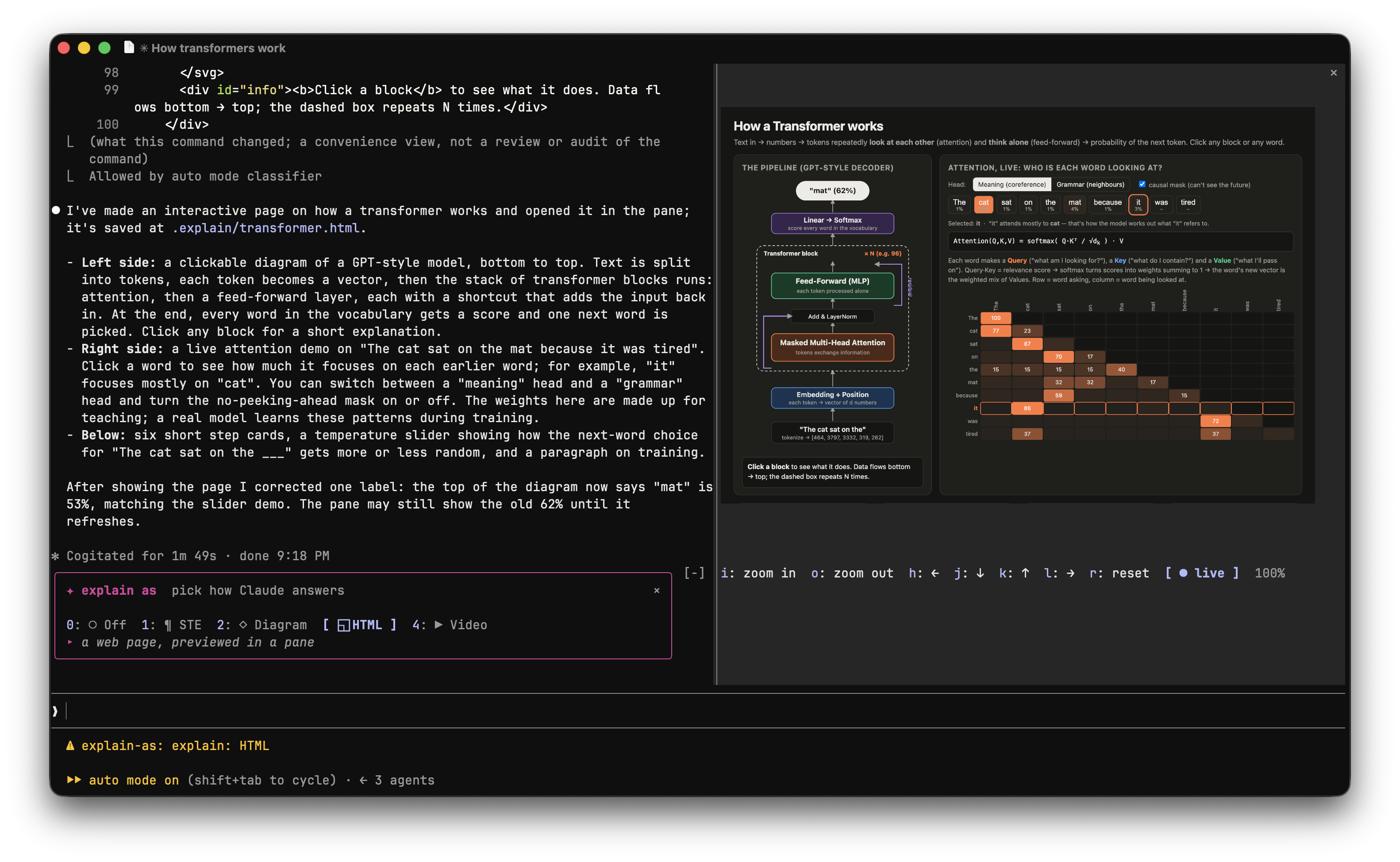
html | Builds a self-contained, interactive HTML page: a preview in the pane, and the live page in your browser |
video | Makes a 3Blue1Brown-style animated explainer in plain JavaScript (canvas) that opens and plays in Chrome, narrated with your device's text-to-speech (ElevenLabs only if you set ELEVENLABS_API_KEY); a Record button saves it as .webm |
/explain                           # open the picker band above the prompt
/explain html                      # every answer as an HTML page from now on
/explain off                       # back to normal
/explain diagram how git rebase works   # one answer only
In html and diagram mode Claude writes the page (or Mermaid source) to .explain/ in your project. The mod screenshots it with headless Chrome, Chromium or Brave and shows the picture in a pane inside Claude Code (needs a terminal with image support, such as Ghostty, kitty, iTerm2 or WezTerm). In the pane, focus it (click or ctrl+x tab) and use i/o to zoom in and out, h j k l (or the arrow buttons) to scroll, r to reset, and v (● live) to open the real, interactive page in the browser; on macOS that Chrome tab refreshes by itself each time Claude updates the page; zoom uses ffmpeg if it is installed. /explain show reopens the last preview, and the pane links to the full interactive page.
The picker band shows explain as [Off] [STE] [Diagram] [HTML] [Video]. Click a format, or focus the band (ctrl+x tab) and press 0-4. The active format is highlighted, and the status line shows it.
Needs Claude Code 2.1.287 or later (check with claude --version). The desktop app bundles its own Claude Code, so it works there once the app ships 2.1.287+; update the app if /explain does not show up. /explain appears after the session's first message. In Claude Code run:
/plugin marketplace add Sumit189/explain-claude-mod
/plugin install explain-as@explain-as
Then start a new session. To try a local copy without installing: claude --plugin-dir ./explain-claude-mod.
This uses Claude Code function hooks, which are in early access. Run the tests with claude plugin test ./explain-claude-mod.
hooks/register.tsx 397 lines1import { atom, read, update } from 'claude-code'
2import type { EngineInterface, Register } from 'claude-code'
3
4export const FORMATS: Record<string, string> = {
5 ste:
6 'Write the explanation about 80% of the way to ASD-STE100 Simplified Technical English: ' +
7 'short sentences (max 20 words for steps, 25 for descriptions), one instruction per sentence, ' +
8 'active voice, simple approved words with one meaning each, no idioms or filler. ' +
9 'Keep code, identifiers and technical names exactly as they are.',
10 diagram:
11 'Explain with a diagram first, prose second. Write a Mermaid diagram that shows the real mechanism ' +
12 '(prefer `flowchart TD` or a layout about 3:2 wide; it is shown in a 3:2 pane, so avoid long single rows) ' +
13 '(components, flow, state) and pass it to the mcp__explain-as__show tool with kind "diagram" (not the Write ' +
14 'tool): it is rendered and shown as a picture inside Claude Code. Do not paste the Mermaid source in the reply; ' +
15 'give short captions only.',
16 html:
17 'Deliver the explanation as one self-contained, interactive HTML page (inline CSS and JS, no build step): ' +
18 'clear visual hierarchy, diagrams, and controls or animations where they aid understanding. ' +
19 'Pass it to the mcp__explain-as__show tool with kind "html" (not the Write tool): a screenshot of its ' +
20 'first 1200x800 screen is shown inside Claude Code, so put the key picture there. ' +
21 'Do not paste the HTML in the reply; summarize it in two or three lines.',
22 video:
23 'Make a 3Blue1Brown-style explainer video as one self-contained web page and pass it to the ' +
24 'mcp__explain-as__show tool with kind "video" (not the Write tool); it opens and plays in Chrome. ' +
25 'Draw on a 1920x1080 <canvas> scaled to the window: dark background, smooth eased transitions, shapes and ' +
26 'equations that build up and transform step by step. Split it into timed scenes driven by one clock, with ' +
27 'play/pause, a seek bar and arrow-key scene skipping. Narrate each scene with on-screen captions. ' +
28 'By default use the device\'s own text-to-speech through the browser speechSynthesis API, picking the best ' +
29 'local English voice (prefer names with "Premium", "Enhanced" or "Natural"). Only if the ELEVENLABS_API_KEY ' +
30 'environment variable is set (check with `[ -n "$ELEVENLABS_API_KEY" ]`, never print it), generate one mp3 per ' +
31 'scene into `.explain/<short-name>/` with curl before showing the page and play them in sync instead ' +
32 '(relative paths from `.explain/`); ' +
33 'never put the key in the page. ' +
34 'Add a "Record" button that saves a .webm of the canvas (and the mp3 audio, if any) with MediaRecorder. ' +
35 'No build step, no external libraries. In the reply give the scene list only.',
36}
37
38const LABELS: Record<string, string> = { ste: 'STE', diagram: 'Diagram', html: 'HTML', video: 'Video' }
39const LOOK = {
40 off: { icon: '○', color: 'gray', blurb: 'Claude answers as usual' },
41 ste: { icon: '¶', color: 'cyan', blurb: 'short, plain sentences in Simplified Technical English' },
42 diagram: { icon: '◇', color: 'green', blurb: 'a rendered diagram in a pane, short captions after' },
43 html: { icon: '◱', color: 'magenta', blurb: 'a web page, previewed in a pane' },
44 video: { icon: '▶', color: 'yellow', blurb: 'a 3Blue1Brown-style narrated animation that plays in Chrome' },
45}
46const lookOf = (fmt: string | null) => LOOK[(fmt ?? 'off') as keyof typeof LOOK]
47const HINT = `[${Object.keys(FORMATS).join('|')}|off|show] [topic]`
48const PANE = 'explain-preview'
49const SOURCE = /\/\.explain\/[^/]+\.(html|mmd)$/
50const VIDEO = /\.video\.html$/
51const BROWSERS = [
52 '/Applications/Google Chrome.app/Contents/MacOS/Google Chrome',
53 '/Applications/Chromium.app/Contents/MacOS/Chromium',
54 '/Applications/Brave Browser.app/Contents/MacOS/Brave Browser',
55 'google-chrome',
56 'chromium',
57]
58const SIZE = { width: 1200, height: 800 }
59const EXTENSIONS = { diagram: '.mmd', html: '.html', video: '.video.html' }
60
61const mode = atom({ plugin: 'explain-as', key: 'mode' } as const, null)
62const isPickerOpen = atom({ plugin: 'explain-as', key: 'isPickerOpen' } as const, false)
63const preview = atom({ plugin: 'explain-as', key: 'preview' } as const, null)
64const view = atom({ plugin: 'explain-as', key: 'view' } as const, { zoom: 1, x: 0.5, y: 0.5 })
65const SCALE = 2 // screenshots are taken at 2x so a zoomed crop stays sharp
66
67// Crops the screenshot to the zoom and pan in `view`, for the terminal pane.
68async function applyView($: EngineInterface) {
69 const shown = await read($, preview)
70 if (!shown) {
71 return
72 }
73 const { zoom, x, y } = await read($, view)
74 const [fullW, fullH] = [SIZE.width * SCALE, SIZE.height * SCALE]
75 const [w, h] = [Math.round(fullW / zoom), Math.round(fullH / zoom)]
76 const left = Math.round(Math.min(Math.max(x * fullW - w / 2, 0), fullW - w))
77 const top = Math.round(Math.min(Math.max(y * fullH - h / 2, 0), fullH - h))
78 const cropped = `${shown.png}.view.png`
79 // ponytail: needs ffmpeg (sips ignores --cropOffset); without it zoom stays at 100%.
80 const run = zoom === 1
81 ? null
82 : await $.process
83 .run(['ffmpeg', '-y', '-loglevel', 'error', '-i', shown.png, '-vf', `crop=${w}:${h}:${left}:${top}`, cropped])
84 .catch(() => null)
85 if (zoom !== 1 && run?.exitCode !== 0) {
86 $.ui.toast('explain: zoom needs ffmpeg (brew install ffmpeg)')
87 }
88 await update($, preview, () => ({ ...shown, view: run?.exitCode === 0 ? cropped : null, generation: Date.now() }))
89}
90
91async function moveView($: EngineInterface, change: { zoom?: number; dx?: number; dy?: number } | null) {
92 await update($, view, ({ zoom, x, y }) => {
93 if (!change) {
94 return { zoom: 1, x: 0.5, y: 0.5 }
95 }
96 const next = Math.min(8, Math.max(1, zoom * (change.zoom ?? 1)))
97 const edge = 0.5 / next
98 const clamp = (v: number) => Math.min(1 - edge, Math.max(edge, v))
99 return { zoom: next, x: clamp(x + (change.dx ?? 0) / next), y: clamp(y + (change.dy ?? 0) / next) }
100 })
101 await applyView($)
102}
103
104async function setMode($: EngineInterface, fmt: string | null) {
105 await update($, mode, () => fmt)
106 $.ui.status(fmt ? `explain: ${LABELS[fmt]}` : undefined)
107}
108
109function mermaidPage(source: string) {
110 const escaped = source.replaceAll('&', '&').replaceAll('<', '<')
111 return `<!doctype html><html><head><style>
112body{margin:0;height:100vh;display:flex;align-items:center;justify-content:center;background:#fff}
113svg{width:96vw!important;max-width:none!important;max-height:96vh}
114</style></head><body><pre class="mermaid">${escaped}</pre><script type="module">
115import m from 'https://cdn.jsdelivr.net/npm/mermaid@11/dist/mermaid.esm.min.mjs'
116m.initialize({ startOnLoad: true, theme: 'default' })
117</script></body></html>`
118}
119
120// Screenshots `.explain/*.html` (or a Mermaid `.mmd`, wrapped in a page) and shows it in the pane.
121// ponytail: static screenshot of the first screen; the page's interactivity stays in the browser.
122// Opens a `.video.html` explainer in Chrome so it plays there.
123async function playVideo($: EngineInterface, path: string) {
124 for (const argv of [['open', '-a', 'Google Chrome', path], ['open', path], ['xdg-open', path]]) {
125 try {
126 if ((await $.process.run(argv)).exitCode === 0) {
127 $.ui.toast(`explain: playing ${path.split('/').pop()} in the browser`)
128 return
129 }
130 } catch {
131 // not on this platform, try the next one
132 }
133 }
134 $.ui.toast(`explain: open ${path} in a browser to play it`)
135}
136
137// Refreshes any Chrome tab already showing the page, so "live" stays current as Claude updates it.
138// ponytail: macOS + Chrome only (AppleScript); other browsers need a manual refresh.
139async function refreshLive($: EngineInterface, page: string) {
140 const url = `file://${page}`.replaceAll('"', '\\"')
141 const script = [
142 'if application "Google Chrome" is running then',
143 ' tell application "Google Chrome"',
144 ' repeat with w in windows',
145 ` repeat with t in (tabs of w whose URL is "${url}")`,
146 ' reload t',
147 ' end repeat',
148 ' end repeat',
149 ' end tell',
150 'end if',
151 ].join('\n')
152 await $.process.run(['osascript', '-e', script]).catch(() => null)
153}
154
155async function showPreview($: EngineInterface, path: string) {
156 const page = path.endsWith('.mmd') ? `${path}.html` : path
157 if (page !== path) {
158 await $.fs.write(page, mermaidPage(await $.fs.read(path)))
159 }
160 const png = `${path}.png`
161 const args = [
162 '--headless=new', '--disable-gpu', '--hide-scrollbars', `--window-size=${SIZE.width},${SIZE.height}`,
163 `--force-device-scale-factor=${SCALE}`,
164 '--virtual-time-budget=8000', `--screenshot=${png}`, `file://${page}`,
165 ]
166 for (const browser of BROWSERS) {
167 try {
168 const run = await $.process.run([browser, ...args], { timeoutMs: 60_000 })
169 if (run.exitCode === 0) {
170 // The desktop panel draws the picture inside an Svg, capped at 131072 characters: a small JPEG fits.
171 // ponytail: sips is macOS only; elsewhere the desktop panel shows the link alone.
172 const jpg = `${path}.jpg`
173 const shrunk = await $.process
174 .run(['sips', '-Z', '1000', '-s', 'format', 'jpeg', '-s', 'formatOptions', '55', png, '--out', jpg])
175 .catch(() => null)
176 const isVideo = VIDEO.test(path)
177 await update($, view, () => ({ zoom: 1, x: 0.5, y: 0.5 }))
178 void refreshLive($, page)
179 await update($, preview, () => ({ png, page, jpg: shrunk?.exitCode === 0 ? jpg : null, view: null, isVideo, generation: Date.now() }))
180 const opened = await $.ui.open({ id: PANE, title: `explain · ${path.split('/').pop()}` })
181 if (!opened.isPlaced) {
182 $.ui.toast('explain: preview ready, run /explain show')
183 }
184 return
185 }
186 } catch {
187 // not installed here, try the next one
188 }
189 }
190 $.ui.toast('explain: no Chrome, Chromium or Brave found to render the preview')
191}
192
193export const register: Register = on => {
194 let once: string | undefined // applies to the next prompt only
195
196 on('session.start', async ($, e, next) => {
197 await $.command.register({
198 name: 'explain',
199 description: 'Answer as ASD-STE100 prose, a diagram, an HTML page, or a video',
200 argumentHint: HINT,
201 })
202 // The mod writes the file itself, so showing a picture needs no Write permission.
203 await $.tool.register({
204 name: 'show',
205 description:
206 'Save an explanation into .explain/ in the working directory and show it to the user inside Claude Code: ' +
207 'a Mermaid diagram or HTML page is rendered as a picture in a pane, a video page opens and plays in Chrome. ' +
208 'Pass the whole source each time; calling again with the same name replaces it.',
209 inputSchema: {
210 type: 'object',
211 properties: {
212 name: { type: 'string', description: 'short kebab-case name, e.g. "tcp-handshake"' },
213 kind: { type: 'string', enum: Object.keys(EXTENSIONS) },
214 source: { type: 'string', description: 'the Mermaid text, or the whole self-contained HTML page' },
215 },
216 required: ['name', 'kind', 'source'],
217 },
218 })
219 const fmt = await read($, mode)
220 $.ui.status(fmt ? `explain: ${LABELS[fmt]}` : undefined)
221
222 return next(e)
223 })
224
225 on('command.run', { command: 'explain' }, async ($, e) => {
226 const [fmt = '', ...rest] = e.args.trim().split(/\s+/)
227 const topic = rest.join(' ')
228
229 if (fmt === '') {
230 await update($, isPickerOpen, open => !open)
231 return { text: 'explain: picker toggled' }
232 }
233 if (fmt === 'show') {
234 const shown = await read($, preview)
235 if (!shown) {
236 return { text: 'explain: nothing to show yet' }
237 }
238 await $.ui.open({ id: PANE, title: 'explain preview', focus: true })
239 return { text: 'explain: preview opened' }
240 }
241 if (fmt === 'off') {
242 await setMode($, null)
243 return { text: 'explain: off' }
244 }
245 if (!(fmt in FORMATS)) {
246 return { text: `Usage: /explain ${HINT}` }
247 }
248 if (topic) {
249 once = fmt
250 void $.prompt.submit({ text: topic, asUser: true })
251 return { text: `explain (${fmt}): ${topic}` }
252 }
253 await setMode($, fmt)
254 return { text: `explain: every answer as ${fmt} until /explain off` }
255 })
256
257 on('prompt.submit', async ($, e, next) => {
258 const rule = FORMATS[once ?? (await read($, mode)) ?? '']
259 once = undefined
260 if (!rule) {
261 return next(e)
262 }
263 return next({ ...e, context: [...(e.context ?? []), rule] })
264 })
265
266 on('tool.call', { tool: 'Write' }, async ($, e, next) => {
267 const ran = await next(e)
268 if (VIDEO.test(e.file_path) && ran.deny === undefined && !ran.isError) {
269 await playVideo($, e.file_path)
270 } else if (SOURCE.test(e.file_path) && ran.deny === undefined && !ran.isError) {
271 await showPreview($, e.file_path)
272 }
273 return ran
274 })
275
276 // The cast only quiets tsc: the plugin's own MCP tool is not in the generated tool names until it loads.
277 on('tool.call', { tool: 'mcp__explain-as__show' as 'Bash' }, async ($, e) => {
278 const { name, kind, source } = e as unknown as { name: string; kind: keyof typeof EXTENSIONS; source: string }
279 const slug = String(name).toLowerCase().replace(/[^a-z0-9-]+/g, '-').replace(/^-+|-+$/g, '') || 'explain'
280 if (!(kind in EXTENSIONS) || typeof source !== 'string' || !source.trim()) {
281 return { deny: 'show needs kind "diagram", "html" or "video" and a non-empty source.' }
282 }
283 const path = `${await $.session.cwd()}/.explain/${slug}${EXTENSIONS[kind]}`
284 await $.fs.write(path, source)
285 if (kind === 'video') {
286 await showPreview($, path)
287 await playVideo($, path)
288 return { result: `Saved ${path} and opened it in the browser.` }
289 }
290 await showPreview($, path)
291 return { result: `Saved ${path} and showed it to the user in a pane.` }
292 })
293
294 // An edited video is not reopened: reloading the tab already playing it is enough.
295 on('tool.call', { tool: 'Edit' }, async ($, e, next) => {
296 const ran = await next(e)
297 if (SOURCE.test(e.file_path) && !VIDEO.test(e.file_path) && ran.deny === undefined && !ran.isError) {
298 await showPreview($, e.file_path)
299 }
300 return ran
301 })
302
303 on('ui.render', { component: 'Pane', requestId: PANE }, async ($, e) => {
304 const { Box, Text, Link } = $.ui.resolve(e)
305 const shown = await read($, preview)
306 if (!shown) {
307 return <Text dimColor>No preview yet.</Text>
308 }
309 const link = (
310 <Link href={`file://${shown.page}`} label={shown.isVideo ? '▶ play live in browser' : '● live in browser'} />
311 )
312 if (e.surface !== 'terminal') {
313 const { Svg } = $.ui.resolve(e)
314 const jpeg = shown.jpg ? await $.fs.read(shown.jpg, { as: 'bytes' }).catch(() => null) : null
315 const svg = jpeg
316 ? `<svg xmlns="http://www.w3.org/2000/svg" viewBox="0 0 ${SIZE.width} ${SIZE.height}">` +
317 `<image href="data:image/jpeg;base64,${jpeg.base64}" width="${SIZE.width}" height="${SIZE.height}"/></svg>`
318 : ''
319 return (
320 <Box flexDirection="column" gap={1}>
321 {svg && svg.length <= 131072 && <Svg source={svg} alt="explain preview" />}
322 {link}
323 </Box>
324 )
325 }
326 const { Button, Image } = $.ui.resolve(e)
327 const { zoom } = await read($, view)
328 // A terminal cell is about twice as tall as it is wide.
329 const columns = Math.min(255, e.props.bodyColumns)
330 const rows = Math.min(255, Math.max(1, e.props.scroll.bodyRows - 4), Math.round((columns * SIZE.height) / SIZE.width / 2))
331 const control = (key: string, label: string, onPress: () => unknown) => (
332 <Button key={key} label={label} hotkey={key} plain onPress={onPress} />
333 )
334 return (
335 <Box flexDirection="column">
336 <Image
337 source={{ file: shown.view ?? shown.png, format: 'png', generation: shown.generation }}
338 columns={columns}
339 rows={rows}
340 alt="explain preview"
341 />
342 <Box gap={2} flexWrap="wrap">
343 {control('i', 'zoom in', () => moveView($, { zoom: 1.5 }))}
344 {control('o', 'zoom out', () => moveView($, { zoom: 1 / 1.5 }))}
345 {control('h', '←', () => moveView($, { dx: -0.25 }))}
346 {control('j', '↓', () => moveView($, { dy: 0.25 }))}
347 {control('k', '↑', () => moveView($, { dy: -0.25 }))}
348 {control('l', '→', () => moveView($, { dx: 0.25 }))}
349 {control('r', 'reset', () => moveView($, null))}
350 <Button key="live" label={shown.isVideo ? '▶ play live' : '● live'} hotkey="v" variant="primary" onPress={() => $.process.run(['open', shown.page])} />
351 <Text dimColor>{Math.round(zoom * 100)}%</Text>
352 </Box>
353 </Box>
354 )
355 })
356
357 on('ui.render', { component: 'AbovePrompt' }, async ($, e, next) => {
358 const current = await read($, mode)
359 if (e.props.hasSurvey || !(await read($, isPickerOpen))) {
360 return next(e)
361 }
362
363 const { Box, Button, Text } = $.ui.resolve(e)
364 const choices: [string | null, string][] = [[null, 'Off'], ...Object.entries(LABELS)]
365 const look = lookOf(current)
366
367 return (
368 <Box flexDirection="column" borderStyle="round" borderColor={look.color} paddingX={1}>
369 <Box justifyContent="space-between">
370 <Text>
371 <Text color={look.color} bold>✦ explain as</Text>
372 <Text dimColor> pick how Claude answers</Text>
373 </Text>
374 <Button key="close" label="×" plain role="dismiss" dimColor onPress={() => update($, isPickerOpen, () => false)} />
375 </Box>
376 <Box gap={2} marginTop={1}>
377 {choices.map(([fmt, label], i) => (
378 <Button
379 key={fmt ?? 'off'}
380 label={`${lookOf(fmt).icon} ${label}`}
381 hotkey={String(i)}
382 plain={fmt === current ? undefined : true}
383 variant={fmt === current ? 'primary' : undefined}
384 dimColor={fmt !== current}
385 onPress={() => setMode($, fmt)}
386 />
387 ))}
388 </Box>
389 <Text>
390 <Text color={look.color}>▸ </Text>
391 <Text italic dimColor>{look.blurb}</Text>
392 </Text>
393 </Box>
394 )
395 })
396}
397types/index.d.ts 9 lines1export type Mode = 'ste' | 'diagram' | 'html' | 'video' | null
2export type Preview = { png: string; page: string; jpg: string | null; view: string | null; isVideo: boolean; generation: number } | null
3
4declare module 'claude-code' {
5 interface PluginState {
6 'explain-as': { mode: Mode; isPickerOpen: boolean; preview: Preview; view: { zoom: number; x: number; y: number } }
7 }
8}
9