file-map
Claude が読んだファイル・書き換えたファイルを、画面の右に一覧表示(最初の読み書きで自動で開く)
newpanebandguardcommand

Claude が読んだファイル・書き換えたファイルを、画面の右に一覧表示(最初の読み書きで自動で開く)
Claude Code の mod(Claude Code の動きや画面を変えられるプラグイン) このセッションで Claude が読んだファイル・書き換えたファイルを、画面の右にフォルダごとの一覧で表示
長いセッションで Claude があちこちのファイルを読み書きすると、どこを見て判断し、どこを書き換えたかが追えなくなる レビューのときに、変更の全体像が見えない
Claude Code 2.1.287 以降が必要(claude --version で確認) 早期公開のときに CLAUDE_CODE_ENABLE_FUNCTION_HOOKS を設定していたら削除(2.1.287 以降は無視される、公式の mods の概要のページ)
/plugin marketplace add shumatsumonobu/claude-mods-bench /plugin install file-map@claude-mods-bench/reload-plugins でも読み込める(公式の mods の概要のページ)Claude が最初にファイルを読み書きした時点で、画面の右に一覧が自動で開く フォルダ名は水色、書き換えたファイルは緑、読んだだけのファイルは白 プロンプトの上の1行には、件数を表示
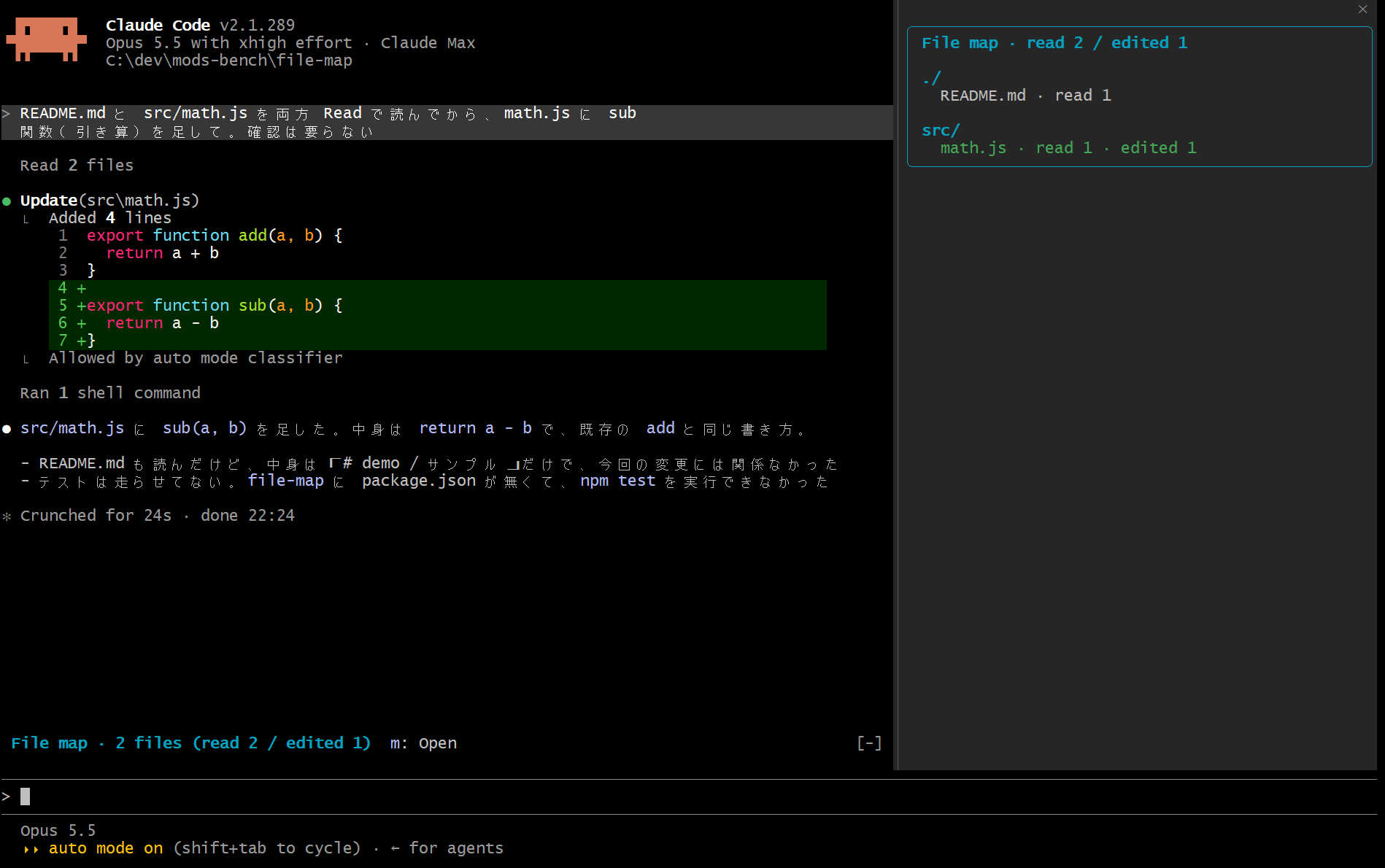
閉じたあとは、m(1行の右の m: Open)か /map で開き直せる
各ファイルの右に回数を表示 ── read N は読んだ回数、edited N は書き換えた回数、created は新しく作ったファイル 見出しの read と edited は、読んだファイルと書き換えたファイルの数(読んでから書き換えたファイルは両方に入る)
File map · read 2 / edited 1
./
  README.md · read 1
src/
  math.js · read 1 · edited 1
数えるのは Claude のファイル操作のツール(Read・Write・Edit・MultiEdit・NotebookEdit)だけ ls や grep のような検索は数えない サブエージェントが読み書きしたファイルも入る(ヘッドレスで1回確認)
mod は Claude Code の中で動くため、shell hook(settings.json に定義する従来のフック)では書けない次のことができる
ui.render と $.ui.open で、画面の右に一覧を開き、プロンプトの上の1行に件数を出せる/map は mod の関数がその場で動き、Claude への問い合わせが起きない 会話にも何も返さないので、トークンを使わずに、いつでも開ける実測(Claude Code 2.1.285 と 2.1.289)
/map を対話で使えるのは Claude Code 2.1.287 以降 2.1.285 では対話のコマンド一覧に出ず、/map が Unknown command になった、2.1.289 では使えた 2.1.287 で mod が正式公開された(公式の mods の概要のページ)/map で開けば、どの幅でも表示(公式の interface のページ)/map で開けるhooks/register.ts 260 lines1import type { On } from 'claude-code'
2
3/** 画面の右に開く一覧の ID、`ui.render` で自分の一覧かを見分けるのにも使う */
4const PANE_ID = 'file-map'
5
6/**
7 * 一覧に載せるツール
8 * 読むのは Read、書くのは Write・Edit・MultiEdit・NotebookEdit
9 * それ以外(Glob・Grep・Bash など)は載せない
10 */
11const READ_TOOLS = new Set(['Read'])
12const WRITE_TOOLS = new Set(['Write', 'Edit', 'MultiEdit', 'NotebookEdit'])
13
14/** ファイル1つの記録 ── 読んだ回数、書き換えた回数、新しく作ったか */
15type Entry = { reads: number; writes: number; created: boolean }
16
17/** このセッションで触ったファイル、キーはプロジェクトからの相対パス */
18const touched = new Map<string, Entry>()
19/** プロジェクトの場所、相対パスを作る基準 */
20let root = ''
21/** 一覧を開いているか */
22let isOpen = false
23/** 画面の右に置けず、プロンプトの上の1行に一覧を出しているか(コマンドやボタンで開いたときだけ) */
24let inBand = false
25/** 最初の読み書きで一度だけ自動で開くための印 */
26let autoOpened = false
27/** ユーザーが自分で閉じたか、閉じたらこのセッションでは自動で開き直さない */
28let closedByUser = false
29
30/** パスの区切りを `/` にそろえ、末尾の `/` を取る */
31export function norm(path: string): string {
32 return path.replace(/\\/g, '/').replace(/\/+$/, '')
33}
34
35/** プロジェクトからの相対パス、プロジェクトの外なら絶対パスのまま */
36export function relPath(base: string, path: string): string {
37 const p = norm(path)
38 const b = norm(base)
39 if (b !== '' && (p === b || p.startsWith(b + '/'))) return p.slice(b.length + 1) || p
40 return p
41}
42
43/** ツールの呼び出しから、触ったファイルのパスと、読んだか書いたかを取り出す、対象外なら null */
44export function fileOf(e: any): { path: string; kind: 'read' | 'write'; created: boolean } | null {
45 const tool = String(e?.tool ?? '')
46 const path = String(e?.file_path ?? e?.notebook_path ?? '')
47 if (path === '') return null
48 if (READ_TOOLS.has(tool)) return { path, kind: 'read', created: false }
49 if (WRITE_TOOLS.has(tool)) return { path, kind: 'write', created: tool === 'Write' }
50 return null
51}
52
53/**
54 * 触った記録を1件足す
55 * created は Write のときだけ立てる(読まずに書いたなら、新しく作った可能性が高い)
56 */
57export function record(map: Map<string, Entry>, rel: string, kind: 'read' | 'write', created: boolean) {
58 const e = map.get(rel) ?? { reads: 0, writes: 0, created: false }
59 if (kind === 'read') e.reads++
60 else {
61 e.writes++
62 if (created && e.reads === 0) e.created = true
63 }
64 map.set(rel, e)
65}
66
67/** 相対パスのフォルダ部分、プロジェクト直下なら `.` */
68function dirOf(rel: string): string {
69 const i = rel.lastIndexOf('/')
70 return i > 0 ? rel.slice(0, i) : '.'
71}
72
73/** 相対パスのファイル名部分 */
74function baseOf(rel: string): string {
75 const i = rel.lastIndexOf('/')
76 return i >= 0 ? rel.slice(i + 1) : rel
77}
78
79/**
80 * 一覧に出す行
81 * フォルダごとにまとめ、書き換えたファイルを先に、触った回数の多い順に並べる
82 */
83export function rows(map: Map<string, Entry>): { dir: string; files: { name: string; e: Entry }[] }[] {
84 const byDir = new Map<string, { name: string; e: Entry }[]>()
85 for (const [rel, e] of map) {
86 const d = dirOf(rel)
87 const list = byDir.get(d) ?? []
88 list.push({ name: baseOf(rel), e })
89 byDir.set(d, list)
90 }
91 return [...byDir.keys()]
92 .sort()
93 .map((dir) => ({
94 dir,
95 files: byDir.get(dir)!.sort((a, b) => {
96 const wa = a.e.writes > 0 ? 1 : 0
97 const wb = b.e.writes > 0 ? 1 : 0
98 if (wa !== wb) return wb - wa
99 return b.e.reads + b.e.writes - (a.e.reads + a.e.writes) || a.name.localeCompare(b.name)
100 }),
101 }))
102}
103
104/** 読んだファイル数、書き換えたファイル数、合計 ── 読んでから書き換えたファイルは両方に数える */
105function counts(map: Map<string, Entry>) {
106 let read = 0
107 let wrote = 0
108 for (const e of map.values()) {
109 if (e.reads > 0) read++
110 if (e.writes > 0) wrote++
111 }
112 return { read, wrote, total: map.size }
113}
114
115/** ファイル1行の表示 ── ファイル名と、読んだ回数・書き換えた回数(新しく作ったなら created) */
116export function fileLabel(name: string, e: Entry): string {
117 const marks: string[] = []
118 if (e.reads > 0) marks.push(`read ${e.reads}`)
119 if (e.writes > 0) marks.push(e.created ? 'created' : `edited ${e.writes}`)
120 return `${name} · ${marks.join(' · ')}`
121}
122
123/** 画面の右に出す一覧 ── フォルダ名は水色、書き換えたファイルは緑、読んだだけのファイルは白 */
124export function drawMap(t: any, map: Map<string, Entry>) {
125 const { Box, Text } = t
126 const c = counts(map)
127 const groups = rows(map)
128 const body =
129 map.size === 0
130 ? [Text({ key: 'empty', dimColor: true, children: 'No files read or edited yet' })]
131 : groups.flatMap((g, gi) => [
132 Box({
133 key: `g${gi}`,
134 flexDirection: 'column',
135 marginTop: gi === 0 ? 0 : 1,
136 children: [
137 Text({ key: 'dir', bold: true, color: 'cyan', children: `${g.dir}/` }),
138 ...g.files.map((f, fi) =>
139 Text({ key: `f${fi}`, ...(f.e.writes > 0 ? { color: 'green' } : {}), children: ` ${fileLabel(f.name, f.e)}` }),
140 ),
141 ],
142 }),
143 ])
144 return Box({
145 flexDirection: 'column',
146 borderStyle: 'round',
147 borderColor: 'cyan',
148 paddingX: 1,
149 children: [
150 Text({ key: 'title', bold: true, color: 'cyan', children: `File map · read ${c.read} / edited ${c.wrote}` }),
151 Box({ key: 'body', flexDirection: 'column', marginTop: 1, children: body }),
152 ],
153 })
154}
155
156/** プロンプトの上の1行 ── 触ったファイルの数と、一覧を開くボタン、まだ何も触っていなければ出さない */
157export function drawHint(t: any, map: Map<string, Entry>, onOpen: () => void) {
158 if (map.size === 0) return null
159 const { Box, Text, Button } = t
160 const c = counts(map)
161 return Box({
162 gap: 2,
163 paddingX: 1,
164 children: [
165 Text({ key: 'label', bold: true, color: 'cyan', children: `File map · ${c.total} file${c.total === 1 ? '' : 's'} (read ${c.read} / edited ${c.wrote})` }),
166 Button({ key: 'open', label: 'Open', hotkey: 'm', plain: true, onPress: onOpen }),
167 ],
168 })
169}
170
171/**
172 * 一覧を開く
173 * コマンドやボタンで開くときだけキーボードを渡し、自動で開くときはプロンプトへの入力を奪わない
174 */
175async function openMap($: any, asked: boolean) {
176 isOpen = true
177 $.ui.invalidate('ui.render')
178 await $.clock.sleep(200)
179 const pane = { id: PANE_ID, title: 'File map', closeOnEscape: true, rows: 22, columns: 50 }
180 const placed = await $.ui.open(asked ? { ...pane, focus: true } : pane)
181 inBand = asked && placed?.isPlaced === false
182 $.ui.invalidate('ui.render')
183}
184
185/** mod の入口 ── Claude のファイルの読み書きを数え、画面の右の一覧とプロンプトの上の1行に出す */
186export function register(on: On) {
187 on('session.start', async ($: any, e: any, next: any) => {
188 root = norm(String(e.cwd ?? ''))
189 autoOpened = false
190 closedByUser = false
191 const r = await next(e)
192 await $.command.register({ name: 'map', description: 'File map: files read and edited this session' })
193 return r
194 })
195
196 on('command.run', { command: 'map' }, async ($: any, e: any) => {
197 closedByUser = false
198 await openMap($, true)
199 // 文字を返すと会話に入り Claude が読むので、何も返さず画面に描くだけにする
200 return {}
201 })
202
203 // 数えるのは Claude のツール呼び出しだけ(サブエージェントの分も届く)、記録の失敗で実行は止めない
204 on('tool.call', async ($: any, e: any, next: any) => {
205 const answer = await next(e)
206 try {
207 const f = fileOf(e)
208 if (f && (answer?.isError !== true)) {
209 if (root === '') root = norm(String(await $.session.cwd().catch(() => '')))
210 record(touched, relPath(root, f.path), f.kind, f.created)
211 $.ui.invalidate('ui.render')
212 if (!autoOpened && !closedByUser) {
213 autoOpened = true
214 await openMap($, false)
215 }
216 }
217 } catch {
218 // 記録の失敗で実行は止めない
219 }
220 return answer
221 })
222
223 // ターンの終わりにも描き直す、途中で頼んだ描き直しは待機中の画面に残らないことがある
224 on('turn.complete', async ($: any, e: any, next: any) => {
225 const r = await next(e)
226 $.ui.invalidate('ui.render')
227 return r
228 })
229
230 on('ui.render', { component: 'Pane' }, ($: any, e: any, next: any) => {
231 if (e.requestId !== PANE_ID) return next(e)
232 return drawMap($.ui.resolve(e), touched)
233 })
234
235 on('ui.render', { component: 'AbovePrompt' }, async ($: any, e: any, next: any) => {
236 const t = $.ui.resolve(e)
237 const ours =
238 isOpen && inBand
239 ? drawMap(t, touched)
240 : drawHint(t, touched, () => {
241 closedByUser = false
242 void openMap($, true)
243 })
244 const theirs = await next(e)
245 if (ours === null) return theirs
246 if (!theirs) return ours
247 // ほかの mod の表示を消さないよう、自分の表示の下に並べる
248 return t.Box({ flexDirection: 'column', children: [ours, theirs] })
249 })
250
251 on('ui.close', ($: any, e: any, next: any) => {
252 if (e.id === PANE_ID || e.requestId === PANE_ID) {
253 isOpen = false
254 if (e.origin?.kind === 'person') closedByUser = true
255 }
256 $.ui.invalidate('ui.render')
257 return next(e)
258 })
259}
260