statusline
Status line: dir | model (price multiplier) | context bar | cache TTL | rate-limit resets
newcommandprocess

Status line: dir | model (price multiplier) | context bar | cache TTL | rate-limit resets
A Claude Code status line, packaged as a plugin. One line with the model and its price multiplier, context usage, prompt-cache time left and hit rate, and rate-limit resets. About 90 columns with the default windows; it shrinks itself on narrow terminals.
What you see · Install · Settings · Narrow terminals · Troubleshooting
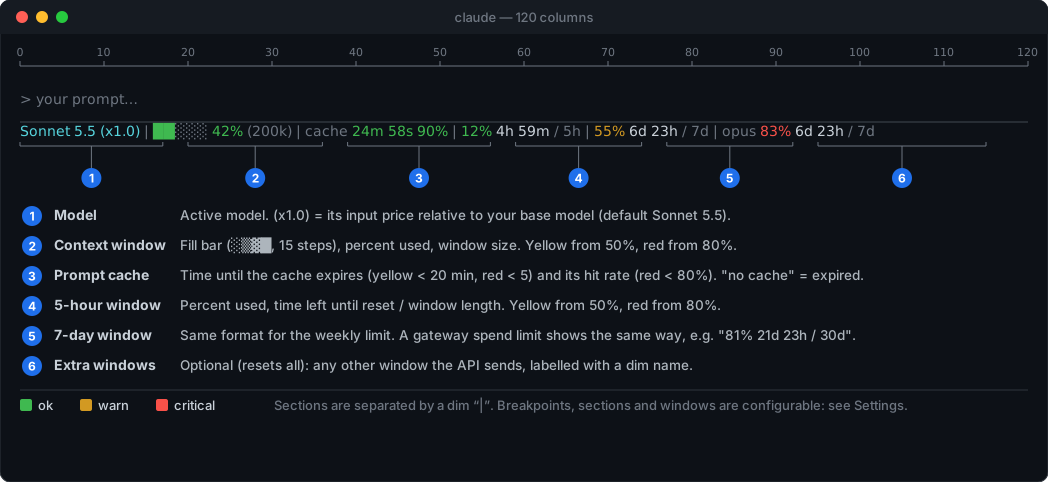
The same in plain text:
        10        20        30        40        50        60        70        80        90       100       110       120
123456789012345678901234567890123456789012345678901234567890123456789012345678901234567890123456789012345678901234567890
Sonnet 5.5 (x1.0) | ██░░░ 42% (200k) | cache 24m 58s 90% | 12% 4h 59m / 5h | 55% 6d 23h / 7d | opus 83% 6d 23h / 7d
└───────1───────┘ └───────2──────┘ └───────3───────┘ └──────4──────┘ └──────5──────┘ └─────────6────────┘| # | Section | Shows | Colors |
|---|---|---|---|
| 1 | Model | Active model. (x1.0) is its input price relative to your base model (default Sonnet 5.5; change it with /statusline-model). Fast mode is priced in. | cyan |
| 2 | Context | Fill bar of 5 cells with 4 shades (░▒▓█, 15 steps), percent used, window size. | 🟩 < 50% · 🟨 ≥ 50% · 🟥 ≥ 80% |
| 3 | Prompt cache | Time until the cache expires, then its hit rate. no cache when it has expired. | time: 🟩 · 🟨 < 20 min · 🟥 < 5 min<br>hit rate: 🟩 ≥ 80% · 🟥 < 80% |
| 4 | 5-hour window | <used %> <time to reset> / <window length> | 🟩 < 50% · 🟨 ≥ 50% · 🟥 ≥ 80% |
| 5 | 7-day window | Same format. A gateway spend limit looks the same, e.g. 81% 21d 23h / 30d. | as above |
| 6 | Extra windows | Optional (/statusline-resets all): any other window the API sends (for example a per-model weekly limit), shown with a dim name. | as above |
6d 23h, 24m 58s, 59s).|, and a section with no data disappears.STATUSLINE_CUSTOM_RESET, see Environment overrides)./plugin marketplace add sergemso/claude-code-status-line
/plugin install statusline@claude-code-status-line
/statusline:setup/statusline:setup [--interval SECONDS] [--force] points statusLine in ~/.claude/settings.json at ~/.claude/statusline/statusline.sh (refresh every 15 s unless --interval says otherwise; refuses to replace an existing different one unless you pass --force). A SessionStart hook keeps that copy in sync with the installed plugin version, so updates need no re-run.
Requires bash, jq, curl and awk (Linux and macOS; Windows is not supported). The /statusline-* commands need a Claude Code version that supports plugin modules; the rest works without them.
Update: /plugin marketplace update claude-code-status-line, then /reload-plugins. The script copy in ~/.claude/statusline/ is refreshed at the next session start.
Uninstall: remove the plugin in /plugin, delete the statusLine entry from ~/.claude/settings.json, and delete ~/.claude/statusline/.
Three ways to change them, all writing ~/.claude/statusline/config (read on every refresh):
| Command | Model turn? | |
|---|---|---|
| Typed commands | /statusline-show, -model, -sections, -resets, -thresholds, -width, -reset | none: answered by the plugin itself |
| Guided picker | /statusline:config | yes (questions go through the model) |
| Shell | ! bash ~/.claude/statusline/config.sh <command> | none |
Examples:
/statusline-show
/statusline-model Claude Opus 5.5        # or: /statusline-model list
/statusline-sections hide stats          # show | hide | only NAME... | all
/statusline-resets 5h,7d,spend           # or: all | none
/statusline-thresholds context 60 85     # yellow/red at % used; also: resets, cache (minutes left: 30 10)
/statusline-width 100                    # or: auto
/statusline-reset # drop saved settings (or: /statusline-reset BASE_MODEL)| Setting | Meaning |
|---|---|
| model | Base model for the price multiplier, validated against the price table (names match case-insensitively, with or without Claude ) |
| sections | Enable or disable model context cache stats resets (stats = the hit rate inside cache) |
| resets | Which reset windows to show. Items are API keys (seven_day_opus) or aliases (5h, 7d, spend, 7d-opus); all shows every window the API sends. Windows other than 5h/7d/spend carry a dim name, e.g. opus 83% 6d 23h / 7d |
| thresholds | context/resets: yellow/red at WARN/CRIT percent used (defaults 50/80). cache: yellow/red when WARN/CRIT minutes are left (20/5) |
| width, margin | Columns to fit the line into (see Narrow terminals); columns kept free at the right edge (default 2) |
| dump | config.sh dump PATH writes the raw status-line JSON and width diagnostics there each run; dump off stops it |
The refresh interval itself is refreshInterval in settings.json: /statusline:setup --interval SECONDS. Module commands can't contain a colon, which is why the typed commands are /statusline-… while the markdown ones are /statusline:….
An env var STATUSLINE_<KEY> (e.g. STATUSLINE_RESETS, STATUSLINE_CONTEXT_WARN, STATUSLINE_SECTIONS) wins over the saved value; set it in the env block of ~/.claude/settings.json. Also:
| Variable | Meaning | ||
|---|---|---|---|
STATUSLINE_PRICES_TTL | Seconds before the price table is re-fetched (default 3600; also settable as PRICES_TTL in the config file) | ||
STATUSLINE_CUSTOM_RESET | `label\ | YYYY-MM-DD HH:MM adds a countdown section, e.g. sprint\ | 2026-10-17 09:00 (part of the resets` section) |
STATUSLINE_DUMP | Same as config.sh dump PATH: the raw status-line JSON (to see which windows your account gets) plus width/level diagnostics | ||
CLAUDE_CONFIG_DIR | Config directory (default ~/.claude) |
Model price multipliers come from the public pricing page, cached in ~/.claude/model-prices.json.
On every refresh the script reads the terminal width (stty size </dev/tty) and, if the line is too wide, drops one thing at a time until it fits. There is no resize notification, so the line adapts at the next refresh: after refreshInterval seconds, or sooner when Claude Code re-runs it for an event. A smaller interval (/statusline:setup --interval 5) reacts faster.
| Level | Dropped, cumulatively | Example (default windows) | ||||
|---|---|---|---|---|---|---|
| 0 | nothing | `Sonnet 5.5 (x1.0) \ | ██░░░ 42% (200k) \ | cache 24m 58s 90% \ | 12% 4h 59m / 5h \ | 55% 6d 23h / 7d` |
| 1 | context window size, named extra windows, custom reset | `Sonnet 5.5 (x1.0) \ | ██░░░ 42% \ | cache 24m 58s 90% \ | 12% 4h 59m / 5h \ | 55% 6d 23h / 7d` |
| 2 | cache hit rate | `… \ | cache 24m 57s \ | 12% 4h 59m / 5h \ | …` | |
| 3 | / total on windows | `… \ | cache 24m 57s \ | 12% 4h 59m \ | 55% 6d 22h` | |
| 4 | price multiplier, windows after the first | `Sonnet 5.5 \ | ██░░░ 42% \ | cache 24m 56s \ | 12% 4h 59m` | |
| 5 | cache | `Sonnet 5.5 \ | ██░░░ 42% \ | 12% 4h 59m` | ||
| 6 | reset windows | `Sonnet 5.5 \ | ██░░░ 42%` |
If the width can't be read (no tty), nothing is dropped; set it by hand with config.sh width 100. If /dev/tty isn't available to the script it uses the tty of the nearest parent process that has one. To see what it detected, run config.sh dump /tmp/sl.txt (or set STATUSLINE_DUMP): each run writes the raw JSON there, then a line cols=… margin=… level=… visible=…; config.sh dump off stops it.
| Symptom | Cause and fix |
|---|---|
| The old status line is still there | /statusline:setup --force replaces an existing statusLine setting. Check that jq is installed. |
Reset windows (12% 3h / 5h) are missing | They exist on subscription accounts only, and only when listed in resets. A saved list such as spend hides the rest: run /statusline-reset RESETS. To see which windows your account gets: ! bash ~/.claude/statusline/config.sh dump /tmp/sl.txt, then read the file. |
The multiplier says (x2.0) | It is relative to your base model, which defaults to Sonnet 5.5. Set it with /statusline-model. |
no cache | The prompt cache has expired or has not been written yet; it turns into a countdown after the next request. |
| The line never gets shorter in a small window | The width could not be read. Set it by hand with /statusline-width 100, or use dump (see Narrow terminals). |
/statusline-* commands are not found | Run /reload-plugins. They need a Claude Code version with plugin modules; ! bash ~/.claude/statusline/config.sh <command> always works. |
| A setting seems ignored | An env var STATUSLINE_<KEY> beats the saved value. /statusline-show lists each value and where it comes from. |
hooks/register.ts 42 lines1import type { Register } from 'claude-code'
2import { splitArgs } from './args'
3
4// Zero-model-turn settings commands: each runs ~/.claude/statusline/config.sh <subcommand> <args>
5// and prints the output. They are answered here, so no model turn is spent.
6// (Module command names allow letters, digits, _ and - only, hence "statusline-model".)
7const COMMANDS: Record<string, { sub: string; description: string; hint?: string }> = {
8 'statusline-show': { sub: 'show', description: 'Show the status line settings and where each value comes from' },
9 'statusline-model': { sub: 'model', description: 'Base model for the price multiplier', hint: '<name | list>' },
10 'statusline-sections': { sub: 'sections', description: 'Show/hide sections: model context cache stats resets', hint: '<show|hide|only NAME… | all>' },
11 'statusline-resets': { sub: 'resets', description: 'Which reset windows to show', hint: '<5h,7d,spend | all | none>' },
12 'statusline-thresholds': { sub: 'thresholds', description: 'Yellow/red breakpoints', hint: '<context|resets|cache> <warn> <crit>' },
13 'statusline-width': { sub: 'width', description: 'Terminal width to fit the line into', hint: '<columns | auto>' },
14 'statusline-reset': { sub: 'reset', description: 'Drop saved settings (all, or the KEYs you name)', hint: '[KEY…]' },
15}
16
17export const register: Register = (on) => {
18 on('session.start', async ($, e, next) => {
19 for (const [name, { description, hint }] of Object.entries(COMMANDS)) {
20 await $.command.register({ name, description, ...(hint ? { argumentHint: hint } : {}) })
21 }
22 return next(e)
23 })
24
25 for (const [name, { sub }] of Object.entries(COMMANDS)) {
26 on('command.run', { command: name }, async ($, e) => {
27 const argv = [
28 'bash', '-c',
29 'exec bash "${CLAUDE_CONFIG_DIR:-$HOME/.claude}/statusline/config.sh" "$@"',
30 'statusline',
31 sub, ...splitArgs(e.args),
32 ]
33 try {
34 const r = await $.process.run(argv)
35 return { text: `${r.stdout}${r.stderr}`.trim() || '(no output)' }
36 } catch (err) {
37 return { text: `${name}: could not run config.sh: ${err instanceof Error ? err.message : String(err)}` }
38 }
39 })
40 }
41}
42hooks/args.ts 25 lines1// Split a command line into words, honouring single and double quotes.
2export function splitArgs(s: string): string[] {
3 const out: string[] = []
4 let cur = ''
5 let quote = ''
6 let has = false
7 for (const ch of s) {
8 if (quote) {
9 if (ch === quote) quote = ''
10 else cur += ch
11 } else if (ch === '"' || ch === "'") {
12 quote = ch
13 has = true
14 } else if (/\s/.test(ch)) {
15 if (has || cur) out.push(cur)
16 cur = ''
17 has = false
18 } else {
19 cur += ch
20 }
21 }
22 if (has || cur) out.push(cur)
23 return out
24}
25