harness-panel
Turn skills, hooks and plugins on or off per directory from a side panel
newpaneguardcommandtoastprompt

Turn skills, hooks and plugins on or off per directory from a side panel
<a href="./README.md"><img src="https://img.shields.io/badge/English-4c6ef5?style=for-the-badge" alt="English"></a> <a href="./README.ko.md"><img src="https://img.shields.io/badge/%ED%95%9C%EA%B5%AD%EC%96%B4-8b949e?style=for-the-badge" alt="한국어"></a>
A side panel for Claude Code that shows every skill, hook and plugin loaded in the current directory, and turns each one on or off with one click.
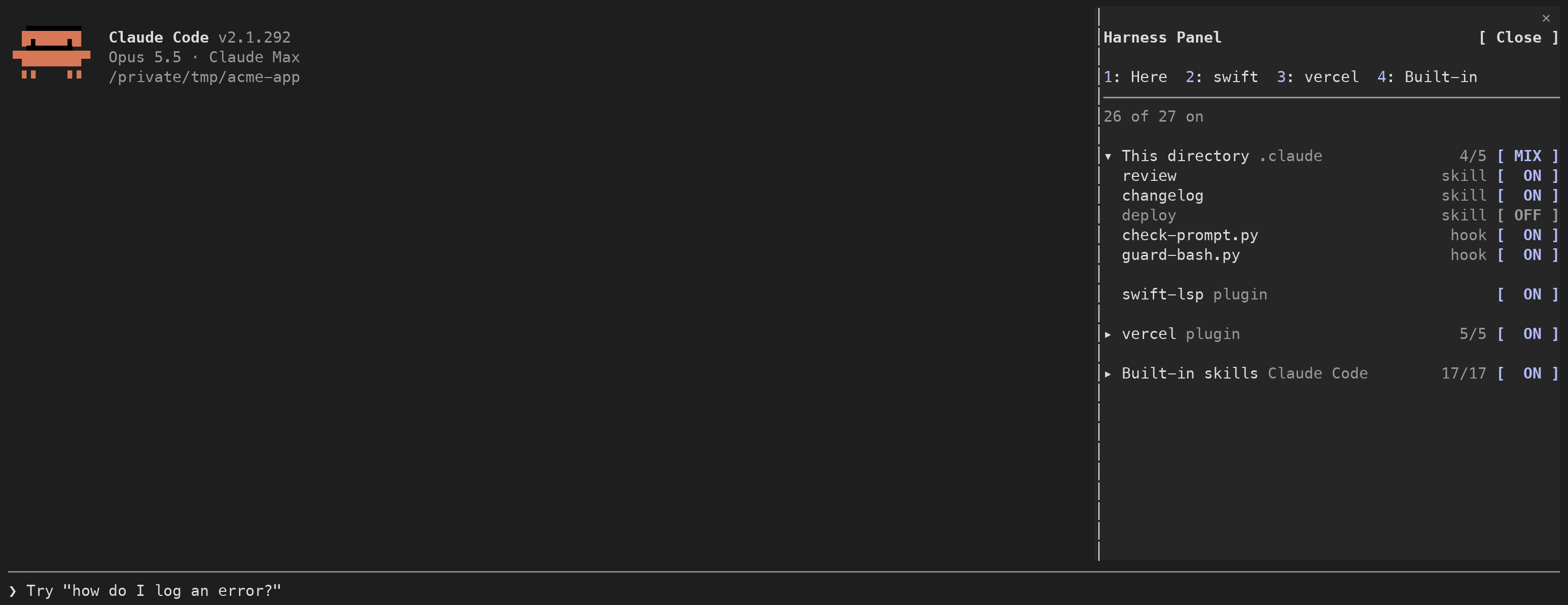
Harnesses are used to keep Claude Code within a project's code structure: skills tell it how to work, and hooks enforce the rules. With recent models, however, we began to suspect that existing harnesses were lowering performance rather than improving it.
Harness Panel is a tool built to test that. It turns individual skills and hooks on or off, and lets you open, edit or delete their files from the same panel. It is intended for anyone who needs to verify whether their harnesses still help.
Type this at the Claude Code prompt:
/plugin install harness-panel --marketplace selvr0/harness-panelAdd marketplace? appears. Press y.user (all your projects) is the usual choice.Installed harness-panel. Plugin is now active. appears.Open the panel once:
/harnessFrom the next session on, it opens by itself.
To dock it on the right, Claude Code needs its fullscreen layout. Without it, the panel shows above the prompt instead.
/tui fullscreenTo see the panel in Korean, open /config, find harness-panel, and set language to ko.
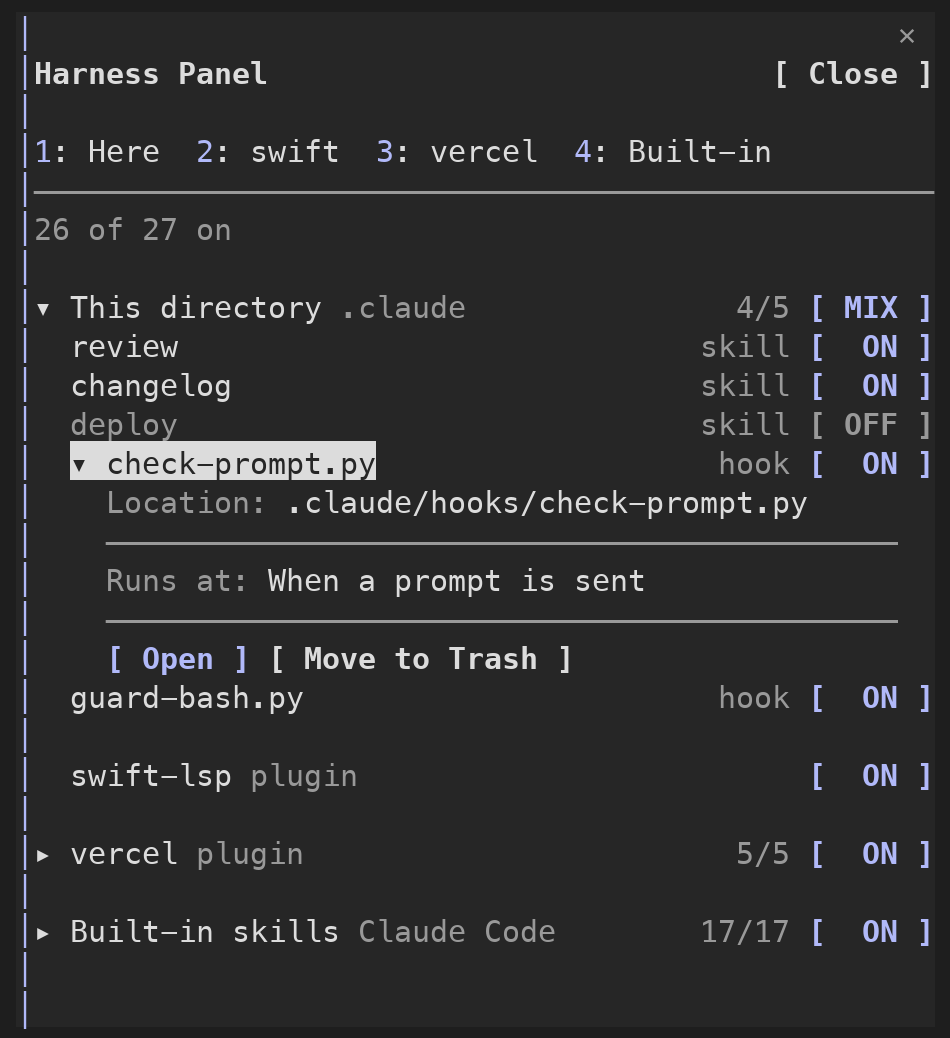
| You want to | Do this |
|---|---|
| Turn one skill or hook off or on | Press its [ ON ] / [ OFF ] button |
| Turn a whole section off or on | Press the button next to the section title |
| Jump to a section | Press its number key at the top, or click the tab |
| See where a file is and when a hook runs | Click its name |
| Open the file in your editor | Click its name, then [ Open ] |
| Move a skill or hook to the Trash | Click its name, then [ Move to Trash ], then [ Move ] |
| Bring it back | Open the Trash section at the bottom, then [ Restore ] |
| Close the panel | [ Close ] at the top right |
| Open it again | /harness |
Every change applies to the current directory only. Each directory keeps its own on/off state.
| Section | What is in it |
|---|---|
| This directory | Skills and hooks in .claude/ of the directory you opened Claude Code in |
| Global | Skills and hooks in ~/.claude/ |
| claude.ai | Skills turned on in your claude.ai account |
| One section per plugin | That plugin's skills and hooks. The button next to the title turns the whole plugin on or off |
| Built-in | Skills that ship with Claude Code |
Skills from a plugin, claude.ai and Claude Code itself can be turned off, but not moved to the Trash.
The panel is a plugin, so you turn it off and on from Claude Code's plugin menu.
| You want to | Type |
|---|---|
| Turn the panel off | /plugin disable harness-panel@harness-panel |
| Turn it back on | /plugin enable harness-panel@harness-panel |
| Remove it | /plugin uninstall harness-panel@harness-panel |
Or open /plugin, go to Installed, select harness-panel and press Space.
Run /reload-plugins afterwards, or start a new session.
What happens to what you turned off when the panel is off:
| What you turned off | While the panel is off |
|---|---|
| Your skills, built-in and claude.ai skills | Stay off. They are saved in .claude/settings.local.json, which Claude Code reads by itself |
| Whole plugins | Stay off, same file |
| Plugin skills, hooks | Run again. Only the panel blocks these. They go back to off when the panel is turned back on |
| What | Where it is saved | Takes effect |
|---|---|---|
| Your skills, built-in and claude.ai skills | skillOverrides in .claude/settings.local.json, the same place /skills writes | Right away |
| Plugin skills | The panel's own storage. The panel blocks calls to the skill | Right away |
| Hooks | The panel's own storage. While a hook is off, the panel runs the other hooks on that event itself | Right away |
| A whole plugin | enabledPlugins in .claude/settings.local.json | After /reload-plugins |
Hooks are turned off one at a time. When a hook on an event is off, the panel runs the remaining hooks on that event itself, the same way Claude Code would. Only command hooks are run this way; other hook types on that event are skipped while any hook there is off.
| macOS | Windows | Linux | |
|---|---|---|---|
| Open in editor (tried in order) | VS Code → Cursor → Zed → Sublime Text → TextEdit | VS Code → Cursor → Notepad | VS Code → Cursor → Zed → Sublime Text → xdg-open |
| Move to Trash | Finder Trash | Recycle Bin | gio trash → trash-put → ~/.local/share/Trash |
Windows and Linux are covered by tests but have not been tried on real machines yet. Reports are welcome.
skillOverrides, so the panel blocks those itself.claude plugin validate .
claude plugin test .hooks/register.tsx 1007 lines1import { atom, read, update } from 'claude-code'
2import type { EngineInterface, Register } from 'claude-code'
3
4import type { HarnessGroup, HarnessItem, TrashedHarness } from '../types'
5import {
6 type HookSettings,
7 insertHookIntoSettings,
8 localSettingsPath,
9 projectSettingsPath,
10 removeHookFromSettings,
11 setOrDeleteKey,
12 userSettingsPath,
13} from './settings-files'
14import { type Messages, MESSAGES, resolveMessages } from './i18n'
15import {
16 type Platform,
17 basename,
18 buildMakeDirCommand,
19 buildMoveCommand,
20 buildMoveToTrashCommands,
21 buildOpenInEditorCommands,
22 buildRemoveFileCommand,
23 buildTrashInfo,
24 buildWindowsRestoreCommand,
25 dirname,
26 isAbsolutePath,
27 linuxTrashDirs,
28 normalizePath,
29 readTrashInfoPath,
30 toNativePath,
31} from './platform'
32import {
33 type HookOutcome,
34 type HookRun,
35 hookTarget,
36 isMatchedByHookMatcher,
37 mergeHookOutcomes,
38 readHookOutcome,
39 resolveMatcherValue,
40} from './hook-runner'
41
42// $ 를 받는 함수는 모두 이 파일 안에 있어야 함 (mod 규칙: $ 는 import 한 함수로 넘길 수 없음)
43type Engine = EngineInterface
44
45// 패널 글자. register 가 /config 의 language 값으로 정함 (기본 영어)
46let text: Messages = MESSAGES.en
47
48// ── 운영체제·경로 ──────────────────────────────────
49
50// 한 번 알아낸 운영체제. 다시 로드되면 다시 알아냄
51let detectedPlatform: Platform | null = null
52
53async function detectPlatform($: Engine): Promise<Platform> {
54 if (detectedPlatform) return detectedPlatform
55 if ((await $.env.get('OS')) === 'Windows_NT') return (detectedPlatform = 'windows')
56 const uname = await runCommand($, ['uname', '-s'])
57 return (detectedPlatform = uname.stdout.trim() === 'Darwin' ? 'mac' : 'linux')
58}
59
60// 없는 명령을 실행하면 예외가 날 수 있어서, 실패로 바꿔서 돌려줌
61async function runCommand($: Engine, argv: string[]) {
62 try {
63 return await $.process.run(argv)
64 } catch (error) {
65 return { exitCode: 127, stdout: '', stderr: (error as Error).message }
66 }
67}
68
69// 차례로 실행해서 처음 성공한 결과를 돌려줌. 다 실패하면 마지막 실패 결과
70async function runFirstSuccessful($: Engine, commands: string[][]) {
71 let last = { exitCode: 1, stdout: '', stderr: '' }
72 for (const argv of commands) {
73 last = await runCommand($, argv)
74 if (last.exitCode === 0) return last
75 }
76 return last
77}
78
79// ── settings 파일 읽고 쓰기 ─────────────────────────
80
81async function readJsonFile($: Engine, path: string): Promise<Record<string, any> | null> {
82 try {
83 if (!(await $.fs.exists(path))) return null
84 return JSON.parse(await $.fs.read(path))
85 } catch {
86 return null
87 }
88}
89
90async function writeJsonFile($: Engine, path: string, value: Record<string, any>) {
91 await $.fs.write(path, JSON.stringify(value, null, 2) + '\n')
92}
93
94// settings 파일 하나를 읽어 고친 뒤 다시 씀. 파일이 없으면 빈 객체에서 시작함
95async function editSettingsFile($: Engine, path: string, edit: (settings: Record<string, any>) => void) {
96 const settings = (await readJsonFile($, path)) ?? {}
97 edit(settings)
98 await writeJsonFile($, path, settings)
99}
100
101// ── 지금 폴더의 하네스 목록 모으기 ───────────────────
102
103// 이 mod 가 직접 막는 것들. $.store 에 폴더별로 저장함
104// key: "off:<세션 루트>"
105// value: {
106// pluginSkills: ["<플러그인>:<스킬>", ...] 꺼 둔 플러그인 스킬 이름
107// hooks: ["PreToolUse|Bash", ...] 꺼 둔 훅의 "이벤트|matcher"
108// }
109type ModOffList = { pluginSkills: string[]; hooks: string[] }
110
111async function readModOffList($: Engine, root: string): Promise<ModOffList> {
112 const saved = (await $.store.get(`off:${root}`)) as Partial<ModOffList> | undefined
113 return { pluginSkills: saved?.pluginSkills ?? [], hooks: saved?.hooks ?? [] }
114}
115
116async function writeModOffList($: Engine, root: string, list: ModOffList) {
117 await $.store.set(`off:${root}`, list)
118}
119
120// 한 번 본 스킬 목록. 꺼진 스킬은 Claude Code 목록에서 사라지므로, 패널에 계속 보이게 기억해 둠
121// key: "seen-skills:<세션 루트>"
122// value: [{ name: <스킬 이름>, source: <Claude Code 가 주는 출처>, pluginName?: <플러그인 이름> }]
123type SeenSkill = { name: string; source: string; pluginName?: string }
124
125async function forgetSeenSkill($: Engine, root: string, name: string) {
126 const seen = ((await $.store.get(`seen-skills:${root}`)) as SeenSkill[] | undefined) ?? []
127 await $.store.set(`seen-skills:${root}`, seen.filter(s => s.name !== name))
128}
129
130const CORE_GROUP_IDS = ['proj', 'user', 'synced'] as const
131
132function describeCoreGroup(id: 'proj' | 'user' | 'synced' | 'builtin'): Omit<HarnessGroup, 'items'> {
133 return { id, ...text.groups[id] }
134}
135
136// 경로를 패널에 보이게 줄임
137// <세션 루트>/<나머지> → <나머지>
138// <홈>/<나머지> → ~/<나머지>
139function shortenPath(path: string, root: string, home: string) {
140 if (path.startsWith(`${root}/`)) return path.slice(root.length + 1)
141 if (path.startsWith(`${home}/`)) return `~${path.slice(home.length)}`
142 return path
143}
144
145async function collectListedSkills($: Engine, root: string): Promise<SeenSkill[]> {
146 const usage = await $.session.usage({ breakdown: 'summary' })
147 const listed = usage.context.breakdown?.skills?.skillFrontmatter ?? []
148 const seen = ((await $.store.get(`seen-skills:${root}`)) as SeenSkill[] | undefined) ?? []
149 const byName = new Map<string, SeenSkill>(seen.map(s => [s.name, s]))
150 for (const s of listed) byName.set(s.name, { name: s.name, source: s.source, pluginName: s.pluginName })
151 const merged = [...byName.values()]
152 await $.store.set(`seen-skills:${root}`, merged)
153 return merged
154}
155
156function resolveSkillGroupId(skill: SeenSkill) {
157 if (skill.pluginName) return `plugin:${skill.pluginName}`
158 const source = skill.source.toLowerCase()
159 if (source.includes('project') || source.includes('local')) return 'proj'
160 if (source.includes('synced')) return 'synced'
161 if (source.includes('user')) return 'user'
162 return 'builtin'
163}
164
165// 스킬 파일이 있을 만한 자리를 차례로 보고, 있는 첫 자리를 고름
166// 스킬: <폴더>/skills/<이름>/SKILL.md → 휴지통 대상은 <이름> 폴더
167// 명령: <폴더>/commands/<이름>.md → 휴지통 대상은 그 파일
168async function findSkillFile(
169 $: Engine,
170 bases: string[],
171 name: string,
172): Promise<{ filePath: string; trashPath: string } | undefined> {
173 for (const base of bases) {
174 const skillFile = `${base}/skills/${name}/SKILL.md`
175 if (await $.fs.exists(skillFile)) return { filePath: skillFile, trashPath: `${base}/skills/${name}` }
176 const commandFile = `${base}/commands/${name}.md`
177 if (await $.fs.exists(commandFile)) return { filePath: commandFile, trashPath: commandFile }
178 }
179 return undefined
180}
181
182// anthropic-skills 는 ~/.claude/skills/synced/<버킷 id>/<이름>/SKILL.md 에 있음
183async function listSyncedSkillBases($: Engine, home: string) {
184 const syncedDir = `${home}/.claude/skills/synced`
185 if (!(await $.fs.exists(syncedDir))) return []
186 const entries = await $.fs.list(syncedDir)
187 return entries.filter(e => e.kind === 'dir').map(e => `${syncedDir}/${e.name}`)
188}
189
190// 훅 command 에서 스크립트 파일 경로를 뽑음
191// command 안의 <스크립트>.py·.sh·.js 같은 경로를 찾고
192// $CLAUDE_PROJECT_DIR → 세션 루트, $CLAUDE_PLUGIN_ROOT → 플러그인 폴더, $HOME·~ → 홈 으로 바꿈
193function resolveHookScriptPath(command: string, root: string, home: string, pluginRoot?: string) {
194 const match = command.match(/["']?([^\s"']+\.(?:py|sh|mjs|cjs|js|ts))["']?/)
195 if (!match?.[1]) return undefined
196 let path = normalizePath(match[1])
197 .replace(/\$\{?CLAUDE_PROJECT_DIR\}?|%CLAUDE_PROJECT_DIR%/g, root)
198 .replace(/\$\{?CLAUDE_PLUGIN_ROOT\}?|%CLAUDE_PLUGIN_ROOT%/g, pluginRoot ?? '')
199 .replace(/\$\{?HOME\}?|%USERPROFILE%/g, home)
200 .replace(/^~(?=\/)/, home)
201 if (!isAbsolutePath(path)) path = `${root}/${path}`
202 return path
203}
204
205function describeHookCommand(command: string) {
206 const script = command.match(/([\w.-]+\.(?:py|sh|mjs|cjs|js|ts))/)
207 return script?.[1] ?? command.slice(0, 32)
208}
209
210function describeHookEvent(event: string, matcher: string) {
211 if (event === 'PreToolUse' && matcher && matcher !== '*') return text.hookBeforeTool(matcher)
212 if (event === 'PostToolUse' && matcher && matcher !== '*') return text.hookAfterTool(matcher)
213 return text.hookEvents[event] ?? event
214}
215
216type HookSource = {
217 // id 에 쓰는 출처 이름. "project" | "local" | "user" | 플러그인 이름
218 name: string
219 hooks: HookSettings | undefined
220 // 내 settings 파일이면 그 경로. 플러그인 훅이면 undefined (휴지통 불가)
221 settingsFile?: string
222 pluginRoot?: string
223}
224
225// legacyPairs: 예전 저장 방식("<이벤트>|<matcher>")과 지금 방식(훅 한 개)의 짝을 모음. 예전 값을 바꿀 때 씀
226function buildHookItems(
227 source: HookSource,
228 offHooks: string[],
229 root: string,
230 home: string,
231 legacyPairs: [string, string][],
232): HarnessItem[] {
233 const items: HarnessItem[] = []
234 for (const [event, entries] of Object.entries(source.hooks ?? {})) {
235 for (const entry of entries ?? []) {
236 const matcher = entry.matcher ?? ''
237 for (const hook of entry.hooks ?? []) {
238 const command = String(hook.command ?? '')
239 const target = hookTarget(event, matcher, command)
240 legacyPairs.push([`${event}|${matcher}`, target])
241 const scriptPath = resolveHookScriptPath(command, root, home, source.pluginRoot)
242 items.push({
243 id: `hook:${source.name}:${event}|${matcher}:${command}`,
244 label: describeHookCommand(command),
245 detail: describeHookEvent(event, matcher),
246 kind: 'hook',
247 isOn: !offHooks.includes(target) && !offHooks.includes(`${event}|${matcher}`),
248 control: 'hook',
249 target,
250 filePath: scriptPath,
251 displayPath: scriptPath ? shortenPath(scriptPath, root, home) : undefined,
252 trashable: source.settingsFile
253 ? { kind: 'hook', settingsFile: source.settingsFile, event, matcher, command, scriptPath }
254 : undefined,
255 untrashableReason: source.settingsFile ? undefined : text.untrashable.pluginHook,
256 })
257 }
258 }
259 }
260 return items
261}
262
263// 같은 스크립트를 훅 두 개 이상이 쓰면, 하나를 휴지통으로 옮길 때 스크립트는 남겨 둠
264function keepSharedHookScripts(items: HarnessItem[]) {
265 const useCount = new Map<string, number>()
266 for (const i of items) if (i.filePath) useCount.set(i.filePath, (useCount.get(i.filePath) ?? 0) + 1)
267 for (const i of items) {
268 if (i.trashable?.kind === 'hook' && i.trashable.scriptPath && (useCount.get(i.trashable.scriptPath) ?? 0) > 1) {
269 i.trashable = { ...i.trashable, scriptPath: undefined }
270 }
271 }
272}
273
274type InstalledPlugin = { id: string; name: string; installPath: string }
275
276// ~/.claude/plugins/installed_plugins.json 에서 이 폴더에 설치된 플러그인만 고름
277// (전역 설치 + 이 폴더 경로로 설치된 프로젝트 설치)
278async function collectInstalledPlugins($: Engine, home: string, root: string): Promise<InstalledPlugin[]> {
279 const file = await readJsonFile($, `${home}/.claude/plugins/installed_plugins.json`)
280 const result: InstalledPlugin[] = []
281 for (const [id, entries] of Object.entries((file?.plugins ?? {}) as Record<string, any[]>)) {
282 const entry = entries.find(e => e.scope === 'user' || (e.projectPath && root.startsWith(normalizePath(e.projectPath))))
283 const name = id.split('@')[0] ?? id
284 // 이 패널 자신은 뺌. 여기서 끄면 패널이 사라져 다시 켤 곳이 없음
285 if (name === 'harness-panel') continue
286 if (entry) result.push({ id, name, installPath: normalizePath(entry.installPath) })
287 }
288 return result
289}
290
291// 예전에는 훅을 "<이벤트>|<matcher>" 묶음으로 껐음. 그 값을 묶음 안 훅 하나하나의 값으로 바꿔 저장함
292async function migrateLegacyHookOffKeys($: Engine, root: string, off: ModOffList, legacyPairs: [string, string][]) {
293 const legacyKeys = new Set(legacyPairs.map(([legacy]) => legacy))
294 if (!off.hooks.some(key => legacyKeys.has(key))) return
295 const hooks = new Set(off.hooks.filter(key => !legacyKeys.has(key)))
296 for (const [legacy, target] of legacyPairs) if (off.hooks.includes(legacy)) hooks.add(target)
297 await writeModOffList($, root, { ...off, hooks: [...hooks] })
298}
299
300async function collectHarnessGroups($: Engine, root: string, home: string): Promise<HarnessGroup[]> {
301 // $.settings.read() 는 파일을 고친 직후엔 옛 값을 줄 수 있음. 토글 직후 화면이 되돌아가지 않게 파일을 직접 읽음
302 const userFile = (await readJsonFile($, userSettingsPath(home))) ?? {}
303 const projectFile = (await readJsonFile($, projectSettingsPath(root))) ?? {}
304 const localFile = (await readJsonFile($, localSettingsPath(root))) ?? {}
305 // 우선순위: skillOverrides 는 project > local·user, enabledPlugins 는 local > project > user
306 const skillOverrides: Record<string, string> = {
307 ...userFile.skillOverrides,
308 ...localFile.skillOverrides,
309 ...projectFile.skillOverrides,
310 }
311 const enabledPlugins: Record<string, boolean> = {
312 ...userFile.enabledPlugins,
313 ...projectFile.enabledPlugins,
314 ...localFile.enabledPlugins,
315 }
316 const off = await readModOffList($, root)
317
318 const groups = new Map<string, HarnessGroup>()
319 for (const id of CORE_GROUP_IDS) groups.set(id, { ...describeCoreGroup(id), items: [] })
320
321 const plugins = await collectInstalledPlugins($, home, root)
322 for (const p of plugins) {
323 groups.set(`plugin:${p.name}`, {
324 id: `plugin:${p.name}`,
325 tab: p.name.replace(/-lsp$/, ''),
326 title: p.name,
327 where: text.groups.pluginWhere,
328 pluginId: p.id,
329 isPluginOn: enabledPlugins[p.id] === true,
330 items: [],
331 })
332 }
333 groups.set('builtin', { ...describeCoreGroup('builtin'), items: [] })
334
335 // 훅: 이 폴더(project + local), 전역(user), 플러그인 hooks.json
336 const myHookSources: [HookSource, string][] = [
337 [{ name: 'project', hooks: projectFile.hooks, settingsFile: projectSettingsPath(root) }, 'proj'],
338 [{ name: 'local', hooks: localFile.hooks, settingsFile: localSettingsPath(root) }, 'proj'],
339 [{ name: 'user', hooks: userFile.hooks, settingsFile: userSettingsPath(home) }, 'user'],
340 ]
341 const myHookItems: HarnessItem[] = []
342 const legacyPairs: [string, string][] = []
343 for (const [source, groupId] of myHookSources) {
344 const items = buildHookItems(source, off.hooks, root, home, legacyPairs)
345 myHookItems.push(...items)
346 groups.get(groupId)!.items.push(...items)
347 }
348 keepSharedHookScripts(myHookItems)
349 for (const p of plugins) {
350 const file = await readJsonFile($, `${p.installPath}/hooks/hooks.json`)
351 const source: HookSource = { name: p.name, hooks: (file?.hooks ?? file) as HookSettings, pluginRoot: p.installPath }
352 groups.get(`plugin:${p.name}`)!.items.push(...buildHookItems(source, off.hooks, root, home, legacyPairs))
353 }
354 await migrateLegacyHookOffKeys($, root, off, legacyPairs)
355
356 // 스킬
357 const syncedBases = await listSyncedSkillBases($, home)
358 for (const skill of await collectListedSkills($, root)) {
359 const groupId = resolveSkillGroupId(skill)
360 // 설치 목록에 없는 플러그인(--plugin-dir 로 띄운 것)도 플러그인 섹션을 따로 만듦
361 if (skill.pluginName && !groups.has(groupId)) {
362 groups.set(groupId, { id: groupId, tab: skill.pluginName, title: skill.pluginName, where: text.groups.pluginWhere, items: [] })
363 }
364 const group = groups.get(groupId) ?? groups.get('builtin')!
365 const plugin = plugins.find(p => p.name === skill.pluginName)
366 const isPluginSkill = !!skill.pluginName
367 const shortName = isPluginSkill ? skill.name.replace(`${skill.pluginName}:`, '') : skill.name.replace(/^anthropic-skills:/, '')
368
369 const bases =
370 groupId === 'proj' ? [`${root}/.claude`]
371 : groupId === 'user' ? [`${home}/.claude`]
372 : groupId === 'synced' ? syncedBases
373 : plugin ? [plugin.installPath]
374 : []
375 const found = bases.length ? await findSkillFile($, bases, shortName) : undefined
376 const isMine = groupId === 'proj' || groupId === 'user'
377 // 내 스킬인데 파일이 없으면 이미 지웠거나 옮긴 것. 목록에서 뺌
378 if (isMine && !found) continue
379
380 group.items.push({
381 id: `skill:${skill.name}`,
382 label: shortName,
383 kind: 'skill',
384 isOn: isPluginSkill ? !off.pluginSkills.includes(skill.name) : skillOverrides[skill.name] !== 'off',
385 control: isPluginSkill ? 'pluginSkill' : 'skillOverrides',
386 target: skill.name,
387 filePath: found?.filePath,
388 displayPath: found ? shortenPath(found.filePath, root, home) : undefined,
389 trashable: isMine && found ? { kind: 'skill', path: found.trashPath } : undefined,
390 untrashableReason: isMine
391 ? undefined
392 : isPluginSkill ? text.untrashable.pluginSkill
393 : groupId === 'synced' ? text.untrashable.synced
394 : text.untrashable.builtin,
395 })
396 }
397
398 // skillOverrides 로 꺼 둔 스킬은 Claude Code 목록에서 빠짐. 패널이 한 번도 못 본 것도 파일이 있으면 꺼진 채로 보여줌
399 const listedTargets = new Set([...groups.values()].flatMap(g => g.items.map(i => i.target)))
400 for (const [name, value] of Object.entries(skillOverrides)) {
401 if (value !== 'off' || listedTargets.has(name)) continue
402 for (const [groupId, base] of [['proj', `${root}/.claude`], ['user', `${home}/.claude`]] as const) {
403 const found = await findSkillFile($, [base], name)
404 if (!found) continue
405 groups.get(groupId)!.items.push({
406 id: `skill:${name}`,
407 label: name,
408 kind: 'skill',
409 isOn: false,
410 control: 'skillOverrides',
411 target: name,
412 filePath: found.filePath,
413 displayPath: shortenPath(found.filePath, root, home),
414 trashable: { kind: 'skill', path: found.trashPath },
415 })
416 break
417 }
418 }
419
420 for (const g of groups.values()) {
421 g.items.sort((a, b) => (a.kind === b.kind ? 0 : a.kind === 'skill' ? -1 : 1))
422 }
423 return [...groups.values()].filter(g => g.items.length > 0 || g.pluginId)
424}
425
426// ── 에디터로 열기·휴지통 ───────────────────────────
427
428async function openFileInEditor($: Engine, path: string) {
429 const platform = await detectPlatform($)
430 const result = await runFirstSuccessful($, buildOpenInEditorCommands(platform, path))
431 if (result.exitCode !== 0) throw new Error(result.stderr.trim() || text.error.cannotOpen(path))
432}
433
434// 운영체제 휴지통으로 옮김
435// 반환값: 휴지통 안의 경로. 운영체제가 알려주지 않으면(윈도우, 리눅스 gio) undefined
436async function moveToSystemTrash($: Engine, path: string, home: string): Promise<string | undefined> {
437 const platform = await detectPlatform($)
438 const result = await runFirstSuccessful($, buildMoveToTrashCommands(platform, path))
439 if (result.exitCode === 0) {
440 return platform === 'mac' && result.stdout.trim() ? normalizePath(result.stdout.trim()).replace(/\/+$/, '') : undefined
441 }
442 if (platform !== 'linux') throw new Error(result.stderr.trim() || text.error.cannotMove(path))
443
444 // 리눅스에 gio·trash-put 이 없으면 freedesktop 휴지통으로 직접 옮김
445 const { files, info } = linuxTrashDirs(home)
446 const name = `${basename(path)}-${Date.now()}`
447 await runCommand($, buildMakeDirCommand(platform, files))
448 await runCommand($, buildMakeDirCommand(platform, info))
449 const moved = await runCommand($, buildMoveCommand(platform, path, `${files}/${name}`))
450 if (moved.exitCode !== 0) throw new Error(moved.stderr.trim() || text.error.cannotMove(path))
451 await $.fs.write(`${info}/${name}.trashinfo`, buildTrashInfo(path, new Date()))
452 return `${files}/${name}`
453}
454
455// 리눅스 휴지통에서 원래 경로가 같은 항목을 찾음. 반환값: { 파일 경로, info 파일 경로 }
456async function findInLinuxTrash($: Engine, originalPath: string, home: string) {
457 const { files, info } = linuxTrashDirs(home)
458 if (!(await $.fs.exists(info))) return undefined
459 for (const entry of await $.fs.list(info)) {
460 if (!entry.name.endsWith('.trashinfo')) continue
461 const infoPath = `${info}/${entry.name}`
462 if (readTrashInfoPath(await $.fs.read(infoPath)) === originalPath) {
463 return { trashedPath: `${files}/${entry.name.slice(0, -'.trashinfo'.length)}`, infoPath }
464 }
465 }
466 return undefined
467}
468
469async function moveBackFromTrash($: Engine, originalPath: string, trashedPath: string | undefined, home: string) {
470 if (await $.fs.exists(originalPath)) throw new Error(text.error.alreadyExists(originalPath))
471 const platform = await detectPlatform($)
472
473 if (!trashedPath && platform === 'windows') {
474 const restored = await runCommand($, buildWindowsRestoreCommand(originalPath))
475 if (restored.exitCode !== 0) throw new Error(text.error.notInTrash)
476 return
477 }
478
479 let infoPath: string | undefined
480 if (!trashedPath && platform === 'linux') {
481 const found = await findInLinuxTrash($, originalPath, home)
482 trashedPath = found?.trashedPath
483 infoPath = found?.infoPath
484 }
485 if (!trashedPath || !(await $.fs.exists(trashedPath))) throw new Error(text.error.notInTrash)
486
487 await runCommand($, buildMakeDirCommand(platform, dirname(originalPath)))
488 const moved = await runCommand($, buildMoveCommand(platform, trashedPath, originalPath))
489 if (moved.exitCode !== 0) throw new Error(moved.stderr.trim() || text.error.cannotMove(trashedPath))
490 if (platform === 'linux') {
491 const linuxInfo = infoPath ?? `${linuxTrashDirs(home).info}/${basename(trashedPath)}.trashinfo`
492 await runCommand($, buildRemoveFileCommand(platform, linuxInfo))
493 }
494}
495
496// 하네스 한 줄을 휴지통으로 옮기고, 되돌릴 때 필요한 정보를 돌려줌
497// 스킬: 스킬 폴더(또는 명령 파일)를 운영체제 휴지통으로
498// 훅: settings 에서 그 훅을 빼고, 스크립트 파일은 운영체제 휴지통으로
499async function moveHarnessToTrash($: Engine, item: HarnessItem, home: string): Promise<TrashedHarness> {
500 const source = item.trashable
501 if (!source) throw new Error(item.untrashableReason ?? text.error.cannotTrash)
502
503 if (source.kind === 'skill') {
504 const trashedPath = await moveToSystemTrash($, source.path, home)
505 return { id: item.id, label: item.label, kind: item.kind, originalPath: source.path, trashedPath }
506 }
507
508 let removed: Record<string, unknown> | undefined
509 await editSettingsFile($, source.settingsFile, settings => {
510 removed = removeHookFromSettings(settings, source.event, source.matcher, source.command)
511 })
512 if (!removed) throw new Error(text.error.hookNotFound)
513 const hook = { settingsFile: source.settingsFile, event: source.event, matcher: source.matcher, entry: removed }
514
515 if (!source.scriptPath || !(await $.fs.exists(source.scriptPath))) {
516 return { id: item.id, label: item.label, kind: item.kind, hook }
517 }
518 const trashedPath = await moveToSystemTrash($, source.scriptPath, home)
519 return { id: item.id, label: item.label, kind: item.kind, originalPath: source.scriptPath, trashedPath, hook }
520}
521
522async function restoreHarnessFromTrash($: Engine, trashed: TrashedHarness, home: string) {
523 if (trashed.originalPath) await moveBackFromTrash($, trashed.originalPath, trashed.trashedPath, home)
524 const hook = trashed.hook
525 if (hook) {
526 await editSettingsFile($, hook.settingsFile, settings => {
527 insertHookIntoSettings(settings, hook.event, hook.matcher, hook.entry)
528 })
529 }
530}
531
532const PANE = 'harness'
533const PANE_COLUMNS = 50
534
535const groupsAtom = atom({ plugin: 'harness-panel', key: 'groups' } as const, [] as HarnessGroup[])
536const openGroupsAtom = atom(
537 { plugin: 'harness-panel', key: 'openGroups' } as const,
538 { proj: true, user: true } as Record<string, boolean>,
539)
540const selectedItemAtom = atom({ plugin: 'harness-panel', key: 'selectedItem' } as const, null as string | null)
541const confirmingTrashAtom = atom({ plugin: 'harness-panel', key: 'confirmingTrash' } as const, null as string | null)
542const trashAtom = atom({ plugin: 'harness-panel', key: 'trash' } as const, [] as TrashedHarness[])
543
544// 경로는 모두 "/" 로 맞춤. 홈은 맥·리눅스 HOME, 윈도우 USERPROFILE
545async function readSessionPaths($: Engine) {
546 const home = (await $.env.get('HOME')) ?? (await $.env.get('USERPROFILE')) ?? ''
547 return { root: normalizePath(await $.session.root()), home: normalizePath(home) }
548}
549
550function toggleInList(list: string[], value: string, isOn: boolean) {
551 const rest = list.filter(v => v !== value)
552 return isOn ? rest : [...rest, value]
553}
554
555// ── 패널 휴지통 목록 ($.store 에 폴더별로 저장) ───────────
556// key: "trash:<세션 루트>"
557// value: TrashedHarness[]
558
559async function readTrashList($: Engine, root: string) {
560 return ((await $.store.get(`trash:${root}`)) as TrashedHarness[] | undefined) ?? []
561}
562
563async function writeTrashList($: Engine, root: string, list: TrashedHarness[]) {
564 await $.store.set(`trash:${root}`, list)
565 await update($, trashAtom, () => list)
566}
567
568async function refreshHarnessPanel($: Engine) {
569 const { root, home } = await readSessionPaths($)
570 const groups = await collectHarnessGroups($, root, home)
571 await update($, groupsAtom, () => groups)
572 const trash = await readTrashList($, root)
573 await update($, trashAtom, () => trash)
574}
575
576// ── 켜고 끄기 ──────────────────────────────────────
577
578// 누르자마자 화면부터 바꿈. 파일 저장과 목록 다시 읽기는 그 뒤에 함
579async function showChangeImmediately($: Engine, change: (groups: HarnessGroup[]) => HarnessGroup[]) {
580 await update($, groupsAtom, change)
581 $.ui.invalidate('ui.render')
582}
583
584async function setHarnessItemsOn($: Engine, items: HarnessItem[], isOn: boolean) {
585 const ids = new Set(items.map(i => i.id))
586 await showChangeImmediately($, groups =>
587 groups.map(g => ({ ...g, items: g.items.map(i => (ids.has(i.id) ? { ...i, isOn } : i)) })),
588 )
589 const { root } = await readSessionPaths($)
590 const overrides = items.filter(i => i.control === 'skillOverrides')
591 if (overrides.length > 0) {
592 await editSettingsFile($, localSettingsPath(root), settings => {
593 for (const i of overrides) setOrDeleteKey(settings, 'skillOverrides', i.target, isOn ? undefined : 'off')
594 })
595 }
596 const modItems = items.filter(i => i.control !== 'skillOverrides')
597 if (modItems.length > 0) {
598 const off = await readModOffList($, root)
599 for (const i of modItems) {
600 if (i.control === 'pluginSkill') off.pluginSkills = toggleInList(off.pluginSkills, i.target, isOn)
601 else off.hooks = toggleInList(off.hooks, i.target, isOn)
602 }
603 await writeModOffList($, root, off)
604 }
605 await refreshHarnessPanel($)
606}
607
608async function setPluginOn($: Engine, group: HarnessGroup, isOn: boolean) {
609 await showChangeImmediately($, groups => groups.map(g => (g.id === group.id ? { ...g, isPluginOn: isOn } : g)))
610 const { root } = await readSessionPaths($)
611 await editSettingsFile($, localSettingsPath(root), settings => {
612 setOrDeleteKey(settings, 'enabledPlugins', group.pluginId!, isOn ? true : false)
613 })
614 $.ui.toast(text.toast.pluginToggled(group.title, isOn))
615 await refreshHarnessPanel($)
616}
617
618async function setGroupOn($: Engine, group: HarnessGroup, isOn: boolean) {
619 if (group.pluginId) return setPluginOn($, group, isOn)
620 return setHarnessItemsOn($, group.items, isOn)
621}
622
623// ── 이름 클릭: 펼치기, [ 열기 ] ────────────────────────
624
625// 이름을 누르면 그 줄 아래에 [ 열기 ] [ 휴지통으로 이동 ] 이 펼쳐짐. 다시 누르면 접힘
626async function toggleItemActions($: Engine, item: HarnessItem) {
627 await update($, selectedItemAtom, selected => (selected === item.id ? null : item.id))
628 await update($, confirmingTrashAtom, () => null)
629}
630
631async function openItemInEditor($: Engine, item: HarnessItem) {
632 if (!item.filePath) {
633 $.ui.toast(text.toast.noFileToOpen(item.label))
634 return
635 }
636 try {
637 await openFileInEditor($, item.filePath)
638 } catch (error) {
639 $.ui.toast(text.toast.openFailed((error as Error).message))
640 }
641}
642
643// ── 휴지통 ─────────────────────────────────────────
644
645async function moveItemToTrash($: Engine, item: HarnessItem) {
646 const { root, home } = await readSessionPaths($)
647 try {
648 const trashed = await moveHarnessToTrash($, item, home)
649 await writeTrashList($, root, [trashed, ...(await readTrashList($, root)).filter(t => t.id !== trashed.id)])
650 if (item.kind === 'skill') await forgetSeenSkill($, root, item.target)
651 await showChangeImmediately($, groups => groups.map(g => ({ ...g, items: g.items.filter(i => i.id !== item.id) })))
652 $.ui.toast(text.toast.movedToTrash(item.label))
653 } catch (error) {
654 $.ui.toast(text.toast.trashFailed((error as Error).message))
655 }
656 await update($, selectedItemAtom, () => null)
657 await update($, confirmingTrashAtom, () => null)
658 await refreshHarnessPanel($)
659}
660
661async function restoreTrashedItem($: Engine, trashed: TrashedHarness) {
662 const { root, home } = await readSessionPaths($)
663 try {
664 await restoreHarnessFromTrash($, trashed, home)
665 await writeTrashList($, root, (await readTrashList($, root)).filter(t => t.id !== trashed.id))
666 $.ui.toast(text.toast.restored(trashed.label))
667 } catch (error) {
668 $.ui.toast(text.toast.restoreFailed((error as Error).message))
669 }
670 await refreshHarnessPanel($)
671}
672
673// ── 꺼 둔 것 막기 ──────────────────────────────────
674
675// 이 폴더에서 돌 수 있는 settings 훅 전부 (내 settings 파일 3개 + 켜진 플러그인의 hooks.json)
676async function collectHookRuns($: Engine, root: string, home: string): Promise<HookRun[]> {
677 const sources: { hooks: HookSettings | undefined; pluginRoot?: string }[] = []
678 const userFile = (await readJsonFile($, userSettingsPath(home))) ?? {}
679 const projectFile = (await readJsonFile($, projectSettingsPath(root))) ?? {}
680 const localFile = (await readJsonFile($, localSettingsPath(root))) ?? {}
681 sources.push({ hooks: projectFile.hooks }, { hooks: localFile.hooks }, { hooks: userFile.hooks })
682 const enabledPlugins: Record<string, boolean> = {
683 ...userFile.enabledPlugins,
684 ...projectFile.enabledPlugins,
685 ...localFile.enabledPlugins,
686 }
687 for (const p of await collectInstalledPlugins($, home, root)) {
688 if (enabledPlugins[p.id] !== true) continue
689 const file = await readJsonFile($, `${p.installPath}/hooks/hooks.json`)
690 sources.push({ hooks: (file?.hooks ?? file) as HookSettings, pluginRoot: p.installPath })
691 }
692 const runs: HookRun[] = []
693 for (const source of sources) {
694 for (const [event, entries] of Object.entries(source.hooks ?? {})) {
695 for (const entry of entries ?? []) {
696 const matcher = entry.matcher ?? ''
697 for (const hook of entry.hooks ?? []) {
698 const command = String(hook.command ?? '')
699 runs.push({
700 target: hookTarget(event, matcher, command),
701 event,
702 matcher,
703 command,
704 type: String(hook.type ?? 'command'),
705 timeoutSeconds: typeof hook.timeout === 'number' ? hook.timeout : undefined,
706 pluginRoot: source.pluginRoot,
707 })
708 }
709 }
710 }
711 }
712 return runs
713}
714
715// 꺼 둔 훅이 "<이벤트>|<matcher>" 로 저장돼 있으면 (예전 방식) 그 묶음 전체가 꺼진 것으로 봄
716function isHookRunOff(run: HookRun, offHooks: string[]) {
717 return offHooks.includes(run.target) || offHooks.includes(`${run.event}|${run.matcher}`)
718}
719
720async function runOneHook($: Engine, run: HookRun, stdin: string, root: string): Promise<HookOutcome> {
721 const platform = await detectPlatform($)
722 const nativeRoot = toNativePath(platform, root)
723 const env: Record<string, string> = { CLAUDE_PROJECT_DIR: nativeRoot }
724 if (run.pluginRoot) env.CLAUDE_PLUGIN_ROOT = toNativePath(platform, run.pluginRoot)
725 const argv = platform === 'windows' ? ['bash', '-c', run.command] : ['sh', '-c', run.command]
726 try {
727 const result = await $.process.run(argv, { cwd: nativeRoot, env, stdin, timeoutMs: (run.timeoutSeconds ?? 60) * 1000 })
728 return readHookOutcome(run.event, result.exitCode, result.stdout, result.stderr)
729 } catch {
730 return {}
731 }
732}
733
734// 이 이벤트에서 꺼 둔 훅이 하나라도 걸리면, 켜진 훅만 직접 돌리고 그 결과를 돌려줌
735// 꺼 둔 훅이 걸리지 않으면 undefined. 그때는 Claude Code 가 원래대로 돌림
736async function runHooksExceptOff($: Engine, event: string, input: Record<string, unknown>) {
737 const { root, home } = await readSessionPaths($)
738 const off = await readModOffList($, root)
739 if (!off.hooks.some(key => key.startsWith(`${event}|`))) return undefined
740
741 const matcherValue = resolveMatcherValue(input)
742 const matched = (await collectHookRuns($, root, home)).filter(
743 run => run.event === event && isMatchedByHookMatcher(run.matcher, matcherValue),
744 )
745 if (!matched.some(run => isHookRunOff(run, off.hooks))) return undefined
746
747 const stdin = JSON.stringify(input)
748 const enabled = matched.filter(run => !isHookRunOff(run, off.hooks) && run.type === 'command')
749 const outcomes = await Promise.all(enabled.map(run => runOneHook($, run, stdin, root)))
750 return mergeHookOutcomes(event, outcomes)
751}
752
753// PreToolUse 는 엔진이 도구 호출 모양(tool, 인자들)으로 줌. settings 훅이 stdin 으로 받는 모양으로 바꿈
754async function buildPreToolUseHookInput($: Engine, envelope: Record<string, unknown>) {
755 const { tool, tool_use_id, agentId, consent, ...toolInput } = envelope
756 return {
757 session_id: await $.session.id(),
758 transcript_path: '',
759 cwd: (await readSessionPaths($)).root,
760 hook_event_name: 'PreToolUse',
761 tool_name: String(tool),
762 tool_input: toolInput,
763 tool_use_id,
764 }
765}
766
767async function isPluginSkillOff($: Engine, name: string) {
768 const off = await readModOffList($, (await readSessionPaths($)).root)
769 return off.pluginSkills.some(s => s === name || s.endsWith(`:${name}`))
770}
771
772// ── 그리기 ─────────────────────────────────────────
773
774function cutToWidth(text: string, width: number) {
775 return text.length > width ? `${text.slice(0, Math.max(1, width - 1))}…` : text
776}
777
778// 켜고 끄는 버튼. 터미널에서 [ ON ] 처럼 괄호 친 버튼으로 그려짐
779// 켜짐은 강조색, 꺼짐은 흐리게. 섹션 안에서 일부만 켜져 있으면 mixed. 글자는 언어팩의 switch
780type SwitchState = 'on' | 'off' | 'mixed'
781
782function resolveGroupSwitchState(group: HarnessGroup): SwitchState {
783 if (group.pluginId) return group.isPluginOn ? 'on' : 'off'
784 const on = group.items.filter(i => i.isOn).length
785 return on === group.items.length ? 'on' : on === 0 ? 'off' : 'mixed'
786}
787
788export const register: Register = (on, options) => {
789 text = resolveMessages(options.language)
790
791 on('session.start', async ($, e, next) => {
792 await $.command.register({ name: 'harness', description: text.command.description })
793 await refreshHarnessPanel($)
794 void $.ui.open({ id: PANE, title: text.panelTitle, columns: PANE_COLUMNS })
795 return next(e)
796 })
797
798 // /resume·/clear 로 대화가 바뀌면 패널 상태도 새 대화용으로 비워짐. 그때 바로 다시 채우고 패널을 엶
799 on('classic.SessionStart', async ($, e, next) => {
800 const result = await next(e)
801 await refreshHarnessPanel($)
802 void $.ui.open({ id: PANE, title: text.panelTitle, columns: PANE_COLUMNS })
803 return result
804 })
805
806 on('command.run', { command: 'harness' }, async $ => {
807 await refreshHarnessPanel($)
808 await $.ui.open({ id: PANE, title: text.panelTitle, columns: PANE_COLUMNS })
809 return { text: text.command.opened }
810 })
811
812 // /skills 나 settings 파일을 직접 고친 것도 따라가도록 턴이 끝날 때마다 다시 읽음
813 on('turn.complete', async ($, e, next) => {
814 await refreshHarnessPanel($)
815 return next(e)
816 })
817
818 // 꺼 둔 플러그인 스킬: 모델의 Skill 호출을 막음
819 on('tool.call', { tool: 'Skill' }, async ($, e, next) => {
820 if (await isPluginSkillOff($, e.skill)) {
821 return { deny: text.model.skillOff(e.skill) }
822 }
823 return next(e)
824 })
825
826 // 꺼 둔 플러그인 스킬: /이름 으로 직접 부를 때도 내용 대신 안내를 보냄
827 on('skill.prompt', async ($, e, next) => {
828 if (await isPluginSkillOff($, e.skill)) {
829 return { text: text.model.skillOff(e.skill) }
830 }
831 return next(e)
832 })
833
834 // 꺼 둔 훅: 그 이벤트에 꺼 둔 훅이 걸리면 켜진 훅만 패널이 직접 돌림. 아니면 Claude Code 가 원래대로 돌림
835 on('classic.PreToolUse', async ($, e, next) => {
836 const input = await buildPreToolUseHookInput($, e as unknown as Record<string, unknown>)
837 const result = await runHooksExceptOff($, 'PreToolUse', input)
838 return result ? (result as never) : next(e)
839 })
840 on('classic.*', async ($, e, next) => {
841 const input = e as unknown as Record<string, unknown>
842 const event = input.hook_event_name
843 if (typeof event !== 'string' || event === 'PreToolUse') return next(e)
844 const result = await runHooksExceptOff($, event, input)
845 return result ? (result as never) : next(e)
846 })
847
848 on('ui.render', { component: 'Pane', requestId: PANE }, async ($, e) => {
849 const { Box, Text, Button } = $.ui.resolve(e)
850 const groups = await read($, groupsAtom)
851 const openGroups = await read($, openGroupsAtom)
852 const selectedItem = await read($, selectedItemAtom)
853 const confirmingTrash = await read($, confirmingTrashAtom)
854 const trash = await read($, trashAtom)
855 const width = e.props.bodyColumns
856 const all = groups.flatMap(g => g.items)
857 const onCount = all.filter(i => i.isOn).length
858
859 const jumpToGroup = (groupId: string) => $.ui.scroll({ to: { key: `g-${groupId}` }, in: PANE, block: 'start' })
860 const toggleGroupOpen = (groupId: string) =>
861 update($, openGroupsAtom, open => ({ ...open, [groupId]: !open[groupId] }))
862
863 // 이름을 누르면 그 줄 아래에 펼쳐지는 부분: 경로 + [ 열기 ] [ 휴지통으로 이동 ]
864 // 열기: 강조색(주황)
865 // 휴지통으로 이동: 마우스를 올리면 빨강
866 // 버튼은 평소 글자색을 바꿀 수 없음. 빨간 글자를 위에 겹쳐 그리면 클릭이 버튼까지 안 가서, 올렸을 때만 빨갛게 함
867 const renderRedButton = (key: string, label: string, onPress: () => unknown) => (
868 <Button key={key} label={label} hover={{ scope: 'harness-trash', color: 'error' }} onPress={onPress} />
869 )
870 const renderItemActions = (item: HarnessItem) => (
871 // 펼친 부분: 위치 / 실행 시점 / 버튼 을 구분선으로 나눠 보여줌
872 // 위치: <파일 경로>
873 // ────
874 // 실행 시점: <언제 도는지> (훅만)
875 // ────
876 // [ 열기 ] [ 휴지통으로 이동 ]
877 <Box key={`actions-${item.id}`} flexDirection="column" paddingLeft={4}>
878 {item.displayPath && (
879 <Text>
880 <Text dimColor>{text.location}: </Text>
881 {cutToWidth(item.displayPath, width - 12)}
882 </Text>
883 )}
884 {item.displayPath && <Text dimColor>{'─'.repeat(Math.max(1, width - 6))}</Text>}
885 {item.detail && (
886 <Text>
887 <Text dimColor>{text.runsAt}: </Text>
888 {item.detail}
889 </Text>
890 )}
891 {item.detail && <Text dimColor>{'─'.repeat(Math.max(1, width - 6))}</Text>}
892 {confirmingTrash === item.id ? (
893 <Box columnGap={1}>
894 <Text color="error">{text.confirmTrash}</Text>
895 {renderRedButton(`trash-yes-${item.id}`, text.confirmMove, () => moveItemToTrash($, item))}
896 <Button key={`trash-no-${item.id}`} label={text.cancel} onPress={() => update($, confirmingTrashAtom, () => null)} />
897 </Box>
898 ) : (
899 <Box columnGap={1}>
900 {item.filePath && (
901 <Button key={`open-${item.id}`} variant="primary" label={text.open} onPress={() => openItemInEditor($, item)} />
902 )}
903 {item.trashable &&
904 renderRedButton(`trash-${item.id}`, text.moveToTrash, () => update($, confirmingTrashAtom, () => item.id))}
905 </Box>
906 )}
907 {!item.trashable && item.untrashableReason && <Text dimColor>{item.untrashableReason}</Text>}
908 </Box>
909 )
910
911 return (
912 <Box flexDirection="column">
913 {/* 헤더: 패널 이름 + 닫기 */}
914 <Box>
915 <Text bold>{text.panelTitle}</Text>
916 <Box flexGrow={1} />
917 <Button key="close-pane" role="dismiss" label={text.close} onPress={() => $.ui.close({ id: PANE })} />
918 </Box>
919 {/* 섹션 이동 탭 */}
920 <Box flexWrap="wrap" columnGap={2} marginTop={1}>
921 {groups.slice(0, 9).map((g, i) => (
922 <Button key={`tab-${g.id}`} plain hotkey={String(i + 1)} label={g.tab} onPress={() => jumpToGroup(g.id)} />
923 ))}
924 </Box>
925 <Text dimColor>{'─'.repeat(Math.max(1, width))}</Text>
926 {/* 목록 시작 전 요약: 전체 켜진 개수 */}
927 <Text dimColor>{text.summary(all.length, onCount)}</Text>
928 {groups.map(g => {
929 const isOpen = !!openGroups[g.id]
930 const groupOn = g.items.filter(i => i.isOn).length
931 const isDimmed = g.pluginId !== undefined && !g.isPluginOn
932 const groupSwitch = resolveGroupSwitchState(g)
933 return (
934 <Box key={`g-${g.id}`} flexDirection="column" marginTop={1}>
935 <Box>
936 <Button
937 key={`fold-${g.id}`}
938 plain
939 label={`${g.items.length === 0 ? ' ' : isOpen ? '▾' : '▸'} ${cutToWidth(g.title, width - 30)}`}
940 onPress={() => toggleGroupOpen(g.id)}
941 />
942 <Text dimColor> {g.where}</Text>
943 <Box flexGrow={1} />
944 {g.items.length > 0 && <Text dimColor>{groupOn}/{g.items.length} </Text>}
945 <Button
946 key={`all-${g.id}`}
947 variant={groupSwitch === 'off' ? undefined : 'primary'}
948 dimColor={groupSwitch === 'off'}
949 label={text.switch[groupSwitch]}
950 onPress={() => setGroupOn($, g, groupSwitch !== 'on')}
951 />
952 </Box>
953 {isOpen &&
954 g.items.map(item => (
955 <Box key={`row-${item.id}`} flexDirection="column">
956 <Box paddingLeft={2}>
957 <Button
958 key={`name-${item.id}`}
959 plain
960 dimColor={!item.isOn || isDimmed}
961 label={`${selectedItem === item.id ? '▾ ' : ''}${cutToWidth(item.label, width - 20)}`}
962 onPress={() => toggleItemActions($, item)}
963 />
964 <Box flexGrow={1} />
965 <Text dimColor>{text.kind[item.kind]} </Text>
966 <Button
967 key={`switch-${item.id}`}
968 variant={item.isOn ? 'primary' : undefined}
969 dimColor={!item.isOn || isDimmed}
970 label={text.switch[item.isOn ? 'on' : 'off']}
971 onPress={() => setHarnessItemsOn($, [item], !item.isOn)}
972 />
973 </Box>
974 {selectedItem === item.id && renderItemActions(item)}
975 </Box>
976 ))}
977 </Box>
978 )
979 })}
980 {trash.length > 0 && (
981 <Box key="g-trash" flexDirection="column" marginTop={1}>
982 <Box>
983 <Button
984 key="fold-trash"
985 plain
986 label={`${openGroups.trash ? '▾' : '▸'} ${text.trash}`}
987 onPress={() => toggleGroupOpen('trash')}
988 />
989 <Box flexGrow={1} />
990 <Text dimColor>{trash.length}</Text>
991 </Box>
992 {openGroups.trash &&
993 trash.map(t => (
994 <Box key={`trash-row-${t.id}`} paddingLeft={2}>
995 <Text dimColor>{cutToWidth(t.label, width - 22)}</Text>
996 <Box flexGrow={1} />
997 <Text dimColor>{text.kind[t.kind]} </Text>
998 <Button key={`restore-${t.id}`} label={text.restore} onPress={() => restoreTrashedItem($, t)} />
999 </Box>
1000 ))}
1001 </Box>
1002 )}
1003 </Box>
1004 )
1005 })
1006}
1007hooks/settings-files.ts 70 lines1// settings.json 의 hooks 항목
2// {
3// <이벤트>: [
4// { matcher?: <도구 이름>, hooks: [{ type: "command", command: <실행할 명령> }] }
5// ]
6// }
7export type HookEntry = { matcher?: string; hooks?: Record<string, unknown>[] }
8export type HookSettings = Record<string, HookEntry[]>
9
10export function localSettingsPath(root: string) {
11 return `${root}/.claude/settings.local.json`
12}
13
14export function projectSettingsPath(root: string) {
15 return `${root}/.claude/settings.json`
16}
17
18export function userSettingsPath(home: string) {
19 return `${home}/.claude/settings.json`
20}
21
22export function setOrDeleteKey(settings: Record<string, any>, section: string, key: string, value: unknown) {
23 const table = { ...(settings[section] ?? {}) }
24 if (value === undefined) delete table[key]
25 else table[key] = value
26 if (Object.keys(table).length === 0) delete settings[section]
27 else settings[section] = table
28}
29
30// settings 의 hooks 에서 command 가 같은 훅 한 개를 뺌. 비게 된 matcher 묶음·이벤트도 같이 지움
31// 반환값: 뺀 훅 객체. 못 찾으면 undefined
32export function removeHookFromSettings(
33 settings: Record<string, any>,
34 event: string,
35 matcher: string,
36 command: string,
37): Record<string, unknown> | undefined {
38 const hooks = settings.hooks as HookSettings | undefined
39 const entries = hooks?.[event]
40 if (!hooks || !entries) return undefined
41 for (const entry of entries) {
42 if ((entry.matcher ?? '') !== matcher) continue
43 const index = (entry.hooks ?? []).findIndex(h => h.command === command)
44 if (index < 0) continue
45 const [removed] = entry.hooks!.splice(index, 1)
46 if (entry.hooks!.length === 0) entries.splice(entries.indexOf(entry), 1)
47 if (entries.length === 0) delete hooks[event]
48 if (Object.keys(hooks).length === 0) delete settings.hooks
49 return removed
50 }
51 return undefined
52}
53
54// 휴지통에서 되돌릴 때 훅 한 개를 원래 이벤트·matcher 자리에 다시 넣음
55export function insertHookIntoSettings(
56 settings: Record<string, any>,
57 event: string,
58 matcher: string,
59 hook: Record<string, unknown>,
60) {
61 const hooks = (settings.hooks ??= {}) as HookSettings
62 const entries = (hooks[event] ??= [])
63 let entry = entries.find(e => (e.matcher ?? '') === matcher)
64 if (!entry) {
65 entry = matcher ? { matcher, hooks: [] } : { hooks: [] }
66 entries.push(entry)
67 }
68 ;(entry.hooks ??= []).push(hook)
69}
70hooks/i18n.ts 184 lines1// 패널에 보이는 모든 글자. /config 의 harness-panel.language 로 고름 (en | ko)
2
3export type Language = 'en' | 'ko'
4
5export type Messages = {
6 panelTitle: string
7 close: string
8 summary: (total: number, on: number) => string
9 location: string
10 runsAt: string
11 open: string
12 moveToTrash: string
13 confirmTrash: string
14 confirmMove: string
15 cancel: string
16 trash: string
17 restore: string
18 kind: { skill: string; hook: string }
19 // 켜고 끄는 버튼. 세 글자로 맞춰서 버튼 폭이 흔들리지 않게 함
20 switch: { on: string; off: string; mixed: string }
21 groups: {
22 proj: { tab: string; title: string; where: string }
23 user: { tab: string; title: string; where: string }
24 synced: { tab: string; title: string; where: string }
25 builtin: { tab: string; title: string; where: string }
26 pluginWhere: string
27 }
28 hookEvents: Record<string, string>
29 hookBeforeTool: (tool: string) => string
30 hookAfterTool: (tool: string) => string
31 untrashable: { pluginHook: string; pluginSkill: string; synced: string; builtin: string }
32 toast: {
33 noFileToOpen: (label: string) => string
34 openFailed: (reason: string) => string
35 movedToTrash: (label: string) => string
36 trashFailed: (reason: string) => string
37 restored: (label: string) => string
38 restoreFailed: (reason: string) => string
39 pluginToggled: (title: string, isOn: boolean) => string
40 }
41 error: {
42 alreadyExists: (path: string) => string
43 notInTrash: string
44 hookNotFound: string
45 cannotTrash: string
46 cannotOpen: (path: string) => string
47 cannotMove: (path: string) => string
48 }
49 command: { description: string; opened: string }
50 // 모델이 읽는 안내 (꺼 둔 스킬을 부를 때)
51 model: { skillOff: (name: string) => string }
52}
53
54const en: Messages = {
55 panelTitle: 'Harness Panel',
56 close: 'Close',
57 summary: (total, on) => `${on} of ${total} on`,
58 location: 'Location',
59 runsAt: 'Runs at',
60 open: 'Open',
61 moveToTrash: 'Move to Trash',
62 confirmTrash: 'Move to Trash?',
63 confirmMove: 'Move',
64 cancel: 'Cancel',
65 trash: 'Trash',
66 restore: 'Restore',
67 kind: { skill: 'skill', hook: 'hook' },
68 switch: { on: ' ON', off: 'OFF', mixed: 'MIX' },
69 groups: {
70 proj: { tab: 'Here', title: 'This directory', where: '.claude' },
71 user: { tab: 'Global', title: 'Global', where: '~/.claude' },
72 synced: { tab: 'claude.ai', title: 'anthropic-skills', where: 'claude.ai account' },
73 builtin: { tab: 'Built-in', title: 'Built-in skills', where: 'Claude Code' },
74 pluginWhere: 'plugin',
75 },
76 hookEvents: {
77 UserPromptSubmit: 'When a prompt is sent',
78 PreToolUse: 'Before a tool runs',
79 PostToolUse: 'After a tool runs',
80 SessionStart: 'Session start',
81 SessionEnd: 'Session end',
82 Stop: 'When a reply ends',
83 SubagentStop: 'When a subagent ends',
84 Notification: 'Notification',
85 PreCompact: 'Before compaction',
86 },
87 hookBeforeTool: tool => `Before ${tool} runs`,
88 hookAfterTool: tool => `After ${tool} runs`,
89 untrashable: {
90 pluginHook: 'Managed by a plugin, cannot be moved',
91 pluginSkill: 'Managed by a plugin, cannot be moved',
92 synced: 'Synced from claude.ai, cannot be moved',
93 builtin: 'Built into Claude Code, cannot be moved',
94 },
95 toast: {
96 noFileToOpen: label => `${label}: no file to open`,
97 openFailed: reason => `Could not open: ${reason}`,
98 movedToTrash: label => `${label} → Trash`,
99 trashFailed: reason => `Could not move to Trash: ${reason}`,
100 restored: label => `${label} restored. Skills may reappear from the next session`,
101 restoreFailed: reason => `Could not restore: ${reason}`,
102 pluginToggled: (title, isOn) => `${title} ${isOn ? 'on' : 'off'}. Run /reload-plugins to apply`,
103 },
104 error: {
105 alreadyExists: path => `${path} already exists`,
106 notInTrash: 'Not found in Trash. It may have been emptied',
107 hookNotFound: 'This hook was not found in settings',
108 cannotTrash: 'Cannot be moved to Trash',
109 cannotOpen: path => `Could not open ${path}`,
110 cannotMove: path => `Could not move ${path}`,
111 },
112 command: { description: 'Open the harness panel (turn skills, hooks and plugins on or off)', opened: 'Opened the harness panel.' },
113 model: { skillOff: name => `The "${name}" skill is turned off in the harness panel. Tell the user and continue without it.` },
114}
115
116const ko: Messages = {
117 panelTitle: '하네스 패널',
118 close: '닫기',
119 summary: (total, on) => `전체 ${total}개 중 ${on}개 켜짐`,
120 location: '위치',
121 runsAt: '실행 시점',
122 open: '열기',
123 moveToTrash: '휴지통으로 이동',
124 confirmTrash: '휴지통으로 옮김?',
125 confirmMove: '옮기기',
126 cancel: '취소',
127 trash: '휴지통',
128 restore: '되돌리기',
129 kind: { skill: '스킬', hook: '훅' },
130 switch: { on: ' ON', off: 'OFF', mixed: '일부' },
131 groups: {
132 proj: { tab: '현재', title: '현재 디렉토리', where: '.claude' },
133 user: { tab: '전역', title: '내 전역', where: '~/.claude' },
134 synced: { tab: 'claude.ai', title: 'anthropic-skills', where: 'claude.ai 계정' },
135 builtin: { tab: '기본', title: '기본 스킬', where: 'Claude Code' },
136 pluginWhere: '플러그인',
137 },
138 hookEvents: {
139 UserPromptSubmit: '질문 보낼 때',
140 PreToolUse: '도구 실행 전',
141 PostToolUse: '도구 실행 후',
142 SessionStart: '세션 시작',
143 SessionEnd: '세션 끝',
144 Stop: '응답 끝',
145 SubagentStop: '하위 에이전트 끝',
146 Notification: '알림',
147 PreCompact: '압축 전',
148 },
149 hookBeforeTool: tool => `${tool} 실행 전`,
150 hookAfterTool: tool => `${tool} 실행 후`,
151 untrashable: {
152 pluginHook: '플러그인이 관리하는 훅이라 옮길 수 없음',
153 pluginSkill: '플러그인이 관리하는 스킬이라 옮길 수 없음',
154 synced: 'claude.ai 계정에서 받은 스킬이라 옮길 수 없음',
155 builtin: 'Claude Code 기본 스킬이라 옮길 수 없음',
156 },
157 toast: {
158 noFileToOpen: label => `${label}: 열 수 있는 파일이 없음`,
159 openFailed: reason => `열지 못함: ${reason}`,
160 movedToTrash: label => `${label} → 휴지통`,
161 trashFailed: reason => `휴지통으로 옮기지 못함: ${reason}`,
162 restored: label => `${label} 되돌림. 스킬은 다음 세션부터 목록에 다시 보일 수 있음`,
163 restoreFailed: reason => `되돌리지 못함: ${reason}`,
164 pluginToggled: (title, isOn) => `${title} ${isOn ? '켜짐' : '꺼짐'}. /reload-plugins 하면 적용됨`,
165 },
166 error: {
167 alreadyExists: path => `${path} 자리에 이미 파일이 있음`,
168 notInTrash: '휴지통에서 찾을 수 없음. 이미 비웠을 수 있음',
169 hookNotFound: 'settings 에서 이 훅을 찾지 못함',
170 cannotTrash: '휴지통으로 옮길 수 없음',
171 cannotOpen: path => `${path} 를 열지 못함`,
172 cannotMove: path => `${path} 를 옮기지 못함`,
173 },
174 command: { description: '하네스 패널 열기 (스킬·훅·플러그인 켜고 끄기)', opened: '하네스 패널을 열었음.' },
175 model: { skillOff: name => `"${name}" 스킬은 하네스 패널에서 꺼 둔 상태임. 사용자에게 알리고 스킬 없이 진행할 것.` },
176}
177
178export const MESSAGES: Record<Language, Messages> = { en, ko }
179
180// /config 값이 없거나 모르는 값이면 영어
181export function resolveMessages(language: unknown): Messages {
182 return language === 'ko' ? ko : en
183}
184hooks/platform.ts 153 lines1// 운영체제마다 다른 명령을 만듦. 실행은 register.tsx 가 함 ($.process.run)
2// 경로는 패널 안에서는 모두 "/" 로 다루고, 명령에 넣을 때만 운영체제 형식으로 바꿈
3
4export type Platform = 'mac' | 'windows' | 'linux'
5
6// 윈도우 경로의 "\" 를 "/" 로 바꿈
7export function normalizePath(path: string) {
8 return path.replace(/\\/g, '/')
9}
10
11// 윈도우 명령에 넣을 경로: "/" 를 다시 "\" 로 바꿈
12export function toNativePath(platform: Platform, path: string) {
13 return platform === 'windows' ? path.replace(/\//g, '\\') : path
14}
15
16export function isAbsolutePath(path: string) {
17 return path.startsWith('/') || /^[A-Za-z]:\//.test(path)
18}
19
20export function basename(path: string) {
21 return path.replace(/\/+$/, '').split('/').pop() ?? path
22}
23
24export function dirname(path: string) {
25 return path.replace(/\/+$/, '').split('/').slice(0, -1).join('/') || '/'
26}
27
28function quoteForAppleScript(text: string) {
29 return `"${text.replace(/\\/g, '\\\\').replace(/"/g, '\\"')}"`
30}
31
32function quoteForPowerShell(text: string) {
33 return `'${text.replace(/'/g, "''")}'`
34}
35
36function powerShell(script: string) {
37 return ['powershell', '-NoProfile', '-NonInteractive', '-Command', script]
38}
39
40// ── 에디터로 열기 ──────────────────────────────────
41// 차례로 시도해서 처음 성공한 것으로 엶
42// 맥: VS Code → Cursor → Zed → Sublime Text → 기본 텍스트 편집기
43// 윈도우: VS Code → Cursor → 메모장
44// 리눅스: VS Code → Cursor → Zed → Sublime Text → 기본 앱(xdg-open)
45
46const MAC_EDITOR_APPS = ['Visual Studio Code', 'Cursor', 'Zed', 'Sublime Text']
47const LINUX_EDITOR_COMMANDS = ['code', 'cursor', 'zed', 'subl']
48
49export function buildOpenInEditorCommands(platform: Platform, path: string): string[][] {
50 if (platform === 'mac') return [...MAC_EDITOR_APPS.map(app => ['open', '-a', app, path]), ['open', '-t', path]]
51 if (platform === 'windows') {
52 const native = toNativePath(platform, path)
53 return [['cmd', '/c', 'code', native], ['cmd', '/c', 'cursor', native], ['notepad', native]]
54 }
55 return [...LINUX_EDITOR_COMMANDS.map(cmd => [cmd, path]), ['xdg-open', path]]
56}
57
58// ── 휴지통으로 옮기기 ──────────────────────────────
59// 맥: Finder 휴지통. 성공하면 휴지통 안의 경로를 stdout 으로 줌 ("되돌려 놓기"도 됨)
60// 윈도우: 휴지통(Recycle Bin)
61// 리눅스: gio trash → trash-put. 둘 다 없으면 register.tsx 가 ~/.local/share/Trash 로 직접 옮김
62
63export function buildMoveToTrashCommands(platform: Platform, path: string): string[][] {
64 if (platform === 'mac') {
65 const script = [
66 `tell application "Finder" to set trashed to delete (POSIX file ${quoteForAppleScript(path)})`,
67 'return POSIX path of (trashed as alias)',
68 ].join('\n')
69 return [['osascript', '-e', script]]
70 }
71 if (platform === 'windows') {
72 const native = quoteForPowerShell(toNativePath(platform, path))
73 return [
74 powerShell(
75 [
76 'Add-Type -AssemblyName Microsoft.VisualBasic',
77 `$p = ${native}`,
78 "if (Test-Path -LiteralPath $p -PathType Container) { [Microsoft.VisualBasic.FileIO.FileSystem]::DeleteDirectory($p, 'OnlyErrorDialogs', 'SendToRecycleBin') }",
79 "else { [Microsoft.VisualBasic.FileIO.FileSystem]::DeleteFile($p, 'OnlyErrorDialogs', 'SendToRecycleBin') }",
80 ].join('; '),
81 ),
82 ]
83 }
84 return [['gio', 'trash', path], ['trash-put', path]]
85}
86
87// 윈도우 휴지통에서 원래 경로가 같은 항목을 찾아 원래 자리로 옮김. 못 찾으면 exit 3
88export function buildWindowsRestoreCommand(originalPath: string): string[] {
89 const native = toNativePath('windows', originalPath)
90 return powerShell(
91 [
92 `$orig = ${quoteForPowerShell(native)}`,
93 '$from = Split-Path -LiteralPath $orig -Parent',
94 '$leaf = Split-Path -LiteralPath $orig -Leaf',
95 '$stem = [System.IO.Path]::GetFileNameWithoutExtension($leaf)',
96 '$bin = (New-Object -ComObject Shell.Application).Namespace(10)',
97 "$item = $bin.Items() | Where-Object { $_.ExtendedProperty('System.Recycle.DeletedFrom') -ieq $from -and ($_.Name -ieq $leaf -or $_.Name -ieq $stem) } | Select-Object -First 1",
98 'if (-not $item) { exit 3 }',
99 'Move-Item -LiteralPath $item.Path -Destination $orig',
100 ].join('; '),
101 )
102}
103
104// ── 옮기기·폴더 만들기 (되돌릴 때 씀) ───────────────
105
106export function buildMoveCommand(platform: Platform, from: string, to: string): string[] {
107 if (platform === 'windows') {
108 return powerShell(
109 `Move-Item -LiteralPath ${quoteForPowerShell(toNativePath(platform, from))} -Destination ${quoteForPowerShell(toNativePath(platform, to))}`,
110 )
111 }
112 return ['mv', from, to]
113}
114
115export function buildMakeDirCommand(platform: Platform, dir: string): string[] {
116 if (platform === 'windows') {
117 return powerShell(`New-Item -ItemType Directory -Force -Path ${quoteForPowerShell(toNativePath(platform, dir))} | Out-Null`)
118 }
119 return ['mkdir', '-p', dir]
120}
121
122export function buildRemoveFileCommand(platform: Platform, path: string): string[] {
123 if (platform === 'windows') return powerShell(`Remove-Item -LiteralPath ${quoteForPowerShell(toNativePath(platform, path))}`)
124 return ['rm', '-f', path]
125}
126
127// ── 리눅스 휴지통 (freedesktop 규칙) ────────────────
128// ~/.local/share/Trash/files/<이름> 옮겨진 파일
129// ~/.local/share/Trash/info/<이름>.trashinfo 원래 경로
130// [Trash Info]
131// Path=<원래 경로>
132// DeletionDate=2026-10-06T18:00:00
133
134export function linuxTrashDirs(home: string) {
135 return { files: `${home}/.local/share/Trash/files`, info: `${home}/.local/share/Trash/info` }
136}
137
138export function buildTrashInfo(originalPath: string, deletedAt: Date) {
139 const date = deletedAt.toISOString().slice(0, 19)
140 const encoded = originalPath.split('/').map(encodeURIComponent).join('/')
141 return `[Trash Info]\nPath=${encoded}\nDeletionDate=${date}\n`
142}
143
144export function readTrashInfoPath(text: string): string | undefined {
145 const line = text.split('\n').find(l => l.startsWith('Path='))
146 if (!line) return undefined
147 try {
148 return decodeURIComponent(line.slice('Path='.length).trim())
149 } catch {
150 return line.slice('Path='.length).trim()
151 }
152}
153hooks/hook-runner.ts 133 lines1// 이벤트에 걸린 훅 중 일부만 꺼져 있을 때, 켜진 훅만 패널이 직접 돌리고 결과를 합침
2// 여기는 순수 함수만 둠. 실제 실행($.process.run)은 register.tsx 가 함
3
4// 실행할 훅 한 개
5export type HookRun = {
6 // 켜고 끄는 단위. "<이벤트>|<matcher>|<command>"
7 target: string
8 event: string
9 matcher: string
10 command: string
11 // 초 단위. 없으면 60초
12 timeoutSeconds?: number
13 // command 가 아닌 훅(prompt 등)은 패널이 대신 돌릴 수 없음
14 type: string
15 // 플러그인 훅이면 그 플러그인 폴더 (CLAUDE_PLUGIN_ROOT)
16 pluginRoot?: string
17}
18
19// 훅 한 개를 돌린 결과를 읽어서 정리한 것
20export type HookOutcome = {
21 block?: string
22 preventContinuation?: true
23 stopReason?: string
24 additionalContext?: string
25 permission?: { decision: 'allow' | 'deny' | 'ask'; reason?: string }
26 updatedInput?: Record<string, unknown>
27}
28
29export function hookTarget(event: string, matcher: string, command: string) {
30 return `${event}|${matcher}|${command}`
31}
32
33// matcher 가 이 값(도구 이름, SessionStart 의 source 등)에 걸리는지. 값이 없으면 matcher 를 따지지 않음
34export function isMatchedByHookMatcher(matcher: string, value: string | undefined) {
35 if (value === undefined || !matcher || matcher === '*') return true
36 try {
37 return new RegExp(`^(?:${matcher})$`).test(value)
38 } catch {
39 return matcher === value
40 }
41}
42
43// 이벤트 입력에서 matcher 와 비교할 값을 고름
44// 도구 이벤트: tool_name, SessionStart: source, PreCompact: trigger, Notification: notification_type
45export function resolveMatcherValue(input: Record<string, unknown>): string | undefined {
46 for (const key of ['tool_name', 'source', 'trigger', 'notification_type']) {
47 const value = input[key]
48 if (typeof value === 'string') return value
49 }
50 return undefined
51}
52
53// 이벤트 중 stdout 일반 글자를 모델에게 넘기는 것
54const PLAIN_STDOUT_AS_CONTEXT = new Set(['UserPromptSubmit', 'SessionStart'])
55
56// 훅 한 개의 종료 코드와 출력을 읽음 (Claude Code 훅 규칙)
57// 종료 코드 2: 막음. 이유는 stderr
58// 종료 코드 0: stdout 이 JSON 이면 그 안의 결정을 읽고, 아니면 일부 이벤트에서만 모델에게 넘김
59// 그 밖의 코드: 막지 않는 오류라 무시
60export function readHookOutcome(event: string, exitCode: number, stdout: string, stderr: string): HookOutcome {
61 if (exitCode === 2) {
62 const reason = stderr.trim() || 'Blocked by hook'
63 return event === 'PreToolUse' ? { permission: { decision: 'deny', reason } } : { block: reason }
64 }
65 if (exitCode !== 0) return {}
66
67 const text = stdout.trim()
68 if (!text) return {}
69 let json: Record<string, any> | undefined
70 if (text.startsWith('{')) {
71 try {
72 json = JSON.parse(text)
73 } catch {
74 json = undefined
75 }
76 }
77 if (!json) return PLAIN_STDOUT_AS_CONTEXT.has(event) ? { additionalContext: text } : {}
78
79 const outcome: HookOutcome = {}
80 if (json.continue === false) {
81 outcome.preventContinuation = true
82 if (typeof json.stopReason === 'string') outcome.stopReason = json.stopReason
83 }
84 if (json.decision === 'block') outcome.block = typeof json.reason === 'string' ? json.reason : 'Blocked by hook'
85 const specific = json.hookSpecificOutput ?? {}
86 if (typeof specific.additionalContext === 'string') outcome.additionalContext = specific.additionalContext
87 const decision = specific.permissionDecision ?? (json.decision === 'approve' ? 'allow' : undefined)
88 if (decision === 'allow' || decision === 'deny' || decision === 'ask') {
89 outcome.permission = { decision, reason: specific.permissionDecisionReason ?? json.reason }
90 }
91 if (specific.updatedInput && typeof specific.updatedInput === 'object') outcome.updatedInput = specific.updatedInput
92 return outcome
93}
94
95// 이벤트마다 결과에 넣을 수 있는 칸이 다름. additionalContext 를 받는 이벤트
96const EVENTS_WITH_CONTEXT = new Set([
97 'UserPromptSubmit', 'UserPromptExpansion', 'SessionStart', 'Setup', 'PostModelSwitch', 'SubagentStart',
98 'PostToolUse', 'PostToolUseFailure', 'PostToolBatch', 'Stop', 'SubagentStop',
99])
100
101// 여러 훅의 결과를 Claude Code 에 돌려줄 결과 하나로 합침
102// PreToolUse: deny > ask > allow 순으로 강한 쪽을 따름
103// 그 밖: 막은 훅이 하나라도 있으면 막음, 모델에게 넘길 글은 모두 이어 붙임
104export function mergeHookOutcomes(event: string, outcomes: HookOutcome[]): Record<string, unknown> {
105 const contexts = outcomes.map(o => o.additionalContext).filter((c): c is string => !!c)
106
107 if (event === 'PreToolUse') {
108 const result: Record<string, unknown> = {}
109 const pick = (d: 'deny' | 'ask' | 'allow') => outcomes.find(o => o.permission?.decision === d)?.permission
110 const deny = pick('deny') ?? (outcomes.find(o => o.block) ? { decision: 'deny', reason: outcomes.find(o => o.block)!.block } : undefined)
111 const ask = pick('ask')
112 const allow = pick('allow')
113 if (deny) result.deny = deny.reason ?? 'Blocked by hook'
114 else if (ask) result.ask = ask.reason ?? 'A hook asked for confirmation'
115 else if (allow) result.allow = true
116 const updated = [...outcomes].reverse().find(o => o.updatedInput)?.updatedInput
117 if (updated && !deny) result.updatedInput = updated
118 if (contexts.length) result.additionalContext = contexts
119 return result
120 }
121
122 const result: Record<string, unknown> = {}
123 const blocked = outcomes.find(o => o.block)
124 if (blocked) result.block = blocked.block
125 const stopped = outcomes.find(o => o.preventContinuation)
126 if (stopped) {
127 result.preventContinuation = true
128 if (stopped.stopReason) result.stopReason = stopped.stopReason
129 }
130 if (contexts.length && EVENTS_WITH_CONTEXT.has(event)) result.additionalContext = contexts
131 return result
132}
133types/index.d.ts 87 lines1// 휴지통으로 옮길 수 있는 하네스가 어디 있는지
2// skill: 스킬 폴더(.claude/skills/<이름>) 또는 명령 파일(.claude/commands/<이름>.md)
3// hook: settings 파일 안의 훅 한 개 + 그 훅이 실행하는 스크립트 파일
4export type TrashableSource =
5 | { kind: 'skill'; path: string }
6 | {
7 kind: 'hook'
8 // 훅이 적힌 settings 파일 경로
9 settingsFile: string
10 // settings 안의 위치. 예: event "PreToolUse", matcher "Bash", command "python3 \"$CLAUDE_PROJECT_DIR/...\""
11 event: string
12 matcher: string
13 command: string
14 // 스크립트 파일 경로. 다른 훅이 같은 파일을 쓰면 undefined (파일은 남겨 둠)
15 scriptPath?: string
16 }
17
18// 패널 한 줄(하네스 하나)
19export type HarnessItem = {
20 // 고유 id. 스킬은 "skill:<이름>", 훅은 "hook:<출처>:<이벤트>|<matcher>:<command>"
21 id: string
22 // 패널에 보이는 이름
23 label: string
24 // 화면에는 언어팩의 kind.skill / kind.hook 으로 보임
25 kind: 'skill' | 'hook'
26 isOn: boolean
27 // 끄고 켤 때 무엇을 바꾸는지:
28 // skillOverrides: .claude/settings.local.json 의 skillOverrides
29 // pluginSkill: 이 mod 가 Skill 호출을 막음 (플러그인 스킬은 skillOverrides 가 안 먹음)
30 // hook: 이 mod 가 그 이벤트의 settings 훅 실행을 건너뜀
31 control: 'skillOverrides' | 'pluginSkill' | 'hook'
32 // control 이 skillOverrides·pluginSkill 일 때 스킬 이름, hook 일 때 "이벤트|matcher"
33 target: string
34 // 이름을 눌러 펼쳤을 때 "실행 시점"으로 보여주는 값. 훅만 있음. 예: "질문 보낼 때"
35 detail?: string
36 // [ 열기 ] 로 에디터에서 여는 파일. 기본 스킬처럼 파일이 없으면 undefined
37 filePath?: string
38 // 패널에 보여줄 짧은 경로. 세션 루트 아래면 그 뒤만, 홈 아래면 "~/..."
39 displayPath?: string
40 // 휴지통으로 옮길 수 있으면 그 위치. 플러그인·기본·동기화 스킬은 undefined
41 trashable?: TrashableSource
42 // trashable 이 없을 때 그 이유. 예: "플러그인이 관리함"
43 untrashableReason?: string
44}
45
46// 패널 섹션 하나
47export type HarnessGroup = {
48 id: string
49 // 섹션 탭에 쓰는 짧은 이름
50 tab: string
51 title: string
52 where: string
53 // 플러그인 섹션이면 "vercel@claude-plugins-official" 같은 id. 섹션 스위치가 플러그인 자체를 켜고 끔
54 pluginId?: string
55 isPluginOn?: boolean
56 items: HarnessItem[]
57}
58
59// 패널 휴지통 섹션의 한 줄. $.store 에 폴더별로 저장함
60export type TrashedHarness = {
61 id: string
62 label: string
63 kind: 'skill' | 'hook'
64 // 원래 자리와 휴지통 안의 자리. 되돌리면 trashedPath → originalPath 로 옮김
65 // trashedPath 가 없으면(윈도우 휴지통, 리눅스 gio) 되돌릴 때 운영체제 휴지통에서 originalPath 로 찾음
66 // 훅인데 스크립트를 남겨 뒀으면 둘 다 undefined
67 originalPath?: string
68 trashedPath?: string
69 // 훅이면 settings 에서 뺀 항목. 되돌리면 같은 자리에 다시 넣음
70 hook?: { settingsFile: string; event: string; matcher: string; entry: Record<string, unknown> }
71}
72
73declare module 'claude-code' {
74 interface PluginState {
75 'harness-panel': {
76 groups: HarnessGroup[]
77 // key: 섹션 id, value: 펼쳐져 있는지
78 openGroups: Record<string, boolean>
79 // 한 번 클릭해서 아래에 버튼이 펼쳐진 줄의 id
80 selectedItem: string | null
81 // [ 휴지통으로 ] 를 눌러 확인을 기다리는 줄의 id
82 confirmingTrash: string | null
83 trash: TrashedHarness[]
84 }
85 }
86}
87