architecture-tree
When a prompt uses architecture or design words, asks Claude to answer with the system architecture as a box-drawing tree.
newtoastprompt

When a prompt uses architecture or design words, asks Claude to answer with the system architecture as a box-drawing tree.
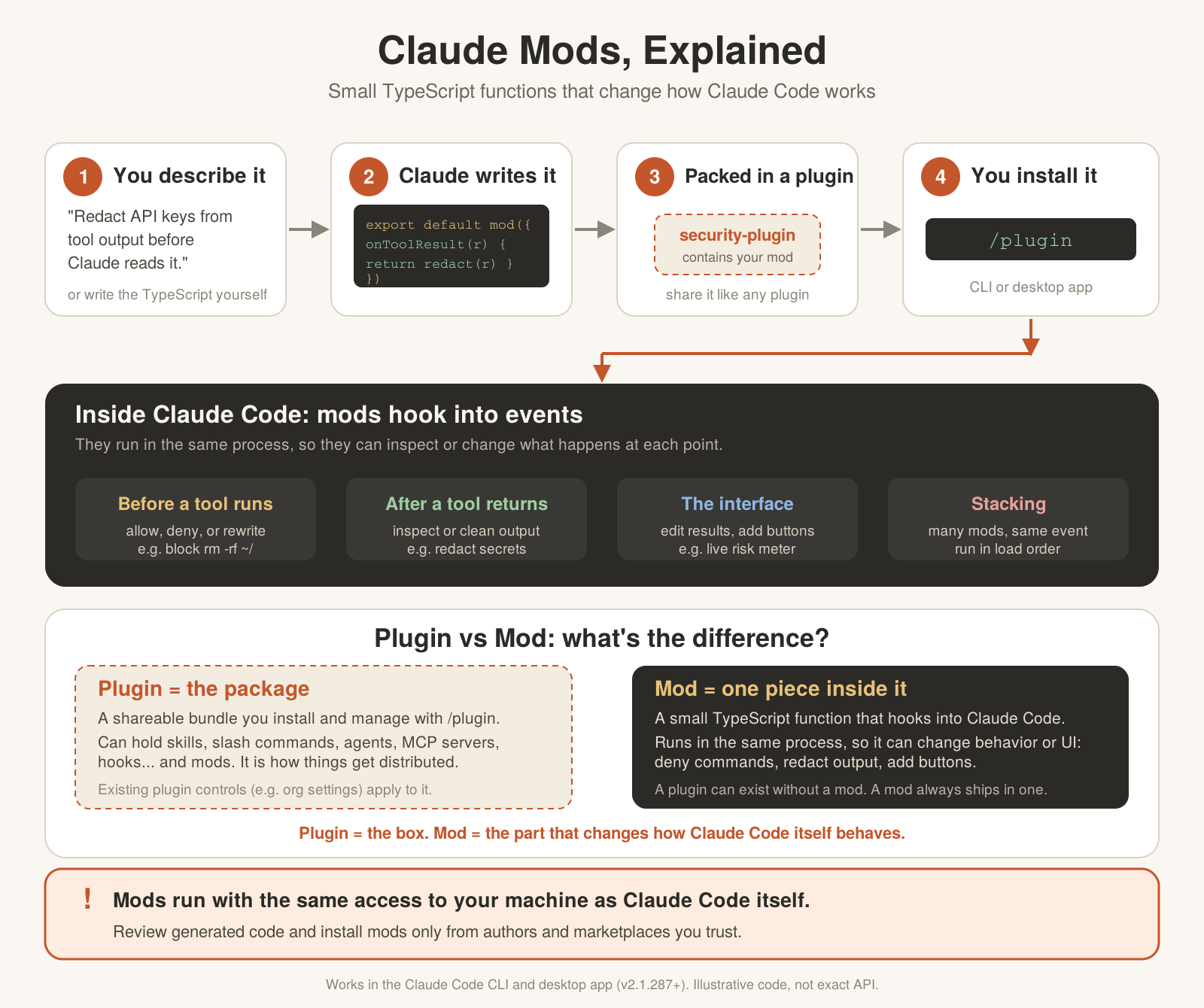
A Claude Code mods (plugin) that watches for architecture or design talk in your prompts and asks Claude to answer with a box-drawing tree of the system, alongside its normal reply.
Version: 0.1.0
The plugin hooks into prompt.submit. When you type a prompt that reads like a question about architecture or design, it:
Architecture words found: asking for a mindmap.context), telling Claude to also read the repository and produce the system architecture as a box-drawing tree in a code block, plus a couple of sentences of notes.Your typed prompt text is left exactly as you wrote it — only Claude's instructions are extended.
This only applies to prompts a person actually typed (or sent via an app/SDK). Messages relayed from a plugin, a peer, or a notification pass through untouched.
The plugin matches on two kinds of language (see hooks/register.ts):
architecture, architectural, architect, system overview, component diagram, high-level structure, tech stack, microservice, monolith, data flow, codebase structure, project structure, module structure, and phrasings like "how is this structured/organized".system, api, database, schema, service, module, pattern, infra, tech, app, in either order — e.g. "database design", "design patterns", "design the architecture".If your prompt says things like "no diagram", "without a mindmap", "skip mermaid", or "don't do a diagram", the plugin leaves it alone even if it otherwise matches. The opt-out only recognizes diagram, mindmap, mind map, and mermaid (see OPT_OUT in hooks/register.ts), so a phrase like "skip the tree" will not opt out.
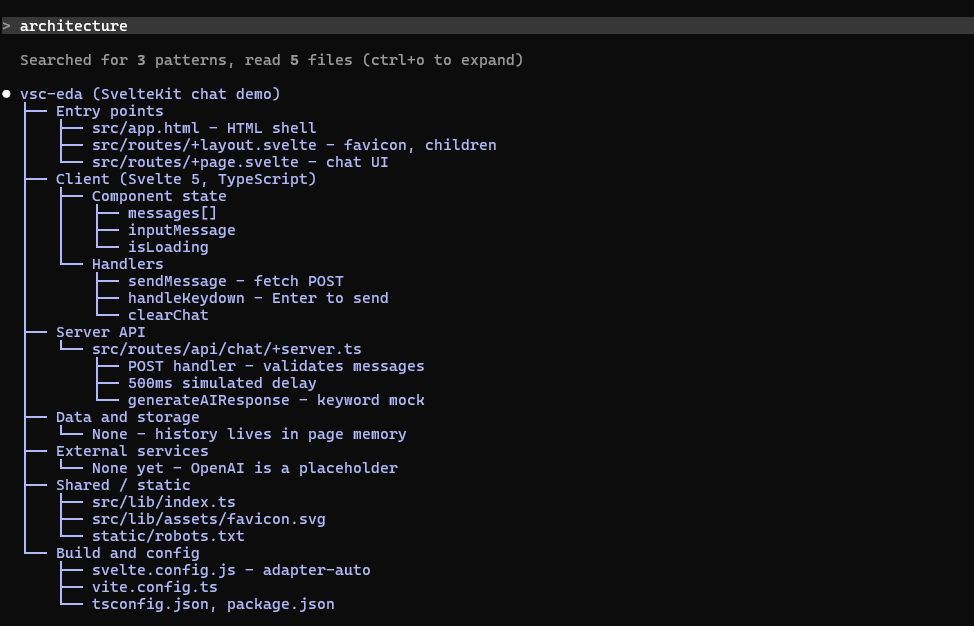
When triggered, Claude's answer includes a tree shaped like this:
my-app
├── Entry points
│   ├── src/server.ts
│   └── src/cli.ts
├── Core modules
│   ├── router
│   └── services
└── Data and storage
    ├── Postgres
    └── Redis cache
The tree is plain text, so it reads directly in the terminal with no viewer. Claude is instructed to read the actual repo first, so nodes name real entry points, modules, and infrastructure rather than invented ones — guesses are called out as assumptions.
Typing architecture triggers the plugin: Claude reads the repo and answers with a tree of the real project structure. The screenshot below was taken before the switch from Mermaid, so its diagram is in the old Mermaid format.
More screenshots and GIFs live in screenshots/.
architecture-tree/
├── .claude-plugin/
│   └── plugin.json       # plugin manifest: name, version, description
├── hooks/
│   ├── hooks.json        # registers register.ts as the hooks module
│   ├── register.ts       # prompt.submit hook: detection + instruction injection
│   └── register.test.ts  # unit tests for register.ts
├── screenshots/          # screenshots/GIFs referenced from this README
└── tsconfig.jsonThis is a Claude Code plugin with no runtime dependencies — there's no build step or npm install. Place this folder wherever Claude Code loads plugins/mods from, and the engine picks up hooks/hooks.json automatically.
Once installed, there's nothing to configure or invoke — the plugin runs automatically on every prompt you type.
architecturegive me a system overviewwhat's the tech stack here?explain the database designArchitecture words found: asking for a mindmap toast and Claude's reply includes a box-drawing tree of the project alongside its normal answer (see Example output and the screenshot above).architecture overview, no diagram.claude plugin validate <dir>claude plugin test <dir>Tests for the detection logic and instruction text live in hooks/register.test.ts.
hooks/register.ts 110 lines1import type { Register } from 'claude-code'
2
3// Architecture Mindmap
4//
5// prompt.submit: if the prompt uses architecture or design words, attach a
6// hidden instruction (the event's `context`) that asks Claude to answer with
7// the system architecture as a box-drawing tree. The prompt text itself is
8// left as typed.
9
10// Words that mean architecture on their own.
11const ARCHITECTURE_WORDS = [
12 'architecture',
13 'architectural',
14 'architect',
15 'system overview',
16 'component diagram',
17 'high-level structure',
18 'high level structure',
19 'tech stack',
20 'microservice',
21 'monolith',
22 'data flow',
23 'codebase structure',
24 'project structure',
25 'module structure',
26 'how is this structured',
27 'how is it structured',
28 'how is this organized',
29 'how is it organized',
30]
31
32// "design" is also a UI, graphic and fashion word, so on its own it does not
33// count. It counts next to a software word, in either order.
34const SOFTWARE_WORDS =
35 'system|software|api|database|db|schema|service|backend|back-end|' +
36 'class|pattern|module|infrastructure|infra|data|high-level|high level|' +
37 'low-level|low level|technical|tech|app|application|platform|doc|document'
38
39const DESIGN_PATTERNS = [
40 new RegExp(`\\b(?:${SOFTWARE_WORDS})\\s+design\\b`, 'i'),
41 new RegExp(`\\bdesign\\s+(?:of|for)\\s+(?:the\\s+|this\\s+|our\\s+|a\\s+)?(?:${SOFTWARE_WORDS})\\b`, 'i'),
42 /\bdesign\s+(?:doc|document|review|decision|overview)s?\b/i,
43 /\bdesign\s+patterns?\b/i,
44 /\bdesign\s+(?:the|a|an)\s+(?:system|architecture|api|database|schema|service)\b/i,
45]
46
47// A prompt that asks for another format, or no diagram, is left alone.
48const OPT_OUT = /\b(?:no|without|skip|don't|do not)\s+(?:a\s+)?(?:diagram|mindmap|mind map|mermaid)\b/i
49
50/** True when the prompt reads like a request about architecture or design. */
51export function isArchitecturePrompt(text: string): boolean {
52 const body = text.trim()
53 if (body === '' || body.startsWith('/') || OPT_OUT.test(body)) {
54 return false
55 }
56 const lower = body.toLowerCase()
57 if (ARCHITECTURE_WORDS.some(word => lower.includes(word))) {
58 return true
59 }
60 return DESIGN_PATTERNS.some(pattern => pattern.test(body))
61}
62
63/** The hidden instruction attached to a matching prompt. */
64export function mindmapInstruction(): string {
65 return [
66 'The architecture-tree plugin matched this prompt: it is about architecture or design.',
67 'Besides answering the question, draw the architecture as a box-drawing tree.',
68 '',
69 'Method:',
70 '- Read the code first (entry points, top-level folders, config, manifests) so every node names something that exists. Do not invent components. If the architecture is not in the repository, mark the guesses as assumptions.',
71 '- Put the tree in ONE fenced code block with no language tag, then 2 to 4 sentences of notes after it.',
72 '',
73 'Tree rules:',
74 '- The first line is the project name.',
75 '- Use ├── for a branch that has siblings below it, └── for the last branch at a level, and │ for a line that continues past a branch. Indent each level by 4 columns, using "│ " or " ".',
76 '- 4 to 7 top-level branches, such as: Entry points, Core modules, Data and storage, External services, Infrastructure, Cross-cutting (auth, logging, config). Rename them to fit the project.',
77 '- At most 4 levels deep and about 40 nodes in all. Group instead of listing everything.',
78 '- Keep each label under about 40 characters: a name, with a short role after " - " if it helps.',
79 '- One node per line. No blank lines inside the block.',
80 '',
81 'Example shape:',
82 '```',
83 'my-app',
84 '├── Entry points',
85 '│ ├── src/server.ts',
86 '│ └── src/cli.ts',
87 '├── Core modules',
88 '│ ├── router',
89 '│ └── services',
90 '└── Data and storage',
91 ' ├── Postgres',
92 ' └── Redis cache',
93 '```',
94 ].join('\n')
95}
96
97export const register: Register = on => {
98 on('prompt.submit', ($, e, next) => {
99 // Only prompts the person typed (or sent from an app or the SDK). A plugin's,
100 // a peer's or a notification's message is passed on untouched.
101 const kind = e.origin?.kind
102 const isPerson = kind === undefined || kind === 'composer' || kind === 'bridge' || kind === 'sdk'
103 if (!isPerson || !isArchitecturePrompt(e.text)) {
104 return next(e)
105 }
106 $.ui.toast('Architecture words found: asking for a mindmap')
107 return next({ ...e, context: [...(e.context ?? []), mindmapInstruction()] })
108 })
109}
110