image-preview
Preview images pasted into the prompt, before you submit: chips above the prompt and an Images pane open them in your OS viewer
newpanebandcommandtoastprompt

Preview images pasted into the prompt, before you submit: chips above the prompt and an Images pane open them in your OS viewer
A Claude Code mod for previewing images you paste or drop into the prompt.
You paste or drop an image into the prompt, don't submit, and step away. When you come back, the prompt only shows [Image #1], and you can't tell which image that was. Claude Code has no way to preview it from the prompt. This was raised in anthropics/claude-code#68986, which was closed.
This mod fills the gap: the 🖼 Image #N chips above the prompt open the pending image in your OS viewer. It works for images pasted from the clipboard as well as dropped files, before you submit. Type a space after the [Image #N] tag that Claude Code inserts, so the chip appears.
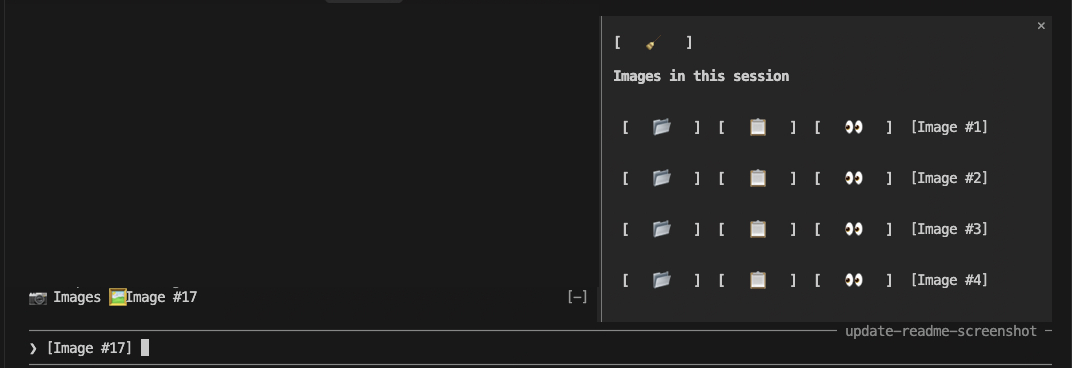
📷 Images button, plus a 🖼 Image #N chip for each [Image #N] in your draft. Clicking a chip opens that image in the OS viewer (Preview on macOS).📷 Images shows or hides it. It is hidden by default. Each row has:📂 reveal the file in Finder📋 copy the file path to the clipboard👀 open the image in Preview[Image #N] label, which also opens the image; hover the buttons for a tooltip🧹 at the top clears the list/image-preview opens the pane. /image-preview 2 opens image 2 in Preview.The mod watches your draft for [Image #N] tags. For a dropped file it remembers the original path. Otherwise it finds the copy Claude Code saved at <session>/images/N.png, by searching the temp folders with find. The chips use whichever is available, and show a notice if neither is.
The Images pane lists the images found on disk. It rescans on every prompt submit, and whenever you open the pane or run /image-preview. 🧹 Clear hides the current images for the rest of the session. Clicking an image's chip brings it back.
Try it from a checkout:
claude --plugin-dir /path/to/image-previewOr install it from GitHub, inside Claude Code:
/plugin marketplace add sandipchitale/claude-code-image-preview
/plugin install image-preview@image-preview
Then run /reload-plugins (or restart). Choose user scope to use it in every project.
[Image #N] tag.| OS | Open | Reveal |
|---|---|---|
| macOS | open | open -R (selects the file) |
| Linux | xdg-open | xdg-open on the folder (the file is not selected) |
| Windows | cmd /c start | explorer /select, |
find over /private/tmp and /tmp, so Windows would also need a Unix-style find (for example from Git Bash) on its PATH for the pane to list images.[Image #N] widget, so the chips above the prompt stand in for it.Button's colors on hover or focus, and the mod can't turn that off.MIT
hooks/register.tsx 251 lines1import { atom, read, update } from 'claude-code'
2import type { Register } from 'claude-code'
3
4import type { PreviewFile } from '../types'
5import { openFile, revealFile } from './os'
6import { droppedImagePath, tokens } from './paths'
7
8const draft = atom({ plugin: 'image-preview', key: 'draft' } as const, '')
9const files = atom({ plugin: 'image-preview', key: 'files' } as const, {} as Record<string, PreviewFile>)
10const origins = atom({ plugin: 'image-preview', key: 'origins' } as const, {} as Record<string, string>)
11// Images the user cleared from the pane, so a rescan doesn't bring them back.
12const cleared = atom({ plugin: 'image-preview', key: 'cleared' } as const, {} as Record<string, boolean>)
13
14// Dropped or pasted file paths not yet matched to an [Image #N] chip.
15let pending: string[] = []
16
17// Icon labels of one width, so the buttons match.
18const PAD = (icon: string) => ` ${icon} `
19
20async function scan($: any) {
21 const sid = await $.session.id()
22 const r = await $.process.run(['find', '/private/tmp', '/tmp', '-maxdepth', '5', '-path', `*/${sid}/images/*`])
23 const gone = await read($, cleared)
24 const found: Record<string, PreviewFile> = {}
25 for (const line of r.stdout.split('\n')) {
26 const m = /\/images\/(\d+)\.[A-Za-z]+$/.exec(line.trim())
27 if (m && !gone[m[1]]) found[m[1]] = { path: line.trim() }
28 }
29 await update($, files, cur => ({ ...cur, ...found }))
30}
31
32async function locate($: any, n: number) {
33 const sid = await $.session.id()
34 const r = await $.process.run(['find', '/private/tmp', '/tmp', '-maxdepth', '5', '-path', `*/${sid}/images/${n}.*`])
35 const path = r.stdout.split('\n').find((l: string) => l.trim())
36 if (path) {
37 await update($, files, m => ({ ...m, [n]: { path } }))
38 }
39}
40
41const PANE = 'image-preview'
42
43async function clearAll($: any) {
44 const ids = Object.keys(await read($, files))
45 await update($, cleared, m => ({ ...m, ...Object.fromEntries(ids.map(id => [id, true])) }))
46 await update($, files, () => ({}))
47}
48
49async function toggle($: any) {
50 const isUp = (await $.ui.panes()).some((p: any) => p.id === PANE)
51 if (isUp) {
52 await $.ui.close({ id: PANE })
53 return
54 }
55 await scan($)
56 await $.ui.open({ id: PANE, title: 'Images', focus: true })
57}
58
59async function show($: any, n: number) {
60 const run = (argv: string[]) => $.process.run(argv)
61 const origin = (await read($, origins))[n]
62 // The dropped file may have been moved since, so the saved copy is the fallback.
63 if (origin && (await openFile(run, origin))) return true
64 let have = (await read($, files))[n]
65 if (!have) {
66 await locate($, n)
67 have = (await read($, files))[n]
68 }
69 if (have && (await openFile(run, have.path))) return true
70 await $.ui.toast(`Image #${n} isn't saved yet or can't be found`)
71 return false
72}
73
74export const register: Register = on => {
75 on('session.start', async ($, e, next) => {
76 await $.command.register({
77 name: 'image-preview',
78 description: 'Preview a pasted image in a pane: /image-preview [n]',
79 })
80 return next(e)
81 })
82
83 on('command.run', { command: 'image-preview' }, async ($, e: any) => {
84 const arg = Number(String(e.args ?? '').trim())
85 await scan($)
86 if (!arg) {
87 await $.ui.open({ id: PANE, title: 'Images', focus: true })
88 return { text: 'Images pane opened.' }
89 }
90 const n = arg
91 const ok = await show($, n)
92 return { text: ok ? `Opened Image #${n}.` : `Image #${n} not found.` }
93 })
94
95 on('prompt.edit', async ($, e, next) => {
96 const result: any = await next(e)
97 const after: string =
98 result?.text ?? e.text.slice(0, e.start) + e.inputText + e.text.slice(e.end)
99 await update($, draft, () => after)
100 if (after.trim() === '') pending = []
101 const dropped = droppedImagePath(e.inputText)
102 if (dropped) pending.push(dropped)
103 const before = new Set(tokens(e.text))
104 for (const n of tokens(after)) {
105 if (before.has(n)) continue
106 const origin = pending.shift()
107 if (origin) await update($, origins, m => ({ ...m, [n]: origin }))
108 }
109 return result
110 })
111
112 on('prompt.submit', async ($, e, next) => {
113 await update($, draft, () => '')
114 pending = []
115 const sent = await next(e)
116 await scan($).catch(() => {})
117 return sent
118 })
119
120 on('ui.render', { component: 'AbovePrompt' }, async ($, e, next) => {
121 const { Box, Button } = $.ui.resolve(e)
122 const text = await read($, draft)
123 const ns = [...new Set(tokens(text))]
124 return (
125 <Box flexDirection="row" gap={1}>
126 <Button key="toggle-pane" plain onPress={() => toggle($)}>
127 {'📷 Images'}
128 </Button>
129 {ns.map(n => (
130 <Button
131 key={`img-${n}`}
132 plain
133 onPress={() => show($, n)}
134 >
135 {`🖼 Image #${n}`}
136 </Button>
137 ))}
138 </Box>
139 )
140 })
141
142 on('ui.render', { component: 'Pane', requestId: PANE }, async ($, e) => {
143 const { Box, Text, Button } = $.ui.resolve(e)
144 const known = await read($, files)
145 const origin = await read($, origins)
146 const shown = (n: number) => origin[n] ?? known[n].path
147 const ids = Object.keys(known).map(Number).sort((a, b) => a - b)
148 // Tooltips are the last children of the root, so nothing paints over them:
149 // an absolute Box paints over siblings before it only. Each joins its
150 // button's hover scope, and sits at a position the fixed layout gives.
151 const ROW0 = 4
152 const ROWH = 3
153 const COLS = [2, 14, 26]
154 const tip = (key: string, top: number, left: number, text: string) => (
155 <Box
156 key={`card-${key}`}
157 position="absolute"
158 top={top}
159 left={left}
160 display="none"
161 hover={{ display: 'flex', scope: key }}
162 borderStyle="round"
163 backgroundColor="inverseText"
164 paddingX={1}
165 >
166 <Text color="text">{text}</Text>
167 </Box>
168 )
169 return (
170 <Box flexDirection="column" paddingX={1} paddingBottom={4}>
171 <Box
172 key="clear-box"
173 hover={{ scope: 'tip-clear' }}
174 alignSelf="flex-start"
175 >
176 <Button key="clear" onPress={() => clearAll($)}>
177 {PAD('🧹')}
178 </Button>
179 </Box>
180 <Text> </Text>
181 <Text bold>Images in this session</Text>
182 <Text> </Text>
183 {ids.length === 0 && <Text dimColor>No images yet.</Text>}
184 {ids.map(n => (
185 <Box
186 key={`row-${n}`}
187 flexDirection="row"
188 alignItems="center"
189 gap={2}
190 paddingX={1}
191 paddingY={1}
192 hover={{ backgroundColor: 'subtle' }}
193 >
194 <Box
195 key={`reveal-box-${n}`}
196 hover={{ scope: `tip-reveal-${n}` }}
197 >
198 <Button
199 key={`reveal-${n}`}
200 onPress={() => revealFile((argv: string[]) => $.process.run(argv), shown(n))}
201 >
202 {PAD('📂')}
203 </Button>
204 </Box>
205 <Box
206 key={`copy-box-${n}`}
207 hover={{ scope: `tip-copy-${n}` }}
208 >
209 <Button
210 key={`copy-${n}`}
211 onPress={(press: any) =>
212 $.ui.copy({ text: shown(n), surface: press.surface })
213 }
214 >
215 {PAD('📋')}
216 </Button>
217 </Box>
218 <Box
219 key={`view-box-${n}`}
220 hover={{ scope: `tip-view-${n}` }}
221 >
222 <Button key={`view-${n}`} onPress={() => show($, n)}>
223 {PAD('👀')}
224 </Button>
225 </Box>
226 <Button key={`open-${n}`} plain onPress={() => show($, n)}>
227 {`[Image #${n}]`}
228 </Button>
229 </Box>
230 ))}
231 {tip('tip-clear', 1, 1, 'Clear list')}
232 {ids.map((n, i) => {
233 const rowTop = ROW0 + i * ROWH
234 // Below the row, unless the card would run past the bottom edge of the
235 // window as scrolled: then above the button (the card is 3 rows tall,
236 // the button on the row's middle line).
237 const offset = e.props?.scroll?.offset ?? 0
238 const room = e.props?.scroll?.bodyRows ?? e.viewport?.rows ?? 24
239 const below =
240 rowTop + ROWH + 3 - offset > room ? rowTop - 2 : rowTop + ROWH
241 return [
242 tip(`tip-reveal-${n}`, below, COLS[0], 'Show in Finder'),
243 tip(`tip-copy-${n}`, below, COLS[1], 'Copy path'),
244 tip(`tip-view-${n}`, below, COLS[2], 'View in OS preview'),
245 ]
246 })}
247 </Box>
248 )
249 })
250}
251hooks/os.ts 34 lines1// Opening and revealing a file differs per OS and the mod can't read the OS,
2// so each command is tried in turn and the first that works is used.
3type Run = (argv: string[]) => Promise<{ exitCode: number }>
4
5const dirname = (p: string) => p.replace(/[\\/][^\\/]*$/, '') || '/'
6
7async function firstOk(run: Run, attempts: { argv: string[]; trustExit?: boolean }[]) {
8 for (const a of attempts) {
9 try {
10 const r = await run(a.argv)
11 if (r.exitCode === 0 || a.trustExit) return true
12 } catch {
13 // command not installed: try the next one
14 }
15 }
16 return false
17}
18
19export const openArgv = (p: string) => [
20 { argv: ['open', p] },
21 { argv: ['xdg-open', p] },
22 { argv: ['cmd', '/c', 'start', '', p] },
23]
24
25// explorer.exe exits 1 even when it worked, so its attempt is trusted.
26export const revealArgv = (p: string) => [
27 { argv: ['open', '-R', p] },
28 { argv: ['explorer', `/select,${p}`], trustExit: true },
29 { argv: ['xdg-open', dirname(p)] },
30]
31
32export const openFile = (run: Run, p: string) => firstOk(run, openArgv(p))
33export const revealFile = (run: Run, p: string) => firstOk(run, revealArgv(p))
34hooks/paths.ts 21 lines1export const tokens = (text: string) =>
2 [...text.matchAll(/\[Image #?(\d+)\]/g)].map(m => Number(m[1]))
3
4const IMAGE_EXT = /\.(png|jpe?g|gif|webp|heic|tiff?|bmp)$/i
5
6// The absolute path of a dropped or pasted image file (plain, quoted, escaped
7// or file://), or null for anything else, including a URL that won't decode.
8export function droppedImagePath(input: string): string | null {
9 let raw = input.trim().replace(/^(['"])(.*)\1$/, '$2')
10 if (raw.startsWith('file://')) {
11 try {
12 raw = decodeURIComponent(raw.slice('file://'.length))
13 } catch {
14 return null
15 }
16 } else {
17 raw = raw.replace(/\\(.)/g, '$1')
18 }
19 return raw.startsWith('/') && raw.length > 1 && IMAGE_EXT.test(raw) ? raw : null
20}
21types/index.d.ts 13 lines1export type PreviewFile = { path: string }
2
3declare module 'claude-code' {
4 interface PluginState {
5 'image-preview': {
6 draft: string
7 files: Record<string, PreviewFile>
8 origins: Record<string, string>
9 cleared: Record<string, boolean>
10 }
11 }
12}
13