Ask Notch
Claude's questions drop from your Mac's notch as a card. Click an option, pick with 1-4, type your own answer, or press esc to answer in Claude Code as usual.
newguardcommandstatusprompttool

Claude's questions drop from your Mac's notch as a card. Click an option, pick with 1-4, type your own answer, or press esc to answer in Claude Code as usual.
When Claude asks you something, the question drops from your Mac's notch as a card, so you can answer without switching back to the terminal.
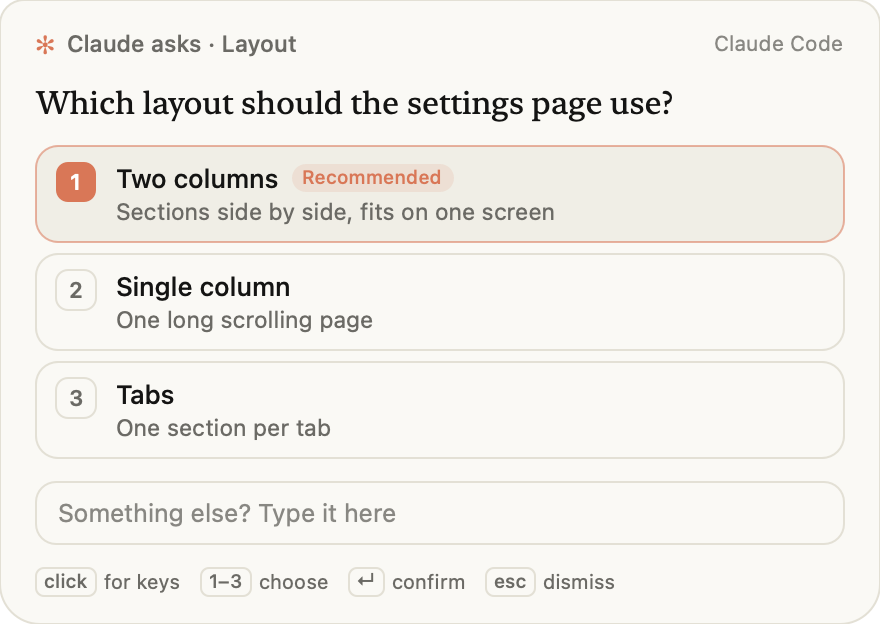
Needs macOS 13+ and Claude Code v2.1.287 or later (claude --version). It is a Claude Code mod: it hooks Claude's AskUserQuestion tool and nothing else. Nothing is compiled: the card is a JavaScript file that macOS's own osascript runs.
Nothing is installed and nothing is written to your settings:
claude --plugin-url https://github.com/sameeeeeeep/ask-notch/releases/latest/download/ask-notch.zipAsk Claude something that makes it ask you back, or run /notch test.
In Claude Code (v2.1.275+ adds the marketplace and installs in one step):
/plugin install ask-notch --marketplace sameeeeeeep/ask-notchUpdates: claude plugin update ask-notch@ask-notch.
Say what you want after /notch, in your own words: /notch put it by my mouse, /notch pause for now, /notch bring the cat, /notch show me one. Claude reads it and changes the setting. On its own, /notch shows the current settings. The words below skip Claude and take effect instantly:
| Command | Effect |
|---|---|
/notch cursor | Open cards beside the pointer instead of at the notch |
/notch notch | Back to the notch |
/notch companion cat | A small painted cat hops out beside the card and waits with you |
/notch companion off | No companion (the default) |
/notch off / /notch on | Use Claude Code's own dialog / the card |
/notch test | Show a test card |
Multi-select, free-text and number questions always use Claude Code's own form.
While cards are on, Claude asks with AskUserQuestion whenever it would otherwise list options in its reply ("A or B?", "go ahead?"), so those choices arrive as a card at the notch. The plugin adds one short paragraph saying so to Claude's system prompt while cards are on (none while they're off), and ships the same guidance as a skill, ask-at-the-notch.
Any request where Claude stops to ask you a question shows the card. Three to try:
/notch test shows a sample card without asking Claude anything.
Cards appear when Claude Code runs on your Mac: the claude CLI in any terminal, and the Desktop app's Code tab once it ships Claude Code v2.1.287. In other places, such as cloud sessions, the mod steps aside and Claude Code asks as usual. Chat on claude.ai and Cowork don't run Claude Code mods, so the plugin does nothing there. On Windows and Linux the card can't open, and Claude Code asks as usual.
claude --version (needs v2.1.287+), then /plugin and look for ask-notch in the mods active line under the tabs. Run /notch test. If /notch is off, run /notch on./notch cursor to open it beside the pointer./notch off.The mod is hooks/register.js (about 100 lines) and the card is helper/card.js (about 600 lines). Both are plain JavaScript you can read; the plugin ships no compiled code.
AskUserQuestion tool, and only single-choice questions. When you pick or type an answer in the card, the mod returns that answer in place of Claude Code's own question dialog, in the same shape the dialog returns. If you press esc, the card times out (9 minutes), the question is multi-select, text or number, or the card can't start, it hands the question back to Claude Code's dialog unchanged./usr/bin/osascript -l JavaScript helper/card.js, from this plugin's own folder. osascript is macOS's built-in script runner; the plugin needs it because a Claude Code mod can only draw inside Claude Code's window, and the card has to appear at the Mac's notch. The question, its options, where to show the card and, if you turned one on, the companion's folder go to the card on its standard input as one JSON object. It starts nothing else and runs no shell.helper/card.js uses macOS's JavaScript bridge to AppKit to draw one window, reads the pointer position (for /notch cursor) and, with a companion, the pictures in assets/companion/. It prints your answer as one line of JSON and exits. It makes no network requests, writes no files, reads no environment variables and needs no permissions. It refuses the keyboard until you click it, and appears without activating, so it can't take keystrokes meant for the app you're using.osascript process above, on its standard input. The card prints your answer on standard output and exits, and the mod gives the answer back to Claude. Nothing leaves your Mac: no network requests, no files written, no credentials or environment variables read.AskUserQuestion in place of Claude Code's dialog only when you answer on the card; every other case calls through to Claude Code's own dialog./notch followed by words it doesn't recognise sends Claude one prompt that quotes them. Claude then changes the setting through the plugin's own tool, mcp__ask-notch__settings (on/off, notch/cursor, companion, test card). The tool reads and writes only the settings below.CHOICES_NOTE in hooks/register.js) asking it to put choices to you with AskUserQuestion. skills/ask-at-the-notch/SKILL.md says the same at length. Both are plain text and run nothing./notch settings (on or off, notch or cursor, companion), in Claude Code's local storage for this plugin.To list the mod's hooks and calls yourself, run claude plugin validate on this directory.
Ask Notch collects nothing. The question, its options and your answer pass only between Claude Code and osascript running helper/card.js on your Mac. There is no network access, no analytics and no account. The only thing saved is your /notch settings (on or off, notch or cursor, companion), in Claude Code's local storage for this plugin; uninstalling the plugin removes it.
Report problems or ask questions at github.com/sameeeeeeep/ask-notch/issues. For security issues, email sameeeeeeep@gmail.com instead of opening a public issue.
The source lives in packages/notch-mod in the Switchboard repo, which also holds the build and release scripts; this repo is a mirror.
claude --plugin-dir /path/to/ask-notch   # load a checkout for one session; edits hot-reload
claude plugin test # unit tests (no session needed)hooks/register.js 154 lines1// Ask Notch: Claude's questions as a native card at the notch.
2//
3// Claude's AskUserQuestion is answered from helper/card.js, a one-shot window drawn by macOS's
4// built-in script runner (osascript, JavaScript for Automation). Esc at the card, a timeout, or a
5// card that can't start falls back to Claude Code's own dialog, so a question is never lost.
6
7const CARD_TIMEOUT_S = 540
8const COMPANIONS = ['cat', 'off']
9// Added to Claude's system prompt while cards are on (the ask-at-the-notch skill says the same at length).
10const CHOICES_NOTE = '# Ask Notch\nAsk Notch is installed and on: an AskUserQuestion call shows as a card at the top of the person\'s screen, answered with one click from any app. So whenever your reply would offer the person two or more options to pick from (approaches, designs, names, which way to go) or end by asking which they prefer, do not write that list. Call AskUserQuestion instead: one single-choice question, 2-4 options with short labels, your pick first with " (Recommended)" at the end of its label, the reasoning and trade-off in each option\'s description. Then continue with the answer. This applies even when they ask you to help them decide: give your pick as the recommended option. Only skip the card when there is truly one sensible way to do it.'
11
12export function register(on) {
13 on('session.start', async ($, e, next) => {
14 try {
15 await $.command.register({
16 name: 'notch',
17 description: 'Claude questions at the notch. Say what you want: "put it by my cursor", "pause", "bring the cat", "test"',
18 argumentHint: '[anything, e.g. "put it by my cursor"]',
19 immediate: true,
20 })
21 // Claude reads whatever follows /notch and changes the setting through this tool.
22 await $.tool.register({
23 name: 'settings',
24 description: 'Read or change Ask Notch, the plugin that shows your AskUserQuestion questions as a card at the Mac\'s notch. Every field is optional; leave all out to read the current settings. on: false sends questions to Claude Code\'s own dialog instead. at: where the card opens, "notch" (drops from the top of the screen) or "cursor" (beside the mouse pointer). companion: "cat" shows an animated cat beside the card, "off" hides it. test: true shows a sample card so the person can see it working. Returns the settings after the change.',
25 inputSchema: {
26 type: 'object',
27 properties: {
28 on: { type: 'boolean' },
29 at: { type: 'string', enum: ['notch', 'cursor'] },
30 companion: { type: 'string', enum: COMPANIONS },
31 test: { type: 'boolean' },
32 },
33 },
34 })
35 } catch {}
36 return next(e)
37 })
38
39 // While cards are on, Claude asks its choices with AskUserQuestion, so they arrive at the notch.
40 on('prompt.compose', async ($, e, next) => {
41 const r = await next(e)
42 const cfg = await loadCfg($)
43 if (!cfg.on) return r
44 return { sections: [...r.sections, { id: 'ask-notch:choices', text: CHOICES_NOTE, scope: 'session' }] }
45 })
46
47 on('command.run', { command: 'notch' }, async ($, e) => {
48 const said = (e.args || '').trim()
49 const cfg = await loadCfg($)
50 if (!said) return { text: describe(cfg) + ' · say what you want, e.g. /notch put it by my cursor' }
51 // The exact words still work instantly; anything else is read by Claude.
52 const exact = parseExact(said)
53 if (exact) {
54 const r = await apply($, cfg, exact)
55 return { text: describe(r.cfg) + (r.test ? ' · test card → ' + JSON.stringify(r.test) : '') }
56 }
57 // A command.run hook can't submit (it holds the turn); queue it to run just after the command returns.
58 $.clock.after(50, () => $.prompt.submit({
59 text: 'The person typed `/notch ' + said + '`. Read it as a change to Ask Notch and make it with the mcp__ask-notch__settings tool, then reply in one short line with what changed. If it asks for something the settings cannot do, say so in one line and leave them as they are. Current: ' + describe(cfg) + '.',
60 }))
61 return { text: 'asking Claude: "' + said + '"…' }
62 })
63
64 on('tool.call', { tool: 'mcp__ask-notch__settings' }, async ($, e) => {
65 const r = await apply($, await loadCfg($), e)
66 return { result: describe(r.cfg) + (r.test ? ' · test card answered: ' + JSON.stringify(r.test) : '') }
67 })
68
69 on('tool.call', { tool: 'AskUserQuestion' }, async ($, e, next) => {
70 const cfg = await loadCfg($)
71 const qs = e.questions || []
72 // The card answers single-choice questions; multi-select, text and number go to Claude Code's form.
73 if (!cfg.on || !qs.length || qs.some((q) => q.multiSelect || (q.kind && q.kind !== 'choice'))) return next(e)
74
75 // Same shape as Claude Code's own dialog result: question text -> chosen label (or typed text).
76 const answers = {}
77 for (const q of qs) {
78 const r = await showCard($, {
79 title: q.header ? 'Claude asks · ' + q.header : undefined,
80 question: q.question,
81 options: (q.options || []).map((o) => ({
82 label: String(o.label).replace(/\s*\(recommended\)\s*$/i, ''),
83 detail: o.description,
84 recommended: /\(recommended\)\s*$/i.test(String(o.label)),
85 })),
86 }, cfg)
87 // Dismissed, timed out, or the card failed: hand the whole question set to Claude Code's dialog.
88 if (!r || r.cancelled || !r.answer) return next(e)
89 answers[q.question] = r.answer
90 }
91 return { result: { questions: qs, answers } }
92 })
93}
94
95// The fixed words /notch has always taken: on, off, notch, cursor, companion cat|off, test.
96function parseExact(said) {
97 const [arg, value, extra] = said.toLowerCase().split(/\s+/)
98 if (extra !== undefined) return null
99 if ((arg === 'on' || arg === 'off') && !value) return { on: arg === 'on' }
100 if ((arg === 'notch' || arg === 'cursor') && !value) return { at: arg }
101 if (arg === 'companion' && COMPANIONS.includes(value)) return { companion: value }
102 if (arg === 'test' && !value) return { test: true }
103 return null
104}
105
106async function apply($, cfg, change) {
107 if (typeof change.on === 'boolean') cfg.on = change.on
108 if (change.at === 'notch' || change.at === 'cursor') cfg.at = change.at
109 if (COMPANIONS.includes(change.companion)) cfg.companion = change.companion
110 await $.store.set('cfg', cfg)
111 let test
112 if (change.test) {
113 test = await showCard($, {
114 question: 'Notch cards are working. Keep Claude\'s questions here?',
115 options: [
116 { label: 'Keep them here', detail: 'Questions drop from the notch', recommended: true },
117 { label: 'Beside the cursor', detail: 'Card opens where you are pointing' },
118 ],
119 }, cfg)
120 }
121 return { cfg, test }
122}
123
124function describe(cfg) {
125 return 'Notch cards ' + (cfg.on ? 'on' : 'off') + ' · at ' + cfg.at + ' · companion ' + cfg.companion
126}
127
128async function loadCfg($) {
129 const saved = await $.store.get('cfg')
130 const cfg = { on: true, at: 'notch', companion: 'off', ...(saved || {}) }
131 if (!COMPANIONS.includes(cfg.companion)) cfg.companion = 'off'
132 return cfg
133}
134
135async function showCard($, spec, cfg) {
136 const companion = cfg.companion === 'cat' ? { name: 'cat', dir: 'assets/companion/cat' } : undefined
137 $.ui.status('question waiting at the ' + cfg.at)
138 try {
139 // Always the same command: macOS's own osascript running this plugin's helper/card.js. The question
140 // goes to it on standard input; its answer comes back on standard output. Nothing leaves the Mac.
141 const r = await $.process.run(['/usr/bin/osascript', '-l', 'JavaScript', 'helper/card.js'], {
142 cwd: $.plugin.root,
143 stdin: JSON.stringify({ ...spec, at: cfg.at, source: 'Claude Code', timeout: CARD_TIMEOUT_S, companion }),
144 timeoutMs: (CARD_TIMEOUT_S + 15) * 1000,
145 })
146 const line = r.stdout.trim().split('\n').pop()
147 return line ? JSON.parse(line) : null
148 } catch {
149 return null
150 } finally {
151 $.ui.status(undefined)
152 }
153}
154