imagine
Generate images with your ChatGPT login (through OpenAI's Codex CLI) and add them to your project
newpanecommandtoaststatusprocess

Generate images with your ChatGPT login (through OpenAI's Codex CLI) and add them to your project
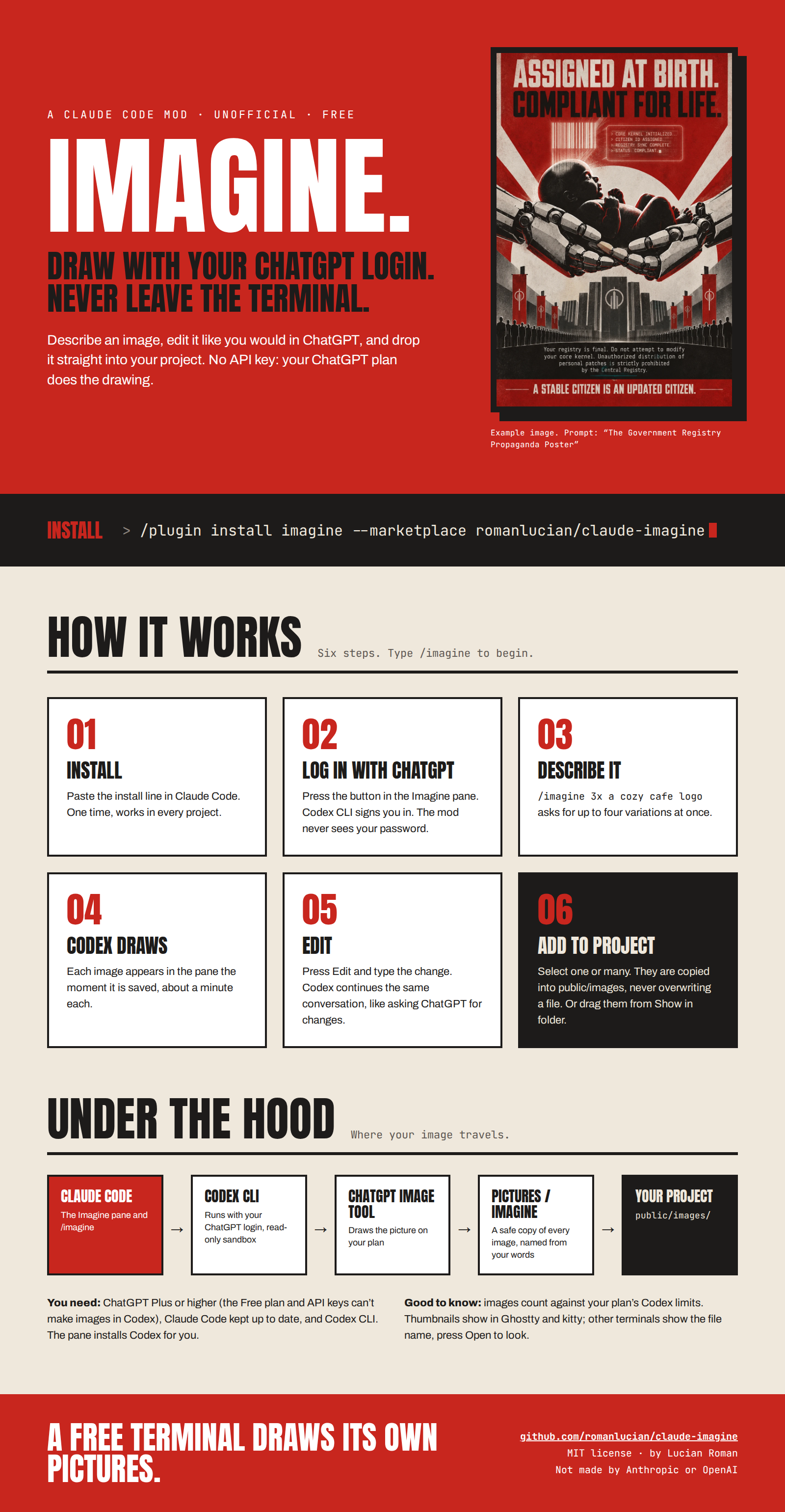
A Claude Code mod that adds an Imagine pane and an /imagine command:
public/images by default).An unofficial community mod by Lucian Roman, not made or supported by Anthropic or OpenAI. Mods are an early-access Claude Code feature, so keep Claude Code up to date (claude update).
npm install -g @openai/codex. The pane also has an Install Codex button.New to the terminal? Follow these steps in order. Every command is something you copy, paste, and press Enter.
Cmd + Space, type Terminal, press Enter.Ctrl + Alt + T.Type claude and press Enter to start Claude Code. Then type this inside Claude Code:
/plugin install imagine --marketplace romanlucian/claude-imagineAnswer y to add the marketplace, then press Enter for the user scope (it then works in all your projects). A settings screen with an empty Codex command field may appear. Leave it empty (the mod then uses codex) and choose Save configuration. Type /exit to quit Claude Code.
Getting updates later. In a terminal, type these two lines (press Enter after each), then start Claude Code again:
claude plugin marketplace update imagine
claude plugin update imagine@imagine"Your project" is the app you want images for. Images are saved into the folder Claude Code was started in, so start it there.
cd and a space, but don't press Enter yet. Drag your project's folder from Finder (or Files) into the terminal window: its path appears by itself. Now press Enter, then type claude.Ctrl + backtick), and type claude./imagine and press Enter. The Imagine pane opens.Type this and press Enter:
/imagine a cozy cafe logo, flat styleWait about a minute. When it's ready, a message says the image is ready in the Imagine pane.
a-cozy-cafe-logo.png). Open and Show in folder use this copy.public/images).After Add to project, press Mention it in my prompt and ask Claude something like "put this image in the hero section".
| You see | What to do |
|---|---|
/imagine is an unknown command | The mod isn't loaded. Type /plugin, open imagine, and look at its Errors tab. If imagine isn't listed, do step 3 again. Then quit Claude Code (/exit) and start it again. |
| "npm was not found" | Install Node.js (step 1), close the terminal, open a new one, and start Claude Code again. |
| "Codex CLI is not installed yet" | Open the pane with /imagine and press Install Codex (npm). Then press Check again. |
| "Claude Code could not run codex" | Codex is installed, but Claude Code can't find it. In a normal terminal type which codex and copy the line it prints. In Claude Code, type /plugin, open imagine, paste that line into the Codex command field, and choose Save configuration. Then quit and start Claude Code again. |
| No browser window opens when you log in (for example over SSH) | Type /imagine login code. Open the link the pane shows, sign in, and type the code it shows. |
| "Codex is logged in with an API key…" | Images only work with a ChatGPT login. In a terminal type codex logout, then press Log in with ChatGPT in the pane. |
| "no image" or "Codex finished without making an image" | Check that your ChatGPT plan is Plus or higher. If you made many images today, you may have hit your plan's limit: wait and try later. |
| "is no longer on disk" when you press Add to project or Open | You have an older version of the mod. Get the update (end of step 3). |
| The pane shows a file name but no picture | Your terminal can't show images (only Ghostty and kitty can). Press Open to see it. |
| "could not add …" | The project folder may be wrong or not writable. Change Project folder in the pane, for example to public/images. |
In Claude Code, from any folder, type:
/plugin install imagine --marketplace romanlucian/claude-imagineAnswer y to add the marketplace, then press Enter for the user scope. If it asks for Codex command, keep codex and press Enter. The mod then works in every project.
This works because this repo is also a plugin marketplace: .claude-plugin/marketplace.json lists the mod.
To get a newer version later:
claude plugin marketplace update imagine
claude plugin update imagine@imagine
Developing the mod: clone this repo and run claude --plugin-dir . inside it to load your working copy instead.
| Type | What happens |
|---|---|
/imagine | Opens the Imagine pane |
/imagine login | Logs in with ChatGPT in your browser |
/imagine login code | Logs in with a link and a one-time code. Use this when Claude Code runs over SSH or no browser opens. |
/imagine a cozy cafe logo, flat style | Generates one image |
/imagine 3x a cozy cafe logo, flat style | Generates 3 variations (up to 4) |
/imagine edit make the background blue | Makes a new version of the latest image with that change |
You can also type the description straight into the pane's Describe an image field.
Images are added to the project Claude Code was started in. In VS Code: open your app's folder, open the terminal (Ctrl + ), and type claude`.
Each image in the pane has these buttons:
cozy-cafe-logo.png, and existing files are never overwritten (-2, -3…).Project folder sets where images go. It's remembered per project.
After adding, Mention it in my prompt puts @public/images/… in your prompt, so you can ask Claude to use the image ("put this in the hero section").
Previews: in Ghostty and kitty the pane shows thumbnails. Other terminals show just the file name, so use Open to look.
~/Pictures/Imagine (Finder: Pictures → Imagine), named from your description. The buttons use this copy, because Codex's own file in ~/.codex/generated_images/ can disappear. Clear list only empties the pane.PATH as your terminal. Run which codex in a terminal, then put that full path in this plugin's Codex command option.codex login or codex login --device-auth. Codex keeps the login in ~/.codex/. This mod never sees your password or tokens.codex exec --json --sandbox read-only -, asking Codex's built-in $imagegen skill for the image(s). The sandbox stops Codex from changing any files; its image tool still saves each picture. Codex's JSON output doesn't list the images, so the mod reads the request's id from it (thread.started) and watches that request's folder, ~/.codex/generated_images/<id>/. Each image shows up in the pane as soon as it's saved, and the mod copies it to ~/Pictures/Imagine right away (and again when Codex finishes).codex exec ... resume <id> - continues the image's own Codex run, so Codex still has the image and the conversation. The new version lands in the same run folder; the mod skips the files that were already there.mkdir -p and cp into the project folder.claude plugin validate . # what the engine will load, and anything it would refuse
claude plugin test . # tests/imagine.test.ts, with Codex fakedMIT, see LICENSE.
hooks/register.tsx 877 lines1import { atom, read, update } from 'claude-code'
2import type { EngineInterface, Register } from 'claude-code'
3
4import type { ImagineImage, ImagineJob, ImagineLogin } from '../types'
5import {
6 baseName,
7 cleanFolder,
8 codexPrompt,
9 dirName,
10 editPrompt,
11 extensionOf,
12 imageFolder,
13 isImageFile,
14 loginPrompt,
15 parseRequest,
16 readLine,
17 readLoginStatus,
18 slug,
19} from './codex'
20
21type Engine = EngineInterface
22
23const PANE = 'imagine'
24const TITLE = 'Imagine'
25const KEEP_IMAGES = 40
26const SHOWN_IMAGES = 12
27
28const images = atom({ plugin: 'imagine', key: 'images' } as const, [])
29const jobs = atom({ plugin: 'imagine', key: 'jobs' } as const, [])
30const login = atom({ plugin: 'imagine', key: 'login' } as const, { status: 'unknown', detail: '' })
31const dest = atom({ plugin: 'imagine', key: 'dest' } as const, '')
32const lastAdded = atom({ plugin: 'imagine', key: 'lastAdded' } as const, [])
33const previews = atom({ plugin: 'imagine', key: 'previews' } as const, false)
34const editing = atom({ plugin: 'imagine', key: 'editing' } as const, '')
35const editDraft = atom({ plugin: 'imagine', key: 'editDraft' } as const, '')
36const promptDraft = atom({ plugin: 'imagine', key: 'promptDraft' } as const, '')
37
38// The children still running (Codex runs, a login), so Cancel can stop them.
39// Module state on purpose: a reload ends them anyway.
40const running = new Map<string, () => void>()
41
42const short = (text: string, max = 40): string =>
43 text.length > max ? `${text.slice(0, max - 1)}…` : text
44
45const oneLine = (text: string): string => short(text.replace(/\s+/g, ' ').trim(), 200)
46
47const plural = (count: number, word: string): string =>
48 `${count} ${word}${count === 1 ? '' : 's'}`
49
50// How to run Codex: the `codexPath` option, read again at every load.
51let codex = 'codex'
52
53// ---- Codex: install, login --------------------------------------------
54
55async function checkLogin($: Engine, force = false): Promise<ImagineLogin> {
56 let found: ImagineLogin
57 try {
58 const ran = await $.process.run([codex, 'login', 'status'], { timeoutMs: 20_000 })
59 found = readLoginStatus(ran.exitCode, `${ran.stdout}\n${ran.stderr}`)
60 } catch {
61 found = { status: 'no-codex', detail: `Claude Code could not run \`${codex}\`.` }
62 }
63 // A check never interrupts a login in progress; the login checks when it ends.
64 await update($, login, current =>
65 current.status === 'logging-in' && !force && found.status !== 'logged-in' ? current : found,
66 )
67 return found
68}
69
70async function installCodex($: Engine): Promise<void> {
71 $.ui.status('imagine: installing Codex CLI…')
72 try {
73 const ran = await $.process.run(['npm', 'install', '-g', '@openai/codex'], {
74 timeoutMs: 300_000,
75 })
76 if (ran.exitCode !== 0) {
77 const tail = (ran.stderr || ran.stdout).trim().split('\n').slice(-2).join(' ')
78 $.ui.toast(
79 `imagine: npm could not install Codex (${oneLine(tail)}). In a terminal: npm install -g @openai/codex`,
80 { timeoutMs: 15_000 },
81 )
82 }
83 } catch {
84 $.ui.toast('imagine: npm was not found. Install Node.js, then: npm install -g @openai/codex', {
85 timeoutMs: 15_000,
86 })
87 } finally {
88 showWork($)
89 }
90 const after = await checkLogin($, true)
91 if (after.status !== 'no-codex') $.ui.toast('imagine: Codex is installed. Now log in with ChatGPT.')
92}
93
94async function logIn($: Engine, mode: 'browser' | 'device'): Promise<void> {
95 running.get('login')?.()
96 const argv = mode === 'device' ? [codex, 'login', '--device-auth'] : [codex, 'login']
97 await update($, login, () => ({
98 status: 'logging-in',
99 detail:
100 mode === 'device'
101 ? 'Open the link, sign in to ChatGPT, then enter the code.'
102 : 'Finish signing in to ChatGPT in the browser window that opened.',
103 }))
104 let printed = ''
105 let stop: (() => void) | undefined
106 try {
107 const stream = $.process.spawn({ argv })
108 stop = () => void stream.return({ code: null, signal: 'SIGTERM' })
109 running.set('login', stop)
110 for await (const chunk of stream) {
111 printed += chunk.text
112 const { url, code } = loginPrompt(printed)
113 await update($, login, current =>
114 current.status === 'logging-in' && (current.url !== url || current.code !== code)
115 ? { ...current, ...(url === undefined ? {} : { url }), ...(code === undefined ? {} : { code }) }
116 : current,
117 )
118 }
119 } catch {
120 // Not started, or stopped: the check below says where that left things.
121 }
122 // A login that was cancelled or replaced by a newer one leaves the state to that one.
123 const isCurrent = stop === undefined ? !running.has('login') : running.get('login') === stop
124 if (!isCurrent) return
125 running.delete('login')
126 const after = await checkLogin($, true)
127 if (after.status === 'logged-in') $.ui.toast(`imagine: logged in (${after.detail})`)
128}
129
130async function cancelLogin($: Engine): Promise<void> {
131 running.get('login')?.()
132 running.delete('login')
133 await checkLogin($, true)
134}
135
136// ---- Generating ---------------------------------------------------------
137
138function showWork($: Engine): void {
139 const busy = [...running.keys()].filter(key => key !== 'login').length
140 $.ui.status(busy === 0 ? undefined : `imagine: drawing ${plural(busy, 'request')}…`)
141}
142
143async function codexHome($: Engine): Promise<string> {
144 const custom = await $.env.get('CODEX_HOME')
145 if (custom !== undefined && custom !== '') return custom.replace(/\/+$/, '')
146 return `${(await $.env.get('HOME')) ?? ''}/.codex`
147}
148
149/** The image files in one folder, oldest first; none when it does not exist (yet). */
150async function imagesIn($: Engine, folder: string): Promise<string[]> {
151 let entries
152 try {
153 entries = await $.fs.list(folder)
154 } catch {
155 return []
156 }
157 return entries
158 .filter(entry => entry.kind === 'file' && isImageFile(entry.name))
159 .sort((a, b) => a.mtimeMs - b.mtimeMs)
160 .map(entry => `${folder}/${entry.name}`)
161}
162
163/** Images under `$CODEX_HOME/generated_images` written since `since`, oldest first. */
164async function recentImages($: Engine, since: number): Promise<string[]> {
165 const root = `${await codexHome($)}/generated_images`
166 const found: { path: string; at: number }[] = []
167 const walk = async (folder: string, depth: number): Promise<void> => {
168 let entries
169 try {
170 entries = await $.fs.list(folder)
171 } catch {
172 return
173 }
174 for (const entry of entries) {
175 const path = `${folder}/${entry.name}`
176 if (entry.kind === 'dir' && depth < 3) await walk(path, depth + 1)
177 else if (entry.kind === 'file' && isImageFile(entry.name) && entry.mtimeMs >= since - 5_000) {
178 found.push({ path, at: entry.mtimeMs })
179 }
180 }
181 }
182 await walk(root, 0)
183 return found.sort((a, b) => a.at - b.at).map(one => one.path)
184}
185
186async function saveImages($: Engine): Promise<void> {
187 await $.store.set('images', await read($, images))
188}
189
190/**
191 * Where the mod keeps its own copy of each image: `~/Pictures/Imagine`.
192 * Codex's file can be gone by the time the person presses a button, so the
193 * pane, Open, Show in folder and Add to project all use this copy.
194 */
195async function keptFolder($: Engine): Promise<string> {
196 return `${(await $.env.get('HOME')) ?? ''}/Pictures/Imagine`
197}
198
199/** Copies Codex's file into the kept folder; the copy's path, or the original when the copy fails. */
200async function keepCopy($: Engine, path: string, prompt: string, target?: string): Promise<string> {
201 try {
202 const folder = await keptFolder($)
203 await $.process.run(['mkdir', '-p', folder])
204 const copy = target ?? (await freeName($, folder, slug(prompt), extensionOf(path)))
205 const ran = await $.process.run(['cp', path, copy])
206 return ran.exitCode === 0 ? copy : path
207 } catch {
208 return path
209 }
210}
211
212async function addImage($: Engine, path: string, prompt: string, threadId?: string): Promise<void> {
213 const createdAt = await $.clock.now()
214 const image: ImagineImage = {
215 id: `img-${createdAt}-${Math.floor(Math.random() * 1e6)}`,
216 path,
217 name: baseName(path),
218 prompt,
219 createdAt,
220 isSelected: false,
221 ...(threadId === undefined ? {} : { threadId }),
222 }
223 await update($, images, list =>
224 list.some(one => one.path === path) ? list : [...list, image].slice(-KEEP_IMAGES),
225 )
226 await saveImages($)
227}
228
229async function setJob($: Engine, id: string, change: Partial<ImagineJob>): Promise<void> {
230 await update($, jobs, list => list.map(job => (job.id === id ? { ...job, ...change } : job)))
231}
232
233/**
234 * Starts a Codex run: a new image from `request`, or with `base` a new version
235 * of that image, `request` saying what to change, in the same Codex conversation.
236 */
237async function generate(
238 $: Engine,
239 request: string,
240 base?: ImagineImage,
241): Promise<{ isStarted: boolean; text: string }> {
242 const { count, prompt } = base === undefined ? parseRequest(request) : { count: 1, prompt: request.trim() }
243 if (prompt === '') {
244 return {
245 isStarted: false,
246 text:
247 base === undefined
248 ? 'Describe the image first, e.g. /imagine a cozy cafe logo, flat style'
249 : 'Say what to change first, e.g. /imagine edit make the background blue',
250 }
251 }
252 if (base !== undefined && base.threadId === undefined) {
253 return { isStarted: false, text: 'This image was made before Edit existed: generate it again to edit it.' }
254 }
255 const account = await checkLogin($)
256 if (account.status !== 'logged-in') {
257 void $.ui.open({ id: PANE, title: TITLE })
258 return {
259 isStarted: false,
260 text:
261 account.status === 'no-codex'
262 ? 'Codex CLI is not installed yet: the Imagine pane has an Install button.'
263 : 'Log in with ChatGPT first: the Imagine pane has the button.',
264 }
265 }
266 const startedAt = await $.clock.now()
267 const job: ImagineJob = {
268 id: `job-${startedAt}-${Math.floor(Math.random() * 1e6)}`,
269 prompt,
270 count,
271 status: 'running',
272 message: 'Starting Codex…',
273 startedAt,
274 }
275 await update($, jobs, list => [...list, job].slice(-6))
276 void runJob($, job, base)
277 return {
278 isStarted: true,
279 text:
280 base === undefined
281 ? `Generating ${count === 1 ? 'an image' : `${count} images`} of "${prompt}" with your ChatGPT account. They will appear in the Imagine pane.`
282 : `Editing ${base.name}: "${prompt}". The new version will appear in the Imagine pane.`,
283 }
284}
285
286async function runJob($: Engine, job: ImagineJob, base?: ImagineImage): Promise<void> {
287 const home = await codexHome($)
288 const found: string[] = []
289 // An edit continues the base image's Codex run, which saves into the same
290 // folder: the images already there are the earlier versions, not new ones.
291 const seen = new Set(base?.threadId === undefined ? [] : await imagesIn($, imageFolder(home, base.threadId)))
292 // The new version is named and described after the image it changes.
293 const described = base === undefined ? job.prompt : `${base.prompt}, ${job.prompt}`
294 const mentioned: string[] = []
295 let threadId: string | undefined
296 let failure: string | undefined
297 let reply: string | undefined
298 let isCancelled = false
299 let isSettled = false
300 let exitCode: number | null = null
301
302 // Codex's file → the mod's own copy of it.
303 const kept = new Map<string, string>()
304 const claim = async (paths: readonly string[]): Promise<void> => {
305 for (const path of paths) {
306 if (found.includes(path) || seen.has(path)) continue
307 found.push(path)
308 const copy = await keepCopy($, path, described)
309 kept.set(path, copy)
310 await addImage($, copy, described, threadId ?? base?.threadId)
311 // A look still under way when the run ended must not undo its final line.
312 if (!isSettled) await setJob($, job.id, { message: `${found.length} of ${job.count} ready…` })
313 }
314 }
315 // Codex writes each image into the run's folder as it finishes; look there
316 // every few seconds so images show up while the rest are still drawing.
317 const collect = async (): Promise<void> => {
318 if (threadId !== undefined) await claim(await imagesIn($, imageFolder(home, threadId)))
319 }
320 const take = async (line: string): Promise<void> => {
321 const said = readLine(line)
322 if (said.threadId !== undefined && threadId === undefined) {
323 threadId = said.threadId
324 await setJob($, job.id, { message: 'Codex is drawing… (an image can take a minute)' })
325 }
326 if (said.failure !== undefined) failure = said.failure
327 if (said.reply !== undefined) reply = said.reply
328 for (const path of said.mentioned) if (!mentioned.includes(path)) mentioned.push(path)
329 }
330
331 const poll = $.clock.every(4_000, () => void collect())
332 try {
333 const options = ['--json', '--skip-git-repo-check', '--sandbox', 'read-only', '-c', 'model_reasoning_effort="low"']
334 const stream = $.process.spawn({
335 argv:
336 base?.threadId === undefined
337 ? [codex, 'exec', ...options, '-']
338 : [codex, 'exec', ...options, 'resume', base.threadId, '-'],
339 input: base === undefined ? codexPrompt(job.prompt, job.count) : editPrompt(job.prompt),
340 })
341 running.set(job.id, () => {
342 isCancelled = true
343 void stream.return({ code: null, signal: 'SIGTERM' })
344 })
345 showWork($)
346 let pending = ''
347 for await (const chunk of stream) {
348 if (chunk.stream !== 'stdout') continue
349 pending += chunk.text
350 const lines = pending.split('\n')
351 pending = lines.pop() ?? ''
352 for (const line of lines) await take(line)
353 }
354 if (pending.trim() !== '') await take(pending)
355 exitCode = (await stream.result).code
356 } catch (error) {
357 if (!isCancelled && failure === undefined) {
358 failure = `Could not run Codex: ${error instanceof Error ? error.message : String(error)}`
359 }
360 } finally {
361 poll.cancel()
362 running.delete(job.id)
363 showWork($)
364 }
365
366 // Whatever finished before a Cancel is kept.
367 await collect()
368 if (found.length === 0) {
369 // A Codex that saves elsewhere: the files its reply names, and with no
370 // run id to go by, whatever appeared in its image folder meanwhile.
371 const existing: string[] = []
372 for (const path of mentioned) {
373 if (path.startsWith(`${home}/generated_images/`) && (await $.fs.exists(path))) existing.push(path)
374 }
375 await claim(existing)
376 if (found.length === 0 && (threadId === undefined || base !== undefined) && !isCancelled) {
377 await claim(await recentImages($, job.startedAt))
378 }
379 }
380
381 // Copy again now that Codex is done, in case a file was still being written
382 // when it was first seen.
383 for (const [path, copy] of kept) {
384 if (copy !== path && (await $.fs.exists(path))) await keepCopy($, path, described, copy)
385 }
386
387 isSettled = true
388 if (isCancelled) {
389 await setJob($, job.id, {
390 status: 'failed',
391 message: found.length === 0 ? 'Cancelled.' : `Cancelled after ${plural(found.length, 'image')}.`,
392 })
393 return
394 }
395 if (found.length > 0) {
396 await setJob($, job.id, { status: 'done', message: `${plural(found.length, 'image')} ready` })
397 $.ui.toast(`imagine: ${plural(found.length, 'image')} of "${short(job.prompt)}" ready in the Imagine pane`)
398 return
399 }
400 const why =
401 failure ??
402 (reply === undefined ? undefined : `Codex made no image. It said: ${reply}`) ??
403 (exitCode !== null && exitCode !== 0
404 ? `Codex exited with code ${exitCode}.`
405 : 'Codex finished without making an image.')
406 await setJob($, job.id, { status: 'failed', message: oneLine(why) })
407 $.ui.toast(`imagine: no image. ${oneLine(why)}`, { timeoutMs: 12_000 })
408}
409
410// ---- Into the project ---------------------------------------------------
411
412async function projectFolder($: Engine): Promise<string> {
413 const folder = cleanFolder(await read($, dest), 'assets/images')
414 if (!folder.startsWith('~/')) return folder
415 return `${(await $.env.get('HOME')) ?? ''}${folder.slice(1)}`
416}
417
418async function freeName($: Engine, folder: string, base: string, extension: string): Promise<string> {
419 for (let n = 1; n < 500; n++) {
420 const candidate = `${folder}/${base}${n === 1 ? '' : `-${n}`}${extension}`
421 if (!(await $.fs.exists(candidate))) return candidate
422 }
423 return `${folder}/${base}-${await $.clock.now()}${extension}`
424}
425
426async function addToProject($: Engine, chosen: readonly ImagineImage[]): Promise<void> {
427 if (chosen.length === 0) {
428 $.ui.toast('imagine: select an image first')
429 return
430 }
431 const folder = await projectFolder($)
432 const copied: string[] = []
433 const problems: string[] = []
434 try {
435 await $.process.run(['mkdir', '-p', folder])
436 } catch {
437 // cp below says what went wrong
438 }
439 for (const image of chosen) {
440 if (!(await $.fs.exists(image.path))) {
441 problems.push(`${image.name} is no longer on disk`)
442 continue
443 }
444 const target = await freeName($, folder, slug(image.prompt), extensionOf(image.path))
445 try {
446 const ran = await $.process.run(['cp', image.path, target])
447 if (ran.exitCode !== 0) {
448 problems.push(`${image.name}: ${oneLine(ran.stderr || `cp exited ${ran.exitCode}`)}`)
449 continue
450 }
451 } catch (error) {
452 problems.push(`${image.name}: ${error instanceof Error ? error.message : String(error)}`)
453 continue
454 }
455 copied.push(target)
456 await update($, images, list =>
457 list.map(one => (one.id === image.id ? { ...one, addedTo: target, isSelected: false } : one)),
458 )
459 }
460 await saveImages($)
461 if (copied.length > 0) {
462 await update($, lastAdded, () => copied)
463 $.ui.toast(`imagine: added ${copied.join(', ')}`, { timeoutMs: 8_000 })
464 }
465 if (problems.length > 0) {
466 $.ui.toast(`imagine: could not add ${problems.join('; ')}`, { timeoutMs: 12_000 })
467 }
468}
469
470async function setFolder($: Engine, value: string): Promise<void> {
471 const folder = cleanFolder(value, 'assets/images')
472 await update($, dest, () => folder)
473 await $.store.set(`dest:${await $.session.cwd()}`, folder)
474 $.ui.toast(`imagine: images will be added to ${folder}`)
475}
476
477async function reveal($: Engine, path: string, how: 'file' | 'folder'): Promise<void> {
478 let isMac = false
479 try {
480 isMac = (await $.process.run(['uname', '-s'])).stdout.trim() === 'Darwin'
481 } catch {
482 // not a POSIX host: try xdg-open below and report what happens
483 }
484 const argv = isMac
485 ? how === 'file'
486 ? ['open', path]
487 : ['open', '-R', path]
488 : ['xdg-open', how === 'file' ? path : dirName(path)]
489 let problem: string | undefined
490 try {
491 const ran = await $.process.run(argv, { timeoutMs: 15_000 })
492 if (ran.exitCode !== 0) problem = oneLine(ran.stderr) || `${argv[0]} exited ${ran.exitCode}`
493 } catch (error) {
494 problem = error instanceof Error ? error.message : String(error)
495 }
496 if (problem !== undefined) {
497 $.ui.toast(`imagine: could not open it on this machine (${problem}). The file is ${path}`, {
498 timeoutMs: 12_000,
499 })
500 }
501}
502
503async function mention($: Engine): Promise<void> {
504 const paths = await read($, lastAdded)
505 if (paths.length === 0) return
506 await $.prompt.fill({ text: `${paths.map(path => `@${path}`).join(' ')} `, mode: 'insert' })
507}
508
509async function restore($: Engine): Promise<void> {
510 const saved = await $.store.get('images')
511 const kept: ImagineImage[] = []
512 if (Array.isArray(saved)) {
513 for (const one of saved as ImagineImage[]) {
514 if (typeof one?.path === 'string' && (await $.fs.exists(one.path))) kept.push({ ...one, isSelected: false })
515 }
516 }
517 await update($, images, current => (current.length > 0 ? current : kept))
518
519 const cwd = await $.session.cwd()
520 const remembered = await $.store.get(`dest:${cwd}`)
521 const folder =
522 typeof remembered === 'string' && remembered !== ''
523 ? remembered
524 : (await $.fs.exists('public'))
525 ? 'public/images'
526 : (await $.fs.exists('src/assets'))
527 ? 'src/assets/images'
528 : 'assets/images'
529 await update($, dest, current => (current === '' ? folder : current))
530
531 const term = (await $.env.get('TERM')) ?? ''
532 const program = (await $.env.get('TERM_PROGRAM')) ?? ''
533 const isKitty = (await $.env.get('KITTY_WINDOW_ID')) !== undefined
534 const canDraw = isKitty || /kitty|ghostty/i.test(term) || /ghostty/i.test(program)
535 if (canDraw) await update($, previews, () => true)
536}
537
538export const register: Register = (on, options) => {
539 const configured = typeof options.codexPath === 'string' ? options.codexPath.trim() : ''
540 codex = configured === '' ? 'codex' : configured
541
542 // ---- Hooks ----------------------------------------------------------------
543
544 on('session.start', async ($, e, next) => {
545 await $.command.register({
546 name: 'imagine',
547 description: 'Generate images with your ChatGPT account (via Codex) and add them to the project',
548 argumentHint: '[2x] <description> | edit <change> | login | login code',
549 })
550 await restore($)
551 return next(e)
552 })
553
554 on('command.run', { command: 'imagine' }, async ($, e) => {
555 const args = e.args.trim()
556 await $.ui.open({ id: PANE, title: TITLE })
557 if (args === '') {
558 void checkLogin($)
559 return { text: 'Imagine pane opened.' }
560 }
561 if (/^login(\s+(code|--device-auth))?$/i.test(args)) {
562 const mode = /code|device/i.test(args) ? 'device' : 'browser'
563 void logIn($, mode)
564 return {
565 text:
566 mode === 'device'
567 ? 'Logging in with ChatGPT: the Imagine pane shows the link and the code.'
568 : 'Logging in with ChatGPT: finish in the browser window that opens.',
569 }
570 }
571 const edit = args.match(/^edit(?:\s+([\s\S]*))?$/i)
572 if (edit !== null) {
573 const latest = (await read($, images)).filter(one => one.threadId !== undefined).pop()
574 if (latest === undefined) return { text: 'Make an image first: /imagine edit changes the latest one.' }
575 const started = await generate($, edit[1] ?? '', latest)
576 return { text: started.text }
577 }
578 const started = await generate($, args)
579 return { text: started.text }
580 })
581
582 on('ui.render', { component: 'Pane', requestId: PANE }, async ($, e) => {
583 const table = $.ui.resolve(e)
584 const { Box, Text, Button, Link } = table
585 const Input = 'Input' in table ? table.Input : undefined
586 const Image = 'Image' in table ? table.Image : undefined
587
588 const account = await read($, login)
589 const list = await read($, images)
590 const work = await read($, jobs)
591 const folder = await read($, dest)
592 const added = await read($, lastAdded)
593 const isPreviewing = (await read($, previews)) && Image !== undefined
594 const editingId = await read($, editing)
595 const typedEdit = await read($, editDraft)
596 const typedPrompt = await read($, promptDraft)
597 const selected = list.filter(one => one.isSelected)
598 const isLoggedIn = account.status === 'logged-in'
599
600 const accountRows = (() => {
601 switch (account.status) {
602 case 'unknown':
603 return (
604 <Box gap={1}>
605 <Text dimColor>Checking your ChatGPT login…</Text>
606 <Button key="recheck" label="Check again" onPress={() => void checkLogin($, true)} />
607 </Box>
608 )
609 case 'no-codex':
610 return (
611 <Box flexDirection="column">
612 <Text>
613 This mod signs in with ChatGPT through OpenAI's free Codex CLI, which is not installed here yet.
614 </Text>
615 <Text dimColor>{account.detail}</Text>
616 <Box gap={1} flexWrap="wrap">
617 <Button key="install" variant="primary" label="Install Codex (npm)" onPress={() => void installCodex($)} />
618 <Button key="recheck" label="Check again" onPress={() => void checkLogin($, true)} />
619 </Box>
620 <Text dimColor>Or in a terminal: npm install -g @openai/codex</Text>
621 <Text dimColor>
622 Installed but still not found? Run `which codex` in a terminal and put that path in this plugin's
623 "Codex command" option.
624 </Text>
625 </Box>
626 )
627 case 'logged-out':
628 return (
629 <Box flexDirection="column">
630 <Text>{account.detail}</Text>
631 <Box gap={1} flexWrap="wrap">
632 <Button key="login" variant="primary" label="Log in with ChatGPT" onPress={() => void logIn($, 'browser')} />
633 <Button key="login-code" label="Use a code instead" onPress={() => void logIn($, 'device')} />
634 </Box>
635 <Text dimColor>
636 Use a code when Claude Code runs over SSH or no browser opens. Making images needs ChatGPT Plus or higher.
637 </Text>
638 </Box>
639 )
640 case 'logging-in':
641 return (
642 <Box flexDirection="column">
643 <Text>{account.detail}</Text>
644 {account.url !== undefined && (
645 <Box gap={1}>
646 <Text>Sign-in page:</Text>
647 <Link href={account.url} label={account.code === undefined ? 'open it' : account.url} />
648 </Box>
649 )}
650 {account.code !== undefined && (
651 <Box gap={1}>
652 <Text>Code:</Text>
653 <Text bold color="claude">
654 {account.code}
655 </Text>
656 <Button
657 key="copy-code"
658 label="Copy"
659 onPress={press => void $.ui.copy({ text: account.code ?? '', surface: press.surface })}
660 />
661 </Box>
662 )}
663 <Box>
664 <Button key="cancel-login" label="Cancel" onPress={() => void cancelLogin($)} />
665 </Box>
666 </Box>
667 )
668 case 'logged-in':
669 return (
670 <Box gap={1}>
671 <Text color="success">● ChatGPT</Text>
672 <Text dimColor>{account.detail}</Text>
673 </Box>
674 )
675 }
676 })()
677
678 const promptRow = !isLoggedIn ? null : Input !== undefined ? (
679 <Box flexDirection="column">
680 <Text bold>Describe an image:</Text>
681 <Input
682 key="prompt"
683 placeholder="a cozy cafe logo, flat style (start with 2x for two)"
684 value={typedPrompt}
685 submitLabel="generate"
686 onInput={value => void update($, promptDraft, () => value)}
687 onSubmit={value => {
688 void update($, promptDraft, () => '')
689 void generate($, value).then(result => {
690 if (!result.isStarted) $.ui.toast(`imagine: ${result.text}`)
691 })
692 }}
693 />
694 </Box>
695 ) : (
696 <Text dimColor>Type /imagine and a description to make an image.</Text>
697 )
698
699 const jobRows =
700 work.length === 0 ? null : (
701 <Box flexDirection="column">
702 {work
703 .slice()
704 .reverse()
705 .map(job => (
706 <Box key={job.id} flexDirection="column">
707 <Box gap={1}>
708 <Text color={job.status === 'failed' ? 'error' : job.status === 'done' ? 'success' : 'warning'}>
709 {job.status === 'running' ? '…' : job.status === 'done' ? '✓' : '✗'}
710 </Text>
711 <Text wrap="truncate-end">
712 "{short(job.prompt, 36)}"{job.count > 1 ? ` ×${job.count}` : ''}
713 </Text>
714 {job.status === 'running' && (
715 <Button key={`cancel-${job.id}`} label="Cancel" onPress={() => running.get(job.id)?.()} />
716 )}
717 </Box>
718 <Text dimColor> {job.message}</Text>
719 </Box>
720 ))}
721 </Box>
722 )
723
724 const imageRows =
725 list.length === 0 ? (
726 isLoggedIn ? <Text dimColor>No images yet. Describe one above, or type /imagine and a description.</Text> : null
727 ) : (
728 <Box flexDirection="column" gap={1}>
729 <Box gap={1}>
730 <Text bold>Images</Text>
731 <Text dimColor>({list.length})</Text>
732 {Image !== undefined && (
733 <Button
734 key="previews"
735 label={isPreviewing ? 'Hide previews' : 'Show previews'}
736 onPress={() => void update($, previews, value => !value)}
737 />
738 )}
739 </Box>
740 {list
741 .slice()
742 .reverse()
743 .slice(0, SHOWN_IMAGES)
744 .map(image => (
745 <Box key={image.id} flexDirection="column">
746 <Box gap={1}>
747 {isPreviewing && Image !== undefined && image.path.startsWith('/') && /\.png$/i.test(image.path) && (
748 <Image source={{ file: image.path, format: 'png' }} columns={16} rows={8} alt={image.name} />
749 )}
750 <Box flexDirection="column" flexShrink={1}>
751 <Text wrap="truncate-middle">
752 {image.isSelected ? '☑ ' : '☐ '}
753 {image.name}
754 </Text>
755 <Text dimColor wrap="truncate-end">
756 "{short(image.prompt, 60)}"
757 </Text>
758 {image.addedTo !== undefined && (
759 <Text color="success" wrap="truncate-middle">
760 ✓ in project: {image.addedTo}
761 </Text>
762 )}
763 <Box gap={1} flexWrap="wrap">
764 <Button
765 key={`select-${image.id}`}
766 label={image.isSelected ? 'Unselect' : 'Select'}
767 onPress={() =>
768 void update($, images, current =>
769 current.map(one => (one.id === image.id ? { ...one, isSelected: !one.isSelected } : one)),
770 )
771 }
772 />
773 <Button key={`add-${image.id}`} label="Add to project" onPress={() => void addToProject($, [image])} />
774 <Button key={`open-${image.id}`} label="Open" onPress={() => void reveal($, image.path, 'file')} />
775 <Button
776 key={`show-${image.id}`}
777 label="Show in folder"
778 onPress={() => void reveal($, image.path, 'folder')}
779 />
780 {Input !== undefined && image.threadId !== undefined && (
781 <Button
782 key={`edit-${image.id}`}
783 label={editingId === image.id ? 'Cancel edit' : 'Edit'}
784 onPress={async () => {
785 await update($, editDraft, () => '')
786 await update($, editing, current => (current === image.id ? '' : image.id))
787 }}
788 />
789 )}
790 </Box>
791 </Box>
792 </Box>
793 {Input !== undefined && editingId === image.id && (
794 <Box flexDirection="column" marginTop={1}>
795 <Text bold>What to change:</Text>
796 <Input
797 key={`change-${image.id}`}
798 placeholder="make the background blue, bigger title"
799 value={typedEdit}
800 submitLabel="edit"
801 onInput={value => void update($, editDraft, () => value)}
802 onSubmit={value => {
803 void generate($, value, image).then(async result => {
804 if (!result.isStarted) $.ui.toast(`imagine: ${result.text}`)
805 else {
806 await update($, editDraft, () => '')
807 await update($, editing, () => '')
808 }
809 })
810 }}
811 />
812 </Box>
813 )}
814 </Box>
815 ))}
816 {list.length > SHOWN_IMAGES && (
817 <Text dimColor>…and {plural(list.length - SHOWN_IMAGES, 'older image')} (Clear list to tidy up).</Text>
818 )}
819 </Box>
820 )
821
822 const projectRows =
823 list.length === 0 ? null : (
824 <Box flexDirection="column">
825 {Input !== undefined ? (
826 <Input
827 key="dest"
828 label="Project folder"
829 value={folder}
830 submitLabel="save"
831 onInput={value => void update($, dest, () => value)}
832 onSubmit={value => void setFolder($, value)}
833 />
834 ) : (
835 <Text dimColor>Project folder: {folder}</Text>
836 )}
837 <Box gap={1} flexWrap="wrap">
838 {selected.length > 0 && (
839 <Button
840 key="add-selected"
841 variant="primary"
842 label={`Add ${plural(selected.length, 'selected image')} to project`}
843 onPress={async () => addToProject($, (await read($, images)).filter(one => one.isSelected))}
844 />
845 )}
846 {added.length > 0 && (
847 <Button
848 key="mention"
849 label={added.length === 1 ? 'Mention it in my prompt' : 'Mention them in my prompt'}
850 onPress={() => void mention($)}
851 />
852 )}
853 <Button
854 key="clear"
855 label="Clear list"
856 dimColor
857 onPress={async () => {
858 await update($, images, () => [])
859 await saveImages($)
860 }}
861 />
862 </Box>
863 </Box>
864 )
865
866 return (
867 <Box flexDirection="column" gap={1}>
868 {accountRows}
869 {promptRow}
870 {jobRows}
871 {imageRows}
872 {projectRows}
873 </Box>
874 )
875 })
876}
877hooks/codex.ts 163 lines1// Pure helpers for talking to OpenAI's Codex CLI: what to send it, and how
2// to read what it prints. No `$` here, so the tests can call them directly.
3
4const ANSI = /\x1b\[[0-9;?]*[ -/]*[@-~]/g
5const IMAGE_FILE = /\.(png|jpe?g|webp|gif)$/i
6
7export const MAX_IMAGES = 4
8
9export const stripAnsi = (text: string): string => text.replace(ANSI, '')
10
11export const isImageFile = (path: string): boolean => IMAGE_FILE.test(path)
12
13/**
14 * Splits what the person typed into how many images and the description:
15 * `3x a red fox logo` (or `x3 ...`) asks for three; anything else for one.
16 */
17export function parseRequest(text: string): { count: number; prompt: string } {
18 const trimmed = text.trim()
19 const match = trimmed.match(/^(?:(\d+)x|x(\d+))\s+([\s\S]+)$/i)
20 if (match === null) return { count: 1, prompt: trimmed }
21 const count = Number(match[1] ?? match[2])
22 return { count: Math.min(Math.max(count, 1), MAX_IMAGES), prompt: (match[3] ?? '').trim() }
23}
24
25/** The instructions `codex exec` gets: use its built-in image tool, touch nothing else. */
26export function codexPrompt(prompt: string, count: number): string {
27 const what =
28 count === 1
29 ? 'one image'
30 : `${count} different variations, one separate image_gen call for each,`
31 return [
32 `Use $imagegen to generate ${what} of: ${prompt}`,
33 '',
34 'This is for preview only: leave the generated files where image_gen saves them.',
35 'Do not copy, move or edit any files, and do not run shell commands.',
36 ].join('\n')
37}
38
39/** What a resumed `codex exec` gets: change the image it made last, in the same conversation. */
40export function editPrompt(change: string): string {
41 return [
42 `Use $imagegen to make a new version of the last image you generated, with this change: ${change}`,
43 'Keep everything else about it the same.',
44 '',
45 'This is for preview only: leave the generated files where image_gen saves them.',
46 'Do not copy, move or edit any files, and do not run shell commands.',
47 ].join('\n')
48}
49
50/**
51 * Where Codex saves one run's images: `$CODEX_HOME/generated_images/<thread id>/<call id>.png`,
52 * the id cleaned the way Codex cleans it (codex-rs/ext/image-generation/src/artifact.rs).
53 * `codex exec --json` names no image file, so this folder is how the mod finds them.
54 */
55export function imageFolder(codexHome: string, threadId: string): string {
56 const clean = threadId.replace(/[^A-Za-z0-9_-]/g, '_') || 'generated_image'
57 return `${codexHome}/generated_images/${clean}`
58}
59
60/** What one line of `codex exec --json` says that the mod cares about. */
61export type CodexLine = {
62 /** The run's id, from `thread.started`: its images are saved under it. */
63 threadId?: string
64 /** Why the run failed, when the line says it did. */
65 failure?: string
66 /** Codex's own reply, kept to explain a run that made no image. */
67 reply?: string
68 /** Image files the reply names, for a Codex that saves them elsewhere. */
69 mentioned: string[]
70}
71
72export function readLine(line: string): CodexLine {
73 const result: CodexLine = { mentioned: [] }
74 let event: unknown
75 try {
76 event = JSON.parse(line)
77 } catch {
78 return result
79 }
80 if (event === null || typeof event !== 'object') return result
81
82 const record = event as {
83 type?: unknown
84 thread_id?: unknown
85 error?: { message?: unknown }
86 item?: { type?: unknown; text?: unknown }
87 }
88 if (record.type === 'thread.started' && typeof record.thread_id === 'string') {
89 result.threadId = record.thread_id
90 }
91 if (record.type === 'turn.failed') {
92 const message = record.error?.message
93 result.failure = typeof message === 'string' ? message : 'Codex stopped with an error.'
94 }
95 const item = record.item
96 if (record.type === 'item.completed' && item?.type === 'agent_message' && typeof item.text === 'string') {
97 result.reply = item.text
98 for (const [path] of item.text.matchAll(/\/[^\s'"`()<>]+/g)) {
99 const clean = path.replace(/[.,;:!?]+$/, '')
100 if (isImageFile(clean) && !result.mentioned.includes(clean)) result.mentioned.push(clean)
101 }
102 }
103 return result
104}
105
106/** The link to open and the one-time code, from what `codex login` printed so far. */
107export function loginPrompt(text: string): { url?: string; code?: string } {
108 const plain = stripAnsi(text)
109 const url = plain.match(/https:\/\/[^\s"'<>]+/)?.[0]
110 const code = plain.match(/\b[A-Z0-9]{3,6}-[A-Z0-9]{3,6}\b/)?.[0]
111 return { url, code }
112}
113
114/**
115 * What `codex login status` means for making images, without echoing any key.
116 * Codex offers its image tool only to a ChatGPT login (not an API key, not the
117 * Free plan), so an API-key login counts as not logged in here.
118 */
119export function readLoginStatus(
120 exitCode: number,
121 output: string,
122): { status: 'logged-in' | 'logged-out'; detail: string } {
123 if (exitCode !== 0) return { status: 'logged-out', detail: 'Not logged in to ChatGPT yet.' }
124 if (/chatgpt/i.test(output)) return { status: 'logged-in', detail: 'ChatGPT account' }
125 if (/api key/i.test(output)) {
126 return {
127 status: 'logged-out',
128 detail: 'Codex is logged in with an API key, but it makes images only with a ChatGPT login.',
129 }
130 }
131 return { status: 'logged-in', detail: 'logged in' }
132}
133
134/** A file name from the description: `A red fox, flat logo!` → `a-red-fox-flat-logo`. */
135export function slug(prompt: string): string {
136 const words = prompt
137 .toLowerCase()
138 .normalize('NFKD')
139 .replace(/[̀-ͯ]/g, '')
140 .replace(/[^a-z0-9]+/g, ' ')
141 .trim()
142 .split(' ')
143 .filter(word => word.length > 0)
144 .slice(0, 6)
145 return words.join('-').slice(0, 48).replace(/-+$/, '') || 'image'
146}
147
148export const extensionOf = (path: string): string =>
149 path.match(/\.[a-z0-9]+$/i)?.[0].toLowerCase() ?? '.png'
150
151export const baseName = (path: string): string => path.split('/').pop() ?? path
152
153export const dirName = (path: string): string => {
154 const cut = path.lastIndexOf('/')
155 return cut <= 0 ? '/' : path.slice(0, cut)
156}
157
158/** `public/images/` → `public/images`; empty → the fallback. */
159export function cleanFolder(folder: string, fallback: string): string {
160 const trimmed = folder.trim().replace(/\/+$/, '')
161 return trimmed === '' ? fallback : trimmed
162}
163types/index.d.ts 52 lines1/** One generated picture: where Codex saved it, and whether it was added to the project. */
2export type ImagineImage = {
3 id: string
4 /** Absolute path of the mod's copy in `~/Pictures/Imagine` (Codex's own file when the copy failed). */
5 path: string
6 name: string
7 prompt: string
8 createdAt: number
9 isSelected: boolean
10 /** The project-relative path it was copied to, once added. */
11 addedTo?: string
12 /** The Codex run that drew it: Edit continues that conversation. */
13 threadId?: string
14}
15
16/** One `/imagine` request while it runs, and how it ended. */
17export type ImagineJob = {
18 id: string
19 prompt: string
20 count: number
21 status: 'running' | 'done' | 'failed'
22 message: string
23 startedAt: number
24}
25
26/** Whether Codex is installed and logged in with ChatGPT; the link and code while logging in. */
27export type ImagineLogin = {
28 status: 'unknown' | 'no-codex' | 'logged-out' | 'logging-in' | 'logged-in'
29 detail: string
30 url?: string
31 code?: string
32}
33
34declare module 'claude-code' {
35 interface PluginState {
36 imagine: {
37 images: ImagineImage[]
38 jobs: ImagineJob[]
39 login: ImagineLogin
40 dest: string
41 lastAdded: string[]
42 /** Draw thumbnails (kitty and Ghostty terminals only). */
43 previews: boolean
44 /** The image whose Edit box is open, or empty. */
45 editing: string
46 /** What is typed in the Edit box and the describe box, shown wrapped above them. */
47 editDraft: string
48 promptDraft: string
49 }
50 }
51}
52