Usage Meter
Claude Code only: a small docked pane showing your 5-hour and weekly usage limits
newpanecommand

Claude Code only: a small docked pane showing your 5-hour and weekly usage limits
A Claude Code mod that shows your usage limits in a small docked pane: the 5-hour session window and the weekly limit, each as a coloured bar (green, yellow from 70%, red from 90%) with the time it resets.
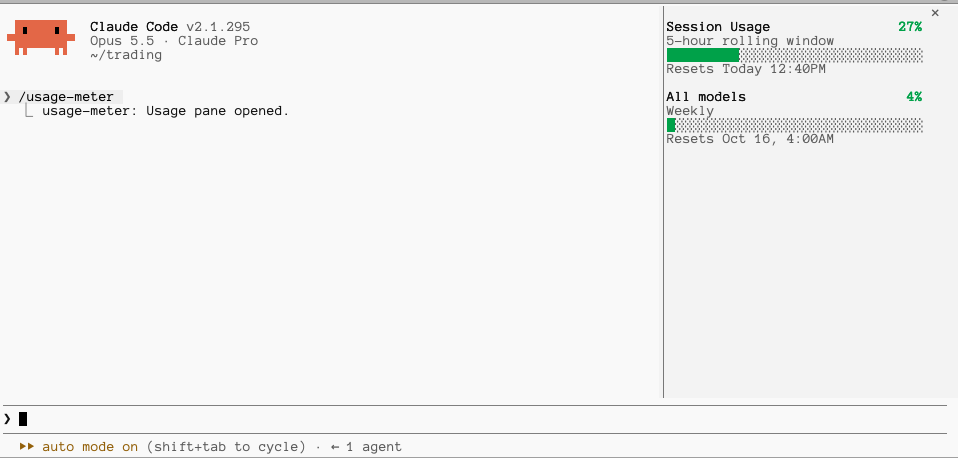
Type this at the prompt of a Claude Code session in a terminal:
/plugin install usage-meter --marketplace rodrigocamargo/usage-meterAnswer y to add the marketplace, then press Enter to install for your user.
/usage-meter to open it.The mod only reads your usage and draws a pane. It sends nothing anywhere, blocks nothing and changes no tool call or prompt.
session.start: registers the /usage-meter command, reads your current usage limits and opens the pane.command.run (only for /usage-meter): answers that command by opening the pane. It does not see or change any other command.session.measure: when Claude Code reports new usage numbers, stores them so the pane redraws.ui.render (only for its own pane): draws the bars.claude plugin validate .
claude plugin test .
claude --plugin-dir .MIT
hooks/register.tsx 87 lines1import { atom, read, update } from 'claude-code'
2import type { Register } from 'claude-code'
3
4import type { Limit } from '../types'
5
6const PANE = 'usage-meter'
7const limits = atom({ plugin: 'usage-meter', key: 'limits' } as const, [])
8
9const LABELS: Record<string, { title: string; sub: string }> = {
10 five_hour: { title: 'Session Usage', sub: '5-hour rolling window' },
11 seven_day: { title: 'All models', sub: 'Weekly' },
12}
13
14/** "Today 6:50PM" or "Oct 9, 4:00AM", in local time. */
15export function resetText(iso: string | undefined, now: number): string {
16 if (iso === undefined) return ''
17 const at = new Date(iso)
18 if (Number.isNaN(at.getTime())) return ''
19 const time = at.toLocaleTimeString('en-US', { hour: 'numeric', minute: '2-digit' }).replace(' ', '')
20 const today = new Date(now).toDateString() === at.toDateString()
21 const day = today ? 'Today' : at.toLocaleDateString('en-US', { month: 'short', day: 'numeric' }) + ','
22 return `Resets ${day} ${time}`
23}
24
25/** A bar `width` cells wide, filled to `percent`. */
26export function bar(percent: number, width: number): { filled: string; empty: string } {
27 const cells = Math.max(4, width)
28 const n = Math.round((Math.min(100, Math.max(0, percent)) / 100) * cells)
29 return { filled: '█'.repeat(n), empty: '░'.repeat(cells - n) }
30}
31
32const colorFor = (percent: number) => (percent >= 90 ? 'red' : percent >= 70 ? 'yellow' : 'green')
33
34export const register: Register = on => {
35 on('session.start', async ($, e, next) => {
36 await $.command.register({ name: 'usage-meter', description: 'Show the usage-limit pane' })
37 const usage = await $.session.usage()
38 await update($, limits, () => usage.rateLimits)
39 void $.ui.open({ id: PANE, title: 'Usage' })
40 return next(e)
41 })
42
43 on('command.run', { command: 'usage-meter' }, async $ => {
44 await $.ui.open({ id: PANE, title: 'Usage' })
45 return { text: 'Usage pane opened.' }
46 })
47
48 on('session.measure', async ($, e, next) => {
49 if (e.changed.includes('rateLimits')) await update($, limits, () => e.rateLimits)
50 return next(e)
51 })
52
53 on('ui.render', { component: 'Pane', requestId: PANE }, async ($, e) => {
54 const { Box, Text } = $.ui.resolve(e)
55 const list: Limit[] = await read($, limits)
56 // The engine draws the pane's close mark over the top-right cell, so keep the
57 // right edge clear (it covered the first row's "%").
58 const width = Math.max(10, e.props.bodyColumns - 3)
59 const now = await $.clock.now()
60 if (list.length === 0) {
61 return <Text dimColor>No usage reading yet (shown after the first reply, on a subscription).</Text>
62 }
63 return (
64 <Box flexDirection="column" paddingRight={3}>
65 {list.map(limit => {
66 const label = LABELS[limit.kind] ?? { title: limit.kind, sub: '' }
67 const { filled, empty } = bar(limit.percentUsed, width)
68 return (
69 <Box flexDirection="column" marginBottom={1}>
70 <Box flexDirection="row" justifyContent="space-between">
71 <Text bold>{label.title}</Text>
72 <Text bold color={colorFor(limit.percentUsed)}>{`${limit.percentUsed}%`}</Text>
73 </Box>
74 {label.sub !== '' && <Text dimColor>{label.sub}</Text>}
75 <Text>
76 <Text color={colorFor(limit.percentUsed)}>{filled}</Text>
77 <Text dimColor>{empty}</Text>
78 </Text>
79 <Text dimColor>{resetText(limit.resetsAt, now)}</Text>
80 </Box>
81 )
82 })}
83 </Box>
84 )
85 })
86}
87types/index.d.ts 8 lines1export type Limit = { kind: string; percentUsed: number; resetsAt?: string }
2
3declare module 'claude-code' {
4 interface PluginState {
5 'usage-meter': { limits: Limit[] }
6 }
7}
8