usage-mod
在输入框上方常驻显示上下文占用、5 小时额度、每周额度和重置时间,带一键压缩上下文的按钮
newbandtoasttimer

在输入框上方常驻显示上下文占用、5 小时额度、每周额度和重置时间,带一键压缩上下文的按钮
A small mod for Claude Code. It shows three usage figures in a row above the prompt, adds a one-click button to compact the context, and can expand a line chart of the token usage of every reply.

Left to right: the compact button, context usage, the 5-hour limit, the weekly limit, and the details button. Click the icon on the far right to expand the token chart above the row (see "Token chart" below); click again to collapse it.
/compact. A tooltip appears on hover.#D77757) fill shows how much is used; the color is fixed and does not change with usage.Click the chart icon on the far right of the row to expand it, and again to collapse it.
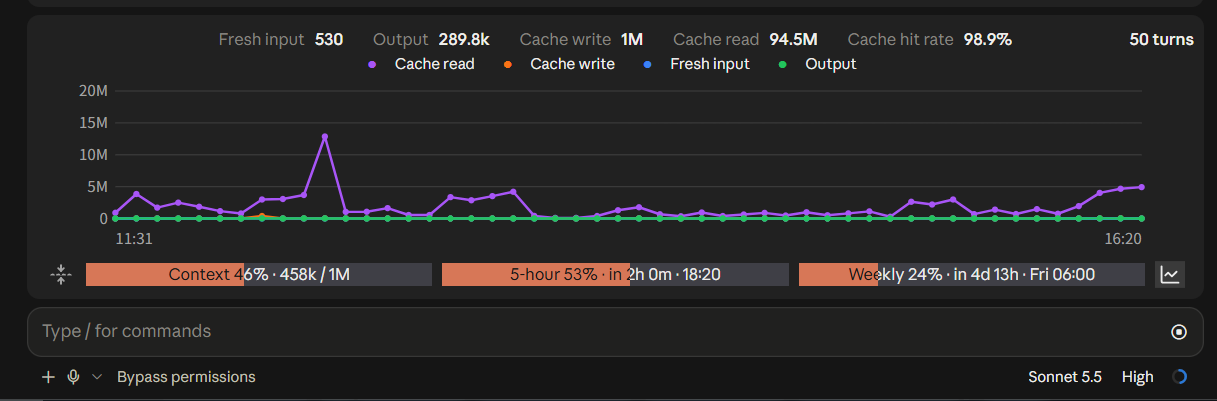
From top to bottom the expanded panel has:
Things to know:
/reload-plugins, and is not saved to a file.Simplified Chinese (zh), Traditional Chinese (zh-TW), English (en) and Japanese (ja).
By default (auto) it follows the computer's language: Simplified Chinese on a Simplified Chinese system, Traditional Chinese (Taiwan, Hong Kong, Macau) on a Traditional one, Japanese on a Japanese one, and English for everything else.
To pin one language, run /plugin in Claude Code, find usage-mod and change Language / 语言. Or set it in ~/.claude/settings.json:
{
  "pluginConfigs": {
    "usage-mod": { "options": { "language": "en" } }
  }
}
The mod reloads itself after the change. auto, no setting, or an unknown language code all follow the computer's language. (When installed from a marketplace, use the key name that /plugin shows for pluginConfigs; changing it in /plugin directly is the safest way.)
To add another language, open hooks/i18n.ts, copy a dictionary and translate it, register it in DICTS, then add the language code to userConfig.language.options in .claude-plugin/plugin.json.
Mods need Claude Code 2.1.287 or later, where they are on by default. Check with claude --version.
This mod was developed on 2.1.286. On 2.1.286 and earlier you also need the environment variable CLAUDE_CODE_ENABLE_FUNCTION_HOOKS=1 (see "Load it manually" below). From 2.1.287 on, that variable is ignored and not needed.
Run these commands in a terminal, not by typing them into the Claude Code chat box. Any terminal works: PowerShell or Windows Terminal (Terminal on macOS / Linux), or the Terminal panel beside the conversation in the Desktop app.
claude plugin marketplace add qingyashizi/claude-usage-mod
claude plugin install usage-mod@usage-modqingyashizi/claude-usage-mod (the format is user/repo) as a "plugin marketplace", a list it can pick plugins from. This only registers it; nothing is installed yet.usage-mod@usage-mod has the form plugin@marketplace; the two names happen to be the same here: the first is the plugin, the second is the marketplace.In a session that is already open, run /reload-plugins to load it; otherwise it loads the next time you start Claude Code.
Put the whole usage-mod folder somewhere you like, for example ~/.claude/mods/usage-mod.
Try it for one run (only for that launch):
claude --plugin-dir ~/.claude/mods/usage-modKeep it permanently: add an env block to ~/.claude/settings.json with your own path. New sessions pick it up.
{
  "env": {
    "CLAUDE_CODE_PLUGIN_DIRS": "C:\\Users\\your-name\\.claude\\mods\\usage-mod"
  }
}
On 2.1.286 and earlier, also add "CLAUDE_CODE_ENABLE_FUNCTION_HOOKS": "1" to env. To reload automatically when you edit the code, also add "CLAUDE_CODE_PLUGIN_DIR_WATCH": "1".
A mod is code that runs inside Claude Code with your permissions, and it is not sandboxed. Before installing, list which events it handles and what it asks Claude Code to do:
claude plugin validate ./usage-modThe hooks: and calls: lines in the output are the answer. This mod uses: reading usage ($.session.usage), noting the usage of each reply when it finishes (the turn.complete event; read-only, kept in memory only), running the /compact command to compact the context ($.command.run), reading and writing cache/limits.json inside its own folder ($.fs.read / $.fs.write), toasts ($.ui.toast) and timers ($.clock). It makes no network requests and reads no other files.
claude in a terminal: the row and the compact button show; the token chart does not (images cannot be drawn in a terminal), and the expand button falls back to a text symbol that opens only the totals.claude -p, and cloud sessions: the mod runs, but the row is not drawn.Colors, icons and the chart style are constants at the top of hooks/register.tsx; all displayed text (including the hover tooltip, tip) is in hooks/i18n.ts:
| Constant | What it does |
|---|---|
ORANGE | Fill color of the used part |
WARM | Background color of the unused part |
DARK / LIGHT | Text color inside / outside the fill |
ICON_PATHS | The two buttons' line icons (Lucide shape data); swap the shapes to change an icon |
ICON_BG / ICON_LINE | Icon background (must match the row's background) and line color |
ICON | The text symbol the compact button uses where no image can be drawn (the terminal) |
SERIES | Colors of the chart's four lines |
CARD / GRID / MUTED | The chart's background, grid lines and axis text |
TIP_BG | Background of the hover details card |
MAX_TURNS | How many turns to keep, 50 by default |
WARN | Percentage that triggers the warning toast, 90 by default |
cache/limits.json inside the mod folder); any whose reset time has passed are dropped and shown as "—". This follows from how the engine supplies the data.CHART_PX_PER_CELL.$.session.compact) directly, so the button runs the /compact command for you instead ($.command.run). This was only verified in the Desktop app; it has not been tried in the terminal.--plugin-dir and CLAUDE_CODE_PLUGIN_DIRS. Installing from a marketplace is written from the official documentation and has not been tried first-hand.Installed from the marketplace (also run in a terminal):
claude plugin uninstall usage-mod@usage-modRun /reload-plugins in an open session, or it takes effect on the next start. You can also run /plugin inside Claude Code and manage usage-mod from the list. To switch it off for now and keep it for later, use claude plugin disable usage-mod@usage-mod (and enable to bring it back).
To remove the marketplace you added as well:
claude plugin marketplace remove usage-modLoaded manually: remove the CLAUDE_CODE_PLUGIN_DIRS entry from settings.json (or change the path) and delete the folder.
If you changed the language, settings.json may still hold a usage-mod entry under pluginConfigs. It does no harm; delete it by hand if you want a clean file.
MIT. See LICENSE.
hooks/register.tsx 596 lines1import { atom, read, update } from 'claude-code'
2import type { EngineInterface, Register } from 'claude-code'
3
4import type { Limit, Stats, TurnRecord, Usage } from '../types'
5import { pickDict } from './i18n'
6import type { Dict } from './i18n'
7
8const usage = atom({ plugin: 'usage-mod', key: 'usage' } as const, { limits: [] } as Usage)
9const now = atom({ plugin: 'usage-mod', key: 'now' } as const, 0)
10// 本会话每轮回复的 token 用量:合计一直累加,明细只留最近 MAX_TURNS 轮。
11const stats = atom({ plugin: 'usage-mod', key: 'stats' } as const, {
12 total: { turns: 0, input: 0, output: 0, cacheRead: 0, cacheCreate: 0 },
13 recent: [],
14} as Stats)
15
16// 折线图里被用户点掉的曲线,以及折线图当前是不是展开着。
17const hiddenSeries = atom({ plugin: 'usage-mod', key: 'hidden' } as const, [] as string[])
18const statsOpen = atom({ plugin: 'usage-mod', key: 'open' } as const, false)
19
20const MAX_TURNS = 50
21
22// 5 小时/每周窗口的用量是账号级的,存到 mod 自己文件夹下的文件里,同一份安装的所有会话共用。
23const cachePath = ($: EngineInterface) => `${$.plugin.root}/cache/limits.json`
24
25const WARN = 90
26const warned = new Set<string>()
27
28const ORANGE = '#D77757'
29const WARM = '#3f3f46'
30const DARK = '#161616'
31const LIGHT = '#ececec'
32
33// 压缩按钮:点一下直接压缩。明细按钮:点一下在横条上方展开 / 收起 token 折线图。
34// 两个都画成线条图标;ICON 是没有 Svg 元素的界面(终端)里的替代符号。
35const ICON = '🗜'
36const BUTTON_CELLS = 3
37/**
38 * 两个按钮的图标:Lucide 的 fold-vertical(压缩)和 chart-line(展开明细),
39 * ISC 许可,Copyright (c) Lucide Contributors,https://lucide.dev。单色细线条,和 Claude 界面自己的图标同一种风格。
40 * 画成一小块方形的图,底色和横条的背景一样(应用把 SVG 当不透明图片画,不画底就是白的);按钮处于"开"的状态时底色和线条都亮一点。
41 */
42const ICON_BG = '#212121'
43const ICON_BG_ON = '#3a3a3a'
44const ICON_LINE = '#a3a3a3'
45const ICON_LINE_ON = '#ececec'
46const ICON_PATHS = {
47 compact: '<path d="M12 22v-6"/><path d="M12 8V2"/><path d="M4 12H2"/><path d="M10 12H8"/><path d="M16 12h-2"/><path d="M22 12h-2"/><path d="m15 19-3-3-3 3"/><path d="m15 5-3 3-3-3"/>',
48 stats: '<path d="M3 3v16a2 2 0 0 0 2 2h16"/><path d="m19 9-5 5-4-4-3 3"/>',
49}
50const lineIconSvg = (paths: string, isOn: boolean) =>
51 `<svg xmlns="http://www.w3.org/2000/svg" width="24" height="22" viewBox="0 0 24 22"><rect width="24" height="22" fill="${isOn ? ICON_BG_ON : ICON_BG}"/><g transform="translate(3 2) scale(.75)" fill="none" stroke="${isOn ? ICON_LINE_ON : ICON_LINE}" stroke-width="2" stroke-linecap="round" stroke-linejoin="round">${paths}</g></svg>`
52
53const pad = (n: number) => String(n).padStart(2, '0')
54
55/** token 数的短写法:834、35.5k、1.2M;和上下文那块用的 tokensText 不同,小数字不取整到 k。 */
56const countText = (n: number) => {
57 if (n >= 1000000) return `${Number((n / 1000000).toFixed(1))}M`
58 if (n >= 1000) return `${Number((n / 1000).toFixed(1))}k`
59
60 return String(n)
61}
62
63/** 缓存命中率:命中的输入占全部输入(新增、缓存创建、缓存命中三项之和)的比例。 */
64const hitRate = (input: number, cacheRead: number, cacheCreate: number) => {
65 const all = input + cacheRead + cacheCreate
66
67 return all === 0 ? '—' : `${((cacheRead / all) * 100).toFixed(1)}%`
68}
69
70const modelName = (model: string) => model.replace(/^claude-/, '').replace(/-\d{8}$/, '')
71
72/** 折线图的四条曲线,颜色和 CC Switch 一致:缓存命中紫、缓存创建橙、新增输入蓝、输出绿。 */
73type SeriesKey = 'input' | 'output' | 'cacheCreate' | 'cacheRead'
74/** 折线图画成自带底色的深色卡片:应用把 SVG 当不透明图片画,不画底就是一块白纸。底色取应用窗口的背景色 rgb(33,33,33),网格线和文字也用不偏色的中性灰,不然会偏蓝。 */
75const CARD = '#212121'
76const GRID = '#3a3a3a'
77const MUTED = '#a3a3a3'
78
79/**
80 * 折线图的画布宽度和最大高度(CSS 像素)。Svg 元素要显式给宽高,不然应用自己挑,会缩得很小。
81 * 宽度跟着横条的格数走(Svg 只收像素,量不了横条的实际像素宽):一格按 7.6 像素算。设得比横条实际能放的宽,应用会把整张图等比缩小,
82 * 图就比框矮一截,上下露出白底(实测一格按 8.4 时就出现了),反推实际约 7.9,所以取 7.6 留余量;最外层的底色也铺成深色,万一缩了露出来的也不是白的;
83 * 高度按横条能给的行数再往下缩。
84 */
85const CHART_PX_PER_CELL = 7.6
86/** 一段文字占几格:中日文字符占两格,其余一格。第一行放得下放不下,按各语言实际的文字量算,不能按中文估。 */
87const cellsOf = (text: string) => [...text].reduce((n, ch) => n + ((ch.codePointAt(0) ?? 0) > 0x2e7f ? 2 : 1), 0)
88const CHART_MIN_W = 480
89const CHART_MAX_W = 1400
90const CHART_MAX_H = 260
91
92const SERIES: Array<{ key: SeriesKey; color: string }> = [
93 { key: 'cacheRead', color: '#a855f7' },
94 { key: 'cacheCreate', color: '#f97316' },
95 { key: 'input', color: '#3b82f6' },
96 { key: 'output', color: '#22c55e' },
97]
98
99const seriesLabel = (L: Dict, key: SeriesKey) => ({ input: L.sIn, output: L.sOut, cacheCreate: L.sCreate, cacheRead: L.sHit })[key]
100
101const clockText = (at: number) => `${pad(new Date(at).getHours())}:${pad(new Date(at).getMinutes())}`
102
103const esc = (text: string) => text.replace(/&/g, '&').replace(/</g, '<').replace(/>/g, '>').replace(/"/g, '"')
104
105/** 纵轴上限取 1、2、5、10 乘以 10 的幂,刻度才好读。 */
106const niceMax = (value: number) => {
107 if (value <= 0) return 1
108 const power = 10 ** Math.floor(Math.log10(value))
109 const m = value / power
110
111 return (m <= 1 ? 1 : m <= 2 ? 2 : m <= 5 ? 5 : 10) * power
112}
113
114/** 悬停明细卡片的底色和边线:底色比图的底色(33,33,33)稍亮一点,像浮起来的一张卡片,并画成半透明,下面的曲线还隐约看得见。 */
115const TIP_BG = '#383838'
116const TIP_LINE = '#5c5c5c'
117const TIP_TEXT = '#ececec'
118
119/** 图里画曲线的区域离画布左、右边的像素数。左边要放纵轴刻度文字(最宽约 27 像素,如 "1.5M"),加间距共 44;右边留 24,两边的空白大致相当。 */
120const PLOT_LEFT = 44
121const PLOT_RIGHT = 24
122
123/** 一段文字在图里占多宽(像素,12 号字):中日文约 12,其余约 6.7,多留一点余量。SVG 量不了字宽,只能估。 */
124const textPx = (text: string) => [...text].reduce((sum, ch) => sum + ((ch.codePointAt(0) ?? 0) > 0x2e7f ? 12 : 6.7), 0) + 2
125
126/**
127 * 选中那一轮的明细卡片的前两行:开始、结束、用时和模型。
128 * 结束时刻是 Mod 收到"这一轮结束"那一刻的时间,开始时刻是它减去引擎报的这一轮总耗时。
129 * 总耗时是墙上时间,你让它停着等的时间也算在里面。
130 */
131const tipHead = (L: Dict, r: TurnRecord): [string, string] => [
132 `${L.startLabel} ${stampText(r.at - r.ms)} → ${L.endLabel} ${stampText(r.at)}`,
133 `${L.elapsed(r.ms)} · ${modelName(r.model)}${r.isSub ? ` (${L.sub})` : ''}`,
134]
135
136/**
137 * 折线图,画成一段 SVG。横轴是最近几轮回复,纵轴是 token 数。
138 * 每一轮一个悬停组(class="c"):鼠标移到这一列上,列高亮、出竖线和放大的点,并弹出明细卡片。
139 * 沙盒里不能跑脚本,全靠 CSS :hover;卡片放在这一列的右边,右边放不下就放左边,底色半透明,不挡住被指的这一列。
140 * 这样的 SVG 要放进沙盒小窗口(isInteractive)画,横条每次重画窗口都会重建,所以会偶尔闪一下。
141 */
142const chartSvg = (L: Dict, turns: TurnRecord[], hidden: string[], width: number, height: number) => {
143 const W = width
144 const H = height
145 const left = PLOT_LEFT
146 const right = PLOT_RIGHT
147 const top = 12
148 const bottom = 26
149 const pw = W - left - right
150 const ph = H - top - bottom
151 const shown = SERIES.filter(one => !hidden.includes(one.key))
152 const max = niceMax(Math.max(0, ...shown.flatMap(one => turns.map(r => r[one.key]))))
153 const n = turns.length
154 const step = n === 1 ? pw : pw / (n - 1)
155 const x = (i: number) => (n === 1 ? left + pw / 2 : left + step * i)
156 const y = (v: number) => top + ph * (1 - v / max)
157 const f = (v: number) => v.toFixed(1)
158
159 const out: string[] = [
160 `<svg xmlns="http://www.w3.org/2000/svg" width="${W}" height="${H}" viewBox="0 0 ${W} ${H}" style="background:${CARD}" font-family="sans-serif" font-size="12">`,
161 '<style>.c .h,.c .t{display:none}.c:hover .h,.c:hover .t{display:inline}.c:hover .band{fill-opacity:.08}</style>',
162 `<rect width="${W}" height="${H}" fill="${CARD}"/>`,
163 ]
164 for (let i = 0; i <= 4; i += 1) {
165 const v = (max * i) / 4
166 out.push(
167 `<line x1="${left}" x2="${W - right}" y1="${f(y(v))}" y2="${f(y(v))}" stroke="${GRID}"/>`,
168 `<text x="${left - 6}" y="${f(y(v) + 4)}" text-anchor="end" fill="${MUTED}">${countText(v)}</text>`,
169 )
170 }
171 for (const one of shown) {
172 const points = turns.map((r, i) => `${f(x(i))},${f(y(r[one.key]))}`)
173 out.push(`<polyline points="${points.join(' ')}" fill="none" stroke="${one.color}" stroke-width="2" stroke-linejoin="round"/>`)
174 for (const point of points) {
175 const [px, py] = point.split(',')
176 out.push(`<circle cx="${px}" cy="${py}" r="2.5" fill="${one.color}"/>`)
177 }
178 }
179 out.push(
180 `<text x="${left}" y="${H - 6}" fill="${MUTED}">${clockText(turns[0]!.at)}</text>`,
181 `<text x="${W - right}" y="${H - 6}" text-anchor="end" fill="${MUTED}">${clockText(turns[n - 1]!.at)}</text>`,
182 )
183
184 // 悬停组放在最后,卡片才画在曲线和文字上面。
185 const rowH = 18
186 const inset = 10
187 turns.forEach((r, i) => {
188 const cx = x(i)
189 const bandX = n === 1 ? left : i === 0 ? left : cx - step / 2
190 const bandW = n === 1 ? pw : i === 0 || i === n - 1 ? step / 2 : step
191 const head = tipHead(L, r)
192 const cells = SERIES.map(one => `${seriesLabel(L, one.key)} ${countText(r[one.key])}`)
193 const col1 = Math.max(textPx(cells[0]!), textPx(cells[2]!)) + 14
194 const col2 = Math.max(textPx(cells[1]!), textPx(cells[3]!)) + 14
195 const cardW = Math.round(Math.max(...head.map(textPx), col1 + 16 + col2) + inset * 2)
196 const cardH = inset * 2 + rowH * 4
197 const gap = 14
198 const cardX = Math.round(cx + gap + cardW <= W - 4 ? cx + gap : Math.max(4, cx - gap - cardW))
199 const cardY = Math.round(Math.min(H - 4 - cardH, top + 4))
200
201 out.push(
202 '<g class="c">',
203 `<rect class="band" x="${f(bandX)}" y="${top}" width="${f(bandW)}" height="${f(ph)}" fill="#ffffff" fill-opacity="0" pointer-events="all"/>`,
204 '<g class="h">',
205 `<line x1="${f(cx)}" x2="${f(cx)}" y1="${top}" y2="${f(top + ph)}" stroke="#ffffff" stroke-opacity=".35" stroke-dasharray="3 3"/>`,
206 ...shown.map(one => `<circle cx="${f(cx)}" cy="${f(y(r[one.key]))}" r="4.5" fill="${one.color}" stroke="${CARD}" stroke-width="1.5"/>`),
207 '</g>',
208 '<g class="t">',
209 `<rect x="${cardX}" y="${cardY}" width="${cardW}" height="${cardH}" rx="6" fill="${TIP_BG}" fill-opacity=".82" stroke="${TIP_LINE}"/>`,
210 `<text x="${cardX + inset}" y="${cardY + inset + 12}" fill="${TIP_TEXT}">${esc(head[0])}</text>`,
211 `<text x="${cardX + inset}" y="${cardY + inset + 12 + rowH}" fill="${MUTED}">${esc(head[1])}</text>`,
212 ...SERIES.flatMap((one, k) => {
213 const tx = cardX + inset + (k % 2 === 0 ? 0 : col1 + 16)
214 const ty = cardY + inset + 12 + rowH * (2 + Math.floor(k / 2))
215
216 return [`<circle cx="${tx + 4}" cy="${ty - 4}" r="4" fill="${one.color}"/>`, `<text x="${tx + 14}" y="${ty}" fill="${TIP_TEXT}">${esc(cells[k]!)}</text>`]
217 }),
218 '</g>',
219 '</g>',
220 )
221 })
222 out.push('</svg>')
223
224 return out.join('')
225}
226
227/** 精确到秒的时刻;不是今天的前面带上月/日。 */
228const stampText = (at: number) => {
229 const d = new Date(at)
230 const time = `${pad(d.getHours())}:${pad(d.getMinutes())}:${pad(d.getSeconds())}`
231
232 return startOfDay(d) === startOfDay(new Date()) ? time : `${pad(d.getMonth() + 1)}/${pad(d.getDate())} ${time}`
233}
234
235
236const remaining = (L: Dict, resetsAt: string | undefined, at: number) => {
237 if (resetsAt === undefined) return ''
238 const ms = Date.parse(resetsAt) - at
239 if (Number.isNaN(ms)) return ''
240 if (ms <= 0) return L.resetSoon
241 const minutes = Math.ceil(ms / 60000)
242 const days = Math.floor(minutes / 1440)
243 const hours = Math.floor((minutes % 1440) / 60)
244 const mins = minutes % 60
245 if (days > 0) return L.inDays(days, hours)
246 if (hours > 0) return L.inHours(hours, mins)
247
248 return L.inMins(mins)
249}
250
251const startOfDay = (d: Date) => new Date(d.getFullYear(), d.getMonth(), d.getDate()).getTime()
252
253const clock = (L: Dict, resetsAt: string | undefined, at: number) => {
254 if (resetsAt === undefined) return ''
255 const target = new Date(resetsAt)
256 if (Number.isNaN(target.getTime())) return ''
257 const days = Math.round((startOfDay(target) - startOfDay(new Date(at))) / 86400000)
258 const time = `${pad(target.getHours())}:${pad(target.getMinutes())}`
259 if (days === 0) return time
260 if (days === 1) return `${L.tomorrow} ${time}`
261 if (days > 1 && days < 7) return `${L.weekday(target.getDay())} ${time}`
262
263 return `${L.date(target.getMonth() + 1, target.getDate())} ${time}`
264}
265
266const tokensText = (n: number | undefined) => {
267 if (n === undefined) return '—'
268 if (n >= 1000000) return `${Number((n / 1000000).toFixed(1))}M`
269
270 return `${Math.round(n / 1000)}k`
271}
272
273const find = (limits: Limit[], kind: string) => limits.find(one => one.kind === kind)
274
275/** 窗口还没到重置时间,存下来的数据才还算数。 */
276const isLive = (one: Limit, at: number) => one.resetsAt === undefined || Date.parse(one.resetsAt) > at
277
278const loadCache = async ($: EngineInterface, at: number): Promise<Limit[]> => {
279 try {
280 const saved: unknown = JSON.parse(String(await $.fs.read(cachePath($))))
281
282 return Array.isArray(saved) ? (saved as Limit[]).filter(one => isLive(one, at)) : []
283 } catch {
284 return []
285 }
286}
287
288const saveCache = async ($: EngineInterface, limits: Limit[]) => {
289 try {
290 await $.fs.write(cachePath($), JSON.stringify(limits))
291 } catch {
292 // 写不进去就算了,只是下个会话启动时没有上次的数据可用。
293 }
294}
295
296/** 读一次引擎当前的用量,有变化才更新,避免白白重画。 */
297const refresh = async ($: EngineInterface) => {
298 const t = await $.clock.now()
299 const current = await $.session.usage()
300 const old = await read($, usage)
301 let limits = old.limits.filter(one => isLive(one, t))
302 if (current.rateLimits.length > 0) {
303 limits = current.rateLimits
304 if (JSON.stringify(limits) !== JSON.stringify(old.limits)) await saveCache($, limits)
305 } else if (limits.length === 0) {
306 // 这个会话还没收到过回复:先用文件里别的会话存下的。
307 limits = await loadCache($, t)
308 }
309 const fresh: Usage = {
310 context: current.context.percent,
311 tokens: current.context.tokens,
312 window: current.context.window,
313 limits,
314 }
315 if (JSON.stringify(fresh) !== JSON.stringify(old)) await update($, usage, () => fresh)
316 // 重置倒计时精确到分钟,每过一分钟更新一次时间。
317 // 明细图展开时不更新:横条每重画一次,交互 SVG 的小窗口就重建一次,图会闪;倒计时晚几分钟更新没关系,合上就补上。
318 if (Math.floor(t / 60000) !== Math.floor((await read($, now)) / 60000) && !(await read($, statsOpen))) await update($, now, () => t)
319}
320
321export const register: Register = (on, options) => {
322 const L = pickDict((options as Record<string, unknown>).language)
323
324 on('session.start', async ($, e, next) => {
325 await refresh($)
326 // 不只在每轮回复结束时更新:每 5 秒主动读一次,回复进行中、刚切到这个会话时数字也是新的。
327 $.clock.every(5000, () => refresh($))
328
329 return next(e)
330 })
331
332 on('session.measure', async ($, e, next) => {
333 await refresh($)
334
335 const checks: Array<[string, string, number | undefined]> = [
336 ['ctx', L.ctx, e.context.percent],
337 ['five', L.fiveWindow, find(e.rateLimits, 'five_hour')?.percentUsed],
338 ['week', L.weekWindow, find(e.rateLimits, 'seven_day')?.percentUsed],
339 ]
340 for (const [key, name, percent] of checks) {
341 if (percent === undefined) continue
342 if (percent >= WARN && !warned.has(key)) {
343 warned.add(key)
344 $.ui.toast(L.warn(name, Math.round(percent)))
345 } else if (percent < WARN - 5) {
346 warned.delete(key)
347 }
348 }
349
350 return next(e)
351 })
352
353 // 只观察:先让这一轮正常收尾,再记下它的用量。记不进去也不影响回复。
354 on('turn.complete', async ($, e, next) => {
355 const result = await next(e)
356 const u = e.usage
357 if (u === undefined) return result
358 try {
359 const record: TurnRecord = {
360 at: await $.clock.now(),
361 model: u.model,
362 input: u.input_tokens,
363 output: u.output_tokens,
364 cacheRead: u.cache_read_input_tokens,
365 cacheCreate: u.cache_creation_input_tokens,
366 ms: e.durationMs,
367 isSub: e.agentId !== undefined,
368 }
369 await update($, stats, old => ({
370 total: {
371 turns: old.total.turns + 1,
372 input: old.total.input + record.input,
373 output: old.total.output + record.output,
374 cacheRead: old.total.cacheRead + record.cacheRead,
375 cacheCreate: old.total.cacheCreate + record.cacheCreate,
376 },
377 recent: [...old.recent, record].slice(-MAX_TURNS),
378 }))
379 } catch {
380 // 少记一轮而已。
381 }
382
383 return result
384 })
385
386 on('ui.render', { component: 'AbovePrompt' }, async ($, e, next) => {
387 if (e.props.hasSurvey) return next(e)
388
389 const data = await read($, usage)
390 const at = await read($, now)
391 const isOpen = await read($, statsOpen)
392 const { total, recent } = await read($, stats)
393 const hidden = await read($, hiddenSeries)
394
395 const five = find(data.limits, 'five_hour')
396 const week = find(data.limits, 'seven_day')
397 const elements = $.ui.resolve(e)
398 const { Box, Button, Text } = elements
399 // 折线图是 SVG,只有桌面端等远程界面有这个元素。
400 const Svg = 'Svg' in elements ? elements.Svg : undefined
401 const isTerminal = e.surface === 'terminal'
402
403 if (e.props.bodyColumns < 78) {
404 const short = [
405 data.context === undefined ? `${L.shortCtx} —` : `${L.shortCtx} ${Math.round(data.context)}%`,
406 five === undefined ? `${L.shortFive} —` : `${L.shortFive} ${Math.round(five.percentUsed)}%`,
407 week === undefined ? `${L.shortWeek} —` : `${L.shortWeek} ${Math.round(week.percentUsed)}%`,
408 ].join(' · ')
409
410 return (
411 <Box width="100%" justifyContent="center">
412 <Text>{short}</Text>
413 </Box>
414 )
415 }
416
417 // 三块等宽,块之间各留一格;减去的是两个按钮和四处间隙占的格数,不再额外留边距。
418 const cells = Math.max(20, Math.floor((e.props.bodyColumns - 4 - 2 * BUTTON_CELLS) / 3))
419
420 // 几何全部交给 Box:底色块铺满整块,橙色填充按百分比取宽度。
421 // 文字画两层、各裁一半:填充内是深色字,填充外是浅色字,在填充边界处切开。
422 // 不用空格撑宽度,因为桌面端字体不是等宽的,空格撑出来的宽度和 Box 的宽度对不上。
423 const block = (key: string, label: string, percent: number | undefined, detail: string) => {
424 const text = percent === undefined ? `${label} —` : `${label} ${Math.round(percent)}%${detail === '' ? '' : ` · ${detail}`}`
425 const filled = percent === undefined ? 0 : percent <= 0 ? 0 : Math.min(cells, Math.max(1, Math.round((percent / 100) * cells)))
426 const layer = (color: string, shift: number) => (
427 <Box position="absolute" top={0} left={shift} width={cells} height={1} justifyContent="center">
428 <Text color={color} wrap="truncate-end">
429 {text}
430 </Text>
431 </Box>
432 )
433
434 return (
435 <Box key={key} width={cells} height={1} backgroundColor={WARM}>
436 {filled > 0 && (
437 <Box position="absolute" top={0} left={0} width={filled} height={1} backgroundColor={ORANGE} overflow="hidden">
438 {layer(DARK, 0)}
439 </Box>
440 )}
441 {filled < cells && (
442 <Box position="absolute" top={0} left={filled} width={cells - filled} height={1} overflow="hidden">
443 {layer(LIGHT, -filled)}
444 </Box>
445 )}
446 </Box>
447 )
448 }
449
450 const ctxDetail = data.tokens === undefined ? '' : `${tokensText(data.tokens)} / ${tokensText(data.window)}`
451 const fiveDetail = five === undefined ? '' : `${remaining(L, five.resetsAt, at)} · ${clock(L, five.resetsAt, at)}`
452 const weekDetail = week === undefined ? '' : `${remaining(L, week.resetsAt, at)} · ${clock(L, week.resetsAt, at)}`
453
454 const compact = async () => {
455 $.ui.toast(L.compacting)
456 try {
457 // 不用 $.session.compact():桌面应用的会话是 SDK 无头会话,引擎不让插件直接调它。
458 // 改成像用户输入 /compact 那样运行这条命令;引擎文档说回复进行中会排队到这一轮结束。
459 await $.command.run({ command: 'compact' })
460 $.ui.toast(L.compacted)
461 } catch (err) {
462 $.ui.toast(L.notCompacted(err instanceof Error ? err.message : String(err)))
463 }
464 }
465
466 const toggleStats = () => void update($, statsOpen, open => !open)
467 const toggleSeries = (key: SeriesKey) =>
468 void update($, hiddenSeries, old => (old.includes(key) ? old.filter(one => one !== key) : [...old, key]))
469
470 // 展开的明细:顶上是合计,中间是折线图,下面是曲线开关。画在横条里、用量条的上方,位置固定。
471 const stat = (key: string, label: string, value: string) => (
472 <Box key={key} gap={1}>
473 <Text dimColor>{label}</Text>
474 <Text bold>{value}</Text>
475 </Box>
476 )
477
478 // 盖在折线图上的一排透明感应区,每轮一个,宽度按比例(flexGrow)和图里的点对齐(图是固定像素宽,Box 的宽度是格数;
479 // 百分比宽度只收整数,量不准,所以按像素数当比例分)。鼠标移到某一轮上,同组(scope)的东西一起亮:这一列变成淡淡的高亮,图下面固定一行里显示那一轮的明细。
480 // 悬停是应用自己处理的,没有任何东西回到插件,所以不会触发横条重画,图也就不会闪。
481 // 横条的高度是应用定的(最多窗口的一半,放不下就滚动),所以图的高度跟着可用行数走,版面压紧:
482 // 标题、曲线开关、关闭按钮一行,合计一行,其余都给图。一行大约按 20 像素算。
483 const chartW = Math.round(Math.min(CHART_MAX_W, Math.max(CHART_MIN_W, e.props.bodyColumns * CHART_PX_PER_CELL)))
484 const chartH = Math.max(140, Math.min(CHART_MAX_H, (e.props.maxRows - 5) * 20))
485
486 // 第一行:合计在整行里居中,标题贴左、共几轮贴右(都不占位置)。放不下的东西按顺序让位:
487 // 先去掉标题,再把"共几轮"挪到第二行,还不够就去掉合计里的命中率、新增输入。英文、日文的文字比中文长得多,所以按实际文字量算。
488 const cols = e.props.bodyColumns
489 const GAP = 3
490 let items: Array<[string, string, string]> = [
491 ['in', L.sIn, countText(total.input)],
492 ['out', L.sOut, countText(total.output)],
493 ['create', L.sCreate, countText(total.cacheCreate)],
494 ['hit', L.sHit, countText(total.cacheRead)],
495 ['rate', L.sRate, hitRate(total.input, total.cacheRead, total.cacheCreate)],
496 ]
497 const rowCells = (list: typeof items) => list.reduce((n, [, label, value]) => n + cellsOf(label) + 1 + cellsOf(value), 0) + GAP * (list.length - 1)
498 for (const drop of ['rate', 'in']) if (rowCells(items) + 4 > cols) items = items.filter(([key]) => key !== drop)
499 const freeSide = (cols - rowCells(items)) / 2
500 const turnsText = L.statsTurns(total.turns)
501 const showTitle = total.turns === 0 || freeSide >= cellsOf(L.statsTitle) + 2
502 const showTurnsTop = freeSide >= cellsOf(turnsText) + 2
503
504 const panel = (
505 <Box key="stats-panel" flexDirection="column" width="100%" alignItems="center">
506 {/* 第一行:五项合计居中,标题贴左、共几轮贴右;第二行:四条曲线的开关,居中。没有关闭按钮,收起靠右下角的图标。放不下时的让位顺序见上面。 */}
507 <Box width="100%" justifyContent="center">
508 {showTitle && (
509 <Box position="absolute" top={0} left={0}>
510 <Text bold>{L.statsTitle}</Text>
511 </Box>
512 )}
513 {total.turns > 0 && (
514 <Box gap={GAP}>{items.map(([key, label, value]) => stat(key, label, value))}</Box>
515 )}
516 {total.turns > 0 && showTurnsTop && (
517 <Box position="absolute" top={0} right={0}>
518 <Text bold>{turnsText}</Text>
519 </Box>
520 )}
521 </Box>
522 {total.turns === 0 ? (
523 <Text dimColor>{L.statsEmpty}</Text>
524 ) : (
525 <Box flexDirection="column" width="100%" alignItems="center">
526 {Svg !== undefined && (
527 <Box width="100%" justifyContent="center" gap={2}>
528 {!showTurnsTop && (
529 <Box position="absolute" top={0} right={0}>
530 <Text bold>{turnsText}</Text>
531 </Box>
532 )}
533 {SERIES.map(one => (
534 <Box key={one.key} gap={1}>
535 <Text color={one.color} dimColor={hidden.includes(one.key)}>
536 ●
537 </Text>
538 <Button key={`toggle-${one.key}`} label={seriesLabel(L, one.key)} plain dimColor={hidden.includes(one.key)} onPress={() => toggleSeries(one.key)} />
539 </Box>
540 ))}
541 </Box>
542 )}
543 {Svg === undefined ? (
544 <Text dimColor>{L.chartDesktopOnly}</Text>
545 ) : (
546 <Box flexDirection="column" width="100%" alignItems="center">
547 <Svg key="chart" source={chartSvg(L, recent, hidden, chartW, chartH)} alt={`${L.statsTitle} · ${L.statsAxis(recent.length)}`} width={chartW} height={chartH} isInteractive />
548 </Box>
549 )}
550 </Box>
551 )}
552 </Box>
553 )
554
555 // 图标按钮。图标是 Svg(画不了点击),所以在它上面盖一个同样大小、看不见的 Button 接收点击;没有 Svg 的界面(终端)直接用符号当按钮。
556 // 悬停提示:平时不显示,鼠标移到图标上时才出现,向 side 指的那一侧展开(向左展开用负的 left,不用 right:实测 right 会让提示从图标往右跑出窗口)。桌面端应用自己把它画成深色卡片,用浅色字;终端里是橙底深字。
557 const iconButton = (key: string, glyph: string, paths: string, isOn: boolean, tip: string, tipCells: number, side: "left" | "right", onPress: () => void) => (
558 <Box key={`${key}-wrap`} width={BUTTON_CELLS} height={1} position="relative" justifyContent="center">
559 {Svg !== undefined && <Svg key={`${key}-icon`} source={lineIconSvg(paths, isOn)} alt={tip} width={24} height={22} />}
560 {Svg !== undefined && (
561 <Box position="absolute" top={0} left={0} width={BUTTON_CELLS} height={1}>
562 <Button key={key} label={'\u00a0'.repeat(BUTTON_CELLS)} plain onPress={onPress} />
563 </Box>
564 )}
565 {Svg === undefined && <Button key={key} label={glyph} plain onPress={onPress} />}
566 <Box
567 position="absolute"
568 top={0}
569 left={side === "right" ? BUTTON_CELLS : -tipCells}
570 width={tipCells}
571 height={1}
572 justifyContent="center"
573 backgroundColor={isTerminal ? ORANGE : undefined}
574 display="none"
575 hover={{ display: 'flex' }}
576 >
577 <Text color={isTerminal ? DARK : LIGHT}>{tip}</Text>
578 </Box>
579 </Box>
580 )
581
582 return (
583 <Box width="100%" flexDirection="column" gap={1}>
584 {isOpen && panel}
585 <Box width="100%" justifyContent="center" gap={1}>
586 {iconButton('compact', ICON, ICON_PATHS.compact, false, L.tip, L.tipCells, 'right', compact)}
587 {block('ctx', L.ctx, data.context, ctxDetail)}
588 {block('five', L.five, five?.percentUsed, fiveDetail)}
589 {block('week', L.week, week?.percentUsed, weekDetail)}
590 {iconButton('stats', '≡', ICON_PATHS.stats, isOpen, L.statsTip, L.statsTipCells, 'left', toggleStats)}
591 </Box>
592 </Box>
593 )
594 })
595}
596hooks/i18n.ts 262 lines1// 所有显示出来的文字都在这里。想加一种语言:复制一份下面的词典,改成目标语言,
2// 在 DICTS 里登记,再把语言代码加进 .claude-plugin/plugin.json 的 userConfig.language.options。
3
4/** 把毫秒拆成时、分、秒,各语言的"用时"文字共用。 */
5const split = (ms: number) => {
6 const total = Math.max(0, Math.round(ms / 1000))
7
8 return { h: Math.floor(total / 3600), m: Math.floor((total % 3600) / 60), s: total % 60 }
9}
10
11export type Dict = {
12 /** 三块的名字,以及窄窗口时的简短写法 */
13 ctx: string
14 five: string
15 week: string
16 shortCtx: string
17 shortFive: string
18 shortWeek: string
19 /** 弹提醒时用的窗口名 */
20 fiveWindow: string
21 weekWindow: string
22 warn: (name: string, percent: number) => string
23 /** 距离重置还有多久:按天+时、时+分、分三档 */
24 inDays: (days: number, hours: number) => string
25 inHours: (hours: number, mins: number) => string
26 inMins: (mins: number) => string
27 resetSoon: string
28 /** 重置时刻:明天、一周内的星期几、更远的日期 */
29 tomorrow: string
30 weekday: (index: number) => string
31 date: (month: number, day: number) => string
32 /** 压缩按钮 */
33 compacting: string
34 compacted: string
35 notCompacted: (reason: string) => string
36 tip: string
37 /** 悬停提示占的格数(中日文每字占两格) */
38 tipCells: number
39 /** token 明细按钮和面板 */
40 statsTip: string
41 statsTipCells: number
42 statsTitle: string
43 statsEmpty: string
44 statsTurns: (n: number) => string
45 sIn: string
46 sOut: string
47 sCreate: string
48 sHit: string
49 sRate: string
50 sub: string
51 statsAxis: (n: number) => string
52 startLabel: string
53 endLabel: string
54 elapsed: (ms: number) => string
55 chartDesktopOnly: string
56}
57
58const zh: Dict = {
59 ctx: '上下文',
60 five: '5小时',
61 week: '本周',
62 shortCtx: '上下文',
63 shortFive: '5时',
64 shortWeek: '周',
65 fiveWindow: '5 小时窗口',
66 weekWindow: '每周窗口',
67 warn: (name, percent) => `${name}已用 ${percent}%`,
68 inDays: (d, h) => `${d}天${h}时后`,
69 inHours: (h, m) => `${h}时${m}分后`,
70 inMins: m => `${m}分后`,
71 resetSoon: '即将重置',
72 tomorrow: '明天',
73 weekday: i => `周${'日一二三四五六'[i]}`,
74 date: (m, d) => `${m}月${d}日`,
75 compacting: '正在压缩上下文…(内容多时要一两分钟)',
76 compacted: '已压缩上下文',
77 notCompacted: reason => `没有压缩:${reason}`,
78 tip: '点击压缩上下文',
79 tipCells: 18,
80 statsTip: '展开/收起 token 趋势',
81 statsTipCells: 24,
82 statsTitle: '本会话 token 明细',
83 statsEmpty: '还没有记录。从装上这个 Mod 起,每轮回复结束时开始统计。',
84 statsTurns: n => `共 ${n} 轮`,
85 sIn: '新增输入',
86 sOut: '输出',
87 sCreate: '缓存创建',
88 sHit: '缓存命中',
89 sRate: '缓存命中率',
90 sub: '子代理',
91 statsAxis: n => `最近 ${n} 轮`,
92 startLabel: '开始',
93 endLabel: '结束',
94 elapsed: ms => {
95 const { h, m, s } = split(ms)
96
97 return h > 0 ? `用时 ${h}小时${m}分` : m > 0 ? `用时 ${m}分${s}秒` : `用时 ${s}秒`
98 },
99 chartDesktopOnly: '折线图只在桌面应用里显示。',
100}
101
102const zhTW: Dict = {
103 ctx: '上下文',
104 five: '5小時',
105 week: '本週',
106 shortCtx: '上下文',
107 shortFive: '5時',
108 shortWeek: '週',
109 fiveWindow: '5 小時視窗',
110 weekWindow: '每週視窗',
111 warn: (name, percent) => `${name}已用 ${percent}%`,
112 inDays: (d, h) => `${d}天${h}時後`,
113 inHours: (h, m) => `${h}時${m}分後`,
114 inMins: m => `${m}分後`,
115 resetSoon: '即將重置',
116 tomorrow: '明天',
117 weekday: i => `週${'日一二三四五六'[i]}`,
118 date: (m, d) => `${m}月${d}日`,
119 compacting: '正在壓縮上下文…(內容多時要一兩分鐘)',
120 compacted: '已壓縮上下文',
121 notCompacted: reason => `沒有壓縮:${reason}`,
122 tip: '點擊壓縮上下文',
123 tipCells: 18,
124 statsTip: '展開/收起 token 趨勢',
125 statsTipCells: 24,
126 statsTitle: '本會話 token 明細',
127 statsEmpty: '還沒有記錄。從裝上這個 Mod 起,每輪回覆結束時開始統計。',
128 statsTurns: n => `共 ${n} 輪`,
129 sIn: '新增輸入',
130 sOut: '輸出',
131 sCreate: '快取建立',
132 sHit: '快取命中',
133 sRate: '快取命中率',
134 sub: '子代理',
135 statsAxis: n => `最近 ${n} 輪`,
136 startLabel: '開始',
137 endLabel: '結束',
138 elapsed: ms => {
139 const { h, m, s } = split(ms)
140
141 return h > 0 ? `耗時 ${h}小時${m}分` : m > 0 ? `耗時 ${m}分${s}秒` : `耗時 ${s}秒`
142 },
143 chartDesktopOnly: '折線圖只在桌面應用程式裡顯示。',
144}
145
146const MONTHS = ['Jan', 'Feb', 'Mar', 'Apr', 'May', 'Jun', 'Jul', 'Aug', 'Sep', 'Oct', 'Nov', 'Dec']
147const WEEKDAYS_EN = ['Sun', 'Mon', 'Tue', 'Wed', 'Thu', 'Fri', 'Sat']
148
149const en: Dict = {
150 ctx: 'Context',
151 five: '5-hour',
152 week: 'Weekly',
153 shortCtx: 'Context',
154 shortFive: '5h',
155 shortWeek: 'Week',
156 fiveWindow: '5-hour limit',
157 weekWindow: 'Weekly limit',
158 warn: (name, percent) => `${name} at ${percent}%`,
159 inDays: (d, h) => `in ${d}d ${h}h`,
160 inHours: (h, m) => `in ${h}h ${m}m`,
161 inMins: m => `in ${m}m`,
162 resetSoon: 'resets soon',
163 tomorrow: 'tomorrow',
164 weekday: i => WEEKDAYS_EN[i] ?? '',
165 date: (m, d) => `${MONTHS[m - 1] ?? ''} ${d}`,
166 compacting: 'Compacting context… (can take a minute or two)',
167 compacted: 'Context compacted',
168 notCompacted: reason => `Not compacted: ${reason}`,
169 tip: 'Click to compact context',
170 tipCells: 26,
171 statsTip: 'Show / hide token trend',
172 statsTipCells: 26,
173 statsTitle: 'Token breakdown (this session)',
174 statsEmpty: 'Nothing recorded yet. Counting starts with the first reply after this mod loads.',
175 statsTurns: n => `${n} turn${n === 1 ? '' : 's'}`,
176 sIn: 'Fresh input',
177 sOut: 'Output',
178 sCreate: 'Cache write',
179 sHit: 'Cache read',
180 sRate: 'Cache hit rate',
181 sub: 'sub-agent',
182 statsAxis: n => `last ${n} turn${n === 1 ? '' : 's'}`,
183 startLabel: 'Start',
184 endLabel: 'End',
185 elapsed: ms => {
186 const { h, m, s } = split(ms)
187
188 return h > 0 ? `took ${h}h ${m}m` : m > 0 ? `took ${m}m ${s}s` : `took ${s}s`
189 },
190 chartDesktopOnly: 'The chart is only drawn in the Desktop app.',
191}
192
193const ja: Dict = {
194 ctx: 'コンテキスト',
195 five: '5時間',
196 week: '週間',
197 shortCtx: 'コンテキスト',
198 shortFive: '5時間',
199 shortWeek: '週',
200 fiveWindow: '5時間枠',
201 weekWindow: '週間枠',
202 warn: (name, percent) => `${name}が${percent}%に達しました`,
203 inDays: (d, h) => `${d}日${h}時間後`,
204 inHours: (h, m) => `${h}時間${m}分後`,
205 inMins: m => `${m}分後`,
206 resetSoon: 'まもなくリセット',
207 tomorrow: '明日',
208 weekday: i => `${'日月火水木金土'[i]}曜`,
209 date: (m, d) => `${m}月${d}日`,
210 compacting: 'コンテキストを圧縮中…(長いと1〜2分かかります)',
211 compacted: 'コンテキストを圧縮しました',
212 notCompacted: reason => `圧縮しませんでした:${reason}`,
213 tip: 'クリックでコンテキストを圧縮',
214 tipCells: 28,
215 statsTip: 'トークン推移を表示/非表示',
216 statsTipCells: 28,
217 statsTitle: 'トークン内訳(このセッション)',
218 statsEmpty: 'まだ記録がありません。このModを読み込んだ後の最初の応答から集計します。',
219 statsTurns: n => `${n} ターン`,
220 sIn: '新規入力',
221 sOut: '出力',
222 sCreate: 'キャッシュ作成',
223 sHit: 'キャッシュ読取',
224 sRate: 'キャッシュヒット率',
225 sub: 'サブエージェント',
226 statsAxis: n => `直近 ${n} ターン`,
227 startLabel: '開始',
228 endLabel: '終了',
229 elapsed: ms => {
230 const { h, m, s } = split(ms)
231
232 return h > 0 ? `所要 ${h}時間${m}分` : m > 0 ? `所要 ${m}分${s}秒` : `所要 ${s}秒`
233 },
234 chartDesktopOnly: 'グラフはデスクトップアプリでのみ表示されます。',
235}
236
237export const DICTS: Record<string, Dict> = { zh, 'zh-TW': zhTW, en, ja }
238
239/**
240 * 按电脑的语言挑词典:繁体中文(台湾、香港、澳门,或写明 Hant)用繁体,其余中文用简体,
241 * 日语用日语,别的一律英文。拿不到系统语言时也是英文。
242 */
243export const languageOf = (locale: string): string => {
244 const lower = locale.toLowerCase().replace('_', '-')
245
246 if (lower.startsWith('zh')) return /^zh-(tw|hk|mo|hant)/.test(lower) ? 'zh-TW' : 'zh'
247 if (lower.startsWith('ja')) return 'ja'
248
249 return 'en'
250}
251
252export const detectLanguage = (): string => {
253 try {
254 return languageOf(Intl.DateTimeFormat().resolvedOptions().locale)
255 } catch {
256 return 'en'
257 }
258}
259
260/** 设置里选了具体语言就用它;选"自动"、没设、或语言代码写错了,按电脑的语言来。 */
261export const pickDict = (language: unknown): Dict => DICTS[String(language)] ?? DICTS[detectLanguage()] ?? en
262types/index.d.ts 23 lines1export type Limit = { kind: string; percentUsed: number; resetsAt?: string }
2export type Usage = { context?: number; tokens?: number; window?: number; limits: Limit[] }
3
4/** 一轮回复的用量:四项 token 是 API 报的数,ms 是这一轮花的时间。 */
5export type TurnRecord = {
6 at: number
7 model: string
8 input: number
9 output: number
10 cacheRead: number
11 cacheCreate: number
12 ms: number
13 isSub: boolean
14}
15export type Totals = { turns: number; input: number; output: number; cacheRead: number; cacheCreate: number }
16export type Stats = { total: Totals; recent: TurnRecord[] }
17
18declare module 'claude-code' {
19 interface PluginState {
20 'usage-mod': { usage: Usage; now: number; stats: Stats; hidden: string[]; open: boolean }
21 }
22}
23