image-shelf
Pasted images shown as a scrollable shelf above the prompt, even in iTerm2 + tmux; click one to mark it up
newbandtoastpromptprocesstimer

Pasted images shown as a scrollable shelf above the prompt, even in iTerm2 + tmux; click one to mark it up
繁體中文 | English
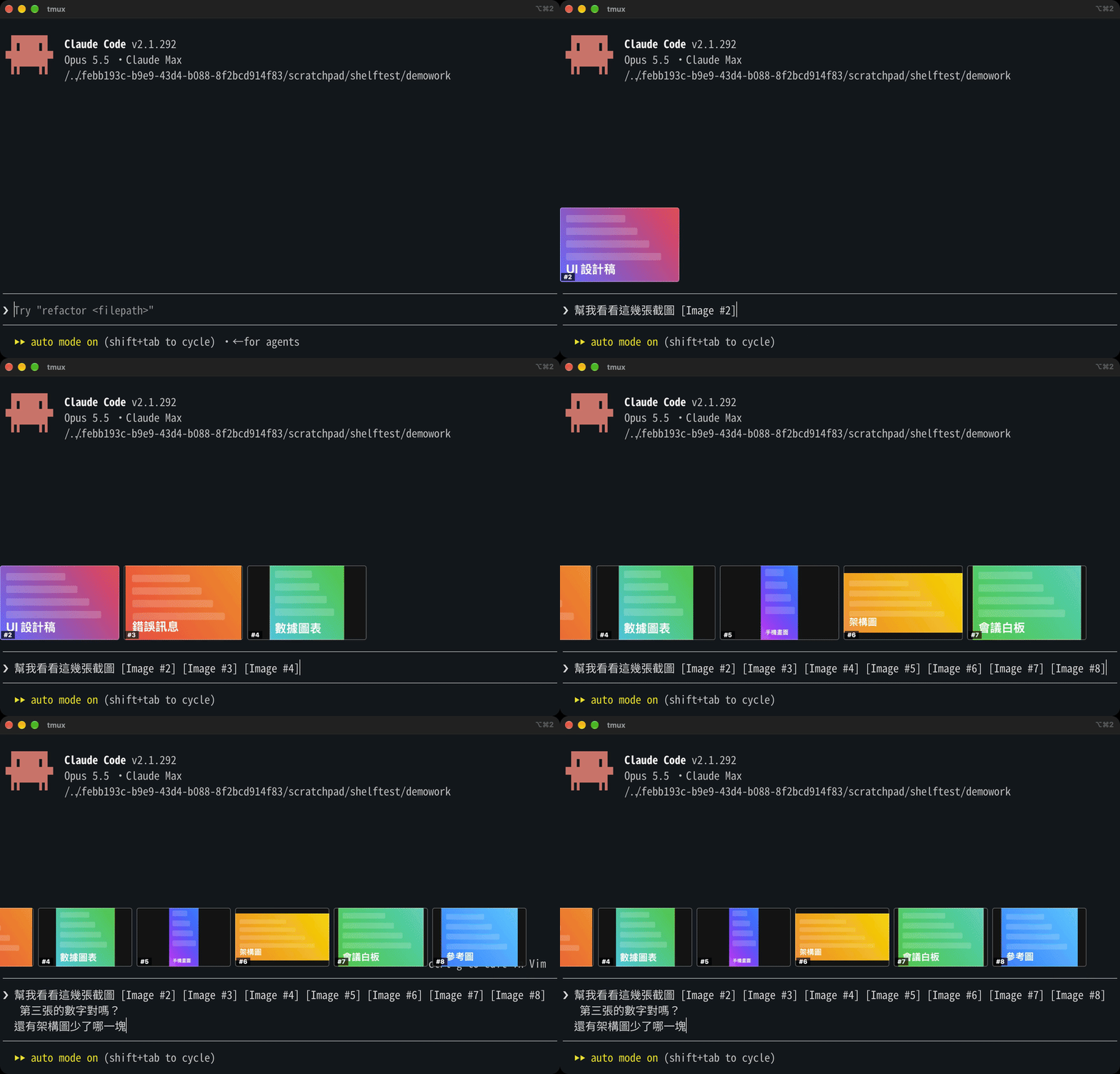
Claude Code 的 mod(外掛)。貼上的圖片會排在輸入框左上方,顯示成真正的縮圖;點一下就能畫圈、加箭頭、寫字、裁切,Claude 收到的是標註過的版本。
在終端機裡,貼上的圖片只會顯示成 [Image #3],貼了幾張之後就分不清哪張是哪張。Claude Code 內建的圖片元件只在 Ghostty、kitty 這類終端機畫得出來,iTerm2 和 tmux 裡看不到。image-shelf 在那種環境改用一個浮在終端機上方的透明小視窗來顯示圖片,像桌寵一樣。
在 Claude Code 的輸入框打:
/plugin install image-shelf --marketplace olilllioli287/claude-code-image-shelf問要不要加入來源時按 y,範圍選 user。第一次貼圖會花幾秒編譯浮動視窗和編輯器。
/plugin uninstall image-shelf@image-shelf想連來源一起移除:/plugin marketplace remove image-shelf。之後要再裝,照上面的安裝指令再打一次就好,可以重複。
不會留下東西在你的設定裡:編譯出來的程式放在 /private/tmp/image-shelf/(重開機會自動清掉);只有你自己建立了 ~/.config/image-shelf.json 才需要手動刪。
xcode-select --install),用來編譯浮動視窗panel/shelf.swift)把圖片蓋在那些列上[-];列從視窗頂端開始的位移,用截一條細長畫面、找兩條白線量出來[-](收合按鈕)用一塊終端機背景色的小視窗蓋住,滑鼠可穿透~/.config/image-shelf.json:
{ "dx": 0, "dy": -5.5 }dy 是圖片相對白線的上下位移(點,負數往上)。預設值是在 Noto Sans Mono CJK TC 20、行高 0.96 下調的,字型不同可能要微調。
目前只支援 macOS,最需要 Windows 和 Linux 的幫手。運作原理看 ARCHITECTURE.md,怎麼參與看 CONTRIBUTING.md。
標註編輯器(editor/)取自 alan890104/claude-code-paste-preview(MIT),未修改。
MIT
A Claude Code mod that shows the images you paste as real thumbnails above the prompt, on the left, and lets you mark one up with a click.
Claude Code's own Image element draws only in terminals with the kitty graphics protocol (Ghostty, kitty), and never through tmux. image-shelf draws there when it can, and in iTerm2 (with or without tmux) it floats a transparent borderless window over blank rows it reserves above the prompt.
Install (in Claude Code): /plugin install image-shelf --marketplace olilllioli287/claude-code-image-shelf
Needs: macOS, Xcode Command Line Tools, iTerm2 with Screen Recording permission (to measure where rows start), or Ghostty/kitty outside tmux.
Use: paste as usual (no popup); swipe or Shift+wheel to scroll a long row; click a picture to annotate it (pen, ellipse, box, arrow, text, crop, rotate). An edited picture gets an orange border; on send, Claude is told to read the edited file.
Uninstall: /plugin uninstall image-shelf@image-shelf (and /plugin marketplace remove image-shelf); reinstall with the install line above.
Tuning: ~/.config/image-shelf.json → { "dx": 0, "dy": -5.5 } (points; negative moves up).
Contributing: macOS only for now; Windows and Linux help wanted. See ARCHITECTURE.md and CONTRIBUTING.md.
The markup editor (editor/) is from alan890104/claude-code-paste-preview (MIT), unmodified.
hooks/register.tsx 337 lines1import { atom, read, update } from 'claude-code'
2import type { EngineInterface, Register } from 'claude-code'
3
4import type { Shot } from '../types'
5
6// image-shelf: each [Image #N] in the prompt box shows on a shelf at the left above the
7// prompt. Nothing opens on paste. Pressing an image opens a copy of it in Preview, whose
8// Markup tools draw on it; once Preview saves (Cmd+S, or on close), the shelf marks it
9// edited and, at Enter, Claude is told to read the edited copy.
10//
11// Claude Code writes each paste to /private/tmp/claude-<uid>/<project>/<session>/images/
12// <N>.png; that is its internal layout, not an API. The picture itself is drawn only
13// where the terminal can (Ghostty, kitty, WezTerm, outside tmux); elsewhere the shelf
14// shows a button per image, and a floating window of our own (panel/shelf.swift, as a
15// desktop pet sits over the screen) shows the pictures over blank rows the band holds.
16
17const shots = atom({ plugin: 'image-shelf', key: 'shots' } as const, [])
18const inBox = atom({ plugin: 'image-shelf', key: 'inBox' } as const, [])
19// Rows the floating window's grid takes; the band holds that many blank rows.
20const roomRows = atom({ plugin: 'image-shelf', key: 'roomRows' } as const, 4)
21
22const PLACEHOLDER = /\[Image #(\d+)\]/g
23// A terminal cell is about twice as tall as it is wide.
24const CELL = 2
25const ROWS = 6
26
27type Setup = { edits: string; tmp: string; session: string; canDraw: boolean; tmuxPane: string; home: string }
28
29// Rows the floating window's pictures take, and what sits under the band down to the
30// pane's bottom (the buttons sit above the pictures): a spacer, the prompt between its two rules,
31// and the status lines. ~/.config/image-shelf.json may say otherwise (dx, dy in points).
32const PANEL_ROWS = 4
33type Tuning = { dx: number; dy: number; statusLines: number; spacer: number }
34const TUNING: Tuning = { dx: 0, dy: -5.5, statusLines: 1, spacer: 0 }
35
36// Module variables start over on a hot reload; everything a drawing reads is in $.state.
37let setup: Promise<Setup> | undefined
38let images: string | undefined
39let isTicking = false
40let panel: Promise<string | undefined> | undefined
41let isPanelUp = false
42let lastShelf = ''
43// What the band last drew with, so the tick can keep the floating window in step as
44// the prompt grows or shrinks between draws.
45let lastColumns = 80
46let lastMaxRows = 0
47let lastShown = false
48const capturing = new Set<number>()
49const thumbs = new Map<string, string>()
50
51const numbersIn = (text: string) => [...new Set([...text.matchAll(PLACEHOLDER)].map(m => Number(m[1])))]
52
53const isSame = (a: readonly number[], b: readonly number[]) => a.length === b.length && a.every((n, i) => n === b[i])
54
55const setUp = ($: EngineInterface) => {
56 setup ??= (async () => {
57 const session = await $.session.id()
58 const uid = (await $.process.run(['id', '-u'])).stdout.trim()
59 const edits = `/private/tmp/image-shelf/${session.slice(0, 8)}`
60 await $.process.run(['mkdir', '-p', edits])
61 const [program, term, tmux, tmuxPane, home] = await Promise.all([$.env.get('TERM_PROGRAM'), $.env.get('TERM'), $.env.get('TMUX'), $.env.get('TMUX_PANE'), $.env.get('HOME')])
62 const canDraw = !tmux && (/^(ghostty|wezterm)$/i.test(program ?? '') || /kitty|ghostty/i.test(term ?? ''))
63 return { edits, tmp: `/private/tmp/claude-${uid}`, session, canDraw, tmuxPane: tmux ? (tmuxPane ?? '') : '', home: home ?? '' }
64 })()
65 return setup
66}
67
68// <tmp>/<project>/<session>/images, whichever project folder holds this session.
69const imagesOf = async ($: EngineInterface, tmp: string, session: string) => {
70 for (const entry of await $.fs.list(tmp).catch(() => [])) {
71 if (entry.kind === 'file') continue
72 const at = `${tmp}/${entry.name}/${session}/images`
73 if (await $.fs.exists(at).catch(() => false)) return at
74 }
75 return undefined
76}
77
78// Claude Code's copy lands a moment after the placeholder does.
79const engineCopy = async ($: EngineInterface, n: number) => {
80 const { tmp, session } = await setUp($)
81 for (let attempt = 0; attempt < 120; attempt++) {
82 images ??= await imagesOf($, tmp, session)
83 if (images !== undefined) {
84 const entry = (await $.fs.list(images).catch(() => [])).find(e => new RegExp(`^${n}\\.[a-z]+$`).test(e.name))
85 if (entry !== undefined) return `${images}/${entry.name}`
86 }
87 await $.clock.sleep(50)
88 }
89 return undefined
90}
91
92// Size and a small PNG for the shelf: a screenshot can be 10 MB, the shelf needs 480 px.
93const look = async ($: EngineInterface, n: number, file: string, gen: number) => {
94 const { edits } = await setUp($)
95 const info = await $.process.run(['sips', '-g', 'pixelWidth', '-g', 'pixelHeight', file])
96 const width = Number(/pixelWidth: (\d+)/.exec(info.stdout)?.[1] ?? 0)
97 const height = Number(/pixelHeight: (\d+)/.exec(info.stdout)?.[1] ?? 0)
98 const thumb = `${edits}/${n}.thumb-${gen}.png`
99 const made = await $.process.run(['sips', '-s', 'format', 'png', '-Z', '480', file, '--out', thumb])
100 return made.exitCode === 0 && width > 0 && height > 0 ? { width, height, thumb } : undefined
101}
102
103const mtimeOf = async ($: EngineInterface, file: string) => (await $.fs.stat(file).catch(() => undefined))?.mtimeMs ?? 0
104
105// A new paste: copy it where Preview may write, so the original stays as pasted.
106const capture = async ($: EngineInterface, n: number) => {
107 const found = await engineCopy($, n)
108 if (found === undefined) return
109 const { edits } = await setUp($)
110 const copy = `${edits}/${n}.png`
111 const made = await $.process.run(['sips', '-s', 'format', 'png', found, '--out', copy])
112 if (made.exitCode !== 0) return
113 const seen = await look($, n, copy, 0)
114 const shot: Shot = { n, copy, thumb: seen?.thumb ?? '', madeAt: await mtimeOf($, copy), isEdited: false, gen: 0, width: seen?.width ?? 0, height: seen?.height ?? 0 }
115 await update($, shots, list => [...list.filter(s => s.n !== n), shot])
116}
117
118// Preview saved: the copy's mtime moved on. Remake the thumbnail and mark it edited.
119const watchEdits = async ($: EngineInterface) => {
120 for (const shot of await read($, shots)) {
121 if (shot.copy === '') continue
122 const at = await mtimeOf($, shot.copy)
123 const last = shot.madeAt
124 if (at === 0 || at === last) continue
125 const gen = shot.gen + 1
126 const seen = await look($, shot.n, shot.copy, gen).catch(() => undefined)
127 await update($, shots, list => list.map(s => (s.n === shot.n ? { ...s, madeAt: at, isEdited: true, gen, thumb: seen?.thumb ?? s.thumb, width: seen?.width ?? s.width, height: seen?.height ?? s.height } : s)))
128 }
129}
130
131// Numbers run up through a session, so only an unknown N is a new paste.
132const sync = async ($: EngineInterface, text: string) => {
133 await setUp($)
134 const ns = numbersIn(text)
135 if (!isSame(ns, await read($, inBox))) await update($, inBox, () => ns)
136 const known = await read($, shots)
137 for (const n of ns) {
138 if (capturing.has(n) || known.some(s => s.n === n)) continue
139 capturing.add(n)
140 void capture($, n).finally(() => capturing.delete(n))
141 }
142}
143
144const tick = async ($: EngineInterface) => {
145 if (isTicking) return
146 isTicking = true
147 try {
148 await sync($, (await $.prompt.read()).text)
149 await watchEdits($)
150 const { canDraw } = await setUp($)
151 if (!canDraw) {
152 const ns = await read($, inBox)
153 // In the prompt's order, as the band writes it: shots is in the order copies finished.
154 const all = await read($, shots)
155 await writeShelf($, ns.flatMap(n => all.filter(s => s.n === n)), lastShown && ns.length > 0, lastColumns)
156 const { edits } = await setUp($)
157 const told = Number(/"rows":(\d+)/.exec(await $.fs.read(`${edits}/layout.json`).catch(() => ''))?.[1] ?? PANEL_ROWS)
158 if (told !== (await read($, roomRows))) await update($, roomRows, () => told)
159 }
160 } finally {
161 isTicking = false
162 }
163}
164
165const open = async ($: EngineInterface, n: number) => {
166 const shot = (await read($, shots)).find(s => s.n === n)
167 if (shot === undefined || shot.copy === '') {
168 $.ui.toast(`Image #${n} 還在準備,等一下再點`)
169 return
170 }
171 // The editor writes the edit over the copy; its new mtime marks it edited.
172 const binary = await buildEditor($)
173 if (binary === undefined) {
174 await $.process.run(['open', '-a', 'Preview', shot.copy])
175 return
176 }
177 await $.process.run([binary, `${$.plugin.root}/editor/editor.html`, shot.copy, shot.copy, `Image #${n}`, 'zh-Hant'], { timeoutMs: 3_600_000 }).catch(() => undefined)
178}
179
180const pictureOf = async ($: EngineInterface, shot: Shot) => {
181 const held = thumbs.get(shot.thumb)
182 if (held !== undefined) return held
183 const { base64 } = await $.fs.read(shot.thumb, { as: 'bytes' })
184 thumbs.set(shot.thumb, base64)
185 return base64
186}
187
188// A Swift program of the mod's, compiled once per version of its source and named by it.
189const build = async ($: EngineInterface, source: string, name: string) => {
190 const text = await $.fs.read(source)
191 const digest = [...new Uint8Array(await crypto.subtle.digest('SHA-256', new TextEncoder().encode(text)))].slice(0, 6).map(b => b.toString(16).padStart(2, '0')).join('')
192 const binary = `/private/tmp/image-shelf/bin/${name}-${digest}`
193 if (await $.fs.exists(binary).catch(() => false)) return binary
194 await $.process.run(['mkdir', '-p', '/private/tmp/image-shelf/bin'])
195 const part = `${binary}.${crypto.randomUUID().slice(0, 8)}`
196 const made = await $.process.run(['xcrun', 'swiftc', '-O', source, '-o', part], { timeoutMs: 180_000 }).catch(() => undefined)
197 if (made?.exitCode !== 0) return undefined
198 return (await $.process.run(['mv', '-f', part, binary])).exitCode === 0 ? binary : undefined
199}
200
201// The floating window, and the markup editor (editor/, from paste-preview, MIT).
202const buildPanel = ($: EngineInterface) => build($, `${$.plugin.root}/panel/shelf.swift`, 'shelf')
203let editor: Promise<string | undefined> | undefined
204const buildEditor = ($: EngineInterface) => {
205 editor ??= build($, `${$.plugin.root}/editor/editor.swift`, 'editor').catch(() => undefined)
206 return editor
207}
208
209const tuningOf = async ($: EngineInterface, home: string): Promise<Tuning> => {
210 const text = await $.fs.read(`${home}/.config/image-shelf.json`).catch(() => '')
211 try {
212 return { ...TUNING, ...(text === '' ? {} : JSON.parse(text)) }
213 } catch {
214 return TUNING
215 }
216}
217
218// Started the first time there is something to show; it quits with Claude Code.
219const startPanel = ($: EngineInterface, shelfFile: string) => {
220 panel ??= (async () => {
221 const binary = await buildPanel($)
222 if (binary === undefined) {
223 $.ui.toast('image-shelf:浮動視窗編譯失敗(需要 Xcode Command Line Tools)')
224 return undefined
225 }
226 isPanelUp = true
227 void (async () => {
228 try {
229 for await (const _ of $.process.spawn({ argv: [binary, shelfFile] })) { /* it says nothing */ }
230 } catch {}
231 isPanelUp = false
232 panel = undefined
233 })()
234 return binary
235 })().catch(() => undefined)
236 return panel
237}
238
239// Display width in cells: CJK and emoji take two.
240const widthOf = (text: string) => [...text].reduce((sum, ch) => sum + ((ch.codePointAt(0) ?? 0) >= 0x1100 ? 2 : 1), 0)
241
242const promptRows = (text: string, columns: number) => text.split('\n').reduce((sum, line) => sum + Math.max(1, Math.ceil((widthOf(line) + 2) / Math.max(10, columns))), 0)
243
244// What the floating window reads: the pictures, and where the band's blank rows are.
245const writeShelf = async ($: EngineInterface, list: Shot[], isVisible: boolean, columns: number) => {
246 const { edits, tmuxPane, home } = await setUp($)
247 const tuning = await tuningOf($, home)
248 const text = isVisible ? (await $.prompt.read().catch(() => ({ text: '' }))).text : ''
249 const rowsBelow = tuning.spacer + 2 + promptRows(text, columns) + tuning.statusLines
250 const items = list.filter(s => s.thumb !== '').map(s => ({ n: s.n, thumb: s.thumb, copy: s.copy, edited: s.isEdited }))
251 const editorBinary = items.length > 0 ? ((await buildEditor($)) ?? '') : ''
252 const shelf = JSON.stringify({ visible: isVisible && items.length > 0, items, rows: PANEL_ROWS, rowsBelow, editor: editorBinary, page: `${$.plugin.root}/editor/editor.html`, tmuxPane, maxRows: lastMaxRows, dx: tuning.dx, dy: tuning.dy })
253 const file = `${edits}/shelf.json`
254 if (shelf !== lastShelf) {
255 lastShelf = shelf
256 await $.fs.write(file, shelf)
257 }
258 // Started again if it quit (or was stopped) while there are pictures to show.
259 if (items.length > 0 && !isPanelUp) void startPanel($, file)
260}
261
262// Same height for all, `rows` tall, as wide as the picture's shape asks.
263const columnsOf = (shot: Shot, rows: number) => Math.max(4, Math.min(48, Math.round((rows * CELL * shot.width) / shot.height)))
264
265export const register: Register = on => {
266 on('session.start', async ($, e, next) => {
267 // A reload (or a new version of the mod) brings a fresh panel: the one an earlier load
268 // started for this session goes, so an edited panel/shelf.swift takes effect.
269 void setUp($).then(({ edits }) => $.process.run(['pkill', '-f', `image-shelf/bin/shelf-[0-9a-f]+ ${edits}/shelf.json`])).catch(() => undefined)
270 $.clock.every(700, () => void tick($).catch(() => undefined))
271 return next(e)
272 })
273
274 on('prompt.edit', async ($, e, next) => {
275 const box = await next(e)
276 await sync($, box.text).catch(() => undefined)
277 return box
278 })
279
280 // At Enter: Claude is pointed at each edited copy. The original paste still goes along;
281 // the note says which one to trust.
282 on('prompt.submit', async ($, e, next) => {
283 await watchEdits($).catch(() => undefined)
284 const ns = numbersIn(e.text)
285 const edited = (await read($, shots).catch(() => [] as Shot[])).filter(s => s.isEdited && ns.includes(s.n))
286 if (edited.length === 0) return next(e)
287 const notes = edited.map(s => `The person edited [Image #${s.n}] in Preview before sending (drew on, cropped or annotated it). The attached original is the unedited paste; the edited picture is ${s.copy}. Read that file and work from the edited version.`)
288 return next({ ...e, context: [...(e.context ?? []), ...notes] })
289 })
290
291 on('ui.render', { component: 'AbovePrompt' }, async ($, e, next) => {
292 const { canDraw } = await setUp($)
293 const ns = await read($, inBox)
294 const all = await read($, shots)
295 const isShown = e.surface === 'terminal' && !e.props.hasSurvey && ns.length > 0
296 lastColumns = e.props.bodyColumns
297 lastMaxRows = e.props.maxRows
298 lastShown = isShown
299 if (!canDraw) void writeShelf($, ns.flatMap(n => all.filter(s => s.n === n)), isShown, e.props.bodyColumns).catch(() => undefined)
300 if (e.surface !== 'terminal' || e.props.hasSurvey || ns.length === 0) return next(e)
301 const { Box, Text, Button, Image } = $.ui.resolve(e)
302 const rows = Math.max(3, Math.min(ROWS, e.props.maxRows - 2))
303
304 // Where the terminal cannot draw, blank rows for the floating window to cover.
305 const room = !canDraw && all.some(s => ns.includes(s.n) && s.thumb !== '')
306 ? <Box key="room" height={Math.max(1, Math.min(PANEL_ROWS, e.props.maxRows))} />
307 : null
308
309 // Here the floating window shows the pictures and takes the clicks: only its room.
310 if (!canDraw) return room === null ? next(e) : <Box flexDirection="column">{room}</Box>
311
312 return (
313 <Box flexDirection="column">
314 <Box flexDirection="row" flexWrap="wrap" columnGap={2} justifyContent="flex-start">
315 {await Promise.all(ns.map(async (n, i) => {
316 const shot = all.find(s => s.n === n)
317 const label = `#${n}${shot?.isEdited ? ' 已編輯' : ''}`
318 const hotkey = i < 9 ? { hotkey: String(i + 1) } : {}
319 const png = canDraw && shot !== undefined && shot.thumb !== '' ? await pictureOf($, shot).catch(() => undefined) : undefined
320 return (
321 <Box key={`shot-${n}`} flexDirection="column">
322 {png !== undefined && shot !== undefined && (
323 <Image key={`img-${n}`} source={{ png }} columns={columnsOf(shot, rows)} rows={rows} alt={`#${n}`} />
324 )}
325 {shot === undefined
326 ? <Text key={`wait-${n}`} dimColor>#{n} …</Text>
327 : <Button key={`open-${n}`} label={`🖼 ${label}`} plain {...hotkey} onPress={() => void open($, n)} />}
328 </Box>
329 )
330 }))}
331 </Box>
332 {room}
333 </Box>
334 )
335 })
336}
337types/index.d.ts 22 lines1// One pasted image: the N of its [Image #N], the editable copy Preview opens, and the
2// small PNG the band draws where the terminal can draw pictures.
3export type Shot = {
4 n: number
5 // The copy in our own folder; '' until Claude Code's copy of the paste is found.
6 copy: string
7 thumb: string
8 // The copy's mtime when it was made; a later one means Preview saved an edit.
9 madeAt: number
10 isEdited: boolean
11 // Bumped each time the picture changes, so the thumbnail is read again.
12 gen: number
13 width: number
14 height: number
15}
16
17declare module 'claude-code' {
18 interface PluginState {
19 'image-shelf': { shots: Shot[]; inBox: number[]; roomRows: number }
20 }
21}
22