Prompt Jump
Jump back to any prompt you typed in a Claude Code session with /jump: newest first, search by words or number, works after --resume.
newpanerowscommandtoastprocess

Jump back to any prompt you typed in a Claude Code session with /jump: newest first, search by words or number, works after --resume.
Jump back to any prompt you typed in a Claude Code session — no more scrolling.
Long Claude Code sessions bury your own prompts under pages of tool output. Ctrl+R brings back the text of an old prompt, but not the place in the conversation where you wrote it. prompt-jump adds a /jump panel that lists every prompt of the current conversation, newest first. Pick one and the transcript scrolls straight to it.
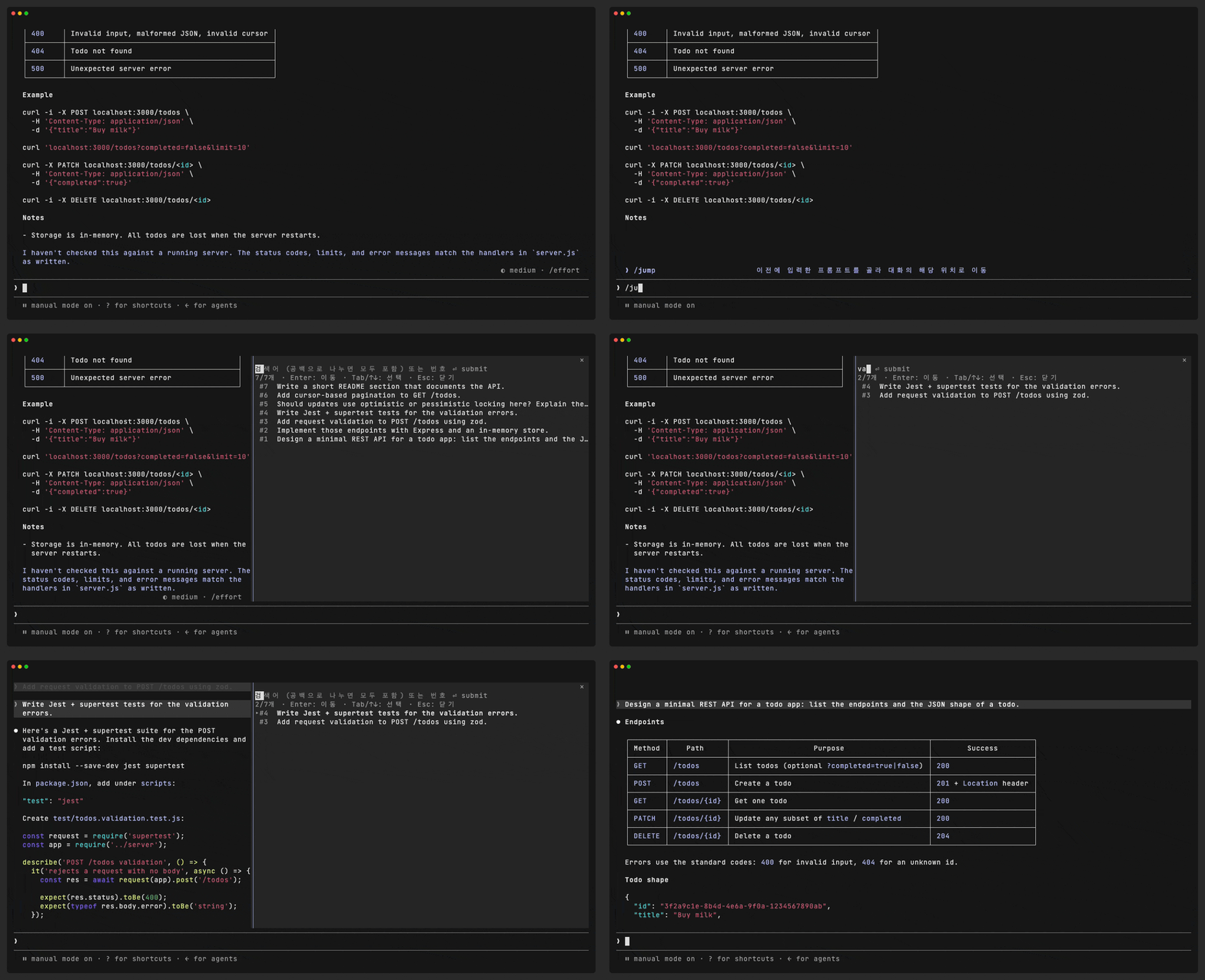
<sub>The demo resumes a session and jumps to prompt #1 without scrolling to it first.</sub>
#1 is the oldest).12 or #12 and press Enter.Esc.--resume. Prompts from before the restart are listed right away, even ones you have not scrolled to yet./rewind, /plugin, …), task notifications and messages from other sessions are left out./jump adds nothing to the transcript or to the model's context, and it works while Claude is still responding.Ctrl+R is untouched. This is an extra command, not a replacement.| Claude Code | v2.1.287 or later, in the terminal (mods are an early-access feature) |
| Renderer | The fullscreen renderer (/tui fullscreen). Jumping scrolls Claude Code's own transcript view |
| OS | macOS or Linux. Resume support calls the system's grep and find |
From a terminal session of Claude Code:
/plugin install prompt-jump --marketplace nickhealthy/claude-code-prompt-jumpAnswer y to add the marketplace, then choose a scope (user scope loads it in every session). The mod is active right away.
Or add the marketplace first, then install from it:
/plugin marketplace add nickhealthy/claude-code-prompt-jump
/plugin install prompt-jump@prompt-jump
git clone https://github.com/nickhealthy/claude-code-prompt-jump.git ~/.claude/mods/prompt-jumpThen load it in every session through ~/.claude/settings.json:
{
  "env": {
    "CLAUDE_CODE_PLUGIN_DIRS": "/absolute/path/to/.claude/mods/prompt-jump"
  }
}
Or for a single session: claude --plugin-dir ~/.claude/mods/prompt-jump.
| Command | What it does |
|---|---|
/jump | Opens the panel with every prompt |
/jump bypass mode | Opens it filtered to prompts that contain both words |
/jump 12 | Opens it showing prompt #12 only |
Inside the panel:
| Key | Action |
|---|---|
| Type | Filter by words, or by number (12, #12) |
Enter in the search box | Jump to the newest match |
Tab / ↑ ↓ | Move between prompts |
Enter / click | Jump to the selected prompt |
Esc | Close the panel |
prompt-jump is a Claude Code mod: a plugin of function hooks that runs inside Claude Code.
$.session.messages(). Rewound branches are not part of it, so prompts you rewound away disappear, and the order is the real conversation order.ui.render hook on UserMessage rows), andgrep so that only prompt rows are copied in. This is what makes resume work, because the fullscreen renderer only draws the rows you have scrolled to.$.ui.scroll({ to: { requestId } }) brings the row to the top of the view.The list is computed once when /jump opens, so typing in the search box never re-reads the conversation.
prompt-jump runs entirely on your machine. It sends nothing over the network and writes nothing outside Claude Code's own session state.
What it reads
Only what the list needs, only from the current session, only when you open /jump:
In detail:
$.session.messages(), to decide which prompts exist and in what order.<config folder>/projects/<project>/<session-id>.jsonl, to find prompts that have not been drawn yet after --resume. The config folder is $CLAUDE_CONFIG_DIR, or ~/.claude when that is unset.HOME and CLAUDE_CONFIG_DIR, only to locate that transcript file.What it runs
It starts at most two local, read-only programs, only when you open /jump. Each is started directly with an argument list, never through a shell.
| Program | Exact command | Why |
|---|---|---|
grep | grep -F '"promptSource":' <transcript file> | Copies in only your prompt rows. The transcript can be larger than the 4 MiB a mod may read with $.fs.read. |
find | find <config folder>/projects -maxdepth 2 -name <session-id>.jsonl | Runs only when the transcript is not at the expected path, which happens when the project folder name is longer than 200 characters and Claude Code shortens it. |
What it sends
Nothing. The output of these programs is parsed inside the mod and shown in the panel. It is not written to disk, not sent to any server, and not added to the transcript or to the model's context.
/compact, prompts from before the compaction drop out of the list. They are still in the scrollback.promptSource). If a Claude Code update changes it, the list falls back to prompts drawn on screen, without errors.prompt-jump/
├── .claude-plugin/plugin.json # manifest
├── hooks/hooks.json # names the hooks module
├── hooks/register.tsx # the mod
├── types/index.d.ts # $.state contract
├── tests/prompt-jump.test.tsx # claude plugin test
└── docs/DEVELOPMENT.md # how this mod was built, iteration by iterationclaude plugin validate . # manifest, hooks module and state contract
claude plugin test . # 15 tests: ordering, rewind, resume, filters, CJK widthWhile developing, run it from the folder with claude --plugin-dir .. Saving a file reloads the mod.
The story of how the mod got here, including every bug and the reason behind each fix, is in docs/DEVELOPMENT.md (Korean).
hooks/register.tsx 337 lines1import { atom, read, update } from 'claude-code'
2import type { EngineInterface, PromptOrigin, Register, SessionMessage } from 'claude-code'
3
4import type { MessageId, PromptEntry } from '../types'
5
6// 기존 Ctrl+R(입력 기록 검색)은 엔진 내부 다이얼로그라 건드리지 않고, /jump 로 여는 별도 패널로 제공한다
7const PANE = 'prompt-jump'
8const PANE_TITLE = '프롬프트로 이동'
9const MAX_LISTED = 200
10const MIN_LABEL_WIDTH = 10
11const ROW_GAP = ' '
12const ELLIPSIS = '…'
13const CURRENT_MARK = '▸'
14// 프로젝트 폴더 이름이 이 길이를 넘으면 엔진이 잘라내고 해시를 붙인다
15const PROJECT_DIR_NAME_MAX = 200
16// grep: 1은 "일치 없음", 그 이상은 오류
17const GREP_NO_MATCH = 1
18// 세션 기록 파일(jsonl)에서 사람이 입력한 프롬프트 행에만 있는 필드. 슬래시 명령·도구 결과 행에는 없다
19const PROMPT_ROW_MARKER = '"promptSource":'
20
21const filter = atom({ plugin: 'prompt-jump', key: 'filter' } as const, '')
22const current = atom({ plugin: 'prompt-jump', key: 'current' } as const, '')
23const listedEntries = atom({ plugin: 'prompt-jump', key: 'entries' } as const, [])
24
25// 화면에 그려진 UserMessage 행의 id(requestId) → 원문. 이번 프로세스에서 그려진 행만 담긴다
26// (resume 직후 아직 스크롤해 보지 않은 행은 없으므로 세션 기록 파일로 보충한다)
27// render hook 안에서는 $.state 쓰기가 금지라 모듈 변수에 둔다
28const prompts = new Map<MessageId, string>()
29
30// 사람이 입력하지 않은 출처: 작업 알림, 예약 실행, 다른 세션·채널·플러그인이 보낸 메시지
31const NON_PROMPT_KINDS: ReadonlySet<PromptOrigin['kind']> = new Set([
32 'task-notification',
33 'scheduled-trigger',
34 'peer',
35 'peer-send-message',
36 'projects-relay',
37 'channel',
38 'coordinator',
39 'observer',
40 'observer-activity',
41 'auto-continuation',
42 'slack-ping',
43 'plugin',
44])
45
46// 허용 목록(composer·bridge)이 아니라 제외 목록으로 거른다: resume으로 불러온 행은 출처가 저장 형식({ kind: 'human' })과 달라
47// composer로 오지 않기 때문. 출처 표시가 없는 팀원 메시지(from)·작업 알림(task)도 뺀다
48const isTypedPrompt = (origin: PromptOrigin, hasSender: boolean) => !NON_PROMPT_KINDS.has(origin.kind) && !hasSender
49
50// 슬래시 명령 행(/rewind, /resume, /plugin …)은 대화 프롬프트가 아니라 제외. "/Users/..." 처럼 경로로 시작하는 프롬프트는 남긴다
51const SLASH_COMMAND = /^\/[\w:-]+(\s|$)/
52const isSlashCommand = (text: string) => {
53 const head = text.trimStart()
54 return SLASH_COMMAND.test(head) || head.startsWith('<command-name>') || head.startsWith('<local-command-')
55}
56
57// 터미널에서 2칸을 차지하는 문자 범위(한글·CJK·전각·이모지). 글자 수로 자르면 한국어 행이 줄바꿈되어 목록이 깨진다
58const WIDE_RANGES: ReadonlyArray<readonly [number, number]> = [
59 [0x1100, 0x115f],
60 [0x2e80, 0xa4cf],
61 [0xac00, 0xd7a3],
62 [0xf900, 0xfaff],
63 [0xfe30, 0xfe4f],
64 [0xff00, 0xff60],
65 [0xffe0, 0xffe6],
66 [0x1f300, 0x1faff],
67 [0x20000, 0x3fffd],
68]
69
70const cellWidth = (ch: string) => {
71 const code = ch.codePointAt(0) ?? 0
72 return WIDE_RANGES.some(([low, high]) => code >= low && code <= high) ? 2 : 1
73}
74
75const displayWidth = (text: string) => [...text].reduce((sum, ch) => sum + cellWidth(ch), 0)
76
77export const truncate = (text: string, width: number) => {
78 if (displayWidth(text) <= width) return text
79 let used = 0
80 let kept = ''
81 for (const ch of text) {
82 const w = cellWidth(ch)
83 // 말줄임표 1칸을 남겨둔다
84 if (used + w > width - 1) break
85 used += w
86 kept += ch
87 }
88 return kept + ELLIPSIS
89}
90
91const oneLine = (text: string) => text.replace(/\s+/g, ' ').trim()
92
93// 서로 다른 출처의 텍스트를 비교하는 키: 줄바꿈·블록 결합 방식 차이를 무시하려고 공백을 모두 뺀다
94const matchKey = (text: string) => text.replace(/\s+/g, '')
95
96type CandidatePrompt = readonly [id: MessageId, text: string]
97type StoredMessage = Pick<SessionMessage, 'role' | 'text' | 'toolResults'>
98
99// 세션 기록 파일의 한 행 중 필요한 필드만
100type TranscriptRow = {
101 type?: unknown
102 uuid?: unknown
103 isMeta?: unknown
104 promptSource?: unknown
105 message?: { content?: unknown }
106}
107
108const parseRow = (line: string): TranscriptRow | undefined => {
109 try {
110 const row: unknown = JSON.parse(line)
111 return typeof row === 'object' && row !== null ? row : undefined
112 } catch {
113 // 잘린 마지막 줄 등 깨진 행은 건너뛴다
114 return undefined
115 }
116}
117
118const isTextBlock = (block: unknown): block is { type: 'text'; text: string } =>
119 typeof block === 'object' &&
120 block !== null &&
121 'type' in block &&
122 block.type === 'text' &&
123 'text' in block &&
124 typeof block.text === 'string'
125
126// 메시지 content는 문자열이거나 블록 배열(이미지 첨부 등): 텍스트 블록만 잇는다
127const contentText = (content: unknown) => {
128 if (typeof content === 'string') return content
129 if (!Array.isArray(content)) return ''
130 return content
131 .filter(isTextBlock)
132 .map(block => block.text)
133 .join('\n')
134}
135
136// 기록 파일 행들(jsonl)에서 사람이 입력한 프롬프트만 기록 순서대로 뽑는다. 되감기로 버려진 분기의 프롬프트도 포함된다
137export const parsePromptRows = (jsonl: string): CandidatePrompt[] =>
138 jsonl.split('\n').flatMap(line => {
139 const row = parseRow(line)
140 if (!row || row.type !== 'user' || row.isMeta === true || row.promptSource === 'system') return []
141 if (typeof row.uuid !== 'string') return []
142
143 const text = contentText(row.message?.content)
144 return text.trim() && !isSlashCommand(text) ? [[row.uuid, text] as const] : []
145 })
146
147// 기록 파일의 프롬프트 뒤에, 기록 파일에 없는 id로 그려진 행을 덧붙인다.
148// 보통 둘의 id는 같아 그대로 기록 파일 순서가 되고, 혹시 다르면 같은 텍스트끼리 짝지을 때 나중 항목(그려진 행)이 우선한다
149export const mergeSources = (stored: readonly CandidatePrompt[], rendered: readonly CandidatePrompt[]) => {
150 const storedIds = new Set(stored.map(([id]) => id))
151 return [...stored, ...rendered.filter(([id]) => !storedIds.has(id))]
152}
153
154// 현재 대화(되감기로 버려진 분기 제외)에 남아 있는 프롬프트만 대화 순서(오래된 → 최신)로 돌려준다
155export const orderActivePrompts = (
156 candidates: readonly CandidatePrompt[],
157 messages: readonly StoredMessage[],
158): PromptEntry[] => {
159 // 같은 텍스트가 여러 번이면 후보 순서대로 쌓아둔다
160 const byKey = new Map<string, CandidatePrompt[]>()
161 for (const candidate of candidates) {
162 const key = matchKey(candidate[1])
163 byKey.set(key, [...(byKey.get(key) ?? []), candidate])
164 }
165
166 // 최신 메시지부터 짝지으며 같은 텍스트 중 가장 나중 후보를 쓴다:
167 // rewind 후 같은 프롬프트를 다시 보낸 경우 버려진 예전 행이 아니라 현재 대화의 새 행을 고르기 위함
168 const newestFirst: PromptEntry[] = []
169 for (const message of [...messages].reverse()) {
170 if (message.role !== 'user' || message.toolResults?.length) continue
171 const candidate = byKey.get(matchKey(message.text))?.pop()
172 if (candidate) newestFirst.push({ id: candidate[0], text: candidate[1] })
173 }
174
175 return newestFirst.reverse()
176}
177
178// 세션 기록 파일 위치: <설정 폴더>/projects/<프로젝트 루트의 영숫자 외 문자를 '-'로 바꾼 이름>/<세션 id>.jsonl
179const findTranscript = async ($: EngineInterface) => {
180 const [id, root, configDir, home] = await Promise.all([
181 $.session.id(),
182 $.session.root(),
183 $.env.get('CLAUDE_CONFIG_DIR'),
184 $.env.get('HOME'),
185 ])
186 const baseDir = configDir ?? (home && `${home}/.claude`)
187 if (!baseDir) return undefined
188
189 const projectsDir = `${baseDir}/projects`
190 const dirName = root.replace(/[^a-zA-Z0-9]/g, '-')
191 const direct = `${projectsDir}/${dirName}/${id}.jsonl`
192 if (dirName.length <= PROJECT_DIR_NAME_MAX && (await $.fs.exists(direct))) return direct
193
194 // 긴 경로는 폴더 이름이 잘리고 해시가 붙으므로 세션 id로 찾는다
195 const found = await $.process.run(['find', projectsDir, '-maxdepth', '2', '-name', `${id}.jsonl`])
196 return found.stdout.split('\n').find(Boolean)
197}
198
199// 기록 파일 전체(수 MB)를 읽지 않고 프롬프트 행만 grep으로 뽑는다 ($.fs.read는 4 MiB 초과 파일을 거부한다)
200const readTranscriptPrompts = async ($: EngineInterface) => {
201 const path = await findTranscript($)
202 if (!path) return []
203
204 const result = await $.process.run(['grep', '-F', PROMPT_ROW_MARKER, path])
205 if (result.exitCode > GREP_NO_MATCH) return []
206 return parsePromptRows(result.stdout)
207}
208
209// 공백으로 나눈 검색어를 모두 포함해야 매치 (대소문자 무시)
210const toTerms = (query: string) => query.toLowerCase().split(/\s+/).filter(Boolean)
211
212const matchesAll = (text: string, terms: readonly string[]) => {
213 const lower = text.toLowerCase()
214 return terms.every(term => lower.includes(term))
215}
216
217// 숫자만 입력하면(# 생략 가능) 그 번호 하나만, 그 외에는 텍스트 검색
218const NUMBER_QUERY = /^#?(\d+)$/
219
220export const selectEntries = <E extends { text: string; no: number }>(entries: readonly E[], query: string): E[] => {
221 const number = NUMBER_QUERY.exec(query.trim())
222 if (number) return entries.filter(entry => entry.no === Number(number[1]))
223
224 const terms = toTerms(query)
225 return entries.filter(entry => matchesAll(entry.text, terms))
226}
227
228export const register: Register = on => {
229 on('session.start', async ($, e, next) => {
230 // 명령 이름은 리터럴로 둔다: validate가 "자기 명령만 응답하는 hook"으로 인식하는 조건
231 await $.command.register({
232 name: 'jump',
233 description: '이전에 입력한 프롬프트를 골라 대화의 해당 위치로 이동',
234 argumentHint: '[검색어 | 번호]',
235 // Claude가 응답 중일 때도 바로 열 수 있게
236 immediate: true,
237 })
238 // 이 mod가 로드되기 전에 그려진 행까지 수집하기 위해 UserMessage 행을 다시 그리게 한다
239 prompts.clear()
240 $.ui.invalidate('ui.render')
241
242 return next(e)
243 })
244
245 // 행을 그대로 그리면서 id와 원문만 수집한다
246 on('ui.render', { component: 'UserMessage' }, ($, e, next) => {
247 const { text, origin, task, from } = e.props
248 const hasSender = task !== undefined || from !== undefined
249 if (isTypedPrompt(origin, hasSender) && text.trim() && !isSlashCommand(text)) prompts.set(e.requestId, text)
250
251 return next(e)
252 })
253
254 on('command.run', { command: 'jump' }, async ($, e) => {
255 // 목록은 열 때 한 번만 계산한다 (검색어 입력마다 대화 전체를 읽지 않도록)
256 const [messages, stored] = await Promise.all([
257 $.session.messages().catch(() => undefined),
258 // 기록 파일을 못 읽으면(경로·grep 실패) 화면에서 수집한 행만 쓴다
259 readTranscriptPrompts($).catch(() => []),
260 ])
261 const candidates = mergeSources(stored, [...prompts])
262 // 대화 기록을 읽지 못하면 현재 대화 여부를 가릴 수 없어 후보 순서 그대로 쓴다
263 const entries = messages
264 ? orderActivePrompts(candidates, messages)
265 : candidates.map(([id, text]) => ({ id, text }))
266
267 await update($, listedEntries, () => entries)
268 await update($, filter, () => e.args.trim())
269 await $.ui.open({ id: PANE, title: PANE_TITLE, focus: true, closeOnEscape: true })
270
271 // 대화 기록과 모델 컨텍스트에 아무것도 남기지 않는다
272 return {}
273 })
274
275 on('ui.render', { component: 'Pane', requestId: PANE }, async ($, e) => {
276 const ui = $.ui.resolve(e)
277 const { Box, Text, Button } = ui
278 const Input = 'Input' in ui ? ui.Input : undefined
279
280 const query = await read($, filter)
281 const currentId = await read($, current)
282 // 번호는 대화 순서(1 = 가장 오래된 프롬프트)
283 const entries = (await read($, listedEntries)).map((entry, index) => ({ ...entry, no: index + 1 }))
284 // 가장 최신 프롬프트가 위로
285 const matched = selectEntries(entries, query).reverse()
286 const listed = matched.slice(0, MAX_LISTED)
287 const noWidth = `#${entries.length}`.length
288 const labelWidth = Math.max(MIN_LABEL_WIDTH, e.props.bodyColumns - noWidth - ROW_GAP.length - CURRENT_MARK.length)
289
290 // 패널은 닫지 않는다: 닫으면 도킹 폭이 바뀌어 스크롤 위치가 밀리고, 여러 프롬프트를 연달아 오갈 수 있게 하기 위함
291 const jump = async (id: MessageId) => {
292 // 거부({ deny })와 예외(행이 사라짐, 스크롤 미지원 화면) 모두 패널을 깨지 않고 토스트로 알린다
293 const moved = await $.ui
294 .scroll({ to: { requestId: id }, block: 'start' })
295 .catch((error: unknown) => ({ deny: error instanceof Error ? error.message : String(error) }))
296 if (moved.deny) {
297 $.ui.toast(`해당 위치로 이동하지 못했어: ${moved.deny}`)
298 return
299 }
300 await update($, current, () => id)
301 }
302
303 const summary =
304 entries.length === 0
305 ? '아직 수집된 프롬프트가 없어.'
306 : `${matched.length}/${entries.length}개 · Enter: 이동 · Tab/↑↓: 선택 · Esc: 닫기`
307
308 return (
309 <Box flexDirection="column">
310 {Input && (
311 <Input
312 key="filter"
313 placeholder="검색어 (공백으로 나누면 모두 포함) 또는 번호"
314 value={query}
315 autoFocus
316 onInput={value => void update($, filter, () => value)}
317 onSubmit={() => void (listed[0] && jump(listed[0].id))}
318 />
319 )}
320 <Text dimColor>{summary}</Text>
321 {listed.map(entry => {
322 const isCurrent = entry.id === currentId
323 return (
324 <Button key={`p-${entry.id}`} plain onPress={() => void jump(entry.id)}>
325 <Text dimColor>{`${isCurrent ? CURRENT_MARK : ' '}${`#${entry.no}`.padStart(noWidth)}`}</Text>
326 {ROW_GAP}
327 <Text bold={isCurrent}>{truncate(oneLine(entry.text), labelWidth)}</Text>
328 </Button>
329 )
330 })}
331 {matched.length > MAX_LISTED && <Text dimColor>{`외 ${matched.length - MAX_LISTED}개 — 검색어로 좁혀줘`}</Text>}
332 {entries.length > 0 && matched.length === 0 && <Text dimColor>검색 결과 없음</Text>}
333 </Box>
334 )
335 })
336}
337types/index.d.ts 19 lines1// UserMessage 행의 requestId (transcript 메시지 id)
2export type MessageId = string
3
4// 목록 한 줄: 이동할 메시지 id와 프롬프트 원문
5export type PromptEntry = { id: MessageId; text: string }
6
7declare module 'claude-code' {
8 interface PluginState {
9 'prompt-jump': {
10 // 패널 검색어
11 filter: string
12 // 마지막으로 이동한 메시지 (목록에서 강조)
13 current: MessageId
14 // /jump를 열 때 계산한 현재 대화의 프롬프트 (오래된 → 최신)
15 entries: PromptEntry[]
16 }
17 }
18}
19