tidy
Keeps everything Claude writes in view and folds each stretch of tool calls and thinking between texts into one line you can expand
newbandspinnerrowstimer

Keeps everything Claude writes in view and folds each stretch of tool calls and thinking between texts into one line you can expand
Claude 寫給你的文字都留著;文字之間的工具呼叫和思考,每一段收成一行,點一下才展開。
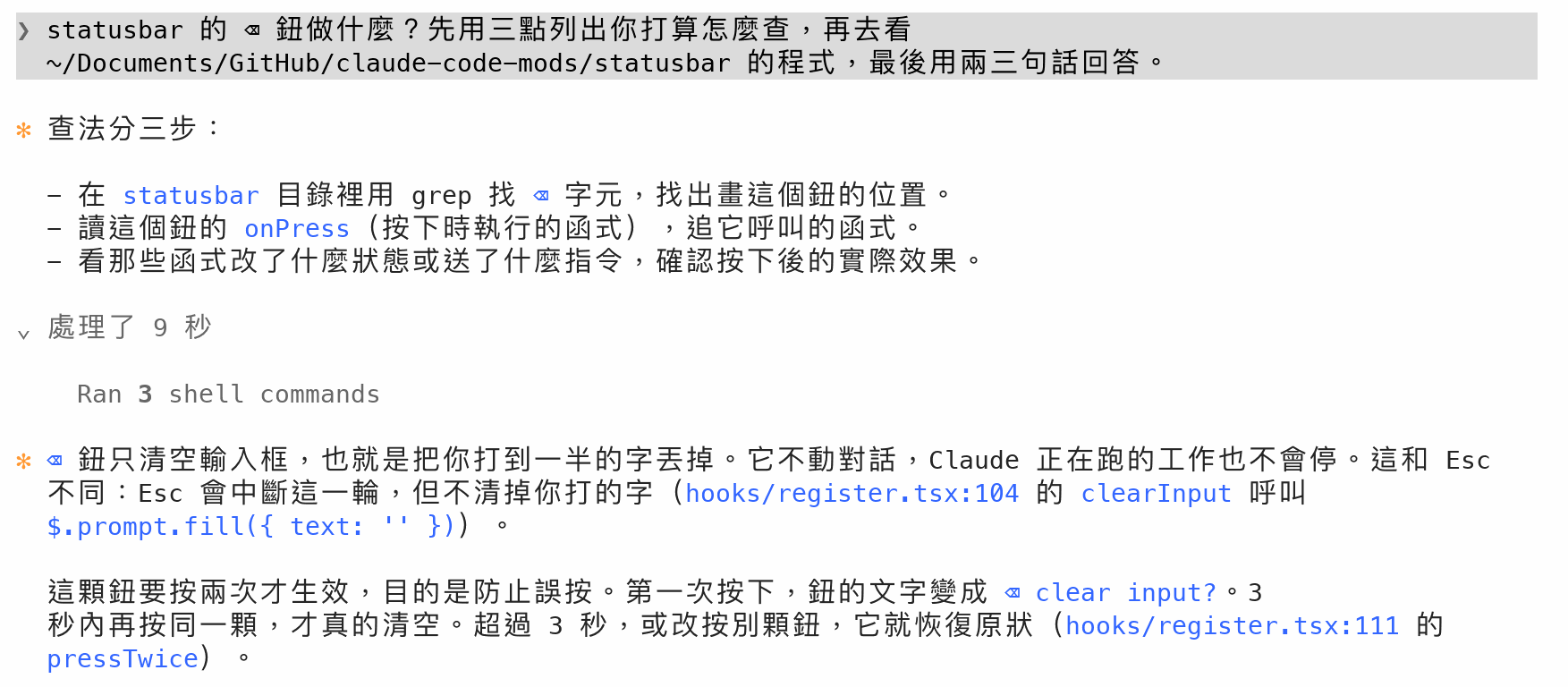
Claude 寫的每一段文字都留在對話裡。夾在文字之間的工具呼叫和結果、畫在畫面上的思考內容,以及工作中送來的訊息,每一段收成一行 › 處理了 N 秒。
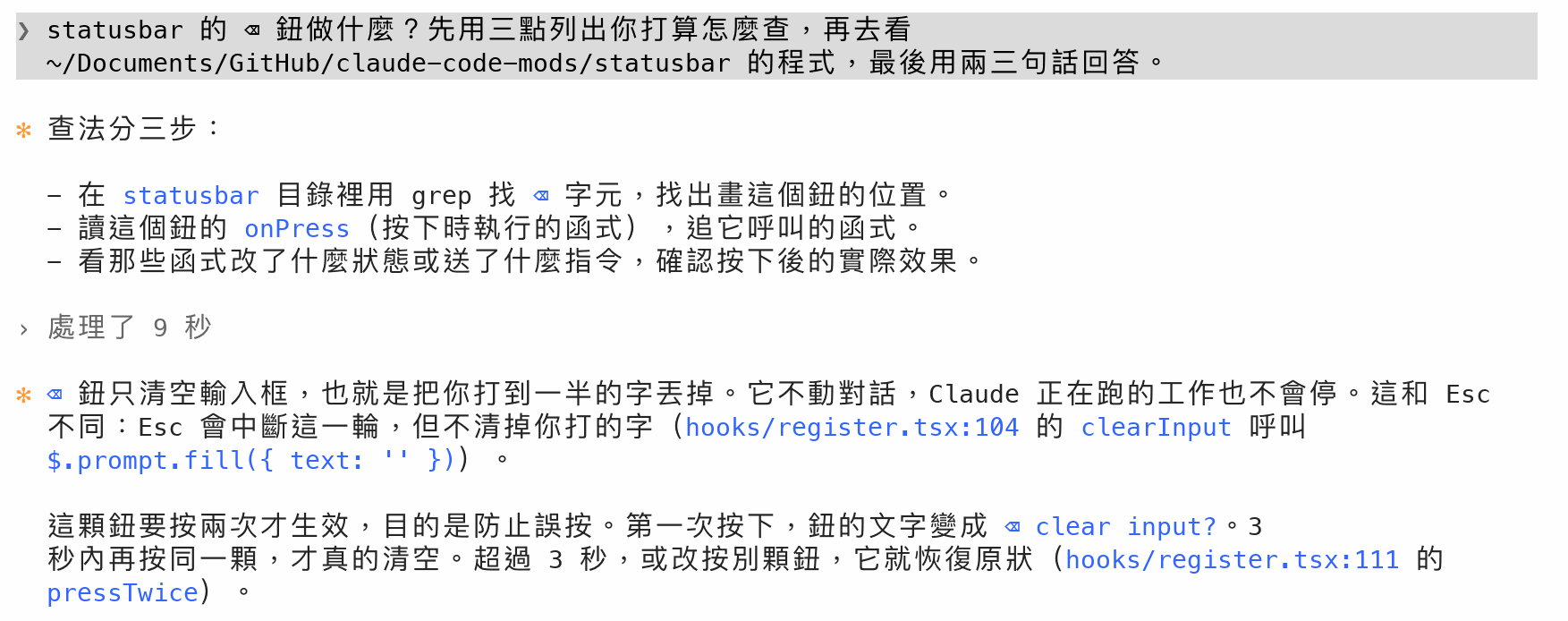
✻,換行的部分縮排兩格對齊。先寫說明再做事時,說明也留著。› 處理了 1 分 23 秒 · 1 個錯誤。Worked for … 不再顯示,因為時間已經寫在各段的那一行。點 › 變成 ⌄,這一段過程照原樣顯示,縮排兩格放在這一行底下。再點一次就收起來。每一段各自展開、收起。
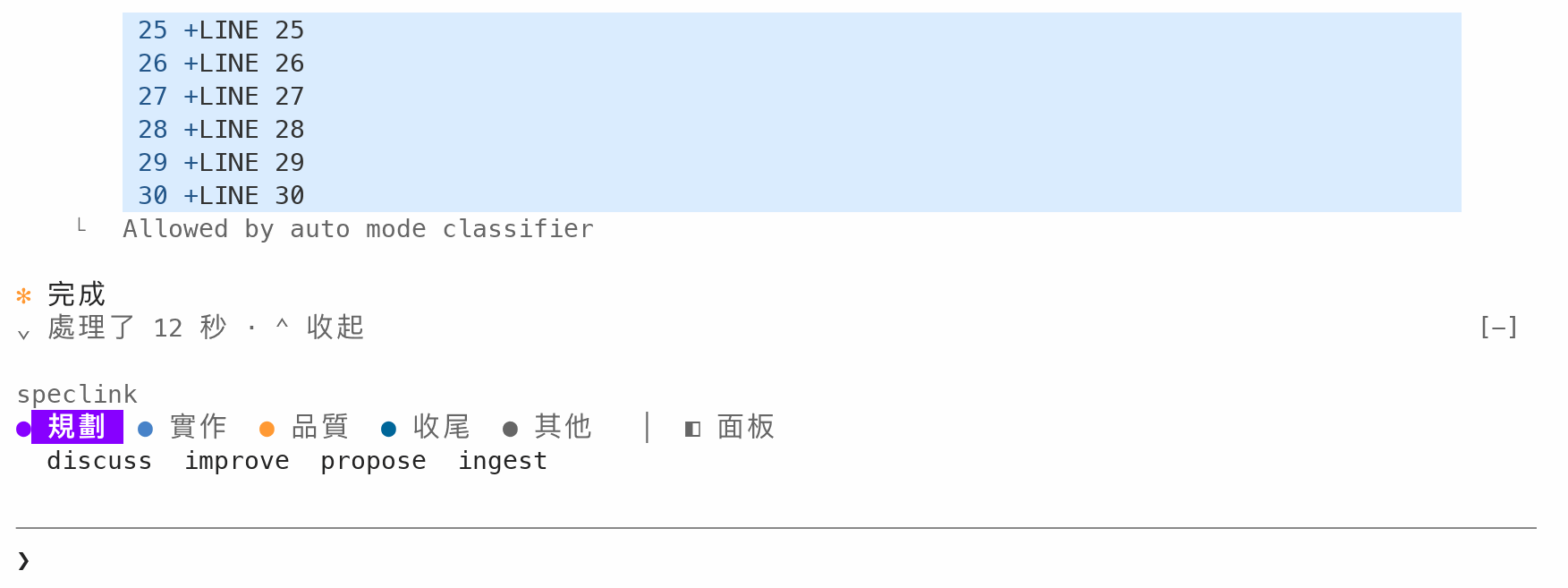
展開的內容很長、捲到看不見 ⌄ 處理了 那一行時,輸入框上方會出現一列 ⌄ 處理了 N 秒 · ⌃ 收起。按 ⌃ 收起 就收起這一段,並把畫面捲回它的那一行,不用自己捲回去找。捲回看得到那一行時,這一列就消失。
Claude 還在工作時,正在進行的那一段寫成 › 處理中 N 秒 · 目前的動作:

› 處理了 N 秒。執行:Run the tests、讀取 register.tsx。同時跑好幾個時加上「等 n 項」。回答之後才送來的 subagent 回報會讓 Claude 開始新的一輪,所以留在對話裡,畫成一行卡片:類型、任務說明,以及完成通知帶來的狀態和時間。
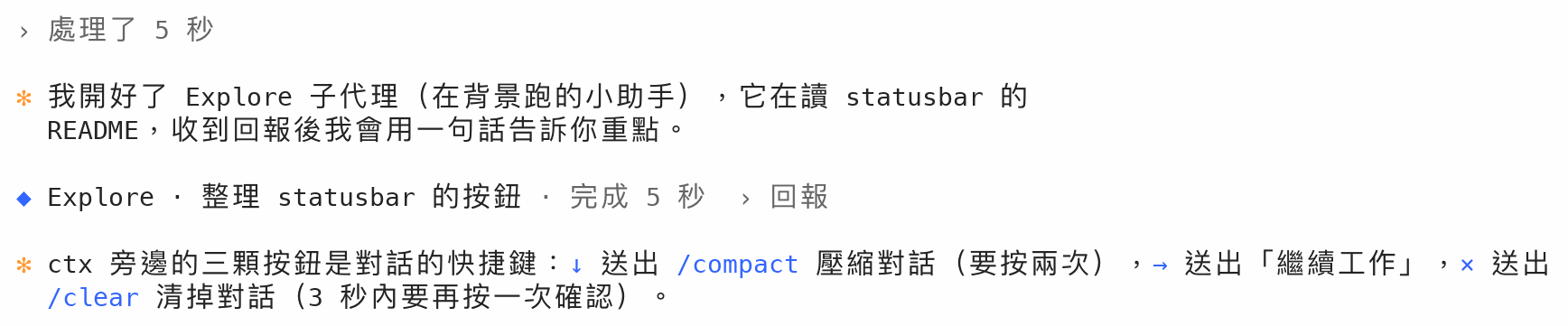
點一下這一列,回報全文縮排兩格展開在底下(Claude Code 會替展開的這一則加上淺灰底);再點一下收起。subagent 失敗或被停止時,◆ 和狀態是紅色。
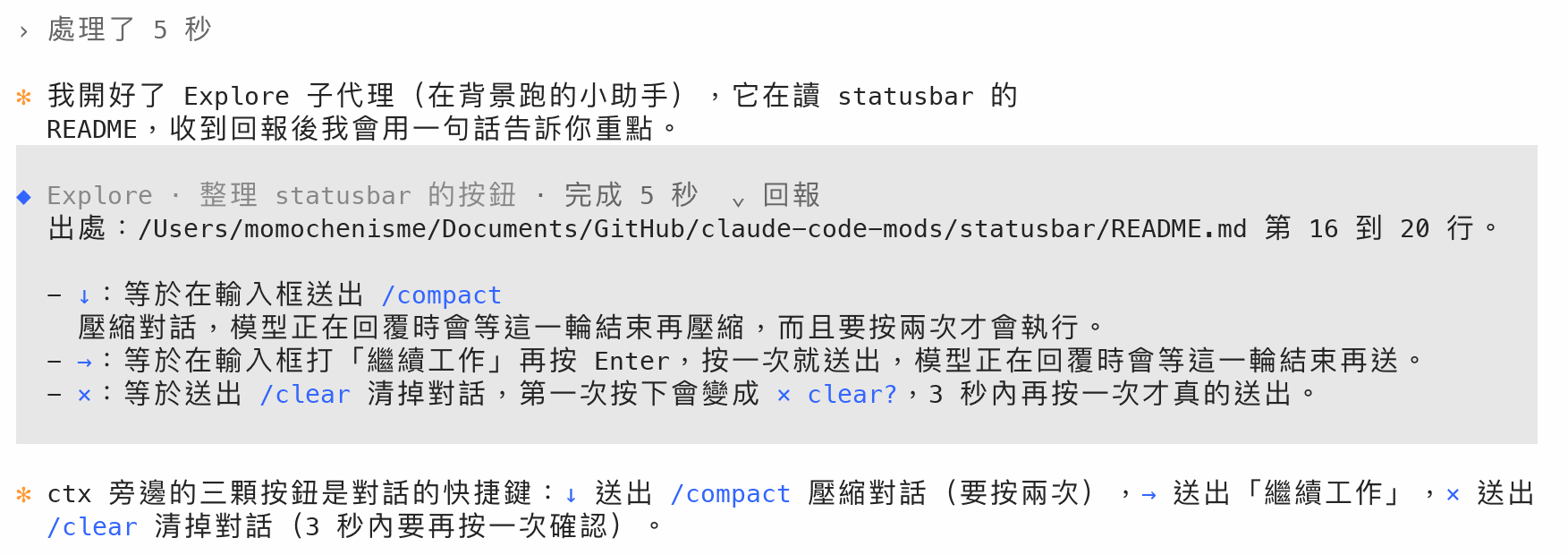
(ctrl+b to run in background) 提示。Message from @…),收進那時候的那一段過程。Agent "…" finished、Background command "…" completed):工作中送來的收進那時候的那一段;回答之後才送來的,收進開這個工作的那一段。› 展開需要 Claude Code 的全螢幕版面(settings.json 的 "tui": "fullscreen")。沒開全螢幕時,過程一樣會收起來,只是點了沒有反應。在 Claude Code 的輸入框輸入:
/plugin install tidy --marketplace MomoChenisMe/claude-code-mods第一次會問要不要加入 github:MomoChenisMe/claude-code-mods 這個 marketplace,回答 y;範圍選 user,每個專案都會載入。
不想用時,執行 /plugin 把 tidy 停用,畫面就恢復原樣。
--resume 接回的舊對話,維持原樣。N background agents launched。這一列 mod 畫不到,收不起來;這種段落的 › 處理了 會畫在緊接著的文字上面。※ recap: 摘要也是 Claude Code 自己畫的,收不起來。不想看可以在 /config 關掉 recap。ctrl+o 打開的完整紀錄、模型讀到的內容都不變。claude plugin validate tidy
claude plugin test tidy本機開發方式見 repo 的 README。
hooks/register.tsx 414 lines1import { atom, memberOf, read, update } from 'claude-code'
2import type { EngineInterface, Register, RenderElement, RenderViewport, ResolveInput, Timer } from 'claude-code'
3
4import type { Agent, Header, Turn, View } from '../types'
5
6import { noticeOf, senderOf, STATUS } from './agents'
7import { addNote, addRow, duration, endTurn, fit, groupOf, startTurn, textKey, views } from './turns'
8
9export const turns = atom({ plugin: 'tidy', key: 'turns' } as const, [] as Turn[])
10// 按「›」展開的過程(每段以它第一列的 id 記)。
11export const expanded = atom({ plugin: 'tidy', key: 'expanded' } as const, [] as string[])
12// 每一列自己的畫法。畫面只讀這一份,所以新增一列時只有變了的列重畫,長對話也不會拖慢。
13// 用 memberOf(view, { requestId: 列 id }) 取某一列的那份。
14const view = atom({ plugin: 'tidy', key: 'view' } as const, null as View | null)
15// subagent 回報卡片:回報列是誰送來的(以列 id 取),與那個 subagent 的說明和結果(以它的 id 取)。
16const sender = atom({ plugin: 'tidy', key: 'sender' } as const, null as string | null)
17const agent = atom({ plugin: 'tidy', key: 'agent' } as const, null as Agent | null)
18
19// 一個 ui.render 事件:畫在哪、哪一列、畫面多寬。
20type Drawn = ResolveInput & { requestId: string; viewport?: RenderViewport }
21// 一列在對話畫面裡露出的範圍(props.onScreen):null 是在畫面外,沒有這個欄位是畫面不回報。
22type OnScreen = { first: number } | null | undefined
23
24// 只寫畫法有變的列。
25const paint = async ($: EngineInterface, before: Record<string, View>, after: Record<string, View>) => {
26 for (const [id, next] of Object.entries(after)) {
27 if (JSON.stringify(before[id]) !== JSON.stringify(next)) {
28 await update($, memberOf(view, { requestId: id }), () => next)
29 }
30 }
31}
32
33// 改輪次表,再把有變的輪次重新算一次各列畫法。
34const change = async ($: EngineInterface, fn: (all: Turn[]) => Turn[]) => {
35 let before: Turn[] = []
36 let after: Turn[] = []
37 await update($, turns, all => {
38 before = all
39 after = fn(all)
40 return after
41 })
42 const [open, now] = await Promise.all([read($, expanded), $.clock.now()])
43 for (const turn of after) {
44 const old = before.find(t => t.id === turn.id)
45 if (old !== turn) {
46 await paint($, old === undefined ? {} : views(old, open, now), views(turn, open, now))
47 }
48 }
49}
50
51// 「處理中 12 秒」的時間每秒往前走:進行中的那一輪每秒重算一次,只有標頭那一列的畫法會變。
52// 這一輪結束(沒有進行中的輪次)就停。ticked 是上一次重算用的時間。
53let ticker: Timer | null = null
54let ticked = 0
55
56const tick = async ($: EngineInterface) => {
57 const current = (await read($, turns)).at(-1)
58 if (current === undefined || current.durationMs !== null) {
59 stopTicking()
60 return
61 }
62 const [open, now] = await Promise.all([read($, expanded), $.clock.now()])
63 await paint($, views(current, open, ticked), views(current, open, now))
64 ticked = now
65}
66
67const startTicking = async ($: EngineInterface) => {
68 if (ticker === null) {
69 ticked = await $.clock.now()
70 ticker = $.clock.every(1000, () => void tick($))
71 }
72}
73
74const stopTicking = () => {
75 ticker?.cancel()
76 ticker = null
77}
78
79const toggle = async ($: EngineInterface, group: string) => {
80 let before: string[] = []
81 let after: string[] = []
82 await update($, expanded, ids => {
83 before = ids
84 after = ids.includes(group) ? ids.filter(one => one !== group) : [...ids, group]
85 return after
86 })
87 const turn = (await read($, turns)).find(t => t.rows.some(r => groupOf(r) === group))
88 if (turn !== undefined) {
89 const now = await $.clock.now()
90 await paint($, views(turn, before, now), views(turn, after, now))
91 }
92}
93
94// 浮動列:展開中的一段,標頭捲出畫面、內容還在畫面上時,輸入框上方畫一列「⌄ 處理了 … · ⌃ 收起」,不用捲回去就
95// 能收起。每一列露出多少只在畫它的時候知道(捲動時,畫面邊緣的列會重畫),畫面 hook 又不能寫 $.state,所以記在
96// 模組裡;該出現、該換或該消失時,請引擎把這個 mod 畫的東西重畫一次。
97type Seen = { group: string; shows: boolean; header?: { label: string; requestId: string; shows: boolean } }
98const seen = new Map<string, Seen>()
99let stuck: { group: string; label: string; requestId: string } | null = null
100
101const stuckOf = () => {
102 const groups = new Map<string, Omit<Seen, 'group'>>()
103 for (const one of seen.values()) {
104 const g = groups.get(one.group)
105 groups.set(one.group, { shows: (g?.shows ?? false) || one.shows, header: one.header ?? g?.header })
106 }
107 const found = [...groups].filter(([, g]) => g.shows && g.header !== undefined && !g.header.shows).at(-1)
108 return found === undefined ? null : { group: found[0], label: found[1].header!.label, requestId: found[1].header!.requestId }
109}
110
111// 標頭那一列最上面是一行空白(marginTop),所以捲掉一行時標頭還看得到。
112const track = ($: EngineInterface, e: Drawn, site: string, view: View | null, onScreen: OnScreen) => {
113 if (onScreen === undefined) {
114 return
115 }
116 const id = `${site}:${e.requestId}`
117 if (view === null || view.kind === 'answer' || !view.isOpen) {
118 seen.delete(id)
119 } else {
120 const shows = onScreen !== null
121 seen.set(id, {
122 group: view.group,
123 shows,
124 header: view.kind === 'header' ? { label: view.label, requestId: e.requestId, shows: shows && onScreen.first <= 1 } : undefined,
125 })
126 }
127 const next = stuckOf()
128 if (JSON.stringify(next) !== JSON.stringify(stuck)) {
129 stuck = next
130 $.ui.invalidate('ui.render')
131 }
132}
133
134// 從浮動列收起:收起這一段,再把畫面捲回它的標頭。捲不動(畫面不支援)也已經收起了。
135const unstick = async ($: EngineInterface, at: NonNullable<typeof stuck>) => {
136 await toggle($, at.group)
137 await $.ui.scroll({ to: { requestId: at.requestId } }).catch(() => undefined)
138}
139
140// 過程裡的一列(含工具結果、執行中的「ctrl+b 放到背景」提示):收起來時藏起來,展開時照原樣、
141// 縮排兩格,看得出是「處理了」底下的內容。回答與不在輪次表裡的列照原樣。
142const tail = async ($: EngineInterface, e: Drawn, view: View | null, original: () => Promise<RenderElement>) => {
143 if (view === null || view.kind === 'answer') {
144 return original()
145 }
146 const { Box } = $.ui.resolve(e)
147 return view.isOpen ? (
148 <Box paddingLeft={2} flexDirection="column">
149 {await original()}
150 </Box>
151 ) : (
152 <Box />
153 )
154}
155
156// 「› 處理了 1 分 23 秒」;按下去展開或收起這一段過程。「處理中 · …」太長時截成一行。
157const headerRow = ($: EngineInterface, e: Drawn, header: Header) => {
158 const { Box, Button, Text } = $.ui.resolve(e)
159 const label = fit(header.label, (e.viewport?.columns ?? 80) - 8)
160 return (
161 <Box marginTop={1}>
162 <Button key={`group:${header.group}`} label={`${header.isOpen ? '⌄' : '›'} ${label}`} plain dimColor onPress={() => toggle($, header.group)} />
163 <Text> </Text>
164 </Box>
165 )
166}
167
168// 過程列:一段的第一個工具列換成「› 處理了 1 分 23 秒」,其餘藏起來;按下去展開,內容縮排在標頭下面。
169// 不是過程列(模型寫的文字、不在輪次表裡的列)回 null。
170const fold = async ($: EngineInterface, e: Drawn, view: View | null, original: () => Promise<RenderElement>): Promise<RenderElement | null> => {
171 if (view === null || view.kind === 'answer') {
172 return null
173 }
174 if (view.kind === 'work') {
175 return tail($, e, view, original)
176 }
177 const { Box } = $.ui.resolve(e)
178 return view.isOpen ? (
179 <Box flexDirection="column">
180 {headerRow($, e, view)}
181 {await tail($, e, view, original)}
182 </Box>
183 ) : (
184 headerRow($, e, view)
185 )
186}
187
188// 記下 subagent 的回報是誰送來的(類型與任務說明查 $.agent.list()),以及完成通知的狀態和時間。
189// 通知通常比回報晚幾秒到;先到也照記,回報到了再補上說明。
190const noteAgents = async ($: EngineInterface, uuid: string, content: readonly { type: string; [field: string]: unknown }[]) => {
191 const from = senderOf(content)
192 if (from !== null) {
193 const info = (await $.agent.list()).find(one => one.id === from)
194 await update($, memberOf(agent, { requestId: from }), a => ({
195 status: null,
196 durationMs: null,
197 ...a,
198 type: info?.type ?? a?.type ?? '',
199 description: info?.description ?? a?.description ?? '',
200 }))
201 await update($, memberOf(sender, { requestId: uuid }), () => from)
202 }
203 const notice = noticeOf(content)
204 if (notice !== null) {
205 await update($, memberOf(agent, { requestId: notice.id }), a => ({
206 type: '',
207 description: '',
208 ...a,
209 status: notice.status,
210 durationMs: notice.durationMs ?? a?.durationMs ?? null,
211 }))
212 }
213}
214
215// subagent 回報卡片:「◆ Explore · Review Standards axis · 完成 2 分 17 秒 › 回報」。點一下這一列,引擎把它
216// 標成展開(和 ctrl+o 的完整紀錄一樣),回報全文縮排兩格畫在底下;再點一下收起。失敗或被停止時「◆」與狀態
217// 是紅色。不知道是誰送來的(mod 載入前的回報)回 null。
218const card = async ($: EngineInterface, e: Drawn, report: string, name: string | undefined, isOpen: boolean) => {
219 const from = await read($, memberOf(sender, e))
220 if (from === null) {
221 return null
222 }
223 const info = await read($, memberOf(agent, { requestId: from }))
224 const { Box, Markdown, Text } = $.ui.resolve(e)
225 const failed = info?.status === 'failed' || info?.status === 'killed'
226 const title = [info?.type ?? '', info?.description ?? ''].filter(part => part !== '').join(' · ') || (name ?? 'subagent')
227 const status =
228 info === null || info.status === null
229 ? null
230 : [STATUS[info.status] ?? info.status, info.durationMs === null ? '' : duration(info.durationMs)].join(' ').trim()
231 return (
232 <Box flexDirection="column" marginTop={1}>
233 <Box>
234 <Box width={2} flexShrink={0}>
235 <Text color={failed ? 'error' : 'suggestion'}>◆</Text>
236 </Box>
237 <Text>{title}</Text>
238 {status !== null && (
239 <Text color={failed ? 'error' : undefined} dimColor={!failed}>
240 {` · ${status}`}
241 </Text>
242 )}
243 <Box marginLeft={2} flexShrink={0}>
244 <Text dimColor>{`${isOpen ? '⌄' : '›'} 回報`}</Text>
245 </Box>
246 </Box>
247 {isOpen && (
248 <Box paddingLeft={2} flexDirection="column">
249 <Markdown text={report} />
250 </Box>
251 )}
252 </Box>
253 )
254}
255
256export const register: Register = on => {
257 // 重新載入 mod(/reload-plugins)時輪次表還在,照它把各列畫法補回來;還在進行的那一輪接著計時。
258 // 新 session 的表是空的。
259 on('session.start', async ($, e, next) => {
260 const [open, now, all] = await Promise.all([read($, expanded), $.clock.now(), read($, turns)])
261 for (const turn of all) {
262 await paint($, {}, views(turn, open, now))
263 }
264 if (all.at(-1)?.durationMs === null) {
265 await startTicking($)
266 }
267 return next(e)
268 })
269
270 // 輪次表只記主對話;subagent 的輪次與列都帶 agentId。
271 on('turn.start', async ($, e, next) => {
272 const startedAt = await $.clock.now()
273 await change($, all => startTurn(all, e.turnId, startedAt))
274 await startTicking($)
275 return next(e)
276 })
277
278 // 回答完、被中斷(Esc)或出錯都會結束這一輪。
279 on('turn.complete', async ($, e, next) => {
280 if (e.agentId === undefined) {
281 stopTicking()
282 await change($, all => endTurn(all, e.turnId, e.durationMs))
283 }
284 return next(e)
285 })
286
287 // 這個 hook 擋在寫入對話紀錄的路上:先記帳再交給下一層;記帳出錯也照樣寫入。
288 // 一輪進行中送進來的訊息走 delivery。
289 on('session.append', async ($, e, next) => {
290 if (e.agentId === undefined) {
291 const at = await $.clock.now()
292 await change($, all => (e.door === 'delivery' ? addNote(all, e.uuid, at) : addRow(all, e.uuid, e.message.type, e.message.content, at)))
293 await noteAgents($, e.uuid, e.message.content)
294 }
295 return next(e)
296 }).catch(($, e, next) => next(e))
297
298 on('ui.render', { component: 'AssistantMessage' }, async ($, e, next) => {
299 if (e.surface !== 'terminal') return next(e)
300 // 先用列 id 找;有些 session 的列 id 對不上 uuid,再用內文指紋找。
301 const key = textKey(e.props.text)
302 const found = (await read($, memberOf(view, e))) ?? (key === null ? null : await read($, memberOf(view, { requestId: key })))
303 // 模型文字的摘要列(isSummary,掛在思考的 uuid 上)也是寫給你的話:照原樣留著;它是一段過程的標頭時,
304 // 標頭畫在它上面。
305 const mine: View | null =
306 e.props.isSummary === true && found !== null && found.kind !== 'answer'
307 ? { kind: 'answer', header: found.kind === 'header' ? found : undefined }
308 : found
309 track($, e, 'AssistantMessage', mine, e.props.onScreen)
310 const folded = await fold($, e, mine, () => next(e))
311 if (folded !== null) return folded
312 if (mine === null) return next(e)
313 // 回答:開頭換成橘色粗體的「✻」,內容接在後面,換行縮排兩格對齊。
314 const { Box, Markdown, Text } = $.ui.resolve(e)
315 const answer = (
316 <Box marginTop={1}>
317 <Box width={2} flexShrink={0}>
318 <Text color="claude" bold>
319 ✻
320 </Text>
321 </Box>
322 <Box flexDirection="column" flexGrow={1}>
323 <Markdown text={e.props.text} />
324 </Box>
325 </Box>
326 )
327 return mine.kind === 'answer' && mine.header !== undefined ? (
328 <Box flexDirection="column">
329 {headerRow($, e, mine.header)}
330 {answer}
331 </Box>
332 ) : (
333 answer
334 )
335 })
336
337 // 一組工具呼叫看它第一個呼叫的畫法:同一組的呼叫都在同一輪裡,標頭所在的第一個工具列就是第一組的第一個呼叫。
338 on('ui.render', { component: 'ToolGroup' }, async ($, e, next) => {
339 if (e.surface !== 'terminal') return next(e)
340 const first = e.props.calls.find(c => c.tool_use_id !== undefined)?.tool_use_id
341 if (first === undefined) return next(e)
342 const mine = await read($, memberOf(view, { requestId: first }))
343 track($, e, 'ToolGroup', mine, e.props.onScreen)
344 const folded = await fold($, e, mine, () => next(e))
345 return folded ?? next(e)
346 })
347
348 on('ui.render', { component: 'ToolUse' }, async ($, e, next) => {
349 if (e.surface !== 'terminal') return next(e)
350 const mine = await read($, memberOf(view, { requestId: e.props.tool_use_id }))
351 track($, e, 'ToolUse', mine, e.props.onScreen)
352 const folded = await fold($, e, mine, () => next(e))
353 return folded ?? next(e)
354 })
355
356 on('ui.render', { component: 'ToolResult' }, async ($, e, next) => {
357 if (e.surface !== 'terminal') return next(e)
358 const mine = await read($, memberOf(view, { requestId: e.props.tool_use_id }))
359 track($, e, 'ToolResult', mine, e.props.onScreen)
360 return tail($, e, mine, () => next(e))
361 })
362
363 on('ui.render', { component: 'ToolProgress' }, async ($, e, next) => {
364 if (e.surface !== 'terminal') return next(e)
365 return tail($, e, await read($, memberOf(view, { requestId: e.props.tool_use_id })), () => next(e))
366 })
367
368 // subagent 的回報(Message from @…)畫成卡片,背景工作完成的通知(Agent "…" finished)藏起來:一輪進行中
369 // 送進來的收進那一輪;回答之後才來的完成通知,跟著開這個工作的工具呼叫收起來。回答之後才來的回報會開新
370 // 的一輪,和你的訊息一樣留在對話裡。點開的列與 ctrl+o 的完整紀錄(isExpanded)不收合。
371 on('ui.render', { component: 'UserMessage' }, async ($, e, next) => {
372 const { origin, task, isExpanded } = e.props
373 if (e.surface !== 'terminal' || (origin.kind !== 'peer' && origin.kind !== 'task-notification')) {
374 return next(e)
375 }
376 const mine = await read($, memberOf(view, e))
377 const opener =
378 mine === null && task?.toolUseId !== undefined ? await read($, memberOf(view, { requestId: task.toolUseId })) : null
379 const found = mine ?? opener
380 const shown: View | null = isExpanded && found !== null && found.kind !== 'answer' ? { kind: 'work', group: found.group, isOpen: true } : found
381 track($, e, 'UserMessage', shown, e.props.onScreen)
382 const drawn = async () =>
383 origin.kind === 'peer' ? ((await card($, e, e.props.text, e.props.from?.name, isExpanded)) ?? next(e)) : next(e)
384 return tail($, e, shown, drawn)
385 })
386
387 // 浮動列畫在輸入框上方這一區的最上面,其他 mod 畫的(例如 speclink 的技能列)接在下面。/clear 之後新 session
388 // 沒有展開中的段,所以舊的記錄不會畫出來。
389 on('ui.render', { component: 'AbovePrompt' }, async ($, e, next) => {
390 const below = await next(e)
391 const at = stuck
392 if (e.surface !== 'terminal' || e.props.hasSurvey || at === null || !(await read($, expanded)).includes(at.group)) {
393 return below
394 }
395 const { Box, Button, Text } = $.ui.resolve(e)
396 return (
397 <Box flexDirection="column">
398 <Box>
399 <Text dimColor>{`⌄ ${fit(at.label, e.props.bodyColumns - 12)} · `}</Text>
400 <Button key="unstick" label="⌃ 收起" plain dimColor onPress={() => unstick($, at)} />
401 </Box>
402 {below}
403 </Box>
404 )
405 })
406
407 // 每輪結尾的「Worked for …」:時間已經寫在「處理了 …」裡。
408 on('ui.render', { component: 'TurnDuration' }, ($, e, next) => {
409 if (e.surface !== 'terminal') return next(e)
410 const { Box } = $.ui.resolve(e)
411 return <Box />
412 })
413}
414hooks/agents.ts 25 lines1// subagent 的回報與背景工作的完成通知:從主對話記下的原始內容取出是誰、怎麼結束、花了多久。
2
3type Block = { readonly type: string; readonly [field: string]: unknown }
4
5const textOf = (content: readonly Block[]) =>
6 content.map(b => (b.type === 'text' && typeof b.text === 'string' ? b.text : '')).join('\n')
7
8// 回報開頭的 `<agent-message from="a8e5…">`:送來的 subagent 的 id;不是回報回 null。
9export const senderOf = (content: readonly Block[]) => textOf(content).match(/<agent-message from="([^"]+)"/)?.[1] ?? null
10
11// `<task-notification>` 裡的工作 id(subagent 的就是它的 id)、狀態與花費時間;背景指令的通知沒有時間。
12export const noticeOf = (content: readonly Block[]) => {
13 const text = textOf(content)
14 if (!text.includes('<task-notification>')) {
15 return null
16 }
17 const tag = (name: string) => text.match(new RegExp(`<${name}>([^<]*)</${name}>`))?.[1]
18 const id = tag('task-id')
19 const ms = tag('duration_ms')
20 return id === undefined ? null : { id, status: tag('status') ?? null, durationMs: ms === undefined ? null : Number(ms) }
21}
22
23// 狀態在卡片上的寫法;其他字照原樣。
24export const STATUS: Record<string, string> = { completed: '完成', failed: '失敗', killed: '已停止' }
25hooks/turns.ts 254 lines1import type { Header, Row, Turn, View } from '../types'
2
3// 只留最近的輪次;更早的列照原樣畫。
4const KEEP = 200
5
6type Block = { readonly type: string; readonly [field: string]: unknown }
7
8export const startTurn = (turns: Turn[], id: string, startedAt: number): Turn[] =>
9 [...turns, { id, rows: [], durationMs: null, startedAt }].slice(-KEEP)
10
11export const endTurn = (turns: Turn[], id: string, durationMs: number): Turn[] =>
12 turns.map(t => (t.id === id ? { ...t, durationMs } : t))
13
14// 把主對話新記下的一列併進進行中的那一輪:模型的思考與文字、工具呼叫,與工具結果(出錯的記在那次呼叫上,
15// 跑完的從「正在跑」拿掉)。at 是記下的時間,用來算每段過程花多久。沒有進行中的輪次(歷史列、mod 載入前)
16// 就不動,回傳原本的表。
17export const addRow = (turns: Turn[], uuid: string, type: string, content: readonly Block[], at: number): Turn[] => {
18 const current = turns.at(-1)
19 if (current === undefined || current.durationMs !== null) {
20 return turns
21 }
22 let rows = current.rows
23 const added: Row[] = []
24 let running = current.running ?? []
25 let recent = current.recent
26 if (type === 'assistant') {
27 // 有內容的思考會畫成一段帶圓點的文字;空的(不給看的)不會畫,不記。
28 const thinking = content.filter(b => b.type === 'thinking' && typeof b.thinking === 'string').map(b => b.thinking as string).join('')
29 const thought = textKey(thinking)
30 if (thought !== null) {
31 added.push({ kind: 'thought', id: uuid, key: thought, at })
32 }
33 const texts = content.filter(b => b.type === 'text' && typeof b.text === 'string').map(b => b.text as string)
34 if (texts.length > 0) {
35 added.push({ kind: 'text', id: uuid, key: textKey(texts.join('')), at })
36 }
37 // 文字留在對話裡,結束了這一段過程;下一段的動作從頭記。
38 recent = texts.length > 0 ? undefined : (firstSentence(thinking) ?? recent)
39 const calls = content.filter(b => b.type === 'tool_use' && typeof b.id === 'string')
40 if (calls.length > 0) {
41 const ids = calls.map(b => b.id as string)
42 added.push(
43 calls.every(b => b.name === 'Agent')
44 ? { kind: 'tools', ids, agents: true, at }
45 : calls.every(b => ASKS.includes(String(b.name)))
46 ? { kind: 'tools', ids, ask: true, at }
47 : { kind: 'tools', ids, at },
48 )
49 const steps = calls.map(b => ({ id: b.id as string, label: describe(String(b.name), (b.input ?? {}) as Record<string, unknown>) }))
50 running = [...running, ...steps]
51 recent = steps[steps.length - 1].label
52 }
53 } else if (type === 'user') {
54 const results = content.filter(b => b.type === 'tool_result')
55 const failed = results.filter(b => b.is_error === true).map(b => b.tool_use_id)
56 if (failed.length > 0) {
57 rows = rows.map(r =>
58 r.kind === 'tools' && r.ids.some(id => failed.includes(id))
59 ? { ...r, errors: (r.errors ?? 0) + r.ids.filter(id => failed.includes(id)).length }
60 : r,
61 )
62 }
63 running = running.filter(step => !results.some(b => b.tool_use_id === step.id))
64 }
65 if (added.length === 0 && rows === current.rows && running === (current.running ?? []) && recent === current.recent) {
66 return turns
67 }
68 return [...turns.slice(0, -1), { ...current, rows: [...rows, ...added], running, recent }]
69}
70
71// 問你問題的工具:它是對話,不是過程。
72const ASKS = ['AskUserQuestion', 'ExitPlanMode']
73
74// 工具在標頭上的說明:動詞,與要顯示的那個參數(路徑只留檔名)。
75const VERBS: Record<string, [verb: string, field: string]> = {
76 Read: ['讀取 ', 'file_path'],
77 Edit: ['編輯 ', 'file_path'],
78 MultiEdit: ['編輯 ', 'file_path'],
79 Write: ['寫入 ', 'file_path'],
80 NotebookEdit: ['編輯 ', 'notebook_path'],
81 Grep: ['搜尋 ', 'pattern'],
82 Glob: ['找檔案 ', 'pattern'],
83 Agent: ['subagent:', 'description'],
84 WebFetch: ['讀取網頁 ', 'url'],
85 WebSearch: ['搜尋網路:', 'query'],
86 Skill: ['技能 ', 'skill'],
87}
88
89// 「執行:Run the tests」「讀取 register.tsx」;MCP 工具是「伺服器:工具」,其他工具用名稱。
90export const describe = (name: string, input: Record<string, unknown>) => {
91 if (ASKS.includes(name)) {
92 return '等你回答'
93 }
94 const field = (key: string) => (typeof input[key] === 'string' && input[key] !== '' ? (input[key] as string) : undefined)
95 if (name === 'Bash') {
96 const what = field('description') ?? field('command')?.split('\n')[0]
97 return what === undefined ? '執行指令' : `執行:${what}`
98 }
99 const verb = VERBS[name]
100 const value = verb === undefined ? undefined : field(verb[1])
101 if (verb !== undefined && value !== undefined) {
102 return verb[0] + (verb[1].endsWith('_path') ? value.split('/').pop() : value)
103 }
104 const mcp = name.match(/^mcp__(.+?)__(.+)$/)
105 return mcp === null ? name : `${mcp[1]}:${mcp[2]}`
106}
107
108// 一段文字的第一句:第一個非空行,拿掉 Markdown 的強調、程式碼與標題記號,切在第一個句號。
109export const firstSentence = (text: string) => {
110 const line = text
111 .split('\n')
112 .map(l => l.replace(/[*`]/g, '').replace(/^\s*(#+|>|[-+]|\d+\.)\s+/, '').trim())
113 .find(l => l !== '')
114 return line?.split(/(?<=[。!?])|(?<=[.!?])\s/)[0].trim()
115}
116
117// 「處理中」後面接的動作:正在跑的工具(同時好幾個時寫「等 n 項」)。沒有工具在跑時是最近一個動作:
118// 模型常常不寫說明、思考內容也是空的,工具跑完就保留它的說明,直到下一個工具或新的說明出現。
119const doing = (turn: Turn) => {
120 const running = turn.running ?? []
121 if (running.length === 0) return turn.recent
122 return running.length === 1 ? running[0].label : `${running[0].label} 等 ${running.length} 項`
123}
124
125// 一輪進行中送進來的訊息(subagent 的回報、背景工作完成的通知)也是過程。沒有進行中的輪次就不動。
126export const addNote = (turns: Turn[], uuid: string, at: number): Turn[] => {
127 const current = turns.at(-1)
128 if (current === undefined || current.durationMs !== null) {
129 return turns
130 }
131 return [...turns.slice(0, -1), { ...current, rows: [...current.rows, { kind: 'note', id: uuid, at }] }]
132}
133
134// 文字的指紋:去掉空白後的 FNV-1a 雜湊。畫面給的列 id 對不上 uuid 時,用內文找回同一列。
135export const textKey = (text: string) => {
136 let hash = 0x811c9dc5
137 const bare = text.replace(/\s+/g, '')
138 for (const ch of bare) {
139 hash = Math.imul(hash ^ ch.codePointAt(0)!, 0x01000193) >>> 0
140 }
141 return bare === '' ? null : `text:${hash.toString(16)}`
142}
143
144// 一段過程:連在一起的工具呼叫、思考與送進來的訊息。模型寫的文字與問你問題的工具不算,它們把過程切成好幾段。
145const isWork = (row: Row) => row.kind === 'note' || row.kind === 'thought' || (row.kind === 'tools' && row.ask !== true)
146
147// 一段過程以它第一列的 id 記:展開哪幾段、標頭按鈕的 key 都用它。
148export const groupOf = (row: Row) => (row.kind === 'tools' ? row.ids[0]! : row.id)
149
150const idsOf = (row: Row) =>
151 row.kind === 'tools' ? row.ids : row.kind === 'note' ? [row.id] : [row.id, row.key ?? null].filter(id => id !== null)
152
153// 一段過程的標頭:做完的「處理了 1 分 23 秒 · 1 個錯誤」,還在進行的「處理中 12 秒 · 執行:…」。時間從前一段文字
154// (第一段從這一輪開始)算到後一段文字(最後一段算到這一輪結束或現在)。舊版記下的列沒有時間,只有一段時用
155// 這一輪的時間,否則不寫時間。
156const labelOf = (turn: Turn, start: number, end: number, count: number, now?: number) => {
157 const { rows } = turn
158 const isLast = end === rows.length - 1
159 const from = start === 0 ? turn.startedAt : rows[start - 1]!.at
160 const until = !isLast
161 ? rows[end + 1]!.at
162 : turn.durationMs === null
163 ? now
164 : turn.startedAt === undefined
165 ? undefined
166 : turn.startedAt + turn.durationMs
167 const ms = from !== undefined && until !== undefined ? until - from : count === 1 && turn.durationMs !== null ? turn.durationMs : undefined
168 const time = ms === undefined ? '' : ` ${duration(ms)}`
169 if (turn.durationMs === null && isLast) {
170 const action = doing(turn)
171 return action === undefined ? `處理中${time === '' ? '…' : time}` : `處理中${time} · ${action}`
172 }
173 const errors = rows.slice(start, end + 1).reduce((n, r) => n + (r.kind === 'tools' ? (r.errors ?? 0) : 0), 0)
174 return `處理了${time}${errors > 0 ? ` · ${errors} 個錯誤` : ''}`
175}
176
177// 一輪裡每一列該怎麼畫,以列 id(文字與思考列的 uuid 與指紋、工具呼叫的 tool_use id、訊息列的 uuid)查。
178// 模型寫的文字都留在對話裡;夾在文字之間的每一段過程收成一行「› 處理了 …」,各段各自展開。收起來時標頭畫在這段
179// 的第一個工具列(沒有工具就是第一段思考):工具列一定畫得出來。展開時標頭移到這段的第一列,展開的內容才會都在
180// 標頭下面。一段裡沒有列畫得出標頭時(例如只有一起開的 subagent),標頭畫在緊接著的文字上面;後面也沒有文字就
181// 照原樣,免得過程藏起來卻點不開。expanded 是展開中的段,now 是現在的時間。
182export const views = (turn: Turn, expanded: readonly string[], now?: number): Record<string, View> => {
183 const { rows } = turn
184 const spans: { start: number; end: number }[] = []
185 rows.forEach((row, index) => {
186 if (isWork(row)) {
187 const last = spans.at(-1)
188 if (last !== undefined && last.end === index - 1) {
189 last.end = index
190 } else {
191 spans.push({ start: index, end: index })
192 }
193 }
194 })
195 // 同一則回覆開好幾個 subagent 時,引擎把這些呼叫畫成自己的一列「N background agents launched」,mod 畫不到;
196 // 訊息列也不一定收合(只收 subagent 與背景工作的)。這兩種列不放標頭。
197 const isAgents = (row: Row | undefined) => row?.kind === 'tools' && row.agents === true
198 const isGrouped = (index: number) => {
199 const row = rows[index]!
200 return row.kind === 'tools' && row.agents === true && (row.ids.length > 1 || isAgents(rows[index - 1]) || isAgents(rows[index + 1]))
201 }
202 const shown: View[] = rows.map(() => ({ kind: 'answer' }))
203 for (const { start, end } of spans) {
204 const group = groupOf(rows[start]!)
205 const isOpen = expanded.includes(group)
206 const header: Header = { group, label: labelOf(turn, start, end, spans.length, now), isOpen }
207 const members = rows.slice(start, end + 1).map((_, k) => start + k)
208 const hosts = members.filter(i => rows[i]!.kind !== 'note' && !isGrouped(i))
209 const host = isOpen ? hosts[0] : (hosts.find(i => rows[i]!.kind === 'tools') ?? hosts[0])
210 const after = rows[end + 1]
211 if (host === undefined && after?.kind !== 'text') {
212 continue
213 }
214 for (const i of members) {
215 shown[i] = i === host ? { kind: 'header', ...header } : { kind: 'work', group, isOpen }
216 }
217 if (host === undefined) {
218 shown[end + 1] = { kind: 'answer', header }
219 }
220 }
221 // 依列的順序寫:同一則回覆的思考與文字共用 uuid,後面的文字蓋過前面的思考。
222 const out: Record<string, View> = {}
223 rows.forEach((row, index) => {
224 for (const id of idsOf(row)) {
225 out[id] = shown[index]!
226 }
227 })
228 return out
229}
230
231// 截成最多 cells 格(中日韓文字算兩格),截掉的地方補「…」。
232export const fit = (text: string, cells: number) => {
233 let used = 0
234 let out = ''
235 for (const ch of text) {
236 const width = ch.codePointAt(0)! >= 0x2e80 ? 2 : 1
237 if (used + width > cells - 1) {
238 return `${out}…`
239 }
240 used += width
241 out += ch
242 }
243 return out
244}
245
246// 83000 → 1 分 23 秒
247export const duration = (ms: number) => {
248 const s = Math.max(1, Math.round(ms / 1000))
249 if (s < 60) return `${s} 秒`
250 const m = Math.floor(s / 60)
251 if (m < 60) return `${m} 分 ${s % 60} 秒`
252 return `${Math.floor(m / 60)} 小時 ${m % 60} 分`
253}
254types/index.d.ts 54 lines1// 一輪裡依序出現的列:模型寫的一段文字、畫在畫面上的思考內容(列 id 與內文指紋)、一次工具呼叫(tool_use id),
2// 或一輪進行中送進來的訊息(subagent 的回報、背景工作完成的通知;列 id)。
3// key 是 null:記下時還沒有內文。舊版記下的列沒有 key。agents:這次呼叫的工具全是 Agent;ask:全是問你的
4// 工具(AskUserQuestion、ExitPlanMode)。errors:出錯的呼叫數。at:記下的時間(epoch 毫秒),舊版記下的列沒有。
5export type Row =
6 | { kind: 'text'; id: string; key?: string | null; at?: number }
7 | { kind: 'thought'; id: string; key: string; at?: number }
8 | { kind: 'tools'; ids: string[]; agents?: true; ask?: true; errors?: number; at?: number }
9 | { kind: 'note'; id: string; at?: number }
10
11// 一個正在跑的工具呼叫,與它在標頭上的說明(「讀取 register.tsx」)。
12export type Step = { id: string; label: string }
13
14export type Turn = {
15 // turn.start 給的 id。
16 id: string
17 rows: Row[]
18 // 這一輪花的時間;還在進行是 null。
19 durationMs: number | null
20 // 正在跑的工具呼叫,與這一段過程最近一個動作(最近開始的工具,或最近一段思考的第一句,看哪個晚);
21 // 「處理中」標頭顯示它們。舊版記下的輪次沒有。
22 running?: Step[]
23 recent?: string
24 // 開始的時間(epoch 毫秒);第一段過程的時間從這裡算。舊版記下的輪次沒有。
25 startedAt?: number
26}
27
28// 一段過程的「處理了 …」標頭:哪一段(第一列的 id)、標籤、是否展開。
29export type Header = { group: string; label: string; isOpen: boolean }
30
31// 一列的畫法:一段過程的「處理了 …」標頭、收起來的過程列(屬於哪一段),或照原樣畫的列(模型寫的文字、
32// 問你的問題)。一段裡沒有列畫得出標頭時,標頭畫在緊接著的文字上面(header)。
33export type View =
34 | ({ kind: 'header' } & Header)
35 | { kind: 'work'; group: string; isOpen: boolean }
36 | { kind: 'answer'; header?: Header }
37
38// subagent 的類型、任務說明,與完成通知帶來的狀態和花費時間(還沒收到是 null)。
39export type Agent = { type: string; description: string; status: string | null; durationMs: number | null }
40
41declare module 'claude-code' {
42 interface PluginState {
43 // view 每列一份,各列只讀自己那份:新增一列時只有變了的列重畫。null 是不在輪次表裡的列。
44 // sender(送來回報的 subagent id)以回報列的 id、agent 以 subagent 的 id 各一份。
45 tidy: {
46 turns: Turn[]
47 expanded: string[]
48 view: StateFamily<View | null>
49 sender: StateFamily<string | null>
50 agent: StateFamily<Agent | null>
51 }
52 }
53}
54