MissionCache
Project memory that survives compaction. The plan, decisions, gotchas and next steps live in markdown files and reload with one command. One lead session…
bandguardtoasttimer

Project memory that survives compaction. The plan, decisions, gotchas and next steps live in markdown files and reload with one command. One lead session…
<img src="assets/missioncache_logo_black.png" alt="MissionCache" width="300">
<h1 align="center">MissionCache</h1>
<img alt="License: MIT" src="https://img.shields.io/badge/License-MIT-blue.svg"> <img alt="Python 3.11+" src="https://img.shields.io/badge/Python-3.11%2B-blue.svg"> <img alt="MCP-compatible" src="https://img.shields.io/badge/MCP-compatible-purple.svg">
MissionCache gives every AI coding project a memory that survives compaction: the plan, the decisions, the gotchas, what is left. It lives in three markdown files per project, and it reloads with one command in the next session, or in another tool.
When you run several sessions at once, one of them can be the lead. It hears from all the others, so you watch one window instead of five.
It works in Claude Code, Codex, OpenCode and VSCode. Claude Code also gets time tracking, a local dashboard, a rich statusline and autonomous runs. It runs on your machine and needs uv, so it does not work in claude.ai chat.
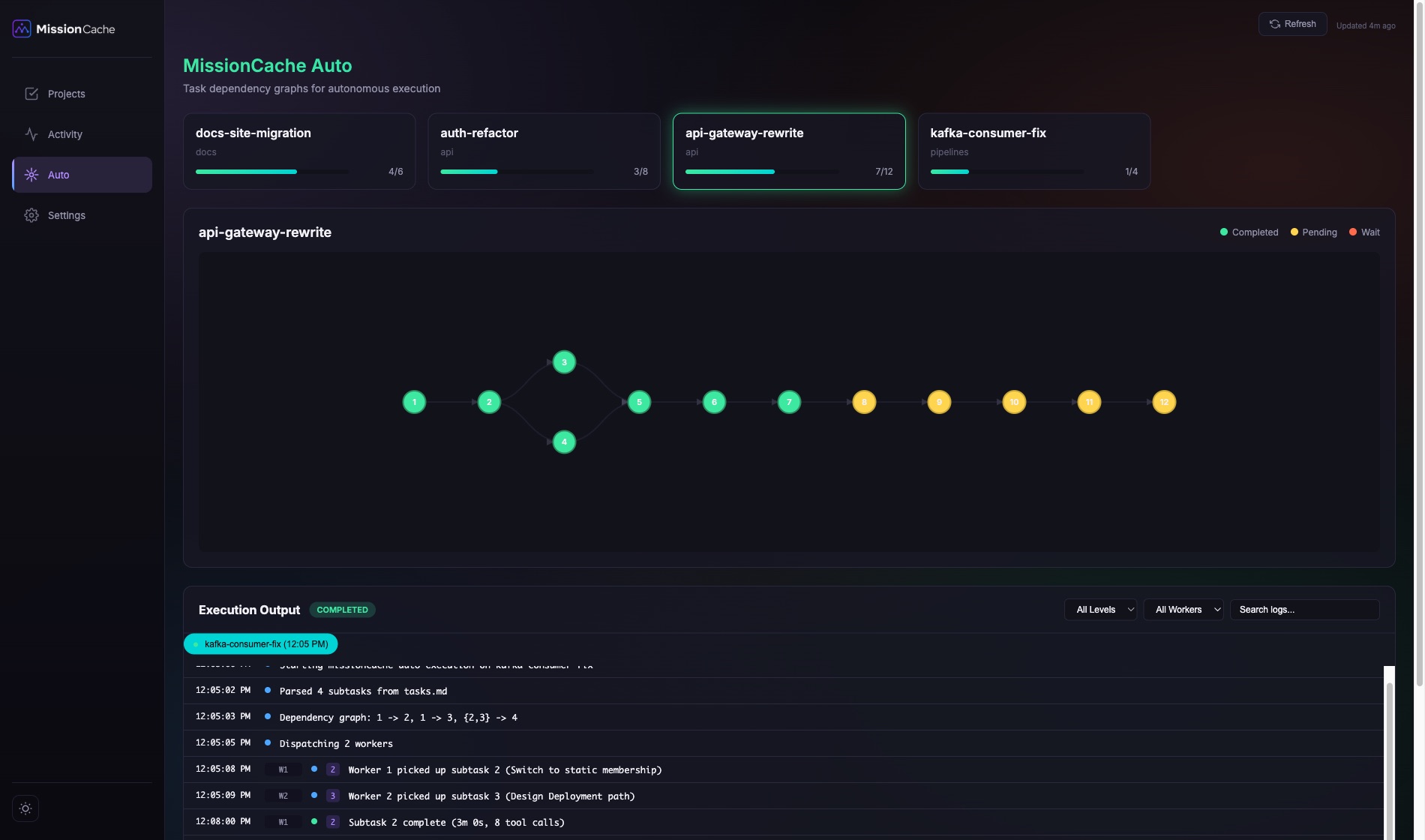
/missioncache:load brings them back./missioncache:lead makes one session the lead, and /missioncache:unlead ends the role. Every other session tells it when its project changes.missioncache-auto runs a project's tasks in parallel, in dependency order, and you can watch it live.No other single tool does all four. docs/comparison.md has the honest comparison.
Claude Code already keeps its own memory: notes about you and your codebase, saved per directory. MissionCache does not replace it. It keeps the state of one piece of work.
| Auto memory | MissionCache | |
|---|---|---|
| Holds | Facts about you and the codebase | A project's plan, tasks, decisions and next step |
| Tied to | The directory you started in | The project, in whatever repo it runs |
| Loaded | Its index, into every session there | When you run /missioncache:load |
| Tools | Claude Code | Claude Code, Codex, OpenCode, VSCode |
| Other sessions | Not told about a change | Told when the project changes |
Use both. A preference goes in auto memory, and where this project stands goes in MissionCache.
The installer detects the AI tools you have and asks, per tool, whether to register MissionCache. The project files, the MCP server and the commands are the same everywhere. Only the way you type a command differs.
| Tool | Project files + MCP tools | Commands | Lead, hooks, statusline, dashboard, auto |
|---|---|---|---|
| Claude Code | yes | /missioncache:load, /missioncache:save, ... | yes |
| Codex CLI | yes | $missioncache-load, $missioncache-save, ... (native skills) | no |
| OpenCode | yes | /missioncache-load, /missioncache-save, ... | no |
| VSCode (Copilot Chat) | yes | /missioncache-load, /missioncache-save, ... (macOS) | no |
Every command except the two lead commands ships to all four tools. The lead needs Claude Code's session titles and cross-session messaging. How each tool is registered, and how to skip the commands for one of them, is in docs/installation.md.
MissionCache ships in two flavors. Pick based on whether you want the full workbench experience (recommended) or just the plugin core.
One command, no clone needed:
uvx missioncache-install
# or
pipx run missioncache-install
The interactive wizard asks which components to install (default is all) and sets up:
localhost:8787 as a background service (launchd on macOS, systemd on Linux)missioncache-auto CLI for autonomous executionmissioncache-statusline entry point, wired into ~/.claude/settings.json~/.claude/rules//whats-new and /optimize-prompt user-level slash commands under ~/.claude/commands/For a fully non-interactive install, use uvx missioncache-install --all --yes. To install everything except specific components, combine --all with opt-outs (e.g. uvx missioncache-install --all --yes --no-statusline). Opt-out flags on their own drop you into the interactive wizard; they only take effect alongside --all or explicit opt-ins.
Requirements: Python 3.11+, Claude Code CLI, and uv on your PATH (provides uvx). If uvx --version fails, install uv first with pip install uv or curl -LsSf https://astral.sh/uv/install.sh | sh. pipx works in place of uvx if you prefer.
Windows note: MissionCache runs on native Windows (no WSL). The installer registers the plugin, installs missioncache-auto, and registers the dashboard as a Task Scheduler task (falling back to an HKCU Run-key entry when run without elevation). The lifecycle hooks - including the pre-compaction snapshot and session tracking - run too: they launch through uv in exec form and the snapshot lock uses msvcrt on Windows. This requires Claude Code 2.1.139+ (where hook exec form was added); an older client silently ignores it and the hooks will not run.
If you only want the plugin core (slash commands, MCP tools, lifecycle hooks, missioncache rules) and don't need the dashboard, missioncache-auto CLI, or statusline, install MissionCache as a pure Claude Code plugin via the marketplace.
In Claude Code:
/plugin marketplace add missioncache/missioncache
/plugin install missioncache@missioncache
Restart your Claude Code session.
Requirements: Claude Code with uvx available on PATH. If uvx --version fails, install uv first with pip install uv or curl -LsSf https://astral.sh/uv/install.sh | sh. The MCP server and bundled missioncache-db are built on demand; no manual pip install is needed.
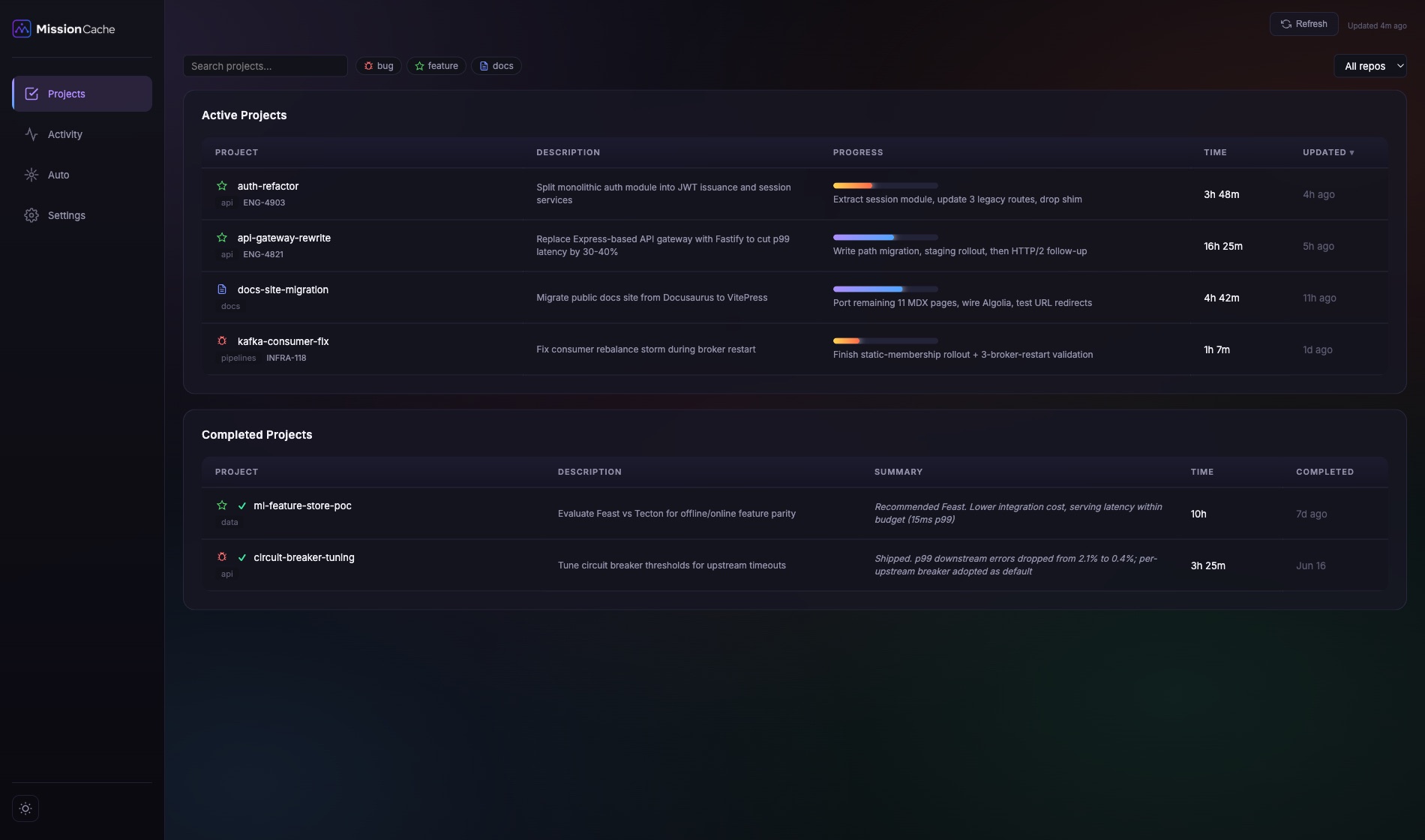
What you give up with the plugin-only install: no local dashboard at localhost:8787, no missioncache-auto CLI for parallel execution, no rich statusline. You keep everything else: per-project plan/context/tasks files, /missioncache:load resume, time heartbeat tracking in ~/.missioncache/tasks.db, and every MCP tool.
uvx missioncache-install --update # full installPlugin-only: /plugin update missioncache@missioncache in Claude Code, then restart the session. Details, including the uvx cache trap, in docs/installation.md.
The full installer also registers missioncache in any non-Claude tool it detects. See Supported tools above for the per-tool registration mechanics. The MCP server and commands are the same files missioncache ships to Claude. Only the invocation token differs: /missioncache:load in Claude Code, $missioncache-load in Codex, /missioncache-load in OpenCode and VSCode.
/missioncache:new auth-refactorMissionCache drops three files under ~/.missioncache/active/auth-refactor/:
auth-refactor-plan.md      # the agreed approach, locked after you approve
auth-refactor-context.md   # living notes: decisions, key files, gotchas, next steps
auth-refactor-tasks.md     # checklist with hierarchical subtasks
Claude walks you through a clarifying conversation, proposes a plan, and asks for approval. Once approved, the plan file is locked and the context file starts tracking your real progress.
<!-- SCREENSHOT: /missioncache:new interactive flow with file tree -->
Edit files, run tests, make decisions. MissionCache tracks time in the background via heartbeats. When Claude Code compacts the context window, missioncache's PreCompact hook auto-saves your current state so nothing gets lost.
If you want to checkpoint manually at any point:
/missioncache:save/missioncache:load auth-refactorMissionCache reloads the plan, context, and tasks files and shows you:
You pick up without reconstructing anything.
<!-- SCREENSHOT: /missioncache:load output showing reload summary -->
Requires the full install (uvx missioncache-install). If you picked the plugin-only install, skip to "Finish it".
If your tasks are decomposed enough, hand the whole project to MissionCache Auto:
missioncache-auto auth-refactor              # parallel, 8 workers (default)
missioncache-auto auth-refactor -w 12        # 12 workers
missioncache-auto auth-refactor --sequential # one task at a time
missioncache-auto auth-refactor --dry-run    # show execution plan without running
Auto runs each task in a separate Claude Code invocation, respects task dependencies, and streams iteration events to the dashboard. On a git repo, parallel runs give each worker its own git worktree and branch by default (merged back when the run finishes); pass --no-worktree to share one checkout.
/missioncache:done auth-refactorMissionCache archives the project files to ~/.missioncache/completed/ and records the final time and progress stats.
That is the full lifecycle. Everything else is optional depth.
| Feature | What you get | Read more |
|---|---|---|
| Project files | A plan, a living context and a task checklist per project, in plain markdown you can edit. | forks.md for projects that share context |
| Survives compaction | A hook saves your state before Claude compacts the window. missioncache-db repair fixes a damaged context file. | cli.md |
| The lead session | A brief across every project, a notice from each session when its project changes, and an optional check on a schedule you set. | Commands |
| Session resume | Claude Code sessions you closed are listed with the command that brings them back. Project sessions are saved on their own. | dashboard.md |
| iTerm2 panels | Your Claude sessions in iTerm2's Toolbelt, and shortcuts to the next one or the one waiting for you. Optional, macOS. | terminal-panels.md |
| Dashboard | What you owe, who owes you, and where your hours went, at localhost:8787. | dashboard.md |
| Statusline | Project and progress, git, model, context use and usage limits, one glance up in Claude Code. | statusline.md |
| Autonomous runs | missioncache-auto runs tasks in parallel in dependency order and streams every step to the dashboard. | missioncache-auto.md |
| Editor extension | The active project in the VSCode status bar, and a sidebar with its tasks and next steps. | extension.md |
| MCP tools | 45 tools any MCP agent can call, for tasks, files, time, planning, action items and the change log. | mcp-tools.md |

MissionCache is not the right answer for every workflow.
The full comparison tables, with where each tool beats MissionCache, are in docs/comparison.md.
MissionCache's load-bearing piece is the mcp-missioncache MCP server. Around it sit six standalone components you can install or skip independently:
| Component | Purpose | Installs via |
|---|---|---|
mcp-missioncache | MCP server (project state, file ops, time tracking, iteration logging) | Bundled with the Claude plugin; pipx install mcp-missioncache for other tools |
missioncache Claude plugin | Slash commands as /missioncache:*, lifecycle hooks (SessionStart, PreCompact, Stop, UserPromptSubmit), rules | Claude Code plugin marketplace |
missioncache-db | SQLite layer at ~/.missioncache/tasks.db | pip install missioncache-db |
missioncache-auto | Autonomous execution CLI (Claude Code only) | pip install missioncache-auto |
missioncache-dashboard | Local FastAPI + vanilla JS web UI at localhost:8787, DuckDB analytics layer (Claude Code only) | Runs as a launchd/systemd service |
missioncache-statusline | Optional multi-line terminal display (Claude Code only) | Bundled with missioncache-dashboard, wired into ~/.claude/settings.json |
missioncache-extension | VSCode / Cursor extension: status bar with the active project and progress, sidebar with tasks, Next Steps and Waiting on (Claude Code not required, reads through the missioncache-db CLI) | Open VSX and VS Marketplace (not published yet), or the .vsix from the repo |
<!-- DIAGRAM: plugin + MCP server + db + auto + dashboard + statusline component graph -->
The MCP server plus missioncache-db is the minimum viable install (and the only piece needed for Codex / OpenCode / VSCode). Everything else is opt-in, and each component can be used on its own if you only need that piece. missioncache-db and missioncache-auto are pip-installable packages you can depend on from your own scripts.
| Path | Purpose |
|---|---|
~/.missioncache/active/ | Active project files (plan, context, tasks) |
~/.missioncache/completed/ | Archived completed projects |
~/.missioncache/tasks.db | SQLite database (task tracking, time heartbeats, Claude session cache) |
~/.missioncache/tasks.duckdb | DuckDB analytics (synced from SQLite, dashboard reads) |
~/.missioncache/update-check.json | Cached result of the update check |
Everything MissionCache stores stays on your machine. There is no account, no telemetry and no MissionCache server.
Files outside ~/.missioncache/:
~/.claude/rules/: the SessionStart hook copies the plugin's rule file there, so Claude follows the MissionCache conventions. It only updates files that carry the plugin's ownership marker on the first line. Remove the marker from your copy and the hook leaves it alone.~/.claude/hooks-state.db: a small SQLite file with per-session state (which project each session is bound to, context usage for the statusline, terminal-to-session mapping).~/.claude/hooks/state/: small pointer files the hooks use to find the current session.statusLine entry in ~/.claude/settings.json.What runs and what it connects to:
uvx from the plugin directory. On first launch uv downloads its Python dependencies from PyPI.uv run. If the machine has no Python 3.11 or newer, uv downloads one the first time.127.0.0.1:8787 only, never on an external interface.Every destination, and what is sent to it, is listed in docs/privacy.md.
| Command | Description |
|---|---|
/missioncache:new | Create a new project with plan, context, and task files |
/missioncache:fork | Create a project as a fork of an existing parent, sharing the parent's context as a common knowledge layer |
/missioncache:load | Resume work on an active project |
/missioncache:save | Persist progress before session end or compaction |
/missioncache:done | Mark a project as completed and archive |
/missioncache:rename | Rename the current project |
/missioncache:prompts | Regenerate optimized prompts for subtasks |
/missioncache:mode | Assign workflow mode (interactive or autonomous) to tasks |
/missioncache:brief | Cross-project brief: what is urgent, what is waiting, which sessions are live, and a schedule for today |
/missioncache:lead | Make this session the lead that keeps the brief live across every project |
/missioncache:unlead | End the lead role and its update loop |
/missioncache:relay | Send one instruction from the lead to a project's session, which runs it after you confirm there |
Using MissionCache
missioncache-db commandsFor maintainers
docs/internals/ folderPull requests welcome. See CONTRIBUTING.md for development setup (uvx missioncache-install --local), testing conventions, and PR standards.
MIT. See LICENSE.
MissionCache stands on the shoulders of the tools that came before it. Direct inspiration and honest competition: GSD, claude-mem, MemPalace, Taskmaster AI, Superpowers, and the Anthropic Productivity Plugin. Each of them solves a real slice of the multi-session Claude Code problem, and missioncache would not exist without the paths they blazed.
hooks/mod/missioncache.tsx 346 lines1// The MissionCache mod. In every session it reports what the session is doing
2// (report_session_status, once per change, no model call). In the lead session
3// it draws a two-row band above the prompt from get_lead_board: the counts
4// that matter now and the link to the dashboard's Lead view. And it carries
5// relays: /missioncache:relay sends one instruction from the lead, and the
6// receiving session runs it only after the person there picks Run.
7import type { EngineInterface, Register } from 'claude-code'
8import { drawBand, type Board } from './board.tsx'
9import { approveReason, clip, decodeMcp, looksLikeRelay, OWN_TOOLS, parseRelay, plain, type Relay, RELAY_TEXT_MAX, relayArgs, SERVER, toolTarget } from './parse.ts'
10
11const POLL_MS = 5_000
12// A session that dies without a last report changes no stored value, so the
13// watermark cannot see it go. One poll a minute rebuilds regardless.
14const FULL_EVERY = 12
15const SLOW_TOOL_MS = 5_000
16// /missioncache:lead's command.run returns before the model has run the skill's
17// `lead set`, so the first polls can still say another session leads. The band
18// waits this many polls for the role before it gives up.
19const CONFIRM_POLLS = 24
20
21// --- the reporter ---------------------------------------------------------
22
23let sent = { state: '', reason: '' }
24let turns = { day: '', count: 0 }
25let compactedThisTurn = false
26// True while the session waits on the person (a permission prompt or a
27// question): nothing but the tool call resuming may report working then.
28let waitingOnPerson = false
29// A relay's dialog is a question asked outside any turn: answering it must
30// leave the session idle, not working.
31let inTurn = false
32const failures = new Set<string>()
33
34function logOnce($: EngineInterface, what: string, err: unknown) {
35 const reason = `${what}: ${String(err)}`
36 if (failures.has(reason)) return
37 failures.add(reason)
38 $.ui.log(reason)
39}
40
41type Report = {
42 state: 'working' | 'idle' | 'needs_you' | 'compacting'
43 needs_reason?: string
44 prompt?: string
45 now?: string
46 context_pct?: number
47 cost_usd?: number
48 turns_today?: number
49 last_answer?: string
50 last_turn_ms?: number
51 compacted?: boolean
52}
53
54// Writes only when the state or its reason changed, unless forced: a turn's
55// start and end, and a slow tool, always carry new fields.
56function report($: EngineInterface, r: Report, force = false) {
57 const reason = r.needs_reason ?? ''
58 if (!force && r.state === sent.state && reason === sent.reason) return
59 sent = { state: r.state, reason }
60 void $.mcp.call(SERVER, 'report_session_status', r).then(
61 res => { if (res.isError) logOnce($, 'report_session_status', decodeMcp<{ message?: string }>(res).message) },
62 err => logOnce($, 'report_session_status', err),
63 )
64}
65
66function countTurn(nowMs: number): number {
67 const day = new Date(nowMs).toDateString()
68 if (turns.day !== day) turns = { day, count: 0 }
69 return ++turns.count
70}
71
72// --- the lead board -------------------------------------------------------
73
74const lead = {
75 active: false,
76 confirmed: false,
77 hidden: false,
78 board: null as Board | null,
79 // The feed itself is the Lead view's; the cursor only keeps each answer small.
80 cursor: null as number | null,
81 polls: 0,
82 timer: null as { cancel: () => void } | null,
83}
84
85async function poll($: EngineInterface, full = false) {
86 const args: Record<string, unknown> = {}
87 if (lead.cursor !== null) args.after_id = lead.cursor
88 if (++lead.polls % FULL_EVERY !== 0 && !full && lead.board) args.watermark = lead.board.watermark
89 try {
90 const res = decodeMcp<Board & { changed: boolean; last_event_id: number; lead: { is_me: boolean } }>(
91 await $.mcp.call(SERVER, 'get_lead_board', args),
92 )
93 if (!res.changed) return
94 if (!res.lead.is_me) {
95 if (lead.confirmed) {
96 stop($)
97 $.ui.toast('MissionCache: another session is the lead now, the band is closed')
98 } else if (lead.polls >= CONFIRM_POLLS) {
99 stop($)
100 }
101 return
102 }
103 lead.confirmed = true
104 lead.cursor = Math.max(lead.cursor ?? 0, res.last_event_id ?? 0)
105 lead.board = res
106 lead.hidden = false
107 $.ui.invalidate('ui.render')
108 } catch (err) {
109 logOnce($, 'get_lead_board', err)
110 }
111}
112
113function start($: EngineInterface) {
114 if (lead.active) return
115 lead.active = true
116 void poll($, true)
117 lead.timer = $.clock.every(POLL_MS, () => { void poll($) })
118}
119
120function stop($: EngineInterface) {
121 lead.timer?.cancel()
122 Object.assign(lead, { active: false, confirmed: false, board: null, cursor: null, polls: 0, timer: null })
123 $.ui.invalidate('ui.render')
124}
125
126// --- relay ----------------------------------------------------------------
127
128// prepare_relay stamps the envelope; an older one is a replay, not a request.
129const RELAY_MAX_AGE_MS = 10 * 60_000
130// A NaN from an unreadable time compares false, so it is never fresh.
131const fresh = (ts: string) => Math.abs(Date.now() - Date.parse(ts)) < RELAY_MAX_AGE_MS
132// A redelivered relay must not open a second dialog.
133const seenRelays = new Set<string>()
134// Only another session's message carries a relay. A Slack ping or a webhook
135// event holds outsiders' text, and reaches the model whole.
136const RELAY_ORIGINS = new Set(['peer', 'peer-send-message'])
137const relayShaped = (e: { agentId?: string; origin?: { kind: string }; text: string }) =>
138 !e.agentId && RELAY_ORIGINS.has(e.origin?.kind ?? '') && looksLikeRelay(e.text)
139
140async function sendRelay($: EngineInterface, args: string): Promise<string> {
141 const parsed = relayArgs(args)
142 if (!parsed) return 'Usage: /missioncache:relay <project> <instruction>'
143 const res = decodeMcp<{ success?: boolean; reason?: string; message?: string; session_id?: string; title?: string | null; envelope?: string }>(
144 await $.mcp.call(SERVER, 'prepare_relay', parsed),
145 )
146 if (!res.success || !res.session_id || !res.envelope) return `Not sent: ${res.reason ?? res.message ?? 'no answer'}`
147 const sent = await $.session.send({ to: { sessionId: res.session_id }, text: res.envelope })
148 if (!sent.isDelivered) return `Not sent: ${sent.reason}`
149 return `Sent to ${res.title ?? parsed.project_name}. It runs there once the person picks Run.`
150}
151
152// Not deduplicated like logOnce: each relay is one action the person took.
153async function recordRelay($: EngineInterface, outcome: 'ran' | 'dropped' | 'failed', text: string) {
154 try {
155 const res = decodeMcp<{ success?: boolean; reason?: string; message?: string }>(
156 await $.mcp.call(SERVER, 'record_relay', { outcome, text }),
157 )
158 if (!res.success) $.ui.log(`relay ${outcome}, not logged: ${res.reason ?? res.message ?? 'no answer'}`)
159 } catch (err) {
160 $.ui.log(`relay ${outcome}, not logged: ${String(err)}`)
161 }
162}
163
164// Nothing a peer sends runs by itself: the person in this session sees the
165// text and picks. Any session can forge an envelope, so this dialog is the
166// only gate, and the text run is the cleaned text the person read. It sits on
167// a line of its own, apart from the mod's words, so a quote in it cannot pose
168// as the mod.
169async function confirmRelay($: EngineInterface, relay: Relay) {
170 const text = clip(relay.text, RELAY_TEXT_MAX)
171 // A leading ! runs a shell command outside the permission prompts.
172 if (text.startsWith('!')) {
173 $.ui.log('relay dropped: it starts with !, which would run a shell command')
174 return recordRelay($, 'dropped', text)
175 }
176 const where = relay.project ? ` for ${clip(relay.project, 60)}` : ''
177 let choice = ''
178 try {
179 choice = await $.ui.ask(`Run this relay${where}? It says it is from "${clip(relay.from, 40)}", which nothing can verify. It runs as if you typed:\n\n${text}`, { options: ['Run', 'Drop'], header: 'Relay' })
180 } catch (err) {
181 // Dismissed, or no one to ask: the same as Drop.
182 $.ui.log(`relay dialog closed: ${String(err)}`, { to: 'debug' })
183 }
184 if (choice !== 'Run') return recordRelay($, 'dropped', text)
185 // An answer long after it arrived is no longer the request that was sent.
186 if (!fresh(relay.ts)) {
187 $.ui.log('relay dropped: it expired while the dialog was open')
188 return recordRelay($, 'dropped', text)
189 }
190 try {
191 await $.prompt.submit({ text, asUser: true })
192 } catch (err) {
193 $.ui.toast(`MissionCache: the relay could not run: ${String(err)}`)
194 return recordRelay($, 'failed', text)
195 }
196 return recordRelay($, 'ran', text)
197}
198
199// --- hooks ----------------------------------------------------------------
200
201// A hook that gates an event carries a .catch that lets the event go on: a
202// failed report or board call must never hold up a tool, a command or a prompt.
203
204export const register: Register = on => {
205 on('session.start', async ($, e, next) => {
206 const r = await next(e)
207 // After a resume the MCP server may not be up yet, so try a few times.
208 void (async () => {
209 for (let attempt = 0; attempt < 5; attempt++) {
210 try {
211 const res = decodeMcp<{ lead?: { is_me: boolean } }>(await $.mcp.call(SERVER, 'get_lead_board', { watermark: '' }))
212 if (res.lead?.is_me) start($)
213 return
214 } catch {
215 await $.clock.sleep(2_000)
216 }
217 }
218 })()
219 return r
220 })
221
222 on('command.run', { command: 'missioncache:lead' }, async ($, e, next) => {
223 const r = await next(e)
224 start($)
225 return r
226 }).catch(($, e, next) => next(e))
227
228 on('command.run', { command: 'missioncache:unlead' }, async ($, e, next) => {
229 const r = await next(e)
230 stop($)
231 return r
232 }).catch(($, e, next) => next(e))
233
234 // Answered here without `next`, so no model turn runs. A failure falls
235 // through to the command's markdown, which has the model send it instead.
236 on('command.run', { command: 'missioncache:relay' }, async ($, e) => ({ text: await sendRelay($, e.args) }))
237 .catch(($, e, next) => {
238 $.ui.log(`relay command failed, the model sends it instead: ${String(next.error)}`)
239 return next(e)
240 })
241
242 // A relay never reaches the model: the mod's send arrives as a peer, a
243 // model's SendMessage as a peer-send-message, and either is taken here.
244 on('session.receive', async ($, e, next) => {
245 if (!relayShaped(e)) return next(e)
246 const relay = parseRelay(e.text)
247 if (!relay) {
248 $.ui.log('relay dropped: it could not be read')
249 return { consumed: 'mc-relay: unreadable' }
250 }
251 if (seenRelays.has(relay.id)) return { consumed: 'mc-relay: already shown' }
252 const mine = relay.to === await $.session.id()
253 if (!mine || !fresh(relay.ts)) {
254 $.ui.log(`relay ignored: ${mine ? 'too old' : 'meant for another session'}`)
255 return { consumed: `mc-relay: ${mine ? 'too old' : 'not for this session'}` }
256 }
257 seenRelays.add(relay.id)
258 void confirmRelay($, relay).catch(err => $.ui.log(`relay failed: ${String(err)}`))
259 return { consumed: 'mc-relay' }
260 }).catch(($, e, next) => {
261 // Failing here must not hand the relay to the model either.
262 if (!relayShaped(e)) return next(e)
263 $.ui.log(`relay dropped: the mod failed reading it: ${String(next.error)}`)
264 return { consumed: 'mc-relay: failed' }
265 })
266
267 on('ui.render', { component: 'AbovePrompt' }, async ($, e, next) => {
268 const below = await next(e)
269 if (!lead.active || lead.hidden || !lead.board || e.props.hasSurvey) return below
270 try {
271 // 0 hides the band until the next poll that finds a change.
272 return drawBand($.ui.resolve(e), below, lead.board, () => {
273 lead.hidden = true
274 $.ui.invalidate('ui.render')
275 })
276 } catch (err) {
277 logOnce($, 'board render', err)
278 return below
279 }
280 })
281
282 on('turn.start', async ($, e, next) => {
283 if (!e.agentId) {
284 compactedThisTurn = false
285 inTurn = true
286 report($, { state: 'working', prompt: clip(plain(e.text), 80) }, true)
287 }
288 return next(e)
289 })
290
291 on('tool.call', async ($, e, next) => {
292 if (e.agentId || OWN_TOOLS.has(e.tool)) return next(e)
293 if (e.tool === 'AskUserQuestion') {
294 waitingOnPerson = true
295 report($, { state: 'needs_you', needs_reason: 'answer a question' })
296 }
297 const slow = $.clock.after(SLOW_TOOL_MS, () => {
298 if (waitingOnPerson) return
299 report($, { state: 'working', now: toolTarget(e as unknown as Record<string, unknown>) }, true)
300 })
301 try {
302 return await next(e)
303 } finally {
304 slow.cancel()
305 // The call resumed, so the person answered: clear the needs_you.
306 waitingOnPerson = false
307 report($, { state: inTurn ? 'working' : 'idle' })
308 }
309 }).catch(($, e, next) => next(e))
310
311 on('classic.PermissionRequest', async ($, e, next) => {
312 waitingOnPerson = true
313 report($, { state: 'needs_you', needs_reason: approveReason(e.tool_name) })
314 return next(e)
315 }).catch(($, e, next) => next(e))
316
317 on('session.compact', async ($, e, next) => {
318 if (!e.agentId) {
319 compactedThisTurn = true
320 report($, { state: 'compacting' })
321 }
322 return next(e)
323 }).catch(($, e, next) => next(e))
324
325 on('turn.complete', async ($, e, next) => {
326 const r = await next(e)
327 if (e.agentId) return r
328 inTurn = false
329 try {
330 const u = await $.session.usage()
331 report($, {
332 state: 'idle',
333 context_pct: u.context.percent === undefined ? undefined : Math.round(u.context.percent),
334 cost_usd: u.cost?.usd,
335 turns_today: countTurn(Date.now()),
336 last_answer: e.reason === 'answer' ? clip(plain(e.answer), 60) : '',
337 last_turn_ms: e.durationMs,
338 compacted: compactedThisTurn,
339 }, true)
340 } catch (err) {
341 logOnce($, 'turn.complete', err)
342 }
343 return r
344 })
345}
346hooks/mod/board.tsx 42 lines1// The lead band: two rows above the prompt that say how the day stands and
2// where the full board lives. The board itself is the dashboard's Lead view;
3// a terminal band of half the screen cannot hold a project list readably.
4// No `$` here, so a test mounts it with any board it likes.
5import type { RenderSurface } from 'claude-code'
6
7export type Board = {
8 watermark: string
9 needs_you: { kind: string; project_name: string | null }[]
10 counts: { needs_you: number; working: number; sessions: number }
11 dashboard_url?: string
12}
13
14export const LEAD_URL = 'http://localhost:8787/#lead'
15const BAR_BG = '#1e293b'
16
17export function drawBand(el: any, below: unknown, board: Board, hide: (surface: RenderSurface) => void) {
18 const { Box, Text, Button, Link } = el
19 const c = board.counts
20 const url = board.dashboard_url || LEAD_URL
21 // Only names and counts on these rows: free text could carry Hebrew, and
22 // iTerm2 orders a whole row by its first strong letter.
23 const first = board.needs_you.find(n => n.kind === 'session')
24 return (
25 <Box flexDirection="column">
26 {below}
27 <Box key="band-top" backgroundColor={BAR_BG} paddingX={1} columnGap={3}>
28 <Text color="claude" weight="bold">◆ MissionCache lead</Text>
29 <Text color={c.needs_you ? 'warning' : undefined} weight={c.needs_you ? 'bold' : undefined} dimColor={!c.needs_you}>{`● ${c.needs_you} need${c.needs_you === 1 ? 's' : ''} you`}</Text>
30 <Text color={c.working ? 'success' : undefined} dimColor={!c.working}>{`● ${c.working} working`}</Text>
31 <Text dimColor>{`${c.sessions} session${c.sessions === 1 ? '' : 's'}`}</Text>
32 {first?.project_name ? <Text wrap="truncate-end" color="warning">{`▸ ${first.project_name}`}</Text> : null}
33 </Box>
34 <Box key="band-link" paddingX={1} columnGap={2}>
35 <Text dimColor>Projects, live feed and today's agenda:</Text>
36 <Box key="lead-link"><Text><Link href={url} label={url} /></Text></Box>
37 <Button key="band-hide" plain hotkey="0" onPress={(press: { surface: RenderSurface }) => hide(press.surface)}><Text dimColor>hide</Text></Button>
38 </Box>
39 </Box>
40 )
41}
42hooks/mod/parse.ts 99 lines1// Pure helpers for the MissionCache mod: no `$`, so the tests call them as is.
2
3export const SERVER = 'plugin:missioncache:pm'
4
5// The tools the mod calls itself. Its own `$.mcp.call` raises a `tool.call`
6// under these names, which the reporter must not take for the model working.
7export const OWN_TOOLS: ReadonlySet<string> = new Set(
8 ['report_session_status', 'get_lead_board', 'prepare_relay', 'record_relay'].map(
9 t => `mcp__plugin_missioncache_pm__${t}`,
10 ),
11)
12
13type McpResult = { content: readonly unknown[]; isError?: boolean }
14
15// The server answers with a JSON text block, never structuredContent.
16export function decodeMcp<T>(r: McpResult): T {
17 const block = r.content.find(b => typeof b === 'object' && b !== null && 'text' in b) as { text: string } | undefined
18 if (!block) throw new Error('the MissionCache server answered without a text block')
19 if (r.isError) throw new Error(block.text)
20 return JSON.parse(block.text) as T
21}
22
23// One line, no control or format characters, clipped with an ellipsis.
24export function clip(text: string | null | undefined, max: number): string {
25 const line = String(text ?? '').replace(/[\p{Cc}\p{Cf}]/gu, ' ').replace(/\s+/g, ' ').trim()
26 return line.length <= max ? line : `${line.slice(0, max - 1)}…`
27}
28
29// The board shows what was asked and said, not how the transcript wraps it: a
30// slash command arrives as <command-name>/x</command-name> tags, an answer as markdown.
31export function plain(text: string | null | undefined): string {
32 const s = String(text ?? '')
33 const cmd = /<command-name>([^<]*)<\/command-name>/.exec(s)
34 const body = cmd ? `${cmd[1]} ${/<command-args>([^<]*)<\/command-args>/.exec(s)?.[1] ?? ''}` : s
35 return body
36 .replace(/<\/?[a-z][\w-]*>/g, ' ')
37 .replace(/^\s{0,3}(#{1,6}|>|[-*+]|\d+\.)\s+/gm, '')
38 .replace(/\*\*|__|`/g, '')
39}
40
41// What a permission prompt asks the person, in words, for "Waiting for you to ...".
42const APPROVE: Record<string, string> = { Bash: 'a command', Edit: 'a file edit', Write: 'a new file', WebFetch: 'a web request' }
43export const approveReason = (tool: string): string => `approve ${APPROVE[tool] ?? `the ${tool.split('__').pop()} tool`}`
44
45// What a long-running tool is doing, in words, for the board's "now" line: a
46// Bash or Agent call carries the model's own description of itself.
47export function toolTarget(e: Record<string, unknown>): string {
48 const tool = String(e.tool ?? '').split('__').pop() ?? ''
49 const file = String(e.file_path ?? e.notebook_path ?? '').split('/').pop()
50 const what = e.description && ['Bash', 'Agent', 'Task'].includes(tool) ? String(e.description)
51 : ['Edit', 'Write', 'NotebookEdit'].includes(tool) ? `Edit ${file}`
52 : tool === 'Read' ? `Read ${file}`
53 : ['Grep', 'Glob'].includes(tool) ? 'Search the code'
54 : ['WebFetch', 'WebSearch'].includes(tool) ? 'Read the web'
55 : tool === 'Bash' ? 'Run a command'
56 : `Use ${tool}`
57 return clip(what, 60)
58}
59
60// --- relay ----------------------------------------------------------------
61
62// One instruction from the lead, as prepare_relay builds it: a line
63// `mc-relay/1 {json}`. The engine wraps a peer's text in its own element and
64// the envelope sits on a line of its own inside it (measured), so it must be
65// the whole line. It is read again unescaped if the wrapper escaped it.
66export type Relay = { id: string; from: string; to: string; ts: string; text: string; project?: string }
67export const RELAY_TEXT_MAX = 500
68const RELAY_LINE = /^mc-relay\/1 (\{.*\})\s*$/m
69const ENTITIES: Record<string, string> = { '"': '"', ''': "'", '<': '<', '>': '>', '&': '&' }
70const unescape = (s: string) => s.replace(/&(quot|apos|lt|gt|amp|#\d+);/g, e => ENTITIES[e] ?? String.fromCharCode(Number(e.slice(2, -1))))
71
72function readRelay(json: string): Relay | null {
73 try {
74 const r = JSON.parse(json) as Record<string, unknown>
75 const fields = ['id', 'from', 'to', 'ts', 'text'] as const
76 if (!fields.every(k => typeof r[k] === 'string' && r[k])) return null
77 const project = typeof r.project === 'string' && r.project ? r.project : undefined
78 return { id: r.id, from: r.from, to: r.to, ts: r.ts, text: r.text, project } as Relay
79 } catch {
80 return null
81 }
82}
83
84// A line shaped like a relay, read or not: one that does not parse is still
85// a relay and never reaches the model.
86export const looksLikeRelay = (text: string): boolean => RELAY_LINE.test(text)
87
88export function parseRelay(text: string): Relay | null {
89 const m = RELAY_LINE.exec(text)
90 if (!m) return null
91 return readRelay(m[1]) ?? readRelay(unescape(m[1]))
92}
93
94// `/missioncache:relay <project> <text>`: the first word names the project.
95export function relayArgs(args: string): { project_name: string; text: string } | null {
96 const m = /^\s*(\S+)\s+([\s\S]*\S)\s*$/.exec(args)
97 return m ? { project_name: m[1], text: m[2] } : null
98}
99