nba-scores-mod
Today's NBA scoreboard above the Claude Code prompt. Pick your team and it gets its own totem and team color; scores update live while games are on. Live data…
newbandnetworktimer

Today's NBA scoreboard above the Claude Code prompt. Pick your team and it gets its own totem and team color; scores update live while games are on. Live data…
English · 繁體中文


Live NBA scores in a thin band above the Claude Code prompt. Works in the terminal and in the desktop app's Code tab.
Desktop app

Terminal

The images on this page are illustrations with made-up scores.
+2 for a few seconds, then switches to the new one.▾) for the score by quarter and each team's top scorers.claude plugin marketplace add miami1124/pusung-modsclaude plugin install nba-scores-mod@pusung-modsThen quit Claude Code completely and open it again. In the desktop app that means Cmd+Q, not just closing the window.
To remove it, uninstall the mod and then drop the marketplace:
claude plugin uninstall nba-scores-mod@pusung-modsclaude plugin marketplace remove pusung-modsRestart Claude Code and the band is gone. The mod writes no files unless you turned on log; if you did, delete ~/.claude/nba-scores-mod.*.log yourself.
"CLAUDE_CODE_ENABLE_FUNCTION_HOOKS": "1" to the env block of ~/.claude/settings.json and restart.claude -p, in the VS Code extension, or on mobile.There are three settings. The desktop app and the terminal keep their own copies, so set them once in each place you use.
| Setting | Default | What it does |
|---|---|---|
| Team | None | Your team's games are listed first. In the desktop app the badge takes your team's colors and a small totem appears next to it. |
| Language | Auto | Auto shows Traditional Chinese when your computer is on Taiwan time and English everywhere else. Pick English or 繁體中文 to force one. |
| Spoiler-free | Off | On hides the score of finished games. Click Reveal on a game, or Reveal all. Live games are never hidden. Revealed games are hidden again the next time you open Claude Code. |
In the desktop app, click ⚙ Settings on the band. A row with the three settings opens; click it again to close the row.

Until you choose a team, a Pick your team dropdown also sits on the band itself.

In the terminal, run /config and scroll to the nba-scores-mod rows (Your team, Language, Spoiler-free).
Each of the 30 teams has a small two-color icon, shown next to the badge in the desktop app once you pick that team.
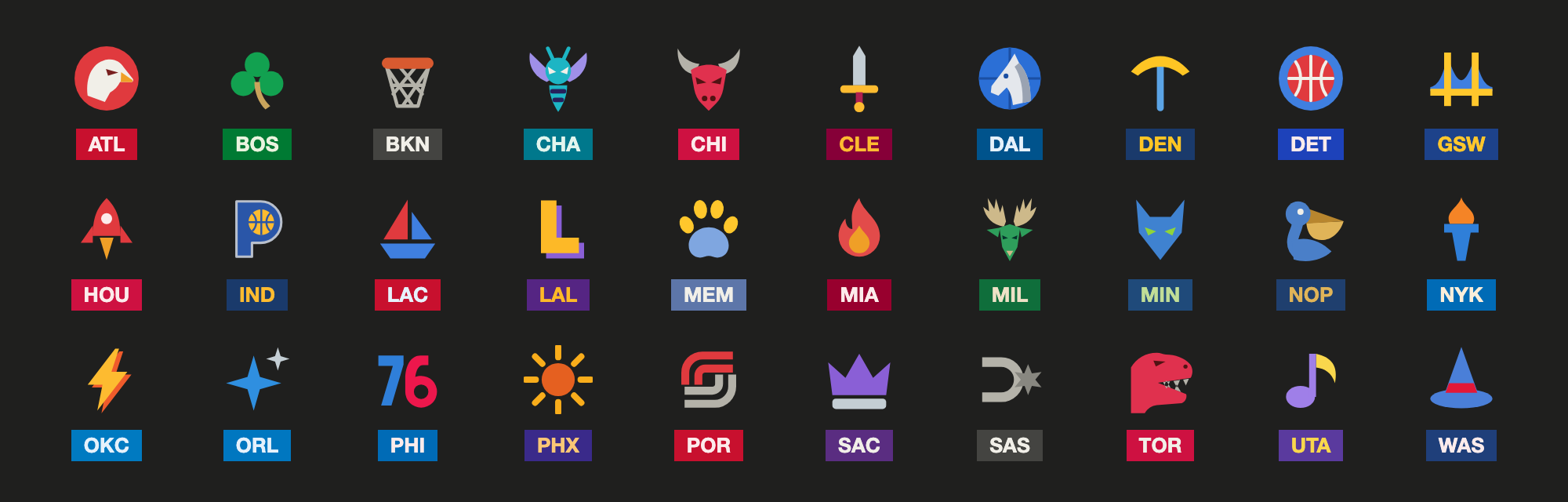
They are small icons I made myself for each team: a flame for Miami, a clover for Boston, a rocket for Houston.
Both show the same games in the same order, with the same controls.
| Desktop app | Terminal | |
|---|---|---|
| Layout | A row of cards | One line of text |
| Team totem and team-colored badge | Yes | No (the badge is always red) |
| Games that do not fit | ‹ › to page | ‹ › to page |
| Score by quarter and top scorers | Yes | Yes |
| Spoiler-free mode | Yes | Yes |
The terminal can only draw characters, so the totems are desktop only.
ESPN's "today" follows US dates, which is awkward in other time zones. This mod works out the NBA game day itself: the day rolls over at 11 AM US Eastern, when last night's games are over and tonight's have not started. So in Asia you see the games played this morning for the rest of your day, not tomorrow's schedule.
Tip-off times are shown in your computer's time zone. On a day with no games, the band shows the next games on the schedule.
Nothing shows up. There is no error message when the band is missing. Check these in order:
claude --version. Update, or turn on the flag described under Requirements.claude plugin list and look for nba-scores-mod@pusung-mods with status enabled.claude -p, the VS Code extension, or mobile."Scores not updating". A ⚠ Scores not updating (last fetched N min ago) warning means the last fetch failed and you are looking at old numbers. The mod says so on purpose instead of passing stale scores off as live. It retries on its own, at most a minute apart while a game is live. If ESPN refuses the request outright, it backs off and waits at least five minutes. If it never recovers, ESPN has probably changed something: the endpoints this mod reads are public but undocumented, and they can change without notice. Please open an issue.
Not needed for normal use. ~/.claude/nba-scores-mod.json accepts a few extra fields:
| Field | Default | What it does |
|---|---|---|
log | false | Writes one line per fetch to ~/.claude/nba-scores-mod.<start time>.log. For debugging; every session creates a new file. |
date | "" | Pins the band to one day (YYYYMMDD). For development during the off-season. |
team, spoilerFree | Older way to set the same things. A team picked in the settings wins over the file; spoiler-free is on if either one turns it on. |
site.api.espn.com. As with any website you visit, ESPN can see your IP address and the requests the mod makes.~/.claude/nba-scores-mod.json, if it exists.log. Your settings and whether the band is collapsed are stored in Claude Code's own settings.session.start and ui.render.Mods are a new Claude Code feature and the API underneath is still changing, so an update to Claude Code can break this one. Bug reports and ideas are welcome in Issues.
This is an unofficial fan project. It is not affiliated with, endorsed by, or sponsored by the NBA, any NBA team, or ESPN. Team names and abbreviations belong to their owners and are used only to identify the teams. Scores come from ESPN's public endpoints and are provided as is, for personal, non-commercial use.
The MIT license covers this project's code only. The team totems are fan art, and each team's name and identity belong to that team. Please do not use the totems commercially.
MIT. Use it and modify it freely. Just keep the copyright notice.
hooks/register.tsx 1001 lines1/* @jsx h */
2import type { EngineInterface, Register } from 'claude-code'
3import {
4 espnHeaders,
5 hasLiveGame,
6 involves,
7 parseBoxscore,
8 parseScoreboard,
9 scoreboardUrl,
10 slateMode,
11 sortLiveFirst,
12 summaryUrl,
13 SCOREBOARD_URL,
14 teamColor,
15 type Game,
16 type Slate,
17 type TeamBox,
18} from './espn.ts'
19import { NO_TEAM, TEAM_OPTIONS, teamFromOption } from './teams.ts'
20import { TOTEM_SIZE, totemFor } from './totems.ts'
21import { nbaGameDay, nextGameDayAt, localStart } from './time.ts'
22import { LANG_OPTIONS, langFromOption, STRINGS, type Strings } from './i18n.ts'
23import { errorLine, LOG_MAX_LINES, logPath, okLine } from './log.ts'
24import { CONFIG_REL, DEFAULTS, parseConfig, type Config } from './config.ts'
25
26// nba-scores-mod:把今日 NBA 比分畫在輸入框上方。
27//
28// 這支模組永遠不呼叫 $.model.*,也不碰使用者的 prompt——它只是讀 ESPN 的
29// 公開端點、算出畫面該長什麼樣,然後畫出來。所以它不消耗任何 model token。
30//
31// 桌面版畫橫排小卡,終端機畫一行橫排;兩邊共用同一份資料、排序與防雷狀態。
32
33const LIVE_EVERY_MS = 30_000
34/** 比分剛變動時的提示:先亮色+顯示加了幾分,再只留亮色,然後恢復原狀 */
35const FLASH_STRONG_MS = 3_000
36const FLASH_MS = 6_000
37const FLASH_COLOR = '#EF9F27'
38type Flash = { delta: number; at: number }
39type Which = 'away' | 'home'
40
41/** 表定時間過了但還沒開打(延後開賽很常見)時,多久再看一次 */
42const LATE_TIPOFF_MS = 60_000
43/** 抓失敗後隔多久重試,一次比一次久;最後一格是上限 */
44const RETRY_MS = [30_000, 60_000, 2 * 60_000, 5 * 60_000, 10 * 60_000]
45/**
46 * 有比賽正在打的時候,重試最久只隔這麼久。
47 * 電腦睡著時會連續失敗把間隔拉到 10 分鐘,醒來後比分就要等那麼久才動。
48 */
49const RETRY_LIVE_MAX_MS = 60_000
50/**
51 * ESPN 明確拒絕(403 被擋、429 太頻繁)時,至少隔這麼久才再試,有比賽在打也一樣。
52 * 對方說不要的時候就退開,不要一直敲。
53 */
54const REJECTED_STATUS = [403, 429]
55const RETRY_REJECTED_MIN_MS = 5 * 60_000
56
57/**
58 * 下一次該什麼時候抓。原則:比分板不會變的時候就不抓。
59 * - 有比賽在打:每 30 秒
60 * - 都還沒打:等到最早那場的表定開賽時間才抓(過了還沒開打就每分鐘看一次)
61 * - 全部打完、今天沒比賽、或顯示的是「下一場」:等到比賽日換日
62 */
63const nextFetchDelay = (slate: Slate, isNext: boolean, now: number): number => {
64 if (hasLiveGame(slate)) return LIVE_EVERY_MS
65 const untilNextDay = nextGameDayAt(now) + 60_000 - now
66 if (isNext) return untilNextDay
67 const tipoffs = slate.games
68 .filter(g => g.state === 'pre')
69 .map(g => Date.parse(g.startsAt))
70 .filter(t => Number.isFinite(t))
71 if (tipoffs.length === 0) return untilNextDay
72 const first = Math.min(...tipoffs)
73 return first > now ? Math.min(first - now, untilNextDay) : LATE_TIPOFF_MS
74}
75const TICK_MS = 15_000
76/** 設定檔不存在時,每讀幾次才重試一次——否則每次輪詢都會在 debug log 留一筆錯誤 */
77const CONFIG_MISS_EVERY = 10
78/** 終端機寬度不到這麼多格時,點開單場的球員數據改放到每節比分下面 */
79const DETAIL_WIDE_COLUMNS = 96
80/** 終端機:兩場之間「 │ 」佔幾格 */
81const CHIP_GAP = 5
82const BADGE_TEXT = ' NBA '
83
84/** 這段字在終端機佔幾格:中文和全形符號算兩格,其餘一格 */
85const textWidth = (s: string): number => {
86 let n = 0
87 for (const ch of s) n += (ch.codePointAt(0) ?? 0) > 0x2e7f ? 2 : 1
88 return n
89}
90
91
92/** 防雷時比分變成這個。用實心方塊而不是 ??? ,一眼就看得出是「被遮住」不是「沒資料」 */
93const MASK = '███'
94
95/** 這場現在該不該遮。只遮已結束的——正在打的當然要讓你看比分 */
96const isMasked = (g: Game, spoilerFree: boolean, revealed: Set<string>): boolean =>
97 spoilerFree && g.state === 'post' && !revealed.has(g.id)
98
99/** 桌面版防雷時蓋住比分的灰塊。桌面版不是等寬字,用 ███ 寬度會亂跳 */
100const MASK_SVG =
101 `<svg xmlns="http://www.w3.org/2000/svg" width="22" height="12" viewBox="0 0 22 12">` +
102 `<rect width="22" height="12" rx="2" fill="rgba(128,128,128,0.45)"/></svg>`
103
104/** 桌面版小卡上的狀態字:還沒開打只寫幾點(卡片很窄),其餘照 ESPN 那句 */
105const chipDetail = (g: Game, isNext: boolean): string => {
106 if (g.state !== 'pre') return g.detail
107 const t = localStart(g.startsAt)
108 if (t === '') return g.detail
109 // 「下一場」可能是好幾天後,那時候日期不能省
110 return isNext ? t : t.slice(6)
111}
112
113/**
114 * 桌面版最上面那條分隔線,把 NBA 這排跟上方其他 mod(例如用量帶)隔開。
115 * 桌面版的框不能只畫一邊、太細的 SVG 又畫不出來,所以用一長串橫線字元,
116 * 畫得比任何視窗都長,交給外層裁掉。
117 */
118const RULE = '─'.repeat(400)
119
120/** 桌面版的點綴色:NBA 徽章的底、進行中的時間。之後可以改成跟著使用者選的球隊走 */
121const ACCENT = '#E24B4A'
122const BADGE_BG = '#A32D2D'
123const BADGE_FG = '#FCEBEB'
124/** 還沒開打的開賽時間用的顏色。跟打完的灰色 Final 分開,不然一眼分不出來 */
125const UPCOMING = '#85B7EB'
126
127/** 收合狀態存在 $.store 的這個 key,下次開 Claude Code 還記得 */
128const COLLAPSED_KEY = 'collapsed'
129/** 桌面版的設定那一排有沒有打開。改設定會讓 mod 重新載入,存起來才不會每改一項就自己關掉 */
130const SETTINGS_OPEN_KEY = 'settingsOpen'
131const SPOILER_OPTIONS = ['Off', 'On']
132
133/** 點開那一場的球員數據。id 是「這份資料屬於哪一場」,跟目前點開的不同就不畫 */
134type BoxState = { id?: string; teams?: TeamBox[]; error?: string; at: number; seq: number }
135
136/**
137 * ESPN 明確拒絕之後,到 until 這個時間點之前所有請求都不發(比分、下一批賽程、球員數據共用)。
138 * 只有比分退開、球員數據照敲,等於沒退。
139 */
140type Backoff = { until: number; reason: string }
141
142/**
143 * 抓一場的球員數據寫進 state,然後重畫。成功失敗都會寫——失敗要讓畫面講出來,
144 * 不能安靜地留著上一場的數據。
145 */
146async function refreshBox(
147 $: EngineInterface,
148 state: BoxState,
149 gameId: string,
150 isStillOpen: () => boolean,
151 backoff: Backoff,
152): Promise<void> {
153 // 每次請求一個流水號,回來時不是最新那次就丟掉(見下面)
154 state.seq += 1
155 const mine = state.seq
156 let teams: TeamBox[] | undefined
157 let error: string | undefined
158 const startedAt = await $.clock.now()
159 if (startedAt < backoff.until) {
160 // 還在退開的期間:不發請求,直接讓畫面講原因
161 error = backoff.reason
162 } else {
163 try {
164 const res = await $.http.fetch(summaryUrl(gameId), { headers: espnHeaders() })
165 if (REJECTED_STATUS.includes(res.status)) {
166 backoff.until = startedAt + RETRY_REJECTED_MIN_MS
167 backoff.reason = `Error: ESPN responded ${res.status}`
168 }
169 if (!res.ok) throw new Error(`ESPN responded ${res.status}`)
170 teams = parseBoxscore(JSON.parse(res.text))
171 } catch (err) {
172 error = String(err)
173 }
174 }
175 // 等回應的期間使用者可能已經點開別場,或點開別場又點回來。慢回來的舊回應不能蓋掉
176 // 新的資料:只比對場次不夠(A → B → A 時第一次 A 的回應場次是對的,但資料是舊的),
177 // 所以還要是最新那次請求才收。
178 if (state.seq !== mine || !isStillOpen()) return
179 state.teams = teams
180 state.error = error
181 state.id = gameId
182 state.at = await $.clock.now()
183 $.ui.invalidate('ui.render')
184}
185
186/**
187 * 點開的那一場:每節比分+兩隊得分前幾名。桌面版和終端機共用。
188 * 一欄一個 Box:桌面版不是等寬字,靠空白對不齊,要靠欄位本身對齊。
189 * wide 為 false(終端機太窄)時球員數據改放到每節比分下面。
190 */
191/** 球員名字最多幾個字。太長會把那一欄撐到折行,名字和數字就對不上了 */
192const PLAYER_NAME_MAX = 16
193const shortName = (name: string): string =>
194 name.length <= PLAYER_NAME_MAX ? name : name.slice(0, PLAYER_NAME_MAX - 1) + '…'
195
196const renderDetail = (
197 ui: { Box: any; Text: any },
198 g: Game,
199 boxState: BoxState,
200 opts: { wide: boolean; gapTop: number; t: Strings },
201) => {
202 const { Box, Text } = ui
203 const count = Math.max(g.away.periods.length, g.home.periods.length)
204 const awayLost = g.state === 'post' && g.away.score < g.home.score
205 const homeLost = g.state === 'post' && g.home.score < g.away.score
206 const column = (id: string, title: string, away: string, home: string, strong: boolean) => (
207 <Box key={id} flexDirection="column" alignItems="flex-end" marginRight={2}>
208 <Text dimColor>{title}</Text>
209 <Text bold={strong && !awayLost} dimColor={awayLost}>
210 {away}
211 </Text>
212 <Text bold={strong && !homeLost} dimColor={homeLost}>
213 {home}
214 </Text>
215 </Box>
216 )
217 // 右邊:兩隊各自得分前幾名。資料屬於別場(剛換場、還在抓)就先說讀取中
218 const mineBox = boxState.id === g.id
219 const teamBlock = (abbr: string) => {
220 const team = boxState.teams?.find(t => t.abbr === abbr)
221 if (!team) return null
222 const stat = (id: string, title: string, pick: (p: TeamBox['players'][number]) => number) => (
223 <Box key={id} flexDirection="column" alignItems="flex-end" marginRight={2} flexShrink={0}>
224 <Text dimColor>{title}</Text>
225 {team.players.map((p, i) => (
226 <Text key={`${id}${i}`}>{String(pick(p))}</Text>
227 ))}
228 </Box>
229 )
230 return (
231 // 每一欄都不准縮:空間不夠時寧可右邊被裁掉,也不能讓名字折行害數字對不上
232 <Box key={abbr} flexDirection="row" marginLeft={3} flexShrink={0}>
233 <Box key={`names:${abbr}`} flexDirection="column" marginRight={2} flexShrink={0}>
234 <Text bold>{abbr}</Text>
235 {team.players.map((p, i) => (
236 <Text key={`n${i}`} dimColor>
237 {shortName(p.name)}
238 </Text>
239 ))}
240 </Box>
241 {stat('pts', opts.t.pts, p => p.pts)}
242 {stat('reb', opts.t.reb, p => p.reb)}
243 {stat('ast', opts.t.ast, p => p.ast)}
244 </Box>
245 )
246 }
247 return (
248 <Box flexDirection={opts.wide ? 'row' : 'column'} marginTop={opts.gapTop}>
249 <Box flexDirection="row">
250 <Box flexDirection="column" marginRight={2}>
251 <Text dimColor> </Text>
252 <Text bold={!awayLost} dimColor={awayLost}>
253 {g.away.abbr}
254 </Text>
255 <Text bold={!homeLost} dimColor={homeLost}>
256 {g.home.abbr}
257 </Text>
258 </Box>
259 {Array.from({ length: count }, (_, i) =>
260 column(
261 `p${i}`,
262 i < 4 ? `Q${i + 1}` : `OT${i - 3}`,
263 String(g.away.periods[i] ?? '-'),
264 String(g.home.periods[i] ?? '-'),
265 false,
266 ),
267 )}
268 {column('total', opts.t.total, String(g.away.score), String(g.home.score), true)}
269 </Box>
270 <Box flexDirection="row">
271 {!mineBox ? (
272 <Box marginLeft={3}>
273 <Text dimColor>{opts.t.boxLoading}</Text>
274 </Box>
275 ) : boxState.error !== undefined ? (
276 <Box marginLeft={3}>
277 <Text color="#d97706">{opts.t.boxFailed(boxState.error)}</Text>
278 </Box>
279 ) : (
280 [teamBlock(g.away.abbr), teamBlock(g.home.abbr)]
281 )}
282 </Box>
283 </Box>
284 )
285}
286
287export const register: Register = (on, options) => {
288 // 球隊可以從兩個地方來:設定選單(優先)和 ~/.claude/nba-scores-mod.json(舊做法,繼續有效)
289 const menuTeam = teamFromOption(options.team)
290 const t = STRINGS[langFromOption(options.language)]
291 // 防雷模式:設定選單選 On 就開;選 Off 或沒設時看設定檔(舊做法,繼續有效)
292 const menuSpoilerFree = options.spoilerFree === 'On'
293 const spoilerFree = () => menuSpoilerFree || config.spoilerFree
294 // 這些狀態只活在記憶體裡:一個新 session 從零開始
295 let slate: Slate | undefined
296 let lastError: string | undefined
297 let config: Config = { ...DEFAULTS, team: menuTeam }
298 let configProblems: string[] = []
299 let nextFetchAt = 0
300 let configMisses = 0
301 /** 今天沒比賽、退回顯示「下一場」時為 true */
302 let showingNext = false
303 /**
304 * 防雷模式下已經揭曉的場次 id。刻意只放記憶體——關掉 Claude Code 再打開,
305 * 就該回到打碼狀態,不然「防雷」只防得了第一次。
306 */
307 const revealed = new Set<string>()
308 /** 紀錄檔的內容(設定 log: true 才會用到)。整份留在記憶體,因為寫檔只能整份覆寫 */
309 const logLines: string[] = []
310 let logFile = ''
311 let logBroken = false
312 /** 整條收起來只剩一行。會寫進 $.store,所以跨 session 記得 */
313 let collapsed = false
314 /** 桌面版:設定那一排(球隊/語言/防雷)有沒有打開 */
315 let settingsOpen = false
316 /** 那一排從第幾場開始畫(按 ‹ › 左右翻) */
317 let offset = 0
318 /** 連續抓失敗幾次了,決定下次隔多久重試;成功就歸零 */
319 let failStreak = 0
320 /** 剛得分的那一邊,key 是「場次 id:away/home」。只放記憶體,幾秒後自己消失 */
321 const flashes = new Map<string, Flash>()
322 /** 這一邊現在該怎麼畫:undefined=沒事;strong=剛變(顯示 +N);否則只留亮色 */
323 const flashOf = (gameId: string, which: Which, now: number) => {
324 const f = flashes.get(`${gameId}:${which}`)
325 if (!f || now - f.at >= FLASH_MS) return undefined
326 return { delta: f.delta, strong: now - f.at < FLASH_STRONG_MS }
327 }
328 /** 目前點開看每節比分的那一場。只放記憶體,重開就收回去 */
329 let openId: string | undefined
330 const boxState: BoxState = { at: 0, seq: 0 }
331 const backoff: Backoff = { until: 0, reason: '' }
332
333 on('session.start', async ($, e, next) => {
334 const r = await next(e)
335
336 // 這裡不能用 isInteractive 或 surface 來判斷要不要抓:桌面版 app 啟動時回報的值
337 // 跟終端機不一樣(v0.8.0 加了這個判斷,結果桌面版整條帶卡在「讀取中」)。
338 // 寧可在不會畫帶子的執行方式多抓幾次,也不能讓會畫的地方抓不到。
339
340 collapsed = (await $.store.get(COLLAPSED_KEY)) === true
341 settingsOpen = (await $.store.get(SETTINGS_OPEN_KEY)) === true
342
343 const home = (await $.env.get('HOME')) ?? ''
344 const configPath = home ? `${home}/${CONFIG_REL}` : ''
345
346 const loadConfig = async () => {
347 if (!configPath) return
348 // 大部分使用者沒有設定檔,而每次失敗的 fs.read 都會寫一筆 ERROR 到 debug
349 // log。沒讀到就隔幾輪再試,讀到了就恢復每輪都讀(改設定不用重開)。
350 if (configMisses > 0 && configMisses % CONFIG_MISS_EVERY !== 0) {
351 configMisses += 1
352 return
353 }
354 try {
355 const parsed = parseConfig(await $.fs.read(configPath))
356 config = menuTeam === '' ? parsed.config : { ...parsed.config, team: menuTeam }
357 configProblems = parsed.problems
358 configMisses = 0
359 } catch {
360 // 沒有設定檔是正常的,用預設值就好
361 configMisses += 1
362 }
363 }
364
365 const fetchSlate = async () => {
366 const now = await $.clock.now()
367 let fetchFailed = true
368 let rejected = false
369 try {
370 // 沒指定日期就用算出來的「NBA 比賽日」,不要讓 ESPN 用美國的今天決定
371 const day = config.date === '' ? nbaGameDay(now) : config.date
372 const res = await $.http.fetch(scoreboardUrl(day), { headers: espnHeaders() })
373 rejected = REJECTED_STATUS.includes(res.status)
374 if (!res.ok) throw new Error(`ESPN responded ${res.status}`)
375 let fetched = parseScoreboard(JSON.parse(res.text), now)
376 showingNext = false
377 // 這天沒有比賽(休賽期、全明星週末)就問 ESPN 下一批是什麼
378 if (fetched.games.length === 0 && config.date === '') {
379 const fb = await $.http.fetch(SCOREBOARD_URL, { headers: espnHeaders() })
380 // 這一次失敗也是失敗:要記下來、被拒絕也要退開,不能當成「今天沒比賽」帶過
381 rejected = REJECTED_STATUS.includes(fb.status)
382 if (!fb.ok) throw new Error(`ESPN responded ${fb.status}`)
383 const parsed = parseScoreboard(JSON.parse(fb.text), now)
384 if (parsed.games.length > 0) {
385 fetched = parsed
386 showingNext = true
387 }
388 }
389 // 跟上一次抓到的比,哪一邊分數變多了就記下來,畫面會亮幾秒
390 if (slate) {
391 for (const g of fetched.games) {
392 const before = slate.games.find(old => old.id === g.id)
393 if (!before || g.state !== 'in') continue
394 for (const which of ['away', 'home'] as const) {
395 const delta = g[which].score - before[which].score
396 if (delta > 0) flashes.set(`${g.id}:${which}`, { delta, at: now })
397 }
398 }
399 }
400 slate = fetched
401 lastError = undefined
402 fetchFailed = false
403 } catch (err) {
404 // 抓壞了就記下來讓畫面明講。舊資料留著沒關係,但畫面會標示它是舊的,
405 // 絕不能安靜地把過期資料當成即時比分。
406 lastError = String(err)
407 // 斷網時會連續失敗很多次,只在第一次講,不要洗版
408 if (failStreak === 0) $.ui.log(`nba-scores-mod: fetch failed ${lastError}`)
409 }
410 failStreak = fetchFailed ? failStreak + 1 : 0
411 const every =
412 fetchFailed || !slate
413 ? rejected
414 ? Math.max(RETRY_MS[Math.min(failStreak, RETRY_MS.length) - 1], RETRY_REJECTED_MIN_MS)
415 : Math.min(
416 RETRY_MS[Math.min(failStreak, RETRY_MS.length) - 1],
417 slate && hasLiveGame(slate) ? RETRY_LIVE_MAX_MS : Infinity,
418 )
419 : nextFetchDelay(slate, showingNext, now)
420 nextFetchAt = now + every
421 if (rejected) {
422 backoff.until = now + every
423 backoff.reason = lastError ?? ''
424 }
425
426 if (!config.log || !home) return
427 if (logFile === '') logFile = logPath(home, now)
428 logLines.push(
429 fetchFailed || !slate
430 ? errorLine(now, lastError ?? 'unknown error', every)
431 : okLine(now, slateMode(slate), showingNext, slate, every),
432 )
433 if (logLines.length > LOG_MAX_LINES) logLines.splice(0, logLines.length - LOG_MAX_LINES)
434 try {
435 await $.fs.write(logFile, logLines.join('\n') + '\n')
436 logBroken = false
437 } catch (err) {
438 // 寫不進去只講一次,不要每 30 秒洗一行
439 if (!logBroken) $.ui.log(`nba-scores-mod: could not write log ${String(err)}`)
440 logBroken = true
441 }
442 }
443
444 await loadConfig()
445 await fetchSlate()
446 // 亮色提示要自己退掉:有提示在的時候每秒重畫一次,沒有就什麼都不做
447 $.clock.every(1_000, async () => {
448 if (flashes.size === 0) return
449 const now = await $.clock.now()
450 for (const [key, f] of flashes) if (now - f.at >= FLASH_MS) flashes.delete(key)
451 $.ui.invalidate('ui.render')
452 })
453 $.clock.every(TICK_MS, async () => {
454 const now = await $.clock.now()
455 // ESPN 剛拒絕過:這段時間什麼都不抓
456 if (now < backoff.until) return
457 // 比分先抓,球員數據排後面:比分才是主角,不能被明細的請求拖住或害它重新退開
458 if (now >= nextFetchAt) {
459 await loadConfig()
460 await fetchSlate()
461 // 抓完就重畫,不然新比分要等到別的東西觸發重畫才會出現
462 $.ui.invalidate('ui.render')
463 }
464 // 點開的那場如果正在打,球員數據跟著比分的頻率更新;打完的抓一次就夠。
465 // 整條收起來時看不到明細,就不要抓。
466 const openGame = slate?.games.find(g => g.id === openId)
467 if (
468 !collapsed &&
469 now >= backoff.until &&
470 openGame?.state === 'in' &&
471 boxState.id === openGame.id &&
472 now - boxState.at >= LIVE_EVERY_MS
473 ) {
474 await refreshBox($, boxState, openGame.id, () => openId === openGame.id, backoff)
475 }
476 })
477
478 return r
479 })
480
481 on('ui.render', { component: 'AbovePrompt' }, async ($, e, next) => {
482 // 只有終端機和桌面版有這條區域。手機、VS Code、claude -p 都沒有
483 if (e.surface !== 'terminal' && e.surface !== 'desktop') return next(e)
484 // 問卷佔用同一塊位置時讓位,不要疊在一起
485 if (e.props.hasSurvey) return next(e)
486
487 const setCollapsed = (value: boolean) => {
488 collapsed = value
489 void $.store.set(COLLAPSED_KEY, value)
490 $.ui.invalidate('ui.render')
491 }
492
493 // ---- 桌面版:橫排小卡 ----
494 if (e.surface === 'desktop') {
495 const { Box, Button, Select, Svg, Text } = $.ui.resolve(e)
496 const nowMs = await $.clock.now()
497 // 別的 mod(例如用量帶)畫的東西一律放在自己上面。兩個 mod 誰包誰是看安裝
498 // 順序,不這樣固定的話,裝的順序不同上下就會顛倒。
499 const below = await next(e)
500 // 有畫圖騰的球隊:圖騰+隊色的徽章。其他球隊維持原本的紅徽章
501 const totem = totemFor(config.team)
502 const badge = (
503 <Box flexDirection="row" alignItems="center" gap={1}>
504 {totem ? <Svg source={totem.svg} alt={totem.alt} width={TOTEM_SIZE} height={TOTEM_SIZE} /> : null}
505 <Box backgroundColor={totem?.badgeBg ?? BADGE_BG} paddingX={1}>
506 <Text bold color={totem?.badgeFg ?? BADGE_FG}>
507 NBA
508 </Text>
509 </Box>
510 </Box>
511 )
512 const rule = (
513 // truncate 會在尾巴加「…」、wrap 會折成兩行。所以包一層不准縮的框:
514 // 字維持一整行、撐出去的部分由外框裁掉
515 <Box flexDirection="row" width="100%" overflow="hidden">
516 <Box flexShrink={0}>
517 <Text dimColor>{RULE}</Text>
518 </Box>
519 </Box>
520 )
521
522 if (!slate) {
523 return (
524 <Box flexDirection="column">
525 {below}
526 <Text dimColor>{lastError ? t.fetchFailed(lastError) : t.loading}</Text>
527 </Box>
528 )
529 }
530
531 // 收起來時只留「有沒有比賽正在打」這一件事,其他都不講
532 const live = slateMode(slate) === 'live'
533 const all = sortLiveFirst(slate.games, config.team)
534
535 if (collapsed) {
536 return (
537 <Box flexDirection="column">
538 {below}
539 {rule}
540 <Box flexDirection="row" alignItems="center" gap={1}>
541 {badge}
542 {live ? <Text color={ACCENT}>● LIVE</Text> : null}
543 <Box key="nba-scores-mod:expand-area">
544 <Button
545 key="nba-scores-mod:expand"
546 plain
547 label={t.expand}
548 hover={{ color: ACCENT }}
549 onPress={() => setCollapsed(false)}
550 />
551 </Box>
552 </Box>
553 </Box>
554 )
555 }
556
557 // 場次變少時(隔天換一批)原本翻到的位置可能已經不存在
558 const start = Math.min(offset, Math.max(0, all.length - 1))
559 const visible = all.slice(start)
560 const hidden = all.filter(g => isMasked(g, spoilerFree(), revealed)).length
561 const age = Math.floor((nowMs - slate.fetchedAt) / 60_000)
562
563 const chip = (g: Game) => {
564 const mine = involves(g, config.team)
565 const masked = isMasked(g, spoilerFree(), revealed)
566 const started = g.state !== 'pre'
567 // 打完的比賽:贏的那邊亮、輸的那邊暗,一眼看得出誰贏。遮住時不能洩漏
568 const decided = g.state === 'post' && !masked && g.away.score !== g.home.score
569 const side = (which: Which) => {
570 const team = g[which]
571 const other = which === 'away' ? g.home : g.away
572 const lost = decided && team.score < other.score
573 const flash = flashOf(g.id, which, nowMs)
574 return (
575 <Box flexDirection="row" alignItems="center" gap={1}>
576 {mine ? <Text color={teamColor(team)}>▍</Text> : null}
577 <Text bold={mine} dimColor={lost}>
578 {team.abbr}
579 </Text>
580 {!started ? null : masked ? (
581 <Svg source={MASK_SVG} alt={t.maskedAlt} width={22} height={12} />
582 ) : (
583 // 剛得分的前幾秒顯示「舊比分 +N」,之後才換成新比分。直接寫「新比分 +N」
584 // 會被讀成還要再加 N 分(100 +2 看起來像 102)。
585 <Text bold={!lost} dimColor={lost} color={flash && !flash.strong ? FLASH_COLOR : undefined}>
586 {String(flash?.strong ? team.score - flash.delta : team.score)}
587 </Text>
588 )}
589 {flash?.strong && !masked ? <Text color={FLASH_COLOR}>+{String(flash.delta)}</Text> : null}
590 </Box>
591 )
592 }
593 return (
594 <Box
595 key={g.id}
596 flexDirection="row"
597 alignItems="center"
598 gap={1}
599 paddingX={1}
600 flexShrink={0}
601 borderStyle="round"
602 borderDimColor={!mine && g.id !== openId}
603 >
604 {g.state === 'in' ? <Text color={ACCENT}>●</Text> : null}
605 {side('away')}
606 <Text dimColor>{started ? '–' : '@'}</Text>
607 {side('home')}
608 {g.state === 'in' ? (
609 <Text color={ACCENT}>{chipDetail(g, showingNext)}</Text>
610 ) : g.state === 'pre' ? (
611 <Text color={UPCOMING}>{chipDetail(g, showingNext)}</Text>
612 ) : (
613 <Text dimColor>{chipDetail(g, showingNext)}</Text>
614 )}
615 {started && !masked ? (
616 <Button
617 key={`nba-scores-mod:open:${g.id}`}
618 plain
619 label={g.id === openId ? '▴' : '▾'}
620 onPress={() => {
621 openId = g.id === openId ? undefined : g.id
622 $.ui.invalidate('ui.render')
623 if (openId !== undefined && (boxState.id !== openId || boxState.error !== undefined)) {
624 const picked = openId
625 void refreshBox($, boxState, picked, () => openId === picked, backoff)
626 }
627 }}
628 />
629 ) : null}
630 {masked ? (
631 <Button
632 key={`nba-scores-mod:reveal:${g.id}`}
633 plain
634 label={t.reveal}
635 onPress={() => {
636 revealed.add(g.id)
637 $.ui.invalidate('ui.render')
638 }}
639 />
640 ) : null}
641 </Box>
642 )
643 }
644
645 // 防雷遮住的那場不能畫明細:點開時還在打、後來打完了,明細會把最終比分洩漏出來
646 const opened = all.find(
647 g => g.id === openId && g.state !== 'pre' && !isMasked(g, spoilerFree(), revealed),
648 )
649
650 // 設定那一排的一個下拉。選了就寫進設定,mod 會帶著新設定重新載入
651 const setting = (field: string, label: string, choices: string[], value: string) => (
652 <Select
653 key={`nba-scores-mod:setting:${field}`}
654 label={label}
655 options={choices.map(v => ({ value: v }))}
656 value={value}
657 onSelect={async picked => {
658 const res = await $.config.set({ key: `nba-scores-mod.${field}`, value: picked })
659 if ('deny' in res) $.ui.log(`nba-scores-mod: could not save ${field} ${String(res.deny)}`)
660 }}
661 />
662 )
663 const currentOption = (value: unknown, choices: string[]) =>
664 typeof value === 'string' && choices.includes(value) ? value : choices[0]
665 // 球隊也可能是從設定檔來的,那時要換算成選單上的那一項
666 const currentTeamOption = TEAM_OPTIONS.find(o => teamFromOption(o) === config.team && config.team !== '') ?? NO_TEAM
667
668 // 一整排、不換行:左邊固定(徽章、往前翻),中間是小卡(放不下的由右邊裁掉),
669 // 右邊固定(往後翻、警告、收起)。桌面版的框不能真的用手滑,所以用 ‹ › 按鈕翻。
670 // 「幾場、幾分鐘前更新」不放——只有資料真的過期時才出聲。
671 const STEP = 2
672 return (
673 <Box flexDirection="column">
674 {below}
675 {rule}
676 <Box flexDirection="row" alignItems="center" gap={1} width="100%">
677 <Box flexDirection="row" alignItems="center" gap={1} flexShrink={0}>
678 {badge}
679 {showingNext ? <Text dimColor>{t.next}</Text> : null}
680 {config.date !== '' ? <Text color="#d97706">{t.pinnedDate(config.date)}</Text> : null}
681 {start > 0 ? (
682 <Button
683 key="nba-scores-mod:prev"
684 plain
685 label="‹"
686 onPress={() => {
687 offset = Math.max(0, start - STEP)
688 $.ui.invalidate('ui.render')
689 }}
690 />
691 ) : null}
692 </Box>
693 <Box flexDirection="row" alignItems="center" gap={1} flexGrow={1} flexShrink={1} overflow="hidden">
694 {all.length === 0 ? <Text dimColor>{t.noGames}</Text> : visible.map(chip)}
695 </Box>
696 <Box flexDirection="row" alignItems="center" gap={1} flexShrink={0}>
697 {start < all.length - 1 ? (
698 <Button
699 key="nba-scores-mod:next"
700 plain
701 label="›"
702 onPress={() => {
703 offset = Math.min(all.length - 1, start + STEP)
704 $.ui.invalidate('ui.render')
705 }}
706 />
707 ) : null}
708 {lastError !== undefined ? (
709 <Text color="#d97706">{t.stale(age)}</Text>
710 ) : null}
711 {configProblems.length > 0 ? (
712 <Text color="#d97706">{t.configProblem(configProblems[0])}</Text>
713 ) : null}
714 {hidden > 0 ? (
715 <Button
716 key="nba-scores-mod:reveal-all"
717 plain
718 label={t.revealAll(hidden)}
719 onPress={() => {
720 for (const g of all) revealed.add(g.id)
721 $.ui.invalidate('ui.render')
722 }}
723 />
724 ) : null}
725 {/* 還沒選球隊才出現。選了會寫進設定,mod 自動重新載入,這個選單就消失 */}
726 {config.team === '' ? (
727 <Select
728 key="nba-scores-mod:pick-team"
729 label={t.pickTeam}
730 options={TEAM_OPTIONS.map(value => ({ value }))}
731 value={NO_TEAM}
732 onSelect={async value => {
733 const res = await $.config.set({ key: 'nba-scores-mod.team', value })
734 if ('deny' in res) $.ui.log(`nba-scores-mod: could not save team ${String(res.deny)}`)
735 }}
736 />
737 ) : null}
738 {/* 桌面版沒有 /config 選單,設定只能從帶子上改,所以給一個常駐的入口。
739 只放齒輪符號太小不明顯,所以符號後面加字 */}
740 <Button
741 key="nba-scores-mod:settings"
742 plain
743 label={t.settings}
744 onPress={() => {
745 settingsOpen = !settingsOpen
746 void $.store.set(SETTINGS_OPEN_KEY, settingsOpen)
747 $.ui.invalidate('ui.render')
748 }}
749 />
750 {/* hover 要有一個帶 key 的 Box 當範圍,沒有的話整棵樹會被桌面版拒收 */}
751 <Box key="nba-scores-mod:collapse-area">
752 <Button
753 key="nba-scores-mod:collapse"
754 plain
755 label={t.collapse}
756 hover={{ color: ACCENT }}
757 onPress={() => setCollapsed(true)}
758 />
759 </Box>
760 </Box>
761 </Box>
762 {settingsOpen ? (
763 <Box flexDirection="row" alignItems="center" gap={2} marginTop={1}>
764 {setting('team', t.settingTeam, TEAM_OPTIONS, currentTeamOption)}
765 {setting('language', t.settingLanguage, LANG_OPTIONS, currentOption(options.language, LANG_OPTIONS))}
766 {setting(
767 'spoilerFree',
768 t.settingSpoilerFree,
769 SPOILER_OPTIONS,
770 currentOption(options.spoilerFree, SPOILER_OPTIONS),
771 )}
772 </Box>
773 ) : null}
774 {opened ? renderDetail({ Box, Text }, opened, boxState, { wide: true, gapTop: 1, t }) : null}
775 </Box>
776 )
777 }
778
779 // ---- 終端機:一行橫排,內容和操作跟桌面版一樣 ----
780 // 終端機畫不了圖騰(只能排字),所以這邊不做球隊客製:徽章一律 NBA 紅、
781 // 也不放選隊選單。在設定選單或桌面版選的球隊仍然會排在最前面。
782
783 const { Box, Button, Text } = await $.ui.resolve(e)
784 const now = await $.clock.now()
785 const columns = e.props.bodyColumns ?? e.viewport?.columns ?? 80
786 const below = await next(e)
787 const badge = (
788 <Text bold color={BADGE_FG} backgroundColor={BADGE_BG}>
789 {BADGE_TEXT}
790 </Text>
791 )
792
793 if (!slate) {
794 return (
795 <Box flexDirection="column">
796 {below}
797 <Text dimColor>{lastError ? t.fetchFailed(lastError) : t.loading}</Text>
798 </Box>
799 )
800 }
801
802 if (collapsed) {
803 return (
804 <Box flexDirection="column">
805 {below}
806 <Box flexDirection="row" gap={2}>
807 {badge}
808 {slateMode(slate) === 'live' ? <Text color={ACCENT}>● LIVE</Text> : null}
809 <Button key="nba-scores-mod:expand" plain dimColor label={t.expand} onPress={() => setCollapsed(false)} />
810 </Box>
811 </Box>
812 )
813 }
814
815 const all = sortLiveFirst(slate.games, config.team)
816 const start = Math.min(offset, Math.max(0, all.length - 1))
817 const hiddenCount = all.filter(g => isMasked(g, spoilerFree(), revealed)).length
818 const ageMin = Math.floor((now - slate.fetchedAt) / 60_000)
819
820 // 每一塊的字先列出來:一份拿去畫,一份拿去量寬度(決定這一行放得下幾場)
821 const dateNote = config.date !== '' ? t.pinnedDate(config.date) : ''
822 const staleNote = lastError !== undefined ? t.stale(ageMin) : ''
823 const configNote = configProblems.length > 0 ? t.configProblem(configProblems[0]) : ''
824 const revealAll = hiddenCount > 0 ? t.revealAll(hiddenCount) : ''
825 const widthOf = (parts: string[], gap: number) => {
826 const used = parts.filter(s => s !== '')
827 return used.reduce((n, s) => n + textWidth(s), 0) + Math.max(0, used.length - 1) * gap
828 }
829 const leftWidth = widthOf([BADGE_TEXT, showingNext ? t.next : '', dateNote, start > 0 ? '‹' : ''], 2)
830 // › 不管有沒有都先留位置,免得出現時擠掉一場
831 const rightWidth = widthOf(['›', staleNote, configNote, revealAll, t.collapse], 2)
832 const chipWidth = (g: Game) => {
833 const started = g.state !== 'pre'
834 const masked = isMasked(g, spoilerFree(), revealed)
835 const score = (n: number) => (!started ? '' : masked ? MASK : String(n))
836 return widthOf(
837 [
838 g.state === 'in' ? '●' : '',
839 g.away.abbr,
840 score(g.away.score),
841 '–',
842 g.home.abbr,
843 score(g.home.score),
844 chipDetail(g, showingNext),
845 masked ? t.reveal : started ? '▾' : '',
846 // 得分時會多出「+3」,先留位置,不然一得分整排就重排
847 g.state === 'in' ? '+3' : '',
848 ],
849 1,
850 )
851 }
852 const room = columns - leftWidth - rightWidth - 2 * 2
853 const shown: Game[] = []
854 let used = 0
855 for (const g of all.slice(start)) {
856 const w = chipWidth(g) + (shown.length > 0 ? CHIP_GAP : 0)
857 // 再窄也至少畫一場
858 if (shown.length > 0 && used + w > room) break
859 shown.push(g)
860 used += w
861 }
862 const hasMore = start + shown.length < all.length
863
864 const chip = (g: Game) => {
865 const masked = isMasked(g, spoilerFree(), revealed)
866 const started = g.state !== 'pre'
867 // 打完的比賽:贏的那邊亮、輸的那邊暗。遮住時不能洩漏
868 const decided = g.state === 'post' && !masked && g.away.score !== g.home.score
869 const side = (which: Which) => {
870 const team = g[which]
871 const other = which === 'away' ? g.home : g.away
872 const lost = decided && team.score < other.score
873 const flash = flashOf(g.id, which, now)
874 return (
875 <Box flexDirection="row" gap={1}>
876 <Text bold={!lost} dimColor={lost}>
877 {team.abbr}
878 </Text>
879 {!started ? null : masked ? (
880 <Text dimColor>{MASK}</Text>
881 ) : (
882 // 先「舊比分 +N」再換新比分,理由同桌面版
883 <Text bold={!lost} dimColor={lost} color={flash && !flash.strong ? FLASH_COLOR : undefined}>
884 {String(flash?.strong ? team.score - flash.delta : team.score)}
885 </Text>
886 )}
887 {flash?.strong && !masked ? <Text color={FLASH_COLOR}>+{String(flash.delta)}</Text> : null}
888 </Box>
889 )
890 }
891 return (
892 <Box key={g.id} flexDirection="row" gap={1}>
893 {g.state === 'in' ? <Text color={ACCENT}>●</Text> : null}
894 {side('away')}
895 <Text dimColor>{started ? '–' : '@'}</Text>
896 {side('home')}
897 {g.state === 'in' ? (
898 <Text color={ACCENT}>{chipDetail(g, showingNext)}</Text>
899 ) : g.state === 'pre' ? (
900 <Text color={UPCOMING}>{chipDetail(g, showingNext)}</Text>
901 ) : (
902 <Text dimColor>{chipDetail(g, showingNext)}</Text>
903 )}
904 {started && !masked ? (
905 <Button
906 key={`nba-scores-mod:open:${g.id}`}
907 plain
908 label={g.id === openId ? '▴' : '▾'}
909 onPress={() => {
910 openId = g.id === openId ? undefined : g.id
911 $.ui.invalidate('ui.render')
912 if (openId !== undefined && (boxState.id !== openId || boxState.error !== undefined)) {
913 const picked = openId
914 void refreshBox($, boxState, picked, () => openId === picked, backoff)
915 }
916 }}
917 />
918 ) : null}
919 {masked ? (
920 <Button
921 key={`nba-scores-mod:reveal:${g.id}`}
922 plain
923 label={t.reveal}
924 onPress={() => {
925 revealed.add(g.id)
926 $.ui.invalidate('ui.render')
927 }}
928 />
929 ) : null}
930 </Box>
931 )
932 }
933
934 // 防雷遮住的那場不能畫明細:點開時還在打、後來打完了,明細會把最終比分洩漏出來
935 const opened = all.find(
936 g => g.id === openId && g.state !== 'pre' && !isMasked(g, spoilerFree(), revealed),
937 )
938 return (
939 <Box flexDirection="column">
940 {below}
941 <Box flexDirection="row" gap={2}>
942 {badge}
943 {showingNext ? <Text dimColor>{t.next}</Text> : null}
944 {dateNote !== '' ? <Text color="#d97706">{dateNote}</Text> : null}
945 {start > 0 ? (
946 <Button
947 key="nba-scores-mod:prev"
948 plain
949 label="‹"
950 onPress={() => {
951 // 往回翻一頁的場數跟現在這頁一樣多(每場寬度差不多)
952 offset = Math.max(0, start - Math.max(1, shown.length))
953 $.ui.invalidate('ui.render')
954 }}
955 />
956 ) : null}
957 {all.length === 0 ? <Text dimColor>{t.noGames}</Text> : null}
958 {shown.flatMap((g, i) =>
959 i === 0
960 ? [chip(g)]
961 : [
962 <Text key={`sep:${g.id}`} dimColor>
963 │
964 </Text>,
965 chip(g),
966 ],
967 )}
968 {hasMore ? (
969 <Button
970 key="nba-scores-mod:next"
971 plain
972 label="›"
973 onPress={() => {
974 offset = start + shown.length
975 $.ui.invalidate('ui.render')
976 }}
977 />
978 ) : null}
979 {staleNote !== '' ? <Text color="#d97706">{staleNote}</Text> : null}
980 {configNote !== '' ? <Text color="#d97706">{configNote}</Text> : null}
981 {revealAll !== '' ? (
982 <Button
983 key="nba-scores-mod:reveal-all"
984 plain
985 label={revealAll}
986 onPress={() => {
987 for (const g of all) revealed.add(g.id)
988 $.ui.invalidate('ui.render')
989 }}
990 />
991 ) : null}
992 <Button key="nba-scores-mod:collapse" plain dimColor label={t.collapse} onPress={() => setCollapsed(true)} />
993 </Box>
994 {opened
995 ? renderDetail({ Box, Text }, opened, boxState, { wide: columns >= DETAIL_WIDE_COLUMNS, gapTop: 0, t })
996 : null}
997 </Box>
998 )
999 })
1000}
1001hooks/espn.ts 247 lines1// ESPN 公開端點的抓取與解析。這個檔案不畫任何東西,只負責「把 ESPN 的 JSON
2// 變成我們自己的資料結構」,畫面邏輯在 register.tsx。
3//
4// 端點免金鑰、免帳號,但不是官方文件化的 API,所以欄位有可能無預警變動。
5// 因此解析失敗一律丟錯(讓上層在畫面上明示),絕不回傳半套資料當成事實。
6
7export const SCOREBOARD_URL =
8 'https://site.api.espn.com/apis/site/v2/sports/basketball/nba/scoreboard'
9
10// ESPN 擋掉大部分的 User-Agent,而且只看「第一個詞」。2026-09-18 實測:
11// curl / python-requests / Go-http-client / okhttp → 200
12// 不送 UA / Mozilla(連完整 Chrome UA)/ node / wget → 403
13// 「curl/8.7.1 nba-scores-mod/0.1.0」→ 200,順序倒過來 → 403
14// 所以第一個詞必須是它認得的客戶端,後面接上我們自己的身分標示。
15// 這是白名單制,ESPN 改名單我們就會壞——所以抓不到時畫面一定要明講。
16const USER_AGENT = 'curl/8.7.1 nba-scores-mod (+https://github.com/miami1124/pusung-mods)'
17
18/** 打 ESPN 要帶的 header。抽出來是因為之後 v2 加單場端點時共用同一份。 */
19export const espnHeaders = (): Record<string, string> => ({
20 'User-Agent': USER_AGENT,
21 Accept: 'application/json',
22})
23
24/** 組出要打的網址。date 是 YYYYMMDD,留空就是今天 */
25export const scoreboardUrl = (date: string): string =>
26 date === '' ? SCOREBOARD_URL : `${SCOREBOARD_URL}?dates=${date}`
27
28/** pre = 還沒開打、in = 進行中、post = 已結束 */
29export type GameState = 'pre' | 'in' | 'post'
30
31export type Side = {
32 abbr: string
33 name: string
34 score: number
35 /** ESPN 給的球隊代表色,六碼十六進位(不含 #) */
36 color: string
37 /** ESPN 給的第二代表色。主色太暗、在深色畫面上看不見時拿它頂替 */
38 altColor: string
39 /** 每一節各得幾分,延長賽接在後面。還沒開打是空陣列 */
40 periods: number[]
41}
42
43export type Game = {
44 id: string
45 state: GameState
46 /** ESPN 自己排好的一句話:「Q3 4:32」「Final」「10/3 - 7:00 PM EDT」 */
47 detail: string
48 period: number
49 clock: string
50 /** 開賽時間,ISO 字串 */
51 startsAt: string
52 home: Side
53 away: Side
54}
55
56export type Slate = {
57 games: Game[]
58 /** 這份資料抓下來的時間(毫秒) */
59 fetchedAt: number
60}
61
62const asState = (raw: unknown): GameState => {
63 if (raw === 'pre' || raw === 'in' || raw === 'post') return raw
64 throw new Error(`unknown game state: ${String(raw)}`)
65}
66
67const parseSide = (raw: any): Side => {
68 const team = raw?.team
69 if (!team?.abbreviation) throw new Error('competitor is missing team.abbreviation')
70 return {
71 abbr: officialAbbr(String(team.abbreviation)),
72 name: String(team.displayName ?? team.abbreviation),
73 // 還沒開打時 ESPN 給 '0',偶爾整個欄位不存在
74 score: Number(raw?.score ?? 0),
75 color: String(team.color ?? '888888'),
76 altColor: String(team.alternateColor ?? team.color ?? '888888'),
77 // 這是比分板順便給的,不用另外抓單場資料
78 periods: Array.isArray(raw?.linescores)
79 ? raw.linescores.map((l: any) => Number(l?.value ?? 0))
80 : [],
81 }
82}
83
84/**
85 * 把 scoreboard 端點的 JSON 變成一份 Slate。
86 * 欄位對不上就丟錯——寧可讓畫面顯示「資料格式異常」,也不要安靜地少幾場。
87 */
88export const parseScoreboard = (json: any, now: number): Slate => {
89 const events = json?.events
90 if (!Array.isArray(events)) throw new Error('scoreboard payload has no events array')
91
92 const games = events.map((e: any): Game => {
93 const comp = e?.competitions?.[0]
94 if (!comp) throw new Error(`event ${e?.id} has no competition`)
95
96 const status = comp.status ?? {}
97 const sides: any[] = comp.competitors ?? []
98 const home = sides.find(s => s?.homeAway === 'home')
99 const away = sides.find(s => s?.homeAway === 'away')
100 if (!home || !away) throw new Error(`event ${e?.id} is missing a home or away side`)
101
102 return {
103 id: String(e.id),
104 state: asState(status?.type?.state),
105 detail: String(status?.type?.shortDetail ?? ''),
106 period: Number(status?.period ?? 0),
107 clock: String(status?.displayClock ?? ''),
108 startsAt: String(e.date ?? ''),
109 home: parseSide(home),
110 away: parseSide(away),
111 }
112 })
113
114 return { games, fetchedAt: now }
115}
116
117/** 有任何一場正在打,就代表該用「即時」的更新頻率 */
118export const hasLiveGame = (slate: Slate): boolean => slate.games.some(g => g.state === 'in')
119
120/** 進行中的排最前面,再來是還沒打的,已結束的放最後 */
121const STATE_ORDER: Record<GameState, number> = { in: 0, pre: 1, post: 2 }
122
123/**
124 * ESPN 有六隊的代號跟 NBA 官方的三碼不一樣(鵜鶘寫 NO、官方是 NOP)。
125 * 資料一進來就轉成官方寫法,畫面、設定、圖騰全部只認官方三碼。
126 */
127const OFFICIAL_ABBR: Record<string, string> = {
128 NO: 'NOP',
129 NY: 'NYK',
130 GS: 'GSW',
131 SA: 'SAS',
132 UTAH: 'UTA',
133 WSH: 'WAS',
134}
135
136/** 把代號轉成 NBA 官方三碼;本來就是官方寫法的原樣回傳 */
137export const officialAbbr = (abbr: string): string => OFFICIAL_ABBR[abbr] ?? abbr
138
139/** 這場有沒有你支持的球隊 */
140export const involves = (g: Game, team: string): boolean =>
141 team !== '' && (g.home.abbr === team || g.away.abbr === team)
142
143/**
144 * 排序:自家隊永遠置頂,其餘按「進行中 → 未開打 → 已結束」,同組內按開賽時間。
145 * 回傳新陣列,不動原本的。
146 */
147export const sortGames = (games: Game[], team: string): Game[] =>
148 [...games].sort((a, b) => {
149 const mine = Number(involves(b, team)) - Number(involves(a, team))
150 if (mine !== 0) return mine
151 const state = STATE_ORDER[a.state] - STATE_ORDER[b.state]
152 if (state !== 0) return state
153 return a.startsAt.localeCompare(b.startsAt)
154 })
155
156/**
157 * 桌面版小卡的排序:正在打的永遠最前面、打完的最後面,自家隊只在同一組裡往前排。
158 * 跟 sortGames 的差別是「狀態」贏過「自家隊」——橫排小卡是由左讀到右,
159 * 最左邊該是現在看得到變化的那幾場。
160 */
161export const sortLiveFirst = (games: Game[], team: string): Game[] =>
162 [...games].sort((a, b) => {
163 const state = STATE_ORDER[a.state] - STATE_ORDER[b.state]
164 if (state !== 0) return state
165 const mine = Number(involves(b, team)) - Number(involves(a, team))
166 if (mine !== 0) return mine
167 return a.startsAt.localeCompare(b.startsAt)
168 })
169
170/** 這批比賽現在是什麼狀態,決定帶子的標題怎麼寫 */
171export type SlateMode =
172 | 'live' // 有比賽正在打
173 | 'recap' // 全部打完了 → 今日戰報
174 | 'upcoming' // 都還沒開打
175 | 'empty' // 這天沒有比賽
176
177export const slateMode = (slate: Slate): SlateMode => {
178 if (slate.games.length === 0) return 'empty'
179 if (slate.games.some(g => g.state === 'in')) return 'live'
180 if (slate.games.every(g => g.state === 'post')) return 'recap'
181 return 'upcoming'
182}
183
184/** 六碼色的亮度,0(黑)到 255(白)。壞掉的色碼當成中間值 */
185const luminance = (hex: string): number => {
186 const n = Number.parseInt(hex, 16)
187 if (hex.length !== 6 || !Number.isFinite(n)) return 128
188 return 0.299 * ((n >> 16) & 255) + 0.587 * ((n >> 8) & 255) + 0.114 * (n & 255)
189}
190
191/**
192 * 畫隊色時用哪個顏色(含 #)。很多球隊主色是深藍或黑,在深色畫面上等於隱形,
193 * 那種就改用第二代表色;兩個都太暗就用主色,至少是對的顏色。
194 */
195export const teamColor = (side: Side): string => {
196 if (luminance(side.color) >= 60) return `#${side.color}`
197 return luminance(side.altColor) >= 60 ? `#${side.altColor}` : `#${side.color}`
198}
199
200// ---- 單場球員數據 ----
201// 比分板不含球員數據,要另外打 summary 端點(一場約 400 KB)。
202// 所以只在使用者點開某一場時才抓,不跟著比分板一起輪詢。
203
204export const summaryUrl = (gameId: string): string =>
205 `https://site.api.espn.com/apis/site/v2/sports/basketball/nba/summary?event=${gameId}`
206
207export type PlayerLine = { name: string; pts: number; reb: number; ast: number }
208export type TeamBox = { abbr: string; players: PlayerLine[] }
209
210/** 每隊列出得分前幾名 */
211const TOP_PLAYERS = 5
212
213/**
214 * 把 summary 端點的 JSON 變成兩隊各自的球員數據(依得分排序、取前幾名)。
215 * 欄位位置用 ESPN 給的 labels 查,不寫死第幾格——它偶爾會加欄位。
216 */
217export const parseBoxscore = (json: any): TeamBox[] => {
218 const teams = json?.boxscore?.players
219 if (!Array.isArray(teams)) throw new Error('summary payload has no boxscore.players')
220
221 return teams.map((t: any): TeamBox => {
222 const abbr = t?.team?.abbreviation
223 const stat = t?.statistics?.[0]
224 if (!abbr || !Array.isArray(stat?.labels) || !Array.isArray(stat?.athletes)) {
225 throw new Error('boxscore team is missing labels or athletes')
226 }
227 const at = (label: string) => {
228 const i = stat.labels.indexOf(label)
229 if (i < 0) throw new Error(`boxscore has no ${label} column`)
230 return i
231 }
232 const [pts, reb, ast] = [at('PTS'), at('REB'), at('AST')]
233 const players = stat.athletes
234 // 沒上場的球員 stats 是空陣列
235 .filter((a: any) => Array.isArray(a?.stats) && a.stats.length > 0)
236 .map((a: any): PlayerLine => ({
237 name: String(a?.athlete?.shortName ?? a?.athlete?.displayName ?? '?'),
238 pts: Number(a.stats[pts] ?? 0),
239 reb: Number(a.stats[reb] ?? 0),
240 ast: Number(a.stats[ast] ?? 0),
241 }))
242 .sort((a: PlayerLine, b: PlayerLine) => b.pts - a.pts)
243 .slice(0, TOP_PLAYERS)
244 return { abbr: officialAbbr(String(abbr)), players }
245 })
246}
247hooks/teams.ts 56 lines1// 30 隊的代號與隊名(英文,設定選單的選項沒辦法跟著語言切換)。代號用 NBA 官方三碼(NOP、NYK、GSW、SAS、UTA、WAS)。
2//
3// 設定選單(plugin.json 的 userConfig.team)的選項就是「代號 隊名」這個字串,
4// 兩邊要一致:改這裡也要改 plugin.json,測試會比對。
5
6import { officialAbbr } from './espn.ts'
7
8export const TEAM_NAMES: Record<string, string> = {
9 ATL: 'Hawks',
10 BOS: 'Celtics',
11 BKN: 'Nets',
12 CHA: 'Hornets',
13 CHI: 'Bulls',
14 CLE: 'Cavaliers',
15 DAL: 'Mavericks',
16 DEN: 'Nuggets',
17 DET: 'Pistons',
18 GSW: 'Warriors',
19 HOU: 'Rockets',
20 IND: 'Pacers',
21 LAC: 'Clippers',
22 LAL: 'Lakers',
23 MEM: 'Grizzlies',
24 MIA: 'Heat',
25 MIL: 'Bucks',
26 MIN: 'Timberwolves',
27 NOP: 'Pelicans',
28 NYK: 'Knicks',
29 OKC: 'Thunder',
30 ORL: 'Magic',
31 PHI: '76ers',
32 PHX: 'Suns',
33 POR: 'Trail Blazers',
34 SAC: 'Kings',
35 SAS: 'Spurs',
36 TOR: 'Raptors',
37 UTA: 'Jazz',
38 WAS: 'Wizards',
39}
40
41/** 選單裡代表「沒選球隊」的那一項,也是預設值 */
42export const NO_TEAM = 'None'
43
44/** 設定選單與帶子上下拉選單共用的選項文字,例如「MIA Heat」 */
45export const teamOption = (abbr: string): string => `${abbr} ${TEAM_NAMES[abbr]}`
46
47export const TEAM_OPTIONS: string[] = [NO_TEAM, ...Object.keys(TEAM_NAMES).map(teamOption)]
48
49/** 把選單的值轉回代號;沒選、或值不認得就回空字串 */
50export const teamFromOption = (value: unknown): string => {
51 if (typeof value !== 'string') return ''
52 // 只看第一個詞,所以舊版的「MIA 熱火」「NO 鵜鶘」也認得
53 const abbr = officialAbbr(value.split(' ')[0] ?? '')
54 return abbr in TEAM_NAMES ? abbr : ''
55}
56hooks/totems.ts 277 lines1// Team totems: small fan-made icons, one per team, drawn for this project.
2// They are not official artwork. Each team's name and identity belong to that
3// team. The repository's MIT license covers the code; please do not use these
4// icons commercially.
5//
6// 各隊的小圖騰:照隊名畫的原創圖(熱火=火焰),不是隊徽,也不是官方吉祥物。
7// 可以參考隊徽的題材和構圖(老鷹是側臉、公牛是正面牛頭),但形狀要自己畫,
8// 不能描隊徽、不能直接用隊徽的圖檔。
9//
10// 畫風統一成「雙色扁平」:20×20 的畫布、一個主色大形狀疊一個副色小形狀、
11// 縮到 16 像素還要認得出來,所以形狀越簡單越好。字母和數字可以用(湖人的 L、
12// 七六人的 76),但要自己畫成路徑,不要照抄隊徽的字型。
13// 顏色要在深色和淺色主題都看得到:不要用純白、純黑、深藍黑。
14//
15// 代號用 NBA 官方三碼(NOP、NYK、GSW、SAS、UTA、WAS),跟設定檔的 team 一致。
16
17export type Totem = {
18 /** 給螢幕閱讀器的說明 */
19 alt: string
20 /** 徽章底色與字色(球隊主色,字色要在上面讀得清楚) */
21 badgeBg: string
22 badgeFg: string
23 /** 20×20 viewBox 的 SVG 字串 */
24 svg: string
25}
26
27export const TOTEM_SIZE = 16
28
29const svg = (body: string): string =>
30 `<svg xmlns="http://www.w3.org/2000/svg" width="${TOTEM_SIZE}" height="${TOTEM_SIZE}" viewBox="0 0 20 20">${body}</svg>`
31
32export const TOTEMS: Record<string, Totem> = {
33 ATL: {
34 alt: '鷹頭',
35 badgeBg: '#C8102E',
36 badgeFg: '#FCEBEB',
37 svg: svg(
38 '<circle cx="10" cy="10" r="9.3" fill="#E03A3E"/><path d="M4.500 15C3.800 9.500 6 5 10.500 4.500c2-.2 3.500.8 4.500 2.300l2.600 3.300c.3.500 0 1-.6 1l-3.100-.1c-.6 1.300-1.600 2.300-2.900 3.100L9.500 16.800z" fill="#F1EFE8"/><path d="M9.800 7.300l3.600 1l-3 .9z" fill="#791F1F"/><path d="M14.200 8.200l3.200 2.200c.3.3.1.700-.4.700l-2.900-.1z" fill="#EF9F27"/>',
39 ),
40 },
41 BOS: {
42 alt: '三葉草',
43 badgeBg: '#007A33',
44 badgeFg: '#EAF3DE',
45 svg: svg(
46 '<circle cx="10" cy="6" r="3.6" fill="#12A150"/><circle cx="6" cy="11.5" r="3.6" fill="#12A150"/><circle cx="14" cy="11.5" r="3.6" fill="#12A150"/><path d="M9.2 11h1.6c0 3 1 5 3 7l-1.4 1c-2-2-3.2-5-3.2-8z" fill="#C9A45C"/>',
47 ),
48 },
49 BKN: {
50 alt: '籃框',
51 badgeBg: '#444441',
52 badgeFg: '#F1EFE8',
53 svg: svg(
54 '<path d="M4 7l3 11h6l3-11M4 7l7.500 11M16 7L8.500 18M8 7l6.200 7.500M12 7l-6.200 7.500M5.300 12h9.400" stroke="#B4B2A9" stroke-width="1" fill="none" stroke-linecap="round" stroke-linejoin="round"/><rect x="2.5" y="4" width="15" height="3.2" rx="1.6" fill="#D85A30"/>',
55 ),
56 },
57 CHA: {
58 alt: '黃蜂',
59 badgeBg: '#00788C',
60 badgeFg: '#E1F5EE',
61 svg: svg(
62 '<path d="M9 9.500L1.800 2.500c-.6 3.800 1.200 7 4.900 8.500z" fill="#9F8FE8"/><path d="M9 9.500L1.800 2.500c-.6 3.800 1.200 7 4.900 8.500z" transform="translate(20 0) scale(-1 1)" fill="#9F8FE8"/><path d="M8.600 4.800L7 1.300M11.400 4.800L13 1.300" stroke="#1DB5C4" stroke-width="1.1" fill="none" stroke-linecap="round" stroke-linejoin="round"/><path d="M6.300 7.800C6.300 5.500 7.900 4 10 4s3.700 1.500 3.700 3.800c0 2-1.600 3.900-3.700 3.900S6.300 9.800 6.300 7.800z" fill="#1DB5C4"/><path d="M7 6.600l2.400 1.500l-2 .7z" fill="#F1EFE8"/><path d="M7 6.600l2.400 1.500l-2 .7z" transform="translate(20 0) scale(-1 1)" fill="#F1EFE8"/><path d="M7.400 12h5.200c0 2.800-1 5.300-2.600 7.700C8.400 17.300 7.400 14.800 7.400 12z" fill="#1DB5C4"/><path d="M8.300 13.700h3.400M9 16.200h2" stroke="#26215C" stroke-width="1.3" fill="none" stroke-linecap="round" stroke-linejoin="round"/>',
63 ),
64 },
65 CHI: {
66 alt: '牛頭',
67 badgeBg: '#CE1141',
68 badgeFg: '#FCEBEB',
69 svg: svg(
70 '<path d="M5.800 8.800C2.600 8.300.8 5.600 1 1.300C2.400 4 4.500 5.500 7.300 5.800z" fill="#B4B2A9"/><path d="M5.800 8.800C2.600 8.300.8 5.600 1 1.300C2.400 4 4.500 5.500 7.300 5.800z" transform="translate(20 0) scale(-1 1)" fill="#B4B2A9"/><path d="M4.800 7.600C6.400 6.500 8.200 6 10 6s3.600.5 5.200 1.600l-1 5.600c-.3 1.600-1 3-2.100 4.100L10 19.400l-2.100-2.100c-1.100-1.100-1.800-2.500-2.100-4.100z" fill="#E0314E"/><path d="M6.200 9.600l3.100 1.600l-2.700.5z" fill="#501313"/><path d="M6.200 9.600l3.100 1.600l-2.700.5z" transform="translate(20 0) scale(-1 1)" fill="#501313"/><circle cx="8.8" cy="15.8" r="0.8" fill="#501313"/><circle cx="11.2" cy="15.8" r="0.8" fill="#501313"/>',
71 ),
72 },
73 CLE: {
74 alt: '劍',
75 badgeBg: '#860038',
76 badgeFg: '#FDBB30',
77 svg: svg(
78 '<path d="M10 0.5l1.8 3V12H8.2V3.5z" fill="#C4CED4"/><rect x="4.5" y="12" width="11" height="2.2" rx="1" fill="#FDBB30"/><rect x="9" y="14" width="2" height="4" rx="0" fill="#B0204F"/><circle cx="10" cy="18.3" r="1.5" fill="#FDBB30"/>',
79 ),
80 },
81 DAL: {
82 alt: '籃球與馬頭',
83 badgeBg: '#00538C',
84 badgeFg: '#E6F1FB',
85 svg: svg(
86 '<circle cx="10" cy="10" r="9" fill="#2B6FD6"/><path d="M10 1v18M1 10h18" fill="none" stroke="#1B4FA3" stroke-width="0.7"/><path d="M11.400 2.800L12.700 5.500C15 8 16.200 11.800 16 16.600L10.900 17.700C10.700 15.500 10.100 13.800 9.100 12.600L6.700 15L4.500 14.100L4.700 12.200L9.300 6.200z" fill="#E4E7EC"/><path d="M12.700 5.500C15 8 16.200 11.800 16 16.600l-2.300.5c.2-3.900-.5-7.700-2.300-10.500z" fill="#9AA3B2"/><circle cx="8.900" cy="9.300" r=".7" fill="#1B4FA3"/>',
87 ),
88 },
89 DEN: {
90 alt: '礦鎬',
91 badgeBg: '#1A3A6B',
92 badgeFg: '#FEC524',
93 svg: svg(
94 '<rect x="9" y="5" width="2" height="14.5" rx="1" fill="#5BA4E6"/><path d="M1.5 8c5-6 12-6 17 0l-2 1.2c-4-3.5-9-3.5-13 0z" fill="#FEC524"/>',
95 ),
96 },
97 DET: {
98 alt: '籃球徽章',
99 badgeBg: '#1D42BA',
100 badgeFg: '#FCEBEB',
101 svg: svg(
102 '<circle cx="10" cy="10" r="9.3" fill="#3F7FE0"/><circle cx="10" cy="10" r="6.8" fill="#E03A3E"/><path d="M3.600 10h12.800M10 3.600v12.800M5.600 5.200c1.900 2.800 1.900 6.800 0 9.600M14.400 5.200c-1.900 2.800-1.900 6.800 0 9.600" stroke="#F1EFE8" stroke-width="0.9" fill="none" stroke-linecap="round" stroke-linejoin="round"/>',
103 ),
104 },
105 GSW: {
106 alt: '大橋',
107 badgeBg: '#1D428A',
108 badgeFg: '#FFC72C',
109 svg: svg(
110 '<path d="M1 12.5C4 12 5.2 7 6 3c1 4 2.6 7.5 4 7.5S13 7 14 3c.8 4 2 9 5 9.5v1.2H1z" fill="#3F7FE0"/><rect x="5" y="2.5" width="2" height="15.5" rx="0" fill="#FFC72C"/><rect x="13" y="2.5" width="2" height="15.5" rx="0" fill="#FFC72C"/><rect x="1" y="13" width="18" height="2" rx="0" fill="#FFC72C"/>',
111 ),
112 },
113 HOU: {
114 alt: '火箭',
115 badgeBg: '#CE1141',
116 badgeFg: '#FCEBEB',
117 svg: svg(
118 '<path d="M8 12.5h4l-2 6.5z" fill="#EF9F27"/><path d="M10 1c3 3 4 6 4 11H6c0-5 1-8 4-11zM6 9l-3.5 5H6zM14 9l3.5 5H14z" fill="#E03A3E"/><circle cx="10" cy="7" r="1.6" fill="#FCEBEB"/>',
119 ),
120 },
121 IND: {
122 alt: 'P 與籃球',
123 badgeBg: '#1A3A6B',
124 badgeFg: '#FDBB30',
125 svg: svg(
126 '<path d="M4 2h7a6 6 0 0 1 0 12H8.5v4H4z" fill="#2A56A8" stroke="#B9C0CC" stroke-width="0.7" stroke-linejoin="round"/><circle cx="11.2" cy="8" r="3.7" fill="#FDBB30"/><path d="M11.2 4.3v7.4M7.5 8h7.4M8.6 5.400c1.500 1.500 1.500 3.700 0 5.200M13.800 5.400c-1.500 1.500-1.500 3.700 0 5.200" fill="none" stroke="#2A56A8" stroke-width="0.55"/>',
127 ),
128 },
129 LAC: {
130 alt: '帆船',
131 badgeBg: '#C8102E',
132 badgeFg: '#E6F1FB',
133 svg: svg(
134 '<path d="M10 1.5V13H3z" fill="#E03A3E"/><path d="M11.2 5V13H17zM2 14.2h16l-3 4.3H5z" fill="#3F7FE0"/>',
135 ),
136 },
137 LAL: {
138 alt: 'L',
139 badgeBg: '#552583',
140 badgeFg: '#FDB927',
141 svg: svg(
142 '<path d="M6.500 3.200h4.500v10.800h6.500v4.500h-11z" fill="#8A5FD6"/><path d="M5 1.700h4.500v10.800H16V17H5z" fill="#FDB927"/>',
143 ),
144 },
145 MEM: {
146 alt: '熊掌',
147 badgeBg: '#5D76A9',
148 badgeFg: '#F1EFE8',
149 svg: svg(
150 '<ellipse cx="3.6" cy="8.8" rx="1.9" ry="2.6" transform="rotate(-28 3.6 8.8)" fill="#FFC72C"/><ellipse cx="7.6" cy="4.3" rx="1.9" ry="2.7" transform="rotate(-8 7.6 4.3)" fill="#FFC72C"/><ellipse cx="12.4" cy="4.3" rx="1.9" ry="2.7" transform="rotate(8 12.4 4.3)" fill="#FFC72C"/><ellipse cx="16.4" cy="8.8" rx="1.9" ry="2.6" transform="rotate(28 16.4 8.8)" fill="#FFC72C"/><path d="M10 9.500c3.300 0 5.800 2.500 5.800 5.300c0 2-1.400 3.500-3.300 3.500c-1 0-1.700-.5-2.500-.5s-1.500.5-2.500.5c-1.900 0-3.300-1.500-3.300-3.500c0-2.800 2.500-5.300 5.800-5.300z" fill="#7FA6E0"/>',
151 ),
152 },
153 MIA: {
154 alt: '火焰',
155 badgeBg: '#98002E',
156 badgeFg: '#FCEBEB',
157 svg: svg(
158 '<path d="M10 1c1 4 6 6 6 11a6 6 0 0 1-12 0c0-2 1-4 2-5c0 2 1 3 2 3c0-3-1-5 2-9z" fill="#E24B4A"/><path d="M10 9c1 2 3 3 3 5a3 3 0 0 1-6 0c0-2 2-3 3-5z" fill="#EF9F27"/>',
159 ),
160 },
161 MIL: {
162 alt: '鹿頭',
163 badgeBg: '#0F6E3B',
164 badgeFg: '#EEE1C6',
165 svg: svg(
166 '<path d="M8.300 9.300C5 8.800 3 6.800 2.300 3.600l1.700 1.300L3.600 1l1.900 3.200l.5-3l1.200 4l.7-2.200l1 4.800z" fill="#CDB98A"/><path d="M8.300 9.300C5 8.800 3 6.800 2.300 3.600l1.700 1.300L3.600 1l1.900 3.200l.5-3l1.200 4l.7-2.200l1 4.800z" transform="translate(20 0) scale(-1 1)" fill="#CDB98A"/><path d="M7.200 9.600L3.300 10.200l3.300 2.200z" fill="#2E9E5B"/><path d="M7.200 9.600L3.300 10.200l3.300 2.200z" transform="translate(20 0) scale(-1 1)" fill="#2E9E5B"/><path d="M7 9.600l3-1l3 1l-.8 5.600L10 19.300l-2.200-4.100z" fill="#2E9E5B"/><path d="M7.800 11.800l1.700.8l-1.500.4z" fill="#04342C"/><path d="M7.800 11.800l1.700.8l-1.500.4z" transform="translate(20 0) scale(-1 1)" fill="#04342C"/><path d="M9 16.300h2l-1 1.600z" fill="#CDB98A"/>',
167 ),
168 },
169 MIN: {
170 alt: '狼頭',
171 badgeBg: '#1F4A7A',
172 badgeFg: '#C0DD97',
173 svg: svg(
174 '<path d="M3 1.5l4 5h6l4-5l-.8 9.5L10 19l-6.2-8z" fill="#3F82D0"/><path d="M5.5 9.5l3.3 1.2l-2.3 1.2zM14.5 9.5l-3.3 1.2l2.3 1.2z" fill="#8FD43A"/>',
175 ),
176 },
177 NOP: {
178 alt: '鵜鶘',
179 badgeBg: '#1F3F6E',
180 badgeFg: '#E0B458',
181 svg: svg(
182 '<path d="M6.300 7c0 3-1.600 4.300-1.600 6.800c0 1.500.8 2.800 2 3.700" stroke="#4A7FC8" stroke-width="3.2" fill="none" stroke-linecap="round" stroke-linejoin="round"/><path d="M4.500 13.500c3.500-1.500 8-.5 11.500 3c-2.500 2.500-7 3.500-11 2.300z" fill="#4A7FC8"/><path d="M8.700 8.300L19.500 7.700c-1.200 4-4.600 6.300-8.100 5.200c-1.600-.5-2.500-2.400-2.700-4.600z" fill="#E0B458"/><path d="M8.800 4L19.500 7.700L8.700 8.400z" fill="#B8862E"/><circle cx="6.3" cy="5.6" r="3.6" fill="#4A7FC8"/><circle cx="7" cy="5" r="0.9" fill="#F1EFE8"/>',
183 ),
184 },
185 NYK: {
186 alt: '自由女神火炬',
187 badgeBg: '#006BB6',
188 badgeFg: '#FAEEDA',
189 svg: svg(
190 '<path d="M10 0.800c.8 2.700 3.700 3.700 3.700 6.200c0 .9-.4 1.500-.4 1.500H6.700s-.4-.6-.4-1.500C6.300 4.500 9.200 3.500 10 .8z" fill="#F58426"/><path d="M5 8.500h10v2.500H5zM7.300 11h5.400l-1.500 8.200H8.800z" fill="#2F7FD9"/>',
191 ),
192 },
193 OKC: {
194 alt: '閃電',
195 badgeBg: '#007AC1',
196 badgeFg: '#E6F1FB',
197 svg: svg(
198 '<path d="M12.5 1L4.5 11.5h4.3L7.3 19l8.7-11.3h-4.6L13.6 1z" transform="translate(1.2 0.8)" fill="#EF5B2B"/><path d="M12.5 1L4.5 11.5h4.3L7.3 19l8.7-11.3h-4.6L13.6 1z" fill="#FDBB30"/>',
199 ),
200 },
201 ORL: {
202 alt: '魔法星',
203 badgeBg: '#0077C0',
204 badgeFg: '#E6F1FB',
205 svg: svg(
206 '<path d="M9.0 3.0L10.8 9.2L17.0 11.0L10.8 12.8L9.0 19.0L7.2 12.8L1.0 11.0L7.2 9.2z" fill="#2F8FE0"/><path d="M16.0 0.6L16.8 3.2L19.4 4.0L16.8 4.8L16.0 7.4L15.2 4.8L12.6 4.0L15.2 3.2z" fill="#C4CED4"/>',
207 ),
208 },
209 PHI: {
210 alt: '76',
211 badgeBg: '#006BB6',
212 badgeFg: '#FCEBEB',
213 svg: svg(
214 '<path d="M1.500 3h7.300v2.600L5.300 17.500H2.300L5.700 6H1.500z" fill="#2F7FD9"/><path d="M16 3h-2.300C11 3 9.300 5.800 9.300 9.800v3.700a4.600 4.600 0 1 0 4.600-4.600c-.6 0-1.200.1-1.700.3c.3-2 1-3.400 2.200-3.400H16zM13.900 11.400a2.100 2.100 0 1 1 0 4.200a2.100 2.100 0 0 1 0-4.200z" fill="#ED174C" fill-rule="evenodd"/>',
215 ),
216 },
217 PHX: {
218 alt: '太陽',
219 badgeBg: '#3A2A8A',
220 badgeFg: '#FAC775',
221 svg: svg(
222 '<path d="M16.5 10.0L19.5 10.0" stroke="#F9AD1B" stroke-width="1.8" stroke-linecap="round"/><path d="M14.6 14.6L16.7 16.7" stroke="#F9AD1B" stroke-width="1.8" stroke-linecap="round"/><path d="M10.0 16.5L10.0 19.5" stroke="#F9AD1B" stroke-width="1.8" stroke-linecap="round"/><path d="M5.4 14.6L3.3 16.7" stroke="#F9AD1B" stroke-width="1.8" stroke-linecap="round"/><path d="M3.5 10.0L0.5 10.0" stroke="#F9AD1B" stroke-width="1.8" stroke-linecap="round"/><path d="M5.4 5.4L3.3 3.3" stroke="#F9AD1B" stroke-width="1.8" stroke-linecap="round"/><path d="M10.0 3.5L10.0 0.5" stroke="#F9AD1B" stroke-width="1.8" stroke-linecap="round"/><path d="M14.6 5.4L16.7 3.3" stroke="#F9AD1B" stroke-width="1.8" stroke-linecap="round"/><circle cx="10" cy="10" r="4.8" fill="#E56020"/>',
223 ),
224 },
225 POR: {
226 alt: '兩道弧線',
227 badgeBg: '#C8102E',
228 badgeFg: '#FCEBEB',
229 svg: svg(
230 '<g fill="none" stroke-width="2.3" stroke-linecap="butt"><path d="M3.2 11.5V8a5 5 0 0 1 5-5H17" stroke="#E03A3E"/><path d="M7 11.5V8.8a2 2 0 0 1 2-2H17" stroke="#E03A3E"/><path d="M16.8 8.5V12a5 5 0 0 1-5 5H3" stroke="#B4B2A9"/><path d="M13 8.5v2.700a2 2 0 0 1-2 2H3" stroke="#B4B2A9"/></g>',
231 ),
232 },
233 SAC: {
234 alt: '皇冠',
235 badgeBg: '#5A2D81',
236 badgeFg: '#F1EFE8',
237 svg: svg(
238 '<path d="M2.2 14.5L1 5l5 4.5l4-7l4 7L19 5l-1.2 9.5z" fill="#8A5FD6"/><rect x="2.2" y="15.5" width="15.6" height="3" rx="1" fill="#C4CED4"/>',
239 ),
240 },
241 SAS: {
242 alt: '馬刺',
243 badgeBg: '#444441',
244 badgeFg: '#F1EFE8',
245 svg: svg(
246 '<path d="M2 3.500h5.500a6.500 6.500 0 0 1 0 13H2v-2.800h5.500a3.700 3.700 0 0 0 0-7.400H2z" fill="#B4B2A9"/><path d="M15.3 5.5L16.4 8.2L19.2 7.8L17.4 10.0L19.2 12.2L16.4 11.8L15.3 14.5L14.3 11.8L11.4 12.2L13.2 10.0L11.4 7.8L14.2 8.2z" fill="#888780"/>',
247 ),
248 },
249 TOR: {
250 alt: '暴龍頭',
251 badgeBg: '#CE1141',
252 badgeFg: '#F1EFE8',
253 svg: svg(
254 '<path d="M1.500 6.500C3 3.800 5.800 2.200 9 2.200c1 0 1.700.5 2.600.5c2.700 0 5.500 1 7 2.800c.9 1.100.9 2.900.2 4L9.300 10.900l8.200 3.300c.3 1-.2 2.200-1.300 2.600L9 17.400c-1.500.2-2.600.9-3.500 2.300h-4z" fill="#E0314E"/><path d="M10.800 10.700l1 1.900l1-2.100zM13.800 10.400l1 1.900l.9-2.200zM16.600 10l.8 1.700l.9-2zM11.200 11.700l.5-1.500l1.300 2.200zM14.200 12.900l.5-1.500l1.300 2.200z" fill="#B4B2A9"/><path d="M8 4.500l3.500.3l-2.800 1.400z" fill="#501313"/><circle cx="17.3" cy="6.2" r="0.6" fill="#501313"/>',
255 ),
256 },
257 UTA: {
258 alt: '音符',
259 badgeBg: '#5A3A9E',
260 badgeFg: '#F9D74C',
261 svg: svg(
262 '<path d="M11.5 2.5c4.5 1 6.5 3.5 5.5 8.5c-1-3-3-4.2-5.5-4.5z" fill="#F9D74C"/><ellipse cx="7" cy="15" rx="4.2" ry="3.2" fill="#9F7FE8"/><rect x="9.5" y="2.5" width="2" height="12.5" rx="0" fill="#9F7FE8"/>',
263 ),
264 },
265 WAS: {
266 alt: '巫師帽',
267 badgeBg: '#1F3F7A',
268 badgeFg: '#FCEBEB',
269 svg: svg(
270 '<ellipse cx="10" cy="15.5" rx="9" ry="2.8" fill="#4A7FD8"/><path d="M10 0.5l5 14H5z" fill="#4A7FD8"/><path d="M6.4 11h7.2l1 2.8H5.4z" fill="#E31837"/>',
271 ),
272 },
273}
274
275/** 查不到的代號回 null,帶子就維持原本的紅色徽章 */
276export const totemFor = (team: string): Totem | null => TOTEMS[team] ?? null
277hooks/time.ts 77 lines1// 時間換算。NBA 的「比賽日」跟台灣人的「今天」不是同一件事,這個檔案處理那個落差。
2//
3// NBA 的比賽幾乎都在美東時間晚上 7 點到隔天凌晨 1 點之間打完,對台灣就是
4// 早上 7 點到中午。如果直接問 ESPN「今天有哪些比賽」,台灣的下午到晚上會拿到
5// 「美國那邊即將開打的那一批」——也就是台灣人明天早上才看得到的比賽,
6// 而不是他今天早上錯過的那一批。
7
8/** 比賽日的分界線:美東時間早上 11 點。那時昨晚的比賽全打完、今晚的還沒開始 */
9const ROLLOVER_HOURS = 11
10
11const ymd = (ms: number, timeZone: string): string =>
12 // en-CA 的日期格式就是 YYYY-MM-DD,不用自己拼
13 new Intl.DateTimeFormat('en-CA', {
14 timeZone,
15 year: 'numeric',
16 month: '2-digit',
17 day: '2-digit',
18 }).format(new Date(ms))
19
20/**
21 * 現在該看哪一個「NBA 比賽日」,回傳 ESPN 要的 YYYYMMDD。
22 *
23 * 做法是把時間往回推 11 小時再取美東日期,等於把換日線挪到美東早上 11 點。
24 * 於是台灣的整個白天到深夜,都還算在「今天早上那批比賽」的那一天。
25 */
26export const nbaGameDay = (nowMs: number): string =>
27 ymd(nowMs - ROLLOVER_HOURS * 3_600_000, 'America/New_York').replace(/-/g, '')
28
29/**
30 * 把 ESPN 給的開賽時間(ISO 字串)換成使用者當地時間的「10/04 07:00」。
31 * timeZone 不給就用電腦的時區;測試會指定,結果才不會跟著跑測試的電腦變。
32 * 拿不到就回空字串,讓呼叫端退回用 ESPN 自己那句英文。
33 */
34export const localStart = (iso: string, timeZone?: string): string => {
35 const t = Date.parse(iso)
36 if (!Number.isFinite(t)) return ''
37 const parts = new Intl.DateTimeFormat('en-CA', {
38 timeZone,
39 month: '2-digit',
40 day: '2-digit',
41 hour: '2-digit',
42 minute: '2-digit',
43 hour12: false,
44 }).formatToParts(new Date(t))
45 const get = (type: string) => parts.find(p => p.type === type)?.value ?? ''
46 const [mo, d, h, mi] = [get('month'), get('day'), get('hour'), get('minute')]
47 if (!mo || !d || !h || !mi) return ''
48 return `${mo}/${d} ${h}:${mi}`
49}
50
51/** 紀錄檔用的當地時間,精確到秒:「10/06 07:00:15」 */
52export const localStamp = (ms: number): string => {
53 const parts = new Intl.DateTimeFormat('en-CA', {
54 month: '2-digit',
55 day: '2-digit',
56 hour: '2-digit',
57 minute: '2-digit',
58 second: '2-digit',
59 hour12: false,
60 }).formatToParts(new Date(ms))
61 const get = (type: string) => parts.find(p => p.type === type)?.value ?? '??'
62 return `${get('month')}/${get('day')} ${get('hour')}:${get('minute')}:${get('second')}`
63}
64
65/**
66 * 下一次「NBA 比賽日」換日的時刻(毫秒)。今天的比賽都打完之後,在這之前
67 * 比分板不會再有任何變化,所以不用抓。用五分鐘一格往後找,最多找兩天。
68 */
69export const nextGameDayAt = (nowMs: number): number => {
70 const today = nbaGameDay(nowMs)
71 const STEP = 5 * 60_000
72 for (let t = nowMs + STEP; t <= nowMs + 48 * 3_600_000; t += STEP) {
73 if (nbaGameDay(t) !== today) return t
74 }
75 return nowMs + 24 * 3_600_000
76}
77hooks/i18n.ts 108 lines1// 畫面上的字。設定選單的 Language 預設是 Auto:電腦時區在台灣就用繁體中文,
2// 其他地方用英文。用時區猜是因為 mod 讀不到電腦的語言設定(一律回 en-US)。
3// 紀錄檔和設定檔的錯誤訊息是給排查問題用的,固定英文,不在這裡。
4
5export type Lang = 'en' | 'zh'
6
7export const LANG_OPTIONS = ['Auto', 'English', '繁體中文']
8
9/** 這個時區的使用者預設看繁體中文 */
10const ZH_TIME_ZONES = ['Asia/Taipei']
11
12const systemTimeZone = (): string => {
13 try {
14 return Intl.DateTimeFormat().resolvedOptions().timeZone ?? ''
15 } catch {
16 return ''
17 }
18}
19
20/**
21 * 把設定選單的值轉成語言。明確選了就照選的;Auto、沒設、或值不認得就看時區。
22 * timeZone 不給就用電腦的;測試會指定。
23 */
24export const langFromOption = (value: unknown, timeZone: string = systemTimeZone()): Lang => {
25 if (value === '繁體中文') return 'zh'
26 if (value === 'English') return 'en'
27 return ZH_TIME_ZONES.includes(timeZone) ? 'zh' : 'en'
28}
29
30export type Strings = {
31 loading: string
32 fetchFailed: (error: string) => string
33 expand: string
34 collapse: string
35 next: string
36 noGames: string
37 pinnedDate: (date: string) => string
38 stale: (minutes: number) => string
39 configProblem: (problem: string) => string
40 reveal: string
41 revealAll: (count: number) => string
42 pickTeam: string
43 settings: string
44 settingTeam: string
45 settingLanguage: string
46 settingSpoilerFree: string
47 maskedAlt: string
48 pts: string
49 reb: string
50 ast: string
51 total: string
52 boxLoading: string
53 boxFailed: (error: string) => string
54}
55
56export const STRINGS: Record<Lang, Strings> = {
57 en: {
58 loading: 'NBA Loading…',
59 fetchFailed: error => `NBA ⚠ Couldn't load scores: ${error}`,
60 expand: 'Show',
61 collapse: 'Hide',
62 next: 'Next up',
63 noGames: 'No games today',
64 pinnedDate: date => `[pinned to ${date}]`,
65 stale: minutes => `⚠ Scores not updating (last fetched ${minutes} min ago)`,
66 configProblem: problem => `⚠ Config: ${problem}`,
67 reveal: 'Reveal',
68 revealAll: count => `Reveal all (${count})`,
69 pickTeam: 'Pick your team',
70 settings: '⚙ Settings',
71 settingTeam: 'Team',
72 settingLanguage: 'Language',
73 settingSpoilerFree: 'Spoiler-free',
74 maskedAlt: 'Score hidden',
75 pts: 'PTS',
76 reb: 'REB',
77 ast: 'AST',
78 total: 'Total',
79 boxLoading: 'Loading player stats…',
80 boxFailed: error => `⚠ Couldn't load player stats: ${error}`,
81 },
82 zh: {
83 loading: 'NBA 讀取中…',
84 fetchFailed: error => `NBA ⚠ 抓不到資料:${error}`,
85 expand: '展開',
86 collapse: '收起',
87 next: '下一場',
88 noGames: '今天沒有比賽',
89 pinnedDate: date => `[固定看 ${date}]`,
90 stale: minutes => `⚠ 資料未更新(${minutes} 分鐘前抓的)`,
91 configProblem: problem => `⚠ 設定檔:${problem}`,
92 reveal: '看結果',
93 revealAll: count => `揭曉全部 (${count})`,
94 pickTeam: '選你的球隊',
95 settings: '⚙ 設定',
96 settingTeam: '球隊',
97 settingLanguage: '語言',
98 settingSpoilerFree: '防雷',
99 maskedAlt: '比分已遮住',
100 pts: '得分',
101 reb: '籃板',
102 ast: '助攻',
103 total: '總分',
104 boxLoading: '球員數據讀取中…',
105 boxFailed: error => `⚠ 球員數據抓不到:${error}`,
106 },
107}
108hooks/log.ts 40 lines1// 紀錄檔:每抓一次 ESPN 就記一行,事後可以回頭看「幾點切成 LIVE、比分多久跳一次、
2// 哪個時間點抓壞了」。預設關閉,在 ~/.claude/nba-scores-mod.json 設 "log": true 才會寫。
3//
4// mod 的檔案 API 只有「整份覆寫」沒有「接在後面寫」,所以每個 session 寫自己的一份
5// (檔名帶開啟時間),兩個視窗同時開也不會互相蓋掉。
6
7import type { Game, Slate, SlateMode } from './espn.ts'
8import { localStamp } from './time.ts'
9
10/** 最多留幾行。一場比賽日開整天大約 700 行,超過就丟掉最舊的 */
11export const LOG_MAX_LINES = 3000
12
13/** 這個 session 的紀錄檔路徑。startedAt 是模組載入的時間(毫秒) */
14export const logPath = (home: string, startedAt: number): string =>
15 `${home}/.claude/nba-scores-mod.${localStamp(startedAt).replace(/[/:]/g, '').replace(' ', '-')}.log`
16
17const gameText = (g: Game): string => {
18 const where = g.state === 'pre' ? 'not started' : g.detail
19 return `${g.away.abbr} ${g.away.score}-${g.home.score} ${g.home.abbr} (${where})`
20}
21
22/** 抓成功的一行:時間、畫面標題的狀態、每場比分、多久後再抓 */
23export const okLine = (
24 now: number,
25 mode: SlateMode,
26 isNext: boolean,
27 slate: Slate,
28 everyMs: number,
29): string =>
30 [
31 localStamp(now),
32 (isNext ? 'next' : mode).padEnd(8),
33 slate.games.map(gameText).join(' | ') || '(no games)',
34 `next in ${Math.round(everyMs / 1000)}s`,
35 ].join(' ')
36
37/** 抓失敗的一行。畫面這時沿用舊資料並標示警告,紀錄裡要看得出是哪一刻開始壞的 */
38export const errorLine = (now: number, error: string, everyMs: number): string =>
39 [localStamp(now), 'ERROR ', error, `next in ${Math.round(everyMs / 1000)}s`].join(' ')
40hooks/config.ts 70 lines1import { officialAbbr } from './espn.ts'
2
3// 使用者設定:~/.claude/nba-scores-mod.json
4//
5// 刻意放在「個人層」而不是專案的 .claude/ 底下——專案那份會被 git 追蹤,
6// 而球隊偏好是每個人自己的事,不該跟著別人的 repo 走。
7
8export type Config = {
9 /** 支持的球隊,NBA 官方三碼(MIA / LAL / NOP…),寫 ESPN 的 NO 也認得。空字串代表不置頂任何隊 */
10 team: string
11 /** 防雷模式:已結束的比賽比分打碼,點擊才揭曉 */
12 spoilerFree: boolean
13 /**
14 * 固定看某一天,格式 YYYYMMDD。空字串=看今天(正常用法)。
15 * 主要用途是休賽期開發時拿過去的比賽當素材,一般使用者不用設。
16 */
17 date: string
18 /**
19 * 把每次抓到的比分寫一行到 ~/.claude/nba-scores-mod.<開啟時間>.log。
20 * 用來事後檢查「幾點切成 LIVE、比分多久跳一次」,平常不用開。
21 */
22 log: boolean
23}
24
25export const DEFAULTS: Config = {
26 team: '',
27 spoilerFree: false,
28 date: '',
29 log: false,
30}
31
32/** 設定檔相對於家目錄的位置 */
33export const CONFIG_REL = '.claude/nba-scores-mod.json'
34
35/**
36 * 把讀到的 JSON 文字併進預設值。
37 * 單一欄位壞掉不該讓整份設定失效——壞的用預設值,其他照用,並回報哪裡壞了。
38 */
39export const parseConfig = (text: string): { config: Config; problems: string[] } => {
40 const problems: string[] = []
41 let raw: any
42 try {
43 raw = JSON.parse(text)
44 } catch (err) {
45 return { config: { ...DEFAULTS }, problems: [`not valid JSON: ${String(err)}`] }
46 }
47
48 const config = { ...DEFAULTS }
49
50 if (raw?.team !== undefined) {
51 if (typeof raw.team === 'string') config.team = officialAbbr(raw.team.trim().toUpperCase())
52 else problems.push('team must be a string, e.g. "MIA"')
53 }
54 if (raw?.date !== undefined) {
55 const d = String(raw.date).trim()
56 if (d === '' || /^\d{8}$/.test(d)) config.date = d
57 else problems.push('date must be 8 digits (YYYYMMDD), or empty for today')
58 }
59 if (raw?.spoilerFree !== undefined) {
60 if (typeof raw.spoilerFree === 'boolean') config.spoilerFree = raw.spoilerFree
61 else problems.push('spoilerFree must be true or false')
62 }
63 if (raw?.log !== undefined) {
64 if (typeof raw.log === 'boolean') config.log = raw.log
65 else problems.push('log must be true or false')
66 }
67
68 return { config, problems }
69}
70