pixel-progress
A pixel progress bar above the prompt: the step Claude is on, tasks done, percent and roughly how long is left. A new colour each session. /progress hides or…
newbandguardcommandprompttimer

A pixel progress bar above the prompt: the step Claude is on, tasks done, percent and roughly how long is left. A new colour each session. /progress hides or…
pixel-progress is a free, open-source Claude Code plugin (a "mod") that adds a progress bar with an ETA above the prompt. It shows the step Claude is working on, how many tasks are done, the percent complete, and roughly how many minutes are left. It works in the Claude Code terminal and in the Code tab of the Claude desktop app, uses no extra tokens, and installs with one command.
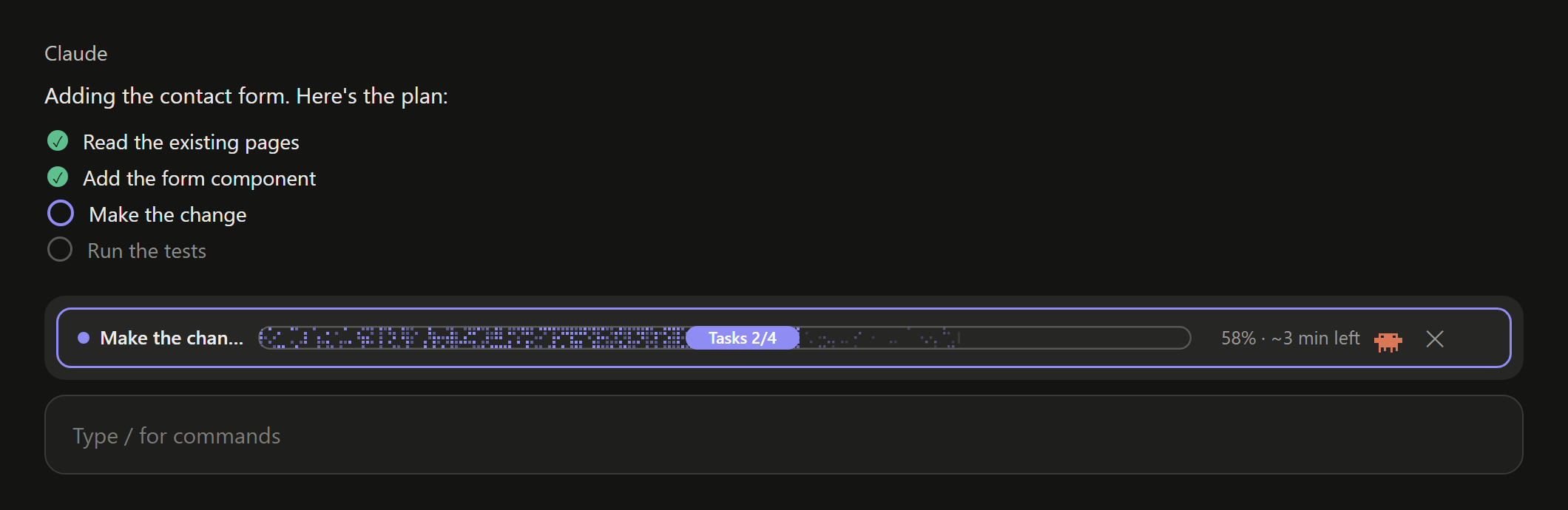
/plugin install pixel-progress --marketplace Krishna30396/Pixel-ProgressTasks 2/4.~3 min left, <1 min left, almost done. A quick request with no task list is estimated from your earlier requests in the session. When it ends, the bar reads 100% · done.Working · 0%.Ready bar. Click ✕ or type /progress to hide it; /progress brings it back.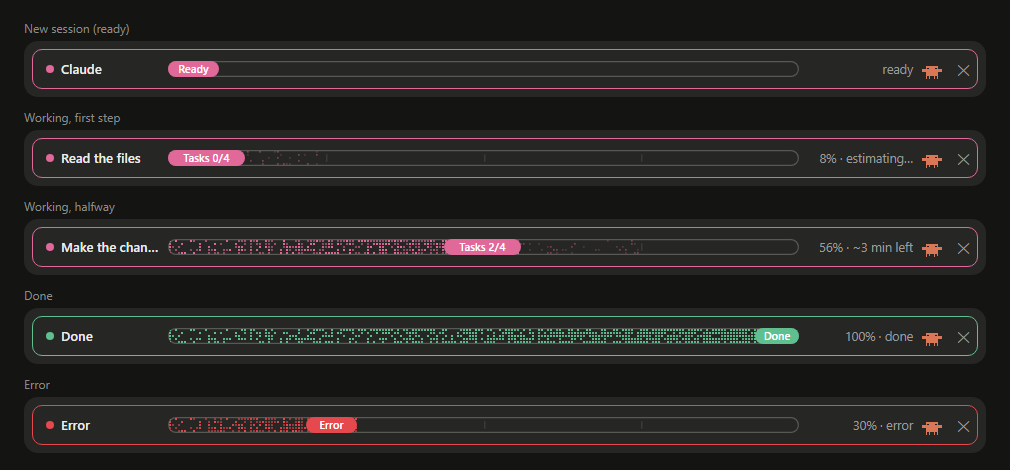
Requires Claude Code 2.1.275 or later. In a terminal session of Claude Code, type:
/plugin install pixel-progress --marketplace Krishna30396/Pixel-ProgressAnswer y to add the marketplace, then press Enter to install for your user. It is active straight away, and in every session you start after, including the Code tab of the Claude desktop app.
Or from your shell:
claude plugin marketplace add Krishna30396/Pixel-Progressclaude plugin install pixel-progress@pixel-progress| You | The bar |
|---|---|
| Start a new session | Claude · Ready, in the session colour |
| Ask for something with steps | the current step, Tasks 1/4, 25% · estimating…, then ~3 min left once a step has finished |
| Ask something quick, no steps | Working, with the time left estimated from your earlier requests |
| The request ends | Done · 100% · done, all in green |
| Something goes wrong, or you stop it | Error or Stopped, all in red |
| Send the next prompt | the bar resets to Working · 0%; the last Done never carries over |
Click ✕ or type /progress | hides the bar; /progress shows it again |
Install pixel-progress with /plugin install pixel-progress --marketplace Krishna30396/Pixel-Progress in a Claude Code terminal session. The bar appears above the prompt straight away and in every new session.
pixel-progress estimates the time left from Claude's own task list: it averages how long the finished steps took and multiplies by the steps still to go. The estimate shows estimating… until the first step finishes, then ~N min left, and gets steadier as more steps finish.
From the task list Claude already keeps while it works: the step list under Claude's messages in the desktop app, or the TodoWrite list in the terminal. On a request with no task list, the bar shows the elapsed time and the number of tools used instead.
No. It is a display-only mod: it starts no agents, makes no model calls and adds nothing to the conversation, so it costs no tokens.
Yes. Install it once from a terminal session at the user scope, and it draws in the Code tab of the Claude desktop app as well as in the terminal. It does not appear in ordinary Chat-tab conversations, which do not run plugins.
Click ✕ or type /progress to hide it; type /progress again to show it. The colour is picked at random from 7 for each new session and stays the same for that session; green is kept for done and red for errors.
A Claude Code status line is one line of text below the prompt. pixel-progress is a mod that draws a graphical bar above the prompt, follows Claude's task list step by step and estimates the time left.
claude plugin update pixel-progress@pixel-progressclaude plugin uninstall pixel-progress@pixel-progressThe mod is a Claude Code hooks module: hooks/register.tsx (the hooks), hooks/draw.ts (the bar's SVG drawing) and types/index.d.ts (its session state).
claude plugin validate .claude plugin test .Run it from a clone for one session with claude --plugin-dir .. Issues and pull requests are welcome.
The bar's drawing (the dithered pixels, the pill and the crab) is adapted from savvy-progress by johnnyvizz, under the MIT licence. pixel-progress changes its colours, gives the pixels a black track, and drives it from Claude's own task list with a time-left estimate.
<sub>Keywords: Claude Code progress bar, Claude Code ETA, Claude Code plugin, Claude Code mod, task progress, time remaining, Anthropic Claude, AI coding assistant, developer tools.</sub>
hooks/register.tsx 345 lines1import { atom, read, update } from 'claude-code'
2import type { EngineInterface, Register } from 'claude-code'
3
4import type { Run, Step } from '../types'
5import { H, rowSvg } from './draw'
6import type { Bar } from './draw'
7
8const run = atom({ plugin: 'pixel-progress', key: 'run' } as const, null)
9const isHidden = atom({ plugin: 'pixel-progress', key: 'isHidden' } as const, false)
10const now = atom({ plugin: 'pixel-progress', key: 'now' } as const, 0)
11// The session's colour, kept with the session so a plugin reload, /clear or a resume keeps it.
12const sessionColor = atom({ plugin: 'pixel-progress', key: 'color' } as const, '')
13// Seconds each finished request of this session took: the estimate for a request with no step list.
14const history = atom({ plugin: 'pixel-progress', key: 'history' } as const, [])
15
16// The colour of the outline, the dot, the dithered boxes and the pill while ready or
17// working: picked once when a session is created and kept for that session only.
18// No green or red: green is kept for done, red for something gone wrong.
19export const ACCENTS = ['#8f8cf4', '#e0699a', '#3fa7d6', '#f08a4b', '#c678dd', '#e5b84b', '#5b8def']
20/** Done: the whole bar, outline included, turns green. */
21export const DONE = '#5fbf8f'
22/** An error, a refusal or a stopped request: the whole bar turns red. */
23export const ERROR = '#e5484d'
24
25const BAR = 16
26const MAX_STEPS = 100
27const MAX_TITLE = 48
28
29const PLAN_TOOL = 'mcp__ccd_turn__update_plan'
30const WRAP_TOOL = 'mcp__ccd_turn__wrap_up'
31
32type StepInput = {
33 items?: { content?: unknown; status?: unknown }[]
34 todos?: { content?: unknown; status?: unknown }[]
35 advance?: boolean
36 done?: number[]
37 start?: number
38}
39
40// ---------------------------------------------------------------------------
41// Pure helpers: the step list, the estimate and what the bar shows.
42
43const stepsOf = (raw: StepInput['items']): Step[] =>
44 (raw ?? []).slice(0, MAX_STEPS).map(s => ({ content: String(s.content ?? '').trim(), status: String(s.status ?? 'pending') }))
45
46/**
47 * The step list after one tool call: the desktop's step list (update_plan, its
48 * advance/done/start shorthands, wrap_up ticking it off) or the terminal's
49 * TodoWrite. Null when the call does not touch a step list.
50 */
51export function applySteps(prev: Step[], tool: string, input: StepInput): Step[] | null {
52 let list: Step[]
53 if (tool === 'TodoWrite' && Array.isArray(input.todos)) {
54 list = stepsOf(input.todos)
55 } else if (tool === PLAN_TOOL) {
56 list = Array.isArray(input.items) ? stepsOf(input.items) : prev.map(s => ({ ...s }))
57 if (input.advance) {
58 const at = list.findIndex(s => s.status === 'in_progress')
59 if (at >= 0) list[at]!.status = 'completed'
60 const nextAt = list.findIndex(s => s.status === 'pending')
61 if (nextAt >= 0) list[nextAt]!.status = 'in_progress'
62 }
63 for (const n of Array.isArray(input.done) ? input.done : []) if (list[n - 1]) list[n - 1]!.status = 'completed'
64 if (typeof input.start === 'number' && list[input.start - 1]) list[input.start - 1]!.status = 'in_progress'
65 } else if (tool === WRAP_TOOL && prev.length > 0) {
66 list = prev.map(s => ({ ...s, status: 'completed' }))
67 } else {
68 return null
69 }
70 return list.length > 0 ? list : null
71}
72
73const doneOf = (steps: Step[]): number => steps.filter(s => s.status === 'completed').length
74
75/** The run after its step list changed at `at` (ms): finished steps add their time to the estimate. */
76export function withSteps(r: Run, steps: Step[], at: number): Run {
77 const gained = doneOf(steps) - doneOf(r.steps)
78 if (gained <= 0) return { ...r, steps }
79 const each = Math.max(0, (at - r.stepMarkAt) / 1000 / gained)
80 return { ...r, steps, stepMarkAt: at, durations: [...r.durations, ...Array<number>(gained).fill(each)].slice(-50) }
81}
82
83/**
84 * Seconds left, from the average finished step times the steps still to go,
85 * less what the current step has already used. Null until a step has finished.
86 */
87export function secondsLeft(r: Run, at: number): number | null {
88 const left = r.steps.length - doneOf(r.steps)
89 if (left <= 0 || r.durations.length === 0) return null
90 const avg = r.durations.reduce((a, b) => a + b, 0) / r.durations.length
91 const used = Math.min(avg, Math.max(0, (at - r.stepMarkAt) / 1000))
92 return Math.max(0, Math.round(avg * left - used))
93}
94
95/**
96 * Seconds left for a request with no step list: the average of this session's
97 * finished requests, less the time this one has run so far. Null with no history yet.
98 */
99export function historyLeft(r: Run, at: number, past: number[]): number | null {
100 if (past.length === 0) return null
101 const avg = past.reduce((a, b) => a + b, 0) / past.length
102 return Math.max(0, Math.round(avg - (at - r.startedAt) / 1000))
103}
104
105/** Time left, short: "~3 min left", "<1 min left", "almost done", or "estimating…" with nothing to go on yet. */
106export const leftText = (s: number | null): string =>
107 s === null ? 'estimating…' : s < 15 ? 'almost done' : s < 60 ? '<1 min left' : `~${Math.round(s / 60)} min left`
108
109const clip = (s: string, max: number): string => (s.length > max ? s.slice(0, max - 1) + '…' : s)
110
111export type Status = 'ready' | 'working' | 'done' | 'error' | 'stopped'
112
113/** What the bar shows: its state, the drawing's input, and the text right of the bar (time left, never time taken). */
114export type View = { status: Status; bar: Bar; right: string }
115
116/** The bar for a run (null: the session's resting bar) at `at` ms, given this session's finished request times. */
117export function viewOf(r: Run | null, at: number, past: number[] = []): View {
118 if (r === null) {
119 return { status: 'ready', bar: { title: 'Claude', total: 0, done: 0, running: 0, isFinished: false, label: 'Ready' }, right: 'ready' }
120 }
121 const total = r.steps.length
122 const done = doneOf(r.steps)
123 const percent = Math.round(100 * Math.max(0, Math.min(1, r.shown)))
124 const base = { total, done, running: 0, progress: r.shown }
125
126 if (r.outcome === 'done') return { status: 'done', bar: { ...base, title: 'Done', isFinished: true, label: 'Done' }, right: '100% · done' }
127 if (r.outcome === 'error') {
128 return { status: 'error', bar: { ...base, title: 'Error', isFinished: false, label: 'Error' }, right: `${percent}% · error` }
129 }
130 if (r.outcome === 'stopped') {
131 return { status: 'stopped', bar: { ...base, title: 'Stopped', isFinished: false, label: 'Stopped' }, right: `${percent}% · stopped` }
132 }
133
134 const current = r.steps.find(s => s.status === 'in_progress') ?? r.steps.find(s => s.status !== 'completed')
135 const left = total ? secondsLeft(r, at) : historyLeft(r, at, past)
136 return {
137 status: 'working',
138 bar: {
139 ...base,
140 running: Math.min(1, total - done),
141 title: clip(current?.content || 'Working', MAX_TITLE),
142 isFinished: false,
143 label: total ? `Tasks ${done}/${total}` : 'Working',
144 },
145 right: `${percent}% · ${leftText(left)}`,
146 }
147}
148
149/**
150 * Where the fill should be now (0..1), moving between step ticks instead of jumping:
151 * the finished steps plus how far into the current one it should be by the time
152 * steps usually take (never past 90% of it until it is ticked). Before any step has
153 * finished, and for a request with no steps, it creeps forward on a slowing curve,
154 * or by this session's earlier requests when there are some.
155 */
156export function targetOf(r: Run, at: number, past: number[] = []): number {
157 if (r.outcome === 'done') return 1
158 const total = r.steps.length
159 const creep = (secs: number, typical: number | null) =>
160 typical ? Math.min(0.95, secs / typical) : (0.9 * secs) / (secs + 45)
161 if (total === 0) {
162 const typical = past.length ? past.reduce((a, b) => a + b, 0) / past.length : null
163 return creep(Math.max(0, (at - r.startedAt) / 1000), typical)
164 }
165 const done = doneOf(r.steps)
166 if (done >= total) return 1
167 const avg = r.durations.length ? r.durations.reduce((a, b) => a + b, 0) / r.durations.length : null
168 const inStep = Math.max(0, (at - r.stepMarkAt) / 1000)
169 const part = avg ? Math.min(0.9, inStep / avg) : (0.9 * inStep) / (inStep + 45)
170 return (done + part) / total
171}
172
173/** One easing step of the shown fill toward its target: a third of the way each tick. */
174export const easeToward = (shown: number, target: number): number =>
175 Math.abs(target - shown) < 0.002 ? target : shown + (target - shown) * 0.35
176
177/** The colour of the outline, dot, pixels and pill for a state. */
178export const colorOf = (status: Status, accent: string): string =>
179 status === 'done' ? DONE : status === 'error' || status === 'stopped' ? ERROR : accent
180
181/** The terminal's text bar for a view. */
182export function textBar(v: View): string {
183 const filled = v.status === 'done' ? BAR : Math.round(BAR * Math.max(0, Math.min(1, v.bar.progress ?? 0)))
184 return '█'.repeat(filled) + '░'.repeat(BAR - filled)
185}
186
187export const newRun = (at: number): Run => ({
188 startedAt: at,
189 endedAt: null,
190 outcome: null,
191 steps: [],
192 shown: 0,
193 stepMarkAt: at,
194 durations: [],
195 tools: 0,
196})
197
198// ---------------------------------------------------------------------------
199// Engine work: each takes $ and is declared here, as the engine requires.
200
201async function startRun($: EngineInterface): Promise<void> {
202 const at = await $.clock.now()
203 await update($, run, () => newRun(at))
204 await update($, now, () => at)
205}
206
207async function resetIfFinished($: EngineInterface): Promise<void> {
208 const r = await read($, run)
209 if (r === null || r.endedAt !== null) await startRun($)
210}
211
212async function seeTool($: EngineInterface, tool: string, input: StepInput): Promise<void> {
213 const at = await $.clock.now()
214 await update($, run, r => {
215 if (r === null || r.endedAt !== null) return r
216 const steps = applySteps(r.steps, tool, input)
217 const counted = { ...r, tools: r.tools + 1 }
218 return steps ? withSteps(counted, steps, at) : counted
219 })
220 await update($, now, () => at)
221}
222
223async function endRun($: EngineInterface, reason: string): Promise<void> {
224 const at = await $.clock.now()
225 const r = await read($, run)
226 if (r === null || r.endedAt !== null) return
227 const outcome: Run['outcome'] = reason === 'answer' ? 'done' : reason === 'aborted' ? 'stopped' : 'error'
228 await update($, run, () => ({ ...r, endedAt: at, outcome, shown: outcome === 'done' ? 1 : r.shown }))
229 if (outcome === 'done') await update($, history, list => [...list, (at - r.startedAt) / 1000].slice(-20))
230 await update($, now, () => at)
231}
232
233async function tick($: EngineInterface): Promise<void> {
234 const r = await read($, run)
235 if (r === null || r.endedAt !== null) return
236 const at = await $.clock.now()
237 const target = targetOf(r, at, await read($, history))
238 await update($, run, cur => (cur === null || cur.endedAt !== null ? cur : { ...cur, shown: easeToward(cur.shown, target) }))
239 await update($, now, () => at)
240}
241
242export const register: Register = on => {
243 on('session.start', async ($, e, next) => {
244 const started = await next(e)
245 if (!(await read($, sessionColor))) {
246 const picked = ACCENTS[Math.floor(Math.random() * ACCENTS.length)] ?? ACCENTS[0]!
247 await update($, sessionColor, () => picked)
248 }
249 await $.command.register({ name: 'progress', description: 'Show or hide the task progress bar above the prompt' })
250 // Moves the fill and redraws the time left a few times a second while a request runs.
251 $.clock.every(400, () => void tick($))
252 return started
253 })
254
255 on('command.run', { command: 'progress' }, async $ => {
256 const wasHidden = await read($, isHidden)
257 await update($, isHidden, () => !wasHidden)
258 return { text: wasHidden ? 'Progress bar shown.' : 'Progress bar hidden. /progress shows it again.' }
259 })
260
261 // A new prompt resets the bar: the last request's "Done · 100%" never carries over.
262 on('prompt.submit', async ($, e, next) => {
263 await startRun($)
264 return next(e)
265 }).catch(($, e, next) => next(e))
266
267 // Backup for prompts that reach the session another way (the desktop app, the
268 // SDK): a turn that starts after the last one finished resets the bar too.
269 on('turn.start', async ($, e, next) => {
270 await resetIfFinished($)
271 return next(e)
272 }).catch(($, e, next) => next(e))
273
274 // Only the main session's own calls: a subagent's steps are not this request's.
275 on('tool.call', async ($, e, next) => {
276 if (!e.agentId) await seeTool($, e.tool, e as unknown as StepInput)
277 return next(e)
278 }).catch(($, e, next) => next(e))
279
280 on('turn.complete', async ($, e, next) => {
281 if (!e.agentId) await endRun($, e.reason)
282 return next(e)
283 })
284
285 on('ui.render', { component: 'AbovePrompt' }, async ($, e, next) => {
286 if (e.props.hasSurvey || (await read($, isHidden))) return next(e)
287 const r = await read($, run)
288
289 // Other mods' bands (savvy-progress) still draw, beneath this row. The
290 // engine's own placeholder is never nested: the desktop drops a band that nests it.
291 const drawn = await Promise.resolve(next(e)).catch(() => null)
292 const below = drawn && typeof drawn === 'object' && (drawn as { type?: string }).type !== 'engine' ? drawn : null
293
294 const at = Math.max(await read($, now), r?.startedAt ?? 0)
295 const view = viewOf(r, at, await read($, history))
296 const { bar, right } = view
297 // One colour for the outline, dot, pixels and pill: green when done, red when
298 // something went wrong, the session's colour otherwise.
299 const color = colorOf(view.status, (await read($, sessionColor)) || ACCENTS[0]!)
300 const ui = $.ui.resolve(e)
301 const { Box, Text, Button } = ui
302 const dismiss = (
303 <Button key="pixel-progress-dismiss" label="✕" plain role="dismiss" onPress={() => update($, isHidden, () => true)} />
304 )
305
306 // Desktop: savvy-progress's drawing, in a rounded outline of the state's colour.
307 if (e.surface !== 'terminal' && 'Svg' in ui) {
308 const { Svg } = ui
309 const width = Math.max(180, Math.min(1600, (e.props.bodyColumns || 100) * 8 - 80))
310 return (
311 <Box flexDirection="column">
312 <Box borderStyle="round" borderColor={color} paddingX={1} flexDirection="row" alignItems="center" gap={1}>
313 <Svg
314 source={rowSvg(bar, width, view.status === 'working', color, right)}
315 alt={`${bar.title}: ${bar.label}, ${right}`}
316 width={width}
317 height={H}
318 />
319 {dismiss}
320 </Box>
321 {below}
322 </Box>
323 )
324 }
325
326 return (
327 <Box flexDirection="column">
328 <Box borderStyle="round" borderColor={color} paddingX={1} flexDirection="row">
329 <Text wrap="truncate-end">
330 <Text color={color}>● </Text>
331 <Text bold>{bar.title} </Text>
332 <Text color={color}>{textBar(view)}</Text>
333 <Text dimColor>
334 {' '}
335 {bar.label} · {right}
336 </Text>
337 </Text>
338 {dismiss}
339 </Box>
340 {below}
341 </Box>
342 )
343 })
344}
345hooks/draw.ts 285 lines1/**
2 * The bar's drawing, copied from savvy-progress 1.2.1 by johnnyvizz (MIT,
3 * https://github.com/johnnyvizz/claude-kit) so this bar looks the same. The only
4 * change: the colour of the dot, the dithered boxes and the pill is passed in
5 * (`color`), instead of savvy-progress's fixed purple.
6 * The track behind the dots is left unfilled, so it takes the colour of the box it
7 * sits in, with a faint grey outline so its length shows even at 0%; the title, bar and
8 * right-hand text have fixed slots.
9 */
10
11/** What the drawing needs to know about progress. */
12/** What the drawing needs. `progress` (0..1), when given, is the smoothed fill; otherwise done / total. */
13export type Bar = { title: string; total: number; done: number; running: number; isFinished: boolean; label: string; progress?: number }
14
15const isRtl = () => false
16const ratio = (f: Bar): number =>
17 f.isFinished ? 1 : f.progress !== undefined ? Math.max(0, Math.min(1, f.progress)) : f.total ? f.done / f.total : 0
18const label = (f: Bar): string => f.label
19
20// Deterministic noise so the dither does not shimmer between redraws.
21const noise = (x: number, y: number): number => {
22 const s = Math.sin(x * 12.9898 + y * 78.233) * 43758.5453
23 return s - Math.floor(s)
24}
25// The whole row is one SVG: the desktop wraps sibling elements onto new lines,
26// so title, bar, percent and the crab live in one drawing; only the count and
27// the dismiss are Buttons beside it.
28export const H = 22
29const BAR_H = 16
30const CRAB_W = 26
31// The crab's drawing grid is 30 units wide, props included.
32const CRAB_BOX = 30
33const CELL = 3
34const FONT = "-apple-system,BlinkMacSystemFont,'SF Pro Text','Segoe UI',sans-serif"
35
36const xml = (s: string): string =>
37 s.replace(/[&<>"]/g, c => ({ '&': '&', '<': '<', '>': '>', '"': '"' })[c] ?? c)
38
39const clip = (s: string, max: number): string => (s.length > max ? s.slice(0, Math.max(1, max - 1)) + '…' : s)
40
41// CJK, fullwidth forms and emoji advance about 1em; at 0.56em a Chinese title was sized at half its width and the bar drew over it.
42// 中日韩文字、全角标点和 emoji 约占 1em;按 0.56em 算时中文标题宽度被低估近一半,进度条会压到标题上。
43const WIDE =
44 /[\u1100-\u115F\u2E80-\u303E\u3041-\u33FF\u3400-\u4DBF\u4E00-\u9FFF\uA960-\uA97F\uAC00-\uD7A3\uF900-\uFAFF\uFE30-\uFE4F\uFF01-\uFF60\uFFE0-\uFFE6\u{1F300}-\u{1FAFF}\u{20000}-\u{3FFFD}]/u
45
46// Rough advance of system UI text, in em; good enough to size the title's slot.
47const charEm = (ch: string): number =>
48 WIDE.test(ch) ? 1 : /[\s.,:;'|!il1()[\]]/.test(ch) ? 0.3 : /[A-ZА-ЯЁmwшщжюМШЩЖЮ@%]/.test(ch) ? 0.72 : 0.56
49
50const textWidth = (s: string, size: number): number => [...s].reduce((w, ch) => w + charEm(ch) * size, 0)
51
52// Cuts `s` to fit `maxW` pixels, with an ellipsis when it had to cut.
53const fitText = (s: string, size: number, maxW: number): string => {
54 if (textWidth(s, size) <= maxW) return s
55 let out = ''
56 for (const ch of s) {
57 if (textWidth(out + ch + '…', size) > maxW) break
58 out += ch
59 }
60 return out + '…'
61}
62
63/** The fixed slot right of the bar for the percent and the time left ("100% · ~12 min left" fits). */
64export const RIGHT_SLOT = 114
65
66export const rowSvg = (f: Bar, W: number, isWorking: boolean, color: string, right: string): string => {
67 // Fixed slots, so the bar never moves or resizes as the text changes: the title
68 // gets a fixed 101px (a bar of about 630px in a 900px row), the percent and time left a fixed slot on the right,
69 // and the bar the fixed length between them. Text too long for its slot is cut with "…".
70 const TITLE_SLOT = 101
71 const title = fitText(f.title, 13, TITLE_SLOT)
72 const BAR_X = 16 + TITLE_SLOT + 6
73 const BAR_W = Math.max(60, W - BAR_X - RIGHT_SLOT - 6 - CRAB_W)
74
75 const y0 = (H - BAR_H) / 2
76 const fillW = Math.round(BAR_W * ratio(f))
77 const runW = Math.max(fillW, f.total ? Math.round((BAR_W * Math.min(f.total, f.done + f.running)) / f.total) : 0)
78 const dots: string[] = []
79 // Positions are worked out left to right; right to left mirrors each box
80 // inside the bar (`bx`) and across the row (`rx`). Text is never mirrored.
81 const rtl = isRtl()
82 const bx = (x: number, w: number): number => (rtl ? BAR_W - x - w : x)
83 const rx = (x: number, w: number): number => (rtl ? W - x - w : x)
84
85 // Dithered fill: sparse at the start, dense toward the head.
86 const cols = Math.floor(fillW / CELL)
87 const rows = Math.floor(BAR_H / CELL)
88 for (let c = 0; c < cols; c++) {
89 const density = 0.35 + 0.6 * Math.pow(c / Math.max(1, cols), 1.2)
90 for (let r = 0; r < rows; r++) {
91 if (noise(c, r) < density) dots.push(`<rect class="t${Math.floor(noise(r, c) * 4)}" x="${bx(c * CELL + 1, 2)}" y="${r * CELL + 1}" width="2" height="2"/>`)
92 }
93 }
94 // Handed to workers, not yet accepted: a faint second layer.
95 const faint: string[] = []
96 for (let c = cols; c < Math.floor(runW / CELL); c++) {
97 for (let r = 0; r < rows; r++) {
98 if (noise(c + 7, r + 3) < 0.2) faint.push(`<rect class="t${Math.floor(noise(r + 5, c) * 4)}" x="${bx(c * CELL + 1, 1.7)}" y="${r * CELL + 1}" width="1.7" height="1.7"/>`)
99 }
100 }
101
102 const ticks: string[] = []
103 for (let i = 1; i < f.total; i++) {
104 const x = Math.round((BAR_W * i) / f.total)
105 if (x > fillW + 4) ticks.push(`<rect x="${bx(x, 1.5)}" y="${BAR_H / 2 - 4}" width="1.5" height="8" rx="0.75"/>`)
106 }
107
108 const text = label(f)
109 const pillW = Math.round(18 + text.length * 6.6)
110 const pillX = bx(Math.max(0, Math.min(BAR_W - pillW, fillW - pillW)), pillW)
111 const percent = fitText(right, 12.5, RIGHT_SLOT)
112 // `direction="rtl"` puts Hebrew words and numbers in reading order; `start` is then the right edge.
113 const titleAt = rtl ? `x="${W - 16}" direction="rtl" text-anchor="start"` : 'x="16"'
114 const percentAt = rtl ? `x="${CRAB_W + 6}" y="${H / 2 + 4.5}"` : `x="${W - CRAB_W - 6}" y="${H / 2 + 4.5}" text-anchor="end"`
115 const crabW = CRAB_BOX * 0.8
116
117 return `<svg xmlns="http://www.w3.org/2000/svg" width="${W}" height="${H}" viewBox="0 0 ${W} ${H}">
118<style>
119.t{fill:#1f1f1f}.m{fill:#8a8a8a}.k{fill:none;stroke-width:1.2}.tk{fill:#3a3a3a}
120@media (prefers-color-scheme: dark){.t{fill:#ececec}.m{fill:#9a9a9a}.k{fill:none;stroke-width:1.2}.tk{fill:#3a3a3a}}
121/* Pixels twinkle in four out-of-phase groups; a finished bar settles to a slow glow. */
122.t0,.t1,.t2,.t3{animation:tw ${f.isFinished ? 3.2 : 2.2}s ease-in-out infinite}
123.t1{animation-duration:${f.isFinished ? 3.8 : 2.8}s;animation-delay:-.7s}.t2{animation-duration:${f.isFinished ? 4.4 : 1.9}s;animation-delay:-1.3s}.t3{animation-duration:${f.isFinished ? 3.5 : 3.3}s;animation-delay:-.4s}
124@keyframes tw{0%,100%{opacity:1}50%{opacity:${f.isFinished ? 0.8 : 0.3}}}
125@media (prefers-reduced-motion: reduce){.t0,.t1,.t2,.t3{animation:none}}
126</style>
127<defs><clipPath id="c"><rect x="0" y="0" width="${BAR_W}" height="${BAR_H}" rx="${BAR_H / 2}"/></clipPath></defs>
128<circle cx="${rtl ? W - 5 : 5}" cy="${H / 2}" r="4" fill="${color}"/>
129<text class="t" ${titleAt} y="${H / 2 + 4.5}" font-family="${FONT}" font-size="13" font-weight="500">${xml(title)}</text>
130<g transform="translate(${rx(BAR_X, BAR_W)},${y0})">
131<rect class="k" x="0.6" y="0.6" width="${BAR_W - 1.2}" height="${BAR_H - 1.2}" rx="${(BAR_H - 1.2) / 2}" stroke="#8a8a86" stroke-opacity="0.5"/>
132<g clip-path="url(#c)">
133<g fill="${color}">${dots.join('')}</g>
134<g fill="${color}" opacity="0.45">${faint.join('')}</g>
135<g class="tk">${ticks.join('')}</g>
136</g>
137<rect x="${pillX}" width="${pillW}" height="${BAR_H}" rx="${BAR_H / 2}" fill="${color}"/>
138<text x="${pillX + pillW / 2}" y="${BAR_H / 2 + 4}" text-anchor="middle"${rtl ? ' direction="rtl"' : ''} font-family="${FONT}" font-size="11" font-weight="600" fill="#ffffff">${xml(text)}</text>
139</g>
140<text class="m" ${percentAt} font-family="${FONT}" font-size="12.5" font-variant-numeric="tabular-nums">${xml(percent)}</text>
141${CRAB_CSS}${crab(rx(W - CRAB_W + 1, crabW), 0, 'other', false, isWorking, 0.8, rtl)}
142</svg>`
143}
144
145
146const TIER_COLOR: Record<string, string> = {
147 fable: '#7F77DD',
148 heavy: '#D85A30',
149 careful: '#BA7517',
150 medium: '#378ADD',
151 light: '#1D9E75',
152 other: '#888780',
153}
154
155// What each savvy tier runs on, for planned tasks that have no run yet.
156const colorOf = (tier: string): string => TIER_COLOR[tier] ?? '#888780'
157
158const tierOf = (type: string): string => {
159 const bare = type.replace(/^[^:]*:/, '')
160 const t = bare.replace(/^savvy-/, '').toLowerCase()
161 return Object.hasOwn(TIER_COLOR, t) && bare.startsWith('savvy-') ? t : 'other'
162}
163
164const CLAY = '#D97757'
165const INK = '#1F1E1D'
166
167// `cls` puts a pixel in a named group: `bd` (the default) is the body and its
168// costume, `la`/`lb` the leg pairs, anything else a prop with its own motion.
169type Fill = (x: number, y: number, w: number, h: number, c: string, cls?: string) => void
170
171const stamp = (f: Fill, x: number, y: number, rows: string[], map: Record<string, string>, cls?: string): void =>
172 rows.forEach((row, dy) => [...row].forEach((ch, dx) => map[ch] && f(x + dx, y + dy, 1, 1, map[ch] ?? '', cls)))
173
174// `armCls` lets a raised claw travel with the prop it holds.
175const crabBody = (f: Fill, armFront = 0, armCls?: string): void => {
176 f(7, 10, 16, 12, CLAY)
177 f(3, 14, 4, 4, CLAY)
178 f(23, 14 + armFront, 4, 4, CLAY, armCls)
179 f(9, 12, 2, 2, INK)
180 f(19, 12, 2, 2, INK)
181 f(7, 22, 2, 4, CLAY, 'la')
182 f(17, 22, 2, 4, CLAY, 'la')
183 f(11, 22, 2, 4, CLAY, 'lb')
184 f(21, 22, 2, 4, CLAY, 'lb')
185}
186
187// Pure CSS, run by the compositor: no redraws. Periods divide one second, so the
188// once-a-second redraw of a running row restarts them in phase. Every crab walks;
189// each costume adds its prop's own motion on top.
190const CRAB_CSS = `<style>
191.run .la{animation:st .5s steps(1) infinite}.run .lb{animation:st .5s steps(1) infinite -.25s}
192.run .bd{animation:bob .5s steps(1) infinite -.125s}
193.run g{transform-box:fill-box}
194@keyframes st{50%{transform:translateY(-1px)}}@keyframes bob{50%{transform:translateY(1px)}}
195.c-fable.run{animation:float 1s ease-in-out infinite}
196.c-fable.run .la,.c-fable.run .lb,.c-fable.run .bd{animation:none}
197.c-fable.run .ant{animation:blink 1s steps(1) infinite}
198.c-fable.run .star{animation:blink .5s steps(1) infinite -.25s}
199@keyframes float{50%{transform:translateY(-2px)}}@keyframes blink{50%{opacity:.15}}
200.c-heavy.run .it{animation:scan 1s steps(1) infinite}
201.c-heavy.run .gl{animation:blink 1s steps(1) infinite -.5s}
202@keyframes scan{25%{transform:translate(-1px,1px)}50%{transform:translate(-2px,2px)}75%{transform:translate(-1px,1px)}}
203.c-careful.run .it{transform-origin:100% 100%;animation:twist .5s ease-in-out infinite}
204@keyframes twist{50%{transform:rotate(-35deg)}}
205.c-medium.run .pan{transform-origin:0 50%;animation:tilt 1s ease-in-out infinite}
206.c-medium.run .egg{animation:flip 1s ease-in-out infinite}
207@keyframes tilt{20%,40%{transform:rotate(-12deg)}}@keyframes flip{30%{transform:translateY(-5px) scaleY(-1)}60%{transform:translateY(0)}}
208.c-light.run .la{animation-duration:.25s}.c-light.run .lb{animation-duration:.25s;animation-delay:-.125s}
209.c-light.run .flag{transform-origin:0 50%;animation:wave .25s steps(1) infinite}
210@keyframes wave{50%{transform:skewY(-12deg) scaleX(.85)}}
211.c-explore.run .it{transform-origin:50% 100%;animation:fence .5s ease-in-out infinite}
212@keyframes fence{50%{transform:rotate(25deg)}}
213@media (prefers-reduced-motion: reduce){.run,.run g{animation:none!important}}
214</style>`
215
216const COSTUMES: Record<string, (f: Fill, t: string) => void> = {
217 // Fable: astronaut in a glass dome; floats instead of walking, the antenna and the star blink.
218 fable: (f, t) => {
219 crabBody(f)
220 f(6, 7, 18, 1, '#E6E8EE'); f(5, 8, 1, 14, '#E6E8EE'); f(24, 8, 1, 14, '#E6E8EE'); f(6, 22, 18, 1, '#C9CCD2')
221 f(6, 8, 18, 14, 'rgba(169,214,245,.32)'); f(8, 9, 2, 1, '#fff'); f(8, 10, 1, 2, '#fff')
222 f(14, 4, 2, 3, '#C9CCD2'); f(14, 2, 2, 2, t, 'ant'); f(13, 18, 4, 2, t)
223 f(27, 3, 1, 3, '#F5C542', 'star'); f(26, 4, 3, 1, '#F5C542', 'star')
224 },
225 // Heavy: detective with a deerstalker; the magnifier sweeps and glints.
226 heavy: (f, t) => {
227 crabBody(f, -4, 'it')
228 stamp(f, 6, 3, ['......bbbbbb......', '....bbcbbcbbbb....', '...bbbbbbbbbbbb...', '..bcbbcbbcbbcbbb..', '.bbbbbbbbbbbbbbbb.', 'dddddddddddddddddd'], { b: '#7A4A26', c: '#A0703F', d: '#5A3519' })
229 f(6, 9, 18, 1, t)
230 stamp(f, 23, 1, ['.kkk.', 'k...k', 'k...k', 'k...k', '.kkk.'], { k: '#3A3A3C' }, 'it')
231 f(24, 2, 3, 3, 'rgba(169,214,245,.7)', 'it'); f(25, 6, 1, 4, '#7A4A26', 'it'); f(24, 2, 1, 1, '#fff', 'gl')
232 },
233 // Careful: engineer in a hard hat; the wrench turns a bolt.
234 careful: (f, t) => {
235 crabBody(f)
236 stamp(f, 6, 4, ['.....yyyyyyyy.....', '...yyyyyhhyyyyy...', '..yyyyyyhhyyyyyy..', '..yyyyyyhhyyyyyy..', '.yyyyyyyhhyyyyyyy.', 'dddddddddddddddddd'], { y: '#F5C542', h: '#FBE08A', d: '#C99A1E' })
237 f(13, 5, 4, 2, t)
238 stamp(f, 0, 10, ['.s.s', 'sss.', '.s..', '.s..'], { s: '#8E929A' }, 'it')
239 },
240 // Medium: chef, the toque traced from DockCrab's Sprites.chefHat; tosses the omelette.
241 medium: (f, t) => {
242 crabBody(f, -4, 'pan')
243 stamp(f, 6, 0, ['........lll.......', '.......lllll......', '.wwwwgwwwwwwgwwwww', 'wwwwwwwwwwwwwwwwww', 'wwwwwwwwwwwwwwwwww', 'wwwwwgwwwwwggwwwww', '.wwwwgwwwwwggwwwww', '.dddbbbbbbbbbbbbb.', '.dddbbbbbbbbbbbbb.', '.dddbbbbbbbbbbbbb.'], { w: '#F4F3EE', l: '#F7F6F2', g: '#D2D1C8', b: t, d: '#B45F43' })
244 f(22, 8, 7, 2, '#4A4A48', 'pan'); f(26, 10, 1, 1, '#4A4A48', 'pan'); f(24, 7, 3, 1, '#F5B731', 'egg')
245 },
246 // Light: racer in a helmet; runs at double pace, the checkered flag flutters.
247 light: (f, t) => {
248 crabBody(f, -4)
249 stamp(f, 6, 5, ['....rrrrrrrrrr....', '..rrrrrrwwrrrrrr..', '.rrrrrrrwwrrrrrrr.', '.rrrrrrrwwrrrrrrr.', '.rrrrrrrwwrrrrrrr.', '.kkkkkkkkkkkkkkkkr'], { r: t, w: '#F8F6F1', k: INK })
250 f(25, 1, 1, 9, '#8E929A')
251 stamp(f, 26, 1, ['wkwk', 'kwkw', 'wkwk'], { w: '#F8F6F1', k: INK }, 'flag')
252 },
253 // Explore: pirate scouting the code; the cutlass fences.
254 explore: f => {
255 crabBody(f)
256 stamp(f, 5, 3, ['.kk..............kk.', '.kkk....kkkk....kkk.', '..kkkkkkkwwkkkkkkk..', '..kkkkkkkkkkkkkkkk..', '.gggggggggggggggggg.'], { k: '#55514C', w: '#F8F6F1', g: '#F5C542' })
257 f(7, 11, 11, 1, INK); f(18, 11, 4, 3, INK)
258 f(27, 6, 1, 9, '#C9CCD2', 'it'); f(26, 15, 3, 1, '#7A4A26', 'it')
259 },
260 other: f => crabBody(f),
261}
262
263const costumeOf = (type: string): string => (type === 'Explore' ? 'explore' : tierOf(type))
264
265const CRAB_SCALE = 1.1
266
267// Body and props nest inside `bd` so a prop rides the bob and adds its own motion;
268// legs stay outside it and step on their own. `mirror` flips the crab inside its
269// own box (x .. x + CRAB_BOX * scale) so it faces left.
270const crab = (x: number, y: number, costume: string, dim = false, isWalking = false, scale = CRAB_SCALE, mirror = false): string => {
271 const groups = new Map<string, string[]>([['bd', []]])
272 const f: Fill = (cx, cy, w, h, c, cls = 'bd') => {
273 if (!groups.has(cls)) groups.set(cls, [])
274 groups.get(cls)?.push(`<rect x="${cx}" y="${cy}" width="${w}" height="${h}" fill="${c}"/>`)
275 }
276 const draw = COSTUMES[costume] ?? ((g: Fill) => crabBody(g))
277 draw(f, colorOf(costume))
278 const group = (cls: string) => `<g class="${cls}">${(groups.get(cls) ?? []).join('')}</g>`
279 const props = [...groups.keys()].filter(k => k !== 'bd' && k !== 'la' && k !== 'lb')
280 const body = `<g class="bd">${(groups.get('bd') ?? []).join('')}${props.map(group).join('')}</g>`
281 const place = mirror ? `translate(${x + CRAB_BOX * scale},${y}) scale(${-scale},${scale})` : `translate(${x},${y}) scale(${scale})`
282 return `<g transform="${place}" opacity="${dim ? 0.45 : 1}" shape-rendering="crispEdges"><g class="c-${costume}${isWalking ? ' run' : ''}">${body}${group('la')}${group('lb')}</g></g>`
283}
284
285types/index.d.ts 26 lines1/** One step of a task's step list, as the step tools report it. */
2export type Step = { content: string; status: string }
3
4/** The request in progress (or the last one), as the bar draws it. */
5export type Run = {
6 startedAt: number
7 /** Set when the turn ends. */
8 endedAt: number | null
9 /** How the request ended: shown green (done) or red (error, stopped). */
10 outcome: "done" | "error" | "stopped" | null
11 steps: Step[]
12 /** The fill shown (0..1): eased toward the estimate a few times a second, so the bar moves smoothly. */
13 shown: number
14 /** When the last step finished, or the run started. */
15 stepMarkAt: number
16 /** Seconds each finished step took, for the time-left estimate. */
17 durations: number[]
18 tools: number
19}
20
21declare module 'claude-code' {
22 interface PluginState {
23 'pixel-progress': { run: Run | null; isHidden: boolean; now: number; color: string; history: number[] }
24 }
25}
26