tint
Restyles your message and Claude's reply, in two looks that follow macOS dark and light.
newspinnerrowscommandprocesstimer

Restyles your message and Claude's reply, in two looks that follow macOS dark and light.
A Claude Code mod that restyles the terminal session. Your message and Claude's reply show as blocks, the small rows around them start on the same left edge, and a status line under the prompt shows the model, the folder and how much context is used.
| Warm dark | Warm light |
|---|---|
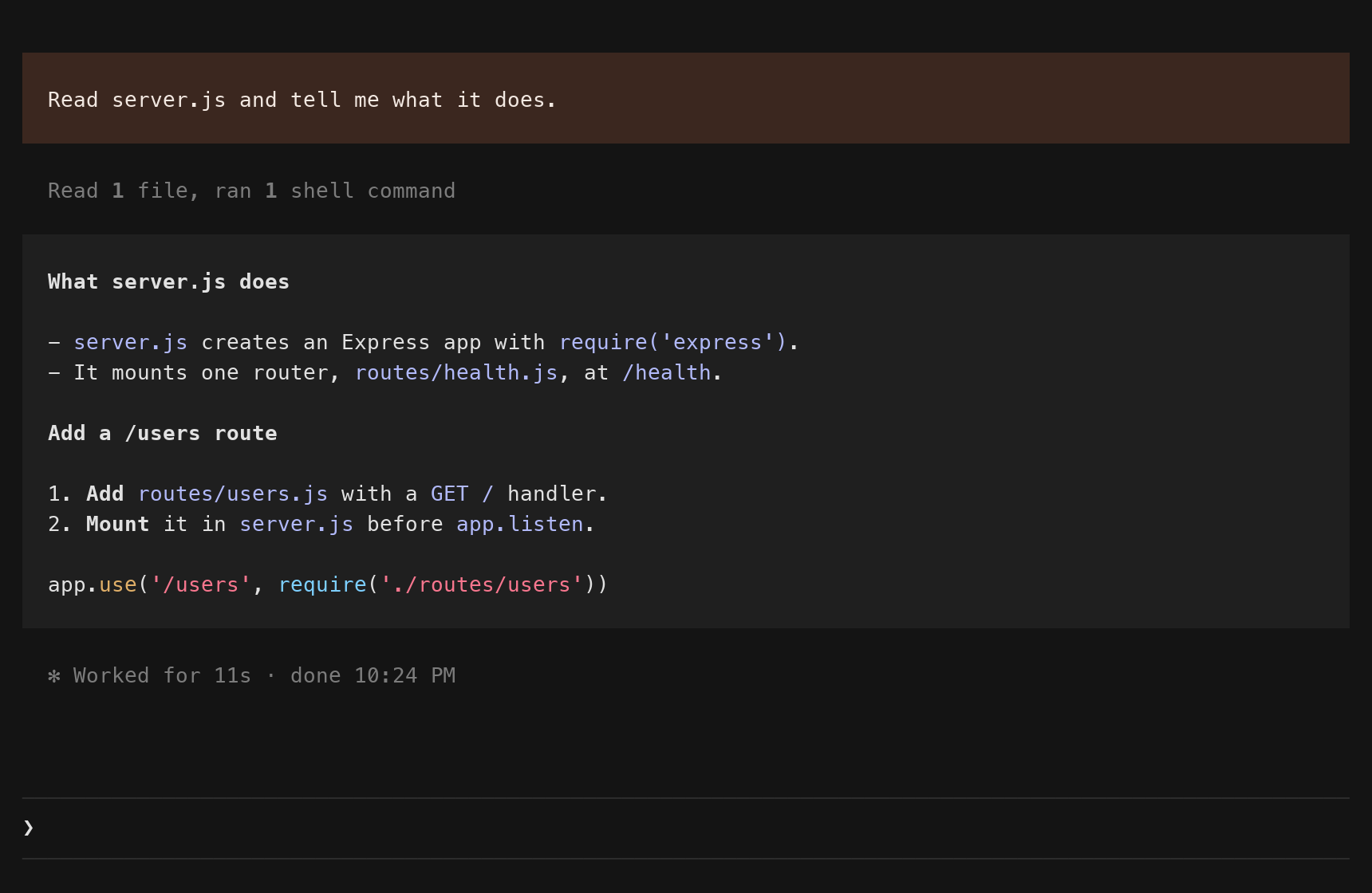 | 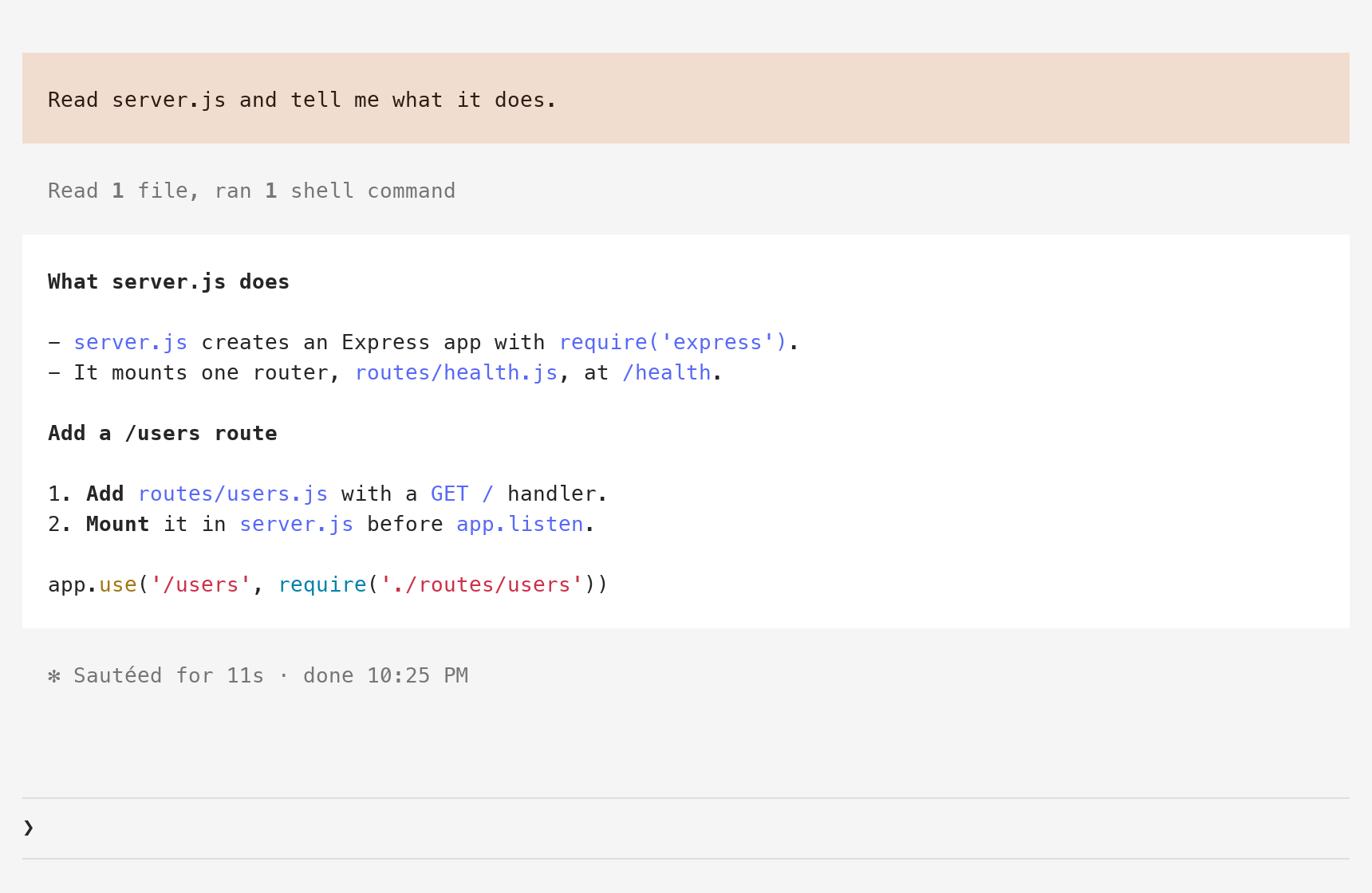 |
| Grok dark | Grok light |
|---|---|
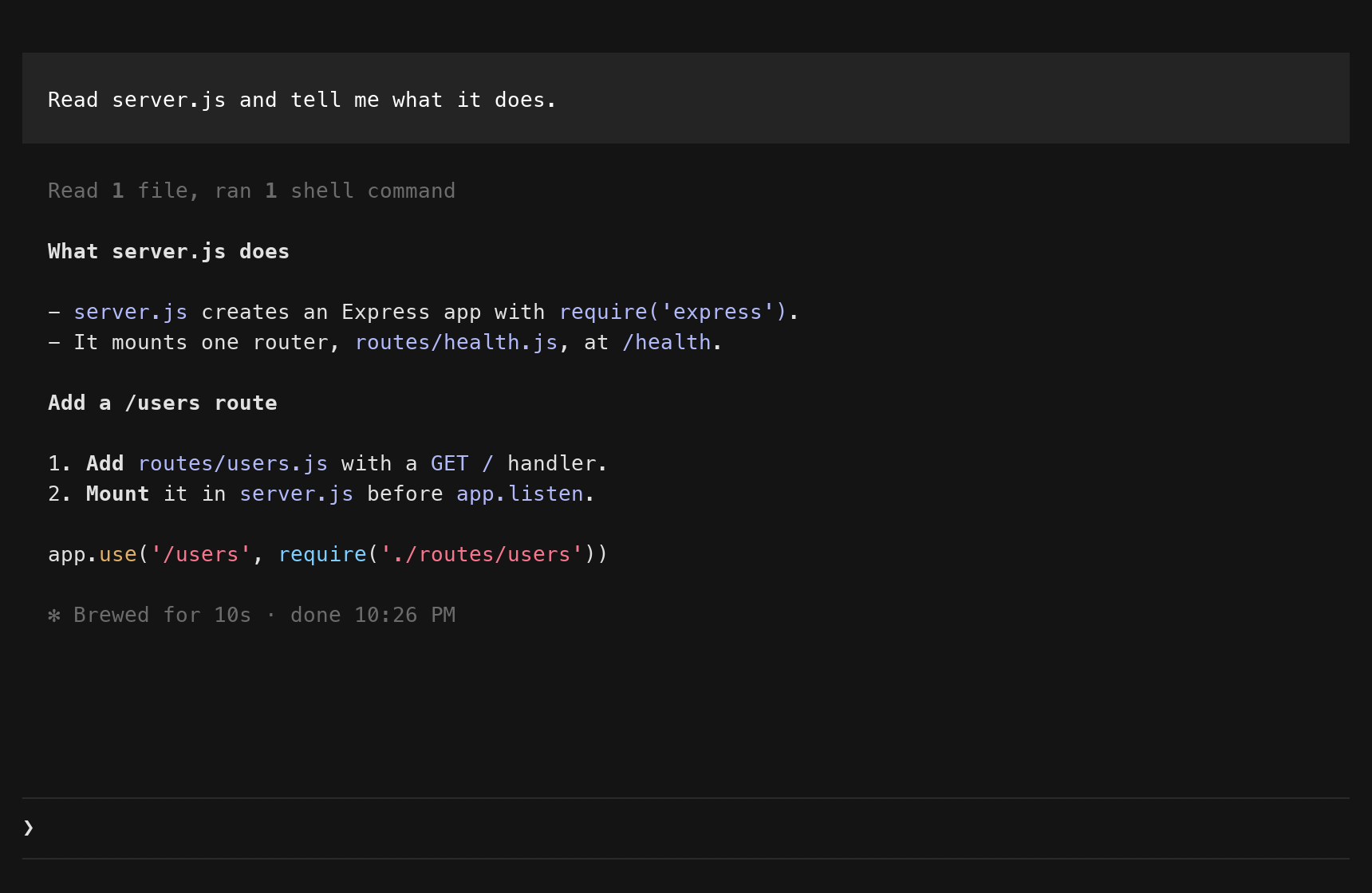 | 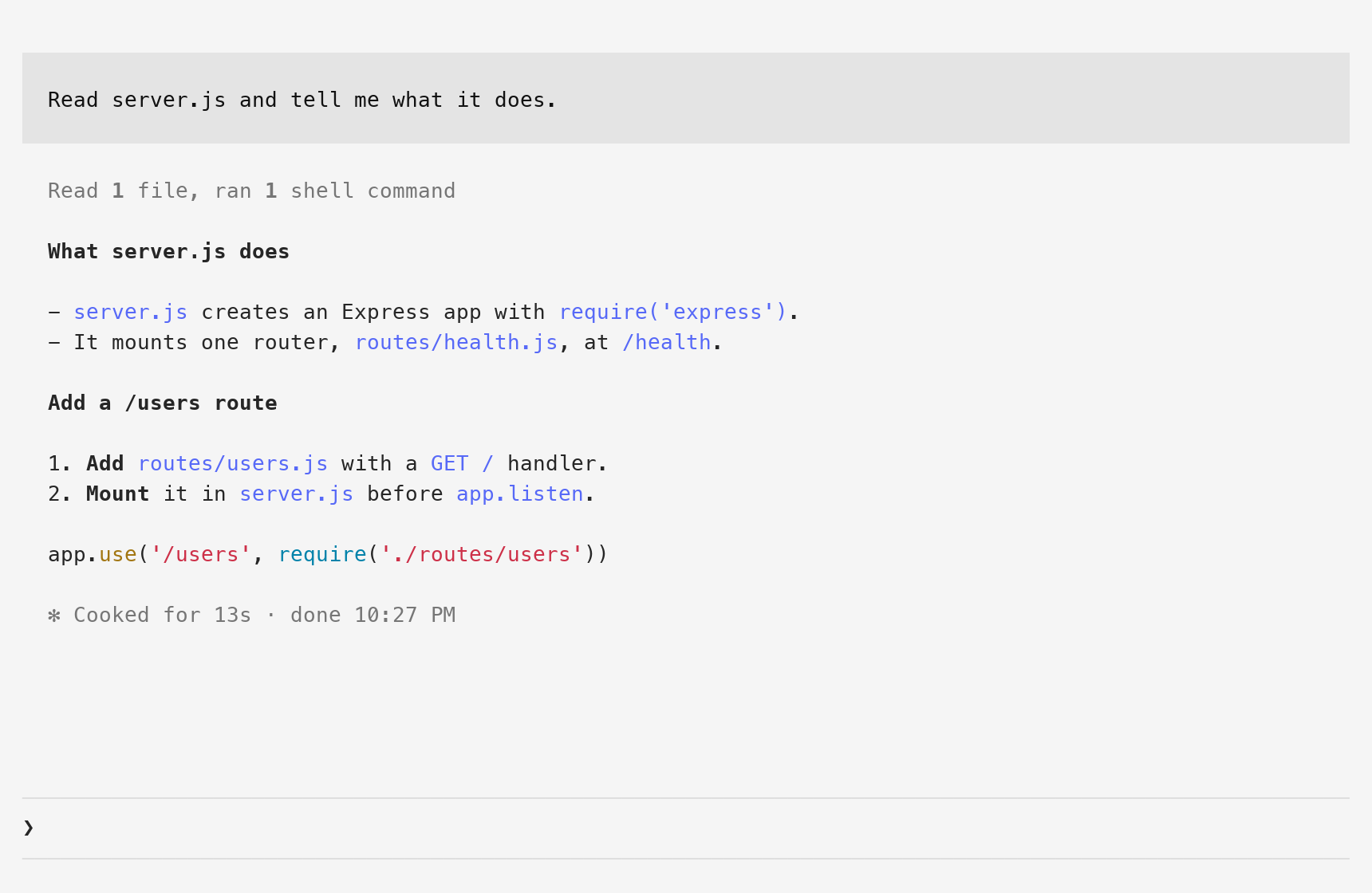 |
The pictures are from a test terminal that draws in Menlo, on a made-up project called demo-app.
/tint, which switches the look in every open session.
In a Claude Code terminal session:
/plugin install tint --marketplace krishna-goutham-tls/cc-modsAnswer y to add the marketplace, then pick a scope. The user scope loads tint in every session.
Then start a new session. At the start of a session the mod puts two files in Claude Code's config folder, ~/.claude:
themes/tint.json, the theme you pick in the next step but one.tint/statusline.sh, a copy of the status line script.The session looks the same as before until you pick the theme.
Add one line to ~/.claude/settings.json:
"statusLine": { "type": "command", "command": "bash ~/.claude/tint/statusline.sh" }The mod itself lives in a folder that has its version in the path, so that path changes with every update. ~/.claude/tint/statusline.sh stays the same. The mod copies the script there at the start of a session, and copies it again when an update changes it.
The status line works without the theme, and the theme works without the status line.
Type /theme and choose "Tint (auto)". Claude Code stores the choice as custom:tint.
Claude Code does not let a mod set a custom theme, so you pick it once by hand. From then on the mod rewrites the theme's file, ~/.claude/themes/tint.json, when the look or the mode changes. Claude Code reads a theme file again when it changes, in every open session.
"Tint (auto)" is the only tint theme in /theme. You pick the look with /tint, and the mode comes from macOS.
The colors assume that your terminal is dark when macOS is dark, and light when macOS is light. Claude Code draws the text of a reply in the terminal's own text color, and the mod cannot change that. If the terminal and macOS disagree, the reply in the warm look is hard to read.
With any other theme the session looks standard.
| You type | What happens |
|---|---|
/tint, /tint next | Switches to the other look |
/tint warm, /tint grok | Switches to that look |
The answer is one line with the look and the mode, for example grok dark. The blocks and the colors change in every open session within 5 seconds, and the status line follows.
/tint works while the theme is "Tint (auto)". With another theme it answers pick Tint (auto) in /theme first.
Running /tint does not call the model. Claude Code keeps the command and its one line of output in the conversation, so Claude reads them with your next prompt. That is a few dozen tokens for each run.
On macOS the mod asks the system for the mode at the start of a session and then every 5 seconds, with defaults read -g AppleInterfaceStyle. When the mode or the look has changed, it writes tint.json again. The mod API has no event for a change of mode, so the mod polls. It writes nothing while the file is already right.
On Linux there is no defaults command. The mod keeps the mode that tint.json already holds, and a new tint.json is dark. /tint still switches the look. There is no way to get the light colors there yet.
On Windows the mod needs HOME and the mv command, which Git Bash and WSL have. Without them it writes nothing. The status line script needs bash.
tint has not been run on Linux or Windows. The two paragraphs above come from the code and its tests.
jq is optional. The status line script uses jq when it finds it and python3 when it does not.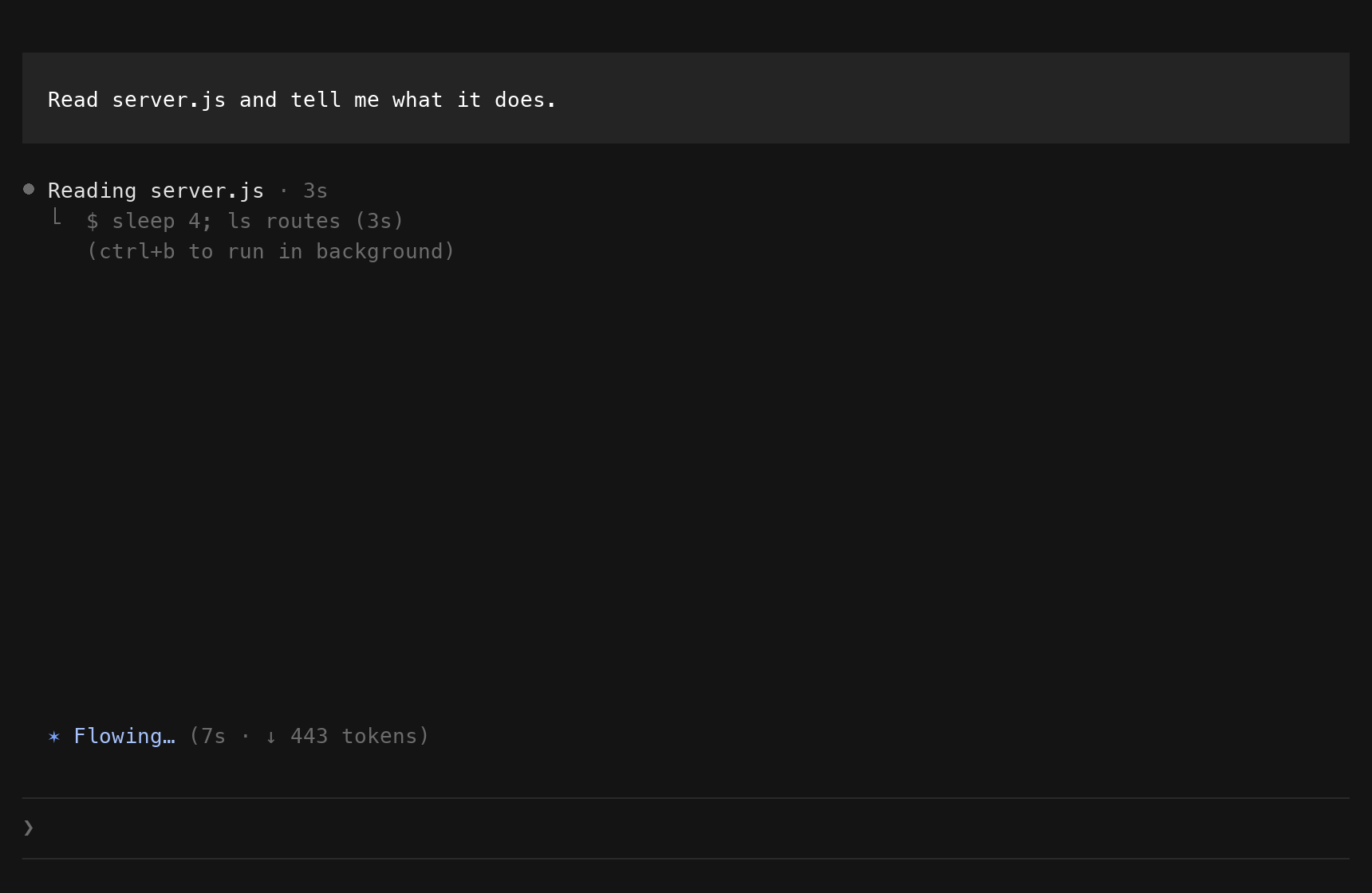
The ctrl+o view keeps the standard drawing for your message and the tool rows.
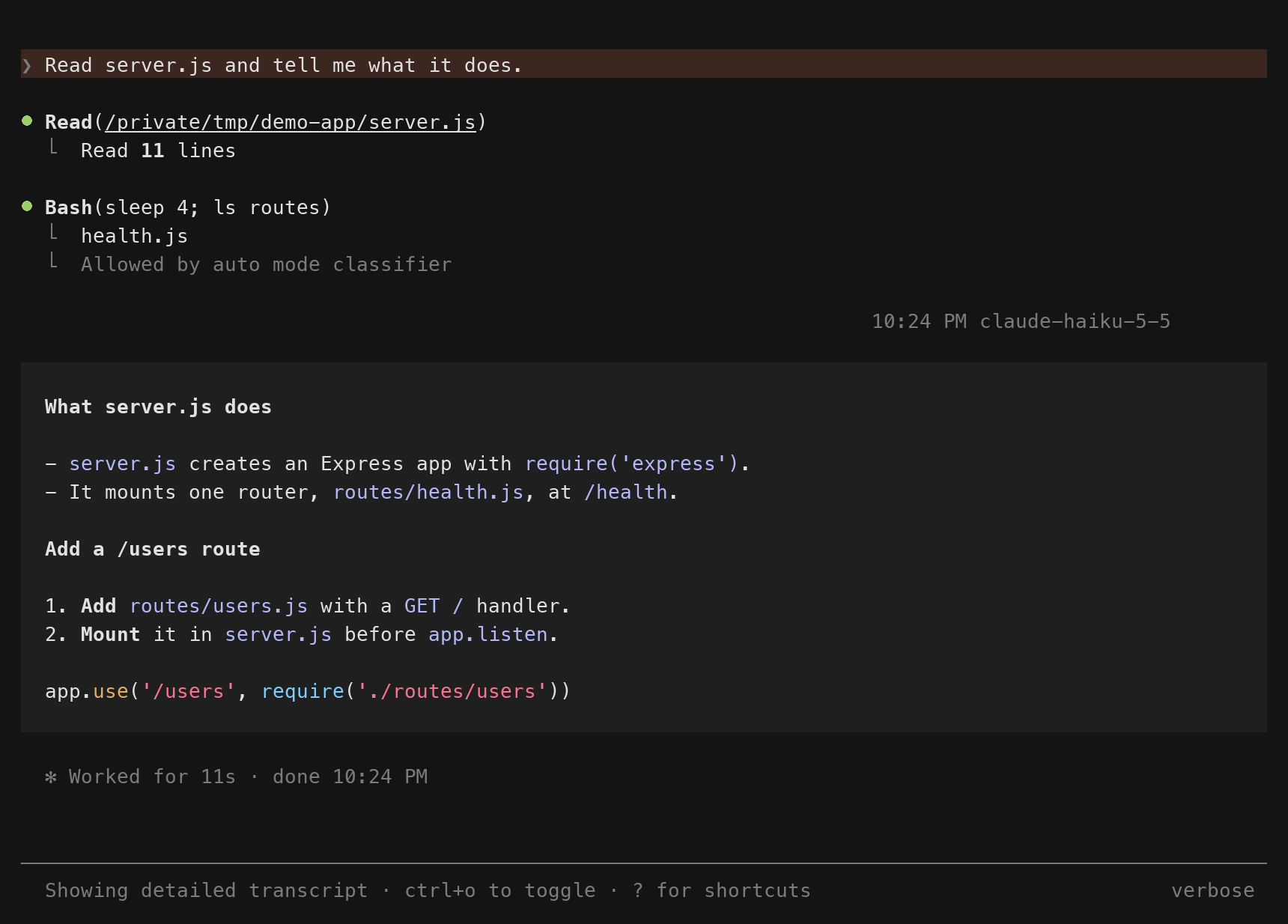
The mod API of Claude Code is early access. A later release can change it and break tint. If a session looks wrong after an update, pick another theme in /theme and the mod stops drawing.
A mod runs inside Claude Code, so it is fair to ask what this one does.
themes/tint.json, tint/active, which holds the look, and tint/statusline.sh. It writes a draft of tint.json next to tint/active and moves it into place with mv.theme setting, and its own looks/ and statusline/ folders.defaults, to ask macOS for the mode, and mv.settings.json.claude plugin validate tint, run from the root of the repo, prints the calls from the source.
The config folder is ~/.claude, or the folder in CLAUDE_CONFIG_DIR when Claude Code was started with one. The status line script reads the same folder.
looks/ has the four sets of colors. tint.json always holds one of them with the name set to "Tint (auto)". To change a color, change it in these four files.hooks/register.tsx has the hooks: the blocks, /tint, and the timer that keeps tint.json in step.hooks/palette.ts has the two colors that no theme key holds: the text color in your block and the fill of the reply.statusline/statusline.sh reads the session JSON on stdin and prints one line. The field list is at https://code.claude.com/docs/en/statusline.Every open session runs the same timer. Each one computes the same text for tint.json from the look file, the mode and the four source files, so two sessions write the same bytes. If two sessions disagree about the mode, each writes once and then leaves the file alone for 60 seconds.
The mod draws three rows itself: your prompt, Claude's reply and the output of a slash command. Claude Code's own markdown renderer draws the reply inside the block, so tables, code fences and links work as before. The spinner and the line that ends a turn keep the standard drawing and move two columns right. A task notification, a message from another agent and an error line keep the standard drawing.
tint is one of two mods in the cc-mods repo. Its folder is tint/.
git clone https://github.com/krishna-goutham-tls/cc-mods
cp -R cc-mods/tint tint-dev && cd tint-dev
cp -R looks themes
claude --plugin-dir . --settings '{"theme":"custom:tint:tint-warm-dark"}'
The copy of looks/ as themes/ gives that session four fixed themes, one for each look and mode. The --settings part forces one of them, so the mod writes no theme file while you try a change. AGENTS.md says why that matters.
claude plugin validate .
claude plugin test .
npx -p typescript tsc -p .
Test the status line by hand:
echo '{"model":{"display_name":"Opus"},"workspace":{"current_dir":"'"$PWD"'"},"context_window":{"used_percentage":25}}' | statusline/statusline.shOpen work is in TRACKER.md.
MIT
hooks/register.tsx 290 lines1// tint: your message and Claude's reply as blocks, in two looks, warm and grok,
2// and the small rows around them on the same left edge. The mod draws while the
3// theme is "Tint (auto)" (`custom:tint`) or one of the fixed tint themes. For "Tint (auto)" it
4// keeps the theme file in step with the look and with macOS dark and light.
5import { atom, read } from 'claude-code'
6import type { EngineInterface, Register } from 'claude-code'
7
8import type { TintActive, TintLook, TintMode } from '../types'
9import { LIVE, PALETTE, fixedOf, liveText, lookOf, modeOf } from './palette'
10
11/** How often the mod reads the theme, the look file and the macOS mode. */
12const POLL_MS = 5000
13
14/** After a write, how long the mod leaves a theme file another writer changed, while its own look and mode stay the same. */
15const QUIET_MS = 60000
16
17/** The column where the text of every row starts. */
18const EDGE = 2
19
20/** The look and the mode of this session's last write of the theme file, and when. */
21type Wrote = { last?: { look: TintLook; mode: TintMode; at: number } }
22
23const active = atom({ plugin: 'tint', key: 'active' } as const, null)
24
25const themeNow = async ($: EngineInterface): Promise<unknown> => (await $.config.list()).find(row => row.key === 'theme')?.value
26
27/** The macOS mode, or undefined when the answer is not clear. */
28const modeNow = async ($: EngineInterface): Promise<TintMode | undefined> => {
29 const run = await $.process.run(['defaults', 'read', '-g', 'AppleInterfaceStyle']).catch(() => undefined)
30
31 if (run === undefined) {
32 return undefined
33 }
34
35 if (run.exitCode === 0) {
36 return run.stdout.trim() === 'Dark' ? 'dark' : undefined
37 }
38
39 // In light mode the key is absent and `defaults` says so.
40 return run.stderr.includes('does not exist') ? 'light' : undefined
41}
42
43const remember = async ($: EngineInterface, next: TintActive): Promise<void> => {
44 const was = await read($, active)
45
46 if (was?.look !== next?.look || was?.mode !== next?.mode) {
47 await $.state.set({ plugin: 'tint', key: 'active' } as const, next)
48 }
49}
50
51const textOf = ($: EngineInterface, path: string): Promise<string | undefined> =>
52 $.fs
53 .read(path)
54 .then(text => (typeof text === 'string' ? text : undefined))
55 .catch(() => undefined)
56
57/** Claude Code's config folder: `CLAUDE_CONFIG_DIR` when it is set, `~/.claude` otherwise. */
58const configDir = async ($: EngineInterface): Promise<string | undefined> => {
59 const home = await $.env.get('HOME')
60
61 return (await $.env.get('CLAUDE_CONFIG_DIR')) ?? (home === undefined ? undefined : `${home}/.claude`)
62}
63
64/**
65 * Brings `tint.json` to the look and the macOS mode, and answers what it holds.
66 * `look` is a look the person just asked for. Without it the look file decides.
67 */
68const settle = async ($: EngineInterface, wrote: Wrote, look?: TintLook): Promise<TintActive> => {
69 // Claude Code reads themes from its config folder, so the mod writes there too.
70 const dir = await configDir($)
71
72 if (dir === undefined) {
73 return null
74 }
75
76 const lookFile = `${dir}/tint/active`
77 const themeFile = `${dir}/themes/tint.json`
78 const asked = await modeNow($)
79
80 // The look file is read after the slow call above, so a look another session just wrote is seen.
81 const want = look ?? lookOf(await textOf($, lookFile))
82 const held = await textOf($, themeFile)
83 const mode = asked ?? modeOf(held) ?? 'dark'
84 const text = liveText(await $.fs.read(`${$.plugin.root}/looks/tint-${want}-${mode}.json`))
85
86 if (look !== undefined) {
87 await $.fs.write(lookFile, `${look}\n`)
88 }
89
90 if (text !== held) {
91 const now = await $.clock.now()
92 const { last } = wrote
93
94 // Another writer put the file back, and nothing changed here since this session wrote it.
95 // A second write would start a loop between the two, so the file stays as it is for a while.
96 if (look === undefined && last?.look === want && last.mode === mode && now - last.at < QUIET_MS) {
97 return { look: want, mode }
98 }
99
100 // Claude Code reads the theme file when it changes. A rename puts the new file in place whole.
101 const draft = `${dir}/tint/tint.json.${Math.random().toString(36).slice(2)}`
102
103 await $.fs.write(draft, text)
104
105 if ((await $.process.run(['mv', draft, themeFile])).exitCode !== 0) {
106 throw new Error('tint: the theme file was not written')
107 }
108
109 wrote.last = { look: want, mode, at: now }
110 }
111
112 return { look: want, mode }
113}
114
115/**
116 * Puts the two files a new install lacks in the config folder. A `tint.json`, so that /theme lists
117 * "Tint (auto)". And a copy of the status line script, because the folder of an installed mod has its version
118 * in the path, and `settings.json` needs a path that stays the same.
119 */
120const prepare = async ($: EngineInterface, wrote: Wrote): Promise<void> => {
121 const dir = await configDir($)
122
123 if (dir === undefined) {
124 return
125 }
126
127 if ((await textOf($, `${dir}/themes/tint.json`)) === undefined) {
128 await settle($, wrote)
129 }
130
131 const shipped = await textOf($, `${$.plugin.root}/statusline/statusline.sh`)
132
133 if (shipped !== undefined && shipped !== (await textOf($, `${dir}/tint/statusline.sh`))) {
134 await $.fs.write(`${dir}/tint/statusline.sh`, shipped)
135 }
136}
137
138/**
139 * A fixed name counts only while its file is in the mod's `themes/` folder. A name an older build
140 * left in the settings has no theme behind it, so the mod draws nothing for it.
141 */
142const fixedNow = async ($: EngineInterface, theme: unknown): Promise<TintActive> => {
143 const fixed = fixedOf(theme)
144
145 if (fixed === null) {
146 return null
147 }
148
149 return (await textOf($, `${$.plugin.root}/themes/tint-${fixed.look}-${fixed.mode}.json`)) === undefined ? null : fixed
150}
151
152/** Reads the theme and brings the mod, and for "Tint (auto)" the theme file, in step with it. */
153const follow = async ($: EngineInterface, wrote: Wrote): Promise<void> => {
154 const theme = await themeNow($)
155
156 await remember($, theme === LIVE ? await settle($, wrote) : await fixedNow($, theme))
157}
158
159export const register: Register = on => {
160 let isFollowing = false
161 const wrote: Wrote = {}
162
163 on('session.start', async ($, e, next) => {
164 // A headless run draws no transcript, so it gets no command and no timer.
165 if (e.surface !== 'terminal') {
166 return next(e)
167 }
168
169 await $.command.register({ name: 'tint', description: 'Switch the look', argumentHint: '[warm|grok|next]' })
170 await prepare($, wrote).catch(() => undefined)
171 await follow($, wrote).catch(() => undefined)
172
173 $.clock.every(POLL_MS, () => {
174 if (isFollowing) {
175 return
176 }
177
178 isFollowing = true
179 void follow($, wrote)
180 .catch(() => undefined)
181 .finally(() => {
182 isFollowing = false
183 })
184 })
185
186 return next(e)
187 })
188
189 // A theme picked in /config shows at once, with no wait for the timer.
190 on('config.set', { key: 'theme' }, async ($, e, next) => {
191 const result = await next(e)
192
193 await follow($, wrote).catch(() => undefined)
194
195 return result
196 }).catch(($, e, next) => next(e))
197
198 on('command.run', { command: 'tint' }, async ($, e) => {
199 if ((await themeNow($)) !== LIVE) {
200 return { text: 'pick Tint (auto) in /theme first' }
201 }
202
203 const asked = e.args.trim().toLowerCase()
204 const now = await read($, active)
205 const look = asked === '' || asked === 'next' ? (now?.look === 'warm' ? 'grok' : 'warm') : asked
206
207 if (look !== 'warm' && look !== 'grok') {
208 return { text: 'warm, grok or next' }
209 }
210
211 const next = await settle($, wrote, look)
212
213 await remember($, next)
214
215 return { text: next === null ? 'off' : `${next.look} ${next.mode}` }
216 })
217
218 on('ui.render', { component: 'UserMessage' }, async ($, e, next) => {
219 const tint = await read($, active)
220
221 if (tint === null || e.surface !== 'terminal' || e.props.isExpanded || e.props.origin.kind !== 'composer') {
222 return next(e)
223 }
224
225 const { Box, Text } = $.ui.resolve(e)
226
227 return (
228 <Box marginTop={1} paddingX={2} paddingY={1} width="100%" backgroundColor="userMessageBackground">
229 <Text color={PALETTE[tint.look][tint.mode].userFg}>{e.props.text}</Text>
230 </Box>
231 )
232 })
233
234 on('ui.render', { component: 'AssistantMessage' }, async ($, e, next) => {
235 const tint = await read($, active)
236
237 if (tint === null || e.surface !== 'terminal' || e.props.text === '') {
238 return next(e)
239 }
240
241 const { Box, Markdown, Text } = $.ui.resolve(e)
242 const fill = PALETTE[tint.look][tint.mode].replyBg
243 const padY = fill === undefined ? 0 : 1
244
245 // A tree of the mod's own loses the engine's summary mark, so it is drawn here.
246 return (
247 <Box flexDirection="column" marginTop={e.props.isFirstOfReply ? 1 : 0} paddingX={2} paddingY={padY} width="100%" backgroundColor={fill}>
248 <Markdown text={e.props.text} />
249 {e.props.isSummary ? <Text dimColor>· summary</Text> : null}
250 </Box>
251 )
252 })
253
254 // What a slash command printed: dim, on the text edge. An error line keeps the engine's color.
255 on('ui.render', { component: 'CommandOutput' }, async ($, e, next) => {
256 if ((await read($, active)) === null || e.surface !== 'terminal' || e.props.isErrored || e.props.text === '') {
257 return next(e)
258 }
259
260 const { Box, Markdown } = $.ui.resolve(e)
261
262 return (
263 <Box paddingX={EDGE} width="100%">
264 <Markdown text={e.props.text} dimColor />
265 </Box>
266 )
267 })
268
269 // The two rows below keep the engine's own drawing, moved right so they start on the text edge.
270 on('ui.render', { component: 'Spinner' }, async ($, e, next) => {
271 if ((await read($, active)) === null || e.surface !== 'terminal') {
272 return next(e)
273 }
274
275 const { Box } = $.ui.resolve(e)
276
277 return <Box paddingLeft={EDGE}>{await next(e)}</Box>
278 })
279
280 on('ui.render', { component: 'TurnDuration' }, async ($, e, next) => {
281 if ((await read($, active)) === null || e.surface !== 'terminal') {
282 return next(e)
283 }
284
285 const { Box } = $.ui.resolve(e)
286
287 return <Box paddingLeft={EDGE}>{await next(e)}</Box>
288 })
289}
290hooks/palette.ts 47 lines1import type { TintActive, TintLook, TintMode } from '../types'
2
3// The colors no theme key holds. Every other color comes from the theme files.
4// `replyBg` is absent where the reply has no fill.
5export const PALETTE: Record<TintLook, Record<TintMode, { userFg: string; replyBg?: string }>> = {
6 warm: {
7 dark: { userFg: '#f2e8e1', replyBg: '#1f1f1f' },
8 light: { userFg: '#2e1d14', replyBg: '#ffffff' },
9 },
10 grok: {
11 dark: { userFg: '#ffffff' },
12 light: { userFg: '#111111' },
13 },
14}
15
16/** The one theme the mod rewrites. Its file is `themes/tint.json` in Claude Code's config folder. */
17export const LIVE = 'custom:tint'
18
19// The names Claude Code gives the four files in `looks/` when a copy of them is in a `themes/` folder
20// of the mod. The mod ships no such folder, so /theme lists only "Tint (auto)". A test session makes
21// the copy and forces one of these names, because the mod draws for them and never writes for them.
22const FIXED: Record<string, NonNullable<TintActive>> = {
23 'custom:tint:tint-warm-dark': { look: 'warm', mode: 'dark' },
24 'custom:tint:tint-warm-light': { look: 'warm', mode: 'light' },
25 'custom:tint:tint-grok-dark': { look: 'grok', mode: 'dark' },
26 'custom:tint:tint-grok-light': { look: 'grok', mode: 'light' },
27}
28
29export const fixedOf = (theme: unknown): TintActive => (typeof theme === 'string' ? (FIXED[theme] ?? null) : null)
30
31/** Reads the look file, `tint/active`. The status line reads it the same way: anything but grok is warm. */
32export const lookOf = (text: string | undefined): TintLook => (text?.trim() === 'grok' ? 'grok' : 'warm')
33
34/** The text of `tint.json` for one of the four source files in `themes/`. */
35export const liveText = (source: string): string => `${JSON.stringify({ ...(JSON.parse(source) as object), name: 'Tint (auto)' }, null, 2)}\n`
36
37/** Which mode a theme file holds, by its `base`. */
38export const modeOf = (text: string | undefined): TintMode | undefined => {
39 try {
40 const base = (JSON.parse(text ?? '') as { base?: unknown }).base
41
42 return base === 'dark' || base === 'light' ? base : undefined
43 } catch {
44 return undefined
45 }
46}
47types/index.d.ts 12 lines1export type TintLook = 'warm' | 'grok'
2export type TintMode = 'dark' | 'light'
3
4/** The tint theme that is active, or null while the person uses another theme. */
5export type TintActive = { look: TintLook; mode: TintMode } | null
6
7declare module 'claude-code' {
8 interface PluginState {
9 tint: { active: TintActive }
10 }
11}
12