image-view
See the images you paste into Claude Code as big previews above the prompt instead of bare [Image #1] tags
panebandcommandtoastprocesstimer

See the images you paste into Claude Code as big previews above the prompt instead of bare [Image #1] tags
讓你在 Claude Code 貼上的圖片,直接以大尺寸預覽顯示在提示框上方,不再只有光禿禿的 [Image #1] 標籤或小小的縮圖。
本專案 fork 自 jarrodwatts/claude-image-view,把預覽放大(預設最大 20 列 × 80 欄,原版是 6 × 32),尺寸也可以自己設定,並加上可停靠在對話旁的大圖預覽 Pane。
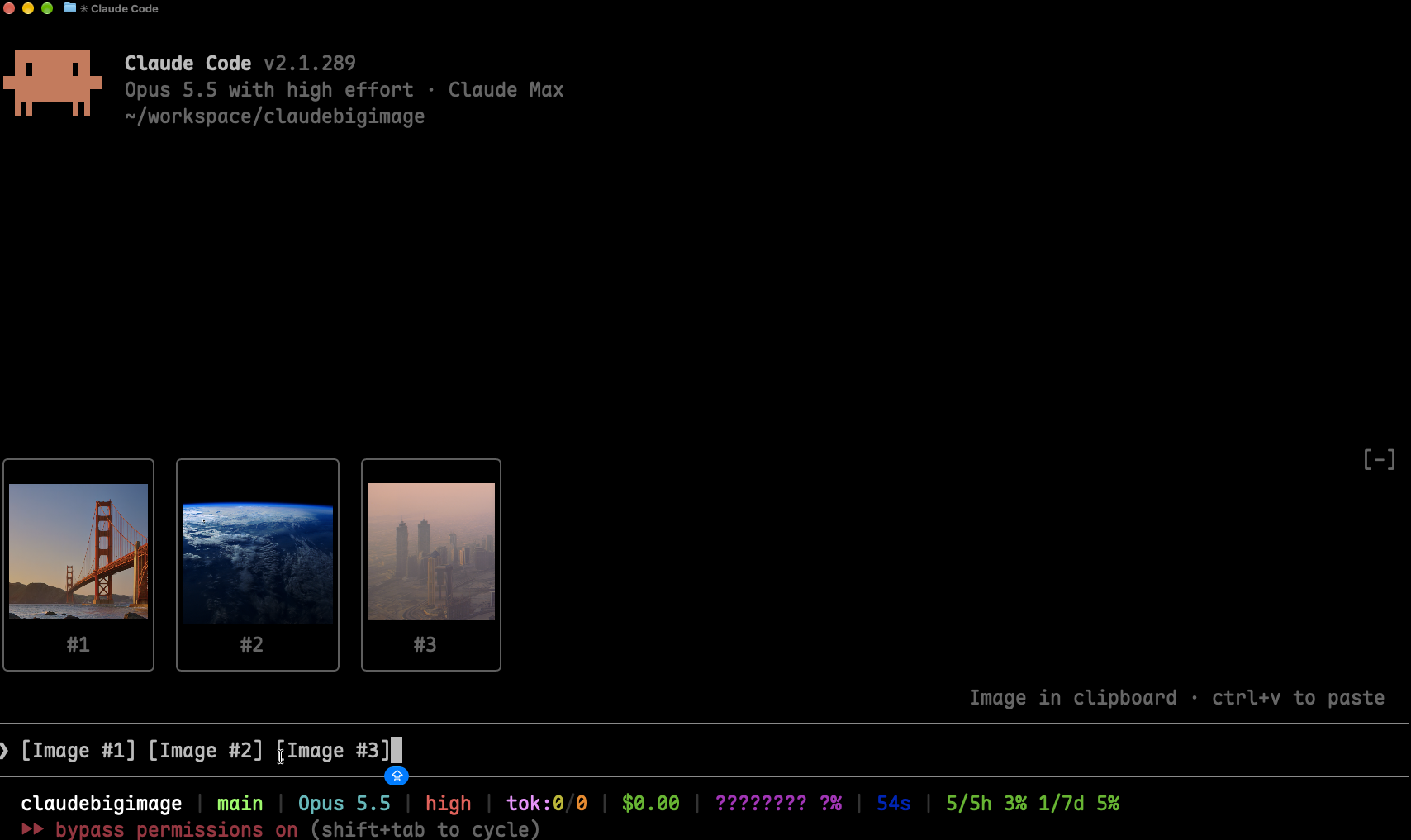
在 Claude Code 裡執行:
/plugin marketplace add joshhu/claudebigimage
/plugin install image-view@claudebigimage
/reload-plugins
這樣就完成了。在提示框貼上圖片,預覽就會出現在輸入框上方。
如果你也裝了原版的 image-view@claude-image-view,請先停用,避免兩個同時畫圖。
claude plugin marketplace add joshhu/claudebigimage
claude plugin install image-view@claudebigimage
接著在 session 裡執行 /reload-plugins,或開一個新的 session。
貼上一張或多張圖片,提示框上方會出現一排預覽,每張都標上對應的標籤編號:
╭────────────────────────╮ ╭────────────╮
│                        │ │            │
│      (screenshot)      │ │  (photo)   │
│                        │ │            │
│           #1           │ │     #2     │
╰────────────────────────╯ ╰────────────╯
❯ 為什麼這裡的標題沒對齊 [Image #1] vs [Image #2]/image-view 隨時打開。 終端機比較窄時,圖片會改顯示在提示框上方那一排;執行 /image-view 可以在任何寬度打開 Pane。手動關掉 Pane 後,要等你貼上不同的圖片才會再自動打開。預覽的最大尺寸由兩個選項控制。可以在 /plugin 的設定選單修改,或寫在 ~/.claude/settings.json 的 pluginConfigs 底下:
| 選項 | 預設值 | 說明 |
|---|---|---|
maxHeight | 20 | 預覽最多幾列高(1–255)。 |
maxWidth | 80 | 預覽最多幾欄寬(4–255)。 |
預覽一定會縮到終端機放得下的大小,所以設大一點也沒關係。把 maxHeight 設成 6、maxWidth 設成 32,就是原版的小縮圖。
Claude Code 會把每張貼上的圖片存到這個 session 的快取資料夾 <tmp>/<project>/<session>/images/<n>.png,並在提示框放一個 [Image #n] 標籤。Claude Big Image 是一個 mod:
[Image #n] 標籤。之所以用計時器輪詢,是因為貼上圖片不會觸發編輯事件。Image 元件把圖片畫在 Pane 裡;Pane 沒辦法顯示時,改畫在提示框上方。圖片檔由終端機自己讀取,圖片資料不會經過這個 mod。Claude Big Image 只在本機運作,不發出任何網路請求,也不寫入任何檔案。它只會讀取提示框內容、列出 Claude Code 的暫存資料夾來找到目前 session 的圖片快取,以及讀取每張圖片開頭的幾個位元組。如果沒有設定 CLAUDE_CODE_TMPDIR,它會執行一次 id -u 來找出預設的暫存資料夾。
對這個 repo 執行 claude plugin validate,可以看到它掛了哪些事件、呼叫了哪些 API。
其他終端機只會在每個框裡顯示 [Image #n] 文字,不會顯示圖片。Claude 桌面版本身就會預覽貼上的圖片,所以這個 mod 在那裡不會畫任何東西。
圖片還是很小。 終端機視窗太小,騰不出空間。全螢幕模式下,提示框上方的區域最多只有終端機高度的一半,25 列的視窗只剩大約 2 列給圖片。把視窗放大,或執行 /image-view 改用預覽 Pane 顯示(Pane 要 144 欄以上才會自動打開;用 /image-view 開過一次之後,110 欄以上就會自動打開)。
貼上之後什麼都沒出現。 執行 /plugin,確認分頁下方那行灰字有列出 image-view 是啟用中的 mod。沒有的話,執行 /reload-plugins。
框裡顯示「no preview」。 mod 找不到快取的圖片檔,可能是 Claude Code 改了貼上圖片的存放位置。請附上你的 Claude Code 版本開一個 issue。
框裡顯示 [Image #1] 文字而不是圖片。 你的終端機不支援 kitty 圖片協定,請參考系統需求。
在 agent view 或背景 session 裡,就算用 Ghostty 或 kitty 也只顯示 [Image #1] 文字。 Claude Code 會在背景 session 關閉終端機圖片。如果你是從支援 kitty 圖片協定的終端機連進去,可以在 ~/.claude/settings.json 的 env 區塊把它打開,再開一個新的 session:
"env": { "CLAUDE_CODE_FORCE_TERMINAL_IMAGES": "1" }git clone https://github.com/joshhu/claudebigimage
cd claudebigimage
# 不安裝,只在這次 session 載入
claude --plugin-dir .
# 檢查並執行測試
claude plugin validate .
claude plugin test .Claude Code 第一次載入這個 mod 時,會把 API 型別寫進 .claude-plugin/types/,之後就可以用 tsc -p . 做型別檢查。
MIT,詳見 LICENSE。本專案改自 Jarrod Watts 的 claude-image-view。
hooks/register.tsx 223 lines1import { atom, read, update } from 'claude-code'
2import type { EngineInterface, Register } from 'claude-code'
3
4import type { PastedImage } from '../types'
5import { clampLimits, fitColumn, fitRow, imageNumbers, paneRequest, pngSize } from './layout'
6import type { Limits, Size } from './layout'
7
8// Pasting an image raises no prompt.edit (the tag only shows up on the next keystroke),
9// so the draft is polled instead.
10const POLL_MS = 200
11
12const PANE = 'image-preview'
13const COMMAND = 'image-view'
14
15const images = atom({ plugin: 'image-view', key: 'images' } as const, [] as PastedImage[])
16const paneShown = atom({ plugin: 'image-view', key: 'paneShown' } as const, false)
17
18let tmpRoot: string | undefined
19let found: { sessionId: string; dir: string } | undefined
20// The image numbers last drawn, so an unchanged draft doesn't rewrite state; undefined
21// while a drawn image's file is still missing, so the next poll looks again.
22let shownKey: string | undefined
23let isChecking = false
24// Only the terminal draws pictures; elsewhere the band and the pane stay out of the way.
25let isTerminal = false
26// The images the person closed the pane over, so it stays closed until they change.
27let dismissedKey: string | undefined
28// Whether the person has been told, once a session, how to open a pane the terminal was too narrow for.
29let isHinted = false
30const sizes = new Map<string, Size | null>()
31
32// Claude Code caches each paste as <tmp>/<project>/<session>/images/<n>.png. The project
33// folder is named after a working directory that may since have moved, so find it by the
34// session id instead of rebuilding it.
35async function imagesDir($: EngineInterface): Promise<string | undefined> {
36 const sessionId = await $.session.id()
37 if (found?.sessionId === sessionId) return found.dir
38 if (tmpRoot === undefined) {
39 const fromEnv = await $.env.get('CLAUDE_CODE_TMPDIR')
40 tmpRoot = fromEnv ?? `/tmp/claude-${(await $.process.run(['id', '-u'])).stdout.trim()}`
41 }
42 const entries = await $.fs.list(tmpRoot).catch(() => [])
43 for (const entry of entries) {
44 const dir = `${tmpRoot}/${entry.name}/${sessionId}/images`
45 if (entry.kind === 'dir' && (await $.fs.exists(dir))) {
46 found = { sessionId, dir }
47 return dir
48 }
49 }
50 return undefined
51}
52
53async function describe($: EngineInterface, dir: string | undefined, n: number): Promise<PastedImage> {
54 const path = `${dir}/${n}.png`
55 if (dir === undefined || !(await $.fs.exists(path))) return { n, path: null, size: null }
56 if (!sizes.has(path)) {
57 const head = await $.fs.read(path, { as: 'bytes' }).then(
58 ({ base64 }) => pngSize(base64),
59 () => undefined, // too big to read: still drawable, just without its aspect ratio
60 )
61 if (head === null) return { n, path: null, size: null }
62 sizes.set(path, head ?? null)
63 }
64 return { n, path, size: sizes.get(path) ?? null }
65}
66
67async function show($: EngineInterface, draft: string, limits: Limits) {
68 const numbers = imageNumbers(draft)
69 const key = numbers.join(',')
70 if (key === shownKey) return
71 const dir = numbers.length > 0 ? await imagesDir($) : undefined
72 const list: PastedImage[] = []
73 for (const n of numbers) list.push(await describe($, dir, n))
74 shownKey = list.every(image => image.path !== null) ? key : undefined
75 await update($, images, () => list)
76 await syncPane($, key, list, limits)
77}
78
79/** Opens the preview pane over pasted images and closes it once the draft has none. */
80async function syncPane($: EngineInterface, key: string, list: PastedImage[], limits: Limits) {
81 if (!isTerminal) return
82 if (list.length === 0) {
83 dismissedKey = undefined
84 if ((await $.ui.panes()).some(pane => pane.id === PANE)) await $.ui.close({ id: PANE })
85 await update($, paneShown, () => false)
86 return
87 }
88 if (key === dismissedKey) return
89 await openPane($, list, limits)
90}
91
92async function openPane($: EngineInterface, list: PastedImage[], limits: Limits) {
93 const want = paneRequest(list.map(image => image.size), limits)
94 const opened = await $.ui.open({ id: PANE, title: 'Image preview', rows: want.rows, columns: want.columns })
95 await update($, paneShown, () => opened.isPlaced)
96 if (!opened.isPlaced && !isHinted) {
97 isHinted = true
98 $.ui.toast(`image-view: run /${COMMAND} for a big preview (the terminal is too narrow to open it by itself)`)
99 }
100}
101
102// A pane opened while the terminal was too narrow seats itself once it widens; follow it.
103async function followPane($: EngineInterface) {
104 const pane = (await $.ui.panes()).find(one => one.id === PANE)
105 const isShown = pane?.isPlaced === true
106 if (isShown !== (await read($, paneShown))) await update($, paneShown, () => isShown)
107}
108
109async function check($: EngineInterface, limits: Limits) {
110 if (isChecking) return
111 isChecking = true
112 try {
113 await show($, (await $.prompt.read()).text, limits)
114 if (isTerminal && shownKey !== '') await followPane($)
115 } finally {
116 isChecking = false
117 }
118}
119
120export const register: Register = (on, options) => {
121 const limits = clampLimits(options.maxHeight, options.maxWidth)
122
123 on('session.start', async ($, e, next) => {
124 isTerminal = e.surface === 'terminal'
125 await $.command.register({ name: COMMAND, description: 'Show the images pasted into the prompt in a large preview pane' })
126 $.clock.every(POLL_MS, () => check($, limits))
127 return next(e)
128 })
129
130 // Asked for, the pane seats at any terminal width.
131 on('command.run', { command: COMMAND }, async $ => {
132 const list = await read($, images)
133 if (list.length === 0) return { text: 'No pasted images in the prompt to preview.' }
134 dismissedKey = undefined
135 await openPane($, list, limits)
136 return { text: 'Image preview opened.' }
137 })
138
139 on('ui.close', async ($, e, next) => {
140 if (e.id === PANE) {
141 if (e.origin.kind === 'person') dismissedKey = (await read($, images)).map(image => image.n).join(',')
142 await update($, paneShown, () => false)
143 }
144 return next(e)
145 })
146
147 on('ui.render', { component: 'Pane', requestId: PANE }, async ($, e) => {
148 const list = await read($, images)
149 if (e.surface !== 'terminal') {
150 const { Text } = $.ui.resolve(e)
151 return <Text dimColor>{list.map(image => `[Image #${image.n}]`).join(' ') || 'No pasted images.'}</Text>
152 }
153 const { Box, Image, Text } = $.ui.resolve(e)
154 if (list.length === 0) return <Text dimColor>No pasted images.</Text>
155 const cells = fitColumn(list.map(image => image.size), e.props.scroll.bodyRows, e.props.bodyColumns, limits)
156 return (
157 <Box flexDirection="column" alignItems="center">
158 {list.map((image, i) => {
159 const { columns, rows } = cells[i] ?? { columns: 4, rows: 1 }
160 return (
161 <Box flexDirection="column" alignItems="center">
162 {image.path === null ? (
163 <Box width={columns} height={rows} alignItems="center" justifyContent="center">
164 <Text dimColor wrap="truncate">no preview</Text>
165 </Box>
166 ) : (
167 <Image
168 key={`pane-image-${image.n}`}
169 source={{ file: image.path, format: 'png' }}
170 columns={columns}
171 rows={rows}
172 alt={`[Image #${image.n}]`}
173 />
174 )}
175 <Text dimColor>#{image.n}</Text>
176 </Box>
177 )
178 })}
179 </Box>
180 )
181 })
182
183 on('ui.render', { component: 'AbovePrompt' }, async ($, e, next) => {
184 if (e.surface !== 'terminal' || e.props.hasSurvey) return next(e)
185 const list = await read($, images)
186 // The pane shows them bigger; don't draw them twice.
187 if (list.length === 0 || (await read($, paneShown))) return next(e)
188
189 const { Box, Image, Text } = $.ui.resolve(e)
190 const cells = fitRow(list.map(image => image.size), e.props.maxRows, e.props.bodyColumns, limits, e.viewport?.rows)
191 const below = await next(e)
192
193 return (
194 <Box flexDirection="column">
195 <Box flexDirection="row" columnGap={1}>
196 {list.map((image, i) => {
197 const { columns, rows } = cells[i] ?? { columns: 4, rows: 1 }
198 return (
199 <Box flexDirection="column" alignItems="center" borderStyle="round" borderDimColor>
200 {image.path === null ? (
201 <Box width={columns} height={rows} alignItems="center" justifyContent="center">
202 <Text dimColor wrap="truncate">no preview</Text>
203 </Box>
204 ) : (
205 <Image
206 key={`image-${image.n}`}
207 source={{ file: image.path, format: 'png' }}
208 columns={columns}
209 rows={rows}
210 alt={`[Image #${image.n}]`}
211 />
212 )}
213 <Text dimColor>#{image.n}</Text>
214 </Box>
215 )
216 })}
217 </Box>
218 {below}
219 </Box>
220 )
221 })
222}
223hooks/layout.ts 110 lines1export type Size = { width: number; height: number }
2export type Cells = { columns: number; rows: number }
3/** The largest picture box one image may take, before the band's own limits apply. */
4export type Limits = { rows: number; columns: number }
5
6export const DEFAULT_LIMITS: Limits = { rows: 20, columns: 80 }
7// The Image element takes 1 to 255 cells each way.
8const MAX_CELLS = 255
9const MIN_COLUMNS = 4
10// Past this many images the pane scrolls rather than shrinking each one further.
11const MIN_PANE_ROWS = 8
12// Outside fullscreen the band may be as tall as the terminal; leave the rest for the transcript.
13const MAX_SCREEN_SHARE = 2 / 3
14// A terminal cell is about twice as tall as it is wide.
15const CELL_ASPECT = 2
16// Used when the size is unknown (file over $.fs.read's 4 MiB cap, or no file).
17const FALLBACK: Size = { width: 16, height: 10 }
18// Each tile adds a border on every side and a label row under the picture.
19const TILE_CHROME_ROWS = 3
20const TILE_CHROME_COLUMNS = 2
21const GAP = 1
22
23/** The distinct image numbers a draft references, in the order they first appear. */
24export function imageNumbers(draft: string): number[] {
25 const seen = new Set<number>()
26 for (const match of draft.matchAll(/\[Image #(\d+)\]/g)) seen.add(Number(match[1]))
27 return [...seen]
28}
29
30/** Width and height from a PNG's IHDR chunk, or null when the bytes aren't a PNG. */
31export function pngSize(base64: string): Size | null {
32 // 24 bytes cover the signature and IHDR's width and height; 32 base64 chars decode to exactly 24.
33 const head = Uint8Array.from(atob(base64.slice(0, 32)), char => char.charCodeAt(0))
34 const signature = [0x89, 0x50, 0x4e, 0x47, 0x0d, 0x0a, 0x1a, 0x0a]
35 if (head.length < 24 || signature.some((byte, i) => head[i] !== byte)) return null
36 const view = new DataView(head.buffer, head.byteOffset, head.byteLength)
37 const width = view.getUint32(16)
38 const height = view.getUint32(20)
39 return width > 0 && height > 0 ? { width, height } : null
40}
41
42/** Configured limits, clamped to what the Image element can draw. */
43export function clampLimits(rows: unknown, columns: unknown): Limits {
44 const clamp = (value: unknown, fallback: number, min: number) =>
45 typeof value === 'number' && Number.isFinite(value) ? Math.min(MAX_CELLS, Math.max(min, Math.round(value))) : fallback
46 return { rows: clamp(rows, DEFAULT_LIMITS.rows, 1), columns: clamp(columns, DEFAULT_LIMITS.columns, MIN_COLUMNS) }
47}
48
49/** A picture box `tileRows` tall, at most `maxColumns` wide, that keeps the picture's aspect ratio. */
50export function fitCells(size: Size | null, tileRows = DEFAULT_LIMITS.rows, maxColumns = DEFAULT_LIMITS.columns): Cells {
51 const { width, height } = size ?? FALLBACK
52 let rows = tileRows
53 let columns = Math.round((rows * CELL_ASPECT * width) / height)
54 if (columns > maxColumns) {
55 columns = maxColumns
56 rows = Math.max(1, Math.round((maxColumns * height) / (CELL_ASPECT * width)))
57 }
58 return { columns: Math.max(MIN_COLUMNS, columns), rows: Math.min(rows, tileRows) }
59}
60
61/**
62 * Picture boxes for one row of tiles that fits the band whole, so it never scrolls:
63 * the tallest tiles within `limits` whose chrome fits in `maxRows` (and in two thirds of
64 * `screenRows`, when known) and whose total width fits in `bodyColumns`.
65 */
66export function fitRow(
67 sizes: readonly (Size | null)[],
68 maxRows: number,
69 bodyColumns: number,
70 limits: Limits = DEFAULT_LIMITS,
71 screenRows?: number,
72): Cells[] {
73 const bandRows = screenRows === undefined ? maxRows : Math.min(maxRows, Math.floor(screenRows * MAX_SCREEN_SHARE))
74 const tallest = Math.max(1, Math.min(limits.rows, bandRows - TILE_CHROME_ROWS))
75 // No tile is wider than the band can hold on its own.
76 const widest = Math.max(MIN_COLUMNS, Math.min(limits.columns, bodyColumns - TILE_CHROME_COLUMNS))
77 for (let tileRows = tallest; tileRows > 1; tileRows--) {
78 const cells = sizes.map(size => fitCells(size, tileRows, widest))
79 const width = cells.reduce((sum, c) => sum + c.columns + TILE_CHROME_COLUMNS, 0) + GAP * (cells.length - 1)
80 if (width <= bodyColumns) return cells
81 }
82 return sizes.map(size => fitCells(size, 1, widest))
83}
84
85/**
86 * Picture boxes for the preview pane, stacked one per image with a label row under each:
87 * as tall as `bodyRows` shares out (the pane scrolls past that), within `limits` and `bodyColumns`.
88 */
89export function fitColumn(
90 sizes: readonly (Size | null)[],
91 bodyRows: number,
92 bodyColumns: number,
93 limits: Limits = DEFAULT_LIMITS,
94): Cells[] {
95 const count = Math.max(1, sizes.length)
96 const share = Math.floor((bodyRows - count) / count)
97 const tall = Math.min(limits.rows, Math.max(MIN_PANE_ROWS, share))
98 const widest = Math.max(MIN_COLUMNS, Math.min(limits.columns, bodyColumns))
99 return sizes.map(size => fitCells(size, tall, widest))
100}
101
102/** The pane size to ask for: the rows the stacked previews want inline, the columns they want docked. */
103export function paneRequest(sizes: readonly (Size | null)[], limits: Limits = DEFAULT_LIMITS): Cells {
104 const cells = sizes.map(size => fitCells(size, limits.rows, limits.columns))
105 return {
106 rows: cells.reduce((sum, c) => sum + c.rows + 1, 0),
107 columns: Math.max(MIN_COLUMNS, ...cells.map(c => c.columns)),
108 }
109}
110types/index.d.ts 18 lines1export type PastedImage = {
2 n: number
3 /** Absolute path of the cached PNG; null when it can't be found. */
4 path: string | null
5 /** Pixel size; null when unknown, and the tile falls back to a default shape. */
6 size: { width: number; height: number } | null
7}
8
9declare module 'claude-code' {
10 interface PluginState {
11 'image-view': {
12 images: PastedImage[]
13 /** True while the preview pane is drawn, so the band above the prompt stays empty. */
14 paneShown: boolean
15 }
16 }
17}
18