ide-mod
Claude Code 안의 IDE 창: 에이전트 보드 + 파일 트리·탭 에디터 + HWP·HWPX·PDF 뷰어(rhwp·pdf.js) + 요청 기록, 강의 자막과 한국어 문체 게이트
newpanebandguardcommandprompt

Claude Code 안의 IDE 창: 에이전트 보드 + 파일 트리·탭 에디터 + HWP·HWPX·PDF 뷰어(rhwp·pdf.js) + 요청 기록, 강의 자막과 한국어 문체 게이트
Claude Code 안에 IDE 창을 띄우는 모드(function-hooks 플러그인)예요. 입력창 위에는 이 세션의 컨텍스트·캐시 적중·생성 속도(tok/s)와 Claude·Codex·Antigravity 사용 한도가 도트 게이지 한 줄로 늘 떠요. 창 위쪽에는 에이전트 보드가, 아래쪽에는 파일 트리와 탭 에디터가 있어요. 탭에서 HWP·HWPX·PDF 문서를 쪽 모양 그대로 열어 보고, 왼쪽 칸을 이번 세션의 요청 기록으로 바꿔 볼 수 있어요. 입력창 위에는 강의 자막과 한국어 문체 게이트가 떠요.
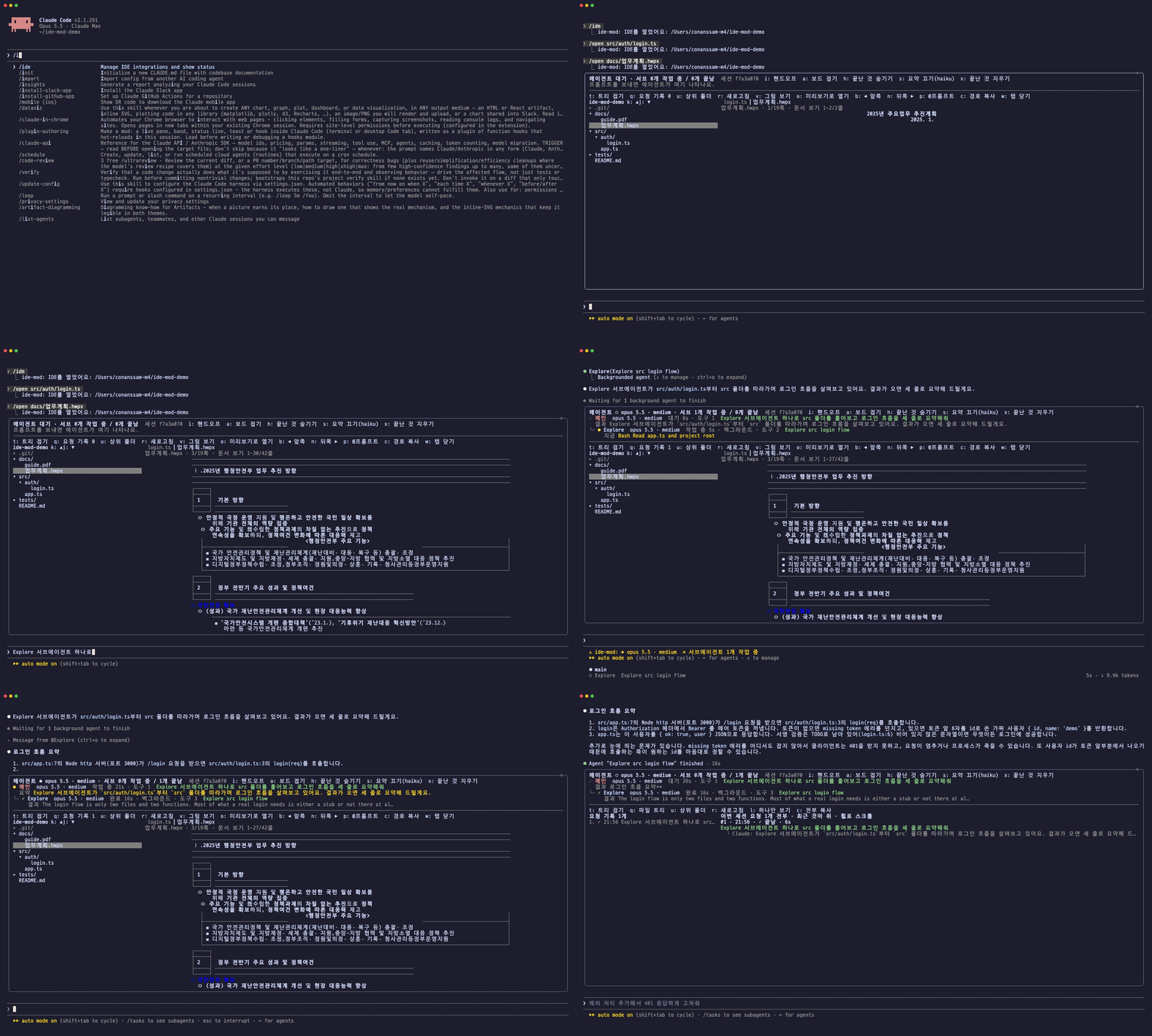
<sub>데모 녹화: docs/demo.tape (VHS) · 샘플 문서는 행정안전부 「2025년 주요업무 추진계획」(공공 문서)</sub>
에이전트 ● opus 5.5 1M · xhigh · 서브 1개 작업 중 / 1개 끝남   a: 보드 접기  h: 끝난 것 숨기기  s: 요약 끄기(haiku)  x: 끝난 것 지우기
● 메인  opus 5.5 1M · xhigh  작업 중 3m12s · 도구 14  로그인 버그 고쳐줘
  요약 인증 흐름을 서브에이전트에 나눠 조사하는 중
├─ ● Explore  haiku 4.5  작업 중 34s · 도구 6  인증 코드 찾기
│    지금 Grep  login
└─ ✓ general-purpose  sonnet 5.5 · medium  완료 1m02s  테스트 작성
     결과 login.test.ts에 실패 케이스 3개 추가
──────────────────────────────────────────────────────────────────────────────
t: 트리 접기  u: 상위 폴더  r: 새로고침  p: @프롬프트  c: 경로 복사  w: 탭 닫기
my-project  1-24/57   k ▲ j ▼ │ ▎app.ts ●   README.md
▾ src/                        │ src/app.ts · 1.2 KB · 1-21/88줄
    ▾ auth/                ●  │  1 import { login } from './auth'
        login.ts           ●  │  2
    app.ts                 ●  │  3 export const answer = 42
▸ tests/                      │  …
README.md │Claude Code 터미널 세션에서 아래 한 줄을 입력하세요.
/plugin install ide-mod --marketplace jkf87/ide-mod마켓플레이스를 추가할지 물으면 y를 누르고 범위(user 권장)를 고르면 돼요. 설치한 세션에서 바로 동작해요.
function hooks는 Claude Code의 early access API예요. 2.1.290에서 만들고 시험했어요. 버전이 바뀌면 API가 달라질 수 있어요.
| 명령 | 하는 일 | |||
|---|---|---|---|---|
/ide | IDE 창을 열어요 (처음엔 작업 폴더). 새 세션은 저절로 열려요 | |||
| `/ide auto on\ | off` | 세션을 시작할 때 IDE 창을 저절로 열지 정해요 (기본 켜짐) | ||
/open <경로> | 폴더면 트리의 뿌리로, 파일이면 탭으로 열어요. ~, 상대 경로, @경로 모두 돼요 | |||
| `/lecture [on\ | off]` | 강의 모드: Claude가 하는 일을 입력창 위에 쉬운 한국어 자막으로 보여줘요 | ||
/handoff [세션 이름] [메모] | 이 세션을 다른 에이전트 세션에 넘겨요. 이름을 주면 그 세션에 핸드오프 글을 바로 보내고, 없으면 글을 보여 주고 핸드오프 화면을 열어요 | |||
| `/limits [line\ | rows\ | off\ | refresh]` | 입력창 위 사용 한도 띠의 모양을 바꾸거나 지금 다시 받아요. 인자 없이 치면 현재 값을 글로 보여 줘요 |
| `/style-gate [파일\ | on\ | off]` | 한국어 원고의 AI티 지표를 검사해요. 켜 두면 Claude가 .md·.txt를 쓸 때마다 자동으로 검사해요 |
전체 화면 레이아웃(fullscreen)에서 쓰면 창이 대화 옆에 넓게 붙어서 IDE처럼 보여요. 창 크기는 직접 끌어서 바꿀 수 있어요.
이 세션과 모든 사용 한도를 한 줄에 도트 게이지로 보여 줘요.
세션 컨텍스트 ⣿⣀⣀⣀ 18% 캐시 ⣿⣿⣿⡇ 94% 114 tok/s │ Claude 5h ⣀⣀⣀⣀ 4% 주 ⣿⣿⣿⣿ 96% 2일 Fable ⣿⣿⣀⣀ 54% │ Codex 주 ⣿⣿⣿⣀ 78% 4일 │ Gemini 5h ⣀⣀⣀⣀ 5% 주 ⡇⣀⣀⣀ 9% │ AG Claude·GPT …2일)이 붙어요./usage와 같은 사용량 응답을 1분마다 받아요(토큰은 mod에 보이지 않아요). 못 받으면 엔진이 응답마다 주는 5시간·주간 한도를 써요.codex app-server)에, Antigravity는 agy /usage에 5분마다 물어요. 설치돼 있지 않으면 그 묶음은 나오지 않아요./limits rows로 출처마다 한 줄(막대·리셋 시각), /limits line으로 다시 한 줄, /limits off로 숨겨요.z를 누르면 메모리를 많이 쓰는 앱 6개를 보여 줘요. 앱의 도우미 프로세스는 앱 이름으로 묶어요(Google Chrome Helper → Google Chrome).sysctl·vm_stat·df·ps로, Linux는 /proc/meminfo로 읽어요. 보드를 접어도 이 줄은 남아요.s로 끌 수 있고, 3번 연속 실패하면 스스로 꺼져요.◆ opus 5.5 · xhigh ⇉ 서브에이전트 N개 작업 중이 떠요.z 메모리 많이 쓰는 앱, i 핸드오프, a 보드 접기/펼치기, h 끝난 것 숨기기(돌고 있는 자손은 남아요), s 요약 켜기/끄기, x 끝난 것 지우기m을 누르면 렌더 화면으로 바뀌어요.j/k는 트리를 반 화면씩 넘겨요.●이 붙고, 열려 있으면 다시 읽어요. 거절되거나 실패한 수정은 표시하지 않아요.t를 누르면 트리로 돌아와요.t 트리 접기, q 파일 트리/요청 기록, l 요청 모두 보기/하나만, u 상위 폴더, r 새로고침, m 렌더/원문, v HWP 문서/그림 보기, o HWP 미리보기로 열기, b·n HWP 앞뒤 쪽, p 입력창에 @경로 넣기, c 경로 복사, w 탭 닫기.hwp·.hwpx·.pdf를 누르면 탭으로 열려요. HWP 엔진은 rhwp(Rust→WASM, MIT, vendor/rhwp), PDF 엔진은 pdf.js(Apache-2.0, vendor/pdfjs)예요. 둘 다 같은 문서 보기 렌더러(bin/grid.mjs)를 써요.pdftoppm으로 만들어요(brew install poppler). o는 PDF 원본을 미리보기로 바로 열어요.…로 줄여요. 그래픽이 없는 터미널(macOS 터미널 등)에서도 HWP 모양으로 보여요. 쪽 끝까지 내리면 다음 쪽으로 넘어가요.v): rhwp가 그린 실제 쪽 그림이에요. 터미널은 PNG(kitty·Ghostty 같은 그래픽 터미널), 데스크톱 앱은 SVG로 그려요.o): 지금 쪽을 그림으로 만들어 macOS 미리보기로 열어요. 한컴에서 보는 모양 그대로 확인할 때 써요.b/n으로 앞뒤 쪽을 넘기고, 치환이 안 된 {{키}} 칸은 빨갛게 표시하고 개수를 위에 보여줘요.bin/rhwp-view.mjs를 Node.js로 실행해요. 그림 변환은 rsvg-convert → resvg → macOS qlmanage+sips 순서로 있는 것을 써요.i)i를 누르면 탐색기가 핸드오프 화면으로 바뀌어요.r로 목록을 새로 받아요.claude --resume <ID> --fork-session), 사용자가 보낸 요청(최근 20개, 시각과 함께), 에이전트가 마지막에 하던 일이 들어가요. 받은 쪽은 대화 기록을 읽고 이어서 일해요.c 핸드오프 글 복사(Codex 같은 다른 에이전트에 붙여 넣을 때), y 세션 ID만 복사, e 이어서 열기 명령 복사.$.session.send를 써요.q)c로 전부 복사해요.p로 입력창에 다시 넣고, c로 복사해요. l로 모두 보기와 하나만 보기를 오가요./lecture): "파일을 읽고 있어요 · login.ts", "터미널에서: 테스트 실행"처럼 지금 하는 일과 방금 한 일, 단계 수, 경과 시간, 일하는 서브에이전트 수를 테두리 상자에 보여줘요. 모델 호출 없이 도구 호출만으로 만들어요./style-gate): noslop-ko의 결정적 패턴 16개(대조 구문, 접속어 뒤 쉼표, 맺음 상투어, 과장 어휘, 번역투 등)를 세서 통과·경고·중단을 판정해요. 경고 이상이면 입력창 위에 뜨고, g로 예문을 펼치고 d로 닫아요. 한글이 50자 넘는 원고만 검사하고 코드 블록은 빼요.패널에 포커스가 있을 때(클릭하거나 ctrl+x tab) 단축키가 먹어요. Esc를 누르면 입력창으로 돌아가요.
r을 누르거나 다음에 다시 그려질 때 반영돼요.claude plugin validate . # 매니페스트·훅 모듈 검사
claude plugin test . # tests/*.test.tsx
claude --plugin-dir . # 이 폴더를 그대로 로드해서 써 보기타입 정의(.claude-plugin/types/)와 tsconfig.json은 Claude Code가 이 폴더를 한 번 로드할 때 깔아 줘요. 그 뒤에 npx tsc -p .로 타입 검사를 할 수 있어요. 둘 다 .gitignore에 들어 있어요.
구조는 hooks/register.tsx 파일 하나예요. 엔진이 $를 같은 파일 안의 함수로만 따라가서, 보드와 탐색기를 한 파일에 나눠 적었어요.
MIT. 함께 들어 있는 rhwp(vendor/rhwp)는 Edward Kim의 MIT 라이선스, pdf.js(vendor/pdfjs)는 Mozilla의 Apache-2.0 라이선스예요.
hooks/register.tsx 2351 lines1import { atom, read, update } from 'claude-code'
2import type { Color, EngineInterface, ModelUsage, On, Register, RenderElement, RenderInput } from 'claude-code'
3
4import type { AgentPhase, AgentRow, Caption, GateCheck, GateResult, LimitWindow, LimitsSnapshot, PeerRow, RequestItem, SessionPerf, SysStat, ViewMode } from '../types'
5
6// ════════════════ 에이전트 보드 ════════════════
7const MAIN = 'main'
8const agentsAtom = atom({ plugin: 'ide-mod', key: 'agents' } as const, {} as Record<string, AgentRow>)
9const tickAtom = atom({ plugin: 'ide-mod', key: 'tick' } as const, 0)
10const foldedAtom = atom({ plugin: 'ide-mod', key: 'isBoardFolded' } as const, false)
11const hideDoneAtom = atom({ plugin: 'ide-mod', key: 'hideDone' } as const, false)
12const recapOnAtom = atom({ plugin: 'ide-mod', key: 'isRecapOn' } as const, true)
13
14const LOG_SIZE = 12
15const MAX_AGENTS = 40
16const RECAP_EVERY_MS = 20_000
17const RECAP_TIMEOUT_MS = 15_000
18const RECAP_MODEL = 'haiku'
19const RECAP_MAX_FAILURES = 3
20// 목록에서 빠진 지 이만큼 소식이 없으면 끝난 것으로 본다
21const STALE_AFTER_MS = 30_000
22// 도구 입력에서 "무엇을 하는지" 가장 잘 말해주는 필드 순서
23const SUMMARY_KEYS = ['description', 'command', 'file_path', 'notebook_path', 'pattern', 'url', 'query', 'skill', 'subject', 'prompt', 'path']
24
25const PHASE_ICON: Record<AgentPhase, string> = { running: '●', idle: '○', done: '✓', failed: '✗' }
26const PHASE_COLOR: Record<AgentPhase, Color> = { running: 'warning', idle: 'subtle', done: 'success', failed: 'error' }
27const PHASE_LABEL: Record<AgentPhase, string> = { running: '작업 중', idle: '대기', done: '완료', failed: '실패' }
28const ROLE_COLORS: Color[] = ['suggestion', 'claude', 'permission', 'planMode', 'autoAccept', 'remember', 'ide', 'merged']
29const LIST_PHASE: Record<string, AgentPhase> = {
30 pending: 'running', running: 'running', waiting: 'idle', idle: 'idle', completed: 'done', failed: 'failed', killed: 'failed',
31}
32
33// 재로드되면 처음부터 다시 세는 값들: 화면이 읽는 값은 전부 $.state에 둔다
34let isInteractive = true
35let timersStarted = false
36let autoOpenDefault = true
37let isAutoOpenPending = false
38let isRecapping = false
39let recapFailures = 0
40let lastStatus: string | undefined
41/** 보드가 마지막으로 그려진 시각: 창이 열려 있을 때만 요약을 만든다 */
42let lastDrawnAt = 0
43
44const oneLine = (text: string, max: number) => {
45 const line = text.replace(/\s+/g, ' ').trim()
46 return line.length > max ? `${line.slice(0, max - 1)}…` : line
47}
48const firstLine = (text: string) => text.split('\n').map(l => l.replace(/^[#>*\-\s]+/, '').trim()).find(l => l !== '') ?? ''
49
50/** claude-opus-5-5[1m] → opus 5.5 1M, us.anthropic.claude-sonnet-4-5-20250929-v1:0 → sonnet 4.5 */
51export const shortModel = (model: string) => {
52 const isLong = /\[1m\]/i.test(model)
53 const bare = model
54 .replace(/\[.*?\]/g, '')
55 .replace(/^.*?(?=claude-)/, '')
56 .replace(/@.*$/, '')
57 .replace(/-v\d+(:\d+)?$/, '')
58 const m = /^(?:claude-)?([a-z]+)-(\d+)(?:-(\d{1,2}))?(?:-\d{8})?$/i.exec(bare)
59 ?? /^(?:claude-)(\d+)-(\d+)-([a-z]+)(?:-\d{8})?$/i.exec(bare)
60 let name = bare
61 if (m !== null && /^[a-z]/i.test(m[1] ?? '')) name = `${m[1]} ${m[2]}${m[3] ? `.${m[3]}` : ''}`
62 else if (m !== null) name = `${m[3]} ${m[1]}.${m[2]}`
63 return isLong ? `${name} 1M` : name
64}
65const toolName = (tool: string) => (tool.startsWith('mcp__') ? tool.split('__').slice(2).join('__') || tool : tool)
66
67export const describeCall = (tool: string, input: Record<string, unknown>) => {
68 if (tool === 'Agent') {
69 const type = typeof input.subagent_type === 'string' ? input.subagent_type : 'agent'
70 return `Agent → ${type}: ${oneLine(String(input.description ?? ''), 50)}`
71 }
72 const key = SUMMARY_KEYS.find(k => typeof input[k] === 'string' && input[k] !== '')
73 const detail = key === undefined ? '' : oneLine(String(input[key]), 60)
74 return detail === '' ? toolName(tool) : `${toolName(tool)} ${detail}`
75}
76
77const formatElapsed = (ms: number) => {
78 const s = Math.max(0, Math.round(ms / 1000))
79 if (s < 60) return `${s}s`
80 const m = Math.floor(s / 60)
81 return m < 60 ? `${m}m${String(s % 60).padStart(2, '0')}s` : `${Math.floor(m / 60)}h${String(m % 60).padStart(2, '0')}m`
82}
83
84const freshRow = (id: string, fields: Partial<AgentRow>): AgentRow => ({
85 id,
86 role: id === MAIN ? 'main' : 'agent',
87 task: '',
88 model: '',
89 phase: 'running',
90 isBackground: false,
91 isTeammate: false,
92 activity: '',
93 log: [],
94 toolCount: 0,
95 recap: '',
96 isRecapStale: false,
97 startedAt: Date.now(),
98 updatedAt: Date.now(),
99 ...fields,
100})
101
102/**
103 * 한 에이전트 줄을 고친다. 서브에이전트 줄은 agent.spawn만 만든다: 엔진 내부의 포크(압축·메모리)는
104 * spawn 없이 agentId를 달고 오고 끝을 알리지 않아서, 여기서 만들면 영영 "작업 중"으로 남는다.
105 */
106async function patch($: EngineInterface, id: string, fn: (row: AgentRow) => AgentRow | undefined, canCreate = id === MAIN) {
107 await update($, agentsAtom, all => {
108 const existing = all[id]
109 if (existing === undefined && !canCreate) return all
110 const changed = fn(existing ?? freshRow(id, {}))
111 if (changed === undefined || changed === existing) return all
112 const next = { ...all, [id]: changed }
113 const ids = Object.keys(next)
114 if (ids.length <= MAX_AGENTS) return next
115 // 오래전에 끝난 서브에이전트부터 정리한다
116 const drop = ids
117 .filter(k => k !== MAIN && next[k]?.phase !== 'running')
118 .sort((a, b) => (next[a]?.startedAt ?? 0) - (next[b]?.startedAt ?? 0))
119 .slice(0, ids.length - MAX_AGENTS)
120 for (const k of drop) delete next[k]
121 return next
122 })
123 await refreshStatus($)
124}
125
126/** 서브에이전트가 돌 때만 상태줄에 모델·effort와 개수를 띄운다 (메인 모델은 기본 화면에도 있다) */
127async function refreshStatus($: EngineInterface) {
128 const all = await read($, agentsAtom)
129 const running = Object.values(all).filter(r => r.id !== MAIN && r.phase === 'running').length
130 const main = all[MAIN]
131 const brain = main === undefined ? '' : `${shortModel(main.model) || '?'}${main.effort ? ` · ${main.effort}` : ''} `
132 const text = running > 0 ? `◆ ${brain}⇉ 서브에이전트 ${running}개 작업 중` : undefined
133 if (text === lastStatus) return
134 lastStatus = text
135 $.ui.status(text)
136}
137
138/** 엔진의 에이전트 목록과 맞춰, 죽었거나 사라진 서브에이전트가 "작업 중"에 머물지 않게 한다 */
139async function reconcile($: EngineInterface) {
140 const all = await read($, agentsAtom)
141 const running = Object.values(all).filter(r => r.id !== MAIN && r.phase === 'running')
142 if (running.length === 0) return
143 const listed = new Map((await $.agent.list().catch(() => [])).map(info => [info.id, info]))
144 const now = Date.now()
145 for (const row of running) {
146 const info = listed.get(row.id)
147 const phase: AgentPhase | undefined = info !== undefined
148 ? LIST_PHASE[info.status]
149 : now - row.updatedAt > STALE_AFTER_MS ? 'done' : undefined
150 if (phase === undefined || phase === 'running') continue
151 await patch($, row.id, r => (r.phase !== 'running' ? undefined : { ...r, phase, activity: '', endedAt: r.endedAt ?? now }))
152 }
153}
154
155/** 쌓인 도구 기록을 haiku로 한 줄 요약한다. 타이머에서만, 보드가 화면에 있을 때만 부른다 */
156async function recapStale($: EngineInterface) {
157 if (isRecapping || Date.now() - lastDrawnAt > 30_000) return
158 if (!(await read($, recapOnAtom))) return
159 isRecapping = true
160 try {
161 const all = await read($, agentsAtom)
162 const due = Object.values(all).filter(r => r.phase === 'running' && r.isRecapStale && r.log.length > 0).slice(0, 3)
163 for (const row of due) {
164 const seenTools = row.toolCount
165 const prompt = [
166 '아래는 코딩 에이전트 하나의 맡은 작업과 최근 도구 호출 기록이다.',
167 '이 에이전트가 지금 무엇을 하고 있는지 한국어 한 문장(40자 이내, 마침표 없이)으로만 답하라.',
168 `역할: ${row.role}`,
169 `맡은 작업: ${row.task || '(알 수 없음)'}`,
170 '최근 도구 호출(오래된 것부터):',
171 ...row.log.map(l => `- ${l}`),
172 ].join('\n')
173 const answer = await $.model
174 .complete({ model: RECAP_MODEL, prompt, maxTokens: 120, effort: 'low', timeoutMs: RECAP_TIMEOUT_MS })
175 .catch(() => undefined)
176 if (answer === undefined || !answer.isAnswered) {
177 recapFailures += 1
178 if (recapFailures >= RECAP_MAX_FAILURES) {
179 await update($, recapOnAtom, () => false)
180 $.ui.toast(`ide-mod: ${RECAP_MODEL} 요약 호출이 ${RECAP_MAX_FAILURES}번 실패해서 요약을 껐어요 (보드에서 s로 다시 켜기)`)
181 }
182 return
183 }
184 recapFailures = 0
185 const recap = oneLine(answer.text.replace(/^["'「]|["'」.]$/g, ''), 80)
186 // 기다리는 사이 끝났거나, 지워졌거나, 새 도구 호출이 쌓였으면 덮어쓰지 않는다
187 await patch($, row.id, r => (r.phase !== 'running' || r.toolCount !== seenTools ? undefined : { ...r, recap, isRecapStale: false }), false)
188 }
189 } finally {
190 isRecapping = false
191 }
192}
193
194/** 요약·정리 타이머를 건다. 터미널(REPL)은 session.start에서, 데스크톱 앱·SDK처럼 isInteractive가 false로 오는
195 * 화면은 보드가 처음 그려질 때 건다 (-p 실행처럼 아무것도 그리지 않으면 걸리지 않는다) */
196function startAgents($: EngineInterface, interactive: boolean) {
197 isInteractive = interactive
198 if (interactive) startTimers($)
199}
200
201function startTimers($: EngineInterface) {
202 if (timersStarted) return
203 timersStarted = true
204 $.clock.every(RECAP_EVERY_MS, () => void recapStale($).catch(() => undefined))
205 $.clock.every(SYS_EVERY_MS, () => void refreshSys($).catch(() => undefined))
206 $.clock.every(30_000, () => void refreshLimits($).catch(() => undefined))
207 $.clock.every(5_000, () =>
208 void (async () => {
209 await reconcile($)
210 const all = await read($, agentsAtom)
211 if (Object.values(all).some(r => r.phase === 'running')) await update($, tickAtom, n => n + 1)
212 })().catch(() => undefined),
213 )
214}
215
216function registerAgents(on: On) {
217 on('session.end', async ($, e, next) => {
218 if (e.reason === 'clear') {
219 await update($, agentsAtom, () => ({}))
220 lastStatus = undefined
221 $.ui.status(undefined)
222 }
223 return next(e)
224 })
225
226 // 사람이 프롬프트를 보내면 메인 에이전트의 작업이 새로 정해진다 (서브에이전트는 turn.start가 없다)
227 on('turn.start', async ($, e, next) => {
228 // 사람이 보낸 요청으로 시작한 턴만 메인 작업을 바꾼다. 백그라운드 작업 알림·다른 세션 메시지로 시작한 턴은
229 // 작업 줄은 두고 "지금 하는 일"만 바꾼다 (그 글은 사람이 쓴 게 아니라서 요청 기록에도 넣지 않는다)
230 const own = personText(e.text)
231 const isPersonTurn = own !== '' && (await requestTurnStarted($, own, e.turnId).catch(() => false))
232 if (!isPersonTurn && e.text.trim() !== '') {
233 await patch($, MAIN, row => ({ ...row, role: 'main', phase: 'running', activity: '알림·메시지 처리 중', updatedAt: Date.now(), endedAt: undefined }))
234 }
235 if (isPersonTurn) {
236 await patch($, MAIN, row => ({
237 ...row,
238 role: 'main',
239 task: oneLine(own, 120),
240 phase: 'running',
241 activity: '생각 중',
242 log: [],
243 recap: '',
244 isRecapStale: false,
245 startedAt: Date.now(),
246 updatedAt: Date.now(),
247 endedAt: undefined,
248 }))
249 await setCaption($, '요청을 읽고 계획을 세우는 중이에요', true).catch(() => undefined)
250 }
251 return next(e)
252 }).catch(($, e, next) => next(e))
253
254 // 모델 요청마다 그 에이전트가 실제로 쓰는 모델과 effort가 실려 온다
255 on('turn.step', async function* ($, e, next) {
256 const effort = e.effort === undefined ? undefined : String(e.effort)
257 await patch($, e.agentId ?? MAIN, row =>
258 row.model === e.model && row.effort === effort && row.phase === 'running'
259 ? undefined
260 : { ...row, model: e.model, effort, phase: 'running', updatedAt: Date.now(), endedAt: undefined },
261 ).catch(() => undefined)
262 // 메인 응답은 첫 조각과 끝(stop) 시각을 재서 속도·캐시 적중을 띠에 올린다. 조각은 손대지 않고 그대로 넘긴다
263 if (e.agentId !== undefined) return yield* next(e)
264 const now = () => $.clock.now().catch(() => Date.now())
265 const sentAt = await now()
266 let firstAt: number | undefined
267 for await (const chunk of next(e)) {
268 if (firstAt === undefined && chunk.kind !== 'engine') firstAt = await now()
269 if (chunk.kind === 'stop' && chunk.usage !== null) {
270 const usage = chunk.usage
271 const endAt = await now()
272 void notePerf($, usage, sentAt, firstAt, endAt).catch(() => undefined)
273 }
274 yield chunk
275 }
276 })
277
278 on('agent.spawn', async ($, e, next) => {
279 const started = await next(e)
280 if (started.agentId === undefined) return started
281 const role = e.name ? `${e.subagentType} · ${e.name}` : e.fork ? `${e.subagentType} (fork)` : e.subagentType
282 await patch(
283 $,
284 started.agentId,
285 row => ({
286 ...row,
287 parentId: e.parentAgentId ?? MAIN,
288 role,
289 task: oneLine(e.description || firstLine(e.prompt), 120),
290 model: row.model || started.model,
291 isBackground: e.background,
292 isTeammate: e.isTeammate === true,
293 phase: 'running',
294 activity: '시작하는 중',
295 startedAt: Date.now(),
296 updatedAt: Date.now(),
297 }),
298 true,
299 )
300 await setCaption($, `${role} 에이전트가 일을 시작했어요 · ${oneLine(e.description, 50)}`).catch(() => undefined)
301 return started
302 }).catch(($, e, next) => next(e))
303
304 on('turn.complete', async ($, e, next) => {
305 const id = e.agentId ?? MAIN
306 const isFailed = e.reason !== 'answer'
307 await patch($, id, row => {
308 // 메인과 팀원은 턴이 끝나도 다음 지시를 기다릴 뿐이다
309 const phase: AgentPhase = id === MAIN || row.isTeammate ? 'idle' : isFailed ? 'failed' : 'done'
310 const note = e.isAborted ? '중단됨' : e.reason === 'error' ? '오류로 끝남' : e.reason === 'refusal' ? '거절로 끝남' : ''
311 return {
312 ...row,
313 phase,
314 activity: note,
315 recap: oneLine(firstLine(e.answer), 120) || row.recap,
316 isRecapStale: false,
317 updatedAt: Date.now(),
318 endedAt: Date.now(),
319 }
320 })
321 if (id === MAIN) {
322 await requestTurnEnded($, e.turnId, e.answer, e.isAborted || e.reason !== 'answer').catch(() => undefined)
323 await setCaption($, e.isAborted ? '작업을 멈췄어요' : '답을 다 썼어요. 다음 요청을 기다려요').catch(() => undefined)
324 }
325 return next(e)
326 }).catch(($, e, next) => next(e))
327}
328
329/** 도구 호출 하나를 그 에이전트의 "지금 하는 일"로 기록한다 (탐색기와 같은 tool.call 훅에서 부른다) */
330async function recordToolCall($: EngineInterface, agentId: string | undefined, tool: string, input: Record<string, unknown>) {
331 const line = describeCall(tool, input)
332 await patch($, agentId ?? MAIN, row => ({
333 ...row,
334 phase: 'running',
335 activity: line,
336 log: [...row.log, line].slice(-LOG_SIZE),
337 toolCount: row.toolCount + 1,
338 isRecapStale: true,
339 updatedAt: Date.now(),
340 }))
341}
342
343// ════════════════ 시스템 상태 (메모리·스왑·디스크) ════════════════
344// 보드 맨 위 한 줄. macOS의 sysctl·vm_stat·df·ps 출력을 한 번에 받아 읽는다 (Linux는 /proc/meminfo)
345
346const sysAtom = atom({ plugin: 'ide-mod', key: 'sys' } as const, null as SysStat | null)
347const showProcsAtom = atom({ plugin: 'ide-mod', key: 'showProcs' } as const, false)
348const SYS_EVERY_MS = 10_000
349// 명령은 절대 경로로 부른다: PATH에 /usr/sbin이 없는 환경(데스크톱 앱·SDK)에서도 sysctl을 찾게
350const SYS_SCRIPT = [
351 'echo ==mem; /usr/sbin/sysctl -n hw.memsize kern.memorystatus_vm_pressure_level vm.swapusage 2>/dev/null',
352 'echo ==vm; /usr/bin/vm_stat 2>/dev/null',
353 'echo ==linux; cat /proc/meminfo 2>/dev/null',
354 'echo ==df; /bin/df -k /System/Volumes/Data 2>/dev/null || /bin/df -k /',
355 'echo ==ps; /bin/ps -axo rss=,comm=',
356].join('; ')
357
358const GB = 1024 ** 3
359const gb = (bytes: number) => `${(bytes / GB).toFixed(bytes >= 100 * GB ? 0 : 1)}GB`
360
361/** 위 스크립트의 출력을 읽는다. 읽을 수 없으면 undefined */
362export function parseSysStat(out: string, at = Date.now()): SysStat | undefined {
363 const part = (name: string) => out.split(`==${name}\n`)[1]?.split(/\n==\w+\n/)[0] ?? ''
364 const mem = part('mem').trim().split('\n')
365 let memTotal = Number(mem[0]) || 0
366 let memUsed = 0
367 let pressure = Number(mem[1]) || 1
368 let swapUsed = 0
369 const swap = (mem[2] ?? '').match(/used = ([\d.]+)M/)
370 if (swap) swapUsed = Number(swap[1]) * 1024 ** 2
371 const vm = part('vm')
372 const pageSize = Number(vm.match(/page size of (\d+) bytes/)?.[1]) || 0
373 if (memTotal > 0 && pageSize > 0) {
374 const pages = (label: string) => Number(vm.match(new RegExp(`${label}:\\s+(\\d+)`))?.[1]) || 0
375 // 활성 상태 보기의 "사용된 메모리" = 앱 메모리 + 고정 + 압축 (근사: active + wired + compressor)
376 memUsed = (pages('Pages active') + pages('Pages wired down') + pages('Pages occupied by compressor')) * pageSize
377 } else {
378 const info = part('linux')
379 const kb = (key: string) => Number(info.match(new RegExp(`^${key}:\\s+(\\d+) kB`, 'm'))?.[1]) * 1024 || 0
380 memTotal = kb('MemTotal')
381 memUsed = memTotal - kb('MemAvailable')
382 swapUsed = kb('SwapTotal') - kb('SwapFree')
383 const ratio = memTotal > 0 ? memUsed / memTotal : 0
384 pressure = ratio > 0.95 ? 4 : ratio > 0.85 ? 2 : 1
385 }
386 const df = part('df').trim().split('\n').pop()?.trim().split(/\s+/) ?? []
387 const diskTotal = Number(df[1]) * 1024 || 0
388 const diskFree = Number(df[3]) * 1024 || 0
389 const byName = new Map<string, number>()
390 for (const line of part('ps').split('\n')) {
391 const m = line.trim().match(/^(\d+)\s+(.+)$/)
392 if (!m) continue
393 // 앱 번들 안의 도우미는 앱 이름으로 묶는다 (Google Chrome Helper (Renderer) → Google Chrome)
394 const app = m[2].match(/\/([^/]+)\.app\//)?.[1] ?? m[2].split('/').pop() ?? m[2]
395 byName.set(app, (byName.get(app) ?? 0) + Number(m[1]) * 1024)
396 }
397 const top = [...byName.entries()].sort((a, b) => b[1] - a[1]).slice(0, 6).map(([name, bytes]) => ({ name, bytes }))
398 if (memTotal === 0 && diskTotal === 0) return undefined
399 return { at, memTotal, memUsed: Math.min(memUsed, memTotal), pressure, swapUsed, diskTotal, diskFree, top }
400}
401
402let isSysRunning = false
403let isSysRequested = false
404async function refreshSys($: EngineInterface) {
405 if (isSysRunning || Date.now() - lastDrawnAt > 30_000) return
406 isSysRunning = true
407 try {
408 const ran = await $.process.run(['/bin/sh', '-c', SYS_SCRIPT], { timeoutMs: 8_000 })
409 const stat = parseSysStat(ran.stdout)
410 if (stat !== undefined) await update($, sysAtom, () => stat)
411 } finally {
412 isSysRunning = false
413 }
414}
415
416const bar = (ratio: number, width = 8) => {
417 const filled = clamp(Math.round(ratio * width), 0, width)
418 return '█'.repeat(filled) + '░'.repeat(width - filled)
419}
420
421/** 보드 맨 위 시스템 줄 (+ z로 펼치는 메모리 많이 쓰는 앱 줄) */
422async function drawSys($: EngineInterface, e: RenderInput<'Pane'>): Promise<RenderElement[]> {
423 const { Box, Text, Button } = $.ui.resolve(e)
424 const stat = await read($, sysAtom)
425 const showProcs = await read($, showProcsAtom)
426 if (stat === null) {
427 // 처음 그릴 때 한 번 바로 읽는다 (그리기 밖에서: 타이머로 넘긴다)
428 if (!isSysRequested) {
429 isSysRequested = true
430 $.clock.after(0, () => void refreshSys($).catch(() => undefined))
431 }
432 return [<Text key="sys-wait" dimColor>시스템 · 메모리와 디스크를 읽는 중…</Text>]
433 }
434 const memRatio = stat.memTotal > 0 ? stat.memUsed / stat.memTotal : 0
435 const memColor = stat.pressure >= 4 ? 'error' : stat.pressure >= 2 ? 'warning' : undefined
436 const pressureLabel = stat.pressure >= 4 ? '위험' : stat.pressure >= 2 ? '경고' : '정상'
437 const swapColor = stat.swapUsed > stat.memTotal * 0.5 ? 'error' : stat.swapUsed > stat.memTotal * 0.15 ? 'warning' : undefined
438 const diskRatio = stat.diskTotal > 0 ? 1 - stat.diskFree / stat.diskTotal : 0
439 const diskColor = diskRatio > 0.95 ? 'error' : diskRatio > 0.9 ? 'warning' : undefined
440 const rows: RenderElement[] = [
441 <Box key="sys" flexDirection="row" columnGap={2} height={1} overflow="hidden">
442 <Text bold>시스템</Text>
443 {stat.memTotal > 0 && <Text color={memColor} wrap="truncate-end">메모리 {bar(memRatio)} {gb(stat.memUsed)}/{gb(stat.memTotal)} · 압력 {pressureLabel}</Text>}
444 {stat.swapUsed > 0 && <Text color={swapColor}>스왑 {gb(stat.swapUsed)}</Text>}
445 {stat.diskTotal > 0 && <Text color={diskColor}>디스크 {bar(diskRatio)} {Math.round(diskRatio * 100)}% · 남은 {gb(stat.diskFree)}</Text>}
446 <Button key="sys-procs" plain hotkey="z" label={showProcs ? '앱 순위 접기' : '메모리 많이 쓰는 앱'} onPress={() => void update($, showProcsAtom, v => !v)} />
447 </Box>,
448 ]
449 if (showProcs && stat.top.length > 0) {
450 rows.push(<Text key="sys-top" dimColor wrap="truncate-end"> {stat.top.map(p => `${p.name} ${gb(p.bytes)}`).join(' · ')}</Text>)
451 }
452 return rows
453}
454
455/**
456 * IDE 창 맨 위의 에이전트 보드: 한 줄이 한 행인 요소들을 돌려준다.
457 * 아래 탐색기가 남은 행을 정확히 쓰도록 maxRows를 넘기지 않는다.
458 */
459async function drawBoard($: EngineInterface, e: RenderInput<'Pane'>, width: number, maxRows: number): Promise<RenderElement[]> {
460 const { Box, Text, Button } = $.ui.resolve(e)
461 lastDrawnAt = Date.now()
462 startTimers($)
463 const all = await read($, agentsAtom)
464 const isFolded = await read($, foldedAtom)
465 const hideDone = await read($, hideDoneAtom)
466 const isRecapOn = await read($, recapOnAtom)
467 await read($, tickAtom)
468 const now = Date.now()
469
470 const subs = Object.values(all).filter(r => r.id !== MAIN)
471 const running = subs.filter(r => r.phase === 'running').length
472 const main = all[MAIN]
473 const mainBrain = main === undefined ? '' : `${shortModel(main.model) || '…'}${main.effort ? ` · ${main.effort}` : ''}`
474 const summary = `에이전트 ${main === undefined ? '대기' : `${PHASE_ICON[main.phase]} ${mainBrain}`} · 서브 ${running}개 작업 중 / ${subs.length - running}개 끝남`
475
476 const sessionId = await $.session.id().catch(() => '')
477 const header = (
478 <Box key="board-header" flexDirection="row" columnGap={2} height={1} overflow="hidden">
479 <Text bold wrap="truncate-end">{summary}</Text>
480 {sessionId !== '' && <Text dimColor wrap="truncate-end">세션 {sessionId.slice(0, 8)}</Text>}
481 <Button key="board-handoff" plain hotkey="i" label="핸드오프" onPress={() => void openHandoff($)} />
482 <Button key="board-fold" plain hotkey="a" label={isFolded ? '보드 펼치기' : '보드 접기'} onPress={() => void update($, foldedAtom, v => !v)} />
483 {!isFolded && <Button key="board-hide" plain hotkey="h" label={hideDone ? '끝난 것 보이기' : '끝난 것 숨기기'} onPress={() => void update($, hideDoneAtom, v => !v)} />}
484 {!isFolded && <Button key="board-recap" plain hotkey="s" label={isRecapOn ? `요약 끄기(${RECAP_MODEL})` : '요약 켜기'} onPress={() => { recapFailures = 0; void update($, recapOnAtom, v => !v) }} />}
485 {!isFolded && (
486 <Button
487 key="board-clear"
488 plain
489 hotkey="x"
490 label="끝난 것 지우기"
491 onPress={() => void update($, agentsAtom, list => Object.fromEntries(Object.entries(list).filter(([id, r]) => id === MAIN || r.phase === 'running')))}
492 />
493 )}
494 </Box>
495 )
496 // 시스템 줄은 접어도 남긴다 (램이 모자랄 때 늘 보이게)
497 const sys = await drawSys($, e).catch(() => [] as RenderElement[])
498 if (isFolded || maxRows <= 1 + sys.length) return [...sys, header]
499
500 // 숨길 때도 돌고 있는 에이전트와 그 조상은 남겨 트리가 끊기지 않게 한다
501 const visible = new Set<string>([MAIN])
502 for (const row of subs) {
503 if (hideDone && row.phase !== 'running') continue
504 for (let at: AgentRow | undefined = row; at !== undefined && !visible.has(at.id); at = at.parentId === undefined ? undefined : all[at.parentId]) visible.add(at.id)
505 }
506 const children = new Map<string, AgentRow[]>()
507 for (const row of subs) {
508 if (!visible.has(row.id)) continue
509 const parent = row.parentId !== undefined && visible.has(row.parentId) && all[row.parentId] !== undefined ? row.parentId : MAIN
510 children.set(parent, [...(children.get(parent) ?? []), row])
511 }
512 for (const list of children.values()) list.sort((a, b) => a.startedAt - b.startedAt)
513 const roleColor = new Map<string, Color>()
514 const colorOf = (role: string) => {
515 const base = role.split(' ')[0] ?? role
516 if (!roleColor.has(base)) roleColor.set(base, ROLE_COLORS[roleColor.size % ROLE_COLORS.length] ?? 'suggestion')
517 return roleColor.get(base) ?? 'suggestion'
518 }
519
520 const lines: RenderElement[] = []
521 const draw = (row: AgentRow, lead: string, branch: string, depth: number) => {
522 const elapsed = formatElapsed((row.endedAt ?? now) - row.startedAt)
523 const brain = `${shortModel(row.model) || '모델 확인 중'}${row.effort ? ` · ${row.effort}` : ''}`
524 const pad = `${lead}${depth === 0 ? '' : branch === '└─ ' ? ' ' : '│ '} `
525 // 지금 하는 일·요약은 노란색(돌고 있을 때만), 끝난 결과는 흐리게
526 const isLive = row.phase === 'running'
527 const [label, body] = isLive && row.recap !== '' ? ['요약', row.recap] : isLive && row.activity !== '' ? ['지금', row.activity] : row.recap !== '' ? ['결과', row.recap] : ['', row.activity]
528 const live = isLive && body !== ''
529 lines.push(
530 <Text key={`agent:${row.id}`} wrap="truncate-end">
531 <Text dimColor>{lead}{depth === 0 ? '' : branch}</Text>
532 <Text color={PHASE_COLOR[row.phase]}>{PHASE_ICON[row.phase]} </Text>
533 <Text bold color={row.id === MAIN ? 'claude' : colorOf(row.role)}>{row.id === MAIN ? '메인' : row.role}</Text>
534 <Text> {brain}</Text>
535 <Text dimColor> {PHASE_LABEL[row.phase]} {elapsed}{row.isBackground ? ' · 백그라운드' : ''}{row.toolCount > 0 ? ` · 도구 ${row.toolCount}` : ''}</Text>
536 {/* 맡긴 일(메인은 사람이 입력한 프롬프트, 서브에이전트는 받은 작업 설명)은 초록색 */}
537 <Text color="success">{row.task !== '' ? ` ${oneLine(row.task, 80)}` : ''}</Text>
538 </Text>,
539 )
540 if (body !== '') {
541 lines.push(
542 <Text key={`agent-doing:${row.id}`} wrap="truncate-end">
543 <Text dimColor>{pad}{label === '' ? '' : `${label} `}</Text>
544 <Text color={live ? 'warning' : undefined} dimColor={!live}>{oneLine(body, Math.max(10, width))}</Text>
545 </Text>,
546 )
547 }
548 const kids = children.get(row.id) ?? []
549 kids.forEach((kid, i) => {
550 const nextLead = depth === 0 ? lead : `${lead}${branch === '└─ ' ? ' ' : '│ '}`
551 draw(kid, nextLead, i === kids.length - 1 ? '└─ ' : '├─ ', depth + 1)
552 })
553 }
554 if (main !== undefined) draw(main, '', '', 0)
555 else (children.get(MAIN) ?? []).forEach((kid, i, kids) => draw(kid, '', i === kids.length - 1 ? '└─ ' : '├─ ', 1))
556
557 const room = maxRows - 1 - sys.length
558 if (lines.length === 0) return [...sys, header, <Text key="board-empty" dimColor>프롬프트를 보내면 에이전트가 여기 나타나요.</Text>].slice(0, maxRows)
559 if (lines.length <= room) return [...sys, header, ...lines]
560 return [...sys, header, ...lines.slice(0, room - 1), <Text key="board-more" dimColor>… {lines.length - room + 1}줄 더 (a로 접기, h로 끝난 것 숨기기)</Text>]
561}
562
563// ════════════════ 탐색기 ════════════════
564const PANE = 'ide-mod'
565const rootAtom = atom({ plugin: 'ide-mod', key: 'root' } as const, '')
566const expandedAtom = atom({ plugin: 'ide-mod', key: 'expanded' } as const, [] as string[])
567const tabsAtom = atom({ plugin: 'ide-mod', key: 'tabs' } as const, [] as string[])
568const activeAtom = atom({ plugin: 'ide-mod', key: 'active' } as const, '')
569const treeOffsetAtom = atom({ plugin: 'ide-mod', key: 'treeOffset' } as const, 0)
570const offsetsAtom = atom({ plugin: 'ide-mod', key: 'offsets' } as const, {} as Record<string, number>)
571const modeAtom = atom({ plugin: 'ide-mod', key: 'mode' } as const, 'code' as ViewMode)
572const revAtom = atom({ plugin: 'ide-mod', key: 'rev' } as const, 0)
573const touchedAtom = atom({ plugin: 'ide-mod', key: 'touched' } as const, [] as string[])
574const treeHiddenAtom = atom({ plugin: 'ide-mod', key: 'isTreeHidden' } as const, false)
575
576const MAX_BYTES = 4 * 1024 * 1024
577const MAX_TREE_ROWS = 3000
578const MAX_TABS = 8
579const MAX_RENDERED_CHARS = 90_000
580// 이보다 좁으면 트리와 파일을 한 번에 하나만 보여준다
581const SPLIT_MIN_COLUMNS = 70
582const SKIP_NAMES = new Set(['.DS_Store'])
583const MARKDOWN = /\.(md|markdown|mdx)$/i
584const PNG = /\.png$/i
585const OTHER_IMAGE = /\.(jpe?g|gif|webp|bmp|heic|tiff?|ico)$/i
586const EDIT_TOOLS = ['Edit', 'Write', 'MultiEdit', 'NotebookEdit']
587
588type TreeRow = { path: string; name: string; depth: number; isDir: boolean; isOpen: boolean; isLoop: boolean }
589
590// 스크롤 훅이 쓰는 마지막 배치: 그릴 때마다 다시 잰다
591const layout = {
592 /** 탐색기 위에 놓인 행 수(에이전트 보드·구분선·툴바) */
593 topRows: 0,
594 showTree: true,
595 showFile: true,
596 treeWidth: 30,
597 treeRows: 0,
598 treeView: 10,
599 active: '',
600 fileMaxOffset: 0,
601 leftMode: 'files' as 'files' | 'requests' | 'handoff',
602 requestRows: 0,
603}
604// 스크롤할 때마다 디스크를 다시 읽지 않도록: 트리는 (뿌리·펼친 폴더·세대)로, 파일은 수정 시각으로 재사용한다
605let treeEpoch = 0
606let treeCache: { key: string; rows: TreeRow[]; isCut: boolean } | undefined
607const fileCache = new Map<string, { mtimeMs: number; size: number; lines: string[] }>()
608// 그림은 터미널이 파일을 직접 읽게 하지 않고 base64로 넘긴다(그래픽 터미널마다 파일 읽기 처리가 달라 멈출 수 있음).
609// Image가 받는 최대 크기(2 MiB)를 넘으면 그리지 않는다
610const PNG_INLINE_MAX = 2 * 1024 * 1024
611const pngCache = new Map<string, { key: string; base64: string }>()
612const B64 = 'ABCDEFGHIJKLMNOPQRSTUVWXYZabcdefghijklmnopqrstuvwxyz0123456789+/'
613/** base64 앞부분만 바이트로 푼다 */
614const base64Head = (text: string, count: number) => {
615 const out: number[] = []
616 let buffer = 0
617 let bits = 0
618 for (const ch of text) {
619 const v = B64.indexOf(ch)
620 if (v < 0) break
621 buffer = (buffer << 6) | v
622 bits += 6
623 if (bits >= 8) {
624 bits -= 8
625 out.push((buffer >> bits) & 0xff)
626 if (out.length >= count) break
627 }
628 }
629 return out
630}
631async function pngData($: EngineInterface, path: string, key: string) {
632 const hit = pngCache.get(path)
633 if (hit?.key === key) return hit.base64
634 const { base64 } = await $.fs.read(path, { as: 'bytes' })
635 if ((base64.length * 3) / 4 > PNG_INLINE_MAX) return undefined
636 // PNG 서명과 IHDR가 없으면 엔진이 창 전체를 거절하므로 미리 걸러낸다
637 const head = base64Head(base64, 16)
638 const isPng = head[0] === 0x89 && head[1] === 0x50 && head[2] === 0x4e && head[3] === 0x47 && String.fromCharCode(...head.slice(12, 16)) === 'IHDR'
639 if (!isPng) return undefined
640 pngCache.set(path, { key, base64 })
641 while (pngCache.size > 6) pngCache.delete(pngCache.keys().next().value as string)
642 return base64
643}
644const FILE_CACHE_SIZE = 8
645
646const baseName = (path: string) => path.replace(/\/+$/, '').split('/').pop() || path
647const parentOf = (path: string) => {
648 const cut = path.replace(/\/+$/, '').lastIndexOf('/')
649 return cut <= 0 ? '/' : path.slice(0, cut)
650}
651const joinPath = (dir: string, name: string) => (dir.endsWith('/') ? dir + name : `${dir}/${name}`)
652const isInside = (path: string, dir: string) => path === dir || path.startsWith(dir.endsWith('/') ? dir : `${dir}/`)
653export const clamp = (n: number, low: number, high: number) => Math.min(Math.max(n, low), Math.max(low, high))
654const formatSize = (bytes: number) =>
655 bytes < 1024 ? `${bytes} B`
656 : bytes < 1024 * 1024 ? `${(bytes / 1024).toFixed(1)} KB`
657 : `${(bytes / 1024 / 1024).toFixed(1)} MB`
658// 그리기 요소는 탭과 줄바꿈 말고 제어 문자를 받지 않는다
659const cleanText = (text: string) =>
660 text.replace(/\r\n?/g, '\n').replace(/[\u0000-\u0008\u000b-\u001f\u007f]/g, '')
661
662// 한글·한자·이모지는 터미널에서 두 칸, 조합용 모음·받침과 결합 부호는 0칸
663const WIDE = /[ᄀ-ᅟ☀-➿⬀-⯿⺀-가-힣豈-︰-﹏-⦆¢-₩\u{1f300}-\u{1faff}]/u
664const ZERO = /[̀-ͯᅠ-ᇿ-︀-️]/
665const cellsOf = (ch: string) => (ZERO.test(ch) ? 0 : WIDE.test(ch) ? 2 : 1)
666/** 터미널 칸 수에 맞춰 자른다 (macOS가 풀어 쓴 한글 이름은 먼저 모아 쓴다) */
667export const fit = (raw: string, columns: number) => {
668 const text = raw.normalize('NFC')
669 if ([...text].reduce((n, ch) => n + cellsOf(ch), 0) <= columns) return text
670 let used = 0
671 let out = ''
672 for (const ch of text) {
673 if (used + cellsOf(ch) > columns - 1) break
674 used += cellsOf(ch)
675 out += ch
676 }
677 return `${out}…`
678}
679
680/** 렌더 모드에서 창을 시작해도 되는 줄: 빈 줄 다음이면서 코드 울타리(```) 밖 */
681export const blockStarts = (lines: string[]) => {
682 const starts = [0]
683 let isFenced = false
684 lines.forEach((line, i) => {
685 if (/^\s*(```|~~~)/.test(line)) isFenced = !isFenced
686 if (!isFenced && i + 1 < lines.length && line.trim() === '' && lines[i + 1]?.trim() !== '') starts.push(i + 1)
687 })
688 return starts
689}
690
691/** 입력한 경로(상대, ~, 따옴표, @ 포함)를 실제 절대 경로로 바꾼다 */
692async function resolvePath($: EngineInterface, raw: string): Promise<{ path: string; isDir: boolean } | { error: string }> {
693 let target = raw.trim().replace(/^@/, '').replace(/^(['"])(.*)\1$/, '$2')
694 if (target === '') target = '.'
695 if (target === '~' || target.startsWith('~/')) {
696 const home = await $.env.get('HOME')
697 if (home === undefined) return { error: '홈 폴더(HOME)를 알 수 없어요.' }
698 target = home + target.slice(1)
699 }
700 const stat = await $.fs.stat(target, { resolve: true }).catch(() => undefined)
701 if (stat?.realPath === undefined) return { error: `파일을 찾을 수 없어요: ${raw.trim()}` }
702 return { path: stat.realPath, isDir: stat.kind === 'dir' }
703}
704
705const remember = (path: string, entry: { mtimeMs: number; size: number; lines: string[] }) => {
706 fileCache.delete(path)
707 fileCache.set(path, entry)
708 while (fileCache.size > FILE_CACHE_SIZE) {
709 const oldest = fileCache.keys().next().value
710 if (oldest === undefined) break
711 fileCache.delete(oldest)
712 }
713}
714
715/** 파일을 탭으로 열고, 트리에서 보이도록 조상 폴더를 펼친다 */
716async function openFile($: EngineInterface, raw: string) {
717 const path = (await $.fs.stat(raw, { resolve: true }).catch(() => undefined))?.realPath ?? raw
718 const root = (await read($, rootAtom)) || (await $.session.cwd())
719 if (!isInside(path, root)) {
720 await update($, rootAtom, () => parentOf(path))
721 await update($, treeOffsetAtom, () => 0)
722 } else {
723 const ancestors: string[] = []
724 for (let dir = parentOf(path); isInside(dir, root) && dir !== root; dir = parentOf(dir)) ancestors.push(dir)
725 await update($, expandedAtom, list => [...new Set([...list, ...ancestors])])
726 }
727 await update($, tabsAtom, list => {
728 if (list.includes(path)) return list
729 const next = [...list, path]
730 return next.length > MAX_TABS ? next.slice(next.length - MAX_TABS) : next
731 })
732 await update($, activeAtom, () => path)
733 // 좁은 화면에서는 파일을 고르면 파일 쪽으로 넘어간다
734 if (!(layout.showTree && layout.showFile)) await update($, treeHiddenAtom, () => true)
735}
736
737async function closeTab($: EngineInterface, path: string) {
738 const tabs = await read($, tabsAtom)
739 const at = tabs.indexOf(path)
740 const rest = tabs.filter(t => t !== path)
741 fileCache.delete(path)
742 await update($, tabsAtom, () => rest)
743 if ((await read($, activeAtom)) === path) await update($, activeAtom, () => rest[Math.min(at, rest.length - 1)] ?? '')
744}
745
746async function pressEntry($: EngineInterface, row: TreeRow) {
747 if (row.isDir) {
748 if (row.isLoop) return
749 await update($, expandedAtom, list => (list.includes(row.path) ? list.filter(p => p !== row.path) : [...list, row.path]))
750 } else {
751 await openFile($, row.path)
752 }
753}
754
755async function buildTree($: EngineInterface, root: string, expanded: Set<string>) {
756 const rows: TreeRow[] = []
757 let isCut = false
758 const walk = async (dir: string, real: string, depth: number) => {
759 const entries = await $.fs.list(dir).catch(() => [])
760 const items = await Promise.all(
761 entries
762 .filter(entry => !SKIP_NAMES.has(entry.name))
763 .map(async entry => {
764 const path = joinPath(dir, entry.name)
765 if (!entry.isLink) return { entry, path, isDir: entry.kind === 'dir', real: joinPath(real, entry.name) }
766 // 링크는 가리키는 곳을 따라가서 폴더면 폴더로 보여준다
767 const stat = await $.fs.stat(path, { resolve: true }).catch(() => undefined)
768 return { entry, path, isDir: stat?.kind === 'dir', real: stat?.realPath ?? path }
769 }),
770 )
771 items.sort((a, b) => (a.isDir === b.isDir ? a.entry.name.localeCompare(b.entry.name) : a.isDir ? -1 : 1))
772 for (const item of items) {
773 if (rows.length >= MAX_TREE_ROWS) {
774 isCut = true
775 return
776 }
777 // 자기 조상을 가리키는 링크는 펼치지 않는다 (무한 트리 방지)
778 const isLoop = item.isDir && item.entry.isLink && isInside(real, item.real)
779 const isOpen = item.isDir && !isLoop && expanded.has(item.path)
780 rows.push({ path: item.path, name: item.entry.name, depth, isDir: item.isDir, isOpen, isLoop })
781 if (isOpen) await walk(item.path, item.real, depth + 1)
782 }
783 }
784 const rootReal = (await $.fs.stat(root, { resolve: true }).catch(() => undefined))?.realPath ?? root
785 await walk(root, rootReal, 0)
786 return { rows, isCut }
787}
788
789async function treeRows($: EngineInterface, root: string, expanded: string[], rev: number) {
790 const key = JSON.stringify([root, [...expanded].sort(), rev, treeEpoch])
791 if (treeCache?.key !== key) treeCache = { key, ...(await buildTree($, root, new Set(expanded))) }
792 return treeCache
793}
794
795async function readLines($: EngineInterface, path: string, mtimeMs: number, size: number) {
796 const cached = fileCache.get(path)
797 if (cached !== undefined && cached.mtimeMs === mtimeMs && cached.size === size) return cached.lines
798 const raw = await $.fs.read(path)
799 if (raw.slice(0, 8000).includes('\u0000')) return undefined
800 const lines = cleanText(raw).split('\n')
801 if (lines.length > 1 && lines[lines.length - 1] === '') lines.pop()
802 remember(path, { mtimeMs, size, lines })
803 return lines
804}
805
806/** /open, /ide가 부른다: 경로를 열고 창을 띄운다 */
807async function openIde($: EngineInterface, args: string) {
808 if (args.trim() !== '') {
809 const resolved = await resolvePath($, args)
810 if ('error' in resolved) return resolved.error
811 if (resolved.isDir) {
812 await update($, rootAtom, () => resolved.path)
813 await update($, treeOffsetAtom, () => 0)
814 await update($, treeHiddenAtom, () => false)
815 } else {
816 await openFile($, resolved.path)
817 }
818 }
819 await $.ui.open({ id: PANE, title: 'IDE', focus: true, rows: 36, columns: 150 })
820 const root = (await read($, rootAtom)) || (await $.session.cwd())
821 return `IDE를 열었어요: ${root}`
822}
823
824/** Claude가 파일을 고치면 트리에 표시하고, 열려 있는 탭은 다시 읽는다 (거절·실패한 호출은 빼고) */
825async function noteEdit($: EngineInterface, tool: string, input: Record<string, unknown>, ran: { deny?: string; isError?: true }) {
826 if (!EDIT_TOOLS.includes(tool) || ran.deny !== undefined || ran.isError === true) return
827 const touched = typeof input.file_path === 'string' ? input.file_path : typeof input.notebook_path === 'string' ? input.notebook_path : undefined
828 if (touched === undefined) return
829 const real = (await $.fs.stat(touched, { resolve: true }).catch(() => undefined))?.realPath
830 if (real === undefined) return
831 fileCache.delete(real)
832 treeEpoch += 1
833 await update($, touchedAtom, list => (list.includes(real) ? list : [...list, real].slice(-300)))
834 await update($, revAtom, n => n + 1)
835}
836
837function registerExplorerScroll(on: On) {
838 // 휠은 포인터가 있는 쪽(트리/파일)을, 키보드는 열린 파일을(없으면 트리를) 스크롤한다
839 on('ui.scroll', { component: 'Pane', requestId: PANE }, async ($, e) => {
840 if (e.pointer !== undefined && e.pointer.row < layout.topRows) return {}
841 const isOverTree = layout.showTree && (!layout.showFile || layout.active === '' || (e.pointer !== undefined && e.pointer.column < layout.treeWidth))
842 if (isOverTree && layout.leftMode === 'requests') {
843 await update($, requestOffsetAtom, n => clamp(n + e.by, 0, layout.requestRows - layout.treeView))
844 } else if (isOverTree) {
845 await update($, treeOffsetAtom, n => clamp(n + e.by, 0, layout.treeRows - layout.treeView))
846 } else if (layout.active !== '' && hwpNow.path === layout.active && HWP.test(layout.active) && (await read($, hwpViewAtom)) === 'doc') {
847 // 문서 보기: 쪽 안에서 움직이다 끝에 닿으면 다음(앞) 쪽으로 넘긴다
848 const { path, page, pages } = hwpNow
849 const key = hwpOffsetKey(path, page)
850 const now = (await read($, offsetsAtom))[key] ?? 0
851 if (e.by > 0 && now >= layout.fileMaxOffset && page < pages - 1) {
852 await update($, offsetsAtom, all => ({ ...all, [hwpOffsetKey(path, page + 1)]: 0 }))
853 await update($, hwpPagesAtom, all => ({ ...all, [path]: page + 1 }))
854 } else if (e.by < 0 && now <= 0 && page > 0) {
855 await update($, offsetsAtom, all => ({ ...all, [hwpOffsetKey(path, page - 1)]: 100_000 }))
856 await update($, hwpPagesAtom, all => ({ ...all, [path]: page - 1 }))
857 } else {
858 await update($, offsetsAtom, all => ({ ...all, [key]: clamp(now + e.by, 0, layout.fileMaxOffset) }))
859 }
860 } else if (layout.active !== '') {
861 const path = layout.active
862 await update($, offsetsAtom, all => ({ ...all, [path]: clamp((all[path] ?? 0) + e.by, 0, layout.fileMaxOffset) }))
863 }
864 return {}
865 }).catch(($, e, next) => next(e))
866}
867
868/** 탐색기 부분: 툴바 한 줄 + 트리 | 탭 에디터. 정확히 rows 행을 쓴다 */
869async function drawExplorer($: EngineInterface, e: RenderInput<'Pane'>, width: number, rows: number, topRows: number): Promise<RenderElement> {
870 const { Box, Text, Button, Code, Markdown } = $.ui.resolve(e)
871 const root = (await read($, rootAtom)) || (await $.session.cwd())
872 const expanded = await read($, expandedAtom)
873 const tabs = await read($, tabsAtom)
874 const active = await read($, activeAtom)
875 const offsets = await read($, offsetsAtom)
876 const mode = await read($, modeAtom)
877 const touched = new Set(await read($, touchedAtom))
878 const isTreeHidden = await read($, treeHiddenAtom)
879 const rev = await read($, revAtom)
880 const leftMode = await read($, leftModeAtom)
881 const requests = await read($, requestsAtom)
882 const selectedN = await read($, selectedRequestAtom)
883 const hwpView = await read($, hwpViewAtom)
884 const isRequests = leftMode === 'requests'
885 const isHandoff = leftMode === 'handoff'
886 const isFiles = leftMode === 'files'
887 const peers = isHandoff ? await read($, peersAtom) : []
888 const handoff = isHandoff ? await currentHandoff($).catch(() => undefined) : undefined
889 const sent = isHandoff ? await read($, handoffSentAtom) : null
890 // 요청 기록 모드: 기본은 이번 세션 요청 전부를 오른쪽에 이어서 보여 주고, 왼쪽에서 고르면 그 요청 하나만 펼친다
891 const requestView = await read($, requestViewAtom)
892 const isAllRequests = isRequests && requestView === 'all' && requests.length > 0
893 const selected = requests.find(r => r.n === selectedN) ?? requests[requests.length - 1]
894 const rightKey = isHandoff ? 'handoff' : isRequests ? (isAllRequests ? 'requests:all' : selected === undefined ? '' : `request:${selected.n}`) : active
895 const isHwp = isFiles && HWP.test(active)
896
897 const isWide = width >= SPLIT_MIN_COLUMNS
898 const showTree = isWide ? !isTreeHidden || rightKey === '' : !(isTreeHidden && rightKey !== '')
899 const showFile = isWide ? true : !showTree
900 const treeWidth = showTree && showFile ? clamp(Math.round(width * 0.3), 24, 44) : width
901 const fileWidth = showTree && showFile ? width - treeWidth - 1 : width
902 const mainRows = Math.max(1, rows - 1)
903 const isMarkdown = isFiles && MARKDOWN.test(active)
904 layout.topRows = topRows
905 layout.leftMode = leftMode
906
907 // ── 툴바 ──
908 const toolbar = (
909 <Box key="ide-toolbar" flexDirection="row" columnGap={2} height={1} overflow="hidden">
910 <Button key="tree" plain hotkey="t" label={showTree && showFile ? '트리 접기' : '트리'} onPress={() => void update($, treeHiddenAtom, v => (rightKey === '' ? false : !v))} />
911 <Button
912 key="left-mode"
913 plain
914 hotkey="q"
915 label={isFiles ? `요청 기록 ${requests.length}` : '파일 트리'}
916 onPress={() =>
917 void (async () => {
918 await update($, leftModeAtom, m => (m === 'files' ? 'requests' : 'files'))
919 await update($, treeHiddenAtom, () => false)
920 })()
921 }
922 />
923 <Button
924 key="up"
925 plain
926 hotkey="u"
927 label="상위 폴더"
928 onPress={() =>
929 void (async () => {
930 await update($, expandedAtom, list => [...new Set([...list, root])])
931 await update($, rootAtom, () => parentOf(root))
932 await update($, treeOffsetAtom, () => 0)
933 })()
934 }
935 />
936 <Button
937 key="reload"
938 plain
939 hotkey="r"
940 label="새로고침"
941 onPress={() => {
942 if (isHandoff) {
943 void loadPeers($).catch(() => undefined)
944 return
945 }
946 fileCache.clear()
947 hwpTextCache.clear()
948 hwpPageCache.clear()
949 hwpGridCache.clear()
950 treeEpoch += 1
951 void update($, revAtom, n => n + 1)
952 }}
953 />
954 {isHwp && (
955 <Button key="hwp-view" plain hotkey="v" label={hwpView === 'image' ? '문서 보기' : '그림 보기'} onPress={() => void update($, hwpViewAtom, v => (v === 'image' ? 'doc' : 'image'))} />
956 )}
957 {isHwp && (
958 <Button key="hwp-open" plain hotkey="o" label="미리보기로 열기" onPress={() => void openHwpPreview($, active, hwpNow.path === active ? hwpNow.page : 0)} />
959 )}
960 {isHwp && (
961 <Button key="hwp-prev" plain hotkey="b" label="◀ 앞쪽" onPress={() => void update($, hwpPagesAtom, all => ({ ...all, [active]: Math.max(0, (all[active] ?? 0) - 1) }))} />
962 )}
963 {isHwp && (
964 <Button key="hwp-next" plain hotkey="n" label="뒤쪽 ▶" onPress={() => void update($, hwpPagesAtom, all => ({ ...all, [active]: (all[active] ?? 0) + 1 }))} />
965 )}
966 {isRequests && requests.length > 0 && (
967 <Button key="request-all" plain hotkey="l" label={isAllRequests ? '하나만 보기' : '모두 보기'} onPress={() => void update($, requestViewAtom, v => (v === 'all' ? 'one' : 'all'))} />
968 )}
969 {isRequests && !isAllRequests && selected !== undefined && (
970 <Button key="request-again" plain hotkey="p" label="입력창에 다시 넣기" onPress={() => void $.prompt.fill({ text: selected.text, mode: 'insert' })} />
971 )}
972 {isRequests && !isAllRequests && selected !== undefined && <Button key="request-copy" plain hotkey="c" label="복사" onPress={() => void $.ui.copy({ text: selected.text, surface: e.surface })} />}
973 {isAllRequests && <Button key="request-copy-all" plain hotkey="c" label="전부 복사" onPress={() => void $.ui.copy({ text: requestsAsText(requests), surface: e.surface })} />}
974 {isHandoff && handoff !== undefined && (
975 <Button key="handoff-copy" plain hotkey="c" label="핸드오프 글 복사" onPress={() => void $.ui.copy({ text: handoff.text, surface: e.surface })} />
976 )}
977 {isHandoff && handoff !== undefined && <Button key="handoff-id" plain hotkey="y" label="세션 ID 복사" onPress={() => void $.ui.copy({ text: handoff.info.id, surface: e.surface })} />}
978 {isHandoff && handoff !== undefined && (
979 <Button
980 key="handoff-resume"
981 plain
982 hotkey="e"
983 label="이어서 열기 명령 복사"
984 onPress={() => void $.ui.copy({ text: `cd ${shellQuote(handoff.info.root)} && claude --resume ${handoff.info.id} --fork-session`, surface: e.surface })}
985 />
986 )}
987 {isFiles && active !== '' && isMarkdown && (
988 <Button key="mode" plain hotkey="m" label={mode === 'rendered' ? '원문' : '렌더'} onPress={() => void update($, modeAtom, m => (m === 'rendered' ? 'code' : 'rendered'))} />
989 )}
990 {isFiles && active !== '' && <Button key="mention" plain hotkey="p" label="@프롬프트" onPress={() => void $.prompt.fill({ text: `@${active} `, mode: 'insert' })} />}
991 {isFiles && active !== '' && <Button key="copy" plain hotkey="c" label="경로 복사" onPress={() => void $.ui.copy({ text: active, surface: e.surface })} />}
992 {isFiles && active !== '' && <Button key="close" plain hotkey="w" label="탭 닫기" onPress={() => void closeTab($, active)} />}
993 </Box>
994 )
995
996 // ── 트리 / 요청 기록 ──
997 let treeColumn: RenderElement | false = false
998 if (showTree && isHandoff) {
999 const self = await read($, selfNameAtom)
1000 treeColumn = (
1001 <Box key="ide-peers" flexDirection="column" width={treeWidth} height={mainRows} overflow="hidden">
1002 <Text bold wrap="truncate-end">보낼 세션 {peers.length}개 · r 새로고침</Text>
1003 {self !== '' && <Text dimColor wrap="truncate-end">이 세션: {self}</Text>}
1004 {peers.length === 0 && <Text dimColor>열려 있는 다른 세션이 없어요. c로 핸드오프 글을 복사해 다른 에이전트에 붙여 넣으세요.</Text>}
1005 {peers.slice(0, Math.max(1, mainRows - 2)).map(peer => (
1006 <Box key={`peer-row:${peer.ref}`} flexDirection="row" height={1} overflow="hidden">
1007 <Button
1008 key={`peer:${peer.ref}`}
1009 plain
1010 dimColor={peer.status !== 'idle'}
1011 label={fit(`→ ${peer.name} · ${peer.status === 'busy' ? '작업 중' : peer.status === 'idle' ? '대기' : peer.status}`, treeWidth)}
1012 onPress={() => void sendHandoff($, peer)}
1013 />
1014 </Box>
1015 ))}
1016 </Box>
1017 )
1018 } else if (showTree && isRequests) {
1019 const treeView = Math.max(1, mainRows - 1)
1020 const newestFirst = [...requests].reverse()
1021 const requestOffset = clamp(await read($, requestOffsetAtom), 0, newestFirst.length - treeView)
1022 Object.assign(layout, { requestRows: newestFirst.length, treeView })
1023 const shown = newestFirst.slice(requestOffset, requestOffset + treeView)
1024 treeColumn = (
1025 <Box key="ide-requests" flexDirection="column" width={treeWidth} height={mainRows} overflow="hidden">
1026 <Text bold wrap="truncate-end">요청 기록 {requests.length}개{requests.length > treeView ? ` · ${requestOffset + 1}-${requestOffset + shown.length}` : ''}</Text>
1027 {shown.length === 0 && <Text dimColor>아직 보낸 요청이 없어요. 이 세션에서 보내는 요청이 여기 쌓여요.</Text>}
1028 {shown.map(r => {
1029 const isOn = !isAllRequests && r.n === selected?.n
1030 return (
1031 <Box key={`req-row:${r.n}`} flexDirection="row" height={1} overflow="hidden" backgroundColor={isOn ? 'promptBorder' : undefined}>
1032 <Button
1033 key={`req:${r.n}`}
1034 plain
1035 dimColor={r.status !== 'running' && !isOn}
1036 label={fit(`${r.n}. ${REQUEST_ICON[r.status]} ${clock(r.at)} ${oneLine(r.text, 200)}`, treeWidth)}
1037 onPress={() =>
1038 void (async () => {
1039 await update($, selectedRequestAtom, () => r.n)
1040 await update($, requestViewAtom, () => 'one')
1041 if (!(layout.showTree && layout.showFile)) await update($, treeHiddenAtom, () => true)
1042 })()
1043 }
1044 />
1045 </Box>
1046 )
1047 })}
1048 </Box>
1049 )
1050 } else if (showTree) {
1051 const tree = await treeRows($, root, expanded, rev)
1052 const treeView = Math.max(1, mainRows - 1)
1053 const treeOffset = clamp(await read($, treeOffsetAtom), 0, tree.rows.length - treeView)
1054 Object.assign(layout, { treeRows: tree.rows.length, treeView })
1055 const shown = tree.rows.slice(treeOffset, treeOffset + treeView)
1056 const position = tree.rows.length > treeView ? ` ${treeOffset + 1}-${treeOffset + shown.length}/${tree.rows.length}${tree.isCut ? '+' : ''}` : ''
1057 const page = Math.max(1, Math.floor(treeView / 2))
1058
1059 treeColumn = (
1060 <Box key="ide-tree" flexDirection="column" width={treeWidth} height={mainRows} overflow="hidden">
1061 <Box flexDirection="row" height={1} overflow="hidden">
1062 <Text bold wrap="truncate-end">{fit(baseName(root) || '/', Math.max(4, treeWidth - position.length - 6))}</Text>
1063 <Text dimColor>{position} </Text>
1064 <Button key="tree-up" plain hotkey="k" label="▲" onPress={() => void update($, treeOffsetAtom, n => clamp(n - page, 0, tree.rows.length - treeView))} />
1065 <Button key="tree-down" plain hotkey="j" label="▼" onPress={() => void update($, treeOffsetAtom, n => clamp(n + page, 0, tree.rows.length - treeView))} />
1066 </Box>
1067 {shown.length === 0 && <Text dimColor>빈 폴더예요.</Text>}
1068 {shown.map(row => {
1069 const isActive = row.path === active
1070 const isTouched = row.isDir ? [...touched].some(p => isInside(p, row.path)) : touched.has(row.path)
1071 const icon = row.isDir ? (row.isLoop ? '↻ ' : row.isOpen ? '▾ ' : '▸ ') : ' '
1072 const label = fit(`${' '.repeat(row.depth)}${icon}${row.name}${row.isDir ? '/' : ''}`, treeWidth - (isTouched ? 2 : 0))
1073 return (
1074 <Box key={`row:${row.path}`} flexDirection="row" height={1} overflow="hidden" backgroundColor={isActive ? 'promptBorder' : undefined}>
1075 <Button key={`tree:${row.path}`} plain dimColor={row.name.startsWith('.') && !isActive} label={label} onPress={() => void pressEntry($, row)} />
1076 {isTouched && <Text color="warning"> ●</Text>}
1077 </Box>
1078 )
1079 })}
1080 </Box>
1081 )
1082 }
1083
1084 // ── 파일 ──
1085 let fileColumn: RenderElement | false = false
1086 if (showFile) {
1087 const contentRows = Math.max(1, mainRows - 2)
1088 const tabRow = (
1089 <Box flexDirection="row" columnGap={1} height={1} overflow="hidden">
1090 {tabs.length === 0 && <Text dimColor>열린 파일 없음</Text>}
1091 {tabs.map(tab => (
1092 <Button
1093 key={`tab:${tab}`}
1094 plain
1095 dimColor={tab !== active}
1096 label={`${tab === active ? '▎' : ' '}${fit(baseName(tab), 24)}${touched.has(tab) ? ' ●' : ''}`}
1097 onPress={() => void update($, activeAtom, () => tab)}
1098 />
1099 ))}
1100 </Box>
1101 )
1102 const frame = (info: string, body: RenderElement) => (
1103 <Box key="ide-file" flexDirection="column" width={fileWidth} height={mainRows} overflow="hidden">
1104 {tabRow}
1105 <Text dimColor wrap="truncate-start">{info}</Text>
1106 <Box flexDirection="column" height={contentRows} overflow="hidden">{body}</Box>
1107 </Box>
1108 )
1109 Object.assign(layout, { active: rightKey, fileMaxOffset: 0 })
1110
1111 if (isHandoff) {
1112 const lines = handoff === undefined ? ['세션 정보를 읽지 못했어요.'] : handoff.text.split('\n')
1113 const offset = clamp(offsets[rightKey] ?? 0, 0, lines.length - 1)
1114 layout.fileMaxOffset = Math.max(0, lines.length - 1)
1115 const note =
1116 sent === null
1117 ? '왼쪽에서 세션을 누르면 아래 글을 그 세션에 보내요.'
1118 : sent.ok
1119 ? `${clock(sent.at)} ${sent.to}에 보냈어요.`
1120 : `${clock(sent.at)} ${sent.to}에 못 보냈어요: ${sent.reason ?? ''}`
1121 fileColumn = (
1122 <Box key="ide-file" flexDirection="column" width={fileWidth} height={mainRows} overflow="hidden">
1123 <Text bold wrap="truncate-end">핸드오프 · 세션 {handoff?.info.id ?? ''}</Text>
1124 <Text dimColor={sent === null} color={sent === null ? undefined : sent.ok ? 'success' : 'error'} wrap="truncate-end">{note}</Text>
1125 <Box flexDirection="column" height={Math.max(1, mainRows - 2)} overflow="hidden">
1126 {lines.slice(offset).map((line, i) => (
1127 <Text key={`handoff-line:${offset + i}`} color={/^\d+\. \[|^ {3}\S/.test(line) ? 'success' : line.startsWith('세션 ID') || line.startsWith('이어서 열기') ? 'warning' : undefined}>
1128 {line === '' ? ' ' : line}
1129 </Text>
1130 ))}
1131 </Box>
1132 </Box>
1133 )
1134 } else if (isRequests) {
1135 const head = <Text dimColor>요청 기록 · {requests.length}개 · {requests.filter(r => r.status === 'running').length}개 진행 중</Text>
1136 if (isAllRequests) {
1137 // 요청 하나가 머리줄 + 본문 줄들 + 답 한 줄 + 빈 줄. 스크롤은 이 논리 줄 단위로, 넘치는 줄은 창이 자른다
1138 const segments: RenderElement[] = []
1139 for (const r of [...requests].reverse()) {
1140 segments.push(
1141 <Text key={`all-head:${r.n}`} bold wrap="truncate-end">
1142 #{r.n} · {dayClock(r.at)} · {REQUEST_ICON[r.status]} {requestStatus(r)}
1143 </Text>,
1144 )
1145 r.text.split('\n').forEach((line, i) => segments.push(<Text key={`all-line:${r.n}:${i}`} color="success">{line === '' ? ' ' : line}</Text>))
1146 if (r.answer !== '') segments.push(<Text key={`all-answer:${r.n}`} dimColor wrap="truncate-end"> └ Claude: {r.answer}</Text>)
1147 segments.push(<Text key={`all-gap:${r.n}`}> </Text>)
1148 }
1149 const offset = clamp(offsets[rightKey] ?? 0, 0, segments.length - 1)
1150 layout.fileMaxOffset = Math.max(0, segments.length - 1)
1151 fileColumn = (
1152 <Box key="ide-file" flexDirection="column" width={fileWidth} height={mainRows} overflow="hidden">
1153 <Text bold wrap="truncate-end">이번 세션 요청 {requests.length}개 전부 · 최근 것이 위 · 휠로 스크롤</Text>
1154 <Box flexDirection="column" height={Math.max(1, mainRows - 1)} overflow="hidden">
1155 {segments.slice(offset)}
1156 </Box>
1157 </Box>
1158 )
1159 } else if (selected === undefined) {
1160 fileColumn = (
1161 <Box key="ide-file" flexDirection="column" width={fileWidth} height={mainRows} overflow="hidden">
1162 {head}
1163 <Text dimColor>이 세션에서 보낸 요청이 왼쪽에 쌓이고, 고르면 여기 전문이 보여요.</Text>
1164 </Box>
1165 )
1166 } else {
1167 const lines = selected.text.split('\n')
1168 const offset = clamp(offsets[rightKey] ?? 0, 0, lines.length - 1)
1169 layout.fileMaxOffset = Math.max(0, lines.length - 1)
1170 const status = requestStatus(selected)
1171 fileColumn = (
1172 <Box key="ide-file" flexDirection="column" width={fileWidth} height={mainRows} overflow="hidden">
1173 <Text bold wrap="truncate-end">요청 #{selected.n} · {clock(selected.at)} · {status}</Text>
1174 {selected.answer !== '' ? <Text dimColor wrap="truncate-end">Claude 답: {selected.answer}</Text> : <Text dimColor> </Text>}
1175 <Box flexDirection="column" height={contentRows} overflow="hidden">
1176 <Text color="success">{lines.slice(offset).join('\n')}</Text>
1177 </Box>
1178 </Box>
1179 )
1180 }
1181 } else if (active === '') {
1182 fileColumn = frame('', <Text dimColor>왼쪽 트리에서 파일을 고르세요. 휠·방향키로 스크롤, j/k로 트리 넘기기.</Text>)
1183 } else {
1184 const relative = isInside(active, root) && active !== root ? active.slice(root.length).replace(/^\//, '') : active
1185 const stat = await $.fs.stat(active).catch(() => undefined)
1186 if (stat === undefined) {
1187 fileColumn = frame(relative, <Text color="error">파일이 없어졌어요.</Text>)
1188 } else if (stat.kind !== 'file') {
1189 fileColumn = frame(relative, <Text dimColor>일반 파일이 아니라 미리볼 수 없어요.</Text>)
1190 } else if (isHwp) {
1191 const hwp = await drawHwp($, e, active, stat, fileWidth, contentRows, offsets)
1192 fileColumn = frame(hwp.info, hwp.body)
1193 } else if (PNG.test(active)) {
1194 if (e.surface === 'terminal') {
1195 const { Image } = $.ui.resolve(e)
1196 const png = await pngData($, active, `${stat.mtimeMs}|${stat.size}`).catch(() => undefined)
1197 fileColumn = frame(
1198 `${relative} · ${formatSize(stat.size)}`,
1199 png === undefined
1200 ? <Text dimColor>이 PNG는 창 안에 그리지 않아요 (2 MB 초과 또는 PNG 형식이 아님).</Text>types/index.d.ts 199 lines1export type ViewMode = 'code' | 'rendered'
2
3export type AgentPhase = 'running' | 'idle' | 'done' | 'failed'
4
5export type AgentRow = {
6 /** 'main' 또는 서브에이전트 id */
7 id: string
8 /** 이 에이전트를 띄운 에이전트; 메인은 없음 */
9 parentId?: string
10 /** 역할: 메인이면 'main', 아니면 서브에이전트 타입(+팀원 이름) */
11 role: string
12 /** 맡은 작업 한 줄 (Agent 호출의 description, 메인은 사용자 프롬프트) */
13 task: string
14 model: string
15 effort?: string
16 phase: AgentPhase
17 isBackground: boolean
18 isTeammate: boolean
19 /** 지금 하고 있는 일: 마지막 도구 호출 */
20 activity: string
21 /** 최근 도구 호출 몇 개; 요약의 재료 */
22 log: string[]
23 toolCount: number
24 /** 모델이 만든 한 줄 요약, 또는 끝난 에이전트의 답 첫 줄 */
25 recap: string
26 /** 마지막 요약 뒤로 일이 쌓였는지 */
27 isRecapStale: boolean
28 startedAt: number
29 updatedAt: number
30 endedAt?: number
31}
32
33/** 이번 세션에 사람이 보낸 요청 하나 */
34export type SysStat = {
35 at: number
36 memTotal: number
37 memUsed: number
38 /** 1 정상, 2 경고, 4 위험 (macOS 메모리 압력) */
39 pressure: number
40 swapUsed: number
41 diskTotal: number
42 diskFree: number
43 /** 메모리를 많이 쓰는 앱 (이름별로 합침) */
44 top: { name: string; bytes: number }[]
45}
46
47/** 사용 한도 창 하나: 쓴 비율(0~100)과 리셋 시각(ms) */
48export type LimitWindow = { label: string; pct: number; resetsAt?: number }
49
50export type LimitsSnapshot = {
51 /** Claude: 5시간·주간·모델별 주간, 컨텍스트 사용률 */
52 claude: LimitWindow[]
53 context?: number
54 codex: LimitWindow[]
55 /** Antigravity: Gemini·Claude·GPT 각각 5시간·주간 */
56 agy: { group: string; windows: LimitWindow[] }[]
57 /** 각 출처를 마지막으로 받은 시각, 받지 못한 이유 */
58 at: { claude?: number; codex?: number; agy?: number }
59 errors: { claude?: string; codex?: string; agy?: string }
60}
61
62/** 이 세션의 메인 에이전트가 받은 마지막 응답: 컨텍스트, 프롬프트 캐시 적중, 생성 속도 */
63export type SessionPerf = {
64 /** 컨텍스트 창 사용률(0~100)과 토큰 수, 창 크기 */
65 context?: number
66 contextTokens?: number
67 window?: number
68 /** 마지막 응답의 입력 중 캐시에서 읽은 비율(0~100) */
69 cacheHit?: number
70 /** 이 세션 메인 응답을 모두 더한 캐시 적중률(0~100)과 그 재료 */
71 sessionHit?: number
72 readTokens: number
73 inputTokens: number
74 /** 마지막 응답의 출력 속도(토큰/초)와 첫 조각까지 걸린 시간 */
75 tokPerSec?: number
76 firstMs?: number
77 outputTokens?: number
78 at?: number
79}
80
81export type PeerRow = {
82 name: string
83 ref: string
84 status: string
85 detail: string
86}
87
88export type RequestItem = {
89 n: number
90 text: string
91 at: number
92 status: 'running' | 'done' | 'stopped'
93 /** 이 요청을 처리한 턴 */
94 turnId?: string
95 /** Claude 답의 첫 줄 */
96 answer: string
97 endedAt?: number
98}
99
100export type GateCheck = { label: string; count: number; limit: number; isHard: boolean }
101
102/** 한국어 문체 게이트 결과 (noslop-ko grep 게이트와 같은 기준) */
103export type GateResult = {
104 path: string
105 verdict: 'pass' | 'warn' | 'stop'
106 violations: number
107 checks: GateCheck[]
108 examples: string[]
109 sentences: number
110 longRuns: number
111 at: number
112}
113
114/** 강의 모드 자막 */
115export type Caption = { text: string; prev: string; step: number; startedAt: number }
116
117declare module 'claude-code' {
118 interface PluginState {
119 'ide-mod': {
120 // ── 탐색기 ──
121 /** 트리의 뿌리 폴더(절대 경로); 빈 문자열이면 작업 폴더 */
122 root: string
123 /** 펼친 폴더들(절대 경로) */
124 expanded: string[]
125 /** 탭으로 열어 둔 파일들, 연 순서대로 */
126 tabs: string[]
127 /** 지금 보이는 탭; 빈 문자열이면 없음 */
128 active: string
129 /** 트리 창이 보여주는 첫 줄 */
130 treeOffset: number
131 /** 파일마다 보던 첫 줄 */
132 offsets: Record<string, number>
133 /** 마크다운을 렌더링할지 원문 코드로 볼지 */
134 mode: ViewMode
135 /** 새로고침 때 올리는 값; 트리·파일을 다시 읽게 한다 */
136 rev: number
137 /** 이번 세션에 Claude가 고친 파일들 */
138 touched: string[]
139 /** 트리를 접었는지 (좁은 화면에서는 파일만 보기) */
140 isTreeHidden: boolean
141
142 // ── 에이전트 보드 ──
143 agents: Record<string, AgentRow>
144 /** 경과 시간을 다시 그리게 하는 시계 */
145 tick: number
146 isBoardFolded: boolean
147 hideDone: boolean
148 isRecapOn: boolean
149
150 // ── 요청 기록 ──
151 /** 왼쪽 칸: 파일 트리 또는 요청 기록 */
152 leftMode: 'files' | 'requests' | 'handoff'
153 requests: RequestItem[]
154 /** 오른쪽에 펼친 요청 번호; 0이면 가장 최근 */
155 selectedRequest: number
156 requestOffset: number
157 /** 오른쪽: all 이번 세션 요청 전부를 이어서, one 고른 요청 하나 */
158 requestView: 'all' | 'one'
159
160 // ── 시스템 상태 ──
161 /** 메모리·스왑·디스크 (보드가 떠 있을 때 10초마다) */
162 sys: SysStat | null
163 /** 메모리를 많이 쓰는 앱 줄을 펼쳤는지 */
164 showProcs: boolean
165
166 // ── 사용 한도 띠 (입력창 위) ──
167 limits: LimitsSnapshot
168 /** full: 출처마다 한 줄, compact: 한 줄, off: 숨김 */
169 /** line 한 줄(도트 게이지), rows 출처마다 한 줄, off; 예전 값 full·compact도 읽는다 */
170 limitsLayout: string
171 perf: SessionPerf
172
173 // ── 자동으로 열기 ──
174 /** 이 세션에서 IDE 창을 저절로 한 번 열었는지 (/reload-plugins 뒤에 다시 열지 않게) */
175 autoOpened: boolean
176
177 // ── 핸드오프 ──
178 /** ListAgents로 받은 다른 세션들 (핸드오프 화면을 열 때·r로 새로 받음) */
179 peers: PeerRow[]
180 /** 이 세션이 다른 세션에 불리는 이름 */
181 selfName: string
182 /** 마지막으로 보낸 핸드오프 결과 */
183 handoffSent: { to: string; at: number; ok: boolean; reason?: string } | null
184
185 // ── HWP 뷰어 ──
186 /** doc: 쪽을 글자 격자로(기본), image: rhwp가 그린 쪽 그림 */
187 hwpView: 'doc' | 'image'
188 hwpPages: Record<string, number>
189
190 // ── 강의 모드·문체 게이트 ──
191 isLecture: boolean
192 caption: Caption
193 gate: GateResult | null
194 isGateOn: boolean
195 isGateOpen: boolean
196 }
197 }
198}
199