image-view
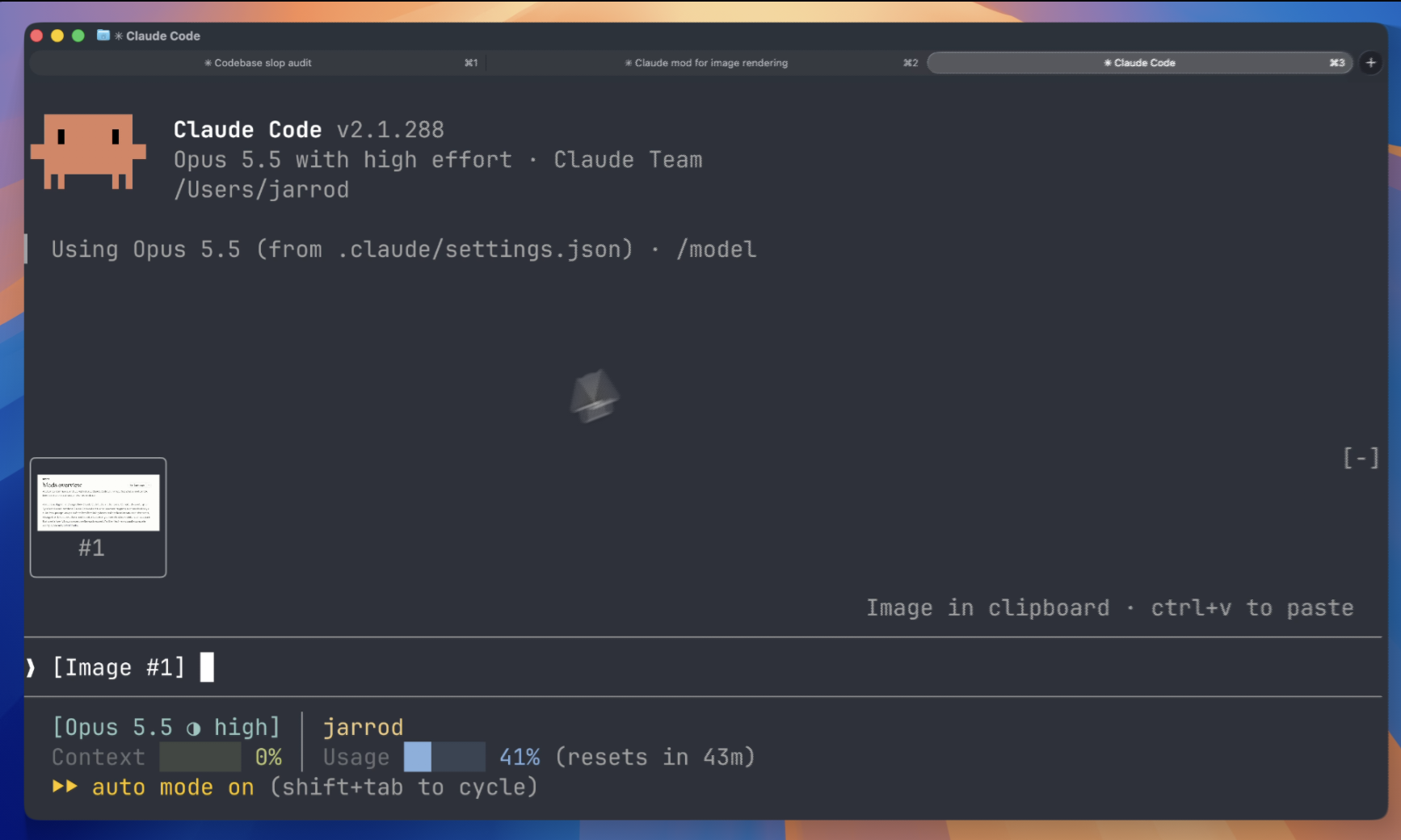
See the images you paste into Claude Code: thumbnails above the prompt instead of bare [Image #1] tags
newbandprocesstimer

See the images you paste into Claude Code: thumbnails above the prompt instead of bare [Image #1] tags
A Claude Code mod that shows the images you paste, so you see thumbnails above your prompt instead of bare [Image #1] tags.

Inside Claude Code, run:
/plugin marketplace add jarrodwatts/claude-image-view
/plugin install image-view
/reload-plugins
That's it. Paste an image into the prompt and its thumbnail appears above the input.
claude plugin marketplace add jarrodwatts/claude-image-view
claude plugin install image-view@claude-image-view
Then run /reload-plugins inside a session, or start a new one.
Paste one or more images and a row of thumbnails sits above the prompt, each labelled with the number of its tag:
╭────────────────────────╮ ╭────────────╮
│                        │ │            │
│      (screenshot)      │ │  (photo)   │
│                        │ │            │
│           #1           │ │     #2     │
╰────────────────────────╯ ╰────────────╯
❯ why is the header misaligned here [Image #1] vs [Image #2]Claude Code saves every pasted image to a cache folder for the session, as <tmp>/<project>/<session>/images/<n>.png, and puts an [Image #n] tag in the prompt. Claude Image View is a mod:
[Image #n] tags. It checks on a timer because pasting an image doesn't raise an edit event.Image element. The terminal reads the file itself, so the image data never passes through the mod.Claude Image View is local-only. It makes no network requests and writes no files. It reads the prompt box, lists Claude Code's temp folder to find the current session's image cache, and reads the first bytes of each pasted image. If CLAUDE_CODE_TMPDIR isn't set, it runs id -u once to find the default temp folder.
Run claude plugin validate on the repo to see every event it hooks and every call it makes.
Other terminals show [Image #n] in each tile instead of the picture. The Claude Desktop app already previews pasted images, so the mod draws nothing there.
Nothing appears when I paste. Run /plugin and check the dim line under the tabs lists image-view as an active mod. If it isn't listed, run /reload-plugins.
The tile says "no preview". The mod couldn't find the cached file. Claude Code may have moved where it stores pasted images. Please open an issue with your Claude Code version.
The tile shows [Image #1] text instead of the picture. Your terminal doesn't support the kitty graphics protocol. See Requirements.
The tile shows [Image #1] text in agent view or a background session, even in Ghostty or kitty. Claude Code turns terminal images off for background sessions. If you attach from a terminal with the kitty graphics protocol, turn them back on in the env block of ~/.claude/settings.json, then start a new session:
"env": { "CLAUDE_CODE_FORCE_TERMINAL_IMAGES": "1" }git clone https://github.com/jarrodwatts/claude-image-view
cd claude-image-view
# Load it for one session without installing
claude --plugin-dir .
# Check it and run the tests
claude plugin validate .
claude plugin test .Claude Code writes the API types into .claude-plugin/types/ the first time it loads the mod, and tsc -p . type-checks it from then on.
MIT. See LICENSE.
hooks/register.tsx 123 lines1import { atom, read, update } from 'claude-code'
2import type { EngineInterface, Register } from 'claude-code'
3
4import type { PastedImage } from '../types'
5import { fitRow, imageNumbers, pngSize } from './layout'
6import type { Size } from './layout'
7
8// Pasting an image raises no prompt.edit (the tag only shows up on the next keystroke),
9// so the draft is polled instead.
10const POLL_MS = 200
11
12const images = atom({ plugin: 'image-view', key: 'images' } as const, [] as PastedImage[])
13
14let tmpRoot: string | undefined
15let found: { sessionId: string; dir: string } | undefined
16// The image numbers last drawn, so an unchanged draft doesn't rewrite state; undefined
17// while a drawn image's file is still missing, so the next poll looks again.
18let shownKey: string | undefined
19let isChecking = false
20const sizes = new Map<string, Size | null>()
21
22// Claude Code caches each paste as <tmp>/<project>/<session>/images/<n>.png. The project
23// folder is named after a working directory that may since have moved, so find it by the
24// session id instead of rebuilding it.
25async function imagesDir($: EngineInterface): Promise<string | undefined> {
26 const sessionId = await $.session.id()
27 if (found?.sessionId === sessionId) return found.dir
28 if (tmpRoot === undefined) {
29 const fromEnv = await $.env.get('CLAUDE_CODE_TMPDIR')
30 tmpRoot = fromEnv ?? `/tmp/claude-${(await $.process.run(['id', '-u'])).stdout.trim()}`
31 }
32 const entries = await $.fs.list(tmpRoot).catch(() => [])
33 for (const entry of entries) {
34 const dir = `${tmpRoot}/${entry.name}/${sessionId}/images`
35 if (entry.kind === 'dir' && (await $.fs.exists(dir))) {
36 found = { sessionId, dir }
37 return dir
38 }
39 }
40 return undefined
41}
42
43async function describe($: EngineInterface, dir: string | undefined, n: number): Promise<PastedImage> {
44 const path = `${dir}/${n}.png`
45 if (dir === undefined || !(await $.fs.exists(path))) return { n, path: null, size: null }
46 if (!sizes.has(path)) {
47 const head = await $.fs.read(path, { as: 'bytes' }).then(
48 ({ base64 }) => pngSize(base64),
49 () => undefined, // too big to read: still drawable, just without its aspect ratio
50 )
51 if (head === null) return { n, path: null, size: null }
52 sizes.set(path, head ?? null)
53 }
54 return { n, path, size: sizes.get(path) ?? null }
55}
56
57async function show($: EngineInterface, draft: string) {
58 const numbers = imageNumbers(draft)
59 const key = numbers.join(',')
60 if (key === shownKey) return
61 const dir = numbers.length > 0 ? await imagesDir($) : undefined
62 const list: PastedImage[] = []
63 for (const n of numbers) list.push(await describe($, dir, n))
64 shownKey = list.every(image => image.path !== null) ? key : undefined
65 await update($, images, () => list)
66}
67
68async function check($: EngineInterface) {
69 if (isChecking) return
70 isChecking = true
71 try {
72 await show($, (await $.prompt.read()).text)
73 } finally {
74 isChecking = false
75 }
76}
77
78export const register: Register = on => {
79 on('session.start', async ($, e, next) => {
80 $.clock.every(POLL_MS, () => check($))
81 return next(e)
82 })
83
84 on('ui.render', { component: 'AbovePrompt' }, async ($, e, next) => {
85 if (e.surface !== 'terminal' || e.props.hasSurvey) return next(e)
86 const list = await read($, images)
87 if (list.length === 0) return next(e)
88
89 const { Box, Image, Text } = $.ui.resolve(e)
90 const cells = fitRow(list.map(image => image.size), e.props.maxRows, e.props.bodyColumns)
91 const below = await next(e)
92
93 return (
94 <Box flexDirection="column">
95 <Box flexDirection="row" columnGap={1}>
96 {list.map((image, i) => {
97 const { columns, rows } = cells[i] ?? { columns: 4, rows: 1 }
98 return (
99 <Box flexDirection="column" alignItems="center" borderStyle="round" borderDimColor>
100 {image.path === null ? (
101 <Box width={columns} height={rows} alignItems="center" justifyContent="center">
102 <Text dimColor wrap="truncate">no preview</Text>
103 </Box>
104 ) : (
105 <Image
106 key={`image-${image.n}`}
107 source={{ file: image.path, format: 'png' }}
108 columns={columns}
109 rows={rows}
110 alt={`[Image #${image.n}]`}
111 />
112 )}
113 <Text dimColor>#{image.n}</Text>
114 </Box>
115 )
116 })}
117 </Box>
118 {below}
119 </Box>
120 )
121 })
122}
123hooks/layout.ts 60 lines1export type Size = { width: number; height: number }
2export type Cells = { columns: number; rows: number }
3
4const TILE_ROWS = 6
5const MAX_COLUMNS = 32
6const MIN_COLUMNS = 4
7// A terminal cell is about twice as tall as it is wide.
8const CELL_ASPECT = 2
9// Used when the size is unknown (file over $.fs.read's 4 MiB cap, or no file).
10const FALLBACK: Size = { width: 16, height: 10 }
11// Each tile adds a border on every side and a label row under the picture.
12const TILE_CHROME_ROWS = 3
13const TILE_CHROME_COLUMNS = 2
14const GAP = 1
15
16/** The distinct image numbers a draft references, in the order they first appear. */
17export function imageNumbers(draft: string): number[] {
18 const seen = new Set<number>()
19 for (const match of draft.matchAll(/\[Image #(\d+)\]/g)) seen.add(Number(match[1]))
20 return [...seen]
21}
22
23/** Width and height from a PNG's IHDR chunk, or null when the bytes aren't a PNG. */
24export function pngSize(base64: string): Size | null {
25 // 24 bytes cover the signature and IHDR's width and height; 32 base64 chars decode to exactly 24.
26 const head = Uint8Array.from(atob(base64.slice(0, 32)), char => char.charCodeAt(0))
27 const signature = [0x89, 0x50, 0x4e, 0x47, 0x0d, 0x0a, 0x1a, 0x0a]
28 if (head.length < 24 || signature.some((byte, i) => head[i] !== byte)) return null
29 const view = new DataView(head.buffer, head.byteOffset, head.byteLength)
30 const width = view.getUint32(16)
31 const height = view.getUint32(20)
32 return width > 0 && height > 0 ? { width, height } : null
33}
34
35/** A picture box `rows` tall that keeps the picture's aspect ratio. */
36export function fitCells(size: Size | null, tileRows = TILE_ROWS): Cells {
37 const { width, height } = size ?? FALLBACK
38 let rows = tileRows
39 let columns = Math.round((rows * CELL_ASPECT * width) / height)
40 if (columns > MAX_COLUMNS) {
41 columns = MAX_COLUMNS
42 rows = Math.max(1, Math.round((MAX_COLUMNS * height) / (CELL_ASPECT * width)))
43 }
44 return { columns: Math.max(MIN_COLUMNS, columns), rows: Math.min(rows, tileRows) }
45}
46
47/**
48 * Picture boxes for one row of tiles that fits the band whole, so it never scrolls:
49 * the tallest tiles whose chrome fits in `maxRows` and whose total width fits in `bodyColumns`.
50 */
51export function fitRow(sizes: readonly (Size | null)[], maxRows: number, bodyColumns: number): Cells[] {
52 const tallest = Math.max(1, Math.min(TILE_ROWS, maxRows - TILE_CHROME_ROWS))
53 for (let tileRows = tallest; tileRows > 1; tileRows--) {
54 const cells = sizes.map(size => fitCells(size, tileRows))
55 const width = cells.reduce((sum, c) => sum + c.columns + TILE_CHROME_COLUMNS, 0) + GAP * (cells.length - 1)
56 if (width <= bodyColumns) return cells
57 }
58 return sizes.map(size => fitCells(size, 1))
59}
60types/index.d.ts 14 lines1export type PastedImage = {
2 n: number
3 /** Absolute path of the cached PNG; null when it can't be found. */
4 path: string | null
5 /** Pixel size; null when unknown, and the tile falls back to a default shape. */
6 size: { width: number; height: number } | null
7}
8
9declare module 'claude-code' {
10 interface PluginState {
11 'image-view': { images: PastedImage[] }
12 }
13}
14