img-viewer
Show images in a Claude Code pane: /img <path>, a show_image tool for Claude, and a pane that follows the images Claude reads
newpaneguardcommandtoolprocess

Show images in a Claude Code pane: /img <path>, a show_image tool for Claude, and a pane that follows the images Claude reads
A Claude Code mod that shows images inside Claude Code's terminal UI, in a pane beside the conversation.
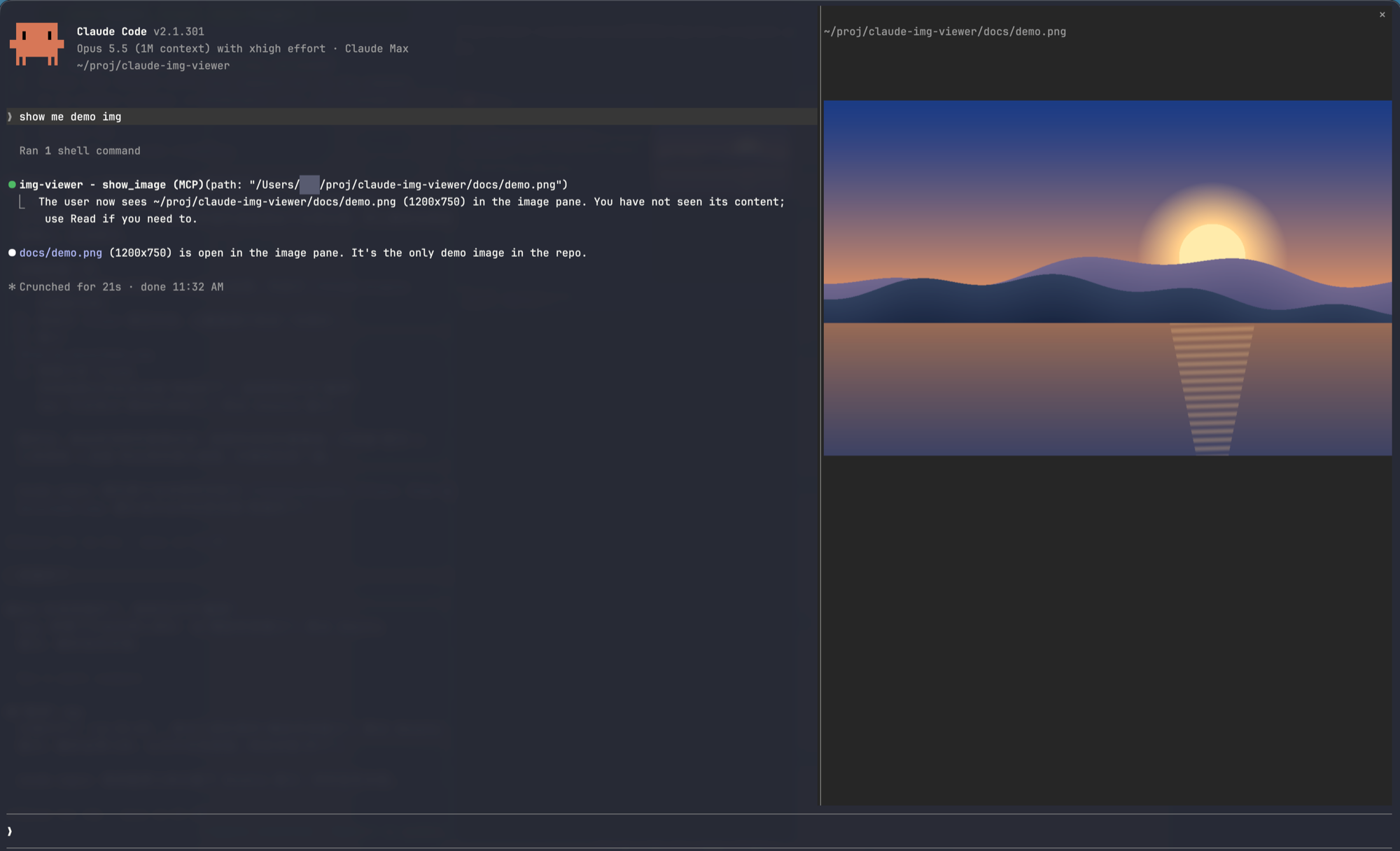
/img <path> shows an image; /img alone opens or closes the pane.show_image tool: the image is shown to you without being read into Claude's context, so it costs no image tokens.sips).magick) or 6 (convert and identify), for example sudo apt install imagemagick.At the prompt of a Claude Code session in a terminal:
/plugin install img-viewer --marketplace jenkinv/claude-img-vieweror from a shell:
claude plugin install img-viewer --marketplace jenkinv/claude-img-viewer| You do | What happens |
|---|---|
/img ~/Pictures/photo.jpg | Shows that image in the pane |
/img | Opens the pane if it is closed, closes it if it is open |
| "Show me screenshot.png" | Claude calls show_image; the image appears, Claude never sees it |
| Claude reads an image file | An open pane switches to that image |
Paths may be absolute, relative to the session's folder, or start with ~/; a path dragged in from a file manager works too. Anything that is not a PNG is converted first, judged by the file's content rather than its extension. PNG, JPEG, GIF, TIFF and BMP work with both sips and ImageMagick; HEIC and WebP depend on the codecs your system has.
| Session | Result |
|---|---|
claude started directly in Ghostty or kitty | Full-resolution image |
claude over SSH from Ghostty or kitty | Full-resolution image (sent inline, downscaled to fit 2 MiB) |
Background sessions (claude agents) | Half-block preview, unless images are forced (below) |
| Any other terminal | Half-block preview |
Claude Code draws no images in background sessions by default. To turn them on, add this to ~/.claude/settings.json and start a new session:
{ "env": { "CLAUDE_CODE_FORCE_TERMINAL_IMAGES": "1" } }This variable is undocumented and may stop working in a later release; the mod then falls back to the half-block preview. It also makes Claude Code send image data to terminals that cannot draw it, which then show stray characters.
When the preview is low resolution, a grey line under it says why.
[Image #1]) cannot be shown; give a file path.claude agents view, Esc and ctrl+x shortcuts may not reach the pane; use /img to close it.claude plugin validate .
claude plugin test .MIT
hooks/register.tsx 282 lines1import { atom, read, update } from 'claude-code'
2import type { EngineInterface, Register } from 'claude-code'
3
4import type { Shown } from '../types'
5
6const PANE = 'img'
7const IMAGE = /\.(png|jpe?g|gif|webp|bmp|tiff?|heic)$/i
8const current = atom({ plugin: 'img-viewer', key: 'current' } as const, null as Shown | null)
9
10const hash = (text: string) => {
11 let n = 5381
12 for (let i = 0; i < text.length; i++) n = (n * 33 + text.charCodeAt(i)) >>> 0
13 return n.toString(36)
14}
15
16// Drag-and-drop pastes 'quoted' or back\ slashed paths
17const unquote = (text: string) =>
18 text.trim().replace(/^(['"])(.*)\1$/, '$2').replace(/\\(.)/g, '$1')
19
20type Tool = 'sips' | 'magick' | 'convert'
21
22let found: Promise<Tool | null> | undefined
23
24// macOS ships sips; Linux needs ImageMagick: `magick` (7) or `convert` and `identify` (6)
25const findTool = ($: EngineInterface) =>
26 (found ??= (async (): Promise<Tool | null> => {
27 if (await $.fs.exists('/usr/bin/sips')) return 'sips'
28 for (const name of ['magick', 'convert'] as const) {
29 const ran = await $.process.run([name, '-version']).catch(() => undefined)
30 if (ran?.exitCode === 0 && ran.stdout.includes('ImageMagick')) return name
31 }
32 return null
33 })())
34
35const needTool = async ($: EngineInterface) => {
36 const tool = await findTool($)
37 if (tool === null) throw new Error('img-viewer needs ImageMagick on Linux; install it, for example: sudo apt install imagemagick')
38 return tool
39}
40
41// Each image operation as the tool spells it; ImageMagick takes the first frame of an animation
42const argv = {
43 describe: (tool: Tool, src: string) =>
44 tool === 'sips'
45 ? ['/usr/bin/sips', '-g', 'format', '-g', 'pixelWidth', '-g', 'pixelHeight', src]
46 : [...(tool === 'magick' ? ['magick', 'identify'] : ['identify']), '-format', '%m %w %h\n', `${src}[0]`],
47 toPng: (tool: Tool, src: string, out: string) =>
48 tool === 'sips' ? ['/usr/bin/sips', '-s', 'format', 'png', src, '--out', out] : [tool, `${src}[0]`, `png:${out}`],
49 shrink: (tool: Tool, src: string, size: number, out: string) =>
50 tool === 'sips'
51 ? ['/usr/bin/sips', '-Z', String(size), src, '--out', out]
52 : [tool, src, '-resize', `${size}x${size}`, `png:${out}`],
53 // Exactly that size; ImageMagick would write a palette BMP for an image of few colours, so 32-bit it is
54 toBmp: (tool: Tool, src: string, width: number, height: number, out: string) =>
55 tool === 'sips'
56 ? ['/usr/bin/sips', '-s', 'format', 'bmp', '-z', String(height), String(width), src, '--out', out]
57 : [tool, src, '-resize', `${width}x${height}!`, '-type', 'TrueColorAlpha', `bmp:${out}`],
58}
59
60// The Image element reads PNG files only, so anything else is converted first
61const load = async ($: EngineInterface, raw: string): Promise<Shown> => {
62 const home = await $.env.get('HOME')
63 const path = home !== undefined && raw.startsWith('~/') ? home + raw.slice(1) : raw
64 const stat = await $.fs.stat(path, { resolve: true }).catch(() => undefined)
65 if (stat?.kind !== 'file' || stat.realPath === undefined) throw new Error(`Not a file: ${raw}`)
66
67 const tool = await needTool($)
68 const generation = Math.floor(stat.mtimeMs)
69 // The extension can lie (a JPEG named .png), so the tool says what the file really is
70 const { stdout } = await $.process.run(argv.describe(tool, stat.realPath))
71 const [format, width, height] =
72 tool === 'sips'
73 ? [/format: (\w+)/.exec(stdout)?.[1], /pixelWidth: (\d+)/.exec(stdout)?.[1], /pixelHeight: (\d+)/.exec(stdout)?.[1]]
74 : (/^(\w+) (\d+) (\d+)/.exec(stdout)?.slice(1) ?? [])
75 if (!(Number(width) > 0 && Number(height) > 0)) throw new Error(`Cannot read image: ${raw}`)
76 let png = stat.realPath
77 if (format?.toLowerCase() !== 'png') {
78 png = `/tmp/claude-img-${hash(stat.realPath)}-${generation}.png`
79 await $.process.run(argv.toPng(tool, stat.realPath, png))
80 }
81
82 // Shown under ~ rather than the home folder, whose name is the user's
83 const shownPath =
84 home !== undefined && stat.realPath.startsWith(`${home}/`) ? `~${stat.realPath.slice(home.length)}` : stat.realPath
85
86 return { path: shownPath, png, generation, width: Number(width), height: Number(height) }
87}
88
89const rasters = new Map<string, string>()
90
91// One cell per two pixels stacked: an upper half block, top pixel as foreground, bottom as background
92const toCells = async ($: EngineInterface, shown: Shown, columns: number, rows: number) => {
93 const key = `${shown.png}:${shown.generation}:${columns}x${rows}`
94 const cached = rasters.get(key)
95 if (cached !== undefined) return cached
96
97 const bmp = `/tmp/claude-img-${hash(key)}.bmp`
98 await $.process.run(argv.toBmp(await needTool($), shown.png, columns, rows * 2, bmp))
99 const { base64 } = await $.fs.read(bmp, { as: 'bytes' })
100 const view = new DataView(Uint8Array.fromBase64(base64).buffer)
101 const offset = view.getUint32(10, true)
102 const isTopDown = view.getInt32(22, true) < 0
103 // 24-bit BGR (sips, opaque images) or 32-bit BGRA; rows pad to 4 bytes and run bottom-up unless the height is negative
104 const size = view.getUint16(28, true) / 8
105 const stride = Math.ceil((columns * size) / 4) * 4
106 const pixel = (x: number, y: number) => {
107 const at = offset + (isTopDown ? y : rows * 2 - 1 - y) * stride + x * size
108 if (size === 4 && view.getUint8(at + 3) < 128) return 0x01000000
109 return (view.getUint8(at + 2) << 16) | (view.getUint8(at + 1) << 8) | view.getUint8(at)
110 }
111 const words = new Uint32Array(columns * rows * 3)
112 for (let y = 0; y < rows; y++) {
113 for (let x = 0; x < columns; x++) {
114 const at = 3 * (y * columns + x)
115 words[at] = 0x2580
116 words[at + 1] = pixel(x, 2 * y)
117 words[at + 2] = pixel(x, 2 * y + 1)
118 }
119 }
120 const cells = new Uint8Array(words.buffer).toBase64()
121 rasters.set(key, cells)
122
123 return cells
124}
125
126const inlined = new Map<string, string | null>()
127
128// Over ssh the terminal cannot open our files, so the PNG goes inline: at most 2 MiB decoded
129const toInline = async ($: EngineInterface, shown: Shown) => {
130 const key = `${shown.png}:${shown.generation}`
131 const cached = inlined.get(key)
132 if (cached !== undefined) return cached
133
134 // A photo's PNG can pass 2 MiB at 1600 px, so step down until it fits
135 const tool = await needTool($)
136 let png: string | null = null
137 for (const size of [1600, 1200, 900, 600]) {
138 const small = `/tmp/claude-img-${hash(key)}-inline-${size}.png`
139 await $.process.run(argv.shrink(tool, shown.png, size, small))
140 if ((await $.fs.stat(small)).size > 2 * 1024 * 1024) continue
141 png = (await $.fs.read(small, { as: 'bytes' })).base64
142 break
143 }
144 inlined.set(key, png)
145
146 return png
147}
148
149export const register: Register = on => {
150 on('session.start', async ($, e, next) => {
151 await $.command.register({
152 name: 'img',
153 description: 'Show an image in a pane; `/img` alone opens or closes the pane',
154 argumentHint: '[path]',
155 })
156 await $.tool.register({
157 name: 'show_image',
158 description:
159 'Show an image file to the user in the image pane. Use it when the user asks to see, show, open or preview ' +
160 'an image. It does not read the image into your context, so you will not see its content; use Read only ' +
161 'when you need to look at the image yourself.',
162 inputSchema: {
163 type: 'object',
164 properties: {
165 path: { type: 'string', description: 'The image file: absolute, relative to the working directory, or ~/...' },
166 },
167 required: ['path'],
168 additionalProperties: false,
169 },
170 isDeferred: false,
171 })
172
173 return next(e)
174 })
175
176 on('tool.call', { tool: 'mcp__img-viewer__show_image' }, async ($, e) => {
177 const shown = await load($, unquote(String(e.path ?? ''))).catch((error: Error) => error)
178 if (shown instanceof Error) return { result: shown.message }
179 await update($, current, () => shown)
180 const opened = await $.ui.open({ id: PANE, title: 'Image' })
181
182 return {
183 result: opened.isPlaced
184 ? `The user now sees ${shown.path} (${shown.width}x${shown.height}) in the image pane. ` +
185 'You have not seen its content; use Read if you need to.'
186 : `${shown.path} is loaded but the image pane is not shown (${opened.reason}); ask the user to run /img.`,
187 }
188 })
189
190 on('command.run', { command: 'img' }, async ($, e) => {
191 const arg = unquote(e.args)
192 if (arg === '' && (await $.ui.panes()).some(pane => pane.id === PANE)) {
193 await $.ui.close({ id: PANE })
194
195 return {}
196 }
197 if (arg !== '') {
198 const shown = await load($, arg).catch((error: Error) => error)
199 if (shown instanceof Error) return { text: shown.message }
200 await update($, current, () => shown)
201 }
202 const opened = await $.ui.open({ id: PANE, title: 'Image' })
203
204 return opened.isPlaced ? {} : { text: `Image pane not shown: ${opened.reason}` }
205 })
206
207 on('tool.call', { tool: 'Read' }, async ($, e, next) => {
208 const ran = await next(e)
209 if (ran.deny !== undefined || ran.isError === true || !IMAGE.test(e.file_path)) return ran
210
211 // An open pane follows the images Claude reads; a closed one shows the latest when /img opens it
212 const shown = await load($, e.file_path).catch(() => undefined)
213 if (shown !== undefined) await update($, current, () => shown)
214
215 return ran
216 }).catch(($, e, next) => next(e))
217
218 on('ui.render', { component: 'Pane', requestId: PANE }, async ($, e) => {
219 const shown = await read($, current)
220 if (e.surface !== 'terminal' || shown === null) {
221 const { Text } = $.ui.resolve(e)
222
223 return <Text dimColor>{shown === null ? 'No image yet: /img <path>' : shown.path}</Text>
224 }
225
226 const { Box, Text, Image, Raster } = $.ui.resolve(e)
227 // A background session's TERM follows the attached client (xterm-ghostty) while TERM_PROGRAM stays
228 // unset, so only TERM_PROGRAM tells a session started directly in Ghostty or kitty. ssh forwards TERM
229 // but not TERM_PROGRAM; the daemon never has SSH_TTY
230 const isSsh = (await $.env.get('SSH_TTY')) !== undefined
231 const isDirect =
232 !isSsh &&
233 (/ghostty|kitty/i.test(`${await $.env.get('TERM_PROGRAM')}`) || (await $.env.get('KITTY_WINDOW_ID')) !== undefined)
234 // Claude Code draws no kitty graphics in background sessions unless CLAUDE_CODE_FORCE_TERMINAL_IMAGES
235 // is set; the daemon then passes them on, but the client terminal may be across ssh, so send the PNG
236 const isForced = Boolean(await $.env.get('CLAUDE_CODE_FORCE_TERMINAL_IMAGES'))
237 const inline = !isDirect && (isForced || (isSsh && /ghostty|kitty/i.test(`${await $.env.get('TERM')}`)))
238 const png = inline ? await toInline($, shown).catch(() => null) : null
239 const isKitty = png !== null || isDirect
240 // A terminal cell is about twice as tall as it is wide
241 const maxColumns = Math.min(isKitty ? 255 : 512, e.props.bodyColumns)
242 const maxRows = Math.min(isKitty ? 255 : 256, e.props.scroll.bodyRows - 1)
243 let columns = maxColumns
244 let rows = Math.round((columns * shown.height) / shown.width / 2)
245 if (rows > maxRows) {
246 rows = maxRows
247 columns = Math.round((rows * 2 * shown.width) / shown.height)
248 }
249 columns = Math.max(1, columns)
250 rows = Math.max(1, rows)
251
252 const cells = isKitty ? undefined : await toCells($, shown, columns, rows).catch(() => null)
253
254 return (
255 <Box flexDirection="column">
256 <Text dimColor>{shown.path}</Text>
257 {isKitty ? (
258 // A key per picture: swapping the source of one Image keeps the terminal's old cell grid
259 <Image
260 key={`img-${hash(`${shown.png}:${shown.generation}`)}`}
261 source={png !== null ? { png } : { file: shown.png, format: 'png', generation: shown.generation }}
262 columns={columns}
263 rows={rows}
264 alt={shown.path}
265 />
266 ) : cells ? (
267 <Raster key="img" columns={columns} rows={rows} cells={cells} />
268 ) : (
269 <Text color="red">Cannot draw this image</Text>
270 )}
271 {!isKitty && (
272 <Text dimColor>
273 {isForced
274 ? 'Low-res preview: could not prepare the PNG (over 2 MiB, or the image tool failed)'
275 : 'Low-res preview: CLAUDE_CODE_FORCE_TERMINAL_IMAGES is not set in this session'}
276 </Text>
277 )}
278 </Box>
279 )
280 })
281}
282types/index.d.ts 15 lines1export type Shown = {
2 path: string
3 png: string
4 generation: number
5 width: number
6 height: number
7}
8
9declare module 'claude-code' {
10 interface PluginState {
11 'img-viewer': { current: Shown | null }
12 }
13}
14
15