browse
Adds /browse: a web browser in a pane beside Claude Code.
newpanecommandtoastprocessnetwork

Adds /browse: a web browser in a pane beside Claude Code.
A Claude Code web browser.
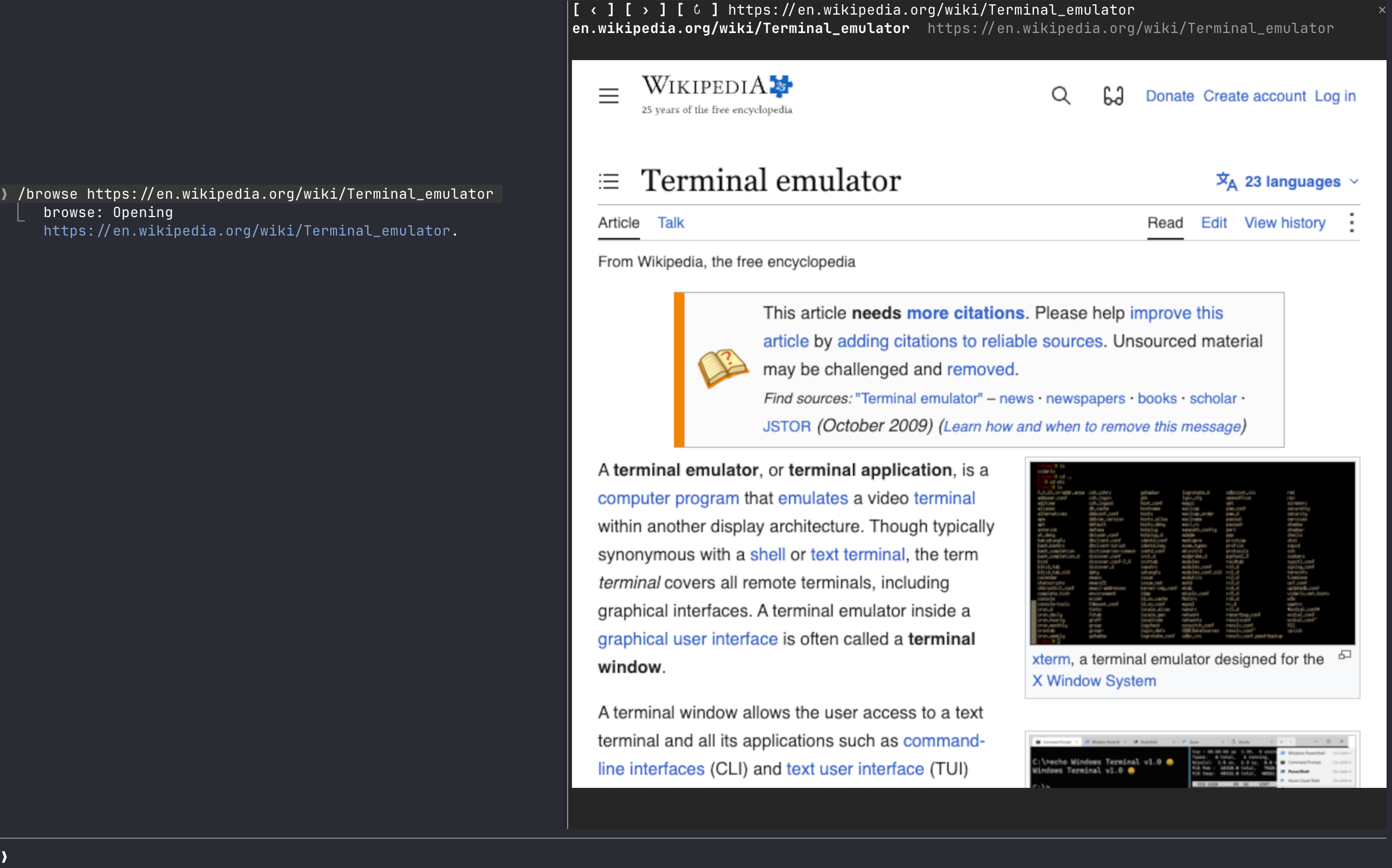
Add the marketplace:
/plugin marketplace add jamubc/toolboxInstall the plugin:
/plugin install browse@toolbox| Command | What it does |
|---|---|
/browse | Opens the browser on a start page: type an address or a search and press Enter, or pick YouTube, DuckDuckGo, Wikipedia, Hacker News or GitHub. |
/browse <address or words> | Opens the address, or searches DuckDuckGo. |
/browse close, or the pane's ✕ | Closes the pane and stops the browser and its sound. |
| The address bar | Type an address or words and press Enter. It has the keys when the start page opens. |
| Click the page | Clicks there. Your keys then go to the page; Esc gives them back to the prompt. |
| Mouse wheel over the page | Scrolls the page. |
/config → How the page is drawn | auto, always real pixels (kitty or Ghostty only) or always colored blocks (any terminal). |
| Where you run Claude Code | Picture | Sound |
|---|---|---|
| kitty, Ghostty | Real pixels (kitty graphics protocol). Untested so far. | Yes |
| Any other terminal: Terminal.app, iTerm2, Zed, VS Code's terminal, WezTerm, tmux, or over ssh | Colored half-blocks, two pixels per character. Video is recognizable but chunky, and small text cannot be read. | Yes, on the machine running Claude Code |
| Claude desktop app, VS Code extension, mobile | Nothing. The pane says the browser only draws in the terminal, and no browser starts. | No |
| System | Status |
|---|---|
| macOS | Tested: YouTube with sound, clicks, keys, the wheel, closing. |
| Linux | Should work; untested. Chrome is looked up on your PATH. |
| Windows | Not supported yet. The pane says so. |
/config → Browser to draw in and Node.js 18+ to run it./config → How the page is drawn back to auto or colored blocks./browse says so.browser/browser.mjs runs Chrome headless and drives it over the DevTools protocol, with no dependencies.hooks/register.tsx draws the pane, answers /browse, and forwards the wheel.hooks/pointer.tsx lies over the picture and passes on clicks and keys./clear and /compact leave the page up: /clear starts a new session in the same process, so the pane keeps what it was showing and writes it into the new one./browse <address> shows in the conversation as the command's reply, so Claude can read it. Pages, frames and what you type into the page stay between the pane and the local Chrome.~/.cache/claude-browse/chrome-profile: cookies and logins persist there between sessions, apart from your everyday Chrome profile. Delete that folder to forget them.hooks/register.tsx 514 lines1// A mini browser in a pane. browser/browser.mjs runs a headless Chrome and
2// streams the page as frames on stdout; this module blits them into a Raster
3// (half-block cells, any terminal) or an Image (real pixels, kitty and
4// Ghostty), and forwards clicks, keys and the wheel to it over its socket.
5
6import { atom, derive, read, update } from 'claude-code'
7import type { EngineInterface, Register } from 'claude-code'
8
9import type { Page, Renderer, Status } from '../types'
10import { toUrl } from './address'
11
12const PANE = 'browse'
13const HEADER_ROWS = 2 // the toolbar and the status line above the page
14const MIN_COLUMNS = 24
15const MIN_VIEW_ROWS = 4
16const DENIES_BEFORE_FALLBACK = 3
17const DEFAULT_COLOR = 0x01000000
18const BLANK_PIXEL = { rgba: 'AAAA/w==', width: 1, height: 1 } as const
19const NEEDS = 'Needs Chrome, Chromium, Brave or Edge, and Node.js 18 or later, on macOS or Linux.'
20const START_PAGES = [
21 ['YouTube', 'https://www.youtube.com'],
22 ['DuckDuckGo', 'https://duckduckgo.com'],
23 ['Wikipedia', 'https://en.wikipedia.org'],
24 ['Hacker News', 'https://news.ycombinator.com'],
25 ['GitHub', 'https://github.com'],
26] as const
27
28const status = atom({ plugin: 'browse', key: 'status' } as const, 'idle')
29const message = atom({ plugin: 'browse', key: 'message' } as const, null)
30const page = atom({ plugin: 'browse', key: 'page' } as const, { url: '', title: '' })
31const renderer = atom({ plugin: 'browse', key: 'renderer' } as const, 'cells')
32const seeded = atom({ plugin: 'browse', key: 'seeded' } as const, false)
33
34// /clear ends the session but not the process: the host's `$.state` starts over empty while this
35// module, its pane and Chrome live on, so read straight from the host the browser is suddenly
36// `idle` with no page. `seeded` is false exactly then, and before the first `session.start`.
37// `snapshot` is what the pane draws from, read in one go: the host's while `seeded`, else what this
38// process last saw; `write` puts the kept values back before the first change after a /clear,
39// and a render that finds `seeded` false schedules that.
40type Snapshot = { status: Status; message: string | null; page: Page; renderer: Renderer }
41const KEYS = ['status', 'message', 'page', 'renderer'] as const
42let kept: Snapshot = { status: 'idle', message: null, page: { url: '', title: '' }, renderer: 'cells' }
43let wasLive: boolean | null = null // what the last read saw; null before the first
44const snapshot = derive([seeded, status, message, page, renderer], (isLive, status, message, page, renderer): Snapshot => {
45 wasLive = isLive
46 if (!isLive) return kept
47 kept = { status, message, page, renderer }
48 return kept
49})
50
51/** The one place the atoms are written: each key to its own, as the validator asks. */
52async function put<K extends keyof Snapshot>($: EngineInterface, key: K, value: Snapshot[K]): Promise<void> {
53 switch (key) {
54 case 'status': await update($, status, () => value as Snapshot['status']); break
55 case 'message': await update($, message, () => value as Snapshot['message']); break
56 case 'page': await update($, page, () => value as Snapshot['page']); break
57 case 'renderer': await update($, renderer, () => value as Snapshot['renderer']); break
58 }
59}
60
61/** After a /clear (or at the first start), writes what this process kept back to the host. */
62let reseeding: Promise<void> | null = null
63function reseed($: EngineInterface): Promise<void> {
64 reseeding ??= (async () => {
65 try {
66 if (await read($, seeded)) return
67 for (const key of KEYS) await put($, key, kept[key])
68 await update($, seeded, () => true)
69 wasLive = true
70 } finally {
71 reseeding = null
72 }
73 })()
74 return reseeding
75}
76
77/** Changes one value from what `snapshot` reads, and keeps it here too. */
78async function write<K extends keyof Snapshot>($: EngineInterface, key: K, change: (now: Snapshot[K]) => Snapshot[K]): Promise<void> {
79 // `kept` is current once a read has seen the host live: only this module writes these values.
80 if (wasLive === null) await read($, snapshot)
81 if (!wasLive) await reseed($)
82 const next = change(kept[key])
83 kept = { ...kept, [key]: next }
84 await put($, key, next)
85}
86
87type Options = { renderer?: string; chrome?: string; node?: string }
88
89type View = { columns: number; rows: number; renderer: Renderer }
90
91type Frame =
92 | { type: 'cells'; columns: number; rows: number; cells: string }
93 | { type: 'image'; columns: number; rows: number; file: string; generation: number }
94
95type Helper = { socket: string | null; ready: Promise<string>; stop: () => void }
96
97type PointerMessage =
98 | { kind: 'size' }
99 | { kind: 'click'; x: number; y: number }
100 | { kind: 'key'; key: string; ctrl?: true; shift?: true; meta?: true }
101
102// What only this process has: the helper is a child of this module, so a
103// hot reload ends it with the module, and these start over with it.
104let helper: Helper | null = null
105let view: View | null = null // the view as last drawn in the terminal
106let sent: View | null = null // the view the helper renders for
107let frame: Frame | null = null // the newest frame, drawn again on a redraw
108let imageDenies = 0
109const blanks = new Map<string, string>()
110
111const sameView = (a: View | null, b: View | null) =>
112 a !== null && b !== null && a.columns === b.columns && a.rows === b.rows && a.renderer === b.renderer
113
114function blankCells(columns: number, rows: number): string {
115 const size = `${columns}x${rows}`
116 let cells = blanks.get(size)
117 if (cells === undefined) {
118 const words = new Uint32Array(columns * rows * 3)
119 for (let i = 0; i < words.length; i += 3) {
120 words[i] = 0x20
121 words[i + 1] = DEFAULT_COLOR
122 words[i + 2] = DEFAULT_COLOR
123 }
124 cells = new Uint8Array(words.buffer).toBase64()
125 blanks.set(size, cells)
126 }
127 return cells
128}
129
130/**
131 * Real pixels where the terminal speaks the kitty graphics protocol. Not
132 * through tmux, which drops it, nor over ssh, where the terminal cannot read
133 * the frame files; kitty's variables leak into both.
134 *
135 * The words are what the /config picker shows, so a row there explains itself;
136 * the engine has already turned anything else into the default before we run.
137 */
138async function pickRenderer($: EngineInterface, options: Options): Promise<Renderer> {
139 const choice = (options.renderer ?? '').toLowerCase()
140 if (choice.startsWith('always real')) return 'image'
141 if (choice.startsWith('always colored')) return 'cells'
142 const isRelayed =
143 (await $.env.get('TMUX')) !== undefined ||
144 (await $.env.get('SSH_CONNECTION')) !== undefined ||
145 (await $.env.get('SSH_TTY')) !== undefined
146 if (isRelayed) return 'cells'
147 const term = (await $.env.get('TERM')) ?? ''
148 const program = ((await $.env.get('TERM_PROGRAM')) ?? '').toLowerCase()
149 const isKitty = (await $.env.get('KITTY_WINDOW_ID')) !== undefined
150 return isKitty || term.includes('kitty') || term.includes('ghostty') || program === 'ghostty' ? 'image' : 'cells'
151}
152
153async function call($: EngineInterface, path: string, body: object = {}): Promise<void> {
154 const socket = helper?.socket
155 if (!socket) return
156 try {
157 const res = await $.http.fetch(`http://browse${path}`, {
158 method: 'POST',
159 headers: { 'content-type': 'application/json' },
160 body: JSON.stringify(body),
161 socketPath: socket,
162 })
163 if (!res.ok) {
164 let reason = `${path} failed (${res.status})`
165 try {
166 reason = JSON.parse(res.text).error ?? reason
167 } catch {}
168 await write($, 'message', () => reason)
169 }
170 } catch (err) {
171 await write($, 'message', () => (err as Error).message)
172 }
173}
174
175/** Tells the helper the size and kind of frames the pane now draws. */
176async function syncView($: EngineInterface): Promise<void> {
177 if (!helper?.socket || view === null || sameView(sent, view)) return
178 sent = view
179 await call($, '/resize', { columns: view.columns, rows: view.rows, mode: view.renderer === 'image' ? 'image' : 'cells' })
180}
181
182async function show($: EngineInterface, next: Frame): Promise<void> {
183 frame = next
184 if (view === null || next.columns !== view.columns || next.rows !== view.rows) return
185 if (next.type === 'cells') {
186 if (view.renderer === 'cells') await $.ui.blit({ requestId: PANE, key: 'view', cells: next.cells })
187 return
188 }
189 if (view.renderer !== 'image') return
190 const res = await $.ui.blit({
191 requestId: PANE,
192 key: 'view',
193 source: { file: next.file, format: 'png', generation: next.generation },
194 })
195 // Not mounted (the pane hidden behind another tab) is no verdict on the terminal.
196 if (res.deny === undefined || /mount/i.test(res.deny)) {
197 imageDenies = 0
198 return
199 }
200 $.ui.log(`browse: image frame refused: ${res.deny}`, { to: 'debug' })
201 imageDenies += 1
202 if (imageDenies >= DENIES_BEFORE_FALLBACK) {
203 imageDenies = 0
204 await write($, 'renderer', () => 'cells')
205 $.ui.toast('This terminal cannot show the page as pixels here; drawing it in colored blocks instead.')
206 }
207}
208
209async function onLine($: EngineInterface, self: Helper, out: any): Promise<string | null> {
210 if (out.type === 'ready') {
211 self.socket = out.socket
212 await write($, 'status', () => 'ready')
213 await syncView($)
214 } else if (out.type === 'page') {
215 await write($, 'page', () => ({ url: out.url, title: out.title }))
216 await write($, 'message', () => null)
217 } else if (out.type === 'cells' || out.type === 'image') {
218 await show($, out)
219 } else if (out.type === 'error') {
220 return String(out.message)
221 }
222 return null
223}
224
225/** Starts the helper once; resolves with its socket when it listens. */
226function startHelper($: EngineInterface, options: Options): Promise<string> {
227 if (helper !== null) return helper.ready
228 const node = options.node || 'node'
229 const child = $.process.spawn({
230 argv: [node, `${$.plugin.root}/browser/browser.mjs`],
231 env: options.chrome ? { BROWSE_CHROME: options.chrome } : {},
232 })
233 let isStopping = false
234 let ready!: (socket: string) => void
235 let failed!: (err: Error) => void
236 const self: Helper = {
237 socket: null,
238 ready: new Promise<string>((resolve, reject) => {
239 ready = resolve
240 failed = reject
241 }),
242 stop: () => {
243 isStopping = true
244 void child.return(undefined as never)
245 },
246 }
247 self.ready.catch(() => {})
248 helper = self
249 sent = null
250 frame = null
251
252 void (async () => {
253 await write($, 'status', () => 'starting')
254 await write($, 'message', () => null)
255 let failure: string | null = null
256 let stderr = ''
257 let pending = ''
258 try {
259 for await (const piece of child) {
260 if (piece.stream === 'stderr') {
261 stderr = (stderr + piece.text).slice(-400)
262 continue
263 }
264 pending += piece.text
265 for (let end = pending.indexOf('\n'); end >= 0; end = pending.indexOf('\n')) {
266 const line = pending.slice(0, end)
267 pending = pending.slice(end + 1)
268 let out
269 try {
270 out = JSON.parse(line)
271 } catch {
272 continue
273 }
274 failure = (await onLine($, self, out)) ?? failure
275 if (out.type === 'ready') ready(out.socket)
276 }
277 }
278 } catch (err) {
279 failure = `Could not run the browser helper with "${node}": ${(err as Error).message}. Set Node.js in /config.`
280 }
281 if (helper === self) {
282 helper = null
283 sent = null
284 }
285 failed(new Error(failure ?? 'the browser stopped'))
286 if (isStopping) return
287 await write($, 'status', () => 'error')
288 await write($, 'message', () => failure ?? `The browser stopped unexpectedly. ${stderr.trim()}`.trim())
289 })().catch(() => {}) // the module unloaded under the loop: nothing left to tell
290
291 return self.ready
292}
293
294async function stopHelper($: EngineInterface): Promise<void> {
295 if (helper === null) return
296 await call($, '/shutdown')
297 helper?.stop()
298 helper = null
299 sent = null
300 frame = null
301 await write($, 'status', () => 'idle')
302}
303
304/** The plugin's own close: its `$.ui.close` never reaches its own `ui.close` hook. */
305async function closePane($: EngineInterface): Promise<void> {
306 await $.ui.close({ id: PANE })
307 view = null
308 await stopHelper($)
309}
310
311async function go($: EngineInterface, options: Options, url: string | null): Promise<void> {
312 try {
313 await startHelper($, options)
314 } catch {
315 return // the helper's own loop has said why
316 }
317 if (url !== null) await call($, '/navigate', { url })
318}
319
320async function open($: EngineInterface, options: Options, args: string) {
321 const typed = args.trim()
322 if (typed === 'close' || typed === 'stop') {
323 await closePane($)
324 return { text: 'Browser closed.' }
325 }
326 if (!(await $.session.surfaces()).includes('terminal')) {
327 return { text: 'The browser pane draws only in the Claude Code terminal, not in this app yet.' }
328 }
329 const url = typed ? toUrl(typed) : null
330 const opened = await $.ui.open({ id: PANE, title: 'Browse', focus: true, rows: 30, columns: 100 })
331 void go($, options, url) // with no address, Chrome starts now and the start page asks where to
332 const where = url ?? 'the browser'
333 const looks = ((await read($, snapshot)).renderer) === 'cells' ? ' Drawn in colored blocks here; kitty or Ghostty show real pixels.' : ''
334 return {
335 text: opened.isPlaced
336 ? `Opening ${where}.${looks}`
337 : `Opening ${where}; widen the terminal to see the pane.${looks}`,
338 }
339}
340
341export const register: Register = (on, options: Options) => {
342 on('session.start', async ($, e, next) => {
343 await $.command.register({ name: 'browse', description: 'Browse the web' })
344 await reseed($)
345 const picked = await pickRenderer($, options)
346 await write($, 'renderer', () => picked)
347 // A reload ended the old helper with the old module.
348 await write($, 'status', () => 'idle')
349
350 return next(e)
351 })
352
353 // /clear: Chrome and the pane stay up, so what they show is written back as soon as the host's
354 // state is the new session's (now, or from the next event if that comes later).
355 on('session.end', async ($, e, next) => {
356 const result = await next(e)
357 if (e.reason === 'clear') await reseed($).catch(() => {})
358 return result
359 })
360
361 on('command.run', { command: 'browse' }, async ($, e) => {
362 await reseed($)
363 return open($, options, e.args)
364 })
365
366 on('ui.close', async ($, e, next) => {
367 const result = await next(e)
368 if (e.id === PANE) {
369 view = null
370 await stopHelper($)
371 }
372 return result
373 })
374
375 on('ui.message', { requestId: PANE }, async ($, e) => {
376 const data = e.data as PointerMessage
377 if (data.kind === 'size') await syncView($)
378 else if (data.kind === 'click') await call($, '/click', { x: data.x, y: data.y })
379 else if (data.kind === 'key') await call($, '/key', data)
380 return {}
381 })
382
383 // The wheel over the page scrolls the page; the pane itself never scrolls.
384 on('ui.scroll', { requestId: PANE }, async ($, e) => {
385 if (view === null) return {}
386 const row = e.pointer ? e.pointer.row - HEADER_ROWS : view.rows / 2
387 if (row < 0) return {}
388 const column = e.pointer ? e.pointer.column : view.columns / 2
389 const dy = e.pointer ? e.by : Math.sign(e.by) * 3
390 await call($, '/wheel', { x: (column + 0.5) / view.columns, y: (row + 0.5) / view.rows, dy })
391 return {}
392 })
393
394 on('ui.render', { component: 'Pane', requestId: PANE }, async ($, e) => {
395 if (e.surface !== 'terminal') {
396 const { Box, Button, Text } = $.ui.resolve(e)
397 return (
398 <Box flexDirection="column">
399 <Text>The browser pane draws only in Claude Code's terminal.</Text>
400 <Text dimColor>Open this session in a terminal to see the page; kitty or Ghostty show real pixels.</Text>
401 <Button key="close" label="Close" onPress={() => closePane($)} />
402 </Box>
403 )
404 }
405 const { Box, Button, Client, Image, Input, Raster, Text } = $.ui.resolve(e)
406 // Drawn from what this process kept after a /clear; the host gets it back off the render.
407 if (!(await read($, seeded))) $.clock.after(0, () => void reseed($).catch(() => {}))
408 const { status: now, message: why, page: shown, renderer: drawAs } = await read($, snapshot)
409 const columns = e.props.bodyColumns
410 const rows = e.props.scroll.bodyRows - HEADER_ROWS
411 // No page yet: Chrome's blank page draws near-black, so the pane shows a
412 // start page instead, and the address bar holds the keys from the start.
413 const isBlank = shown.url === '' || shown.url === 'about:blank'
414
415 const toolbar = (
416 <Box flexDirection="row" gap={1}>
417 <Button key="back" label="‹" onPress={() => call($, '/back')} />
418 <Button key="forward" label="›" onPress={() => call($, '/forward')} />
419 <Button key="reload" label="↻" onPress={() => call($, '/reload')} />
420 <Box flexGrow={1}>
421 <Input
422 key="address"
423 placeholder="address or search"
424 value={isBlank ? '' : shown.url}
425 autoFocus={isBlank ? true : undefined}
426 submitLabel="go"
427 onSubmit={value => go($, options, toUrl(value))}
428 />
429 </Box>
430 </Box>
431 )
432
433 let line
434 if (now === 'starting') line = <Text dimColor>Starting Chrome…</Text>
435 else if (now === 'ready' && why !== null) line = <Text color="yellow" wrap="truncate-end">{why}</Text>
436 else if (now === 'ready' && shown.url !== '' && shown.url !== 'about:blank') {
437 line = (
438 <Text wrap="truncate-end">
439 <Text bold>{shown.title || shown.url}</Text>
440 <Text dimColor>{` ${shown.url}`}</Text>
441 </Text>
442 )
443 } else if (isBlank) line = <Text dimColor wrap="truncate-end">Esc gives the keys back to the prompt.</Text>
444 else line = <Text dimColor wrap="truncate-end">Click the page to type into it; Esc gives the keys back.</Text>
445
446 let body
447 if (now === 'error') {
448 view = null
449 body = (
450 <Box flexDirection="column">
451 <Text color="red">{why ?? 'The browser stopped.'}</Text>
452 <Text dimColor>{NEEDS}</Text>
453 <Button key="retry" label="Try again" variant="primary" onPress={() => go($, options, shown.url || null)} />
454 </Box>
455 )
456 } else if (now === 'idle') {
457 view = null
458 body = (
459 <Box flexDirection="column">
460 <Text dimColor>The browser is stopped.</Text>
461 <Button key="start" label="Start" variant="primary" onPress={() => go($, options, shown.url || null)} />
462 </Box>
463 )
464 } else if (isBlank) {
465 view = null
466 body = (
467 <Box flexDirection="column" paddingTop={1} gap={1}>
468 <Text bold>Where to?</Text>
469 <Text dimColor wrap="wrap">Type an address or a search into the bar above and press Enter, or pick one:</Text>
470 <Box flexDirection="row" flexWrap="wrap" columnGap={2}>
471 {START_PAGES.map(([name, url]) => (
472 <Button key={`start:${name}`} label={name} onPress={() => go($, options, url)} />
473 ))}
474 </Box>
475 </Box>
476 )
477 } else if (columns < MIN_COLUMNS || rows < MIN_VIEW_ROWS) {
478 view = null
479 body = <Text dimColor>{`Make the pane bigger to see the page (at least ${MIN_COLUMNS}×${MIN_VIEW_ROWS + HEADER_ROWS}).`}</Text>
480 } else {
481 view = { columns, rows, renderer: drawAs }
482 const fits = frame !== null && frame.columns === columns && frame.rows === rows
483 const picture =
484 drawAs === 'image' ? (
485 <Image
486 key="view"
487 columns={columns}
488 rows={rows}
489 alt="This terminal cannot show images: set Picture to blocks in /config."
490 source={fits && frame?.type === 'image' ? { file: frame.file, format: 'png', generation: frame.generation } : BLANK_PIXEL}
491 />
492 ) : (
493 <Raster key="view" columns={columns} rows={rows} cells={fits && frame?.type === 'cells' ? frame.cells : blankCells(columns, rows)} />
494 )
495 body = (
496 <Box width={columns} height={rows}>
497 {picture}
498 <Box position="absolute" top={0} left={0}>
499 <Client key="pointer" module="./pointer.tsx" width={columns} height={rows} />
500 </Box>
501 </Box>
502 )
503 }
504
505 return (
506 <Box flexDirection="column">
507 {toolbar}
508 {line}
509 {body}
510 </Box>
511 )
512 })
513}
514hooks/address.ts 12 lines1/**
2 * Turns what the person typed into a URL: a URL as given (http, https or
3 * about only), a bare host made https, anything else a web search.
4 */
5export function toUrl(text: string): string {
6 const typed = text.trim()
7 if (/^https?:\/\//i.test(typed) || /^about:/i.test(typed)) return typed
8 if (/^(localhost|127\.0\.0\.1)(:\d+)?(\/\S*)?$/i.test(typed)) return `http://${typed}`
9 if (/^[\w-]+(\.[\w-]+)*\.[a-z]{2,}(:\d+)?(\/\S*)?$/i.test(typed)) return `https://${typed}`
10 return `https://duckduckgo.com/?q=${encodeURIComponent(typed)}`
11}
12hooks/pointer.tsx 31 lines1import type { ClientModule } from 'claude-code'
2
3type Size = { columns: number; rows: number }
4
5// Lies over the page's picture and hands the hooks module what the person
6// does there: its size as laid out, a click as a fraction of the view, then
7// every key while it has the focus (the click gives it; Escape returns it).
8const Pointer: ClientModule<null, Size> = (_props, surface) => {
9 if (surface.state === undefined) {
10 surface.onPointer(e => {
11 if (e.type !== 'down' || e.button !== 'left' || surface.columns === 0) return
12 surface.post({
13 kind: 'click',
14 x: (e.fine?.x ?? e.x + 0.5) / surface.columns,
15 y: (e.fine?.y ?? e.y + 0.5) / surface.rows,
16 })
17 })
18 surface.onKey(e => surface.post({ kind: 'key', ...e }))
19 }
20 const { columns, rows } = surface
21 if (columns > 0 && (surface.state?.columns !== columns || surface.state?.rows !== rows)) {
22 surface.post({ kind: 'size', columns, rows })
23 surface.setState({ columns, rows })
24 }
25 const { Box } = surface.elements
26
27 return <Box width={columns} height={rows} />
28}
29
30export default Pointer
31types/index.d.ts 22 lines1/** Whether the browser helper is running: not yet, coming up, up, or failed. */
2export type Status = 'idle' | 'starting' | 'ready' | 'error'
3
4/** How frames are drawn: real pixels (kitty graphics) or half-block cells. */
5export type Renderer = 'image' | 'cells'
6
7export type Page = { url: string; title: string }
8
9declare module 'claude-code' {
10 interface PluginState {
11 browse: {
12 status: Status
13 /** Why the browser failed (status `error`), or a passing notice. */
14 message: string | null
15 page: Page
16 renderer: Renderer
17 /** True once this session's values are written; false after a /clear empties them. */
18 seeded: boolean
19 }
20 }
21}
22