hud
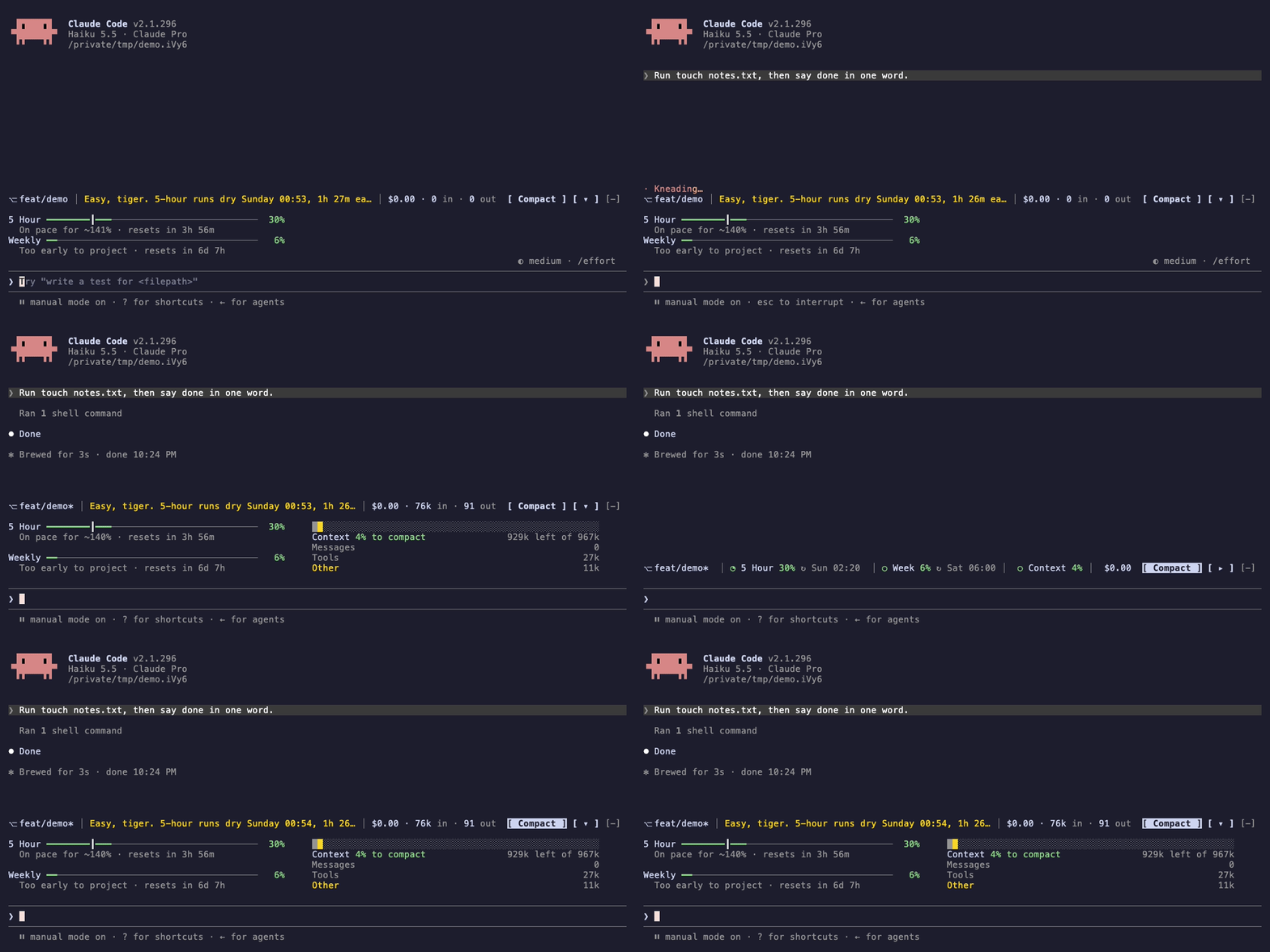
A band above the prompt: usage limits with a pace verdict, context, branch and cost, with Compact and collapse buttons.
newbandguardcommandtoastprocess

A band above the prompt: usage limits with a pace verdict, context, branch and cost, with Compact and collapse buttons.
A Claude Code mod that draws a band of up to six lines above the prompt. The first line holds the git branch, a one-sentence verdict on the usage limits, the session's cost and tokens, and two buttons. Under it, the 5-hour and weekly limits sit on the left and the context on the right.
⎇ feat/hud* │ Cruising. Plenty left for Wednesday. │ $0.42 · 1.2M in · 38k out  [ Compact ] [ ▾ ]
5 Hour ━━━━━━━━━━━━━━━━━━━━━━━━━━━━━━━━━━━┃━━━━━━───  81%   ████████████▓▓▓▒▒░░░░░░░░░░░░░░░░░░░░░░░░░░░░░░░░░░
  On pace for ~87% · resets in 23m                         Context 24% to compact                   120k left of 160k
Weekly ━━━━━━━━┃━━━━──────────────────────────────────  20%   Messages                                                190k
  On pace for ~36% · resets in 2d 20h                      Tools                                                    36k
                                                           Other                                                    18k
Collapsed, it's one line spread across the band, and each bar becomes a ring (a circle glyph in a terminal):
⎇ feat/hud* │ ◕ 5 Hour 81% ↻ 14:00 │ ◔ Week 20% ↻ Wed 09:00 │ ◔ Context 30% │ $0.42 [ Compact ] [ ▸ ]| Part | What it reads |
|---|---|
⎇ feat/hud* | git branch --show-current, and * when git status --porcelain lists changes. Read at session start and after every Bash call. Hidden outside a git repository and on a detached HEAD. |
| Verdict | Whether the 5-hour and weekly limits last until they reset, at the rate they've been used so far. Green: Cruising. Plenty left for Wednesday. Yellow, or red from 90% used: Easy, tiger. 5-hour runs dry 14:50, 30m early. Red: Weekly's tapped out. Back Wednesday 09:00. Cut short with … when the line is too narrow. |
$0.42 · 1.2M in · 38k out | The cost /cost reports. On a Pro or Max subscription this is what the same tokens would cost at API prices, not a charge. Input counts uncached, cache-write and cache-read tokens. Subagents' tokens are included. |
5 Hour ━━━┃━── 81% | How much of the 5-hour window is used. The ┃ marks how much of the window has passed, so a bar that fills past it is ahead of pace. The line under it projects the use at the reset and counts down to it. The tick and projection appear once 10% of the window has passed. |
Weekly ━━━┃━── 20% | The same for the weekly window. |
████▓▒░░ Context 24% to compact | Context used, measured against the point where auto-compact runs. The bar is split into messages, tools and everything else, in the colours /context uses, with each part's tokens listed below it. With auto-compact off, it's measured against the model's context window and reads used. |
↻ 14:00 | Collapsed only: when each limit resets. The time alone for today, the day too for later. |
The limit bars and percentages are green below 70% used, yellow from 70%, and red from 90%. The rings on the collapsed line follow the same colours. A part with nothing to show is left out, and countdowns redraw every minute.
In the desktop app, the bars are drawn as solid rounded bars that fill their column, and the limits always sit beside the context. On a terminal narrower than 80 columns, the context goes under the limits, and the projections and the context breakdown are dropped.
| Control | What it does |
|---|---|
Compact (c) | Runs /compact. Pressed during a turn, it runs once the turn ends. A failure shows the reason Claude Code gives. |
▾ / ▸ (h) | Collapses the band to one line, or expands it. The choice is kept across sessions. The desktop app draws a larger triangle without button shading, with the click area centred on it. |
/hud | Hides or shows the whole band. The choice is kept across sessions. |
The hotkeys work in a terminal while the band has the focus: click it, or press ctrl+x tab. The desktop app shows plain buttons without them.
The patterns it demonstrates:
AbovePrompt band drawn from $.state values, so it redraws by itself when a value changes, laid out to the band's bodyColumns.$.clock.every timer that redraws the countdowns.session.measure and $.session.usage(), instead of computing cost or context.tool.call after next(e), without changing them.$.store.The recording shows version 0.2, before the redesign. Claude works through a four-item todo list in a new repo on feat/demo. The branch gets a * once the first file exists, the todo bar fills with the current item beside it, and the context, cost and token figures fill in when the turn ends. The recording is scripted: run vhs mod/hud/demo/hud.tape from the repo root in a plain terminal to make it again.
I want a mod that will show a band above prompt input.
- Show progress bar of todo
- Show context bar before auto-compact/limit
- Show branch it's working on
- Show rough estimation of cost incurred based on token input/output and model used?
- Show 5hr and weekly usage remaining
/hud toggle were settled in an interview before building.claude plugin test only. It hasn't been tried in a live terminal yet./compact and waits for a running turn. The verdicts are shorter, the collapsed line has dividers, each limit's bar stays with its reset line, and the desktop's collapse click area covers the whole triangle.Requirements:
git on the PATH for the branch part.No environment variables or configuration.
Steps:
   git clone https://github.com/im-ksc/ks-ai-stack.git
cd ks-ai-stack claude plugin validate ./mod/hud
claude plugin test ./mod/hud claude --plugin-dir ./mod/hudOr install it, with the other mods here, from the marketplace at the repository root (see the root README):
   claude plugin marketplace add ./
claude plugin install hud@ks-ai-stack --scope userh to collapse it and c to compact./hud to hide the band, and again to show it./context's rows by name: Messages, rows with "tool" in the name, and the rest./clear empties them. After --resume the token counts start from zero while the cost doesn't, because the cost comes from the engine's ledger.spend_limit window isn't shown.| Name | Version | License (SPDX) | Source |
|---|---|---|---|
| None |
None.
hooks/hud.mjs 401 lines1// HUD: a band above the prompt. Expanded: the branch, a verdict on the usage
2// limits and the cost, then the 5h and weekly limits beside the context
3// (character bars in a terminal, SVG bars in the desktop app).
4// Collapsed: one line spread across the band, with each bar drawn as a ring.
5
6import { atom, read, update } from "claude-code";
7
8const branch = atom({ plugin: "hud", key: "branch" }, null);
9const budget = atom({ plugin: "hud", key: "budget" }, {});
10const tokens = atom({ plugin: "hud", key: "tokens" }, { input: 0, output: 0 });
11const isHidden = atom({ plugin: "hud", key: "isHidden" }, false);
12const isCollapsed = atom({ plugin: "hud", key: "isCollapsed" }, false);
13const minute = atom({ plugin: "hud", key: "minute" }, 0); // bumped so countdowns redraw
14
15async function refreshBranch($) {
16 try {
17 const name = (await $.process.run(["git", "branch", "--show-current"], { timeoutMs: 5000 })).stdout.trim();
18 if (!name) return update($, branch, () => null);
19 const status = await $.process.run(["git", "status", "--porcelain"], { timeoutMs: 5000 });
20 await update($, branch, () => ({ name, isDirty: status.stdout.trim() !== "" }));
21 } catch {
22 await update($, branch, () => null); // not a repo, or no git
23 }
24}
25
26// Filled cells of a `width`-cell bar at `percent`.
27const cells = (percent, width) => Math.max(0, Math.min(width, Math.round((percent / 100) * width)));
28
29// Theme colour for how much of a budget is used.
30const level = (used) => (used >= 90 ? "error" : used >= 70 ? "warning" : "success");
31
32// The desktop draws bars as SVG, an image that can't read theme names: hex
33// for the level colours and the context groups, a grey track for either theme.
34const HEX = { success: "#4ade80", warning: "#f5c04a", error: "#f87171", Messages: "#5ec8e5", Tools: "#a78bfa", Other: "#8b93a1" };
35const TRACK = "rgba(128,128,128,0.25)";
36
37// A rounded bar the width of its column: [percent, colour] segments laid end to end.
38function svgBar(Svg, alt, segments, tick = null) {
39 let x = 0;
40 const rects = segments.map(([w, fill]) => {
41 const rect = `<rect x="${x}%" width="${w}%" height="8" fill="${fill}"/>`;
42 x += w;
43 return rect;
44 });
45 if (tick !== null) rects.push(`<rect x="${Math.min(99, tick)}%" width="2" height="8" fill="rgba(160,160,160,0.9)"/>`);
46 const source = `<svg xmlns="http://www.w3.org/2000/svg" width="100%" height="8"><clipPath id="r"><rect width="100%" height="8" rx="4"/></clipPath><g clip-path="url(#r)"><rect width="100%" height="8" fill="${TRACK}"/>${rects.join("")}</g></svg>`;
47 return Svg({ alt, height: 8, source });
48}
49
50// A ring filled clockwise from the top to `percent`, in its level's colour.
51const ringSvg = (percent) => {
52 const arc = `<circle cx="6" cy="6" r="4.5" fill="none" stroke-width="2"`;
53 return `<svg xmlns="http://www.w3.org/2000/svg" width="12" height="12">${arc} stroke="${TRACK}"/>` +
54 `${arc} stroke="${HEX[level(percent)]}" pathLength="100" stroke-dasharray="${Math.max(0, Math.min(100, percent))} 100" transform="rotate(-90 6 6)"/></svg>`;
55};
56
57// A bar in one glyph, for the collapsed line: ○ ◔ ◑ ◕ ●.
58const circle = (percent) => "○◔◑◕●"[Math.max(0, Math.min(4, Math.round(percent / 25)))];
59
60// 1.2M, 38k, 950.
61function count(n) {
62 if (n >= 999_500) return `${(n / 1e6).toFixed(1)}M`; // not "1000k"
63 if (n >= 1e3) return `${Math.round(n / 1e3)}k`;
64 return String(n);
65}
66
67const DAYS = ["Sunday", "Monday", "Tuesday", "Wednesday", "Thursday", "Friday", "Saturday"];
68const clock = (time) => {
69 const d = new Date(time);
70 return `${String(d.getHours()).padStart(2, "0")}:${String(d.getMinutes()).padStart(2, "0")}`;
71};
72// "14:50" today, "Wednesday 09:00" (or "Wed 09:00") on another day.
73const when = (time, now, isShort = false) => {
74 if (new Date(time).toDateString() === new Date(now).toDateString()) return clock(time);
75 const day = DAYS[new Date(time).getDay()];
76 return `${isShort ? day.slice(0, 3) : day} ${clock(time)}`;
77};
78
79// Two units at most: "2d 20h", "3h 5m", "23m".
80function span(ms) {
81 const m = Math.max(0, Math.round(ms / 60e3));
82 if (m >= 1440) return `${Math.floor(m / 1440)}d ${Math.floor((m % 1440) / 60)}h`;
83 if (m >= 60) return `${Math.floor(m / 60)}h ${m % 60}m`;
84 return `${m}m`;
85}
86
87const WINDOWS = { five_hour: { ms: 5 * 3600e3, name: "5-hour" }, seven_day: { ms: 7 * 86400e3, name: "weekly" } };
88
89// How far through its window a limit is, 0 to 1, or null when that isn't
90// known yet: no reset time, or under 10% in, too early to project from.
91function pace(limit, now) {
92 if (!limit.resetsAt) return null;
93 const f = 1 - (Date.parse(limit.resetsAt) - now) / WINDOWS[limit.kind].ms;
94 return f >= 0.1 ? Math.min(1, f) : null;
95}
96
97// One sentence on the limits: reached, running out before the reset, or on track.
98function verdict(limits, now) {
99 const reached = limits.find((l) => l.percentUsed >= 100);
100 if (reached) {
101 const name = WINDOWS[reached.kind].name;
102 const reset = reached.resetsAt ? ` Back ${when(reached.resetsAt, now)}.` : "";
103 return { color: "error", text: `${name[0].toUpperCase()}${name.slice(1)}'s tapped out.${reset}` };
104 }
105 const runsOut = limits.flatMap((l) => {
106 const f = pace(l, now);
107 if (f === null || l.percentUsed <= 0) return [];
108 const reset = Date.parse(l.resetsAt);
109 const start = reset - WINDOWS[l.kind].ms;
110 const out = start + ((now - start) * 100) / l.percentUsed;
111 return out < reset ? [{ l, out, reset }] : [];
112 }).sort((a, b) => a.out - b.out)[0];
113 if (runsOut) {
114 const { l, out, reset } = runsOut;
115 return {
116 color: level(Math.max(70, l.percentUsed)),
117 text: `Easy, tiger. ${WINDOWS[l.kind].name[0].toUpperCase()}${WINDOWS[l.kind].name.slice(1)} runs dry ${when(out, now)}, ${span(reset - out)} early.`,
118 };
119 }
120 const weekly = limits.find((l) => l.kind === "seven_day" && l.resetsAt);
121 return { color: "success", text: weekly ? `Cruising. Plenty left for ${DAYS[new Date(weekly.resetsAt).getDay()]}.` : "Cruising." };
122}
123
124// The context breakdown in three groups, each in the colour /context gives its largest row.
125function groups(categories) {
126 const named = { Messages: [], Tools: [], Other: [] };
127 for (const c of categories.filter((c) => c.kind === "used")) {
128 named[c.name === "Messages" ? "Messages" : /tool/i.test(c.name) ? "Tools" : "Other"].push(c);
129 }
130 return Object.entries(named).map(([name, rows]) => ({
131 name,
132 tokens: rows.reduce((sum, c) => sum + c.tokens, 0),
133 color: rows.sort((a, b) => b.tokens - a.tokens)[0]?.color ?? "inactive",
134 }));
135}
136
137// [glyph, colour] cells merged into one Text per run of a colour; no colour draws dim.
138function runs(Text, list) {
139 const out = [];
140 for (const [glyph, color] of list) {
141 const last = out.at(-1);
142 if (last && last.color === color) last.text += glyph;
143 else out.push({ text: glyph, color });
144 }
145 return out.map(({ text, color }) => Text(color ? { color, children: text } : { dimColor: true, children: text }));
146}
147
148let ticker; // the minute timer
149let isCompacting = false; // so a second press doesn't queue a second /compact
150
151export function register(on) {
152 on("session.start", async ($, e, next) => {
153 const r = await next(e);
154 await $.command.register({ name: "hud", description: "Hide or show the HUD band above the prompt" });
155 const hidden = (await $.store.get("isHidden")) === true;
156 await update($, isHidden, () => hidden);
157 const collapsed = (await $.store.get("isCollapsed")) === true;
158 await update($, isCollapsed, () => collapsed);
159 await refreshBranch($);
160 ticker?.cancel(); // session.start fires again on /clear and resume
161 ticker = $.clock.every(60e3, () => update($, minute, (n) => n + 1));
162 return r;
163 });
164
165 on("command.run", { command: "hud" }, async ($) => {
166 const hidden = !(await read($, isHidden));
167 await update($, isHidden, () => hidden);
168 await $.store.set("isHidden", hidden);
169 return { text: hidden ? "HUD hidden. Run /hud to show it again." : "HUD shown." };
170 });
171
172 // /clear starts the conversation over: its token counts with it.
173 on("session.end", async ($, e, next) => {
174 if (e.reason === "clear") {
175 await update($, tokens, () => ({ input: 0, output: 0 }));
176 }
177 return next(e);
178 });
179
180 on("tool.call", async ($, e, next) => {
181 const r = await next(e);
182 if (e.tool === "Bash") await refreshBranch($);
183 return r;
184 });
185
186 // Subagent turns count too: their tokens are in /cost as well.
187 on("turn.complete", async ($, e, next) => {
188 const u = e.usage;
189 if (u) {
190 const input = u.input_tokens + u.cache_creation_input_tokens + u.cache_read_input_tokens;
191 await update($, tokens, (t) => ({ input: t.input + input, output: t.output + u.output_tokens }));
192 }
193 return next(e);
194 });
195
196 on("session.measure", async ($, e, next) => {
197 let contextPercent = e.context.percent === undefined ? undefined : Math.round(e.context.percent);
198 let contextLimit = e.context.window;
199 let isToCompact = false;
200 let contextGroups;
201 if (e.context.tokens !== undefined) {
202 try {
203 // The local estimate: no API request. Absent threshold means auto-compact is off.
204 const breakdown = (await $.session.usage({ breakdown: "summary" })).context.breakdown;
205 if (breakdown?.categories) contextGroups = groups(breakdown.categories);
206 if (breakdown?.autoCompactThreshold) {
207 contextLimit = breakdown.autoCompactThreshold;
208 contextPercent = Math.round((e.context.tokens / contextLimit) * 100);
209 isToCompact = true;
210 }
211 } catch { /* keep the window's percent */ }
212 }
213 const limit = (kind) => e.rateLimits.find((l) => l.kind === kind);
214 await update($, budget, () => ({
215 contextPercent, contextTokens: e.context.tokens, contextLimit, isToCompact, contextGroups,
216 costUsd: e.cost?.usd, fiveHour: limit("five_hour"), weekly: limit("seven_day"),
217 }));
218 return next(e);
219 });
220
221 on("ui.render", { component: "AbovePrompt" }, async ($, e, next) => {
222 if (e.props.hasSurvey || (await read($, isHidden))) return next(e);
223 const { Box, Text, Button, Svg } = $.ui.resolve(e);
224 const isDesktop = e.surface === "desktop"; // draws bars as SVG and hotkeys as chips, so none
225 const dim = (children) => Text({ dimColor: true, children });
226 await read($, minute); // redraw each minute
227 const now = Date.now();
228
229 const b = await read($, branch);
230 const collapsed = await read($, isCollapsed);
231 const { contextPercent, contextTokens, contextLimit, isToCompact, contextGroups, costUsd, fiveHour, weekly } = await read($, budget);
232 const t = await read($, tokens);
233 const limits = [["5 Hour", "5 Hour", fiveHour], ["Weekly", "Week", weekly]].filter(([, , l]) => l);
234 const hasContext = contextPercent !== undefined;
235 const sep = dim(" │ ");
236 const line = (key, children) => Box({ key, children: Text({ children }) }); // a Text takes no key
237
238 // /compact rather than $.session.compact(), which an SDK session (the desktop app) lacks;
239 // the command waits for a running turn. Started on a timer: it outlasts a press.
240 const compact = () => {
241 if (isCompacting) return;
242 isCompacting = true;
243 $.clock.after(0, async () => {
244 try {
245 await $.command.run({ command: "compact" });
246 } catch (err) {
247 $.ui.toast(`Compact failed: ${err?.message ?? err}`);
248 } finally {
249 isCompacting = false;
250 }
251 });
252 };
253 const toggle = async () => {
254 await update($, isCollapsed, () => !collapsed);
255 await $.store.set("isCollapsed", !collapsed);
256 };
257 // The desktop shades every button but a plain one, so a bigger triangle is drawn and a
258 // chromeless button laid over it takes the click.
259 const triangle = () => Box({ key: "collapse-box", width: 4, height: 1, overflow: "hidden", children: [
260 Box({ key: "glyph", position: "absolute", top: 0, left: 0, width: 4, height: 1, alignItems: "center", justifyContent: "center",
261 children: Svg({ alt: collapsed ? "Expand" : "Collapse", width: 12, height: 8,
262 source: `<svg xmlns="http://www.w3.org/2000/svg" width="12" height="8"><path d="${collapsed ? "M1 7 6 1 11 7z" : "M1 1h10L6 7z"}" fill="#a0a0a0"/></svg>` }) }),
263 // Centred like the triangle and wider than it: spaces in the desktop's font are narrow.
264 Box({ key: "press", position: "absolute", top: 0, left: 0, width: 4, height: 1, alignItems: "center", justifyContent: "center",
265 children: Button({ key: "collapse", label: "\u2003\u2003", plain: true, hover: { backgroundColor: "#00000000" }, onPress: toggle }) }),
266 ] });
267 const buttons = [
268 Button({ key: "compact", label: "Compact", ...(!isDesktop && { hotkey: "c" }), variant: "secondary", onPress: compact }),
269 isDesktop ? triangle() : Button({ key: "collapse", label: collapsed ? "▸" : "▾", hotkey: "h", onPress: toggle }),
270 ];
271 // Parts kept whole; the one marked `shrinks` is cut with … when the row is too narrow.
272 const row = (key, parts) => Box({
273 key, flexDirection: "row",
274 children: [
275 ...parts.map(({ shrinks, children }, i) => Box({
276 key: `part${i}`, flexShrink: shrinks ? 1 : 0, children: Text({ wrap: "truncate-end", children }),
277 })),
278 Box({ key: "gap", flexGrow: 1, minWidth: 2 }),
279 ...buttons.flatMap((button, i) => (i ? [Text({ children: " " }), button] : [button])),
280 ],
281 });
282 const join = (parts, between) => parts.flatMap((p, i) => (i ? [{ children: between }, p] : [p]));
283 const cost = costUsd === undefined ? null : [`$${costUsd.toFixed(2)} · ${count(t.input)}`, dim(" in · "), count(t.output), dim(" out")];
284
285 let lines;
286 if (collapsed) {
287 // A ring per limit: SVG on the desktop, a circle glyph in a terminal.
288 const chip = (label, percent, resetsAt) => [
289 isDesktop ? Svg({ alt: `${label} ${Math.round(percent)}% used`, width: 12, height: 12, source: ringSvg(percent) })
290 : Text({ color: level(percent), children: circle(percent) }),
291 Text({ children: [` ${label} `, Text({ color: level(percent), children: `${Math.round(percent)}%` }), resetsAt ? dim(` ↻ ${when(resetsAt, now, true)}`) : ""] }),
292 ];
293 const parts = [
294 b && [Text({ wrap: "truncate-end", children: `⎇ ${b.name}${b.isDirty ? "*" : ""}` })],
295 ...limits.map(([, short, l]) => chip(short, l.percentUsed, l.resetsAt)),
296 hasContext && chip("Context", contextPercent),
297 costUsd !== undefined && [Text({ children: `$${costUsd.toFixed(2)}` })],
298 ].filter(Boolean);
299 // Spread evenly, dividers between; nothing to show still draws the buttons, so a
300 // collapsed band can be expanded.
301 lines = [Box({ key: "head", flexDirection: "row", children: [
302 Box({ key: "parts", flexGrow: 1, flexDirection: "row", justifyContent: "space-evenly", alignItems: "center",
303 children: parts.flatMap((children, i) => [
304 ...(i ? [Box({ key: `sep${i}`, children: sep })] : []),
305 Box({ key: `part${i}`, flexDirection: "row", alignItems: "center", flexShrink: i === 0 && b ? 1 : 0, children }), // the branch is cut first
306 ]) }),
307 Box({ key: "gap", minWidth: 2 }),
308 ...buttons.flatMap((button, i) => (i ? [Text({ children: " " }), button] : [button])),
309 ] })];
310 } else {
311 const v = limits.length ? verdict(limits.map(([, , l]) => l), now) : null;
312 const parts = [
313 b && { children: `⎇ ${b.name}${b.isDirty ? "*" : ""}` },
314 v && { shrinks: true, children: Text({ color: v.color, children: v.text }) },
315 cost && { children: cost },
316 ].filter(Boolean);
317 if (!parts.length && !hasContext) return next(e);
318 const isWide = isDesktop || (e.props.bodyColumns ?? 120) >= 80;
319 const half = Math.floor(((e.props.bodyColumns ?? 120) - 3) / 2);
320 const barWidth = isWide ? half - 14 : 16;
321
322 // Each limit: its bar with a ┃ at how far through the window it is, and the pace below.
323 const limitRows = limits.flatMap(([label, , l]) => {
324 const used = l.percentUsed;
325 const f = pace(l, now);
326 const n = cells(used, barWidth);
327 const tick = f === null ? -1 : Math.min(barWidth - 1, Math.floor(f * barWidth));
328 const bar = runs(Text, Array.from({ length: barWidth }, (_, i) => (i === tick ? ["┃", "text"] : i < n ? ["━", level(used)] : ["─", null])));
329 const resets = l.resetsAt ? `resets in ${span(Date.parse(l.resetsAt) - now)}` : null;
330 const percent = Text({ color: level(used), children: `${String(Math.round(used)).padStart(3)}%` });
331 if (!isWide) return [line(l.kind, [`${label} `, ...bar, " ", percent, resets ? dim(` · ${span(Date.parse(l.resetsAt) - now)}`) : ""])];
332 const projected = f === null ? null : `On pace for ~${Math.round(used / f)}%`;
333 const head = isDesktop
334 ? Box({ key: l.kind, flexDirection: "row", children: [
335 Box({ key: "label", width: 7, flexShrink: 0, children: Text({ children: label }) }),
336 Box({ key: "bar", flexGrow: 1, children: svgBar(Svg, `${label} ${Math.round(used)}% used`,
337 [[Math.min(100, used), HEX[level(used)]]], f === null ? null : Math.round(f * 100)) }),
338 Text({ children: " " }), percent,
339 ] })
340 : line(l.kind, [`${label} `, ...bar, " ", percent]);
341 // The bar and its pace line kept together, so the column spreads the pairs, not the rows.
342 return [Box({ key: `${l.kind}-group`, flexDirection: "column", children: [
343 head,
344 line(`${l.kind}-pace`, dim(` ${[projected, resets].filter(Boolean).join(" · ")}`)),
345 ] })];
346 });
347
348 // The context: one bar split by group against the auto-compact point (or the window).
349 const contextRows = [];
350 if (hasContext) {
351 const width = isWide ? half : barWidth;
352 const filled = cells(contextPercent, width);
353 const total = contextGroups?.reduce((sum, g) => sum + g.tokens, 0);
354 let bar;
355 if (total) {
356 let done = 0, before = 0;
357 bar = contextGroups.flatMap((g) => {
358 done += g.tokens;
359 const upTo = Math.round((done / total) * filled);
360 const these = Array.from({ length: upTo - before }, () => ["█", g.color]);
361 before = upTo;
362 return these;
363 });
364 } else {
365 bar = Array.from({ length: filled }, () => ["█", level(contextPercent)]);
366 }
367 bar = runs(Text, [...bar, ...Array.from({ length: width - filled }, () => ["░", null])]);
368 const percent = Text({ color: level(contextPercent), children: `${contextPercent}% ${isToCompact ? "to compact" : "used"}` });
369 const left = contextTokens !== undefined && contextLimit ? `${count(Math.max(0, contextLimit - contextTokens))} left of ${count(contextLimit)}` : "";
370 const name = (g) => Text({ color: isDesktop ? HEX[g.name] : g.color, children: g.name });
371 const spread = (key, a, z) => Box({ key, flexDirection: "row", justifyContent: "space-between", width: isDesktop ? "100%" : width, children: [Text({ children: a }), dim(z)] });
372 if (isDesktop) {
373 const filledPercent = Math.min(100, contextPercent);
374 const segments = total
375 ? contextGroups.map((g) => [+((g.tokens / total) * filledPercent).toFixed(2), HEX[g.name]])
376 : [[filledPercent, HEX[level(contextPercent)]]];
377 contextRows.push(svgBar(Svg, `Context ${contextPercent}% ${isToCompact ? "to compact" : "used"}`, segments));
378 } else if (isWide) contextRows.push(line("context-bar", bar));
379 if (isWide) {
380 contextRows.push(spread("context-label", ["Context ", percent], left));
381 for (const g of contextGroups ?? []) contextRows.push(spread(g.name, name(g), count(g.tokens)));
382 } else {
383 contextRows.push(line("context", ["Context ", ...bar, " ", percent]));
384 }
385 }
386
387 lines = [row("head", join(parts, sep))];
388 if (isWide) {
389 const column = (key, children) => children.length && Box({ key, flexDirection: "column", justifyContent: "space-between", width: isDesktop ? "50%" : half, children });
390 const columns = [column("limits", limitRows), column("context-column", contextRows)].filter(Boolean);
391 if (columns.length) lines.push(Box({ key: "body", flexDirection: "row", gap: 3, marginTop: isDesktop ? 0.5 : 1, children: columns }));
392 } else {
393 lines.push(...limitRows, ...contextRows);
394 }
395 }
396
397 const beneath = await next(e); // another mod's band, kept under this one
398 return Box({ flexDirection: "column", children: [...lines, beneath].filter(Boolean) });
399 });
400}
401types/index.d.ts 21 lines1export type Todo = { content: string; status: string; activeForm?: string }
2export type Branch = { name: string; isDirty: boolean }
3export type Limit = { kind: string; percentUsed: number; resetsAt?: string }
4export type ContextGroup = { name: string; tokens: number; color: string }
5export type Budget = { contextPercent?: number; contextTokens?: number; contextLimit?: number; isToCompact?: boolean; contextGroups?: ContextGroup[]; costUsd?: number; fiveHour?: Limit; weekly?: Limit }
6
7declare module 'claude-code' {
8 interface PluginState {
9 hud: {
10 todos: Todo[]
11 tasks: Record<string, Todo>
12 branch: Branch | null
13 budget: Budget
14 tokens: { input: number; output: number }
15 isHidden: boolean
16 isCollapsed: boolean
17 minute: number
18 }
19 }
20}
21