launchpad
A menu of one-click actions under the header, below the prompt or in a pane: each button runs an installed command, skill or agent. Pick and order up to 8 with…
newpanespinnerrowscommandtoast

A menu of one-click actions under the header, below the prompt or in a pane: each button runs an installed command, skill or agent. Pick and order up to 8 with…
A menu of one-click actions under the Claude Code header, below the prompt or in a pane of its own, so nobody has to know a /command before they can get something done. Each button runs a command, a skill or an agent that this session has installed.
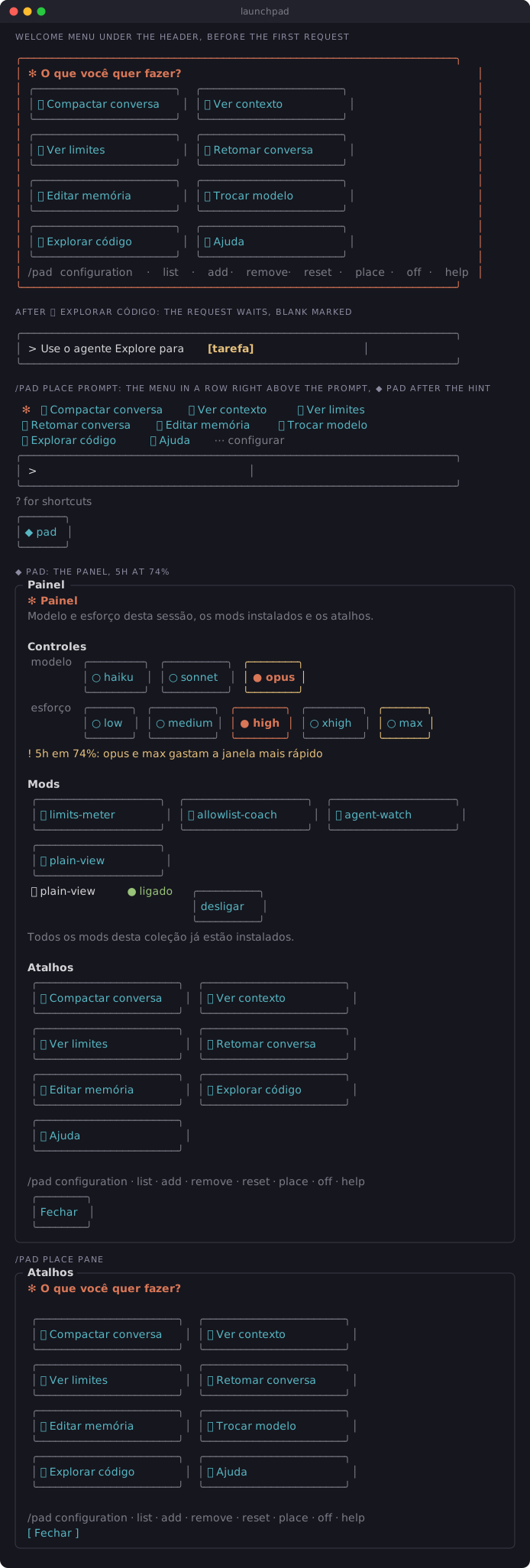
/clear: a framed card under the header, each button an icon and an action in a bordered tile, in columns that fit the window. The card is the output of /pad, which the mod runs for you, so it sits in the conversation and scrolls up as the conversation grows. /pad draws a fresh one at any time./name runs that command or skill: 🗜️ Compactar conversa runs /compact./name [blank] puts the command in the prompt with the blank marked, for you to fill in and send: /code-review [level] waits for the level. Arguments with no brackets (/code-review high) run as written. A command whose arguments are all optional runs bare: /clear [name] runs /clear.@name calls that agent: 🔍 Explorar código puts Use o agente Explore para [tarefa] in the prompt with the blank marked, for you to say what to explore.general-purpose, Explore, Plan) and the agent files in .claude/agents/ of the project and of your home folder. A button whose command another session has (/limits comes with limits-meter) stays in your list and shows where it works.configuration · list · add · remove · reset · place · off · help. configuration opens the pane, list and help print as a dim line in the conversation (Claude does not read it), off turns the menu off. add, remove and reset wait in the prompt (/pad add [nome] | [/comando ou @agente]), so a stray click changes nothing./pad place, or the placement option):header, the default: the card under the header described above.prompt: the buttons in a row below the prompt that stays there, under Claude Code's own hint line (? for shortcuts), with ⋯ configure to open the pane.pane: a pane of its own, a tab like those of /limits and /watch, with the card's bordered tiles. It opens when a session starts and after /clear, and on /pad. Claude Code opens a pane only with the keyboard on it: Esc closes it and gives the prompt back./pad show the menu again
/pad configuration pane to order, remove and add buttons
/pad list every button, numbered, with what it runs
/pad add 🔎 Revisão | /code-review a button that runs a command or skill
/pad add Revisor | @revisor a button that calls an agent
/pad remove 3 drop button 3
/pad reset back to the default buttons
/pad place header | prompt | pane where the menu shows: under the header, below the prompt, or in a pane
/pad off turn the menu off: no card at the start, after /clear or on /pad
/pad on turn it back on/pad configuration (or /pad config) opens a pane with your buttons, each with ↑, ↓ and remover, and below them every installed command, skill and agent not yet in the menu, with a filter to type into and + adicionar on each. Enter in the filter adds the first match. A command that takes an argument comes in with it as a blank (/code-review [level]), from the hint Claude Code shows for it in the / menu. The mod learns the hints as that menu lists the commands, so one you have not yet seen there in this session comes in bare: add the blank with /pad add. A hint of optional arguments only ([name], [auto|<tokens>]) gives no blank: the button runs the command bare. A button saved with such blanks by an earlier version (/clear [name]) is saved back bare once Claude Code lists the command. Once 8 buttons work, the pane says the menu is full until you remove one.
/pad off is kept across sessions and hides the cards already in the conversation too. The other commands and the pane go on working, so you can set the menu up before /pad on. The showOnStart option below only stops the card at the start and after /clear.
The icon in /pad add is optional. It can be any emoji or symbol, or a built-in name between colons (/pad add :chart: Vendas | /cost): folder, doc, pen, search, compress, gauge, chart, table, mail, undo, spark, brain, sliders, help, agent, tool, plug. A plain first word stays in the label. An agent button can carry its task (@revisor revise [arquivo]); without one, the prompt waits with [tarefa]. Your list is kept across sessions.
A project can ship its own buttons in .claude/launchpad.json:
{
  "buttons": [
    { "icon": "🧾", "label": "Fechamento do mês", "text": "/fechamento" },
    { "icon": "chart", "label": "Revisor", "text": "@revisor" }
  ]
}
Each text is a /command or an @agent, and the button shows only when the session has it. They show after your own, up to 8 in the menu. Their text comes from the repository, so a project button never runs a command on its own: a press only puts its text in the prompt, and you read it before pressing Enter. To remove one, edit the file.
Set them in /config or under pluginConfigs in ~/.claude/settings.json, keyed by the installed name (launchpad@lfernandes-mods).
| Option | Values | Default |
|---|---|---|
language | auto, pt-BR, en: the default buttons and the messages. auto follows the system's LANG: Portuguese for pt_*, English otherwise and when LANG is unset | auto |
icons | auto, emoji, or symbol (⇲ ▥ ◔) for terminals that draw emoji at odd widths. auto uses symbols in a JetBrains IDE's terminal (IntelliJ, PyCharm, ...: TERMINAL_EMULATOR=JetBrains-JediTerm), which gives many emoji one column, and emoji elsewhere | auto |
showOnStart | false shows the menu only on /pad | true |
placement | header, prompt or pane: where the menu shows. /pad place overrides it and is kept across sessions | header |
In the desktop app the buttons are native buttons and always use emoji.
An option already saved in your settings wins over a new default. Installing the plugin can save every option with the value it had then, so after an update that adds auto to an option, set it to auto yourself to get the new behaviour.
terminal.integrated.gpuAcceleration set to off) shifts the rest of the row and bends the borders. icons: auto covers JetBrains; in VS Code, turn GPU acceleration on, or set icons to symbol.general-purpose, Explore, Plan and the .md files directly in .claude/agents/ of the project and of your home folder. An agent a plugin brings, or one in a subfolder, counts as not installed: Claude Code gives a mod no list of agent types./ menu. The pane gives a command its argument as a blank from the hint Claude Code shows in the / menu. The mod learns the hints as that menu lists the commands, and forgets them when it reloads./pad draws a new one. Claude reads /pad's one-line output (Menu de atalhos do launchpad.), not the buttons./plugin install launchpad --marketplace ice-lfernandes/claude-code-modsOr for one session: claude --plugin-dir ./launchpad
| Mod | Network | Runs processes | Files | Calls a model | Sends data anywhere |
|---|---|---|---|---|---|
| launchpad | No | No | Reads .claude/launchpad.json, and the agent files in .claude/agents/ of the session's folder and of $HOME | No | No |
A pressed button does what typing would do: it runs a slash command or fills the prompt box. Those go through Claude Code and every other mod's hooks as usual, so permission dialogs and other guards still apply. The mod keeps your list of buttons in its plugin store, on this machine.
hooks/register.tsx 691 lines1// launchpad: a welcome menu of one-click actions, so nobody has to know a /command first.
2//
3// menu a card in the transcript, under the header: an icon and an action per button, in
4// bordered tiles. It is /pad's output row drawn as buttons, so the mod runs /pad when
5// a session starts with an empty conversation and after /clear, and the card scrolls
6// up with the conversation. Typing /pad draws a new one.
7// buttons each one runs a command or skill (`/compact`) or calls an agent (`@Explore`, which
8// puts "use the Explore agent to [task]" in the prompt). Only what this session has
9// installed shows or can be added: the catalog is $.command.list() (commands and
10// skills), the built-in agents and the files in .claude/agents/ (project and user).
11// /pad configuration a pane to order, remove and add buttons from the catalog, up to
12// MAX_SHOWN. /pad add, remove, list and reset do the same from the prompt. The
13// person's list is kept across sessions in the plugin's store.
14// /pad off | on turns the menu off (no card at the start, after /clear or on /pad) and back
15// on, kept across sessions.
16// /pad place header | prompt | pane where the menu shows: the card under the header, a row
17// under the prompt that stays (below the engine's hint line), or a pane of its own, a
18// tab like other mods' panes, with the card's tiles.
19// Kept across sessions; the `placement` option is the default.
20// project .claude/launchpad.json adds the repository's buttons. They come from the repo, so
21// a press only puts the text in the prompt: the person reads it before pressing Enter.
22//
23// Reads .claude/launchpad.json and the agent files in .claude/agents/ (the session's folder and
24// the home folder). Runs no process, calls no model.
25
26import { atom, read, update } from 'claude-code'
27import type { Elements, EngineInterface, Register } from 'claude-code'
28
29import type { IconStyle, Lang, Pad, Placement, Target } from '../types'
30import {
31 agentName,
32 agentOf,
33 agentTask,
34 asPads,
35 available,
36 BUILTIN_AGENTS,
37 blankIn,
38 blanksOf,
39 buttonLabel,
40 commandOf,
41 defaults,
42 keyOf,
43 langOf,
44 layout,
45 listText,
46 localize,
47 matches,
48 MAX_SHOWN,
49 moveId,
50 windowOf,
51 padFor,
52 padKey,
53 parseAdd,
54 parseProject,
55 placementOf,
56 sameText,
57 shownOf,
58 spell,
59 styleOf,
60 tileLabel,
61 unblank,
62 WORDS,
63} from './pad'
64
65const PANE = 'launchpad'
66/** The menu's own pane, under `/pad place pane`. */
67const MENU_PANE = 'launchpad-menu'
68const PROJECT_FILE = '.claude/launchpad.json'
69const AGENTS_DIR = '.claude/agents'
70const KEY_MENU = 'menu'
71const KEY_OFF = 'off'
72const KEY_PLACE = 'placement'
73
74const menu = atom({ plugin: 'launchpad', key: 'menu' } as const, [] as Pad[])
75const project = atom({ plugin: 'launchpad', key: 'project' } as const, [] as Pad[])
76const catalog = atom({ plugin: 'launchpad', key: 'catalog' } as const, [] as Target[])
77const filter = atom({ plugin: 'launchpad', key: 'filter' } as const, '')
78const offset = atom({ plugin: 'launchpad', key: 'offset' } as const, 0)
79const isOff = atom({ plugin: 'launchpad', key: 'isOff' } as const, false)
80const placement = atom({ plugin: 'launchpad', key: 'placement' } as const, 'header' as Placement)
81
82/**
83 * Argument hints by command name, as the engine lists the commands for the typeahead and /help
84 * (command.describe). $.command.list() carries none, so a command the person has not yet seen
85 * listed in this session has no hint here.
86 */
87const hints = new Map<string, string>()
88
89/** The last first row the pane's catalog list can start at, as last drawn: where the wheel stops. */
90let lastStart = 0
91
92// Set by register from the options, and by session.start for the folder.
93let lang: Lang = 'pt-BR'
94let style: IconStyle = 'emoji'
95let cwd = ''
96/** The `placement` option: where the menu shows until /pad place picks a place. */
97let placeOption: Placement = 'header'
98
99/** The agent types in one `.claude/agents` folder; none where it cannot be read. */
100async function agentsIn($: EngineInterface, dir: string): Promise<Target[]> {
101 const entries = (await $.fs.list(dir).catch(() => [])).filter(f => f.kind === 'file' && f.name.endsWith('.md'))
102 const names = await Promise.all(
103 entries.map(async f => {
104 const raw = await $.fs.read(`${dir}/${f.name}`).catch(() => null)
105 return agentName(f.name, typeof raw === 'string' ? raw : null)
106 }),
107 )
108 return names.filter(Boolean).map(name => ({ kind: 'agent' as const, name, description: '', source: 'agent' }))
109}
110
111/** Every command, skill and agent this session has, less /pad itself. */
112async function readCatalog($: EngineInterface): Promise<Target[]> {
113 const commands = await $.command.list().catch(() => [])
114 const home = await $.env.get('HOME').catch(() => undefined)
115 const [here, mine] = await Promise.all([cwd ? agentsIn($, `${cwd}/${AGENTS_DIR}`) : [], home ? agentsIn($, `${home}/${AGENTS_DIR}`) : []])
116 const files = [...here, ...mine]
117 const seen = new Set<string>()
118 const out: Target[] = []
119 const push = (t: Target) => {
120 const key = keyOf(t.kind, t.name)
121 if (seen.has(key)) return
122 seen.add(key)
123 out.push(t)
124 }
125 for (const c of commands) {
126 const name = c.name.replace(/^\//, '')
127 if (name && name !== 'pad') push({ kind: 'command', name, description: c.description, source: c.source })
128 }
129 for (const name of BUILTIN_AGENTS) push({ kind: 'agent', name, description: '', source: 'agent' })
130 for (const a of files) push(a)
131 return out
132}
133
134/**
135 * Reads the person's list, the project's buttons and the on/off switch. The catalog is read once
136 * a session (and again when the pane opens, or an add names something it lacks): `fresh` reads
137 * it now.
138 */
139async function load($: EngineInterface, fresh = false) {
140 const stored = asPads(await $.store.get(KEY_MENU).catch(() => undefined))
141 const raw = cwd ? await $.fs.read(`${cwd}/${PROJECT_FILE}`).catch(() => null) : null
142 await update($, menu, () => (stored ? localize(stored, lang) : defaults(lang)))
143 const off = (await $.store.get(KEY_OFF).catch(() => undefined)) === true
144 await update($, isOff, () => off)
145 const place = await $.store.get(KEY_PLACE).catch(() => undefined)
146 await update($, placement, () => (typeof place === 'string' ? placementOf(place) : placeOption))
147 await update($, project, () => parseProject(typeof raw === 'string' ? raw : null))
148 if (fresh || (await read($, catalog)).length === 0) {
149 const list = await readCatalog($)
150 await update($, catalog, () => list)
151 }
152}
153
154/** Applies a change to the list as it stands now, not as a drawing last saw it. */
155async function editMenu($: EngineInterface, change: (list: Pad[]) => Pad[]) {
156 await saveMenu($, change(await read($, menu)))
157}
158
159async function saveMenu($: EngineInterface, list: Pad[]) {
160 await $.store.set(KEY_MENU, list)
161 await update($, menu, () => list)
162}
163
164/** The buttons as shown and numbered: the person's that work here, then the project's. */
165async function shown($: EngineInterface) {
166 return shownOf(await read($, menu), await read($, project), await read($, catalog))
167}
168
169/** Puts a text in the prompt, its `[blank]` marked for the person to replace. */
170async function fill($: EngineInterface, text: string) {
171 const blank = blankIn(text)
172 await $.prompt.fill(blank ? { text, decorations: [{ ...blank, bold: true, underline: true }] } : { text })
173}
174
175async function press($: EngineInterface, p: Pad) {
176 try {
177 if (p.kind === 'agent') return await fill($, WORDS[lang].useAgent(agentOf(p.text), agentTask(p.text)))
178 // A command with a [blank] waits in the prompt for the person to fill in; so does any
179 // project button, whose text comes from the repository.
180 // A command whose blanks came from an optional hint (`/clear [name]`) runs bare.
181 const text = p.origin === 'project' ? p.text : unblank(p.text, hints.get(commandOf(p.text).command))
182 if (p.origin === 'project' || blankIn(text)) return await fill($, text)
183 const { command, args } = commandOf(text)
184 await $.command.run({ command, args })
185 } catch {
186 $.ui.toast(WORDS[lang].failed(p.label))
187 }
188}
189
190/** Adds a button to the person's list. Returns why not, or null when it was added. */
191async function add($: EngineInterface, p: Pad): Promise<string | null> {
192 const w = WORDS[lang]
193 const list = await read($, menu)
194 const key = padKey(p)
195 const known = async () => (await read($, catalog)).some(t => keyOf(t.kind, t.name) === key)
196 // Installed since the catalog was read? Read it again before saying no.
197 if (!(await known())) await load($, true)
198 if (!(await known())) return w.missing(p.text.split(/\s+/)[0] ?? p.text)
199 if ([...list, ...(await read($, project))].some(x => sameText(x.text, p.text))) return w.already(p.text)
200 // The limit counts the buttons that work here: one whose command another session has stays
201 // in the list, marked in the pane, and takes no place in this menu.
202 if (available(list, await read($, catalog)).length >= MAX_SHOWN) return w.full
203 await saveMenu($, [...list, p])
204 return null
205}
206
207/** The tile's background under the pointer: the theme's subtle gray, so it reads on dark and light. */
208const TILE_HOVER = 'subtle'
209
210/** /pad's arguments in the row under the menu; `fill` is the text the prompt waits with. */
211const PAD_ACTIONS: { verb: string; fill?: (w: (typeof WORDS)[Lang]) => string }[] = [
212 { verb: 'configuration' },
213 { verb: 'list' },
214 { verb: 'add', fill: w => w.addTemplate },
215 { verb: 'remove', fill: w => w.removeTemplate },
216 { verb: 'reset', fill: () => '/pad reset' },
217 { verb: 'place', fill: w => w.placeTemplate },
218 { verb: 'off' },
219 { verb: 'help' },
220]
221
222/** An id no button in the list has: the time, and the list's length for two in one millisecond. */
223async function newId($: EngineInterface) {
224 return `user:${await $.clock.now()}:${(await read($, menu)).length}`
225}
226
227/** Opens the menu's own pane. The host opens a pane only with the keyboard on it; Esc closes it. */
228function openMenuPane($: EngineInterface) {
229 return $.ui.open({ id: MENU_PANE, title: WORDS[lang].menuPane, focus: true, closeOnEscape: true }).catch(() => null)
230}
231
232/**
233 * Shows the menu at the start and after /clear, where it lives: under the header, /pad's row
234 * drawn as the card (not awaited: the row lands once the hook has returned); in its pane, opened
235 * with the keyboard on it, as the host opens every pane. The band above the prompt is there
236 * already.
237 */
238async function showMenu($: EngineInterface) {
239 const place = await read($, placement)
240 if (place === 'header') $.command.run({ command: 'pad' }).catch(() => undefined)
241 else if (place === 'pane') await openMenuPane($)
242}
243
244/** Runs one of /pad's arguments from the row: its answer, if any, as dim lines in the transcript. */
245async function pressVerb($: EngineInterface, a: (typeof PAD_ACTIONS)[number]) {
246 const w = WORDS[lang]
247 try {
248 if (a.fill) return await fill($, a.fill(w))
249 const { text } = await runPad($, a.verb)
250 // A log line is drawn as one row: a list or the help goes out a line at a time.
251 for (const line of text?.split('\n') ?? []) if (line.trim()) $.ui.log(line)
252 } catch {
253 $.ui.toast(w.failed(`/pad ${a.verb}`))
254 }
255}
256
257/**
258 * The row under the buttons: /pad's own arguments, one press each. Those that run at once (the
259 * pane, the list, off, help) run; those that take an argument or undo the person's list (add,
260 * remove, reset) wait in the prompt, so nothing is lost on a stray click.
261 */
262function padRow($: EngineInterface, ui: Pick<Elements[keyof Elements], 'Box' | 'Text' | 'Button'>, more: number) {
263 const { Box, Text, Button } = ui
264 const w = WORDS[lang]
265 return (
266 <Box flexDirection="row" flexWrap="wrap">
267 {more > 0 && <Text dimColor>{`${w.more(more)} · `}</Text>}
268 <Text dimColor>/pad </Text>
269 {PAD_ACTIONS.map((a, i) => (
270 <Box key={`padrow:${a.verb}`} flexDirection="row">
271 {i > 0 && <Text dimColor> · </Text>}
272 <Button key={`cmd:${a.verb}`} plain dimColor label={a.verb} onPress={() => pressVerb($, a)} />
273 </Box>
274 ))}
275 </Box>
276 )
277}
278
279/**
280 * The terminal's grid of bordered tiles, in columns that fit `columns` cells. Each tile adds 5
281 * cells to its label (border and padding on both sides, one cell of gap).
282 */
283function tiles($: EngineInterface, ui: Elements['terminal'], visible: Pad[], columns: number) {
284 const { Box, Button } = ui
285 const { width, rows } = layout(visible, style, Math.max(1, columns), 5)
286 return (
287 <Box flexDirection="column">
288 {rows.map((row, r) => (
289 <Box key={`row:${r}`} flexDirection="row">
290 {row.map(p => (
291 <Box key={`cell:${p.id}`} width={width} paddingRight={1}>
292 {/* The border is the Box's: a Button there would show inverted under the pointer.
293 The label fills the row inside it, so a press anywhere on that row counts.
294 Over the tile, it tints and its border and label turn the accent color. */}
295 <Box
296 key={`tile:${p.id}`}
297 flexGrow={1}
298 borderStyle="round"
299 borderDimColor
300 hover={{ borderColor: 'claude', borderDimColor: false, backgroundColor: TILE_HOVER }}
301 >
302 <Button
303 key={`pad:${p.id}`}
304 plain
305 label={tileLabel(buttonLabel(p, style), width - 3)}
306 hover={{ color: 'claude', bold: true }}
307 onPress={() => press($, p)}
308 />
309 </Box>
310 </Box>
311 ))}
312 </Box>
313 ))}
314 </Box>
315 )
316}
317
318/** The terminal's card: a frame in the accent color (4 cells), the question, the tiles and /pad's row. */
319function terminalCard($: EngineInterface, ui: Elements['terminal'], list: Pad[], columns: number) {
320 const { Box, Text } = ui
321 const w = WORDS[lang]
322 const visible = list.slice(0, MAX_SHOWN)
323 const more = list.length - visible.length
324 return (
325 <Box flexDirection="column" borderStyle="round" borderColor="claude" paddingX={1}>
326 <Text color="claude" bold>
327 ✻ {w.ask}
328 </Text>
329 {tiles($, ui, visible, columns - 4)}
330 {padRow($, ui, more)}
331 </Box>
332 )
333}
334
335/** /pad and its arguments: what the command answers, and what the row under the menu runs. */
336async function runPad($: EngineInterface, args: string): Promise<{ text?: string }> {
337 const w = WORDS[lang]
338 const [verb = '', ...rest] = args.trim().split(/\s+/)
339 const arg = rest.join(' ')
340
341 switch (verb.toLowerCase()) {
342 case '':
343 case 'show': {
344 await load($)
345 if (await read($, isOff)) return { text: w.isOff }
346 if (!(await shown($)).length) return { text: w.empty }
347 const place = await read($, placement)
348 if (place === 'prompt') return { text: w.inBand }
349 if (place === 'pane') {
350 const opened = await openMenuPane($)
351 if (opened?.isPlaced) return {}
352 return { text: listText(await shown($), lang, style) }
353 }
354 return { text: w.shown }
355 }
356
357 case 'place': {
358 const where = arg.toLowerCase()
359 if (where !== 'header' && where !== 'prompt' && where !== 'pane') return { text: w.badPlace }
360 await $.store.set(KEY_PLACE, where)
361 await update($, placement, () => where)
362 if (where === 'pane') await openMenuPane($)
363 else await $.ui.close({ id: MENU_PANE }).catch(() => undefined)
364 return { text: w.placed[where] }
365 }
366
367 // Kept across sessions. Off hides every card, those already in the transcript too; the
368 // commands and the pane go on working, to set the menu up before turning it back on.
369 case 'off':
370 case 'on': {
371 const off = verb.toLowerCase() === 'off'
372 await $.store.set(KEY_OFF, off)
373 await update($, isOff, () => off)
374 return { text: off ? w.off : w.on }
375 }
376
377 case 'configuration':
378 case 'config':
379 case 'configure': {
380 await load($, true)
381 await update($, filter, () => '')
382 await update($, offset, () => 0)
383 const opened = await $.ui.open({ id: PANE, title: w.pane.title, focus: true, closeOnEscape: true }).catch(() => null)
384 if (opened?.isPlaced) return {}
385 return { text: listText(await shown($), lang, style) }
386 }
387
388 case 'list':
389 await load($)
390 return { text: listText(await shown($), lang, style) }
391
392 case 'add': {
393 await load($)
394 const p = parseAdd(args.trim().slice(3), await newId($))
395 if (!p) return { text: w.badAdd }
396 const why = await add($, p)
397 if (why) return { text: why }
398 const n = (await shown($)).findIndex(x => x.id === p.id) + 1
399 return { text: w.added(n, buttonLabel(p, style)) }
400 }
401
402 case 'remove': {
403 await load($)
404 const p = (await shown($))[Number(arg) - 1]
405 if (!/^\d+$/.test(arg) || !p) return { text: w.noSuch(arg || '?') }
406 if (p.origin === 'project') return { text: w.projectRemove }
407 await saveMenu($, (await read($, menu)).filter(x => x.id !== p.id))
408 return { text: w.removed(p.label) }
409 }
410
411 case 'reset':
412 await saveMenu($, defaults(lang))
413 return { text: w.reset }
414
415 default:
416 return { text: w.help }
417 }
418}
419
420export const register: Register = (on, options) => {
421 // The options alone until session.start can read the system's LANG and which terminal this is.
422 lang = langOf(options.language)
423 style = styleOf(options.icons)
424 const showOnStart = options.showOnStart !== false
425 placeOption = placementOf(options.placement)
426 let w = WORDS[lang]
427
428 on('session.start', async ($, e, next) => {
429 const result = await next(e)
430 cwd = e.cwd
431 lang = langOf(options.language, await $.env.get('LANG').catch(() => undefined))
432 style = styleOf(options.icons, await $.env.get('TERMINAL_EMULATOR').catch(() => undefined))
433 w = WORDS[lang]
434 await $.command.register({
435 name: 'pad',
436 description:
437 lang === 'en'
438 ? 'Shortcuts: /pad shows them; configuration, list, add, remove, reset, place, off, on'
439 : 'Atalhos: /pad mostra; configuration, list, add, remove, reset, place, off, on',
440 argumentHint: '[configuration|list|add|remove|reset|place|off|on]',
441 })
442 await load($, true)
443 if (showOnStart && e.isInteractive) {
444 const messages = await $.session.messages().catch(() => [])
445 if (messages.length === 0 && !(await read($, isOff))) await showMenu($)
446 }
447 return result
448 })
449
450 // Watches the engine list the commands, to learn which take an argument.
451 on('command.describe', async ($, e, next) => {
452 const result = await next(e)
453 const name = e.command.replace(/^\//, '')
454 const hint = result.argumentHint?.trim()
455 if (hint) hints.set(name, hint)
456 else hints.delete(name)
457 // A button saved with blanks from an optional hint (`/clear [name]`) is saved back bare.
458 const list = await read($, menu)
459 const fixed = list.map(p => (p.kind === 'command' && p.origin === 'user' && commandOf(p.text).command === name ? { ...p, text: unblank(p.text, hint) } : p))
460 if (fixed.some((p, i) => p !== list[i] && p.text !== list[i]!.text)) await saveMenu($, fixed)
461 return result
462 }).catch(($, e, next) => next(e))
463
464 // A /clear starts the conversation over with no session.start; the classic SessionStart says so.
465 on('classic.SessionStart', async ($, e, next) => {
466 const result = await next(e)
467 if (e.source === 'clear' && showOnStart && !(await read($, isOff))) await showMenu($)
468 return result
469 }).catch(($, e, next) => next(e))
470
471 on('command.run', { command: 'pad' }, ($, e) => runPad($, e.args))
472
473 // /pad's own row, drawn as the menu. Any other /pad output (list, add, ...) stays text.
474 on('ui.render', { component: 'CommandOutput' }, async ($, e, next) => {
475 const verb = e.props.args.trim().toLowerCase()
476 if (e.props.command !== 'pad' || e.props.isErrored || (verb !== '' && verb !== 'show')) return next(e)
477 if ((await read($, isOff)) || (await read($, placement)) !== 'header') return next(e)
478 const list = await shown($)
479 if (list.length === 0) return next(e)
480
481 if (e.surface === 'terminal') {
482 return terminalCard($, $.ui.resolve({ ...e, surface: 'terminal' }), list, e.viewport?.columns ?? 80)
483 }
484
485 const { Box, Text, Button } = $.ui.resolve(e)
486 const visible = list.slice(0, MAX_SHOWN)
487 const more = list.length - visible.length
488 return (
489 <Box flexDirection="column" rowGap={1}>
490 <Text bold>{w.ask}</Text>
491 <Box flexDirection="row" flexWrap="wrap" columnGap={1} rowGap={1}>
492 {visible.map(p => (
493 <Button key={`pad:${p.id}`} label={buttonLabel(p, 'emoji')} onPress={() => press($, p)} />
494 ))}
495 </Box>
496 {padRow($, { Box, Text, Button }, more)}
497 </Box>
498 )
499 })
500
501 // `/pad place prompt`: the buttons in a row under the prompt, below the engine's hint line,
502 // which stays as the engine draws it.
503 on('ui.render', { component: 'PromptHint' }, async ($, e, next) => {
504 const theirs = await next(e)
505 if ((await read($, placement)) !== 'prompt' || (await read($, isOff))) return theirs
506 const list = await shown($)
507 if (list.length === 0) return theirs
508 const { Box, Text, Button } = $.ui.resolve(e)
509 const icons = e.surface === 'terminal' ? style : 'emoji'
510 return (
511 <Box flexDirection="column">
512 {theirs}
513 <Box key="launchpad" flexDirection="row" flexWrap="wrap" gap={2} paddingX={2}>
514 <Text color="claude">✻</Text>
515 {list.slice(0, MAX_SHOWN).map(p => (
516 <Button key={`pad:${p.id}`} plain label={buttonLabel(p, icons)} hover={{ color: 'claude', bold: true }} onPress={() => press($, p)} />
517 ))}
518 <Button key="band:settings" plain dimColor label={w.settings} onPress={() => pressVerb($, PAD_ACTIONS[0]!)} />
519 </Box>
520 </Box>
521 )
522 })
523
524 // `/pad place pane`: the menu in a pane of its own, a tab beside the other mods' panes, with
525 // the card's bordered tiles on the terminal and its native buttons elsewhere.
526 on('ui.render', { component: 'Pane', requestId: MENU_PANE }, async ($, e) => {
527 const ui = $.ui.resolve(e)
528 const { Box, Text, Button } = ui
529 const list = await shown($)
530 const visible = list.slice(0, MAX_SHOWN)
531 const more = list.length - visible.length
532 const columns = Math.max(20, (e.props.bodyColumns || e.viewport?.columns || 80) - 2)
533 const body =
534 e.surface === 'terminal' ? (
535 tiles($, $.ui.resolve({ ...e, surface: 'terminal' }), visible, columns)
536 ) : (
537 <Box flexDirection="row" flexWrap="wrap" columnGap={1} rowGap={1}>
538 {visible.map(p => (
539 <Button key={`pad:${p.id}`} label={buttonLabel(p, 'emoji')} onPress={() => press($, p)} />
540 ))}
541 </Box>
542 )
543 return (
544 <Box flexDirection="column" paddingX={1} gap={1}>
545 <Text color="claude" bold>{`✻ ${w.ask}`}</Text>
546 {(await read($, isOff)) ? <Text dimColor>{w.isOff}</Text> : visible.length === 0 ? <Text dimColor>{w.empty}</Text> : body}
547 <Box flexDirection="row" flexWrap="wrap" gap={2}>
548 {padRow($, { Box, Text, Button }, more)}
549 <Button key="close" role="dismiss" label={w.pane.close} onPress={() => $.ui.close({ id: MENU_PANE })} />
550 </Box>
551 </Box>
552 )
553 })
554
555 // The wheel over the pane moves the catalog list, which the pane keeps whole in view.
556 on('ui.scroll', { component: 'Pane', requestId: PANE }, async ($, e) => {
557 await update($, offset, o => Math.max(0, Math.min(lastStart, o + e.by)))
558 return {}
559 }).catch(($, e, next) => next(e))
560
561 // /pad configuration: the person's buttons to order and remove, the project's, and the catalog
562 // to add from, filtered as they type.
563 on('ui.render', { component: 'Pane', requestId: PANE }, async ($, e) => {
564 const els = $.ui.resolve(e)
565 const { Box, Text, Button } = els
566 // The mobile app draws no field yet: there the catalog lists unfiltered.
567 const Input = 'Input' in els ? els.Input : null
568 const icons = e.surface === 'terminal' ? style : 'emoji'
569 const all = await read($, catalog)
570 const mine = await read($, menu)
571 const theirs = available(await read($, project), all)
572 const working = available(mine, all)
573 const query = await read($, filter)
574 const found = matches(all, mine, query)
575 // The catalog list takes the rows the rest leaves: hint, menu, project, headings, filter,
576 // the scroll row, the footer and the gaps between them. The pane keeps it in view whole.
577 const fixed = 10 + mine.length + (theirs.length ? theirs.length + 2 : 0)
578 const listRows = Math.max(5, e.props.scroll.bodyRows - fixed)
579 const view = windowOf(found.length, await read($, offset), listRows)
580 const nameWidth = Math.max(24, Math.min(44, Math.floor(e.props.bodyColumns * 0.4)))
581 lastStart = Math.max(0, found.length - listRows)
582 const scrollList = (by: number) => update($, offset, o => windowOf(found.length, o + by, listRows).start)
583 const addTarget = async (t: Target) => {
584 const why = await add($, padFor(t, await newId($), hints.get(t.name)))
585 if (why) $.ui.toast(why)
586 }
587
588 return (
589 <Box flexDirection="column" paddingX={1} gap={1}>
590 <Text dimColor>{w.pane.hint}</Text>
591
592 <Box flexDirection="column">
593 <Text bold>{w.pane.menu(working.length)}</Text>
594 {mine.map((p, i) => {
595 // Numbered as /pad list and /pad remove number them: the buttons that work here.
596 const n = working.indexOf(p) + 1
597 return (
598 <Box key={`menu:${p.id}`} flexDirection="row" gap={1}>
599 <Text dimColor>{n > 0 ? String(n).padStart(2) : ' –'}</Text>
600 <Box width={26}>
601 <Text wrap="truncate-end">{buttonLabel(p, icons)}</Text>
602 </Box>
603 <Box width={22}>
604 <Text dimColor={n > 0} color={n > 0 ? undefined : 'warning'} wrap="truncate-end">
605 {n > 0 ? p.text : `${p.text} ${w.pane.gone}`}
606 </Text>
607 </Box>
608 <Box width={2}>{i > 0 && <Button key={`up:${p.id}`} plain label="↑" onPress={() => editMenu($, list => moveId(list, p.id, -1))} />}</Box>
609 <Box width={2}>
610 {i < mine.length - 1 && <Button key={`down:${p.id}`} plain label="↓" onPress={() => editMenu($, list => moveId(list, p.id, 1))} />}
611 </Box>
612 <Button
613 key={`remove:${p.id}`}
614 plain
615 dimColor
616 label={w.pane.remove}
617 onPress={() => editMenu($, list => list.filter(x => x.id !== p.id))}
618 />
619 </Box>
620 )
621 })}
622 </Box>
623
624 {theirs.length > 0 && (
625 <Box flexDirection="column">
626 <Text bold>{w.pane.project}</Text>
627 {theirs.map((p, i) => (
628 <Text key={`project:${p.id}`} dimColor wrap="truncate-end">{`${String(working.length + i + 1).padStart(2)} ${buttonLabel(p, icons)} ${p.text}`}</Text>
629 ))}
630 </Box>
631 )}
632
633 <Box flexDirection="column">
634 <Text bold>{w.pane.add}</Text>
635 {working.length >= MAX_SHOWN ? (
636 <Text color="warning">{w.pane.full}</Text>
637 ) : (
638 <Box flexDirection="column">
639 {Input && (
640 <Input
641 key="filter"
642 label={w.pane.filter}
643 placeholder={w.pane.placeholder}
644 value={query}
645 autoFocus
646 submitLabel={w.pane.plus}
647 onInput={async (value: string) => {
648 await update($, filter, () => value)
649 await update($, offset, () => 0)
650 }}
651 onSubmit={(value: string) => {
652 const first = matches(all, mine, value)[0]
653 if (first) addTarget(first)
654 }}
655 />
656 )}
657 {found.length === 0 && <Text dimColor>{w.pane.none}</Text>}
658 {found.slice(view.start, view.end).map(t => (
659 <Box key={`find:${keyOf(t.kind, t.name)}`} flexDirection="row" gap={1}>
660 <Button key={`add:${keyOf(t.kind, t.name)}`} plain label={w.pane.plus} onPress={() => addTarget(t)} />
661 <Box width={nameWidth}>
662 <Text wrap="truncate-end">
663 {spell(t)}
664 {t.kind === 'command' && hints.has(t.name) && <Text dimColor>{` ${blanksOf(hints.get(t.name))}`}</Text>}
665 </Text>
666 </Box>
667 <Text dimColor wrap="truncate-end">
668 {t.description || w.kinds[t.kind]}
669 </Text>
670 </Box>
671 ))}
672 {found.length > listRows && (
673 <Box flexDirection="row" gap={2}>
674 <Button key="list:up" plain dimColor={view.start === 0} label={w.pane.up} onPress={() => scrollList(-listRows + 1)} />
675 <Button key="list:down" plain dimColor={view.end === found.length} label={w.pane.down} onPress={() => scrollList(listRows - 1)} />
676 <Text dimColor>{w.pane.range(view.start + 1, view.end, found.length)}</Text>
677 </Box>
678 )}
679 </Box>
680 )}
681 </Box>
682
683 <Box flexDirection="row" gap={2}>
684 <Button key="reset" label={w.pane.reset} onPress={() => saveMenu($, defaults(lang))} />
685 <Button key="close" role="dismiss" label={w.pane.close} onPress={() => $.ui.close({ id: PANE })} />
686 </Box>
687 </Box>
688 )
689 })
690}
691hooks/pad.ts 530 lines1// Pure logic for launchpad: the default buttons, icons, parsing /pad add and the project file,
2// checking buttons against what the session has installed, and laying them out in columns.
3// No `$` here, so it tests without an engine.
4
5import type { IconStyle, Kind, Lang, Origin, Pad, Placement, Target } from '../types'
6
7/** Buttons the menu shows, and the most the person's own list may hold. */
8export const MAX_SHOWN = 8
9export const MAX_LABEL = 24
10export const MAX_TEXT = 2000
11export const MAX_PROJECT = 8
12
13/** Agent types every session has, besides the ones in `.claude/agents/`. */
14export const BUILTIN_AGENTS = ['general-purpose', 'Explore', 'Plan']
15
16/** Built-in icons: an emoji for most terminals, a one-cell symbol for those that draw emoji badly. */
17export const ICONS: Record<string, { emoji: string; symbol: string }> = {
18 folder: { emoji: '📁', symbol: '▤' },
19 doc: { emoji: '📄', symbol: '¶' },
20 pen: { emoji: '✏️', symbol: '✎' },
21 search: { emoji: '🔍', symbol: 'Δ' },
22 compress: { emoji: '🗜️', symbol: '⇲' },
23 gauge: { emoji: '⏱️', symbol: '◔' },
24 chart: { emoji: '📊', symbol: '▥' },
25 table: { emoji: '📋', symbol: '▦' },
26 mail: { emoji: '✉️', symbol: '✉' },
27 undo: { emoji: '↩️', symbol: '↺' },
28 spark: { emoji: '✨', symbol: '✦' },
29 brain: { emoji: '🧠', symbol: '◎' },
30 sliders: { emoji: '🎛️', symbol: '≡' },
31 help: { emoji: '❓', symbol: '?' },
32 agent: { emoji: '🤖', symbol: '◉' },
33 tool: { emoji: '🔧', symbol: '⚙' },
34 plug: { emoji: '🔌', symbol: '⌁' },
35}
36
37type Words = {
38 ask: string
39 defaults: { id: string; icon: string; label: string; text: string }[]
40 kinds: Record<Kind, string>
41 origins: Record<Origin, string>
42 shown: string
43 empty: string
44 off: string
45 on: string
46 isOff: string
47 added: (n: number, label: string) => string
48 removed: (label: string) => string
49 reset: string
50 projectRemove: string
51 noSuch: (n: string) => string
52 help: string
53 badAdd: string
54 addTemplate: string
55 removeTemplate: string
56 missing: (text: string) => string
57 full: string
58 already: (text: string) => string
59 failed: (what: string) => string
60 more: (n: number) => string
61 /** Where the menu shows: the answer to /pad place, and what /pad says when the menu is not a card. */
62 placed: Record<Placement, string>
63 badPlace: string
64 placeTemplate: string
65 inBand: string
66 /** The menu's own pane, when it shows as one. */
67 menuPane: string
68 /** The band's button that opens /pad configuration. */
69 settings: string
70 /** What an agent button puts in the prompt, its `[blank]` for the task. */
71 useAgent: (name: string, task?: string) => string
72 pane: {
73 title: string
74 hint: string
75 menu: (n: number) => string
76 project: string
77 add: string
78 filter: string
79 placeholder: string
80 plus: string
81 remove: string
82 gone: string
83 full: string
84 none: string
85 range: (from: number, to: number, of: number) => string
86 up: string
87 down: string
88 reset: string
89 close: string
90 }
91}
92
93export const WORDS: Record<Lang, Words> = {
94 'pt-BR': {
95 ask: 'O que você quer fazer?',
96 defaults: [
97 { id: 'compact', icon: 'compress', label: 'Compactar conversa', text: '/compact' },
98 { id: 'context', icon: 'chart', label: 'Ver contexto', text: '/context' },
99 { id: 'limits', icon: 'gauge', label: 'Ver limites', text: '/limits' },
100 { id: 'resume', icon: 'undo', label: 'Retomar conversa', text: '/resume' },
101 { id: 'memory', icon: 'brain', label: 'Editar memória', text: '/memory' },
102 { id: 'model', icon: 'sliders', label: 'Trocar modelo', text: '/model' },
103 { id: 'explore', icon: 'search', label: 'Explorar código', text: '@Explore' },
104 { id: 'help', icon: 'help', label: 'Ajuda', text: '/help' },
105 ],
106 kinds: { command: 'comando', agent: 'agente' },
107 origins: { default: 'padrão', user: 'seu', project: 'projeto' },
108 shown: 'Menu de atalhos do launchpad.',
109 empty: 'Nenhum atalho disponível. /pad configuration escolhe os do menu.',
110 off: 'Launchpad desligado: o menu não aparece mais ao abrir a sessão nem com /pad. /pad on liga de novo.',
111 on: 'Launchpad ligado: o menu aparece ao abrir a sessão, depois do /clear e com /pad.',
112 isOff: 'O launchpad está desligado. /pad on liga de novo.',
113 added: (n, label) => `Atalho ${n} criado: ${label}.`,
114 removed: label => `Atalho removido: ${label}.`,
115 reset: 'Atalhos de volta aos padrões.',
116 projectRemove: 'Esse atalho vem do projeto. Edite .claude/launchpad.json para tirá-lo.',
117 noSuch: n => `Não existe atalho ${n}. /pad list mostra os números.`,
118 help: [
119 '/pad mostra o menu',
120 '/pad configuration abre o painel para escolher e ordenar os atalhos',
121 '/pad list lista os atalhos',
122 '/pad add 📊 Nome | /comando um atalho que roda um comando ou skill',
123 '/pad add Nome | @agente um atalho que chama um agente',
124 '/pad remove 3 tira o atalho 3',
125 '/pad reset volta aos atalhos padrão',
126 '/pad off | on desliga ou liga o menu',
127 '/pad place header o menu como cartão sob o cabeçalho (padrão)',
128 '/pad place prompt o menu numa linha abaixo do prompt, sempre à mão',
129 '/pad place pane o menu num painel, uma aba como as de /limits e /watch',
130 `Só entram comandos, skills e agentes instalados, até ${MAX_SHOWN} atalhos.`,
131 ].join('\n'),
132 badAdd: 'Use: /pad add 📊 Nome | /comando ou /pad add Nome | @agente',
133 addTemplate: '/pad add [nome] | [/comando ou @agente]',
134 removeTemplate: '/pad remove [número]',
135 missing: text => `${text} não está instalado nesta sessão. /pad configuration mostra o que está.`,
136 full: `O menu já tem ${MAX_SHOWN} atalhos. Tire um com /pad remove ou no painel.`,
137 already: text => `${text} já está no menu.`,
138 failed: what => `Não deu para rodar: ${what}`,
139 more: n => `+${n} em /pad list`,
140 placed: {
141 header: 'O menu volta a ser um cartão sob o cabeçalho, ao abrir a sessão, depois do /clear e com /pad.',
142 prompt: 'O menu agora fica numa linha abaixo do prompt, sempre à mão.',
143 pane: 'O menu agora abre num painel, uma aba como as de /limits e /watch.',
144 },
145 badPlace: 'Use: /pad place header | prompt | pane',
146 placeTemplate: '/pad place [header|prompt|pane]',
147 inBand: 'O menu está na linha abaixo do prompt. /pad place header volta ao cartão.',
148 menuPane: 'Atalhos',
149 settings: '⋯ configurar',
150 useAgent: (name, task) => `Use o agente ${name} para ${task || '[tarefa]'}`,
151 pane: {
152 title: 'Launchpad',
153 hint: `Só aparecem comandos, skills e agentes instalados nesta sessão. Até ${MAX_SHOWN} no menu.`,
154 menu: n => `No menu (${n}/${MAX_SHOWN})`,
155 project: 'Do projeto (.claude/launchpad.json)',
156 add: 'Adicionar',
157 filter: 'Filtrar',
158 placeholder: 'nome de comando, skill ou agente',
159 plus: '+ adicionar',
160 remove: 'remover',
161 gone: '(não instalado)',
162 full: `Menu cheio. Tire um atalho para adicionar outro.`,
163 none: 'Nada com esse nome.',
164 range: (from, to, of) => `${from}–${to} de ${of}`,
165 up: '▲ acima',
166 down: '▼ abaixo',
167 reset: 'Restaurar padrões',
168 close: 'Fechar',
169 },
170 },
171 en: {
172 ask: 'What do you want to do?',
173 defaults: [
174 { id: 'compact', icon: 'compress', label: 'Compact chat', text: '/compact' },
175 { id: 'context', icon: 'chart', label: 'See context', text: '/context' },
176 { id: 'limits', icon: 'gauge', label: 'See limits', text: '/limits' },
177 { id: 'resume', icon: 'undo', label: 'Resume a chat', text: '/resume' },
178 { id: 'memory', icon: 'brain', label: 'Edit memory', text: '/memory' },
179 { id: 'model', icon: 'sliders', label: 'Switch model', text: '/model' },
180 { id: 'explore', icon: 'search', label: 'Explore code', text: '@Explore' },
181 { id: 'help', icon: 'help', label: 'Help', text: '/help' },
182 ],
183 kinds: { command: 'command', agent: 'agent' },
184 origins: { default: 'default', user: 'yours', project: 'project' },
185 shown: 'Launchpad shortcuts menu.',
186 empty: 'No shortcuts available. /pad configuration picks the menu.',
187 off: 'Launchpad off: the menu no longer shows when a session starts or on /pad. /pad on turns it back on.',
188 on: 'Launchpad on: the menu shows when a session starts, after /clear and on /pad.',
189 isOff: 'The launchpad is off. /pad on turns it back on.',
190 added: (n, label) => `Shortcut ${n} added: ${label}.`,
191 removed: label => `Shortcut removed: ${label}.`,
192 reset: 'Shortcuts back to the defaults.',
193 projectRemove: 'That shortcut comes from the project. Edit .claude/launchpad.json to drop it.',
194 noSuch: n => `There is no shortcut ${n}. /pad list shows the numbers.`,
195 help: [
196 '/pad show the menu',
197 '/pad configuration open the pane to pick and order the shortcuts',
198 '/pad list list the shortcuts',
199 '/pad add 📊 Name | /command a shortcut that runs a command or skill',
200 '/pad add Name | @agent a shortcut that calls an agent',
201 '/pad remove 3 drop shortcut 3',
202 '/pad reset back to the default shortcuts',
203 '/pad off | on turn the menu off or on',
204 '/pad place header the menu as a card under the header (the default)',
205 '/pad place prompt the menu in a row below the prompt, always at hand',
206 '/pad place pane the menu in a pane, a tab like those of /limits and /watch',
207 `Only installed commands, skills and agents, up to ${MAX_SHOWN} shortcuts.`,
208 ].join('\n'),
209 badAdd: 'Use: /pad add 📊 Name | /command or /pad add Name | @agent',
210 addTemplate: '/pad add [name] | [/command or @agent]',
211 removeTemplate: '/pad remove [number]',
212 missing: text => `${text} is not installed in this session. /pad configuration shows what is.`,
213 full: `The menu already has ${MAX_SHOWN} shortcuts. Drop one with /pad remove or in the pane.`,
214 already: text => `${text} is already in the menu.`,
215 failed: what => `Could not run: ${what}`,
216 more: n => `+${n} in /pad list`,
217 placed: {
218 header: 'The menu is a card under the header again: when a session starts, after /clear and on /pad.',
219 prompt: 'The menu now sits in a row below the prompt, always at hand.',
220 pane: 'The menu now opens in a pane, a tab like those of /limits and /watch.',
221 },
222 badPlace: 'Use: /pad place header | prompt | pane',
223 placeTemplate: '/pad place [header|prompt|pane]',
224 inBand: 'The menu is in the row below the prompt. /pad place header brings the card back.',
225 menuPane: 'Shortcuts',
226 settings: '⋯ configure',
227 useAgent: (name, task) => `Use the ${name} agent to ${task || '[task]'}`,
228 pane: {
229 title: 'Launchpad',
230 hint: `Only commands, skills and agents installed in this session show. Up to ${MAX_SHOWN} in the menu.`,
231 menu: n => `In the menu (${n}/${MAX_SHOWN})`,
232 project: 'From the project (.claude/launchpad.json)',
233 add: 'Add',
234 filter: 'Filter',
235 placeholder: 'command, skill or agent name',
236 plus: '+ add',
237 remove: 'remove',
238 gone: '(not installed)',
239 full: 'The menu is full. Drop a shortcut to add another.',
240 none: 'Nothing by that name.',
241 range: (from, to, of) => `${from}–${to} of ${of}`,
242 up: '▲ up',
243 down: '▼ down',
244 reset: 'Restore defaults',
245 close: 'Close',
246 },
247 },
248}
249
250/**
251 * The language: the `language` option when it names one; on `auto` (or none), Portuguese when the
252 * system's LANG is Portuguese (`pt_BR.UTF-8`, `pt_PT`, `pt`), English otherwise and when unset.
253 */
254export const langOf = (option: unknown, systemLang?: string | null): Lang =>
255 option === 'en' || option === 'pt-BR' ? option : /^pt([_.@-]|$)/i.test(systemLang ?? '') ? 'pt-BR' : 'en'
256/**
257 * The icon style: the `icons` option when it names one; on `auto` (or none), symbols in a
258 * JetBrains IDE's terminal (TERMINAL_EMULATOR=JetBrains-JediTerm), which gives many emoji one
259 * column where Claude Code counts two, and emoji everywhere else.
260 */
261export const styleOf = (option: unknown, terminal?: string | null): IconStyle =>
262 option === 'emoji' || option === 'symbol' ? option : /^JetBrains/i.test(terminal ?? '') ? 'symbol' : 'emoji'
263
264/** `/x` runs a command or skill, `@x` calls an agent; anything else is no button. */
265export const kindOf = (text: string): Kind | null => (/^\/[^\s/]/.test(text) ? 'command' : /^@[^\s@]/.test(text) ? 'agent' : null)
266
267const BLANK = /\[[^\]\n]+\]/
268
269/** The first `[blank]` in a text, as offsets, so the prompt can mark what to replace. */
270export const blankIn = (text: string): { start: number; end: number } | null => {
271 const m = BLANK.exec(text)
272 return m ? { start: m.index, end: m.index + m[0].length } : null
273}
274
275/** A command button's name and arguments: `/compact focus` is `compact` and `focus`. */
276export const commandOf = (text: string): { command: string; args: string } => {
277 const [name = '', ...rest] = text.replace(/^\//, '').trim().split(/\s+/)
278 return { command: name, args: rest.join(' ') }
279}
280
281/** An agent button's type: `@Explore` is `Explore`. */
282export const agentOf = (text: string): string => text.replace(/^@/, '').trim().split(/\s+/)[0] ?? ''
283
284/** What an agent button asks after the agent's name: `@revisor review [file]` is `review [file]`. */
285export const agentTask = (text: string): string => text.replace(/^@/, '').trim().split(/\s+/).slice(1).join(' ')
286
287/** What a button or a target stands for, the same spelling for both: `command:compact`, `agent:Explore`. */
288export const keyOf = (kind: Kind, name: string) => `${kind}:${name}`
289export const padKey = (p: Pad) => keyOf(p.kind, p.kind === 'command' ? commandOf(p.text).command : agentOf(p.text))
290
291/** How a target is written on a button: `/compact`, `@Explore`. */
292export const spell = (t: Target) => (t.kind === 'command' ? `/${t.name}` : `@${t.name}`)
293
294export const defaults = (lang: Lang): Pad[] =>
295 WORDS[lang].defaults.map(d => ({ ...d, kind: kindOf(d.text)!, origin: 'default' as const }))
296
297/** A saved list in the current language: a default button takes its label from `defaults(lang)`. */
298export const localize = (list: Pad[], lang: Lang): Pad[] => {
299 const labels = new Map(defaults(lang).map(d => [d.id, d.label]))
300 return list.map(p => (p.origin === 'default' && labels.has(p.id) ? { ...p, label: labels.get(p.id)! } : p))
301}
302
303/** The icon a target gets when the pane adds it: by kind, and for a command by where it comes from. */
304export const iconFor = (t: Target) => (t.kind === 'agent' ? 'agent' : t.source === 'builtin' ? 'tool' : t.source === 'mcp' ? 'plug' : 'spark')
305
306/**
307 * Whether a command's argument hint names only optional arguments: every part in square
308 * brackets, as `/clear [name]` or `/autocompact [auto|<tokens>]`. Such a command runs bare.
309 */
310export const isOptionalHint = (hint: string | undefined) => /^\s*(\[[^\]]*\]\s*)+$/.test(hint ?? '')
311
312/** Where the menu shows: the option or /pad place when it names one, else under the header. */
313export const placementOf = (v: unknown): Placement => (v === 'prompt' || v === 'pane' || v === 'header' ? v : 'header')
314
315/**
316 * A command button's text without the blanks an optional hint gave it: `/clear [name]` back to
317 * `/clear`, so it runs. Any other text, and an agent's, as it is.
318 */
319export const unblank = (text: string, hint: string | undefined) => {
320 if (!isOptionalHint(hint)) return text
321 const { command, args } = commandOf(text)
322 return sameText(args, blanksOf(hint)) ? `/${command}` : text
323}
324
325/**
326 * A command's argument hint as blanks to fill: `[level]` and `[a] [b]` stay, `<file>` becomes
327 * `[file]`, a bare `message` becomes `[message]`; empty when there is no hint.
328 */
329export const blanksOf = (hint: string | undefined): string => {
330 const h = (hint ?? '').trim()
331 if (!h) return ''
332 if (h.includes('[')) return h
333 return /<[^>]+>/.test(h) ? h.replace(/<([^>]+)>/g, '[$1]') : `[${h}]`
334}
335
336/**
337 * A button for a target the pane lists. A command whose hint asks for an argument gets it as
338 * blanks, so a press puts it in the prompt to finish rather than running it bare. A hint of
339 * optional arguments only gives none: the command runs as it is.
340 */
341export const padFor = (t: Target, id: string, hint?: string): Pad => {
342 const blanks = t.kind === 'command' && !isOptionalHint(hint) ? blanksOf(hint) : ''
343 return {
344 id,
345 icon: iconFor(t),
346 label: t.name.slice(0, MAX_LABEL),
347 text: blanks ? `${spell(t)} ${blanks}` : spell(t),
348 kind: t.kind,
349 origin: 'user',
350 }
351}
352
353/** Whether a name is one of the built-in icons; own keys only, so `constructor` is none. */
354export const isIcon = (name: string) => Object.hasOwn(ICONS, name)
355
356/**
357 * The icon a word of /pad add names, or null: a built-in name written `:chart:`, or a glyph (any
358 * token that starts with no letter or digit). A bare word is part of the label, so `search docs`
359 * is a label and not the icon `search`.
360 */
361const iconIn = (token: string): string | null => {
362 const named = /^:([\w-]+):$/.exec(token)?.[1]
363 if (named) return isIcon(named) ? named : null
364 return /^[^\p{L}\p{N}]/u.test(token) ? token : null
365}
366
367/** `/pad add 📊 Name | /command` or `| @agent` (icon optional) as a button, or null. */
368export const parseAdd = (args: string, id: string): Pad | null => {
369 const bar = args.indexOf('|')
370 if (bar < 0) return null
371 const left = args.slice(0, bar).trim()
372 const text = args.slice(bar + 1).trim().slice(0, MAX_TEXT)
373 const [first = '', ...rest] = left.split(/\s+/)
374 const icon = rest.length > 0 ? iconIn(first) : null
375 const label = (icon ? rest.join(' ') : left).trim().slice(0, MAX_LABEL)
376 const kind = kindOf(text)
377 if (!/[\p{L}\p{N}]/u.test(label) || !kind) return null
378 return { id, icon: icon ?? (kind === 'agent' ? 'agent' : 'tool'), label, text, kind, origin: 'user' }
379}
380
381/**
382 * The project's `.claude/launchpad.json`: `{ "buttons": [{ "icon", "label", "text" }] }`, each
383 * text a `/command` or an `@agent`. It comes from the repository, so a press only puts the text in
384 * the prompt and the person reads it before pressing Enter. Nothing from the file runs on a press.
385 */
386export const parseProject = (raw: string | null | undefined): Pad[] => {
387 if (!raw) return []
388 let data: unknown
389 try {
390 data = JSON.parse(raw)
391 } catch {
392 return []
393 }
394 const list = (data as { buttons?: unknown })?.buttons
395 if (!Array.isArray(list)) return []
396 const out: Pad[] = []
397 for (const b of list) {
398 if (out.length >= MAX_PROJECT) break
399 const label = typeof b?.label === 'string' ? b.label.trim().slice(0, MAX_LABEL) : ''
400 const text = typeof b?.text === 'string' ? b.text.trim().slice(0, MAX_TEXT) : ''
401 const kind = kindOf(text)
402 if (!label || !kind) continue
403 const icon = typeof b?.icon === 'string' && b.icon.trim() ? b.icon.trim().slice(0, 8) : 'table'
404 out.push({ id: `project:${out.length}`, icon, label, text, kind, origin: 'project' })
405 }
406 return out
407}
408
409/** An agent file's type: the `name:` in its frontmatter, else the file name less `.md`. */
410export const agentName = (file: string, raw: string | null | undefined): string => {
411 const front = /^---\r?\n([\s\S]*?)\r?\n---/.exec(raw ?? '')?.[1] ?? ''
412 const name = /^name:\s*["']?([^"'\r\n]+?)["']?\s*$/m.exec(front)?.[1]
413 return (name ?? file.replace(/\.md$/i, '')).trim()
414}
415
416/**
417 * A saved list as buttons: entries with no id, label or button text are dropped, and a missing
418 * icon or origin takes the kind's icon and `user`, so nothing malformed reaches the drawing.
419 */
420export const asPads = (v: unknown): Pad[] | null => {
421 if (!Array.isArray(v)) return null
422 const out: Pad[] = []
423 for (const p of v) {
424 if (typeof p?.id !== 'string' || typeof p?.label !== 'string' || typeof p?.text !== 'string') continue
425 const kind = kindOf(p.text)
426 if (!kind) continue
427 const icon = typeof p.icon === 'string' && p.icon ? p.icon : kind === 'agent' ? 'agent' : 'tool'
428 const origin: Origin = p.origin === 'default' || p.origin === 'project' ? p.origin : 'user'
429 out.push({ id: p.id, icon, label: p.label, text: p.text, kind, origin })
430 }
431 return out
432}
433
434/** Whether two button texts run the same thing: the same words, whatever the spaces. */
435export const sameText = (a: string, b: string) => a.trim().split(/\s+/).join(' ') === b.trim().split(/\s+/).join(' ')
436
437/** Keeps the buttons whose command, skill or agent this session has. */
438export const available = (pads: Pad[], catalog: readonly Target[]): Pad[] => {
439 const have = new Set(catalog.map(t => keyOf(t.kind, t.name)))
440 return pads.filter(p => have.has(padKey(p)))
441}
442
443/** The person's buttons that work here, then the project's: what the menu shows and numbers. */
444export const shownOf = (menu: Pad[], project: Pad[], catalog: readonly Target[]): Pad[] => available([...menu, ...project], catalog)
445
446/** Targets not yet in the menu that match the filter, commands first, then agents, by name. */
447export const matches = (catalog: readonly Target[], menu: Pad[], filter: string): Target[] => {
448 const taken = new Set(menu.map(padKey))
449 const q = filter.trim().toLowerCase().replace(/^[/@]/, '')
450 return catalog
451 .filter(t => !taken.has(keyOf(t.kind, t.name)))
452 .filter(t => !q || t.name.toLowerCase().includes(q) || t.description.toLowerCase().includes(q))
453 .sort((a, b) => (a.kind === b.kind ? a.name.localeCompare(b.name) : a.kind === 'command' ? -1 : 1))
454}
455
456/** The window of `rows` items a list of `total` shows from `offset`, kept inside the list. */
457export const windowOf = (total: number, offset: number, rows: number): { start: number; end: number } => {
458 const size = Math.max(1, rows)
459 const start = Math.max(0, Math.min(offset, total - size))
460 return { start, end: Math.min(total, start + size) }
461}
462
463/** The list with the button `id` moved by `delta` places; unchanged where it cannot move. */
464export const moveId = (list: readonly Pad[], id: string, delta: number): Pad[] => move(list, list.findIndex(p => p.id === id), delta)
465
466/** The list with item `i` moved by `delta` places; unchanged where it cannot move. */
467export const move = <T>(list: readonly T[], i: number, delta: number): T[] => {
468 const j = i + delta
469 if (i < 0 || i >= list.length || j < 0 || j >= list.length) return [...list]
470 const out = [...list]
471 ;[out[i], out[j]] = [out[j]!, out[i]!]
472 return out
473}
474
475export const glyph = (icon: string, style: IconStyle): string => {
476 return isIcon(icon) ? ICONS[icon]![style] : icon
477}
478
479const EMOJI = /\p{Emoji_Presentation}/u
480const PICTO = /\p{Extended_Pictographic}/u
481
482/**
483 * Cells a string takes in a terminal: two for an emoji drawn as one (📁, or ✏️ with its variation
484 * selector), one for a symbol drawn as text (⚙, ✉) and the rest, none for the selectors.
485 */
486export const cells = (s: string): number => {
487 const chars = [...s]
488 let n = 0
489 chars.forEach((ch, i) => {
490 if (ch === '\uFE0F' || ch === '\u200D') return
491 n += EMOJI.test(ch) || (PICTO.test(ch) && chars[i + 1] === '\uFE0F') ? 2 : 1
492 })
493 return n
494}
495
496/**
497 * A button's icon and label. With symbols, an icon of the person's own that is not one cell wide
498 * (an emoji from /pad add or the project file) gives way to the symbol of the button's kind, so
499 * the columns stay aligned.
500 */
501export const buttonLabel = (p: Pad, style: IconStyle) => {
502 const icon = style === 'symbol' && !isIcon(p.icon) && cells(p.icon) !== 1 ? (p.kind === 'agent' ? 'agent' : 'tool') : p.icon
503 return `${glyph(icon, style)} ${p.label}`
504}
505
506/**
507 * A tile's label padded to the cells inside its border, a space each side: the whole row between
508 * the side borders is the button, so a press anywhere on it counts.
509 */
510export const tileLabel = (label: string, inner: number): string => {
511 const room = Math.max(cells(label) + 2, inner)
512 return ` ${label}${' '.repeat(room - 1 - cells(label))}`
513}
514
515/** Columns of equal width that fit `columns` cells: the cell width and the rows of buttons. */
516export const layout = (pads: Pad[], style: IconStyle, columns: number, gap = 3): { width: number; rows: Pad[][] } => {
517 const width = Math.max(1, ...pads.map(p => cells(buttonLabel(p, style)))) + gap
518 const per = Math.max(1, Math.floor(Math.max(columns, width) / width))
519 const rows: Pad[][] = []
520 for (let i = 0; i < pads.length; i += per) rows.push(pads.slice(i, i + per))
521 return { width, rows }
522}
523
524/** /pad list: every button, numbered, with what it runs, its kind and where it comes from. */
525export const listText = (pads: Pad[], lang: Lang, style: IconStyle): string => {
526 const w = WORDS[lang]
527 if (pads.length === 0) return w.empty
528 return pads.map((p, i) => `${i + 1}. ${buttonLabel(p, style)} ${p.text} (${w.kinds[p.kind]}, ${w.origins[p.origin]})`).join('\n')
529}
530types/index.d.ts 55 lines1/** What a button does when pressed: run a command or skill, or call an agent. */
2export type Kind = 'command' | 'agent'
3
4/** Where a button comes from: built in, the person's own, or the project's .claude/launchpad.json. */
5export type Origin = 'default' | 'user' | 'project'
6
7export type Lang = 'pt-BR' | 'en'
8
9export type IconStyle = 'emoji' | 'symbol'
10
11/** Where the menu shows: a card under the header, a band above the prompt, or its own pane. */
12export type Placement = 'header' | 'prompt' | 'pane'
13
14export type Pad = {
15 id: string
16 /** A key of ICONS (`folder`) or a glyph of the person's own (`🧾`). */
17 icon: string
18 label: string
19 /** `/name args` for a command or skill, `@type` for an agent. */
20 text: string
21 kind: Kind
22 origin: Origin
23}
24
25/** A command, skill or agent this session has: what a button may point at. */
26export type Target = {
27 kind: Kind
28 /** Without the slash or the at sign. */
29 name: string
30 description: string
31 /** Where a command comes from (`builtin`, `plugin`, `user`, `mcp`); `agent` for an agent. */
32 source: string
33}
34
35declare module 'claude-code' {
36 interface PluginState {
37 launchpad: {
38 /** The person's buttons in order, at most MAX_SHOWN: the defaults until they change them. */
39 menu: Pad[]
40 /** The buttons of the project's .claude/launchpad.json. */
41 project: Pad[]
42 /** The commands, skills and agents this session has, read when the menu or the pane loads. */
43 catalog: Target[]
44 /** The pane's filter over the catalog. */
45 filter: string
46 /** The first catalog row the pane's list shows: moved by its arrows and the wheel. */
47 offset: number
48 /** True after /pad off: no menu at the start, after /clear or on /pad, until /pad on. */
49 isOff: boolean
50 /** Where the menu shows: /pad place, else the `placement` option. */
51 placement: Placement
52 }
53 }
54}
55