youtube-side-player
Watch YouTube videos on the side in any screen or terminal position while working in Claude Code
newpanebandspinnerguardcommand

Watch YouTube videos on the side in any screen or terminal position while working in Claude Code
Watch YouTube right inside Claude Code, while you code.
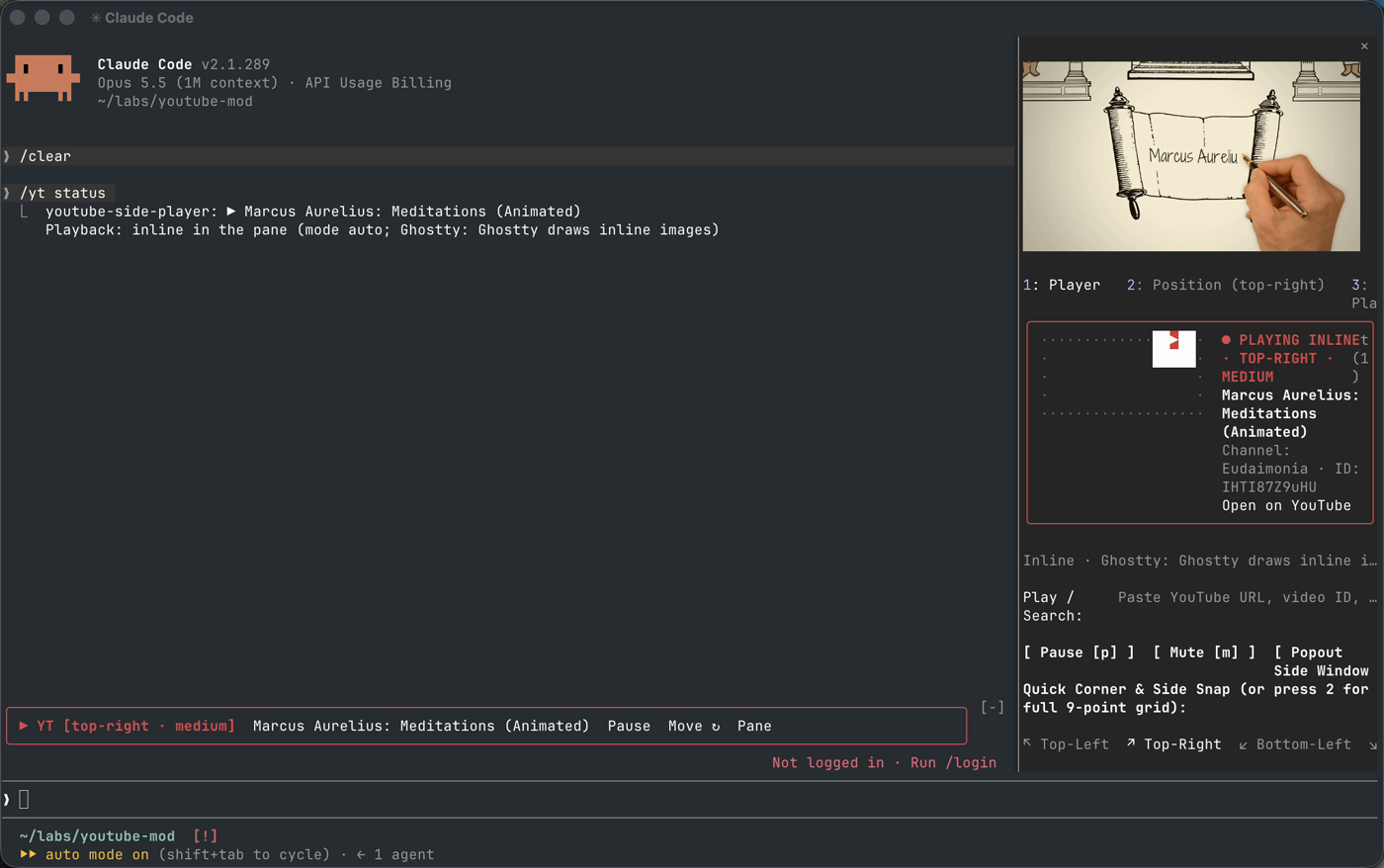
In Ghostty or kitty the video plays inline, in Claude Code's side pane, with sound. Everywhere else it pops out into a floating, always-on-top macOS window.
/plugin marketplace add hemanth/claude-code-youtube-mod
/plugin install youtube-side-player@claude-code-youtube-mod
__Or from a clone:__
$ git clone https://github.com/hemanth/claude-code-youtube-mod
$ claude --plugin-dir ./claude-code-youtube-mod
Needs Claude Code 2.1.287+ and macOS.
/yt marcus aurelius meditations animatedThat's it: it searches YouTube and plays the top hit.
__More:__
/yt                          open the player pane
/yt <url | id | search>      play
/yt pause | resume
/yt stop                     stop and close the pane
/yt hide | show              hide the UI, keep listening
/yt pos <where> [size]       move the popout window (top-right, left-side, x,y,w,h ...)
/yt width <cols>             pane width
/yt mode auto|inline|window
/yt setup                    install the inline video tools
/yt status
Or just ask Claude: "play some lofi on the side".
Decided per session, from the terminal:
/yt status tells you which one, and why.
Inline video needs yt-dlp and ffmpeg. If they're on your PATH, they're used. If not, the first /yt play fetches them into ~/.claude/plugins/data/youtube-side-player/bin/:
Delete that folder to remove them.
$ claude plugin validate --strict .
$ claude plugin test .
$ swiftc -O native/YTPiPPlayer.swift -o bin/yt-pip -framework Cocoa -framework WebKitMIT © Hemanth.HM
hooks/register.js 1638 lines1const PANE_ID = 'youtube-side-player';
2const STATE_FILE_PATH = '/tmp/claude-yt-mod-state.json';
3const DEFAULT_COLOR = 0x01000000;
4
5const CURATED_VIDEOS = [
6 {
7 id: 'jfKfPfyJRdk',
8 title: 'lofi hip hop radio - beats to relax/study to',
9 author: 'Lofi Girl',
10 category: 'Focus & Beats'
11 },
12 {
13 id: 'zjkBMFhNj_g',
14 title: 'Intro to Large Language Models (1hr Talk)',
15 author: 'Andrej Karpathy',
16 category: 'AI & Systems'
17 },
18 {
19 id: 'aircAruvnKk',
20 title: 'But what is a neural network? | Deep learning Ch. 1',
21 author: '3Blue1Brown',
22 category: 'Math & ML'
23 },
24 {
25 id: '4b4MUYve_U8',
26 title: 'Synthwave Radio - chill synth / retro beats to code to',
27 author: 'Lofi Girl Synthwave',
28 category: 'Focus & Beats'
29 },
30 {
31 id: 'kCc8FmEb1nY',
32 title: 'Let’s build GPT: from scratch, in code, spelled out',
33 author: 'Andrej Karpathy',
34 category: 'AI & Systems'
35 },
36 {
37 id: 'r6sGWTCMz2k',
38 title: 'But what is a Fourier series? From heat flow to circles',
39 author: '3Blue1Brown',
40 category: 'Math & ML'
41 }
42];
43
44const POSITION_PRESETS = [
45 { key: 'top-left', short: 'TL', arrow: '↖', label: 'Top-Left', hotkey: 'q', row: 0, col: 0 },
46 { key: 'top-center', short: 'TC', arrow: '↑', label: 'Top-Center', hotkey: 'w', row: 0, col: 1 },
47 { key: 'top-right', short: 'TR', arrow: '↗', label: 'Top-Right', hotkey: 'e', row: 0, col: 2 },
48 { key: 'left-side', short: 'L', arrow: '←', label: 'Left-Side', hotkey: 'a', row: 1, col: 0 },
49 { key: 'center', short: 'C', arrow: '·', label: 'Center', hotkey: 's', row: 1, col: 1 },
50 { key: 'right-side', short: 'R', arrow: '→', label: 'Right-Side', hotkey: 'd', row: 1, col: 2 },
51 { key: 'bottom-left', short: 'BL', arrow: '↙', label: 'Bottom-Left', hotkey: 'z', row: 2, col: 0 },
52 { key: 'bottom-center', short: 'BC', arrow: '↓', label: 'Bottom-Center', hotkey: 'x', row: 2, col: 1 },
53 { key: 'bottom-right', short: 'BR', arrow: '↘', label: 'Bottom-Right', hotkey: 'c', row: 2, col: 2 }
54];
55
56let activeTab = 'player';
57let currentVideo = {
58 id: CURATED_VIDEOS[0].id,
59 title: CURATED_VIDEOS[0].title,
60 author: CURATED_VIDEOS[0].author
61};
62let screenPosition = 'top-right';
63let customCoords = '';
64let sizePreset = 'medium';
65let opacity = 0.96;
66let uiPlacement = 'both'; // 'pane' | 'band' | 'both' | 'spinner'
67let paneColumns = 58;
68let isPlaying = false;
69let isMuted = false;
70let playlist = CURATED_VIDEOS.slice();
71let searchResults = [];
72let videoNotes = [];
73let aiSummary = '';
74let pluginRootPath = '';
75let isUiHidden = false;
76let hasActiveVideo = false; // a video is loaded (playing or paused) until stopped
77// Inline (in-pane) playback: decided per session from the terminal
78const INLINE_FRAME = { width: 1280, height: 720, fps: 24, file: '/tmp/claude-yt-inline-frame.rgb' };
79const INLINE_IMAGE_KEY = 'inline-video';
80const INLINE_CACHE_DIR = '/tmp/claude-yt-inline-cache';
81let modePreference = 'auto'; // 'auto' | 'inline' | 'window'
82let playbackMode = 'window'; // 'inline' | 'window'
83let terminalInfo = { canInline: false, terminal: 'unknown', reason: 'not detected yet' };
84let inlineSession = null;
85let inlineOffset = 0;
86let depsDir = ''; // where bin/install-deps.sh puts yt-dlp and ffmpeg
87let depsInstall = null; // the install in flight, if any
88let toolPaths = { 'yt-dlp': 'yt-dlp', ffmpeg: 'ffmpeg' };
89let lastSurface = null;
90const DEPS_UPDATE_EVERY_MS = 7 * 24 * 60 * 60 * 1000;
91
92export function extractYouTubeId(input) {
93 const raw = String(input || '').trim();
94 if (!raw) return null;
95 if (/^[A-Za-z0-9_-]{11}$/.test(raw)) {
96 return raw;
97 }
98 try {
99 const url = new URL(raw);
100 const host = url.hostname.toLowerCase();
101 if (host.includes('youtu.be')) {
102 const id = url.pathname.replace(/^\/+/, '').slice(0, 11);
103 if (/^[A-Za-z0-9_-]{11}$/.test(id)) return id;
104 }
105 if (host.includes('youtube.com') || host.includes('youtube-nocookie.com')) {
106 const v = url.searchParams.get('v');
107 if (v && /^[A-Za-z0-9_-]{11}$/.test(v.slice(0, 11))) {
108 return v.slice(0, 11);
109 }
110 const parts = url.pathname.split('/').filter(Boolean);
111 const markerIdx = parts.findIndex((p) => p === 'embed' || p === 'shorts' || p === 'live' || p === 'v');
112 if (markerIdx !== -1 && parts[markerIdx + 1]) {
113 const candidate = parts[markerIdx + 1].slice(0, 11);
114 if (/^[A-Za-z0-9_-]{11}$/.test(candidate)) return candidate;
115 }
116 }
117 } catch {
118 // Not a full URL; check for inline v= or youtu.be/ pattern
119 }
120 const match = raw.match(/(?:v=|youtu\.be\/|embed\/|shorts\/)([A-Za-z0-9_-]{11})/);
121 return match ? match[1] : null;
122}
123
124export function normalizePosition(raw) {
125 const cleaned = String(raw || '').trim().toLowerCase();
126 if (!cleaned) return 'top-right';
127 const map = {
128 tr: 'top-right',
129 'top-right': 'top-right',
130 topright: 'top-right',
131 tl: 'top-left',
132 'top-left': 'top-left',
133 topleft: 'top-left',
134 br: 'bottom-right',
135 'bottom-right': 'bottom-right',
136 bottomright: 'bottom-right',
137 bl: 'bottom-left',
138 'bottom-left': 'bottom-left',
139 bottomleft: 'bottom-left',
140 r: 'right-side',
141 right: 'right-side',
142 'right-side': 'right-side',
143 'dock-right': 'right-side',
144 l: 'left-side',
145 left: 'left-side',
146 'left-side': 'left-side',
147 'dock-left': 'left-side',
148 tc: 'top-center',
149 top: 'top-center',
150 'top-center': 'top-center',
151 bc: 'bottom-center',
152 bottom: 'bottom-center',
153 'bottom-center': 'bottom-center',
154 c: 'center',
155 center: 'center'
156 };
157 if (map[cleaned]) return map[cleaned];
158 if (/^\d+\s*,\s*\d+/.test(cleaned)) {
159 return 'custom';
160 }
161 return cleaned;
162}
163
164function packRasterCells(rows) {
165 const numbers = rows.flat().flatMap(([ch, fg, bg]) => [
166 ch.codePointAt(0),
167 fg ?? DEFAULT_COLOR,
168 bg ?? DEFAULT_COLOR
169 ]);
170 return new Uint8Array(Uint32Array.from(numbers).buffer).toBase64();
171}
172
173function buildScreenRadarRaster(pos, playing) {
174 const cols = 19;
175 const rowsCount = 5;
176 const activePos = normalizePosition(pos);
177 const grid = [];
178
179 let targetRow = 0;
180 let targetColStart = 13;
181 let targetRowEnd = 1;
182
183 if (activePos === 'top-left') {
184 targetRow = 0;
185 targetRowEnd = 1;
186 targetColStart = 1;
187 } else if (activePos === 'top-center') {
188 targetRow = 0;
189 targetRowEnd = 1;
190 targetColStart = 7;
191 } else if (activePos === 'top-right') {
192 targetRow = 0;
193 targetRowEnd = 1;
194 targetColStart = 13;
195 } else if (activePos === 'left-side') {
196 targetRow = 1;
197 targetRowEnd = 3;
198 targetColStart = 1;
199 } else if (activePos === 'center' || activePos === 'custom') {
200 targetRow = 1;
201 targetRowEnd = 3;
202 targetColStart = 7;
203 } else if (activePos === 'right-side') {
204 targetRow = 1;
205 targetRowEnd = 3;
206 targetColStart = 13;
207 } else if (activePos === 'bottom-left') {
208 targetRow = 3;
209 targetRowEnd = 4;
210 targetColStart = 1;
211 } else if (activePos === 'bottom-center') {
212 targetRow = 3;
213 targetRowEnd = 4;
214 targetColStart = 7;
215 } else if (activePos === 'bottom-right') {
216 targetRow = 3;
217 targetRowEnd = 4;
218 targetColStart = 13;
219 }
220
221 const activeColor = playing ? 0xe53935 : 0x29b6f6;
222 const frameColor = 0x546e7a;
223
224 for (let r = 0; r < rowsCount; r += 1) {
225 const rowCells = [];
226 for (let c = 0; c < cols; c += 1) {
227 const inTarget =
228 r >= targetRow &&
229 r <= targetRowEnd &&
230 c >= targetColStart &&
231 c <= targetColStart + 4;
232 if (inTarget) {
233 const ch = c === targetColStart + 2 && r === targetRow ? '▶' : '█';
234 rowCells.push([ch, 0xffffff, activeColor]);
235 } else if (c === 0 || c === cols - 1 || r === 0 || r === rowsCount - 1) {
236 rowCells.push(['·', frameColor, DEFAULT_COLOR]);
237 } else {
238 rowCells.push([' ', DEFAULT_COLOR, DEFAULT_COLOR]);
239 }
240 }
241 grid.push(rowCells);
242 }
243 return { columns: cols, rows: rowsCount, cells: packRasterCells(grid) };
244}
245
246function buildDesktopPositionSvg(pos, playing) {
247 const activePos = normalizePosition(pos);
248 const coords = {
249 'top-left': { x: 8, y: 6, w: 38, h: 20 },
250 'top-center': { x: 51, y: 6, w: 38, h: 20 },
251 'top-right': { x: 94, y: 6, w: 38, h: 20 },
252 'left-side': { x: 8, y: 14, w: 34, h: 44 },
253 center: { x: 51, y: 24, w: 38, h: 24 },
254 custom: { x: 51, y: 24, w: 38, h: 24 },
255 'right-side': { x: 98, y: 14, w: 34, h: 44 },
256 'bottom-left': { x: 8, y: 46, w: 38, h: 20 },
257 'bottom-center': { x: 51, y: 46, w: 38, h: 20 },
258 'bottom-right': { x: 94, y: 46, w: 38, h: 20 }
259 };
260 const box = coords[activePos] || coords['top-right'];
261 const fill = playing ? '#e53935' : '#29b6f6';
262 return (
263 '<svg xmlns="http://www.w3.org/2000/svg" viewBox="0 0 140 72">' +
264 '<rect x="2" y="2" width="136" height="68" rx="6" fill="#111827" stroke="#374151" stroke-width="1.5"/>' +
265 '<rect x="' + box.x + '" y="' + box.y + '" width="' + box.w + '" height="' + box.h + '" rx="3" fill="' + fill + '"/>' +
266 '<polygon points="' + (box.x + 15) + ',' + (box.y + 5) + ' ' + (box.x + 15) + ',' + (box.y + box.h - 5) + ' ' + (box.x + 25) + ',' + (box.y + box.h / 2) + '" fill="#ffffff"/>' +
267 '</svg>'
268 );
269}
270
271async function persistSettings($) {
272 await $.store.set('currentVideo', currentVideo);
273 await $.store.set('screenPosition', screenPosition);
274 await $.store.set('customCoords', customCoords);
275 await $.store.set('sizePreset', sizePreset);
276 await $.store.set('opacity', opacity);
277 await $.store.set('uiPlacement', uiPlacement);
278 await $.store.set('paneColumns', paneColumns);
279 await $.store.set('playlist', playlist);
280 await $.store.set('videoNotes', videoNotes);
281}
282
283async function loadSavedSettings($) {
284 const savedVideo = await $.store.get('currentVideo');
285 if (savedVideo && typeof savedVideo === 'object' && savedVideo.id) {
286 currentVideo = savedVideo;
287 }
288 const savedPos = await $.store.get('screenPosition');
289 if (typeof savedPos === 'string' && savedPos) {
290 screenPosition = savedPos;
291 }
292 const savedCustom = await $.store.get('customCoords');
293 if (typeof savedCustom === 'string') {
294 customCoords = savedCustom;
295 }
296 const savedSize = await $.store.get('sizePreset');
297 if (typeof savedSize === 'string' && savedSize) {
298 sizePreset = savedSize;
299 }
300 const savedOpacity = await $.store.get('opacity');
301 if (typeof savedOpacity === 'number') {
302 opacity = savedOpacity;
303 }
304 const savedPlacement = await $.store.get('uiPlacement');
305 if (typeof savedPlacement === 'string' && savedPlacement) {
306 uiPlacement = savedPlacement;
307 }
308 const savedCols = await $.store.get('paneColumns');
309 if (typeof savedCols === 'number') {
310 paneColumns = savedCols;
311 }
312 const savedPlaylist = await $.store.get('playlist');
313 if (Array.isArray(savedPlaylist) && savedPlaylist.length > 0) {
314 playlist = savedPlaylist;
315 }
316 const savedNotes = await $.store.get('videoNotes');
317 if (Array.isArray(savedNotes)) {
318 videoNotes = savedNotes;
319 }
320 const savedMode = await $.store.get('modePreference');
321 if (savedMode === 'auto' || savedMode === 'inline' || savedMode === 'window') {
322 modePreference = savedMode;
323 }
324}
325
326async function resolveVideoMetadata($, videoId, fallbackTitle) {
327 const oembedUrl =
328 'https://www.youtube.com/oembed?url=' +
329 encodeURIComponent('https://www.youtube.com/watch?v=' + videoId) +
330 '&format=json';
331 try {
332 const res = await $.http.fetch(oembedUrl);
333 if (res && res.ok && res.text) {
334 const data = JSON.parse(res.text);
335 return {
336 id: videoId,
337 title: data.title || fallbackTitle || 'YouTube Video (' + videoId + ')',
338 author: data.author_name || 'YouTube'
339 };
340 }
341 } catch {
342 // Fall back to curated or default title when offline or in tests
343 }
344 const curated = CURATED_VIDEOS.find((v) => v.id === videoId);
345 if (curated) {
346 return { id: curated.id, title: curated.title, author: curated.author };
347 }
348 return {
349 id: videoId,
350 title: fallbackTitle || 'YouTube Video (' + videoId + ')',
351 author: 'YouTube'
352 };
353}
354
355async function searchYouTubeVideos($, query) {
356 const q = String(query || '').trim();
357 if (!q) return [];
358 const lower = q.toLowerCase();
359 const localMatches = playlist.filter(
360 (v) =>
361 v.title.toLowerCase().includes(lower) ||
362 (v.author && v.author.toLowerCase().includes(lower)) ||
363 (v.category && v.category.toLowerCase().includes(lower))
364 );
365
366 try {
367 const searchUrl = 'https://www.youtube.com/results?search_query=' + encodeURIComponent(q);
368 const res = await $.http.fetch(searchUrl);
369 if (res && res.ok && res.text) {
370 const results = [];
371 const seen = new Set();
372 const regex = /"videoId":"([A-Za-z0-9_-]{11})".*?"title":\{"runs":\[\{"text":"([^"]+)"/g;
373 let match = regex.exec(res.text);
374 while (match && results.length < 6) {
375 const id = match[1];
376 let title = match[2];
377 try {
378 // Titles are JSON string contents: decode \u0026 and friends
379 title = JSON.parse('"' + title + '"');
380 } catch {
381 // Keep it as found
382 }
383 if (!seen.has(id)) {
384 seen.add(id);
385 results.push({ id, title, author: 'YouTube Search' });
386 }
387 match = regex.exec(res.text);
388 }
389 if (results.length > 0) {
390 return results;
391 }
392 }
393 } catch {
394 // Fall back to local curated matches
395 }
396
397 return localMatches.length > 0 ? localMatches : [CURATED_VIDEOS[0]];
398}
399
400async function runNativePipCommand($, args) {
401 const binPath = pluginRootPath + '/bin/yt-pip';
402 try {
403 await $.process.run([binPath, ...args]);
404 return true;
405 } catch {
406 return false;
407 }
408}
409
410// Terminals whose graphics protocol the pane's `Image` element draws (kitty's).
411const INLINE_TERMINALS = [
412 { name: 'Ghostty', test: (env) => /ghostty/i.test(env.termProgram) || /ghostty/i.test(env.term) || !!env.ghostty },
413 { name: 'kitty', test: (env) => /kitty/i.test(env.term) || !!env.kittyWindowId }
414];
415
416export function classifyTerminal(env) {
417 if (env.surface && env.surface !== 'terminal') {
418 return { canInline: false, terminal: env.surface, reason: 'the ' + env.surface + ' app draws no video in a pane' };
419 }
420 if (env.tmux) {
421 return { canInline: false, terminal: 'tmux', reason: 'tmux does not pass inline images through' };
422 }
423 const match = INLINE_TERMINALS.find((t) => t.test(env));
424 if (match) {
425 return { canInline: true, terminal: match.name, reason: match.name + ' draws inline images' };
426 }
427 const name = env.termProgram || env.term || 'this terminal';
428 return { canInline: false, terminal: name, reason: name + ' has no inline image protocol (Ghostty or kitty do)' };
429}
430
431// A tool on PATH wins; otherwise the copy bin/install-deps.sh put in depsDir.
432async function resolveTool($, name) {
433 try {
434 const { exitCode, stdout } = await $.process.run(['/usr/bin/env', 'which', name]);
435 if (exitCode === 0 && stdout.trim()) return stdout.trim();
436 } catch {
437 // Not on PATH
438 }
439 if (depsDir) {
440 try {
441 const { exitCode } = await $.process.run(['/bin/test', '-x', depsDir + '/' + name]);
442 if (exitCode === 0) return depsDir + '/' + name;
443 } catch {
444 // Not installed by us either
445 }
446 }
447 return null;
448}
449
450// Runs bin/install-deps.sh: yt-dlp and ffmpeg into depsDir, checksum-verified.
451async function installDeps($, { update = false } = {}) {
452 if (depsInstall) return depsInstall;
453 depsInstall = (async () => {
454 try {
455 const { exitCode, stdout, stderr } = await $.process.run(
456 ['/bin/bash', pluginRootPath + '/bin/install-deps.sh', ...(update ? ['--update'] : [])],
457 { env: { YT_MOD_DEPS_DIR: depsDir }, timeoutMs: 600000 }
458 );
459 const lines = String(stdout || '').trim().split('\n');
460 const last = lines[lines.length - 1] || '';
461 if (exitCode !== 0 || !last.startsWith('ok ')) {
462 const why = lines.find((l) => l.startsWith('error ')) || String(stderr || '').trim().split('\n').pop() || 'exit ' + exitCode;
463 return { ok: false, message: why.replace(/^error /, '') };
464 }
465 await $.store.set('depsCheckedAt', Date.now());
466 return { ok: true, message: 'yt-dlp and ffmpeg are ready in ' + depsDir };
467 } catch (err) {
468 return { ok: false, message: err && err.message ? err.message : String(err) };
469 } finally {
470 depsInstall = null;
471 }
472 })();
473 return depsInstall;
474}
475
476// Installs missing tools, then decides the playback mode again.
477async function setupInlineDeps($) {
478 $.ui.toast('Installing yt-dlp + ffmpeg for inline video (one-time, ~100 MB)…');
479 const result = await installDeps($);
480 await detectPlaybackMode($, lastSurface);
481 $.ui.toast(result.ok ? 'Inline video ready: ' + describeMode() : 'Install failed: ' + result.message);
482 $.ui.invalidate('ui.render');
483 return result;
484}
485
486async function detectPlaybackMode($, surface) {
487 const env = {
488 surface,
489 termProgram: (await $.env.get('TERM_PROGRAM')) || '',
490 term: (await $.env.get('TERM')) || '',
491 tmux: (await $.env.get('TMUX')) || '',
492 kittyWindowId: (await $.env.get('KITTY_WINDOW_ID')) || '',
493 ghostty: (await $.env.get('GHOSTTY_RESOURCES_DIR')) || ''
494 };
495 lastSurface = surface;
496 let result = { ...classifyTerminal(env), needsDeps: false };
497 if (result.canInline) {
498 const missing = [];
499 for (const tool of ['yt-dlp', 'ffmpeg']) {
500 const path = await resolveTool($, tool);
501 if (path) toolPaths[tool] = path;
502 else missing.push(tool);
503 }
504 if (missing.length > 0) {
505 result = {
506 ...result,
507 canInline: false,
508 needsDeps: true,
509 reason: 'needs ' + missing.join(' + ') + ' (installed on first play, or /yt setup)'
510 };
511 }
512 }
513 terminalInfo = result;
514 applyModePreference();
515 return result;
516}
517
518function applyModePreference() {
519 playbackMode = modePreference === 'window' || !terminalInfo.canInline ? 'window' : 'inline';
520}
521
522function inlinePosition() {
523 if (!inlineSession) return inlineOffset;
524 return inlineSession.offset + (Date.now() - inlineSession.startedAt) / 1000;
525}
526
527function drainInBackground(stream, onEnd) {
528 void (async () => {
529 let stderr = '';
530 let code = null;
531 try {
532 while (true) {
533 const step = await stream.next();
534 if (step.done) {
535 code = step.value ? step.value.code : null;
536 break;
537 }
538 if (step.value.stream === 'stderr' && stderr.length < 2000) stderr += step.value.text;
539 }
540 } catch {
541 // Closed by stopInline
542 }
543 if (onEnd) onEnd(code, stderr);
544 })();
545}
546
547function stopInline() {
548 if (!inlineSession) return;
549 const session = inlineSession;
550 inlineOffset = inlinePosition();
551 inlineSession = null;
552 session.frameTimer.cancel();
553 session.proc.return(undefined).catch(() => {});
554}
555
556function inlineFrameSource(generation) {
557 return {
558 file: INLINE_FRAME.file,
559 format: 'rgb',
560 width: INLINE_FRAME.width,
561 height: INLINE_FRAME.height,
562 generation
563 };
564}
565
566// One ffmpeg reads yt-dlp's separate video and audio downloads at the same
567// pace, writing frames for the pane and playing the sound, so they stay in
568// sync. `exec` makes the spawned process ffmpeg itself: ending it ends both
569// downloads (they get a broken pipe).
570const shellQuote = (s) => "'" + String(s).replace(/'/g, "'\\''") + "'";
571
572export function buildInlineScript(videoId, offsetSeconds, muted, tools = { 'yt-dlp': 'yt-dlp', ffmpeg: 'ffmpeg' }) {
573 if (!/^[A-Za-z0-9_-]{11}$/.test(videoId)) {
574 throw new Error('not a YouTube video id: ' + videoId);
575 }
576 const seek = String(Math.max(0, Math.floor(offsetSeconds)));
577 // Read the first `seek` seconds at full speed so resuming does not wait
578 const burst = String(Math.max(0, Math.floor(offsetSeconds)) + 1);
579 const download =
580 shellQuote(tools['yt-dlp']) + ' -q --no-warnings --no-part --cache-dir ' + INLINE_CACHE_DIR + ' -o - ' +
581 '"https://www.youtube.com/watch?v=' + videoId + '"';
582 return [
583 'exec ' + shellQuote(tools.ffmpeg) + ' -loglevel error',
584 '-readrate 1 -readrate_initial_burst ' + burst,
585 '-i <(' + download + ' -f "bv*[height<=1080][vcodec^=avc1]/bv*[height<=1080]/bv*")',
586 '-readrate 1 -readrate_initial_burst ' + burst,
587 '-i <(' + download + ' -f "ba[ext=m4a]/ba")',
588 '-ss ' + seek + ' -map 0:v:0',
589 // Fit inside the frame and letterbox, so 4:3 and vertical videos keep their shape
590 "-vf 'scale=" + INLINE_FRAME.width + ':' + INLINE_FRAME.height + ':force_original_aspect_ratio=decrease,' +
591 'pad=' + INLINE_FRAME.width + ':' + INLINE_FRAME.height + ":(ow-iw)/2:(oh-ih)/2,fps=" + INLINE_FRAME.fps + "'",
592 '-pix_fmt rgb24 -c:v rawvideo -f image2 -update 1 -atomic_writing 1 -y ' + INLINE_FRAME.file,
593 '-ss ' + seek + ' -map 1:a:0' + (muted ? ' -af volume=0' : '') + ' -f audiotoolbox -'
594 ].join(' ');
595}
596
597async function startInline($, videoId, offsetSeconds, attempt = 0) {
598 stopInline();
599 const script = buildInlineScript(videoId, offsetSeconds, isMuted, toolPaths);
600 const proc = $.process.spawn({ argv: ['/bin/bash', '-c', script] });
601
602 let generation = 0;
603 const frameTimer = $.clock.every(Math.round(1000 / INLINE_FRAME.fps), () => {
604 generation += 1;
605 $.ui
606 .blit({ requestId: PANE_ID, key: INLINE_IMAGE_KEY, source: inlineFrameSource(generation) })
607 .catch(() => {});
608 });
609
610 const session = { videoId, offset: offsetSeconds, startedAt: Date.now(), proc, frameTimer };
611 inlineSession = session;
612 drainInBackground(proc, (code, stderr) => {
613 // Ended by itself (the video finished or the download failed), not by stopInline
614 if (inlineSession !== session) return;
615 stopInline();
616 // YouTube now and then refuses a download (HTTP 403); a fresh start usually works
617 if (code !== 0 && attempt < 2 && Date.now() - session.startedAt < 20000) {
618 startInline($, videoId, offsetSeconds, attempt + 1).catch(() => {});
619 return;
620 }
621 inlineOffset = 0;
622 isPlaying = false;
623 if (code !== 0) {
624 const line = stderr.split('\n').find((l) => /error/i.test(l)) || stderr.trim().split('\n')[0] || 'exit ' + code;
625 $.ui.toast('Inline playback stopped: ' + line.slice(0, 160));
626 }
627 $.ui.invalidate('ui.render');
628 });
629}
630
631// Routes a player command to the inline pane player or the native window.
632async function runPlayerCommand($, args) {
633 if (playbackMode !== 'inline') {
634 return runNativePipCommand($, args);
635 }
636 const [cmd, arg] = args;
637 try {
638 if (cmd === 'play') {
639 inlineOffset = 0;
640 await startInline($, arg, 0);
641 } else if (cmd === 'pause' || (cmd === 'toggle' && inlineSession)) {
642 stopInline();
643 } else if (cmd === 'resume' || cmd === 'toggle') {
644 await startInline($, currentVideo.id, inlineOffset);
645 } else if (cmd === 'stop') {
646 stopInline();
647 inlineOffset = 0;
648 } else if ((cmd === 'mute' || cmd === 'unmute') && inlineSession) {
649 // ffmpeg takes its volume at start, so restart from where it is
650 await startInline($, currentVideo.id, inlinePosition());
651 }
652 // position/size move the native window; the pane has no screen position
653 return true;
654 } catch (err) {
655 stopInline();
656 isPlaying = false;
657 $.ui.toast('Inline playback failed: ' + (err && err.message ? err.message : String(err)));
658 return false;
659 }
660}
661
662async function syncFromNativeStateFile($) {
663 try {
664 const raw = await $.fs.read(STATE_FILE_PATH);
665 if (!raw) return;
666 const parsed = JSON.parse(raw);
667 if (parsed && typeof parsed === 'object') {
668 if (parsed.position) {
669 screenPosition = parsed.position;
670 }
671 if (typeof parsed.customX === 'number' && typeof parsed.customY === 'number') {
672 customCoords = Math.round(parsed.customX) + ',' + Math.round(parsed.customY);
673 }
674 if (typeof parsed.isPaused === 'boolean') {
675 isPlaying = !parsed.shouldQuit && !parsed.isPaused;
676 }
677 }
678 } catch {
679 // Ignore missing state file before first launch
680 }
681}
682
683async function playYouTubeTarget($, rawTarget, requestedPos, requestedSize) {
684 // This terminal can play inline but the tools are missing: fetch them first
685 if (terminalInfo.needsDeps && modePreference !== 'window') {
686 await setupInlineDeps($);
687 }
688 if (requestedPos) {
689 const norm = normalizePosition(requestedPos);
690 screenPosition = norm;
691 if (norm === 'custom') {
692 customCoords = String(requestedPos).trim();
693 }
694 }
695 if (requestedSize) {
696 sizePreset = String(requestedSize).trim().toLowerCase();
697 }
698
699 const trimmed = String(rawTarget || '').trim();
700 let videoId = extractYouTubeId(trimmed);
701 let resolvedMeta = null;
702
703 if (!videoId && trimmed) {
704 const found = await searchYouTubeVideos($, trimmed);
705 searchResults = found;
706 if (found.length > 0) {
707 videoId = found[0].id;
708 resolvedMeta = found[0];
709 }
710 }
711
712 if (!videoId) {
713 videoId = currentVideo.id || CURATED_VIDEOS[0].id;
714 }
715
716 const meta = await resolveVideoMetadata($, videoId, resolvedMeta ? resolvedMeta.title : '');
717 currentVideo = meta;
718 isPlaying = true;
719 hasActiveVideo = true;
720
721 if (!playlist.some((item) => item.id === meta.id)) {
722 playlist = [meta, ...playlist.slice(0, 14)];
723 }
724
725 const posArg = screenPosition === 'custom' && customCoords ? customCoords : screenPosition;
726 await runPlayerCommand($, [
727 'play',
728 meta.id,
729 '--position',
730 posArg,
731 '--size',
732 sizePreset,
733 '--title',
734 meta.title,
735 '--opacity',
736 String(opacity)
737 ]);
738
739 await persistSettings($);
740 $.ui.invalidate('ui.render');
741 return meta;
742}
743
744async function movePlayerPosition($, newPos, newSize) {
745 const raw = String(newPos || '').trim();
746 if (raw === 'pane' || raw === 'band' || raw === 'both' || raw === 'spinner') {
747 uiPlacement = raw;
748 await persistSettings($);
749 $.ui.invalidate('ui.render');
750 return { kind: 'ui', placement: uiPlacement };
751 }
752
753 const norm = normalizePosition(raw);
754 screenPosition = norm;
755 if (norm === 'custom') {
756 customCoords = raw;
757 }
758 if (newSize) {
759 sizePreset = String(newSize).trim().toLowerCase();
760 } else if (norm === 'right-side' || norm === 'left-side') {
761 sizePreset = 'sidebar';
762 } else if (sizePreset === 'sidebar') {
763 sizePreset = 'medium';
764 }
765
766 const posArg = screenPosition === 'custom' && customCoords ? customCoords : screenPosition;
767 await runPlayerCommand($, ['position', posArg, sizePreset]);
768 await persistSettings($);
769 $.ui.invalidate('ui.render');
770 return { kind: 'screen', position: screenPosition, sizePreset };
771}
772
773const YT_HELP = [
774 '/yt open the player pane',
775 '/yt <url|id|search> play (same as /yt play)',
776 '/yt play <url|search> [@position] [size]',
777 '/yt pause | resume pause toggles when already paused',
778 '/yt stop stop playback and close the pane and bar',
779 '/yt hide | show hide or show the UI; playback keeps going',
780 '/yt pos <where> [size] move the popout window',
781 '/yt mode auto|inline|window',
782 '/yt width <cols> pane width (the inline video scales with it)',
783 '/yt setup install yt-dlp + ffmpeg for inline video',
784 '/yt status'
785].join('\n');
786
787// Opened to watch, the pane leaves the keyboard with the prompt so typing goes
788// on; opened to use (/yt, /yt show, /yt pos), it takes the keys.
789async function openPlayerPane($, { focus = true } = {}) {
790 await $.ui.open({
791 id: PANE_ID,
792 title: 'YouTube Side Player',
793 ...(focus ? { focus: true } : {}),
794 closeOnEscape: true,
795 columns: paneColumns
796 });
797}
798
799async function stopPlayback($) {
800 isPlaying = false;
801 hasActiveVideo = false;
802 await runPlayerCommand($, ['stop']);
803 await $.ui.close({ id: PANE_ID });
804 $.ui.invalidate('ui.render');
805}
806
807function describeMode() {
808 const where = playbackMode === 'inline' ? 'inline in the pane' : 'in the popout window';
809 return (
810 'Playback: ' + where + ' (mode ' + modePreference + '; ' + terminalInfo.terminal + ': ' + terminalInfo.reason + ')'
811 );
812}
813
814export function register(on) {
815 on('session.start', async ($, e, next) => {
816 await loadSavedSettings($);
817
818 try {
819 await $.command.register({
820 name: 'yt',
821 description: 'YouTube side player: play, pause, resume, stop, hide, show, pos, mode, status',
822 argumentHint: '[play <url|search> | pause | resume | stop | hide | show | pos <where> | mode auto|inline|window | width <cols> | setup | status]',
823 immediate: true
824 });
825 } catch {
826 // Ignore duplicate command registration on reload
827 }
828
829 pluginRootPath = $.plugin.root;
830 depsDir = ((await $.env.get('HOME')) || '/tmp') + '/.claude/plugins/data/youtube-side-player/bin';
831 await detectPlaybackMode($, e.surface ?? (await $.session.surfaces())[0] ?? null);
832
833 // YouTube changes break old yt-dlp releases: refresh our own copy weekly
834 const checkedAt = await $.store.get('depsCheckedAt');
835 if (terminalInfo.canInline && (typeof checkedAt !== 'number' || Date.now() - checkedAt > DEPS_UPDATE_EVERY_MS)) {
836 void installDeps($, { update: true });
837 }
838
839 try {
840 await $.tool.register({
841 name: 'youtube_player',
842 description:
843 'Play a YouTube video on the side, search YouTube, or move the floating YouTube player to any screen or terminal position the user likes.',
844 inputSchema: {
845 type: 'object',
846 properties: {
847 action: {
848 type: 'string',
849 description: 'play, position, pause, resume, stop, or status'
850 },
851 queryOrUrl: {
852 type: 'string',
853 description: 'YouTube video URL, 11-character video ID, or search query'
854 },
855 position: {
856 type: 'string',
857 description:
858 'top-right, top-left, bottom-right, bottom-left, right-side, left-side, top-center, bottom-center, center, pane, band, both, or custom x,y,w,h'
859 },
860 size: {
861 type: 'string',
862 description: 'small, medium, large, or sidebar'
863 }
864 },
865 required: ['action']
866 }
867 });
868 } catch {
869 // Ignore duplicate tool registration on reload
870 }
871
872 return next(e);
873 });
874
875 on('classic.SessionStart', { source: 'clear' }, async ($, e, next) => {
876 await loadSavedSettings($);
877 return next(e);
878 });
879
880 on('command.run', { command: 'yt' }, async ($, e) => {
881 const rawArgs = String(e.args || '').trim();
882 if (playbackMode === 'window') {
883 await syncFromNativeStateFile($);
884 }
885 const [first = '', ...rest] = rawArgs.split(/\s+/).filter(Boolean);
886 const sub = first.toLowerCase();
887 const restText = rest.join(' ');
888
889 if (!sub || sub === 'show') {
890 isUiHidden = false;
891 // Bare /yt is to use the pane; /yt show only brings it back into view
892 await openPlayerPane($, { focus: !sub });
893 $.ui.invalidate('ui.render');
894 return {};
895 }
896 if (sub === 'help') {
897 return { text: YT_HELP };
898 }
899 if (sub === 'setup') {
900 const result = await setupInlineDeps($);
901 return { text: (result.ok ? result.message : 'Install failed: ' + result.message) + '\n' + describeMode() };
902 }
903 if (sub === 'pause' || sub === 'resume') {
904 const wantPlaying = sub === 'resume' || !isPlaying;
905 if (wantPlaying === isPlaying) {
906 return { text: (isPlaying ? 'Already playing: ' : 'Already paused: ') + currentVideo.title };
907 }
908 isPlaying = wantPlaying;
909 await runPlayerCommand($, [wantPlaying ? 'resume' : 'pause']);
910 $.ui.invalidate('ui.render');
911 return { text: (isPlaying ? 'Resumed: ' : 'Paused: ') + currentVideo.title };
912 }
913 if (sub === 'stop') {
914 await stopPlayback($);
915 return { text: 'Stopped YouTube Side Player.' };
916 }
917 if (sub === 'hide') {
918 isUiHidden = true;
919 await $.ui.close({ id: PANE_ID });
920 $.ui.invalidate('ui.render');
921 return { text: 'YouTube player UI hidden' + (isPlaying ? ' (still playing; /yt show to bring it back).' : '.') };
922 }
923 if (sub === 'pos' || sub === 'position') {
924 if (!restText) {
925 activeTab = 'position';
926 await openPlayerPane($);
927 return {};
928 }
929 const [posToken, sizeToken] = rest;
930 const updated = await movePlayerPosition($, posToken, sizeToken);
931 if (updated.kind === 'ui') {
932 return { text: 'YouTube Mod UI placement set to: ' + updated.placement };
933 }
934 return {
935 text:
936 'Moved YouTube Side Player to ' +
937 updated.position +
938 (screenPosition === 'custom' && customCoords ? ' (' + customCoords + ')' : '') +
939 ' [' +
940 updated.sizePreset +
941 ']' +
942 (playbackMode === 'inline' ? ' (applies to the popout window; inline video lives in the pane)' : '')
943 };
944 }
945 if (sub === 'width') {
946 const cols = Number(rest[0]);
947 if (!Number.isInteger(cols) || cols < 30 || cols > 160) {
948 return { text: 'Usage: /yt width <30-160> (pane width in columns; now ' + paneColumns + ')' };
949 }
950 paneColumns = cols;
951 await persistSettings($);
952 // An open pane keeps its width: reopen it at the new one
953 if (!isUiHidden) {
954 await $.ui.close({ id: PANE_ID });
955 await openPlayerPane($, { focus: false });
956 }
957 $.ui.invalidate('ui.render');
958 return { text: 'Pane width set to ' + cols + ' columns.' };
959 }
960 if (sub === 'mode') {
961 const want = (rest[0] || '').toLowerCase();
962 if (want === 'auto' || want === 'inline' || want === 'window') {
963 const wasPlaying = isPlaying;
964 if (wasPlaying) await runPlayerCommand($, ['stop']);
965 modePreference = want;
966 await $.store.set('modePreference', modePreference);
967 applyModePreference();
968 if (wasPlaying) await playYouTubeTarget($, currentVideo.id, null, null);
969 $.ui.invalidate('ui.render');
970 } else if (want) {
971 return { text: 'Usage: /yt mode auto|inline|window' };
972 }
973 return { text: describeMode() };
974 }
975 if (sub === 'status') {
976 return {
977 text:
978 (isPlaying ? '▶ ' : '⏸ ') + currentVideo.title + '\n' + describeMode()
979 };
980 }
981
982 // `/yt play <target>` or the shorthand `/yt <url | id | search>`
983 const parts = sub === 'play' ? rest.slice() : rawArgs.split(/\s+/);
984 let sizeOverride = null;
985 let posOverride = null;
986
987 const knownSizes = new Set(['small', 'medium', 'large', 'sidebar']);
988 const knownPositions = new Set([
989 'top-left', 'top-center', 'top-right',
990 'left-side', 'center', 'right-side',
991 'bottom-left', 'bottom-center', 'bottom-right',
992 'tl', 'tc', 'tr', 'bl', 'bc', 'br', 'left', 'right', 'top', 'bottom',
993 'dock-left', 'dock-right'
994 ]);
995
996 if (parts.length >= 2 && knownSizes.has(parts[parts.length - 1].toLowerCase())) {
997 sizeOverride = parts.pop().toLowerCase();
998 }
999 if (parts.length >= 2) {
1000 const last = parts[parts.length - 1];
1001 if (last.startsWith('@')) {
1002 posOverride = parts.pop().slice(1);
1003 } else if (knownPositions.has(last.toLowerCase()) || /^\d+,\d+/.test(last)) {
1004 posOverride = parts.pop();
1005 }
1006 }
1007
1008 isUiHidden = false;
1009 // Open first so the inline Image is mounted when frames start arriving
1010 await openPlayerPane($, { focus: false });
1011 const meta = await playYouTubeTarget($, parts.join(' '), posOverride, sizeOverride);
1012 $.ui.toast(
1013 isPlaying
1014 ? 'Playing "' + meta.title + '" ' + (playbackMode === 'inline' ? 'in the pane' : 'at ' + screenPosition)
1015 : 'Could not play "' + meta.title + '"'
1016 );
1017 return {};
1018 });
1019
1020 on('tool.call', { tool: 'mcp__youtube-side-player__youtube_player' }, async ($, e) => {
1021 const action = String(e.action || 'status').toLowerCase();
1022 if (action === 'play') {
1023 const meta = await playYouTubeTarget($, e.queryOrUrl || '', e.position, e.size);
1024 return {
1025 result:
1026 'Playing "' +
1027 meta.title +
1028 '" (' +
1029 meta.id +
1030 ') at position ' +
1031 screenPosition +
1032 ' [' +
1033 sizePreset +
1034 '].'
1035 };
1036 }
1037 if (action === 'position' || action === 'move') {
1038 const updated = await movePlayerPosition($, e.position || 'top-right', e.size);
1039 return {
1040 result:
1041 updated.kind === 'ui'
1042 ? 'Updated Claude UI placement to ' + updated.placement
1043 : 'Moved YouTube Side Player to ' + updated.position + ' [' + updated.sizePreset + ']'
1044 };
1045 }
1046 if (action === 'pause') {
1047 isPlaying = false;
1048 await runPlayerCommand($, ['pause']);
1049 $.ui.invalidate('ui.render');
1050 return { result: 'Paused YouTube Side Player.' };
1051 }
1052 if (action === 'resume') {
1053 isPlaying = true;
1054 await runPlayerCommand($, ['resume']);
1055 $.ui.invalidate('ui.render');
1056 return { result: 'Resumed YouTube Side Player.' };
1057 }
1058 if (action === 'stop') {
1059 await stopPlayback($);
1060 return { result: 'Stopped and closed YouTube Side Player.' };
1061 }
1062 return {
1063 result: JSON.stringify({
1064 video: currentVideo,
1065 isPlaying,
1066 screenPosition,
1067 sizePreset,
1068 uiPlacement
1069 })
1070 };
1071 });
1072
1073 on('ui.render', { component: 'Spinner' }, async ($, e, next) => {
1074 if (!isPlaying) {
1075 return next(e);
1076 }
1077 const shortTitle =
1078 currentVideo.title.length > 28
1079 ? currentVideo.title.slice(0, 25) + '…'
1080 : currentVideo.title;
1081 return next({
1082 ...e,
1083 props: {
1084 ...e.props,
1085 suffix: ' · ▶ [' + screenPosition + '] ' + shortTitle
1086 }
1087 });
1088 });
1089
1090 on('ui.render', { component: 'AbovePrompt' }, async ($, e, next) => {
1091 if (uiPlacement !== 'band' && uiPlacement !== 'both') {
1092 return next(e);
1093 }
1094 if (isUiHidden || !hasActiveVideo) {
1095 return next(e);
1096 }
1097
1098 const { Box, Text, Button } = $.ui.resolve(e);
1099 const theirs = await next(e);
1100
1101 const bandBar = Box({
1102 borderStyle: 'round',
1103 borderColor: isPlaying ? 'red' : 'cyan',
1104 paddingX: 1,
1105 flexDirection: 'row',
1106 columnGap: 2,
1107 children: [
1108 Text({
1109 bold: true,
1110 color: isPlaying ? 'red' : 'cyan',
1111 children: [(isPlaying ? '▶ YT' : '⏸ YT') + ' [' + screenPosition + ' · ' + sizePreset + ']']
1112 }),
1113 Text({
1114 wrap: 'truncate-end',
1115 children: [currentVideo.title]
1116 }),
1117 Button({
1118 key: 'band-toggle-play',
1119 label: isPlaying ? 'Pause' : 'Play',
1120 plain: true,
1121 onPress: async () => {
1122 if (isPlaying) {
1123 isPlaying = false;
1124 await runPlayerCommand($, ['pause']);
1125 } else {
1126 await playYouTubeTarget($, currentVideo.id, screenPosition, sizePreset);
1127 }
1128 $.ui.invalidate('ui.render');
1129 }
1130 }),
1131 Button({
1132 key: 'band-cycle-pos',
1133 label: 'Move ↻',
1134 plain: true,
1135 onPress: async () => {
1136 const order = ['top-right', 'bottom-right', 'bottom-left', 'top-left', 'right-side', 'left-side'];
1137 const idx = order.indexOf(screenPosition);
1138 const nextPos = order[(idx + 1) % order.length];
1139 await movePlayerPosition($, nextPos, null);
1140 }
1141 }),
1142 Button({
1143 key: 'band-open-pane',
1144 label: 'Pane',
1145 plain: true,
1146 onPress: async () => {
1147 await $.ui.open({
1148 id: PANE_ID,
1149 title: 'YouTube Side Player',
1150 focus: true,
1151 closeOnEscape: true,
1152 columns: paneColumns
1153 });
1154 }
1155 })
1156 ]
1157 });
1158
1159 return Box({
1160 flexDirection: 'column',
1161 children: [theirs, bandBar]
1162 });
1163 });
1164
1165 on('ui.render', { component: 'Pane' }, async ($, e, next) => {
1166 if (e.requestId !== PANE_ID) {
1167 return next(e);
1168 }
1169
1170 const { Box, Text, Button, Input, Select, Link, Markdown, Raster, Svg, Image } = $.ui.resolve(e);
1171 const redraw = () => $.ui.invalidate('ui.render');
1172
1173 const tabButton = (id, label, hotkey) =>
1174 Button({
1175 key: 'tab-' + id,
1176 label,
1177 hotkey,
1178 plain: true,
1179 dimColor: activeTab !== id,
1180 onPress: () => {
1181 activeTab = id;
1182 redraw();
1183 }
1184 });
1185
1186 const headerTabs = Box({
1187 flexDirection: 'row',
1188 columnGap: 3,
1189 children: [
1190 tabButton('player', 'Player', '1'),
1191 tabButton('position', 'Position (' + screenPosition + ')', '2'),
1192 tabButton('playlist', 'Playlist (' + playlist.length + ')', '3'),
1193 tabButton('notes', 'Notes & AI (' + videoNotes.length + ')', '4')
1194 ]
1195 });
1196
1197 const visualMonitor =
1198 e.surface === 'terminal' && Raster
1199 ? Raster({
1200 key: 'screen-radar',