Handoffs
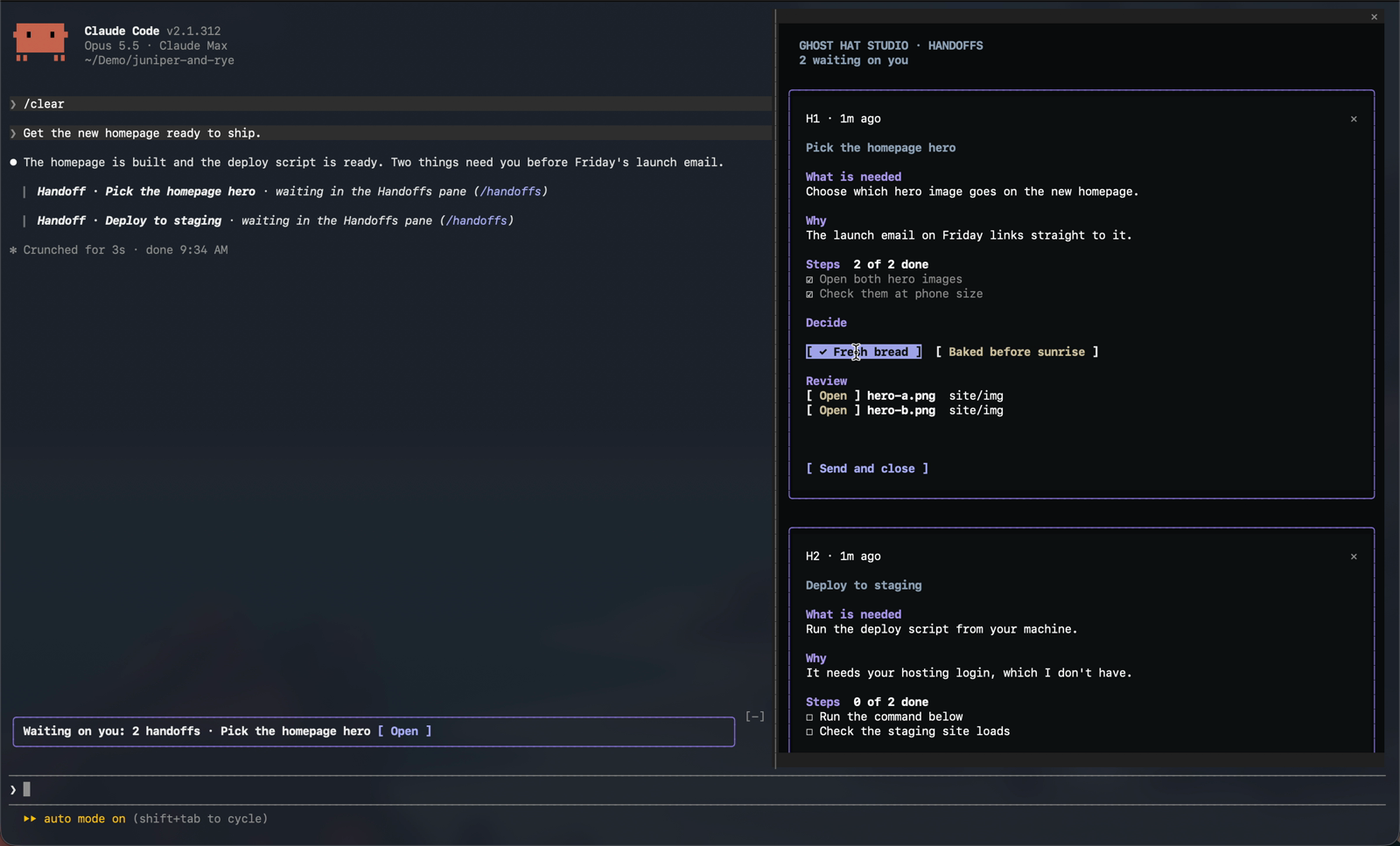
Turns Claude's requests to you into checklist cards in a Handoffs pane, with steps to tick, decision buttons, and Open and Copy buttons, so nothing Claude is…
newpanebandrowscommandtoast

Turns Claude's requests to you into checklist cards in a Handoffs pane, with steps to tick, decision buttons, and Open and Copy buttons, so nothing Claude is…
A mod for Claude Code. When Claude needs you to do or decide something, the request becomes a card in a Handoffs pane, so it doesn't scroll away while you're busy elsewhere.
Watch the 36-second tour on the Toolbox page.
Each card shows what Claude needs and why, with:
A Waiting on you band sits above the prompt while any card is open. When you're done, Send to Claude or Mark done sends your ticks and your pick back, and Claude carries on. Anything you tick without sending goes along with your next message.
Type these as messages in a Claude Code session: in your terminal, or in the Code tab of the Claude Desktop app.
/plugin marketplace add ghosthat-studio/marketplace
/plugin install handoffs@ghosthat-studio
Then run /reload-plugins, or start a new session.
Don't add it on the Plugins page under Customize in Claude Desktop or claude.ai. That page is for chat and Cowork, where Handoffs can't run. See Which plugins page to use.
To get new versions automatically, turn on auto-update for the marketplace: run /plugin, open Marketplaces, pick ghosthat-studio, and choose Enable auto-update. Claude Code then fetches updates in the background and tells you when one is ready for /reload-plugins. Without it, update by hand:
/plugin marketplace update ghosthat-studio
/plugin update handoffs@ghosthat-studioxdg-open, and Copy uses wl-copy, xclip or xsel.Handoffs is a mod, so it works in Claude Code only.
claude update in your terminal, and keep Claude Desktop up to date./tui fullscreen (/tui default goes back). Until you do, the top of the pane reminds you./theme and pick Auto.Handoffs works in all three ways of running Claude Code on Windows: inside WSL, the CLI in PowerShell, and Claude Desktop.
.cmd file, have it open Windows Terminal (wt.exe).The pane follows Claude Code's theme. Pick one with /theme:
The Waiting on you band sits on your terminal's own background, so its text always uses your terminal's text colour. If your terminal is light but the theme is Dark (or the other way round), the pane and Claude Code's own colours won't match your terminal. Set the theme to Auto or to the one that matches.
You don't need to do anything to turn it on. The mod teaches Claude a short handoff block format, and Claude ends a reply with one whenever it's waiting on you. The block shows in the transcript as a one-line pointer, and the card opens in the pane.
/handoffs opens the pane.h1, h2 and so on. Each of your messages tells Claude which cards are still open, so it keeps one card per topic: a new request on a topic updates that topic's card, and a card that a new one replaces gets closed. Separate topics keep separate cards.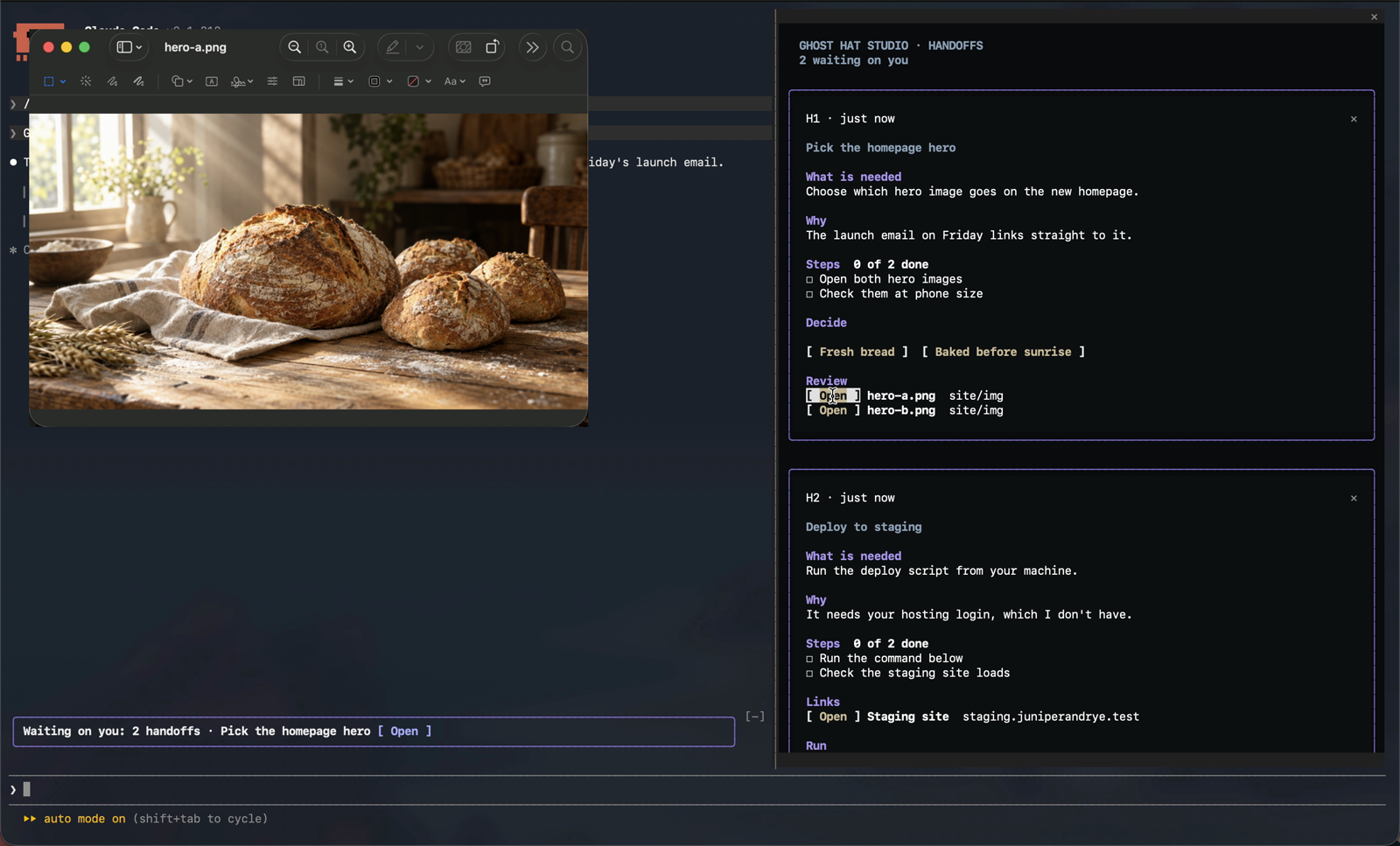
The mod starts programs only to open files and links, copy commands, match your light or dark mode, and tell which system it's on. Each command is fixed text in the code. A path, link or command from a card is passed as one argument or on standard input, never as part of the command text.
open, open -t for text, and open -R to show a file in Finderxdg-openexplorer.exe, plus powershell.exe -NoProfile -NonInteractive running Start-Process for text files (the file type's Edit action, or Notepad) and for showing a file in its folder. The path reaches PowerShell on standard input. In WSL, wslpath -w turns the path into a Windows one first.pbcopy on macOS; wl-copy, xclip or xsel on Linux; powershell.exe -NoProfile -NonInteractive running Set-Clipboard on Windows and WSL. The command goes to the clipboard on standard input and is never run. On macOS, Linux and WSL, a command that would change your shell's folder or environment is copied wrapped in ( … ), so pasting it into Claude's shared shell doesn't change the rest of your session. PowerShell has no such wrapper, so on Windows the command is copied as written.defaults read -g AppleInterfaceStylegsettings get org.gnome.desktop.interface color-schemereg.exe query HKCU\Software\Microsoft\Windows\CurrentVersion\Themes\Personalize /v AppsUseLightThemeuname -sr, once per session, when the environment doesn't already say Windows or WSL. It tells macOS, Linux and WSL apart.OS, WSL_DISTRO_NAME, HOME and USERPROFILE, to know the platform, name your WSL distribution on the card, and expand ~ in a file path.plugin.json, for its version number, so it can tell when it has been updated.The mod reads no passwords, keys, tokens or other credentials.
handoff block: the fields, one card per topic, and how to close a card. On Windows and WSL it adds a note on which shell to write commands for. When a session starts with its own system prompt (--system-prompt, a custom agent, or an app built on the Agent SDK), the same section goes along with your first message instead. Where another plugin skips both of those (Claude Code's own security plugin does on Team and Enterprise plans and machines with managed settings), the section goes with your next message, and with your first message in later sessions, followed by a one-line reminder with each message after it.session.start registers /handoffs, brings back a resumed session's cards, notes the version for the update note, and starts the light or dark check.command.run for /handoffs opens the pane.config.set for the theme lets the change through unaltered, then redraws the pane in the new colours.prompt.compose adds the handoff format section described above. It changes nothing else in the instructions.prompt.context adds the same section to your first message, only in sessions where Claude Code composes no system prompt of its own. It changes nothing else in the message.session.append and turn.complete read handoff blocks from Claude's replies. They change nothing in the conversation.prompt.submit adds your open and changed cards to your message, and the handoff format or its reminder where another plugin skipped the hooks above. It changes nothing else in the message.session.compact adds your open cards after the summary.ui.render draws the pane and the Waiting on you band, and in the transcript shows each handoff block as a one-line pointer to its card. The reply Claude sees and keeps is unchanged.Cards are saved in Claude Code's plugin store on your machine, per session, and deleted after 14 days.
The store also keeps the version of Handoffs you last ran, whether you've put away the auto-update tip and the note on what changed, and whether another plugin skipped the format on this machine.
The mod makes no network calls and sends nothing to Ghost Hat Studio. What it adds to your messages and to Claude's instructions, listed above, goes to Anthropic with the rest of the conversation, as Claude Code always does. Open hands a path or link to your own apps, and Copy puts a command on your clipboard.
Anthropic uses "plugin" and "marketplace" for several different places. Handoffs is a mod, a plugin that changes Claude Code's own screen, so it runs in Claude Code only.
| Where | Does Handoffs run there? | How to install |
|---|---|---|
| Claude Code in your terminal | Yes | The commands under Install |
| The Code tab in Claude Desktop | Yes | The same commands, or + next to the prompt, then Add plugins, with the marketplace ghosthat-studio/marketplace |
| The VS Code extension | Yes | The same commands, or /plugins and its Marketplaces tab |
| JetBrains IDEs | Yes | The commands, in the IDE's terminal |
| Customize > Plugins in Claude Desktop or claude.ai | Not in chat or Cowork | Not recommended. See below. |
| Claude Code on the web (claude.ai/code) | No | Cloud sessions don't load plugins from your computer |
The terminal, the Desktop Code tab and VS Code on one computer share their settings, so installing Handoffs in one installs it in all three.
The Customize > Plugins page adds plugins to your claude.ai account for chat and Cowork. Mods don't run in either. Plugins added there also reach Claude Code as handoffs@synced, but only in sessions signed in with that same claude.ai account. Installing from Claude Code itself is simpler and works everywhere Handoffs can run.
The buttons on a card don't respond to clicks. On Windows, you're probably in the older console window rather than Windows Terminal. See On Windows. Anywhere else, check that your terminal sends mouse clicks to programs; most do by default.
The pane covers the conversation instead of sitting beside it. Claude Code isn't in fullscreen mode. Type /tui fullscreen.
The pane says "Handoffs needs Claude Code 2.1.299 or later". Your Claude Code is older than the mod supports. Run claude update in your terminal, then start a new session.
The pane says "Claude hasn't been given the handoff format yet". Another plugin skipped the way Handoffs teaches Claude to write cards. Claude Code's own security plugin does this on Team and Enterprise plans and on machines with managed settings. Send your next message and Claude gets the format with it; later sessions on the same machine get it with the first message. If cards still don't appear, update to the latest Handoffs and start a new session. If the pane still says so after that, run /plugin, and send the list of plugins you have enabled to the issues page. /handoffs also says how Claude got the format.
Adding the marketplace says "This repository isn't a marketplace". The address you entered isn't one of ours. Use ghosthat-studio/marketplace, which also lists our other tools. This repo's own address, ghosthat-studio/handoffs, works too. Better still, skip that box and type the commands under Install in Claude Code. See Which plugins page to use.
/plugin lists Handoffs twice. For example handoffs@ghosthat-studio and handoffs@synced, or handoffs@ghosthat-handoffs. When two copies share a name, only one copy's hooks run, and it may not be the one you're updating. Keep handoffs@ghosthat-studio and remove the other. For a /plugin install, that's /plugin uninstall handoffs@ghosthat-handoffs. For handoffs@synced, remove it from Customize > Plugins in Claude Desktop or claude.ai. Then run /reload-plugins.
Handoffs does nothing in Claude Desktop's chat, Cowork, or claude.ai. That's expected: mods run in Claude Code only. Open the Code tab in Claude Desktop, or run claude in a terminal.
Claude's replies don't turn into cards, or /handoffs isn't there. Run /plugin and check that handoffs is installed and enabled, then /reload-plugins or start a new session. If you started Claude Code with a folder of its own plugins (--plugin-dir), check the path: a typo there quietly starts Claude Code without the mod.
A copied command fails with "The token '&&' is not a valid statement separator". That's a bash command pasted into Windows PowerShell. Paste it into the shell the card's Run heading names.
Open or Copy says it couldn't reach the app or the clipboard. On Linux, Open needs xdg-open, and Copy needs wl-copy (Wayland) or xclip or xsel (X11). In WSL, run Claude Code in a terminal on the PC, not over SSH. The command is always on the card, so you can still select and copy it by hand.
The pane's colours don't suit your terminal. Set /theme to Auto, or to Light or Dark to match your terminal. See Light and dark mode.
claude plugin test .MIT. See LICENSE.
Made by Ghost Hat Studio. Questions and bug reports go to the issues page.
hooks/register.tsx 934 lines1import { atom, read, update } from 'claude-code'
2import type { EngineInterface as Engine, Register, RenderSurface } from 'claude-code'
3
4import type { Handoff, Link, Step } from '../types'
5import { MONOGRAM } from './monogram.ts'
6
7const PANE = 'handoffs'
8const TITLE = 'Handoffs'
9const SELF = 'handoffs'
10
11const items = atom({ plugin: 'handoffs', key: 'items' } as const, [])
12const seq = atom({ plugin: 'handoffs', key: 'seq' } as const, 1)
13const showDone = atom({ plugin: 'handoffs', key: 'showDone' } as const, false)
14const seen = atom({ plugin: 'handoffs', key: 'seen' } as const, [])
15
16// Cards are saved per session in the store, so a resumed session gets its cards back; a new session starts empty.
17const SAVED = 'sessions'
18const KEEP_MS = 14 * 24 * 60 * 60_000
19type Saved = Record<string, { items: Handoff[]; seq: number; at: number }>
20
21// Text and backgrounds follow the person's theme: the pane paints no background of its own, and body text is in
22// the theme's own colours, so it reads on every surface and theme. The Ghost Hat accents come in a dark and a light
23// set, each 7:1 or more on its ground where they colour text; the outlines keep the brand Violet.
24type Mode = 'dark' | 'light'
25const ACCENTS = {
26 // The heading violet, a lighter tint of the brand Violet (#8F82D8, which is under 7:1 for text).
27 // In dark, the pane keeps the brand's near-black and its cards gunmetal; in light it takes the theme's own ground.
28 dark: { heading: '#B3A8F0', outline: '#8F82D8', steel: '#98ABC1', brass: '#D4C5A4', ground: '#0A0B0E', card: '#0D0F12' },
29 light: { heading: '#463A9A', outline: '#463A9A', steel: '#3A4A5E', brass: '#664510', ground: undefined, card: undefined },
30}
31// Outside fullscreen the terminal gives the pane no column of its own. The mod can't change that setting itself, so
32// it says how.
33const FULLSCREEN_HINT = 'The pane sits beside the conversation in fullscreen mode. Type /tui fullscreen to turn it on.'
34
35const INK = 'text'
36const DIM_INK = 'inactive'
37
38// The theme setting names light or dark, or auto, which follows the system. Under auto, the system's own setting is
39// read once and then watched (see session.start), so the pane switches when the system does, not at its next redraw.
40let appearance: Mode | undefined
41async function themeOf($: Engine) {
42 return (await $.config.list().catch(() => [])).find(row => row.key === 'theme')?.value
43}
44async function systemMode($: Engine): Promise<Mode> {
45 const os = await where($)
46 const argv = os === 'mac' ? ['defaults', 'read', '-g', 'AppleInterfaceStyle']
47 : os === 'linux' ? ['gsettings', 'get', 'org.gnome.desktop.interface', 'color-scheme']
48 : ['reg.exe', 'query', 'HKCU\\Software\\Microsoft\\Windows\\CurrentVersion\\Themes\\Personalize', '/v', 'AppsUseLightTheme']
49 const out = (await $.process.run(argv).catch(() => undefined))?.stdout ?? ''
50 // macOS names Dark only when dark is on. GNOME says prefer-light or prefer-dark, and Windows holds 1 or 0 for light
51 // apps; anywhere the setting can't be read, the pane stays dark.
52 return os === 'mac' ? (/Dark/.test(out) ? 'dark' : 'light')
53 : os === 'linux' ? (/light/.test(out) ? 'light' : 'dark')
54 : /0x1\b/.test(out) ? 'light' : 'dark'
55}
56async function modeOf($: Engine): Promise<Mode> {
57 const theme = await themeOf($)
58 if (typeof theme === 'string' && theme.startsWith('light')) return 'light'
59 if (theme !== 'auto') return 'dark'
60 return (appearance ??= await systemMode($))
61}
62
63// The format Claude is asked to write; the system prompt section below teaches it.
64const FENCE = /```handoff[^\n]*\n([\s\S]*?)```/g
65
66const FORMAT = `# Handoffs
67
68When your reply ends waiting on the person to do or decide something, end it with a handoff block. The Handoffs pane turns it into a card with checkboxes, decision buttons and Open buttons for files, and a band above the prompt shows it is waiting. Write it as a fenced code block whose language is \`handoff\`, one field per line:
69
70\`\`\`handoff
71title: A short name for the request
72need: What you need from them, in one sentence.
73why: Why you need it, in one sentence.
74step: One thing to do (one line per step, in order)
75decide: First option | Second option | Third option
76review: path/to/a/file/to/look/at
77link: Pull request 22 | https://github.com/owner/repo/pull/22
78run: cd /absolute/path/to/project && npm run deploy
79\`\`\`
80
81Only \`need\` is required. Use \`decide\` when there is a choice: each option becomes a button. Use one \`review\` line per local file they should open, absolute or relative to the working directory. Use one \`link\` line per web page (a label, a bar, then the URL), each of which becomes an Open button; a URL written anywhere else on the card gets an Open button too. Use one \`run\` line per shell command they need to run themselves; each gets a Copy button. Write each command so it runs from any folder: use absolute paths, and \`cd\` with an absolute path when it must run somewhere in particular. Do not put links or commands inside \`step\` text when a \`link\` or \`run\` line will do. Write one block per request. Keep the reply's own prose as usual; the block is shown in the transcript as a one-line pointer to its card, so do not leave anything in it that the prose needs.
82
83Cards are numbered h1, h2, ... When the person sends a card back you get a message headed \`Handoff h2 (title)\` with the steps they ticked and the option they picked. To change a card that is still open, write the whole card again with its \`id: h2\`: the new block replaces the card, so leave out a line to remove it. Steps whose text you keep stay ticked; write \`step: [x] text\` to tick one yourself. To close a card that no longer stands, write a block holding only \`close: h2\`.
84
85Keep one card per topic. Your context lists the cards still open; check that list before you write a block. When a request belongs to a topic that already has an open card, rewrite that card with its id rather than starting a new one, folding in what changed and dropping steps that no longer apply. When a new card takes over from older ones, or the plan has moved on, close the cards it replaces in the same reply. Requests on separate topics get separate cards, and two cards never share a step.
86
87A reply that ends by asking whether to go ahead, or which way to go, is waiting on the person: end it with a card. Do not use a handoff block for anything you can do yourself, or for an aside that needs no answer.`
88
89// The format's gist, with each later message when the format itself went with a message: it keeps its weight
90// there, and it outlasts a compaction that drops the message the format came with.
91const REMINDER = 'Handoffs: when your reply ends waiting on the person to do or decide something, including asking whether to go ahead, end it with a `handoff` block (title, need, why, step, decide, review, link and run lines; `id: h2` to rewrite an open card, `close: h2` to close one).'
92
93type Parsed = {
94 id?: string
95 title?: string
96 need: string
97 why: string
98 steps: Step[]
99 options: string[]
100 reviews: string[]
101 links: Link[]
102 runs: string[]
103 close: string[]
104}
105
106const URL_IN_TEXT = /https?:\/\/[^\s<>()`'"]+[^\s<>()`'".,;:!?]/g
107const isUrl = (value: string) => /^https?:\/\/\S+$/.test(value)
108
109// `[x] text` or `[ ] text` at the start of a step.
110const stepFrom = (value: string): Step => {
111 const box = value.match(/^\[([ xX]?)\]\s*(.+)$/)
112
113 return box?.[2] !== undefined ? { text: box[2].trim(), isDone: (box[1] ?? '').trim() !== '' } : { text: value, isDone: false }
114}
115
116const linkFrom = (value: string): Link | undefined => {
117 const bar = value.lastIndexOf('|')
118 const url = (bar < 0 ? value : value.slice(bar + 1)).trim().replace(/^<|>$/g, '')
119 if (!isUrl(url)) return undefined
120 const label = bar < 0 ? '' : value.slice(0, bar).trim()
121
122 return { label: label === '' ? url.replace(/^https?:\/\/(www\.)?/, '') : label, url }
123}
124
125const addLink = (list: Link[], link: Link | undefined) => {
126 if (link !== undefined && !list.some(l => l.url === link.url)) list.push(link)
127}
128
129function parseBlock(body: string): Parsed {
130 const out: Parsed = { need: '', why: '', steps: [], options: [], reviews: [], links: [], runs: [], close: [] }
131 for (const raw of body.split('\n')) {
132 const line = raw.trim()
133 if (line === '') continue
134 const box = line.match(/^[-*]\s*(\[[ xX]?\].+)$/)
135 if (box?.[1] !== undefined) {
136 out.steps.push(stepFrom(box[1].trim()))
137 continue
138 }
139 const m = line.match(/^([a-zA-Z]+)\s*:\s*(.*)$/)
140 if (m === null) continue
141 const key = (m[1] ?? '').toLowerCase()
142 const value = (m[2] ?? '').trim()
143 if (key === 'id') out.id = value
144 else if (key === 'title') out.title = value
145 else if (key === 'need' || key === 'needed') out.need = out.need === '' ? value : `${out.need} ${value}`
146 else if (key === 'why') out.why = out.why === '' ? value : `${out.why} ${value}`
147 else if (key === 'step') out.steps.push(stepFrom(value))
148 else if (key === 'decide' || key === 'decision' || key === 'options') {
149 out.options.push(...value.split('|').map(o => o.trim()).filter(o => o !== ''))
150 } else if (key === 'review') {
151 const path = value.replace(/^`|`$/g, '')
152 if (isUrl(path)) addLink(out.links, linkFrom(path))
153 else out.reviews.push(path)
154 } else if (key === 'link' || key === 'url') addLink(out.links, linkFrom(value))
155 else if (key === 'run' || key === 'command' || key === 'cmd') {
156 const command = value.replace(/^`|`$/g, '').replace(/^\$\s+/, '').replace(/^!\s*/, '')
157 if (command !== '') out.runs.push(command)
158 } else if (key === 'close' || key === 'done') out.close.push(...value.split(/[\s,]+/).filter(Boolean))
159 }
160 // A URL written inside the card's text gets an Open button too.
161 for (const text of [out.need, out.why, ...out.steps.map(st => st.text)]) {
162 for (const url of text.match(URL_IN_TEXT) ?? []) addLink(out.links, { label: url.replace(/^https?:\/\/(www\.)?/, ''), url })
163 }
164
165 return out
166}
167
168export function parseAnswer(text: string): Parsed[] {
169 return [...text.matchAll(FENCE)].map(m => parseBlock(m[1] ?? ''))
170}
171
172const titleFrom = (p: Parsed) => {
173 if (p.title !== undefined && p.title !== '') return p.title
174 const first = p.need.split(/(?<=[.?!])\s/)[0] ?? p.need
175
176 return first.length > 60 ? `${first.slice(0, 57)}...` : first
177}
178
179const sameText = (a: string, b: string) => a.toLowerCase().replace(/\s+/g, ' ').trim() === b.toLowerCase().replace(/\s+/g, ' ').trim()
180
181// Folds a reply's blocks into the cards: new requests, changes to open cards, closes.
182export function apply(list: Handoff[], blocks: Parsed[], next: number, now: number, root: string) {
183 let cards = [...list]
184 let counter = next
185 const added: Handoff[] = []
186 for (const b of blocks) {
187 if (b.close.length > 0 && b.need === '') {
188 cards = cards.map(c => (b.close.includes(c.id) ? { ...c, status: 'done', isDirty: false } : c))
189 continue
190 }
191 if (b.need === '' && b.steps.length === 0 && b.options.length === 0 && b.links.length === 0 && b.runs.length === 0) continue
192 // A block without an id whose title matches an open card is that card again, not a second card on the topic.
193 const same = b.id !== undefined
194 ? cards.find(c => c.id === b.id)
195 : b.title === undefined ? undefined : cards.find(c => c.status === 'open' && sameText(c.title, b.title ?? ''))
196 if (same !== undefined) {
197 // The block is the whole card again: what it leaves out is gone, but a step whose text it keeps stays ticked.
198 const steps: Step[] = b.steps.map(st => ({
199 text: st.text,
200 isDone: st.isDone || same.steps.some(old => old.isDone && sameText(old.text, st.text)),
201 }))
202 const changed: Handoff = {
203 ...same,
204 title: b.title !== undefined || b.need !== '' ? titleFrom(b) : same.title,
205 need: b.need || same.need,
206 why: b.why,
207 steps,
208 options: b.options,
209 pick: same.pick !== null && b.options.includes(same.pick) ? same.pick : null,
210 reviews: b.reviews,
211 links: b.links,
212 runs: b.runs,
213 status: 'open',
214 }
215 cards = cards.map(c => (c.id === same.id ? changed : c))
216 continue
217 }
218 const id = b.id !== undefined && b.id !== '' && !cards.some(c => c.id === b.id) ? b.id : `h${counter++}`
219 const card: Handoff = {
220 id, title: titleFrom(b), need: b.need, why: b.why,
221 steps: b.steps,
222 options: b.options, pick: null, reviews: b.reviews, links: b.links, runs: b.runs, root,
223 status: 'open', createdAt: now, isDirty: false,
224 }
225 cards.push(card)
226 added.push(card)
227 }
228
229 return { cards, next: counter, added }
230}
231
232// What Claude is told about a card: its ticks and its pick.
233export function report(card: Handoff, how: 'progress' | 'done' | 'open'): string {
234 const head =
235 how === 'done' ? `Handoff ${card.id} (${card.title}): marked done.`
236 : how === 'open' ? `Handoff ${card.id} (${card.title}) is still open.`
237 : `Handoff ${card.id} (${card.title}): progress so far.`
238 const lines = [head]
239 if (how === 'open' && card.need !== '') lines.push(`Needed: ${card.need}`)
240 for (const s of card.steps) lines.push(`- [${s.isDone ? 'x' : ' '}] ${s.text}`)
241 if (card.options.length > 0) {
242 lines.push(card.pick === null ? `Decision: not made yet (${card.options.join(' / ')}).` : `Decision: ${card.pick}`)
243 }
244 if (how === 'open' && card.reviews.length > 0) lines.push(`To review: ${card.reviews.join(', ')}`)
245 if (how === 'open') for (const l of card.links) lines.push(`Link: ${l.label} | ${l.url}`)
246 if (how === 'open') for (const command of card.runs) lines.push(`Run: ${command}`)
247
248 return lines.join('\n')
249}
250
251// The open cards as each of the person's messages carries them: enough to tell whether a request already has a card.
252export function openList(open: Handoff[]): string {
253 const cards = open.map(card => {
254 const lines = [`${card.id}: ${card.title}`, ` Needed: ${card.need}`]
255 for (const s of card.steps) lines.push(` - [${s.isDone ? 'x' : ' '}] ${s.text}`)
256 if (card.options.length > 0) lines.push(card.pick === null ? ` Decision: not made yet (${card.options.join(' / ')})` : ` Decision: ${card.pick}`)
257
258 return lines.join('\n')
259 })
260
261 return `Handoff cards open in the Handoffs pane. Before writing a new handoff block, check these: a request on one of these topics rewrites that card with its id, and a card a new one replaces is closed.\n\n${cards.join('\n\n')}`
262}
263
264type Platform = 'mac' | 'linux' | 'wsl' | 'windows'
265let platform: Platform | undefined
266
267// WSL reports Linux, but its desktop is Windows, so Open and Copy go through the Windows side.
268async function where($: Engine): Promise<Platform> {
269 if (platform !== undefined) return platform
270 if ((await $.env.get('OS').catch(() => undefined)) === 'Windows_NT') return (platform = 'windows')
271 if ((await $.env.get('WSL_DISTRO_NAME').catch(() => undefined)) !== undefined) return (platform = 'wsl')
272 // Not every WSL shell sets WSL_DISTRO_NAME (an SSH login doesn't), but its kernel is always named for Microsoft.
273 const ran = await $.process.run(['uname', '-sr']).catch(() => undefined)
274 const name = ran?.stdout.trim() ?? ''
275 return (platform = name.startsWith('Darwin') ? 'mac' : /microsoft/i.test(name) ? 'wsl' : 'linux')
276}
277
278// Builds before 2.1.299 refuse a tree whose Text names a face; there the heavy faces fall back to bold.
279let isRich = false
280
281// How the format reached Claude: in the system prompt the engine composed, or, when it composed none, with the first
282// message's context. A plugin seated over this one (Claude Code's own sec-default on managed, Team and Enterprise
283// machines) can pass both prompt hooks over; then it goes with a message the person sends (`submit`): from the next
284// one in the session that finds out, and from the first in every session after, since the store remembers.
285let delivery: 'system' | 'message' | 'submit' | undefined
286let isTurnDone = false
287
288// Builds before this one lack the hooks the mod is built on.
289const MIN_VERSION = [2, 1, 299]
290let olderThanSupported: string | undefined
291
292const README = 'https://github.com/ghosthat-studio/handoffs#troubleshooting'
293const notices = () => [
294 ...(olderThanSupported === undefined ? [] : [`Handoffs needs Claude Code ${MIN_VERSION.join('.')} or later, and this is ${olderThanSupported}. Run claude update in your terminal.`]),
295 ...(delivery === undefined && isTurnDone ? [`Claude hasn't been given the handoff format yet: another plugin skipped the way Handoffs gives it. Claude gets it with your next message instead. See ${README}`] : []),
296]
297const deliveryNote = () =>
298 delivery === 'system' ? 'Claude has the handoff format in its instructions.'
299 : delivery === 'message' ? 'Claude got the handoff format with your first message.'
300 : delivery === 'submit' ? 'Claude got the handoff format with one of your messages, and a reminder goes with each one after, because another plugin skips the way Handoffs usually gives it.'
301 : isTurnDone ? '' : 'Claude gets the handoff format with your first message.'
302
303// Told once, then put away with Got it: what changed when the mod updates, and how to get updates without asking.
304const NOTES = 'notes'
305// isSkipped: a session here ended a turn with the format never given, so the next ones send it with the first message.
306type Notes = { version?: string; unread?: string; isTipDone?: boolean; isSkipped?: boolean }
307const CHANGELOG = 'https://github.com/ghosthat-studio/handoffs/blob/main/CHANGELOG.md'
308const TIP = 'Get new versions automatically: run /plugin, open Marketplaces, pick ghosthat-studio and choose Enable auto-update.'
309const WHATS_NEW: Record<string, string> = {
310 '1.0.4': 'Handoffs now works on Team and Enterprise machines, where Claude Code’s own security plugin skipped the way Handoffs teaches Claude the format. Claude is also told plainly that a reply asking whether to go ahead needs a card.',
311 '1.0.3': 'Claude now writes cards in sessions that start with their own system prompt, and the pane tells you when Claude can’t make cards or Claude Code needs updating.',
312}
313let notes: Notes = {}
314
315const ownVersion = async ($: Engine) => {
316 const text = await $.fs.read(`${$.plugin.root}/.claude-plugin/plugin.json`).catch(() => undefined)
317 try {
318 const version = (JSON.parse(text ?? '{}') as { version?: unknown }).version
319 return typeof version === 'string' ? version : undefined
320 } catch {
321 return undefined
322 }
323}
324
325// A version this store has not seen is an update when an earlier one ran here: one the notes name, or, before
326// there were notes, one that saved cards.
327async function noteVersion($: Engine) {
328 notes = ((await $.store.get(NOTES)) ?? {}) as Notes
329 const version = await ownVersion($)
330 if (version === undefined || version === notes.version) return
331 const hasRun = notes.version !== undefined || Object.keys(((await $.store.get(SAVED)) ?? {}) as Saved).length > 0
332 notes = { ...notes, version, unread: hasRun ? version : notes.unread }
333 await $.store.set(NOTES, notes)
334 if (hasRun) $.ui.toast(`Handoffs updated to ${version}. Type /handoffs to see what changed.`)
335}
336
337async function putAway($: Engine, change: Notes) {
338 notes = { ...notes, ...change }
339 await $.store.set(NOTES, notes)
340 $.ui.invalidate('ui.render')
341}
342
343const formatText = async ($: Engine) => FORMAT + shellNote(await where($), await distroOf($))
344type Face = { mono?: boolean; size?: 'caption' | 'footnote' | 'body' | 'heading' | 'title'; weight?: 'regular' | 'medium' | 'semibold' | 'bold' }
345const face = (f: Face): Face | { bold?: boolean } =>
346 isRich ? f : f.weight === 'semibold' || f.weight === 'bold' || f.size === 'title' || f.size === 'heading' ? { bold: true } : {}
347
348const atLeast = (version: string, min: number[]) => {
349 const parts = version.split(/[.-]/).slice(0, 3).map(Number)
350 for (let i = 0; i < min.length; i++) {
351 const a = parts[i] ?? 0
352 const b = min[i] ?? 0
353 if (a !== b) return a > b
354 }
355
356 return true
357}
358
359const isAbsolute = (path: string) => /^([A-Za-z]:[\\/]|[\\/])/.test(path)
360
361async function openFile($: Engine, card: Handoff, path: string) {
362 const os = await where($)
363 const home = (await $.env.get('HOME')) ?? (await $.env.get('USERPROFILE')) ?? ''
364 const full = isAbsolute(path) ? path : path.startsWith('~/') ? `${home}/${path.slice(2)}` : `${card.root}/${path}`
365 if (!(await $.fs.exists(full))) {
366 $.ui.toast(`${path} is not there.`)
367 return
368 }
369 const info = await $.fs.stat(full).catch(() => undefined)
370 const how = info === undefined ? 'show' : openHow(full, info.kind, info.isLink)
371 const target = os === 'wsl' ? (await $.process.run(['wslpath', '-w', full]).catch(() => undefined))?.stdout.trim() : full
372 if (target === undefined || target === '') {
373 $.ui.toast(`Could not open ${path} here.`)
374 return
375 }
376 const { argv, stdin } = openRun(os, how, target)
377 const ran = await $.process.run(argv, stdin === undefined ? undefined : { stdin }).catch(() => undefined)
378 // explorer.exe exits 1 even when it opened the file.
379 const isOpened = ran !== undefined && (ran.exitCode === 0 || (ran.exitCode === 1 && (os === 'wsl' || os === 'windows')))
380 if (!isOpened) $.ui.toast(`Could not open ${path} here.`)
381 else if (how === 'show') $.ui.toast(`Showed ${path} in its folder rather than opening it.`)
382}
383
384// Windows has no default text editor, and opening a script the usual way runs it. So text opens with the file
385// type's Edit action, the editor an installer registered for it, and in Notepad when the type has none. That and
386// Explorer's /select go through PowerShell's Start-Process, which returns at once: Notepad run directly would hold
387// the click until it was closed. The path arrives on stdin, never in the command text, so nothing in a name is
388// read as code; a Windows path holds no ".
389const READ_PATH = `[Console]::InputEncoding = [Text.Encoding]::UTF8; $p = [Console]::In.ReadToEnd().Trim(); `
390const EDIT = `${READ_PATH}try { Start-Process -FilePath $p -Verb Edit -ErrorAction Stop } catch { Start-Process notepad.exe -ArgumentList ('"' + $p + '"') }`
391const SELECT = `${READ_PATH}Start-Process explorer.exe -ArgumentList ('/select,"' + $p + '"')`
392
393export function openRun(os: Platform, how: 'open' | 'text' | 'show', full: string): { argv: string[]; stdin?: string } {
394 if ((os !== 'windows' && os !== 'wsl') || how === 'open' || (os === 'wsl' && how === 'show')) return { argv: openArgv(os, how, full) }
395 return { argv: ['powershell.exe', '-NoProfile', '-NonInteractive', '-Command', how === 'text' ? EDIT : SELECT], stdin: full.replace(/\//g, '\\') }
396}
397
398export function openArgv(os: Platform, how: 'open' | 'text' | 'show', full: string): string[] {
399 if (os === 'mac') return { open: ['open', full], text: ['open', '-t', full], show: ['open', '-R', full] }[how]
400 if (os === 'linux') {
401 const parent = full.replace(/\/[^/]*\/?$/, '') || '/'
402 return { open: ['xdg-open', full], text: ['xdg-open', full], show: ['xdg-open', parent] }[how]
403 }
404 // Windows: explorer.exe takes the path as one argument, with no cmd.exe in between to read & or ^ in a name.
405 const win = full.replace(/\//g, '\\')
406 return { open: ['explorer.exe', win], text: ['notepad.exe', win], show: ['explorer.exe', `/select,${win}`] }[how]
407}
408
409// The path on a card comes from Claude's reply, so Open must never run a program. Documents and media open in
410// their usual app; code and other text opens in a text editor (a .py or .sh opened normally can run); app
411// bundles, installers, links and anything unknown are shown in their folder instead.
412const DOCUMENT = /\.(md|markdown|pdf|png|jpe?g|gif|webp|svg|heic|tiff?|bmp|mp4|mov|m4v|webm|mp3|wav|m4a|aac|flac|ogg|html?|csv|tsv)$/i
413const TEXT = /\.(txt|log|json|jsonc|toml|ya?ml|ini|cfg|conf|env\.example|xml|tsx?|jsx?|mjs|cjs|py|rb|go|rs|java|kt|swift|c|h|cc|cpp|hpp|cs|php|lua|sql|sh|bash|zsh|fish|ps1|psm1|bat|cmd|vbs|reg|css|scss|vue|svelte|diff|patch)$/i
414const BUNDLE = /\.(app|bundle|framework|plugin|kext|prefpane|workflow|action|saver|appex|pkg|mpkg|qlgenerator|mdimporter)\/?$/i
415
416export function openHow(path: string, kind: 'file' | 'dir' | 'other', isLink: boolean): 'open' | 'text' | 'show' {
417 if (isLink || kind === 'other') return 'show'
418 if (kind === 'dir') return BUNDLE.test(path) ? 'show' : 'open'
419 if (DOCUMENT.test(path)) return 'open'
420 // Code and other text, and dotfiles such as .gitignore.
421 if (TEXT.test(path) || /[\\/]\.[^\\/.]+$/.test(path)) return 'text'
422
423 return 'show'
424}
425
426async function openUrl($: Engine, url: string) {
427 if (!isUrl(url)) return
428 const os = await where($)
429 // On Windows the URL goes to explorer.exe as one argument; isUrl has already held it to http(s).
430 const argv = os === 'mac' ? ['open', url] : os === 'linux' ? ['xdg-open', url] : ['explorer.exe', url]
431 const ran = await $.process.run(argv).catch(() => undefined)
432 const isOpened = ran !== undefined && (ran.exitCode === 0 || (ran.exitCode === 1 && os !== 'mac' && os !== 'linux'))
433 if (!isOpened) $.ui.toast(`Could not open ${url} here.`)
434}
435
436// True when the whole command already sits in one subshell: its first ( closes at its last ).
437const isWrapped = (command: string) => {
438 const text = command.trim()
439 if (!text.startsWith('(') || !text.endsWith(')')) return false
440 let depth = 0
441 for (let i = 0; i < text.length; i++) {
442 if (text[i] === '(') depth++
443 else if (text[i] === ')') depth--
444 if (depth === 0 && i < text.length - 1) return false
445 }
446
447 return depth === 0
448}
449
450// A pasted command runs in Claude's shared shell (! in the prompt), where a cd, export or source would stick
451// for the rest of the session. Such a command is copied inside a subshell; one already wrapped is left alone.
452const STICKY = /(^|[;&|(]\s*|\s)(cd|pushd|popd|export|unset|source|alias)(\s|$)|(^|[;&|]\s*)\.\s/
453// On Windows a command is written for PowerShell, which has no ( … ) subshell, so it is copied as written.
454export const forShell = (command: string, os?: Platform) =>
455 os === 'windows' || isWrapped(command) || !STICKY.test(command) ? command : `( ${command.trim()} )`
456
457// Where the person pastes a run line. On Windows that is PowerShell, the terminal's default; under WSL it is the
458// distro's own shell, since a WSL command means nothing to PowerShell.
459export function pasteInto(os: Platform, distro?: string) {
460 if (os === 'windows') return { where: 'PowerShell', language: 'powershell' }
461 if (os === 'wsl') return { where: `your ${distro ?? 'WSL'} terminal`, language: 'bash' }
462 return { where: 'a terminal', language: 'bash' }
463}
464
465// Added to the format on Windows and WSL, where a run line pasted into the wrong shell fails.
466export function shellNote(os: Platform, distro?: string) {
467 if (os === 'windows') return `\n\nThe person is on Windows and pastes run lines into PowerShell, so write each \`run\` line in PowerShell syntax, not bash, even though your own shell is Git Bash: Windows paths, \`;\` between commands rather than \`&&\` (Windows PowerShell 5.1 has no \`&&\`), \`Set-Location\` or \`cd\` with an absolute path, and \`$env:NAME = 'value'\` for a variable.`
468 if (os === 'wsl') return `\n\nThe person is on Windows, running you inside WSL (${distro ?? 'Linux'}). Write each \`run\` line for the WSL shell, in bash with Linux paths; the card tells them to paste it into their ${distro ?? 'WSL'} terminal, not PowerShell. When they need to run something on the Windows side, say so in a step instead.`
469 return ''
470}
471
472// The surface's own clipboard first; the desktop app's is out of a mod's reach, so then the machine's.
473const distroOf = async ($: Engine) => (await $.env.get('WSL_DISTRO_NAME').catch(() => undefined)) || undefined
474
475async function copy($: Engine, text: string, surface: RenderSurface) {
476 const os = await where($)
477 const copied = `Copied. Paste it into ${pasteInto(os, await distroOf($)).where}.`
478 const viaSurface = await $.ui.copy({ text, surface }).catch(() => ({ isCopied: false }))
479 if (viaSurface.isCopied) {
480 $.ui.toast(copied)
481 return
482 }
483 // PowerShell reads the text as UTF-8. clip.exe is no fallback: it mangles anything outside the code page.
484 const windows = [['powershell.exe', '-NoProfile', '-NonInteractive', '-Command', '[Console]::InputEncoding = [Text.Encoding]::UTF8; Set-Clipboard -Value ([Console]::In.ReadToEnd())']]
485 const tries = os === 'mac' ? [['pbcopy']] : os === 'linux' ? [['wl-copy'], ['xclip', '-selection', 'clipboard'], ['xsel', '--clipboard', '--input']] : windows
486 for (const argv of tries) {
487 const ran = await $.process.run(argv, { stdin: text }).catch(() => undefined)
488 if (ran !== undefined && ran.exitCode === 0) {
489 $.ui.toast(copied)
490 return
491 }
492 }
493 $.ui.toast('Could not reach the clipboard here; the command is on the card to copy by hand.')
494}
495
496async function save($: Engine) {
497 const id = await $.session.id()
498 const now = await $.clock.now()
499 const all = ((await $.store.get(SAVED)) ?? {}) as Saved
500 const kept: Saved = Object.fromEntries(Object.entries(all).filter(([, v]) => now - v.at < KEEP_MS))
501 kept[id] = { items: await read($, items), seq: await read($, seq), at: now }
502 await $.store.set(SAVED, kept)
503}
504
505// Turns the blocks of one reply message into cards, skipping blocks already read.
506async function take($: Engine, text: string) {
507 if (!text.includes('```handoff')) return
508 const done = new Set(await read($, seen))
509 const bodies = [...text.matchAll(FENCE)].map(m => (m[1] ?? '').trim()).filter(b => b !== '' && !done.has(b))
510 if (bodies.length === 0) return
511 await update($, seen, list => [...list, ...bodies].slice(-200))
512 const root = await $.session.root()
513 const now = await $.clock.now()
514 const result = apply(await read($, items), bodies.map(parseBlock), await read($, seq), now, root)
515 await update($, items, () => result.cards)
516 await update($, seq, () => result.next)
517 await save($)
518 if (result.added.length > 0) {
519 await $.ui.open({ id: PANE, title: TITLE })
520 $.ui.toast(result.added.length === 1 ? `Handoff: ${result.added[0]?.title}` : `${result.added.length} new handoffs`)
521 }
522}
523
524// A review path's folder, with the home folder written as ~.
525const shortDir = (path: string) => path.slice(0, path.lastIndexOf('/')).replace(/^\/(Users|home)\/[^/]+/, '~') || '/'
526
527async function setCard($: Engine, id: string, fn: (card: Handoff) => Handoff) {
528 await update($, items, list => list.map(card => (card.id === id ? fn(card) : card)))
529 await save($)
530}
531
532async function send($: Engine, id: string, markDone: boolean) {
533 const card = (await read($, items)).find(card => card.id === id)
534 if (card === undefined) return
535 await setCard($, id, card => ({ ...card, isDirty: false, status: markDone ? 'done' : card.status }))
536 await $.prompt.submit({ text: report(card, markDone ? 'done' : 'progress'), asUser: true })
537 $.ui.toast(markDone ? `${card.id} marked done and sent to Claude` : `${card.id} sent to Claude`)
538}
539
540const age = (then: number, now: number) => {
541 const mins = Math.round((now - then) / 60_000)
542 if (mins < 1) return 'just now'
543 if (mins < 60) return `${mins}m ago`
544 if (mins < 60 * 24) return `${Math.round(mins / 60)}h ago`
545
546 return `${Math.round(mins / (60 * 24))}d ago`
547}
548
549// Replaces each handoff block in a reply with a one-line pointer to its card.
550const pointer = (text: string) =>
551 text.replace(FENCE, (_, body: string) => {
552 const b = parseBlock(body)
553 if (b.close.length > 0 && b.need === '') return `*Handoff ${b.close.join(', ')} closed.*`
554
555 return `> **Handoff · ${titleFrom(b)}** · waiting in the Handoffs pane (\`/handoffs\`)`
556 })
557
558export const register: Register = on => {
559 on('session.start', async ($, e, next) => {
560 await $.command.register({ name: 'handoffs', description: 'Open the Handoffs pane: what Claude is waiting on you for' })
561 const { base, version } = await $.session.version()
562 isRich = atLeast(base ?? version, MIN_VERSION)
563 olderThanSupported = isRich ? undefined : base ?? version
564 if (olderThanSupported !== undefined) $.ui.toast(notices()[0] ?? '')
565 await noteVersion($).catch(() => undefined)
566 // A new conversation never saw the message the format went with.
567 if (delivery === 'submit' && (e.source === 'startup' || e.source === 'clear')) {
568 delivery = undefined
569 isTurnDone = false
570 }
571 // A resumed session gets its cards back.
572 if ((await read($, items)).length === 0) {
573 const mine = (((await $.store.get(SAVED)) ?? {}) as Saved)[await $.session.id()]
574 if (mine !== undefined && mine.items.length > 0) {
575 await update($, items, () => mine.items.map(card => ({ ...card, links: card.links ?? [], runs: card.runs ?? [] })))
576 await update($, seq, () => mine.seq)
577 }
578 }
579 // A reload (an edit to this mod) redraws the pane and band at once, not only at the next change.
580 $.ui.invalidate('ui.render')
581 // Under the auto theme, a change of the system's light or dark setting redraws the pane within a few seconds.
582 $.clock.every(4_000, async () => {
583 if ((await themeOf($)) !== 'auto') return
584 const now = await systemMode($)
585 if (now === appearance) return
586 appearance = now
587 $.ui.invalidate('ui.render')
588 })
589
590 return next(e)
591 })
592
593 on('command.run', { command: 'handoffs' }, async ($, e) => {
594 await $.ui.open({ id: PANE, title: TITLE })
595 const open = (await read($, items)).filter(card => card.status === 'open').length
596 const opened = open === 0 ? 'Handoffs pane opened. Nothing is waiting on you.' : `Handoffs pane opened: ${open} waiting on you.`
597
598 const news = notes.unread === undefined ? [] : [`Handoffs updated to ${notes.unread}.`, WHATS_NEW[notes.unread] ?? '', `What changed: ${CHANGELOG}`]
599 const said = [opened, ...(e.presentation?.isFullscreen === false ? [FULLSCREEN_HINT] : []), ...notices(), deliveryNote(), ...news]
600
601 return { text: said.filter(line => line !== '').join(' ') }
602 })
603
604 // A theme change repaints Claude Code's own ground at once; the pane and band draw again with it, so their accents
605 // switch too, and auto looks at the system afresh.
606 on('config.set', { key: 'theme' }, async ($, e, next) => {
607 const written = await next(e)
608 appearance = undefined
609 $.ui.invalidate('ui.render')
610 return written
611 }).catch(($, e, next) => next(e)) // the theme is always written, whatever happens here
612
613 // Teaches the block format.
614 on('prompt.compose', async ($, e, next) => {
615 const composed = await next(e)
616 const sections = [...composed.sections, { id: 'handoffs:format', text: await formatText($), scope: 'session' as const }]
617 // Marked only once the section is written, so a failure here leaves the first-message fallback to send it.
618 if (delivery !== 'system') {
619 // A slash command before the first message has the context built first; ask for it again, now without the copy.
620 if (delivery === 'message') $.ui.invalidate('prompt.context')
621 delivery = 'system'
622 $.ui.invalidate('ui.render')
623 }
624 // Nothing skips it any more: later sessions stop sending the format with their first message.
625 if (notes.isSkipped === true) await putAway($, { isSkipped: undefined })
626
627 return { ...composed, sections }
628 }).catch(($, e, next) => next(e))
629
630 // A host that brings its own system prompt (`--system-prompt`, or an SDK host replacing it) composes none, so
631 // prompt.compose never fires; the format then rides the first message's context instead.
632 on('prompt.context', async ($, e, next) => {
633 const context = await next(e)
634 if (delivery === 'system') return context
635 const blocks = [...context.blocks, { name: 'handoffs', text: await formatText($) }]
636 delivery = 'message'
637 $.ui.invalidate('ui.render')
638 if (notes.isSkipped === true) await putAway($, { isSkipped: undefined })
639
640 return { ...context, blocks }
641 })
642
643 // Reads handoff blocks from every main-loop reply message as it is kept, not only the turn's last text:
644 // a block written before a tool call is caught too.
645 on('session.append', { door: 'response' }, async ($, e, next) => {
646 const kept = await next(e)
647 if (e.agentId === undefined && e.message.type === 'assistant') {
648 const content = e.message.content
649 const text = typeof content === 'string' ? content
650 : content.map(block => (block.type === 'text' && typeof block.text === 'string' ? block.text : '')).join('\n')
651 await take($, text).catch(error => $.ui.log(`handoffs: could not read a block: ${String(error)}`))
652 }
653
654 return kept
655 }).catch(($, e, next) => next(e))
656
657 // And the turn's final answer, for hosts that keep no rows; a block already read is skipped.
658 on('turn.complete', async ($, e, next) => {
659 if (e.agentId === undefined && e.reason === 'answer') await take($, e.answer)
660 if (e.agentId === undefined && !isTurnDone) {
661 isTurnDone = true
662 // Both prompt hooks were passed over: the person's next message carries the format, here and from now on.
663 if (delivery === undefined) await putAway($, { isSkipped: true }).catch(() => $.ui.invalidate('ui.render'))
664 }
665
666 return next(e)
667 })
668
669 // Clicks not yet sent ride along with the person's next message.
670 on('prompt.submit', async ($, e, next) => {
671 // The person's own messages, and prompts another mod sends for them (a /peek); never this mod's own sends.
672 const origin = e.origin
673 const isOwn = origin.kind === 'plugin' && origin.name === SELF
674 const isPersons = !isOwn && origin.kind !== 'task-notification' && origin.kind !== 'scheduled-trigger' && origin.kind !== 'peer'
675 if (!isPersons || e.command !== undefined || e.isMeta === true) return next(e)
676 const list = await read($, items)
677 const dirty = list.filter(card => card.isDirty)
678 const told: string[] = []
679 if (delivery === undefined && (isTurnDone || notes.isSkipped === true)) {
680 told.push(await formatText($))
681 delivery = 'submit'
682 $.ui.invalidate('ui.render')
683 } else if (delivery === 'submit') told.push(REMINDER)
684 if (dirty.length > 0) {
685 await update($, items, cards => cards.map(card => (card.isDirty ? { ...card, isDirty: false } : card)))
686 await save($)
687 told.push(`The person changed these handoff cards since you last heard:\n\n${dirty.map(card => report(card, 'progress')).join('\n\n')}`)
688 }
689 // Every message carries the open cards, so a new request updates its topic's card instead of adding one.
690 const open = list.filter(card => card.status === 'open' && !card.isDirty)
691 if (open.length > 0) told.push(openList(open))
692 if (told.length === 0) return next(e)
693
694 return next({ ...e, context: [...(e.context ?? []), ...told] })
695 }).catch(($, e, next) => next(e))
696
697 // A compaction keeps every open request: the cards go back in after the summary.
698 on('session.compact', async ($, e, next) => {
699 const done = await next(e)
700 if (done.skip !== undefined || e.trigger === 'precompute' || e.agentId !== undefined) return done
701 const open = (await read($, items)).filter(card => card.status === 'open')
702 if (open.length === 0) return done
703 const text =
704 `These handoff cards are still open in the Handoffs pane, waiting on the person:\n\n` +
705 open.map(card => report(card, 'open')).join('\n\n')
706
707 return { ...done, messages: [...done.messages, { role: 'user', text, toolUses: [] }] }
708 }).catch(($, e, next) => next(e))
709
710 // The raw block becomes a one-line pointer in the transcript.
711 on('ui.render', { component: 'AssistantMessage' }, ($, e, next) => {
712 if (!e.props.text.includes('```handoff')) return next(e)
713
714 return next({ ...e, props: { ...e.props, text: pointer(e.props.text) } })
715 })
716
717 // "Waiting on you" while anything is open.
718 on('ui.render', { component: 'AbovePrompt' }, async ($, e, next) => {
719 const open = (await read($, items)).filter(card => card.status === 'open')
720 if (open.length === 0 || e.props.hasSurvey) return next(e)
721 const { Box, Button, Text } = $.ui.resolve(e)
722 const first = open[0]
723 const below = await next(e)
724
725 // The band sits on the terminal's own background, which can be light under a dark theme (a light terminal with
726 // the default theme), so its text takes the terminal's own colour and only the outline is Violet, which reads on both.
727 return (
728 <Box flexDirection="column">
729 <Box key="waiting" flexDirection="row" alignItems="center" gap='sm' paddingX='sm' borderStyle="round" borderColor={ACCENTS.dark.outline}>
730 <Text {...face({ weight: 'bold' })}>Waiting on you:</Text>
731 <Text {...face({ weight: 'semibold' })} wrap="truncate-end">
732 {open.length === 1 ? first?.title : `${open.length} handoffs`}
733 {open.length > 1 && <Text> · {first?.title}</Text>}
734 </Text>
735 <Button key="open-pane" label="Open" variant="primary" onPress={() => void $.ui.open({ id: PANE, title: TITLE })} />
736 </Box>
737 {below}
738 </Box>
739 )
740 })
741
742 on('ui.render', { component: 'Pane', requestId: PANE }, async ($, e) => {
743 const elements = $.ui.resolve(e)
744 const { Box, Button, Code, Text } = elements
745 const Svg = 'Svg' in elements ? elements.Svg : undefined
746 const list = await read($, items)
747 const isDoneShown = await read($, showDone)
748 const now = await $.clock.now()
749 const open = list.filter(card => card.status === 'open')
750 const done = list.filter(card => card.status === 'done')
751 const system = await where($)
752 const A = ACCENTS[await modeOf($)]
753 const paste = pasteInto(system, await distroOf($))
754
755 const label = (text: string, aside?: string) => (
756 <Text {...face({ size: 'title', weight: 'bold' })} color={A.heading}>
757 {text}{aside !== undefined && <Text {...face({ weight: 'regular' })} color={INK}> {aside}</Text>}
758 </Text>
759 )
760
761 // A secondary button's label in warm brass. The app draws the button itself, so its fill stays its own;
762 // a primary button is white there, and keeps its dark label.
763 const brass = (text: string) => <Text color={A.brass}>{text}</Text>
764
765 const cardView = (card: Handoff) => {
766 const ticked = card.steps.filter(s => s.isDone).length
767
768 return (
769 <Box key={`card-${card.id}`} flexDirection="column" rowGap='md' paddingX='md' paddingY='md' backgroundColor={A.card} borderStyle="round" borderColor={A.outline}>
770 <Box flexDirection="row" justifyContent="space-between" alignItems="center">
771 <Text {...face({ mono: true, size: 'footnote' })} color={INK}>{card.id.toUpperCase()} · {age(card.createdAt, now)}</Text>
772 {card.isDirty && <Text {...face({ weight: 'semibold' })} color={INK}>Unsent changes</Text>}
773 </Box>
774 <Text {...face({ size: 'title', weight: 'bold' })} color={A.steel}>{card.title}</Text>
775
776 <Box flexDirection="column">
777 {label('What is needed')}
778 <Text color={INK}>{card.need}</Text>
779 </Box>
780 {card.why !== '' && (
781 <Box flexDirection="column">
782 {label('Why')}
783 <Text color={INK}>{card.why}</Text>
784 </Box>
785 )}
786
787 {card.steps.length > 0 && (
788 <Box flexDirection="column">
789 {label('Steps', `${ticked} of ${card.steps.length} done`)}
790 {card.steps.map((s, i) => (
791 <Box key={`row-${card.id}-${i}`} flexDirection="row" alignItems="flex-start" gap='sm'>
792 <Button key={`step-${card.id}-${i}`} plain label={s.isDone ? '☑' : '☐'}
793 onPress={() => void setCard($, card.id, c => ({
794 ...c, isDirty: true,
795 steps: c.steps.map((x, j) => (j === i ? { ...x, isDone: !x.isDone } : x)),
796 }))} />
797 <Text color={s.isDone ? DIM_INK : INK} strikethrough={s.isDone}>{s.text}</Text>
798 </Box>
799 ))}
800 </Box>
801 )}
802
803 {card.options.length > 0 && (
804 <Box flexDirection="column" rowGap='sm'>
805 {label('Decide')}
806 <Box flexDirection="row" flexWrap="wrap" columnGap='md' rowGap='md' marginTop='md'>
807 {card.options.map(o => (
808 <Button key={`pick-${card.id}-${o}`} label={card.pick === o ? `✓ ${o}` : o}
809 variant={card.pick === o ? 'primary' : 'secondary'}
810 onPress={() => void setCard($, card.id, c => ({ ...c, isDirty: true, pick: c.pick === o ? null : o }))}>
811 {card.pick === o ? `✓ ${o}` : brass(o)}
812 </Button>
813 ))}
814 </Box>
815 </Box>
816 )}
817
818 {card.reviews.length > 0 && (
819 <Box flexDirection="column" rowGap='sm'>
820 {label('Review')}
821 {card.reviews.map(path => (
822 <Box key={`rev-${card.id}-${path}`} flexDirection="row" alignItems="center" gap='sm'>
823 <Button key={`open-${card.id}-${path}`} label="Open" onPress={() => void openFile($, card, path)}>{brass('Open')}</Button>
824 <Text wrap="truncate-start">
825 <Text {...face({ weight: 'semibold' })} color={INK}>{path.split('/').pop()}</Text>
826 {path.includes('/') && <Text {...face({ mono: true })} color={INK}> {shortDir(path)}</Text>}
827 </Text>
828 </Box>
829 ))}
830 </Box>
831 )}
832
833 {card.links.length > 0 && (
834 <Box flexDirection="column" rowGap='sm'>
835 {label('Links')}
836 {card.links.map(link => (
837 <Box key={`link-${card.id}-${link.url}`} flexDirection="row" alignItems="center" gap='sm'>
838 <Button key={`url-${card.id}-${link.url}`} label="Open" onPress={() => void openUrl($, link.url)}>{brass('Open')}</Button>
839 <Text wrap="truncate-end">
840 <Text {...face({ weight: 'semibold' })} color={INK}>{link.label}</Text>
841 {link.label !== link.url.replace(/^https?:\/\/(www\.)?/, '') && (
842 <Text {...face({ mono: true })} color={INK}> {link.url.replace(/^https?:\/\//, '')}</Text>
843 )}
844 </Text>
845 </Box>
846 ))}
847 </Box>
848 )}
849
850 {card.runs.length > 0 && (
851 <Box flexDirection="column" rowGap='md'>
852 {label('Run', system === 'wsl' || system === 'windows' ? `in ${paste.where.replace(/^your /, '')}` : undefined)}
853 {card.runs.map((command, i) => (
854 <Box key={`run-${card.id}-${i}`} flexDirection="column" rowGap='sm'>
855 <Code source={forShell(command, system)} language={paste.language} />
856 <Box flexDirection="row">
857 <Button key={`copy-${card.id}-${i}`} label="Copy" onPress={press => void copy($, forShell(command, system), press.surface)}>
858 {brass('Copy')}
859 </Button>
860 </Box>
861 </Box>
862 ))}
863 </Box>
864 )}
865
866 <Box flexDirection="column" rowGap='md' marginTop='xl'>
867 <Box flexDirection="row" flexWrap="wrap" alignItems="center" columnGap='md' rowGap='md'>
868 <Button key={`send-${card.id}`} label="Send to Claude" variant="primary" onPress={() => void send($, card.id, false)} />
869 <Button key={`done-${card.id}`} label="Mark done" onPress={() => void send($, card.id, true)}>{brass('Mark done')}</Button>
870 </Box>
871 {card.isDirty && <Text color={DIM_INK}>Not sent yet: your changes also ride along with your next message.</Text>}
872 </Box>
873 </Box>
874 )
875 }
876
877 return (
878 <Box flexDirection="column" rowGap='md' padding={1} backgroundColor={A.ground}>
879 <Box flexDirection="row" alignItems="center" gap='md'>
880 {Svg !== undefined && <Svg key="monogram" source={MONOGRAM} alt="Ghost Hat Studio" width={24} height={32} />}
881 <Box flexDirection="column">
882 <Text {...face({ mono: true, size: 'footnote', weight: 'bold' })} color={A.steel}>GHOST HAT STUDIO · HANDOFFS</Text>
883 <Text {...face({ size: 'title', weight: 'bold' })} color={A.steel}>
884 {open.length === 0 ? 'Nothing waiting on you' : open.length === 1 ? '1 waiting on you' : `${open.length} waiting on you`}
885 </Text>
886 {open.length === 0 && (
887 <Text color={INK}>When Claude needs you to do or decide something, it lands here as a card.</Text>
888 )}
889 {e.surface === 'terminal' && e.viewport?.isFullscreen === false && <Text color={DIM_INK}>{FULLSCREEN_HINT}</Text>}
890 {notices().map(notice => <Text key={notice} color={INK} {...face({ weight: 'semibold' })}>{notice}</Text>)}
891 {notes.unread !== undefined && (
892 <Box key="news" flexDirection="column">
893 <Text color={INK} {...face({ weight: 'semibold' })}>Handoffs updated to {notes.unread}.</Text>
894 <Text color={INK}>{`${WHATS_NEW[notes.unread] ?? ''} What changed: ${CHANGELOG}`.trim()}</Text>
895 <Button key="news-done" plain dimColor label="Got it" onPress={() => void putAway($, { unread: undefined })} />
896 </Box>
897 )}
898 {notes.isTipDone !== true && (
899 <Box key="tip" flexDirection="column">
900 <Text color={INK}>{TIP}</Text>
901 <Button key="tip-done" plain dimColor label="Got it" onPress={() => void putAway($, { isTipDone: true })} />
902 </Box>
903 )}
904 </Box>
905 </Box>
906
907 {open.map(cardView)}
908
909 {done.length > 0 && (
910 <Box key="done" flexDirection="column" rowGap='sm' marginTop='md'>
911 <Box flexDirection="row" alignItems="center" gap='sm'>
912 <Button key="toggle-done" plain dimColor label={isDoneShown ? `▾ Done (${done.length})` : `▸ Done (${done.length})`}
913 onPress={() => void update($, showDone, x => !x)} />
914 {isDoneShown && (
915 <Button key="clear-done" plain dimColor label="Clear"
916 onPress={() => void update($, items, l => l.filter(card => card.status !== 'done')).then(() => save($))} />
917 )}
918 </Box>
919 {isDoneShown && done.map(card => (
920 <Box key={`done-${card.id}`} flexDirection="row" alignItems="center" gap='sm'>
921 <Text {...face({ mono: true })} color={INK}>{card.id.toUpperCase()}</Text>
922 <Text color={DIM_INK} strikethrough wrap="truncate-end">{card.title}</Text>
923 {card.pick !== null && <Text color={INK}> · {card.pick}</Text>}
924 <Button key={`reopen-${card.id}`} plain dimColor label="Reopen"
925 onPress={() => void setCard($, card.id, c => ({ ...c, status: 'open' }))} />
926 </Box>
927 ))}
928 </Box>
929 )}
930 </Box>
931 )
932 })
933}
934hooks/monogram.ts 104 lines1// The Ghost Hat Studio GH monogram, from the brand system's ghost-hat-monogram symbol (brand/brand-system.html).
2// Drawn where a surface has Svg: the desktop app and the phones. The terminal has none and draws the header alone.
3export const MONOGRAM = `<svg xmlns="http://www.w3.org/2000/svg" viewBox="590 160 225 300"><defs>
4<radialGradient id="bsMonogram_bgVignette" cx="50%" cy="48%" r="72%">
5 <stop offset="0%" stop-color="#1d2328"/>
6 <stop offset="100%" stop-color="#0a0b0e"/>
7 </radialGradient>
8 <linearGradient id="bsMonogram_brassMetal" x1="0%" y1="0%" x2="100%" y2="100%">
9 <stop offset="0%" stop-color="#fff3cf"/>
10 <stop offset="18%" stop-color="#f2ddb0"/>
11 <stop offset="38%" stop-color="#d6b579"/>
12 <stop offset="52%" stop-color="#fff0c8"/>
13 <stop offset="68%" stop-color="#cfa260"/>
14 <stop offset="84%" stop-color="#8b6234"/>
15 <stop offset="100%" stop-color="#f4ddaa"/>
16 </linearGradient>
17 <linearGradient id="bsMonogram_steelMetal" x1="0%" y1="0%" x2="100%" y2="100%">
18 <stop offset="0%" stop-color="#eef5ff"/>
19 <stop offset="18%" stop-color="#cfdceb"/>
20 <stop offset="36%" stop-color="#98abc1"/>
21 <stop offset="52%" stop-color="#f5f9ff"/>
22 <stop offset="70%" stop-color="#8a9bb0"/>
23 <stop offset="86%" stop-color="#4d5967"/>
24 <stop offset="100%" stop-color="#d6e1ef"/>
25 </linearGradient>
26 <filter id="bsMonogram_monogramDepth" x="-12%" y="-12%" width="124%" height="124%" color-interpolation-filters="sRGB">
27 <feDropShadow dx="0" dy="1.5" stdDeviation="1.5" flood-color="#020304" flood-opacity="0.45"/>
28 </filter>
29 <filter id="bsMonogram_markGlow" x="-48%" y="-48%" width="196%" height="196%" color-interpolation-filters="sRGB">
30 <feGaussianBlur in="SourceGraphic" stdDeviation="5" result="blurTight"/>
31 <feGaussianBlur in="SourceGraphic" stdDeviation="8" result="blurSoft"/>
32 <feGaussianBlur in="SourceGraphic" stdDeviation="19" result="blurWide"/>
33 <feColorMatrix in="blurTight" type="matrix"
34 values="0 0 0 0 0.92
35 0 0 0 0 0.96
36 0 0 0 0 1.00
37 0 0 0 0.82 0" result="tightTint"/>
38 <feColorMatrix in="blurSoft" type="matrix"
39 values="0 0 0 0 0.82
40 0 0 0 0 0.88
41 0 0 0 0 0.96
42 0 0 0 0.78 0" result="softTint"/>
43 <feColorMatrix in="blurWide" type="matrix"
44 values="0 0 0 0 0.72
45 0 0 0 0 0.82
46 0 0 0 0 0.94
47 0 0 0 0.34 0" result="wideTint"/>
48 <feMerge>
49 <feMergeNode in="wideTint"/>
50 <feMergeNode in="softTint"/>
51 <feMergeNode in="tightTint"/>
52 <feMergeNode in="SourceGraphic"/>
53 </feMerge>
54 </filter>
55 </defs>
56 <g transform="translate(260 100)" filter="url(#bsMonogram_monogramDepth)">
57<path d="M422.717 69.3877C420.413 69.8997 420.029 71.1797 415.805 88.0757
58 C414.397 93.5797 412.861 97.1637 411.581 97.5477C410.429 97.9317 405.053 100.236 399.677 102.796
59 L389.821 107.276L378.557 100.748C369.725 95.6277 366.909 94.6037 364.989 95.4997
60 C361.277 97.5477 336.701 121.74 334.397 125.708C332.221 129.42 332.349 129.548 337.981 140.556
61 L343.741 151.692L338.749 164.236L333.757 176.652L321.213 179.852
62 C306.237 183.692 306.621 183.18 305.597 203.532C304.957 217.356 306.493 231.564 308.925 233.996
63 C309.693 234.764 315.709 236.428 322.493 237.964L334.909 240.78L337.085 247.052
64 C338.365 250.636 340.413 256.012 341.693 259.212L343.997 264.972L337.981 275.724
65 C332.989 284.812 332.349 286.732 333.629 289.036C335.421 292.492 355.261 313.1 361.789 318.348
66 L366.653 322.188L378.173 315.532L389.693 308.876L401.597 313.74
67 C407.997 316.428 413.629 318.732 413.885 318.86C414.141 319.116 415.677 324.876 417.341 331.66
68 C419.005 338.444 420.541 344.332 420.925 344.588C422.461 346.124 432.317 347.532 441.917 347.532
69 H452.413L452.157 270.348L451.773 193.292H422.973H394.173V209.932V226.572L406.717 226.956
70 L419.133 227.34V254.86V282.38L416.317 281.612C409.277 279.564 395.965 270.22 388.285 262.156
71 C379.069 252.428 371.773 239.372 368.701 227.724C366.013 217.484 366.013 197.26 368.701 187.02
72 C375.101 162.316 394.813 141.452 420.413 132.364L430.013 128.908L430.397 123.66L430.781 118.412
73 L425.277 119.052C417.341 119.82 402.621 126.092 393.277 132.748
74 C346.173 166.54 340.541 232.844 381.373 272.652C394.429 285.324 412.861 295.564 425.661 297.228
75 L430.397 297.868L431.165 285.964C431.677 279.308 431.805 261.004 431.677 245.132L431.293 216.332
76 L418.237 215.948L405.053 215.564V209.932V204.172H422.973H440.893V270.092V336.012H436.797
77 C434.493 336.012 431.933 335.5 431.165 334.988C430.397 334.476 428.349 328.588 426.813 321.804
78 L423.869 309.388L418.621 307.852C415.677 307.084 407.869 303.756 401.085 300.556L388.797 294.796
79 L378.429 301.452L367.933 308.108L363.069 303.884C357.053 298.636 346.301 286.988 346.173 285.708
80 C346.173 285.196 348.733 280.204 351.933 274.7L357.693 264.716L352.701 253.964
81 C349.885 248.076 347.069 240.78 346.301 237.836C345.405 234.892 344.125 231.948 343.229 231.436
82 C342.461 230.924 336.573 229.26 330.173 227.852L318.653 225.292L317.501 217.996
83 C316.989 214.028 316.989 206.604 317.501 201.484L318.653 192.14L327.613 189.964
84 C332.605 188.812 338.109 187.532 339.901 187.02C342.717 186.38 343.869 184.716 346.813 176.396
85 C348.733 170.892 351.677 163.724 353.341 160.396C355.005 157.068 356.413 153.484 356.413 152.332
86 C356.413 151.308 353.981 145.804 351.037 140.172L345.661 129.932L349.501 125.196
87 C351.677 122.636 356.541 117.644 360.509 114.316L367.549 108.172L378.045 114.06L388.669 119.948
88 L398.397 115.468C403.773 113.036 411.453 110.092 415.293 108.812
89 C419.133 107.532 422.589 106.38 422.717 106.124C422.973 105.996 424.509 100.492 426.173 93.9637
90 C428.349 85.7717 430.141 81.4197 431.933 80.0117C433.981 78.4757 434.621 76.8117 434.237 73.4837
91 C433.853 69.5157 433.469 69.1317 429.373 68.8757C426.941 68.8757 423.869 69.0037 422.717 69.3877Z" fill="url(#bsMonogram_brassMetal)"/>
92<path d="M465.469 160.78L465.853 203.532L502.717 203.916L539.453 204.172V199.18
93 C539.453 187.788 530.109 163.084 522.173 153.612L518.973 149.772L519.357 161.292
94 C519.741 169.612 520.765 175.244 523.197 181.772C524.989 186.636 526.141 191.116 525.885 191.628
95 C525.501 192.14 514.621 192.652 501.565 192.652H478.013V157.58
96 C478.013 118.924 478.269 120.204 469.821 118.796L465.213 118.028L465.469 160.78Z" fill="url(#bsMonogram_steelMetal)"/>
97<path d="M465.981 219.66C465.597 221.836 465.213 240.268 465.213 260.62
98 C465.213 301.836 464.573 299.532 474.045 296.204L478.013 294.796V261.004V227.212H501.693
99 C514.749 227.212 525.373 227.468 525.373 227.852C525.373 228.108 524.221 231.308 522.813 234.892
100 C521.021 239.628 520.253 244.364 520.253 252.172C520.253 258.188 520.765 263.052 521.277 263.052
101 C521.917 263.052 524.477 259.468 527.037 254.988C532.157 246.54 537.277 231.82 538.813 221.708
102 L539.709 215.692H503.229H466.877L465.981 219.66Z" fill="url(#bsMonogram_steelMetal)"/>
103</g></svg>`
104types/index.d.ts 48 lines1/** One thing to tick off on a handoff card. */
2export type Step = { text: string; isDone: boolean }
3
4/** A web page the card points to: an Open button. */
5export type Link = { label: string; url: string }
6
7/** One request Claude handed to the person, as a card in the Handoffs pane. */
8export type Handoff = {
9 /** `h1`, `h2`, ... in the order they arrived; or the id Claude gave the block. */
10 id: string
11 title: string
12 /** What is needed, in a sentence. */
13 need: string
14 /** Why it is needed. */
15 why: string
16 steps: Step[]
17 /** The decision buttons, in order; empty when there is nothing to decide. */
18 options: string[]
19 /** The option the person picked, or null. */
20 pick: string | null
21 /** Local files Claude wants reviewed, as written in the block. */
22 reviews: string[]
23 /** Web pages: `link:` lines, `review:` lines that are URLs, and URLs inside the card's text. */
24 links: Link[]
25 /** Shell commands for the person to run, each with a Copy button. */
26 runs: string[]
27 /** The session's working directory when the card arrived, for relative review paths. */
28 root: string
29 status: 'open' | 'done'
30 createdAt: number
31 /** True when the person clicked something Claude has not been told about yet. */
32 isDirty: boolean
33}
34
35declare module 'claude-code' {
36 interface PluginState {
37 handoffs: {
38 items: Handoff[]
39 /** The number the next card takes. */
40 seq: number
41 /** Whether the done cards are listed in the pane. */
42 showDone: boolean
43 /** Blocks already turned into cards, by their text, so a block read twice makes one card. */
44 seen: string[]
45 }
46 }
47}
48