firelight
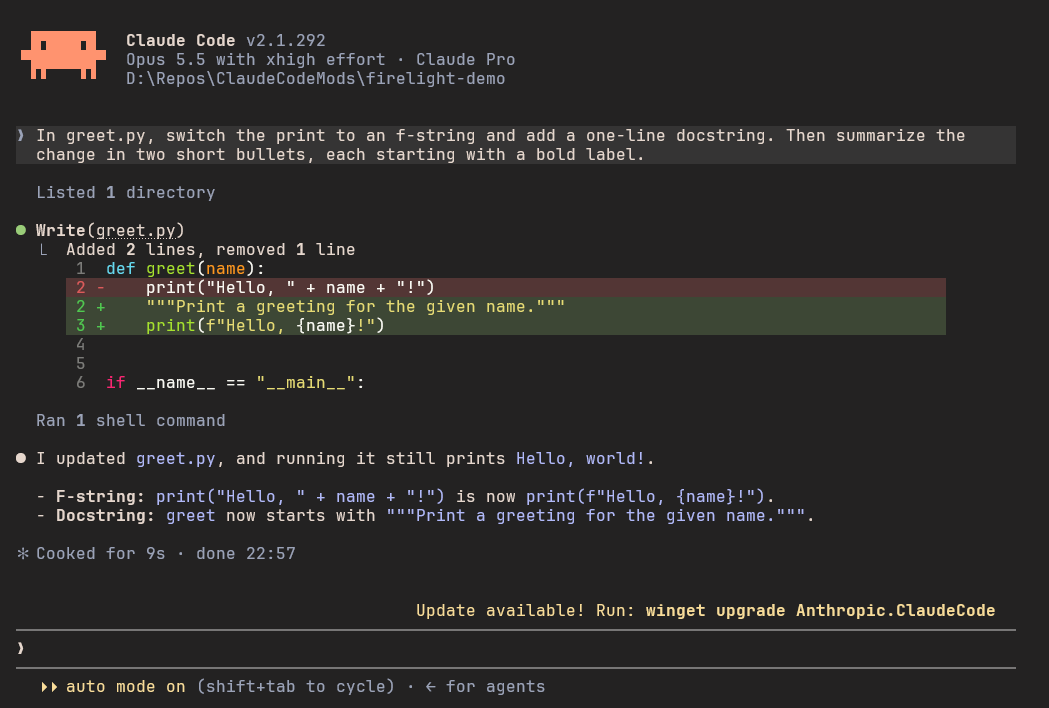
Claude Code themes in all three variants of Firelight, the color palette by ridusaini (Coal, Smoulder and Ash). The terminal background and colors follow the…
newprocess

Claude Code themes in all three variants of Firelight, the color palette by ridusaini (Coal, Smoulder and Ash). The terminal background and colors follow the…
Claude Code themes in Firelight, a color palette made by ridusaini, plus a matching Windows Terminal look.
Firelight is named after the way fire changes color as it grows. Its accents run from rose through ember, coral, apricot and honey, then over to fern, verdigris, cornflower, lilac and orchid. It has neutral backgrounds and text that goes from cool to warm. It comes in three variants, and this skin has all of them:
| Variant | Look | Main text against the background |
|---|---|---|
| Coal | Dark, with the most contrast. Start here. | 11.3:1 |
| Smoulder | Dark, but softer: a lighter grey background and gentler text | 8.8:1 |
| Ash | Light and warm | 9.1:1 |
Every color comes from the palette. This skin only decides which Firelight color goes where in Claude Code and Windows Terminal. Where the palette doesn't have a color Claude Code needs, the skin mixes one from Firelight's own colors, and Changes from the palette lists each of those.
In Claude Code (the themes). Like Ember, text falls into three clear levels, using the shades Firelight suggests for each job:
| Level | Used for | Firelight color | Contrast in Coal |
|---|---|---|---|
| Primary | Claude's replies and anything you need to read | fg1, body text | 11.3:1 |
| Secondary | Tool output, file names, metadata | fg4, labels and captions | 6.3:1 |
| Tertiary | Hints, borders, placeholders | bg5, subtle controls | 3.5:1 |
Your own messages sit on a raised block (bg2, or bg0 in Ash), so you can find where each exchange starts when you scroll back. The accents follow the jobs Firelight gives them:
| In Claude Code | Firelight color |
|---|---|
| Claude's orange: the spinner, the logo, the Claude box in Readable Layout | coral, shimmering to apricot |
| Permission prompts, selected menu items, the You box and inline code in Readable Layout | cornflower, shimmering to lilac |
| Bold text in Readable Layout, plan mode, background tasks | verdigris |
| Auto-accept, skills | orchid |
| Bash mode | rose |
| Success, errors, warnings | fern, ember, honey |
Subagent colors and the rainbow ultrathink text | the Firelight accent closest to each color |
Firelight suggests rose as the main accent. The skin uses coral instead, the palette's closest color to Claude's orange, so Claude still looks like Claude.
In the terminal around it. A Claude Code theme only colors Claude Code's own text, so on its own Coal's text would sit on whatever background your terminal has. While a Firelight theme is picked, the skin also switches the terminal's background, text color, cursor and 16 ANSI colors to that variant, so the text is always on the background it was made for. Switching between variants in /theme switches the terminal along with it, and picking a theme that isn't Firelight, or quitting Claude Code, gives the terminal its own colors back. This works in terminals that accept the standard color-changing codes (OSC 4, 10, 11 and 12), which most current ones do. I've tested it in Windows Terminal only. If Claude Code is killed instead of quit, the colors stay until you close the tab.
In Windows Terminal (the look). All three variants as color schemes, mapped exactly the way Firelight's suggested terminal colors lay them out, with a rose cursor. The rest matches Ember: the JetBrains Mono NL font at 12 pt with 20% more line height, padding around the text, real bold for bold text, and a tab bar that blends into the window.
The themes change colors only. To also change how a conversation is laid out, add the Readable Layout mod. It picks up Firelight's colors on its own.
Type this at the Claude Code prompt:
/plugin install firelight --marketplace GarvitNangru/claude-code-modsIt asks whether to add this repo as a marketplace. Say y and pick a scope; the user scope loads it in every session. Then run /theme and pick Firelight Coal, Firelight Smoulder or Firelight Ash. Each is listed as "from firelight".
You don't need this part for the colors, since the themes set those themselves. It adds the font, the spacing and the matching tab bar, and makes the terminal Firelight-colored before Claude Code starts too. It changes Windows Terminal's own settings, so it's a separate step, and it's Windows only. Clone this repository and run the script:
git clone https://github.com/GarvitNangru/claude-code-mods.git
powershell -ExecutionPolicy Bypass -File claude-code-mods\skins\firelight\windows-terminal\install.ps1
It does three things:
-SkipFont to keep Cascadia Mono instead.-Variant Smoulder or -Variant Ash for another variant, and -ProfileName "PowerShell" to style a different profile.Pick the same variant here as in /theme, so the terminal and Claude Code share one background.
Colors and spacing change immediately. If the font doesn't switch, close and reopen Windows Terminal.
Before changing anything, the script saves a backup of your settings next to the original, and it prints the one command that puts the backup back. Running it again is safe; it replaces Firelight's settings rather than adding them twice. If you already use Ember, its scheme stays installed.
If you'd rather make the change by hand, windows-terminal/firelight.json holds the pieces: the color schemes go in schemes, the window themes in themes, and the profile values in the profile you use for Claude Code, along with "colorScheme": "Firelight Coal".
To update the themes later, run claude plugin update firelight@garvit-mods, then /reload-plugins in an open session. To remove them, run /plugin uninstall firelight@garvit-mods. To undo the Windows Terminal part, run the restore command the install script printed.
Firelight's community guidelines ask themes to note any palette changes, so here is everything this skin mixes or changes:
fern and ember laid over bg1: 22% for a changed line, 12% for a dimmed one, 35% for the changed words. Firelight's own diff-add and diff-remove aren't used, because the two aren't equally strong. In Coal the removed color is 1.13:1 against the background, and in Smoulder and Ash the added color nearly disappears. An editor marks changed lines in the gutter too, but in Claude Code the background is the only sign, so added and removed lines need the same weight.lilac at 25% over bg1, stronger than the 12% Firelight suggests, so selected text is easy to see.rose and cornflower at 12% over bg1, the same opacity Firelight uses for selection. The palette has no tinted backgrounds for these.ultrathink rainbow shimmers toward fg0 (in Ash, toward bg0), since the palette has no lighter shade of each accent.Bold text option to highlight, or use Coal or Smoulder.Each variant is one small JSON file in themes/. Each key overrides one color of Claude Code's built-in dark theme, or light theme for Ash, and any key you leave out keeps its default. Colors are #RRGGBB hex. The terminal schemes and font settings live in windows-terminal/firelight.json, and the colors the skin sets in your terminal while Claude Code runs come from the same schemes. If 12 pt is too small on your screen, change size, and if the lines feel too airy, lower cellHeight towards 1.1.
After editing a theme, start a new session, or reselect it in /theme, to see the change.
The Firelight palette is by ridusaini and the Firelight contributors. You can browse it on the palette site, try it in the Playground, and find other apps' themes on the Community page. It's released under the MIT License, and NOTICE.md carries its copyright notice. The skin itself, meaning the theme mappings and the install script, is MIT like the rest of this repo.
hooks/register.ts 96 lines1import type { EngineInterface as Engine, Register } from 'claude-code'
2
3const THEME_PREFIX = 'custom:firelight:'
4const ANSI = [
5 'black', 'red', 'green', 'yellow', 'blue', 'purple', 'cyan', 'white',
6 'brightBlack', 'brightRed', 'brightGreen', 'brightYellow', 'brightBlue', 'brightPurple', 'brightCyan', 'brightWhite',
7] as const
8
9export type Scheme = { name: string; background: string; foreground: string; cursorColor: string } & Record<(typeof ANSI)[number], string>
10export const RESET = '\x1b]104\x07\x1b]110\x07\x1b]111\x07\x1b]112\x07'
11
12const osc = (code: string, value: string): string => `\x1b]${code};${value}\x07`
13const rgb = (hex: string): string => `rgb:${hex.slice(1, 3)}/${hex.slice(3, 5)}/${hex.slice(5, 7)}`
14
15export const colorSequence = (s: Scheme): string =>
16 osc('11', rgb(s.background)) +
17 osc('10', rgb(s.foreground)) +
18 osc('12', rgb(s.cursorColor)) +
19 osc('4', ANSI.map((name, i) => `${i};${rgb(s[name])}`).join(';'))
20
21export const variantOf = (theme: unknown): string | undefined =>
22 typeof theme === 'string' && theme.startsWith(THEME_PREFIX) ? theme.slice(THEME_PREFIX.length) : undefined
23
24let schemes: Record<string, Scheme> | undefined
25let painted = false
26let queue: Promise<void> = Promise.resolve()
27
28async function loadSchemes($: Engine): Promise<Record<string, Scheme>> {
29 const file = JSON.parse(await $.fs.read(`${$.plugin.root}/windows-terminal/firelight.json`)) as { schemes: Scheme[] }
30 return Object.fromEntries(file.schemes.map(s => [s.name.replace(/^Firelight /, '').toLowerCase(), s]))
31}
32
33// Claude Code starts helpers with a hidden console of their own, so on Windows the helper attaches to Claude Code's.
34async function writeToTerminal($: Engine, text: string): Promise<void> {
35 const argv = (await $.env.get('OS')) === 'Windows_NT'
36 ? ['powershell.exe', '-NoProfile', '-NonInteractive', '-ExecutionPolicy', 'Bypass', '-File', `${$.plugin.root}/hooks/paint-console.ps1`]
37 : ['sh', '-c', 'cat > /dev/tty']
38 try {
39 const { exitCode, stderr } = await $.process.run(argv, { stdin: text, timeoutMs: 5000 })
40 if (exitCode !== 0) $.ui.log(`could not set the terminal colors (exit ${exitCode}): ${stderr.trim()}`, { to: 'debug' })
41 } catch (err) {
42 $.ui.log(`could not set the terminal colors: ${err}`, { to: 'debug' })
43 }
44}
45
46async function currentTheme($: Engine): Promise<unknown> {
47 return (await $.config.list()).find(row => row.key === 'theme')?.value
48}
49
50async function follow($: Engine, theme: unknown): Promise<void> {
51 const variant = variantOf(theme)
52 if (variant) {
53 schemes ??= await loadSchemes($)
54 const scheme = schemes[variant]
55 if (!scheme) return
56 await writeToTerminal($, colorSequence(scheme))
57 painted = true
58 } else if (painted) {
59 await writeToTerminal($, RESET)
60 painted = false
61 }
62}
63
64async function followCurrentTheme($: Engine): Promise<void> {
65 await follow($, await currentTheme($))
66}
67
68function enqueue($: Engine, work: () => Promise<void>): void {
69 queue = queue.then(work).catch(err => $.ui.log(`could not set the terminal colors: ${err}`, { to: 'debug' }))
70}
71
72async function restore($: Engine): Promise<void> {
73 await queue
74 if (painted) await writeToTerminal($, RESET)
75 painted = false
76}
77
78export const register: Register = on => {
79 on('session.start', async ($, e, next) => {
80 const started = await next(e)
81 if (e.surface === 'terminal' && e.isInteractive) enqueue($, () => followCurrentTheme($))
82 return started
83 })
84
85 on('config.set', { key: 'theme' }, async ($, e, next) => {
86 const result = await next(e)
87 if (!result.deny) enqueue($, () => follow($, result.value))
88 return result
89 })
90
91 on('session.end', async ($, e, next) => {
92 if (e.reason !== 'clear' && e.reason !== 'resume') await restore($)
93 return next(e)
94 })
95}
96