claude-mod-hider
Claude Mod Hider: one tiny button that hides or shows every Claude Code mod above the prompt, remembered across sessions.
newbandcommand

Claude Mod Hider: one tiny button that hides or shows every Claude Code mod above the prompt, remembered across sessions.
Moved: Claude Mod Hider now lives in Claude Mod Pack, with the other small mods. Install it from there:
/plugin marketplace add finalpantasy/claude-mod-pack
/plugin install claude-mod-hider@claude-mod-pack
This repo is archived.
One tiny button that hides every Claude Code mod above your prompt, and brings them all back.
Running a few Claude Code mods (status bands, agent trackers, idle games) is great until you shrink the window and they push your prompt halfway up the screen. Claude Mod Hider puts a single arrow in the top-right corner of the band above the prompt, beside your mods, so it never adds a line. Click it and every mod there folds away; click again and they are back. It remembers your choice across sessions.
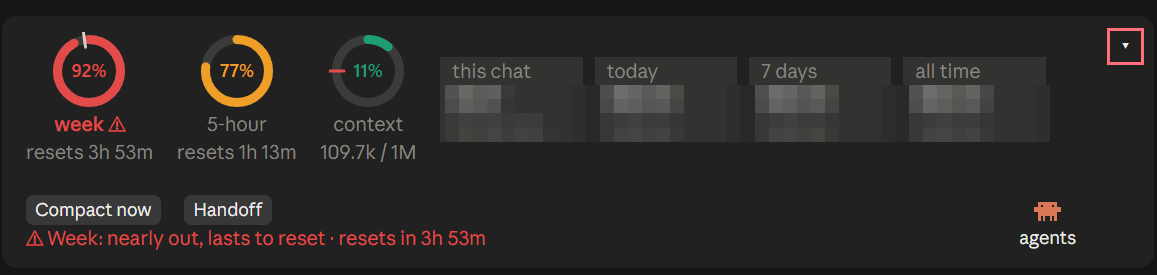
Click the arrow and the whole band folds down to a single ▸ mods button.
/plugin marketplace add finalpantasy/claude-mod-hider
/plugin install claude-mod-hider@claude-mod-hider
Restart Claude Code. Click the small ▾ in the top-right corner of the band above the prompt, or type /hide-mods. Click ▸ mods, or type /hide-mods again, to bring them back.
While hidden, Claude Mod Hider draws only its arrow and does not hand the band on, so every mod drawn beneath it disappears. Claude Code does not document the order mods draw in, so a mod drawn above it can still show. Mod authors can make their mod hide reliably with two lines:
const modsHidden = atom({ plugin: 'claude-mod-hider', key: 'hidden' } as const, false)

on('ui.render', { component: 'AbovePrompt' }, async ($, e, next) => {
  if (e.props.hasSurvey || (await read($, modsHidden))) return next(e)
  // ...draw as usual
})
and in your mod's type contract, inside interface PluginState:
'claude-mod-hider': { hidden: boolean }A survey always gets the band, hidden or not.
MIT
hooks/register.tsx 53 lines1import { atom, read, update } from 'claude-code'
2import type { EngineInterface, Register } from 'claude-code'
3
4// One button above the prompt that hides or shows every mod drawn there, and stays itself.
5// Hidden, this hook draws only the button and does not hand the band on, so mods beneath it never draw;
6// mods above it in the chain read the same switch and pass. The choice is kept across sessions.
7
8const hidden = atom({ plugin: 'claude-mod-hider', key: 'hidden' } as const, false)
9
10async function toggle($: EngineInterface) {
11 const next = !(await read($, hidden))
12 await update($, hidden, () => next)
13 await $.store.set('hidden', next)
14 return next
15}
16
17export const register: Register = on => {
18 on('session.start', async ($, e, next) => {
19 const started = await next(e)
20 await $.command.register({ name: 'hide-mods', description: 'Hide or show everything mods draw above the prompt' })
21 const saved = await $.store.get('hidden').catch(() => undefined)
22 if (typeof saved === 'boolean') await update($, hidden, () => saved)
23 return started
24 })
25
26 on('command.run', { command: 'hide-mods' }, async $ => {
27 const isHidden = await toggle($)
28 return { text: isHidden ? 'Mods above the prompt hidden. /hide-mods or the button brings them back.' : 'Mods above the prompt shown.' }
29 })
30
31 on('ui.render', { component: 'AbovePrompt' }, async ($, e, next) => {
32 // A survey always gets the band.
33 if (e.props.hasSurvey) return next(e)
34 const ui = $.ui.resolve(e)
35 const { Box, Text } = ui
36 const Button = 'Button' in ui ? ui.Button : null
37 const isHidden = await read($, hidden)
38 const control = Button
39 ? <Button key="hide-mods" label={isHidden ? '▸ mods' : '▾'} plain onPress={() => void toggle($)} />
40 : <Text key="hide-mods" dimColor>{isHidden ? '▸ mods (/hide-mods)' : '▾'}</Text>
41 if (isHidden) return <Box flexDirection="row">{control}</Box>
42 // Shown, the arrow takes a narrow column beside the other mods, in the top-right corner, not a row of its own:
43 // the band is no taller than the mods make it.
44 const below = await next(e).catch(() => null)
45 return (
46 <Box flexDirection="row">
47 <Box flexDirection="column" flexGrow={1} flexShrink={1}>{below}</Box>
48 <Box flexShrink={0} marginLeft={1} alignSelf="flex-start">{control}</Box>
49 </Box>
50 )
51 })
52}
53types/index.d.ts 13 lines1// Claude Mod Hider's type contract: the one switch other mods read.
2
3/** True while mods above the prompt are hidden; any mod drawing there reads it and passes. */
4export type Hidden = boolean
5
6declare module 'claude-code' {
7 interface PluginState {
8 'claude-mod-hider': {
9 hidden: Hidden
10 }
11 }
12}
13