image-preview
See the images you paste into Claude Code: thumbnails above the prompt instead of bare [Image #N] tags, and click a thumbnail to enlarge it.
newpanebandprocesstimer

See the images you paste into Claude Code: thumbnails above the prompt instead of bare [Image #N] tags, and click a thumbnail to enlarge it.
English | 繁體中文
Paste a screenshot, see it before you send.
A Claude Code mod that shows the images you paste: thumbnails above the prompt instead of bare [Image #1] tags, so you can check you pasted the right picture before you send. Click a thumbnail's #N label to enlarge it.
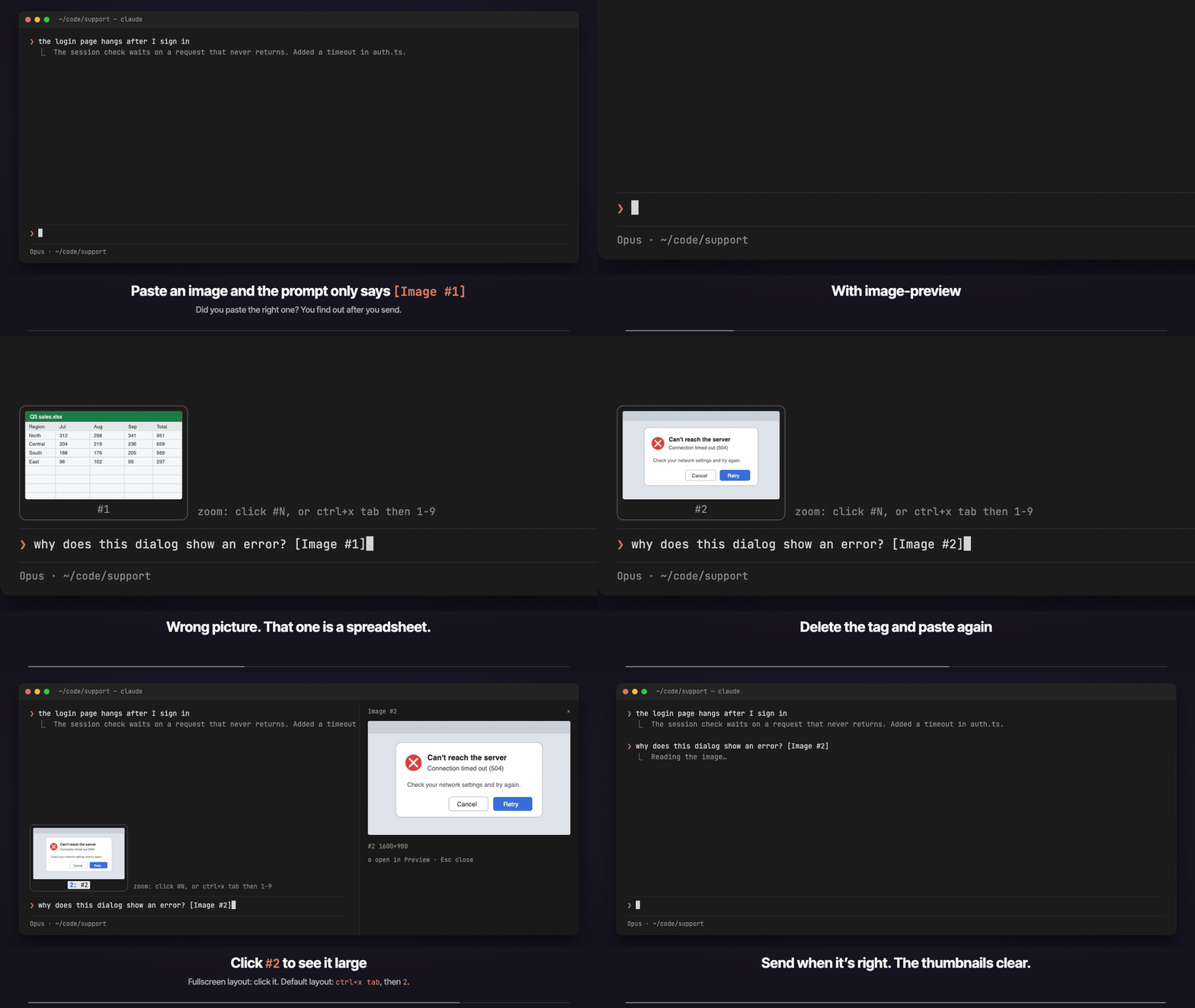
The demo is a recreated terminal, not a screen recording. Source: demo/demo.html, recorded with demo/record.py (MP4).
Inside Claude Code:
/plugin marketplace add f64991144/claude-image-preview
/plugin install image-preview@claude-image-preview
/reload-plugins
Paste an image into the prompt and its thumbnail appears above the input.
sips (or ImageMagick on Linux); other formats, or a paste nothing can convert, show "no preview", and their #N opens the original instead.[Image #N] tag with Backspace and paste again; the tile updates.#N under a thumbnail and the picture opens large in a pane. Inside the pane, o opens the original in macOS Preview and x or Esc closes it./tui fullscreen (switch back with /tui default). In the default layout, press ctrl+x tab to focus the thumbnail row, then press the number.[Image #n] text in each tile.In a background session or agent view, Claude Code turns terminal images off. To turn them on, add this to the env block of ~/.claude/settings.json and start a new session:
"env": { "CLAUDE_CODE_FORCE_TERMINAL_IMAGES": "1" }claude plugin update image-preview@claude-image-previewClaude Code saves each pasted image as <tmp>/<project>/<session>/images/<n>.<ext>, with the extension of the pasted picture (png, jpg, gif, webp...). Every 200 ms the mod reads the prompt box for [Image #n] tags, finds the cached files, and draws them above the prompt with Claude Code's Image element, reading their size from the PNG header. Pasting an image raises no edit event, which is why it polls.
The Image element draws PNG only, so a paste in any other format is converted once to <tmp>/<project>/<session>/image-preview/<n>.png, next to Claude Code's own cache, with sips (macOS) or ImageMagick's magick/convert (Linux). That folder is the only thing the mod writes, and it goes away with the session's temp files.
It makes no network requests. It runs id -u once to find the default temp folder (when CLAUDE_CODE_TMPDIR is not set), the converter above once per JPEG/GIF/WebP paste (cut off after 10 seconds), and open <file> only when you ask for macOS Preview. Run claude plugin validate . on the repo to see every event it hooks and every call it makes.
/plugin and check that image-preview is listed as an active mod; if not, run /reload-plugins.#N button. The cached file wasn't found; Claude Code may have moved where it keeps pasted images. Please open an issue with your Claude Code version.#N works. The file is there but nothing could convert it to PNG: on Linux, install ImageMagick; on macOS, the format may be one sips can't read. #N still opens the original in Preview.#N does nothing. You are in the default layout, where the terminal does not pass clicks to Claude Code. Use /tui fullscreen, or ctrl+x tab then the number.Forked from jarrodwatts/claude-image-view (MIT, Copyright (c) 2026 Jarrod Watts), which built the thumbnail row. This fork adds the enlarge pane and the Preview fallback, and is named image-preview so it does not clash with the upstream image-view. See LICENSE and NOTICE.
git clone https://github.com/f64991144/claude-image-preview
cd claude-image-preview
claude --plugin-dir .        # load it for one session without installing
claude plugin validate .
claude plugin test .讓你在 Claude Code 貼上的圖片看得到的 mod:輸入框上方顯示縮圖,取代只有 [Image #1] 的標籤,送出前就能確認貼對圖。點縮圖下方的 #N 可以放大。示範影片見上方(重建的終端機畫面,不是實機錄影)。
在 Claude Code 裡輸入:
/plugin marketplace add f64991144/claude-image-preview
/plugin install image-preview@claude-image-preview
/reload-pluginssips(Linux 用 ImageMagick)轉一次成 PNG;其他格式或轉不了的圖會顯示「no preview」,但 #N 仍可直接開原圖。[Image #N] 再重貼,縮圖會跟著換。#N,會開一個面板顯示大圖。面板裡按 o 用 macOS「預覽程式」開原圖,按 x 或 Esc 關閉。/tui fullscreen(改回來用 /tui default)。一般模式下,先按 ctrl+x tab 讓縮圖列取得焦點,再按數字。[Image #n] 文字。背景 session 或 agent view 預設不顯示圖片,要在 ~/.claude/settings.json 的 env 加上 "CLAUDE_CODE_FORCE_TERMINAL_IMAGES": "1",再開新的 session。
claude plugin update image-preview@claude-image-preview改自 jarrodwatts/claude-image-view(MIT 授權),縮圖列是原作的功能;放大面板與「預覽程式」備援是這個版本加的。
hooks/register.tsx 251 lines1import { atom, read, update } from 'claude-code'
2import type { EngineInterface, Register } from 'claude-code'
3
4import type { PastedImage } from '../types'
5import { fitPane, fitRow, imageNumbers, pngSize } from './layout'
6import type { Size } from './layout'
7
8// Pasting an image raises no prompt.edit (the tag only shows up on the next keystroke),
9// so the draft is polled instead.
10const POLL_MS = 200
11
12const images = atom({ plugin: 'image-preview', key: 'images' } as const, [] as PastedImage[])
13// The image number shown enlarged in the pane, or null while the pane is closed.
14const zoomed = atom({ plugin: 'image-preview', key: 'zoomed' } as const, null as number | null)
15
16const PANE = 'image-preview'
17// Rows under the enlarged picture: the label and the buttons.
18const PANE_CHROME_ROWS = 2
19// How to enlarge, drawn right of the tiles; its width is held back from them.
20const HINT = 'zoom: click #N, or ctrl+x tab then 1-9'
21const HINT_COLUMNS = HINT.length + 1
22
23// Where this session's pastes are cached, and where their PNG copies go.
24type Dirs = { sessionId: string; images: string; converted: string }
25
26let tmpRoot: string | undefined
27let found: Dirs | undefined
28// The image numbers last drawn, so an unchanged draft doesn't rewrite state; undefined
29// while a drawn image's file is still missing, so the next poll looks again.
30let shownKey: string | undefined
31let isChecking = false
32const sizes = new Map<string, Size | null>()
33// Cached file -> its PNG copy, or null when no converter could read it.
34const converted = new Map<string, string | null>()
35
36// Claude Code caches each paste as <tmp>/<project>/<session>/images/<n>.<ext>, the extension
37// that of the pasted picture (png, jpg, gif, webp...). The project folder is named after a
38// working directory that may since have moved, so find it by the session id instead of
39// rebuilding it. PNG copies of the other formats go in a sibling folder, <session>/image-preview.
40async function dirs($: EngineInterface): Promise<Dirs | undefined> {
41 const sessionId = await $.session.id()
42 if (found?.sessionId === sessionId) return found
43 if (tmpRoot === undefined) {
44 const fromEnv = await $.env.get('CLAUDE_CODE_TMPDIR')
45 tmpRoot = fromEnv ?? `/tmp/claude-${(await $.process.run(['id', '-u'])).stdout.trim()}`
46 }
47 const entries = await $.fs.list(tmpRoot).catch(() => [])
48 for (const entry of entries) {
49 const session = `${tmpRoot}/${entry.name}/${sessionId}`
50 if (entry.kind === 'dir' && (await $.fs.exists(`${session}/images`))) {
51 found = { sessionId, images: `${session}/images`, converted: `${session}/image-preview` }
52 return found
53 }
54 }
55 return undefined
56}
57
58/** The cached file of image n, whatever its extension, or undefined while there is none. */
59async function cached($: EngineInterface, where: Dirs, n: number): Promise<string | undefined> {
60 const name = new RegExp(`^${n}\\.[A-Za-z0-9]+$`)
61 const entries = await $.fs.list(where.images).catch(() => [])
62 const entry = entries.find(one => one.kind === 'file' && name.test(one.name))
63 return entry === undefined ? undefined : `${where.images}/${entry.name}`
64}
65
66// sips ships with macOS; ImageMagick is the usual tool elsewhere. `[0]` takes a GIF's first frame.
67function converters(src: string, dst: string): string[][] {
68 return [
69 ['sips', '-s', 'format', 'png', src, '--out', dst],
70 ['magick', `${src}[0]`, dst],
71 ['convert', `${src}[0]`, dst],
72 ]
73}
74
75// Only these are handed to a converter: ImageMagick picks its decoder from the file's
76// content, and formats such as SVG, PDF or MVG run delegates, so anything else stays
77// "no preview". A converter that hangs must not stall the poll, hence the timeout.
78const CONVERTIBLE = /\.(jpe?g|gif|webp)$/i
79const CONVERT_TIMEOUT_MS = 10_000
80
81// The Image element draws PNG only, so any other paste is converted once to
82// <session>/image-preview/<n>.png. sips exits 0 even when it can't read the file, and a
83// missing converter rejects, so the copy's existence is what decides.
84async function toPng($: EngineInterface, where: Dirs, n: number, path: string): Promise<string | null> {
85 if (/\.png$/i.test(path)) return path
86 if (!CONVERTIBLE.test(path)) return null
87 const known = converted.get(path)
88 if (known !== undefined) return known
89 const out = `${where.converted}/${n}.png`
90 if (!(await $.fs.exists(out))) {
91 if (!(await $.fs.exists(where.converted))) await $.process.run(['mkdir', '-p', where.converted], { timeoutMs: CONVERT_TIMEOUT_MS }).catch(() => undefined)
92 for (const argv of converters(path, out)) {
93 const ran = await $.process.run(argv, { timeoutMs: CONVERT_TIMEOUT_MS }).catch(() => undefined)
94 if (ran?.exitCode === 0 && (await $.fs.exists(out))) break
95 }
96 }
97 const result = (await $.fs.exists(out)) ? out : null
98 converted.set(path, result)
99 return result
100}
101
102async function describe($: EngineInterface, where: Dirs | undefined, n: number): Promise<PastedImage> {
103 const path = where === undefined ? undefined : await cached($, where, n)
104 if (where === undefined || path === undefined) return { n, path: null, png: null, size: null }
105 const png = await toPng($, where, n, path)
106 if (png === null) return { n, path, png: null, size: null }
107 if (!sizes.has(png)) {
108 const head = await $.fs.read(png, { as: 'bytes' }).then(
109 ({ base64 }) => pngSize(base64),
110 () => undefined, // too big to read: still drawable, just without its aspect ratio
111 )
112 if (head === null) return { n, path, png: null, size: null } // not a PNG after all
113 sizes.set(png, head ?? null)
114 }
115 return { n, path, png, size: sizes.get(png) ?? null }
116}
117
118async function show($: EngineInterface, draft: string) {
119 const numbers = imageNumbers(draft)
120 const key = numbers.join(',')
121 if (key === shownKey) return
122 const where = numbers.length > 0 ? await dirs($) : undefined
123 const list: PastedImage[] = []
124 for (const n of numbers) list.push(await describe($, where, n))
125 shownKey = list.every(image => image.path !== null) ? key : undefined
126 await update($, images, () => list)
127 // The enlarged image left the draft (sent, or its tag deleted): close its pane.
128 const open = await read($, zoomed)
129 if (open !== null && !numbers.includes(open)) await closeZoom($)
130}
131
132// Opens the pane as the press's own first call: anything awaited before $.ui.open loses
133// the press, and the pane then counts as opened unasked (seated only from 144 columns).
134// A pane that still can't be seated falls back to Preview, so a press always shows the picture.
135async function zoom($: EngineInterface, image: PastedImage) {
136 if (image.path === null) return
137 // Nothing to draw in a pane: open the original as it is.
138 if (image.png === null) {
139 await $.process.run(['open', image.path])
140 return
141 }
142 const opened = $.ui.open({ id: PANE, title: `Image #${image.n}`, focus: true, closeOnEscape: true, rows: 30 })
143 await update($, zoomed, () => image.n)
144 const result = await opened.catch(() => undefined)
145 if (result?.isPlaced !== true) {
146 await $.ui.close({ id: PANE })
147 await update($, zoomed, () => null)
148 await $.process.run(['open', image.path])
149 }
150}
151
152async function closeZoom($: EngineInterface) {
153 await update($, zoomed, () => null)
154 await $.ui.close({ id: PANE })
155}
156
157async function check($: EngineInterface) {
158 if (isChecking) return
159 isChecking = true
160 try {
161 await show($, (await $.prompt.read()).text)
162 } finally {
163 isChecking = false
164 }
165}
166
167export const register: Register = on => {
168 on('session.start', async ($, e, next) => {
169 $.clock.every(POLL_MS, () => check($))
170 return next(e)
171 })
172
173 on('ui.render', { component: 'Pane', requestId: PANE }, async ($, e, next) => {
174 // Image is terminal-only; the Desktop app previews pastes itself.
175 if (e.surface !== 'terminal') return next(e)
176 const { Box, Button, Image, Text } = $.ui.resolve(e)
177 const n = await read($, zoomed)
178 const image = (await read($, images)).find(one => one.n === n)
179 if (n === null || image === undefined || image.path === null || image.png === null) {
180 return <Text dimColor>No image to show.</Text>
181 }
182 const { columns, rows } = fitPane(image.size, e.props.scroll.bodyRows - PANE_CHROME_ROWS, e.props.bodyColumns)
183 const path = image.path
184 const size = image.size === null ? '' : ` ${image.size.width}×${image.size.height}`
185 return (
186 <Box flexDirection="column">
187 <Image key={`zoom-${n}`} source={{ file: image.png, format: 'png' }} columns={columns} rows={rows} alt={`[Image #${n}]`} />
188 <Box flexDirection="row" columnGap={2}>
189 <Text dimColor>#{n}{size}</Text>
190 <Button key="preview" hotkey="o" onPress={() => void $.process.run(['open', path])}>Open in Preview</Button>
191 <Button key="close" role="dismiss" hotkey="x" onPress={() => void closeZoom($)}>Close</Button>
192 </Box>
193 </Box>
194 )
195 })
196
197 on('ui.render', { component: 'AbovePrompt' }, async ($, e, next) => {
198 if (e.surface !== 'terminal' || e.props.hasSurvey) return next(e)
199 const list = await read($, images)
200 if (list.length === 0) return next(e)
201
202 const { Box, Button, Image, Text } = $.ui.resolve(e)
203 const cells = fitRow(list.map(image => image.size), e.props.maxRows, e.props.bodyColumns - HINT_COLUMNS)
204 const below = await next(e)
205
206 return (
207 <Box flexDirection="column">
208 <Box flexDirection="row" columnGap={1}>
209 {list.map((image, i) => {
210 const { columns, rows } = cells[i] ?? { columns: 4, rows: 1 }
211 return (
212 <Box flexDirection="column" alignItems="center" borderStyle="round" borderDimColor>
213 {image.png === null ? (
214 <Box width={columns} height={rows} alignItems="center" justifyContent="center">
215 <Text dimColor wrap="truncate">no preview</Text>
216 </Box>
217 ) : (
218 <Image
219 key={`image-${image.n}`}
220 source={{ file: image.png, format: 'png' }}
221 columns={columns}
222 rows={rows}
223 alt={`[Image #${image.n}]`}
224 />
225 )}
226 {image.path === null ? (
227 <Text dimColor>#{image.n}</Text>
228 ) : (
229 <Button
230 key={`zoom-${image.n}`}
231 plain
232 dimColor
233 hotkey={image.n <= 9 ? String(image.n) : undefined}
234 onPress={() => void zoom($, image)}
235 >
236 {`#${image.n}`}
237 </Button>
238 )}
239 </Box>
240 )
241 })}
242 <Box alignSelf="flex-end">
243 <Text dimColor>{HINT}</Text>
244 </Box>
245 </Box>
246 {below}
247 </Box>
248 )
249 })
250}
251hooks/layout.ts 65 lines1export type Size = { width: number; height: number }
2export type Cells = { columns: number; rows: number }
3
4const TILE_ROWS = 6
5const MAX_COLUMNS = 32
6const MIN_COLUMNS = 4
7// A terminal cell is about twice as tall as it is wide.
8const CELL_ASPECT = 2
9// Used when the size is unknown (file over $.fs.read's 4 MiB cap, or no file).
10const FALLBACK: Size = { width: 16, height: 10 }
11// Each tile adds a border on every side and a label row under the picture.
12const TILE_CHROME_ROWS = 3
13const TILE_CHROME_COLUMNS = 2
14const GAP = 1
15
16/** The distinct image numbers a draft references, in the order they first appear. */
17export function imageNumbers(draft: string): number[] {
18 const seen = new Set<number>()
19 for (const match of draft.matchAll(/\[Image #(\d+)\]/g)) seen.add(Number(match[1]))
20 return [...seen]
21}
22
23/** Width and height from a PNG's IHDR chunk, or null when the bytes aren't a PNG. */
24export function pngSize(base64: string): Size | null {
25 // 24 bytes cover the signature and IHDR's width and height; 32 base64 chars decode to exactly 24.
26 const head = Uint8Array.from(atob(base64.slice(0, 32)), char => char.charCodeAt(0))
27 const signature = [0x89, 0x50, 0x4e, 0x47, 0x0d, 0x0a, 0x1a, 0x0a]
28 if (head.length < 24 || signature.some((byte, i) => head[i] !== byte)) return null
29 const view = new DataView(head.buffer, head.byteOffset, head.byteLength)
30 const width = view.getUint32(16)
31 const height = view.getUint32(20)
32 return width > 0 && height > 0 ? { width, height } : null
33}
34
35/** A picture box `rows` tall that keeps the picture's aspect ratio. */
36export function fitCells(size: Size | null, tileRows = TILE_ROWS, maxColumns = MAX_COLUMNS): Cells {
37 const { width, height } = size ?? FALLBACK
38 let rows = tileRows
39 let columns = Math.round((rows * CELL_ASPECT * width) / height)
40 if (columns > maxColumns) {
41 columns = maxColumns
42 rows = Math.max(1, Math.round((maxColumns * height) / (CELL_ASPECT * width)))
43 }
44 return { columns: Math.max(MIN_COLUMNS, columns), rows: Math.min(rows, tileRows) }
45}
46
47/** The enlarged picture: as big as the pane's body allows, aspect kept, within the Image element's 255 cap. */
48export function fitPane(size: Size | null, bodyRows: number, bodyColumns: number): Cells {
49 return fitCells(size, Math.max(1, Math.min(255, bodyRows)), Math.max(MIN_COLUMNS, Math.min(255, bodyColumns)))
50}
51
52/**
53 * Picture boxes for one row of tiles that fits the band whole, so it never scrolls:
54 * the tallest tiles whose chrome fits in `maxRows` and whose total width fits in `bodyColumns`.
55 */
56export function fitRow(sizes: readonly (Size | null)[], maxRows: number, bodyColumns: number): Cells[] {
57 const tallest = Math.max(1, Math.min(TILE_ROWS, maxRows - TILE_CHROME_ROWS))
58 for (let tileRows = tallest; tileRows > 1; tileRows--) {
59 const cells = sizes.map(size => fitCells(size, tileRows))
60 const width = cells.reduce((sum, c) => sum + c.columns + TILE_CHROME_COLUMNS, 0) + GAP * (cells.length - 1)
61 if (width <= bodyColumns) return cells
62 }
63 return sizes.map(size => fitCells(size, 1))
64}
65types/index.d.ts 16 lines1export type PastedImage = {
2 n: number
3 /** The cached paste as Claude Code saved it (.png, .jpg, .gif, .webp...); null when it can't be found. */
4 path: string | null
5 /** A PNG of it for the Image element: `path` itself, or a converted copy; null when no converter could read it. */
6 png: string | null
7 /** Pixel size; null when unknown, and the tile falls back to a default shape. */
8 size: { width: number; height: number } | null
9}
10
11declare module 'claude-code' {
12 interface PluginState {
13 'image-preview': { images: PastedImage[]; zoomed: number | null }
14 }
15}
16