model-badge
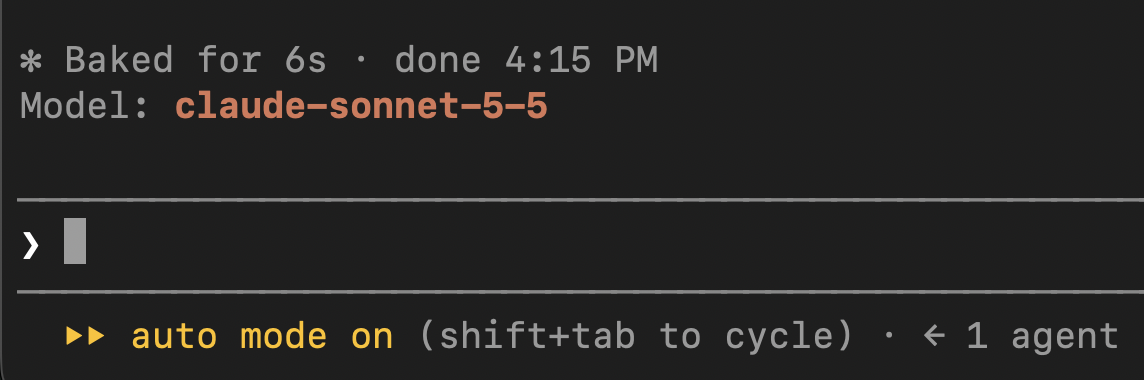
Shows the active model above the prompt.
newband

Shows the active model above the prompt.
Mods for Claude Code: small plugins of function hooks that run inside your session.
| Mod | What it does |
|---|---|
model-badge | Shows the active model above the prompt. Updates when you switch models. |
claude plugin --help should work)./plugin install is not available in the desktop app's Code tab, but a mod installed from a terminal at user scope also loads there.In a Claude Code terminal session, type:
/plugin install model-badge --marketplace emerson-buoy/claude-code-modsThen:
y to Add marketplace?Installed model-badge. Plugin is now active.It is active immediately, no restart needed. You should see Model: <name> above the prompt.
/plugin uninstall model-badgegit clone git@github.com:emerson-buoy/claude-code-mods.git
claude --plugin-dir ./claude-code-modsnpm run validate # claude plugin validate .
npm run typecheck # tsc -p . (needs the mod to have loaded once, see below)
npm test # claude plugin test . (needs a *.test.ts)There are no npm dependencies. The claude-code types are written by the engine into .claude-plugin/types/ when the mod first loads (run claude --plugin-dir . once). That folder is generated and git-ignored.
Layout:
.claude-plugin/plugin.json - manifest.claude-plugin/marketplace.json - makes this repo installablehooks/hooks.json - lists the hook moduleshooks/register.tsx - the hookstypes/index.d.ts - $.state contractMarketplace file not found: check the owner/repo spelling and that you have access to the repo.Plugin "model-badge" not found in marketplace: the marketplace is cached; remove and re-add it.claude --debug and look for lines starting with model-badge:.MIT
hooks/register.tsx 43 lines1import { atom, read, update } from 'claude-code'
2import type { Register } from 'claude-code'
3
4const model = atom({ plugin: 'model-badge', key: 'model' } as const, null)
5
6export const register: Register = on => {
7 on('session.start', async ($, e, next) => {
8 const current = await $.session.model()
9 await update($, model, () => current)
10
11 return next(e)
12 })
13
14 on('classic.PostModelSwitch', async ($, e, next) => {
15 await update($, model, () => e.to_model)
16
17 return next(e)
18 }).catch(($, e, next) => next(e))
19
20 on('ui.render', { component: 'AbovePrompt' }, async ($, e, next) => {
21 if (e.props.hasSurvey) {
22 return next(e)
23 }
24
25 const current = await read($, model)
26
27 if (current === null) {
28 return next(e)
29 }
30
31 const { Box, Text } = $.ui.resolve(e)
32
33 return (
34 <Box>
35 <Text dimColor>Model: </Text>
36 <Text bold color="claude">
37 {current}
38 </Text>
39 </Box>
40 )
41 })
42}
43types/index.d.ts 6 lines1declare module 'claude-code' {
2 interface PluginState {
3 'model-badge': { model: string | null };
4 }
5}
6