tool-tape
Shows each tool call of the current turn as a colored cell above the Claude Code prompt
newbandspinnerguardprompttimer

Shows each tool call of the current turn as a colored cell above the Claude Code prompt
Claude Codeが1回の依頼の中で行ったツール呼び出しを、入力欄の上に色のマスで並べるmodです。何を何回行ったか、どこで失敗したか、どれくらい時間がかかっているかを、作業中にひと目で確認できます。
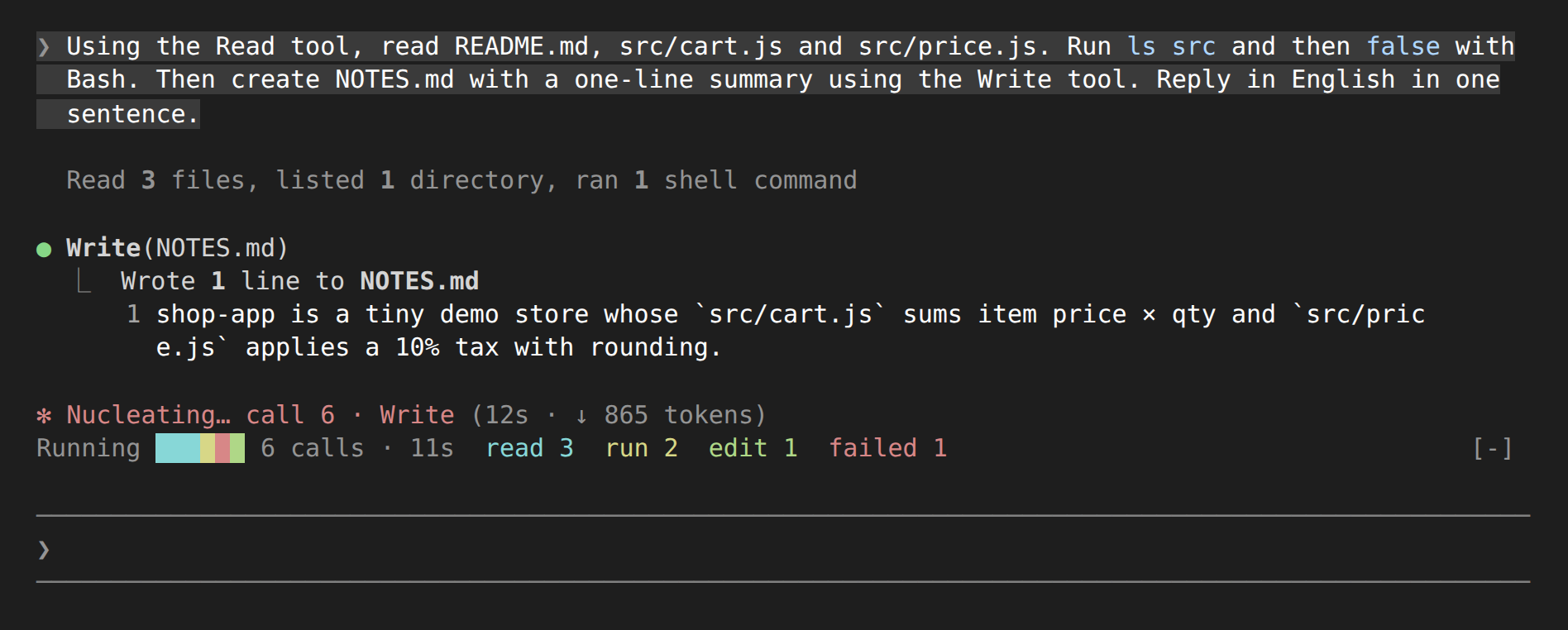
進行 ▮▮▮▮▮▮ 6回 · 9秒 読3 実2 編1 失1+12 のように数だけ出します。| 色 | 種類 | 対象のツール |
|---|---|---|
| 水色 | 読(read) | Read, Grep, Glob, LS, NotebookRead |
| 黄 | 実(run) | Bash, BashOutput, KillShell, Monitor |
| 緑 | 編(edit) | Edit, Write, MultiEdit, NotebookEdit |
| 青 | 網(web) | WebFetch, WebSearch, Playwright MCP |
| 紫 | 委(agent) | Agent, Task, SendMessage |
| 灰 | 他(other) | 上記以外(MCPツールなど) |
| 赤 | 失(failed) | 拒否された、またはエラーを返した呼び出し |
作業中のスピナーの後ろにも、何回目の呼び出しかと直近のツール名を … 6回目 · Write のように足します。
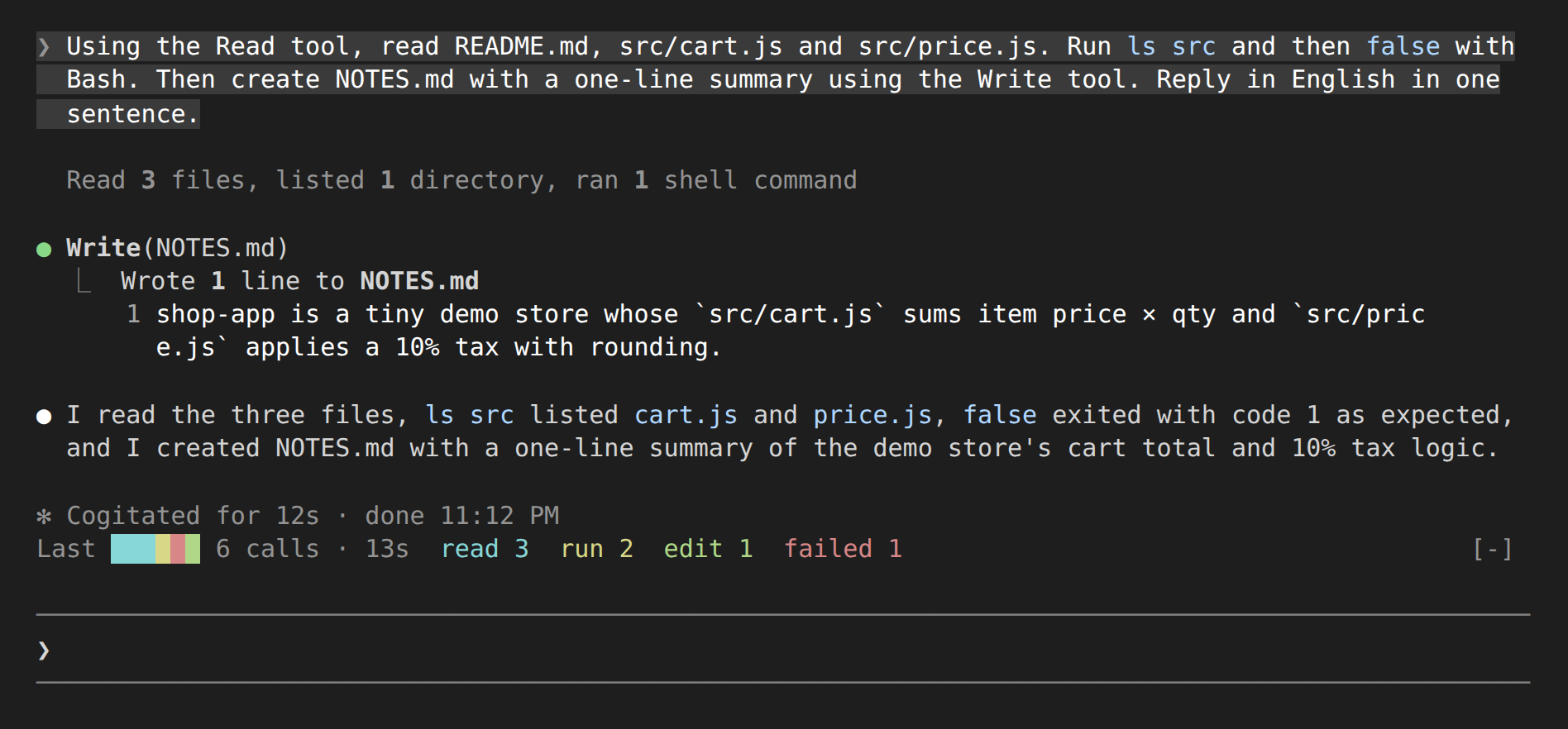
スクリーンショットは英語表示(LANG=en_US.UTF-8)で撮影しています。
claude -p では何も描画されません。呼び出しを数える処理だけが動きます。Claude Codeのセッションで次を実行します。
/plugin install tool-tape --marketplace DonMecha/tool-tapeマーケットプレイスの追加を確認されたら y、スコープは既定のユーザースコープを選びます。
インストールせずに試すときは、このリポジトリをcloneして次のように起動します。
claude --plugin-dir ./tool-tape表示言語は既定で auto です。LC_ALL・LC_MESSAGES・LANG の順に見て、ja で始まれば日本語、それ以外は英語で表示します。固定する場合は /config の設定欄で選ぶか、ユーザー設定ファイル(settings.json)に次のように書きます。
{
  "pluginConfigs": {
    "tool-tape@tool-tape": { "options": { "language": "ja" } }
  }
}
止めるときは claude plugin disable tool-tape@tool-tape を実行します。
LC_ALL・LC_MESSAGES・LANG だけです。claude plugin validate .
claude plugin test .hooks/register.tsx 154 lines1import type { Register } from 'claude-code'
2
3// Lays out each tool call of the current turn as one colored cell above the prompt,
4// with the call count, elapsed time and a per-kind breakdown, and adds the call
5// count and the latest tool to the spinner.
6
7type Kind = 'read' | 'run' | 'edit' | 'web' | 'agent' | 'other'
8type Pip = { kind: Kind; failed: boolean }
9type Lang = 'en' | 'ja'
10
11const COLORS: Record<Kind, string> = {
12 read: '#5fb3d9',
13 run: '#e5c07b',
14 edit: '#98c379',
15 web: '#61afef',
16 agent: '#c678dd',
17 other: '#7f848e',
18}
19const FAILED = '#e06c75'
20const TAPE_MAX = 40
21
22const TEXT = {
23 en: {
24 kinds: { read: 'read ', run: 'run ', edit: 'edit ', web: 'web ', agent: 'agent ', other: 'other ' },
25 failed: 'failed ',
26 running: 'Running ',
27 last: 'Last ',
28 calls: (n: number) => `${n} ${n === 1 ? 'call' : 'calls'}`,
29 nth: (n: number) => `call ${n}`,
30 time: (m: number, s: number) => (m === 0 ? `${s}s` : `${m}m ${s}s`),
31 },
32 ja: {
33 kinds: { read: '読', run: '実', edit: '編', web: '網', agent: '委', other: '他' },
34 failed: '失',
35 running: '進行 ',
36 last: '前回 ',
37 calls: (n: number) => `${n}回`,
38 nth: (n: number) => `${n}回目`,
39 time: (m: number, s: number) => (m === 0 ? `${s}秒` : `${m}分${s}秒`),
40 },
41} as const
42
43const kindOf = (tool: string): Kind => {
44 if (['Read', 'Grep', 'Glob', 'LS', 'NotebookRead'].includes(tool)) return 'read'
45 if (['Bash', 'BashOutput', 'KillShell', 'Monitor'].includes(tool)) return 'run'
46 if (['Edit', 'Write', 'MultiEdit', 'NotebookEdit'].includes(tool)) return 'edit'
47 if (['WebFetch', 'WebSearch'].includes(tool) || tool.startsWith('mcp__playwright__')) return 'web'
48 if (['Agent', 'Task', 'SendMessage'].includes(tool)) return 'agent'
49 return 'other'
50}
51
52const shortName = (tool: string) => (tool.startsWith('mcp__') ? tool.split('__').pop() ?? tool : tool)
53
54const pickLang = (setting: unknown, locale: string | undefined): Lang => {
55 if (setting === 'en' || setting === 'ja') return setting
56 return locale?.toLowerCase().startsWith('ja') ? 'ja' : 'en'
57}
58
59export const register: Register = (on, options) => {
60 let lang: Lang = pickLang(options.language, undefined)
61 let pips: Pip[] = []
62 let lastTool = ''
63 let started = false
64 let startedAt = 0
65 let endedAt = 0
66 let working = false
67 let tick: { cancel: () => void } | undefined
68
69 on('session.start', async ($, e, next) => {
70 if (options.language !== 'en' && options.language !== 'ja') {
71 const locale = (await $.env.get('LC_ALL')) || (await $.env.get('LC_MESSAGES')) || (await $.env.get('LANG'))
72 lang = pickLang(options.language, locale)
73 }
74 return next(e)
75 })
76
77 on('prompt.submit', async ($, e, next) => {
78 pips = []
79 lastTool = ''
80 startedAt = await $.clock.now()
81 started = true
82 endedAt = 0
83 working = true
84 tick?.cancel()
85 tick = $.clock.every(1000, () => $.ui.invalidate('ui.render'))
86 $.ui.invalidate('ui.render')
87 return next(e)
88 }).catch(($, e, next) => next(e))
89
90 on('tool.call', async ($, e, next) => {
91 const pip: Pip = { kind: kindOf(e.tool), failed: false }
92 pips.push(pip)
93 lastTool = shortName(e.tool)
94 $.ui.invalidate('ui.render')
95 const ran = await next(e)
96 if (ran.deny !== undefined || ran.isError === true) {
97 pip.failed = true
98 $.ui.invalidate('ui.render')
99 }
100 return ran
101 }).catch(($, e, next) => next(e))
102
103 on('turn.complete', async ($, e, next) => {
104 endedAt = await $.clock.now()
105 working = false
106 tick?.cancel()
107 tick = undefined
108 $.ui.invalidate('ui.render')
109 return next(e)
110 })
111
112 on('ui.render', { component: 'Spinner' }, ($, e, next) =>
113 pips.length === 0
114 ? next(e)
115 : next({ ...e, props: { ...e.props, suffix: `… ${TEXT[lang].nth(pips.length)} · ${lastTool}` } }),
116 )
117
118 on('ui.render', { component: 'AbovePrompt' }, async ($, e, next) => {
119 if (e.props.hasSurvey || !started) return next(e)
120
121 const t = TEXT[lang]
122 const { Box, Text } = $.ui.resolve(e)
123 const sec = Math.round(((working ? await $.clock.now() : endedAt) - startedAt) / 1000)
124 const shown = pips.slice(-TAPE_MAX)
125 const hidden = pips.length - shown.length
126 const failed = pips.filter(p => p.failed).length
127 const counts = (Object.keys(COLORS) as Kind[])
128 .map(kind => ({ kind, n: pips.filter(p => p.kind === kind).length }))
129 .filter(c => c.n > 0)
130
131 return (
132 <Box flexDirection="row">
133 <Text dimColor>{working ? t.running : t.last}</Text>
134 {hidden > 0 ? <Text dimColor>+{hidden} </Text> : null}
135 {shown.map(p => (
136 <Text backgroundColor={p.failed ? FAILED : COLORS[p.kind]}> </Text>
137 ))}
138 {shown.length > 0 ? <Text> </Text> : null}
139 <Text dimColor>
140 {t.calls(pips.length)} · {t.time(Math.floor(sec / 60), sec % 60)}
141 </Text>
142 {counts.map(c => (
143 <Text color={COLORS[c.kind]}>
144 {' '}
145 {t.kinds[c.kind]}
146 {c.n}
147 </Text>
148 ))}
149 {failed > 0 ? <Text color={FAILED}>{' '}{t.failed}{failed}</Text> : null}
150 </Box>
151 )
152 })
153}
154