post-its
Painel lateral de post-its: crie, conclua e consulte os concluídos
newpanecommandtimer

Painel lateral de post-its: crie, conclua e consulte os concluídos
Um mod para o Claude Code: painel lateral de post-its no terminal.
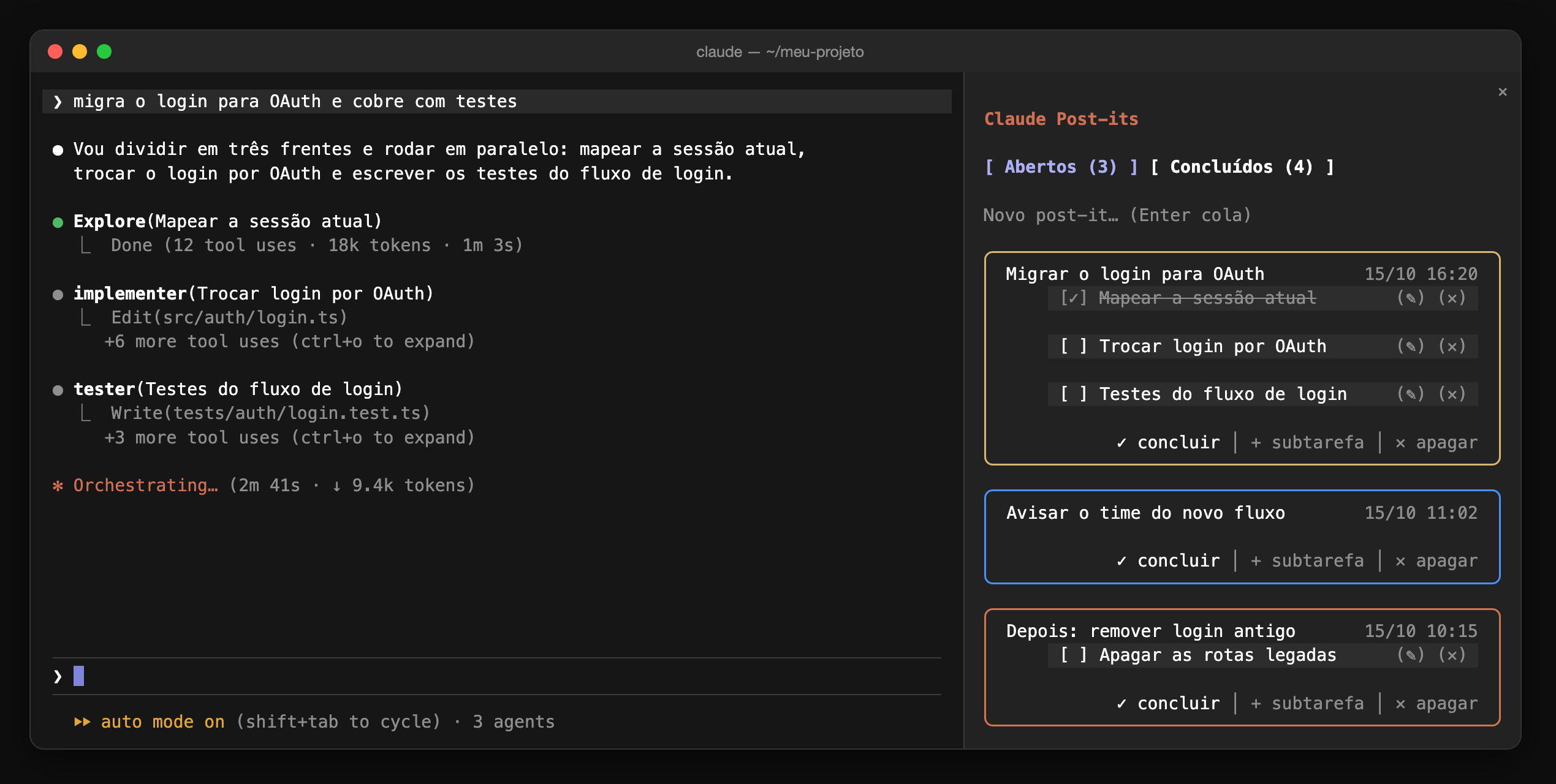
Enquanto os agentes trabalham na conversa, o painel ao lado guarda a tarefa atual, com uma subtarefa por frente, e as próximas que vêm depois.
(✎)) e removíveis ((✕)).Numa sessão do Claude Code no terminal:
/plugin install post-its --marketplace DiogoGRS/claude-post-itsResponda y para adicionar o marketplace e escolha o escopo de usuário. O mod fica ativo na hora e em toda sessão seguinte.
/postits abre ou fecha o painel.Esc devolve o teclado ao prompt.Quem decide a largura da lateral é o Claude Code: 45% do terminal (até 90 colunas), ou a largura que você arrastar na borda do painel, que ele guarda em ~/.claude.json (pluginPanes.dockColumns) e lê ao iniciar.
Os post-its ficam no store do plugin, em ~/.claude/plugins/store/, fora deste repositório.
claude --plugin-dir .            # carrega o mod desta pasta numa sessão
claude plugin validate .         # confere o manifesto e o módulo
claude plugin test .             # roda tests/*.test.ts
Os tipos da API (.claude-plugin/types/) são gerados pelo Claude Code ao carregar o mod; depois disso tsc -p . checa os tipos.
hooks/register.tsx 566 lines1import { atom, read, update } from 'claude-code'
2import type { EngineInterface, Register, RenderViewport, Timer } from 'claude-code'
3
4import type { Note, Subtask } from '../types'
5
6const PANE = 'post-its'
7const TITLE = 'Post-its'
8// Cores dos post-its, na ordem em que são distribuídas: o post-it criado com o contador em n
9// recebe a cor da posição n % 6. A cor fica gravada nele, então mudar a lista não repinta os antigos.
10const PALETTE = {
11 laranja: '#E07B53',
12 azul: '#4A9EFF',
13 amarelo: '#E5C07B',
14 verde: '#5FB878',
15 ciano: '#3CC8C8',
16 roxo: '#A47DE8',
17} as const
18type ColorName = keyof typeof PALETTE
19const COLOR_ORDER = Object.keys(PALETTE) as ColorName[]
20
21const notes = atom({ plugin: 'post-its', key: 'notes' } as const, [])
22const tab = atom({ plugin: 'post-its', key: 'tab' } as const, 'open')
23// O post-it cujo campo de subtarefa está aberto, ou nenhum.
24const addingSubtaskTo = atom({ plugin: 'post-its', key: 'addingSubtaskTo' } as const, null)
25const editingSubtask = atom({ plugin: 'post-its', key: 'editingSubtask' } as const, null)
26
27function isSubtask(value: unknown): value is Subtask {
28 if (typeof value !== 'object' || value === null) return false
29 const sub = value as Record<string, unknown>
30
31 return typeof sub.id === 'string' && typeof sub.text === 'string' && typeof sub.isDone === 'boolean'
32}
33
34// Lê um post-it do store; os gravados antes das subtarefas existirem entram com a lista vazia.
35function toNote(value: unknown): Note | undefined {
36 if (typeof value !== 'object' || value === null) return undefined
37 const note = value as Record<string, unknown>
38 const isValid =
39 typeof note.id === 'string' &&
40 typeof note.text === 'string' &&
41 typeof note.createdAt === 'number' &&
42 (note.doneAt === null || typeof note.doneAt === 'number')
43 if (!isValid) return undefined
44
45 return {
46 id: note.id as string,
47 text: note.text as string,
48 createdAt: note.createdAt as number,
49 doneAt: note.doneAt as number | null,
50 subtasks: Array.isArray(note.subtasks) ? note.subtasks.filter(isSubtask) : [],
51 // Sem cor válida fica vazio: o session.start distribui as cores que faltam.
52 color: isColorName(note.color) ? note.color : '',
53 }
54}
55
56// O estado da sessão pode ainda ter post-its de antes das subtarefas (um reload desenha antes
57// do session.start normalizar): quem lê a lista passa por aqui.
58const withSubtasks = (note: Note): Note => ({ ...note, subtasks: note.subtasks ?? [] })
59
60const newId = (now: number) => `${now.toString(36)}-${Math.random().toString(36).slice(2, 8)}`
61
62const pad = (n: number) => String(n).padStart(2, '0')
63
64function formatDate(ms: number): string {
65 const d = new Date(ms)
66
67 return `${pad(d.getDate())}/${pad(d.getMonth() + 1)} ${pad(d.getHours())}:${pad(d.getMinutes())}`
68}
69
70const isColorName = (value: unknown): value is ColorName =>
71 typeof value === 'string' && Object.hasOwn(PALETTE, value)
72
73const colorAt = (count: number): ColorName => COLOR_ORDER[count % COLOR_ORDER.length] ?? 'laranja'
74
75const colorOf = (note: Note) => PALETTE[isColorName(note.color) ? note.color : 'laranja']
76
77// O contador só sobe (apagar um post-it não o faz voltar) e fica no store, entre sessões.
78async function readColorCounter($: EngineInterface) {
79 const stored = await $.store.get('colorCounter')
80
81 return typeof stored === 'number' ? stored : 0
82}
83
84async function nextColor($: EngineInterface): Promise<ColorName> {
85 const count = await readColorCounter($)
86 await $.store.set('colorCounter', count + 1)
87
88 return colorAt(count)
89}
90
91// Toda mudança passa por aqui: grava no estado da sessão (redesenha o painel)
92// e no store do plugin (sobrevive entre sessões).
93async function change($: EngineInterface, fn: (list: Note[]) => Note[]) {
94 const saved = await update($, notes, list => fn(list.map(withSubtasks)))
95 await $.store.set('notes', saved)
96}
97
98async function add($: EngineInterface, text: string) {
99 const trimmed = text.trim()
100 if (trimmed === '') return
101
102 const now = await $.clock.now()
103 const color = await nextColor($)
104 await change($, list => [
105 ...list,
106 { id: newId(now), text: trimmed, createdAt: now, doneAt: null, subtasks: [], color },
107 ])
108}
109
110// Abre (ou fecha, se já aberto) o campo de subtarefa do post-it e leva o foco até ele.
111async function toggleSubtaskField($: EngineInterface, noteId: string) {
112 const target = await update($, addingSubtaskTo, current => (current === noteId ? null : noteId))
113 if (target === noteId) {
114 await $.ui.focus({ requestId: PANE, key: `subtask:${noteId}` }).catch(() => undefined)
115 }
116}
117
118// Enter com texto cria a subtarefa; Enter vazio só fecha o campo.
119async function addSubtask($: EngineInterface, noteId: string, text: string) {
120 const trimmed = text.trim()
121 if (trimmed !== '') {
122 const subtask = { id: newId(await $.clock.now()), text: trimmed, isDone: false }
123 await change($, list =>
124 list.map(note =>
125 note.id === noteId ? { ...note, subtasks: [...note.subtasks, subtask] } : note,
126 ),
127 )
128 }
129 await update($, addingSubtaskTo, () => null)
130}
131
132const toggleSubtask = ($: EngineInterface, noteId: string, subtaskId: string) =>
133 change($, list =>
134 list.map(note =>
135 note.id === noteId
136 ? {
137 ...note,
138 subtasks: note.subtasks.map(sub =>
139 sub.id === subtaskId ? { ...sub, isDone: !sub.isDone } : sub,
140 ),
141 }
142 : note,
143 ),
144 )
145
146// Abre (ou fecha, se já aberta) a edição da subtarefa e leva o foco até o campo.
147async function toggleSubtaskEdit($: EngineInterface, noteId: string, subtaskId: string) {
148 const key = `${noteId}:${subtaskId}`
149 const target = await update($, editingSubtask, current => (current === key ? null : key))
150 if (target === key) {
151 await $.ui.focus({ requestId: PANE, key: `editsub:${key}` }).catch(() => undefined)
152 }
153}
154
155// Enter com texto salva; Enter vazio cancela e deixa o texto como estava.
156async function saveSubtask($: EngineInterface, noteId: string, subtaskId: string, text: string) {
157 const trimmed = text.trim()
158 if (trimmed !== '') {
159 await change($, list =>
160 list.map(note =>
161 note.id === noteId
162 ? {
163 ...note,
164 subtasks: note.subtasks.map(sub =>
165 sub.id === subtaskId ? { ...sub, text: trimmed } : sub,
166 ),
167 }
168 : note,
169 ),
170 )
171 }
172 await update($, editingSubtask, () => null)
173}
174
175const removeSubtask = ($: EngineInterface, noteId: string, subtaskId: string) =>
176 change($, list =>
177 list.map(note =>
178 note.id === noteId
179 ? { ...note, subtasks: note.subtasks.filter(sub => sub.id !== subtaskId) }
180 : note,
181 ),
182 )
183
184async function complete($: EngineInterface, id: string) {
185 const now = await $.clock.now()
186 await change($, list => list.map(note => (note.id === id ? { ...note, doneAt: now } : note)))
187}
188
189const reopen = ($: EngineInterface, id: string) =>
190 change($, list => list.map(note => (note.id === id ? { ...note, doneAt: null } : note)))
191
192const remove = ($: EngineInterface, id: string) =>
193 change($, list => list.filter(note => note.id !== id))
194
195// ── Lugar e largura do painel ─────────────────────────────────────────────────────────────
196// Como o Claude Code se comporta (medido e lido no código dele, versão 2.1.292):
197// - o painel só fica na lateral em tela cheia e com o terminal em 110 colunas ou mais; abaixo
198// disso ele desce para cima do prompt, e não há como forçar a lateral;
199// - a largura da lateral é a salva no ~/.claude.json (`pluginPanes.dockColumns`, onde vai a
200// largura arrastada na borda), lida quando o Claude Code inicia; sem ela, 45% do terminal
201// (até 90 colunas). O mod não define largura: o pedido dele perde para a salva;
202// - aberto sem a pessoa pedir (por timer), o painel espera escondido até o terminal ter 110
203// colunas, e então aparece na lateral.
204
205const DOCK_MIN_COLUMNS = 110
206// Espera o terminal parar de mudar de tamanho antes de esconder o painel, para não piscar.
207const RESIZE_SETTLE_MS = 400
208
209const isNarrow = (isFullscreen: boolean | undefined, terminal: number) =>
210 isFullscreen === true && terminal < DOCK_MIN_COLUMNS
211
212const openPane = ($: EngineInterface, focus?: true) =>
213 $.ui.open({ id: PANE, title: TITLE, ...(focus ? { focus } : {}) })
214
215// Fecha e abre sem a pessoa pedir: o painel sai de cima do prompt e espera escondido até o
216// terminal alargar.
217async function hidePane($: EngineInterface) {
218 await $.ui.close({ id: PANE })
219
220 return openPane($)
221}
222
223// Abre por timer, sem a pessoa pedir: com o terminal estreito, espera escondido até alargar.
224function openWhenWide($: EngineInterface) {
225 $.clock.after(0, () => void openPane($))
226}
227
228// Esconder-até-alargar deste carregamento do módulo: o timer que espera o redimensionamento
229// parar, e a largura para a qual já escondeu, para não fechar e abrir sem fim.
230let settleTimer: Timer | undefined
231let hiddenFor: number | undefined
232
233// Chamado a cada desenho do painel (o Claude Code redesenha quando o terminal muda de largura).
234// Se o painel desceu para cima do prompt porque o terminal estreitou, esconde e espera alargar.
235// Fora da tela cheia não há lateral, então ali ele fica onde está.
236function keepDocked(
237 $: EngineInterface,
238 placement: 'dock' | 'inline',
239 viewport: RenderViewport | undefined,
240) {
241 settleTimer?.cancel()
242 if (placement === 'dock') hiddenFor = undefined
243 if (placement !== 'inline' || viewport === undefined) return
244
245 // Acima do prompt a conversa ocupa o terminal inteiro: a largura dela é a do terminal.
246 const terminal = viewport.columns
247 settleTimer = $.clock.after(RESIZE_SETTLE_MS, () => {
248 if (!isNarrow(viewport.isFullscreen, terminal) || hiddenFor === terminal) return
249 hiddenFor = terminal
250 void hidePane($).catch(() => undefined)
251 })
252}
253
254export const register: Register = on => {
255 on('session.start', async ($, e, next) => {
256 const saved = await $.store.get('notes')
257 let list = Array.isArray(saved)
258 ? saved.map(toNote).filter((note): note is Note => note !== undefined)
259 : []
260
261 // Post-its de antes das cores recebem as suas na ordem em que foram criados.
262 const uncolored = list.filter(note => note.color === '').sort((a, b) => a.createdAt - b.createdAt)
263 if (uncolored.length > 0) {
264 let count = await readColorCounter($)
265 const colors = new Map(uncolored.map(note => [note.id, colorAt(count++)]))
266 list = list.map(note => ({ ...note, color: colors.get(note.id) ?? note.color }))
267 await $.store.set('colorCounter', count)
268 await $.store.set('notes', list)
269 }
270
271 await update($, notes, () => list)
272
273 // Restos das versões anteriores do dimensionamento.
274 for (const key of ['widthColumns', 'paneColumns', 'widthDebug', 'widthPct', 'paneSize']) {
275 await $.store.delete(key)
276 }
277
278 await $.command.register({
279 name: 'postits',
280 description: 'Abre ou fecha o painel de post-its',
281 })
282
283 // Estava aberto na sessão anterior: reabre.
284 if ((await $.store.get('isOpen')) === true) void openPane($).catch(() => undefined)
285
286 return next(e)
287 })
288
289 on('command.run', { command: 'postits' }, async ($, e) => {
290 const terminal = e.presentation.columns
291 const pane = (await $.ui.panes()).find(one => one.id === PANE)
292
293 // Fecha se está à vista, ou se está esperando o terminal alargar.
294 if (pane?.isShown === true || (pane !== undefined && !pane.isPlaced)) {
295 await $.ui.close({ id: PANE })
296 await $.store.set('isOpen', false)
297
298 return { text: 'Post-its fechado.' }
299 }
300
301 await $.store.set('isOpen', true)
302
303 if (isNarrow(e.presentation.isFullscreen, terminal)) {
304 openWhenWide($)
305
306 return {
307 text: `O terminal tem ${terminal} colunas e o painel lateral precisa de ${DOCK_MIN_COLUMNS}: ele aparece sozinho quando o terminal alargar.`,
308 }
309 }
310
311 await openPane($, true)
312
313 return { text: 'Post-its aberto.' }
314 })
315
316 // Só o fechar da pessoa conta: o do próprio mod (esconder até alargar) mantém o painel ligado.
317 on('ui.close', { id: 'post-its' }, async ($, e, next) => {
318 if (e.origin.kind === 'person') await $.store.set('isOpen', false)
319
320 return next(e)
321 })
322
323 on('ui.render', { component: 'Pane', requestId: PANE }, async ($, e) => {
324 keepDocked($, e.props.placement, e.viewport)
325
326 const ui = $.ui.resolve(e)
327 const { Box, Text, Button } = ui
328 // O celular não desenha campo de texto.
329 const Input = 'Input' in ui && e.surface !== 'mobile' ? ui.Input : undefined
330 const list = (await read($, notes)).map(withSubtasks)
331 const current = await read($, tab)
332 const adding = await read($, addingSubtaskTo)
333 const editing = await read($, editingSubtask)
334 // Fundo do card de subtarefa: um tom acima do painel, claro ou escuro conforme o tema.
335 const isLight = await $.config.list().then(
336 rows => String(rows.find(row => row.key === 'theme')?.value ?? '').startsWith('light'),
337 () => false,
338 )
339 const cardBackground = isLight ? '#e6e6e6' : '#333333'
340
341 const open = list.filter(note => note.doneAt === null).reverse()
342 const done = list
343 .filter(note => note.doneAt !== null)
344 .sort((a, b) => (b.doneAt ?? 0) - (a.doneAt ?? 0))
345
346 // Texto do post-it à esquerda, data no canto superior direito.
347 const header = (text: string, date: string, isDim: boolean) => (
348 <Box justifyContent="space-between" gap={2}>
349 <Box flexShrink={1}>
350 <Text dimColor={isDim}>{text}</Text>
351 </Box>
352 <Box flexShrink={0}>
353 <Text dimColor>{date}</Text>
354 </Box>
355 </Box>
356 )
357
358 // Ações no canto direito, separadas por uma barra para ficar claro onde um botão termina e o
359 // outro começa, e uma linha em branco acima, para não colar no texto.
360 const actions = (buttons: JSX.Element[]) => (
361 <Box gap={1} flexWrap="wrap" justifyContent="flex-end" marginTop={1}>
362 {buttons.flatMap((button, i) => (i === 0 ? [button] : [<Text dimColor>│</Text>, button]))}
363 </Box>
364 )
365
366 // Título do painel: o terminal não muda o tamanho da fonte, então destaca com negrito e cor.
367 const title = (
368 <Text key="title" bold color="claude">
369 Claude Post-its
370 </Text>
371 )
372
373 const tabs = (
374 <Box gap={1} flexWrap="wrap">
375 <Button
376 key="tab:open"
377 label={`Abertos (${open.length})`}
378 variant={current === 'open' ? 'primary' : 'secondary'}
379 onPress={() => update($, tab, () => 'open')}
380 />
381 <Button
382 key="tab:done"
383 label={`Concluídos (${done.length})`}
384 variant={current === 'done' ? 'primary' : 'secondary'}
385 onPress={() => update($, tab, () => 'done')}
386 />
387 </Box>
388 )
389
390 if (current === 'done') {
391 return (
392 <Box flexDirection="column" gap={1}>
393 {title}
394 {tabs}
395 {done.length === 0 && <Text dimColor>Nada concluído ainda.</Text>}
396 {done.map(note => (
397 <Box
398 key={`note:${note.id}`}
399 flexDirection="column"
400 borderStyle="round"
401 borderDimColor
402 paddingX={2}
403 >
404 {header(note.text, `✓ ${formatDate(note.doneAt ?? note.createdAt)}`, true)}
405 {note.subtasks.length > 0 && (
406 <Box flexDirection="column" paddingLeft={4} gap={1}>
407 {note.subtasks.map(sub => (
408 <Box paddingX={1} backgroundColor={cardBackground}>
409 <Text dimColor>
410 {sub.isDone ? '[✓]' : '[ ]'} {sub.text}
411 </Text>
412 </Box>
413 ))}
414 </Box>
415 )}
416 {actions([
417 <Button
418 key={`reopen:${note.id}`}
419 plain
420 dimColor
421 label="↺ reabrir"
422 onPress={() => reopen($, note.id)}
423 />,
424 <Button
425 key={`remove:${note.id}`}
426 plain
427 dimColor
428 label="✕ apagar"
429 onPress={() => remove($, note.id)}
430 />,
431 ])}
432 </Box>
433 ))}
434 </Box>
435 )
436 }
437
438 return (
439 <Box flexDirection="column" gap={1}>
440 {title}
441 {tabs}
442 {Input ? (
443 <Input
444 key="new"
445 placeholder="Novo post-it… (Enter cola)"
446 submitLabel="colar"
447 value=""
448 autoFocus
449 onSubmit={text => add($, text)}
450 />
451 ) : (
452 <Text dimColor>Crie post-its pelo terminal ou pelo desktop.</Text>
453 )}
454 {open.length === 0 && <Text dimColor>Nenhum post-it aberto.</Text>}
455 {open.map(note => (
456 <Box
457 key={`note:${note.id}`}
458 flexDirection="column"
459 borderStyle="round"
460 borderColor={colorOf(note)}
461 paddingX={2}
462 >
463 {header(note.text, formatDate(note.createdAt), false)}
464 {(note.subtasks.length > 0 || adding === note.id) && (
465 <Box flexDirection="column" paddingLeft={4} gap={1}>
466 {note.subtasks.map(sub => {
467 const subKey = `${note.id}:${sub.id}`
468
469 return (
470 <Box
471 justifyContent="space-between"
472 gap={2}
473 paddingX={1}
474 backgroundColor={cardBackground}
475 >
476 {Input && editing === subKey ? (
477 <Box flexGrow={1}>
478 <Input
479 key={`editsub:${subKey}`}
480 value={sub.text}
481 placeholder="Vazio cancela"
482 submitLabel="salvar"
483 onSubmit={text => saveSubtask($, note.id, sub.id, text)}
484 />
485 </Box>
486 ) : (
487 <Box gap={1} flexShrink={1}>
488 <Button
489 key={`check:${subKey}`}
490 plain
491 dimColor={sub.isDone}
492 label={sub.isDone ? '[✓]' : '[ ]'}
493 onPress={() => toggleSubtask($, note.id, sub.id)}
494 />
495 <Text dimColor={sub.isDone} strikethrough={sub.isDone}>
496 {sub.text}
497 </Text>
498 </Box>
499 )}
500 <Box flexShrink={0} gap={1}>
501 {Input && (
502 <Button
503 key={`editbtn:${subKey}`}
504 plain
505 dimColor
506 label="(✎)"
507 onPress={() => toggleSubtaskEdit($, note.id, sub.id)}
508 />
509 )}
510 <Button
511 key={`rmsub:${subKey}`}
512 plain
513 dimColor
514 label="(✕)"
515 onPress={() => removeSubtask($, note.id, sub.id)}
516 />
517 </Box>
518 </Box>
519 )
520 })}
521 {Input && adding === note.id && (
522 <Box paddingX={1} backgroundColor={cardBackground}>
523 <Input
524 key={`subtask:${note.id}`}
525 placeholder="Subtarefa… (Enter cria, vazio cancela)"
526 submitLabel="criar"
527 value=""
528 onSubmit={text => addSubtask($, note.id, text)}
529 />
530 </Box>
531 )}
532 </Box>
533 )}
534 {actions([
535 <Button
536 key={`done:${note.id}`}
537 plain
538 label="✓ concluir"
539 onPress={() => complete($, note.id)}
540 />,
541 ...(Input
542 ? [
543 <Button
544 key={`addsub:${note.id}`}
545 plain
546 dimColor
547 label="+ subtarefa"
548 onPress={() => toggleSubtaskField($, note.id)}
549 />,
550 ]
551 : []),
552 <Button
553 key={`remove:${note.id}`}
554 plain
555 dimColor
556 label="✕ apagar"
557 onPress={() => remove($, note.id)}
558 />,
559 ])}
560 </Box>
561 ))}
562 </Box>
563 )
564 })
565}
566types/index.d.ts 30 lines1export type Subtask = {
2 id: string
3 text: string
4 isDone: boolean
5}
6
7export type Note = {
8 id: string
9 text: string
10 createdAt: number
11 doneAt: number | null
12 subtasks: Subtask[]
13 // Nome da cor na paleta (laranja, azul, ...), gravado quando o post-it é criado.
14 color: string
15}
16
17export type Tab = 'open' | 'done'
18
19declare module 'claude-code' {
20 interface PluginState {
21 'post-its': {
22 notes: Note[]
23 tab: Tab
24 addingSubtaskTo: string | null
25 // `<noteId>:<subtaskId>` da subtarefa em edição, ou nenhuma.
26 editingSubtask: string | null
27 }
28 }
29}
30