dgmo-pane
Renders each .dgmo file Claude writes or edits in a live side pane, and tells Claude the parser's errors
newpanebandguardcommandprompt

Renders each .dgmo file Claude writes or edits in a live side pane, and tells Claude the parser's errors
Ask Claude for a diagram and see it beside the conversation.
A Claude Code mod that adds a live diagram pane. Say "diagram the login flow" or "draw this directory structure", and Claude writes the diagram in DGMO and the picture appears in a side pane. When Claude gets the syntax wrong, the error goes back to Claude, which fixes it and tries again.
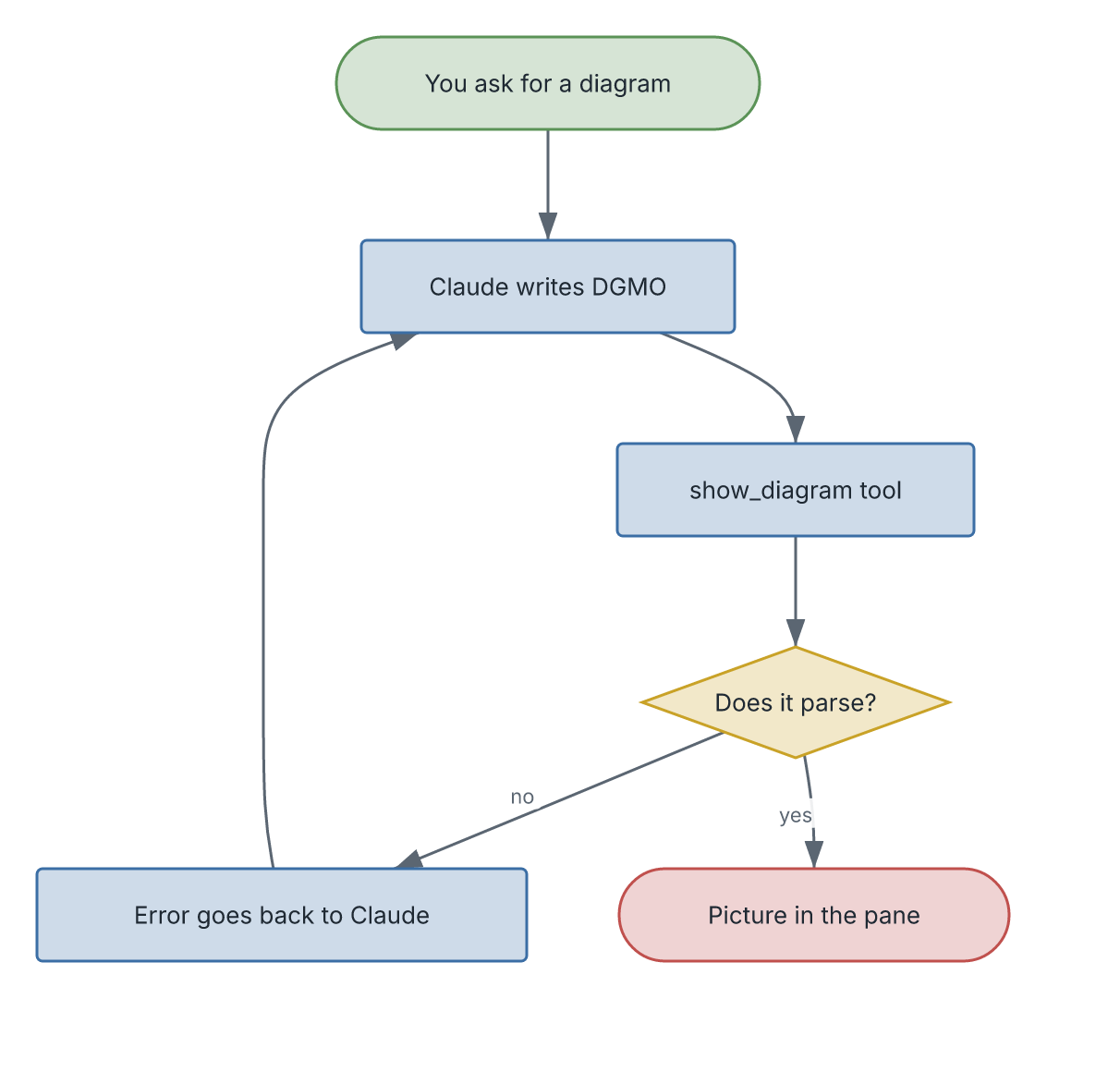
<sub>That picture is itself a DGMO diagram: assets/how-it-works.dgmo.</sub>
You need Claude Code 2.1.282 or later. Check with claude --version.
Inside a Claude Code session in your terminal, run:
/plugin install dgmo-pane --marketplace diagrammo/dgmo-paneIf it asks to add the diagrammo/dgmo-pane marketplace, answer y. If it asks for a scope, choose user to have the pane in every project.
Restart Claude Code (quit and run claude again). The /dgmo-pane command and the show_diagram tool are then ready.
The pane draws with the dgmo command. If you don't have it, the pane says so the first time and offers an Install dgmo button, which runs npm install -g @diagrammo/dgmo-cli for you (this needs Node.js). You can also run that command yourself beforehand.
| You do | What happens |
|---|---|
| Ask in plain words: "diagram how auth works here" | Claude draws it with show_diagram; the pane opens with the picture |
/dgmo-pane draw the release process | The same thing, as a command |
/dgmo-pane docs/arch.dgmo | Shows that .dgmo file |
Claude writes or edits any .dgmo file | The pane redraws it after each save |
/dgmo-pane | Opens the pane |
If a diagram does not parse, the pane keeps the last good picture and shows the error in red above it.
Where it draws: in Ghostty and kitty the diagram is a real image, and that works over ssh. The Claude desktop app and VS Code draw it as SVG. Other terminals show a one-line description instead.
In a shell:
claude plugin marketplace update dgmo-pane
claude plugin update dgmo-pane@dgmo-pane
Then restart Claude Code.
claude plugin uninstall dgmo-pane@dgmo-pane
claude plugin marketplace remove dgmo-pane| You see | Do this |
|---|---|
Unknown command: /dgmo-pane right after installing | Restart Claude Code |
| "dgmo is not installed" in the pane | Press Install dgmo, or run npm install -g @diagrammo/dgmo-cli |
| "npm was not found" after pressing Install | Install Node.js from nodejs.org, then press Install dgmo again |
| "dgmo is installed, but this session cannot find it" | Restart Claude Code. If it persists, check that dgmo --version works in the shell you start claude from |
| The pane does not open by itself | It waits until the terminal is at least 144 columns wide. Widen the window, or run /dgmo-pane to open it at any width |
| An empty box, or a one-line description where the picture should be | Your terminal cannot draw images. Use Ghostty or kitty, or the Claude desktop app |
| Claude keeps getting DGMO syntax wrong | Run dgmo install claude-code. It gives Claude the full DGMO language reference |
The mod API is early access, so a Claude Code update can change how mods work. If the pane breaks after an update, please open an issue with your claude --version.
claude plugin validate .
claude plugin test .
claude --plugin-dir . # run a session with this checkout loadedhooks/register.tsx 301 lines1import { atom, read, update } from 'claude-code'
2import type { EngineInterface, Register } from 'claude-code'
3
4import type { Diagram, Setup } from '../types'
5import { dgmoError, fitCells, pngSize } from './layout'
6
7const PANE = 'dgmo-pane'
8const OUT_DIR = '/tmp/dgmo-pane'
9/** Svg's own bound on its markup. */
10const MAX_SVG = 131072
11/** Image's bound on inline bytes, 2 MiB decoded, as base64 characters. */
12const MAX_PNG_BASE64 = Math.floor((2 * 1024 * 1024 * 4) / 3)
13
14const TOOL = 'show_diagram'
15const TOOL_ID = 'mcp__dgmo-pane__show_diagram'
16const TOOL_DESCRIPTION = [
17 'Draws a diagram for the user in the dgmo pane beside the conversation.',
18 'Use it whenever the user asks to diagram, draw, chart or visualize something.',
19 'Pass the diagram as DGMO source, the language of the `dgmo` command: the first line names the chart type and a title,',
20 'then the content, e.g. "flowchart Login\n\n(Start) -> [Check password] -> (Signed in)".',
21 'Run `dgmo types` for every chart type. A parse error comes back as the result: fix the source and call again.',
22].join(' ')
23
24const diagram = atom({ plugin: 'dgmo-pane', key: 'diagram' } as const, null as Diagram | null)
25const setup = atom({ plugin: 'dgmo-pane', key: 'setup' } as const, { isDgmoMissing: false } as Setup)
26
27const PACKAGE = '@diagrammo/dgmo-cli'
28const INSTALL_COMMAND = `npm install -g ${PACKAGE}`
29const MISSING = `dgmo is not installed. The user can press Install dgmo in the pane, or run \`${INSTALL_COMMAND}\`.`
30
31const isDgmoMissing = ($: EngineInterface): Promise<boolean> =>
32 $.process.run(['dgmo', '--version']).then(
33 ran => ran.exitCode !== 0,
34 () => true,
35 )
36
37/** The pane's Install dgmo button: npm installs the CLI, then the last diagram draws again. */
38const installDgmo = async ($: EngineInterface): Promise<void> => {
39 await update($, setup, (old): Setup => ({ ...old, install: 'running', installError: undefined }))
40 const ran = await $.process.run(['npm', 'install', '-g', PACKAGE], { timeoutMs: 600_000 }).catch(() => undefined)
41 let installError: string | undefined
42 if (ran === undefined) {
43 installError = 'npm was not found. Install Node.js from nodejs.org, then press Install dgmo again.'
44 } else if (ran.exitCode !== 0) {
45 const last = ran.stderr.trim().split('\n').filter(line => line.trim() !== '').pop() ?? `exit ${ran.exitCode}`
46 installError = `npm install failed: ${last}`
47 } else if (await isDgmoMissing($)) {
48 installError = 'dgmo is installed, but this session cannot find it. Restart Claude Code.'
49 }
50 await update($, setup, (): Setup => ({
51 isDgmoMissing: installError !== undefined,
52 install: installError === undefined ? 'done' : 'failed',
53 installError,
54 }))
55 const last = await read($, diagram)
56 if (installError === undefined && last !== null) await render($, last.path, last.label)
57}
58
59/** Renders to temp files; only the newest render of a path writes the state. */
60let latest = 0
61
62const render = async ($: EngineInterface, path: string, label?: string): Promise<string | undefined> => {
63 const ticket = ++latest
64 await update($, diagram, old => ({
65 ...(old?.path === path ? old : { generation: 0 }),
66 path,
67 label,
68 isRendering: true,
69 }))
70
71 const stem = `${OUT_DIR}/${path.replace(/[^A-Za-z0-9._-]/g, '_')}`
72 let error: string | undefined
73 let size: { width: number; height: number } | undefined
74 let bytes: string | undefined
75 let markup: string | undefined
76 try {
77 await $.process.run(['mkdir', '-p', OUT_DIR])
78 const [png, svg] = await Promise.all([
79 $.process.run(['dgmo', path, '-o', `${stem}.png`, '--json', '--theme', 'dark'], { timeoutMs: 60_000 }),
80 $.process.run(['dgmo', path, '-o', `${stem}.svg`, '--json', '--theme', 'dark'], { timeoutMs: 60_000 }),
81 ])
82 error = dgmoError(png.stdout, png.stderr, png.exitCode)
83 if (error === undefined) {
84 const { base64 } = await $.fs.read(`${stem}.png`, { as: 'bytes' })
85 if (base64.length > MAX_PNG_BASE64) throw new Error('the PNG is over the 2 MiB an Image takes')
86 bytes = base64
87 size = pngSize(Uint8Array.fromBase64(base64))
88 if (dgmoError(svg.stdout, svg.stderr, svg.exitCode) === undefined) {
89 const text = await $.fs.read(`${stem}.svg`).catch(() => undefined)
90 markup = text !== undefined && text.length <= MAX_SVG ? text : undefined
91 }
92 }
93 } catch (err) {
94 error = (await isDgmoMissing($))
95 ? MISSING
96 : `could not show it: ${err instanceof Error ? err.message : String(err)}`
97 }
98 const isMissing = error === MISSING
99 if ((await read($, setup)).isDgmoMissing !== isMissing) {
100 await update($, setup, old => ({ ...old, isDgmoMissing: isMissing }))
101 }
102 if (ticket !== latest) return error
103
104 await update($, diagram, old => {
105 const base: Diagram = old?.path === path ? old : { path, label, generation: 0, isRendering: false }
106 if (error !== undefined || size === undefined || bytes === undefined) {
107 return { ...base, error: error ?? 'dgmo wrote no readable PNG', isRendering: false }
108 }
109
110 return {
111 path,
112 label,
113 png: bytes,
114 width: size.width,
115 height: size.height,
116 svg: markup,
117 generation: base.generation + 1,
118 isRendering: false,
119 }
120 })
121
122 return error
123}
124
125/** Inline diagrams get a fresh file each, so one never overwrites a picture still drawing. */
126let inline = 0
127
128/**
129 * Declares the command and the tool. `session.start` is too late for a mod
130 * installed mid-session (the session has already started), so the first
131 * event after a load also tries; both calls replace what they declared.
132 */
133let isDeclared = false
134const declare = async ($: EngineInterface): Promise<void> => {
135 if (isDeclared) return
136 isDeclared = true
137 try {
138 await $.command.register({
139 name: 'dgmo-pane',
140 description: 'Show a diagram in the dgmo pane: a .dgmo file, or describe what to draw',
141 argumentHint: '[file.dgmo | what to draw]',
142 })
143 await $.tool.register({
144 name: TOOL,
145 description: TOOL_DESCRIPTION,
146 inputSchema: {
147 type: 'object',
148 properties: {
149 source: { type: 'string', description: 'The whole diagram in DGMO.' },
150 title: { type: 'string', description: 'A short name for the pane header.' },
151 },
152 required: ['source'],
153 },
154 })
155 } catch {
156 isDeclared = false
157 }
158}
159
160export const register: Register = on => {
161 on('session.start', async ($, e, next) => {
162 await declare($)
163
164 return next(e)
165 })
166
167 on('prompt.submit', async ($, e, next) => {
168 await declare($)
169
170 return next(e)
171 })
172
173 on('ui.render', { component: 'AbovePrompt' }, async ($, e, next) => {
174 void declare($)
175
176 return next(e)
177 })
178
179 on('command.run', { command: 'dgmo-pane' }, async ($, e) => {
180 await $.ui.open({ id: PANE, title: 'dgmo' }).catch(() => undefined)
181 const arg = e.args.trim()
182 if (arg === '') return { text: 'dgmo pane opened.' }
183
184 const stat = await $.fs.stat(arg, { resolve: true }).catch(() => undefined)
185 if (stat?.realPath !== undefined && stat.kind === 'file') {
186 const error = await render($, stat.realPath)
187
188 return { text: error === undefined ? `Rendered ${arg}.` : `dgmo: ${error}` }
189 }
190
191 // A command.run hook cannot submit: the prompt would wait on the dispatch
192 // this hook holds. A timer runs after it, once the session is idle.
193 $.clock.after(0, () => {
194 void $.prompt.submit({ text: `Draw this with the ${TOOL} tool: ${arg}`, asUser: true }).catch(() => undefined)
195 })
196
197 return { text: 'Asked Claude to draw it.' }
198 })
199
200 on('tool.call', { tool: TOOL_ID }, async ($, e) => {
201 const input = (e as unknown as { source?: unknown; title?: unknown })
202 if (typeof input.source !== 'string' || input.source.trim() === '') {
203 return { result: 'show_diagram needs `source`, the diagram in DGMO.', isError: true }
204 }
205 const title = typeof input.title === 'string' && input.title.trim() !== '' ? input.title.trim() : undefined
206 const path = `${OUT_DIR}/inline-${++inline}.dgmo`
207 const isWritten = await $.fs
208 .write(path, input.source.endsWith('\n') ? input.source : `${input.source}\n`)
209 .then(() => true, () => false)
210 if (!isWritten) return { result: `show_diagram could not write ${path}.`, isError: true }
211 void $.ui.open({ id: PANE, title: 'dgmo' }).catch(() => undefined)
212 const error = await render($, path, title)
213
214 return error === undefined
215 ? { result: 'The diagram is showing in the dgmo pane.' }
216 : { result: `dgmo could not render it: ${error}`, isError: true }
217 })
218
219 on('tool.call', async ($, e, next) => {
220 const ran = await next(e)
221 const isEdit = e.tool === 'Write' || e.tool === 'Edit'
222 if (!isEdit || ran.deny !== undefined || ran.isError === true) return ran
223 const path = e.file_path
224 if (!path.endsWith('.dgmo')) return ran
225
226 void $.ui.open({ id: PANE, title: 'dgmo' }).catch(() => undefined)
227 const error = await render($, path)
228 if (error === undefined) return ran
229
230 return { ...ran, context: [...(ran.context ?? []), `dgmo could not render ${path}: ${error}`] }
231 }).catch(($, e, next) => next(e))
232
233 on('ui.render', { component: 'Pane', requestId: PANE }, async ($, e) => {
234 const shown = await read($, diagram)
235 const name = shown?.label ?? shown?.path.split('/').pop() ?? ''
236 const status = shown === null ? '' : shown.isRendering ? ' · rendering…' : ''
237 const header = `${name}${status}`
238
239 const ready = await read($, setup)
240 if (ready.isDgmoMissing) {
241 const { Box, Text, Button } = $.ui.resolve(e)
242
243 return (
244 <Box flexDirection="column">
245 <Text bold>dgmo is not installed</Text>
246 <Text>The pane needs the dgmo command to draw diagrams.</Text>
247 {ready.install === 'running' ? (
248 <Text>Installing {PACKAGE}…</Text>
249 ) : (
250 <Button key="install" label="Install dgmo" hotkey="i" onPress={() => installDgmo($)} />
251 )}
252 {ready.installError !== undefined && <Text color="red">✖ {ready.installError}</Text>}
253 <Text>Or run it yourself: {INSTALL_COMMAND}</Text>
254 </Box>
255 )
256 }
257
258 if (e.surface === 'terminal') {
259 const { Box, Text, Image } = $.ui.resolve(e)
260 if (shown === null) {
261 return <Text dimColor>Nothing drawn yet. Ask Claude to diagram something, or run /dgmo-pane <file or description>.</Text>
262 }
263 const errorRows = shown.error === undefined ? 0 : 3
264 const room = {
265 columns: Math.max(1, (e.viewport?.columns ?? 80) - 2),
266 rows: Math.max(1, (e.viewport?.rows ?? 24) - 6 - errorRows),
267 }
268 const cells = shown.width && shown.height ? fitCells({ width: shown.width, height: shown.height }, room) : undefined
269
270 return (
271 <Box flexDirection="column">
272 <Text bold>{header}</Text>
273 {shown.error !== undefined && <Text color="red">✖ {shown.error}</Text>}
274 {shown.png !== undefined && cells !== undefined ? (
275 <Image
276 key="diagram"
277 source={{ png: shown.png }}
278 columns={cells.columns}
279 rows={cells.rows}
280 alt={`diagram from ${name}`}
281 />
282 ) : (
283 <Text dimColor>No picture yet.</Text>
284 )}
285 </Box>
286 )
287 }
288
289 const { Box, Text, Svg } = $.ui.resolve(e)
290 if (shown === null) return <Text>Nothing drawn yet. Ask Claude to diagram something.</Text>
291
292 return (
293 <Box flexDirection="column">
294 <Text bold>{header}</Text>
295 {shown.error !== undefined && <Text color="red">✖ {shown.error}</Text>}
296 {shown.svg !== undefined ? <Svg source={shown.svg} alt={`diagram from ${name}`} /> : <Text>No picture yet.</Text>}
297 </Box>
298 )
299 })
300}
301hooks/layout.ts 44 lines1/** Width and height of a PNG from its IHDR chunk, or undefined if not a PNG. */
2export const pngSize = (bytes: Uint8Array): { width: number; height: number } | undefined => {
3 const SIGNATURE = [0x89, 0x50, 0x4e, 0x47]
4 if (bytes.length < 24 || SIGNATURE.some((b, i) => bytes[i] !== b)) return undefined
5 const view = new DataView(bytes.buffer, bytes.byteOffset, bytes.byteLength)
6
7 return { width: view.getUint32(16), height: view.getUint32(20) }
8}
9
10/** A terminal cell is about twice as tall as it is wide. */
11const CELL_ASPECT = 2
12const MAX_CELLS = 255
13
14/** Fits a picture into the pane, keeping its aspect ratio. */
15export const fitCells = (
16 size: { width: number; height: number },
17 room: { columns: number; rows: number },
18): { columns: number; rows: number } => {
19 const ratio = size.height / size.width / CELL_ASPECT
20 let columns = Math.min(MAX_CELLS, Math.max(1, room.columns))
21 let rows = Math.round(columns * ratio)
22 const maxRows = Math.min(MAX_CELLS, Math.max(1, room.rows))
23 if (rows > maxRows) {
24 rows = maxRows
25 columns = Math.max(1, Math.round(rows / ratio))
26 }
27
28 return { columns, rows: Math.max(1, rows) }
29}
30
31/** The error `dgmo --json` reports, or undefined on success. */
32export const dgmoError = (stdout: string, stderr: string, exitCode: number): string | undefined => {
33 try {
34 const report = JSON.parse(stdout) as { success?: boolean; error?: string }
35 if (report.success === true) return undefined
36 if (typeof report.error === 'string') return report.error
37 } catch {
38 // not JSON: fall through to the raw streams
39 }
40 const text = (stderr || stdout).trim()
41
42 return exitCode === 0 && text === '' ? undefined : text || `dgmo exited ${exitCode}`
43}
44types/index.d.ts 34 lines1export type Diagram = {
2 /** The .dgmo file shown, absolute. */
3 path: string
4 /** What the pane calls it; the file name when absent. */
5 label?: string
6 /** The last PNG that rendered, base64; sent inline so it draws over ssh too. */
7 png?: string
8 /** Its pixel size, read from the PNG header. */
9 width?: number
10 height?: number
11 /** The last SVG that rendered, for surfaces without Image. */
12 svg?: string
13 /** Counts the renders that succeeded. */
14 generation: number
15 /** The parser's error for the latest save; the picture is the last good one. */
16 error?: string
17 isRendering: boolean
18}
19
20export type Setup = {
21 /** The last render could not start `dgmo`, and `dgmo --version` failed too. */
22 isDgmoMissing: boolean
23 /** The pane's Install dgmo button: absent until pressed. */
24 install?: 'running' | 'done' | 'failed'
25 /** Why the install did not leave a working `dgmo`. */
26 installError?: string
27}
28
29declare module 'claude-code' {
30 interface PluginState {
31 'dgmo-pane': { diagram: Diagram | null; setup: Setup }
32 }
33}
34