context-meter
A tiny meter in the bar under the prompt showing how full the context window is: five cells, the percent and the token counts.
newspinnerguardtimer

A tiny meter in the bar under the prompt showing how full the context window is: five cells, the percent and the token counts.
A Claude Code mod that shows how full your context window is, as a tiny meter in the bar under the prompt. You can see a /compact coming before it happens.
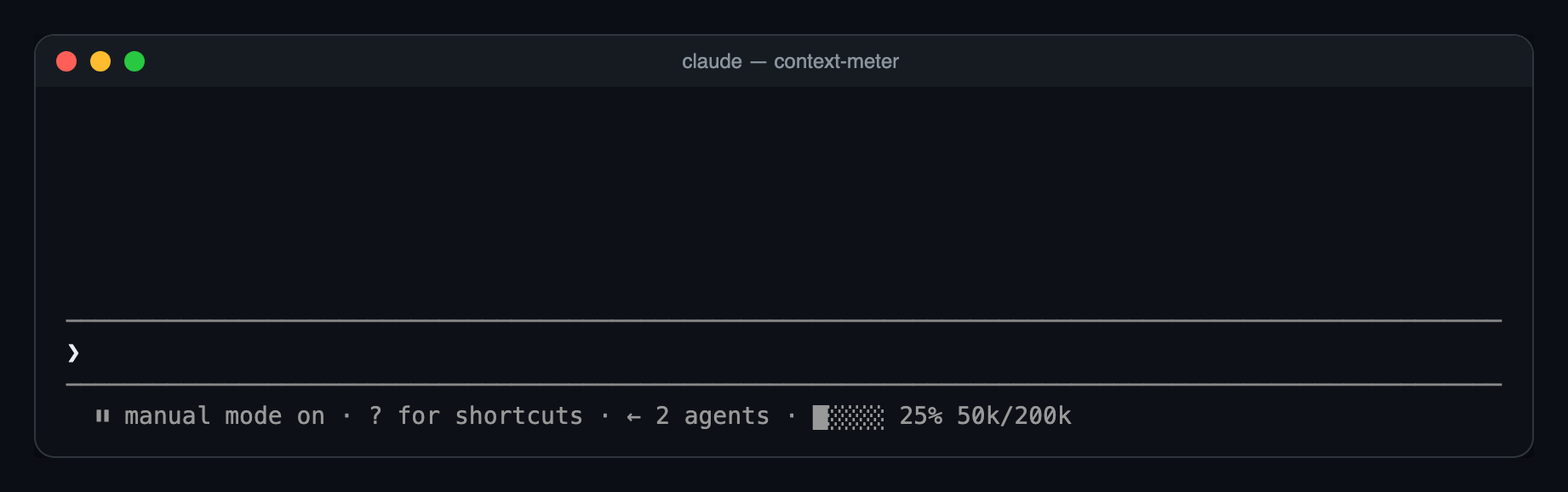
⏵⏵ auto mode on · ████░ 76% 152k/200kused_percentage.49k/1M.Nothing shows until the first response of a session, or the first one after /compact or /clear, because there's no reading yet.
You need Claude Code 2.1.287 or newer.
git clone https://github.com/cjavdev/mods.git ~/mods
claude --plugin-dir ~/mods/context-meter
To load it in every session, add the folder to CLAUDE_CODE_PLUGIN_DIRS in the env block of ~/.claude/settings.json (separate several folders with :):
{ "env": { "CLAUDE_CODE_PLUGIN_DIRS": "~/mods/context-meter" } }It shares the bar with cache-shot-clock: the meter comes first, then the clock.
In /config, or under pluginConfigs["context-meter"].options in settings:
| Option | Default | |
|---|---|---|
enabled | true | Turns the meter off without unloading the mod. |
Near the top, Claude Code shows its own warning, such as 93% context used, while the meter reads 84%. Claude Code measures against the auto-compact threshold, which is a little below the full window. context-meter measures against the full window. As a result, auto-compact usually fires while the meter reads around 85–90%.
The mod is one hooks module, hooks/register.tsx:
$.session.usage() reads the window's fill. The plain call doesn't count tokens, so it costs nothing.$.state, declared in types/index.d.ts). The bar redraws whenever the reading changes.session.measure fires; the engine pushes it after each turn/compact or /clear between turnsui.render hook on the PromptHint component adds the meter as the hint line's tail. The terminal draws that line dim, so the meter has no color of its own. Other surfaces don't draw the tail yet.The bar and token formatting are pure functions in hooks/meter.ts.
claude plugin validate ~/mods/context-meter   # manifest and hooks check
claude plugin test ~/mods/context-meter       # runs tests/*.test.tsx
The screenshot is a real capture of Claude Code running the mod in tmux (tmux capture-pane -p -e), turned into a page with scripts/ansi2html.py and screenshotted.
hooks/register.tsx 60 lines1import { atom, read, update } from 'claude-code'
2import type { EngineInterface, Register } from 'claude-code'
3
4import type { Fill } from '../types'
5import { bar, compact } from './meter'
6
7const fill = atom({ plugin: 'context-meter', key: 'fill' } as const, null)
8
9// Reads the window's fill (the free call: no token counting) and stores it;
10// a changed value redraws the meter.
11const refresh = async ($: EngineInterface) => {
12 const { context } = await $.session.usage()
13 const now: Fill | null =
14 context.tokens === undefined || context.percent === undefined
15 ? null
16 : { tokens: context.tokens, window: context.window, percent: context.percent }
17
18 await update($, fill, prev =>
19 prev?.tokens === now?.tokens && prev?.window === now?.window ? prev : now,
20 )
21}
22
23export const register: Register = (on, options) => {
24 // Off in /config: hook nothing at all.
25 if (options.enabled === false) return
26
27 on('session.start', async ($, e, next) => {
28 const result = await next(e)
29 await refresh($)
30 // Catches a model switch, /compact or /clear between turns.
31 $.clock.every(3000, () => void refresh($))
32 return result
33 })
34
35 // A tool result follows a model response, so the meter moves mid-turn.
36 on('tool.call', async ($, e, next) => {
37 const result = await next(e)
38 await refresh($)
39 return result
40 })
41
42 // The engine pushes this after each main-thread turn when the fill moved.
43 on('session.measure', async ($, e, next) => {
44 await refresh($)
45 return next(e)
46 })
47
48 // A five-cell meter at the end of the hint row under the prompt:
49 // `█░░░░ 5% 49k/1M`. Nothing until a response of the live window (a fresh
50 // session, or one just compacted or cleared).
51 on('ui.render', { component: 'PromptHint' }, async ($, e, next) => {
52 const f = await read($, fill)
53 if (f === null) return next(e)
54
55 const { filled, empty } = bar(f.percent, 5)
56 const meter = `${filled}${empty} ${f.percent}% ${compact(f.tokens)}/${compact(f.window)}`
57 return next({ ...e, props: { ...e.props, tail: e.props.tail ? `${meter} · ${e.props.tail}` : meter } })
58 })
59}
60hooks/meter.ts 16 lines1// Pure helpers: no `$`, so tests can call them directly.
2
3const clamp = (n: number, lo: number, hi: number) => Math.min(hi, Math.max(lo, n))
4
5export const bar = (percent: number, width: number): { filled: string; empty: string } => {
6 const n = Math.round((clamp(percent, 0, 100) / 100) * width)
7 return { filled: '█'.repeat(n), empty: '░'.repeat(width - n) }
8}
9
10export const compact = (tokens: number): string =>
11 tokens >= 1_000_000
12 ? `${+(tokens / 1_000_000).toFixed(1)}M`
13 : tokens >= 1000
14 ? `${Math.round(tokens / 1000)}k`
15 : `${tokens}`
16types/index.d.ts 8 lines1export type Fill = { tokens: number; window: number; percent: number }
2
3declare module 'claude-code' {
4 interface PluginState {
5 'context-meter': { fill: Fill | null }
6 }
7}
8