tiktok-break
Plays TikTok in a side pane while Claude works
newpanecommandtoastprocessnetwork

Plays TikTok in a side pane while Claude works
Watch TikTok inside Claude Code while Claude works, in a pane beside the transcript.
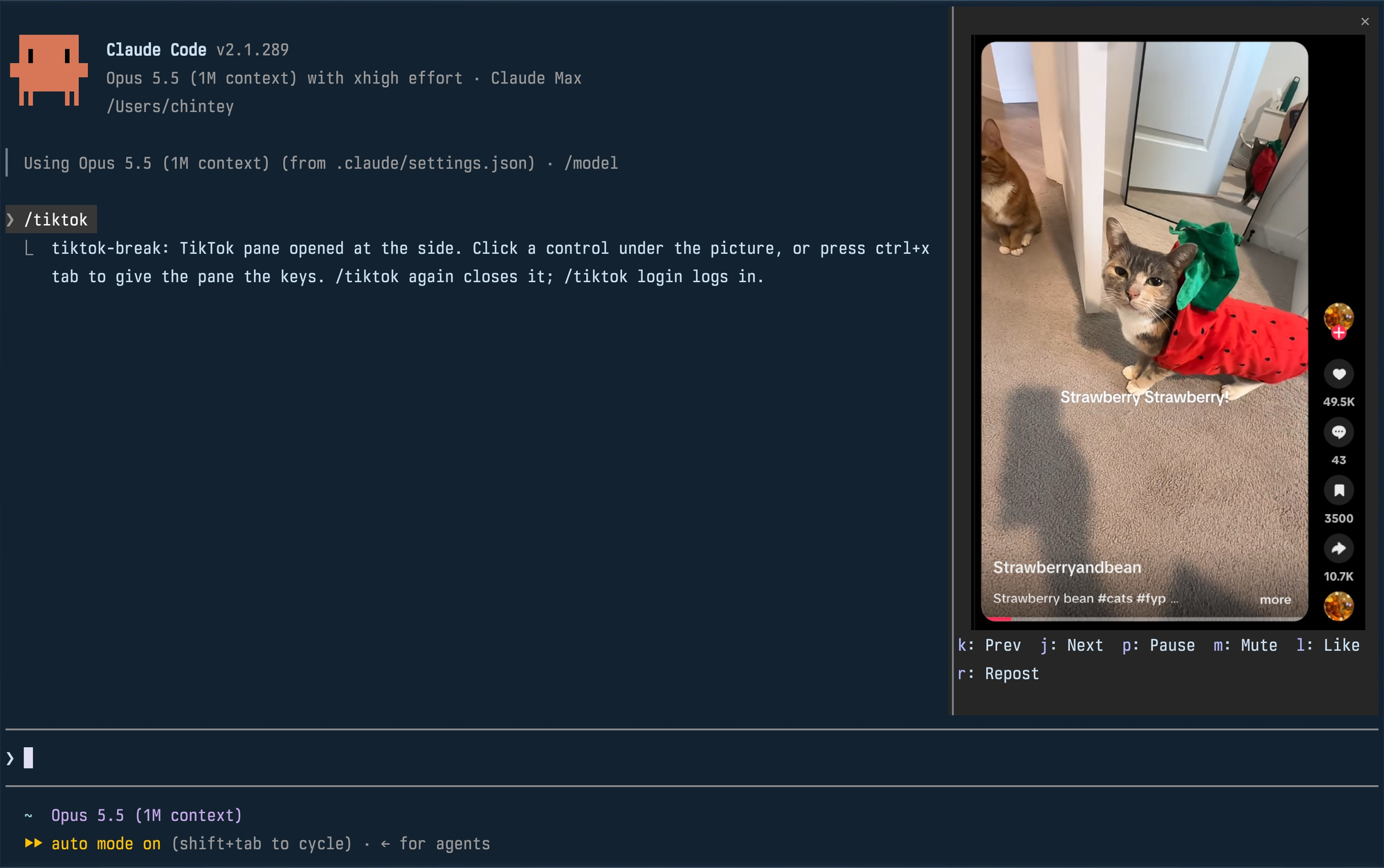
Unofficial. Not affiliated with TikTok or Anthropic.
| Command | What it does |
|---|---|
/tiktok | Plays your For You feed in a pane; run it again to close. |
/tiktok login | Opens a real browser window on the mod's profile so you can log in. Close it, then run /tiktok. |
The pane docks at the side, full height, when Claude Code is in its fullscreen layout and the terminal is at least 110 columns wide. In a smaller terminal it is a block above the prompt. Docked, a video is framed with its creator, likes, comments, saves and shares; above the prompt, the video alone.
Click a control under the picture, or press ctrl+x tab to give the pane the keyboard and use its key. Esc hands the keyboard back to the prompt.
| Key | Control |
|---|---|
k | Previous video |
j | Next video |
p | Pause or play |
m | Mute or unmute |
l | Like |
r | Repost (again takes it back) |
A video that finishes moves on to the next by itself. Like and Repost are real actions on the account you logged in with.
env or flatpak isn't detected. A snap-packaged Chromium can't write the profile in ~/.config and won't work.PATHclaude plugin marketplace add Chinteyley/tiktok-break
claude plugin install tiktok-break@tiktok-breakThen start Claude Code, or run /reload-plugins in a session that is already open.
To work on the mod instead, clone the repository and load the folder directly; edits to it reload live:
git clone https://github.com/Chinteyley/tiktok-break
claude --plugin-dir ./tiktok-breakviewer/viewer.ts runs a headless Chrome on a profile of its own (~/Library/Application Support/tiktok-break on macOS, ~/.config/tiktok-break on Linux), opens the For You feed and screencasts it over the DevTools protocol. Each frame is written to one PNG file, and the mod (hooks/register.tsx) repaints the pane's picture from that file through the terminal's graphics protocol. The controls go the other way over a Unix socket: the viewer presses TikTok's own keyboard shortcuts in the page. Sound comes from that Chrome.
/tiktok login opens a plain app window of the same browser on the same profile, which is how the pane comes to be logged in.
/tiktok login window for comments and search./tiktok login.claude plugin validate .
claude plugin test .
tsc -p .tsc needs the type declarations Claude Code lays into .claude-plugin/types/ the first time it loads the mod; that folder is not checked in.
MIT
hooks/register.tsx 345 lines1import type { EngineInterface, Register } from 'claude-code'
2
3const LOGIN = 'https://www.tiktok.com/login'
4const PANE = 'tiktok'
5// From this width the fullscreen layout docks a pane beside the transcript.
6const DOCK_COLUMNS = 110
7// An Image's box is at most this many cells each way.
8const MAX_CELLS = 255
9// The pane's controls: the key that presses each while the pane has the
10// keyboard, the viewer's name for what it does, and its label.
11const CONTROLS = [
12 ['k', 'prev', 'Prev'],
13 ['j', 'next', 'Next'],
14 ['p', 'pause', 'Pause'],
15 ['m', 'mute', 'Mute'],
16 ['l', 'like', 'Like'],
17 ['r', 'repost', 'Repost'],
18] as const
19const CONTROL_GAP = 2
20
21// The viewer feeding the pane, while it runs.
22let viewer: ReturnType<EngineInterface['process']['spawn']> | undefined
23let generation = 0
24
25const FIND = `
26case $(uname) in
27 Darwin)
28 echo "$HOME/Library/Application Support/tiktok-break"
29 app=$(osascript -l JavaScript -e 'ObjC.import("AppKit"); const u = $.NSWorkspace.sharedWorkspace.URLForApplicationToOpenURL($.NSURL.URLWithString("https://www.tiktok.com")); u.isNil() ? "" : u.path.js' 2>/dev/null)
30 ls "$app/Contents/Frameworks" 2>/dev/null | grep -q ' Framework\\.framework$' &&
31 b="$app/Contents/MacOS/$(defaults read "$app/Contents/Info" CFBundleExecutable)" ;;
32 *)
33 echo "\${XDG_CONFIG_HOME:-$HOME/.config}/tiktok-break"
34 id=$(xdg-settings get default-web-browser 2>/dev/null)
35 for d in "\${XDG_DATA_HOME:-$HOME/.local/share}" $(echo "\${XDG_DATA_DIRS:-/usr/local/share:/usr/share}" | tr : ' '); do
36 [ -n "$id" ] && [ -f "$d/applications/$id" ] && b=$(sed -n 's/^Exec=\\([^ ]*\\).*/\\1/p' "$d/applications/$id" | head -n 1) && break
37 done
38 "$b" --version 2>/dev/null | grep -Eq '[0-9]+\\.[0-9]+\\.[0-9]+\\.[0-9]+' || b= ;;
39esac
40command -v "$b" || echo
41`
42
43let located: Promise<{ profile: string; browser: string }> | undefined
44
45function locate($: EngineInterface) {
46 located ??= $.process.run(['sh', '-c', FIND]).then(({ stdout }) => {
47 const [dir = '', binary = ''] = stdout.split('\n')
48
49 return { profile: dir, browser: binary }
50 })
51
52 return located
53}
54
55async function profile($: EngineInterface) {
56 return (await locate($)).profile
57}
58
59async function findBrowser($: EngineInterface) {
60 const found = (await locate($)).browser
61
62 if (!found) {
63 $.ui.toast('tiktok-break: set a Chromium-based browser (Chrome, Chromium, Brave, Edge, Helium, Vivaldi…) as your default; Firefox and Safari cannot drive the pane')
64
65 return undefined
66 }
67
68 return found
69}
70
71async function frame($: EngineInterface) {
72 return `${await profile($)}/pane-frame.png`
73}
74
75async function socket($: EngineInterface) {
76 return `${await profile($)}/pane.sock`
77}
78
79// The browser runs on a profile of its own, so the window is a process this
80// mod can end without touching the person's own browser. The shell returns
81// before the browser does, so it waits a second to catch one that dies at
82// startup, and keeps the browser's output in the profile to show then. On a
83// first run the profile does not exist yet, so the log needs it made first.
84const LAUNCH = `
85log=$1; shift
86mkdir -p "\${log%/*}" || exit
87"$@" >"$log" 2>&1 &
88sleep 1
89kill -0 $! 2>/dev/null || { wait $!; s=$?; cat "$log" >&2; exit $s; }
90`
91
92// Resolves whether the window came up.
93async function open($: EngineInterface, url: string) {
94 const binary = (await locate($)).browser
95 const dir = await profile($)
96 const { exitCode, stderr } = await $.process.run([
97 'sh',
98 '-c',
99 LAUNCH,
100 'sh',
101 `${dir}/launch.log`,
102 binary,
103 `--app=${url}`,
104 `--user-data-dir=${dir}`,
105 '--window-size=430,900',
106 '--no-first-run',
107 '--no-default-browser-check',
108 ])
109
110 if (exitCode !== 0) {
111 $.ui.toast(`tiktok-break: could not open ${binary}: ${stderr.trim().split('\n').at(-1) ?? ''}`)
112 }
113
114 return exitCode === 0
115}
116
117// Whether any browser runs on the mod's profile: a window, or the pane's.
118async function isBusy($: EngineInterface) {
119 const { exitCode } = await $.process.run([
120 'pgrep',
121 '-f',
122 '--',
123 `--user-data-dir=${await profile($)}`,
124 ])
125
126 return exitCode === 0
127}
128
129// Ends a window on the mod's profile; resolves true when one was up.
130async function quit($: EngineInterface) {
131 const { exitCode } = await $.process.run([
132 'pkill',
133 '-f',
134 '--',
135 `--app=[^ ]* --user-data-dir=${await profile($)}`,
136 ])
137
138 return exitCode === 0
139}
140
141// Chrome takes a moment to leave the profile, and one started before then
142// is handed to the one leaving and lost.
143async function settle($: EngineInterface) {
144 for (let i = 0; i < 20 && (await isBusy($)); i++) {
145 await $.clock.sleep(150)
146 }
147}
148
149// Runs the viewer and repaints the pane's picture at each frame it writes;
150// the loop is the viewer's life, so ending the stream ends the playback.
151// Docked there is room to frame a video with its likes and creator; the
152// small block above the prompt frames the video alone.
153async function watch($: EngineInterface, binary: string, isDocked: boolean) {
154 const file = await frame($)
155 const frames = $.process.spawn({
156 argv: [
157 'bun',
158 `${$.plugin.root}/viewer/viewer.ts`,
159 await profile($),
160 file,
161 await socket($),
162 isDocked ? 'item' : 'video',
163 binary,
164 ],
165 })
166 viewer = frames
167 let complaint = ''
168
169 try {
170 for await (const piece of frames) {
171 if (piece.stream === 'stderr') {
172 complaint = piece.text
173 continue
174 }
175
176 generation += 1
177 void $.ui.blit({
178 requestId: PANE,
179 key: 'view',
180 source: { file, format: 'png', generation },
181 })
182 }
183 } catch {
184 complaint = 'bun could not be started'
185 }
186
187 // Still ours: the viewer ended by itself, not by the pane closing.
188 if (viewer === frames) {
189 viewer = undefined
190 $.ui.toast(`tiktok-break: the viewer stopped. ${complaint.slice(0, 120)}`)
191 }
192}
193
194async function unwatch() {
195 const frames = viewer
196 viewer = undefined
197 await frames?.return({ code: null, signal: 'SIGTERM' })
198}
199
200// How many rows the controls take once they wrap at this width; each is
201// drawn as its key, a colon, a space and its label.
202function controlRows(columns: number) {
203 let rows = 1
204 let used = 0
205
206 for (const [, , label] of CONTROLS) {
207 const width = label.length + 3
208
209 if (used > 0 && used + CONTROL_GAP + width > columns) {
210 rows += 1
211 used = width
212 } else {
213 used += (used > 0 ? CONTROL_GAP : 0) + width
214 }
215 }
216
217 return rows
218}
219
220// Hands one of the pane's controls to the viewer, which presses TikTok's own
221// key for it.
222async function send($: EngineInterface, action: string) {
223 try {
224 await $.http.fetch('http://viewer/', {
225 method: 'POST',
226 body: action,
227 socketPath: await socket($),
228 })
229 } catch (error) {
230 $.ui.toast(`tiktok-break: ${String(error).slice(0, 120)}`)
231 }
232}
233
234export const register: Register = on => {
235 on('session.start', async ($, e, next) => {
236 await $.command.register({
237 name: 'tiktok',
238 description: 'Play TikTok in a side pane; "login" opens a window to log in',
239 argumentHint: '[login]',
240 immediate: true,
241 })
242
243 return next(e)
244 })
245
246 on('command.run', { command: 'tiktok' }, async ($, e) => {
247 // Logging in takes a real window: a QR code, a password manager, a
248 // captcha. The pane's Chrome shares the profile, so it is logged in after.
249 if (e.args.trim() === 'login') {
250 if (viewer !== undefined) {
251 await $.ui.close({ id: PANE })
252 }
253
254 if (!(await findBrowser($))) {
255 return { text: 'No Chromium browser is your default browser to log in with.' }
256 }
257
258 await quit($)
259 await settle($)
260 if (!(await open($, LOGIN))) {
261 return { text: 'The login window did not open.' }
262 }
263
264 return {
265 text: 'Log in to TikTok in the window that opened, then close it and run /tiktok.',
266 }
267 }
268
269 if (viewer !== undefined) {
270 await $.ui.close({ id: PANE })
271
272 return { text: 'TikTok pane closed.' }
273 }
274
275 const binary = await findBrowser($)
276
277 if (!binary) {
278 return { text: 'No Chromium browser is your default browser to play TikTok in.' }
279 }
280
281 const { isFullscreen, columns } = e.presentation
282 const isDocked = isFullscreen && columns >= DOCK_COLUMNS
283
284 await quit($)
285 await settle($)
286 void watch($, binary, isDocked)
287 await $.ui.open({ id: PANE, title: 'TikTok', columns: 46, rows: 60 })
288
289 const where = isDocked
290 ? 'at the side'
291 : `above the prompt; from ${DOCK_COLUMNS} columns (now ${columns}) it docks at the side, full height`
292
293 return {
294 text: `TikTok pane opened ${where}. Click a control under the picture, or press ctrl+x tab to give the pane the keys. /tiktok again closes it; /tiktok login logs in.`,
295 }
296 })
297
298 on('ui.close', { id: PANE }, async ($, e, next) => {
299 await unwatch()
300
301 return next(e)
302 })
303
304 on('ui.render', { component: 'Pane', requestId: PANE }, async ($, e) => {
305 if (e.surface !== 'terminal') {
306 const { Text } = $.ui.resolve(e)
307
308 return <Text>The TikTok pane draws in the terminal only.</Text>
309 }
310
311 const { Box, Button, Image } = $.ui.resolve(e)
312 // The picture is fitted inside its box, so the box is all the room there
313 // is. A docked pane's body is that room, less the rows of controls; an
314 // inline block is only as tall as what is drawn in it, so there the
315 // picture asks for half the terminal.
316 const rows =
317 e.props.placement === 'dock'
318 ? e.props.scroll.bodyRows - controlRows(e.props.bodyColumns)
319 : Math.max(8, Math.floor((e.viewport?.rows ?? 32) / 2))
320
321 return (
322 <Box flexDirection="column">
323 <Image
324 key="view"
325 source={{ file: await frame($), format: 'png', generation }}
326 columns={Math.max(1, Math.min(MAX_CELLS, e.props.bodyColumns))}
327 rows={Math.max(1, Math.min(MAX_CELLS, rows))}
328 alt="TikTok"
329 />
330 <Box columnGap={CONTROL_GAP} flexWrap="wrap">
331 {CONTROLS.map(([hotkey, action, label]) => (
332 <Button
333 key={action}
334 plain
335 hotkey={hotkey}
336 label={label}
337 onPress={() => void send($, action)}
338 />
339 ))}
340 </Box>
341 </Box>
342 )
343 })
344}
345