Oh My Toolbelt
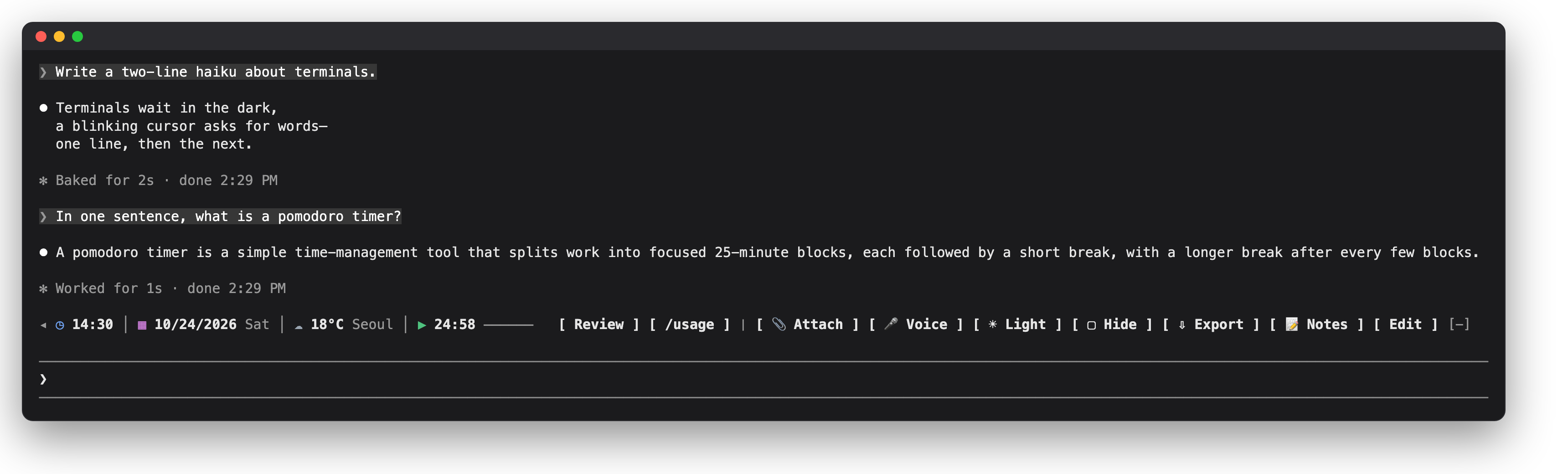
A toolbelt above the Claude Code prompt: clock, date, weather and a pomodoro on the left; your saved prompts, commands and one-press actions on the right; a…
newpanebandspinnerrowscommand

A toolbelt above the Claude Code prompt: clock, date, weather and a pomodoro on the left; your saved prompts, commands and one-press actions on the right; a…
<b>English</b> · <a href="README.ko.md">한국어</a> · <a href="README.ja.md">日本語</a>
<img src="assets/logo.svg" width="112" alt="Oh My Toolbelt logo">
<h1 align="center">Oh My Toolbelt</h1>
<b>New to the terminal? Claude Code, made easy.</b><br> Your go-to prompts as buttons, files attached from a picker, passing thoughts kept as notes. All on one toolbelt, right above the prompt box.
When you use Claude Code in a terminal, an unfamiliar screen and missing conveniences can often leave you at a loss. Oh My Toolbelt is a toolbelt built around the things a non-developer found awkward in the terminal.
Add a single toolbelt row above the prompt box, and the commands and prompts you use most become buttons. Attaching a file no longer means typing its path: you pick it in a file picker. An idea that comes up mid-task goes into a note, and from there straight into the prompt box. Prompts you sent earlier are in a list too; click one to jump right back to it. When you step away, Hide covers your work, and Export saves the session's conversation to a file in one go.
The little things that trip you up when the terminal is new, eased by one toolbelt. Most of it works the same in the desktop app, too.
<a href="LICENSE"><img alt="License: Apache-2.0" src="https://img.shields.io/badge/license-Apache--2.0-d77757"></a> <img alt="Claude Code 2.1.309 or later" src="https://img.shields.io/badge/Claude%20Code-2.1.309%2B-1f1f22"> <img alt="Terminal and desktop app" src="https://img.shields.io/badge/runs%20in-terminal%20%7C%20desktop%20app-555"> <img alt="English, Korean, Japanese" src="https://img.shields.io/badge/languages-en%20%7C%20ko%20%7C%20ja-555">
From a terminal:
claude plugin install oh-my-toolbelt --marketplace calmtiger86/oh-my-toolbeltOne line. If Claude Code is already open, type /reload-plugins there to turn it on. If the install ends with userConfig options not yet set, that is fine: every setting starts at its default. It starts quiet: no network until you pick a weather city, no clipboard history until you turn it on, and nothing you write in it leaves your computer unless you send it as a prompt.
In the desktop app: open + → Add plugins (or Plugins → Browse plugins), add the marketplace from its repository, calmtiger86/oh-my-toolbelt, then pick oh-my-toolbelt in the list and install it. Running the terminal command above once works too: the terminal and the desktop app's local sessions read the same settings.
Requirements: Claude Code 2.1.309 or later, in a terminal or in the desktop app's Code tab. VS Code and mobile do not draw a row above the prompt.
From a terminal:
claude plugin install oh-my-toolbelt --marketplace calmtiger86/oh-my-toolbeltInside Claude Code:
/plugin install oh-my-toolbelt --marketplace calmtiger86/oh-my-toolbeltIt asks to add the marketplace (y) and the scope (Enter), then shows the settings: press Enter on each row to keep its default, then Save.
To update: claude plugin update oh-my-toolbelt, then restart Claude Code; what changed is in CHANGELOG.md. To remove: claude plugin uninstall oh-my-toolbelt.
| Feature | What it does |
|---|---|
| Your buttons | Save the prompts and commands you use most as buttons. A press puts one in the prompt box or sends it |
| Prompt list | The prompts you sent pile up in a numbered list; click one to go back to it |
| Attach | Pick files in your file picker; they go into the prompt box as @ mentions (terminal) |
| Notes | Jot down a thought and put it in the prompt box later. All your sessions share the same notes |
| Clipboard history | Keeps what you copy from the conversation so you can put it back (off by default; only in the desktop app and in the terminal's fullscreen mode) |
| Hide | One press covers the conversation |
| Export | Saves the conversation as a Markdown, HTML or text file; in the terminal, as PDF too once you pick a Chromium-based browser as the PDF browser and PDF as the Export format, both in the Status tab |
| Clock · Date · Weather | The clock and date stay in view; pick a city and the weather shows too (weather is off by default) |
| Pomodoro | Shows a focus round with a progress bar and tells you when it ends |
| Voice | Turns Claude Code's voice input on and off (terminal) |
| Light / Dark | Switches the theme |
| Fold | ◂ folds the whole toolbelt into a single ▸ |
| Panel | Opens from Edit or /toolbelt, with the settings, the button layout and a step-by-step guide |

New here? Start with the guide. Press Edit on the toolbelt and open the Guide tab: it walks you through each feature step by step and tells you what to press. The guide speaks the language you set (English, Korean or Japanese).
Information on the left, buttons on the right. When the window is narrow, the buttons shrink to their icons and the least needed ones move into ….
| Tool | What it does |
|---|---|
◂ / ▸ | Fold the toolbelt into a single ▸, and open it again. It stays folded next time |
| Clock · Date | 12- or 24-hour, in your computer's time zone, UTC or that of one of 53 cities, seconds if you like; the date in your language's order |
| Weather | Off until you pick one of 63 cities. Current conditions, refreshed every 30 minutes by default |
| Pomodoro | Press it to start a focus round, again to pause, once more to go on. Breaks are timed only when Pomodoro auto break is on. A notification when a round ends, and a sound on macOS if you turn it on |
| Your buttons | A saved prompt to put in the prompt box or send, or a slash command or skill to run. Group them into sets and switch between sets |
| Attach | Your system's file picker; the files go into the prompt box as @ mentions (terminal) |
| Voice | Turns Claude Code's voice input on and off, where your Claude Code has /voice (terminal) |
| Light / Dark | Switches Claude Code's theme to its light or dark pair |
| Hide | Covers the conversation until you press it again |
| Export | Saves the conversation in the format picked in the Status tab (Markdown at first) |
| Notes | Opens the notes |
| Edit | Opens the panel |
Press Edit or type /toolbelt to open it beside the conversation.
| Tab | What it holds |
|---|---|
| Prompts | Every prompt you sent in this conversation, numbered (the newest 200). Click one to jump to it. Point at one to see its turn on the toolbelt row: how long it took, the tools it used and the files it changed. In the desktop app a row opens in place: read the whole answer, put the prompt back in the prompt box, or export that answer alone |
| Notes | A notepad shared by all your sessions. Insert puts a note at the cursor of the prompt box. Up to 500 notes (256 KiB); past that the oldest go |
| Clipboard | Off by default. What you copy by dragging over the conversation, newest first (the last 30; a selection over 20,000 characters is skipped); Insert puts it back. Kept in memory until Claude Code closes, never written to a file |
| Status | This session at a glance (versions, weather, finished focus rounds, the last error), every tool, and every setting as a switch or a pick list |
| Tools | The layout (side, order, shown or hidden), your buttons and button sets, and the icons |
| Guide | A step-by-step tour of all of the above, in your language |
In the terminal, press ctrl+x, let go, then tab: the toolbelt is selected. Tab moves between buttons, Enter presses one, Esc goes back to the prompt box. While it is selected, one letter presses a tool (a Attach, v Voice, t Light / Dark, h Hide, e Export, n Notes, b Edit, m more); your own buttons can have letters too. In the desktop app, click the buttons.
| Command | What it does | |||
|---|---|---|---|---|
/toolbelt (or /tb, when no other mod has it) | Open the panel | |||
/toolbelt tools · toc · notes · clips · status · guide | Open the panel at that tab | |||
/toolbelt toc next · prev · first · last · <n> · find <words> | Jump to a prompt | |||
/toolbelt pomodoro start · pause · stop · reset | Start or go on, pause, stop (the count of finished rounds stays) or reset (the count goes back to 0) | |||
| `/toolbelt export [md\ | html\ | txt\ | pdf]` | Export the conversation |
/toolbelt curtain on · off | Hide or show the conversation | |||
/toolbelt weather refresh | Fetch the weather now | |||
/toolbelt hide · show | Take the toolbelt away entirely, or bring it back |
Every setting is a switch or a pick list in the panel's Status tab; all but the export format are in /config too.
| Setting | Default | Choices |
|---|---|---|
language | auto | auto (your system's), en, ko, ja |
clockFormat · clockSeconds | auto · off | auto, 12, 24; seconds on or off |
dateFormat | auto | off, auto, year first, day first, month first |
timeZone | system | Your computer's zone, UTC, or one of 53 cities |
iconStyle | icon+label | icon+label, icon, label (for terminals that draw emoji badly) |
weatherPlace | off | off or one of 63 cities |
temperatureUnit · weatherRefreshMinutes | auto · 30 | auto (Fahrenheit for US cities), Celsius or Fahrenheit; 10 to 180 minutes |
pomodoroFocusMinutes · pomodoroBreakMinutes | 25 · 5 | 5 to 120; 1 to 60 |
pomodoroAutoBreak · pomodoroNotify | off · on | Start the break when a focus round ends (without it no break is timed); notify when a round ends |
pomodoroSound · pomodoroSoundName | off · bell | A sound when a round ends (macOS): bell, chime, ding, digital, marimba, soft |
exportDirectory · pdfBrowser | downloads · off | Where exports go (downloads, desktop, documents, home, or session: the project folder, where a file could end up in git); the browser that prints PDFs (auto, chrome, edge, brave, chromium) |
| Export format (Status tab only) | md | md, html, txt, and pdf in the terminal once pdfBrowser is set |
attachEnabled · voiceMode | on · tap | The Attach button; how Voice records (tap or hold) |
curtainRestoreOnSubmit | off | Show the conversation again when you send a prompt |
hotkeysEnabled | on | Letter keys for the toolbelt's buttons |
tocTab · clipboardTab | on · off | The Prompts tab; the Clipboard tab |
paneOpenOnStart | off | Open the panel when a session starts (wide windows) |
Privacy: Oh My Toolbelt runs on your computer and sends nothing about you to its authors; its only network request is the weather, if you turn it on.
api.open-meteo.com receives that city's coordinates and the temperature unit; like any web request, it also sees your IP address.tail (PowerShell on Windows) to read this session's transcript when it is over 4 MiB. Each with an argument list and no shell./toolbelt command stays in the conversation, where the model can read it.The full account is in PRIVACY.md.
/config the next time you use it in the terminal."tui": "fullscreen"); in the inline layout your terminal app does the selecting, so nothing reaches the toolbelt.curtainRestoreOnSubmit off, a prompt sent by one of your send buttons stays in view (its answer is covered), as Claude Code does not pass that prompt's row to the mod that sent it.<command-name> or <bash-stdout>) can be left out of an export, as it cannot be told apart from Claude Code's output.! shell command (bash mode), a follow-up turn Claude Code starts by itself after something you do, and a turn started by another mod, by one of your buttons that runs a command or skill, or by a task notification count toward no prompt. In an older conversation whose transcript file records no turn lengths, such a turn may still count toward the prompt before it./plugin and check that oh-my-toolbelt is listed as active. In a narrow window the toolbelt shrinks, and below about 14 columns it steps aside.claude --debug.iconStyle to label.[-]? That is Claude Code's own fold (terminal): click the line it leaves, or press ctrl+x then ctrl+a.ctrl+x then Tab does nothing? Your terminal app may use those keys. Bind others in ~/.claude/keybindings.json: part 5 of the Guide tab has the lines to paste.Oh My Toolbelt is a Claude Code mod: a hooks module written in TypeScript (JSX for the drawings) that the engine loads as it is, with no build step.
git clone https://github.com/calmtiger86/oh-my-toolbelt
cd oh-my-toolbelt
claude --plugin-dir .          # run it; edits reload when a turn ends
claude plugin validate .       # the engine's own checks
claude plugin test .           # the test suite (over 500 tests, terminal and desktop surfaces)
npx -p typescript@5 tsc -p . # type-check, once Claude Code has loaded the mod and written its typeshooks/locales/en.ts to hooks/locales/<code>.ts and translate it; register it in hooks/lib/i18n.ts and tests/i18n.test.ts; add the code to the language options in .claude-plugin/plugin.json. The tests check that every key and placeholder is there. The Japanese text has not been reviewed by a native speaker yet; corrections are welcome.hooks/tools/registry.ts (a label, a priority, what a press does as a list of effects); hooks/register.tsx is the one place effects become calls on the engine.Apache License 2.0. Copyright 2026 calmtiger86 and contributors. If you share this code or a work built on it, keep the NOTICE file with it and mark the files you changed.
The Prompts tab adapts code from oikon48/prompt-rail (MIT); its notice is in THIRD_PARTY_NOTICES.md. The chip style of the clock, date, weather and pomodoro follows augiefra/claude-mods.
Oh My Toolbelt is an independent mod made by an individual developer, not affiliated with or endorsed by Anthropic. Claude and Claude Code are trademarks of Anthropic, PBC.
hooks/register.tsx 892 lines1// Toolbelt's hooks module: it registers every hook, declares every `$.state` atom and writes every call on the engine,
2// because the loader and the plugin directory read those only in this file. The other files are handed `engineOf($)`.
3// Parts ported from oikon48/prompt-rail (MIT): see THIRD_PARTY_NOTICES.md.
4import { atom, read, update } from 'claude-code'
5import type { CommandInfo, CommandRunInput, CommandRunResult, ConfigSetResult, ConfigValue, EngineInterface, HttpResponse, Register, RenderSurface } from 'claude-code'
6import type { ButtonConfig, ClipBoard, Layout, PaneTab } from '../types/index'
7import { FOLD_ID, UNFOLD_ID, bandModel, drawBand, drawFolded, hidesButtonNames } from './band'
8import { draftIssues, drawPane } from './pane'
9import type { PaneAction } from './pane'
10import type { Effect } from './lib/effects'
11import { formatClock, isValidTimeZone } from './lib/format'
12import { DEFAULT_ICON_GROUP, asIconGroup, asIcons, iconStyleOf, withToolIcon } from './lib/icons'
13import { resolveLanguage, systemLocale, translator } from './lib/i18n'
14import type { ResolvedLanguage, TFn } from './lib/i18n'
15import { cellsOf } from './lib/width'
16import { cleanButtonConfig, defaultButtons, defaultLayout, planLoad } from './lib/schema'
17import type { StoreRead } from './lib/schema'
18import { clockFormatOptions, clockLabel, configuredTimeZone } from './tools/clock'
19import { ARGUMENT_HINT, isHumanOrigin, parseCommand, replyFor } from './tools/command'
20import type { PomodoroVerb } from './tools/command'
21import { curtainEffects } from './tools/curtain'
22import { asPomodoro, idlePomodoro, mergePomodoro, pause, pomodoroConfig, pomodoroEffects, reset, start, stop, tick as advancePomodoro } from './tools/pomodoro'
23import { BUTTON_PREFIX, applyLayoutOp, emptySnapshot, isItemShown, normalizeLayout, resetLayout, toolForItem } from './tools/registry'
24import type { Ctx } from './tools/registry'
25import { isTocTabOn } from './tools/toc'
26import { addButton, addSetChange, allButtons, buildButton, defaultButtonConfig, deleteSetChange, draftFor, nextButtonId, pickSetChange, removeButton, setButtonIcon, setDraftField, updateButton } from './tools/user'
27import type { SetChange } from './tools/user'
28import { asWeatherCache, failedWeather, forecastUrl, isFresh, loadingWeather, newerCache, offWeather, parseForecast, sameTarget, shownWeather, weatherCity, weatherRefreshMs, weatherTarget } from './tools/weather'
29import type { WeatherCache, WeatherLook, WeatherTarget } from './tools/weather'
30import { EXPORT_TOAST_MS, MOVE_SETTINGS_MS, PANE_ID, PANE_ROWS, SYNC_MS, TICK_MS, VOICE_SYNC_MS, errorText, initialRuntime, makeCtx, withBandColumns } from './runtime'
31import type { Engine, StoreIo } from './runtime'
32import { moveToc, openedAnswer, noteTocView, resetToc, scrollToPrompt, tocBandCards, tocView, viewTocRow, watchToc } from './toc-live'
33import { fillTranscript, refillTranscript } from './toc-history'
34import { appendRow, completeTurn, logHookFailure, readTranscript, receivePrompt, startTurn } from './toc-hooks'
35import { changeCurtain, drawPromptRow, drawRow, isCurtainOn, submitPrompt } from './row-hooks'
36import { FOLDED_KEY, isBandFolded, loadFold, setBandFolded } from './fold'
37import { clipEffects, deleteClip, isClipsTabOn, noteSelection, readClipBoard, restoreClips } from './clips'
38import { exportOutcome, loadExportFormat, readExportFormat, rememberFormat, toastAndAnswer } from './export-run'
39import type { ExportEnv } from './export-run'
40import { addQuickNote, deleteQuickNote, noteFillEffects, readNotes, syncNotes } from './notes-run'
41import { runAttach } from './attach-run'
42import { changeSetting, dropSoundPick, listSettings, playPickedSound, previewSound, readSettings, readSettingsSource, readThemeRow, setTheme } from './settings'
43import type { SettingChange } from './settings'
44import { loadOverrides, moveOverrides, readVersions, saveOverride } from './own-settings'
45import { voiceModeOf, voiceModeToSync } from './tools/voice'
46
47const clockLabelState = atom({ plugin: 'oh-my-toolbelt', key: 'clockLabel' } as const, '')
48const pomodoroState = atom({ plugin: 'oh-my-toolbelt', key: 'pomodoro' } as const, idlePomodoro(0))
49const weatherState = atom({ plugin: 'oh-my-toolbelt', key: 'weather' } as const, offWeather())
50const bandHiddenState = atom({ plugin: 'oh-my-toolbelt', key: 'bandHidden' } as const, false)
51const paneTabState = atom({ plugin: 'oh-my-toolbelt', key: 'paneTab' } as const, 'tools')
52const openPickerState = atom({ plugin: 'oh-my-toolbelt', key: 'openPicker' } as const, null)
53const voiceState = atom({ plugin: 'oh-my-toolbelt', key: 'voice' } as const, { isAvailable: false, requested: null })
54const paneStartedState = atom({ plugin: 'oh-my-toolbelt', key: 'paneStarted' } as const, false)
55const guideSectionState = atom({ plugin: 'oh-my-toolbelt', key: 'guideSection' } as const, 'start')
56const buttonsState = atom({ plugin: 'oh-my-toolbelt', key: 'buttons' } as const, defaultButtons())
57const layoutState = atom({ plugin: 'oh-my-toolbelt', key: 'layout' } as const, defaultLayout())
58const iconsState = atom({ plugin: 'oh-my-toolbelt', key: 'icons' } as const, {})
59const iconGroupState = atom({ plugin: 'oh-my-toolbelt', key: 'iconGroup' } as const, DEFAULT_ICON_GROUP)
60const editDraftState = atom({ plugin: 'oh-my-toolbelt', key: 'editDraft' } as const, null)
61const lastErrorState = atom({ plugin: 'oh-my-toolbelt', key: 'lastError' } as const, null)
62const settingsState = atom({ plugin: 'oh-my-toolbelt', key: 'settings' } as const, [])
63// Whose rows the status tab draws: the engine's, or the mod's own from plugin.json.
64const settingsSourceState = atom({ plugin: 'oh-my-toolbelt', key: 'settingsSource' } as const, 'engine')
65// Claude Code's own theme row, for the theme button; read with the mod's rows.
66const themeRowState = atom({ plugin: 'oh-my-toolbelt', key: 'themeRow' } as const, null)
67const soundPickState = atom({ plugin: 'oh-my-toolbelt', key: 'soundPick' } as const, null)
68const bandFoldedState = atom({ plugin: 'oh-my-toolbelt', key: 'bandFolded' } as const, false)
69const EMPTY_CLIP_BOARD: ClipBoard = { clips: [], seen: null, changing: null }
70const clipBoardState = atom({ plugin: 'oh-my-toolbelt', key: 'clipBoard' } as const, EMPTY_CLIP_BOARD)
71// The status tab's choice; the store's `exportLast` is the one the band's button uses next, in every session.
72const exportFormatState = atom({ plugin: 'oh-my-toolbelt', key: 'exportFormat' } as const, 'md')
73const notesState = atom({ plugin: 'oh-my-toolbelt', key: 'notes' } as const, [])
74const curtainState = atom({ plugin: 'oh-my-toolbelt', key: 'curtain' } as const, false)
75// A count only the prompts tab reads, so bumping it draws the panel again and nothing else: `$.ui.invalidate` would
76// draw every transcript row too, and rows drawn again just after a jump move the viewport.
77const tocMovedState = atom({ plugin: 'oh-my-toolbelt', key: 'tocMoved' } as const, 0)
78
79// What this module load knows besides `$.state` (hooks/runtime.ts).
80let runtime = initialRuntime()
81const tr = (): TFn => translator(runtime.lang.lang)
82
83// ---- Failures and the store ----
84// The debug log in English, and the status tab's last error in the person's language (a key of the
85// language files). A failure to record one has nowhere left to go.
86async function noteError($: EngineInterface, key: string, args?: Record<string, unknown>): Promise<void> {
87 $.ui.log(`oh-my-toolbelt: ${translator('en')(key, args)}`, { to: 'debug' })
88 await update($, lastErrorState, () => tr()(key, args)).catch(() => undefined)
89}
90
91// Runs one call on `$`; a failure goes to the debug log and lastError, and `fallback` stands in.
92// `call` runs once; a promise already started is waited for the same way. That promise must come from an async
93// function, so that a throw arrives here as a rejection instead of escaping before `attempt` runs. `engineOf` does not
94// throw, so building `engineOf($)` for such a call cannot throw before `attempt` runs either.
95async function attempt<T>($: EngineInterface, what: string, call: Promise<T> | (() => Promise<T>), fallback: T): Promise<T> {
96 try {
97 return await (typeof call === 'function' ? call() : call)
98 } catch (err) {
99 await noteError($, 'error.call', { call: what, reason: errorText(err) })
100 return fallback
101 }
102}
103
104// The environment variables the mod reads, each name written out: the engine's loader reads `$.env.get` only with a literal
105// name, so a module's variables can be listed.
106async function envGet($: EngineInterface, name: string): Promise<string | undefined> {
107 switch (name) {
108 case 'LC_ALL': return $.env.get('LC_ALL')
109 case 'LC_MESSAGES': return $.env.get('LC_MESSAGES')
110 case 'LANG': return $.env.get('LANG')
111 case 'DISPLAY': return $.env.get('DISPLAY')
112 case 'WAYLAND_DISPLAY': return $.env.get('WAYLAND_DISPLAY')
113 case 'OS': return $.env.get('OS')
114 case 'SystemRoot': return $.env.get('SystemRoot')
115 case 'HOME': return $.env.get('HOME')
116 case 'USERPROFILE': return $.env.get('USERPROFILE')
117 case 'ProgramFiles': return $.env.get('ProgramFiles')
118 case 'ProgramFiles(x86)': return $.env.get('ProgramFiles(x86)')
119 case 'LOCALAPPDATA': return $.env.get('LOCALAPPDATA')
120 default: throw new Error(`not a variable this mod reads: ${name}`)
121 }
122}
123
124// The engine calls the feature modules make, each written here as a plain call (runtime.ts `Engine`).
125export function engineOf($: EngineInterface): Engine {
126 return {
127 cells: {
128 settings: { read: () => read($, settingsState), update: change => update($, settingsState, change) },
129 settingsSource: { read: () => read($, settingsSourceState), update: change => update($, settingsSourceState, change) },
130 themeRow: { read: () => read($, themeRowState), update: change => update($, themeRowState, change) },
131 soundPick: { read: () => read($, soundPickState), update: change => update($, soundPickState, change) },
132 bandFolded: { read: () => read($, bandFoldedState), update: change => update($, bandFoldedState, change) },
133 clipBoard: { read: () => read($, clipBoardState), update: change => update($, clipBoardState, change) },
134 exportFormat: { read: () => read($, exportFormatState), update: change => update($, exportFormatState, change) },
135 notes: { read: () => read($, notesState), update: change => update($, notesState, change) },
136 curtain: { read: () => read($, curtainState), update: change => update($, curtainState, change) },
137 tocMoved: { read: () => read($, tocMovedState), update: change => update($, tocMovedState, change) },
138 },
139 store: { get: key => $.store.get(key), set: (key, value) => $.store.set(key, value), delete: key => $.store.delete(key), keys: () => $.store.keys() },
140 env: { get: name => envGet($, name) },
141 ui: {
142 toast: (text, options) => $.ui.toast(text, options),
143 log: (text, options) => $.ui.log(text, options),
144 selection: () => $.ui.selection(),
145 invalidate: event => $.ui.invalidate(event),
146 scroll: args => $.ui.scroll(args),
147 resolve: e => $.ui.resolve(e),
148 },
149 clock: { now: () => $.clock.now(), after: (ms, fn) => $.clock.after(ms, fn) },
150 session: { surfaces: () => $.session.surfaces(), messages: () => $.session.messages(), id: () => $.session.id(), version: () => $.session.version(), cwd: () => $.session.cwd() },
151 prompt: { fill: input => $.prompt.fill(input) },
152 // Runs and writes only what PRIVACY.md lists under "What it runs" and "What it keeps on your computer": the file
153 // picker, the PDF browser, `tail` (PowerShell on Windows) for a long transcript, and the exports.
154 process: { run: (argv, init) => $.process.run(argv, init), spawn: request => $.process.spawn(request) },
155 fs: { exists: path => $.fs.exists(path), write: (path, text) => $.fs.write(path, text), stat: (path, options) => $.fs.stat(path, options), read: path => $.fs.read(path) },
156 command: { list: () => $.command.list() },
157 audio: { play: (clip, options) => $.audio.play(clip, options) },
158 config: { list: () => $.config.list(), write: (key, value) => writeConfig($, key, value) },
159 plugin: { name: $.plugin.name, root: $.plugin.root },
160 }
161}
162
163// The only place the mod writes /config: one plain call per row it may change, the key written out, so a reader (the
164// plugin directory's check among them) sees that it changes its own rows and the theme and nothing else.
165export async function writeConfig($: EngineInterface, key: string, value: ConfigValue): Promise<ConfigSetResult> {
166 switch (key) {
167 case 'oh-my-toolbelt.language': return $.config.set({ key: 'oh-my-toolbelt.language', value: value })
168 case 'oh-my-toolbelt.clockFormat': return $.config.set({ key: 'oh-my-toolbelt.clockFormat', value: value })
169 case 'oh-my-toolbelt.clockSeconds': return $.config.set({ key: 'oh-my-toolbelt.clockSeconds', value: value })
170 case 'oh-my-toolbelt.dateFormat': return $.config.set({ key: 'oh-my-toolbelt.dateFormat', value: value })
171 case 'oh-my-toolbelt.timeZone': return $.config.set({ key: 'oh-my-toolbelt.timeZone', value: value })
172 case 'oh-my-toolbelt.iconStyle': return $.config.set({ key: 'oh-my-toolbelt.iconStyle', value: value })
173 case 'oh-my-toolbelt.weatherPlace': return $.config.set({ key: 'oh-my-toolbelt.weatherPlace', value: value })
174 case 'oh-my-toolbelt.temperatureUnit': return $.config.set({ key: 'oh-my-toolbelt.temperatureUnit', value: value })
175 case 'oh-my-toolbelt.weatherRefreshMinutes': return $.config.set({ key: 'oh-my-toolbelt.weatherRefreshMinutes', value: value })
176 case 'oh-my-toolbelt.pomodoroFocusMinutes': return $.config.set({ key: 'oh-my-toolbelt.pomodoroFocusMinutes', value: value })
177 case 'oh-my-toolbelt.pomodoroBreakMinutes': return $.config.set({ key: 'oh-my-toolbelt.pomodoroBreakMinutes', value: value })
178 case 'oh-my-toolbelt.pomodoroAutoBreak': return $.config.set({ key: 'oh-my-toolbelt.pomodoroAutoBreak', value: value })
179 case 'oh-my-toolbelt.pomodoroNotify': return $.config.set({ key: 'oh-my-toolbelt.pomodoroNotify', value: value })
180 case 'oh-my-toolbelt.pomodoroSound': return $.config.set({ key: 'oh-my-toolbelt.pomodoroSound', value: value })
181 case 'oh-my-toolbelt.pomodoroSoundName': return $.config.set({ key: 'oh-my-toolbelt.pomodoroSoundName', value: value })
182 case 'oh-my-toolbelt.exportDirectory': return $.config.set({ key: 'oh-my-toolbelt.exportDirectory', value: value })
183 case 'oh-my-toolbelt.attachEnabled': return $.config.set({ key: 'oh-my-toolbelt.attachEnabled', value: value })
184 case 'oh-my-toolbelt.voiceMode': return $.config.set({ key: 'oh-my-toolbelt.voiceMode', value: value })
185 case 'oh-my-toolbelt.pdfBrowser': return $.config.set({ key: 'oh-my-toolbelt.pdfBrowser', value: value })
186 case 'oh-my-toolbelt.curtainRestoreOnSubmit': return $.config.set({ key: 'oh-my-toolbelt.curtainRestoreOnSubmit', value: value })
187 case 'oh-my-toolbelt.hotkeysEnabled': return $.config.set({ key: 'oh-my-toolbelt.hotkeysEnabled', value: value })
188 case 'oh-my-toolbelt.tocTab': return $.config.set({ key: 'oh-my-toolbelt.tocTab', value: value })
189 case 'oh-my-toolbelt.clipboardTab': return $.config.set({ key: 'oh-my-toolbelt.clipboardTab', value: value })
190 case 'oh-my-toolbelt.paneOpenOnStart': return $.config.set({ key: 'oh-my-toolbelt.paneOpenOnStart', value: value })
191 case 'theme': return $.config.set({ key: 'theme', value: value })
192 default: throw new Error(`not a setting this mod writes: ${key}`)
193 }
194}
195
196// A failed read comes back `isRead: false`, never as "unset".
197function storeGet($: EngineInterface, key: string): Promise<StoreRead> {
198 return attempt($, `store.get ${key}`, async (): Promise<StoreRead> => ({ isRead: true, value: await $.store.get(key) }), { isRead: false, value: undefined })
199}
200
201// True once written. A read-only store writes nothing; a refused write says so.
202async function storeSet($: EngineInterface, key: string, value: unknown): Promise<boolean> {
203 if (runtime.isStoreReadOnly) return false
204 const isSaved = await attempt($, `store.set ${key}`, () => $.store.set(key, value).then(() => true), false)
205 if (!isSaved) $.ui.toast(tr()('toast.saveFailed'))
206 return isSaved
207}
208
209// The panel saves to the store first and draws after, so a refused save changes nothing on screen.
210async function panelSave($: EngineInterface, key: string, value: unknown): Promise<boolean> {
211 if (runtime.isStoreReadOnly) $.ui.toast(tr()('status.storeNewer'))
212 return storeSet($, key, value)
213}
214
215// Re-read before a write, as every session shares the store; a failed re-read stops the save.
216async function freshRead($: EngineInterface, key: string): Promise<StoreRead> {
217 const stored = runtime.isStoreReadOnly ? { isRead: true, value: undefined } : await storeGet($, key)
218 if (!stored.isRead) $.ui.toast(tr()('toast.saveFailed'))
219 return stored
220}
221
222// The calls above as the feature modules make them (hooks/notes-run.ts, export-run.ts).
223function storeIo($: EngineInterface): StoreIo {
224 const [get, fresh] = [(key: string) => storeGet($, key), (key: string) => freshRead($, key)]
225 return { get, fresh, set: (key, value) => storeSet($, key, value), save: (key, value) => panelSave($, key, value), attempt: (what, call, fallback) => attempt($, what, call, fallback) }
226}
227
228// The buttons to change: the store's, else this session's; null when the re-read failed.
229async function freshButtons($: EngineInterface): Promise<ButtonConfig | null> {
230 const stored = await freshRead($, 'buttons')
231 return stored.isRead ? (cleanButtonConfig(stored.value) ?? read($, buttonsState)) : null
232}
233
234// Copies the store into `$.state`: at start, and after /clear, /resume and /branch reset the state.
235async function loadStore($: EngineInterface): Promise<void> {
236 // First, so a band drawn after /clear meanwhile is not drawn unfolded.
237 await attempt($, 'store.get bandFolded', loadFold(engineOf($)), undefined)
238 await attempt($, 'clipboard restore', restoreClips(engineOf($)), undefined)
239 const [version, buttons, layout] = [await storeGet($, 'schemaVersion'), await storeGet($, 'buttons'), await storeGet($, 'layout')]
240 const plan = planLoad(version, buttons, layout, defaultButtonConfig(tr()), runtime.isStoreReadOnly)
241 const snapshot = plan.snapshot
242 runtime = { ...runtime, isStoreReadOnly: plan.isReadOnly }
243 if (plan.isReadOnly) await noteError($, 'status.storeNewer')
244 // The version goes last, so a write that fails halfway is tried again at the next start.
245 if (plan.shouldWrite) for (const key of ['buttons', 'layout', 'schemaVersion'] as const) await storeSet($, key, snapshot[key])
246 const normalized = normalizeLayout(snapshot.layout, { state: { buttons: snapshot.buttons } })
247 const pomodoro = asPomodoro((await storeGet($, 'pomodoro')).value)
248 const isHidden = (await storeGet($, 'bandHidden')).value === true
249 const icons = await storeGet($, 'icons')
250 await update($, buttonsState, () => snapshot.buttons)
251 await update($, layoutState, () => normalized)
252 await update($, pomodoroState, current => mergePomodoro(current, pomodoro))
253 await update($, bandHiddenState, () => isHidden)
254 await loadExportFormat(engineOf($), storeIo($))
255 if (icons.isRead) await update($, iconsState, () => asIcons(icons.value))
256}
257
258// ---- Clock and pomodoro: state is written only when the drawn text changes ----
259async function refreshClock($: EngineInterface, now: number): Promise<void> {
260 const { text, degraded } = clockLabel(now, clockFormatOptions(runtime.options, runtime.lang.locale), formatClock)
261 if (text === (await read($, clockLabelState))) return
262 await update($, clockLabelState, () => text)
263 // Intl failed and the local time stands in: the status tab says so, once a load, and a later error stays shown.
264 if (!degraded || runtime.hasClockNote) return
265 runtime = { ...runtime, hasClockNote: true }
266 await noteError($, 'clock.noTimeZone')
267}
268
269async function refreshPomodoro($: EngineInterface, now: number): Promise<void> {
270 const current = await read($, pomodoroState)
271 const result = advancePomodoro(current, now, { config: pomodoroConfig(runtime.options), t: tr() })
272 if (result.state === current) return
273 if (result.ended === null) return void (await update($, pomodoroState, latest => (latest.updatedAt === current.updatedAt ? result.state : latest)))
274 // Each session sees the end; one finding a newer copy saved takes it and only toasts (notify and sound once).
275 const stored = asPomodoro((await storeGet($, 'pomodoro')).value)
276 if (stored === null || stored.updatedAt <= current.updatedAt) return runEffects($, [...pomodoroEffects(result.state), ...result.effects])
277 await update($, pomodoroState, () => stored)
278 await runEffects($, result.effects.filter(effect => effect.kind === 'ui.toast'))
279}
280
281async function tick($: EngineInterface): Promise<void> {
282 const now = await attempt($, 'clock.now', () => $.clock.now(), null)
283 if (now === null) return
284 await attempt($, 'clock tick', () => refreshClock($, now), undefined)
285 await attempt($, 'pomodoro tick', () => refreshPomodoro($, now), undefined)
286 if (runtime.isActive && isClipsTabOn(runtime.options)) await attempt($, 'clipboard tick', noteSelection(engineOf($), now), undefined)
287}
288
289async function syncPomodoro($: EngineInterface): Promise<void> {
290 const current = await read($, pomodoroState)
291 const merged = mergePomodoro(current, asPomodoro((await storeGet($, 'pomodoro')).value))
292 if (merged !== current) await update($, pomodoroState, latest => mergePomodoro(latest, merged))
293}
294
295// The timer as a press or a command sees it: this session's copy or a newer saved one.
296async function currentPomodoro($: EngineInterface) {
297 return mergePomodoro(await read($, pomodoroState), asPomodoro((await storeGet($, 'pomodoro')).value))
298}
299
300async function changePomodoro($: EngineInterface, verb: PomodoroVerb): Promise<void> {
301 const now = await $.clock.now()
302 const current = await currentPomodoro($)
303 const config = pomodoroConfig(runtime.options)
304 const next = verb === 'start' ? start(current, now, config) : verb === 'pause' ? pause(current, now) : verb === 'reset' ? reset(now) : stop(current, now)
305 await runEffects($, pomodoroEffects(next))
306}
307
308// A reload drops the old module's timers; one left from an earlier start in this module is cancelled.
309function startTimers($: EngineInterface): void {
310 for (const timer of runtime.timers) timer.cancel()
311 const timers = [
312 $.clock.every(TICK_MS, () => void tick($)),
313 $.clock.every(SYNC_MS, () => void attempt($, 'pomodoro sync', () => syncPomodoro($), undefined)),
314 ...(weatherCity(runtime.options) === null ? [] : [$.clock.every(weatherRefreshMs(runtime.options), () => askWeatherInBackground($))]),
315 ]
316 runtime = { ...runtime, timers }
317}
318
319// ---- Weather: one city's forecast, saved in the store and drawn from `$.state` ----
320const weatherLook = (): WeatherLook => ({ t: tr(), locale: runtime.lang.locale, style: iconStyleOf(runtime.options.iconStyle) === 'label' ? 'text' : 'emoji' })
321
322// The one request this mod makes: the coordinates and the unit, nothing the person wrote.
323function fetchWeather($: EngineInterface, target: WeatherTarget): Promise<HttpResponse | null> {
324 return attempt($, 'http.fetch', (): Promise<HttpResponse | null> => $.http.fetch(forecastUrl(target), { headers: { Accept: 'application/json' } }), null)
325}
326
327// `☁ --` for a failed ask, and a toast once per load; the next period asks again.
328async function weatherFailed($: EngineInterface, why: string): Promise<void> {
329 await noteError($, 'error.call', { call: 'weather forecast', reason: why })
330 await update($, weatherState, () => failedWeather(weatherLook()))
331 if (runtime.hasWeatherToast) return
332 runtime = { ...runtime, hasWeatherToast: true }
333 $.ui.toast(tr()('toast.weatherFailed'))
334}
335
336async function askWeather($: EngineInterface, target: WeatherTarget): Promise<void> {
337 await update($, weatherState, loadingWeather)
338 const reply = await fetchWeather($, target)
339 // A city or unit changed while the ask was out: its answer is no one's, neither saved over the new city's copy nor
340 // drawn nor told as a failure; refreshWeather asks for the new one next.
341 if (!sameTarget(target, weatherTarget(runtime.options))) return
342 const current = reply?.ok === true ? parseForecast(reply.text) : null
343 if (current === null) return weatherFailed($, reply === null ? 'request failed' : reply.ok ? 'answer unreadable' : `answered ${reply.status}`)
344 const mine: WeatherCache = { ...target, fetchedAt: await $.clock.now(), current }
345 // Every session shares the saved copy: read it again just before the write and keep a newer one for this city.
346 const kept = newerCache(mine, asWeatherCache((await storeGet($, 'weatherCache')).value))
347 if (kept === mine && !runtime.isStoreReadOnly) await attempt($, 'store.set weatherCache', () => $.store.set('weatherCache', mine), undefined)
348 await update($, weatherState, () => shownWeather(kept, weatherLook()))
349}
350
351// One ask at a time: a second one wanted while another is out (a start with a /clear, a command) is dropped.
352async function refreshWeather($: EngineInterface): Promise<void> {
353 const target = weatherTarget(runtime.options)
354 if (target === null || runtime.isFetchingWeather) return
355 runtime = { ...runtime, isFetchingWeather: true }
356 try {
357 await askWeather($, target)
358 } finally {
359 runtime = { ...runtime, isFetchingWeather: false }
360 }
361 if (!sameTarget(target, weatherTarget(runtime.options))) await refreshWeather($)
362}
363
364// A slow network must not hold a hook, a timer or a command, so nothing waits for the ask.
365function askWeatherInBackground($: EngineInterface): void {
366 void attempt($, 'weather refresh', () => refreshWeather($), undefined)
367}
368
369// At start and after /clear: a saved forecast for this city and unit that is young enough is drawn as it is, else a
370// new one is asked for. ponytail: the timer's first ask is a whole period after the start, so a forecast taken from
371// the store can grow to twice the period; schedule that ask at the saved copy's expiry if that matters.
372async function loadWeather($: EngineInterface): Promise<void> {
373 const target = weatherTarget(runtime.options)
374 if (target === null) return void (await update($, weatherState, () => offWeather()))
375 const saved = asWeatherCache((await storeGet($, 'weatherCache')).value)
376 if (isFresh(saved, target, await $.clock.now(), weatherRefreshMs(runtime.options))) {
377 return void (await update($, weatherState, () => shownWeather(saved, weatherLook())))
378 }
379 // A city changed in /config must not keep the old city's label while the new one is on its way.
380 await update($, weatherState, () => loadingWeather(offWeather()))
381 askWeatherInBackground($)
382}
383
384// ---- Session start, language and commands ----
385async function resolveLang($: EngineInterface): Promise<ResolvedLanguage> {
386 const setting = typeof runtime.options.language === 'string' ? runtime.options.language : 'auto'
387 const env = await attempt($, 'env.get', async () => [await $.env.get('LC_ALL'), await $.env.get('LC_MESSAGES'), await $.env.get('LANG')], [])
388 return resolveLanguage(setting, env, systemLocale())
389}
390
391async function listCommands($: EngineInterface): Promise<CommandInfo[] | null> {
392 const list = await attempt($, 'command.list', (): Promise<CommandInfo[] | null> => $.command.list(), null)
393 if (list !== null) runtime = { ...runtime, knownCommands: list.map(command => command.name) }
394 if (list !== null) await update($, voiceState, voice => ({ ...voice, isAvailable: list.some(command => command.name === 'voice') }))
395 return list
396}
397
398// The status tab's settings (hooks/settings.ts), a failed read keeping the last; kept store changes go to /config.
399// A change /config refused or a locked row holds is named, and the mod runs with /config's value again.
400async function refreshSettings($: EngineInterface): Promise<void> {
401 await attempt($, 'config.list', listSettings(engineOf($), runtime.options), undefined)
402 const rows = await readSettings(engineOf($))
403 if (runtime.isStoreReadOnly || rows.length === 0 || (await readSettingsSource(engineOf($))) !== 'engine') return
404 const result = await attempt($, 'settings move', moveOverrides(engineOf($), runtime.baseOptions, rows), { refused: [], moved: 0, failed: [] })
405 // One that failed stays in the store for the next try, and the status tab says why.
406 if (result.failed.length > 0) await noteError($, 'error.call', { call: 'settings move', reason: result.failed.join('; ') })
407 if (result.refused.length === 0) return
408 $.ui.toast(tr()('toast.settingsNotMoved', { names: result.refused.join(', ') }))
409 // A change written to /config reloads the module, which applies the settings again; with none written, it is done here.
410 if (result.moved === 0) await applySettings($)
411}
412
413async function pickSetting($: EngineInterface, key: string, value: string): Promise<void> {
414 await previewSound(engineOf($), key, value)
415 let change: SettingChange
416 try {
417 change = await changeSetting(engineOf($), key, value, runtime.options)
418 } catch (err) {
419 await dropSoundPick(engineOf($))
420 throw err
421 }
422 if (change.kind === 'own') return saveOwnSetting($, change.field, change.value)
423 if (change.kind !== 'denied') return
424 await dropSoundPick(engineOf($))
425 return $.ui.toast(tr()('toast.settingRefused', { reason: change.reason }))
426}
427
428// A change to the mod's own rows (hooks/own-settings.ts): kept first, then applied as a load applies one, as no reload
429// follows. A prompts tab turned on reads the conversation again: nothing noted it while the tab was off.
430async function saveOwnSetting($: EngineInterface, field: string, value: ConfigValue): Promise<void> {
431 const saving = runtime.isStoreReadOnly ? null : saveOverride(engineOf($), runtime.baseOptions, field, value)
432 const isSaved = saving !== null && (await attempt($, 'settings save', saving.then(() => true), false))
433 if (!isSaved) return void (await dropSoundPick(engineOf($)), $.ui.toast(tr()(runtime.isStoreReadOnly ? 'status.storeNewer' : 'toast.saveFailed')))
434 const wasToc = isTocLive()
435 await applySettings($)
436 if (!wasToc && isTocLive()) await refillTranscript(engineOf($), !runtime.isStoreReadOnly)
437 // As a start says it after a /config change.
438 if (field === 'timeZone') warnBadTimeZone($)
439}
440
441// A zone this computer's clock data lacks draws the clock in the computer's own zone.
442function warnBadTimeZone($: EngineInterface): void {
443 const zone = configuredTimeZone(runtime.options)
444 if (zone !== '' && !isValidTimeZone(zone)) $.ui.toast(tr()('clock.badTimeZone', { zone }))
445}
446
447// /toolbelt always; /tb only while no one else owns that name. Registering a name again replaces it.
448async function registerCommands($: EngineInterface): Promise<void> {
449 const t = tr()
450 const list = await listCommands($)
451 await refreshSettings($)
452 // immediate: typed while a turn runs, /toolbelt runs at once (it used to reach the model instead).
453 // Its hook keeps to the mod's own state, not the turn's, as the flag asks.
454 const main = () => $.command.register({ name: 'toolbelt', description: t('command.description'), argumentHint: ARGUMENT_HINT, immediate: true })
455 await attempt($, 'command.register toolbelt', main, undefined)
456 const owner = list?.find(command => command.name === 'tb')
457 if (owner !== undefined && owner.plugin !== 'oh-my-toolbelt' && !runtime.ownsAlias) return
458 const alias = () => $.command.register({ name: 'tb', description: t('command.aliasDescription'), argumentHint: ARGUMENT_HINT, immediate: true })
459 // Awaited before `runtime` is spread, so a start and a /clear running together keep each other's fields.
460 const ownsAlias = await attempt($, 'command.register tb', () => alias().then(() => true), false)
461 runtime = { ...runtime, ownsAlias }
462}
463
464// Timers first, so a failure below cannot leave the clock and the pomodoro stopped. After /clear this
465// also revives a timer whose period the host refused; the old handles are cancelled first.
466async function reloadSession($: EngineInterface): Promise<void> {
467 startTimers($)
468 await loadStore($)
469 await syncNotes(engineOf($), storeIo($))
470 await refreshClock($, await $.clock.now())
471 await registerCommands($)
472 await attempt($, 'weather load', () => loadWeather($), undefined)
473}
474
475// A voice mode changed in the status tab or /config takes over at once while the voice this mod turned on is on: the
476// change reloads the module, which stops what the old load had begun (the sound), so the new load runs /voice <mode>,
477// from a timer as the band's buttons and timers run commands. Only when the mode differs.
478async function syncVoiceMode($: EngineInterface): Promise<void> {
479 const mode = voiceModeToSync(await read($, voiceState), voiceModeOf(runtime.options.voiceMode))
480 if (mode !== null) $.clock.after(VOICE_SYNC_MS, () => attempt($, 'voice sync', () => runEffect($, { kind: 'voice', next: mode }), undefined))
481}
482
483// A load's work with the settings, done again by a change to the mod's own rows; returns how many store changes stand.
484async function applySettings($: EngineInterface): Promise<number> {
485 const kept = await attempt($, 'settings load', loadOverrides(engineOf($), runtime.baseOptions), { options: runtime.baseOptions, count: 0 })
486 runtime = { ...runtime, options: kept.options }
487 const lang = await resolveLang($)
488 runtime = { ...runtime, lang }
489 await reloadSession($)
490 // The band and the panel draw from the options, which no state they read follows (a changed icon style did not show).
491 $.ui.invalidate('ui.render')
492 // Neither may keep the session from starting.
493 await attempt($, 'sound pick', playPickedSound(engineOf($)), undefined)
494 await attempt($, 'voice sync', () => syncVoiceMode($), undefined)
495 return kept.count
496}
497
498// A reload in the desktop app (a settings file change) starts again with isInteractive false and no surface, the desktop
499// still attached (in the real engine the toolbelt vanished), so the attached surfaces count too.
500async function startIfActive($: EngineInterface, e: { isInteractive: boolean; surface: RenderSurface | null }): Promise<void> {
501 const isActive = e.isInteractive || e.surface !== null || (await $.session.surfaces()).length > 0
502 runtime = { ...runtime, isActive }
503 if (isActive) await startSession($)
504}
505
506async function startSession($: EngineInterface): Promise<void> {
507 // ponytail: kept store changes go to /config one look later (rows list ~4 s on); a slower load leaves them to the panel
508 if ((await applySettings($)) > 0 && (await $.session.surfaces()).includes('terminal')) $.clock.after(MOVE_SETTINGS_MS, () => void attempt($, 'settings refresh', () => refreshSettings($), undefined))
509 warnBadTimeZone($)
510 // Not a failure the status tab names: the versions line is left out.
511 const versions = await readVersions(engineOf($)).catch((err: unknown) => ($.ui.log(`oh-my-toolbelt: versions unread: ${errorText(err)}`, { to: 'debug' }), null))
512 runtime = { ...runtime, versions }
513 if (runtime.options.paneOpenOnStart === true) await openPaneAtStart($)
514 // The prompts sent before this load, from the transcript file a SessionStart or the store names.
515 if (isTocTabOn(runtime.options)) await fillTranscript(engineOf($), !runtime.isStoreReadOnly)
516}
517
518// ---- Effects: the one place a tool's wish becomes a `$` call ----
519// True when the command ran; a refusal says why in a toast.
520async function runCommand($: EngineInterface, command: string, args: string | undefined): Promise<boolean> {
521 const ran = await attempt($, `command.run ${command}`, () => $.command.run({ command, ...(args === undefined ? {} : { args }) }), null)
522 if (ran !== null) return true
523 const known = runtime.knownCommands
524 $.ui.toast(tr()(known !== null && !known.includes(command) ? 'toast.commandMissing' : 'toast.commandRejected', { command }))
525 return false
526}
527
528// A second press of the button that opened a tab closes the panel; from another tab it moves to this one.
529async function togglePane($: EngineInterface, tab: PaneTab): Promise<void> {
530 const panes = await attempt($, 'ui.panes', () => $.ui.panes(), [])
531 if (!panes.some(pane => pane.id === PANE_ID && pane.isShown)) return openPane($, tab)
532 if ((await read($, paneTabState)) === tab) return $.ui.close({ id: PANE_ID })
533 // Opened again, not only switched, so it asks for the keys as a first open does (notes pressed over another tab used
534 // to leave the cursor in the prompt box).
535 return openPane($, tab)
536}
537
538// The notes tab shows what the store holds now: another session may have saved a note since this one read them.
539async function showTab($: EngineInterface, tab: PaneTab): Promise<void> {
540 if (tab === 'notes') await syncNotes(engineOf($), storeIo($))
541 await update($, openPickerState, () => null)
542 await update($, paneTabState, () => tab)
543}
544
545async function openPane($: EngineInterface, tab: PaneTab): Promise<void> {
546 await showTab($, tab)
547 await listCommands($)
548 await refreshSettings($)
549 const placed = await $.ui.open({ id: PANE_ID, title: tr()('pane.title'), focus: true, closeOnEscape: true, rows: PANE_ROWS })
550 if (!placed.isPlaced) await noteError($, 'error.paneNotPlaced', { reason: placed.reason })
551 // The desktop app gives the keys to the panel but not to its autoFocus field, so notes move them.
552 else if (tab === 'notes') await attempt($, 'ui.focus', () => $.ui.focus({ requestId: PANE_ID, key: 'note-input' }), undefined)
553}
554
555// Asks for no keyboard focus, and shows the contents tab when there is one. An unrequested pane waits for a wide
556// screen, so `isPlaced: false` is not worth a word. A reload starts the session again but keeps `$.state`, so the panel
557// opens once a run: a tab moved to, or a panel closed, stays as the person left it.
558async function openPaneAtStart($: EngineInterface): Promise<void> {
559 if (await read($, paneStartedState)) return
560 await update($, paneStartedState, () => true)
561 await update($, paneTabState, () => (isTocTabOn(runtime.options) ? 'toc' : 'tools'))
562 await attempt($, 'ui.open', () => $.ui.open({ id: PANE_ID, title: tr()('pane.title'), rows: PANE_ROWS }), null)
563}
564
565async function runEffect($: EngineInterface, effect: Effect): Promise<void> {
566 const t = tr()
567 switch (effect.kind) {
568 case 'prompt.fill':
569 return (await $.prompt.fill({ text: effect.text, mode: effect.mode })).isFilled ? undefined : $.ui.toast(t('toast.fillRejected'))
570 case 'prompt.submit': {
571 const sent = await $.prompt.submit({ text: effect.text, ...(effect.asUser ? { asUser: true as const } : {}) })
572 if (sent.drop !== undefined) return $.ui.toast(t('toast.promptRejected'))
573 // The send button's prompt is the person's words (`asUser`), so curtainRestoreOnSubmit lowers the curtain for it
574 // as for one typed. 2.1.310 runs none of this mod's prompt.submit or ui.render hooks on its own submit (only
575 // session.append, where the prompts tab lists it), so it is judged here.
576 if (effect.asUser && runtime.options.curtainRestoreOnSubmit === true) await changeCurtain(engineOf($), () => false)
577 return
578 }
579 case 'command.run': return void (await runCommand($, effect.command, effect.args))
580 // The button follows a /voice that ran; one refused goes for this session.
581 case 'voice': {
582 const ran = await runCommand($, 'voice', effect.next)
583 // /voice only turns voice on; Space records, so the toast says how, for the mode.
584 if (ran && effect.next !== 'off') $.ui.toast(t(`toast.voiceOn.${effect.next}`), { timeoutMs: EXPORT_TOAST_MS })
585 return void (await update($, voiceState, voice => (ran ? { ...voice, requested: effect.next } : { ...voice, isAvailable: false })))
586 }
587 // Only the theme button sets a /config row through an effect.
588 case 'config.set': {
589 if (effect.key !== 'theme') return noteError($, 'error.effectUnavailable', { effect: `config.set ${effect.key}` })
590 const deny = await setTheme(engineOf($), String(effect.value))
591 return deny === undefined ? undefined : $.ui.toast(t('toast.themeRefused', { reason: deny }))
592 }
593 case 'ui.open': return openPane($, effect.tab)
594 case 'ui.toggle': return togglePane($, effect.tab)
595 case 'ui.close': return $.ui.close({ id: PANE_ID })
596 case 'ui.toast': return $.ui.toast(effect.text, effect.timeoutMs === undefined ? {} : { timeoutMs: effect.timeoutMs })
597 // Raised alone: the tool adds a toast for a bell without text or a desktop without a channel.
598 case 'notify':
599 return void (await $.ui.notify(effect.text, effect.title === undefined ? {} : { title: effect.title }))
600 // A sound that cannot play (not macOS, no file) stays quiet.
601 case 'audio.play':
602 return $.audio.play({ asset: effect.asset }).catch(() => undefined)
603 case 'state.update':
604 if (effect.key === 'curtain') return void (await changeCurtain(engineOf($), value => effect.fn(value) === true))
605 if (effect.key !== 'pomodoro') return noteError($, 'error.effectUnavailable', { effect: `state.update ${effect.key}` })
606 return void (await update($, pomodoroState, value => asPomodoro(effect.fn(value)) ?? value))
607 case 'store.set': return void (await storeSet($, effect.key, effect.value))
608 case 'export': return $.ui.toast(await exportOutcome(engineOf($), storeIo($), exportEnv(), effect.format), { timeoutMs: EXPORT_TOAST_MS })
609 case 'attach': return runAttach(engineOf($), t)
610 case 'log': return $.ui.log(effect.text, { to: 'debug' })
611 // A kind added to Effect without a case fails to compile here, and one that reaches it anyway leaves a line why.
612 default: {
613 const unhandled: never = effect
614 return noteError($, 'error.effectUnavailable', { effect: String((unhandled as { kind?: unknown }).kind) })
615 }
616 }
617}
618
619async function runEffects($: EngineInterface, effects: readonly Effect[]): Promise<void> {
620 for (const effect of effects) await attempt($, effect.kind, () => runEffect($, effect), undefined)
621}
622
623// ---- Presses and the panel: a press reads state now, never what a drawing captured ----
624async function pressItem($: EngineInterface, id: string, surface: RenderSurface): Promise<void> {
625 if (id === FOLD_ID || id === UNFOLD_ID) return void (await setBandFolded(engineOf($), id === FOLD_ID), await storeSet($, FOLDED_KEY, id === FOLD_ID))
626 const state = { ...emptySnapshot(), buttons: await read($, buttonsState), layout: await read($, layoutState), pomodoro: await currentPomodoro($), curtain: await isCurtainOn(engineOf($)), themeRow: await readThemeRow(engineOf($)), voice: await read($, voiceState) }
627 const ctx = makeCtx(runtime, surface, state, await $.clock.now())
628 await runEffects($, toolForItem(id, ctx)?.onPress?.(ctx, { surface }) ?? [])
629}
630
631// True once the changed layout is saved; until then nothing changes.
632async function changeLayout($: EngineInterface, surface: RenderSurface, change: (layout: Layout, ctx: Ctx) => Layout, buttons?: ButtonConfig): Promise<boolean> {
633 const current = buttons ?? (await freshButtons($))
634 const stored = current === null ? null : await freshRead($, 'layout')
635 if (current === null || stored === null || !stored.isRead) return false
636 const base = normalizeLayout(stored.value === undefined ? await read($, layoutState) : stored.value, { state: { buttons: current } })
637 const shownBy = { themeRow: await readThemeRow(engineOf($)), voice: await read($, voiceState) }
638 const next = change(base, makeCtx(runtime, surface, { ...emptySnapshot(), buttons: current, layout: base, ...shownBy }, await $.clock.now()))
639 if (!(await panelSave($, 'layout', next))) return false
640 await update($, layoutState, () => next)
641 return true
642}
643
644// A pick from a layout row's icon list: a fixed tool's goes to the shared `icons`, a button's into its own `icon`.
645async function changeIcon($: EngineInterface, surface: RenderSurface, id: string, value: string): Promise<void> {
646 if (id.startsWith(BUTTON_PREFIX)) {
647 const buttons = await freshButtons($)
648 const next = buttons === null ? null : setButtonIcon(buttons, id.slice(BUTTON_PREFIX.length), value)
649 if (next !== null) await saveButtons($, surface, next)
650 return
651 }
652 const stored = await freshRead($, 'icons')
653 const next = stored.isRead ? withToolIcon(asIcons(stored.value), id, value) : null
654 if (next !== null && (await panelSave($, 'icons', next))) await update($, iconsState, () => next)
655}
656
657// Saving buttons also tidies the layout: a new button joins the right end, a deleted one leaves.
658// True once the buttons are saved; a tidy that fails is done again by the next load.
659async function saveButtons($: EngineInterface, surface: RenderSurface, next: ButtonConfig): Promise<boolean> {
660 if (!(await panelSave($, 'buttons', next))) return false
661 await update($, buttonsState, () => next)
662 await changeLayout($, surface, layout => layout, next)
663 return true
664}
665
666async function saveDraft($: EngineInterface, surface: RenderSurface): Promise<void> {
667 const draft = await read($, editDraftState)
668 const buttons = draft === null ? null : await freshButtons($)
669 if (draft === null || buttons === null) return
670 const first = draftIssues(draft, buttons, runtime.knownCommands).errors[0]
671 if (first !== undefined) return $.ui.toast(tr()(first.key, first.args))
672 const id = draft.id
673 const isEdit = id !== undefined && allButtons(buttons).some(b => b.id === id)
674 const button = buildButton(draft, isEdit ? id : nextButtonId(buttons, await $.clock.now()))
675 if (!(await saveButtons($, surface, isEdit ? updateButton(buttons, button) : addButton(buttons, button)))) return
676 await update($, editDraftState, () => null)
677 $.ui.toast(tr()('toast.buttonSaved'))
678}
679
680async function deleteButton($: EngineInterface, surface: RenderSurface, id: string): Promise<void> {
681 const buttons = await freshButtons($)
682 if (buttons === null || !(await saveButtons($, surface, removeButton(buttons, id)))) return
683 await update($, editDraftState, draft => (draft?.id === id ? null : draft))
684 $.ui.toast(tr()('toast.buttonDeleted'))
685}
686
687// Sets: tools/user.ts decides what a press changes and says; the save closes an open form.
688// True when the sets changed and were saved.
689async function changeSets($: EngineInterface, surface: RenderSurface, plan: (buttons: ButtonConfig) => SetChange): Promise<boolean> {
690 const buttons = await freshButtons($)
691 if (buttons === null) return false
692 const { next, say } = plan(buttons)
693 if (next !== undefined && !(await saveButtons($, surface, next))) return false
694 if (next !== undefined) await update($, editDraftState, () => null)
695 if (say !== undefined) $.ui.toast(tr()(say.key, say.args))
696 return next !== undefined
697}
698
699async function runPaneAction($: EngineInterface, action: PaneAction, surface: RenderSurface): Promise<void> {
700 switch (action.kind) {
701 case 'tab': return showTab($, action.tab)
702 case 'press': return pressItem($, action.id, surface)
703 case 'toc.go': return scrollToPrompt(engineOf($), action.requestId, tr())
704 case 'toc.view': return action.op === 'export' ? exportAnswer($) : viewTocRow(engineOf($), action.op, action.key, tr())
705 case 'note.add': return addQuickNote(engineOf($), storeIo($), action.text, tr())
706 case 'note.fill': return runEffects($, await noteFillEffects(engineOf($), action.id))
707 case 'note.delete': return deleteQuickNote(engineOf($), storeIo($), action.id)
708 case 'clip.fill': return runEffects($, await clipEffects(engineOf($), action.id, tr()('toast.clipGone')))
709 case 'clip.delete': return deleteClip(engineOf($), action.id)
710 case 'export.format': return rememberFormat(engineOf($), storeIo($), action.format)
711 case 'layout':
712 return void (await changeLayout($, surface, (layout, ctx) => applyLayoutOp(layout, action.op, action.id, id => isItemShown(id, ctx))))
713 case 'layout.reset':
714 if (await changeLayout($, surface, (_, ctx) => resetLayout(ctx.state.buttons))) $.ui.toast(tr()('toast.layoutReset'))
715 return
716 case 'icon.set': return changeIcon($, surface, action.id, action.value)
717 case 'icon.group': return void (await update($, iconGroupState, () => asIconGroup(action.group)))
718 case 'button.delete': return deleteButton($, surface, action.id)
719 case 'draft.open': {
720 const draft = draftFor(await read($, buttonsState), action.id)
721 await update($, openPickerState, () => null)
722 return void (await update($, editDraftState, () => draft))
723 }
724 case 'draft.field':
725 return void (await update($, editDraftState, draft => (draft === null ? null : setDraftField(draft, action.field, action.value))))
726 case 'draft.save': return saveDraft($, surface)
727 case 'draft.cancel': return void (await Promise.all([update($, editDraftState, () => null), update($, openPickerState, () => null)]))
728 case 'set.pick': return void (await changeSets($, surface, buttons => pickSetChange(buttons, action.name)))
729 // The name field closes once the set is made; a refused name keeps it open, the toast saying why.
730 case 'set.add': return void ((await changeSets($, surface, buttons => addSetChange(buttons, action.name, cellsOf))) && (await update($, openPickerState, () => null)))
731 case 'set.delete': return void (await changeSets($, surface, deleteSetChange))
732 case 'setting.set': return pickSetting($, action.key, action.value)
733 case 'guide.section': return void (await update($, guideSectionState, () => action.section))
734 case 'picker.open': return void (await update($, openPickerState, () => action.key))
735 case 'pomodoro': return changePomodoro($, action.verb).then(() => $.ui.toast(tr()(`command.pomodoro.${action.verb}`)))
736 }
737}
738
739// ---- The prompts tab: hooks/toc-live.ts keeps the table, the turns and where the person reads ----
740const isTocLive = (): boolean => runtime.isActive && isTocTabOn(runtime.options)
741
742// ---- Export (hooks/export-run.ts): the settings it writes with, and the desktop app's opened prompt row's answer ----
743const exportEnv = (): ExportEnv => ({ t: tr(), lang: runtime.lang.lang, clock: clockFormatOptions(runtime.options, runtime.lang.locale), exportDirectory: runtime.options.exportDirectory, pdfBrowser: runtime.options.pdfBrowser })
744
745async function exportAnswer($: EngineInterface): Promise<void> {
746 const only = await openedAnswer(engineOf($))
747 if (only !== null) $.ui.toast(await exportOutcome(engineOf($), storeIo($), exportEnv(), undefined, only), { timeoutMs: EXPORT_TOAST_MS })
748}
749
750// ---- /toolbelt and /tb ----
751async function runToolbelt($: EngineInterface, e: CommandRunInput): Promise<CommandRunResult> {
752 const t = tr()
753 const command = parseCommand(e.args)
754 if (command.op === 'toc') return moveToc(engineOf($), command.move, tr(), isTocLive())
755 if (command.op === 'open') await openPane($, command.tab)
756 const isPersonOnly = command.op === 'band' || command.op === 'curtain' || command.op === 'export'
757 if (isPersonOnly && !isHumanOrigin(e.origin)) return { text: `${t('command.error.humanOnly')} ${t('command.usage')}` }
758 if (command.op === 'export') return toastAndAnswer(engineOf($), await exportOutcome(engineOf($), storeIo($), exportEnv(), command.format))
759 if (command.op === 'band') {
760 await update($, bandHiddenState, () => command.isHidden)
761 await storeSet($, 'bandHidden', command.isHidden)
762 }
763 // The curtain flips through the band button's effects; asked for the state it is in, it changes and toasts nothing.
764 if (command.op === 'curtain' && command.isOn !== (await isCurtainOn(engineOf($)))) await runEffects($, curtainEffects(command.isOn, t))
765 if (command.op === 'pomodoro') await changePomodoro($, command.verb)
766 if (command.op === 'weather') {
767 if (weatherCity(runtime.options) === null) return { text: t('command.weather.off') }
768 askWeatherInBackground($)
769 }
770 const text = replyFor(command, t)
771 return text === undefined ? {} : { text }
772}
773
774// ---- Drawing reads: each site reads only what it draws, so it redraws only for that ----
775async function bandCtx($: EngineInterface, surface: RenderSurface): Promise<Ctx> {
776 const [clockLabel, pomodoro] = [await read($, clockLabelState), await read($, pomodoroState)]
777 const [weather, buttons, layout] = [await read($, weatherState), await read($, buttonsState), await read($, layoutState)]
778 const [curtain, icons, themeRow, voice] = [await isCurtainOn(engineOf($)), await read($, iconsState), await readThemeRow(engineOf($)), await read($, voiceState)]
779 // The band carries the prompts' cards, so it draws again as the prompts tab does.
780 if (isTocTabOn(runtime.options)) await watchToc(engineOf($))
781 return makeCtx(runtime, surface, { ...emptySnapshot(), clockLabel, pomodoro, weather, buttons, layout, curtain, icons, themeRow, voice }, await $.clock.now())
782}
783
784async function paneCtx($: EngineInterface, surface: RenderSurface): Promise<Ctx> {
785 const paneTab = await read($, paneTabState)
786 // The prompts tab draws again as where the person reads or a turn changes (toc-live's count).
787 if (paneTab === 'toc') await watchToc(engineOf($))
788 // Only the status tab draws the clock, the weather, the timer, the curtain button and the export format, and only
789 // the notes tab the notes, so each redraws only as its own values change.
790 const live = paneTab === 'status'
791 ? { clockLabel: await read($, clockLabelState), weather: await read($, weatherState), pomodoro: await read($, pomodoroState), curtain: await isCurtainOn(engineOf($)), exportFormat: await readExportFormat(engineOf($)) }
792 : paneTab === 'notes' ? { notes: await readNotes(engineOf($)) }
793 : paneTab === 'clips' ? { clipBoard: await readClipBoard(engineOf($)) }
794 : paneTab === 'guide' ? { guideSection: await read($, guideSectionState) } : {}
795 const [buttons, layout] = [await read($, buttonsState), await read($, layoutState)]
796 const [editDraft, lastError] = [await read($, editDraftState), await read($, lastErrorState)]
797 // Whether the theme and voice buttons exist: the status tab lists them and the tools tab lays them out.
798 const [themeRow, voice] = [await readThemeRow(engineOf($)), await read($, voiceState)]
799 const [icons, iconGroup, openPicker] = [await read($, iconsState), await read($, iconGroupState), await read($, openPickerState)]
800 return makeCtx(runtime, surface, { ...emptySnapshot(), ...live, paneTab, buttons, layout, icons, iconGroup, openPicker, editDraft, lastError, themeRow, voice }, await $.clock.now())
801}
802
803export const register: Register = (on, options) => {
804 runtime = { ...runtime, options, baseOptions: options }
805
806 // `claude -p` and SDK hosts get nothing: no command, no timer, no drawing.
807 on('session.start', async ($, e, next) => {
808 const starting = startIfActive($, e)
809 runtime = { ...runtime, starting }
810 await starting
811 return next(e)
812 }).catch(($, e, next) => (logHookFailure(engineOf($), 'session.start', next.error), next(e)))
813
814 // The desktop app hosts its Code tab's sessions through the SDK, so they start with isInteractive false and no
815 // surface (d.ts SessionStartInput); a person is there once a surface attaches (without this, /toolbelt was missing in
816 // the desktop app). The mod starts then, once; a -p run, which attaches nothing, stays off. A start still asking for
817 // the surfaces decides first, so the two cannot both start it, nor that start turn it off; it logs its own failure.
818 on('session.attach', async ($, e, next) => {
819 await runtime.starting.catch(() => undefined)
820 if (!runtime.isActive) {
821 runtime = { ...runtime, isActive: true }
822 await startSession($)
823 }
824 return next(e)
825 }).catch(($, e, next) => (logHookFailure(engineOf($), 'session.attach', next.error), next(e)))
826
827 // /clear, /resume and /branch reset `$.state` without a new session.start.
828 on('classic.SessionStart', { source: ['clear', 'resume', 'fork'] }, async ($, e, next) => {
829 // Nothing the table holds is in the new, empty conversation. The panel is drawn again after the usual wait,
830 // when the old rows are gone and cannot be noted again.
831 if (e.source === 'clear') resetToc(engineOf($))
832 // These empty `$.state`, and the panel is not opened by itself after them, nor after a reload that follows.
833 await update($, paneStartedState, () => true)
834 if (runtime.isActive) await reloadSession($)
835 return next(e)
836 }).catch(($, e, next) => (logHookFailure(engineOf($), 'classic.SessionStart', next.error), next(e)))
837
838 // This `.catch` must not read `next`, or validate no longer sees a hook that answers its own command.
839 on('command.run', { command: ['toolbelt', 'tb'] }, ($, e) => runToolbelt($, e)).catch($ => (logHookFailure(engineOf($), 'command.run'), { text: tr()('command.failed') }))
840
841 on('ui.render', { component: 'AbovePrompt' }, async ($, e, next) => {
842 const props = e.props
843 noteTocView(props.view.agentId)
844 // Read before the guards: a band drawn before session.start draws again when loadStore writes it.
845 if ((await read($, bandHiddenState)) || !runtime.isActive || props.hasSurvey || props.view.agentId !== undefined || props.maxRows < 1) return next(e)
846 runtime = { ...runtime, bandColumns: withBandColumns(engineOf($), runtime.bandColumns, e.surface, props.bodyColumns) }
847 // Folded, it reads nothing it does not draw, so the clock's tick leaves it be.
848 const isFolded = await isBandFolded(engineOf($))
849 const model = isFolded ? null : bandModel(await bandCtx($, e.surface), props.bodyColumns, runtime.knownCommands)
850 if (model === null && !isFolded) return next(e)
851 // Another mod's band goes below ours, one row shorter; if it fails, ours draws alone.
852 const other = await next({ ...e, props: { ...props, maxRows: Math.max(0, props.maxRows - 1) } }).catch(() => undefined)
853 const press = (id: string, surface: RenderSurface) => attempt($, `press ${id}`, () => pressItem($, id, surface), undefined)
854 if (model === null) return drawFolded($.ui.resolve(e), press, other)
855 return drawBand($.ui.resolve(e), model, press, other, tocBandCards(props.bodyColumns, tr()), props.bodyColumns)
856 }).catch(($, e, next) => (logHookFailure(engineOf($), 'ui.render AbovePrompt', next.error), next(e)))
857
858 on('ui.render', { component: 'Pane', requestId: 'oh-my-toolbelt' }, async ($, e, next) => {
859 // Read before the guard, as the band does: a panel kept open over a reload draws again.
860 const ctx = await paneCtx($, e.surface)
861 if (!runtime.isActive) return next(e)
862 noteTocView(e.props.view.agentId)
863 // Only the prompts tab draws the list, so only it works out where the person reads.
864 const toc = ctx.state.paneTab === 'toc' ? tocView() : { rows: [], hidden: 0, isElsewhere: false }
865 const isStatus = ctx.state.paneTab === 'status'
866 const model = {
867 ctx, language: `${runtime.lang.lang} (${runtime.lang.locale})`, versions: runtime.versions, knownCommands: runtime.knownCommands,
868 settings: isStatus ? await readSettings(engineOf($)) : [], settingsSource: await readSettingsSource(engineOf($)),
869 canSelect: e.surface === 'desktop' || (e.surface === 'terminal' && e.viewport?.isFullscreen === true),
870 isBandShort: isStatus && !(await read($, bandHiddenState)) && !(await isBandFolded(engineOf($))) && hidesButtonNames(ctx, runtime.bandColumns[e.surface], runtime.knownCommands),
871 toc, columns: e.props.bodyColumns, clock: clockFormatOptions(runtime.options, runtime.lang.locale),
872 }
873 const act = (action: PaneAction, surface: RenderSurface) => attempt($, `panel ${action.kind}`, () => runPaneAction($, action, surface), undefined)
874 return drawPane($.ui.resolve(e), model, act)
875 }).catch(($, e, next) => (logHookFailure(engineOf($), 'ui.render Pane', next.error), next(e)))
876
877 // The rows', the turns' and the transcript's hooks (hooks/row-hooks.ts, hooks/toc-hooks.ts): registered whatever the
878 // settings say, and asked at each event, so a change to the mod's own rows comes without a reload.
879 const rowsLive = () => ({ isTocLive: isTocLive(), restoresCurtain: runtime.options.curtainRestoreOnSubmit === true })
880 const turnsLive = () => ({ isActive: isTocLive(), isStoreReadOnly: runtime.isStoreReadOnly })
881 on('ui.render', { component: 'UserMessage' }, async ($, e, next) => drawPromptRow(engineOf($), e, next, rowsLive)).catch(($, e, next) => (logHookFailure(engineOf($), 'ui.render UserMessage', next.error), next(e)))
882 on('ui.render', { component: ['AssistantMessage', 'ToolUse', 'ToolResult', 'ToolGroup', 'CommandOutput', 'TurnDuration', 'InfoNotice', 'ToolProgress'] }, async ($, e, next) => drawRow(engineOf($), e, next, rowsLive)).catch(($, e, next) => (logHookFailure(engineOf($), 'ui.render curtain', next.error), next(e)))
883 on('prompt.submit', async ($, e, next) => submitPrompt(engineOf($), e, next, rowsLive)).catch(($, e, next) => (logHookFailure(engineOf($), 'prompt.submit', next.error), next(e)))
884 // This SessionStart runs after the clear/resume/fork one above, so the session is loaded again (or /clear has emptied the table) first.
885 on('classic.SessionStart', async ($, e, next) => readTranscript(engineOf($), e, next, turnsLive)).catch(($, e, next) => (logHookFailure(engineOf($), 'classic.SessionStart transcript', next.error), next(e)))
886 on('session.receive', async ($, e, next) => receivePrompt(engineOf($), e, next, turnsLive)).catch(($, e, next) => (logHookFailure(engineOf($), 'session.receive', next.error), next(e)))
887 on('session.append', { door: ['prompt', 'response'] }, async ($, e, next) => appendRow(engineOf($), e, next, turnsLive)).catch(($, e, next) => (logHookFailure(engineOf($), 'session.append', next.error), next(e)))
888 on('turn.start', async ($, e, next) => startTurn(engineOf($), e, next, turnsLive)).catch(($, e, next) => (logHookFailure(engineOf($), 'turn.start', next.error), next(e)))
889 on('turn.complete', async ($, e, next) => completeTurn(engineOf($), e, next, turnsLive)).catch(($, e, next) => (logHookFailure(engineOf($), 'turn.complete', next.error), next(e)))
890}
891
892hooks/band.tsx 196 lines1// The band above the prompt: which items fit, and the tree that draws them.
2// Pure: register.tsx hands in the element table from `$.ui.resolve(e)` and the press callback.
3import type { Elements, RenderElement, RenderSurface } from 'claude-code'
4import { ACCENT } from './card'
5import { PILL_PADDING, chipCells, drawChip } from './chip'
6import type { Chip } from './chip'
7import { DEFAULT_GAPS, fitBand } from './lib/fit'
8import type { FitItem, FitSize } from './lib/fit'
9import { cellsOf, padCells } from './lib/width'
10import { isVoiceOn } from './tools/voice'
11import { BUTTON_PREFIX, TOOLS, isItemShown, priorityOf, toolForItem } from './tools/registry'
12import type { Ctx, Tool } from './tools/registry'
13import type { BandCard } from './tools/toc'
14import { activeButtons } from './tools/user'
15
16export type BandKit = Pick<Elements['terminal'], 'Box' | 'Text' | 'Button'>
17export type PressItem = (id: string, surface: RenderSurface) => unknown
18
19export type BandItem = {
20 // The layout id: a tool id, or `btn:<id>` for a user button.
21 id: string
22 kind: 'text' | 'button'
23 label: string
24 hotkey?: string
25 // A command or skill this session does not have: drawn dim.
26 isDim: boolean
27 // The curtain while it is on, or voice: drawn in the accent colour. A running pomodoro shows in its chip's meter.
28 isActive: boolean
29 group: 'user' | 'tool'
30 // Information drawn as a chip (hooks/chip.tsx) in place of the label.
31 chip?: Chip
32}
33
34// The surface and Claude Code's theme pick the chips' look and tints; `size` is the room fitBand gave the items, and
35// `hidesNames` whether a button drawn lost its name to it.
36export type BandModel = { left: BandItem[]; right: BandItem[]; more: BandItem | null; size: FitSize; hidesNames: boolean; surface: RenderSurface; theme: string | undefined }
37
38// The ◂ mark at the band's left end folds it to one ▸ mark that unfolds it: each a bracketless button of one cell, the
39// fold mark and the gap after it away from the engine's [-] at the right end. A mark is the button's label, dim until
40// pointed at, as a desktop draws the label of a native button (d.ts Button).
41export const FOLD_ID = 'fold'
42export const UNFOLD_ID = 'unfold'
43const FOLD_MARK = '◂'
44const UNFOLD_MARK = '▸'
45
46type Entry = { item: (size: FitSize) => BandItem; fit: FitItem }
47
48// Every band button is drawn `[ label ]` (4 cells of chrome): a plain Button would print its hotkey as `o: label`, and
49// hotkeys are shown in the panel only. Information (every `text` tool) is a chip, which counts its own cells.
50const BUTTON_CHROME = 4
51const cellsOfItem = (item: BandItem, surface: RenderSurface): number =>
52 item.chip === undefined ? cellsOf(item.label) + BUTTON_CHROME : chipCells(item.chip) + (surface === 'terminal' ? 0 : PILL_PADDING)
53const GROUP_MARK = '❘'
54// The terminal parts the information with a dim rule and a space either side; a desktop sets its pills a cell apart.
55const INFO_RULE = '│'
56const LEFT_COLUMN_GAP = 1
57const gapsOf = (surface: RenderSurface) => ({ ...DEFAULT_GAPS, left: surface === 'terminal' ? cellsOf(INFO_RULE) + 2 * LEFT_COLUMN_GAP : LEFT_COLUMN_GAP })
58// A desktop draws even a plain button in a native frame, counted as the bracketed buttons are.
59const foldCells = (surface: RenderSurface) => cellsOf(FOLD_MARK) + (surface === 'terminal' ? 0 : BUTTON_CHROME) + LEFT_COLUMN_GAP
60
61function isMissingCommand(id: string, ctx: Ctx, knownCommands: readonly string[] | null): boolean {
62 if (knownCommands === null || !id.startsWith(BUTTON_PREFIX)) return false
63 const button = activeButtons(ctx.state.buttons).find(b => BUTTON_PREFIX + b.id === id)
64 return button !== undefined && button.kind !== 'prompt' && !knownCommands.includes(button.command ?? '')
65}
66
67function itemOf(id: string, tool: Tool, ctx: Ctx, size: FitSize, isDim: boolean): BandItem {
68 const hotkey = tool.hotkey?.(ctx)
69 const chip = tool.chip?.(ctx, size)
70 return {
71 id,
72 kind: tool.kind,
73 label: tool.label(ctx, size),
74 ...(hotkey === undefined ? {} : { hotkey }),
75 isDim,
76 isActive: (tool.id === 'curtain' && ctx.state.curtain) || (tool.id === 'voice' && isVoiceOn(ctx.state.voice)),
77 group: id.startsWith(BUTTON_PREFIX) ? 'user' : 'tool',
78 ...(chip === undefined ? {} : { chip }),
79 }
80}
81
82function entryOf(id: string, side: 'left' | 'right', order: number, ctx: Ctx, known: readonly string[] | null): Entry | null {
83 const tool = toolForItem(id, ctx)
84 if (tool === undefined || !isItemShown(id, ctx)) return null
85 const isDim = isMissingCommand(id, ctx, known)
86 const item = (size: FitSize) => itemOf(id, tool, ctx, size, isDim)
87 const [long, short] = [item('long'), item('short')]
88 // An empty label (the clock before its first tick) takes no room and draws nothing.
89 if (long.label === '') return null
90 return { item, fit: { id, side, order, priority: priorityOf(tool, ctx), longCells: cellsOfItem(long, ctx.surface), shortCells: cellsOfItem(short, ctx.surface), group: long.group } }
91}
92
93// What the band draws at this width, or null when it should yield to the rest of the chain:
94// too narrow or nothing to show.
95export function bandModel(ctx: Ctx, bodyColumns: number, knownCommands: readonly string[] | null): BandModel | null {
96 const { left, right } = ctx.state.layout
97 const entries = [
98 ...left.map((id, order) => entryOf(id, 'left', order, ctx, knownCommands)),
99 ...right.map((id, order) => entryOf(id, 'right', order, ctx, knownCommands)),
100 ].filter((entry): entry is Entry => entry !== null)
101 const more = itemOf('more', TOOLS.more, ctx, 'short', false)
102 const moreCells = cellsOfItem(more, ctx.surface)
103 const fitted = fitBand({ bodyColumns: bodyColumns - foldCells(ctx.surface), items: entries.map(entry => entry.fit), moreCells, gaps: gapsOf(ctx.surface) })
104 if (fitted === null || fitted.left.length + fitted.right.length + (fitted.hasMore ? 1 : 0) === 0) return null
105 const byId = new Map(entries.map(entry => [entry.fit.id, entry]))
106 const pick = (ids: readonly string[]): BandItem[] =>
107 ids.flatMap(id => {
108 const entry = byId.get(id)
109 return entry === undefined ? [] : [entry.item(fitted.size)]
110 })
111 // `icon name` drawn as `icon`, an icon holding no letter or digit: a button with no icon keeps a shortened word.
112 const hidesNames = fitted.size === 'short' && [...fitted.left, ...fitted.right].some(id => {
113 const [long, short] = [byId.get(id)?.item('long'), byId.get(id)?.item('short')]
114 return long?.kind === 'button' && short !== undefined && short.label !== '' && !/[\p{L}\p{N}]/u.test(short.label) && long.label.startsWith(`${short.label} `)
115 })
116 return { left: pick(fitted.left), right: pick(fitted.right), more: fitted.hasMore ? more : null, size: fitted.size, hidesNames, surface: ctx.surface, theme: ctx.state.themeRow?.value }
117}
118
119// Whether the band, drawn `columns` wide, is too narrow for a button's name (a band of icon-less buttons was once said
120// to show icons only).
121export const hidesButtonNames = (ctx: Ctx, columns: number | undefined, knownCommands: readonly string[] | null): boolean =>
122 bandModel(ctx, columns ?? 0, knownCommands)?.hidesNames === true
123
124function drawItem(kit: BandKit, model: BandModel, item: BandItem, onPress: PressItem): RenderElement {
125 const { Button, Text } = kit
126 if (item.chip !== undefined) {
127 const press = item.kind === 'button' ? { onPress: () => void onPress(item.id, model.surface) } : {}
128 return drawChip(kit, item.chip, { key: item.id, label: item.label, surface: model.surface, theme: model.theme, ...press })
129 }
130 const props = {
131 key: item.id,
132 label: item.label,
133 onPress: (press: { surface: RenderSurface }) => void onPress(item.id, press.surface),
134 // The desktop app's own Tab never reaches the band, so a letter there could not be pressed.
135 ...(item.hotkey === undefined || model.surface === 'desktop' ? {} : { hotkey: item.hotkey }),
136 ...(item.isDim ? { dimColor: true } : {}),
137 ...(item.isActive && model.surface !== 'terminal' ? { variant: 'primary' as const } : {}),
138 }
139 // On, on the terminal: the label in the toolbelt's accent (card.tsx), whatever the theme's accent is.
140 return item.isActive && model.surface === 'terminal' ? <Button {...props}><Text color={ACCENT} weight="semibold">{item.label}</Text></Button> : <Button {...props} />
141}
142
143// One row: information on the left, buttons on the right, `…` at the right end when anything was hidden. Another mod's
144// band, when given, goes below it. The prompts tab's cards lie hidden over the row, each padded to the band's width so
145// it covers the row while a pointer on its panel row reveals it. A desktop lets the row show through a card, so there a
146// card is a row of its own above it, a row apart.
147export function drawBand(kit: BandKit, model: BandModel, onPress: PressItem, other?: RenderElement, cards: readonly BandCard[] = [], width = 0): RenderElement {
148 const { Box, Button, Text } = kit
149 const isOverlay = model.surface === 'terminal'
150 const cardBoxes = cards.map(card => (
151 <Box key={`band-card-${card.scope}`} {...(isOverlay ? { position: 'absolute' as const, top: 0, left: 0, width } : { marginBottom: 1 })} display="none" hover={{ scope: card.scope, display: 'flex' }}>
152 <Text wrap="truncate-end">{isOverlay ? padCells(card.text, width) : card.text}</Text>
153 </Box>
154 ))
155 const row = (
156 <Box key="band-row" flexDirection="row" justifyContent="space-between">
157 <Box key="band-left" flexDirection="row" flexShrink={0} columnGap={LEFT_COLUMN_GAP}>
158 <Button key={FOLD_ID} label={FOLD_MARK} plain dimColor onPress={press => void onPress(FOLD_ID, press.surface)} />
159 {model.left.flatMap((item, i) => [
160 ...(i > 0 && model.surface === 'terminal' ? [<Text dimColor>{INFO_RULE}</Text>] : []),
161 drawItem(kit, model, item, onPress),
162 ])}
163 </Box>
164 <Box key="band-right" flexDirection="row" flexShrink={0} columnGap={1}>
165 {model.right.flatMap((item, i) => {
166 const before = model.right[i - 1]
167 const mark = before !== undefined && before.group !== item.group ? [<Text dimColor>{GROUP_MARK}</Text>] : []
168 return [...mark, drawItem(kit, model, item, onPress)]
169 })}
170 {model.more === null ? null : drawItem(kit, model, model.more, onPress)}
171 </Box>
172 {isOverlay ? cardBoxes : null}
173 </Box>
174 )
175 if (other === undefined && isOverlay) return row
176 return (
177 <Box key="band" flexDirection="column">
178 {isOverlay ? null : cardBoxes}
179 {row}
180 {other ?? null}
181 </Box>
182 )
183}
184
185// The folded band: the ▸ mark that unfolds it, and another mod's band below it as drawBand puts it. The prompts tab's
186// cards wait for the band to unfold.
187export function drawFolded(kit: BandKit, onPress: PressItem, other?: RenderElement): RenderElement {
188 const { Box, Button } = kit
189 const row = (
190 <Box key="band-row" flexDirection="row">
191 <Button key={UNFOLD_ID} label={UNFOLD_MARK} plain dimColor onPress={press => void onPress(UNFOLD_ID, press.surface)} />
192 </Box>
193 )
194 return other === undefined ? row : <Box key="band" flexDirection="column">{row}{other}</Box>
195}
196hooks/pane.tsx 640 lines1// The Toolbelt panel: tabs, the layout rows, the button list and the edit form, the status tab with every tool, and the
2// guide. Pure: register.tsx hands in the element table from `$.ui.resolve(e)` and `act`, which turns a PaneAction into
3// `$` calls.
4import type { ConfigRow, Elements, RenderElement, RenderSurface } from 'claude-code'
5import type { ButtonConfig, ExportFormat, GuideSection, PaneTab, ToolButton } from '../types/index'
6import { drawGuide } from './guide'
7import { EXPORT_FORMATS, asExportFormat } from './lib/export'
8import { formatStamp } from './lib/format'
9import type { ClockOptions } from './lib/format'
10import { ICON_DEFAULT, ICON_NONE, ICON_TOOLS, OWN_ICONS, groupChoices, iconChoices, iconStyleOf } from './lib/icons'
11import { cellsOf, truncateCells } from './lib/width'
12import { NOTE_CELLS_MAX } from './tools/notes'
13import { isClipsTabOn } from './clips'
14import { CONFIG_PREFIX } from './runtime'
15import type { Versions } from './runtime'
16import { weatherRefreshMs } from './tools/weather'
17import { drawLabeledButton, drawPicker, pickerButton, pickerList } from './picker'
18import { ACCENT, ACCENT_TEXT, cardFrame, drawCard } from './card'
19import { pomodoroConfig, pomodoroProgress } from './tools/pomodoro'
20import type { Picker } from './picker'
21import { BUTTON_PREFIX, isItemShown, reservedHotkeys, toolForItem } from './tools/registry'
22import type { Ctx, LayoutOp } from './tools/registry'
23import { firstLine, isTocTabOn } from './tools/toc'
24import type { TocView, TocViewOp } from './tools/toc'
25import { TOC_CELLS_MIN, TOC_MARGIN, drawTocTab } from './toc-tab'
26import { activeButtons, validateButton } from './tools/user'
27import type { ButtonDraft, DraftField, Validation } from './tools/user'
28
29type Kit = Pick<Elements['terminal'], 'Box' | 'Text' | 'Button'>
30// Mobile draws no Input: there the form is left out. Lists are Buttons (hooks/picker.tsx), drawn everywhere.
31export type PaneKit = Kit & Partial<Pick<Elements['terminal'], 'Input'>>
32type FormKit = Kit & Pick<Elements['terminal'], 'Input'>
33
34export type PaneAction =
35 | { kind: 'tab'; tab: PaneTab }
36 | { kind: 'layout'; op: LayoutOp; id: string }
37 | { kind: 'layout.reset' }
38 // An icon picked for a layout row: `id` is the row's item id (a tool, or `btn:<id>`); the value an icon, "none" or "default".
39 | { kind: 'icon.set'; id: string; value: string }
40 // The group of icons the lists show (this session only).
41 | { kind: 'icon.group'; group: string }
42 | { kind: 'button.delete'; id: string }
43 // null opens an empty form for a new button.
44 | { kind: 'draft.open'; id: string | null }
45 | { kind: 'draft.field'; field: DraftField; value: string }
46 | { kind: 'draft.save' }
47 | { kind: 'draft.cancel' }
48 // A tool pressed from the status tab, as its band button does.
49 | { kind: 'press'; id: string }
50 // A prompt of the contents tab: bring its transcript row into view.
51 | { kind: 'toc.go'; requestId: string }
52 // The desktop app's opened prompt row (hooks/toc-live.ts viewTocRow), and its answer saved alone.
53 | { kind: 'toc.view'; op: TocViewOp | 'export'; key: string }
54 // The notes tab: save what was typed, put a note in the prompt box, delete a note.
55 | { kind: 'note.add'; text: string }
56 | { kind: 'note.fill'; id: string }
57 | { kind: 'note.delete'; id: string }
58 // The clipboard tab (hooks/clips.ts): put a clip in the prompt box, delete it.
59 | { kind: 'clip.fill'; id: string }
60 | { kind: 'clip.delete'; id: string }
61 // Button sets: show another set, make one (it starts empty and is shown), delete the one shown.
62 | { kind: 'set.pick'; name: string }
63 | { kind: 'set.add'; name: string }
64 | { kind: 'set.delete' }
65 // A /config row of this mod changed from the status tab; the value is a choice, or `true`/`false` for a toggle.
66 | { kind: 'setting.set'; key: string; value: string }
67 // The part of the guide to show.
68 | { kind: 'guide.section'; section: GuideSection }
69 // The status tab's export format: the band's export button saves in it from now on.
70 | { kind: 'export.format'; format: ExportFormat }
71 // The pick list to open (hooks/picker.tsx), or null to close the open one.
72 | { kind: 'picker.open'; key: string | null }
73 // The status tab's pomodoro reset, as /toolbelt pomodoro reset.
74 | { kind: 'pomodoro'; verb: 'reset' }
75
76export type Act = (action: PaneAction, surface: RenderSurface) => unknown
77
78export type PaneModel = {
79 ctx: Ctx
80 // How the status tab names the language in use, e.g. "ko (ko-KR)", and the versions running.
81 language: string
82 versions: Versions | null
83 knownCommands: readonly string[] | null
84 // The mod's own /config rows, which the status tab shows and changes, and whose they are: the engine's, or the mod's
85 // own from plugin.json where the engine lists none (the desktop app, hooks/own-settings.ts).
86 settings: readonly ConfigRow[]
87 settingsSource: 'engine' | 'own'
88 // The band is drawn at its short size and a button there shows its icon without its name.
89 isBandShort: boolean
90 // This surface tells the mod what the person selects: a terminal Claude Code draws in full, or the desktop app
91 // (hooks/clips.ts).
92 canSelect: boolean
93 // The prompts tab as hooks/toc-live.ts sees it, and the panel's width in cells.
94 toc: TocView
95 columns: number
96 // The clock's locale, zone and cycle, which the notes' dates follow.
97 clock: ClockOptions
98}
99
100const tabsOf = (ctx: Ctx): readonly PaneTab[] => [
101 ...(isTocTabOn(ctx.options) ? ['toc' as const] : []), 'notes', ...(isClipsTabOn(ctx.options) ? ['clips' as const] : []), 'status', 'tools', 'guide',
102]
103const NAME_CELLS_MAX = 24
104const ARROW = { up: '↑', down: '↓', toRight: '→', toLeft: '←' } as const
105
106const pressOf = (act: Act, action: PaneAction) => (press: { surface: RenderSurface }) => void act(action, press.surface)
107
108function itemName(id: string, ctx: Ctx): string {
109 if (!id.startsWith(BUTTON_PREFIX)) return ctx.t(`tool.${id}`)
110 return activeButtons(ctx.state.buttons).find(b => BUTTON_PREFIX + b.id === id)?.label ?? id
111}
112
113// A fixed-width name cell so the row buttons line up.
114function nameCell(kit: Kit, key: string, name: string, width: number): RenderElement {
115 const { Box, Text } = kit
116 return (
117 <Box key={key} width={width} flexShrink={0}>
118 <Text wrap="truncate-end">{name}</Text>
119 </Box>
120 )
121}
122
123// Row controls are plain and dim: bracketed Buttons are drawn bold, which some terminals color loudly.
124function control(kit: Kit, key: string, label: string, onPress: (press: { surface: RenderSurface }) => void): RenderElement {
125 const { Button } = kit
126 return <Button key={key} label={label} plain dimColor onPress={onPress} />
127}
128
129// The band shows no hotkeys; the panel names them, `h:` before the tool. Not in the desktop app, where no letter
130// reaches the band; the cell keeps the names in line.
131function hotkeyCell(kit: Kit, id: string, ctx: Ctx): RenderElement {
132 const { Box, Text } = kit
133 const hotkey = ctx.surface === 'desktop' ? undefined : toolForItem(id, ctx)?.hotkey?.(ctx)
134 return (
135 <Box key={`hotkey-${id}`} width={2} flexShrink={0}>
136 <Text dimColor>{hotkey === undefined ? '' : `${hotkey}:`}</Text>
137 </Box>
138 )
139}
140
141// A layout row's icon button, `icon ▾`: the longest text it shows (an icon, or "None") and a space and the arrow.
142const ICON_PICK_FRAME = 2
143const pickCells = (ctx: Ctx): number => ICON_PICK_FRAME + Math.max(2, cellsOf(ctx.t('icon.none')))
144
145// What a row leaves for the name: the panel's width less the margin, the hotkey, the icon list, the controls and the
146// one-cell gaps between them. A narrow panel cuts the name instead of wrapping the row.
147function nameRoom(ctx: Ctx, columns: number, pick: number): number {
148 const controls = 3 + Math.max(cellsOf(ctx.t('layout.hide')), cellsOf(ctx.t('layout.show')))
149 return columns - TOC_MARGIN - 2 - pick - controls - (pick === 0 ? 5 : 6)
150}
151
152type RowWidths = { name: number; pick: number }
153
154// The icon list of a row: a fixed tool that takes an icon (with "default") or a button of the set; none for the clock,
155// the date and the weather, whose cell is left blank so the names line up.
156function iconPicker(id: string, ctx: Ctx, act: Act): Picker | null {
157 const button = id.startsWith(BUTTON_PREFIX) ? activeButtons(ctx.state.buttons).find(b => BUTTON_PREFIX + b.id === id) : undefined
158 const isTool = ICON_TOOLS.includes(id)
159 if (!isTool && button === undefined) return null
160 const current = button === undefined ? (ctx.state.icons[id] ?? ICON_DEFAULT) : (button.icon ?? ICON_NONE)
161 const options = iconChoices(ctx.t, ctx.state.iconGroup, current, isTool ? (OWN_ICONS[id] ?? null) : null)
162 return { key: `icon-${id}`, options, value: current, onPick: (value, surface) => void act({ kind: 'icon.set', id, value }, surface) }
163}
164
165function layoutRow(kit: PaneKit, id: string, side: 'left' | 'right' | 'hidden', widths: RowWidths, ctx: Ctx, act: Act): RenderElement {
166 const { Box } = kit
167 const op = (o: LayoutOp) => pressOf(act, { kind: 'layout', op: o, id })
168 const controls =
169 side === 'hidden'
170 ? [control(kit, `show-${id}`, ctx.t('layout.show'), op('show'))]
171 : [
172 control(kit, `up-${id}`, ARROW.up, op('up')),
173 control(kit, `down-${id}`, ARROW.down, op('down')),
174 control(kit, `side-${id}`, side === 'left' ? ARROW.toRight : ARROW.toLeft, op('side')),
175 control(kit, `hide-${id}`, ctx.t('layout.hide'), op('hide')),
176 ]
177 const picker = iconPicker(id, ctx, act)
178 const row = (
179 <Box key={`row-${id}`} flexDirection="row" columnGap={1}>
180 {hotkeyCell(kit, id, ctx)}
181 <Box key={`icon-box-${id}`} width={widths.pick} flexShrink={0}>
182 {picker === null ? null : pickerButton(kit, picker, ctx, act)}
183 </Box>
184 {nameCell(kit, `name-${id}`, itemName(id, ctx), widths.name)}
185 {controls}
186 </Box>
187 )
188 // The open icon list goes under the row, as wide as the panel.
189 const list = picker === null ? null : pickerList(kit, picker, ctx, act)
190 return list === null ? row : <Box key={`item-${id}`} flexDirection="column">{row}{list}</Box>
191}
192
193function layoutGroup(kit: PaneKit, side: 'left' | 'right' | 'hidden', ids: readonly string[], widths: RowWidths, ctx: Ctx, act: Act): RenderElement {
194 const { Box, Text } = kit
195 const title = { left: 'layout.left', right: 'layout.right', hidden: 'layout.hiddenTools' }[side]
196 return (
197 <Box key={`group-${side}`} flexDirection="column">
198 <Text dimColor>{ctx.t(title)}</Text>
199 {ids.length === 0 ? <Text dimColor>{ctx.t('layout.empty')}</Text> : ids.map(id => layoutRow(kit, id, side, widths, ctx, act))}
200 </Box>
201 )
202}
203
204// The icon group the icon lists show (this session only).
205const groupPicker = (key: string, ctx: Ctx, act: Act): Picker => ({
206 key, label: ctx.t('icon.group'), options: groupChoices(ctx.t), value: ctx.state.iconGroup,
207 onPick: (group, surface) => void act({ kind: 'icon.group', group }, surface),
208})
209
210// The layout: the items shown now (fixed tools and the active set's buttons), per side.
211function layoutSection(kit: PaneKit, ctx: Ctx, act: Act, columns: number): RenderElement {
212 const { Box, Button, Text } = kit
213 const inner = columns - cardFrame(columns)
214 const shown = (ids: readonly string[]) => ids.filter(id => isItemShown(id, ctx))
215 const { left, right, hidden } = ctx.state.layout
216 const sides = { left: shown(left), right: shown(right), hidden: shown(hidden) }
217 const names = [...sides.left, ...sides.right, ...sides.hidden].map(id => cellsOf(itemName(id, ctx)))
218 const pick = pickCells(ctx)
219 const longest = Math.max(0, ...names)
220 const widths = { name: Math.max(4, Math.min(NAME_CELLS_MAX, nameRoom(ctx, inner, pick), longest)), pick }
221 return drawCard(kit, { key: 'layout', title: ctx.t('layout.title'), columns }, [
222 <Box key="layout-body" flexDirection="column" rowGap={1}>
223 <Box key="icon-group-help" flexDirection="column">
224 {drawPicker(kit, groupPicker('icon-group', ctx, act), ctx, act)}
225 <Text dimColor>{ctx.t('layout.iconHelp')}</Text>
226 </Box>
227 {layoutGroup(kit, 'left', sides.left, widths, ctx, act)}
228 {layoutGroup(kit, 'right', sides.right, widths, ctx, act)}
229 <Text dimColor>{ctx.t('layout.moreNote')}</Text>
230 {layoutGroup(kit, 'hidden', sides.hidden, widths, ctx, act)}
231 <Button key="layout-reset" label={ctx.t('layout.reset')} onPress={pressOf(act, { kind: 'layout.reset' })} />
232 </Box>,
233 ])
234}
235
236function buttonRow(kit: Kit, button: ToolButton, width: number, canEdit: boolean, ctx: Ctx, act: Act): RenderElement {
237 const { Box, Text } = kit
238 const hotkey = button.hotkey ? ctx.t('pane.hotkey', { key: button.hotkey }) : ctx.t('pane.hotkeyNone')
239 const facts = [ctx.t(`pane.kind.${button.kind}`), ctx.t(`pane.mode.${button.mode}`), hotkey].join(' · ')
240 return (
241 <Box key={`button-${button.id}`} flexDirection="row" columnGap={2}>
242 {nameCell(kit, `label-${button.id}`, button.label, width)}
243 <Text dimColor wrap="truncate-end">{facts}</Text>
244 {canEdit ? control(kit, `edit-${button.id}`, ctx.t('pane.edit'), pressOf(act, { kind: 'draft.open', id: button.id })) : null}
245 {control(kit, `delete-${button.id}`, ctx.t('pane.delete'), pressOf(act, { kind: 'button.delete', id: button.id }))}
246 </Box>
247 )
248}
249
250// The check of the form, drawn live under it and run again on Save: errors block saving, warnings do not.
251export function draftIssues(draft: ButtonDraft, buttons: ButtonConfig, knownCommands: readonly string[] | null): Validation {
252 return validateButton(draft, {
253 existing: activeButtons(buttons),
254 reserved: reservedHotkeys(),
255 cells: cellsOf,
256 ...(knownCommands === null ? {} : { knownCommands }),
257 })
258}
259
260function issueLines(kit: Kit, issues: Validation, ctx: Ctx): RenderElement[] {
261 const { Text } = kit
262 return [
263 ...issues.errors.map(i => <Text color="error">{ctx.t(i.key, i.args)}</Text>),
264 ...issues.warnings.map(i => <Text color="warning">{ctx.t(i.key, i.args)}</Text>),
265 ]
266}
267
268// A field's one-line description, under it.
269const help = (kit: Kit, ctx: Ctx, key: string): RenderElement => <kit.Text dimColor>{ctx.t(key)}</kit.Text>
270
271function kindFields(kit: FormKit, draft: ButtonDraft, ctx: Ctx, act: Act, field: (f: DraftField) => FieldHandlers): RenderElement[] {
272 const { Input } = kit
273 if (draft.kind === 'prompt' || draft.kind === undefined) {
274 const modes = (['fill', 'send'] as const).map(m => ({ value: m, label: ctx.t(`pane.mode.${m}`) }))
275 return [
276 <Input key="field-text" label={ctx.t('pane.field.text')} rows={3} value={draft.text ?? ''} {...field('text')} />,
277 help(kit, ctx, 'pane.help.prompt'),
278 drawPicker(kit, { key: 'field-mode', label: ctx.t('pane.field.mode'), options: modes, value: draft.mode === 'send' ? 'send' : 'fill', onPick: field('mode').onSubmit }, ctx, act),
279 ]
280 }
281 return [
282 <Input key="field-command" label={ctx.t('pane.field.command')} value={draft.command ?? ''} {...field('command')} />,
283 help(kit, ctx, 'pane.help.command'),
284 // One "prompt" field for every kind: here it is what follows the command (stored as `args`).
285 <Input key="field-args" label={ctx.t('pane.field.text')} value={draft.args ?? ''} {...field('args')} />,
286 help(kit, ctx, 'pane.help.commandPrompt'),
287 ]
288}
289
290type FieldHandlers = { onInput: (value: string) => void; onSubmit: (value: string) => void }
291
292// The edit form. Every edit and Enter writes the draft, so Save reads what is on screen.
293function draftForm(kit: FormKit, draft: ButtonDraft, model: PaneModel, act: Act, surface: RenderSurface): RenderElement {
294 const { Box, Button, Input, Text } = kit
295 const { ctx } = model
296 const set = (f: DraftField) => (value: string) => void act({ kind: 'draft.field', field: f, value }, surface)
297 const field = (f: DraftField): FieldHandlers => ({ onInput: set(f), onSubmit: set(f) })
298 const kinds = (['prompt', 'command', 'skill'] as const).map(k => ({ value: k, label: ctx.t(`pane.kind.${k}`) }))
299 return drawCard(kit, { key: 'form', title: ctx.t(draft.id === undefined ? 'pane.formNew' : 'pane.formEdit'), columns: model.columns }, [
300 <Box key="form-body" flexDirection="column">
301 <Input key="field-label" label={ctx.t('pane.field.label')} value={draft.label ?? ''} {...field('label')} />
302 {help(kit, ctx, 'pane.help.label')}
303 {drawPicker(kit, groupPicker('field-icon-group', ctx, act), ctx, act)}
304 {drawPicker(kit, { key: 'field-icon', label: ctx.t('pane.field.icon'), options: iconChoices(ctx.t, ctx.state.iconGroup, draft.icon || ICON_NONE, null), value: draft.icon || ICON_NONE, onPick: set('icon') }, ctx, act)}
305 {help(kit, ctx, 'pane.help.icon')}
306 {drawPicker(kit, { key: 'field-kind', label: ctx.t('pane.field.kind'), options: kinds, value: draft.kind ?? 'prompt', onPick: set('kind') }, ctx, act)}
307 {kindFields(kit, draft, ctx, act, field)}
308 <Input key="field-hotkey" label={ctx.t('pane.field.hotkey')} value={draft.hotkey ?? ''} {...field('hotkey')} />
309 {issueLines(kit, draftIssues(draft, ctx.state.buttons, model.knownCommands), ctx)}
310 <Box key="form-actions" flexDirection="row" columnGap={1}>
311 {ctx.surface === 'terminal'
312 ? <Button key="save" label={ctx.t('pane.save')} onPress={pressOf(act, { kind: 'draft.save' })}><Text color={ACCENT} weight="semibold">{ctx.t('pane.save')}</Text></Button>
313 : <Button key="save" variant="primary" label={ctx.t('pane.save')} onPress={pressOf(act, { kind: 'draft.save' })} />}
314 <Button key="cancel" label={ctx.t('pane.cancel')} onPress={pressOf(act, { kind: 'draft.cancel' })} />
315 </Box>
316 </Box>,
317 ])
318}
319
320// The sets: which set the band shows, Delete for that set, and + New set, which opens a field for the new one's name (a
321// bare field was easy to miss). The field is open while `openPicker` names it.
322export const SET_NEW_FIELD = 'set-new'
323
324function setControls(kit: FormKit, ctx: Ctx, act: Act): RenderElement {
325 const { Box, Button, Input, Text } = kit
326 const isAdding = ctx.state.openPicker === SET_NEW_FIELD
327 const toggleNew = pressOf(act, { kind: 'picker.open', key: isAdding ? null : SET_NEW_FIELD })
328 const { sets, activeSet } = ctx.state.buttons
329 const picker: Picker = {
330 key: 'set', label: ctx.t('pane.set'), options: Object.keys(sets).map(name => ({ value: name, label: name })), value: activeSet,
331 onPick: (name, surface) => void act({ kind: 'set.pick', name }, surface),
332 }
333 return (
334 <Box key="sets" flexDirection="column" rowGap={1}>
335 <Box key="set-pick" flexDirection="column">
336 <Box key="set-row" flexDirection="row" columnGap={2}>
337 {pickerButton(kit, picker, ctx, act)}
338 {control(kit, 'set-delete', ctx.t('pane.setDelete'), pressOf(act, { kind: 'set.delete' }))}
339 </Box>
340 {pickerList(kit, picker, ctx, act)}
341 {/* On its own line under the set row; the name field opens in its place. */}
342 {isAdding ? (
343 <Box key="set-new-field" flexDirection="column">
344 <Input key={SET_NEW_FIELD} autoFocus placeholder={ctx.t('pane.setNew')} submitLabel={ctx.t('pane.setAdd')} value="" onSubmit={name => void act({ kind: 'set.add', name }, ctx.surface)} />
345 <Button key="set-new-cancel" label={ctx.t('pane.cancel')} onPress={toggleNew} />
346 </Box>
347 ) : <Button key="set-new-open" label={ctx.t('pane.newSet')} onPress={toggleNew} />}
348 <Text dimColor>{ctx.t('pane.setHelp')}</Text>
349 </Box>
350 </Box>
351 )
352}
353
354function toolsTab(kit: PaneKit, model: PaneModel, act: Act): RenderElement {
355 const { Box, Button, Input } = kit
356 const { ctx } = model
357 const form = Input === undefined ? null : { ...kit, Input }
358 const draft = ctx.state.editDraft
359 const buttons = activeButtons(ctx.state.buttons)
360 const width = Math.min(NAME_CELLS_MAX, Math.max(4, ...buttons.map(b => cellsOf(b.label))))
361 return (
362 <Box key="tools" flexDirection="column" rowGap={1}>
363 {layoutSection(kit, ctx, act, model.columns)}
364 {drawCard(kit, { key: 'buttons', title: ctx.t('pane.setName', { name: ctx.state.buttons.activeSet }), columns: model.columns }, [
365 <Box key="buttons-body" flexDirection="column" rowGap={1}>
366 {form === null ? null : setControls(form, ctx, act)}
367 <Box key="button-rows" flexDirection="column">
368 {buttons.map(b => buttonRow(kit, b, width, form !== null, ctx, act))}
369 </Box>
370 {form === null ? null : <Button key="button-new" label={ctx.t('pane.newButton')} onPress={pressOf(act, { kind: 'draft.open', id: null })} />}
371 </Box>,
372 ])}
373 {form === null || draft === null ? null : draftForm(form, draft, model, act, ctx.surface)}
374 </Box>
375 )
376}
377
378// The pomodoro's bar under its button while a round runs or waits: spaces on a colour, focus in the accent colour and a
379// break in the success colour, the rest in the subtle one, then the percent.
380const METER_CELLS_MAX = 20
381
382function pomodoroMeter(kit: Kit, ctx: Ctx, columns: number): RenderElement | null {
383 const { Box, Text } = kit
384 const progress = pomodoroProgress(ctx.state.pomodoro, ctx.now, pomodoroConfig(ctx.options))
385 const width = Math.min(METER_CELLS_MAX, columns - 6)
386 if (progress === null || width < 4) return null
387 const filled = Math.round(progress.ratio * width)
388 return (
389 <Box key="pomodoro-meter" flexDirection="row" columnGap={1}>
390 <Box key="pomodoro-meter-bar" flexDirection="row">
391 {filled > 0 ? <Text backgroundColor={progress.phase === 'break' ? 'success' : ACCENT}>{' '.repeat(filled)}</Text> : null}
392 {width - filled > 0 ? <Text backgroundColor="subtle">{' '.repeat(width - filled)}</Text> : null}
393 </Box>
394 <Text dimColor>{`${Math.round(progress.ratio * 100)}%`}</Text>
395 </Box>
396 )
397}
398
399// Every tool the person has not hidden, pressable here whatever fits in the band (the band's … opens it).
400function allTools(kit: Kit, ctx: Ctx, act: Act, columns: number): RenderElement {
401 const { Button, Text } = kit
402 const ids = [...ctx.state.layout.left, ...ctx.state.layout.right].filter(id => isItemShown(id, ctx))
403 // This list is where the names are: the icon-only style is drawn with its words here.
404 const named = ctx.options.iconStyle === 'icon' ? { ...ctx, options: { ...ctx.options, iconStyle: 'icon+label' } } : ctx
405 const rows = ids.flatMap(id => {
406 const tool = toolForItem(id, ctx)
407 if (tool === undefined) return []
408 const label = tool.label(named, 'long')
409 if (label === '') return []
410 if (tool.kind === 'text') return [<Text>{label}</Text>]
411 const button = <Button key={`more-${id}`} label={label} onPress={pressOf(act, { kind: 'press', id })} />
412 return id === 'pomodoro' ? [button, pomodoroMeter(kit, ctx, columns - cardFrame(columns))] : [button]
413 })
414 return drawCard(kit, { key: 'more', title: ctx.t('more.title'), columns }, [<Text dimColor>{ctx.t('more.description')}</Text>, ...rows])
415}
416
417// The clipboard tab: the selections copied by dragging, newest first, as the notes are drawn but with no time, so
418// Insert and Delete stay in a narrow panel: the first line, Insert and Delete. A surface where no selection reaches the
419// mod (the main screen, a surface not known to answer) says so in place of the empty list's line.
420function clipsTab(kit: PaneKit, model: PaneModel, act: Act): RenderElement {
421 const { Box, Text } = kit
422 const { ctx } = model
423 const clips = ctx.state.clipBoard.clips
424 const buttons = cellsOf(ctx.t('notes.insert')) + cellsOf(ctx.t('pane.delete'))
425 // The row's gaps are two one-cell columns; the panel may draw a focus mark in the margin.
426 const room = model.columns - TOC_MARGIN - buttons - 2
427 // A clip of several lines says how many after its first, as Insert puts them all.
428 const lines = clips.map(clip => {
429 const count = clip.text.split('\n').length
430 const more = count > 1 ? ` ${ctx.t('clips.lines', { count })}` : ''
431 return `${truncateCells(firstLine(clip.text), Math.max(1, Math.min(NOTE_CELLS_MAX, Math.max(TOC_CELLS_MIN, room)) - cellsOf(more)))}${more}`
432 })
433 const lineCells = Math.max(0, ...lines.map(cellsOf))
434 return (
435 <Box key="clips" flexDirection="column" rowGap={1}>
436 <Text dimColor>{ctx.t('clips.intro')}</Text>
437 {!model.canSelect ? <Text dimColor>{ctx.t('clips.notHere')}</Text> : clips.length === 0 ? <Text dimColor>{ctx.t('clips.empty')}</Text> : null}
438 <Box key="clip-list" flexDirection="column">
439 {clips.map((clip, i) => (
440 <Box key={`clip-${clip.id}`} flexDirection="row" columnGap={1}>
441 {nameCell(kit, `clip-text-${clip.id}`, lines[i] ?? '', lineCells)}
442 {control(kit, `clip-fill-${clip.id}`, ctx.t('notes.insert'), pressOf(act, { kind: 'clip.fill', id: clip.id }))}
443 {control(kit, `clip-delete-${clip.id}`, ctx.t('pane.delete'), pressOf(act, { kind: 'clip.delete', id: clip.id }))}
444 </Box>
445 ))}
446 </Box>
447 </Box>
448 )
449}
450
451// The notes tab: the field to type in, then the notes newest first: date and time, the first line, Insert and Delete.
452// Mobile draws no Input, so there only the list shows.
453function notesTab(kit: PaneKit, model: PaneModel, act: Act): RenderElement {
454 const { Box, Text, Input } = kit
455 const { ctx } = model
456 const notes = [...ctx.state.notes].reverse()
457 const stamps = notes.map(note => formatStamp(note.createdAt, model.clock))
458 const stampCells = Math.max(0, ...stamps.map(cellsOf))
459 const buttons = cellsOf(ctx.t('notes.insert')) + cellsOf(ctx.t('pane.delete'))
460 // The row's gaps are three one-cell columns; the panel may draw a focus mark in the margin.
461 const room = model.columns - TOC_MARGIN - stampCells - buttons - 3
462 const lines = notes.map(note => truncateCells(firstLine(note.text), Math.min(NOTE_CELLS_MAX, Math.max(TOC_CELLS_MIN, room))))
463 const lineCells = Math.max(0, ...lines.map(cellsOf))
464 return (
465 <Box key="notes" flexDirection="column" rowGap={1}>
466 {Input === undefined ? null : (
467 <Input
468 key="note-input"
469 rows={3}
470 placeholder={ctx.t('notes.placeholder')}
471 submitLabel={ctx.t('notes.add')}
472 autoFocus
473 value=""
474 onSubmit={text => void act({ kind: 'note.add', text }, ctx.surface)}
475 />
476 )}
477 {notes.length === 0 ? <Text dimColor>{ctx.t('notes.empty')}</Text> : null}
478 <Box key="note-list" flexDirection="column">
479 {notes.map((note, i) => (
480 <Box key={`note-${note.id}`} flexDirection="row" columnGap={1}>
481 <Box key={`note-stamp-${note.id}`} width={stampCells} flexShrink={0}>
482 <Text dimColor>{stamps[i]}</Text>
483 </Box>
484 {nameCell(kit, `note-text-${note.id}`, lines[i] ?? '', lineCells)}
485 {control(kit, `note-fill-${note.id}`, ctx.t('notes.insert'), pressOf(act, { kind: 'note.fill', id: note.id }))}
486 {control(kit, `note-delete-${note.id}`, ctx.t('pane.delete'), pressOf(act, { kind: 'note.delete', id: note.id }))}
487 </Box>
488 ))}
489 </Box>
490 </Box>
491 )
492}
493
494// The export format (kept in the store, not /config): a settings row after the export folder. pdf needs a browser to
495// print with (pdfBrowser) and a terminal to run it in.
496function exportFormatRow(kit: PaneKit, ctx: Ctx, act: Act): RenderElement {
497 const choose = (value: string, surface: RenderSurface) => {
498 const format = asExportFormat(value)
499 if (format !== null) void act({ kind: 'export.format', format }, surface)
500 }
501 const canPdf = ctx.surface === 'terminal' && ctx.options.pdfBrowser !== undefined && ctx.options.pdfBrowser !== 'off'
502 const formats = EXPORT_FORMATS.filter(format => format !== 'pdf' || canPdf).map(format => ({ value: format, label: format }))
503 const value = formats.some(f => f.value === ctx.state.exportFormat) ? ctx.state.exportFormat : 'html'
504 return drawPicker(kit, { key: 'export-format', label: ctx.t('status.exportFormat'), options: formats, value, onPick: choose }, ctx, act)
505}
506
507// The weather as the status tab tells it: when it came, how often it comes, or why it did not; nothing while it is off.
508function weatherFact(ctx: Ctx, clock: ClockOptions): string | null {
509 const place = ctx.options.weatherPlace
510 if (typeof place !== 'string' || place === 'off') return null
511 const minutes = weatherRefreshMs(ctx.options) / 60_000
512 const weather = ctx.state.weather
513 if (weather.status === 'ok' && weather.fetchedAt !== null) return ctx.t('status.weatherOk', { place, time: formatStamp(weather.fetchedAt, clock), minutes })
514 return weather.status === 'error' ? ctx.t('status.weatherError', { place, minutes }) : ctx.t('status.weatherLoading', { place })
515}
516
517// This session first: the versions, the language, the weather, the finished focus rounds and whether anything failed,
518// with where to read more when it did; then every tool, then the settings.
519function statusTab(kit: PaneKit, model: PaneModel, act: Act): RenderElement {
520 const { Box, Text } = kit
521 const { ctx } = model
522 const error = ctx.state.lastError
523 const weather = weatherFact(ctx, model.clock)
524 return (
525 <Box key="status" flexDirection="column" rowGap={1}>
526 {drawCard(kit, { key: 'status-facts', title: ctx.t('status.title'), columns: model.columns }, [
527 model.versions === null ? null : <Text>{ctx.t('status.versions', model.versions)}</Text>,
528 <Text>{ctx.t('status.language', { lang: model.language })}</Text>,
529 weather === null ? null : <Text>{weather}</Text>,
530 <Text>{ctx.t('status.pomodoroRounds', { count: ctx.state.pomodoro.round })}</Text>,
531 // A mark beside the words, so the colour is not the only sign.
532 <Box key="status-error" flexDirection="row" columnGap={1}>
533 <Text color={error === null ? 'success' : 'error'}>{error === null ? '✓' : '✗'}</Text>
534 <Text>{error === null ? ctx.t('status.noError') : ctx.t('status.lastError', { error })}</Text>
535 </Box>,
536 error === null ? null : <Text dimColor>{ctx.t('status.debugHint')}</Text>,
537 ])}
538 {allTools(kit, ctx, act, model.columns)}
539 {settingsSection(kit, model, act)}
540 </Box>
541 )
542}
543
544// The text a language file has for `key`, or undefined: t answers a key it does not know with the key itself.
545const known = (ctx: Ctx, key: string): string | undefined => {
546 const text = ctx.t(key)
547 return text === key ? undefined : text
548}
549
550// The mod's /config rows: a toggle flips with one press, a choice opens its list. A locked row, or one with nothing to
551// pick, shows the value as text. Names and worded values are the person's language (`settings.field.<field>`,
552// `settings.value.<field>.<value>` or `settings.value.<value>`); /config shows plugin.json's English, and a field or
553// value the files lack keeps the engine's text.
554function settingsSection(kit: PaneKit, model: PaneModel, act: Act): RenderElement {
555 const { Box, Text } = kit
556 const { ctx } = model
557 const rows = model.settings.map(row => {
558 const field = row.key.slice(CONFIG_PREFIX.length)
559 const name = known(ctx, `settings.field.${field}`) ?? row.label
560 const word = (value: string) => known(ctx, `settings.value.${field}.${value}`) ?? known(ctx, `settings.value.${value}`) ?? value
561 const shown = typeof row.value === 'boolean' ? ctx.t(row.value ? 'settings.on' : 'settings.off') : word(String(row.value))
562 const key = `setting-${row.key}`
563 const pick = (value: string, surface: RenderSurface) => void act({ kind: 'setting.set', key: row.key, value }, surface)
564 if (!row.isLocked && row.kind === 'boolean') return drawLabeledButton(kit, key, name, shown, press => pick(String(row.value !== true), press.surface))
565 const options = (row.options ?? []).map(option => ({ value: option, label: word(option) }))
566 // A Text takes no key: a line of text goes in a keyed Box.
567 if (row.isLocked || row.kind !== 'choice' || options.length === 0) return <Box key={key}><Text>{`${name}: ${shown}`}</Text></Box>
568 return drawPicker(kit, { key, label: name, options, value: String(row.value), onPick: pick }, ctx, act)
569 })
570 // Rows the panel adds among them, each after the last row it follows or last: the pomodoro's reset after its
571 // settings, the export format after the export folder, and under the icon style, while the band is too narrow for
572 // names, a note that it shows icons only.
573 const isIconsOnly = model.isBandShort && iconStyleOf(ctx.options.iconStyle) === 'icon+label'
574 const extras = [
575 { follows: (key: string) => key.startsWith(`${CONFIG_PREFIX}pomodoro`), row: drawLabeledButton(kit, 'pomodoro-reset', ctx.t('settings.pomodoro'), ctx.t('settings.pomodoroReset'), pressOf(act, { kind: 'pomodoro', verb: 'reset' })) },
576 { follows: (key: string) => key === `${CONFIG_PREFIX}exportDirectory`, row: exportFormatRow(kit, ctx, act) },
577 ...(isIconsOnly ? [{ follows: (key: string) => key === `${CONFIG_PREFIX}iconStyle`, row: <Box key="icon-style-short"><Text dimColor>{ctx.t('settings.iconsOnly')}</Text></Box> }] : []),
578 ].map(extra => ({ ...extra, at: model.settings.findLastIndex(row => extra.follows(row.key)) }))
579 const listed = [...rows.flatMap((row, i) => [row, ...extras.filter(x => x.at === i).map(x => x.row)]), ...extras.filter(x => x.at === -1).map(x => x.row)]
580 const isOwn = model.settingsSource === 'own'
581 return drawCard(kit, { key: 'settings', title: ctx.t(isOwn ? 'settings.titleOwn' : 'settings.title'), columns: model.columns }, [
582 rows.length === 0 ? <Text dimColor>{ctx.t(isOwn ? 'settings.noneOwn' : 'settings.none')}</Text> : null,
583 ...listed,
584 ])
585}
586
587// The tabs that fit on one line (wrapped tabs took the top of a narrow panel): all of them, or the one shown and those
588// after it in order that fit beside a … button, which lists the rest.
589// A tab is `[ name ]` (4 cells around the name), or ` name ` as a badge in the terminal (2 cells).
590const TAB_FRAME = 4
591const BADGE_FRAME = 2
592const MORE_TABS = '…'
593
594export function fitTabs(names: readonly PaneTab[], shown: PaneTab, cells: (tab: PaneTab) => number, room: number, frame = TAB_FRAME): { fitted: PaneTab[]; rest: PaneTab[] } {
595 const width = (tab: PaneTab) => cells(tab) + frame + 1
596 if (names.reduce((sum, tab) => sum + width(tab), 0) - 1 <= room) return { fitted: [...names], rest: [] }
597 const budget = room - (cellsOf(MORE_TABS) + frame)
598 const chosen = names.reduce((kept, tab) => (tab !== shown && kept.used + width(tab) <= budget ? { used: kept.used + width(tab), tabs: [...kept.tabs, tab] } : kept), { used: width(shown), tabs: [shown] })
599 return { fitted: names.filter(tab => chosen.tabs.includes(tab)), rest: names.filter(tab => !chosen.tabs.includes(tab)) }
600}
601
602export function drawPane(kit: PaneKit, model: PaneModel, act: Act): RenderElement {
603 const { Box, Button, Text } = kit
604 const { ctx } = model
605 const names = tabsOf(ctx)
606 const tab = names.includes(ctx.state.paneTab) ? ctx.state.paneTab : 'tools'
607 const label = (name: PaneTab) => ctx.t(`pane.tab.${name}`)
608 // The terminal shows the tab in use as a badge, the accent colour behind its name, and the others dim; a desktop
609 // keeps its own buttons.
610 const isBadge = ctx.surface === 'terminal'
611 const { fitted, rest } = fitTabs(names, tab, name => cellsOf(label(name)), model.columns - TOC_MARGIN, isBadge ? BADGE_FRAME : TAB_FRAME)
612 const go = (name: PaneTab) => pressOf(act, { kind: 'tab', tab: name })
613 const tabs = fitted.map(name =>
614 !isBadge ? <Button key={`tab-${name}`} label={label(name)} {...(name === tab ? { variant: 'primary' as const } : {})} onPress={go(name)} />
615 : name === tab ? <Button key={`tab-${name}`} plain onPress={go(name)}><Text backgroundColor={ACCENT} color={ACCENT_TEXT} weight="semibold">{` ${label(name)} `}</Text></Button>
616 : <Button key={`tab-${name}`} label={` ${label(name)} `} plain dimColor onPress={go(name)} />,
617 )
618 const more: Picker = { key: 'tab-more', options: rest.map(name => ({ value: name, label: label(name) })), value: '', onPick: (name, surface) => void act({ kind: 'tab', tab: name as PaneTab }, surface) }
619 const isMoreOpen = ctx.state.openPicker === more.key
620 const body =
621 tab === 'toc' ? drawTocTab(kit, { view: model.toc, columns: model.columns }, ctx, act)
622 : tab === 'notes' ? notesTab(kit, model, act)
623 : tab === 'clips' ? clipsTab(kit, model, act)
624 : tab === 'status' ? statusTab(kit, model, act)
625 : tab === 'guide' ? drawGuide(kit, ctx, act, model.columns)
626 : toolsTab(kit, model, act)
627 return (
628 <Box key="pane" flexDirection="column" rowGap={1}>
629 <Box key="tab-bar" flexDirection="column">
630 <Box key="tabs" flexDirection="row" columnGap={1}>
631 {tabs}
632 {rest.length === 0 ? null : <Button key="tab-more" label={isBadge ? ` ${MORE_TABS} ` : MORE_TABS} {...(isBadge ? { plain: true as const, dimColor: true } : {})} onPress={pressOf(act, { kind: 'picker.open', key: isMoreOpen ? null : more.key })} />}
633 </Box>
634 {pickerList(kit, more, ctx, act)}
635 </Box>
636 {body}
637 </Box>
638 )
639}
640hooks/lib/effects.ts 32 lines1// Effects: what a pure tool function asks the host to do. Only register.tsx's runEffect turns them into `$` calls, so
2// tool logic stays testable without `$`.
3import type { PluginState } from 'claude-code'
4import type { PaneTab } from '../../types/index'
5import type { ExportFormat } from './export'
6
7export type StateKey = keyof PluginState['oh-my-toolbelt']
8
9export type Effect =
10 | { kind: 'prompt.fill'; text: string; mode: 'replace' | 'append' | 'insert' }
11 | { kind: 'prompt.submit'; text: string; asUser?: true }
12 | { kind: 'command.run'; command: string; args?: string }
13 | { kind: 'config.set'; key: string; value: string | boolean | number }
14 | { kind: 'ui.open'; tab: PaneTab }
15 // Open the panel, or close it when it is already showing (the band's edit button).
16 | { kind: 'ui.toggle'; tab: PaneTab }
17 | { kind: 'ui.close' }
18 | { kind: 'ui.toast'; text: string; timeoutMs?: number }
19 // Goes through the do-not-disturb and surface guards.
20 | { kind: 'notify'; text: string; title?: string }
21 // Goes through the do-not-disturb and settings guards.
22 | { kind: 'audio.play'; asset: string }
23 | { kind: 'state.update'; key: StateKey; fn: (value: unknown) => unknown }
24 | { kind: 'store.set'; key: string; value: unknown }
25 // Save the conversation to files: in this format, or the last one chosen.
26 | { kind: 'export'; format?: ExportFormat }
27 // Open the system's file picker and put the picked paths in the prompt box.
28 | { kind: 'attach' }
29 // Run /voice with this argument; the voice state follows only a run that went through.
30 | { kind: 'voice'; next: 'tap' | 'hold' | 'off' }
31 | { kind: 'log'; text: string }
32hooks/lib/format.ts 110 lines1// Time and duration formatting. Thin wrappers over Intl.
2
3export type ClockFormat = 'auto' | '12' | '24'
4
5export type ClockOptions = {
6 locale: string
7 // Empty or missing means the system time zone.
8 timeZone?: string
9 // Missing means the locale default.
10 hour12?: boolean
11 seconds: boolean
12}
13
14const pad2 = (n: number): string => String(n).padStart(2, '0')
15
16// Throws a RangeError where Intl rejects the locale or time zone: tools/clock.ts clockLabel then draws the local time
17// and says so in the status tab.
18export function formatClock(nowMs: number, options: ClockOptions): string {
19 // hourCycle states the cycle outright (h12 or h23).
20 const hourCycle = options.hour12 === undefined ? undefined : options.hour12 ? 'h12' : 'h23'
21 return new Intl.DateTimeFormat(options.locale, {
22 hour: 'numeric',
23 minute: '2-digit',
24 second: options.seconds ? '2-digit' : undefined,
25 hourCycle,
26 timeZone: options.timeZone || undefined,
27 }).format(nowMs)
28}
29
30// A note's date and time: month and day, then the clock, in the clock's locale, zone and cycle.
31export function formatStamp(nowMs: number, options: ClockOptions): string {
32 const hourCycle = options.hour12 === undefined ? undefined : options.hour12 ? 'h12' : 'h23'
33 try {
34 return new Intl.DateTimeFormat(options.locale, {
35 month: 'numeric',
36 day: 'numeric',
37 hour: 'numeric',
38 minute: '2-digit',
39 hourCycle,
40 timeZone: options.timeZone || undefined,
41 }).format(nowMs)
42 } catch (error) {
43 if (!(error instanceof RangeError)) throw error
44 const date = new Date(nowMs)
45 return `${date.getMonth() + 1}/${date.getDate()} ${pad2(date.getHours())}:${pad2(date.getMinutes())}`
46 }
47}
48
49// The export's header date: medium date and short time, in the clock's locale, zone and cycle.
50export function formatDateTime(nowMs: number, options: ClockOptions): string {
51 const hourCycle = options.hour12 === undefined ? undefined : options.hour12 ? 'h12' : 'h23'
52 try {
53 return new Intl.DateTimeFormat(options.locale, { dateStyle: 'medium', timeStyle: 'short', hourCycle, timeZone: options.timeZone || undefined }).format(nowMs)
54 } catch (error) {
55 if (!(error instanceof RangeError)) throw error
56 const date = new Date(nowMs)
57 return `${date.getFullYear()}-${pad2(date.getMonth() + 1)}-${pad2(date.getDate())} ${pad2(date.getHours())}:${pad2(date.getMinutes())}`
58 }
59}
60
61// `YYYYMMDD-HHmm` for an export's file name, in the clock's zone; the local zone when Intl refuses it.
62export function fileStamp(nowMs: number, timeZone?: string): string {
63 try {
64 const parts = new Intl.DateTimeFormat('en-US', {
65 year: 'numeric', month: '2-digit', day: '2-digit', hour: '2-digit', minute: '2-digit', hourCycle: 'h23', timeZone: timeZone || undefined,
66 }).formatToParts(nowMs)
67 const part = (type: Intl.DateTimeFormatPartTypes): string => parts.find(p => p.type === type)?.value ?? '00'
68 return `${part('year')}${part('month')}${part('day')}-${part('hour')}${part('minute')}`
69 } catch (error) {
70 if (!(error instanceof RangeError)) throw error
71 const date = new Date(nowMs)
72 return `${date.getFullYear()}${pad2(date.getMonth() + 1)}${pad2(date.getDate())}-${pad2(date.getHours())}${pad2(date.getMinutes())}`
73 }
74}
75
76// Countdown text: mm:ss, or h:mm:ss from one hour on. Partial seconds round up, as timers do.
77export function formatDuration(ms: number): string {
78 const total = Number.isFinite(ms) ? Math.max(0, Math.ceil(ms / 1000)) : 0
79 const hours = Math.floor(total / 3600)
80 const minutes = Math.floor((total % 3600) / 60)
81 const seconds = total % 60
82 return hours > 0
83 ? `${hours}:${pad2(minutes)}:${pad2(seconds)}`
84 : `${pad2(minutes)}:${pad2(seconds)}`
85}
86
87// Intl throws RangeError for a time zone it does not know (confirmed on 2.1.308).
88export function isValidTimeZone(timeZone: string): boolean {
89 try {
90 new Intl.DateTimeFormat('en-US', { timeZone })
91 return true
92 } catch (error) {
93 if (error instanceof RangeError) return false
94 throw error
95 }
96}
97
98// true when the clock shows 12 hours: fixed by the setting, or by the locale when it is auto.
99export function resolveHour12(clockFormat: ClockFormat, locale: string): boolean {
100 if (clockFormat === '12') return true
101 if (clockFormat === '24') return false
102 try {
103 const cycle = new Intl.DateTimeFormat(locale, { hour: 'numeric' }).resolvedOptions().hourCycle
104 return cycle === 'h12' || cycle === 'h11'
105 } catch (error) {
106 if (error instanceof RangeError) return false
107 throw error
108 }
109}
110hooks/lib/icons.ts 117 lines1// Icons for the toolbelt buttons: the groups the pickers list, the three icon styles, and the small pure helpers that
2// turn a pick into a label or a list of choices. Pure: no `$`.
3import type { ToolIcons } from '../../types/index'
4import type { TFn } from './i18n'
5
6// Stored and picked as these words: "none" is kept, "default" is the key being absent.
7export const ICON_NONE = 'none'
8export const ICON_DEFAULT = 'default'
9// A Select takes at most 64 choices (2.1.308): a group, plus "default", "none" and a pick from another group, stays under.
10export const ICON_GROUP_MAX = 60
11
12export type IconGroup = { id: string; icons: readonly string[] }
13
14// Emoji groups hold characters with Emoji_Presentation=Yes written as one code point, which a terminal draws two cells
15// wide. The symbols group holds text-drawn characters one cell wide whose East Asian Width is Neutral or Narrow: an
16// Ambiguous one (a star, a filled circle) is two cells wide in Korean and Japanese terminals and would break every width.
17// Spelled as strings, split into code points below.
18const EMOJI_WORK = '💼📁📂📄📋📌📎📝💻🔧🔨🔍🔎🔗📊📈📉📅📆📧📨📤📥📦🧪🧰🧮🤖🧠💡🎯🚀✅❌🔒🔓🔑🐛🧹🧾📐📏🔬🔭📡💾💿📀'
19const EMOJI_TIME = '⏰⏳⌛⌚🕐🕑🕒🕓🕔🕕🕖🕗🕘🕙🕚🕛🔔🔕❗❓⚡🔥⭐🌟✨💯🔴🔵⚫⚪➕➖⏩⏪⏫⏬🚦🚩🏁🎉🎊💤🔄🔁🔃'
20const EMOJI_OBJECTS = '🏠🏢🏫🏥🚗🚌🚲🚂📱📞📷📹🎥📺📻🎧🎤🎵🎶🎮🎲🧩🎨📚📖📕📗📘📙📓📒🎓🏆🏅🎁🛒💰💳💎⚽⚾🏀☕🍎🍕🍔🍜🍺🔋💊🎸🎹🔦🔮'
21const EMOJI_NATURE = '🌱🌲🌳🌴🌵🌷🌸🌹🌻🍀🍁🍂🍃🌍🌙🌞⛅☔🌈🌊🐶🐱🐭🐰🦊🐻🐼🐨🐯🦁🐮🐷🐸🐵🐔🐧🐦🐢🐍🐙🐟🐬🐳🦋🐝🦄🐞🌼🍄🌰'
22const EMOJI_FACES = '😀😃😄😁😆😅😂🙂😉😊😇😍😘😋😎🤓🤔😐😴😮😢😭😡😱🥳🥺🤯🤗🙄😬👍👎👌👏🙏💪👋✋👀💙💚💛💜🧡🖤💔💕🤝👊🙌'
23const SYMBOLS = '✓✗✘✎✐✑⌘⌥⌫⌦⏎⌃➜➤➔➙➝⇨⇦⇩↻↺⟳⟲⧗⏻⏼⏽⌂⌕⌖⎈⚑⚐☐☒✦✧✱✲✪✿❀❖✚✠❁❅❆❯❮☾☽♫▸◦◌▢'
24
25const codePoints = (text: string): readonly string[] => Array.from(text)
26
27// The group ids are the keys `icon.group.<id>` of the language files.
28export const ICON_GROUPS: readonly IconGroup[] = [
29 { id: 'work', icons: codePoints(EMOJI_WORK) },
30 { id: 'time', icons: codePoints(EMOJI_TIME) },
31 { id: 'objects', icons: codePoints(EMOJI_OBJECTS) },
32 { id: 'nature', icons: codePoints(EMOJI_NATURE) },
33 { id: 'faces', icons: codePoints(EMOJI_FACES) },
34 { id: 'symbols', icons: codePoints(SYMBOLS) },
35]
36export const DEFAULT_ICON_GROUP = 'work'
37
38const LISTED: ReadonlySet<string> = new Set(ICON_GROUPS.flatMap(group => group.icons))
39
40// Whether a value is an icon of some group. A stored or typed value is checked with this before it is drawn.
41export const isListedIcon = (value: unknown): value is string => typeof value === 'string' && LISTED.has(value)
42
43// A group id from outside (a pick, the session state); anything else is the first group.
44export const asIconGroup = (value: unknown): string => ICON_GROUPS.find(group => group.id === value)?.id ?? DEFAULT_ICON_GROUP
45
46// ---- Icon style (the `iconStyle` setting) ----
47
48export type IconStyle = 'icon+label' | 'icon' | 'label'
49
50// The older values `emoji` and `text` are not in the list; the engine reads them as the default, and so does this.
51export const iconStyleOf = (value: unknown): IconStyle => (value === 'icon' || value === 'label' ? value : 'icon+label')
52
53// What a button draws: its icon and its word, by the style and the room the band gives it. A button with no icon
54// ('') shows its word whatever the style says. `shortWord` is the word when the band is tight.
55export function faceOf(style: IconStyle, size: 'long' | 'short', icon: string, word: string, shortWord: string = word): string {
56 if (style === 'label' || icon === '') return size === 'long' ? word : shortWord
57 if (style === 'icon') return icon
58 return size === 'long' ? `${icon} ${word}` : icon
59}
60
61// ---- The fixed tools' icons (store key `icons`) ----
62
63// The buttons of the toolbelt that take a picked icon: not `…`, and not the clock, date and weather cells.
64export const ICON_TOOLS: readonly string[] = ['pomodoro', 'curtain', 'export', 'notes', 'edit', 'theme', 'voice', 'attach']
65
66// The stored icons, cleaned: only the tools above, each with "none" or an icon of a group.
67export function asIcons(value: unknown): ToolIcons {
68 if (typeof value !== 'object' || value === null || Array.isArray(value)) return {}
69 const raw = value as Record<string, unknown>
70 const picks = ICON_TOOLS.flatMap(id => {
71 const pick = Object.hasOwn(raw, id) ? raw[id] : undefined
72 return pick === ICON_NONE || isListedIcon(pick) ? [[id, pick] as const] : []
73 })
74 return Object.fromEntries(picks)
75}
76
77// The pick for a tool: undefined for its own icon, '' for none, else the icon.
78export function pickedIcon(icons: ToolIcons, id: string): string | undefined {
79 const pick = Object.hasOwn(icons, id) ? icons[id] : undefined
80 return pick === ICON_NONE ? '' : pick
81}
82
83// The icons after a pick, or null when the tool takes no icon or the value is not a choice.
84export function withToolIcon(icons: ToolIcons, id: string, value: string): ToolIcons | null {
85 if (!ICON_TOOLS.includes(id)) return null
86 const rest = Object.fromEntries(Object.entries(icons).filter(([key]) => key !== id))
87 if (value === ICON_DEFAULT) return rest
88 return value === ICON_NONE || isListedIcon(value) ? { ...rest, [id]: value } : null
89}
90
91// ---- The pickers ----
92
93export type Choice = { value: string; label: string }
94
95export const groupChoices = (t: TFn): Choice[] => ICON_GROUPS.map(group => ({ value: group.id, label: t(`icon.group.${group.id}`) }))
96
97// Each fixed tool's own icon (the curtain's as it shows while off). A tool's "default" choice is drawn as this icon, so
98// a closed list shows the icon the band shows rather than a word. Kept beside the tools' own constants in hooks/tools;
99// tests/icons.test.ts checks every tool that takes an icon has one.
100export const OWN_ICONS: Readonly<Record<string, string>> = { pomodoro: '🍅', curtain: '▢', export: '⇩', notes: '📝', edit: '⚙', theme: '☾', voice: '🎤', attach: '📎' }
101
102// The choices of one icon Select: "default" (a fixed tool only, drawn as `own`, its own icon), "none", the current pick
103// when it belongs to another group, then the group's icons. `current` is a value of the Select: an icon, ICON_NONE or
104// ICON_DEFAULT.
105export function iconChoices(t: TFn, group: string, current: string, own: string | null): Choice[] {
106 // The tool's own icon is the Default row: listed again it would be a second, identical row that stores the icon
107 // itself (the curtain's ▢ would then no longer change to ▣ when on).
108 const listed = (ICON_GROUPS.find(g => g.id === group)?.icons ?? []).filter(icon => icon !== own)
109 const elsewhere = isListedIcon(current) && !listed.includes(current) ? [{ value: current, label: current }] : []
110 return [
111 ...(own === null ? [] : [{ value: ICON_DEFAULT, label: own }]),
112 { value: ICON_NONE, label: t('icon.none') },
113 ...elsewhere,
114 ...listed.map(icon => ({ value: icon, label: icon })),
115 ]
116}
117hooks/lib/i18n.ts 78 lines1// Language tables, `t` and the language decision order. Pure: environment variables and the Intl locale are read by the
2// caller and passed in.
3import { en } from '../locales/en'
4import { ja } from '../locales/ja'
5import { ko } from '../locales/ko'
6import type { Messages } from '../locales/en'
7
8export const LANGS = ['en', 'ko', 'ja'] as const
9export type Lang = (typeof LANGS)[number]
10export type TFn = (key: string, args?: Record<string, unknown>) => string
11export type ResolvedLanguage = { lang: Lang; locale: string }
12
13const TABLE: Record<Lang, Messages> = { en, ko, ja }
14const isLang = (value: string): value is Lang => (LANGS as readonly string[]).includes(value)
15const lookup = (messages: Messages, key: string): string | undefined => {
16 const value = (messages as Record<string, unknown>)[key]
17 return typeof value === 'string' ? value : undefined
18}
19
20// Replaces {name} with args.name. A placeholder with no matching argument stays as written.
21function interpolate(text: string, args?: Record<string, unknown>): string {
22 if (!args) return text
23 return text.replace(/\{(\w+)\}/g, (placeholder, name: string) => (Object.hasOwn(args, name) ? String(args[name]) : placeholder))
24}
25
26// Looks the key up in `lang`, then in English. An unknown key comes back as itself, so a typo shows.
27export function t(lang: Lang, key: string, args?: Record<string, unknown>): string {
28 return interpolate(lookup(TABLE[lang], key) ?? lookup(en, key) ?? key, args)
29}
30
31// One function per language, so a cache can tell a language change by the function alone.
32const translators = new Map<Lang, TFn>()
33export function translator(lang: Lang): TFn {
34 const known = translators.get(lang)
35 if (known !== undefined) return known
36 const made: TFn = (key, args) => t(lang, key, args)
37 translators.set(lang, made)
38 return made
39}
40export const directionOf = (lang: Lang): 'ltr' | 'rtl' => TABLE[lang].dir
41
42// "ko_KR.UTF-8" becomes "ko-KR". "C", "C.UTF-8", "POSIX" and an empty value are not language tags
43// (the pattern wants a 2-3 letter language), so they are skipped.
44function toTag(raw: string | undefined): string | null {
45 if (!raw) return null
46 const tag = (raw.split(/[.@]/)[0] ?? '').replace(/_/g, '-')
47 return /^[A-Za-z]{2,3}(-[A-Za-z0-9]{2,8})*$/.test(tag) ? tag : null
48}
49
50// The language is the setting when it names a supported language; otherwise the first supported
51// language among the environment values (given in order: LC_ALL, LC_MESSAGES, LANG) and then the
52// Intl default locale; otherwise English. The locale for time formats is separate: the first valid
53// full tag from the same list (e.g. "de-DE" even though the interface falls back to English).
54export function resolveLanguage(
55 setting: string,
56 envValues: readonly (string | undefined)[],
57 intlLocale?: string,
58): ResolvedLanguage {
59 const tags = [...envValues, intlLocale].map(toTag).filter((tag): tag is string => tag !== null)
60 const fromTags = tags.map(tag => (tag.split('-')[0] ?? '').toLowerCase()).find(isLang)
61 return { lang: (isLang(setting) ? setting : undefined) ?? fromTags ?? 'en', locale: tags[0] ?? 'en' }
62}
63
64// The locale for words such as a weekday: the language picked in the setting when the time locale speaks another one,
65// so Korean on an en_US computer writes `금`; otherwise the time locale, so a German computer with no language picked
66// keeps `23.10.2026 Fr`.
67export const wordLocale = (resolved: ResolvedLanguage, setting: unknown): string =>
68 isLang(String(setting)) && (resolved.locale.split('-')[0] ?? '').toLowerCase() !== resolved.lang ? resolved.lang : resolved.locale
69
70// The runtime's default locale (step 3 of the language decision order), or undefined where Intl cannot say.
71export function systemLocale(): string | undefined {
72 try {
73 return new Intl.DateTimeFormat().resolvedOptions().locale
74 } catch {
75 return undefined
76 }
77}
78hooks/lib/width.ts 118 lines1// Display width in terminal cells. Never use String.length for layout.
2// ponytail: Intl.Segmenter is assumed present (verified in the Claude Code 2.1.308 mod runtime);
3// add a code-point fallback only if a runtime without it ever shows up.
4// Parts ported from oikon48/prompt-rail (MIT): see THIRD_PARTY_NOTICES.md.
5
6type Range = readonly [number, number]
7
8// Marks that take no room of their own.
9const ZERO_WIDTH: readonly Range[] = [
10 [0x0300, 0x036f], // combining diacritics
11 [0x1160, 0x11ff], // Hangul medial vowels and final consonants
12 [0x1ab0, 0x1aff], // combining diacritics extended
13 [0x200b, 0x200f], // zero-width space, joiners, direction marks
14 [0x20d0, 0x20ff], // combining marks for symbols
15 [0x2060, 0x2064], // word joiner and invisible operators
16 [0xfe00, 0xfe0f], // variation selectors
17 [0x1f3fb, 0x1f3ff], // skin tone modifiers
18]
19
20// East Asian Wide/Fullwidth plus characters that default to emoji presentation.
21const WIDE: readonly Range[] = [
22 [0x1100, 0x115f],
23 [0x2e80, 0x303e],
24 [0x3041, 0x33ff],
25 [0x3400, 0x4dbf],
26 [0x4e00, 0x9fff],
27 [0xa000, 0xa4cf],
28 [0xac00, 0xd7a3],
29 [0xf900, 0xfaff],
30 [0xfe30, 0xfe4f],
31 [0xff00, 0xff60],
32 [0xffe0, 0xffe6],
33 [0x1f1e6, 0x1f1ff], // regional indicators (flags)
34 [0x1f300, 0x1f64f],
35 [0x1f680, 0x1f6ff],
36 [0x1f900, 0x1f9ff],
37 [0x1fa70, 0x1faff],
38 [0x20000, 0x3fffd],
39 // Symbols that default to emoji presentation (Unicode Emoji_Presentation=Yes).
40 // Text-default symbols such as U+2600 (sun) stay 1 cell unless followed by U+FE0F.
41 [0x231a, 0x231b], [0x23e9, 0x23ec], [0x23f0, 0x23f0], [0x23f3, 0x23f3],
42 [0x25fd, 0x25fe], [0x2614, 0x2615], [0x2648, 0x2653], [0x267f, 0x267f],
43 [0x2693, 0x2693], [0x26a1, 0x26a1], [0x26aa, 0x26ab], [0x26bd, 0x26be],
44 [0x26c4, 0x26c5], [0x26ce, 0x26ce], [0x26d4, 0x26d4], [0x26ea, 0x26ea],
45 [0x26f2, 0x26f3], [0x26f5, 0x26f5], [0x26fa, 0x26fa], [0x26fd, 0x26fd],
46 [0x2705, 0x2705], [0x270a, 0x270b], [0x2728, 0x2728], [0x274c, 0x274c],
47 [0x274e, 0x274e], [0x2753, 0x2755], [0x2757, 0x2757], [0x2795, 0x2797],
48 [0x27b0, 0x27b0], [0x27bf, 0x27bf], [0x2b1b, 0x2b1c], [0x2b50, 0x2b50],
49 [0x2b55, 0x2b55],
50]
51
52const ZWJ = 0x200d
53const VS16 = 0xfe0f
54const ELLIPSIS = '…'
55
56const segmenter = new Intl.Segmenter('en', { granularity: 'grapheme' })
57
58function inRanges(codePoint: number, ranges: readonly Range[]): boolean {
59 return ranges.some(([low, high]) => codePoint >= low && codePoint <= high)
60}
61
62// Width of one grapheme cluster, decided by its first code point.
63function clusterCells(cluster: string): number {
64 const codePoints = Array.from(cluster, ch => ch.codePointAt(0) ?? 0)
65 const first = codePoints[0] ?? 0
66 if (inRanges(first, ZERO_WIDTH)) return 0
67 if (inRanges(first, WIDE)) return 2
68 if (codePoints.includes(VS16)) return 2
69 // Emoji ZWJ sequence that starts with a text-default symbol (e.g. a heart + ZWJ + fire).
70 if (codePoints.includes(ZWJ) && codePoints.some(cp => inRanges(cp, WIDE))) return 2
71 return 1
72}
73
74export function cellsOf(text: string): number {
75 let cells = 0
76 for (const { segment } of segmenter.segment(text)) cells += clusterCells(segment)
77 return cells
78}
79
80// Splits text into lines of at most `max` cells, never inside a grapheme. ponytail: breaks mid-word; break at
81// spaces if cards read badly.
82export function wrapCells(text: string, max: number): string[] {
83 if (max <= 0) return []
84 const lines: string[] = []
85 let line = ''
86 let used = 0
87 for (const { segment } of segmenter.segment(text)) {
88 const cells = clusterCells(segment)
89 if (used + cells > max && line !== '') {
90 lines.push(line)
91 line = ''
92 used = 0
93 }
94 line += segment
95 used += cells
96 }
97 return line === '' ? lines : [...lines, line]
98}
99
100// Text followed by spaces up to `width` cells, so a card painted over rows hides them whole.
101export const padCells = (text: string, width: number): string => text + ' '.repeat(Math.max(0, width - cellsOf(text)))
102
103// Cuts text to at most `max` cells; when something is cut the result ends with an ellipsis.
104export function truncateCells(text: string, max: number): string {
105 if (max <= 0) return ''
106 if (cellsOf(text) <= max) return text
107 const budget = max - cellsOf(ELLIPSIS)
108 let used = 0
109 let kept = ''
110 for (const { segment } of segmenter.segment(text)) {
111 const cells = clusterCells(segment)
112 if (used + cells > budget) break
113 kept += segment
114 used += cells
115 }
116 return kept + ELLIPSIS
117}
118hooks/lib/schema.ts 150 lines1// Store schema version, per-key defaults and migration. Pure: no `$`.
2import type { ButtonConfig, Layout, ToolButton } from '../../types'
3import { isListedIcon } from './icons'
4
5export const CURRENT_SCHEMA = 1
6export const DEFAULT_SET = 'default'
7// English fallback; the language files supply the localized body.
8export const DEFAULT_REVIEW_TEXT = 'Review the change you just made and list the risks.'
9
10// The keys a migration is responsible for. Other keys (notes, pomodoro, ...) have no stored shape to fix.
11export type StoreSnapshot = { schemaVersion: typeof CURRENT_SCHEMA; buttons: ButtonConfig; layout: Layout }
12
13export const LEFT_DEFAULT: readonly string[] = ['clock', 'date', 'weather', 'pomodoro']
14export const RIGHT_DEFAULT: readonly string[] = ['attach', 'voice', 'theme', 'curtain', 'export', 'notes', 'edit']
15const BUTTON_KINDS: readonly unknown[] = ['prompt', 'command', 'skill']
16const BUTTON_MODES: readonly unknown[] = ['fill', 'send', 'run']
17// A user button's hotkey: one lowercase letter (no digits).
18export const HOTKEY_PATTERN = /^[a-z]$/
19// Control characters and line or paragraph separators: in a label they would break the band's one row. And the
20// invisible ones that reorder or hide text: the bidi marks, embeddings, overrides and isolates, the BOM and the tag
21// characters. Not all of \p{Cf}: the zero-width joiner (U+200D) holds emoji like a family together.
22const CONTROLS = /[\p{Cc}\p{Zl}\p{Zp}\u061c\u200e\u200f\u202a-\u202e\u2066-\u2069\ufeff\u{e0000}-\u{e007f}]/gu
23
24export const stripControls = (text: string): string => text.replace(CONTROLS, '')
25
26// A prompt's text keeps its line breaks and tabs, the only control characters a Text draws.
27const TEXT_CONTROLS = new RegExp(`(?![\\t\\n])${CONTROLS.source}`, 'gu')
28export const stripTextControls = (text: string): string => text.replace(TEXT_CONTROLS, '')
29
30export function defaultButtons(reviewText: string = DEFAULT_REVIEW_TEXT, reviewLabel = 'Review'): ButtonConfig {
31 return {
32 version: 1,
33 sets: {
34 [DEFAULT_SET]: [
35 { id: 'ex-review', kind: 'prompt', label: reviewLabel, text: reviewText, mode: 'fill' },
36 { id: 'ex-usage', kind: 'command', label: '/usage', command: 'usage', mode: 'run' },
37 ],
38 },
39 activeSet: DEFAULT_SET,
40 }
41}
42
43// `more` is never part of a layout: it is always drawn at the right end.
44export function defaultLayout(buttons: ButtonConfig = defaultButtons()): Layout {
45 const mine = (buttons.sets[buttons.activeSet] ?? []).map(button => `btn:${button.id}`)
46 return { left: [...LEFT_DEFAULT], right: [...mine, ...RIGHT_DEFAULT], hidden: [] }
47}
48
49const isRecord = (value: unknown): value is Record<string, unknown> =>
50 typeof value === 'object' && value !== null && !Array.isArray(value)
51
52const isStringArray = (value: unknown): value is string[] =>
53 Array.isArray(value) && value.every(item => typeof item === 'string')
54
55function isToolButton(value: unknown): value is ToolButton {
56 return (
57 isRecord(value) &&
58 typeof value.id === 'string' &&
59 typeof value.label === 'string' &&
60 BUTTON_KINDS.includes(value.kind) &&
61 BUTTON_MODES.includes(value.mode)
62 )
63}
64
65export function isButtonConfig(value: unknown): value is ButtonConfig {
66 return (
67 isRecord(value) &&
68 value.version === 1 &&
69 typeof value.activeSet === 'string' &&
70 isRecord(value.sets) &&
71 Object.hasOwn(value.sets, value.activeSet) &&
72 Object.values(value.sets).every(list => Array.isArray(list) && list.every(isToolButton))
73 )
74}
75
76// A stored button with its optional fields checked: a hotkey that is not one letter, or a text
77// field that is not a string, or an icon that is in no icon group, is dropped, and the label loses its control characters. Hand-edited
78// values and other versions' values never reach the band or a press unchecked.
79function cleanButton(button: ToolButton): ToolButton {
80 const { hotkey, text, command, args, icon } = button as Record<string, unknown>
81 return {
82 id: button.id,
83 kind: button.kind,
84 label: stripControls(button.label),
85 mode: button.mode,
86 ...(typeof hotkey === 'string' && HOTKEY_PATTERN.test(hotkey) ? { hotkey } : {}),
87 ...(typeof text === 'string' ? { text: stripTextControls(text) } : {}),
88 ...(typeof command === 'string' ? { command: stripControls(command) } : {}),
89 ...(typeof args === 'string' ? { args: stripControls(args) } : {}),
90 ...(isListedIcon(icon) ? { icon } : {}),
91 }
92}
93
94// The stored buttons, each cleaned, or null when the value does not have the ButtonConfig shape.
95// Set names lose their control characters as a new set's do; two that become one name keep both sets' buttons.
96export function cleanButtonConfig(value: unknown): ButtonConfig | null {
97 if (!isButtonConfig(value)) return null
98 const named = Object.entries(value.sets).map(([name, list]) => [stripControls(name).trim(), list.map(cleanButton)] as const)
99 const sets = named.reduce<Record<string, ToolButton[]>>((all, [name, list]) => (name === '' ? all : { ...all, [name]: [...(all[name] ?? []), ...list] }), {})
100 const active = stripControls(value.activeSet).trim()
101 const activeSet = Object.hasOwn(sets, active) ? active : Object.hasOwn(sets, DEFAULT_SET) ? DEFAULT_SET : (Object.keys(sets)[0] ?? DEFAULT_SET)
102 return { version: 1, sets: Object.keys(sets).length === 0 ? { [DEFAULT_SET]: [] } : sets, activeSet }
103}
104
105function isLayout(value: unknown): value is Layout {
106 return (
107 isRecord(value) &&
108 isStringArray(value.left) &&
109 isStringArray(value.right) &&
110 isStringArray(value.hidden)
111 )
112}
113
114// v0 is "no schemaVersion stored". Anything already stored that has the v1 shape is kept, so a lost
115// version key never wipes the user's buttons; the rest gets the defaults.
116function v0ToV1(raw: unknown): StoreSnapshot {
117 const stored = isRecord(raw) ? raw : {}
118 const buttons = cleanButtonConfig(stored.buttons) ?? defaultButtons()
119 const layout = isLayout(stored.layout) ? stored.layout : defaultLayout(buttons)
120 return { schemaVersion: CURRENT_SCHEMA, buttons, layout }
121}
122
123// Brings what was stored at `fromVersion` up to CURRENT_SCHEMA. Call it only for versions below
124// CURRENT_SCHEMA; a newer store is read-only (see isNewerSchema).
125export function migrate(raw: unknown, fromVersion: number): StoreSnapshot {
126 if (fromVersion === 0) return v0ToV1(raw)
127 throw new RangeError(`cannot migrate from schema version ${fromVersion}`)
128}
129
130// True when a newer version of the mod wrote the store: read it, never write it.
131export function isNewerSchema(version: unknown): boolean {
132 return typeof version === 'number' && version > CURRENT_SCHEMA
133}
134
135// One `$.store.get`. `isRead` is false when the read failed, which is not the same as unset.
136export type StoreRead = { isRead: boolean; value: unknown }
137export type LoadPlan = { snapshot: StoreSnapshot; isReadOnly: boolean; shouldWrite: boolean }
138
139// What a start makes of the stored schemaVersion, buttons and layout. `fresh` is the new-install buttons, in the
140// person's language, which also stand in for stored buttons too broken to read. The store is written only when all three
141// were read: after a failed read the session works from what it could read and writes
142// nothing, so a passing failure never puts defaults over the person's buttons. An unreadable version keeps the
143// read-only flag it had.
144export function planLoad(version: StoreRead, buttons: StoreRead, layout: StoreRead, fresh: ButtonConfig, wasReadOnly: boolean): LoadPlan {
145 const snapshot = migrate({ buttons: cleanButtonConfig(buttons.value) ?? fresh, layout: layout.value }, 0)
146 const isReadOnly = version.isRead ? isNewerSchema(version.value) : wasReadOnly
147 const isAllRead = version.isRead && buttons.isRead && layout.isRead
148 return { snapshot, isReadOnly, shouldWrite: isAllRead && !isReadOnly && version.value !== CURRENT_SCHEMA }
149}
150hooks/tools/clock.ts 93 lines1// Clock tool. Pure: the clock's formatter is passed in; the date beside it calls Intl itself and draws nothing where
2// Intl fails.
3
4export type ClockFormatOptions = { locale: string; timeZone?: string; hour12?: boolean; seconds: boolean }
5export type ClockFormatter = (nowMs: number, options: ClockFormatOptions) => string
6export type ClockLabel = { text: string; degraded: boolean }
7
8const MINUTE_MS = 60_000
9const SECOND_MS = 1_000
10
11// The timeZone setting picks from a list whose first entry, "system", means the computer's own zone;
12// an empty value (from before the list) means the same.
13export const configuredTimeZone = (options: Readonly<Record<string, unknown>>): string => {
14 const zone = typeof options.timeZone === 'string' ? options.timeZone.trim() : ''
15 return zone === 'system' ? '' : zone
16}
17
18// Maps the userConfig values (clockFormat, clockSeconds, timeZone) to formatter options.
19export function clockFormatOptions(options: Readonly<Record<string, unknown>>, locale: string): ClockFormatOptions {
20 const zone = configuredTimeZone(options)
21 return {
22 locale,
23 ...(zone === '' ? {} : { timeZone: zone }),
24 ...(options.clockFormat === '12' ? { hour12: true } : options.clockFormat === '24' ? { hour12: false } : {}),
25 seconds: options.clockSeconds === true,
26 }
27}
28
29const pad2 = (n: number): string => String(n).padStart(2, '0')
30
31// Date-getter fallback for a runtime where the formatter throws: 24-hour, local zone.
32function localClock(nowMs: number, seconds: boolean): string {
33 const date = new Date(nowMs)
34 const hm = `${pad2(date.getHours())}:${pad2(date.getMinutes())}`
35 return seconds ? `${hm}:${pad2(date.getSeconds())}` : hm
36}
37
38// The text to draw. Long and short forms are the same. `degraded` tells the caller to show
39// "time zone support unavailable" in the status tab.
40export function clockLabel(nowMs: number, options: ClockFormatOptions, format: ClockFormatter): ClockLabel {
41 try {
42 return { text: format(nowMs, options), degraded: false }
43 } catch {
44 return { text: localClock(nowMs, options.seconds), degraded: true }
45 }
46}
47
48// Milliseconds until the label can change: the next minute boundary, or 1 s with seconds shown.
49// A time exactly on the boundary waits a full period, so a timer never fires twice for one label.
50export function msUntilNextTick(nowMs: number, seconds: boolean): number {
51 const period = seconds ? SECOND_MS : MINUTE_MS
52 return period - (((nowMs % period) + period) % period)
53}
54
55export type DateFormat = 'off' | 'auto' | 'ymd' | 'dmy' | 'mdy'
56const DATE_FORMATS: readonly string[] = ['off', 'auto', 'ymd', 'dmy', 'mdy']
57// A value outside the list reads as the schema's default, as the engine reads it.
58export const dateFormatOf = (value: unknown): DateFormat => (typeof value === 'string' && DATE_FORMATS.includes(value) ? (value as DateFormat) : 'auto')
59
60// The date tool, a tool of its own beside the clock: year, month and day in the language's own order (auto) or the one
61// picked, and the weekday short (one letter in Korean and Japanese), in the clock's time zone. Null when off, or when
62// Intl does not know the zone (the clock says so already).
63// ponytail: one remembered answer per minute and setting, as a band draws the date several times a render; a map if two zones ever show
64let lastParts: { key: string; parts: { date: string; weekday: string } | null } | null = null
65
66export function dateParts(nowMs: number, format: DateFormat, locale: string, timeZone: string): { date: string; weekday: string } | null {
67 const key = `${Math.floor(nowMs / 60_000)}|${format}|${locale}|${timeZone}`
68 if (lastParts?.key !== key) lastParts = { key, parts: formatDate(nowMs, format, locale, timeZone) }
69 return lastParts.parts
70}
71
72function formatDate(nowMs: number, format: DateFormat, locale: string, timeZone: string): { date: string; weekday: string } | null {
73 if (format === 'off') return null
74 try {
75 const zone = timeZone === '' ? {} : { timeZone }
76 const weekday = new Intl.DateTimeFormat(locale, { weekday: 'short', ...zone }).format(nowMs)
77 // The Gregorian year in Western digits whatever the locale's calendar.
78 const digits = { year: 'numeric', month: '2-digit', day: '2-digit', calendar: 'gregory', numberingSystem: 'latn', ...zone } as const
79 if (format === 'auto') return { date: new Intl.DateTimeFormat(locale, digits).format(nowMs), weekday }
80 const parts = new Intl.DateTimeFormat('en-US', digits).formatToParts(nowMs)
81 const part = (type: Intl.DateTimeFormatPartTypes): string => parts.find(p => p.type === type)?.value ?? ''
82 const [y, m, d] = [part('year'), part('month'), part('day')]
83 return { date: format === 'ymd' ? `${y}/${m}/${d}` : format === 'dmy' ? `${d}/${m}/${y}` : `${m}/${d}/${y}`, weekday }
84 } catch {
85 return null
86 }
87}
88
89export const dateText = (nowMs: number, format: DateFormat, locale: string, timeZone: string): string => {
90 const parts = dateParts(nowMs, format, locale, timeZone)
91 return parts === null ? '' : `${parts.date} ${parts.weekday}`
92}
93hooks/tools/command.ts 106 lines1// The /toolbelt (and /tb) arguments. Pure: register.tsx runs what this returns.
2import type { PromptOrigin } from 'claude-code'
3import type { ExportFormat, PaneTab } from '../../types/index'
4import { asExportFormat } from '../lib/export'
5import { stripControls } from '../lib/schema'
6import type { TFn } from '../lib/i18n'
7import type { TocMove } from './toc'
8
9export type PomodoroVerb = 'start' | 'pause' | 'stop' | 'reset'
10
11export type ToolbeltCommand =
12 | { op: 'open'; tab: PaneTab }
13 | { op: 'band'; isHidden: boolean }
14 | { op: 'pomodoro'; verb: PomodoroVerb }
15 | { op: 'weather' }
16 | { op: 'curtain'; isOn: boolean }
17 // A move through the prompts; `/toolbelt toc` alone opens the tab.
18 | { op: 'toc'; move: TocMove }
19 // Without a format, the last one chosen.
20 | { op: 'export'; format?: ExportFormat }
21 // Words it does not know: answer the usage line, naming the first unknown word when there is one.
22 | { op: 'usage'; unknown?: string }
23
24// Shown after the command name in the typeahead: the sub-command words, which are not translated.
25export const ARGUMENT_HINT = '[tools|toc|notes|clips|status|guide|toc next|prev|first|last|<n>|find <words>|hide|show|pomodoro start|pause|stop|reset|weather refresh|curtain on|off|export txt|md|html|pdf]'
26
27// `more` was the tab the status tab took in; the word still opens it.
28const TABS: Readonly<Record<string, PaneTab>> = { '': 'tools', tools: 'tools', toc: 'toc', notes: 'notes', clips: 'clips', more: 'status', status: 'status', guide: 'guide' }
29const VERBS: readonly string[] = ['start', 'pause', 'stop', 'reset']
30const TOC_STEPS: readonly string[] = ['next', 'prev', 'first', 'last']
31
32export function parseCommand(args: string): ToolbeltCommand {
33 const [first = '', ...rest] = stripControls(args).trim().toLowerCase().split(/\s+/)
34 // Own keys only: `constructor` or `__proto__` is not a tab.
35 const tab = Object.hasOwn(TABS, first) ? TABS[first] : undefined
36 const isBand = first === 'hide' || first === 'show'
37 if (tab !== undefined && rest.length === 0) return { op: 'open', tab }
38 if (isBand && rest.length === 0) return { op: 'band', isHidden: first === 'hide' }
39 if (first === 'pomodoro') {
40 const verb = rest[0] ?? ''
41 return VERBS.includes(verb) && rest.length === 1 ? { op: 'pomodoro', verb: verb as PomodoroVerb } : unknownWord(rest[0] ?? '')
42 }
43 if (first === 'weather') {
44 const verb = rest[0] ?? ''
45 if (verb === 'refresh' && rest.length === 1) return { op: 'weather' }
46 return unknownWord(verb === 'refresh' ? (rest[1] ?? '') : verb)
47 }
48 if (first === 'toc') return tocCommand(rest)
49 if (first === 'export') {
50 const format = asExportFormat(rest[0])
51 if (rest.length === 0) return { op: 'export' }
52 return format !== null && rest.length === 1 ? { op: 'export', format } : unknownWord(format === null ? (rest[0] ?? '') : (rest[1] ?? ''))
53 }
54 if (first === 'curtain') {
55 const verb = rest[0] ?? ''
56 const isVerb = verb === 'on' || verb === 'off'
57 return isVerb && rest.length === 1 ? { op: first, isOn: verb === 'on' } : unknownWord(isVerb ? (rest[1] ?? '') : verb)
58 }
59 // After a word it knows, the first extra word is the unknown one.
60 return unknownWord(tab !== undefined || isBand ? (rest[0] ?? '') : first)
61}
62
63const unknownWord = (word: string): ToolbeltCommand => (word === '' ? { op: 'usage' } : { op: 'usage', unknown: word })
64
65// The words of a find go back to the person in a toast, so they are cut to this many characters.
66const FIND_CHARS_MAX = 80
67
68// `toc next|prev|first|last`, `toc 12` or `toc #12`, `toc find <words>`; the words of a find keep their order.
69function tocCommand(rest: readonly string[]): ToolbeltCommand {
70 const [verb = '', ...more] = rest
71 const number = /^#?(\d+)$/.exec(verb)?.[1]
72 if (verb === 'find') return more.length > 0 ? { op: 'toc', move: { kind: 'find', words: Array.from(more.join(' ')).slice(0, FIND_CHARS_MAX).join('') } } : unknownWord('')
73 if (more.length > 0) return unknownWord(more[0] ?? '')
74 if (number !== undefined) return { op: 'toc', move: { kind: 'number', n: Number(number) } }
75 return TOC_STEPS.includes(verb) ? { op: 'toc', move: { kind: verb as 'next' | 'prev' | 'first' | 'last' } } : unknownWord(verb)
76}
77
78// Hiding the band or the transcript and writing the conversation to a file are for the person alone: a typed command,
79// the remote bridge, or the desktop app, whose sessions run over the SDK so what a person types there is `sdk` (its
80// transcripts: promptSource "sdk"); never another plugin.
81// ponytail: any active session's sdk prompt counts, as only one with a surface runs the mod; an SDK script that a phone
82// attaches to would count too, so check `$.session.surfaces()` for the desktop if such hosts show up
83export const isHumanOrigin = (origin: PromptOrigin): boolean => origin.kind === 'composer' || origin.kind === 'bridge' || origin.kind === 'sdk'
84
85const POMODORO_REPLY = { start: 'command.pomodoro.started', pause: 'command.pomodoro.paused', stop: 'command.pomodoro.stopped', reset: 'command.pomodoro.reset' } as const
86
87// The line /toolbelt answers once the command ran. Opening the panel answers with no text.
88export function replyFor(command: ToolbeltCommand, t: TFn): string | undefined {
89 switch (command.op) {
90 case 'open': return undefined
91 // A move answers with a toast, as the person reads far above where a reply row would land.
92 case 'toc': return undefined
93 case 'band': return t(command.isHidden ? 'command.hidden' : 'command.shown')
94 case 'pomodoro': return t(POMODORO_REPLY[command.verb])
95 case 'weather': return t('command.weather.refreshing')
96 // Raising the curtain hides this very reply, so the toast says it instead.
97 case 'curtain': return command.isOn ? undefined : t('command.curtain.off')
98 // register.tsx answers with where the files went.
99 case 'export': return undefined
100 case 'usage':
101 return command.unknown === undefined
102 ? t('command.usage')
103 : `${t('command.error.unknownArgument', { arg: command.unknown })} ${t('command.usage')}`
104 }
105}
106hooks/tools/curtain.ts 23 lines1// Curtain tool. Pure: register.tsx keeps the state and draws what this decides.
2import type { Effect } from '../lib/effects'
3import { faceOf } from '../lib/icons'
4import type { IconStyle } from '../lib/icons'
5import type { TFn } from '../lib/i18n'
6
7// Filled while the curtain is up, empty while it is down. The word beside it names what a press does.
8const ICON = { on: '▣', off: '▢' } as const
9// The toast says what the curtain leaves out, so it is longer than most and stays longer than the default 4 seconds.
10export const CURTAIN_TOAST_MS = 8000
11
12// `▣ Show` / `▢ Hide`, the icon alone when the band is tight, by the icon style. `picked` is the icon the person chose
13// for this button (`''` for none), which stands for both states.
14export function curtainLabel(isOn: boolean, size: 'long' | 'short', style: IconStyle, picked: string | undefined, t: TFn): string {
15 return faceOf(style, size, picked ?? (isOn ? ICON.on : ICON.off), t(isOn ? 'curtain.show' : 'curtain.hide'))
16}
17
18// Raising the curtain says once what it leaves out; lowering it needs no word.
19export const curtainEffects = (isOn: boolean, t: TFn): Effect[] => [
20 { kind: 'state.update', key: 'curtain', fn: () => isOn },
21 ...(isOn ? [{ kind: 'ui.toast' as const, text: t('toast.curtainOn'), timeoutMs: CURTAIN_TOAST_MS }] : []),
22]
23