mod-menu
A mods button above the prompt that opens a menu of your mods; click one to start it
newpanespinnercommandtoast

A mods button above the prompt that opens a menu of your mods; click one to start it
A ◆ mods button in the lower-right corner of the Claude Code prompt footer. Click it to open a menu of every mod you have installed, then click one to start it.
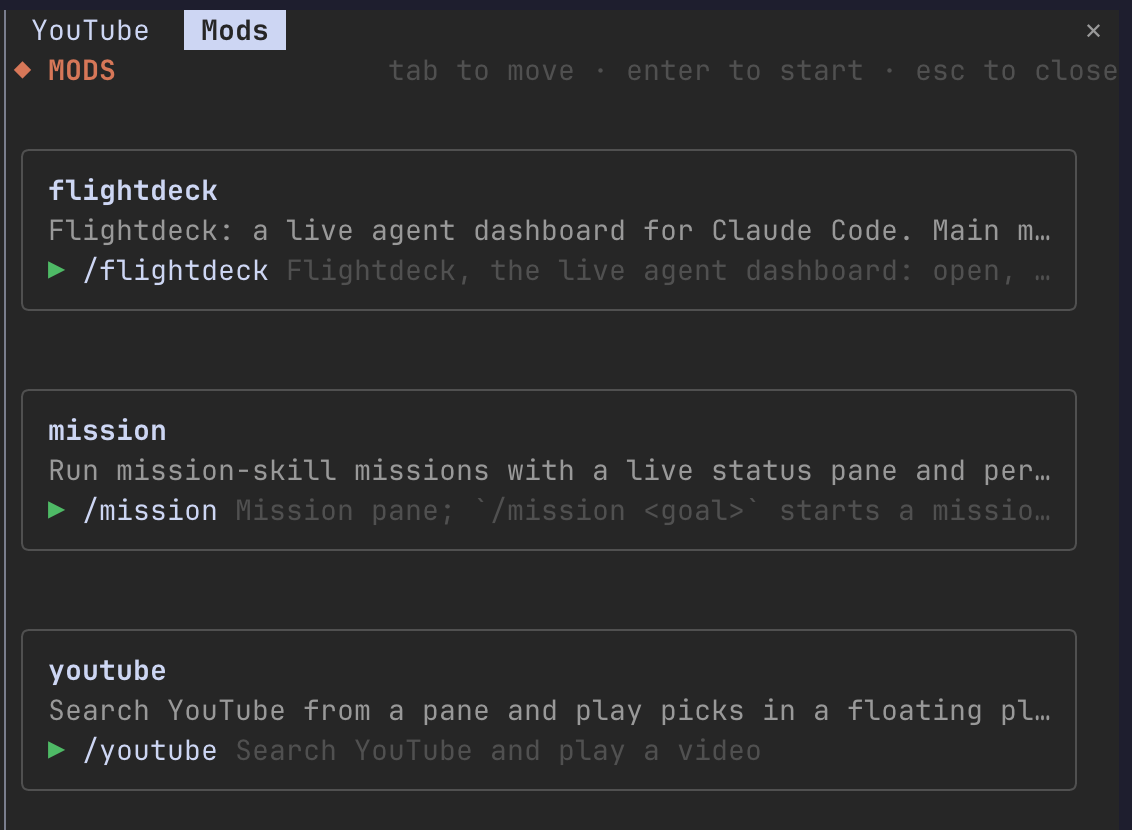
/mods opens the same menu from the prompt.Clone the repo, then load it as a plugin folder:
git clone https://github.com/brogrammerMW/claude-mod-menu.git
claude --plugin-dir ./claude-mod-menu
To load it in every session, add the folder to a local plugin marketplace and install it with claude plugin install.
| Key | Action |
|---|---|
Tab | Move between commands |
Enter | Start the selected mod |
Esc | Close the menu |
~/.claude/plugins/installed_plugins.json) and keeps the ones whose hooks/hooks.json loads a module.mod or mod:…).The menu leaves itself out of the list.
If a mod's command is missing after /reload-plugins, start a new session. A fresh session registers every mod's commands at startup.
claude plugin validate .
claude plugin test .
The menu logic lives in hooks/menu.ts and is tested in hooks/menu.test.ts. The footer button and the menu pane live in hooks/register.tsx.
hooks/register.tsx 99 lines1import type { EngineInterface as Engine, Register } from 'claude-code'
2
3import { buildMenu, descriptionOf, isModHooks, parseInstalled } from './menu'
4import type { CommandInfo, ModEntry } from './menu'
5
6const SELF = 'mod-menu'
7const PANE = 'mod-menu'
8// Theme color names, so the menu follows the person's light, dark or color-blind theme.
9const C = { accent: 'claude', text: 'text', dim: 'inactive', faint: 'subtle', run: 'success' }
10
11// Every installed plugin that loads a hooks module is a mod, from any marketplace.
12async function readMods($: Engine): Promise<ModEntry[]> {
13 const home = (await $.env.get('HOME')) ?? ''
14 const readText = (path: string) => $.fs.read(path).catch(() => '')
15 const installed = parseInstalled(await readText(`${home}/.claude/plugins/installed_plugins.json`))
16 const mods: { name: string; description: string }[] = []
17 for (const p of installed) {
18 if (!isModHooks(await readText(`${p.installPath}/hooks/hooks.json`))) continue
19 mods.push({ name: p.name, description: descriptionOf(await readText(`${p.installPath}/.claude-plugin/plugin.json`)) })
20 }
21 let commands: CommandInfo[] = []
22 try {
23 commands = (await $.command.list()) as CommandInfo[]
24 } catch (err) {
25 $.ui.log(`mod-menu: could not list commands: ${String(err)}`, { to: 'debug' })
26 }
27 return buildMenu(mods, commands, SELF)
28}
29
30async function openMenu($: Engine) {
31 await $.ui.open({ id: PANE, title: 'Mods', focus: true, closeOnEscape: true, rows: 16 })
32}
33
34// Close the menu first so the mod's own pane gets the room, then run its command.
35async function launch($: Engine, command: string) {
36 await $.ui.close({ id: PANE })
37 try {
38 await $.command.run({ command })
39 } catch (err) {
40 $.ui.toast(`Couldn't start /${command}: ${String(err)}`)
41 }
42}
43
44export const register: Register = on => {
45 on('session.start', async ($, e, next) => {
46 await $.command.register({ name: 'mods', description: 'Open the menu of your mods' })
47 return next(e)
48 })
49
50 on('command.run', { command: 'mods' }, async $ => {
51 await openMenu($)
52 return { text: 'Mods menu opened.' }
53 })
54
55 // The button: in the prompt footer's lower-right corner, after Claude Code's own mode labels.
56 on('ui.render', { component: 'SessionMode' }, async ($, e, next) => {
57 const { Box, Text, Button } = $.ui.resolve(e)
58 const modes = await next(e)
59 return (
60 <Box gap={1}>
61 {modes}
62 {e.props.modes.length > 0 && <Text color={C.faint}>·</Text>}
63 <Button key="open-mods" plain label="◆ mods" onPress={() => void openMenu($)} />
64 </Box>
65 )
66 })
67
68 on('ui.render', { component: 'Pane', requestId: PANE }, async ($, e) => {
69 const { Box, Text, Button } = $.ui.resolve(e)
70 const mods = await readMods($)
71 const width = Math.max(30, e.props.bodyColumns - 2)
72 return (
73 <Box flexDirection="column" gap={1}>
74 <Box justifyContent="space-between">
75 <Text color={C.accent} bold>◆ MODS</Text>
76 <Text color={C.faint}>tab to move · enter to start · esc to close</Text>
77 </Box>
78 {mods.length === 0 && (
79 <Text color={C.dim}>No mods found: no installed plugin loads a hooks module.</Text>
80 )}
81 {mods.map(m => (
82 <Box key={`mod-${m.name}`} flexDirection="column" borderStyle="round" borderColor={C.faint} paddingX={1} width={width}>
83 <Text bold>{m.name}</Text>
84 {m.description && <Text color={C.dim} wrap="truncate-end">{m.description}</Text>}
85 {m.commands.length === 0 && <Text color={C.faint}>no slash command to start it</Text>}
86 {m.commands.map(c => (
87 <Box key={`cmd-${c.name}`} gap={1}>
88 <Text color={C.run}>▶</Text>
89 <Button key={`run-${c.name}`} plain label={`/${c.name}`} onPress={() => void launch($, c.name)} />
90 <Text color={C.faint} wrap="truncate-end">{c.description}</Text>
91 </Box>
92 ))}
93 </Box>
94 ))}
95 </Box>
96 )
97 })
98}
99hooks/menu.ts 60 lines1// Pure menu logic: which installed plugins are mods, and which commands start them.
2
3export type CommandInfo = { name: string; description: string; source: string; plugin?: string }
4export type ModEntry = { name: string; description: string; commands: { name: string; description: string }[] }
5export type InstalledPlugin = { name: string; installPath: string }
6
7// "youtube@my-mods" → "youtube"
8export const baseName = (id: string) => id.split('@')[0] ?? id
9
10// ~/.claude/plugins/installed_plugins.json: { plugins: { "name@market": [{ installPath, ... }] } }
11export function parseInstalled(text: string): InstalledPlugin[] {
12 try {
13 const j = JSON.parse(text) as { plugins?: Record<string, unknown> }
14 return Object.entries(j.plugins ?? {}).flatMap(([id, v]) => {
15 const entry = (Array.isArray(v) ? v[0] : v) as { installPath?: unknown } | undefined
16 return typeof entry?.installPath === 'string' ? [{ name: baseName(id), installPath: entry.installPath }] : []
17 })
18 } catch {
19 return []
20 }
21}
22
23// A plugin is a mod when its hooks.json loads a hooks module ("modules"), not just shell hooks.
24export function isModHooks(hooksJson: string): boolean {
25 try {
26 const j = JSON.parse(hooksJson) as { modules?: unknown }
27 return Array.isArray(j.modules) && j.modules.length > 0
28 } catch {
29 return false
30 }
31}
32
33export function descriptionOf(pluginJson: string): string {
34 try {
35 const d = (JSON.parse(pluginJson) as { description?: unknown }).description
36 return typeof d === 'string' ? d : ''
37 } catch {
38 return ''
39 }
40}
41
42// One card per mod, alphabetical, the menu itself left out. A command belongs to a mod when the
43// engine says that plugin added it (with or without "@marketplace"), or its name is the mod's
44// name or "mod:…", whatever source the engine reports for it. A mod with no command still shows, so a missing one is visible.
45export function buildMenu(mods: { name: string; description: string }[], commands: CommandInfo[], self: string): ModEntry[] {
46 return mods
47 .filter(m => m.name !== self)
48 .sort((a, b) => a.name.localeCompare(b.name))
49 .map(m => ({
50 ...m,
51 commands: commands
52 // By name whatever the source says (a hook-registered command may not report 'plugin'),
53 // or by the plugin the engine names.
54 .filter(c => c.name === m.name || c.name.startsWith(`${m.name}:`)
55 || (c.plugin !== undefined && baseName(c.plugin) === m.name))
56 .map(c => ({ name: c.name, description: c.description }))
57 .sort((a, b) => a.name.localeCompare(b.name)),
58 }))
59}
60