usage-meters
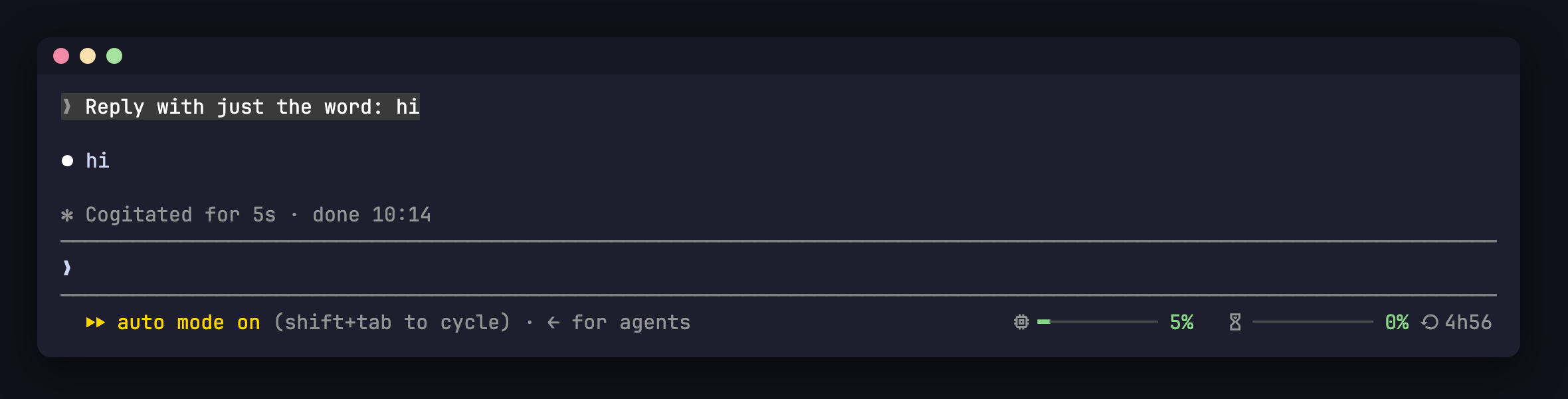
Context and rate-limit meters drawn natively above the prompt
spinner

Context and rate-limit meters drawn natively above the prompt
A Claude Code mod that draws two live meters in the prompt footer:
Bars go green → yellow (60%) → red (85%). On terminals narrower than 80 columns the reset countdown is hidden.
In a Claude Code terminal session:
/plugin install usage-meters --marketplace bradlycarpenter/claude-usage-metersAnswer y to add the marketplace, then press Enter to install at user scope. The meters appear immediately — no restart needed.
The icons are Nerd Font glyphs; without a Nerd Font they render as boxes.
Mods are small enough that Claude can write one for you. Paste this into Claude Code to get the same thing (and tweak it to taste):
Make me a mod that shows meters in the prompt footer (the
SessionModecomponent): one for context window usage and one for the 5-hour rate limit with a countdown until it resets. Draw each as a 10-cell bar using━for filled and─for empty, coloured success/warning/error at 60% and 85%, followed by the percentage. Use Nerd Font icons as labels. Keep any existing mode text (e.g. "plan mode") to the left of the meters. Position the meters absolutely so they never wrap the footer onto a second row, and hide the reset countdown below 80 columns. Seed the values onsession.startfrom$.session.usage()and update them onsession.measure. Add tests.
claude --plugin-dir .          # run with the mod loaded
claude plugin validate .       # check manifest + hooks
claude plugin test .           # run hooks/*.test.ts
Once loaded, .claude-plugin/types/ is generated so tsc -p . type-checks the mod.
hooks/register.tsx 76 lines1import { atom, read, update } from 'claude-code'
2import type { Register, SessionContextUsage, SessionRateLimit } from 'claude-code'
3
4import type { Meter } from '../types'
5
6const meters = atom({ plugin: 'usage-meters', key: 'meters' } as const, [])
7
8export const toMeters = (context: SessionContextUsage, rateLimits: readonly SessionRateLimit[]): Meter[] => [
9 ...(context.percent === undefined ? [] : [{ label: '', percent: context.percent }]),
10 ...rateLimits
11 .filter(r => r.kind === 'five_hour')
12 .map(r => ({ label: '', percent: r.percentUsed, resetsAt: r.resetsAt })),
13]
14
15export const tone = (percent: number) => (percent >= 85 ? 'error' : percent >= 60 ? 'warning' : 'success')
16
17const NARROW_COLUMNS = 80
18
19export const until = (resetsAt: string | undefined, now: number) => {
20 if (!resetsAt) return ''
21 const minutes = Math.max(0, Math.round((Date.parse(resetsAt) - now) / 60000))
22 if (minutes < 60) return `${minutes}m`
23 if (minutes < 48 * 60) return `${Math.floor(minutes / 60)}h${String(minutes % 60).padStart(2, '0')}`
24 return `${Math.round(minutes / 1440)}d`
25}
26
27export const register: Register = on => {
28 on('session.start', async ($, e, next) => {
29 const result = await next(e)
30 const usage = await $.session.usage()
31 await update($, meters, () => toMeters(usage.context, usage.rateLimits))
32 return result
33 })
34
35 on('session.measure', async ($, e, next) => {
36 await update($, meters, () => toMeters(e.context, e.rateLimits))
37 return next(e)
38 })
39
40 on('ui.render', { component: 'SessionMode' }, async ($, e, next) => {
41 const current = await read($, meters)
42 if (current.length === 0) return next(e)
43
44 const { Box, Text } = $.ui.resolve(e)
45 const now = await $.clock.now()
46 const width = 10
47 const showReset = (e.viewport?.columns ?? Infinity) >= NARROW_COLUMNS
48
49 // Absolute so the footer never wraps the meters to a row of their own; they
50 // paint over the hint's tail when narrow, hence spaces rather than gaps.
51 // right={-2} cancels the footer's right padding.
52 return (
53 <Box width={0} height={1}>
54 <Box position="absolute" right={-2} height={1} flexShrink={0}>
55 <Text wrap="truncate-start">
56 {e.props.modes.length ? <Text dimColor>{` ${e.props.modes.join(' & ')}`}</Text> : null}
57 {current.map(m => {
58 const filled = Math.round((Math.min(m.percent, 100) / 100) * width)
59 const reset = showReset ? until(m.resetsAt, now) : ''
60 return (
61 <Text key={m.label}>
62 <Text dimColor>{` ${m.label} `}</Text>
63 <Text color={tone(m.percent)}>{'━'.repeat(filled)}</Text>
64 <Text color="subtle">{'─'.repeat(width - filled)}</Text>
65 <Text color={tone(m.percent)} bold={m.percent >= 85}>{` ${Math.round(m.percent)}%`}</Text>
66 {reset ? <Text dimColor>{` ${reset}`}</Text> : null}
67 </Text>
68 )
69 })}
70 </Text>
71 </Box>
72 </Box>
73 )
74 })
75}
76types/index.d.ts 8 lines1export type Meter = { label: string; percent: number; resetsAt?: string }
2
3declare module 'claude-code' {
4 interface PluginState {
5 'usage-meters': { meters: Meter[] }
6 }
7}
8