usage-band
Shows context window fill and plan usage limits in a band above the prompt.
newbandprocesstimer

Shows context window fill and plan usage limits in a band above the prompt.
Context window and plan limits, always in view, in a band above the Claude Code prompt.





<sub>Unofficial. This project is not affiliated with or endorsed by Anthropic. Claude is a trademark of Anthropic.</sub>
<img src="docs/band.png" alt="The usage band above the prompt in the desktop Code tab: the Context, Session and Weekly meters drawn as rings, the branch, and the cache countdown">
<sub>Desktop Code tab</sub>
<img src="docs/cli-band.webp" alt="The usage band above the prompt in the terminal">
<sub>Terminal</sub>
| Meter | Shows |
|---|---|
| Context | How full the context window is. The drawer breaks it down by category, coloured as /context shows it |
| Session | The 5-hour plan limit and the time until it resets |
| Weekly | The 7-day plan limit and the time until it resets |
| Credits | The spend limit, when your plan has one |
| Branch | The session's git branch (a short commit hash when detached), shown from its last /: feature/NEXT-1777 shows as NEXT-1777. Hover it for the full name. The desktop shows a branch icon (a fork icon in a linked worktree); the terminal shows git main, and · worktree in a linked worktree |
| Cache | Estimated prompt-cache time remaining, after a clock icon on the desktop (Cache in the terminal), to the left of the + toggle |
A meter's fill turns amber at 80% of its limit and red at 95%. For the context, the limit is the auto-compact point, or the full window when auto-compact is off.
The cache countdown starts after a main-conversation response uses or writes the cache. It counts whole minutes (59m), then seconds in the last minute. The countdown uses your cache TTL settings. Without an explicit setting, it estimates the TTL from the plan limits. — means no cache time is available. A model switch or compaction clears the estimate. See Claude Code cache lifetimes.
When the band is too narrow, the bars shrink first. On the desktop, bars that would be too short to read turn into small rings. Then the branch is shortened with …, and then it is dropped. If the band is still too narrow, meters drop whole from the right, so items never overlap. The branch refreshes when the session starts and after each turn.
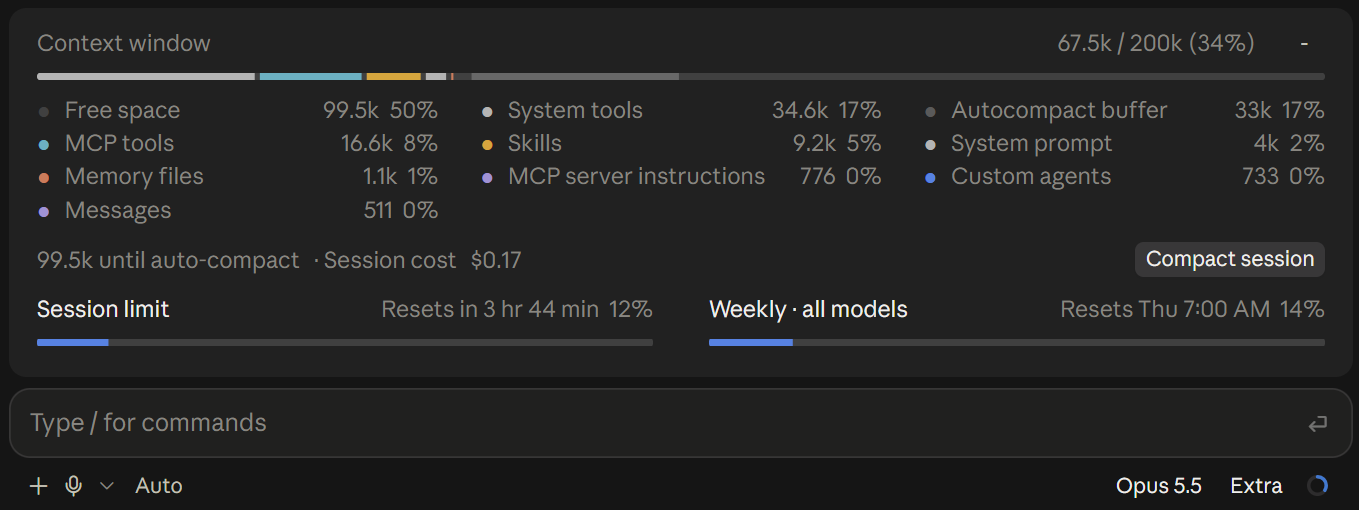
Click a meter or the + toggle to open the drawer. It shows the full context breakdown, the space left before auto-compact, the session cost, and a Compact session button.
The context breakdown is a local estimate. It sends no API request.

In a Claude Code session, run:
/plugin install usage-band --marketplace benpaternostro/claude-usage-bandConfirm the marketplace source, choose an installation scope, and start a new session.
| Surface | Status |
|---|---|
| Terminal, including the VS Code integrated terminal | ✅ Supported. The bars are drawn as text. Click a meter's label or figures, or +, to open the drawer. |
| Desktop app, Code tab | ✅ Supported |
| VS Code extension | ❌ Not supported. The extension loads the mod and runs its hooks, but it draws no plugin UI: neither the band nor a status line. Tested on extension 2.1.291. |
[!WARNING] The function-hook plugin API is in early access. It can change between Claude Code releases without notice.
From your shell, the install is two commands:
claude plugin marketplace add benpaternostro/claude-usage-bandclaude plugin install usage-band@claude-usage-bandTo get a new version, run:
claude plugin update usage-band@claude-usage-bandClone the repository, then start Claude Code with the folder:
git clone https://github.com/benpaternostro/claude-usage-band.gitclaude --plugin-dir ./claude-usage-bandUse this method when you change the mod yourself, or in the desktop app, where you cannot give a command-line flag. Add the absolute path of the cloned folder to the env block of ~/.claude/settings.json:
{
  "env": {
    "CLAUDE_CODE_PLUGIN_DIRS": "/Users/you/code/claude-usage-band"
  }
}
To load more than one folder, separate the paths with : on macOS and Linux, or with ; on Windows.
[!IMPORTANT] Do not load the mod from a folder and also install it from the marketplace. Use one method only.
Claude Code writes the API type declarations into .claude-plugin/types/ when it loads the mod from a folder. These files are not in the repository.
claude plugin validate .claude plugin test .When you load the mod from a folder, it reloads in a running terminal session after you save hooks/register.tsx. In the desktop app, set CLAUDE_CODE_PLUGIN_DIR_WATCH=1 in the same env block to get this behaviour, or start a new session.
| Path | Contents |
|---|---|
hooks/register.tsx | The hooks: usage refresh, band and drawer rendering |
hooks/cache.ts | Cache TTL estimate and countdown text |
hooks/git.ts | Branch and worktree detection |
hooks/fit.ts | Band width budget: bar widths, rings and branch shortening |
.claude-plugin/marketplace.json | The marketplace entry for /plugin install |
types/index.d.ts | Snapshot types and plugin state declarations |
tests/band.test.ts | Helper, git and render tests |
tests/cache.test.mjs | Cache countdown tests (node --test) |
tests/fit.test.mjs | Width budget tests (node --test) |
hooks/register.tsx 633 lines1import { atom, read, update } from 'claude-code'
2import type { EngineInterface, Register, SessionContextUsage, SessionCost, SessionRateLimit } from 'claude-code'
3
4import type { GitHead, Limit, Segment, Snapshot } from '../types'
5import { cacheText, cacheTtl } from './cache'
6import { BAR_CELLS, BAR_PX, CACHE_WORD, DESKTOP, GIT_WORD, ICON_PX, OPEN_GLYPH, TERMINAL, WORKTREE_NOTE, fitBand, roomOf } from './fit'
7import { HEAD_ARGV, branchName, isDetached, parseHead } from './git'
8
9const snapshot = atom({ plugin: 'usage-band', key: 'snapshot' } as const, null)
10const isOpen = atom({ plugin: 'usage-band', key: 'isOpen' } as const, false)
11const cacheExpiresAt = atom({ plugin: 'usage-band', key: 'cacheExpiresAt' } as const, null)
12const git = atom({ plugin: 'usage-band', key: 'git' } as const, null)
13
14// Full-width glyphs: the same size as the app's close control, and the same
15// advance as each other, so the toggle never moves.
16export { OPEN_GLYPH }
17export const CLOSE_GLYPH = '-'
18
19const SHORT_LABELS: Record<string, string> = { five_hour: 'Session', seven_day: 'Weekly', spend_limit: 'Credits' }
20const LONG_LABELS: Record<string, string> = {
21 five_hour: 'Session limit',
22 seven_day: 'Weekly · all models',
23 spend_limit: 'Usage credits',
24}
25
26// The app's usage popover: blue fill on a dark track; context categories in theme colours.
27const BLUE = '#4a80e8'
28const AMBER = '#e0a526'
29const RED = '#e5484d'
30const TRACK = '#8888884d'
31const BUFFER = '#8888888c'
32const HOVER_BG = '#8888881f'
33// The whole branch name over the short one, on the desktop: the band's dark
34// grey as a meter under the pointer lights it, opaque so the name hides what
35// it covers.
36const TIP_BG = '#2e2e2e'
37const TIP_TEXT = '#f2f2f2'
38const THEME: Record<string, string> = {
39 permission: BLUE,
40 suggestion: BLUE,
41 claude: '#d97757',
42 success: '#3fae6a',
43 warning: AMBER,
44 error: RED,
45 inactive: '#b4b4b4',
46 promptBorder: '#b4b4b4',
47 remember: '#a48fd8',
48 purple_FOR_SUBAGENTS_ONLY: '#a48fd8',
49 cyan_FOR_SUBAGENTS_ONLY: '#4fb3c4',
50}
51const BY_RANK = [BLUE, '#d97757', '#3fae6a', AMBER, '#b4b4b4', '#a48fd8', '#4fb3c4']
52// Braille blanks: drawn empty, never trimmed as spaces are. About a cell's
53// worth for each cell of bar.
54const hitLabel = (px: number) => '⠀'.repeat(Math.max(1, Math.round((BAR_CELLS * px) / BAR_PX)))
55
56// Desktop icons, 24-unit strokes in a grey that reads on light and dark themes.
57const ICON_GREY = '#8c8c8c'
58const ICONS = {
59 branch: '<circle cx="6" cy="5" r="2"/><circle cx="6" cy="19" r="2"/><circle cx="18" cy="6" r="2"/><path d="M6 7v10M18 8v1a4 4 0 0 1-4 4h-4a4 4 0 0 0-4 4"/>',
60 worktree: '<circle cx="6" cy="5" r="2"/><circle cx="18" cy="5" r="2"/><circle cx="12" cy="19" r="2"/><path d="M6 7v1a4 4 0 0 0 4 4h4a4 4 0 0 0 4-4v-1M12 12v5"/>',
61 clock: '<circle cx="12" cy="12" r="9"/><path d="M12 7v5l3 3"/>',
62}
63const svgIcon = (body: string) =>
64 `<svg xmlns="http://www.w3.org/2000/svg" width="24" height="24" viewBox="0 0 24 24" fill="none" stroke="${ICON_GREY}" stroke-width="2" stroke-linecap="round" stroke-linejoin="round">${body}</svg>`
65const SVG_DIVIDER = `<svg xmlns="http://www.w3.org/2000/svg" width="1" height="14"><rect width="1" height="14" fill="${ICON_GREY}" fill-opacity="0.45"/></svg>`
66
67type Usage = { context: SessionContextUsage; rateLimits: SessionRateLimit[]; cost?: SessionCost }
68type Part = { color: string; part: number; title?: string; tokens?: number }
69// What the bar's empty track says under the pointer.
70type Bar = { parts: Part[]; rest?: string; restTokens?: number }
71
72const limitsOf = (u: Usage): Limit[] =>
73 u.rateLimits.map(r => ({ kind: r.kind, percentUsed: r.percentUsed, resetsAt: r.resetsAt }))
74
75// The breakdown is what /context and the popover show; the raw figure is the last
76// response's input, which can be a subagent's, so it is only the fallback.
77export const toSnapshot = (u: Usage, prev: Snapshot | null): Snapshot => {
78 const b = u.context.breakdown
79 if (!b) {
80 return {
81 tokens: u.context.tokens,
82 window: u.context.window,
83 percent: u.context.percent,
84 limits: limitsOf(u),
85 usd: u.cost?.usd,
86 segments: prev?.segments ?? [],
87 buffer: prev?.buffer,
88 autoCompactAt: prev?.autoCompactAt,
89 }
90 }
91 const segments: Segment[] = b.categories
92 .filter(c => c.kind === 'used' && c.tokens > 0)
93 .sort((x, y) => y.tokens - x.tokens)
94 .map((c, i) => ({ name: c.name, tokens: c.tokens, color: THEME[c.color] ?? BY_RANK[i % BY_RANK.length] ?? BLUE }))
95 const buffer = b.categories.filter(c => c.kind === 'buffer').reduce((a, c) => a + c.tokens, 0)
96 return {
97 tokens: b.totalTokens,
98 window: b.rawMaxTokens,
99 percent: b.percentage,
100 limits: limitsOf(u),
101 usd: u.cost?.usd,
102 segments,
103 buffer: buffer > 0 ? buffer : undefined,
104 autoCompactAt: b.isAutoCompactEnabled ? b.autoCompactThreshold : undefined,
105 }
106}
107
108export const kTokens = (n: number) =>
109 n >= 1_000_000 ? `${(n / 1_000_000).toFixed(1)}M` : n >= 1000 ? `${(n / 1000).toFixed(1).replace(/\.0$/, '')}k` : `${n}`
110
111export const relative = (ms: number, isLong = false) => {
112 const mins = Math.max(1, Math.round(ms / 60_000))
113 const d = Math.floor(mins / 1440)
114 const h = Math.floor((mins % 1440) / 60)
115 const m = mins % 60
116 if (isLong) return d > 0 ? `${d} d ${h} hr` : h > 0 ? `${h} hr ${m} min` : `${m} min`
117 return d > 0 ? `${d}d ${h}h` : h > 0 ? `${h}h ${m}m` : `${m}m`
118}
119
120export const resetIn = (l: Limit, now: number) => {
121 const at = l.resetsAt ? Date.parse(l.resetsAt) : NaN
122 return at > now ? relative(at - now) : ''
123}
124
125// Under a day: "Resets in 1 hr 8 min"; longer: "Resets Thu 7:00 AM".
126export const resetText = (l: Limit, now: number) => {
127 const at = l.resetsAt ? Date.parse(l.resetsAt) : NaN
128 if (!(at > now)) return ''
129 if (at - now < 86_400_000) return `Resets in ${relative(at - now, true)}`
130 try {
131 const when = new Date(at).toLocaleString('en-US', { weekday: 'short', hour: 'numeric', minute: '2-digit' })
132 return `Resets ${when.replace(',', '')}`
133 } catch {
134 return `Resets in ${relative(at - now, true)}`
135 }
136}
137
138const share = (tokens: number, window: number) => `${Math.round((tokens / window) * 100)}%`
139
140// Category segments scaled to the window's fill, then the buffer; the rest is track.
141export const contextBar = (s: Snapshot): Bar => {
142 if (s.window <= 0) return { parts: [] }
143 const tokens = s.tokens ?? 0
144 const fill = Math.min(1, tokens / s.window)
145 const total = s.segments.reduce((a, x) => a + x.tokens, 0)
146 const used: Part[] =
147 fill <= 0
148 ? []
149 : total <= 0
150 ? [{ color: BLUE, part: fill, tokens, title: `Used · ${kTokens(tokens)} (${share(tokens, s.window)})` }]
151 : s.segments.map(x => ({
152 color: x.color,
153 part: (x.tokens / total) * fill,
154 tokens: x.tokens,
155 title: `${x.name} · ${kTokens(x.tokens)} (${share(x.tokens, s.window)})`,
156 }))
157 const bufferPart = s.buffer ? Math.min(1 - fill, s.buffer / s.window) : 0
158 const parts =
159 bufferPart > 0
160 ? [...used, { color: BUFFER, part: bufferPart, tokens: s.buffer, title: `Autocompact buffer · ${kTokens(s.buffer ?? 0)} (${share(s.buffer ?? 0, s.window)})` }]
161 : used
162 const free = Math.max(0, s.window - tokens - (bufferPart > 0 ? (s.buffer ?? 0) : 0))
163 return { parts, restTokens: free, rest: `Free space · ${kTokens(free)} (${share(free, s.window)})` }
164}
165
166// A fill turns amber from 80% of the way to its limit, and red from 95%.
167export const fillColor = (used: number, limit = 100) => {
168 const way = limit > 0 ? used / limit : 0
169 return way >= 0.95 ? RED : way >= 0.8 ? AMBER : BLUE
170}
171
172// The context's limit is where it auto-compacts, or the window when it never does.
173export const contextColor = (s: Snapshot) => fillColor(s.tokens ?? 0, s.autoCompactAt ?? s.window)
174
175export const limitBar = (l: Limit, now: number): Bar => {
176 const percent = Math.min(100, Math.max(0, l.percentUsed))
177 const reset = resetText(l, now)
178 const name = LONG_LABELS[l.kind] ?? l.kind
179 return {
180 parts: [{ color: fillColor(percent), part: percent / 100, title: `${name} · ${percent}% used${reset ? ` · ${reset}` : ''}` }],
181 rest: `${100 - percent}% left${reset ? ` · ${reset}` : ''}`,
182 }
183}
184
185const svgBar = (bar: Bar, width: number, height: number, gap: number) => {
186 let x = 0
187 const rects = bar.parts
188 .map(p => {
189 const w = p.part * width
190 const isLast = x + w >= width - 0.5
191 const r = `<rect x="${x.toFixed(2)}" width="${Math.max(0, isLast ? w : w - gap).toFixed(2)}" height="${height}" fill="${p.color}"/>`
192 x += w
193 return r
194 })
195 .join('')
196 return (
197 `<svg xmlns="http://www.w3.org/2000/svg" width="${width}" height="${height}" viewBox="0 0 ${width} ${height}" preserveAspectRatio="none">` +
198 `<clipPath id="c"><rect width="${width}" height="${height}" rx="${height / 2}"/></clipPath>` +
199 `<g clip-path="url(#c)"><rect width="${width}" height="${height}" fill="${TRACK}"/>${rects}</g></svg>`
200 )
201}
202
203// A bar wound into a ring, for a row with no room for bars: the fill as one
204// arc in its colour, clockwise from the top, on the same track.
205const svgRing = (part: number, size: number, color: string) => {
206 const c = size / 2
207 const r = c - 1.25
208 const around = 2 * Math.PI * r
209 const arc = Math.min(1, Math.max(0, part)) * around
210 return (
211 `<svg xmlns="http://www.w3.org/2000/svg" width="${size}" height="${size}" viewBox="0 0 ${size} ${size}" fill="none" stroke-width="2">` +
212 `<g transform="rotate(-90 ${c} ${c})"><circle cx="${c}" cy="${c}" r="${r}" stroke="${TRACK}"/>` +
213 (arc > 0
214 ? `<circle cx="${c}" cy="${c}" r="${r}" stroke="${color}" stroke-linecap="round" stroke-dasharray="${arc.toFixed(2)} ${around.toFixed(2)}"/>`
215 : '') +
216 `</g></svg>`
217 )
218}
219
220
221export const textCells = (parts: Part[], width: number) => {
222 const cells: { color: string; n: number }[] = []
223 let used = 0
224 for (const p of parts) {
225 const n = Math.min(width - used, Math.round(p.part * width))
226 if (n > 0) {
227 cells.push({ color: p.color, n })
228 used += n
229 }
230 }
231 return { cells, free: Math.max(0, width - used) }
232}
233
234// The summary breakdown is a local estimate: it sends no API request.
235async function refresh($: EngineInterface) {
236 const prev = await read($, snapshot)
237 let usage: Usage
238 try {
239 usage = await $.session.usage({ breakdown: 'summary' })
240 } catch {
241 usage = await $.session.usage()
242 }
243 await update($, snapshot, () => toSnapshot(usage, prev))
244}
245
246// Outside a repository, or with no commit yet, the band shows no branch.
247async function refreshGit($: EngineInterface) {
248 let head: GitHead | null = null
249 try {
250 const ran = await $.process.run(HEAD_ARGV, { timeoutMs: 5000 })
251 if (ran.exitCode === 0) {
252 const sha = isDetached(ran.stdout) ? (await $.process.run(['git', 'rev-parse', '--short', 'HEAD'], { timeoutMs: 5000 })).stdout : ''
253 head = parseHead(ran.stdout, sha)
254 }
255 } catch {
256 // No git on the host: no branch.
257 }
258 await update($, git, () => head)
259}
260
261async function toggle($: EngineInterface) {
262 await update($, isOpen, open => !open)
263}
264
265export const register: Register = on => {
266 let ticker: ReturnType<EngineInterface['clock']['every']> | undefined
267
268 on('session.start', async ($, e, next) => {
269 const result = await next(e)
270 await update($, isOpen, () => false)
271 await update($, cacheExpiresAt, () => null)
272 await Promise.all([refresh($), refreshGit($)])
273 ticker ??= $.clock.every(1000, () => $.ui.invalidate('ui.render'))
274 return result
275 })
276
277 on('session.end', async (_, e, next) => {
278 ticker?.cancel()
279 ticker = undefined
280 return next(e)
281 })
282
283 on('turn.step', async function* ($, e, next) {
284 const result = yield* next(e)
285 if (e.agentId || !result.usage) return result
286 const usage = result.usage
287 if (usage.cache_read_input_tokens + usage.cache_creation_input_tokens === 0) {
288 await update($, cacheExpiresAt, () => null)
289 return result
290 }
291 const now = await $.clock.now()
292 const [force5m, ttl, enable1h, settings, session] = await Promise.all([
293 $.env.get('FORCE_PROMPT_CACHING_5M'),
294 $.env.get('CLAUDE_CODE_PROMPT_CACHE_TTL'),
295 $.env.get('ENABLE_PROMPT_CACHING_1H'),
296 $.settings.read(),
297 $.session.usage(),
298 ])
299 const duration = cacheTtl({ force5m, ttl, enable1h, setting: settings.promptCacheTtl, limits: limitsOf(session) })
300 await update($, cacheExpiresAt, () => now + duration)
301 return result
302 })
303
304 // A turn may switch the branch or move into a worktree; so may the person,
305 // outside the session, between turns.
306 on('turn.complete', async ($, e, next) => {
307 const result = await next(e)
308 if (!e.agentId) await refreshGit($)
309 return result
310 })
311
312 on('classic.PostModelSwitch', async ($, e, next) => {
313 const result = await next(e)
314 await update($, cacheExpiresAt, () => null)
315 return result
316 })
317
318 on('session.compact', async ($, e, next) => {
319 const result = await next(e)
320 if (!e.agentId && e.trigger !== 'precompute' && result.skip === undefined) {
321 await update($, cacheExpiresAt, () => null)
322 }
323 return result
324 })
325
326 on('session.measure', async ($, e, next) => {
327 if (e.changed.includes('context')) {
328 await refresh($)
329 } else {
330 // Limits and cost only: keep the context figures the breakdown gave.
331 const limits = limitsOf(e)
332 await update($, snapshot, prev => (prev ? { ...prev, limits, usd: e.cost?.usd ?? prev.usd } : toSnapshot(e, null)))
333 }
334 return next(e)
335 })
336
337 on('ui.render', { component: 'AbovePrompt' }, async ($, e, next) => {
338 const s = await read($, snapshot)
339 if (e.props.hasSurvey || s === null) return next(e)
340
341 const { Box, Button, Text } = $.ui.resolve(e)
342 const now = await $.clock.now()
343 const open = await read($, isOpen)
344 ticker ??= $.clock.every(1000, () => $.ui.invalidate('ui.render'))
345 const cacheLabel = cacheText(await read($, cacheExpiresAt), now)
346 const head = await read($, git)
347
348 // A wide bar spans `width` cells on the terminal: the drawer's inner width
349 // unless it sits in a narrower column. A narrow one is `width` cells, or px
350 // on the desktop.
351 const bar = (id: string, bar: Bar, label: string, isWide: boolean, width = e.props.bodyColumns - 2) => {
352 if (e.surface === 'desktop') {
353 const { Svg } = $.ui.resolve(e)
354 // A wide bar fills a row of its own, centred in it, so the text above
355 // and below sits the same distance away.
356 return isWide ? (
357 <Box key={id} height={1} flexDirection="column" justifyContent="center">
358 <Svg key={`${id}-svg`} source={svgBar(bar, 1000, 4, 4)} alt={label} height={4} />
359 </Box>
360 ) : (
361 <Svg key={id} source={svgBar(bar, width, 4, 1)} alt={label} width={width} height={4} />
362 )
363 }
364 const { cells, free } = textCells(bar.parts, isWide ? Math.max(10, width) : width)
365 return (
366 <Box key={id}>
367 {cells.map((c, i) => (
368 <Text key={`${id}-${i}`} color={c.color}>
369 {'━'.repeat(c.n)}
370 </Text>
371 ))}
372 <Text dimColor>{'━'.repeat(free)}</Text>
373 </Box>
374 )
375 }
376
377 const dot = (id: string, color: string) => (
378 <Text key={id} color={color}>
379 ●
380 </Text>
381 )
382
383 // The legend as a grid, as /context lays it out: each cell a dot and the
384 // name on the left, the size and share aligned on the right.
385 const cols = e.props.bodyColumns >= 128 ? 4 : e.props.bodyColumns >= 90 ? 3 : e.props.bodyColumns >= 60 ? 2 : 1
386 const legend = (id: string, b: Bar, maxRows = Infinity) => {
387 const items = [
388 ...b.parts.map(p => ({ color: p.color, title: p.title ?? '', tokens: p.tokens ?? 0 })),
389 ...(b.rest ? [{ color: TRACK, title: b.rest, tokens: b.restTokens ?? 0 }] : []),
390 ].sort((x, y) => y.tokens - x.tokens)
391 const width = Math.floor((e.props.bodyColumns - 2 - 3 * (cols - 1)) / cols)
392 const rows = Array.from({ length: Math.max(1, Math.min(maxRows, Math.ceil(items.length / cols))) }, (_, r) => items.slice(r * cols, r * cols + cols))
393 return (
394 <Box key={id} flexDirection="column">
395 {rows.map((row, r) => (
396 <Box key={`${id}-r${r}`} flexDirection="row" columnGap={3}>
397 {row.map((it, c) => {
398 const [name, ...rest] = it.title.split(' · ')
399 const value = rest.join(' · ').replace(/ \((\d+%)\)$/, ' $1')
400 return (
401 <Box key={`${id}-${r}-${c}`} width={width} flexDirection="row" columnGap={1}>
402 {dot(`${id}-dot-${r}-${c}`, it.color)}
403 <Box key={`${id}-n-${r}-${c}`} flexGrow={1} flexShrink={1}>
404 <Text dimColor wrap="truncate-end">
405 {name}
406 </Text>
407 </Box>
408 <Text dimColor>{value}</Text>
409 </Box>
410 )
411 })}
412 </Box>
413 ))}
414 </Box>
415 )
416 }
417
418 // Its own keyed Box: the toggle brightens under the pointer, not the whole row.
419 const toggleButton = (
420 <Box key="details-box">
421 <Button
422 key="details"
423 plain
424 dimColor
425 hover={{ dimColor: false }}
426 label={open ? CLOSE_GLYPH : OPEN_GLYPH}
427 onPress={() => toggle($)}
428 />
429 </Box>
430 )
431
432 const ctx = contextBar(s)
433 const ctxRight =
434 s.tokens === undefined ? `— / ${kTokens(s.window)}` : `${kTokens(s.tokens)} / ${kTokens(s.window)} (${s.percent ?? 0}%)`
435 const toCompact =
436 s.autoCompactAt !== undefined && s.tokens !== undefined ? Math.max(0, s.autoCompactAt - s.tokens) : undefined
437 const compactLine =
438 toCompact === undefined
439 ? s.tokens === undefined
440 ? 'No reply yet in this window'
441 : `${kTokens(Math.max(0, s.window - s.tokens))} free`
442 : toCompact < 10_000
443 ? 'Auto-compacts soon'
444 : `${kTokens(toCompact)} until auto-compact`
445
446 if (open) {
447 // The drawer takes the band's place and must fit it whole: past maxRows
448 // the band scrolls. The limits share a row and the cost rides the compact
449 // row, so the breakdown keeps its room; gaps only when all of it fits.
450 const limitCols = e.props.bodyColumns >= 70 ? 2 : 1
451 // The columns share the inner width; the first ones take any odd cells.
452 const limitSpan = e.props.bodyColumns - 2 - 4 * (limitCols - 1)
453 const limitWidth = (c: number) => Math.floor(limitSpan / limitCols) + (c < limitSpan % limitCols ? 1 : 0)
454 const limitRows = Array.from({ length: Math.ceil(s.limits.length / limitCols) }, (_, r) =>
455 s.limits.slice(r * limitCols, r * limitCols + limitCols),
456 )
457 const legendRows = Math.ceil((ctx.parts.length + (ctx.rest ? 1 : 0)) / cols)
458 const base = 3 + 2 * limitRows.length
459 const hasGaps = base + legendRows + 1 + limitRows.length <= e.props.maxRows
460 return (
461 <Box flexDirection="column" rowGap={hasGaps ? 1 : 0} paddingX={1}>
462 <Box key="d-ctx" flexDirection="column">
463 <Box key="d-ctx-row" flexDirection="row" justifyContent="space-between" alignItems="center" columnGap={2}>
464 <Text dimColor>Context window</Text>
465 <Box key="d-ctx-right" flexDirection="row" alignItems="center" columnGap={2}>
466 <Text dimColor>{ctxRight}</Text>
467 {toggleButton}
468 </Box>
469 </Box>
470 {bar('d-ctx-bar', ctx, `Context ${s.percent ?? 0}%`, true)}
471 {legend('d-ctx-legend', ctx, e.props.maxRows - base)}
472 </Box>
473 <Box key="d-compact" flexDirection="row" justifyContent="space-between" alignItems="center" columnGap={2}>
474 <Box key="d-compact-left" flexDirection="row" alignItems="center" columnGap={1}>
475 <Text dimColor>{compactLine}</Text>
476 {s.usd !== undefined && <Text dimColor>· Session cost</Text>}
477 {s.usd !== undefined && <Text dimColor>{`$${s.usd.toFixed(2)}`}</Text>}
478 </Box>
479 <Button key="compact-now" variant="secondary" label="Compact session" onPress={() => $.session.compact()} />
480 </Box>
481 {limitRows.map((row, r) => (
482 <Box key={`d-lims-${r}`} flexDirection="row" columnGap={4}>
483 {row.map((l, c) => {
484 const reset = resetText(l, now)
485 return (
486 <Box key={`d-lim-${l.kind}`} flexDirection="column" flexGrow={1} flexShrink={1} width={`${Math.floor(100 / limitCols)}%`}>
487 <Box key={`d-lim-row-${l.kind}`} flexDirection="row" justifyContent="space-between" alignItems="center" columnGap={2}>
488 <Text wrap="truncate-end">{LONG_LABELS[l.kind] ?? l.kind}</Text>
489 <Text dimColor wrap="truncate-end">{`${reset}${reset ? ' ' : ''}${l.percentUsed}%`}</Text>
490 </Box>
491 {bar(`d-lim-bar-${l.kind}`, limitBar(l, now), `${l.kind} ${l.percentUsed}%`, true, limitWidth(c))}
492 </Box>
493 )
494 })}
495 </Box>
496 ))}
497 </Box>
498 )
499 }
500
501 // A desktop cell is about 8px wide: the band's inner gaps take half of one
502 // there. Terminal gaps are whole cells.
503 const isDesktop = e.surface === 'desktop'
504 const half = isDesktop ? 0.5 : 1
505 const percentText = (percent: number | undefined) => (percent === undefined ? '—' : `${percent}%`)
506
507 const meters = [
508 // One fill, as the limits have: at this size the context's grey
509 // categories vanish into the track. The drawer breaks it down.
510 { id: 'ctx', label: 'Context', b: { parts: [{ color: contextColor(s), part: Math.min(1, (s.percent ?? 0) / 100) }] }, percent: s.percent, note: '' },
511 ...s.limits.map(l => ({
512 id: `lim-${l.kind}`,
513 label: SHORT_LABELS[l.kind] ?? l.kind,
514 b: limitBar(l, now),
515 percent: l.percentUsed,
516 note: resetIn(l, now),
517 })),
518 ]
519 // The bars narrow, then turn to rings on the desktop, then the branch
520 // shortens, before anything is dropped.
521 const model = isDesktop ? DESKTOP : TERMINAL
522 const fit = fitBand(
523 {
524 meters: meters.map(m => ({ label: m.label, percent: percentText(m.percent), note: m.note })),
525 branch: head ? branchName(head) : undefined,
526 worktree: head?.worktree !== undefined,
527 cache: cacheLabel,
528 },
529 roomOf(model, e.props.bodyColumns),
530 model,
531 )
532
533 const svg = (id: string, source: string, alt: string, width: number, height: number) => {
534 if (e.surface !== 'desktop') return null
535 const { Svg } = $.ui.resolve(e)
536 return <Svg key={id} source={source} alt={alt} width={width} height={height} />
537 }
538 const icon = (id: string, body: string, alt: string) => svg(id, svgIcon(body), alt, ICON_PX, ICON_PX)
539
540 const meter = ({ id, label, b, percent, note }: (typeof meters)[number]) => (
541 <Box
542 key={id}
543 flexDirection="row"
544 alignItems="center"
545 columnGap={half}
546 paddingX={half}
547 flexShrink={0}
548 hover={{ backgroundColor: HOVER_BG }}
549 >
550 {/* Only Buttons take a press, so each word of the meter is one: a click
551 anywhere on its text opens the drawer. */}
552 <Button key={`${id}-label`} plain dimColor label={label} onPress={() => toggle($)} />
553 {/* A bar or ring takes no press, so on the desktop a blank plain Button
554 lies over it. On a text surface that Button would paint over the bar's
555 cells, so there the label and figures take the press alone. */}
556 {/* A ring sits closer to its figure than to its label, so the two read
557 as one. */}
558 <Box key={`${id}-fill`} flexDirection="row" alignItems="center" columnGap={fit.isRing ? 0 : half}>
559 <Box flexDirection="row" alignItems="center">
560 {fit.isRing
561 ? svg(`${id}-bar`, svgRing((percent ?? 0) / 100, fit.bar, b.parts[0]?.color ?? BLUE), `${label} ${percent ?? 0}%`, fit.bar, fit.bar)
562 : bar(`${id}-bar`, b, `${label} ${percent ?? 0}%`, false, fit.bar)}
563 {isDesktop && (
564 <Box position="absolute" top={0} left={0}>
565 <Button key={`${id}-hit`} plain label={hitLabel(fit.bar)} hover={{ inverse: false }} onPress={() => toggle($)} />
566 </Box>
567 )}
568 </Box>
569 <Button key={`${id}-pct`} plain label={percentText(percent)} onPress={() => toggle($)} />
570 </Box>
571 {note !== '' && <Button key={`${id}-note`} plain dimColor label={note} onPress={() => toggle($)} />}
572 </Box>
573 )
574
575 return (
576 <Box flexDirection="row" justifyContent="space-between" alignItems="center" columnGap={2 * half}>
577 {/* One row that wraps onto a hidden second one: whatever the fit
578 misjudges leaves whole, from the right, rather than overlapping or
579 being cut mid-word. The branch sits last and grows to push itself
580 right, so it is the first to go, with the divider that parts it
581 from the cache. On the desktop the meters' own padding spaces them. */}
582 <Box key="meters" flexDirection="row" flexWrap="wrap" alignItems="center" columnGap={model.gap} height={1} flexGrow={1} flexShrink={1} overflow="hidden">
583 {meters.map(meter)}
584 {head && fit.branch !== undefined && (
585 <Box key="git" flexDirection="row" justifyContent="flex-end" alignItems="center" columnGap={half} paddingLeft={isDesktop ? 0 : 1} flexGrow={1} flexShrink={0}>
586 <Box key="git-name" flexDirection="row" alignItems="center" columnGap={half}>
587 {isDesktop && icon('git-icon', head.worktree === undefined ? ICONS.branch : ICONS.worktree, head.worktree === undefined ? 'Branch' : 'Worktree branch')}
588 {/* The terminal has no icons: a label stands in, as "Cache" does. */}
589 {!isDesktop && <Text dimColor>{GIT_WORD}</Text>}
590 <Text>{fit.branch}</Text>
591 {/* A name shown short is whole under the pointer, drawn over the
592 row and ending where the short one does. Unkeyed, so the
593 pointer on the name reveals it. An interactive Svg's
594 tooltip would sit in a frame that paints white each redraw.
595 Terminal cells cover what is under them; the desktop needs
596 a ground. */}
597 {fit.branch !== head.branch && (
598 <Box
599 position="absolute"
600 top={0}
601 right={0}
602 display="none"
603 hover={{ display: 'flex' }}
604 backgroundColor={isDesktop ? TIP_BG : undefined}
605 paddingX={isDesktop ? half : 0}
606 >
607 <Text color={isDesktop ? TIP_TEXT : undefined}>{head.branch}</Text>
608 </Box>
609 )}
610 </Box>
611 {!isDesktop && head.worktree !== undefined && <Text dimColor>{WORKTREE_NOTE}</Text>}
612 <Box key="git-divider" marginLeft={half} flexDirection="row" alignItems="center">
613 {/* With an empty alt the desktop drew nothing here. */}
614 {isDesktop ? svg('divider', SVG_DIVIDER, 'Separator', 1, 14) : <Text dimColor>│</Text>}
615 </Box>
616 </Box>
617 )}
618 </Box>
619 <Box key="band-right" flexDirection="row" alignItems="center" columnGap={2 * half} flexShrink={0}>
620 {/* The time's Button pads it enough from the clock, so they sit as
621 close as the branch and its icon; the terminal's word keeps a cell. */}
622 <Box key="cache" flexDirection="row" alignItems="center" columnGap={isDesktop ? 0 : half}>
623 {/* An icon or a dim word, then the value bright, as the branch is. */}
624 {isDesktop ? icon('cache-icon', ICONS.clock, 'Prompt cache') : <Button key="cache-label" plain dimColor label={CACHE_WORD} onPress={() => toggle($)} />}
625 <Button key="cache-time" plain label={cacheLabel} onPress={() => toggle($)} />
626 </Box>
627 {toggleButton}
628 </Box>
629 </Box>
630 )
631 })
632}
633hooks/cache.ts 32 lines1import type { Limit } from '../types'
2
3type CacheOptions = {
4 force5m?: string
5 ttl?: string
6 setting?: unknown
7 enable1h?: string
8 limits: Limit[]
9}
10
11// Limits identify the subscription default. The host does not expose its
12// billing mode, so this remains an estimate when no TTL is configured.
13export const cacheTtl = ({ force5m, ttl, setting, enable1h, limits }: CacheOptions): number => {
14 if (force5m === '1') return 300_000
15 for (const value of [ttl, setting]) {
16 if (value === '5m') return 300_000
17 if (value === '1h') return 3_600_000
18 }
19 if (enable1h === '1') return 3_600_000
20 const plan = limits.filter(l => l.kind === 'five_hour' || l.kind === 'seven_day')
21 return plan.length > 0 && plan.every(l => l.percentUsed < 100) ? 3_600_000 : 300_000
22}
23
24// Whole minutes until the last one, then seconds: the label keeps its width
25// rather than changing every second. The band puts a clock or "Cache" before it.
26export const cacheText = (expiresAt: number | null, now: number): string => {
27 if (expiresAt === null) return '—'
28 const seconds = Math.max(0, Math.ceil((expiresAt - now) / 1000))
29 if (seconds === 0) return 'expired'
30 return seconds < 60 ? `${seconds}s` : `${Math.ceil(seconds / 60)}m`
31}
32hooks/fit.ts 135 lines1// The band's width budget. The meters' words, the cache and the toggle keep
2// their size; the bars give way first, down to a stub or on the desktop to a
3// ring, then the branch is cut short, then it goes. The band's wrapping row
4// still drops whatever this misjudges, whole and from the right, so nothing
5// ever overlaps.
6
7export type Meter = { label: string; percent: string; note: string }
8export type BandText = { meters: Meter[]; branch?: string; worktree: boolean; cache: string }
9// The bars' width (cells on the terminal, px on the desktop), whether rings
10// stand in for them, and the branch as drawn: absent when it does not fit.
11export type Fit = { bar: number; isRing?: boolean; branch?: string }
12
13export type Model = {
14 bar: { min: number; max: number }
15 // A ring `size` wide stands in for bars narrower than `min`, and sits
16 // `closer` to its figure than a bar does. Without one the bars stop at `min`.
17 ring?: { size: number; closer: number }
18 text: (s: string) => number
19 // Between the band's row items: the meters and the branch.
20 gap: number
21 // A meter with no bar.
22 meter: (m: Meter) => number
23 git: (branch: string, worktree: boolean) => number
24 // The cache and the toggle, with the gap before them.
25 right: (cache: string) => number
26}
27
28// The words the terminal spells out where the desktop draws icons.
29export const GIT_WORD = 'git'
30export const WORKTREE_NOTE = '· worktree'
31export const CACHE_WORD = 'Cache'
32export const OPEN_GLYPH = '+'
33
34export const BAR_CELLS = 8
35export const BAR_PX = 48
36export const ICON_PX = 13
37export const RING_PX = 14
38// A branch keeps this many characters, the ellipsis included, or goes.
39const BRANCH_MIN = 8
40
41const isWide = (c: number) =>
42 (c >= 0x1100 && c <= 0x115f) ||
43 (c >= 0x2e80 && c <= 0xa4cf) ||
44 (c >= 0xac00 && c <= 0xd7a3) ||
45 (c >= 0xf900 && c <= 0xfaff) ||
46 (c >= 0xfe30 && c <= 0xfe4f) ||
47 (c >= 0xff00 && c <= 0xff60) ||
48 (c >= 0xffe0 && c <= 0xffe6) ||
49 (c >= 0x1f300 && c <= 0x1faff) ||
50 c >= 0x20000
51
52export const cells = (s: string) => [...s].reduce((n, c) => n + (isWide(c.codePointAt(0) ?? 0) ? 2 : 1), 0)
53
54// Terminal cells are exact: the engine lays the band out in `bodyColumns`.
55// A meter is padded a cell each side, its words a cell apart; the branch is
56// "git main │" after a cell of padding, the divider a cell further off.
57export const TERMINAL: Model = {
58 bar: { min: 3, max: BAR_CELLS },
59 text: cells,
60 gap: 1,
61 meter: m => 2 + cells(m.label) + 2 + cells(m.percent) + (m.note ? 1 + cells(m.note) : 0),
62 git: (branch, worktree) => 1 + cells(GIT_WORD) + 1 + cells(branch) + (worktree ? 1 + cells(WORKTREE_NOTE) : 0) + 3,
63 right: cache => 2 + cells(CACHE_WORD) + 1 + cells(cache) + 2 + cells(OPEN_GLYPH),
64}
65
66// The desktop's text is proportional, so its widths are estimates, measured
67// from the Code tab at 14px and rounded up: a cell is about 8.1px, its gaps
68// half of one, and a plain Button pads its label 6px each side.
69export const CELL_PX = 8.1
70// The Code tab's column is about 768px wide at most; the band's padding
71// leaves this much inside it.
72const BAND_PX = 750
73const HALF = CELL_PX / 2
74const PAD = 6
75const PX: [RegExp, number][] = [
76 [/[ijl.,:;'|!`]/, 3.2],
77 [/[ftrI()[\]{}\\]/, 4.4],
78 [/[/-]/, 5.4],
79 [/ /, 3.6],
80 [/[scz]/, 5.8],
81 [/[mwMW%—]/, 10.5],
82 [/…/, 13],
83 [/1/, 5.4],
84 [/[0-9]/, 7.4],
85 [/[A-Z]/, 8.2],
86]
87export const px = (s: string) =>
88 [...s].reduce((n, c) => n + (isWide(c.codePointAt(0) ?? 0) ? 11 : (PX.find(([r]) => r.test(c))?.[1] ?? 7.2)), 0)
89const button = (s: string) => px(s) + 2 * PAD
90
91// A meter is padded half a cell each side, its words half a cell apart; the
92// meters touch. The branch is its icon, the name and the divider. A bar much
93// under half its width reads as a dash, so a ring takes its place.
94export const DESKTOP: Model = {
95 bar: { min: 28, max: BAR_PX },
96 ring: { size: RING_PX, closer: HALF },
97 text: px,
98 gap: 0,
99 meter: m => 2 * HALF + button(m.label) + 2 * HALF + button(m.percent) + (m.note ? HALF + button(m.note) : 0),
100 git: branch => ICON_PX + HALF + px(branch) + 2 * HALF + 1,
101 right: cache => 2 * HALF + ICON_PX + button(cache) + 2 * HALF + button(OPEN_GLYPH),
102}
103
104// What the band may fill: the terminal's columns, or on the desktop the pane's
105// width less a margin, within the column's own.
106export const roomOf = (model: Model, bodyColumns: number) =>
107 model === DESKTOP ? Math.min(BAND_PX, (bodyColumns - 2) * CELL_PX) : bodyColumns
108
109export const clip = (s: string, max: number) => ([...s].length > max ? `${[...s].slice(0, max - 1).join('')}…` : s)
110
111export const fitBand = (t: BandText, room: number, model: Model): Fit => {
112 const n = t.meters.length
113 const fixed = t.meters.reduce((w, m) => w + model.meter(m), 0) + Math.max(0, n - 1) * model.gap + model.right(t.cache)
114 const barIn = (left: number) => (n === 0 ? model.bar.max : Math.min(model.bar.max, Math.floor(left / n)))
115 // The narrowest the meters draw: stub bars, or rings, and the room each
116 // takes from the row.
117 const least: Fit = model.ring === undefined ? { bar: model.bar.min } : { bar: model.ring.size, isRing: true }
118 const leastTakes = model.ring === undefined ? model.bar.min : model.ring.size - model.ring.closer
119 const sized = (bar: number): Fit => (bar >= model.bar.min ? { bar } : least)
120 const alone = sized(barIn(room - fixed))
121 if (t.branch === undefined) return alone
122 const withGit = (name: string) => fixed + (n > 0 ? model.gap : 0) + model.git(name, t.worktree)
123 const whole = barIn(room - withGit(t.branch))
124 if (whole >= model.bar.min) return { bar: whole, branch: t.branch }
125 // The narrowest meters, and the name whole or cut to what the row has left.
126 const left = room - withGit('') - n * leastTakes
127 const chars = [...t.branch].length
128 for (let k = chars; k >= Math.min(chars, BRANCH_MIN); k--) {
129 const cut = clip(t.branch, k)
130 if (model.text(cut) <= left) return { ...least, branch: cut }
131 }
132 // No room for the branch: it goes, and the bars take back its share.
133 return alone
134}
135hooks/git.ts 34 lines1import type { GitHead } from '../types'
2import { clip } from './fit'
3
4// One call answers all four: the git dir, the common dir, the working tree's
5// top and the branch ("HEAD" when detached).
6export const HEAD_ARGV = [
7 'git',
8 'rev-parse',
9 '--path-format=absolute',
10 '--git-dir',
11 '--git-common-dir',
12 '--show-toplevel',
13 '--abbrev-ref',
14 'HEAD',
15] as const
16
17export const isDetached = (stdout: string) => stdout.trim().split(/\r?\n/)[3] === 'HEAD'
18
19// A linked worktree keeps a git dir of its own under the common one; the main
20// working tree's are the same.
21export const parseHead = (stdout: string, sha = ''): GitHead | null => {
22 const [gitDir, commonDir, top, ref] = stdout.trim().split(/\r?\n/).map(l => l.trim())
23 if (!gitDir || !commonDir || !top || !ref) return null
24 const branch = ref === 'HEAD' ? sha.trim() : ref
25 if (!branch) return null
26 const norm = (p: string) => p.replace(/\\/g, '/').replace(/\/+$/, '')
27 return norm(gitDir) === norm(commonDir) ? { branch } : { branch, worktree: norm(top).split('/').pop() ?? top }
28}
29
30// The name after its last slash: "feature/NEXT-1777" is "NEXT-1777", and a
31// worktree's "claude/fix-band" is "fix-band". The band shortens it further
32// when the row is full, and shows the whole on hover.
33export const branchName = (head: GitHead, max = 48) => clip(head.branch.split('/').pop() || head.branch, max)
34types/index.d.ts 26 lines1export type Limit = { kind: string; percentUsed: number; resetsAt?: string }
2
3export type Segment = { name: string; tokens: number; color: string }
4
5export type Snapshot = {
6 tokens?: number
7 window: number
8 percent?: number
9 limits: Limit[]
10 usd?: number
11 /** Used categories, largest first, as /context and the usage popover colour them. */
12 segments: Segment[]
13 /** The auto-compact buffer, drawn after the used segments in a darker gray. */
14 buffer?: number
15 autoCompactAt?: number
16}
17
18/** The session's checkout: its branch (a short sha when detached) and, in a linked worktree, that worktree's folder name. */
19export type GitHead = { branch: string; worktree?: string }
20
21declare module 'claude-code' {
22 interface PluginState {
23 'usage-band': { snapshot: Snapshot | null; isOpen: boolean; cacheExpiresAt: number | null; git: GitHead | null }
24 }
25}
26