Inline images
Gives Claude a show_image tool and draws pasted images and images Claude reads inline in the terminal, Orca included
newrowsguardtoolprocess

Gives Claude a show_image tool and draws pasted images and images Claude reads inline in the terminal, Orca included
A Claude Code mod that shows images inline in your terminal.
Adapted from Mechazawa/claude-inline-images (MIT) so it also works in Orca.
It gives Claude a show_image tool. When you ask Claude to show you an image, the tool draws the file in the transcript. The image does not go into Claude's context. Claude uses Read when it must look at the image itself.
It also draws the images you paste into the prompt, under your message in the transcript, and the images Claude opens with Read, under the Read line.
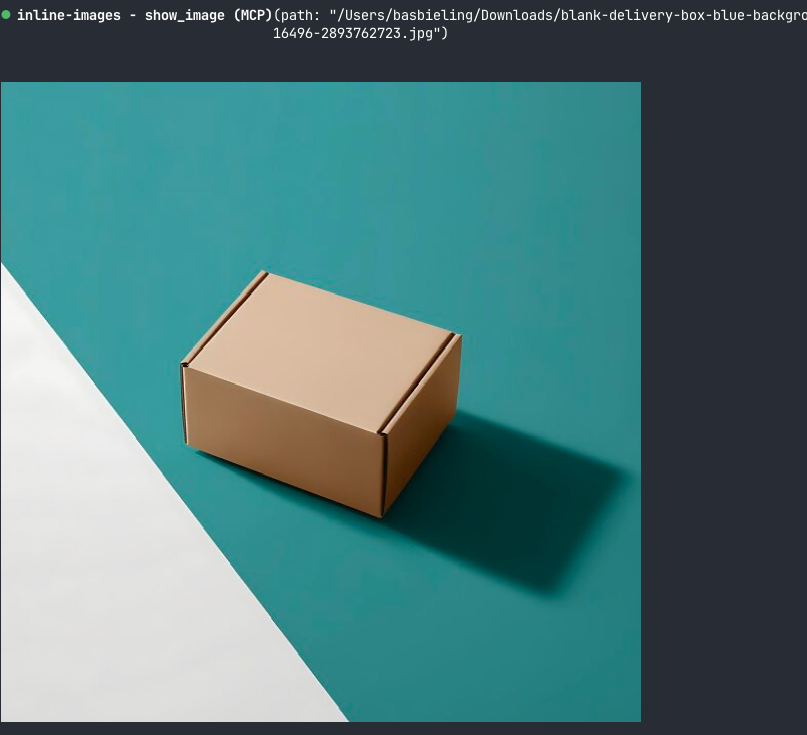
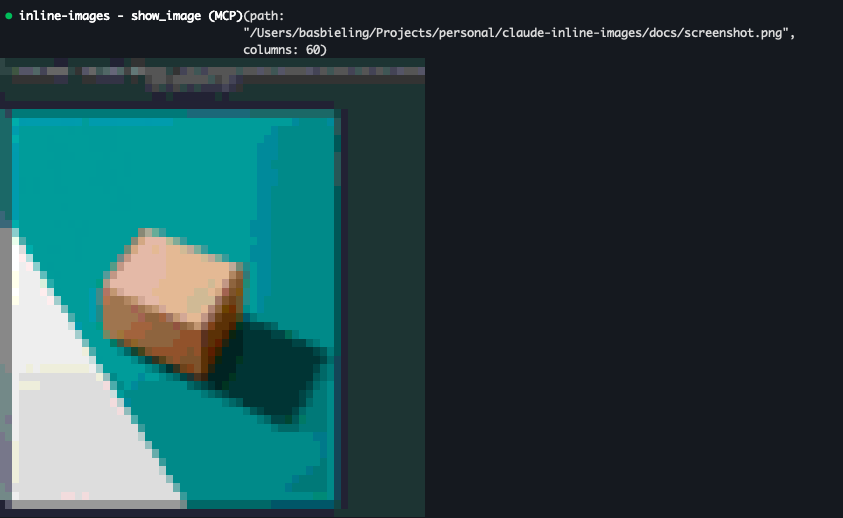
Claude Code does not draw real images in iTerm2, so there the mod uses a fallback: colored half-block characters, two pixels per cell.
At the prompt of a Claude Code session in the terminal, type:
/plugin marketplace add benjaminb10/encore-mods
/plugin install inline-images@encore-mods
The tool is available from the next prompt.
Orca 1.4.230 or later draws the images with the kitty graphics protocol, with two conditions:
~/.claude/settings.json, then quit and restart the Claude session (/reload-plugins is not enough): { "env": { "CLAUDE_CODE_FORCE_TERMINAL_IMAGES": "1" } }$TMPDIR). Anywhere else it draws an empty frame. The mod handles this by copying every image into $TMPDIR/claude-inline-images before drawing it.Without the setting, the mod draws nothing in Orca: half blocks are unreadable there.
Ask Claude to show you a file:
show me ~/Downloads/screenshot.jpgClaude calls show_image with these inputs:
| Input | Description |
|---|---|
path | Absolute or working-directory-relative path of the image |
columns | Width in terminal columns, 80 by default |
The image keeps its aspect ratio. It is never wider than the transcript and never taller than 40 rows.
When you paste an image into the prompt, the mod draws it 40 columns wide under your message. Images pasted before the mod was loaded are not drawn.
To turn this off, open /config and set inline-images.showPastedImages to false.
When Claude opens an image with Read (a screenshot it took, a chart it made), the mod draws that image 60 columns wide under the Read line in the transcript. Reads are usually folded into one line such as Read 3 files; the images go under that line. Images read before the mod was loaded are not drawn.
To turn this off, open /config and set inline-images.showReadImages to false.
sips, which macOS includes.sudo apt install imagemagick. For HEIC files, also install libheif-plugin-libde265.ffprobe.Converted and copied files go to $TMPDIR/claude-inline-images (a private /tmp/claude-inline-images.XXXXXX folder when TMPDIR is unset).
Run Claude Code with the mod loaded from this folder:
claude --plugin-dir .Check and test it:
claude plugin validate .
claude plugin test .hooks/register.tsx 388 lines1import { atom, read, update } from 'claude-code'
2import type { Elements, EngineInterface, Register } from 'claude-code'
3
4import type { Shown } from '../types'
5
6const TOOL = 'show_image'
7const FULL_NAME = 'mcp__inline-images__show_image'
8// Orca only reads kitty image files from the project or the system temp folder ($TMPDIR, not /tmp) and draws an
9// empty frame for any other path, so every image goes through this folder.
10let fallbackDir: Promise<string> | undefined
11
12const tempDir = async ($: EngineInterface) => {
13 const tmp = await $.env.get('TMPDIR').catch(() => undefined)
14
15 if (tmp) {
16 return `${tmp.replace(/\/+$/, '')}/claude-inline-images`
17 }
18
19 // Without TMPDIR, another user could take a fixed name in the shared /tmp first, so use a private, unpredictable one.
20 fallbackDir ??= exec($, ['mktemp', '-d', '/tmp/claude-inline-images.XXXXXX']).then(stdout => stdout.trim())
21
22 return fallbackDir.catch(error => {
23 fallbackDir = undefined
24 throw error
25 })
26}
27const MAX_ROWS = 40
28const PASTED_COLUMNS = 40
29const READ_COLUMNS = 60
30// A terminal cell is about twice as tall as it is wide.
31const CELL_ASPECT = 2
32const DEFAULT_COLOR = 0x01000000
33const SPACE = 0x20
34const UPPER_HALF_BLOCK = 0x2580
35const LOWER_HALF_BLOCK = 0x2584
36
37// The BMP must be 24-bit, or 32-bit with alpha in the fourth byte, for rasterCells to read it.
38type Converter = {
39 binaries: string[]
40 size: (file: string) => string[]
41 png: (file: string, out: string) => string[]
42 bmp: (file: string, out: string, columns: number, rows: number) => string[]
43}
44
45const imageMagick = (binary: string): Converter => ({
46 binaries: [binary],
47 size: file => [binary, `${file}[0]`, '-format', 'width=%w height=%h', 'info:'],
48 png: (file, out) => [binary, `${file}[0]`, `png:${out}`],
49 bmp: (file, out, columns, rows) => [
50 binary, `${file}[0]`, '-resize', `${columns}x${rows}!`, '-type', 'TrueColorAlpha', '-define', 'bmp:format=bmp4', `bmp:${out}`,
51 ],
52})
53
54const CONVERTERS: Converter[] = [
55 {
56 binaries: ['sips'],
57 size: file => ['sips', '-g', 'pixelWidth', '-g', 'pixelHeight', file],
58 png: (file, out) => ['sips', '-s', 'format', 'png', file, '--out', out],
59 bmp: (file, out, columns, rows) => ['sips', '-s', 'format', 'bmp', '-z', String(rows), String(columns), file, '--out', out],
60 },
61 imageMagick('magick'),
62 imageMagick('convert'),
63 {
64 binaries: ['ffmpeg', 'ffprobe'],
65 size: file => ['ffprobe', '-v', 'error', '-select_streams', 'v:0', '-show_entries', 'stream=width,height', '-of', 'default=nw=1', file],
66 png: (file, out) => ['ffmpeg', '-y', '-v', 'error', '-i', file, '-frames:v', '1', out],
67 bmp: (file, out, columns, rows) => [
68 'ffmpeg', '-y', '-v', 'error', '-i', file, '-frames:v', '1', '-vf', `scale=${columns}:${rows}`, '-pix_fmt', 'bgra', out,
69 ],
70 },
71]
72
73const findConverter = async ($: EngineInterface) => {
74 const found = await Promise.all(
75 CONVERTERS.map(async candidate => {
76 const checks = await Promise.all(candidate.binaries.map(binary => $.process.run(['sh', '-c', `command -v ${binary}`])))
77
78 return checks.every(check => check.exitCode === 0) ? candidate : undefined
79 }),
80 )
81
82 return found.find(candidate => candidate !== undefined)
83}
84
85let converter: Promise<Converter | undefined> | undefined
86
87const exec = async ($: EngineInterface, argv: string[]) => {
88 const { exitCode, stdout, stderr } = await $.process.run(argv)
89
90 if (exitCode !== 0) {
91 throw new Error(`${argv[0]} failed: ${stderr.trim()}`)
92 }
93
94 return stdout
95}
96
97// Owner-only, so other users cannot read the images in a shared /tmp. chmod fails, and so does the call, when the
98// folder belongs to someone else. Files inside need no mode of their own: nobody else can enter the folder.
99const run = async ($: EngineInterface, argv: string[]) => {
100 const dir = await tempDir($)
101 await exec($, ['mkdir', '-p', '-m', '700', dir])
102 await exec($, ['chmod', '700', dir])
103
104 return exec($, argv)
105}
106
107const pixelSize = async ($: EngineInterface, using: Converter, file: string) => {
108 const stdout = await run($, using.size(file)).catch(() => '')
109
110 return {
111 width: Number(/width[:=] ?(\d+)/i.exec(stdout)?.[1] ?? 0),
112 height: Number(/height[:=] ?(\d+)/i.exec(stdout)?.[1] ?? 0),
113 }
114}
115
116// The terminal decodes PNG only, so every other format is converted first; PNGs are copied into the temp dir.
117const asPng = async ($: EngineInterface, using: Converter, file: string) => {
118 const dir = await tempDir($)
119
120 if (file.startsWith(`${dir}/`) && /\.png$/i.test(file)) {
121 return file
122 }
123
124 const converted = `${dir}/${Date.now()}-${Math.random().toString(36).slice(2, 8)}.png`
125 await run($, /\.png$/i.test(file) ? ['cp', file, converted] : using.png(file, converted))
126
127 return converted
128}
129
130const cellBox = (shown: Shown, available: number) => {
131 const wanted = Math.min(shown.columns ?? 80, available, 255)
132 const rows = Math.round((wanted * shown.height) / shown.width / CELL_ASPECT)
133
134 return rows <= MAX_ROWS
135 ? { columns: wanted, rows: Math.max(1, rows) }
136 : { columns: Math.max(1, Math.round((MAX_ROWS * CELL_ASPECT * shown.width) / shown.height)), rows: MAX_ROWS }
137}
138
139// Terminals without kitty graphics get the picture as half blocks: each cell shows two stacked pixels.
140const rasterCells = async ($: EngineInterface, using: Converter, file: string, columns: number, rows: number) => {
141 const bmp = `${await tempDir($)}/${Date.now()}-${columns}x${rows}.bmp`
142 await run($, using.bmp(file, bmp, columns, rows * 2))
143 const { base64 } = await $.fs.read(bmp, { as: 'bytes' })
144 const view = new DataView(Uint8Array.fromBase64(base64).buffer)
145 const offset = view.getUint32(10, true)
146 const height = view.getInt32(22, true)
147 const bytesPerPixel = view.getUint16(28, true) / 8
148 const stride = Math.ceil((columns * bytesPerPixel) / 4) * 4
149
150 const pixel = (x: number, y: number) => {
151 const at = offset + (height < 0 ? y : height - 1 - y) * stride + x * bytesPerPixel
152
153 return bytesPerPixel === 4 && view.getUint8(at + 3) < 128
154 ? DEFAULT_COLOR
155 : (view.getUint8(at + 2) << 16) | (view.getUint8(at + 1) << 8) | view.getUint8(at)
156 }
157
158 const words = Array.from({ length: columns * rows }, (_, cell) => {
159 const x = cell % columns
160 const top = pixel(x, Math.floor(cell / columns) * 2)
161 const bottom = pixel(x, Math.floor(cell / columns) * 2 + 1)
162
163 if (top !== DEFAULT_COLOR) {
164 return [UPPER_HALF_BLOCK, top, bottom]
165 }
166
167 return [bottom === DEFAULT_COLOR ? SPACE : LOWER_HALF_BLOCK, bottom, DEFAULT_COLOR]
168 }).flat()
169
170 return new Uint8Array(Uint32Array.from(words).buffer).toBase64()
171}
172
173const rasters = new Map<string, Promise<string>>()
174
175const describe = async ($: EngineInterface, using: Converter, path: string, columns?: number): Promise<Shown> => {
176 const file = await asPng($, using, path)
177 const size = await pixelSize($, using, file)
178
179 if (size.width === 0 || size.height === 0) {
180 throw new Error(`${path} is not an image ${using.binaries[0]} can read`)
181 }
182
183 return { file, ...size, columns }
184}
185
186const picture = async ($: EngineInterface, { Image, Raster }: Elements['terminal'], shown: Shown, available: number, key: string) => {
187 const box = cellBox(shown, available)
188
189 // Orca speaks the kitty protocol (ORCA_IMAGE_PROTOCOL=kitty), but Claude Code only draws an Image there when
190 // CLAUDE_CODE_FORCE_TERMINAL_IMAGES=1; without it, only the alt text shows.
191 if ((await $.env.get('TERM_PROGRAM')) === 'ghostty' || (await $.env.get('TERM')) === 'xterm-kitty' ||
192 ((await $.env.get('ORCA_IMAGE_PROTOCOL')) === 'kitty' && (await $.env.get('CLAUDE_CODE_FORCE_TERMINAL_IMAGES')) === '1')) {
193 return <Image source={{ file: shown.file, format: 'png' }} {...box} alt={shown.file} />
194 }
195
196 // Half blocks are unreadable in Orca, so without the flag nothing is drawn there.
197 if ((await $.env.get('ORCA_IMAGE_PROTOCOL')) !== undefined) {
198 return undefined
199 }
200
201 const using = await (converter ??= findConverter($))
202
203 if (using === undefined) {
204 return undefined
205 }
206
207 const cacheKey = `${shown.file}:${box.columns}x${box.rows}`
208 const cells = rasters.get(cacheKey) ?? rasterCells($, using, shown.file, box.columns, box.rows)
209 rasters.set(cacheKey, cells)
210
211 return <Raster key={key} {...box} cells={await cells} />
212}
213
214const pasted = atom({ plugin: 'inline-images', key: 'pasted' } as const, {})
215// Keyed by the tool_use_id of a Read that returned an image.
216const reads = atom({ plugin: 'inline-images', key: 'reads' } as const, {})
217
218// A UserMessage row's requestId is its stored row's uuid with the last group zeroed.
219const rowKey = (id: string) => id.slice(0, 23)
220
221
222export const register: Register = (on, options) => {
223 on('session.start', async ($, e, next) => {
224 await $.tool.register({
225 name: TOOL,
226 description:
227 'Show an image file to the user, drawn inline in their terminal. Use it when the user wants to see an image ' +
228 '(a screenshot, a chart, a generated picture). It does not put the image in your context: use Read for that.',
229 inputSchema: {
230 type: 'object',
231 properties: {
232 path: { type: 'string', description: 'Absolute or working-directory-relative path of a PNG, JPEG, GIF, WebP, HEIC or TIFF file' },
233 columns: { type: 'integer', minimum: 4, maximum: 255, description: 'Width in terminal columns, 80 by default' },
234 },
235 required: ['path'],
236 },
237 isDeferred: false,
238 })
239
240 return next(e)
241 })
242
243 on('tool.call', { tool: FULL_NAME }, async ($, e) => {
244 const input = e as { path?: unknown; columns?: unknown }
245
246 if (typeof input.path !== 'string') {
247 return { deny: 'path must be a string' }
248 }
249
250 const real = (await $.fs.stat(input.path, { resolve: true }).catch(() => undefined))?.realPath
251
252 if (real === undefined) {
253 return { deny: `${input.path} does not exist` }
254 }
255
256 const using = await (converter ??= findConverter($))
257
258 if (using === undefined) {
259 return { deny: 'show_image needs sips (macOS), ImageMagick or ffmpeg to read images' }
260 }
261
262 const shown = await describe($, using, real, typeof input.columns === 'number' ? input.columns : undefined)
263
264 return { result: JSON.stringify(shown) }
265 }).catch(($, e, next) => ({ deny: `show_image failed: ${next.error.message ?? next.error.kind}` }))
266
267 on('ui.render', { component: 'ToolResult', props: { tool: FULL_NAME } }, async ($, e, next) => {
268 const shown = typeof e.props.output === 'string' ? (JSON.parse(e.props.output) as Shown) : undefined
269
270 if (e.surface !== 'terminal' || e.props.isErrored || shown === undefined) {
271 return next(e)
272 }
273
274 return (await picture($, $.ui.resolve(e), shown, (e.viewport?.columns ?? 80) - 6, e.requestId)) ?? next(e)
275 })
276
277 if (options.showReadImages !== false) {
278 on('tool.call', { tool: 'Read' }, async ($, e, next) => {
279 const ran = await next(e)
280
281 if (ran.isError || ran.result?.type !== 'image') {
282 return ran
283 }
284
285 const using = await (converter ??= findConverter($)).catch(() => undefined)
286 const shown = using && (await describe($, using, e.file_path, READ_COLUMNS).catch(() => undefined))
287
288 if (shown) {
289 await update($, reads, all => ({ ...all, [e.tool_use_id]: shown })).catch(() => undefined)
290 }
291
292 return ran
293 }).catch(($, e, next) => next(e))
294
295 on('ui.render', { component: 'ToolUse', props: { tool: 'Read' } }, async ($, e, next) => {
296 const shown = (await read($, reads))[e.props.tool_use_id]
297
298 if (e.surface !== 'terminal' || shown === undefined) {
299 return next(e)
300 }
301
302 const elements = $.ui.resolve(e)
303
304 return (
305 <elements.Box flexDirection="column">
306 {await next(e)}
307 {await picture($, elements, shown, (e.viewport?.columns ?? 80) - 6, e.requestId)}
308 </elements.Box>
309 )
310 })
311
312 // A folded group draws one count line and no rows, so its image Reads are drawn under that line.
313 on('ui.render', { component: 'ToolGroup' }, async ($, e, next) => {
314 const all = await read($, reads)
315 const shown = e.props.calls.flatMap(call => (call.tool_use_id === undefined ? [] : (all[call.tool_use_id] ?? [])))
316
317 if (e.surface !== 'terminal' || e.props.isExpanded || shown.length === 0) {
318 return next(e)
319 }
320
321 const elements = $.ui.resolve(e)
322 const available = (e.viewport?.columns ?? 80) - 6
323 const pictures = await Promise.all(shown.map((one, index) => picture($, elements, one, available, `${e.requestId}-${index}`)))
324
325 return (
326 <elements.Box flexDirection="column">
327 {await next(e)}
328 {pictures}
329 </elements.Box>
330 )
331 })
332 }
333
334 if (options.showPastedImages === false) {
335 return
336 }
337
338 // The prompt row holds the pasted image's bytes; the note row right after it names the file.
339 let pastedRow: string | undefined
340
341 on('session.append', { door: 'prompt' }, ($, e, next) => {
342 pastedRow = e.message.content.some(block => block.type === 'image') ? e.uuid : undefined
343
344 return next(e)
345 })
346
347 on('session.append', { door: 'note' }, async ($, e, next) => {
348 const appended = await next(e)
349 const files = e.message.content.flatMap(block =>
350 block.type === 'text' ? [...String(block.text).matchAll(/\[Image: source: ([^\]]+)\]/g)].map(match => match[1] ?? '') : [],
351 )
352 const row = pastedRow
353
354 if (row === undefined || files.length === 0) {
355 return appended
356 }
357
358 pastedRow = undefined
359 const using = await (converter ??= findConverter($)).catch(() => undefined)
360
361 if (using !== undefined) {
362 const shown = await Promise.all(files.map(file => describe($, using, file, PASTED_COLUMNS).catch(() => undefined)))
363 await update($, pasted, all => ({ ...all, [rowKey(row)]: shown.filter(one => one !== undefined) })).catch(() => undefined)
364 }
365
366 return appended
367 })
368
369 on('ui.render', { component: 'UserMessage' }, async ($, e, next) => {
370 const shown = (await read($, pasted))[rowKey(e.requestId)]
371
372 if (e.surface !== 'terminal' || shown === undefined) {
373 return next(e)
374 }
375
376 const elements = $.ui.resolve(e)
377 const available = (e.viewport?.columns ?? 80) - 6
378 const pictures = await Promise.all(shown.map((one, index) => picture($, elements, one, available, `${e.requestId}-${index}`)))
379
380 return (
381 <elements.Box flexDirection="column">
382 {await next(e)}
383 {pictures}
384 </elements.Box>
385 )
386 })
387}
388types/index.d.ts 8 lines1export type Shown = { file: string; width: number; height: number; columns?: number }
2
3declare module 'claude-code' {
4 interface PluginState {
5 'inline-images': { pasted: Record<string, Shown[]>; reads: Record<string, Shown> }
6 }
7}
8