Background Watch
See Claude's background shell commands: live output in a pane, status, and a toast when one fails
newpaneguardcommandtoaststatus

See Claude's background shell commands: live output in a pane, status, and a toast when one fails
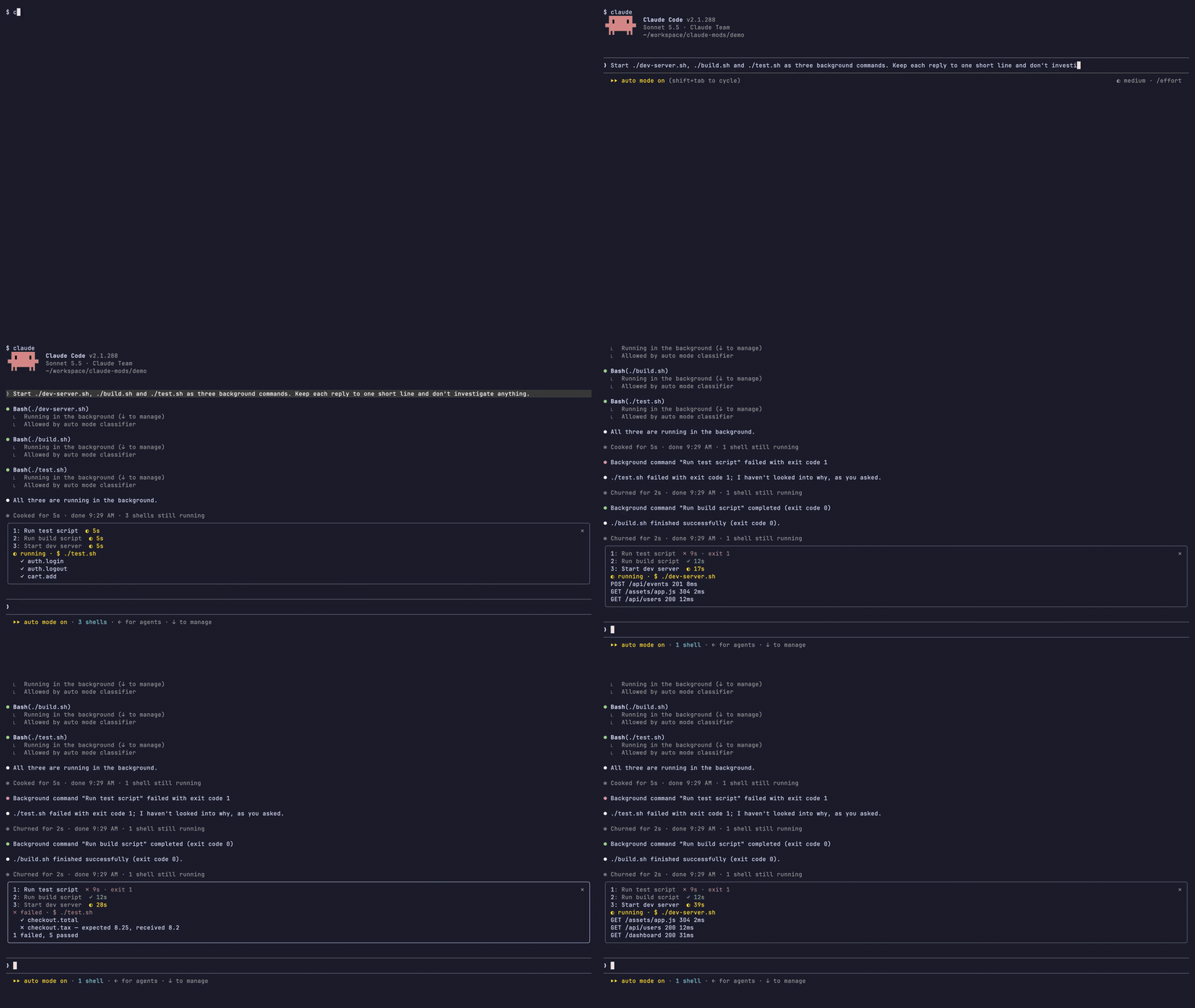
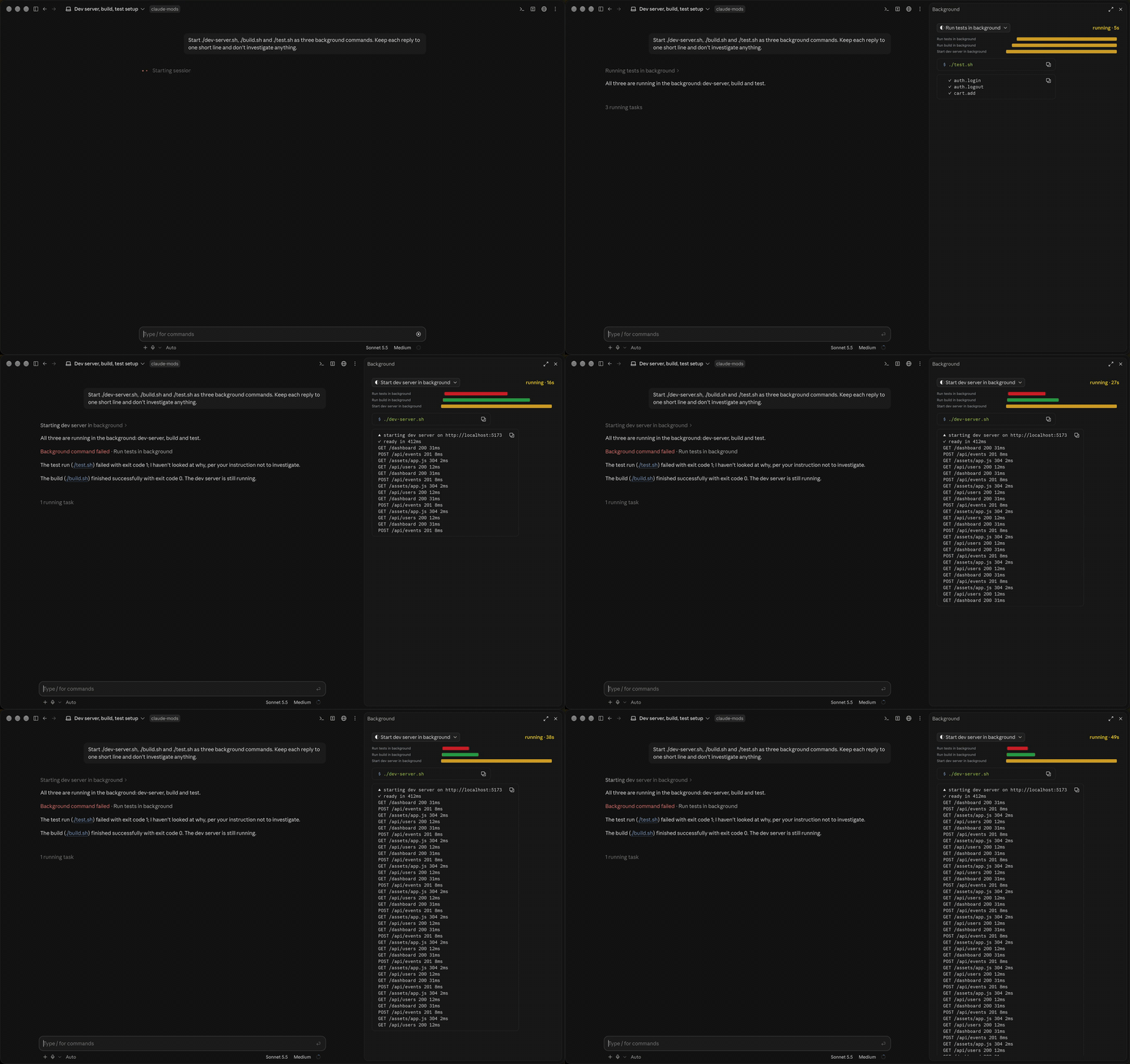
See what Claude's background shell commands are doing, while they run.
When Claude starts a dev server, a build or a test run in the background, its output goes to a file you never see. bg-watch opens a pane that follows it live, marks each command running, done or failed, and pops a toast when one fails.
In Claude Code (v2.1.287 or later):
/plugin install bg-watch --marketplace Arunprakaash/claude-modsOr from your shell:
claude plugin marketplace add Arunprakaash/claude-mods
claude plugin install bg-watch@arun-modsThe pane opens on its own the first time Claude runs a command in the background, including one you push there with Ctrl+B.
1–5 to switch./bg-watch reopens the pane. It runs at once, even while Claude is mid-turn. /bg-watch text prints a plain summary instead.In places that can't draw a pane, such as the VS Code extension's chat panel or claude -p, the mod still tracks commands, and /bg-watch answers with the text summary.
Mods run inside Claude Code with your permissions, so here is all of what this one does. claude plugin validate on this folder lists the same.
tail -n 300, and the file's size, to know when it changed.tail.tail, so on Windows the pane lists commands without their output.claude --plugin-dir ./bg-watch # load this checkout for one session
claude plugin validate ./bg-watch # what it hooks and calls
claude plugin test ./bg-watch # the test suitehooks/register.tsx 281 lines1import type { EngineInterface, Register, Timer } from 'claude-code'
2
3import { COLOR, ICON, cleanLines, elapsed, parseNotifications, parseStart, timelineSvg } from './lib'
4import type { Task } from './lib'
5
6const PANE = 'bg-watch'
7// `/bg` is the built-in /background's alias.
8const COMMAND = 'bg-watch'
9const TAIL_LINES = 300
10const LIST_ROWS = 5
11
12// Module state: what the hooks record, the pane draws. A reload starts it over.
13const tasks = new Map<string, Task>()
14const tails = new Map<string, string[]>()
15const sizes = new Map<string, number>()
16let selected: string | null = null
17let isOpen = false
18let isClosedByPerson = false
19let ticker: Timer | null = null
20
21function current(): Task | undefined {
22 if (selected && tasks.has(selected)) return tasks.get(selected)
23 const all = [...tasks.values()]
24 return all.reverse().find(t => t.status === 'running') ?? all[0]
25}
26
27function labelOf(t: Task, now: number): string {
28 const took = elapsed((t.endedAt ?? now) - t.startedAt)
29 const exit = t.exitCode !== undefined && t.exitCode !== 0 ? ` · exit ${t.exitCode}` : ''
30 return `${ICON[t.status]} ${t.label} · ${took}${exit}`
31}
32
33function statusLine(): string | undefined {
34 if (tasks.size === 0) return undefined
35 const count = (s: Task['status']) => [...tasks.values()].filter(t => t.status === s).length
36 const parts = [
37 count('running') ? `${ICON.running}${count('running')}` : '',
38 count('completed') ? `${ICON.completed}${count('completed')}` : '',
39 count('failed') ? `${ICON.failed}${count('failed')}` : '',
40 ].filter(Boolean)
41 return `bg ${parts.join(' ')}`
42}
43
44async function readTail($: EngineInterface, t: Task): Promise<void> {
45 if (!t.outputFile) return
46 try {
47 const { size } = await $.fs.stat(t.outputFile)
48 if (sizes.get(t.id) === size && tails.has(t.id)) return
49 sizes.set(t.id, size)
50 const r = await $.process.run(['tail', '-n', String(TAIL_LINES), t.outputFile], { timeoutMs: 5_000 })
51 tails.set(t.id, cleanLines(r.stdout))
52 } catch {
53 // The file can vanish once the session cleans up its tasks folder.
54 }
55}
56
57async function tick($: EngineInterface): Promise<void> {
58 const t = current()
59 if (t && isOpen) await readTail($, t)
60 // The pane already shows all of this; the status line is for when it's closed.
61 $.ui.status(isOpen ? undefined : statusLine())
62 $.ui.invalidate('ui.render')
63 const isIdle = ![...tasks.values()].some(x => x.status === 'running')
64 if (isIdle && !isOpen && ticker) {
65 ticker.cancel()
66 ticker = null
67 }
68}
69
70function startTicker($: EngineInterface): void {
71 ticker ??= $.clock.every(1_000, () => void tick($))
72}
73
74async function textSummary($: EngineInterface): Promise<string> {
75 if (tasks.size === 0) return 'No background commands in this session yet.'
76 const now = await $.clock.now()
77 const rows = [...tasks.values()].reverse().map(t => labelOf(t, now))
78 const t = current()
79 if (!t) return rows.join('\n')
80 await readTail($, t)
81 const tail = (tails.get(t.id) ?? []).slice(-15)
82 const where = t.outputFile ? `\n(full output: ${t.outputFile})` : ''
83 return [...rows, '', `── ${t.label} ──`, ...tail].join('\n') + where
84}
85
86export const register: Register = on => {
87 on('session.start', async ($, e, next) => {
88 try {
89 await $.command.register({
90 name: COMMAND,
91 description: "Show Claude's background commands and their live output",
92 argumentHint: '[text]',
93 // Background commands matter most while Claude is mid-turn.
94 immediate: true,
95 })
96 } catch (error) {
97 // The pane and toasts still work without the command.
98 $.ui.toast(`bg-watch: /${COMMAND} unavailable (${String(error).slice(0, 80)})`)
99 }
100 return next(e)
101 })
102
103 on('command.run', { command: COMMAND }, async ($, e) => {
104 if (e.args.trim() === 'text') return { text: await textSummary($) }
105 isClosedByPerson = false
106 const opened = await $.ui.open({ id: PANE, title: 'Background', rows: 16 })
107 if (!opened.isPlaced) return { text: await textSummary($) }
108 isOpen = true
109 startTicker($)
110 void tick($)
111 return { text: 'Background pane opened.' }
112 })
113
114 on('tool.call', { tool: 'Bash' }, async ($, e, next) => {
115 const ran = await next(e)
116 const result = ran.result as { backgroundTaskId?: string } | undefined
117 const id = result?.backgroundTaskId
118 if (!id || tasks.has(id)) return ran
119
120 const start = parseStart(ran.text)
121 tasks.set(id, {
122 id,
123 label: e.description?.trim() || (e.command.split('\n')[0] ?? '').slice(0, 60),
124 command: e.command,
125 outputFile: start?.outputFile,
126 startedAt: await $.clock.now(),
127 status: 'running',
128 })
129 selected = null
130 startTicker($)
131 if (!isClosedByPerson && !isOpen) {
132 // Nothing draws under `claude -p` or the VS Code panel; tracking goes on.
133 isOpen = await $.ui.open({ id: PANE, title: 'Background', rows: 16 }).then(
134 opened => opened.isPlaced,
135 () => false,
136 )
137 }
138 void tick($)
139 return ran
140 })
141
142 on('session.append', async ($, e, next) => {
143 const text = JSON.stringify(e.message.content)
144 if (!text.includes('task-notification')) return next(e)
145
146 const now = await $.clock.now()
147 for (const n of parseNotifications(text.replace(/\\n/g, '\n'))) {
148 const t = tasks.get(n.id)
149 if (!t || t.status !== 'running') continue
150 t.status = n.status
151 t.exitCode = n.exitCode
152 t.endedAt = now
153 t.outputFile ??= n.outputFile
154 sizes.delete(t.id)
155 await readTail($, t)
156 if (n.status === 'failed') {
157 $.ui.toast(`✗ ${t.label} failed${n.exitCode !== undefined ? ` (exit ${n.exitCode})` : ''} · /${COMMAND}`)
158 }
159 }
160 void tick($)
161 return next(e)
162 })
163
164 on('ui.close', { id: PANE }, async ($, e, next) => {
165 isOpen = false
166 if (e.origin.kind === 'person') isClosedByPerson = true
167 return next(e)
168 })
169
170 on('ui.render', { component: 'Pane', requestId: PANE }, async ($, e) => {
171 isOpen = true
172 const t = current()
173 const now = await $.clock.now()
174
175 // Desktop draws native controls and SVG; give it a layout of its own.
176 if (e.surface === 'desktop') {
177 const { Box, Text, Button, Select, Svg, Code } = $.ui.resolve(e)
178 if (!t) {
179 return (
180 <Box flexDirection="column" padding={1} gap={1}>
181 <Text bold>No background commands yet</Text>
182 <Text dimColor>When Claude starts a long-running command, its output streams here.</Text>
183 </Box>
184 )
185 }
186 const recent = [...tasks.values()].reverse().slice(0, 8)
187 const tail = (tails.get(t.id) ?? []).slice(-60).join('\n')
188 return (
189 <Box flexDirection="column" padding={1} gap={1}>
190 <Box flexDirection="row" justifyContent="space-between" alignItems="center" gap={2}>
191 <Select
192 key="task"
193 options={recent.map(x => ({ key: x.id, value: x.id, label: `${ICON[x.status]} ${x.label}` }))}
194 value={t.id}
195 onSelect={value => {
196 selected = value
197 sizes.delete(value)
198 void tick($)
199 }}
200 />
201 <Text color={COLOR[t.status]} bold>
202 {t.status} · {elapsed((t.endedAt ?? now) - t.startedAt)}
203 {t.exitCode ? ` · exit ${t.exitCode}` : ''}
204 </Text>
205 </Box>
206 <Svg source={timelineSvg(recent, now)} alt="Timeline of background commands by status" />
207 <Code source={`$ ${t.command}`} language="bash" wrap="wrap" />
208 {tail ? (
209 <Code source={tail} wrap="truncate-end" />
210 ) : (
211 <Text dimColor>{t.outputFile ? 'No output yet.' : 'Output file unknown until the command finishes.'}</Text>
212 )}
213 {selected ? (
214 <Button
215 key="follow"
216 label="Follow latest"
217 variant="secondary"
218 onPress={() => {
219 selected = null
220 void tick($)
221 }}
222 />
223 ) : null}
224 </Box>
225 )
226 }
227
228 const { Box, Text, Button } = $.ui.resolve(e)
229 if (!t) {
230 return (
231 <Box flexDirection="column">
232 <Text dimColor>No background commands yet.</Text>
233 <Text dimColor>When Claude runs one, its output streams here.</Text>
234 </Box>
235 )
236 }
237
238 const recent = [...tasks.values()].reverse().slice(0, LIST_ROWS)
239 const rows = Math.max(3, e.props.scroll.bodyRows - recent.length - 1)
240 const lines = (tails.get(t.id) ?? []).slice(-rows)
241
242 return (
243 <Box flexDirection="column">
244 {recent.map((x, i) => (
245 <Box key={x.id} flexDirection="row">
246 <Button
247 key={`pick-${x.id}`}
248 label={x.label}
249 hotkey={String(i + 1)}
250 plain
251 dimColor={x.id !== t.id}
252 onPress={() => {
253 selected = x.id
254 sizes.delete(x.id)
255 void tick($)
256 }}
257 />
258 <Text color={COLOR[x.status]} wrap="truncate-end">
259 {' '}
260 {ICON[x.status]} {elapsed((x.endedAt ?? now) - x.startedAt)}
261 {x.exitCode ? ` · exit ${x.exitCode}` : ''}
262 </Text>
263 </Box>
264 ))}
265 <Text color={COLOR[t.status]} wrap="truncate-end">
266 {ICON[t.status]} {t.status} · $ {t.command.split('\n')[0] ?? ''}
267 </Text>
268 {lines.length === 0 ? (
269 <Text dimColor>{t.outputFile ? 'No output yet.' : 'Output file unknown until the command finishes.'}</Text>
270 ) : (
271 lines.map((line, i) => (
272 <Text key={`l${i}`} wrap="truncate-end">
273 {line || ' '}
274 </Text>
275 ))
276 )}
277 </Box>
278 )
279 })
280}
281hooks/lib.ts 119 lines1export type TaskStatus = 'running' | 'completed' | 'failed' | 'killed'
2
3export type Task = {
4 id: string
5 label: string
6 command: string
7 outputFile?: string
8 startedAt: number
9 endedAt?: number
10 status: TaskStatus
11 exitCode?: number
12}
13
14export type Notification = {
15 id: string
16 status: TaskStatus
17 outputFile?: string
18 exitCode?: number
19}
20
21// Bash answers a backgrounded command with this sentence; the path is where
22// its output streams.
23export function parseStart(text: string | undefined): { id: string; outputFile?: string } | null {
24 if (!text) return null
25 const id = /running in background with ID: (\w+)/.exec(text)?.[1]
26 if (!id) return null
27 const outputFile = /Output is being written to: (\S+?\.output)\b/.exec(text)?.[1]
28 return { id, outputFile }
29}
30
31// A finished background command reaches the conversation as a
32// <task-notification> block. The text may be JSON-escaped, so match tags only.
33export function parseNotifications(text: string): Notification[] {
34 const found: Notification[] = []
35 for (const m of text.matchAll(/<task-notification>([\s\S]*?)<\/task-notification>/g)) {
36 const body = m[1] ?? ''
37 const id = /<task-id>(\w+)<\/task-id>/.exec(body)?.[1]
38 const raw = /<status>(\w+)<\/status>/.exec(body)?.[1]
39 if (!id || !raw) continue
40 const exit = /exit code (\d+)/.exec(body)?.[1]
41 found.push({
42 id,
43 status: raw === 'completed' ? 'completed' : raw === 'failed' ? 'failed' : 'killed',
44 outputFile: /<output-file>([^<]+)<\/output-file>/.exec(body)?.[1],
45 exitCode: exit === undefined ? undefined : Number(exit),
46 })
47 }
48 return found
49}
50
51const ANSI = /\x1b\[[0-9;?]*[A-Za-z]|\x1b\][^\x07]*\x07/g
52
53export function cleanLines(text: string): string[] {
54 const lines = text
55 .replace(ANSI, '')
56 .replace(/\r(?!\n)/g, '\n')
57 .split('\n')
58 // Claude Code appends its own exit line; the pane shows the exit code already.
59 .filter(line => !/^\[exited with code \d+\]$/.test(line.trim()))
60 while (lines.length && (lines[lines.length - 1] ?? '').trim() === '') lines.pop()
61 return lines
62}
63
64export function elapsed(ms: number): string {
65 const s = Math.max(0, Math.round(ms / 1000))
66 if (s < 60) return `${s}s`
67 const m = Math.floor(s / 60)
68 if (m < 60) return `${m}m${String(s % 60).padStart(2, '0')}s`
69 return `${Math.floor(m / 60)}h${String(m % 60).padStart(2, '0')}m`
70}
71
72export const ICON: Record<TaskStatus, string> = {
73 running: '◐',
74 completed: '✓',
75 failed: '✗',
76 killed: '■',
77}
78
79export const COLOR: Record<TaskStatus, string> = {
80 running: 'yellow',
81 completed: 'green',
82 failed: 'red',
83 killed: 'gray',
84}
85
86// Mid-tone fills that read on both light and dark themes.
87const FILL: Record<TaskStatus, string> = {
88 running: '#d4a72c',
89 completed: '#2da44e',
90 failed: '#cf222e',
91 killed: '#8c959f',
92}
93
94function escapeXml(s: string): string {
95 return s.replace(/[<>&"']/g, c => `&#${c.charCodeAt(0)};`)
96}
97
98// One bar per command on a shared time axis, newest at the top: where each
99// started, how long it ran, and how it ended.
100export function timelineSvg(list: readonly Task[], now: number, width = 640): string {
101 const row = 22
102 const labelW = Math.round(width * 0.38)
103 const barW = width - labelW - 8
104 const from = Math.min(...list.map(t => t.startedAt))
105 const span = Math.max(1, now - from)
106 const bars = list.map((t, i) => {
107 const y = i * row
108 const x = labelW + ((t.startedAt - from) / span) * barW
109 const w = Math.max(3, (((t.endedAt ?? now) - t.startedAt) / span) * barW)
110 const label = t.label.length > 34 ? `${t.label.slice(0, 33)}…` : t.label
111 return (
112 `<text x="0" y="${y + 15}" font-size="12" font-family="system-ui,sans-serif" fill="#8c959f">${escapeXml(label)}</text>` +
113 `<rect x="${x.toFixed(1)}" y="${y + 5}" width="${w.toFixed(1)}" height="12" rx="3" fill="${FILL[t.status]}"/>`
114 )
115 })
116 const height = list.length * row
117 return `<svg xmlns="http://www.w3.org/2000/svg" viewBox="0 0 ${width} ${height}" width="${width}" height="${height}">${bars.join('')}</svg>`
118}
119