context-lens
A live /context: a pinned line under the prompt with the window fill and the growth per turn, and /context-lens for a pane with the per-category bars and how…
newpanecommandstatus

A live /context: a pinned line under the prompt with the window fill and the growth per turn, and /context-lens for a pane with the per-category bars and how…
A live /context.
Claude Code's /context is a snapshot you have to ask for. context-lens keeps the same figures on screen: a pinned line under the prompt that updates after every turn, and a pane with the window broken down by category.
A pinned status line under the prompt, from the moment the session starts:
ctx 5% · 45.9k/1.0M · +44 last turn · 99+ turns to fullReading it left to right: how full the context window is, the tokens used against the window size, what the last turn added, and how many more turns fit at the recent average growth. Any figure the engine has not reported yet is left out rather than guessed, so early in a session the line is shorter. Before the first answer comes back it reads ctx waiting for the first answer.
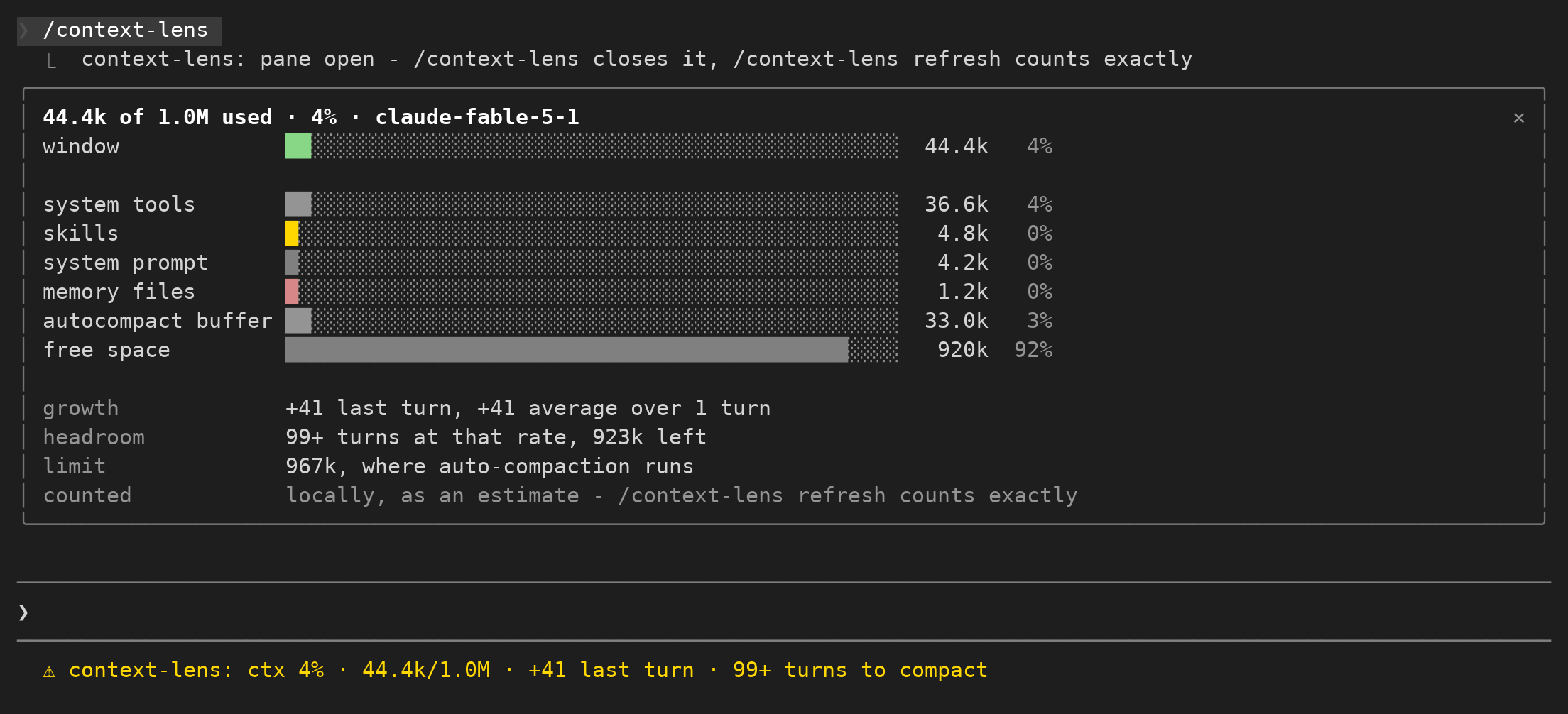
/context-lens opens a pane with the same reading in full:
45.9k of 1.0M used · 5% · claude-opus-5
window          ██░░░░░░░░░░░░░░░░░░░░░░░░░░░░░░░░░░░░░░░░░░░░░░  45.9k   5%

messages        █░░░░░░░░░░░░░░░░░░░░░░░░░░░░░░░░░░░░░░░░░░░░░░░  22.4k   2%
system tools    █░░░░░░░░░░░░░░░░░░░░░░░░░░░░░░░░░░░░░░░░░░░░░░░  14.2k   1%
memory files    █░░░░░░░░░░░░░░░░░░░░░░░░░░░░░░░░░░░░░░░░░░░░░░░   4.9k   0%
system prompt   █░░░░░░░░░░░░░░░░░░░░░░░░░░░░░░░░░░░░░░░░░░░░░░░   3.1k   0%
autocompact bu… ██░░░░░░░░░░░░░░░░░░░░░░░░░░░░░░░░░░░░░░░░░░░░░░  45.0k   5%
free space      ████████████████████████████████████████████░░░░   910k  91%

growth          +4.2k last turn, +3.8k average over 5 turns
headroom        12 turns at that rate, 754k left
limit           800k, where auto-compaction runs
counted         locally, as an estimate - /context-lens refresh counts exactly
Each bar is sized to the pane's own width, so it fits the dock and the inline placement alike.
Running /context-lens again closes the pane. /context-lens refresh counts every category with the token-count API, the way /context does, and says so in the counted row.
Everything comes from one call, $.session.usage.
After each finished turn the mod asks for breakdown: "summary", which estimates locally and sends no requests, so the line costs nothing. /context-lens refresh asks for breakdown: "full", which sends one token-count request per tool and memory file. That is the only thing in this mod that spends anything, and it only runs when you ask for it.
The growth figures come from a small in-memory list of the token count after each turn. A compaction clears it, since the window it measured no longer exists.
The compaction line prefers the engine's own autoCompactThreshold from the breakdown. When auto-compaction is off it falls back to the compaction window (rawMaxTokens), and when there is no breakdown at all it falls back to the context window size and says which it used, so the number is never presented as more than it is.
claude plugin marketplace add Arunjay4213/claude-mods
claude plugin install context-lens@claude-mods
Mods are early access, so the module only loads when the function-hooks flag is set. Add it to ~/.claude/settings.json:
{
  "env": { "CLAUDE_CODE_ENABLE_FUNCTION_HOOKS": "1" }
}
or set it on the command line for one run:
CLAUDE_CODE_ENABLE_FUNCTION_HOOKS=1 claudeTo run it from a checkout instead:
CLAUDE_CODE_ENABLE_FUNCTION_HOOKS=1 claude --plugin-dir plugins/context-lens$.session.usage({ breakdown }).Claude Code 2.1.272 and later answer it with the categories and the auto-compaction threshold, and the pane draws them. Claude Code 2.1.270 and earlier answer with only tokens, window and percent, so on those builds the pane draws the window bar alone, says so in place of the category rows, and measures headroom against the whole window.
tokens and percent come from the last API response, so a fresh or just-compacted session has no reading until its next answer.hooks/register.tsx 328 lines1/* @jsx h */
2import type {
3 EngineInterface,
4 Register,
5 SessionContextBreakdown,
6 ContextCategory,
7} from 'claude-code'
8
9import { fit, filledCells, right, signed, tokens } from './format'
10
11// context-lens: a live /context.
12//
13// A pinned line under the prompt carries the window fill and what the last turn added;
14// `/context-lens` opens a pane with the same figures broken down by category. Every
15// reading comes from `$.session.usage`, asked with `breakdown: "summary"` (free, local)
16// after each turn, and with `"full"` only when the user runs `/context-lens refresh`.
17
18const PANE_ID = 'context-lens'
19const COMMAND = 'context-lens'
20const HISTORY_MAX = 24
21const AVERAGE_OVER = 5
22const STATUS_MAX = 70
23const BAR_MAX = 48
24
25type Snapshot = {
26 used: number
27 window: number
28 percent: number
29 /** The token count the headroom is measured against. */
30 threshold: number
31 /** Where that figure came from: the engine's own threshold, the compaction window, or the plain window. */
32 limit: 'auto-compact' | 'compaction-window' | 'window'
33 breakdown: SessionContextBreakdown | null
34 detail: 'summary' | 'full'
35}
36
37let snap: Snapshot | null = null
38/** Tokens in the window after each finished turn, since the last compaction. */
39let history: number[] = []
40let paneOpen = false
41/** True from a compaction or /clear until the next answer gives a fresh reading. */
42let awaitingReading = false
43
44/** Reads the window. Keeps the last good snapshot when the call fails. */
45async function read($: EngineInterface, detail: 'summary' | 'full'): Promise<void> {
46 let context
47 try {
48 context = (await $.session.usage({ breakdown: detail })).context
49 } catch {
50 return
51 }
52 const breakdown = context.breakdown ?? snap?.breakdown ?? null
53 const used = context.tokens ?? breakdown?.totalTokens
54 const window = context.window || breakdown?.rawMaxTokens || 0
55 if (used === undefined || window <= 0) return
56 const auto =
57 breakdown && breakdown.isAutoCompactEnabled ? breakdown.autoCompactThreshold : undefined
58 snap = {
59 used,
60 window,
61 percent: context.percent ?? Math.round((used / window) * 100),
62 threshold: auto ?? breakdown?.rawMaxTokens ?? window,
63 limit: auto !== undefined ? 'auto-compact' : breakdown ? 'compaction-window' : 'window',
64 breakdown,
65 detail: context.breakdown ? detail : (snap?.detail ?? detail),
66 }
67}
68
69/** What the last turn added, and the average of the recent turns that grew. */
70function growth(): { last?: number; average?: number; over: number } {
71 const deltas: number[] = []
72 for (let i = 1; i < history.length; i++) deltas.push((history[i] ?? 0) - (history[i - 1] ?? 0))
73 const rising = deltas.filter(d => d > 0).slice(-AVERAGE_OVER)
74 const average = rising.length
75 ? rising.reduce((a, b) => a + b, 0) / rising.length
76 : undefined
77 return { last: deltas.at(-1), average, over: rising.length }
78}
79
80/** Turns of the recent average that still fit before the threshold. */
81function turnsLeft(average: number | undefined): number | undefined {
82 if (!snap || average === undefined || average <= 0) return undefined
83 return Math.max(0, Math.floor((snap.threshold - snap.used) / average))
84}
85
86/** `3 turns`, and `99+ turns` past a hundred: a five-digit count says nothing useful. */
87function turnCount(n: number): string {
88 return n > 99 ? '99+ turns' : `${n} turn${n === 1 ? '' : 's'}`
89}
90
91function statusText(): string {
92 // The line is pinned from the session's first moment, even before a reading exists.
93 if (!snap) return awaitingReading ? 'ctx waiting for the next answer' : 'ctx waiting for the first answer'
94 const parts = [`ctx ${snap.percent}%`, `${tokens(snap.used)}/${tokens(snap.window)}`]
95 const { last, average } = growth()
96 if (last !== undefined) parts.push(`${signed(last)} last turn`)
97 const left = turnsLeft(average)
98 const edge = snap.limit === 'auto-compact' ? 'compact' : 'full'
99 if (left !== undefined) {
100 parts.push(left === 0 ? `${edge} next turn` : `${turnCount(left)} to ${edge}`)
101 }
102 const line = parts.join(' · ')
103 return line.length > STATUS_MAX ? `${line.slice(0, STATUS_MAX - 1)}…` : line
104}
105
106/** Pins the line and redraws the pane, if it is open. Never throws. */
107function show($: EngineInterface): void {
108 try {
109 $.ui.status(statusText())
110 } catch {
111 /* a status line that will not pin costs nothing else */
112 }
113 if (!paneOpen) return
114 try {
115 $.ui.invalidate('ui.render')
116 } catch {
117 /* the next turn redraws it */
118 }
119}
120
121/** Used rows biggest first, then the compaction buffer, then the free space. */
122function rowsOf(breakdown: SessionContextBreakdown): ContextCategory[] {
123 const rank = (c: ContextCategory) => (c.kind === 'free' ? 2 : c.kind === 'buffer' ? 1 : 0)
124 return breakdown.categories
125 .filter(c => !c.isDeferred && c.tokens > 0)
126 .sort((a, b) => rank(a) - rank(b) || b.tokens - a.tokens)
127}
128
129/**
130 * After a compaction or /clear the window was rewritten: the old reading and the
131 * old per-turn growth say nothing about the new one. The engine reports no token
132 * count until the next answer, so the line says it is waiting rather than showing
133 * the stale figures as current.
134 */
135async function forget($: EngineInterface): Promise<void> {
136 snap = null
137 history = []
138 awaitingReading = true
139 await read($, 'summary')
140 // read() may have set snap again; the cast tells the type checker so. The
141 // growth history restarts from the next finished turn, as at session start.
142 if ((snap as Snapshot | null) !== null) awaitingReading = false
143 show($)
144}
145
146export const register: Register = on => {
147 on('session.start', async ($, e, next) => {
148 const result = await next(e)
149 try {
150 await $.command.register({
151 name: COMMAND,
152 description: 'Live /context: the window by category, growth per turn, turns to compaction',
153 argumentHint: '[refresh]',
154 })
155 } catch (error) {
156 $.ui.log(`context-lens: /${COMMAND} not registered: ${String(error)}`)
157 }
158 // The reading at start is the engine's estimate of the window; the growth
159 // history starts from the first finished turn, so a real count is never
160 // compared against an estimate.
161 await read($, 'summary')
162 show($)
163 return result
164 })
165
166 on('turn.complete', async ($, e, next) => {
167 const result = await next(e)
168 // A subagent's turn is answered over its own window, not this one.
169 if (e.agentId !== undefined) return result
170 await read($, 'summary')
171 if (snap) {
172 awaitingReading = false
173 history.push(snap.used)
174 if (history.length > HISTORY_MAX) history = history.slice(-HISTORY_MAX)
175 }
176 show($)
177 return result
178 })
179
180 on('session.compact', async ($, e, next) => {
181 const result = await next(e)
182 await forget($)
183 return result
184 })
185
186 on('command.run', { command: 'clear' }, async ($, e, next) => {
187 const result = await next(e)
188 await forget($)
189 return result
190 })
191
192 on('command.run', { command: COMMAND }, async ($, e, next) => {
193 if (e.args.trim().toLowerCase() === 'refresh') {
194 await read($, 'full')
195 if (!paneOpen) {
196 try {
197 await $.ui.open({ id: PANE_ID, title: 'Context lens', rows: 18 })
198 paneOpen = true
199 } catch {
200 /* fall through: the counted figures still land on the status line */
201 }
202 }
203 show($)
204 return { text: 'counted with the token-count API' }
205 }
206 if (paneOpen) {
207 try {
208 await $.ui.close({ id: PANE_ID })
209 } catch {
210 return { text: 'the pane would not close' }
211 }
212 paneOpen = false
213 return { text: 'pane closed' }
214 }
215 if (!snap) await read($, 'summary')
216 try {
217 await $.ui.open({ id: PANE_ID, title: 'Context lens', rows: 18 })
218 } catch (error) {
219 return { text: `the pane would not open (${String(error)})` }
220 }
221 paneOpen = true
222 show($)
223 return { text: 'pane open - /context-lens closes it, /context-lens refresh counts exactly' }
224 })
225
226 on('ui.close', { id: PANE_ID }, async ($, e, next) => {
227 const result = await next(e)
228 paneOpen = false
229 return result
230 })
231
232 on('ui.render', { component: 'Pane' }, ($, e, next) => {
233 if (e.requestId !== PANE_ID) return next(e)
234 // Being asked to draw is proof the pane is open: after a hot reload this is how the
235 // module learns it again, so the toggle and the per-turn redraw stay in step.
236 paneOpen = true
237 const { Box, Text } = $.ui.resolve(e)
238 const columns = Math.max(24, e.props.bodyColumns)
239
240 if (!snap) {
241 return (
242 <Box flexDirection="column">
243 <Text dimColor>No reading of the context window yet. It arrives with the first answer.</Text>
244 </Box>
245 )
246 }
247
248 // label, bar, tokens, percent. The bar takes what is left, and stops growing past
249 // BAR_MAX so a docked pane on a wide screen does not draw a bar the width of the screen.
250 const labelW = Math.min(19, Math.max(7, columns - 26))
251 const barW = Math.min(BAR_MAX, Math.max(4, columns - labelW - 14))
252 const { last, average, over } = growth()
253 const left = turnsLeft(average)
254 const breakdown = snap.breakdown
255 const base = breakdown?.rawMaxTokens || snap.window
256 const spare = Math.max(0, snap.threshold - snap.used)
257
258 const row = (key: string, label: string, share: number, count: number, color: string) => {
259 const lit = filledCells(share, barW)
260 return (
261 <Box key={key} flexDirection="row">
262 <Text wrap="truncate-end">{fit(label, labelW)}</Text>
263 <Text color={color}>{'█'.repeat(lit)}</Text>
264 <Text color="inactive">{'░'.repeat(barW - lit)}</Text>
265 <Text>{right(tokens(count), 7)}</Text>
266 <Text dimColor>{right(`${Math.round(share * 100)}%`, 5)}</Text>
267 </Box>
268 )
269 }
270
271 const note = (label: string, text: string, dim?: true) => (
272 <Box flexDirection="row">
273 <Text dimColor>{fit(label, labelW)}</Text>
274 <Text dimColor={dim} wrap="truncate-end">{text}</Text>
275 </Box>
276 )
277
278 const limitText =
279 snap.limit === 'auto-compact'
280 ? `${tokens(snap.threshold)}, where auto-compaction runs`
281 : snap.limit === 'compaction-window'
282 ? `${tokens(snap.threshold)}, the compaction window (auto-compaction is off)`
283 : `${tokens(snap.threshold)}, the window itself - this build reports no compaction threshold`
284
285 return (
286 <Box flexDirection="column">
287 <Text bold wrap="truncate-end">
288 {`${tokens(snap.used)} of ${tokens(snap.window)} used · ${snap.percent}%${breakdown ? ` · ${breakdown.model}` : ''}`}
289 </Text>
290 {row('total', 'window', snap.used / snap.window, snap.used, 'success')}
291 <Text> </Text>
292 {breakdown ? (
293 <Box flexDirection="column">
294 {rowsOf(breakdown).map(c =>
295 row(`cat:${c.name}`, c.name.toLowerCase(), c.tokens / base, c.tokens, c.color),
296 )}
297 </Box>
298 ) : (
299 <Text dimColor wrap="truncate-end">
300 This build of Claude Code answers $.session.usage with no category breakdown, so only the window bar is drawn.
301 </Text>
302 )}
303 <Text> </Text>
304 {note(
305 'growth',
306 last === undefined
307 ? 'nothing measured yet - it arrives with the second answer'
308 : `${signed(last)} last turn${average === undefined ? '' : `, ${signed(average)} average over ${over} turn${over === 1 ? '' : 's'}`}`,
309 )}
310 {note(
311 'headroom',
312 left === undefined
313 ? `${tokens(spare)} left, no growth rate yet`
314 : `${turnCount(left)} at that rate, ${tokens(spare)} left`,
315 )}
316 {note('limit', limitText)}
317 {note(
318 'counted',
319 snap.detail === 'full'
320 ? 'exactly, with the token-count API'
321 : 'locally, as an estimate - /context-lens refresh counts exactly',
322 true,
323 )}
324 </Box>
325 )
326 })
327}
328hooks/format.ts 37 lines1// Plain formatting helpers for the status line and the pane. No engine calls here,
2// so nothing in this file can fail a session.
3
4/** `68412` as `68.4k`, `1240000` as `1.2M`; small numbers as they are. */
5export function tokens(n: number): string {
6 const v = Math.round(n)
7 if (Math.abs(v) >= 1_000_000) return `${(v / 1_000_000).toFixed(1)}M`
8 if (Math.abs(v) >= 100_000) return `${Math.round(v / 1000)}k`
9 if (Math.abs(v) >= 1000) return `${(v / 1000).toFixed(1)}k`
10 return String(v)
11}
12
13/** The same, with a sign kept: `+4.2k`, `-1.1k`, `0`. */
14export function signed(n: number): string {
15 if (Math.round(n) === 0) return '0'
16 return n > 0 ? `+${tokens(n)}` : `-${tokens(-n)}`
17}
18
19/** Pads or clips `text` to exactly `width` cells. */
20export function fit(text: string, width: number): string {
21 if (width <= 0) return ''
22 if (text.length === width) return text
23 if (text.length < width) return text + ' '.repeat(width - text.length)
24 return width <= 1 ? text.slice(0, width) : `${text.slice(0, width - 1)}…`
25}
26
27/** Right-aligns `text` in `width` cells. */
28export function right(text: string, width: number): string {
29 return text.length >= width ? text : ' '.repeat(width - text.length) + text
30}
31
32/** How many of `width` cells a share of `0..1` fills; a non-zero share always shows one. */
33export function filledCells(share: number, width: number): number {
34 if (!(share > 0) || width <= 0) return 0
35 return Math.min(width, Math.max(1, Math.round(share * width)))
36}
37