todo-pane
Shows this session's todo list (what we are working on) and pin board (pinned notes) in side panes, one file per session under a directory
newpaneguardcommandtoaststatus

Shows this session's todo list (what we are working on) and pin board (pinned notes) in side panes, one file per session under a directory
A plugin that keeps Claude's current task list in a pane next to the conversation.
During a long session in Claude Code, side trips and confirmations make it easy to lose track of what is being done now and what is left. With todo-pane installed, Claude writes each piece of work to the task list before starting it, and when it finishes, checks it off and moves it under "Done (date)". Look at the right-hand pane at any time to see the current work and what remains.
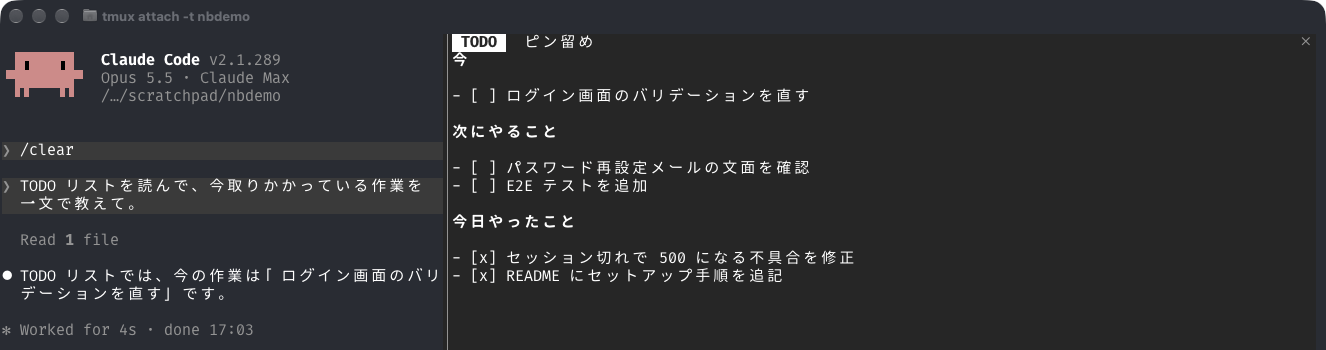
The pane has two tabs.
Some ways to use pins:
Both tabs are plain Markdown files, one file per session. When Claude rewrites a file, the pane updates right away.
The pane and the instructions to Claude are implemented by a mod (a function hook that runs inside Claude Code) in the plugin. Mods arrived in Claude Code 2.1.287, so 2.1.287 or later is required.
/plugin marketplace add aromarious/claude-code-plugins
/plugin install todo-pane@aromarious
Right after installing, a "Configure todo-pane" screen appears. Skip it without entering anything and the files are created under the default .claude.
| Command | Kind | What it does |
|---|---|---|
/todo-pane | Mod command | Opens the TODO pane, or closes it if it is open. Opening creates the todo file if it is missing |
/todo-pane-pinboard | Mod command | Opens the Pins pane, or closes it if it is open |
/todo-pane-wrap | Mod command | Switches long lines in the TODO pane between being cut with "…" (default) and wrapping onto the next row. The choice is kept across sessions |
/todo-pane:pin [what to pin] | Skill | Pins the main content of Claude's last reply. With text after it, pins what the text describes |
The ✕ button at the top right of a pane also closes it. Run the command again to reopen it.
To toggle wrapping with a key, bind the command in ~/.claude/keybindings.json. Claude Code keybindings can run a slash command with the action "command:<name>":
{ "bindings": [ { "context": "Chat", "bindings": { "meta+z": "command:todo-pane-wrap" } } ] }On macOS, Option+Z reaches Claude Code as Meta+Z only if the terminal sends it that way. In Ghostty, add keybind = alt+z=esc:z to its config (and keybind = cmd+alt+z=esc:z to also use Cmd+Alt+Z). The command: action is not in the official keybindings documentation (it was found in Claude Code itself), so it may change.
If Claude Code's own diff pane (the pane that shows git changes) is open, the TODO pane is hidden behind it, and running /todo-pane does not bring it forward. If the right side shows a list of changed files or "Diff unavailable", that is the diff pane. Run /diff or click the ✕ at its top right to close it.
The diff pane can open by itself in a git repository when the screen is wide. Once you close it with /diff or ✕, that state is saved as diffSidebarOpen in ~/.claude.json and it no longer opens automatically.
| Component | Used | Files | Role |
|---|---|---|---|
| Function hook (mod) | Yes | modules in hooks/hooks.json, hooks/register.tsx | Draws the panes, adds instructions for Claude on every prompt, detects a missed update, provides the /todo-pane and /todo-pane-pinboard commands |
Setting (userConfig) | Yes | .claude-plugin/plugin.json | Lets you change the directory dir where files are kept (Settings) |
| Commands | Yes | hooks/register.tsx | /todo-pane and /todo-pane-pinboard. Not command files; the mod registers them at startup |
| Skill | Yes | skills/pin/SKILL.md | /todo-pane:pin, which pins something to the Pins pane |
| Shell command hook | No | — | — |
| Command files, agents, MCP servers | No | — | — |
Claude Code has two kinds of hooks: hooks that run a shell command when an event occurs, and hooks that run a function inside Claude Code (mods). todo-pane uses function hooks only. hooks/hooks.json just tells Claude Code to load the module that holds them (register.tsx).
The mod registers functions for these events.
| Event | What it does |
|---|---|
session.start | Detects the display language, opens the panes, starts re-reading the files every 3 seconds, and last registers /todo-pane and /todo-pane-pinboard (a name already taken does not stop the rest) |
prompt.submit | On every prompt, attaches instructions for Claude that match the current state |
turn.start | Remembers the contents of the todo file at the start of the turn |
tool.call | Records whether a tool that changes files or Notion was called |
turn.complete | If something was changed but the todo file was not, shows a notice and a status line |
command.run | On /todo-pane or /todo-pane-pinboard, opens the pane in front if it is closed, brings it forward if another tab is in front, and closes it if it is already in front. Opening with /todo-pane also creates the todo file if it is missing |
ui.close | Remembers that a pane was closed (by a command or by ✕), so the next command opens it again |
skill.prompt | When /todo-pane:pin runs, adds the session's pin file path to the skill text and opens the Pins pane |
ui.render | Draws the pane contents (the Markdown of the todo file and the pin file) |
The mod runs the following commands. All of them come with macOS and Linux. Windows has not been tested.
| Command | Purpose |
|---|---|
sh, ls, tail | Read the last 500 lines of the session transcript (JSONL) to get the session name (every 3 seconds) |
rm | Delete the old-name files when the session name changes and the files are renamed |
One file of each kind is kept per session, under .claude/ relative to the directory where the session was started.
| File | Pane name | When it opens |
|---|---|---|
.claude/todo/<name>.md | TODO | Always opens at session start |
.claude/pin/<name>.md | Pins | Opens at session start if the file exists |
.claude/todo/done/<date>.md | (no pane; the latest one is shown under the TODO tab) | Where the previous day's done items are moved when the date changes |
.claude/todo/<name>.off | (no pane) | Records that you answered "don't create" in this session |
<name> is <session name>-<first 6 characters of the session ID> when the session has a name, and the first 8 characters of the session ID otherwise. /, \, : and control characters in the session name are replaced with _. Emoji and Japanese are kept as they are.
The pane re-reads the files every 3 seconds. A closed pane can be reopened with /todo-pane or /todo-pane-pinboard, and the ✕ button at the top right of a pane closes it, just like running the command again.
The session name comes from the latest custom-title line in the session transcript (JSONL). When the name changes mid-session, <name> is recomputed during the 3-second re-read, and the existing todo, pin and off files are moved to the new name.
The date in the todo file's "## Done (YYYY-MM-DD)" heading (in Japanese, "## やったこと(YYYY-MM-DD)") is today's date in local time. When the date changes, at the next prompt or pane re-read, the contents of the previous day's done section are moved to <dir>/todo/done/<date>.md and the todo file's heading is changed to today's date. In the destination file they go under a "## Session <name>" heading. There is one file per date, shared by the sessions in the same directory. The older "## 今日やったこと" heading is read as the dated heading. A done heading in any language is accepted, and the heading written afterwards is in the current language.
Under the TODO tab, a divider follows the todo file, then the completed items of the most recent earlier day, up to the last 5. If there are more than 5, a line "…and N more" with the location of the source file is added. This is display only; it is not written to the todo file.
Long lines in the TODO tab are cut with "…" to fit the pane's current width instead of wrapping, and the cut is recomputed when the width changes. The todo file keeps the full text, and the Pins tab still wraps.
One setting can be changed. It is a path relative to the working directory; an absolute path also works. A changed setting takes effect from the next session.
| Setting | Default | Meaning |
|---|---|---|
dir | .claude | Directory that holds todo/ and pin/ |
Write the value in pluginConfigs in ~/.claude/settings.json. The key is todo-pane@aromarious when installed from the marketplace, and todo-pane or todo-pane@inline when loaded with --plugin-dir.
{
  "pluginConfigs": {
    "todo-pane@aromarious": {
      "options": { "dir": "out" }
    }
  }
}
With this example, the files are out/todo/<name>.md, out/pin/<name>.md and out/todo/<name>.off.
Every time you send a prompt, the following instructions are attached after it and passed to Claude. They are not shown on screen and the prompt text is not changed. They are rebuilt for every prompt, so they reflect the current state, such as whether the todo file exists or whether the session name changed.
The instructions are written in English. The headings in them follow Claude Code's language setting (see Display language): "## Now" and "## Done (date)" in English, "## 今" and "## やったこと(日付)" when the language is Japanese. The instructions also tell Claude to write the items in the language you are writing in, so talking to Claude in Japanese gives Japanese items. The instructions say:
- [ ] for open, - [x] for done. Never use a plain - bullet.For pins, the following instruction is attached every time, whether or not the todo file exists and whether or not you answered "don't create".
/todo-pane:pin skill. Write only when asked; do not update it as work progresses.If a turn changed files or Notion but the todo file did not change, a notice and a status line tell you, and Claude is told to bring the todo file up to date at the start of the next turn. Changes made by subagents are not counted.
Tab titles, todo-file headings, empty-pane placeholders, the previous-day block and notices follow Claude Code's language setting. If language names one of the supported languages below, they are in that language; otherwise they are in English. English names, native names and codes all work, in any case (German, Deutsch, de; Traditional Chinese, 繁體中文, zh-TW; pt-BR). A plain Chinese or 中文 is Simplified. The check runs once, at session start.
Supported languages: English, Japanese (日本語), Simplified Chinese (简体中文), Traditional Chinese (繁體中文), Korean (한국어), Spanish (Español), French (Français), German (Deutsch), Portuguese (Português), Italian (Italiano) and Russian (Русский). Other languages are welcome: please open an issue or a pull request. The strings are in the L table at the top of hooks/register.tsx.
The table shows the Japanese and English wording as examples.
| Item | Japanese | English |
|---|---|---|
| Now heading | ## 今 | ## Now |
| Done heading | ## やったこと(date) | ## Done (date) |
| Pin tab title | ピン留め | Pins |
| Previous-day heading | #### 前の日(date) | #### Previous day (date) |
| Done file title | # date にやったこと | # Done on date |
| Done file session heading | ## セッション <name> | ## Session <name> |
| Missed-update notice | <file> が更新されていません | <file> was not updated |
The date rollover described above recognises the done heading of any supported language (## Done (YYYY-MM-DD), ## やったこと(YYYY-MM-DD), ## Erledigt (YYYY-MM-DD), and so on). Any other heading is left alone, even one that ends with a date, such as ## Meeting notes (2026-10-01). A newly written heading uses the current language.
In a session that has no todo file of its own, Claude asks in the first turn whether to create one. The question is asked once per session.
<dir>/todo/<name>.off and does not ask again in this session.In either case, running /todo-pane creates a todo file containing only the "## Now" and "## Done (today's date)" headings (Japanese equivalents when the language is Japanese) and shows it in the pane. It also deletes the .off file, so you can start using it with /todo-pane even after answering "don't create".
hooks/register.tsx 582 lines1import { atom, read, update } from 'claude-code'
2import type { PluginOptions, Register } from 'claude-code'
3
4// Claude rewrites these files; each pane shows whatever its file says.
5// Files live under the "dir" setting (relative to the session's working directory unless absolute):
6// <dir>/todo/<base>.md, <dir>/pin/<base>.md, and the off marker <dir>/todo/<base>.off. One set per session.
7const dirFrom = (options: PluginOptions) => {
8 const v = options.dir
9 return (typeof v === 'string' && v ? v : '.claude').replace(/\/+$/, '')
10}
11// Session name (control characters and path separators become _) plus the id's first 6 characters;
12// without a name, the id's first 8.
13export const sanitize = (name: string) => name.replace(/[\/\\:\u0000-\u001f\u007f]/g, '_')
14export const baseName = (title: string | undefined, id: string) => {
15 const t = title ? sanitize(title.trim()) : ''
16 return t ? `${t}-${id.slice(0, 6)}` : id.slice(0, 8)
17}
18export const pathsFor = (dir: string, base: string) => ({
19 todo: `${dir}/todo/${base}.md`,
20 pin: `${dir}/pin/${base}.md`,
21 off: `${dir}/todo/${base}.off`,
22})
23// The latest {"type":"custom-title"} line in the transcript's tail, if any
24export const lastTitle = (text: string): string | undefined => {
25 let title: string | undefined
26 for (const line of text.split('\n')) {
27 if (!line.includes('"custom-title"')) continue
28 try {
29 const j = JSON.parse(line)
30 if (j.type === 'custom-title' && typeof j.customTitle === 'string') title = j.customTitle
31 } catch {}
32 }
33 return title
34}
35// Local date as YYYY-MM-DD (toISOString would be UTC)
36export const today = () => {
37 const d = new Date()
38 const z = (n: number) => String(n).padStart(2, '0')
39 return `${d.getFullYear()}-${z(d.getMonth() + 1)}-${z(d.getDate())}`
40}
41
42// Fixed strings the person sees (headings, tab titles, placeholders, toasts). Prompts to Claude stay English.
43export type Lang = 'ja' | 'en' | 'zh-Hans' | 'zh-Hant' | 'ko' | 'es' | 'fr' | 'de' | 'pt' | 'it' | 'ru'
44export const L = {
45 ja: {
46 now: '## 今',
47 done: (d: string) => `## やったこと(${d})`,
48 todoTitle: 'TODO',
49 pinTitle: 'ピン留め',
50 emptyTodo: '(TODO はまだありません)',
51 emptyPin: '(ピン留めはまだありません)',
52 prevDay: (d: string) => `#### 前の日(${d})`,
53 more: (n: number, path: string) => `…ほか ${n} 件(${path})`,
54 doneTitle: (d: string) => `# ${d} にやったこと`,
55 session: (label: string) => `## セッション ${label}`,
56 missedToast: (f: string) => `${f} が更新されていません`,
57 missedStatus: (f: string) => `${f} 未更新`,
58 },
59 en: {
60 now: '## Now',
61 done: (d: string) => `## Done (${d})`,
62 todoTitle: 'TODO',
63 pinTitle: 'Pins',
64 emptyTodo: '(No TODO yet)',
65 emptyPin: '(Nothing pinned yet)',
66 prevDay: (d: string) => `#### Previous day (${d})`,
67 more: (n: number, path: string) => `…and ${n} more (${path})`,
68 doneTitle: (d: string) => `# Done on ${d}`,
69 session: (label: string) => `## Session ${label}`,
70 missedToast: (f: string) => `${f} was not updated`,
71 missedStatus: (f: string) => `${f} not updated`,
72 },
73 'zh-Hans': {
74 now: '## 现在',
75 done: (d: string) => `## 已完成(${d})`,
76 todoTitle: 'TODO',
77 pinTitle: '固定',
78 emptyTodo: '(暂无 TODO)',
79 emptyPin: '(暂无固定内容)',
80 prevDay: (d: string) => `#### 前一天(${d})`,
81 more: (n: number, path: string) => `…另有 ${n} 项(${path})`,
82 doneTitle: (d: string) => `# ${d} 已完成事项`,
83 session: (label: string) => `## 会话 ${label}`,
84 missedToast: (f: string) => `${f} 尚未更新`,
85 missedStatus: (f: string) => `${f} 未更新`,
86 },
87 'zh-Hant': {
88 now: '## 現在',
89 done: (d: string) => `## 已完成(${d})`,
90 todoTitle: 'TODO',
91 pinTitle: '釘選',
92 emptyTodo: '(尚無 TODO)',
93 emptyPin: '(尚無釘選內容)',
94 prevDay: (d: string) => `#### 前一天(${d})`,
95 more: (n: number, path: string) => `…另有 ${n} 項(${path})`,
96 doneTitle: (d: string) => `# ${d} 已完成事項`,
97 session: (label: string) => `## 工作階段 ${label}`,
98 missedToast: (f: string) => `${f} 尚未更新`,
99 missedStatus: (f: string) => `${f} 未更新`,
100 },
101 'ko': {
102 now: '## 지금',
103 done: (d: string) => `## 완료 (${d})`,
104 todoTitle: 'TODO',
105 pinTitle: '고정',
106 emptyTodo: '(TODO가 아직 없습니다)',
107 emptyPin: '(고정된 항목이 없습니다)',
108 prevDay: (d: string) => `#### 전날 (${d})`,
109 more: (n: number, path: string) => `…외 ${n}건 (${path})`,
110 doneTitle: (d: string) => `# ${d} 완료한 일`,
111 session: (label: string) => `## 세션 ${label}`,
112 missedToast: (f: string) => `${f} 업데이트되지 않았습니다`,
113 missedStatus: (f: string) => `${f} 업데이트 안 됨`,
114 },
115 'es': {
116 now: '## Ahora',
117 done: (d: string) => `## Hecho (${d})`,
118 todoTitle: 'TODO',
119 pinTitle: 'Fijados',
120 emptyTodo: '(Aún no hay TODO)',
121 emptyPin: '(Nada fijado todavía)',
122 prevDay: (d: string) => `#### Día anterior (${d})`,
123 more: (n: number, path: string) => `…y ${n} más (${path})`,
124 doneTitle: (d: string) => `# Hecho el ${d}`,
125 session: (label: string) => `## Sesión ${label}`,
126 missedToast: (f: string) => `${f} no se ha actualizado`,
127 missedStatus: (f: string) => `${f} sin actualizar`,
128 },
129 'fr': {
130 now: '## En cours',
131 done: (d: string) => `## Terminé (${d})`,
132 todoTitle: 'TODO',
133 pinTitle: 'Épinglés',
134 emptyTodo: '(Aucun TODO pour l’instant)',
135 emptyPin: '(Rien d’épinglé pour l’instant)',
136 prevDay: (d: string) => `#### Jour précédent (${d})`,
137 more: (n: number, path: string) => `…et ${n} de plus (${path})`,
138 doneTitle: (d: string) => `# Terminé le ${d}`,
139 session: (label: string) => `## Session ${label}`,
140 missedToast: (f: string) => `${f} n’a pas été mis à jour`,
141 missedStatus: (f: string) => `${f} non mis à jour`,
142 },
143 'de': {
144 now: '## Jetzt',
145 done: (d: string) => `## Erledigt (${d})`,
146 todoTitle: 'TODO',
147 pinTitle: 'Angepinnt',
148 emptyTodo: '(Noch keine TODOs)',
149 emptyPin: '(Noch nichts angepinnt)',
150 prevDay: (d: string) => `#### Vorheriger Tag (${d})`,
151 more: (n: number, path: string) => `…und ${n} weitere (${path})`,
152 doneTitle: (d: string) => `# Erledigt am ${d}`,
153 session: (label: string) => `## Sitzung ${label}`,
154 missedToast: (f: string) => `${f} wurde nicht aktualisiert`,
155 missedStatus: (f: string) => `${f} nicht aktualisiert`,
156 },
157 'pt': {
158 now: '## Agora',
159 done: (d: string) => `## Concluído (${d})`,
160 todoTitle: 'TODO',
161 pinTitle: 'Fixados',
162 emptyTodo: '(Nenhum TODO ainda)',
163 emptyPin: '(Nada fixado ainda)',
164 prevDay: (d: string) => `#### Dia anterior (${d})`,
165 more: (n: number, path: string) => `…e mais ${n} (${path})`,
166 doneTitle: (d: string) => `# Concluído em ${d}`,
167 session: (label: string) => `## Sessão ${label}`,
168 missedToast: (f: string) => `${f} não foi atualizado`,
169 missedStatus: (f: string) => `${f} não atualizado`,
170 },
171 'it': {
172 now: '## Ora',
173 done: (d: string) => `## Fatto (${d})`,
174 todoTitle: 'TODO',
175 pinTitle: 'Fissati',
176 emptyTodo: '(Nessun TODO per ora)',
177 emptyPin: '(Nulla di fissato per ora)',
178 prevDay: (d: string) => `#### Giorno precedente (${d})`,
179 more: (n: number, path: string) => `…e altri ${n} (${path})`,
180 doneTitle: (d: string) => `# Fatto il ${d}`,
181 session: (label: string) => `## Sessione ${label}`,
182 missedToast: (f: string) => `${f} non è stato aggiornato`,
183 missedStatus: (f: string) => `${f} non aggiornato`,
184 },
185 'ru': {
186 now: '## Сейчас',
187 done: (d: string) => `## Готово (${d})`,
188 todoTitle: 'TODO',
189 pinTitle: 'Закреплено',
190 emptyTodo: '(TODO пока нет)',
191 emptyPin: '(Ничего не закреплено)',
192 prevDay: (d: string) => `#### Предыдущий день (${d})`,
193 more: (n: number, path: string) => `…и ещё ${n} (${path})`,
194 doneTitle: (d: string) => `# Сделано за ${d}`,
195 session: (label: string) => `## Сессия ${label}`,
196 missedToast: (f: string) => `${f} не был обновлён`,
197 missedStatus: (f: string) => `${f} не обновлён`,
198 },
199}
200// Maps Claude Code's free-text `language` setting (English or native name, or a code) to a table key; anything else is English.
201// Traditional Chinese is tested before the general Chinese pattern.
202const LANG_PATTERNS: [Lang, RegExp][] = [
203 ['zh-Hant', /繁|traditional|^zh[-_ ]?(tw|hk|mo|hant)(?!\p{L})/iu],
204 ['zh-Hans', /^(中文|简|汉)|^(chinese|simplified|zh)(?!\p{L})/iu],
205 ['ja', /^(ja|japanese|日本語)/i],
206 ['ko', /^(ko|korean|한국어)(?!\p{L})/iu],
207 ['es', /^(es|spanish|español|espanol)(?!\p{L})/iu],
208 ['fr', /^(fr|french|français|francais)(?!\p{L})/iu],
209 ['de', /^(de|german|deutsch)(?!\p{L})/iu],
210 ['pt', /^(pt|portuguese|português|portugues)(?!\p{L})/iu],
211 ['it', /^(it|italian|italiano)(?!\p{L})/iu],
212 ['ru', /^(ru|russian|русский)(?!\p{L})/iu],
213]
214export const langFrom = (language: unknown): Lang => {
215 const s = String(language ?? '').trim()
216 return LANG_PATTERNS.find(([, re]) => re.test(s))?.[0] ?? 'en'
217}
218// Set once in session.start; English until then.
219let lang: Lang = 'en'
220let langRead = false
221
222// The done heading of any language in L, built from the table so a dated heading of the user's own
223// (e.g. "## Meeting notes (2026-10-01)") is never taken for it.
224const esc = (s: string) => s.replace(/[.*+?^${}()|[\]\\]/g, '\\$&')
225const DONE_RE = new RegExp(`^(?:${[...new Set(Object.values(L).map(t => esc(t.done('\u0000')).replace('\u0000', '\\d{4}-\\d{2}-\\d{2}')))].join('|')})\\s*$`)
226const LEGACY_RE = /^## 今日やったこと\s*$/
227
228// Date changed: move the old done section (any language) out of the todo text. Pure; the caller does the I/O.
229export const rollover = (text: string, today: string, lang: Lang): { text: string; archived?: { date: string; body: string } } => {
230 const lines = text.split('\n')
231 const i = lines.findIndex(l => DONE_RE.test(l) || LEGACY_RE.test(l))
232 if (i < 0) return { text }
233 if (LEGACY_RE.test(lines[i])) {
234 lines[i] = L[lang].done(today)
235 return { text: lines.join('\n') }
236 }
237 const date = lines[i].match(/\d{4}-\d{2}-\d{2}/)![0]
238 if (date >= today) return { text }
239 let j = i + 1
240 while (j < lines.length && !lines[j].startsWith('## ')) j++
241 const body = lines.slice(i + 1, j).join('\n').trim()
242 const out = [...lines.slice(0, i), L[lang].done(today), '', ...lines.slice(j)].join('\n')
243 return body ? { text: out, archived: { date, body } } : { text: out }
244}
245
246// New content for <dir>/todo/done/<date>.md with this session's section appended.
247export const appendDone = (existing: string | undefined, date: string, sessionLabel: string, body: string, lang: Lang) => {
248 const head = existing ? existing.replace(/\s+$/, '') + '\n\n' : `${L[lang].doneTitle(date)}\n\n`
249 return `${head}${L[lang].session(sessionLabel)}\n\n${body}\n`
250}
251
252// True when today's done section already has a checked item; the previous day is shown only when it has none.
253export const hasDoneToday = (text: string, date: string, lang: Lang) => {
254 const lines = text.split('\n')
255 const i = lines.indexOf(L[lang].done(date))
256 if (i < 0) return false
257 for (const l of lines.slice(i + 1)) {
258 if (l.startsWith('## ')) break
259 if (l.startsWith('- [x]')) return true
260 }
261 return false
262}
263
264// Last 5 "- [x]" lines of a done file, for the TODO tab (display only).
265export const prevDayBlock = (date: string, fileText: string, path: string, lang: Lang) => {
266 const items = fileText.split('\n').filter(l => l.startsWith('- [x]'))
267 if (!items.length) return ''
268 const more = items.length - 5
269 const lines = items.slice(-5)
270 if (more > 0) lines.push(L[lang].more(more, path))
271 return `\n\n---\n\n${L[lang].prevDay(date)}\n\n${lines.join('\n')}`
272}
273
274// Display width of one code point: East Asian Wide/Fullwidth and emoji take 2 columns, the rest 1.
275// ponytail: range table, not full Unicode width data; combining marks and ambiguous-width characters count as 1.
276const isWide = (c: number) =>
277 (c >= 0x1100 && c <= 0x115f) || (c >= 0x2e80 && c <= 0x303e) || (c >= 0x3041 && c <= 0x33ff) ||
278 (c >= 0x3400 && c <= 0x4dbf) || (c >= 0x4e00 && c <= 0x9fff) || (c >= 0xa000 && c <= 0xa4cf) ||
279 (c >= 0xac00 && c <= 0xd7a3) || (c >= 0xf900 && c <= 0xfaff) || (c >= 0xfe30 && c <= 0xfe6f) ||
280 (c >= 0xff00 && c <= 0xff60) || (c >= 0xffe0 && c <= 0xffe6) || (c >= 0x1f300 && c <= 0x1faff) ||
281 (c >= 0x20000 && c <= 0x3fffd)
282export const displayWidth = (s: string) => {
283 let w = 0
284 for (const ch of s) w += isWide(ch.codePointAt(0)!) ? 2 : 1
285 return w
286}
287const LIST_RE = /^(\s*(?:[-*+]|\d+[.)])\s+(?:\[[ xX]\]\s+)?)/
288const HEADING_RE = /^(#{1,6}\s+)/
289const MARGIN = 2
290
291// Cuts each over-long line to `columns` display columns and ends it with "…", so the Markdown element
292// never wraps it. Display only. Blank lines, fenced code and table rows are left alone.
293export const truncateForWidth = (markdown: string, columns: number): string => {
294 let fence = false
295 return markdown
296 .split('\n')
297 .map(line => {
298 const t = line.trimStart()
299 if (/^(```|~~~)/.test(t)) {
300 fence = !fence
301 return line
302 }
303 if (fence || !t || t.startsWith('|')) return line
304 const list = line.match(LIST_RE)?.[1]
305 const heading = list ? undefined : line.match(HEADING_RE)?.[1]
306 const head = list ?? heading ?? ''
307 const rest = line.slice(head.length)
308 // A heading's # marks are not drawn; a list marker is drawn about as wide as its source.
309 const budget = columns - MARGIN - (heading ? 0 : displayWidth(head))
310 if (budget < 4 || displayWidth(rest) <= budget) return line
311 let cut = ''
312 let w = 0
313 for (const ch of rest) {
314 const cw = isWide(ch.codePointAt(0)!) ? 2 : 1
315 if (w + cw > budget - 1) break
316 cut += ch
317 w += cw
318 }
319 // No half-open link or code span: either would swallow what follows.
320 const lb = cut.lastIndexOf('[')
321 if (lb >= 0 && !/\]\([^)]*\)/.test(cut.slice(lb))) cut = cut.slice(0, lb)
322 if ((cut.match(/`/g) ?? []).length % 2) cut = cut.slice(0, cut.lastIndexOf('`'))
323 return head + cut + '…'
324 })
325 .join('\n')
326}
327
328const NOW_PANE = 'todo-pane'
329const PIN_PANE = 'pin-board'
330
331// The engine's scan needs each atom named directly where read/update use it, so the two boards are spelled out.
332const nowText = atom({ plugin: 'todo-pane', key: 'text' } as const, '')
333const pinText = atom({ plugin: 'todo-pane', key: 'pin' } as const, '')
334// true: long TODO lines wrap; false (default): they are cut with "…". Saved with $.store so it outlives the session.
335const wrapOn = atom({ plugin: 'todo-pane', key: 'wrap' } as const, false)
336
337// Sent to the model every turn, so the board stays current without relying on memory.
338const rule = (f: string, lang: Lang) => [
339 `${f} is the TODO list shown in the right-hand pane.`,
340 '- Write every item as a checkbox: `- [ ] ` for open, `- [x] ` for done. Never use a plain `- ` bullet.',
341 `- Before starting any work that changes files or Notion, first write it under "${L[lang].now}" in ${f}.`,
342 `- When the work is done, check it and move it under "${L[lang].done(today())}"; keep remaining items in their sections.`,
343 `- When the topic changes, update the "${L[lang].now}" section to match.`,
344 '- Write the items in the language the user is writing in.',
345].join('\n')
346const ask = (f: string, off: string, lang: Lang) =>
347 `The TODO file ${f} (the TODO list shown in the right-hand pane) does not exist. At the very start of this turn, before anything else, ask the user with AskUserQuestion whether to create a TODO list.\n- Yes: create ${f} with the headings "${L[lang].now}" and "${L[lang].done(today())}", and write the current task under "${L[lang].now}" as \`- [ ] \`.\n- No: create an empty file at ${off} (do not ask again this session).`
348// Sent every turn too, even after a "no" to the todo list: the pin board is independent of it.
349const pinRule = (f: string, lang: Lang) =>
350 `When asked to "pin" something (e.g. "pin that", 「ピン留めして」), write the target (the explanation, comparison table, summary, etc. you just gave) as Markdown to ${f}, creating it if missing. This is the "${L[lang].pinTitle}" tab of this plugin's side pane, not claude.ai Artifact pinning. The user can also run the /todo-pane:pin skill. Only write it when asked; do not update it as work progresses.`
351const emptyBoard = (lang: Lang) => `${L[lang].now}\n\n${L[lang].done(today())}\n`
352const missedText = (f: string) =>
353 `In the previous turn files or Notion were changed, but ${f} was not updated. At the start of this turn, update ${f} to the current state.`
354
355// Tools that change something the person would expect the board to mention.
356export const isWrite = (tool: string, path: string, now: string, off: string) =>
357 (['Write', 'Edit', 'NotebookEdit'].includes(tool) && !path.endsWith(now) && !path.endsWith(off)) ||
358 /notion.*(update|create|patch|post|delete|move|duplicate)/i.test(tool)
359
360// ponytail: per-session flags in module scope; a reload resets them, which only skips one check
361let before: string | undefined
362let wrote = false
363let missed = false
364
365let dir = '.claude'
366let sessionId = ''
367let base = ''
368let p = pathsFor(dir, '')
369
370// Latest custom-title from the transcript's tail (the file can exceed fs.read's 4 MiB, so tail it).
371async function titleOf($: any, id: string) {
372 const script = 'f=$(ls "${CLAUDE_CONFIG_DIR:-$HOME/.claude}"/projects/*/"$1".jsonl 2>/dev/null | head -1); [ -n "$f" ] && tail -n 500 "$f"'
373 const r = await $.process.run(['sh', '-c', script, 'sh', id]).catch(() => undefined)
374 return r ? lastTitle(String(r.stdout)) : undefined
375}
376
377// Recompute <base>; if it changed, carry the old files (todo, pin and off) to the new names.
378async function sync($: any) {
379 // Claude Code's `language` setting picks the fixed strings (settings can fail to read: English).
380 // Read here, not only in session.start, so a hot reload that skips session.start still gets it.
381 if (!langRead) {
382 lang = langFrom((await $.settings.read().catch(() => undefined))?.language)
383 langRead = true
384 }
385 if (!sessionId) sessionId = await $.session.id()
386 const next = baseName(await titleOf($, sessionId), sessionId)
387 if (next === base) return
388 const old = base ? pathsFor(dir, base) : undefined
389 base = next
390 p = pathsFor(dir, base)
391 if (!old) return
392 for (const k of ['todo', 'pin', 'off'] as const) {
393 if (!(await $.fs.exists(old[k])) || (await $.fs.exists(p[k]))) continue
394 await $.fs.write(p[k], String(await $.fs.read(old[k])))
395 await $.process.run(['rm', '-f', old[k]])
396 }
397}
398
399// Roll the done section over when the date changed. Runs outside Claude's tool calls and before turn.start
400// snapshots `before`, so it never reads as a missed update.
401// The 3s refresh and prompt.submit can both get here; one run at a time, or a section could be archived twice.
402let archiving: Promise<void> | undefined
403function archiveIfNeeded($: any) {
404 archiving ??= rollOver($).finally(() => { archiving = undefined })
405 return archiving
406}
407async function rollOver($: any) {
408 if (!(await $.fs.exists(p.todo))) return
409 const text = String(await $.fs.read(p.todo))
410 const r = rollover(text, today(), lang)
411 if (r.text !== text) await $.fs.write(p.todo, r.text)
412 if (!r.archived) return
413 const file = `${dir}/todo/done/${r.archived.date}.md`
414 await $.process.run(['mkdir', '-p', `${dir}/todo/done`])
415 const existing = await $.fs.read(file).then(String).catch(() => undefined)
416 await $.fs.write(file, appendDone(existing, r.archived.date, base, r.archived.body, lang))
417}
418
419// Most recent earlier day's finished items, shown under the TODO tab only.
420async function prevDay($: any) {
421 const names: { name: string }[] = await $.fs.list(`${dir}/todo/done`).catch(() => [])
422 const t = today()
423 const last = names.map(n => n.name).filter(n => /^\d{4}-\d{2}-\d{2}\.md$/.test(n) && n.slice(0, 10) < t).sort().pop()
424 if (!last) return ''
425 const path = `${dir}/todo/done/${last}`
426 return prevDayBlock(last.slice(0, 10), String(await $.fs.read(path).catch(() => '')), path, lang)
427}
428
429// What a pane command does: not open -> open it in front; open but behind another tab -> bring it forward; in front -> close.
430export const paneAction = ({ isOpen, isFront }: { isOpen: boolean; isFront: boolean }): 'open' | 'front' | 'close' =>
431 !isOpen ? 'open' : isFront ? 'close' : 'front'
432// $.ui.open with focus raises the tab (and retitles an open one), so open and front are the same call.
433const openPane = ($: any, id: string, title: string) => $.ui.open({ id, title, focus: true })
434// The engine's record of this plugin's panes; isShown marks the one tab in front. An unplaced pane counts as not open.
435async function stateOf($: any, id: string) {
436 const pane = ((await $.ui.panes().catch(() => [])) as { id: string; isShown: boolean; isPlaced: boolean }[]).find(x => x.id === id)
437 return { isOpen: !!pane?.isPlaced, isFront: !!pane?.isShown }
438}
439
440export const register: Register = (on, options) => {
441 dir = dirFrom(options)
442 p = pathsFor(dir, base)
443
444 on('session.start', async ($, e, next) => {
445 await sync($)
446 const savedWrap = (await $.store.get('wrap').catch(() => undefined)) === true
447 const refresh = async () => {
448 await sync($).catch(() => {})
449 await archiveIfNeeded($).catch(() => {})
450 const file = String(await $.fs.read(p.todo).catch(() => '')).slice(0, 9000)
451 const now = file ? file + (hasDoneToday(file, today(), lang) ? '' : await prevDay($)) : file
452 const pin = String(await $.fs.read(p.pin).catch(() => '')).slice(0, 9000)
453 await update($, nowText, prev => (prev === now ? prev : now))
454 await update($, pinText, prev => (prev === pin ? prev : pin))
455 return pin
456 }
457 await update($, wrapOn, () => savedWrap)
458 const pin = await refresh()
459 // ponytail: polls every 3s; a file watch would be nicer if the API grows one
460 $.clock.every(3000, () => void refresh())
461 void openPane($, NOW_PANE, L[lang].todoTitle)
462 // The pin board opens at start only when this session's file exists; /todo-pane-pinboard opens it later.
463 if (pin) void openPane($, PIN_PANE, L[lang].pinTitle)
464 // Last, and each guarded: a taken name must not stop the panes or the timer above.
465 for (const [name, description] of [['todo-pane', 'Open, bring forward, or close the TODO pane'], ['todo-pane-pinboard', 'Open, bring forward, or close the pinboard pane'], ['todo-pane-wrap', 'Toggle wrapping long lines in the TODO pane']])
466 try { await $.command.register({ name, description }) } catch (err) { $.ui.log(`command ${name} not registered: ${err}`, { to: 'debug' }) }
467
468 return next(e)
469 })
470
471 // Attached to every prompt as context the model reads beside it (never shown, text untouched),
472 // so the instruction reflects the board's state at that turn; prompt.compose is frozen after the first turn.
473 on('prompt.submit', async ($, e, next) => {
474 await sync($).catch(() => {})
475 await archiveIfNeeded($).catch(() => {})
476 const pin = pinRule(p.pin, lang)
477 if (await $.fs.exists(p.off)) return next({ ...e, context: [...(e.context ?? []), pin] })
478 const text = (await $.fs.exists(p.todo)) ? (missed ? `${rule(p.todo, lang)}\n${missedText(p.todo)}` : rule(p.todo, lang)) : ask(p.todo, p.off, lang)
479 return next({ ...e, context: [...(e.context ?? []), text, pin] })
480 })
481
482 on('turn.start', async ($, e, next) => {
483 before = await $.fs.read(p.todo).then(String).catch(() => undefined)
484 wrote = false
485 return next(e)
486 })
487
488 on('tool.call', async ($, e, next) => {
489 if (!e.agentId) {
490 const path = 'file_path' in e ? String(e.file_path) : ''
491 if (isWrite(e.tool, path, p.todo, p.off)) wrote = true
492 }
493 return next(e)
494 })
495
496 on('turn.complete', async ($, e, next) => {
497 if (!e.agentId && !e.isAborted && before !== undefined) {
498 const after = await $.fs.read(p.todo).then(String).catch(() => undefined)
499 missed = wrote && after === before
500 if (missed) $.ui.toast(L[lang].missedToast(p.todo))
501 $.ui.status(missed ? L[lang].missedStatus(p.todo) : undefined)
502 }
503 return next(e)
504 })
505
506 // Both commands: open in front / bring forward / close (see paneAction). /todo-pane opening is an explicit yes: create the board if missing and drop an earlier "no" (.off).
507 on('command.run', { command: 'todo-pane' }, async $ => {
508 const act = paneAction(await stateOf($, NOW_PANE))
509 if (act === 'close') {
510 await $.ui.close({ id: NOW_PANE })
511 return { text: 'Closed.' }
512 }
513 if (act === 'front') {
514 await openPane($, NOW_PANE, L[lang].todoTitle)
515 return { text: 'Brought forward.' }
516 }
517 // Pick up a name set by -n / /rename first, or the file is created under the bare id and renamed 3s later.
518 await sync($).catch(() => {})
519 let created = false
520 if (!(await $.fs.exists(p.todo))) {
521 // $.fs has no mkdir or remove, so those go through the shell tools.
522 await $.process.run(['mkdir', '-p', `${dir}/todo`]).catch(() => {})
523 await $.fs.write(p.todo, emptyBoard(lang))
524 created = true
525 }
526 if (await $.fs.exists(p.off)) await $.process.run(['rm', '-f', p.off]).catch(() => {})
527 if (created) await update($, nowText, () => emptyBoard(lang))
528 await openPane($, NOW_PANE, L[lang].todoTitle)
529 return { text: created ? `Created ${p.todo} and opened.` : 'Opened.' }
530 })
531
532 on('command.run', { command: 'todo-pane-pinboard' }, async $ => {
533 const act = paneAction(await stateOf($, PIN_PANE))
534 if (act === 'close') {
535 await $.ui.close({ id: PIN_PANE })
536 return { text: 'Closed.' }
537 }
538 await openPane($, PIN_PANE, L[lang].pinTitle)
539 return { text: act === 'front' ? 'Brought forward.' : 'Opened.' }
540 })
541
542 on('command.run', { command: 'todo-pane-wrap' }, async $ => {
543 const v = !(await read($, wrapOn))
544 await update($, wrapOn, () => v)
545 await $.store.set('wrap', v).catch(() => {})
546 return { text: v ? 'Wrap on.' : 'Wrap off (truncate).' }
547 })
548
549 // The pin skill: tell it the concrete file and show the pins pane.
550 on('skill.prompt', async ($, e, next) => {
551 const r = await next(e)
552 if (e.skill !== 'todo-pane:pin' || !r || !('text' in r)) return r
553 await sync($).catch(() => {})
554 if (!(await stateOf($, PIN_PANE)).isOpen) await openPane($, PIN_PANE, L[lang].pinTitle).catch(() => {})
555 return { text: `${r.text}\n\nPin file for this session: ${p.pin} (create it if missing).` }
556 })
557
558 on('ui.render', { component: 'Pane', requestId: NOW_PANE }, async ($, e) => {
559 const { Box, Markdown } = $.ui.resolve(e)
560 const body = await read($, nowText)
561 // Width of this draw; the engine redraws when it changes. Without one, nothing is cut.
562 const cols = Number((e.props as any)?.bodyColumns)
563 const text = body || L[lang].emptyTodo
564 const wrap = await read($, wrapOn)
565 return (
566 <Box flexDirection="column">
567 <Markdown text={wrap || !(cols > 0) ? text : truncateForWidth(text, cols)} />
568 </Box>
569 )
570 })
571
572 on('ui.render', { component: 'Pane', requestId: PIN_PANE }, async ($, e) => {
573 const { Box, Markdown } = $.ui.resolve(e)
574 const body = await read($, pinText)
575 return (
576 <Box flexDirection="column">
577 <Markdown text={body || L[lang].emptyPin} />
578 </Box>
579 )
580 })
581}
582types/index.d.ts 8 lines1export type NowText = string
2
3declare module 'claude-code' {
4 interface PluginState {
5 'todo-pane': { text: NowText; pin: NowText; wrap: boolean }
6 }
7}
8