usage-bar
Usage limits, context and cost above the prompt; keeps your status line
newbandtoasttimer

Usage limits, context and cost above the prompt; keeps your status line
Your plan's usage limits, context and cost on one quiet line above the prompt, with an alert before you run out. It doesn't replace your status line: it sits above the prompt, so the two work side by side.
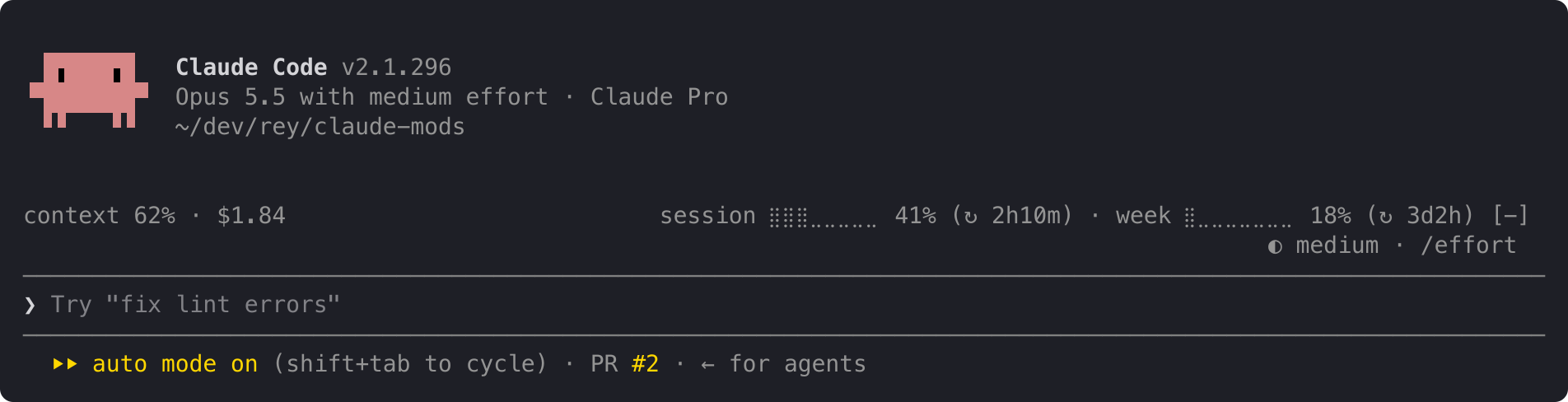
On the left, this conversation:
context: how full the context window is.$: what this session has cost.On the right, your account's limits:
session and week: how much of your 5-hour and weekly limits you've used, and after ↻, how long until each resets: 2h10m, 3d2h, or now once it has reset.A limit's percent turns yellow at 50% and red at 95%; the rest of the line stays grey. An alert with the limit and its percent appears at the top right at 50%, 80% and 95%:
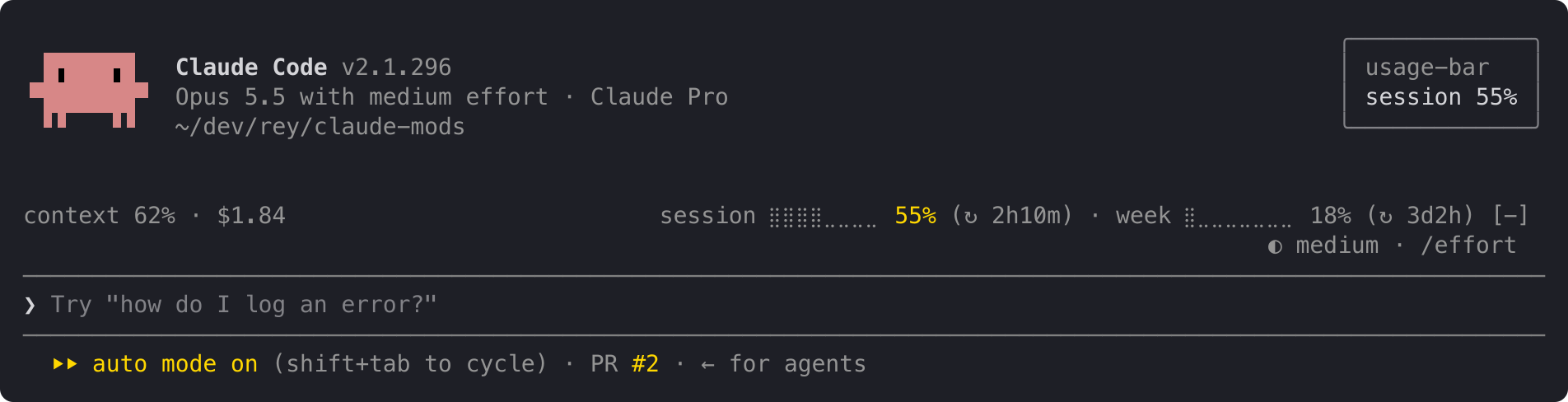
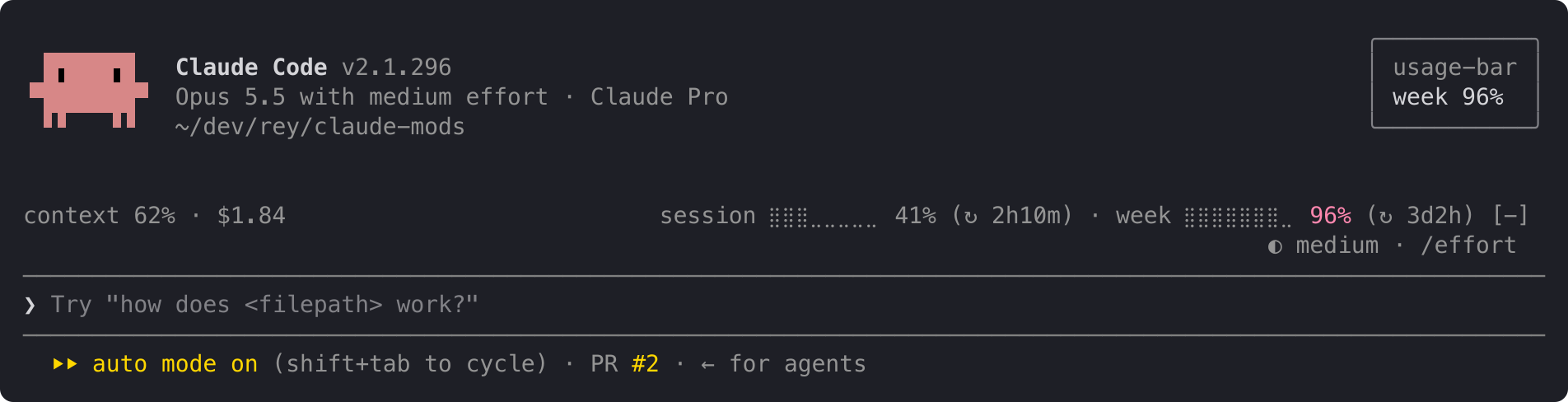
When both limits cross at once, one alert names both: session 62% · week 97%. Each alert shows once per limit period, even across restarts and projects. When a limit resets, its alerts start over.
The line at the top is the full layout. When it doesn't fit, it shortens instead of wrapping, one step at a time:
ctx 62% · $1.84 s ⣿⣿⣿⣀⣀⣀⣀⣀ 41% (↻ 2h10m) · w ⣿⣀⣀⣀⣀⣀⣀⣀ 18% (↻ 3d2h)ctx 62% · $1.84 s 41% (↻ 2h10m) · w 18% (↻ 3d2h)ctx 62% · $1.84 s 41% · w 18%For a few seconds after startup, and for as long as you're not logged in, the line reads:
usage: no data yetThe context shows – until your first reply, because Claude Code measures the context only when it answers.
usage-bar reads only figures Claude Code already has: context fill, session cost and your plan's limits. It sends nothing anywhere and makes no network requests. It stores one small record per limit on your machine, listing the alerts already shown in the current period, so a restart doesn't repeat them.
In Claude Code:
/plugin install usage-bar --marketplace andrej-kolic/claude-modsThe desktop app's Code tab doesn't offer /plugin install: run it once in a terminal, at the user scope, and the line shows in the desktop app's local sessions too.
$, and no alerts.The screenshots use sample readings. The yellow and red follow your Claude Code theme.
The spec has every rule: rounding, colours, widths, and when alerts repeat.
hooks/register.tsx 208 lines1import { atom, read, update } from 'claude-code'
2import type { EngineInterface, Register, Timer } from 'claude-code'
3
4import type { LimitReading, Reading } from '../types'
5
6const reading = atom({ plugin: 'usage-bar', key: 'reading' } as const, null)
7// Bumped each minute so the countdowns redraw while no reading arrives.
8const minute = atom({ plugin: 'usage-bar', key: 'minute' } as const, 0)
9
10const THRESHOLDS = [50, 80, 95]
11
12type Window = { label: string; letter: string }
13
14// The two windows the line shows; any other kind (a gateway's spend_limit) is ignored.
15const WINDOWS: Record<string, Window> = {
16 five_hour: { label: 'session', letter: 's' },
17 seven_day: { label: 'week', letter: 'w' },
18}
19
20// The line's layouts, widest first: the line uses the first whose text fits bodyColumns (see docs/usage-bar.md).
21type Layout = 'full' | 'short-bars' | 'short' | 'tiny'
22const LAYOUTS: Layout[] = ['full', 'short-bars', 'short', 'tiny']
23
24const BAR_CELLS = 8
25
26// A run of the line; a colored one shows a window's percent.
27type Segment = { text: string; color?: 'warning' | 'error' }
28
29// What $.store holds per window kind: the period's resetsAt and the thresholds already toasted in it.
30type Toasted = { resetsAt: string; thresholds: number[] }
31
32// Time left until resetsAt, in whole minutes rounded up: `3d2h`, `2h10m`, `45m`; a zero part is dropped, `4h`.
33// `now` once it has passed: the limit has reset, and the next reading brings the new period's percent.
34function countdown(resetsAt: string, now: number): string {
35 const minutes = Math.max(0, Math.ceil((new Date(resetsAt).getTime() - now) / 60_000))
36 const days = Math.floor(minutes / 1440)
37 const hours = Math.floor((minutes % 1440) / 60)
38
39 const part = (n: number, unit: string) => (n > 0 ? `${n}${unit}` : '')
40
41 return days > 0 ? `${days}d${part(hours, 'h')}` : hours > 0 ? `${hours}h${part(minutes % 60, 'm')}` : minutes > 0 ? `${minutes}m` : 'now'
42}
43
44function bar(percent: number): string {
45 const filled = Math.min(BAR_CELLS, Math.max(0, Math.floor((percent / 100) * BAR_CELLS)))
46
47 // Braille: a full cell against a low baseline looks the same in every terminal and the desktop app, and stays light.
48 return '⣿'.repeat(filled) + '⣀'.repeat(BAR_CELLS - filled)
49}
50
51const levelColor = (percent: number): Segment['color'] =>
52 percent >= 95 ? 'error' : percent >= 50 ? 'warning' : undefined
53
54function windowSegments(limit: LimitReading, layout: Layout, now: number): Segment[] | undefined {
55 const window = WINDOWS[limit.kind]
56 if (!window) return undefined
57
58 const label = layout === 'full' ? window.label : window.letter
59 const percent = `${Math.floor(limit.percentUsed)}%`
60 const barText = layout === 'full' || layout === 'short-bars' ? `${bar(limit.percentUsed)} ` : ''
61 const time = limit.resetsAt && layout !== 'tiny' ? countdown(limit.resetsAt, now) : undefined
62 const resets = time === undefined ? '' : ` (↻ ${time})`
63
64 return [{ text: `${label} ${barText}` }, { text: percent, color: levelColor(limit.percentUsed) }, { text: resets }]
65}
66
67// The line in two groups of items: this conversation's figures on the left, the account's limits on the right.
68// Items are drawn apart with a dot between and a one-column gap either side of it, not a typed ` · `: the
69// desktop app's spaces are narrower than a column.
70type Item = Segment[]
71type Groups = { conversation: Item[]; limits: Item[] }
72const SEPARATOR = 3
73
74// The narrowest gap between the groups.
75const GAP = 2
76
77const groupLength = (items: Item[]) =>
78 items.reduce((n, item) => n + item.reduce((m, s) => m + s.text.length, 0), 0) +
79 Math.max(0, items.length - 1) * SEPARATOR
80
81function lineGroups(r: Reading, columns: number, now: number): Groups {
82 const fits = ({ conversation, limits }: Groups) =>
83 groupLength(conversation) + (limits.length > 0 ? GAP + groupLength(limits) : 0) <= columns
84
85 // The narrowest layout shows even where nothing fits.
86 return LAYOUTS.map(layout => layoutGroups(r, layout, now)).find(fits) ?? layoutGroups(r, 'tiny', now)
87}
88
89function layoutGroups(r: Reading, layout: Layout, now: number): Groups {
90 // A figure the reading lacks is a dash, not a made-up 0: the fill before any response
91 // reports it, the cost where Claude Code keeps no cost record.
92 const ctx = r.contextPercent === undefined ? '–' : `${Math.floor(r.contextPercent)}%`
93 const usd = r.usd === undefined ? '–' : r.usd.toFixed(2)
94 const conversation: Item[] = [[{ text: `${layout === 'full' ? 'context' : 'ctx'} ${ctx}` }], [{ text: `$${usd}` }]]
95
96 const limits: Item[] = []
97 for (const limit of r.rateLimits) {
98 const window = windowSegments(limit, layout, now)
99 if (window) limits.push(window.filter(segment => segment.text !== ''))
100 }
101
102 return { conversation, limits }
103}
104
105// The record to save when the window crossed a threshold not yet toasted this period, else undefined.
106// It marks every crossed threshold, so a lower one never toasts later in this period.
107async function freshRecord($: EngineInterface, limit: LimitReading): Promise<Toasted | undefined> {
108 const period = limit.resetsAt ?? ''
109 const stored = (await $.store.get(`toasted:${limit.kind}`)) as Toasted | undefined
110 const shown = stored?.resetsAt === period ? stored.thresholds : []
111
112 const crossed = THRESHOLDS.filter(t => limit.percentUsed >= t)
113 if (crossed.every(t => shown.includes(t))) return undefined
114
115 return { resetsAt: period, thresholds: crossed }
116}
117
118// Just the windows and numbers, named as in the line's full layout: `week 97%`, or `session 62% · week 97%`.
119const toastText = (limits: { limit: LimitReading; window: Window }[]): string =>
120 limits.map(({ limit, window }) => `${window.label} ${Math.floor(limit.percentUsed)}%`).join(' · ')
121
122export const register: Register = on => {
123 // One timer per module: session.start can fire again without a reload, and a reload drops the old timer itself.
124 let tick: Timer | undefined
125
126 on('session.start', async ($, e, next) => {
127 tick?.cancel()
128 tick = $.clock.every(60_000, () => void update($, minute, n => n + 1))
129
130 return next(e)
131 })
132
133 on('session.measure', async ($, e, next) => {
134 const r: Reading = {
135 contextPercent: e.context.percent,
136 usd: e.cost?.usd,
137 rateLimits: e.rateLimits.map(({ kind, percentUsed, resetsAt }) => ({ kind, percentUsed, resetsAt })),
138 }
139 await update($, reading, () => r)
140
141 // One toast per reading: the desktop app shows one toast per plugin at a time and drops the next.
142 // Toast before saving the records: a failed save repeats a toast later rather than losing it.
143 const crossed: { limit: LimitReading; window: Window; record: Toasted }[] = []
144 for (const limit of r.rateLimits) {
145 const window = WINDOWS[limit.kind]
146 const record = window && (await freshRecord($, limit))
147 if (window && record) crossed.push({ limit, window, record })
148 }
149 if (crossed.length > 0) $.ui.toast(toastText(crossed))
150 for (const { limit, record } of crossed) {
151 await $.store.set(`toasted:${limit.kind}`, record)
152 }
153
154 return next(e)
155 })
156
157 on('ui.render', { component: 'AbovePrompt' }, async ($, e, next) => {
158 if (e.props.hasSurvey) return next(e)
159
160 // No reading until Claude Code's startup quota check, and none at all while not logged in: say so, so the line doesn't look missing.
161 const r = await read($, reading)
162 const { Box, Text } = $.ui.resolve(e)
163
164 if (r === null) {
165 return (
166 <Box>
167 <Text dimColor>usage: no data yet</Text>
168 </Box>
169 )
170 }
171
172 await read($, minute)
173 const { conversation, limits } = lineGroups(r, e.props.bodyColumns, await $.clock.now())
174 // Never wrap: while a desktop window is resized, a frame can draw the layout chosen for the previous width,
175 // and a wrapped piece would make the row jump to two lines. Cut it short instead.
176 const draw = (group: string, items: Item[]) =>
177 items.flatMap((item, i) => [
178 ...(i > 0 ? [<Text dimColor wrap="truncate-end">·</Text>] : []),
179 <Box key={`${group}:${i}`} flexDirection="row">
180 {item.map(({ text, color }) =>
181 color ? (
182 <Text color={color} wrap="truncate-end">
183 {text}
184 </Text>
185 ) : (
186 <Text dimColor wrap="truncate-end">
187 {text}
188 </Text>
189 ),
190 )}
191 </Box>,
192 ])
193
194 return (
195 <Box flexDirection="row" justifyContent="space-between" columnGap={GAP} width="100%">
196 <Box flexDirection="row" columnGap={1}>
197 {draw('conversation', conversation)}
198 </Box>
199 {limits.length > 0 && (
200 <Box flexDirection="row" columnGap={1}>
201 {draw('limits', limits)}
202 </Box>
203 )}
204 </Box>
205 )
206 })
207}
208types/index.d.ts 14 lines1export type LimitReading = { kind: string; percentUsed: number; resetsAt?: string }
2
3export type Reading = {
4 contextPercent?: number
5 usd?: number
6 rateLimits: LimitReading[]
7}
8
9declare module 'claude-code' {
10 interface PluginState {
11 'usage-bar': { reading: Reading | null; minute: number }
12 }
13}
14