paste-view
See what you paste into Claude Code: image thumbnails and long-text previews above the prompt instead of bare [Image #1] and [Pasted text #2] tags
newpanebandtoastprocesstimer

See what you paste into Claude Code: image thumbnails and long-text previews above the prompt instead of bare [Image #1] and [Pasted text #2] tags
A Claude Code mod that shows what you paste, so you see image thumbnails and a preview of long text above your prompt instead of bare [Image #1] and [Pasted text #2 +41 lines] tags.
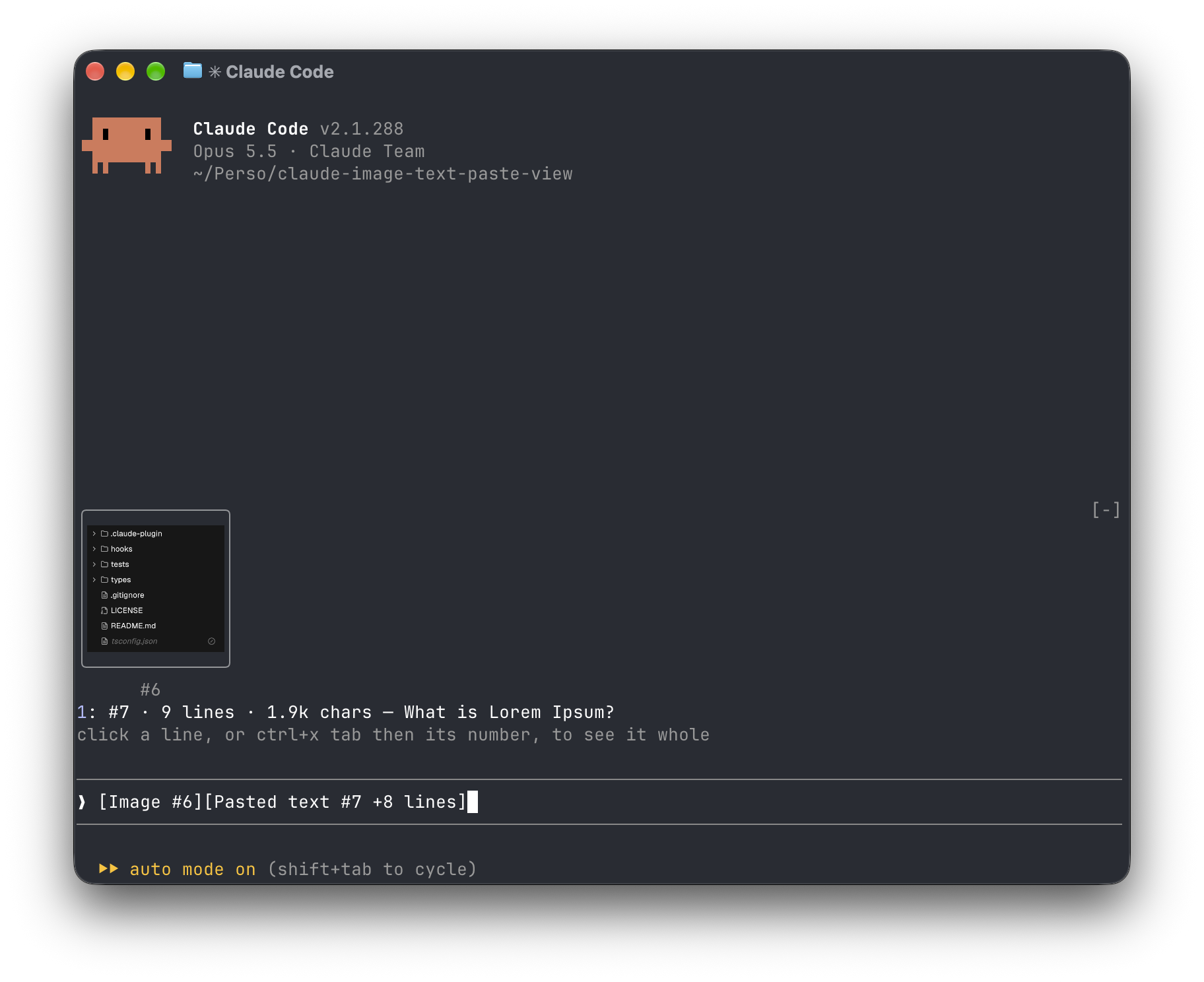
Inside Claude Code, run:
/plugin marketplace add Amorfx/claude-paste-view
/plugin install paste-view
/reload-plugins
claude plugin marketplace add Amorfx/claude-paste-view
claude plugin install paste-view@claude-paste-viewThen run /reload-plugins inside a session, or start a new one.
╭────────────────────────╮
│      (screenshot)      │
│           #1           │
╰────────────────────────╯
1: #2 · 42 lines · 3.1k chars — Traceback (most recent call last):
click a paste, or ctrl+x tab then its number, to read it whole
❯ why does this fail [Image #1] [Pasted text #2 +41 lines]#1 · image 1630×632 — open, that opens it in your system's image viewer. A pasted JPEG, WebP or other non-PNG image is always a line, #1 · image · jpg — open, since the terminal draws only PNG files.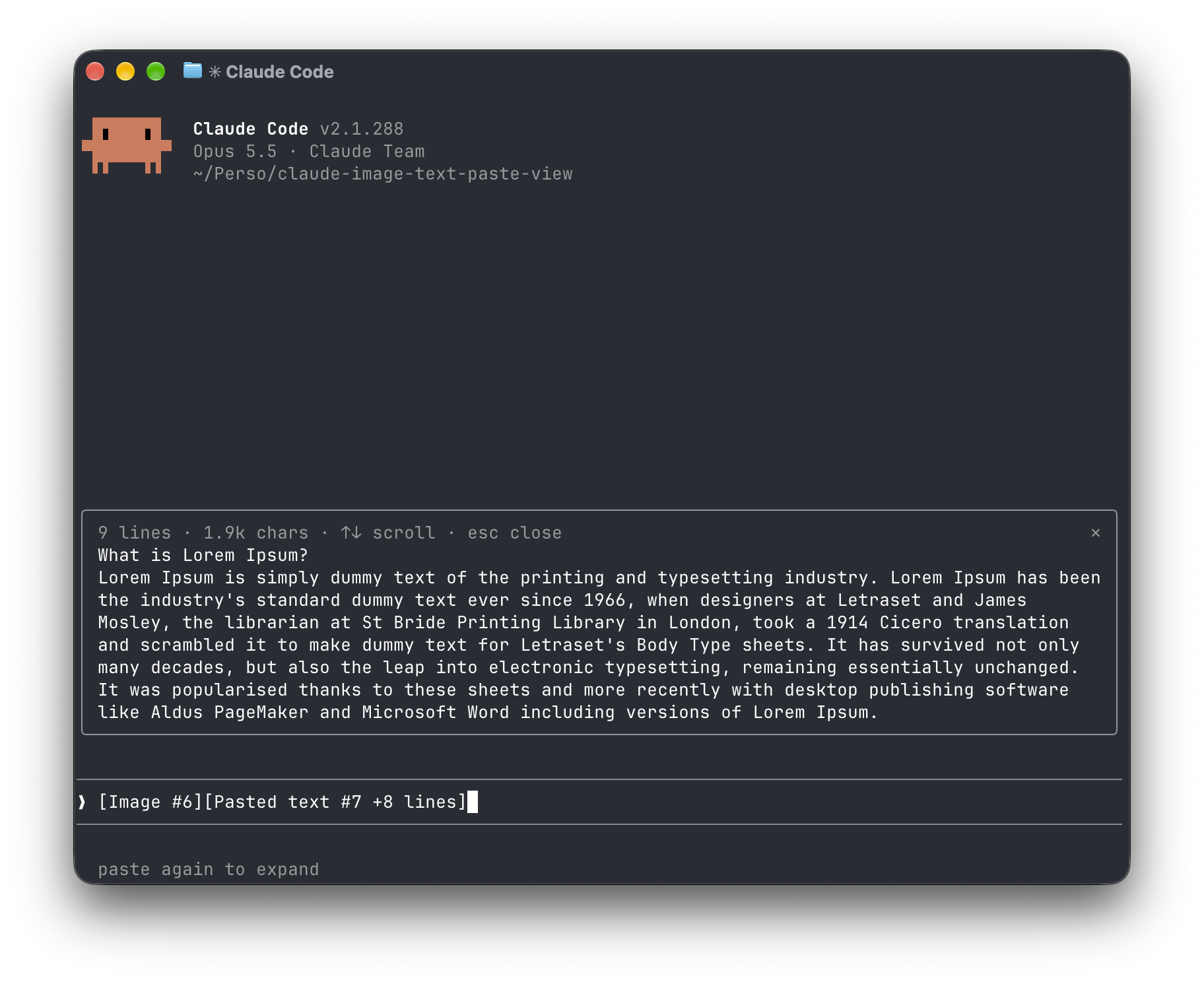
[Image #n] and [Pasted text #n …] tags. It polls because pasting raises no edit event.<tmp>/<project>/<session>/images/<n>.png, or <n>.jpg, <n>.webp, … when it was pasted in another format. The mod finds that file and draws a PNG with Claude Code's Image element.pbpaste on macOS, wl-paste or xclip on Linux). It keeps that text only if its line count matches the count in the tag, and holds it in memory until the tag leaves the prompt.no preview rather than showing the wrong text."env": { "CLAUDE_CODE_FORCE_TERMINAL_IMAGES": "1" } to ~/.claude/settings.json and start a new session.CLAUDE_CODE_FORCE_TERMINAL_IMAGES set, thumbnails draw in iTerm2 (seen with 3.7.3). Set it for iTerm2 only, since a terminal that can't draw pictures would then show neither a thumbnail nor the open line: add [ "$TERM_PROGRAM" = "iTerm.app" ] && export CLAUDE_CODE_FORCE_TERMINAL_IMAGES=1 to your shell profile (~/.zshrc, …), then start a new session.Everything stays on your machine: the mod never touches the network and never writes to disk. It reads the prompt box, lists Claude Code's temp folder to find the session's image cache and the pasted images in it, reads the first bytes of each pasted image, and reads the clipboard once per text paste. It reads TERM, TERM_PROGRAM, KITTY_WINDOW_ID, TMUX, STY, CLAUDE_CODE_SESSION_KIND and CLAUDE_CODE_FORCE_TERMINAL_IMAGES to know whether the terminal draws pictures. It runs id -u once if CLAUDE_CODE_TMPDIR isn't set, the clipboard tool for each text paste, and uname then open or xdg-open when you ask to open an image. Pasted text is kept in memory only, and dropped once its tag leaves the prompt.
Run claude plugin validate .claude-plugin/plugin.json on the repo to see every event it hooks and every call it makes.
wl-clipboard or xclip for text previewsCLAUDE_CODE_FORCE_TERMINAL_IMAGES set (see Limitations). The mod recognises them from TERM, TERM_PROGRAM and KITTY_WINDOW_ID, or trusts CLAUDE_CODE_FORCE_TERMINAL_IMAGES when it is set; in any other terminal, or inside tmux, it lists images as lines that open them with open (macOS) or xdg-open (Linux).git clone https://github.com/Amorfx/claude-paste-view
cd claude-paste-view
# Load it for one session without installing
claude --plugin-dir .
# Check it and run the tests
claude plugin validate .claude-plugin/plugin.json
claude plugin test .Once Claude Code has loaded the mod, it generates the API typings in .claude-plugin/types/ along with a tsconfig.json; after that, tsc -p . type-checks the code.
MIT. See LICENSE.
hooks/register.tsx 296 lines1import { atom, read, update } from 'claude-code'
2import type { EngineInterface, Register } from 'claude-code'
3
4import type { PastedImage, PastedText } from '../types'
5import { charCount, draftTags, firstLine, lineBreaks, matchesTag } from './tags'
6import type { TextTag } from './tags'
7import { drawsImages, pngDimensions, thumbnailBoxes } from './thumbnails'
8import type { Dimensions } from './thumbnails'
9
10const PANE = 'paste-view'
11// A paste raises no prompt.edit, and a collapsed text paste reaches no hook before it is
12// sent: the draft is watched on a timer, and a new text tag is matched against the
13// clipboard the moment it appears.
14const POLL_MS = 200
15
16const images = atom({ plugin: 'paste-view', key: 'images' } as const, [] as PastedImage[])
17const texts = atom({ plugin: 'paste-view', key: 'texts' } as const, [] as PastedText[])
18const viewing = atom({ plugin: 'paste-view', key: 'viewing' } as const, null as number | null)
19
20// Tried in order on first use; the first that runs is kept.
21const CLIPBOARD_COMMANDS: readonly (readonly string[])[] = [
22 ['pbpaste'],
23 ['wl-paste', '--no-newline'],
24 ['xclip', '-selection', 'clipboard', '-o'],
25]
26
27let cwd = ''
28let hasGraphics = false
29let clipboardCommand: readonly string[] | null | undefined
30let viewerCommand: string | undefined
31let imagesDir: { session: string; path: string } | undefined
32const dimensions = new Map<string, Dimensions | null>()
33// Pasted texts by tag number, each read once, when its tag first shows up.
34const pastes = new Map<number, string | null>()
35// What the draft held at the last refresh; undefined forces the next one to redo the work.
36let lastSignature: string | undefined
37// What was last written to state, so a refresh that finds the same pastes doesn't redraw.
38let written: string | undefined
39let isRefreshing = false
40
41async function tmpRoot($: EngineInterface): Promise<string> {
42 const configured = await $.env.get('CLAUDE_CODE_TMPDIR')
43 if (configured !== undefined) return configured
44 const { stdout } = await $.process.run(['id', '-u'])
45 return `/tmp/claude-${stdout.trim()}`
46}
47
48// Claude Code keeps a session's pasted images in <tmp>/<project>/<session>/images/<n>.<ext>,
49// <project> being the working directory with every character but letters and digits
50// turned into '-'. That folder is tried first; the session id alone finds it otherwise.
51async function findImagesDir($: EngineInterface): Promise<string | undefined> {
52 const session = await $.session.id()
53 if (imagesDir?.session === session) return imagesDir.path
54 const root = await tmpRoot($)
55 const projects = await $.fs.list(root).catch(() => [])
56 const candidates = [
57 cwd.replace(/[^a-zA-Z0-9]/g, '-'),
58 ...projects.filter(entry => entry.kind === 'dir').map(entry => entry.name),
59 ]
60 for (const project of candidates) {
61 const path = `${root}/${project}/${session}/images`
62 if (await $.fs.exists(path)) {
63 imagesDir = { session, path }
64 return path
65 }
66 }
67 return undefined
68}
69
70// An image is cached in the format it was pasted in: <n>.png for a screenshot, but
71// <n>.jpg or <n>.webp for others.
72async function findImage($: EngineInterface, dir: string, n: number): Promise<string | undefined> {
73 const png = `${dir}/${n}.png`
74 if (await $.fs.exists(png)) return png
75 const entries = await $.fs.list(dir).catch(() => [])
76 const other = entries.find(entry => entry.kind === 'file' && entry.name.startsWith(`${n}.`))
77 return other === undefined ? undefined : `${dir}/${other.name}`
78}
79
80const isPng = (path: string) => path.endsWith('.png')
81
82async function describeImage($: EngineInterface, dir: string | undefined, n: number): Promise<PastedImage> {
83 const path = dir === undefined ? undefined : await findImage($, dir, n)
84 if (path === undefined) return { n, path: null, size: null }
85 if (!isPng(path)) return { n, path, size: null }
86 if (!dimensions.has(path)) {
87 // A file past the read cap is still drawn, in a default shape.
88 const head = await $.fs.read(path, { as: 'bytes' }).catch(() => undefined)
89 dimensions.set(path, head === undefined ? null : pngDimensions(head.base64))
90 }
91 return { n, path, size: dimensions.get(path) ?? null }
92}
93
94async function readClipboard($: EngineInterface): Promise<string | null> {
95 if (clipboardCommand === null) return null
96 for (const argv of clipboardCommand === undefined ? CLIPBOARD_COMMANDS : [clipboardCommand]) {
97 // pbpaste decodes by the locale, which a bare child process may lack.
98 const ran = await $.process.run(argv, { env: { LANG: 'en_US.UTF-8' }, timeoutMs: 1000 }).catch(() => undefined)
99 if (ran?.exitCode === 0 && !ran.isStdoutTruncated) {
100 clipboardCommand = argv
101 return ran.stdout
102 }
103 }
104 clipboardCommand ??= null
105 return null
106}
107
108async function capturePastes($: EngineInterface, tags: readonly TextTag[]) {
109 for (const n of pastes.keys()) if (!tags.some(tag => tag.n === n)) pastes.delete(n)
110 const fresh = tags.filter(tag => !pastes.has(tag.n))
111 if (fresh.length === 0) return
112 // One clipboard can only stand for one paste: tags arriving together (a draft brought
113 // back from history) are left without a preview rather than guessed.
114 const clipboard = fresh.length === 1 ? await readClipboard($) : null
115 for (const tag of fresh) pastes.set(tag.n, clipboard !== null && matchesTag(clipboard, tag.lines) ? clipboard : null)
116}
117
118async function refresh($: EngineInterface, draft: string) {
119 const tags = draftTags(draft)
120 await capturePastes($, tags.texts)
121
122 const signature = JSON.stringify([tags.images, tags.texts.map(tag => tag.n)])
123 if (signature === lastSignature) return
124
125 const dir = tags.images.length > 0 ? await findImagesDir($) : undefined
126 const imageList = await Promise.all(tags.images.map(n => describeImage($, dir, n)))
127 // An image whose file hasn't landed yet is looked for again on the next poll.
128 lastSignature = imageList.some(image => image.path === null) ? undefined : signature
129
130 const textList = tags.texts.map(tag => ({ ...tag, text: pastes.get(tag.n) ?? null }))
131 // Each write redraws the band: an image still missing must not redraw it on every poll.
132 const json = JSON.stringify([imageList, textList])
133 if (json !== written) {
134 await update($, images, () => imageList)
135 await update($, texts, () => textList)
136 written = json
137 }
138
139 const shown = await read($, viewing)
140 if (shown !== null && !tags.texts.some(tag => tag.n === shown)) await closePane($)
141}
142
143async function poll($: EngineInterface) {
144 if (isRefreshing) return
145 isRefreshing = true
146 try {
147 await refresh($, (await $.prompt.read()).text)
148 } finally {
149 isRefreshing = false
150 }
151}
152
153// Without pictures in the terminal, an image opens in the system's own viewer.
154async function openImage($: EngineInterface, path: string) {
155 viewerCommand ??= (await $.process.run(['uname'])).stdout.trim() === 'Darwin' ? 'open' : 'xdg-open'
156 const ran = await $.process.run([viewerCommand, path], { timeoutMs: 5000 }).catch(() => undefined)
157 if (ran?.exitCode !== 0) $.ui.toast(`paste-view: couldn't open the image with ${viewerCommand}`)
158}
159
160async function openPane($: EngineInterface, paste: PastedText) {
161 await update($, viewing, () => paste.n)
162 await $.ui.open({ id: PANE, title: `Pasted text #${paste.n}`, focus: true, closeOnEscape: true })
163}
164
165async function closePane($: EngineInterface) {
166 await update($, viewing, () => null)
167 if ((await $.ui.panes()).some(pane => pane.id === PANE)) await $.ui.close({ id: PANE })
168}
169
170/** Lines a paste spans on screen, a trailing newline not counted. */
171const shownLines = (paste: PastedText) =>
172 paste.text === null ? (paste.lines ?? 0) + 1 : lineBreaks(paste.text.trimEnd()) + 1
173
174const imageLabel = (image: PastedImage, path: string) => {
175 if (image.size !== null) return `#${image.n} · image ${image.size.width}×${image.size.height}`
176 return isPng(path) ? `#${image.n} · image` : `#${image.n} · image · ${path.slice(path.lastIndexOf('.') + 1)}`
177}
178
179export const register: Register = on => {
180 on('session.start', async ($, e, next) => {
181 cwd = e.cwd
182 hasGraphics = drawsImages({
183 term: await $.env.get('TERM'),
184 termProgram: await $.env.get('TERM_PROGRAM'),
185 kittyWindowId: await $.env.get('KITTY_WINDOW_ID'),
186 forceImages: await $.env.get('CLAUDE_CODE_FORCE_TERMINAL_IMAGES'),
187 sessionKind: await $.env.get('CLAUDE_CODE_SESSION_KIND'),
188 multiplexer: (await $.env.get('TMUX')) ?? (await $.env.get('STY')),
189 })
190 // A reload keeps the state: the texts already read stay matched to their tags.
191 for (const paste of await read($, texts)) pastes.set(paste.n, paste.text)
192 $.clock.every(POLL_MS, () => poll($))
193 return next(e)
194 })
195
196 on('ui.close', { id: PANE }, async ($, e, next) => {
197 await update($, viewing, () => null)
198 return next(e)
199 })
200
201 on('ui.render', { component: 'AbovePrompt' }, async ($, e, next) => {
202 if (e.surface !== 'terminal' || e.props.hasSurvey) return next(e)
203 const imageList = await read($, images)
204 const textList = await read($, texts)
205 if (imageList.length === 0 && textList.length === 0) return next(e)
206
207 const { Box, Button, Image, Text } = $.ui.resolve(e)
208 const width = e.props.bodyColumns
209 // The Image element draws a PNG file only: any other format is a line that opens it.
210 const pictures = hasGraphics ? imageList.filter(image => image.path !== null && isPng(image.path)) : []
211 const imageLines = imageList.filter(image => !pictures.includes(image))
212 const openable = imageLines.filter(image => image.path !== null)
213 // One row per line below the thumbnails, plus the hint; the thumbnails get the rest.
214 const lineRows = imageLines.length + textList.length + 1
215 const boxes = thumbnailBoxes(pictures.map(image => image.size), e.props.maxRows - lineRows, width)
216 // Number keys run down the lines that open something, images first.
217 const hotkey = (i: number) => (i >= 0 && i < 9 ? { hotkey: String(i + 1) } : {})
218 const below = await next(e)
219
220 return (
221 <Box flexDirection="column">
222 {pictures.length > 0 && (
223 <Box flexDirection="row" columnGap={1} alignItems="flex-end">
224 {pictures.map((image, i) => (
225 <Box flexDirection="column" alignItems="center">
226 <Box borderStyle="round" borderDimColor>
227 <Image
228 key={`picture-${image.n}`}
229 source={{ file: image.path ?? '', format: 'png' }}
230 columns={boxes[i]?.columns ?? 4}
231 rows={boxes[i]?.rows ?? 1}
232 alt={`[Image #${image.n}]`}
233 />
234 </Box>
235 <Text dimColor>#{image.n}</Text>
236 </Box>
237 ))}
238 </Box>
239 )}
240 {imageLines.map(image => {
241 const path = image.path
242 if (path === null) {
243 return <Text dimColor wrap="truncate">{`#${image.n} · image · no preview`}</Text>
244 }
245 return (
246 <Button
247 key={`image-${image.n}`}
248 plain
249 {...hotkey(openable.indexOf(image))}
250 label={`${imageLabel(image, path)} — open`}
251 onPress={() => openImage($, path)}
252 />
253 )
254 })}
255 {textList.map((paste, i) => {
256 const head = `#${paste.n} · ${shownLines(paste)} lines`
257 if (paste.text === null) {
258 return <Text dimColor wrap="truncate">{`${head} · no preview (clipboard changed)`}</Text>
259 }
260 const label = `${head} · ${charCount(paste.text.length)} — `
261 // The hotkey prefix (`1: `) takes three cells.
262 return (
263 <Button
264 key={`text-${paste.n}`}
265 plain
266 {...hotkey(openable.length + i)}
267 label={`${label}${firstLine(paste.text, width - label.length - 3)}`}
268 onPress={() => openPane($, paste)}
269 />
270 )
271 })}
272 {(openable.length > 0 || textList.some(paste => paste.text !== null)) && (
273 <Text dimColor wrap="truncate">click a line, or ctrl+x tab then its number, to see it whole</Text>
274 )}
275 {below}
276 </Box>
277 )
278 })
279
280 on('ui.render', { component: 'Pane', requestId: PANE }, async ($, e) => {
281 const { Box, Text } = $.ui.resolve(e)
282 const shown = await read($, viewing)
283 const paste = (await read($, texts)).find(one => one.n === shown)
284 if (paste?.text == null) return <Text dimColor>This paste is no longer in the prompt.</Text>
285
286 return (
287 <Box flexDirection="column">
288 <Text dimColor wrap="truncate">
289 {`${shownLines(paste)} lines · ${charCount(paste.text.length)} · ↑↓ scroll · esc close`}
290 </Text>
291 <Text>{paste.text}</Text>
292 </Box>
293 )
294 })
295}
296hooks/tags.ts 48 lines1export type TextTag = { n: number; lines: number | null }
2export type DraftTags = { images: number[]; texts: TextTag[] }
3
4// `[Image #3]`, `[Pasted text #2 +9 lines]`, or `[Pasted text #2]` for one long line.
5const TAG = /\[(?:Image #(\d+)|Pasted text #(\d+)(?: \+(\d+) lines?)?)\]/g
6
7/** The image and pasted-text tags a draft holds, each once, in the order they first appear. */
8export function draftTags(draft: string): DraftTags {
9 const images: number[] = []
10 const texts: TextTag[] = []
11 for (const [, image, text, lines] of draft.matchAll(TAG)) {
12 if (image !== undefined && !images.includes(Number(image))) images.push(Number(image))
13 if (text !== undefined && !texts.some(tag => tag.n === Number(text))) {
14 texts.push({ n: Number(text), lines: lines === undefined ? null : Number(lines) })
15 }
16 }
17 return { images, texts }
18}
19
20/** Line breaks in a text, counted the way Claude Code counts them for a paste's tag. */
21export function lineBreaks(text: string): number {
22 return text.match(/\r\n|\r|\n/g)?.length ?? 0
23}
24
25/**
26 * Whether a clipboard text is the paste a tag stands for: same line count as the tag
27 * announces, allowing for a trailing newline the terminal may have dropped.
28 */
29export function matchesTag(text: string, lines: number | null): boolean {
30 if (text.trim() === '') return false
31 const expected = lines ?? 0
32 return lineBreaks(text) === expected || lineBreaks(text.trimEnd()) === expected
33}
34
35/** The first non-blank line, whitespace collapsed, cut to `width` with an ellipsis. */
36export function firstLine(text: string, width: number): string {
37 const line = text.split(/\r\n|\r|\n/).find(l => l.trim() !== '')?.replace(/\s+/g, ' ').trim() ?? ''
38 if (width < 1) return ''
39 return line.length <= width ? line : `${line.slice(0, Math.max(0, width - 1))}…`
40}
41
42/** A short character count: `840 chars`, `2.3k chars`, `1.2M chars`. */
43export function charCount(length: number): string {
44 if (length < 1000) return `${length} chars`
45 if (length < 1_000_000) return `${(length / 1000).toFixed(1).replace(/\.0$/, '')}k chars`
46 return `${(length / 1_000_000).toFixed(1).replace(/\.0$/, '')}M chars`
47}
48hooks/thumbnails.ts 93 lines1export type Dimensions = { width: number; height: number }
2export type Box = { columns: number; rows: number }
3
4// A thumbnail is at most this many rows tall and columns wide, and never narrower than MIN.
5const MAX_ROWS = 6
6const MAX_COLUMNS = 32
7const MIN_COLUMNS = 4
8// Terminal cells are roughly twice as tall as they are wide.
9const CELL_RATIO = 2
10// Each thumbnail's frame takes a cell on each side, a border row above and below, plus
11// its label row; neighbours sit one column apart.
12const FRAME_COLUMNS = 2
13const FRAME_ROWS = 3
14const GAP = 1
15// The shape assumed when an image's size is unknown.
16const UNKNOWN: Dimensions = { width: 3, height: 2 }
17
18const PNG_MAGIC = [0x89, 0x50, 0x4e, 0x47]
19const IHDR = [0x49, 0x48, 0x44, 0x52]
20
21/**
22 * Width and height from the start of a PNG file (base64), read from its IHDR chunk;
23 * null when the bytes aren't a PNG.
24 */
25export function pngDimensions(base64: string): Dimensions | null {
26 // Bytes 0-7 are the signature, 12-15 the IHDR tag, 16-23 width and height (big-endian).
27 const raw = atob(base64.slice(0, 32))
28 if (raw.length < 24) return null
29 const byte = (i: number) => raw.charCodeAt(i)
30 if (PNG_MAGIC.some((b, i) => byte(i) !== b) || IHDR.some((b, i) => byte(12 + i) !== b)) return null
31 const uint32 = (at: number) => ((byte(at) << 24) | (byte(at + 1) << 16) | (byte(at + 2) << 8) | byte(at + 3)) >>> 0
32 const width = uint32(16)
33 const height = uint32(20)
34 return width > 0 && height > 0 ? { width, height } : null
35}
36
37function boxAt(rows: number, size: Dimensions | null): Box {
38 const { width, height } = size ?? UNKNOWN
39 const columns = Math.round((rows * CELL_RATIO * width) / height)
40 if (columns <= MAX_COLUMNS) return { columns: Math.max(MIN_COLUMNS, columns), rows }
41 // Too wide: keep the column cap and give back the rows the picture no longer needs.
42 return { columns: MAX_COLUMNS, rows: Math.max(1, Math.round((MAX_COLUMNS * height) / (CELL_RATIO * width))) }
43}
44
45const rowWidth = (boxes: readonly Box[]) =>
46 boxes.reduce((sum, box) => sum + box.columns + FRAME_COLUMNS, 0) + GAP * Math.max(0, boxes.length - 1)
47
48/**
49 * Picture boxes for a single row of thumbnails, each keeping its image's proportions,
50 * as tall as `maxRows` allows and scaled down until the row fits in `columns`.
51 */
52export function thumbnailBoxes(sizes: readonly (Dimensions | null)[], maxRows: number, columns: number): Box[] {
53 let rows = Math.min(MAX_ROWS, Math.max(1, maxRows - FRAME_ROWS))
54 let boxes = sizes.map(size => boxAt(rows, size))
55 while (rows > 1 && rowWidth(boxes) > columns) {
56 // Jump straight to the height the overflow suggests, then settle by single rows.
57 const scaled = Math.floor((rows * columns) / rowWidth(boxes))
58 rows = Math.max(1, Math.min(rows - 1, scaled))
59 boxes = sizes.map(size => boxAt(rows, size))
60 }
61 return boxes
62}
63
64export type TerminalEnv = {
65 term?: string
66 termProgram?: string
67 kittyWindowId?: string
68 /** CLAUDE_CODE_FORCE_TERMINAL_IMAGES */
69 forceImages?: string
70 /** CLAUDE_CODE_SESSION_KIND */
71 sessionKind?: string
72 /** TMUX or STY, set inside tmux or screen */
73 multiplexer?: string
74}
75
76/**
77 * Whether the terminal draws Claude Code's `Image` element, which needs the kitty
78 * graphics protocol (kitty, Ghostty); elsewhere it only draws the `alt` text. Claude Code
79 * itself turns pictures off in background sessions and inside tmux or screen, unless
80 * CLAUDE_CODE_FORCE_TERMINAL_IMAGES is set.
81 */
82export function drawsImages(env: TerminalEnv): boolean {
83 if (env.forceImages) return true
84 if (env.sessionKind === 'bg' || env.multiplexer) return false
85 const term = env.term?.toLowerCase() ?? ''
86 return (
87 env.kittyWindowId !== undefined ||
88 env.termProgram?.toLowerCase() === 'ghostty' ||
89 term.includes('kitty') ||
90 term.includes('ghostty')
91 )
92}
93types/index.d.ts 27 lines1export type PastedImage = {
2 n: number
3 /** Where Claude Code cached the image; null until its file is found. */
4 path: string | null
5 /** Its size in pixels, from the PNG header; null when that couldn't be read. */
6 size: { width: number; height: number } | null
7}
8
9export type PastedText = {
10 n: number
11 /** The line count the tag announces (`+9 lines`); null when the tag gives none. */
12 lines: number | null
13 /** The pasted text, read from the clipboard; null when it couldn't be confirmed. */
14 text: string | null
15}
16
17declare module 'claude-code' {
18 interface PluginState {
19 'paste-view': {
20 images: PastedImage[]
21 texts: PastedText[]
22 /** The pasted text shown in the pane, by tag number; null while it is closed. */
23 viewing: number | null
24 }
25 }
26}
27